cruise control AUDI TT ROADSTER 2018 Owners Manual
[x] Cancel search | Manufacturer: AUDI, Model Year: 2018, Model line: TT ROADSTER, Model: AUDI TT ROADSTER 2018Pages: 310, PDF Size: 46.95 MB
Page 9 of 310
Cl 00 .-< N r-N .-< 0 r-Vl 00
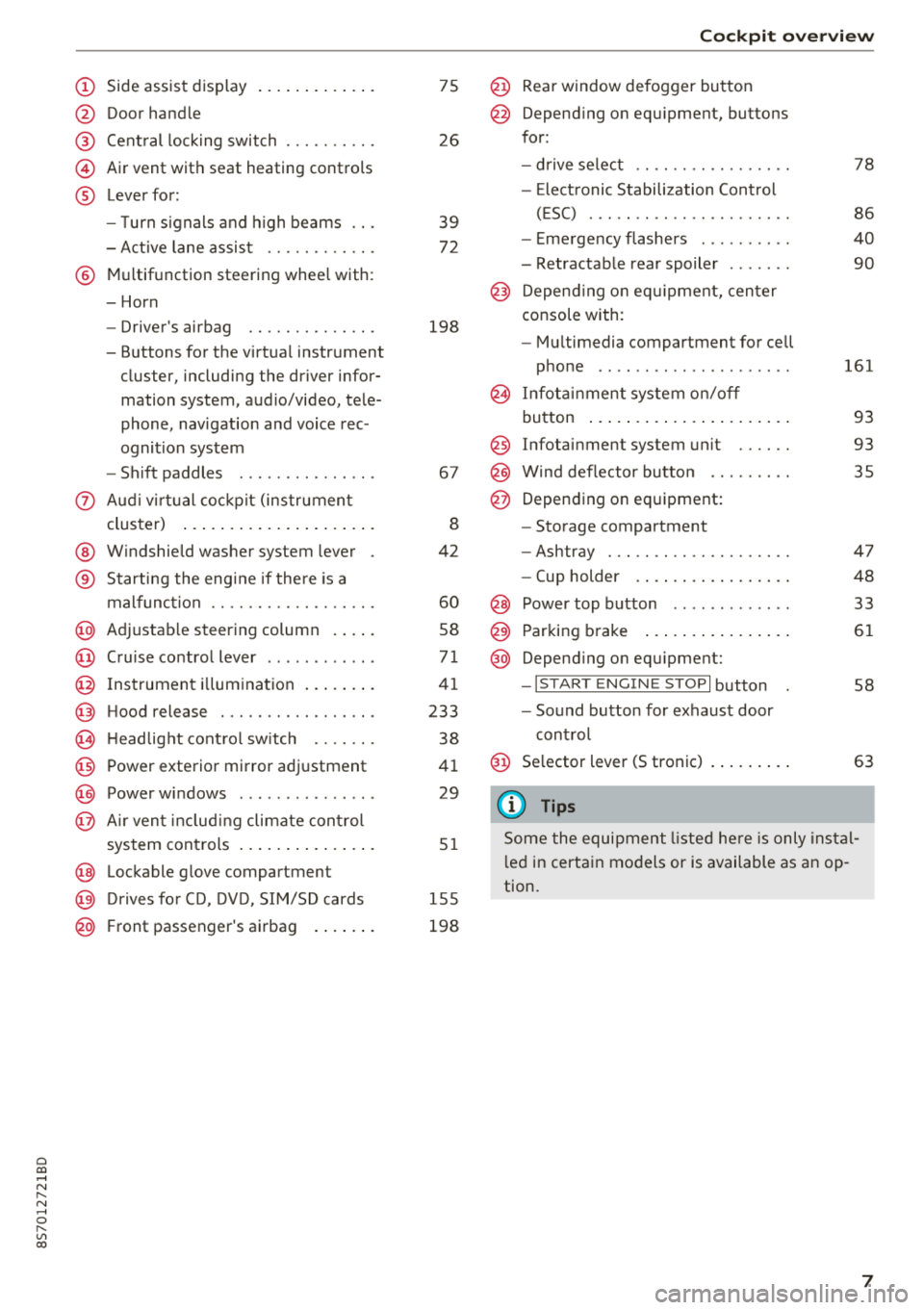
(D Side assist disp lay ..... ... .. .. .
@ Door handle
@ Cent ral locking swit ch ..... .. .. .
@ Air vent with seat heating controls
® Lever for:
- T urn s ignals and high beams
- Act ive lane assist ....... .. .. .
® M ultifunction steering whee l with :
- Horn
- Driver's airbag ........... .. .
- Buttons for the virtua l instr ument
cluster, including the dr iver infor
mation system, audio/video, tele
phone, navigation and voice rec
ognit ion system
- Shift paddles ............. . .
(J) A ud i v irtu al coc kp it (instrument
cluster) ... ... .. ..... ... .. .. .
@ W indshield washer system lever
® Starting the eng ine if the re is a
malfunc tion ............... .. .
@ Ad justable steer ing column . ... .
@ Cruise contro l lever .......... . .
@ Ins trumen t il lum ination ... .. .. .
@ Hood release .............. .. .
€3) H eadlight cont ro l sw itch .... .. .
@ Power exterio r mirror adj ustment
@) Power windows .............. .
@ A ir ven t incl uding climate con trol
system controls .. ..... ... .. .. .
@ Lockable g love compartment
@) D rives fo r CD, DV D, SIM/SD cards
@ Front passenger's ai rbag . ... .. .
75
26
39
7 2
198
67
8
42
60
58
71
41
233
38
4 1
29
5 1
1 55
198
Coc kpit o ver view
@ Rear window defogger button
@ Depend ing on equ ipment, buttons
for:
- drive select .. .............. .
- Elect ronic Stabili zation Cont rol
( E SC) . .. .. .. .............. .
- E me rge ncy flashers ......... .
- Retractable rear spoiler ...... .
@ Depending o n eq uipment, cen ter
console with:
- Mu ltimedia compartment for cell
p hone .. .. .. .. ............ .
@ In fota inment system o n/off
bu tton ... .... .. ... .. ..... .. .
@ Infotai nment system unit ..... .
@ Wind deflector butto n ........ .
@ Depending on eq uipment:
- Storage compartment
- Ashtray . .. .. .............. .
- Cup holder .... ... .. ..... .. .
@ Power top b utton ............ .
@ Parking b rake ... ... .. ..... .. .
@ Depend ing on eq uipment:
-I S TAR T ENGI NE STOP I button
- So und button for exhaust door
cont rol
@ Se lector lever (S tronic)
(D Tips
78
86
40
90
161
93
93 35
47
48
33
61
58
63
Some the equi pment listed he re is only ins tal
l e d in certa in models or is available as an op
tion.
7
Page 12 of 310
Instruments and indicator lights
10
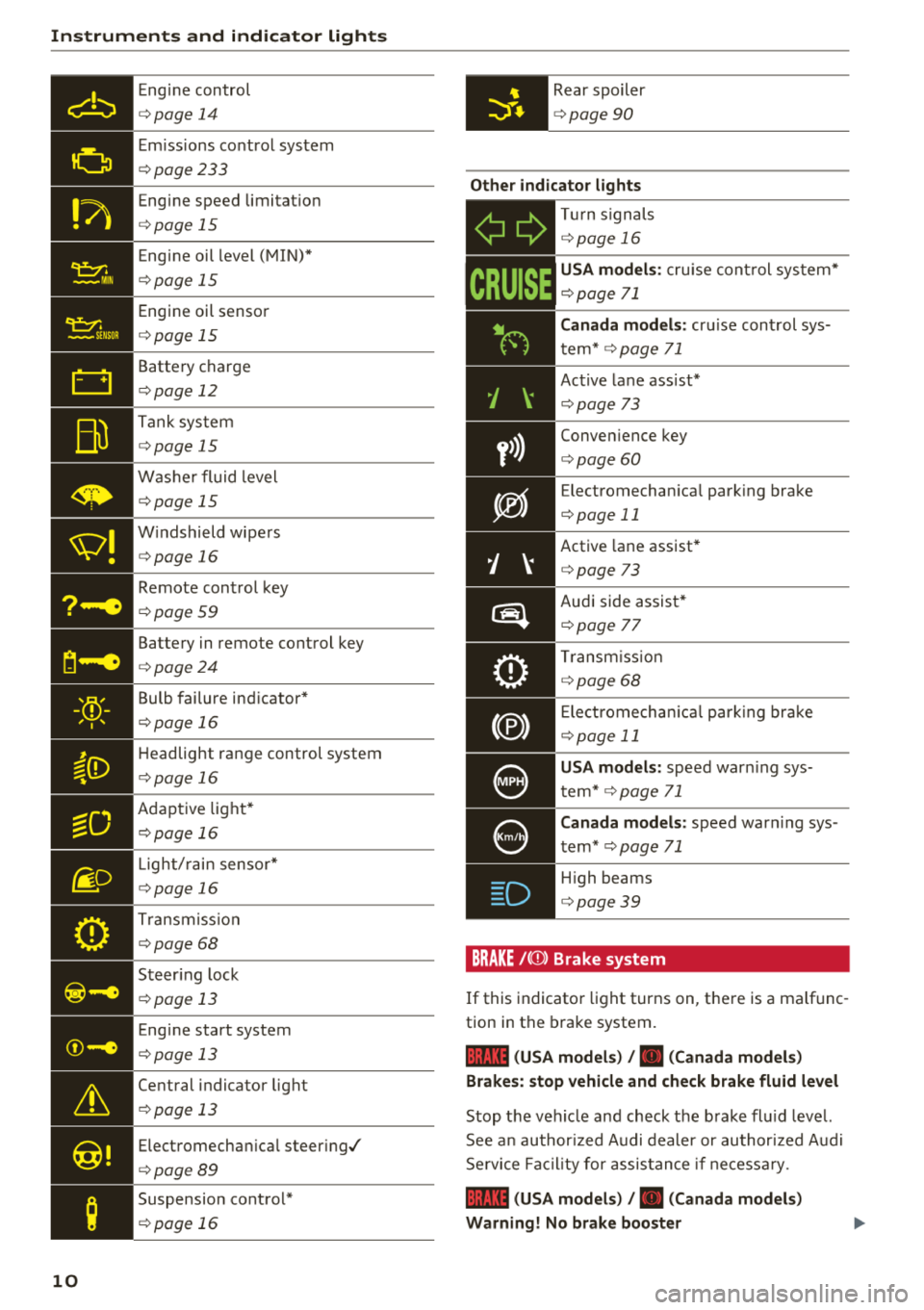
Eng ine con trol
¢ page 14
Em iss ions co ntrol system
¢ page233
Eng ine speed limitat io n
¢ page 15
Eng ine oil level ( MIN) *
¢page 15
Engi ne oil senso r
¢page 15
Batte ry charge
¢ page 12
Tank sys tem
¢page 15
W ash er fluid level
¢page 15
W indshield wipe rs
¢ page 16
Remote con trol key
¢ page 59
Batte ry in remote control key
¢ page 24
Bulb failure ind icator*
¢page 1 6
H eadlight range control system
¢ pag e 16
Adaptive lig ht*
¢ page 16
Light/ rain sensor *
¢page 16
Trans miss io n
¢page 68
S teer ing lock
¢ page 13
Eng ine start system
¢ page 13
Ce ntral indicator light
¢ page 13
Elect romecha nica l steer ing/
¢ page8 9
Suspension cont rol*
¢ page 16
Rear spoiler
¢page 90
Other indicator lights
-Ii
ii T
ur n sign als
¢ page 16
CRUISE
USA models : cru ise co ntrol system*
¢ page 71
Canada models: cr uise con trol sys
t em*
¢ page 71
- Ac
tive lane ass ist*
¢ page 73
Conve nience key
¢ page 60
Electromechan ica l park ing bra ke
¢page 11
Active lane assist *
¢page 73
Audi side assist *
r=;, page 7 7
Tra nsm iss io n
c:::> page 68
Ele ct romecha nical par king brak e
¢page 11
USA models: speed war ning sys
t em *
¢page 71
Canada models: speed war ning sys
t em *
¢page 71
- H
igh beams
. ¢ page 39
BRAKE/{©) Brake system
If this indicato r light turns on, t here is a malf unc
tion in the brake system.
1111 (USA models) / . (Canada models)
Brakes : stop vehicle and check brake fluid level
Stop t he veh icle and check t he b rake fl uid leve l.
See a n au thor ized Audi de aler or au thor ized A udi
Se rvi ce Faci lity for assis tan ce if n ecess ary.
1111 (USA models) / . (Canada models)
Warning! No brake booster
Page 69 of 310
Cl co .... N ,....
N ...... 0 ,....
Vl co
Hill descent control
The hill descent control system assists the driver
when driving down hills .
Hill descent control is activated when the selec
tor lever is in the "D" or "S" position and you press the brake pedal. The transm iss ion auto
mat ically selects a gear that is suitable for the
h ill. Hill descent con trol tries to maintain the
speed ach ieved at the t ime of b raking, w ith in
phys ica l and technical limi tatio ns. If may still be
necessa ry to adjust the speed with the brakes .
Because hill descent contro l cannot sh ift down
farther than 3rd gear, it may be necessary to
shift into tiptronic mode in very steep areas. In
this case, shift manually into 1st or 2nd gear in
tiptron ic mode to use the engine 's braking force
to relieve the brakes .
Hill descent control switches off once the hill lev
els out or you press the accelerator pedal.
On vehicles with a cruise contro l system*
¢ page 71, hill descent control is also activated
when the speed is set .
A WARNING
Hill descent control cannot overcome physical
limitations , so it may not be able to maintain
a constant speed under all condit ions . Always
be ready to apply the brakes .
Shifting manually (tiptronic mode)
The tiptronic mode allows the driver to shift the
gears manually .
Fig. 73 Center co nso le: s hift ing ma nually w it h the selector
l ever
D rivi ng
Fig. 74 Steer ing w hee l: sh ifting manually w it h the sh ift
padd les•
Shifting with the s elector le ver
"' 0 6
~
"'
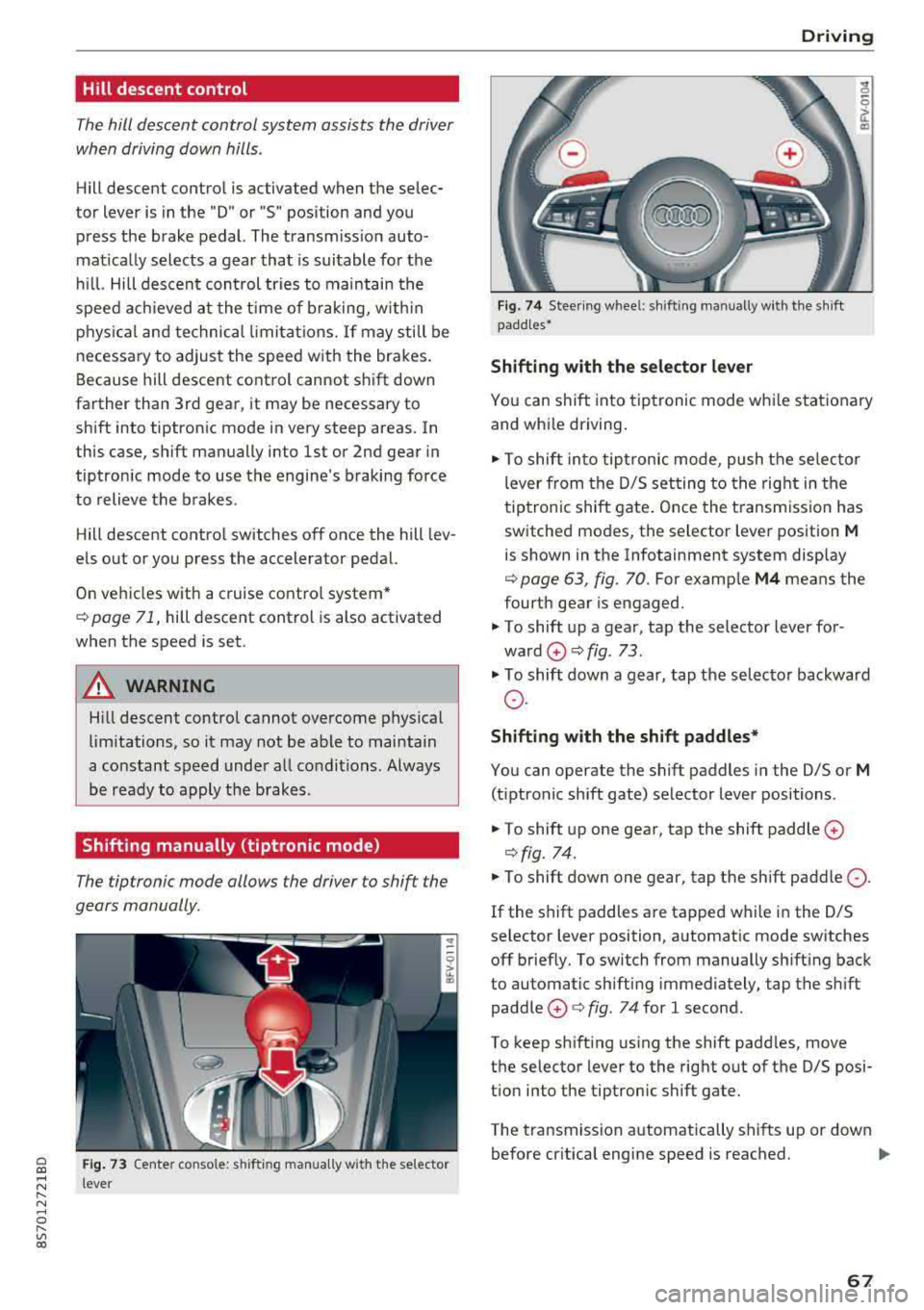
Yo u can shift into tiptronic mode whi le stat ionary
and whi le driving.
.,. To shift into tip tronic mode, push the selec to r
lever from the D/S setting to the right in the
tiptronic shift gate . Once the t ransmiss ion has
switched modes, the selector lever position
M
is shown in the Infotainment system disp lay
¢ page 63, fig. 70. For examp le M4 means the
fourth gear is engaged.
.,. T o shift up a gear, tap the selector lever for
ward
0 ¢ fig. 73 .
.,. To shift down a gear, tap the selecto r backward
o.
Shift ing with the shift paddle s*
You can operate the shift paddles in the D/S or
M
(t iptronic shift gate) selector lever positions .
.,. To shift up one gear, tap the shift paddle 0
¢fig. 74 .
.,. To shift down one gear, tap the shift paddle 0 -
If the shift paddles are tapped w hile in the D/S
selector lever position, automatic mode switches off brief ly. To switch from manually sh ifting back
to automatic sh ifting immediately, tap the shift
paddle
0 ¢ fig . 74 for 1 second.
To keep sh ifting using the shift padd les, move
the selector lever to the rig ht out of the D/S posi
t ion into the tiptronic shift gate.
The transmission automatically shifts up or down before cr itical engine speed is reached.
..,.
67
Page 73 of 310
Cl co .... N ,....
N ...... 0 ,....
Vl co
Assistance systems Speed warning system
Description
App lies to: vehicles with speed warning system
The speed warning system helps you to stay be
low a specified maximum speed that can be set,
changed or deleted in the Infotainment system .
The speed warning system warns you if you are
exceeding the maximum speed that you have set .
A warning tone will sound as soon as your speed
exceeds the stored value slightly. The
(Ol (USA
models)/
(01 (Canada models) indicato r light
and a message appear i n the ins trumen t cluster
d isplay at the same time. The
(Sl (USA models)/
(O] (Canada models) indicator light and the mes
sage turn off when the ve hicle speed drops below
the stored maximum speed.
Sett ing a threshold is recommended if you would
like to be reminded when you reach a certain
maximum speed . Situations where you may want
to do so include driving in a country with a gener
al speed limit or if there is a specified maximum
speed for winter tires.
Setting the warning thr eshold
.. Se lect in the Infotainment system: ! MENUI b ut
ton
> Vehicle > left contro l button > Driver a s
s istan ce
> S peed warning > Manual.
@ Tips
Regard less of the speed warning system, you
should always monitor your speed using the
speedometer and make sure you are following
the legal speed limit.
A ssi st a nce systems
Cruise control system
Switching on
Applies to: vehicles with cruise control system
The cruise control system makes it possible to
drive at a constant speed starting at 15 mph
(20 km/h).
0
f
~
0
Fig . 7 7 Operat ing leve r: cru ise control system
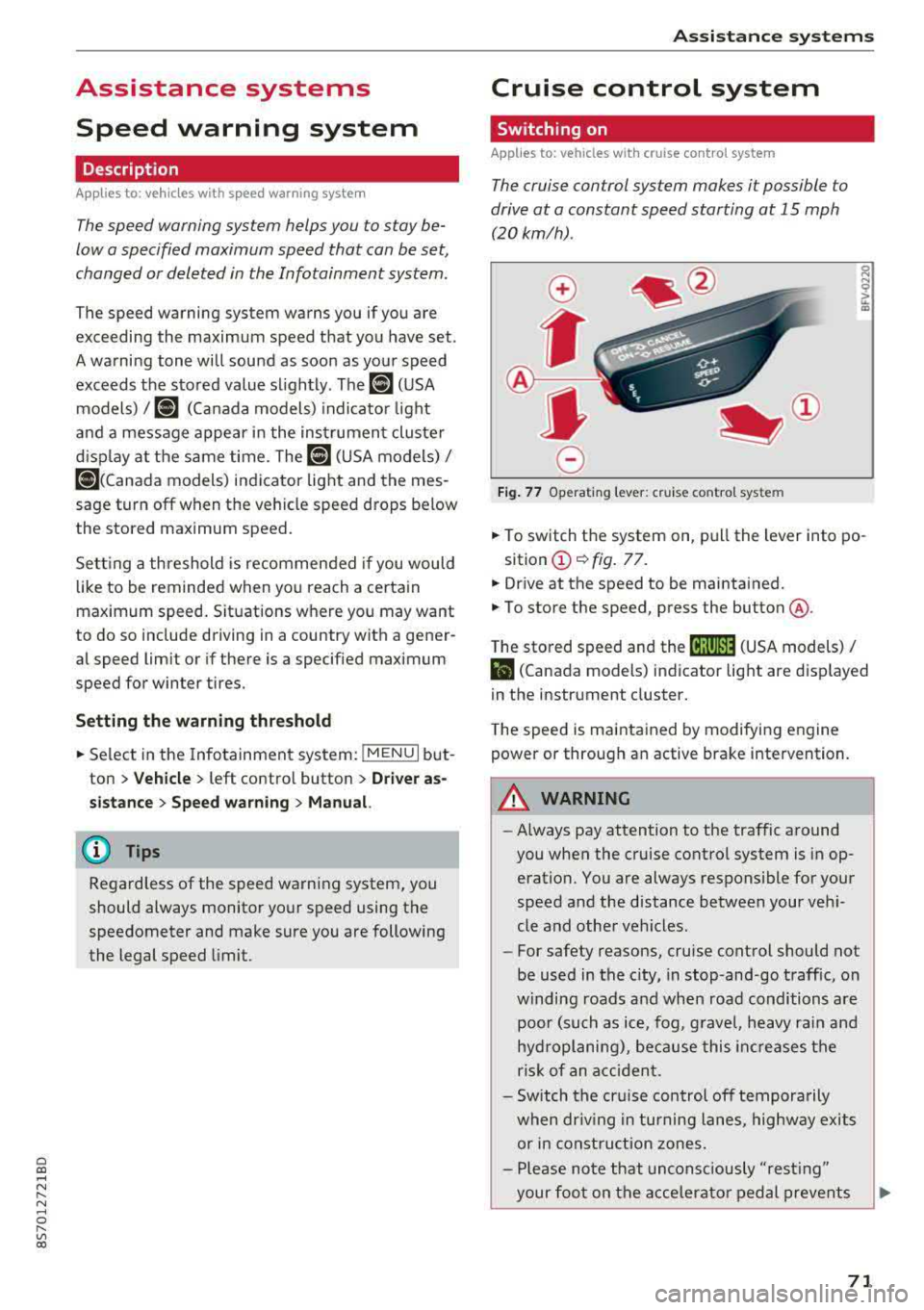
.. To switch t he system on, pull the lever into po-
sition
(D ¢ fig. 77.
.. Drive at the speed to be maintained.
.. To store the speed, press the button @.
T he stored speed and the
@jltJ~i, (USA models) /
l'I (Canada models) ind icator lig ht are d isp layed
in the instrument cluster.
T he speed is maintained by modifying engine
power or through an active brake intervention.
_8 WARNING
---A lways pay attention to the traffic around
you when the cruise control system is in op
eration. You are always responsible for your
speed and the distance between your vehi
cle and othe r vehicles.
-For safety reasons, cruise control should not
be used in the city, in stop-and-go traffic, on
w inding roads a nd when road conditions a re
poor (such as ice, fog, g rave l, heavy rai n and
hydroplaning), because this in cr eases the
risk of an acciden t.
-Sw itch the cr uise con trol off tempora rily
when dr iv ing in tu rning lanes, highway exits
or in const ruc tion zones.
-Please no te that uncons ciously "resting"
your foo t on the accelera to r ped al prevents
-
71
Page 74 of 310
Ass is tanc e system s
the cruise control from braking. This is be
cause pressing the accelerator pedal over
rides the cruise contro l system .
- If a brake system ma lfunction such as over
heating occurs when the cruise control sys
tem is sw itched on, the braking function in
the system may be switched off . The rest of
the cruise control system functions remain act ive as long as
the @jll)~i~ (USA models) /
i'I (Canada models) indicator light is on.
(j) Tips
The brake lights turn on when the brakes are appl ied automatically .
Changing speed
Applies to: vehicles with cruise control system
.,. To inc rease/decrease the speed in increments,
br iefly
tap the leve r towa rd 0 10 ~ page 71,
fig.
77 up/down to the first level.
.. T o increase o r decrease the speed in incre
ments,
tap the lever toward 0 10 i::> page 71,
fig .
77 up/down to the second leve l.
.. To increase or decrease the speed quickly, hold
the lever in the
0 10 direct ion until the de
s ired speed is reached .
Overriding the speed
Applies to: vehicles with cruise control system
You can press the accelerator pedal to increase
your speed, for example if you want to pass someo ne. The speed yo u set ea rlier w ill res ume
as soon as yo u release the acceler ator pedal.
H owever , if you are driving cons iderably faster
than the stored speed fo r a long period of time,
the cruise co ntrol system w ill tempora rily swi tch
off.
Th e@jll )~i~ (USA mode ls) tl'II ( C anada mod
e ls) indicator light in the inst rument cluste r
turns off and the stored speed is maintained .
Preselecting the speed
Applies to: vehicles with cruise control system
You can pre -select your desired speed when the
vehicle is stationary.
.,. Switc h the ign ition on.
72
.. Pull the lever into position (D ¢ page 71,
fig.
77 .
.. To increase or decrease the speed, tap the lever
toward
0 10 .
This function makes it possible, for example, to
save the speed you want before driving on the
highway. Once you are on the expressway, acti
vate the cruise control system by pulling the lev er into position
(D .
Switching off
Applies to: vehicles with cruise control system
Deactivating temporarily
.. Press the brake pedal, or
.. Press the lever toward @ (not locked into
place)
~ page 71, fig . 77.
Switching off completely
.. Press the lever into position @(clicked into
place), or
.. Switch the ignit ion off .
T he speed you stored will be maintained if the
cruise contro l has been switched off temporarily .
To resume the stored speed, release the brake or
clutch pedal and pull the lever to position
(D .
Switch ing the ignit ion off w ill erase the stored
speed .
A WARNING
You should only resume the stored speed if it
is not too high for existing traff ic conditions.
Othe rw ise you can inc rease the risk of an acc i
dent.
Audi active lane assist
Description
Applies to: vehicles with Audi active lane assist
Active lane assist detects lane marker lines w ith -
i n the lim its of the system using a camera in the
windshield. If you are approach ing a detected
lane marker line and it appears likely that you
will leave the lane, the system w ill warn you with
cor rective stee ring . You can over ride this stee ring
at any t ime. If you pass ove r a line, the stee ring
1111>
Page 299 of 310
Convertible locking retractor
Activating . . . . . . . . . . . . . . . . . . . . . . . . . . 226
Deactivating . . . . . . . . . . . . . . . . . . . . . . . . 227
Using to secure a child safety seat . . . . . . 226
Cooling mode (climate control system) . . . . 52
Cooling system Adding coolant . . . . . . . . . . . . . . . . . . . . . . 240
Coolant . . . . . . . . . . . . . . . . . . . . . . . . . . . . 239
Coolant level checking . . . . . . . . . . . . . . . . 240
Coolant temperature indicator . . . . . . . . . . . 8
I ndicator light . . . . . . . . . . . . . . . . . . . . . . . 12
Crank (power top emergency operation) . . . . 36
Crash data recorder ( EDR) . . . . . . . . . . . . . . . 91
Crosshairs . . . . . . . . . . . . . . . . . . . . . . . . . . . 136
Cruise control system Changing speed . . . . . . . . . . . . . . . . . . . . . . 72
Preselecting speed . . . . . . . . . . . . . . . . . . . . 72
Switching off . . . . . . . . . . . . . . . . . . . . . . . . 72
Switching on.. ............. .. .. .. .. .. 71
Cup holders . . . . . . . . . . . . . . . . . . . . . . . . . . . 48
Current fuel consumption . . . . . . . . . . . . . . . 21
D
Data connection . . . . . . . . . . . . . . . . . . . . . . 130
Data protection . . . . . . . . . . . . . . . . . . . . . . . 132
Data recorder . . . . . . . . . . . . . . . . . . . . . . . . . 91
Date .. .. .. .. .. ............. .. .. .. .. . 173
Date display . . . . . . . . . . . . . . . . . . . . . . . . . 173
Daytime running light . . . . . . . . . . . . . . . . . . 38
Declaration of compliance . . . . . . . . . . . . . . 293
Defrosting (windows) . . . . . . . . . . . . . . . . . . . 53
DEF (instrument cluster) . . . . . . . . . . . . . . . . 21
Deluxe automatic climate control
refer to Climate control system (automatic) .S2
Determining correct load limit . . . . . . . . . . 257
Digital compass . . . . . . . . . . . . . . . . . . . . . . . 44
Digital Rights Management . . . . . . . . . . . . . 154
Dimensions . . . . . . . . . . . . . . . . . . . . . . . . . . 288
Dimming the rearview mirror . . . . . . . . . . . . 42
Directory
refer to Contacts . . . . . . . . . . . . . . . . . . . . 119
Display
c refer to Audi virtua l cockpit (instrument 00
;::: cluster) . . . . . . . . . . . . . . . . . . . . . . . . . . 18, 20 r--
~ Distance driven . . . . . . . . . . . . . . . . . . . . . . . . 21 0 r--Vl 00
Index
Driver information system . . . . . . . . . . . . 18 , 20
Indicator lights . . . . . . . . . . . . . . . . . . . . . . . 9
Messages . . . . . . . . . . . . . . . . . . . . . . . . . . . . 9
On -board computer . . . . . . . . . . . . . . . . . . . 21
Outside temperature display. . . . . . . . . . . . 17
Service interval display . . . . . . . . . . . . . . . 243
Drives
refer to Media . . . . . . . . . . . . . . . . . . 154, 162
Drive select . . . . . . . . . . . . . . . . . . . . . . . . . . . 78
Driving economically . . . . . . . . . . . . . . . . . . . 56
Driving safely . . . . . . . . . . . . . . . . . . . . . . . . 179
Driving through water . . . . . . . . . . . . . . . . . . 56
Driving time . . . . . . . . . . . . . . . . . . . . . . . . . . 21
Dust filter
refer to Pollutant filter
DVD drive (media drives)
Dynamic volume 51
155
refer to System volume . . . . . . . . . . . . . . . 177
E
E-mail
117
Economical route . . . . . . . . . . . . . . . . . . . . . 141
Electromechanical parking brake . . . . . . . . . 61
Electromechanical steering . . . . . . . . . . . . . . 89
Indicator light . . . . . . . . . . . . . . . . . . . . . . . 89
Electronic differentia l lock . . . . . . . . . . . . . . . 86
Electronic immobili zer . . . . . . . . . . . . . . . . . . 22
Electronic stabilization control (ESC) . . . . . . 86
Indicator light . . . . . . . . . . . . . . . . . . . . . . . 13
Sport mode . . . . . . . . . . . . . . . . . . . . . . . . . 87
Emergency assistance . . . . . . . . . . . . . . . . . 272
Emergency braking function . . . . . . . . . . . . . 61
Emergency flashers . . . . . . . . . . . . . . . . . . . . 40
Emergency fueling . . . . . . . . . . . . . . . . . . . . 232
Emergency operation Fuel filler door . . . . . . . . . . . . . . . . . . . . . . 232
Luggage compartment lid . . . . . . . . . . . . . . 28
Power top . . . . . . . . . . . . . . . . . . . . . . . . . . . 36
Emergency release
Se lector lever . . . . . . . . . . . . . . . . . . . . . . . . 69
Emergency starting . . . . . . . . . . . . . . . . . . . 283
Emissions control system Catalytic converter . . . . . . . . . . . . . . . . . . . 233
Energy managem ent . . . . . . . . . . . . . . . . . . . 91
297