fog light AUDI TT ROADSTER 2018 Owners Manual
[x] Cancel search | Manufacturer: AUDI, Model Year: 2018, Model line: TT ROADSTER, Model: AUDI TT ROADSTER 2018Pages: 310, PDF Size: 46.95 MB
Page 9 of 310
Cl 00 .-< N r-N .-< 0 r-Vl 00
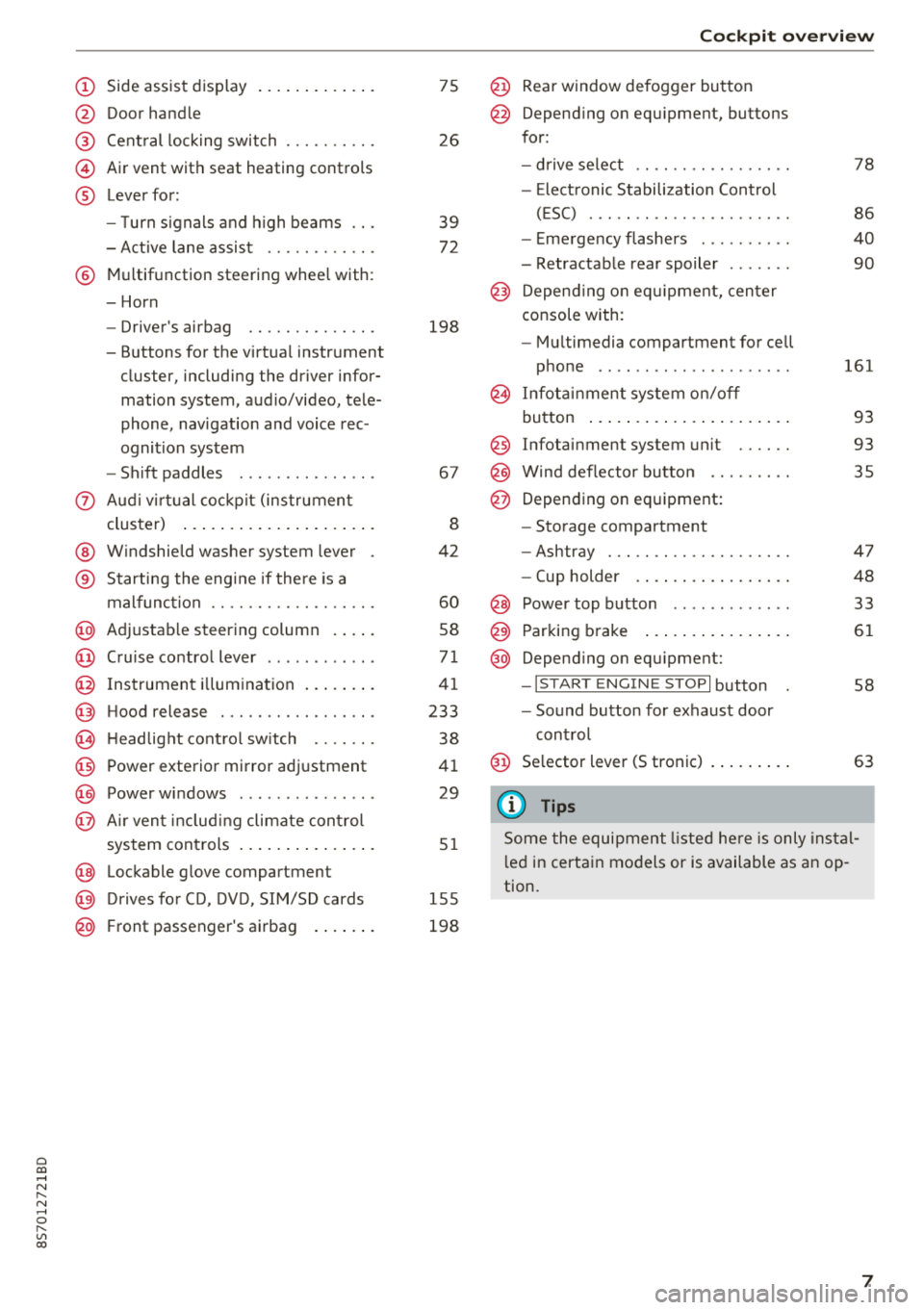
(D Side assist disp lay ..... ... .. .. .
@ Door handle
@ Cent ral locking swit ch ..... .. .. .
@ Air vent with seat heating controls
® Lever for:
- T urn s ignals and high beams
- Act ive lane assist ....... .. .. .
® M ultifunction steering whee l with :
- Horn
- Driver's airbag ........... .. .
- Buttons for the virtua l instr ument
cluster, including the dr iver infor
mation system, audio/video, tele
phone, navigation and voice rec
ognit ion system
- Shift paddles ............. . .
(J) A ud i v irtu al coc kp it (instrument
cluster) ... ... .. ..... ... .. .. .
@ W indshield washer system lever
® Starting the eng ine if the re is a
malfunc tion ............... .. .
@ Ad justable steer ing column . ... .
@ Cruise contro l lever .......... . .
@ Ins trumen t il lum ination ... .. .. .
@ Hood release .............. .. .
€3) H eadlight cont ro l sw itch .... .. .
@ Power exterio r mirror adj ustment
@) Power windows .............. .
@ A ir ven t incl uding climate con trol
system controls .. ..... ... .. .. .
@ Lockable g love compartment
@) D rives fo r CD, DV D, SIM/SD cards
@ Front passenger's ai rbag . ... .. .
75
26
39
7 2
198
67
8
42
60
58
71
41
233
38
4 1
29
5 1
1 55
198
Coc kpit o ver view
@ Rear window defogger button
@ Depend ing on equ ipment, buttons
for:
- drive select .. .............. .
- Elect ronic Stabili zation Cont rol
( E SC) . .. .. .. .............. .
- E me rge ncy flashers ......... .
- Retractable rear spoiler ...... .
@ Depending o n eq uipment, cen ter
console with:
- Mu ltimedia compartment for cell
p hone .. .. .. .. ............ .
@ In fota inment system o n/off
bu tton ... .... .. ... .. ..... .. .
@ Infotai nment system unit ..... .
@ Wind deflector butto n ........ .
@ Depending on eq uipment:
- Storage compartment
- Ashtray . .. .. .............. .
- Cup holder .... ... .. ..... .. .
@ Power top b utton ............ .
@ Parking b rake ... ... .. ..... .. .
@ Depend ing on eq uipment:
-I S TAR T ENGI NE STOP I button
- So und button for exhaust door
cont rol
@ Se lector lever (S tronic)
(D Tips
78
86
40
90
161
93
93 35
47
48
33
61
58
63
Some the equi pment listed he re is only ins tal
l e d in certa in models or is available as an op
tion.
7
Page 40 of 310
Lights and Vision
Lights and Vision
Exterior lighting
Switching lights on and off
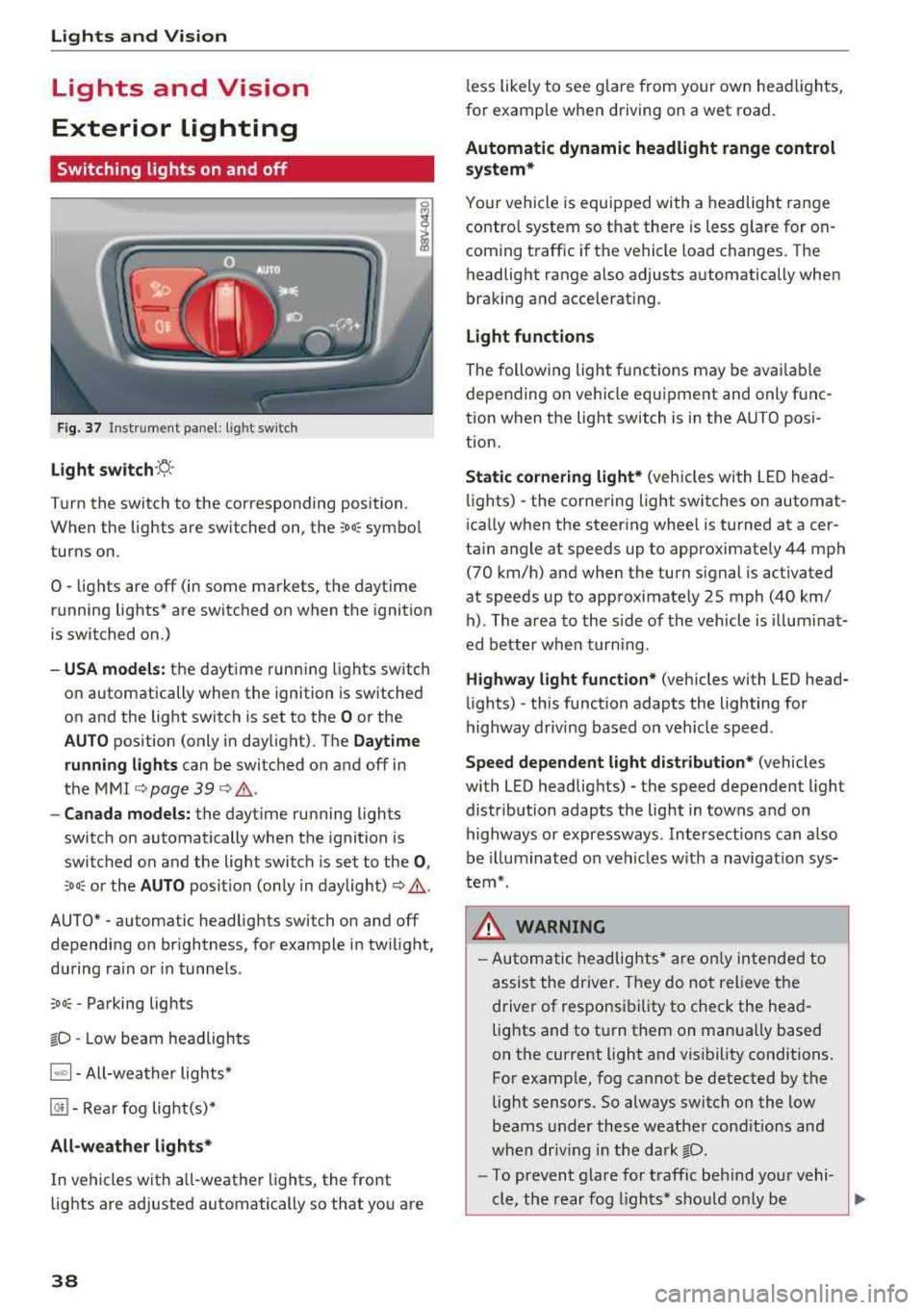
F ig. 37 Instrument panel: l ight sw itch
Light s witch ·~ ·
I
Turn the switch to the corresponding position.
When the lights are switched on, the
;Do: symbo l
turns on.
0
• lights are off (in some markets, the daytime
running lights* are switched on when the ignition
is switched on.)
-USA models : the daytime running lights switch
on automatically when the ignition is sw itched
on and the light switch is set to the
O or the
AUTO position (only in daylight). The Daytime
runn ing lights
can be switched on and off in
the
MMI c::;, page 39 c::;, ,&. .
-Canad a models: the dayt ime running lights
switch on automatically when the ignition is
switched on and the light switch is set to the
0 ,
:'.Do: or the AUTO position (only in daylight) c::;, ,&. .
AUTO* - automatic headlig hts switch on and off
depending on br ightness, for example in tw ilight,
during ra in or in tunne ls .
;Do: -Parking lights
tD -Low beam headlights
1~"' 1-All-weather lights*
@!I -Rear fog light(s)*
All-weather light s*
In vehicles with a ll-weathe r lights, the front
lights are adjusted automatically so that yo u are
38
less likely to see g lare from your own head lights,
fo r example when driving on a wet road.
Automatic dynamic headlight range control
system*
Your vehicle is equipped with a headlight range
contro l system so that there is less g la re for on
coming t raffic if the vehicle load changes. The
headlight range also adjusts automatically when
braking and accelerat ing.
Light function s
The following light funct ions may be ava ilable
depending on ve hicle equipment and only f unc
tion when the light switch is in the AUTO posi
t ion.
Static cornering light* (vehicles with LED head
li ghts) - the corne ring light switches on automat
i ca lly when the steer ing whee l is turned at acer
ta in angle at speeds up to approximately 44 mph
(70 km/h) and when the turn signal is activated
at speeds up to approximately 25 mph (40 km/ h) . The area to the side of the veh icle is illum ina t
ed bette r whe n turn ing .
Highway l ight function * (vehicles with LED head
li ghts)
-this function adapts the lighting for
highway driv ing based on veh icle speed .
Speed dependent light dist ribution* (vehicles
with LED headlig hts) - the speed dependent light
distribution adapts the light in towns and on
highways or expressways . Intersections can a lso
be illuminated on veh icles w ith a navigat ion sys
tem*.
& WARNING
- Autom atic headlig hts * are o nly in tended to
assis t the driver. They do not relieve the
driver of responsi bility to check the head
lights and to t urn them on manually based
on the current light and v is ibility conditions.
For examp le, fog cannot be detected by the
light sensors . So always switch on the low
beams under these weather cond it io ns an d
when dr iv ing in the da rk
tD.
-To prevent gla re for traffic be hind you r vehi-
cle, the rear fog lights* sho uld only be
..,.
Page 41 of 310
Cl co .... N ,..._
N .... 0 ,..._
Vl co
turned on in accordance with traffic
reg ulations.
- If the battery has been discharging for a
while, the parking light may sw itch off auto
matically. A lways make sure your vehicle is
parked and adequately lit according to the
laws . Avo id using the parking lights for sev
era l hours.
- Always observe legal reg ulat ions when us
ing the light ing systems described.
(!') Tips
- The light sensor for the automatic head
lights* is in the rearview mirror mount. Do
not place any stickers in this area on the
windsh ield.
- Some exterior lighting fu nctions can be ad
j usted
c::> page 39.
- If you turn off the ignition wh ile the exterio r
lights are on and open the door, a warning
tone so unds.
- In some markets, the ta il lights will sw itch
on when the dayt ime runn ing lights sw itch
on.
- In cool o r damp weather, the inside of the
headlig hts, tu rn s ignals and tai l lights can
fog over d ue to the tem perature d ifference
betwee n the inside and ou ts ide. They will
clea r shor tly after sw itch ing them o n. This
d oes not aff ect t he serv ice life o f the lig ht
i ng.
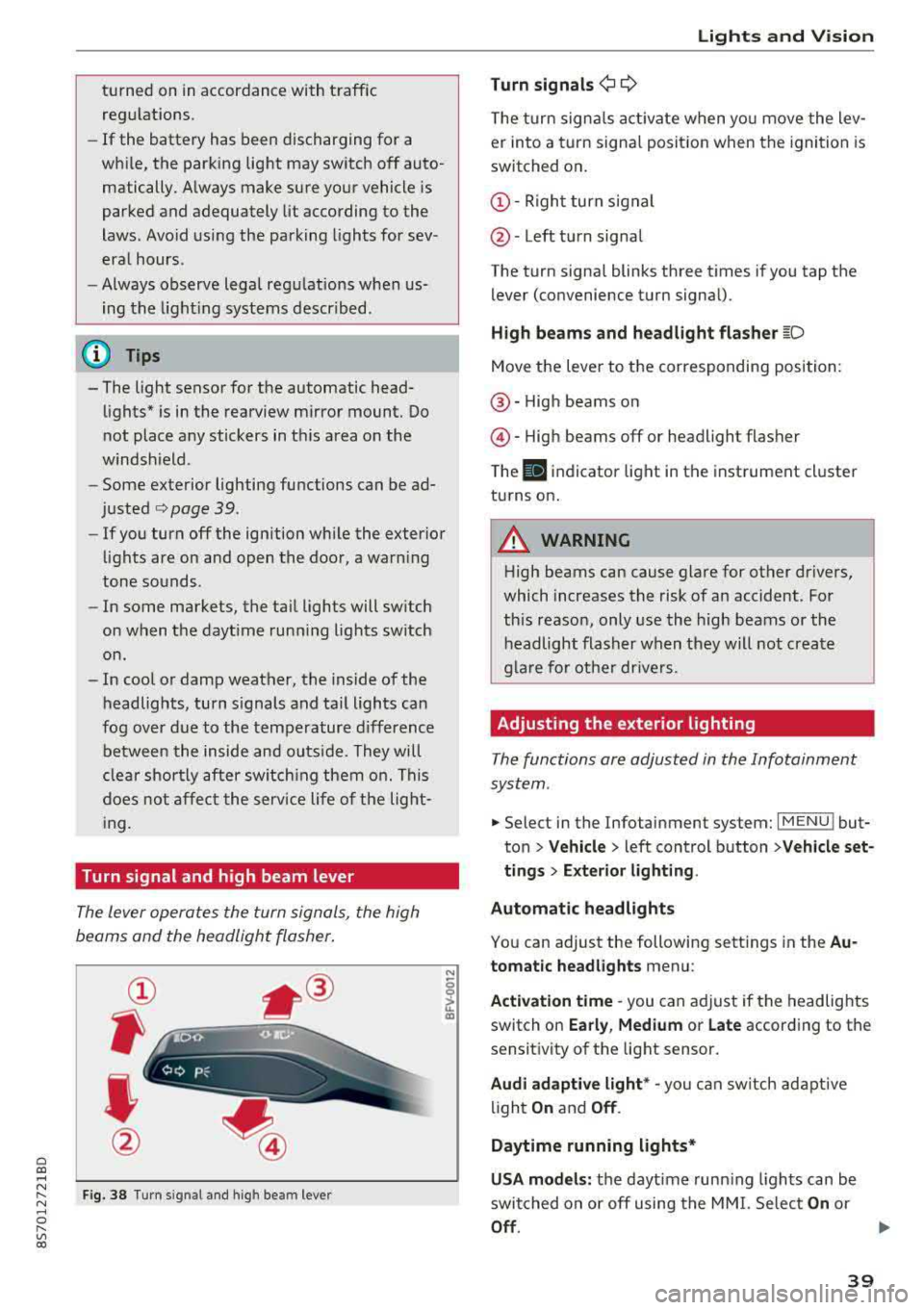
Turn signal and high beam lever
The lever opera tes the turn sign als, the high
beams and the headlight flasher .
Fig . 38 Tu rn signal an d high beam lever
N
0
~
"'
Lights and V ision
Turn signals ¢ 9
The turn signa ls act ivate w hen yo u move the lev
er into a turn signa l posit io n when the igni tion is
switched on .
©-Righ t turn signal
@ -Left tur n signal
The turn signa l blinks three t imes i f you tap t he
lever (convenience t urn signa l).
High beams and headlight flasher
~D
Move t he lever to the corresponding position:
@ -High beams o n
@-High beams off or headlight flasher
T he
II indicato r light in t he inst rument cl uster
turns on .
A WARNING
-High beams can cause glare for other drivers,
which increases the risk of an accident. Fo r
this reaso n, only use the high beams or the
headlight flasher when they wil l not create
g la re fo r ot her dr ivers.
Adjusting the exterior lighting
The functions are adjusted in the Infotainment
system .
.,. Select in the Infotainment system: I MENU ! but
ton> Vehicle > left control button >Vehicle set
tings > Exterior lighting .
Automatic headlights
You can adjust the following sett ings in the Au
tomatic headlights menu:
Activation time
-you can a djust if the headlights
switch on Early, Medium or Late according to the
sensit ivity of the light sensor.
Audi adaptive light * -you can sw itch ad ap tive
li gh t
On and Off .
Daytime running lights*
USA models: the daytime runn ing ligh ts can be
switched on or off using the MM I. Se lec t
On or
Off .
39
Page 54 of 310
Warm and cold
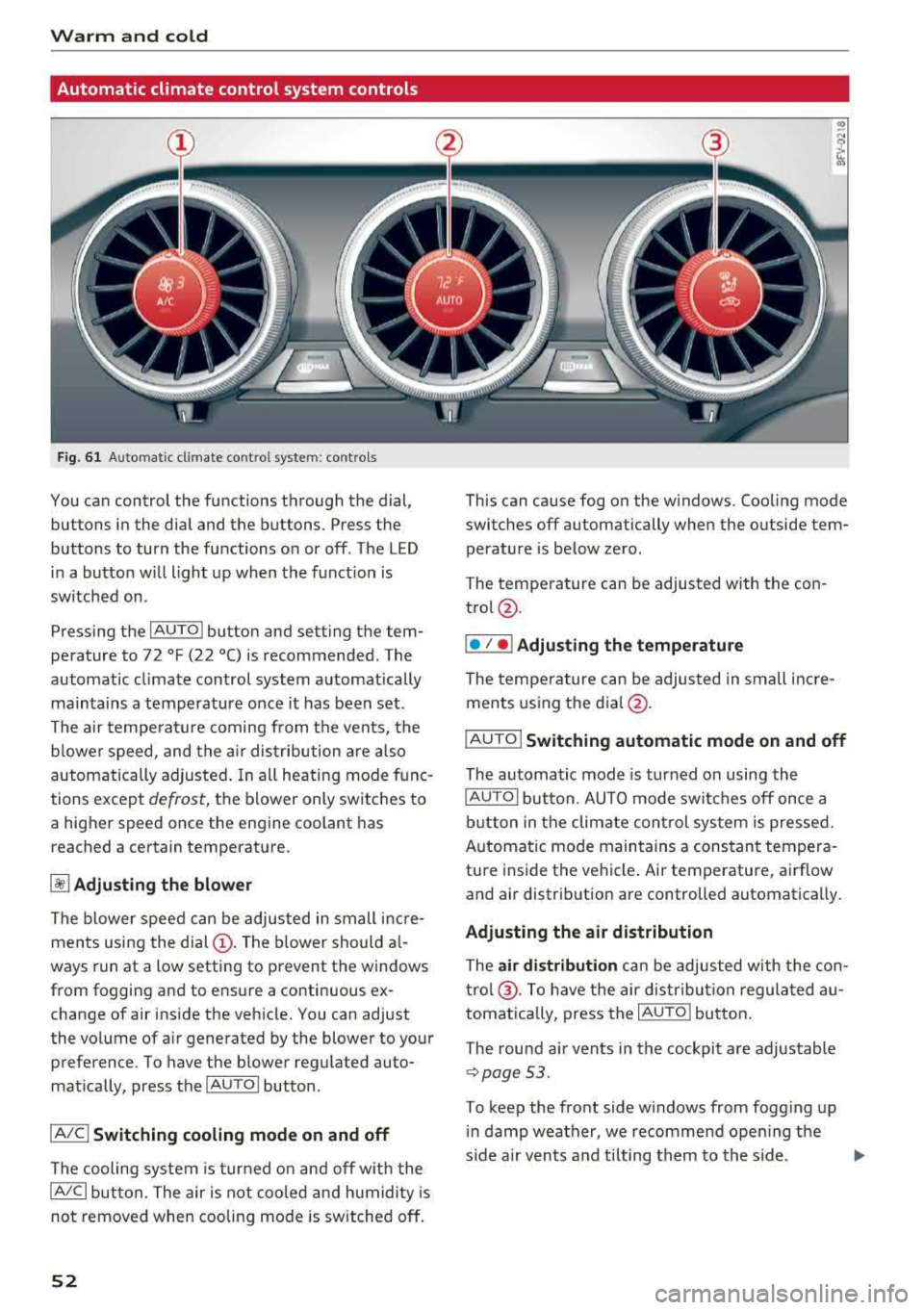
Automatic climate control system controls
Fig. 6 1 Automatic climate co ntrol syste m: contro ls
You can control the functions through the dial,
buttons in the dial and the buttons . Press the
buttons to turn the functions on or off. The LED i n a button w ill light up when the funct ion is
sw itched on.
Pressing the
IAU TO ! button and setting the tem
pe rature to 72
°F (22 °() is recommended. The
automatic climate control system automatically
maintains a temperature once it has been set .
The a ir tempe rature coming from the vents, the
b lower speed, and the a ir dis tribution are a lso
automatically a djusted . In all heati ng mode func
tions except
defrost, the blower only switches to
a higher speed once the engine coolant has reached a certain temperat ure.
~ Adjusting the blower
The blower speed can be adjusted in small inc re
ments using the
dial (!). The b lower should a l
ways run at a low setting to prevent the windows
from fogging and to ensure a continuous ex
change of air ins ide the vehicle. You can adjust
the volume of a ir generated by the blower to your
preference. To have the blower regulated auto
mat ically, press the
IAU TOI butto n.
IA/C l Switching cooling mode on and off
The cooling system is turned on and off w ith the
IA/C l button. The air is not coo led and humidity is
not removed when cooling mode is switched off.
52
This can cause fog on the w indows. Coo ling mode
switches off automatically when the outside tem
perature is below zero.
The temperature can be adjusted with the con
trol@ .
I• I • I Adjusting th e tempe rature
The temperature can be adjusted in sm all incre
ments using the
d ia l@ .
IAUTO I Switching automatic mode on and off
The automatic mode is turned on using the
IAUTOI button. AUTO mode switches off once a
button in the climate cont rol system is pressed.
Automat ic mode maintains a constant tempera
ture inside the vehicle . Air temperature, airflow
and air distribution are controlled automatically.
Adjusting the air distribution
The air distribution can be adjusted w ith the con
tro l@ . To have the air d istribu tion regulated au
tomatica lly, press the
I AUTO l button.
The round a ir vents in the cockpit a re adjustable
¢ page 53.
To keep the front side windows from fogg ing up
i n damp weather, we recommend ope ning the
s ide a ir vents a nd tilting them to the side.
Page 73 of 310
Cl co .... N ,....
N ...... 0 ,....
Vl co
Assistance systems Speed warning system
Description
App lies to: vehicles with speed warning system
The speed warning system helps you to stay be
low a specified maximum speed that can be set,
changed or deleted in the Infotainment system .
The speed warning system warns you if you are
exceeding the maximum speed that you have set .
A warning tone will sound as soon as your speed
exceeds the stored value slightly. The
(Ol (USA
models)/
(01 (Canada models) indicato r light
and a message appear i n the ins trumen t cluster
d isplay at the same time. The
(Sl (USA models)/
(O] (Canada models) indicator light and the mes
sage turn off when the ve hicle speed drops below
the stored maximum speed.
Sett ing a threshold is recommended if you would
like to be reminded when you reach a certain
maximum speed . Situations where you may want
to do so include driving in a country with a gener
al speed limit or if there is a specified maximum
speed for winter tires.
Setting the warning thr eshold
.. Se lect in the Infotainment system: ! MENUI b ut
ton
> Vehicle > left contro l button > Driver a s
s istan ce
> S peed warning > Manual.
@ Tips
Regard less of the speed warning system, you
should always monitor your speed using the
speedometer and make sure you are following
the legal speed limit.
A ssi st a nce systems
Cruise control system
Switching on
Applies to: vehicles with cruise control system
The cruise control system makes it possible to
drive at a constant speed starting at 15 mph
(20 km/h).
0
f
~
0
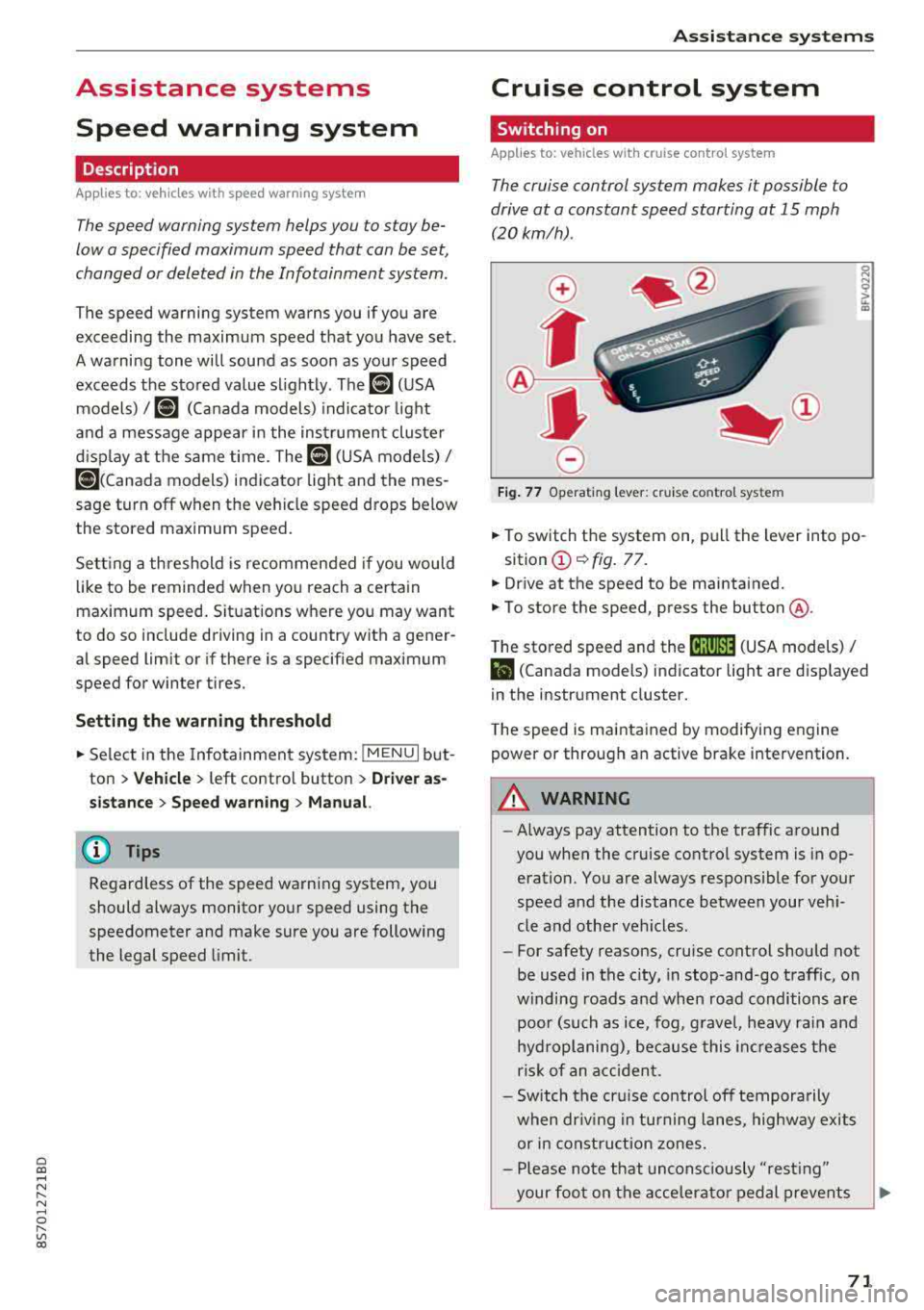
Fig . 7 7 Operat ing leve r: cru ise control system
.. To switch t he system on, pull the lever into po-
sition
(D ¢ fig. 77.
.. Drive at the speed to be maintained.
.. To store the speed, press the button @.
T he stored speed and the
@jltJ~i, (USA models) /
l'I (Canada models) ind icator lig ht are d isp layed
in the instrument cluster.
T he speed is maintained by modifying engine
power or through an active brake intervention.
_8 WARNING
---A lways pay attention to the traffic around
you when the cruise control system is in op
eration. You are always responsible for your
speed and the distance between your vehi
cle and othe r vehicles.
-For safety reasons, cruise control should not
be used in the city, in stop-and-go traffic, on
w inding roads a nd when road conditions a re
poor (such as ice, fog, g rave l, heavy rai n and
hydroplaning), because this in cr eases the
risk of an acciden t.
-Sw itch the cr uise con trol off tempora rily
when dr iv ing in tu rning lanes, highway exits
or in const ruc tion zones.
-Please no te that uncons ciously "resting"
your foo t on the accelera to r ped al prevents
-
71
Page 75 of 310
Cl co .... N ,....
N
wheel will vibrate lightly. In order for this warn
ing vibration to occur, it must first be switched
on in the Infotainment system. Active lane assist
is ready for operation when the lane marker line
is detected on a t least one side of the vehicle.
The system is design ed for driving on express
ways and highways and so it only activates at
speeds above approximately 40 mph (65 km/h)
(depending on the market).
Applies to vehicles with side assist* : if you acti
vate a turn s ignal when active lane assist is ready
and it classifies a lane change as critical because
of vehicles traveling alongside you or approach ing you, there will be noticeable corrective steer
in g shortly before you leave the lane . This will at
tempt to keep your vehicle in the lane.
Applies to vehicles without side assist *: the sys
tem does not warn when it is ready if you activate
the turn signal before crossing the lane marker line. In this case , it assumes that you are chang
ing lanes intentionally .
A WARNING
- The system warns the driver that the vehicle
is leaving the lane using corrective steer ing.
The driver is always responsible for keeping
the vehicle within the lane.
- The system can assist the driver in keeping
the vehicle in the lane, but it does not drive
by itself. Always keep your hands on the
steering wheel.
- Corrective steering may not occur in certain
situations, such as during heavy braking .
-There may be cases where the camera does
not recognize all lane marker lines . Correc
tive steering can only take place on the side
of the vehicle where lane marker lines are
detected .
-Other road structures or objects could possi
bly be identified unintentionally as lane
marker lines . As a result, corrective steering
may be unexpected or may not occur .
8 1l The corrective stee rin g func tion is not avail able in all mar,..._
~ ket s.
Assistance systems
-The camera view can be restricted, for ex
ample by vehicles driving ahead or by rain,
snow, heavy spray light shining into the
camera or by dirt on the window . This can
result in active lane assist not detecting the
lane marker lines or detecting them incor
rectly.
- In certain situations where visibility is low,
the vehicle may switch internally from "ear
ly " to "late" steering correction
l).
-Under certain conditions such as ruts in the
road, an inclined roadway or crosswinds, the
corrective steer ing alone may not be enough
to keep the vehicle in the middle of the lane .
- For safety reasons, act ive lane assist must
not be used when there are poor road and/
or weather conditions such as slippery roads, fog, gravel, heavy rain, snow and the
potential for hydroplaning. Using active lane
assist under these conditions may increase
the risk of a crash.
Switching on/off
Applies to : vehicles wit h Aud i act ive la ne ass ist
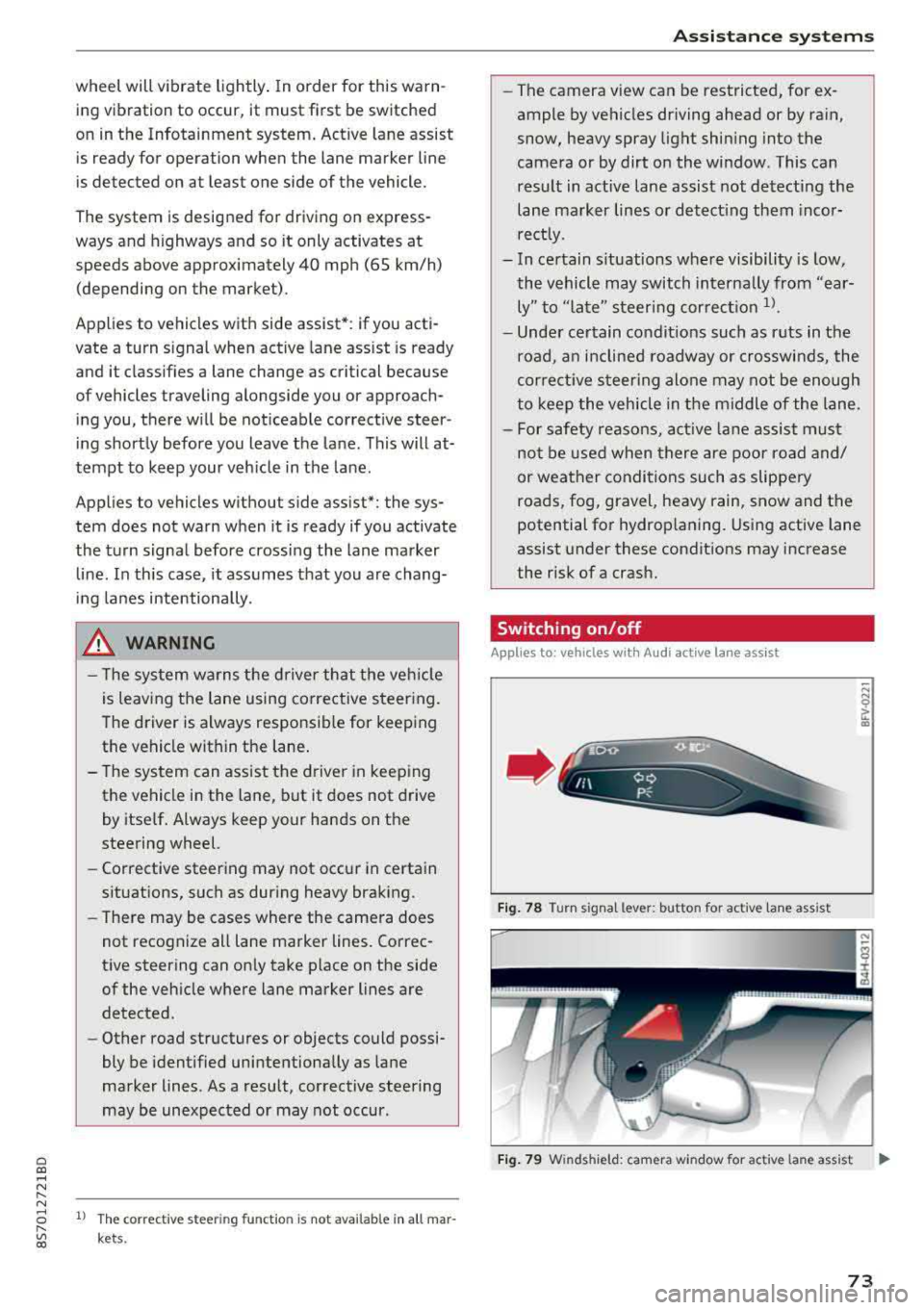
Fig. 78 Turn s ignal lever: but ton for activ e lane ass ist
"' N 0 > u. CD
Fig. 79 W inds hield: camera w indow for ac tive la n e ass ist ..,.
73
Page 76 of 310
Ass is tance sy stem s
,.. Press the button to switch the system on and
off¢ fig. 78. The . or rl1 indicator light in
the instrument cluster turns on or off.
Ind icat or light s
• Read y: the i ndicator light t urns on when the
system is ready for use. The system can now be
operated.
rl1 Not read y: the indicator light turns on if the
system is swi tched on but is inoperab le. Th is may
be due to the following reasons:
- There is no lane marker line .
- The relevant lane marker lines are not detected (for example, mark ings in a construction zone
o r because they are obstructed by snow, dirt,
water or lighting).
- The veh icle speed is below the activation speed
of approximately 40 mph (65 km/h) (the speed
may vary depending on yo ur country).
- The lane is too narrow or too wide.
- The curve is too narrow .
- The driver's hands are not on the steering
wheel.
(D Tips
- Make sure the camera's field of view
¢
fig. 79 is not obstructed by stickers or
anything else . For informat ion on cleaning,
see¢ page 266 .
-In certain markets : if the system is switched
on, it will sw itch on automat ically each time
the ign it ion is switched on .
Indicator in Infotainment d isplay
Ap plies to: ve hicles w ith Aud i active lane assist
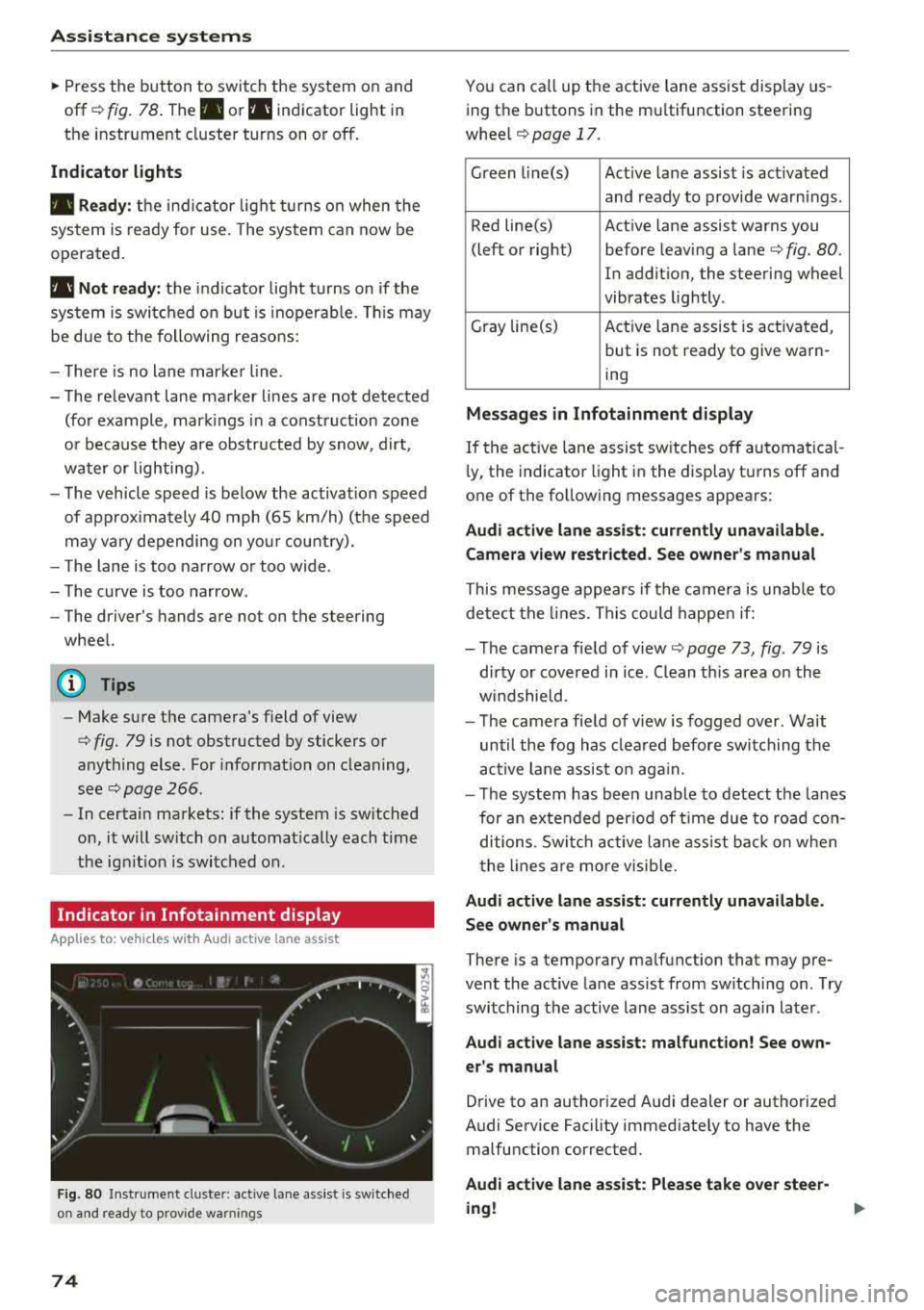
F ig. 80 Instrument cluste r: active lane ass ist is switched
on and ready to prov ide warnings
74
You can call up the active lane ass ist display us
ing the buttons in the mu ltifunction steering
wheel
¢ page 17.
Green l i ne(s) Act ive lane assist is act ivated
and ready to provide warnings .
Red line(s) Active lane assist warns you
(left or right) before leav ing a
lane¢ fig. 80.
In addition, the steering wheel
vibrates lightly .
Gray line(s) Act ive lane assist is activated,
but is not ready to give warn-
ing
M essag es in Infotainm ent disp la y
If the active lane assist sw itches off automatical
l y, the indicato r light i n the display turns off and
one of the following messages appears :
Audi a ctive l ane ass is t: currentl y unavailable.
Camera view restricted . See ow ner' s ma nual
This message appears if the camera is unable to
detect the lines. This could happe n if:
- The camera field of
view ¢ page 73, fig. 79 is
dirty or covered in ice . Clean th is area on the
w indshield.
- The camera fie ld of view is fogged over. Wait
until the fog has clea red before switching the
active lane assist on aga in.
- T he system has been unable to detect the lanes
for an extended per iod of t ime due to road con
ditions . Switch ac tive lane assist ba ck on w hen
the lines a re more visib le.
A udi acti ve l ane as sis t: cur rentl y una vailable.
Se e owner' s manual
There is a temporary malfunction that may pre
vent the act ive lane assist from sw itching on . T ry
switching the active lane assist on again later .
Audi active lane assi st: mal func tion! See own
er 's manual
Drive to an authorized Audi dealer or authorized
Audi Service Facility immediately to have the malfunction corrected.
Audi a ctive lane a ssi st: Plea se take over stee r
ing !
Page 272 of 310
Care and cleaning
- Never use warm or hot water to remove
snow or ice from the camera lens. This
could cause the lens to crack.
- Never use abrasive cleaning materials or
alcohol to clean the camera lens. This
could cause scratches and cracks.
- Power top
- Remove bird droppings immediately.
- Never use gasoline, spot remover, ben-
zene, paint thinner or other solvents to re
move .
-Door windows
- Remove snow and ice on windows and ex-
terior mirrors with a plastic scraper. To
avoid scratches, move the scraper only in
one direction and not back and forth.
- Never remove snow or ice from door win
dows and mirrors using warm or hot water
because this could cause cracks to form.
- To avoid damage to the rear window de
fogger, do not apply any stickers on the heating wires on the inside of the window.
- Decorative parts/trim
- Never use chrome care or cleaning prod-
ucts .
-Paint
-To reduce the risk of scratches, the vehicle
must be free of dirt and dust before pol
ishing or waxing.
- To prevent paint damage, do not polish or
wax the vehicle in direct sunlight.
- To reduce the risk of paint damage, do not
polish away rust spots .
- Remove cosmetics and sunscreen immedi
ately - these could damage the paint.
- Instrument cluster
- Make sure that the instrument cluster is
switched off and has cooled off before
cleaning it.
- The instrument cluster and the trim sur
rounding it must not be cleaned with dry
cleaning methods because they could get
scratched.
- Make sure no fluids enter the spaces be
tween the instrument cluster and the
trim, because that could cause damage.
- Controls
270
- Make sure that no fluids enter the con
trols, because this could cause damage.
- Safety belts
- Do not remove the safety belts to clean
them.
- Never clean safety belts or their compo
nents chemically or with corrosive fluids
or solvents and never allow sharp objects
to come into contact with the safety belts.
This could cause damage to the belt web
bing.
- If there is damage to the webbing, the
connections, the retractors or the buckles, have them replaced by an authorized Audi
dealer or authorized Audi Service Facility .
-Textiles/artificial leather/ Alcantara
- Never treat artificial leather/ Alcantara
with leather care products, solvents, floor
polish, shoe polish, spot remove or similar
products.
- Have a specialist remove stubborn stains
to prevent damage .
- Never use steam cleaners, brushes, hard
sponges, etc. when cleaning.
-Do not turn on the seat heating* to dry the
seat.
- Objects with sharp edges, such as zippers
or rivets on clothing or belts, can cause
damage to the surface.
- Open hook and loop fasteners , for exam
ple on clothing, can damage seat covers .
Make sure hook and loop fasteners are
closed.
- Natural leather
- Never treat leather with solvents, floor
polish, shoe polish, spot remover or simi
lar products.
- Objects with sharp edges, such as zippers
or rivets on clothing or belts, can cause
damage to the surface.
- Never use steam cleaners, brushes, hard
sponges, etc. when cleaning.
- Do not turn on the seat heating* to dry the
seat .
- To help prevent the leather from fading,
do not leave the vehicle in direct sunlight
for long periods of time. If leaving the
Page 283 of 310
Cl co .... N ,....
N ...... 0 ,....
Vl co
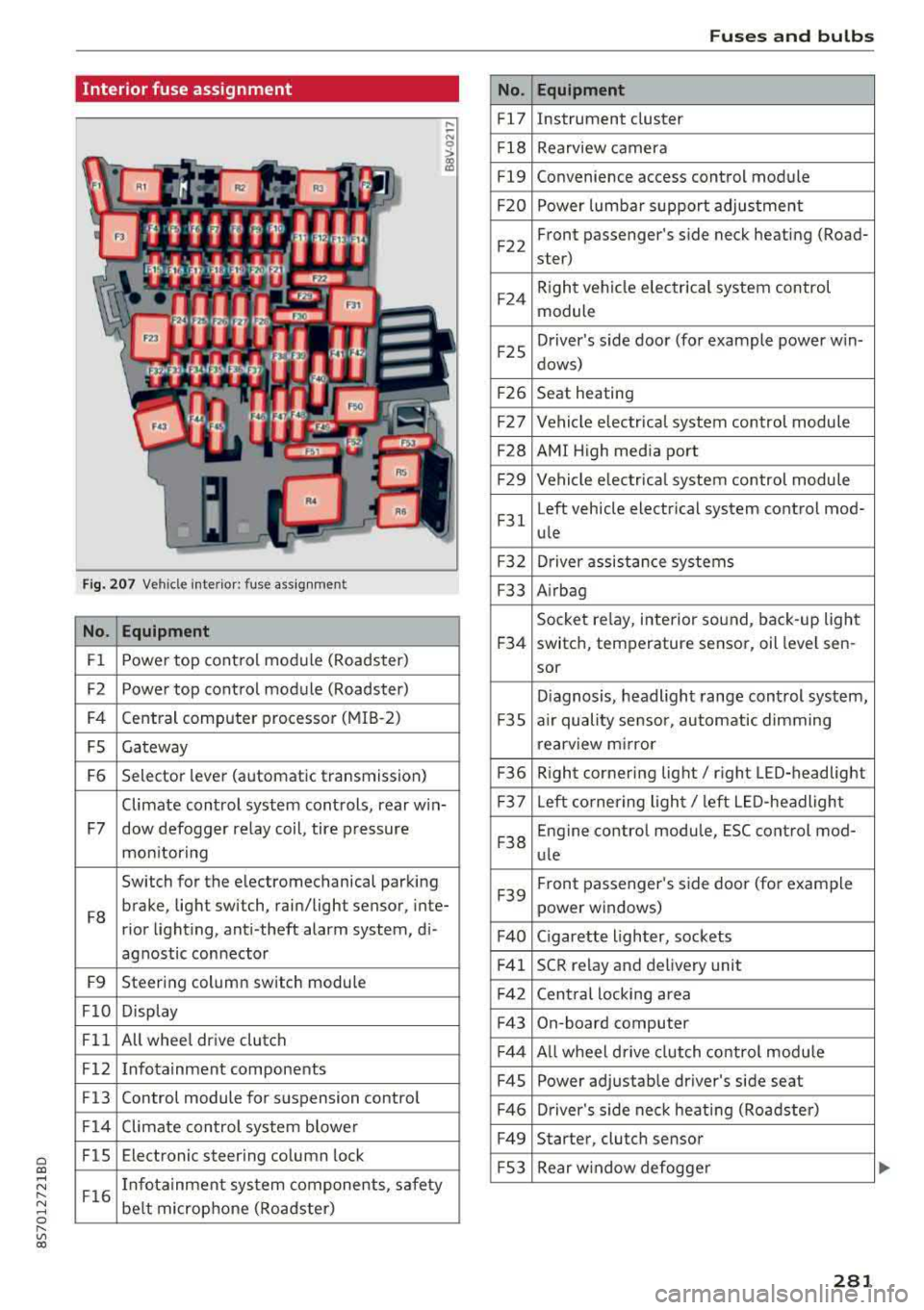
Interior fuse assignment
Fig. 207 Vehicle interior: fuse assignmen t
No. Equipment
Fl Power top cont
rol module (Roadster)
F2 Power top control module (Roadster)
F4 Central computer processor (MIB
-2)
FS Gateway
F6 Selector lever (automatic transmission)
Climate control system controls, rear w in-
F7 dow defogger relay coil, tire pressure
mon itoring
Switch for the electromechanical parking
F8 brake, light switch, rain/light sensor, inte-
rior lighting, anti -theft alarm system, di -
agnostic connector
F9 Steering column switch module
FlO Display
Fll All whee
l drive clutch
F12 Infotainment components
F13 Control module for suspension control
F14 Climate control system blowe r
FlS Electronic steering column
lock
F16 I
nfotainment system components, safety
be lt microphone (Roadster)
No.
Fl7
F1 8
Fl9
F20
F 22
F24
F 25
F 26
F 27
F28
F2 9
F 31
F3 2
F33
F 34
F 35
F36
F37
F3 8
F39
F40
F41
F 42
F43
F44
F45
F46
F49
F S3
Fuses and bulbs
Equipment
Instrument cluster
Rearview camera
Convenience access control module
Power lumbar support adjustment
Front passenger's side neck heating (Road-
ster)
R ight vehicle electrica l system control
module
Driver's s ide door (for example power w in-
dows)
Seat heating
Vehicle electrical system control module
AMI High media port
Vehicle e lectr ical system control module
Left vehicle electrical system contro l mod-
ule
Driver assistance systems
Airbag
Socket relay, inte rior sound , back-up light
switch, temperature sensor, oil leve l sen -
sor
Diagnosis, headlight range control system,
a ir quality sensor, automatic dimming
rearview mirror
R ight cornering light/ right LED-headlight
L eft cornering light/ left LED-headlight
Engine control module, ESC control mod-
ule
Front passenger's side door (for example
power windows)
C igarette lighter, sockets
SCR relay and delivery unit
Central locking area
On-board computer
A ll wheel d rive clutch control module
Power adjustable driver's side seat
Driver's side neck heating (Roadster)
Starter, clutch sensor
Rear window defogger
281
Page 298 of 310
Index
Central locking switch . . . . . . . . . . . . . . . . . . 26
Ce rt ificat ion . . . . . . . . . . . . . . . . . . . . . . . . . 293
Changing eng ine o il . . . . . . . . . . . . . . . . . . . 238
Changing light bulbs . . . . . . . . . . . . . . . . . . 28 2
Chargi ng the battery (mob ile dev ices) . . . . 161
Chi ld restraint
Danger of using ch ild rest raints in the front
seat . . . . . . . . . . . . . . . . . . . . . . . . . . . . . . .
195
Ch ild rest raints
Where can I get additional in format ion
about child restraints and their use? . . . .
228
C hil d safety . . . . . . . . . . . . . . . . . . . . . . . . . . 2 16
Important safety ins truc tions fo r us ing ch ild
safety sea ts . . . . . . . . . . . . . . . . . . . . . . . .
2 19
Ch ild safety seats . . . . . . . . . . . . . . . . . . . . . 2 21
Booster seats . . . . . . . . . . . . . . . . . . . . . . . 223
Conve rt ible c hild seats . . . . . . . . . . . . . . . 22 2
How do I properly install a child safe ty seat
. h ' l 7 in myve 1c e .. .. ............. .... .. . 2 19
Infant seats . . . . . . . . . . . . . . . . . . . . . . . . 22 1
Safety instructions . . . . . . . . . . . . . . . . . . . 2 19
Securing . . . . . . . . . . . . . . . . . . . . . . . . . . . 225
C iga rette lighte r . . . . . . . . . . . . . . . . . . . . . . . 48
Clean ing . . . . . . . . . . . . . . . . . . . . . . . . . . . . 266
C leaning/removing ice from windows . . . . . 26 8
Clea ning Alcanta ra . . . . . . . . . . . . . . . . . . . . 269
Clean ing artificia l leather . . . . . . . . . . . . . . . 269
C le ani ng ca rbon p arts . . . . . . . . . . . . . 2 68, 269
Clea ning contro ls . . . . . . . . . . . . . . . . . . . . . 269
C leaning decorative parts and trim . . . . . . . 268
C lea ning displays . . . . . . . . . . . . . . . . . . . . . 269
Clea ning exhaust ta il pipes . . . . . . . . . . . . . 267
C lean ing plast ic parts . . . . . . . . . . . . . . . . . . 26 8
Clea ning rims . . . . . . . . . . . . . . . . . . . . . . . . 267
Clean ing seat covers . . . . . . . . . . . . . . . . . . . 269
C lea ning t ail lights . . . . . . . . . . . . . . . . . . . . 26 7
Clea ning text iles . . . . . . . . . . . . . . . . . . . . . . 269
Cleaning the Audi virt ual cockpit . . . . . . . . . 269
C lean ing t he instrument cluster . . . . . . . . . 269
Clean ing the wind deflector . . . . . . . . . . . . . 268
Clima te con trol system (automa tic)
Ad '
t' . JU S mg air vents . . . . . . . . . . . . . . . . . . . . 52
Ad justing the air vents . . . . . . . . . . . . . . . . . 53
Ad justing the temperature . . . . . . . . . . . . . 52
Air distribution, a ir vents . . . . . . . . . . . . . . . 52
AUTO (automatic mode) . . . . . . . . . . . . . . . 52
296
B lower
Contro ls . . . . . . . . . . . . . . . . . . . . . . . . . . . . . 52
52
Defrosting the windows . . . . . . . . . . . . . . . 53
Drive select . . . . . . . . . . . . . . . . . . . . . . . . . . 78
Rear w indow defogger. . . . . . . . . . . . . . . . . 53
Rec irculat ion mode . . . . . . . . . . . . . . . . . . . 53
Cli mate contro l system (manua l)
Adjusting th e air vents . . . . . . . . . . . . . . . . .
53
Clock . . . . . . . . . . . . . . . . . . . . . . . . . . . . . . . 173
Closi ng
Hood . . . . . . . . . . . . . . . . . . . . . . . . . . . . . .
235
Windows ....... .. .. ................ 29
Closing/ open ing
By remote control . . . . . . . . . . . . . . . . . . . .
24
U sing the door lock . . . . . . . . . . . . . . . . . . . 2 7
Coc kpit (overview) . . . . . . . . . . . . . . . . . . . . . .
6
Coming home . . . . . . . . . . . . . . . . . . . . . . . . . 40
Commands (voice recogn ition system) . . . . 105
Compa rtments . . . . . . . . . . . . . . . . . . . . . . . . 48
Compass in the m irror . . . . . . . . . . . . . . . . . . 44
Compliance . . . . . . . . . . . . . . . . . . . . . . . . . . 293
Conferen ce ca ll . . . . . . . . . . . . . . . . . . . . . . . 115
Connect ion manager 174
Connect ions
refer to M edia . . . . . . . . . . . . . . . . . . 154, 162
Connect io n sett ings . . . . . . . . . . . . . . . . . . . 17 4
Cons umer Information . . . . . . . . . . . . . 185, 290
Cons umption (fuel) . . . . . . . . . . . . . . . . . . . . 21
Contacting NHTSA . . . . . . . . . . . . . . . . . . . . 185
Contacts
Additional directory . . . . . . . . . . . . . . . . . .
175
Importing/export ing . . . . . . . . . . . . . . . . . 120
Memory capac ity . . . . . . . . . . . . . . . . . . . . 121
Searching . . . . . . . . . . . . . . . . . . . . . . . . . . 120
Showing details . . . . . . . . . . . . . . . . . . . . . 120
Stor ing as destination . . . . . . . . . . . . . . . . 140
Control buttons . . . . . . . . . . . . . . . . . . . . . . . 19
Cont ro l buttons (opera ting t he M MI) . . . . . . 94
Control knob with joystick funct ion . . . . . . . . 98
Convenience key
Ind icator light . . . . . . . . . . . . . . . . . . . . . . .
59
Stopping the eng ine (START ENGINE STOP
button) . . . . . . . . . . . . . . . . . . . . . . . . . . . . .
59
Un locking/locking . . . . . . . . . . . . . . . . . . . . 25
Convenience open ing/clos ing . . . . . . . . . . . . 29
Convertib le child safe ty se ats . . . . . . . . . . . 2 22