brake light AUDI TT ROADSTER 2019 Owner's Manual
[x] Cancel search | Manufacturer: AUDI, Model Year: 2019, Model line: TT ROADSTER, Model: AUDI TT ROADSTER 2019Pages: 304, PDF Size: 80.77 MB
Page 88 of 304
Intelligent Technology
Intelligent Technology
Electronic stabilization
control (ESC)
Electronic Stabilization Control (ESC) supports
driver safety. It reduces the risk of slipping and
improves driving stability. ESC detects critical sit-
uations such as the vehicle oversteering and un-
dersteering or the wheels are spinning. The
brakes are applied or the engine torque is re-
duced in order to stabilize the vehicle. When the
ESC engages, the B indicator light blinks in the
instrument cluster.
The following systems are integrated in the ESC:
Anti-lock braking system (ABS)
ABS prevents the wheels from locking when brak-
ing. The vehicle can still be steered even during
hard braking. Apply steady pressure to the brake
pedal. Do not pump the pedal. A pulsing in the
brake pedal indicates that the system is acting to
stabilize the vehicle.
Brake assist system
The brake assist system can decrease braking dis-
tance. It increases braking power when the driver
presses the brake pedal quickly in emergency sit-
uations. You must press and hold the brake pedal
until the dangerous situation is over.
Anti-Slip Regulation (ASR)
ASR reduces drive power when the drive wheels
begin spinning and adapts the power to the road
conditions. This makes it easier to start, acceler-
ate and drive up hills.
Electronic Differential Lock (EDL)
The EDL applies the brakes to wheels that are
slipping and transfers the drive power to the oth-
er wheels. This function is not available at higher
speeds.
In extreme cases, EDL automatically switches off
to keep the brake on the braked wheel from over-
heating. The vehicle is still functioning correctly.
86
EDL will switch on again automatically when con-
ditions have returned to normal.
Power steering
The ESC can also support vehicle stability
through steering.
Selective wheel torque control
Selective wheel torque control is used when driv-
ing on curves. Braking is targeted toward the
wheels on the inside of the curve as needed. This
allows more precise driving in curves.
Automatic post-collision braking system
The automatic post-collision braking system can
help to reduce the risk of sliding and of addition-
al collisions after an accident. If the airbag con-
trol module detects a collision above a certain ve-
hicle speed, the vehicle is braked by the ESC.
The vehicle does not brake automatically if one of
the following occurs:
— The driver presses the accelerator pedal
—The braking force generated by the pressed
brake pedal is greater than the braking force
that would be initiated by the system
— The ESC, the brake system, or the vehicle elec-
trical system is not functioning
ZA WARNING
— The ESC and its integrated systems cannot
overcome the limits imposed by natural
physical laws. This is especially important on
slippery or wet roads. If the systems begin
acting to stabilize your vehicle, you should
immediately alter your speed to match the
road and traffic conditions. Do not let the in-
creased safety provided tempt you into tak-
ing risks. This could increase your risk of a
collision.
— Please note the risk of a collision increases
when driving fast, especially through curves
and on slippery or wet roads, and when driv-
ing too close to objects ahead. The ESC and
its integrated systems cannot always pre-
vent collisions - there is still a risk of acci-
dents!
Page 90 of 304
Intelligent Technology
— There is no vehicle stabilization when
ESC/ASR are switched off.
@) Tips
— When the cruise control system* is switched
on, ESC/ASR cannot be switched off or sport
mode cannot be switched on.
— Malfunctions in the rear spoiler or the Audi
magnetic ride may make it impossible to
switch the ESC/ASR off or to switch sport
mode on.
Brakes
You can apply the vehicle's brakes using the brake
pedal.
Operating noise
Noises may occur when braking depending on the
speed, braking force, and outside conditions such
as temperature and humidity.
Braking effect
The response time from the brakes depends on
the weather and environmental conditions. To
ensure the optimum braking effect, the brake
system is cleaned at regular intervals. This is
done by applying the brake pads to the brake ro-
tors for a short period of time when driving at
high speeds when the windshield wipers are
switched on.
If the brake system becomes damp, for example
after driving in heavy rain, the braking effect may
be delayed. Other factors that could temporarily
increase the response time of the brakes include:
— Wet conditions
— Low temperatures, ice, and snow
— Roads covered in salt
— Dirty brake pads
Corrosion
Corrosion may form on the brake rotors if there is
no heavy braking, if the vehicle is not driven for
long periods of time, or if the vehicle is not driv-
en
frequently or for long distances. In this case,
braking heavily several times while driving at
high speeds can clean the brake rotors > A\.
838
Brake pads
New brake pads do not achieve their full braking
effect during the first 250 miles (400 km). They
must be “broken in” first. However, you can com-
pensate for the slightly reduced braking force by
pressing firmly on the brake pedal. Avoid heavy
braking during the break-in period.
Brake pad wear depends largely on the way the
vehicle is driven and on operating conditions.
Brake pad wear increases when driving frequently
in the city or short distances or when using a very
sporty driving style.
Ceramic brakes
Applies to: vehicles with ceramic brakes
Ceramic brakes provide excellent deceleration
rates.
The break-in period for new ceramic brakes may
be significantly longer than for standard brake
rotors. Due to the properties of the material,
they may cause noises at lower speeds. Ceramic
brakes also absorb more moisture in wet condi-
tions. Therefore, there will temporarily be less
braking force than when the brakes are dry. You
can compensate for this by pressing the brake
pedal harder.
A WARNING
— Only apply the brakes for the purpose of
cleaning the brake system when road and
traffic conditions permit. You must not en-
danger other road users and increase the
risk of an accident.
— Due to the risk of injury, only have an au-
thorized Audi dealer or authorized Audi
Service Facility work on the brake system.
Incorrect repairs could impair the function.
— Never let the vehicle roll while the engine is
stopped because this increases the risk of an
accident.
— Depending on vehicle equipment, the brake
pedal may move downward automatically
during autonomous braking maneuvers. To
reduce the risk of injury, do not place your
foot under the brake pedal.
Page 91 of 304
8S8012721BA
Intelligent Technology
@) Note
— Never let the brakes “rub” by pressing the
pedal lightly when braking is not actually
necessary. This can cause the brakes to over-
heat and increases braking distance and
causes wear.
— Before driving on long stretches with steep
hills, reduce the vehicle speed and shift to a
lower gear to use the engine braking effect.
This reduces the load on the brakes. If you
need to brake additionally, brake in intervals
and not continuously.
@) Tips
— If you retrofit your vehicle with a front spoil-
er, wheel covers or similar items, make sure
that the air flow to the brakes is not ob-
structed. Otherwise the brake system can
overheat.
— Also refer to the information about brake
fluid > page 235.
Steering
Electromechanical steering supports the driver's
steering movements by electronically adapting
the power steering depending on the vehicle
speed. The settings depend on the selected Audi
drive select* mode.
a Steering: malfunction! Please stop vehicle
The power steering may have failed. Adapt your
driving style immediately to compensate for the
fact that it may be more difficult to turn the
steering wheel, and stop your vehicle in a safe lo-
cation as soon as possible. Do not continue driv-
ing. See an authorized Audi dealer or authorized
Audi Service Facility for assistance.
a Steering: malfunction! You can continue
driving
There is a malfunction. Steering may be more dif-
ficult or more sensitive. Adapt your driving style.
Have the steering system checked immediately
by an authorized Audi dealer or authorized Audi
Service Facility. Please note that the red indicator
light may turn on after restarting the engine. Do
not continue driving if it does.
G@) Tips
If the 12 or al indicator light only stays on
for a short time, you may continue driving.
ALL wheel drive (quattro)
Applies to: vehicles with all wheel drive
In all wheel drive, all four wheels are powered.
General information
In all wheel drive, the driving power is divided be-
tween all four wheels. This happens automatical-
ly depending on your driving behavior as well as
the current road conditions. Also see > page 86,
Electronic stabilization control (ESC).
The all wheel drive concept is designed for high
engine power. Your vehicle is exceptionally pow-
erful and has excellent driving characteristics
both under normal driving conditions and on
snow and ice. Always read and follow safety pre-
cautions > A\.
Winter tires
By using all wheel drive, your vehicle has good
forward motion with standard tires in winter con-
ditions. However, in winter we recommend using
winter or all season tires on all four wheels, be-
cause this will improve the braking effect.
Snow chains
If there are snow chain laws, snow chains must
also be used on vehicles with all wheel drive
=> page 255, Snow chains.
Replacing tires
For vehicles with all wheel drive, only wheels with
the same rolling circumference should be used.
Avoid using tires with different tread depths
=> page 247, New tires or wheels.
89
Page 237 of 304
8S58012721BA
Checking and Filling
Observe the safety precautions > page 227, Gen-
eral information.
Checking the engine coolant level
>» Park the vehicle on a level surface.
> Switch the ignition off.
> Read the coolant level on the coolant expansion
tank > page 230, fig. 174. The coolant level
must be between the markings @) 9 fig. 177
when the engine is cold. When the engine is
warm it can be slightly above the upper mark-
ing.
Adding coolant
Requirement: there must be a residual amount of
coolant in the expansion tank >@.
If you must add coolant, use a mixture of water
and coolant additive. Mixing the coolant additive
with distilled water is recommended.
> Allow the engine to cool.
>» Place a large, thick towel on the coolant expan-
sion tank cover.
> Remove the cover (@) 9 fig. 177 carefully to the
left > AX.
> Add the correct mixture ratio of coolant
> page 234 up to the upper marking @)
> fig. 177.
> Make sure that the fluid level remains stable.
Add more coolant if necessary.
> Close the cap securely.
Coolant loss usually indicates that there is a leak.
Immediately drive your vehicle to an authorized
Audi dealer or authorized Audi Service Facility
and have the cooling system inspected. If the
cooling system is not leaking, coolant loss can re-
sult from the coolant boiling due overheating
and then being forced out of the cooling system.
compartment. This increases the risk of
burns. The cooling system is under pressure.
When you no longer see or hear steam or
coolant escaping, you may open the engine
compartment with caution.
— When working in the engine compartment,
remember that the radiator fan can switch
on even if the ignition is switched off, which
increases the risk of injury.
— Coolant additive and coolant can be danger-
ous to your health. For this reason, store the
coolant in the original container and away
from children. There is a risk of poisoning.
@) Note
Do not add coolant if the expansion tank is
empty. Air could enter the cooling system and
damage the engine. If this is the case, do not
continue driving. See an authorized Audi deal-
er or authorized Audi Service Facility for assis-
tance.
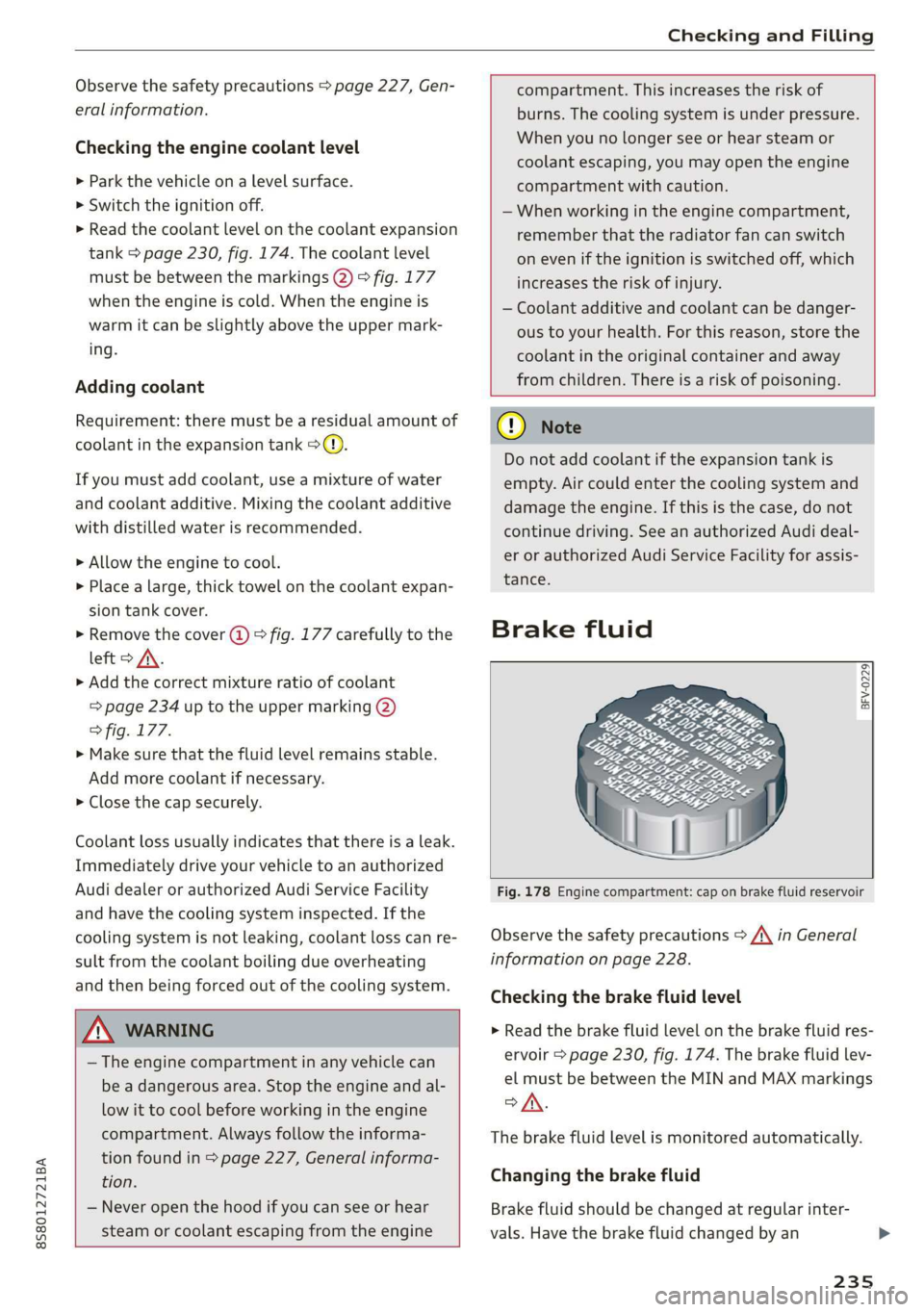
Brake fluid
BFV-0229)
Z\ WARNING
— The engine compartment in any vehicle can
be a dangerous area. Stop the engine and al-
low it to cool before working in the engine
compartment. Always follow the informa-
tion found in > page 227, General informa-
tion.
— Never open the hood if you can see or hear
steam or coolant escaping from the engine
Fig. 178 Engine compartment: cap on brake fluid reservoir
Observe the safety precautions > /A\ in General
information on page 228.
Checking the brake fluid level
> Read the brake fluid level on the brake fluid res-
ervoir > page 230, fig. 174. The brake fluid lev-
el must be between the MIN and MAX markings
oA.
The brake fluid level is monitored automatically.
Changing the brake fluid
Brake fluid should be changed at regular inter-
vals. Have the brake fluid changed by an
235
Page 238 of 304
Checking and Filling
authorized Audi dealer or authorized Audi Service
Facility. The authorized Audi dealer or authorized
Audi Service Facility will inform you of the re-
placement intervals.
ZA\ WARNING
— If the brake fluid level is below the MIN
marking, it can impair the braking effect and
driving safety, which increase the risk of an
accident. Do not continue driving. See an au-
thorized Audi dealer or authorized Audi
Service Facility for assistance.
— If the brake fluid is old, bubbles may form in
the brake system during heavy braking. This
could impair braking performance and driv-
ing safety, which increases the risk of an ac-
cident.
— The brake fluid in your vehicle must meet
the standard VW 501 14 and is available at
an authorized Audi dealer or authorized Au-
di Service Facility. If this brake fluid is not
available, another high-grade brake fluid of
equivalent quality may be used, and it must
meet the U.S. Federal Motor Vehicle Stand-
ard (FMVSS) 116 DOT 4, Class 6.
@) Note
— If the brake fluid level is above the MAX
marking, brake fluid may leak out over the
edge of the reservoir and result in damage
to the vehicle.
— Do not allow any brake fluid to come into
contact with the vehicle paint, because it
will corrode the paint.
Electrical system
If the = or fm] indicator light turns on, there is a
malfunction in the generator, the battery, or the
vehicle electrical system.
zi Electric system: malfunction! Battery is not
being charged
Drive to an authorized Audi dealer or authorized
Audi Service Facility immediately. Turn off all un-
necessary electrical equipment because it will
drain the battery. See an authorized Audi dealer
236
or authorized Audi Service Facility if the battery
charge level is too low.
= Electrical system: low battery charge. Bat-
tery
will be charged while driving
The starting ability may be impaired.
If this message turns off after a little while, the
vehicle battery has charged enough while driving.
If this message does not turn off, drive immedi-
ately to an authorized Audi dealer or authorized
Audi Service Facility.
Battery
Battery general information
Because of the complex power supply, all work on
batteries such as disconnecting, replacing, etc.,
should only be performed by an authorized Audi
dealer or authorized Audi Service Facility > A\.
Multiple batteries with different technologies
may be installed in your vehicle:
— Vehicle battery (for example, for starting the
engine, basic power supply) > page 237, Lead
battery or > page 237, Other battery types
— Auxiliary battery (for example, for recuperation
or optional equipment) > page 237, Other bat-
tery types
Not running the vehicle for long periods of
time
The battery will gradually drain if the vehicle
does not run for long periods of time. To ensure
that the vehicle can still be started, the electrical
equipment will be reduced or switched off
=> page 91. Some convenience functions, such as
interior lighting or power seat adjustment, may
not be available under certain circumstances.
These convenience functions will be available
again once you switch the ignition on and start
the
engine.
Even when electrical equipment is switched off,
the equipment can still drain the battery if the
vehicle is not driven for long periods of time.
Deep draining results in a chemical reaction that
destroys the inside of the battery. The battery
must be charged every month to prevent this >
Page 265 of 304
8S8012721BA
Care and cleaning
—To reduce the risk of cuts, protect yourself
from sharp metal components when wash-
ing the underbody or the inside of the wheel
housings.
— After washing the vehicle, the braking effect
may be delayed due to moisture on the
brake rotors or ice in the winter. This in-
creases the risk of an accident. The brakes
must be dried with a few careful brake appli-
cations.
@) Note
— If you wash the vehicle in an automatic car
wash, you must retract the extendable rear
spoiler* if necessary, and fold the exterior
mirrors in to reduce the risk of damage.
Power folding exterior mirrors* must only
be folded in and out using the power folding
function.
—To reduce the risk of paint damage, do not
wash the vehicle in direct sunlight.
—To reduce the risk of damage, do not wash —To
reduce the risk of damage, do not wash
the power top with a pressure washer.
—To reduce the risk of damage to the surface,
do not use insect removing sponges, kitchen
sponges, or similar items.
— When washing matte finish painted vehicle
components:
— To reduce the risk of damage to the sur-
face, do not use polishing agents or hard
wax.
— Never use protective wax. It can destroy
the matte finish effect.
— Do not place any stickers or magnetic
signs on vehicle components painted with
matte finish paint. The paint could be
damaged when the stickers or magnets
are removed.
@) For the sake of the environment
Only wash the vehicle in facilities specially de-
signed for that purpose. This will reduce the
risk of dirty water contaminated with oil from
decorative decals* with a pressure washer.
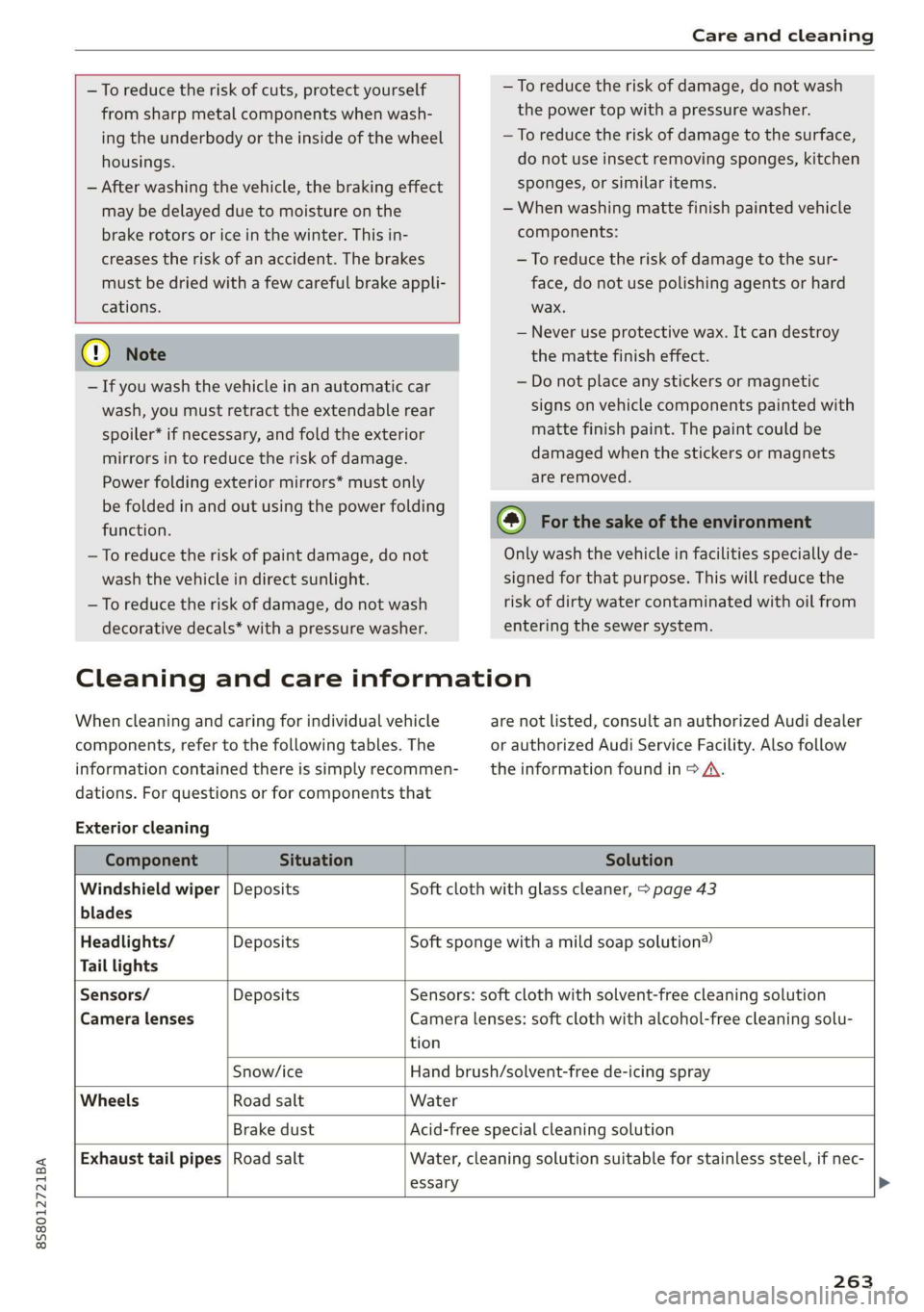
Cleaning and care information
When cleaning and caring for individual vehicle
components, refer to the following tables. The
information contained there is simply recommen-
dations. For questions or for components that
Exterior cleaning
entering the sewer system.
are not listed, consult an authorized Audi dealer
or authorized Audi Service Facility. Also follow
the information found in > A.
Component Situation Solution
Windshield wiper | Deposits Soft cloth with glass cleaner, > page 43
blades
Headlights/ Deposits Soft sponge with a mild soap solution®
Tail lights
Sensors/ Deposits Sensors: soft cloth with solvent-free cleaning solution
Camera lenses Camera lenses: soft cloth with alcohol-free cleaning solu-
tion
Snow/ice Hand brush/solvent-free de-icing spray
Wheels Road salt Water
Brake dust Acid-free special cleaning solution
Exhaust tail pipes | Road salt Water, cleaning solution suitable for stainless steel, if nec-
essary
263
Page 280 of 304
![AUDI TT ROADSTER 2019 Owners Manual Fuses and bulbs
Interior fuse assignment
ft
pl Bel Fe
» BEBE ERED
Poo
ns
[24] 25) rao) 27) Fe Ra
23 |
Fsacsomeemr STE 42)
eases eres] b
ro Wa a i ee
1F52) FOL
Re
B8V-0217](/img/6/57667/w960_57667-279.png "AUDI TT ROADSTER 2019 Owners Manual Fuses and bulbs
Interior fuse assignment
ft
pl Bel Fe
» BEBE ERED
Poo
ns
[24] 25) rao) 27) Fe Ra
23 |
Fsacsomeemr STE 42)
eases eres] b
ro Wa a i ee
1F52) FOL
Re
B8V-0217")
Fuses and bulbs
Interior fuse assignment
ft
pl Bel Fe
» BEBE ERED
Poo
ns
[24] 25) rao) 27) Fe Ra
23 |
Fsacsomeemr STE 42)
eases eres] b
ro Wa a i ee
1F52) FOL
Re
B8V-0217
No. | Equipment
F20 | Power lumbar support adjustment
Front passenger's side neck heating (Road-
F22
ster)
Right vehicle electrical system control
F24
module
F25 | Driver side door
F26 | Seat heating
Vehicle electrical system control module
Fae (terminal 30)
F28 | AMI High media port
F29 | Vehicle electrical system control module
F32 | Driver assistance systems
F33 | Airbag
Sockets, interior sound, tail light switch,
F34 | temperature sensor, oil level sensor, neck
heating, garage door opener
Fig. 202 Vehicle interior: fuse assignment
No. Equipment
Diagnosis, headlight range control, air
quality sensor, automatic dimming rear-
view mirror, center instrument panel
switch module
F35
F4 Central computer processor (MIB-2) F36 | Right cornering light / right LED headlight
FS Gateway (diagnostics) F37 | Left cornering light / left LED headlight
Fo Selector lever (automatic transmission)
F7
Climate control system controls, rear win-
dow defogger, tire pressure monitoring
Engine control module, ESC control mod-
F38
ule
F39 | Front passenger side door
F8
Switch for the electromechanical parking
brake, light switch, rain/light sensor, inte-
rior lighting, diagnostic connector, roof
electronics F40
| Cigarette lighter, sockets
F41 | Fuel tank diagnosis
F42 | Central locking area
FQ Steering column switch module
F44 | All wheel drive clutch control module
F10 Vehicle positioning
F45 | Power adjustable driver's side seat
Fll
All wheel drive clutch, left vehicle electri-
cal system control module
F46 | Driver's side neck heating (Roadster)
F49 | Engine start, clutch sensor
F12 Infotainment components
F52 | Control module for suspension control
F1l4 Climate control system blower fan
F53 | Rear window defogger
Fis Electronic steering column lock
F16
Infotainment system components, safety
belt microphone
F17 Instrument cluster
F18 Rearview camera
F19
Convenience access control module
278
The power seats* are protected via circuit break-
ers that automatically switch on after a few sec-
onds after the overload has been reduced.
Page 281 of 304
8S58012721BA
Fuses and bulbs
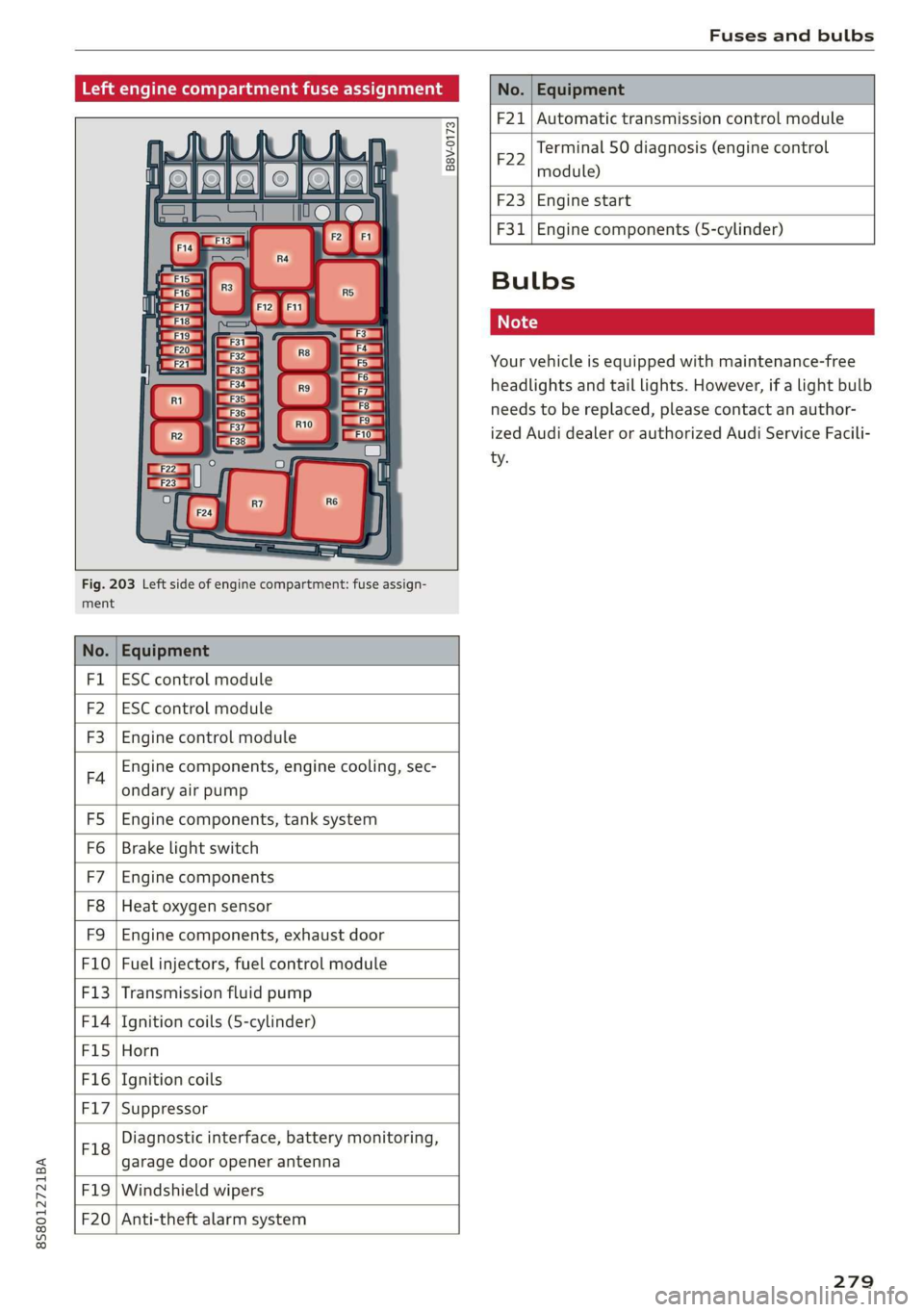
Left engine compartment fuse assignment
B8V-0173
ment
Fig. 203 Left side of engine compartment: fuse assign-
No. Equipment
Fl ESC control module
F2 ESC control module
F3 Engine control module
F4
Engine components, engine cooling, sec-
ondary air pump
FS Engine components, tank system
Fo Brake light switch
F7 Engine components
F8 Heat oxygen sensor
F9 Engine components, exhaust door
F10 Fuel injectors, fuel control module
F13 Transmission fluid pump
F1l4 Ignition coils (5-cylinder)
Fis Horn
F16 Ignition coils
F17 Suppressor
F18
Diagnostic interface, battery monitoring,
garage door opener antenna
F19 Windshield wipers
F20
Anti-theft alarm system
No. Equipment
F21 Automatic transmission control module
F22
Terminal 50 diagnosis (engine control
module)
F23 Engine start
F31
Engine components (5-cylinder)
Bulbs
Cs
Your vehicle is equipped with maintenance-free
headlights and tail lights. However, if a light bulb
needs to be replaced, please contact an author-
ized Audi dealer or authorized Audi Service Facili-
ty.
279
Page 290 of 304
Index
AUTO
Automatic climate control system........ 53
Automatic headlights...............0.. 38
Auto Lock (central locking) ............... 21
Automatic belt retractor..............-. 185
Automatic climate control system
refer to Climate control system (automatic) . 53
Automatic post-collision braking system.... 86
Automatic transmission................5- 61
DYING tPSiss s caus s 2 eee ss deme se ee ae 64
Emergency: Mode: « sieves «eens a emma se ow 67
Hill descent control................000. 65
Kicked OWiirews x 2 sews « & meee © eames « RoE 66
Malfumetionjans = cvs cw waseews a 6 wrawsos ot ancnnus & 63
Selector lever emergency release......... 68
Selector lever lO¢K ow « « sees = 2 capes y yee 63
Selector lever positions.............000- 62
Shifting manually.................000. 66
Steering wheel with shift paddles........ 66
LiptrOnies. « sass ss wows ¥ wane wo eae « + vam 66
Automatic wiper/washer system..........- 42
Automatic zoom (navigation)............ 142
AUX iNPUt sows s 5 epee so veme s pee es ees 159
Average fuel consumption................ 15
Average speed..... 0.2... cee ee eee eee 15
B
BACK button... 2.6.6... cece eee eee eee 92
Balance(SOUNG) wiesvise « crevice so sistas oxenize « 175
Band
refer to Frequency band............... 147
Bass (sound) .............00.00e eee eee 175
Battery. sors » x sows 2 « seme 9 « acomaee oo camsem 4 236
Charging.................0. cece eae 238
Winter operation. ..........0e eee e eee 237
Before rivitig, swiss = x zavex s » aw 2 x saree 4 oe 177
Better route (navigation)................ 145
Blower... 2... eee eee eee 53)
Bluetooth
Audio player « sean se cgay se eee e pawn vee 155
Connecting acell phone............... 110
SettingS
00... 0. cece eee eee ee eee 174
Boost... eee eee 15
Booster'seats:, « cscs + + wvosse a 0 wssnass oo micas + 217
Boost pressure indicator.............-00. 15
288
Brake fluid
Checking the brake fluid level........... 235
Brakes... 2... eee eee 88
Brak@assist:: « sais 2 < meas ss Raa 2 Bee aS 86
Brake assist systeM...........000--008. 86
Brake: booster’, «cscs» 0 scngee sx cncacn 0 « scuenen 88
Brake fluid
Electromechanical parking brake......... 59
Emergency braking function............. 60
Indicator lights. ...............0 eee eee 16
New brake pads............ ee eee eres 88
Break-in security feature..............0-. 27
Breaking in
New brake pads: «cca. ocean as wee es wee 88
Newtires.. 0.0.0... c cee eee eee 247
Browser
refer to Media center...............0.. 161
Bulb failure (indicator light).............. 19
Bulb replacement..............00 ee eee 279
Buttons
Control panel (MMI)...............---. 92
Cc
Cable (USB adapter/AUX connector cable).. 158
California Proposition 65 Warning........ 228
Battery specific.................-.00. 237
Calllist.. 0.0... eee eee eee Ls
Calloptions.......... 0.0.0 cece eee eee 122
Capacities
Fueltank.....................0.0000. 285
Washer fluid reservoir... ......... 00000 285
Cat K6Yisae + paca g = sete ss ome se dows § eRe 22
Car WaShi's = « wows = ¢ mews ¢ teens xo eg cs 262
Catalytic converter.................000. 227
CD drive (media drives) ................. 154
Cell phone
PlSYING IMUSIC ¢ saese « ¢ seme Fo ROR ¢ 5 eR: 155
also refer to Telephone................ 110
Cell phone compartment
refer to Audi phone box............... 113
Center armrest res: «5 wo vo wmnen ¥ wramen ev oe 47
Central: lockingiecs «= cece oo anaes o seatane vv vee 21
Auto Lock... 2.2... eee eee 21
Convenience key..........-.002- 000 eee 24
Convenience opening and closing......... 29
Mechanically unlocking and locking....... 26
Page 291 of 304
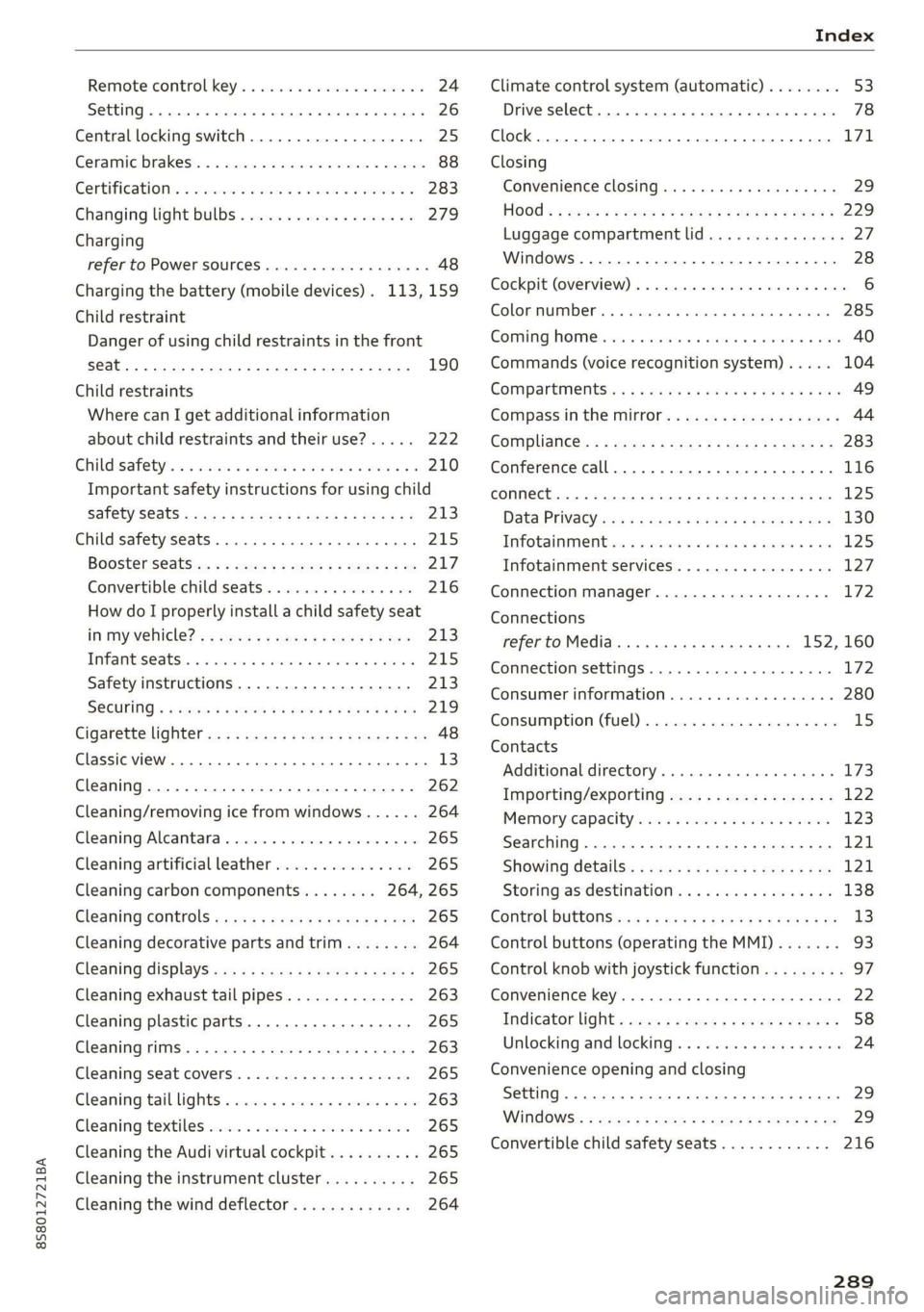
8S58012721BA
Remote control key............---0 eee 24
Setting... 2... cece eee 26
Central locking switch..............00-0. 25
Ceramic brakes......... 00020-00002 eae 88
Gertifications: = + ccs 2 waver « cece =o anesees 3 283
Changing light bulbs................... 279
Charging
refer to Power sourceS.........2--0000-- 48
Charging the battery (mobile devices). 113, 159
Child restraint
Danger of using child restraints in the front
Child restraints
Where can I get additional information
about child restraints and their use?..... 222
Child:safety:s + & scvis ss ows 2 2 reson oe vem vo 210
Important safety instructions for using child
SAfetySGats s wacas x x sees go eeeE so eR YY 213
Child safety seats... 0.00... cece eee eee 215
Booster Seats... + «isu ss ews ev paws soe 217
Convertible child seats.............0.0. 216
How do I properly install a child safety seat
in my vehicle? s = sees « ¢ sews so ees so es 213
Tinfantiseatsis i osseous a x cviaina a o canams ao xaos 215
Safety instructions.............-..00. 213
SOCUFING & exis x o ees xe eis xe dew ee oH 219
Cigarette lighter a: < s eens + 8 ees ose 5 oe 48
Classic view
Cleaning......... 02.
Cleaning/removing ice from windows...... 264
Cleaning Alcantara...............00000. 265
Cleaning artificial leather............... 265
Cleaning carbon components........ 264, 265
Cleaning controls ........0..scceeeeeees 265
Cleaning decorative parts andtrim........ 264
Cleaning displays «os i esas si eee ot ve ws 265
Cleaning exhaust tail pipes.............. 263
Cleaning plastic parts..............000. 265
Cleaning rims..............0 02.20 e ee eee 263
Cleaning seat covers.............000005 265
Cleaning taillights « ice <2 cece 6 a emacs xe oe 263
Cleaning textiles ove. ss sccan vs evn oe eves 265
Cleaning the Audi virtual cockpit.......... 265
Cleaning the instrument cluster.......... 265
Cleaning the wind deflector............. 264
Climate control system (automatic)........ 53
Drive select... 0... cece eee eee 78
Clock... eee eee eee eee L71
Closing
Convenience closing. ..........ese eres 29
HOG « 2 wey + y seus: 8 5 ees ¢ 9 eee es wR 229
Luggage compartment lid............... 27
Windows ..... 0.0.0.0 c cece eee eee eee 28
Cockpit (overview) ...... 6.0.0 c cece eee ee 6
GolommUMBer a. « siasnse sv cvavane ew ogsuwre + o oxesnse 285
GOMING HOME aici 2 6 sensi av eymree w H arwere a + anave 40
Commands (voice recognition system) ..... 104
Compartments: as ss ssw sv sews sv eaves y 6 eae 49
Compass inthe mirror...............0005 44
Complianicé:: = » eece x x sews 5 s wees 5 v eee os 283
Conference call...................20005 116
CONNECE. 2... eee eee 125
Data Privacy ews < ¢ ces se nes & ¢ pete 5 ¥ eee 130
Infotainmenticn 2 = ciao a 2 cxivaus « eoeseas 6 2 we 125
Infotainment services............00005 127
Connection manager................... 172
Connections
referto Media..............e eee 152, 160
Connection settings .................00. 172
Consumer information................55 280
Consumption (Fuel) . . srerice o ccasese wo yess « 6 ave 15
Contacts
Additional directory.......... 0.0 eevee 173
Importing/exporting.................. 122
Memiory:capacityisicca: asc ss sesese © evans 123
Searching.......... 02. see eee eee eee 121
SHOWiniG UStailS!: « aeas x 2 eames ¢ 5 seem Ee 121
Storing
as destination................. 138
Control BUTCONSio08 x s mews 2 x gow = qamey o 9 we 13
Control buttons (operating the MMI)....... 93
Control knob with joystick function......... 97
Convenience key...... 0.02.00 ee eee eee 22
Indicator light ; sacs se ceca ss pees ee reese 58
Unlocking and locking..............0005 24
Convenience opening and closing
Setting... 0.0... c eee 29
WIRKOWS% = zur: ¢ 2 were x x ces go ee sox 29
Convertible child safety seats............ 216
289