cruise control AUDI TT ROADSTER 2019 Owners Manual
[x] Cancel search | Manufacturer: AUDI, Model Year: 2019, Model line: TT ROADSTER, Model: AUDI TT ROADSTER 2019Pages: 304, PDF Size: 80.77 MB
Page 4 of 304
Table of contents
About this Owner's Manual......
SUMIMALY: ; « ss6% : osen ss sean cs poe s
QC CCeS Skis: si esis a 6 ores os ewe
Cockpit overview.............-000005
Indicator lights overview...........0.
Display and operation............
Instrument cluster...............
Instrument cluster overview...........
Coolant temperature indicator.........
Tachometer.......... 0.0 eee eee eee
Odometer as = s eee = seen ge zee a tows e
Outside temperature display...........
Fuellevel.......... 0. cece eee eee eee
Multifunction steering wheel..........
Vehicle functions « se-0 2. ese ve eee ees
MessageS ... 0... eee eee eee
Starting and driving.............
Opening and closing.............
Central locking 2.2% ieee seven a eevee
Luggage compartment lid.............
Power windows.............0.00 0005
Garage door opener...............0..
POWER EOPE: « «cece 0 csv « o semiens 6 0 eens
Automatic power top.................
Wind deflector ecax « x came + 5 yom 2 4 ews
Power top emergency operation........
Lights and Vision.................
Exterior lighting ssivses + « ssa 3s inane 9 & sou
Interior lighting. ................000.
VISION s « s saas ss sees Fo Hees Eo ee ee
Windshield wipers..............00005
Digital compass................0000.
Storage... eee eee eee
Luggage compartment...............
NOD
OO
11 il 12 12 15
16
21 21 21
27
28
30
3.
33 35 35
38 38
40
Al 42
44
46 46
46
48
48
48 48 49
50
Warm and cold...
Climate control system............00.
DRIVING: & tacos 6 2 maemo e eae 0 x iano 4
General information .
Steering.........6.
Starting and stopping
Electromechanical par
Starting to drive.....
theengine.......
king brake.......
Automatic transmission..............
Trailer towing.......
Driver assistance.
Assist systems...
Speed warning system...............-
Cruise control system
Audi active lane assist
Audi side assist
Audi drive select (drive settings) ........
Parking aid.......
Introduction........
Rear parking system .
Parking system plus.............-.00.
Rearview camera
Intelligent Technology...........
Electronic stabilization control (ESC) ....
StEOKing © esse we wssuse
All wheel drive (quattro) ..............
Rear spoiler........
Energy management .
Information about data recorded by
vehicle control modules...............
Infotainment system............
Multi Media Interface............
Traffic safety information.............
Introduction........
MMI On/Off knob with joystick function . .
MMI operation......
MMT OU CPi ccm. » 6 camere
Control knob with joys
Letter/number speller
tick function. ....
52
56 56 57 57 59
61
61
69 70 70 70
70
72
75
77
80
80
81
81
82
84
84
86
86
88
89
89 90
91
91 92
92
92
92
92
93
94
97
98
Page 7 of 304
8S8012721BA
About this Owner's Manual
This Owner's Manual applies to all versions of
this model. It contains important information,
tips, suggestions, and warnings for using your ve-
hicle.
Keep this manual in your vehicle at all times. This
is especially important if you loan your vehicle to
others or sell it.
This owner's manual describes the equipment
range specified for this model at the time of
printing. Individual equipment options described
may only be available at a later date or may only
be offered in certain countries.
Some sections in this manual do not apply to all
vehicles. When this is the case, the beginning of
the section indicates the validity, for example
“Applies to: vehicles with cruise control system”.
Optional
or vehicle-specific equipment is also
identified with an asterisk “*”.
The illustrations in this manual are a guide.
Some of the details in your vehicle may differ
from the illustration.
All directions, such as “Left”, “right”, “front” and
“rear”, are based on the vehicle's direction of
travel.
* — Optional or vehicle-specific equipment
b> The section continues on the next page.
=>/\ Cross reference to a “WARNING” within a
section. If a page number is indicated, the
WARNING is located outside of the section.
Z\ WARNING
Text with this symbol contains information
about safety and how to reduce the risk of se-
rious personal injury or death.
@) Note
Text with this symbol contains information
about reducing the risk of damage to your ve-
hicle.
@ For the sake of the environment
Text with this symbol contains information on
protecting the environment.
@) Tips
Text with this symbol contains additional use-
ful information.
Page 9 of 304
8S8012721BA
Quick access
OOOO
©
OOOOGOOOO
©
O
®OOO®
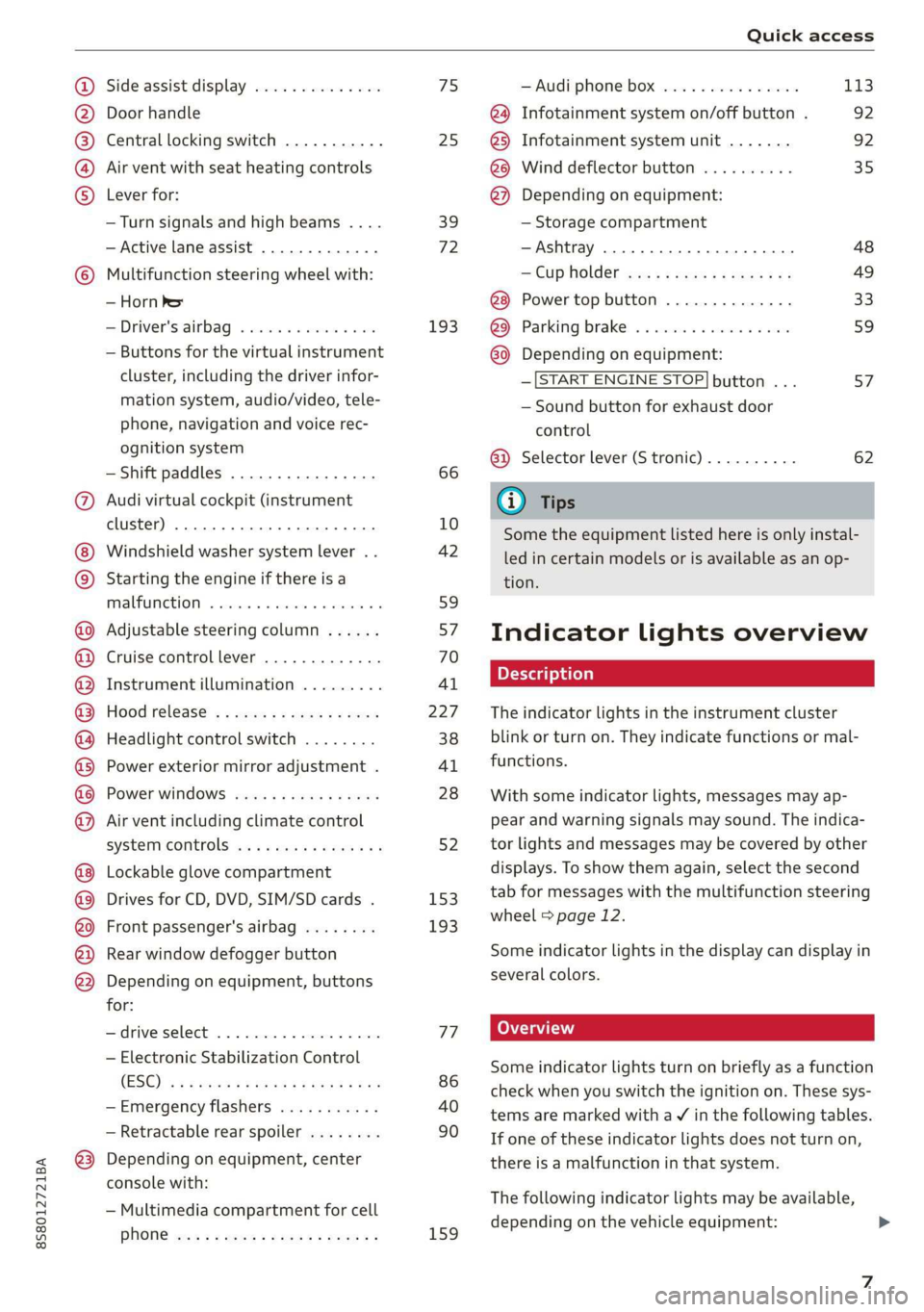
Side assist display ..............
Door handle
Central locking switch ...........
Air vent with seat heating controls
Lever for:
—Turn signals and high beams ....
— Active lane assist .............
Multifunction steering wheel with:
— Horn Pe
— Driver's airbag ...............
— Buttons for the virtual instrument
cluster, including the driver infor-
mation system, audio/video, tele-
phone, navigation and voice rec-
ognition system
—Shift paddles ................
Audi virtual cockpit (instrument
cluster) 22... 0... eee eee eee
Windshield washer system lever . .
Starting the engine if there is a
malfunction ..............00 00
Adjustable steering column ......
Cruise control lever .............
Instrument illumination .........
Hood release! » « wae ¢ s eae vs setee
Headlight control switch ........
Power exterior mirror adjustment .
Power windows ............005-
Air vent including climate control
system controls ................
Lockable glove compartment
Drives for CD, DVD, SIM/SD cards .
Front passenger's airbag ........
Rear window defogger button
Depending on equipment, buttons
for:
sdriverselect oc. seins 6 + cgies oo neve
— Electronic Stabilization Control
(ESC) «5 « cows ss owen 4 ¢ ee a8 i vee
—Emergency flashers ...........
— Retractable rear spoiler ........
Depending on equipment, center
console with:
— Multimedia compartment for cell
PNONG aces cs ees s Ree se BER es
75 25
39
72
193
66
10
42
59 57 70
Al
227
38
Al
28
52
153,
193
TT
86
40
90
159
= Audi phone box sessie ss owe oo cee 113
@) Infotainment system on/off button . 92
@5) Infotainment system unit ....... 92
@8 Wind deflector button .......... 35
@) Depending on equipment:
— Storage compartment
—Ashtray 0.2... 00. eee eee eee 48
—CUPHGIDES wis 5 2 wens s x eee 5 2: 49
Power top button .............. 33
@ Parking’ brake: « + cs ss wows so sors 59
G0 Depending on equipment:
—[START ENGINE STOP] button ... 57
— Sound button for exhaust door
control
@) Selector lever (S tronic).......... 62
@) Tips
Some the equipment listed here is only instal-
led in certain models or is available as an op-
tion.
Indicator lights overview
The indicator lights in the instrument cluster
blink or turn on. They indicate functions or mal-
functions.
With some indicator lights, messages may ap-
pear and warning signals may sound. The indica-
tor lights and messages may be covered by other
displays. To show them again, select the second
tab for messages with the multifunction steering
wheel © page 12.
Some indicator lights in the display can display in
several colors.
Some indicator lights turn on briefly as a function
check when you switch the ignition on. These sys-
tems are marked with a V in the following tables.
If one of these indicator lights does not turn on,
there is a malfunction in that system.
The following indicator lights may be available,
depending on the vehicle equipment:
Page 11 of 304

8S8012721BA
Quick access
Transmission High beams
=> page 67
Steering lock = High beam assistant
=> page 18 Vy
Engine start system
>page 18
High beam assistant
Central indicator light
=>page 19
Electromechanical steering
=> page 89
Suspension control
=> page 20
Rear spoiler
=> page 90
Other indicator lights
Turn signals
=> page 20
Cruise control system
=> page 70
Cruise control system
=> page 70
Active lane assist
=> page 73
Convenience key
=> page 59
Electromechanical parking brake
>page 17
Active lane assist
=> page 73
Audi side assist
=> page 76
Transmission
=> page 67
)
(®
7 ¥
0;
PARK BRAKE Electromechanical parking brake
=>page 17
Electromechanical parking brake
‘@)) => page 17
Speed warning system
=> page 70
Speed warning system
=> page 70
Page 68 of 304
Driving
case, shift manually into 1st or 2nd gear in tip-
tronic mode to use the engine's braking force to
relieve the brakes.
Hill descent control switches off once the hill lev-
els out or if you press the accelerator pedal.
On vehicles with a cruise control system*
= page 70, hill descent control is also activated
when the speed is set.
Z\ WARNING
Hill descent control may not be able to main-
tain a constant speed under all conditions. Al-
ways be ready to apply the brakes.
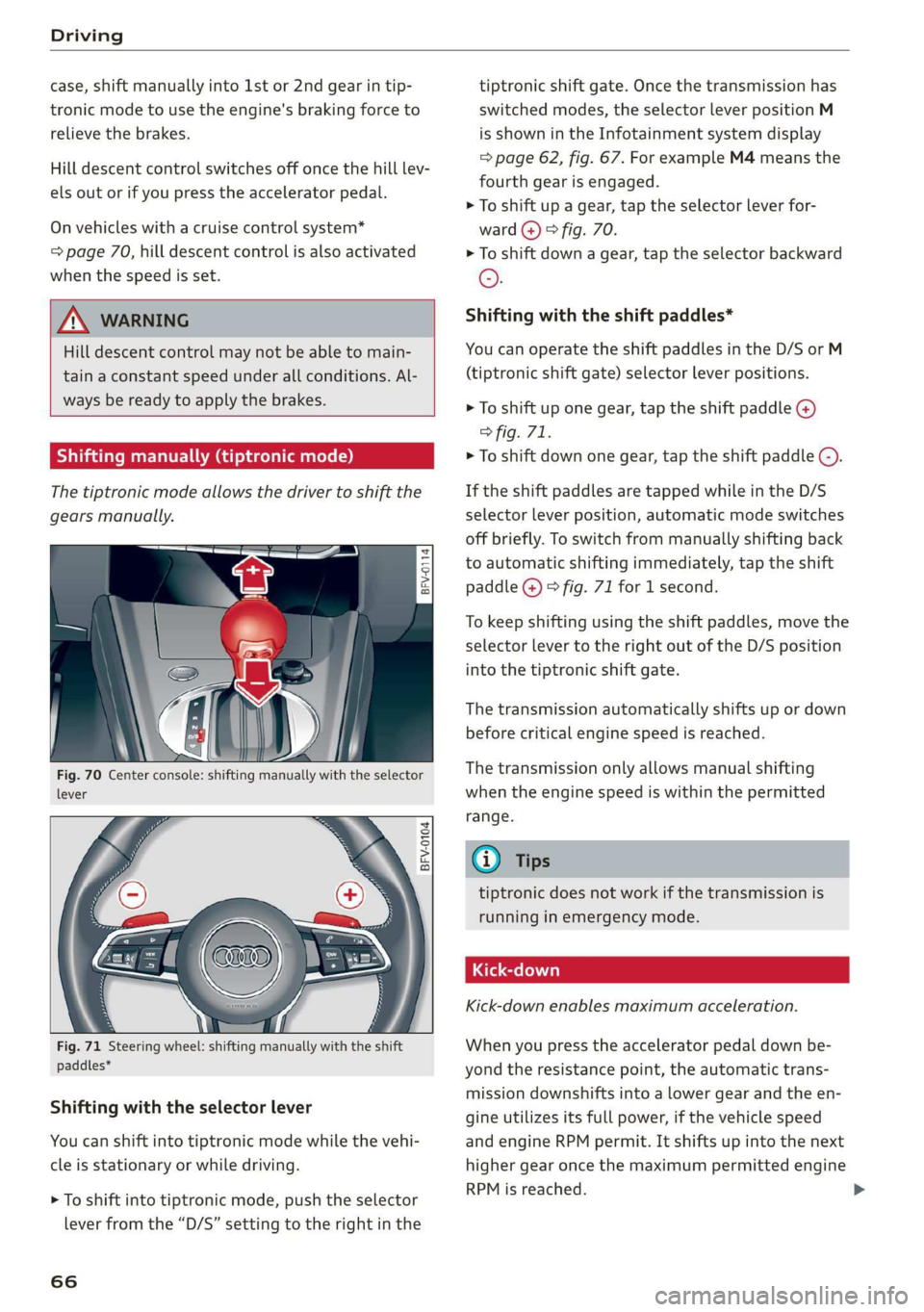
Shifting manually (tiptronic mode)
The tiptronic mode allows the driver to shift the
gears manually.
= g
i 5
BFV-0104
paddles*
Shifting with the selector lever
You can shift into tiptronic mode while the vehi-
cle is stationary or while driving.
> To shift into tiptronic mode, push the selector
lever from the “D/S” setting to the right in the
66
tiptronic shift gate. Once the transmission has
switched modes, the selector lever position M
is shown in the Infotainment system display
=> page 62, fig. 67. For example M4 means the
fourth gear is engaged.
> To shift up a gear, tap the selector lever for-
ward @) © fig. 70.
> To shift down a gear, tap the selector backward
©.
Shifting with the shift paddles*
You can operate the shift paddles in the D/S or M
(tiptronic shift gate) selector lever positions.
> To shift up one gear, tap the shift paddle @)
> fig. 71.
> To shift down one gear, tap the shift paddle ©).
If the shift paddles are tapped while in the D/S
selector lever position, automatic mode switches
off briefly. To switch from manually shifting back
to automatic shifting immediately, tap the shift
paddle @) © fig. 71 for 1 second.
To keep shifting using the shift paddles, move the
selector lever to the right out of the D/S position
into the tiptronic shift gate.
The transmission automatically shifts up or down
before critical engine speed is reached.
The transmission only allows manual shifting
when the engine speed is within the permitted
range.
@) Tips
tiptronic does not work if the transmission is
running in emergency mode.
Kick-down enables maximum acceleration.
When you press the accelerator pedal down be-
yond the resistance point, the automatic trans-
mission downshifts into a lower gear and the en-
gine utilizes its full power, if the vehicle speed
and engine RPM permit. It shifts up into the next
higher gear once the maximum permitted engine
RPM is reached.
Page 72 of 304
Assist systems
Assist systems
Speed warning system
Applies to: vehicles with speed warning system
The speed warning system helps you to stay be-
low a specified maximum speed that can be set,
changed or deleted in the Infotainment system.
The speed warning system warns you if you are
exceeding the maximum speed that you have set.
A warning tone will sound as soon as your speed
exceeds the stored value slightly. The oe) in-
dicator light and a message will appear in the in-
strument cluster display at the same time. The
owe indicator light and the message turn off if
the speed falls back below the stored maximum
speed.
Setting a threshold is recommended if you would
like to be reminded when you reach a certain
maximum speed. Situations where you may want
to do so include driving in a country with a gener-
al speed limit or if there is a specified maximum
speed for winter tires.
Setting the warning threshold
> Select in the Infotainment system: MENU but-
ton > Vehicle > left control button > Driver as-
sistance > Speed warning > Manual.
G) Tips
Regardless of the speed warning system, you
should always monitor your speed using the
speedometer and make sure you are following
the legal speed limit.
Cruise control system
Applies to: vehicles with cruise control system
The cruise control system assists the driver in
maintaining a constant speed above approxi-
mately 15 mph (20 km/h). The system maintains
the desired speed by braking and accelerating.
70
Z\ WARNING
— Always pay attention to the traffic around
your vehicle when the cruise control system
is in operation. As the driver, you are always
responsible for controlling your vehicle
speed and the distance between your vehicle
and
other vehicles.
— For safety reasons, cruise control should not
be used in the city, in stop-and-go traffic, on
winding roads, and when road conditions are
poor (such as ice, fog, gravel, heavy rain,
and conditions that could lead to hydroplan-
ing), because this increases the risk of an ac-
cident.
— Switch the cruise control off temporarily
when driving in turning lanes, highway exits,
or in construction zones.
—To reduce the risk of an accident, you should
only resume the stored speed if it is suitable
for the current traffic conditions.
() Note
Before driving downhill a long distance on a
steep hill, decrease your speed and select a
lower gear. This makes use of the engine brak-
ing effect and reduces the load placed on the
brakes.
G) Tips
The brake lights turn on when the brakes are
applied automatically.
Switching the system on
Applies to: vehicles with cruise control system
@ g
©
f ©
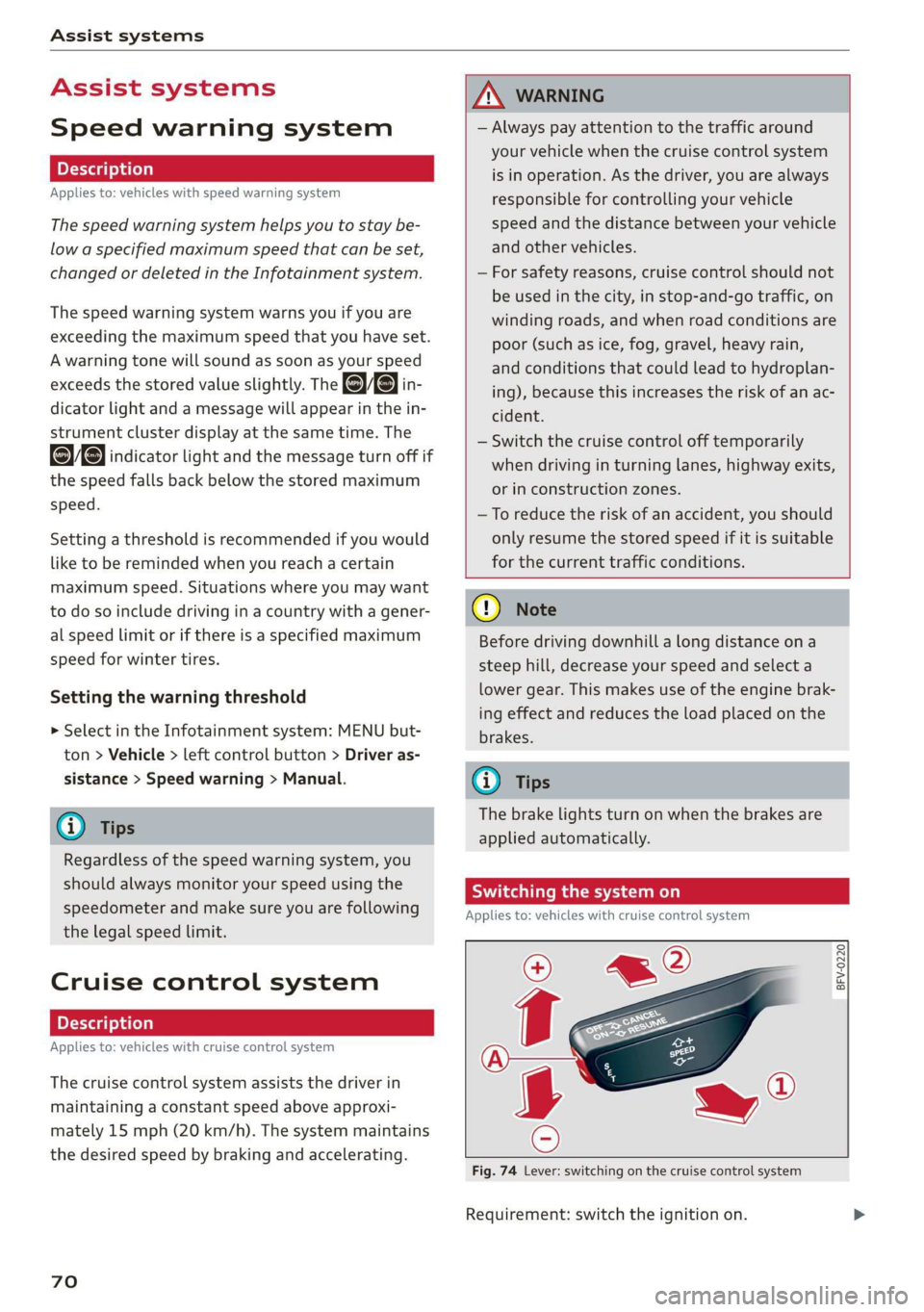
Fig. 74 Lever: switching on the cruise control system
Requirement: switch the ignition on.
Page 73 of 304
![AUDI TT ROADSTER 2019 Owners Manual 8S58012721BA
Assist systems
> To switch the system on, pull the lever toward
you to position @).
The Gig or (§] indicator light and the corre-
sponding message will appear in the instrument](/img/6/57667/w960_57667-72.png "AUDI TT ROADSTER 2019 Owners Manual 8S58012721BA
Assist systems
> To switch the system on, pull the lever toward
you to position @).
The Gig or (§] indicator light and the corre-
sponding message will appear in the instrument")
8S58012721BA
Assist systems
> To switch the system on, pull the lever toward
you to position @).
The Gig or (§] indicator light and the corre-
sponding message will appear in the instrument
cluster.
Z\ WARNING
If the brakes are malfunctioning (for example,
overheating) while the cruise control system
is switched on, it may shut off automatically.
Preselecting or activating a cruise control
ry ey-t-fe)
Applies to: vehicles with cruise control system
When the vehicle is stationary, you can preselect
the cruise control speed or activate the speed
while driving.
Requirement: the system must be switched on.
> To preselect a cruise control speed when the ve-
hicle is stationary, tap the lever toward @)/G)
=> page 70, fig. 74.
> To activate the cruise control speed, pull the
lever toward position @ while driving, or
> To set the current driving speed as the cruise
control speed, press the button () on the lever.
The active cruise control speed is indicated with
the ICRUISE| or BS indicator light in the instrument
cluster.
Changing the cruise control speed
Applies to: vehicles with cruise control system
> To increase or decrease the cruise control speed
in small increments, tap the lever up to the
first level toward @/@) > page 70, fig. 74.
> To increase or decrease the cruise control speed
in larger increments, tap the lever up to the
second level toward @)/G).
> To increase or decrease the cruise control speed
continuously, tap and hold the lever at the first
or second level toward (#)/G).
Overriding or deactivating the cruise
control speed
Applies to: vehicles with cruise control system
You can override or deactivate the cruise control
system. When you deactivate the system, your
cruise control speed will be stored and you can
resume that speed.
Requirement: the system must be switched on
and activated.
Overriding
> To temporarily override the cruise control
speed, press the accelerator pedal.
> Once you release the accelerator pedal, the sys-
tem will adjust back to the stored cruise control
speed.
If you override the cruise control system for a
long period of time, the cruise control system
will be deactivated. The system indicator light
will turn off and the cruise control speed will be
stored.
Deactivating
> To deactivate the cruise control speed, press
the lever toward (2) (not locked into place)
=> page 70, fig. 74.
> Press the brake pedal.
Z\ WARNING
Resting your foot on the accelerator pedal
could override the cruise control. This will pre-
vent braking interventions by the system.
Siem eel
Applies to: vehicles with cruise control system
When you switch the system off completely, the
cruise control speed will be deleted.
Requirement: the system must be switched on.
> To switch the system off, press the lever toward
@ (locked into place) > page 70, fig. 74, or
> Switch the ignition off.
71
Page 74 of 304
Assist systems
Applies to: vehicles with cruise control system
ICRUISE| / §) Speed control system: currently un-
available. See owner's manual
If the indicator light turns on and this message
appears, the cruise control system has been deac-
tivated. There is a temporary malfunction, for ex-
ample the brakes are overheating. Switch the
cruise control system on again later.
Audi active lane assist
Applies to: vehicles with Audi active lane assist
Active lane assist detects lane marker lines with-
in the limits of the system using a camera in the
windshield. If you are approaching a detected
lane marker line and it appears likely that you
will leave the lane, the system will warn you with
corrective steering. You can override this steering
at any time. If you pass over a line, the steering
wheel will vibrate lightly. In order for this warn-
ing vibration to occur, it must first be switched
on in the Infotainment system. Active lane assist
is ready for operation when the lane marker line
is detected on at least one side of the vehicle.
The system is designed for driving on express-
ways and highways and so it only activates at
speeds above approximately 40 mph (65 km/h)
(depending on the market).
Applies to vehicles with side assist*: If you acti-
vate a turn signal when active lane assist is ready
and it classifies a lane change as critical because
of vehicles traveling alongside you or approach-
ing you, there will be noticeable corrective steer-
ing shortly before you leave the lane. This will at-
tempt to keep your vehicle in the lane.
Applies to vehicles without side assist*: When
the system is ready, it will not warn you if you ac-
tivate the turn signal before crossing the lane
marker line. In this case, it assumes that you are
changing lanes intentionally.
)) The corrective steering function is not available in all mar-
kets.
72
Z\ WARNING
— The system warns the driver that the vehicle
is leaving the lane using corrective steering.
The
driver is always responsible for keeping
the vehicle within the lane.
— The system can assist the driver in keeping
the vehicle in the lane, but it does not drive
by itself. Always keep your hands on the
steering wheel.
— Corrective steering may not occur in certain
situations, such as during heavy braking.
— There may be cases where the camera does
not recognize all lane marker lines. Correc-
tive steering can only take place on the side
of the vehicle where lane marker lines are
detected.
— Other road structures or objects could possi-
bly be identified unintentionally as lane
marker lines. As a result, corrective steering
may be unexpected or may not occur.
— The camera view can be restricted, for exam-
ple by vehicles driving ahead or by rain,
snow, heavy spray light shining into the
camera or by dirt on the window. This can
result in active lane assist not detecting the
lane marker lines or detecting them incor-
rectly.
— Incertain situations where visibility is low,
the vehicle may switch internally from “ear-
ly” to “late” steering correction )).
— Under certain conditions such as ruts in the
road, an inclined roadway or crosswinds, the
corrective steering alone may not be enough
to keep the vehicle in the middle of the lane.
— For safety reasons, active lane assist must
not be used when there are poor road and/or
weather conditions such as slippery roads,
fog, gravel, heavy rain, snow and the poten-
tial for hydroplaning. Using active lane as-
sist under these conditions may increase the
risk of a crash.
Page 90 of 304
Intelligent Technology
— There is no vehicle stabilization when
ESC/ASR are switched off.
@) Tips
— When the cruise control system* is switched
on, ESC/ASR cannot be switched off or sport
mode cannot be switched on.
— Malfunctions in the rear spoiler or the Audi
magnetic ride may make it impossible to
switch the ESC/ASR off or to switch sport
mode on.
Brakes
You can apply the vehicle's brakes using the brake
pedal.
Operating noise
Noises may occur when braking depending on the
speed, braking force, and outside conditions such
as temperature and humidity.
Braking effect
The response time from the brakes depends on
the weather and environmental conditions. To
ensure the optimum braking effect, the brake
system is cleaned at regular intervals. This is
done by applying the brake pads to the brake ro-
tors for a short period of time when driving at
high speeds when the windshield wipers are
switched on.
If the brake system becomes damp, for example
after driving in heavy rain, the braking effect may
be delayed. Other factors that could temporarily
increase the response time of the brakes include:
— Wet conditions
— Low temperatures, ice, and snow
— Roads covered in salt
— Dirty brake pads
Corrosion
Corrosion may form on the brake rotors if there is
no heavy braking, if the vehicle is not driven for
long periods of time, or if the vehicle is not driv-
en
frequently or for long distances. In this case,
braking heavily several times while driving at
high speeds can clean the brake rotors > A\.
838
Brake pads
New brake pads do not achieve their full braking
effect during the first 250 miles (400 km). They
must be “broken in” first. However, you can com-
pensate for the slightly reduced braking force by
pressing firmly on the brake pedal. Avoid heavy
braking during the break-in period.
Brake pad wear depends largely on the way the
vehicle is driven and on operating conditions.
Brake pad wear increases when driving frequently
in the city or short distances or when using a very
sporty driving style.
Ceramic brakes
Applies to: vehicles with ceramic brakes
Ceramic brakes provide excellent deceleration
rates.
The break-in period for new ceramic brakes may
be significantly longer than for standard brake
rotors. Due to the properties of the material,
they may cause noises at lower speeds. Ceramic
brakes also absorb more moisture in wet condi-
tions. Therefore, there will temporarily be less
braking force than when the brakes are dry. You
can compensate for this by pressing the brake
pedal harder.
A WARNING
— Only apply the brakes for the purpose of
cleaning the brake system when road and
traffic conditions permit. You must not en-
danger other road users and increase the
risk of an accident.
— Due to the risk of injury, only have an au-
thorized Audi dealer or authorized Audi
Service Facility work on the brake system.
Incorrect repairs could impair the function.
— Never let the vehicle roll while the engine is
stopped because this increases the risk of an
accident.
— Depending on vehicle equipment, the brake
pedal may move downward automatically
during autonomous braking maneuvers. To
reduce the risk of injury, do not place your
foot under the brake pedal.
Page 292 of 304
Index
Convertible locking retractor
Activating ..... 0... c cece eee eee 220
DESCtivating « x wsee 2 cee ss meme ee REE ee 221
Using to secure a child safety seat....... 220
Gooling Mod ei: « «acre sa meee se eee oe oe 53
Cooling system
Adding coolants. sssies = « cesses % seevene a # see 234
Coolant.................00000 2c eee 234
Coolant level checking saws ss news « x gee s 234
Coolant temperature indicator........... 10
Indicator light............. 000.0022. 17
Crank (power top emergency operation) ..... 36
Crash data recorder (EDR)................ 91
EnOSSHALRS!: cisions x wecxawe ov ecwoe wo aecnoe a a 134
Cruise control system. ......... 00 eee eae 70
Cup holdersices 5 « casis so qaws + cores & & wees 8 49
Current fuel consumption................ 15
D
Data Privacy’: = sacs ss geass eee y omen se 130
Datarecorder............02020222220005 91
Date... eee cee eee eee 171
Date display.................000 22 e ee 171
Daytime running light................00. 38
Declaration of compliance............... 283
Defrosting (windows) .................005 54
DEF (instrumment:cluster) « was s ¢ sews sv eves 10
Deluxe automatic climate control
refer to Climate control system (automatic) . 53
Determining correct load limit........... 253
Digital’cOMpass saws + ¢ sees ce ce en ve oases 44
Digital Rights Management.............. 152
DIMENSIONS s « = aes st ees ay ee ee eee 285
Dimming the rearview mirror............. 42
Directory
Peer £0 CONLACES wes ss ees ee Sew se ee 120
DiSpOSalens « 2 sews x ¢ eens 4 ¢ eee Ee wee ge 280
Distance driven. ........ 0.0 cece eee eee 15
Doors
Mechanically unlocking and locking....... 26
Driver information system................ 12
On-board computer..............--.00. 15
Switching VieWS........ 00... cee eee eee 13
Driver information systems
Energy consumers.............--.--00- 15
290
Drives
refer to Media.............000 eee
Drive select. ..... 0.0... eee cee eee eee
Driving safely........... 2.0... ee eee eee
Driving through water............-....--
DriViNG CIM k ais oo seco 3 sei ws acsene we eoREOM &
Driving tips
Efficient Ariviing s « camecs 5 2 cron 0 x amen a 2 sine
Dust filter
refer to Pollutant filter.............0005
DVD drive (media drives)................
Dynamic volume
refer to System volume............0005
EDL
refer to Electronic Differential Lock.......
Electrical system... .. ccc eee eee eee
Electromechanical parking brake..........
Electronic Differential Lock...............
Electronic immobilizer...................
Electronic stabilization control (ESC).......
Sport mode....... 2... ce eee eee eee eee
Electronic Stabilization Control (ESC)
Indicator light.................-00 0005
Emergency assistance..................
Emergency braking function..............
Emergency flashers.........00.eeeeeeeee
Emergency fueling « sie ss cove se uma a 0 one
Emergency operation
Luggage compartment lid...............
POWEPtOPisis: © crcasee we © stsitei 8 ween oe ree 4
Emergency release
Selector lever... .... cee eee cece eee eee
Emissions control system..............
EMErgy COMSUMMENSIoys + sean ¥ ene e & maven We &
Energy management............. 0000005
77