warning light BMW 128I CONVERTIBLE 2008 E88 User Guide
[x] Cancel search | Manufacturer: BMW, Model Year: 2008, Model line: 128I CONVERTIBLE, Model: BMW 128I CONVERTIBLE 2008 E88Pages: 264, PDF Size: 8.68 MB
Page 220 of 264
Maintenance
218
Socket for On-Board
Diagnosis OBD
Primary components that make up exhaust
emissions can be checked by a device via the
OBD socket.
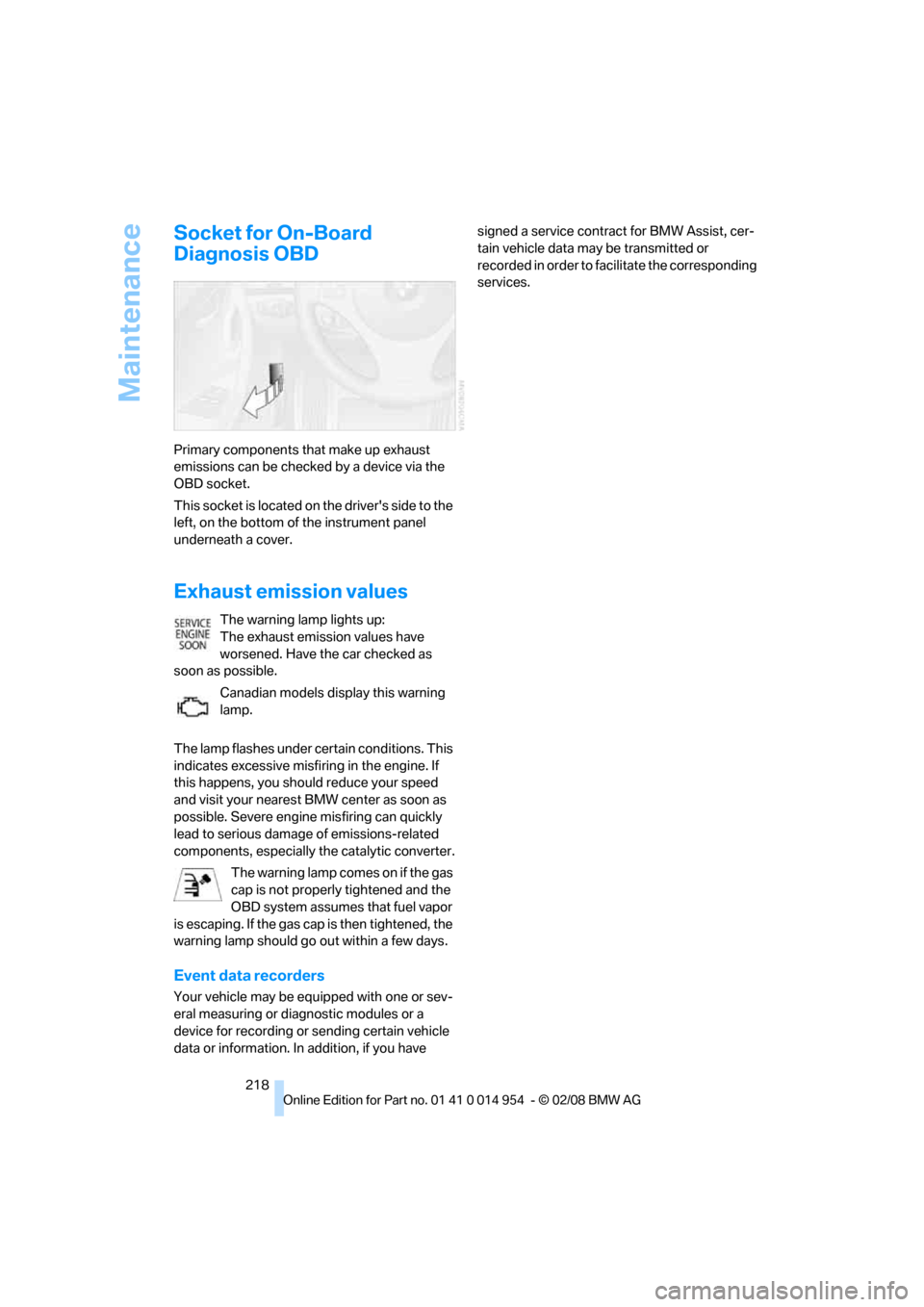
This socket is located on the driver's side to the
left, on the bottom of the instrument panel
underneath a cover.
Exhaust emission values
The warning lamp lights up:
The exhaust emission values have
worsened. Have the car checked as
soon as possible.
Canadian models display this warning
lamp.
The lamp flashes under certain conditions. This
indicates excessive misfiring in the engine. If
this happens, you should reduce your speed
and visit your nearest BMW center as soon as
possible. Severe engine misfiring can quickly
lead to serious damage of emissions-related
components, especially the catalytic converter.
The warning lamp comes on if the gas
cap is not properly tightened and the
OBD system assumes that fuel vapor
is escaping. If the gas cap is then tightened, the
warning lamp should go out within a few days.
Event data recorders
Your vehicle may be equipped with one or sev-
eral measuring or diagnostic modules or a
device for recording or sending certain vehicle
data or information. In addition, if you have signed a service contract for BMW Assist, cer-
tain vehicle data may be transmitted or
recorded in order to facilitate the corresponding
services.
Page 234 of 264
Giving and receiving assistance
232 windshield wipers may be unavailable. Power
steering assistance is not available when the
engine is not running. Thus, braking and steer-
ing will require increased effort. Active steering
is not active and it will be necessary to turn the
steering wheel further.<
Manual transmission
Gearshift lever in neutral position.
Automatic transmission
Selector lever in position N.
Changing the selector lever position, refer to
page61.
Do not exceed a towing speed of 45 mph/
70 km/h and a towing distance of
90 miles/150 km, otherwise the automatic
transmission may be damaged.<
Towing methods
Do not lift the vehicle by a tow fitting or
body and chassis parts, otherwise dam-
age may result.<
With a tow bar
The towing vehicle must not be lighter
than the towed vehicle, otherwise it may
be impossible to maintain control.<
The tow fittings used should be on the same
side on both vehicles. Should it prove impossi-
ble to avoid mounting the tow bar at an angle,
please observe the following:
>Clearance and maneuvering capability will
be sharply limited during cornering.
>The tow bar will generate lateral forces if it is
attached offset.
Attach the tow bar to the tow fittings only,
as attaching it to other parts of the vehicle
could result in damage.<
With a tow rope
When starting off in the towing vehicle, make
sure that the tow rope is taut.
To avoid jerking and the associated
stresses on vehicle components when
towing, always use nylon ropes or nylon straps. Attach the tow rope to the tow fittings only, as
attaching it to other parts of the vehicle could
result in damage.<
With a tow truck
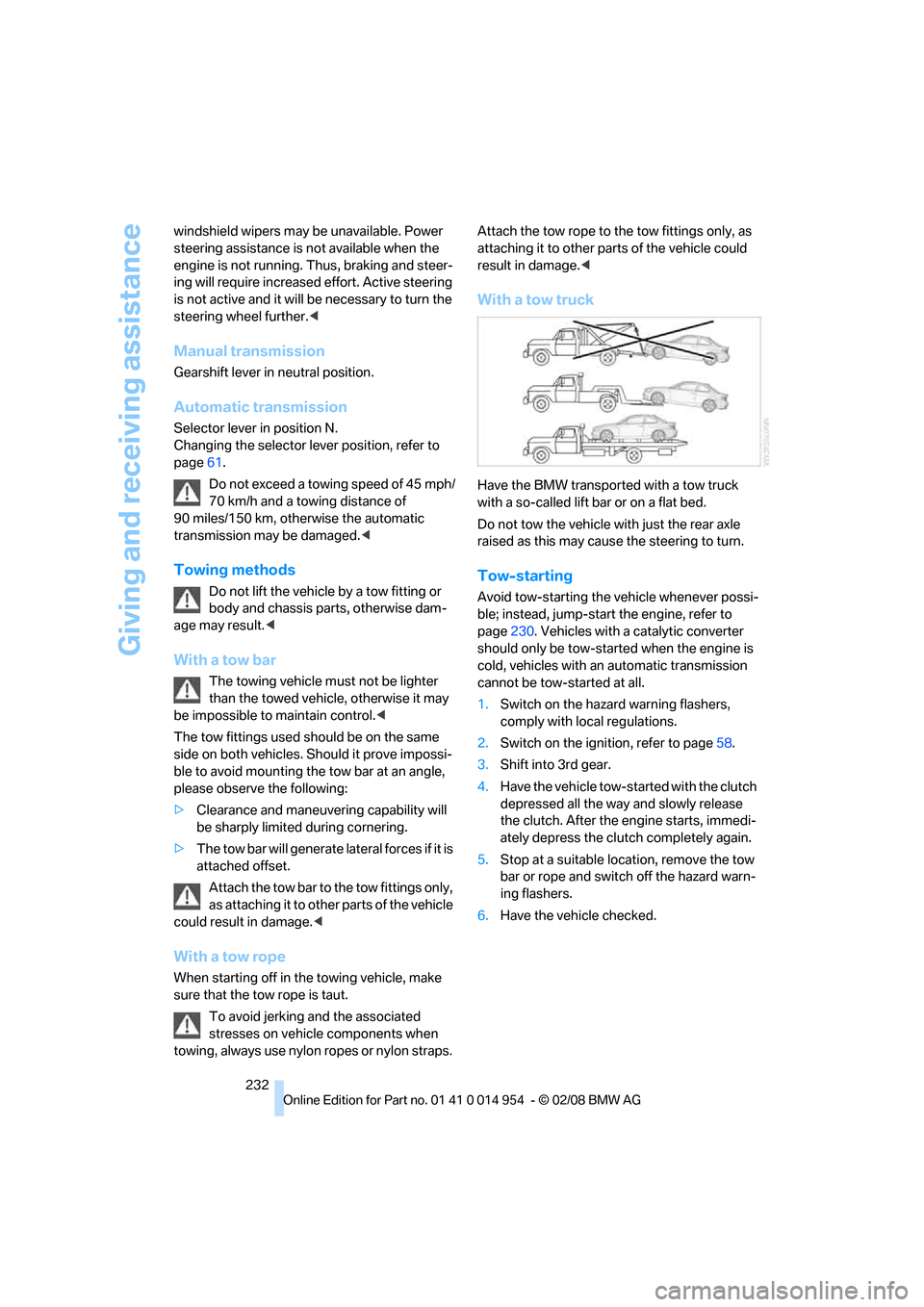
Have the BMW transported with a tow truck
with a so-called lift bar or on a flat bed.
Do not tow the vehicle with just the rear axle
raised as this may cause the steering to turn.
Tow-starting
Avoid tow-starting the vehicle whenever possi-
ble; instead, jump-start the engine, refer to
page230. Vehicles with a catalytic converter
should only be tow-started when the engine is
cold, vehicles with an automatic transmission
cannot be tow-started at all.
1.Switch on the hazard warning flashers,
comply with local regulations.
2.Switch on the ignition, refer to page58.
3.Shift into 3rd gear.
4.Have the vehicle tow-started with the clutch
depressed all the way and slowly release
the clutch. After the engine starts, immedi-
ately depress the clutch completely again.
5.Stop at a suitable location, remove the tow
bar or rope and switch off the hazard warn-
ing flashers.
6.Have the vehicle checked.
Page 246 of 264
Everything from A - Z
244
Everything from A - Z
Index
"..." Identifies Control Display
texts used to select
individual functions and
refers you to the page where
these texts can be found.
A
ABS Antilock Brake
System82
Accessories, refer to The
individual vehicle5
Accident, reporting, refer to
Emergency Request229
Activated-charcoal filter101
"Activation time" for parked
car ventilation101
Active steering88
Adaptive Head Light94
"Add digits" on the mobile
phone184
Additives
– coolant216
– engine oil215
"Address book" in
navigation131
Address for navigation
– deleting133
– entering123,131
– selecting132
– storing131
– storing current position132
"Add to destination list"126
Airbags89
– sitting safely45
– warning lamp90
Air conditioner97
Air distribution
– automatic99
Air flow rate99
Airing, refer to Ventilation100
Air outlets, refer to Air
vents97Air pressure, checking, refer
to Tire inflation
pressure204
Air recirculation, refer to
Recirculated-air mode99
"Air recirculation on / off"53
Air vents97
AKI, refer to Fuel
specifications202
Alarm system34
– avoiding unintentional
alarms35
– interior motion sensor35
– switching off an alarm35
– tilt alarm sensor35
"All channels" for satellite
radio161
All-season tires, refer to
Winter tires211
"All stations", displaying with
the radio154
"AM", waveband150,154
Ambient air, refer to
Recirculated-air mode
99
Antenna for mobile phone176
Antifreeze
– coolant216
– washer fluid64
Antilock Brake System
ABS82
Anti-theft alarm system, refer
to Alarm system34
Anti-theft system29
Approved axle loads, refer to
Weights239
Approved gross vehicle
weight, refer to Weights239
Armrest, refer to Center
armrest107
Arrival time
– computer69
Arrival time, refer to Starting
destination guidance136Arrow display for
navigation137
"Arrow display" in
navigation137
Ashtray107
Assist191
Assistance systems, refer to
Dynamic Stability Control
DSC82
"Assist profile"197
AUC Automatic recirculated-
air control99
"Audio"153,157
Audio150
– controls150
– switching on/off150
– tone control151
– volume151
"Audio", refer to Tone
control151
Automatic
– air distribution99
– air flow rate99
– BMW Teleservice Call193
– cruise control65
– headlamp control92
– storing of stations155
Automatic car wash, refer to
Car wash116
Automatic car washes219
Automatic climate control97
– automatic air distribution99
– settings via iDrive98
Automatic curb monitor52
Automatic lamps
– refer to Welcome lamps92
"Automatic programs" with
automatic climate control99
Automatic recirculated-air
control AUC99
Automatic station search155
Page 250 of 264
Everything from A - Z
248 "Delete address book" in
navigation133
"Delete all numbers" on the
mobile phone185
"Delete data" in
navigation133
"Delete" for mobile
phone185
Destination address
– deleting133
– entering123,127
Destination for navigation
– destination list130
– entry123
– home address133
– manual entry123,127
– selecting from address
book132
– selecting using
information129
– selecting via language127
– selecting via map128
– storing131
Destination guidance136
– canceling voice
instructions54
– changing specified
route134
– displaying route137
– distance and arrival136
– starting136
– terminating/continuing136
– voice instructions140
– volume of voice
instructions140
Destination list for navigation
system130
Destinations recently driven
to130
"Details" for audio mode171
"Dial" for mobile phone183
"Dial number"183
Differential, breaking in114
Digital clock67
Digital compass105
Digital radio, refer to High
Definition Radio157
Digital Versatile Disc, refer to
– Drive for navigation DVD150Dimensions237
Directional indicators, refer to
Turn signals62
Direction instructions, refer to
Voice instructions140
Directory for navigation, refer
to Address book131
Displacement, refer to Engine
data
236
"Display"20
Display, refer to Control
Display16
Display lighting, refer to
Instrument lighting95
Displays, refer to Instrument
cluster12
Displays and controls10
"Display settings"80
Disposal
– of coolant216
– remote control battery37
– vehicle battery227
Distance, refer to
Computer69
Distance remaining to service,
refer to Service
requirements72
"Distance to dest."70
Distance to destination, refer
to Computer69
Distance warning, refer to
Park Distance Control
PDC81
Door key, refer to Integrated
key/remote control28
Door lock32
Door lock, confirmation
signals31
"Door locks"30,32,73
Doors, emergency
operation32
DOT Quality Grades208
Draft-free ventilation100
Drinks holders, refer to Cup
holders107
Drive for navigation DVD150
Drive-off assistance, refer to
DSC82
Drive-off assistant83Driving around a traffic
congestion144
Driving lamps, refer to Parking
lamps/low beams92
Driving notes114
Driving off on hills, refer to
Drive-off assistant83
Driving route, refer to
Displaying route137
Driving stability control
systems82
Driving through water116
Driving tips, refer to Driving
notes114
Dry air, refer to Cooling
function100
DSC Dynamic Stability
Control82
DTC Dynamic Traction
Control83
– indicator lamps83
DVD
– drive for navigation DVD150
DVD for navigation122
Dynamic Brake Control
DBC82
"Dynamic route" in
navigation134
Dynamic Stability Control
DSC82
Dynamic Traction Control
DTC
– indicator lamps83
E
EBV Electronic brake-force
distribution82
Eject button, refer to Buttons
on the CD player150
Electrical malfunction
– door lock32
– fuel filler door202
– glass roof40
– luggage compartment lid33
Electronic brake-force
distribution EBV82
Electronic oil level check213
Page 253 of 264
Reference 251
At a glance
Controls
Driving tips
Communications
Navigation
Entertainment
Mobility
Imprint2
Indicator and warning
lamps13
– Tire Pressure Monitor
TPM87
Indicator lighting, refer to
Instrument lighting95
Individually programmable
buttons on steering
wheel53
Individual settings, refer to
Personal Profile28
Inflation pressure, tires204
Inflation pressure monitoring,
refer to Tire Pressure
Monitor TPM85
Information
– on another location129
– on country129
– on current position129
– on destination location129
"Information on
destination"131
"Info sources"73
Initializing
– compass, refer to
Calibrating106
Initializing, Flat Tire Monitor
FTM84
"Input map"128
Installation location
– CD changer167
Instructions for navigation
system, refer to Voice
instructions140
Instrument cluster12
Instrument lighting95
Integrated key28
Integrated universal remote
control103
Interesting destination for
navigation129
"Interim time"79
Interior lamps95
– remote control30
Interior motion sensor35Interior rearview mirror52
– automatic dimming
feature53
– compass105
Interlock61
Intermittent mode of the
wipers63
J
Jacking points227
Jets, refer to Air vents97
Joystick, refer to iDrive16
Jumpering, refer to Jump
starting230
Jump starting230
K
Key, refer to Integrated key/
remote control28
Keyless go, refer to
Convenient access36
Keyless opening and closing,
refer to Convenient
access36
Key Memory, refer to Personal
Profile28
Kick-down61
Knock control202
L
Lamps
– Adaptive Head Light94
– instrument lighting95
– interior lighting95
Lamps, refer to Parking lamps/
low beams92
Lamps and bulbs, replacing
bulbs223
"Language / Units"71,80
"Language / Units" in
navigation138,140
"Languages"80
"Languages" in
navigation138,140
Lashing eyes, refer to
Securing cargo118Last destinations, refer to
Destination list130
"Last seat pos."50
LATCH child-restraint fixing
system56
Leather care221
LED Light-emitting
diodes223
Length, refer to
Dimensions237
License plate lamp, replacing
bulb226
Light-alloy wheels221
Light-emitting diodes
LED223
Lighter108
– socket108
"Lighting"63,93
Lighting
– lamps and bulbs223
– of instruments95
– of vehicle, refer to Lamps92
Light switch92
"Limit", refer to Speed limit79
Limit, refer to Speed limit79
Load securing equipment,
refer to Securing cargo118
Lock buttons of doors, refer to
Locking33
Locking
– adjusting confirmation
signal31
– from inside33
– from outside30
– without remote control, refer
to Convenient access36
Locking and unlocking doors
– from inside32
– from outside29
Low-beam headlamps92
– automatic92
– replacing bulbs224
Lower back support, refer to
Lumbar support47
Luggage compartment, refer
to Cargo bay
Page 255 of 264
Reference 253
At a glance
Controls
Driving tips
Communications
Navigation
Entertainment
Mobility
"New address" in
navigation132
"New destination"124,128
"New route"141
New tires210
"Next entertainment
source"54
North-facing map138
Number of cylinders, refer to
Engine data236
O
OBD socket, refer to Socket
for On-Board Diagnosis218
Octane ratings, refer to Fuel
specifications202
Odometer67
Oil, refer to Engine oil213
Oil consumption213
Oil level213
Old batteries, refer to
Disposal227
"On a new destination" in
navigation130
"Onboard info"69
Onboard tool kit223
"On destination"130
"On location"130
Opening and closing
– convenient access36
– from inside32
– from outside29
– using the door lock32
– via the remote control29
Operation by voice for mobile
phone187
– adjusting volume188
– canceling187
– correcting phone
number188
– dialing phone number188
– placing a call188
– redialing188
– voice commands187
– voice phone book188
"Options"195,196
Orientation menu, refer to
Start menu17Outlets, refer to
Ventilation100
Output, refer to Engine
data236
Outside temperature
display67
– changing unit of measure71
– on computer71
Outside temperature
warning67
Overriding selector lever
lock62P
Paintwork care220
Park assistant, refer to Park
Distance Control81
Park Distance Control PDC81
"Parked car operation"101
"Parked car ventilation"101
Parked car ventilation101
– activating switch-on
time102
– preselecting switch-on
times101
– switching on and off
directly101
Parking
– vehicle59
Parking aid, refer to Park
Distance Control PDC81
Parking brake59
– indicator lamp60
Parking lamps/low beams92
– replacing bulbs224
Parts and accessories, refer to
The individual vehicle5
Passenger-side mirror tilt
function52
"Pathway lighting"93
Pathway lighting93
"PDC"81
Personal Profile28
"Perspective"138
Phone book181Phone numbers
– deleting from phone
book185
– dialing183
– most recent numbers184
– selecting in phone book184
– Top 8184
Pinch protection system
– glass roof, electric40
– windows39
Placing a call, refer to
telephone owner's manual
"Play" for satellite radio161
Polish222
Pollen, refer to Microfilter/
activated-charcoal filter101
Position
– displaying144
– saving, refer to Storing
current position132
Power windows38
Power windows, refer to
Windows38
"Presets", displaying with the
radio154
"Presets" for satellite
radio161
Pressure, tires204
Pressure monitoring of tires,
refer to Flat Tire Monitor84
Pressure monitoring of tires,
refer to Tire Pressure
Monitor TPM85
Programmable buttons on the
steering wheel11
Programmable memory
keys21
Protection function, refer to
Pinch protection system
– glass roof, electric40
– windows39
Providing medical assistance,
refer to First add pouch230
Puncture
– Flat Tire Monitor84