191 BMW 128I COUPE 2008 E82 Owner's Manual
[x] Cancel search | Manufacturer: BMW, Model Year: 2008, Model line: 128I COUPE, Model: BMW 128I COUPE 2008 E82Pages: 260, PDF Size: 8.61 MB
Page 5 of 260
Reference
At a glance
Controls
Driving tips
Communications
Navigation
Entertainment
Mobility
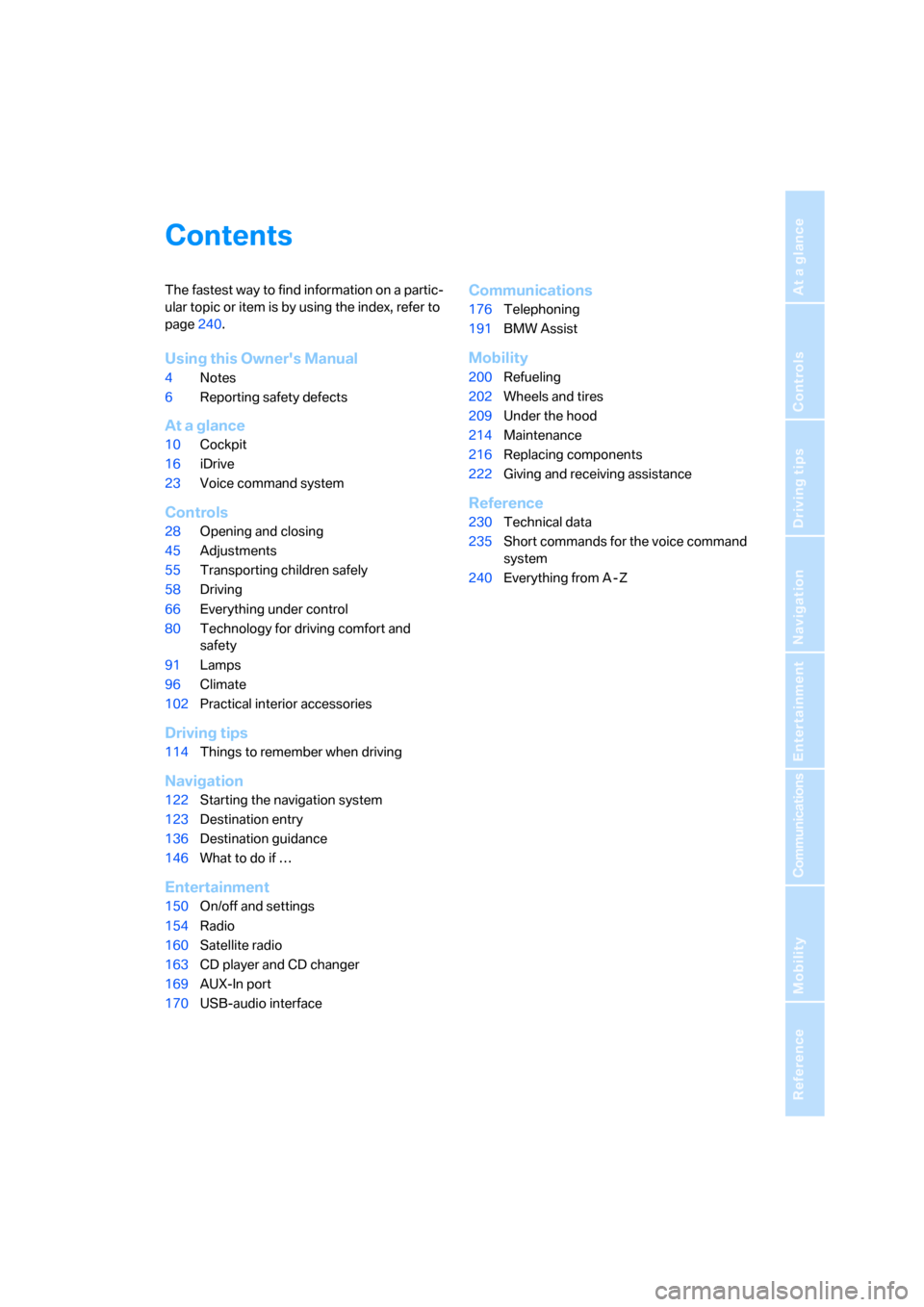
Contents
The fastest way to find information on a partic-
ular topic or item is by using the index, refer to
page240.
Using this Owner's Manual
4Notes
6Reporting safety defects
At a glance
10Cockpit
16iDrive
23Voice command system
Controls
28Opening and closing
45Adjustments
55Transporting children safely
58Driving
66Everything under control
80Technology for driving comfort and
safety
91Lamps
96Climate
102Practical interior accessories
Driving tips
114Things to remember when driving
Navigation
122Starting the navigation system
123Destination entry
136Destination guidance
146What to do if …
Entertainment
150On/off and settings
154Radio
160Satellite radio
163CD player and CD changer
169AUX-In port
170USB-audio interface
Communications
176Telephoning
191BMW Assist
Mobility
200Refueling
202Wheels and tires
209Under the hood
214Maintenance
216Replacing components
222Giving and receiving assistance
Reference
230Technical data
235Short commands for the voice command
system
240Everything from A - Z
Page 187 of 260
185
Entertainment
Reference
At a glance
Controls
Driving tips Communications
Navigation
Mobility
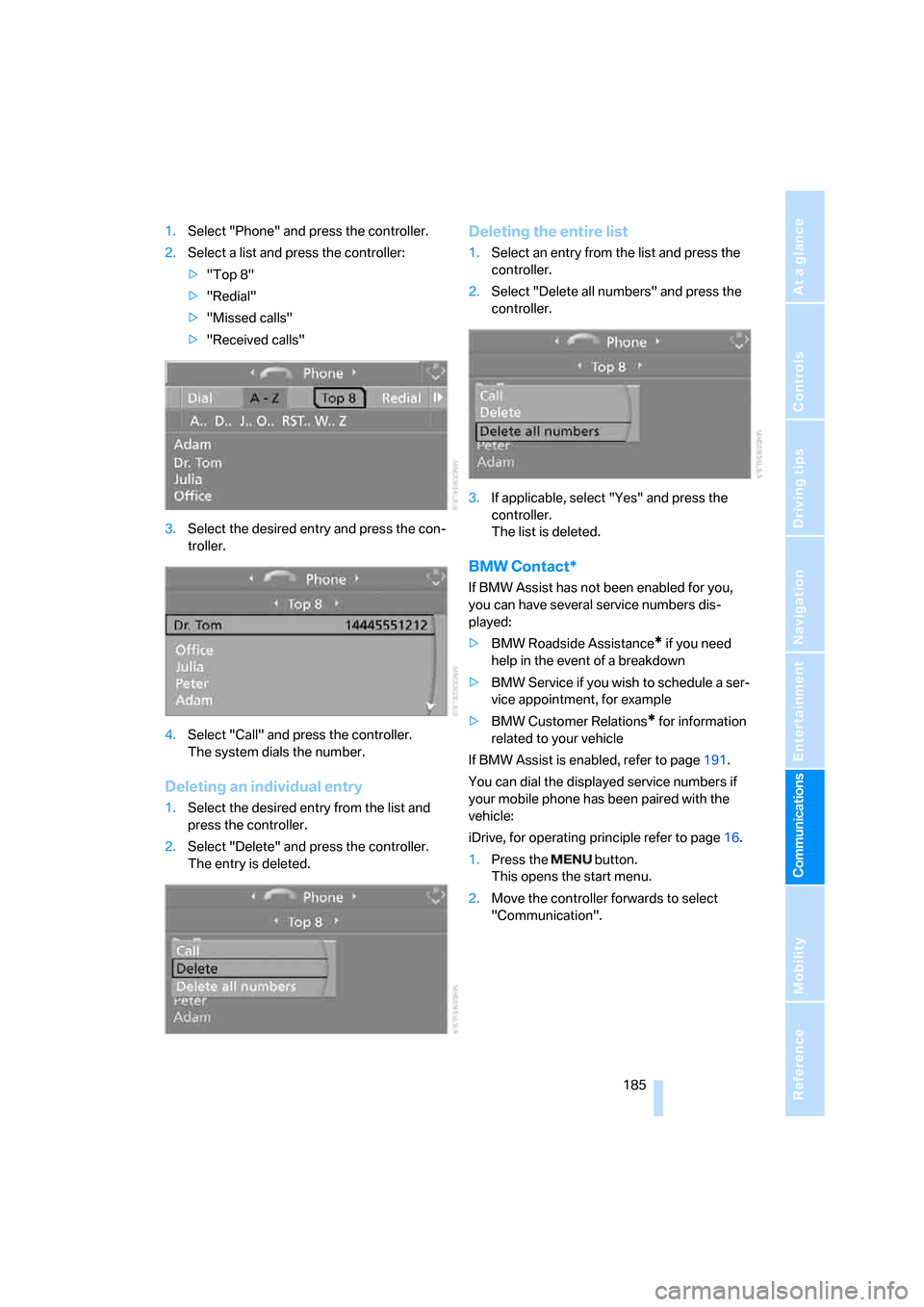
1.Select "Phone" and press the controller.
2.Select a list and press the controller:
>"Top 8"
>"Redial"
>"Missed calls"
>"Received calls"
3.Select the desired entry and press the con-
troller.
4.Select "Call" and press the controller.
The system dials the number.
Deleting an individual entry
1.Select the desired entry from the list and
press the controller.
2.Select "Delete" and press the controller.
The entry is deleted.
Deleting the entire list
1.Select an entry from the list and press the
controller.
2.Select "Delete all numbers" and press the
controller.
3.If applicable, select "Yes" and press the
controller.
The list is deleted.
BMW Contact*
If BMW Assist has not been enabled for you,
you can have several service numbers dis-
played:
>BMW Roadside Assistance
* if you need
help in the event of a breakdown
>BMW Service if you wish to schedule a ser-
vice appointment, for example
>BMW Customer Relations
* for information
related to your vehicle
If BMW Assist is enabled, refer to page191.
You can dial the displayed service numbers if
your mobile phone has been paired with the
vehicle:
iDrive, for operating principle refer to page16.
1.Press the button.
This opens the start menu.
2.Move the controller forwards to select
"Communication".
Page 193 of 260
191
Entertainment
Reference
At a glance
Controls
Driving tips Communications
Navigation
Mobility
BMW Assist
BMW Assist provides you with various services.
For example, the position data of your vehicle
can be transmitted to the BMW Assist
Response Center if an Emergency Request
*
has been sent.
Many BMW Assist services depend on the indi-
vidually agreed contract.
After your contract has expired, the
BMW Assist system will be deactivated by the
BMW Assist Response Center without you hav-
ing to visit a BMW center. After the BMW Assist
system has been deactivated, no BMW Assist
service will be available. The BMW Assist sys-
tem can be reactivated by a BMW center after a
new contract has been signed.
Requirements
You can use BMW Assist when the following
requirements are met:
>The installed BMW Assist system is logged
on to a mobile phone network. This network
must be capable of transmitting the ser-
vices.
>To transmit position data, the vehicle must
be able to determine the current position.
>To activate and update BMW Assist, a GPS
signal must be available.
>You have subscribed to BMW Assist with
your BMW center or with the BMW Assist
Response Center. Enabling must have
been completed.
>BMW Assist is activated, refer to page196.
Offered services
The following services are available via
BMW Assist:
>Emergency Request, refer to page222:
When you press the SOS button, a connec-
tion is established to the BMW Assist
Response Center. The BMW Assist Response Center contacts you and takes
further steps to help you.
>Automatic Collision Notification:
Under certain conditions, a connection is
established to the BMW Assist Response
Center after a serious accident. If possible,
the BMW Assist Response Center contacts
you and takes further steps to help you.
>Enhanced Roadside Assistance:
You can call BMW Roadside Assistance
*
should you require help in the event of a
breakdown. If possible, the vehicle data and
position data are transmitted during this
call.
>Customer Relations:
For all information related to your vehicle
you can be connected with BMW Customer
Relations.
>TeleService:
Data on your vehicle's service status or
required inspections are transmitted to your
BMW center either automatically before a
service due date or when you request a
BMW service appointment.
>Remote Door Unlock:
Contact the BMW Assist Response Center
if your remote control or key is not available
and you would like to have the vehicle
unlocked.
>Stolen Vehicle Recovery:
After you report your vehicle stolen with the
police, call the BMW Assist Response Cen-
ter to determine its position.
In addition, optional services can be provided to
you, such as the Concierge service or informa-
tion on directions, traffic or the weather. You
can use Critical Calling to activate a limited
number of calls via the BMW Assist Response
Center, e.g. when you do not have your mobile
phone with you.
Press the SOS button in order to contact the
BMW Assist Response Center, see below.
*
Page 243 of 260
Reference 241
At a glance
Controls
Driving tips
Communications
Navigation
Entertainment
Mobility
Automatic transmission with
Steptronic60
– interlock61
– selector lever lock61
– shiftlock61
– towing224
– tow-starting224
"Automatic ventilation" for
parked car ventilation100
AUTO program for automatic
climate control98
"Auto Request"193
"Autostore"
– on the radio156
"AUX"150,169,171
– AUX-In port169
– USB-audio interface170
AUX-In port169
Average fuel consumption68
– setting the units70
Average speed68
"Avoid ferries" in
navigation134
"Avoid highways" in
navigation134
Avoid highways in
navigation134
Avoiding unintentional
alarms35
"Avoid tollroads" in
navigation134
Axle loads, refer to
Weights233
"A - Z"183,184
B
Backrests, refer to Seats46
Backrest width adjustment47
Back seats, refer to Rear seats
– adjusting head restraints48
Backup lamp, replacing
bulb219
Bag for skis, refer to Ski
bag109
Balance, tone control151
Band-aids, refer to First-aid
pouch223Bar, refer to Tow-starting,
towing away225
Bass, tone control151
Bass sounds, refer to Treble
and bass151
Battery220
– charging220
– disposal37,220
– jump starting223
– temporary power failure220
Battery renewal
– remote control for vehicle37
Being towed224
Belts, refer to Safety belts51
Belt tensioner, refer to Safety
belts51
Beverage holders, refer to
Cup holders106
Blower, refer to Air flow
rate98
"BMW Assist"192,193,194
BMW Assist
– activating196
– Concierge service194
– contacting BMW Customer
Relations194
– Roadside Assistance192
– services offered191
– TeleService193
"BMW Contact"186
"BMW Contact
Numbers"186
BMW Maintenance
System214
"BMW Service settings"197
Bottle holders, refer to Cup
holders106
Brake assist, refer to Dynamic
Brake Control81
Brake fluid
– service requirements71
Brake Force Display87
Brake lamps
– Brake Force Display87
– replacing bulb219
Brake pads, breaking in114
Brake rotors116
– brakes114
– breaking in114Brakes
– ABS81
– BMW Maintenance
System214
– braking safely116
– breaking in114
– parking brake59
– service requirements71
Brake system114
– BMW Maintenance
System214
– breaking in114
– disc brakes116
Breakdown services, refer to
Roadside Assistance222
Breaking in the clutch114
Break-in period114
"Brightness"79
Bulb changing, refer to Lamps
and bulbs216
Bulbs, changing216
Button for starting the
engine58
Buttons on the steering
wheel11
C
California Proposition 65
warning6
"Call"184,195
Call
– accepting182
– displaying accepted184
– ending183
– missed184
– starting183
Calling
– from phone book183
– from Top 8 list184
– redialing184
Can holders, refer to Cup
holders106
Capacities234
Capacity of the cargo bay233
Car battery, refer to Vehicle
battery220
Car care, refer to Caring for
your vehicle brochure
Page 254 of 260
Everything from A - Z
252 Song search, refer to Playing a
track165
Sound, adjusting during audio
playback, refer to Tone
control151
Sound output for
entertainment on/off150
Spare fuses,220
Spare fuses, refer to
Fuses220
Speaking, refer to Voice
instructions from navigation
system140
Special oils, refer to Specified
engine oils212
Specified engine oils212
Speed
– for winter tires208
Speed-dependent volume
control151
Speed display, refer to
Speedometer12
Speed limit78
Speed limit warning, refer to
Speed limit78
Speedometer12
"Speed volume", refer to Tone
control152
Sport program, automatic
transmission with
Steptronic61
Spray nozzles, refer to
Windshield washer
nozzles64
Stability control,
refer to Driving stability
control systems81
Start/stop button58
– starting the engine59
– switching off the engine59
"Start guidance"126
Starting, refer to Starting the
engine59
Starting assistance, refer to
Jump starting223
Starting the engine
– start/stop button58
Start menu17
"Start service"192"Start Service" for BMW
Assist194
"State / Province" in
destination entry124
Station
– refer to Radio154
"Status"72
Status of this Owner's Manual
at time of printing5
Steering wheel53
– adjustment53
– buttons on steering
wheel11
– freely programmable
buttons53
"Steering wheel buttons"53
Steering with variable ratio,
refer to Active steering87
Steptronic, refer to Automatic
transmission with
Steptronic60
"Stopwatch"78
Stopwatch78
Storage compartment
package106
Storage compartments106
"Store" for satellite radio162
"Store in address book" in
navigation132
"Store" on the radio156
Storing
– seat position, refer to Seat
and mirror memory49
– telephone numbers, refer to
separate Owner's Manual
Storing current position132
Storing radio stations156
Storing tires208
Stowage, refer to Storage
compartments106
"Street" in destination
entry126
Summer tires, refer to Wheels
and tires202
"Surround Settings", refer to
Tone control152
Switches, refer to Cockpit10
Switching off
– engine59Switching off the engine
– start/stop button58
Switching on
– audio150
– CD changer150
– CD player150
– radio150
Switching on the hour
signal75
Switching the cooling function
on and off99
Switch-on times of parked car
ventilation, preselecting100
Symbols4
– navigation system143
– status information20
– traffic info for navigation
system141
T
Tachometer66
Tail lamp, refer to Tail
lamps218
– replacing bulb219
Tail lamps218
– replacing bulb219
Tank contents, refer to
Capacities234
Technical changes5
Technical data230
Telematics, refer to
TeleService, BMW
Assist191
Telephone, installation
location, refer to Center
armrest106
Telephone, refer to Mobile
phone176
Telephone, refer to separate
Owner's Manual
"Telephone list"54
TeleService193
Temperature, setting for
automatic climate control97