I drive BMW 3 SERIES 2009 Repair Manual
[x] Cancel search | Manufacturer: BMW, Model Year: 2009, Model line: 3 SERIES, Model: BMW 3 SERIES 2009Pages: 268, PDF Size: 11.52 MB
Page 117 of 268
Driving tips
115Reference
At a glance
Controls
Communications
Navigation
Entertainment
Mobility
Drive defensively
Avoid unnecessary acceleration and braking
maneuvers. To do so, keep an adequate dis-
tance to the forward vehicle. A defensive and
smooth driving style keeps fuel consumption
down.
Avoid high engine speeds
Only use first gear when setting off. In second
and higher gears, accele rate without hesitation
or pauses. When accelerating, shift up before
reaching high engine speeds.
When you reach the desired speed, shift into
the highest applicable ge ar and drive with the
engine speed as low as possible and at a con-
stant speed.
As a rule: driving at low engine speeds lowers
fuel consumption and reduces wear.
Coasting
When approaching a red lig ht, take your foot off
the accelerator and coast to a stop in the high-
est applicable gear.
On a downhill slope, take your foot off the accel-
erator and coast in a suitable gear.
The fuel supply is interrupted when coasting.
Switch off the engi ne during lengthy
stops
Switch off the engine when stopping for lengthy
periods, e.g. at traffic lights, railroad crossings
or in traffic congestions. You achieve fuel sav-
ings even if standing time is as short as approx.
4 seconds.
Switch off functions you do not need at
the moment
Functions such as the air conditioner and the
seat or rear window heating draw large amounts
of power and consume a dditional fuel. Espe-
cially in city traffic and in stop and go driving
they have a considerable impact. Therefore,
switch these functions off when they are not
really needed.
Have the vehicle serviced
Have the vehicle serviced regularly to achieve
good economy and a long vehicle life. BMW
recommends having the vehicle serviced at a
BMW center. Also note the BMW service sys-
tem, refer to page 216.
General driving notes
Close the luggage compartment lid/
tailgate
Operate the vehicle only when the lug-
gage compartment lid/tailgate and rear
window are closed. Otherwise, exhaust fumes
could enter the interior of the vehicle. <
If the vehicle must be driven with the luggage
compartment lid/tailgate open:
1. Close all windows and the glass roof.
2. Greatly increase the ai r volume of the auto-
matic climate control system, refer to
page 95.
Hot exhaust system
In all vehicles, extremely high tempera-
tures are generated in the exhaust sys-
tem. Do not remove the heat shields installed
adjacent to various sect ions of the exhaust sys-
tem, and never apply un dercoating to them.
When driving, standing at idle and while park-
ing, take care to avoid possible contact
between the hot exhaust system and any highly
flammable materials such as hay, leaves, grass,
etc. Such contact could lead to a fire, with the
risk of serious personal injuries and property
damage. Do not touch ho t exhaust tail pipes.
Otherwise there is a risk of burns. <
Diesel particulate filter*
The diesel particulate filter collects soot parti-
cles and burns them periodically at high tem-
peratures. This cleaning process takes several
minutes. During cleaning, you may notice that
the engine temporarily runs less smoothly and
that a somewhat higher engine speed is neces-
sary to achieve the accustomed performance.
Also, noises may be heard and a slight amount
ba8_E9091_cic.book Seite 115 Mittwoch, 29. Oktober 2008 2:59 14
Page 118 of 268
Things to remember when driving
116
of smoke may emerge from the exhaust, even
for a short period after
the engine is switched
off.
Hydroplaning
When driving on wet or slushy roads,
reduce road speed. If you do not, a wedge
of water can form between tires and road sur-
face. This situation, known as hydroplaning,
means that the tire can completely lose contact
with the road surface, so that neither the car can
be steered nor the brak e be properly applied.<
The risk of hydroplaning increases with declin-
ing tread depth on the tire s, refer also to Mini-
mum tread depth on page 208.
Driving through water
Drive through water on the road only if it is
not deeper than 1 ft/30 cm, and then only
at walking speed at the most. Otherwise, the
vehicle's engine, the electrical systems and the
transmission may be damaged. <
Use the parking brake on inclines
On inclines, do not hold the vehicle for a
lengthy period using the clutch; use the
parking brake instead. Ot herwise greater clutch
wear will result. <
For more information about the drive-off assis-
tant, refer to page 83.
Braking safely
Your BMW is equipped with ABS as a standard
feature. Applying the brakes fully is the most
effective way of braking in situations in which
this is necessary. Since the vehicle maintains
steering responsiveness, you can still avoid
possible obstacles with a minimum of steering
effort.
Pulsation of the brake pedal, combined with
sounds from the hydraulic circuits, indicate that
ABS is in its active mode.
Driving in wet conditions
When roads are wet or there is heavy rain,
briefly exert gentle pre ssure on the brake pedal
every few miles. Monitor traffic conditions to ensure that this maneuver does not endanger
other road users. The heat generated in this
process helps dry the pads and rotors. Full
braking efficiency will th
en be available when
you need it.
Hills
To prevent overheating and the resulting
reduced efficiency of the brake system,
drive long or steep downhill gradients in the
gear in which the least br aking is required. Even
light but consistent brak e pressure can lead to
high temperatures, brake wear and possibly
even brake failure. <
You can increase the engine's braking effect by
shifting down, all the way to first gear if neces-
sary. This strategy helps you avoid placing
excessive loads on the brake system. Down-
shifting in manual mode of the automatic trans-
mission, refer to page 56.
Never drive with the clutch held down,
with the transmission in neutral or with
the engine switched off; otherwise, engine
braking action will not be present or there will be
no power assistance to the brakes or steering.
Never allow floor mats, carpets or any other
objects to protrude into the area around the
pedals, otherwise peda l function could be
impaired. <
Corrosion on brake rotors
When the vehicle is driv en only occasionally,
during extended periods when the vehicle is not
used at all, and in op erating conditions where
brake applications are less frequent, there is an
increased tendency for corrosion to form on
rotors, while contaminan ts accumulate on the
brake pads. This occurs because the minimum
pressure which must be exerted by the pads
during brake applications to clean the rotors is
not reached.
Should corrosion form on the brake rotors, the
brakes will tend to re spond with a pulsating
effect that even extended application will fail to
cure.
ba8_E9091_cic.book Seite 116 Mittwoch, 29. Oktober 2008 2:59 14
Page 119 of 268
Driving tips
117Reference
At a glance
Controls
Communications
Navigation
Entertainment
Mobility
When the vehicle is parked
Condensation forms while the automatic cli-
mate control is in operation, and then exits
under the vehicle. Traces of condensed water
under the vehicle are therefore normal.
Before driving into a car wash
General information on caring for your BMW
can be found on page218.
Sports Wagon: re ar window wiper
Driving through an automatic car wash can
result in damage to the rear window wiper. If
necessary, ask the operator of the car wash
about protective measures you should take.
With convenient access and automatic
transmission
Insert the remote control into the ignition
switch.
The engine can be switched off when the selec-
tor lever is in position N. Refer also to page 218.
Cargo loading
To avoid loading the tires beyond their
approved carrying capacity, never over-
load the vehicle. Overlo ading can lead to over-
heating and increases the rate at which damage
develops inside the tires. This can ultimately
result in a sudden blow-out. <
Make sure that no liquids are spilled or
leak from their containers in the cargo
bay, as this could result in damage to the vehi-
cle. <
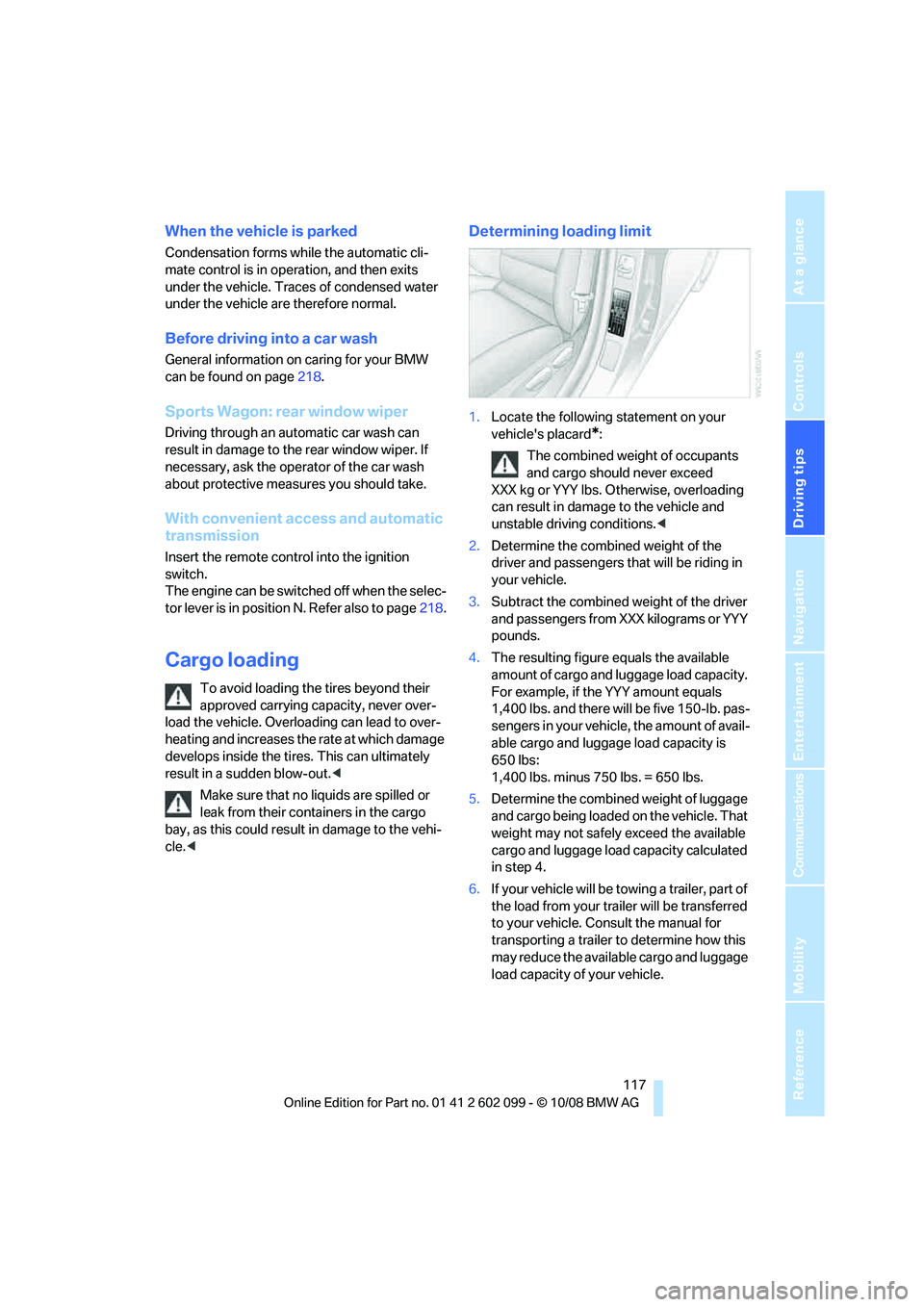
Determining loading limit
1. Locate the following statement on your
vehicle's placard
*:
The combined weight of occupants
and cargo should never exceed
XXX kg or YYY lbs. Otherwise, overloading
can result in damage to the vehicle and
unstable driving conditions.<
2. Determine the combined weight of the
driver and passengers that will be riding in
your vehicle.
3. Subtract the combined weight of the driver
and passengers from XXX kilograms or YYY
pounds.
4. The resulting figure equals the available
amount of cargo and luggage load capacity.
For example, if the YYY amount equals
1,400 lbs. and there will be five 150-lb. pas-
sengers in your vehicle, the amount of avail-
able cargo and luggage load capacity is
650 lbs:
1,400 lbs. minus 750 lbs. = 650 lbs.
5. Determine the combined weight of luggage
and cargo being loaded on the vehicle. That
weight may not safely exceed the available
cargo and luggage load capacity calculated
in step 4.
6. If your vehicle will be towing a trailer, part of
the load from your tra iler will be transferred
to your vehicle. Consult the manual for
transporting a trailer to determine how this
may reduce the availa ble cargo and luggage
load capacity of your vehicle.
ba8_E9091_cic.book Seite 117 Mittwoch, 29. Oktober 2008 2:59 14
Page 121 of 268
Driving tips
119Reference
At a glance
Controls
Communications
Navigation
Entertainment
Mobility
Only attach the cargo straps using the lashing
eyes shown in the illustration. Do not secure
cargo with the anchors for tether straps, refer to
page 50, otherwise these could be damaged. <
Roof-mounted luggage rack*
A special rack system is available as an option
for your BMW. Comply with the directions given
in the installation instructions.
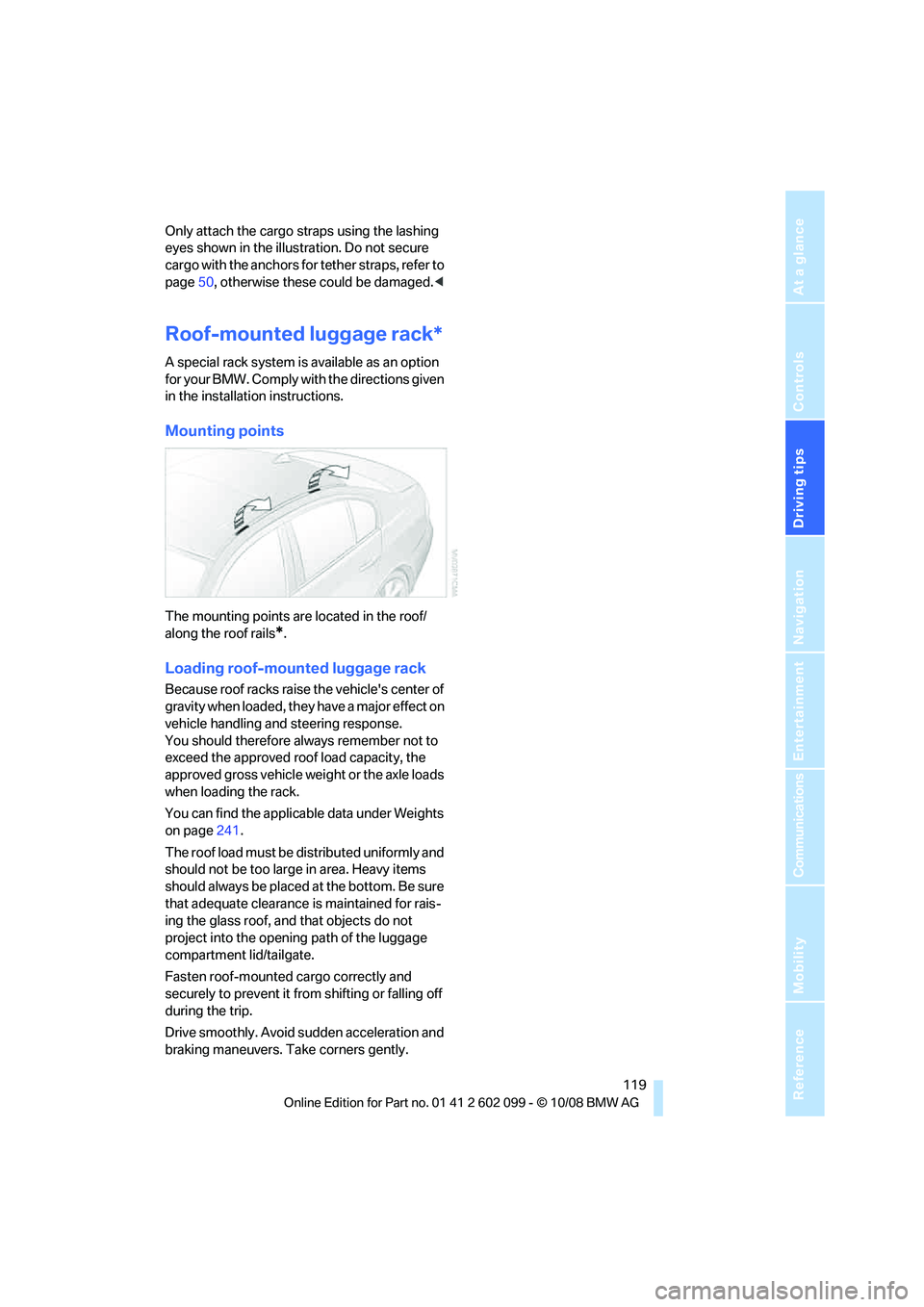
Mounting points
The mounting points are located in the roof/
along the roof rails
*.
Loading roof-mounted luggage rack
Because roof racks raise the vehicle's center of
gravity when loaded, they have a major effect on
vehicle handling and steering response.
You should therefore always remember not to
exceed the approved roof load capacity, the
approved gross vehicle weight or the axle loads
when loading the rack.
You can find the applicab le data under Weights
on page 241.
The roof load must be distributed uniformly and
should not be too large in area. Heavy items
should always be placed at the bottom. Be sure
that adequate clearance is maintained for rais-
ing the glass roof, and that objects do not
project into the opening path of the luggage
compartment lid/tailgate.
Fasten roof-mounted cargo correctly and
securely to prevent it from shifting or falling off
during the trip.
Drive smoothly. Avoid sudden acceleration and
braking maneuvers. Ta ke corners gently.
ba8_E9091_cic.book Seite 119 Mittwoch, 29. Oktober 2008 2:59 14
Page 124 of 268
Navigation system
122
Navigation system
General information
With the help of satellites, the navigation sys-
tem is able to ascertain the precise position of
the vehicle and guide you reliably to any desti-
nation you enter.
The navigation data is st ored in the vehicle and
can be updated using navigation DVDs.
Make all entries while the vehicle is sta-
tionary
Enter data only when th e vehicle is stationary,
and always give priority to the applicable traffic
regulations in the event of any contradiction
between traffic and road conditions and the
instructions issued by the navigation system.
Failure to take to this precaution can place you
in violation of the law and put vehicle occupants
and other road users in danger. <
Updating the navigation data
The navigation data is stored in the vehicle and
can be updated using a na vigation DVD. Please
contact the BMW center if you have any ques-
tions.
Inserting navigation DVD
1. Insert the navigation DVD into the DVD
player with the labe led side facing up.
2. Follow the instructio ns on the display.
3. Enter the authorization code of the naviga-
tion DVD and change the DVD if needed.
Displaying information on the version
1. "Navigation"
2. Open "Options".
3. "Navigation system version". Information
on the data vers ion is displayed.
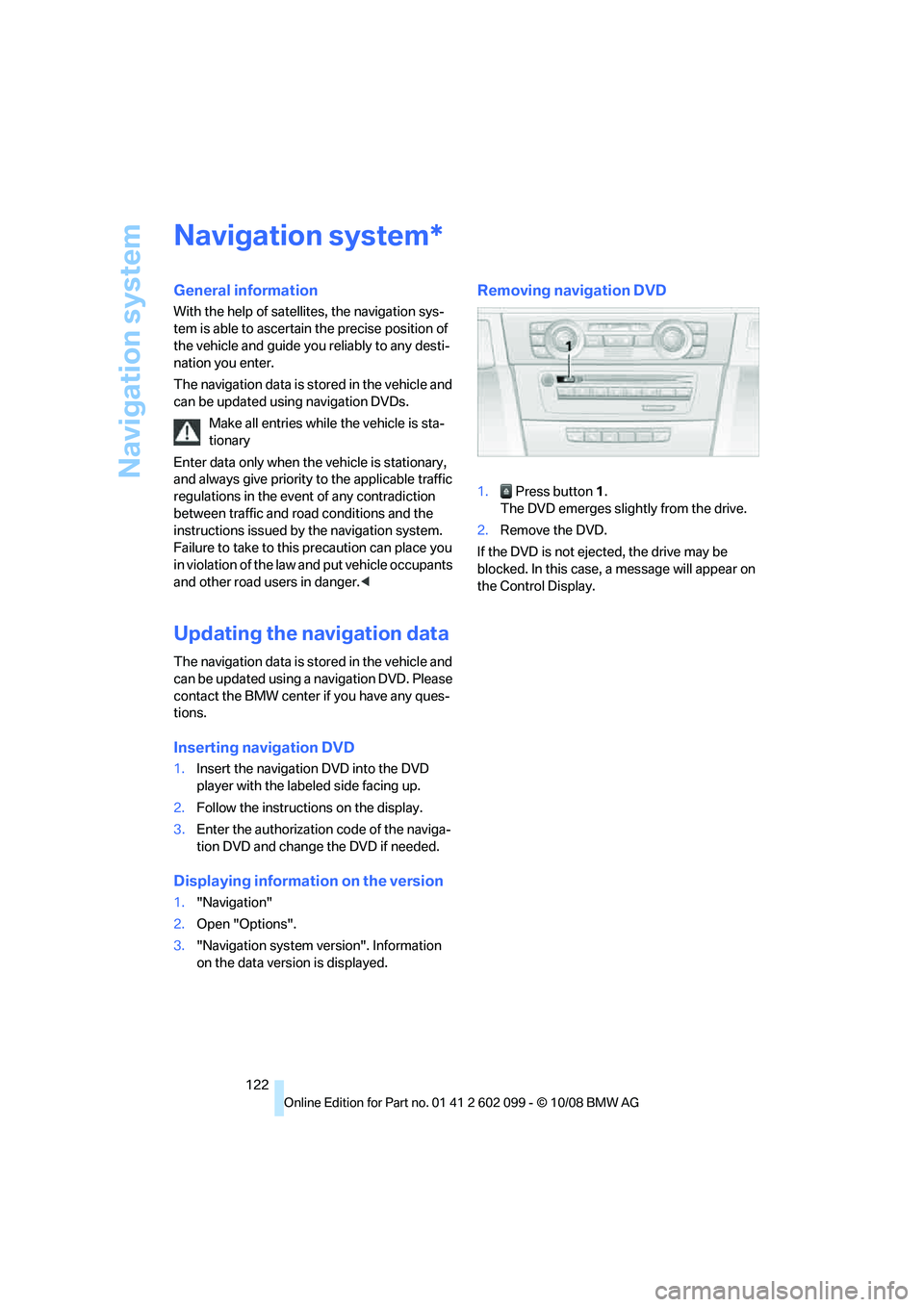
Removing navigation DVD
1. Press button 1.
The DVD emerges slightly from the drive.
2. Remove the DVD.
If the DVD is not ejected, the drive may be
blocked. In this case, a message will appear on
the Control Display.
*
ba8_E9091_cic.book Seite 122 Mittwoch, 29. Oktober 2008 2:59 14
Page 131 of 268
Navigation
Driving tips
129Reference
At a glance
Controls
Communications
Entertainment
Mobility
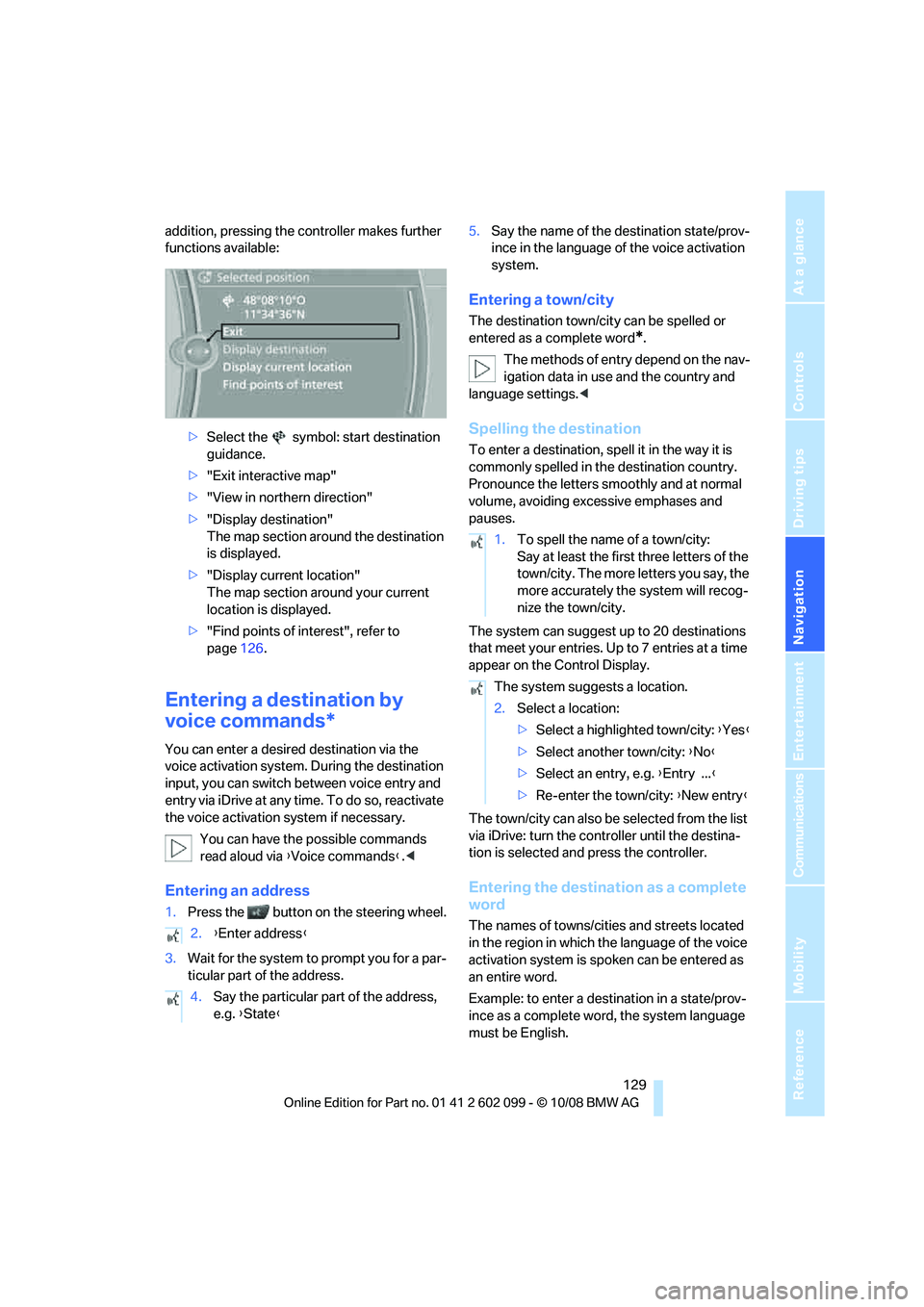
addition, pressing the controller makes further
functions available:>Select the symbol: start destination
guidance.
> "Exit interactive map"
> "View in northern direction"
> "Display destination"
The map section around the destination
is displayed.
> "Display current location"
The map section around your current
location is displayed.
> "Find points of interest", refer to
page 126.
Entering a destination by
voice commands*
You can enter a desired destination via the
voice activation system. During the destination
input, you can switch between voice entry and
entry via iDrive at any ti me. To do so, reactivate
the voice activation system if necessary.
You can have the possible commands
read aloud via {Voice commands }.<
Entering an address
1. Press the button on the steering wheel.
3. Wait for the system to prompt you for a par-
ticular part of the address. 5.
Say the name of the destination state/prov-
ince in the language of the voice activation
system.
Entering a town/city
The destination town/cit y can be spelled or
entered as a complete word
*.
The methods of entry depend on the nav-
igation data in use and the country and
language settings. <
Spelling the destination
To enter a destination, spell it in the way it is
commonly spelled in th e destination country.
Pronounce the letters smoothly and at normal
volume, avoiding excessive emphases and
pauses.
The system can suggest up to 20 destinations
that meet your entries. Up to 7 entries at a time
appear on the Control Display.
The town/city can also be selected from the list
via iDrive: turn the controller until the destina-
tion is selected and press the controller.
Entering the destination as a complete
word
The names of towns/cities and streets located
in the region in which th e language of the voice
activation system is spoken can be entered as
an entire word.
Example: to enter a destination in a state/prov-
ince as a complete word , the system language
must be English.
2.
{Enter address }
4. Say the particular part of the address,
e.g. {State }
1.To spell the name of a town/city:
Say at least the first three letters of the
town/city. The more letters you say, the
more accurately th e system will recog-
nize the town/city.
The system suggests a location.
2. Select a location:
>Select a highlighted town/city: {Yes }
> Select another town/city: {No }
> Select an entry, e.g. {Entry ... }
> Re-enter the town/city: {New entry }
ba8_E9091_cic.book Seite 129 Mittwoch, 29. Oktober 2008 2:59 14
Page 138 of 268
Destination guidance
136
Automatic scaling of the map
In the map display facing north, turn the control-
ler in any direction until AUTO is displayed as
the map scale.
The map shows the entire range from your loca-
tion to the destination.
Settings for the map display
1. "Navigation"
2. "Map"
3. Open "Options".
4. "Settings"
>Optimized view "Night mode"
> Optimized view with spatial display:
"Perspective view in 3D" prominent
areas are shown in the map.
Split screen settings
The map settings for the split screen can be
created separately fr om the main screen.
1. Open "Options".
2. "Split screen"
3. Move the controller to the right until the
split screen is selected.
4. Press the controller.
5. Select the settings:
>"View facing north"
> "View in direction of travel"
> "Perspective view"
6. To change the scale:
>Move the controller: change the scale.
Traffic bulletins*
You can display the traffi c bulletins from radio
stations that broadcast the TMC (Traffic Mes-
sage Channel) of a traffic information service.
This information from the traffic information
service is continuously updated on the basis of
measurement data from traffic control centers
and information on traffic congestion.
During destination guid ance, traffic bulletins
that are relevant to areas along the route are automatically displayed
and taken into account
in the route planning. You can open all traffic
bulletins manually via iDrive.
The traffic bulletins are shown in the map dis-
play.
Activating/deactivating reception
1. "Navigation"
2. Open "Options".
3. "Receive Traffic Info"
In many metropolitan areas you can receive
traffic information broadcast by radio stations.
The traffic conditions ar e monitored by traffic
control centers and the traffic information is
updated periodically.
During destination guid ance, the traffic bulle-
tins relevant to your planned route are automat-
ically shown. Whether de stination guidance is
active or not, you can ha ve the traffic bulletins
displayed in the map view or in the traffic bulle-
tin list.
Traffic bulletins in a list
A list of the traffic bulle tins can be opened via
the menu or map display.
Opening the traffic bulletins
1. "Navigation"
2. "Traffic Info"
First, the traffic bulle tins on the planned
route are displayed. The traffic bulletins are
sorted in the order of their distance from the
current vehicle position.
3. Select a traffic bulletin.
Additional information can be displayed for
some traffic bulletins:
1. Select the symbol.
2. Additional information is displayed.
ba8_E9091_cic.book Seite 136 Mittwoch, 29. Oktober 2008 2:59 14
Page 139 of 268
Navigation
Driving tips
137Reference
At a glance
Controls
Communications
Entertainment
Mobility
3.To exit from the menu:
Move the controlle r to the left.
Highlighting traffic bulletins
1."Navigation"
2. "Map"
3. Open "Options".
4. "Settings"
The map is optimized for displaying the traffic
bulletins. Symbols for th e special destinations
are no longer displayed.
Symbols in the map display
The appearance of the symbols indicating a
traffic obstruction depends on the scale and the
position of the traffic ob struction relative to the
route.
> Smaller map scale, e.g. 1 mile/2 km: white
sign with the traffic obstruction symbol
> Larger map scale, e.g. 50 miles/100 km:
white sign with an arrow in the relevant
direction
Additional information in the map
display
When using a smaller map scale, the traffic
obstructions are displayed as gray bars at the
edge of the calculated route.
Filtering of traffic bulletins
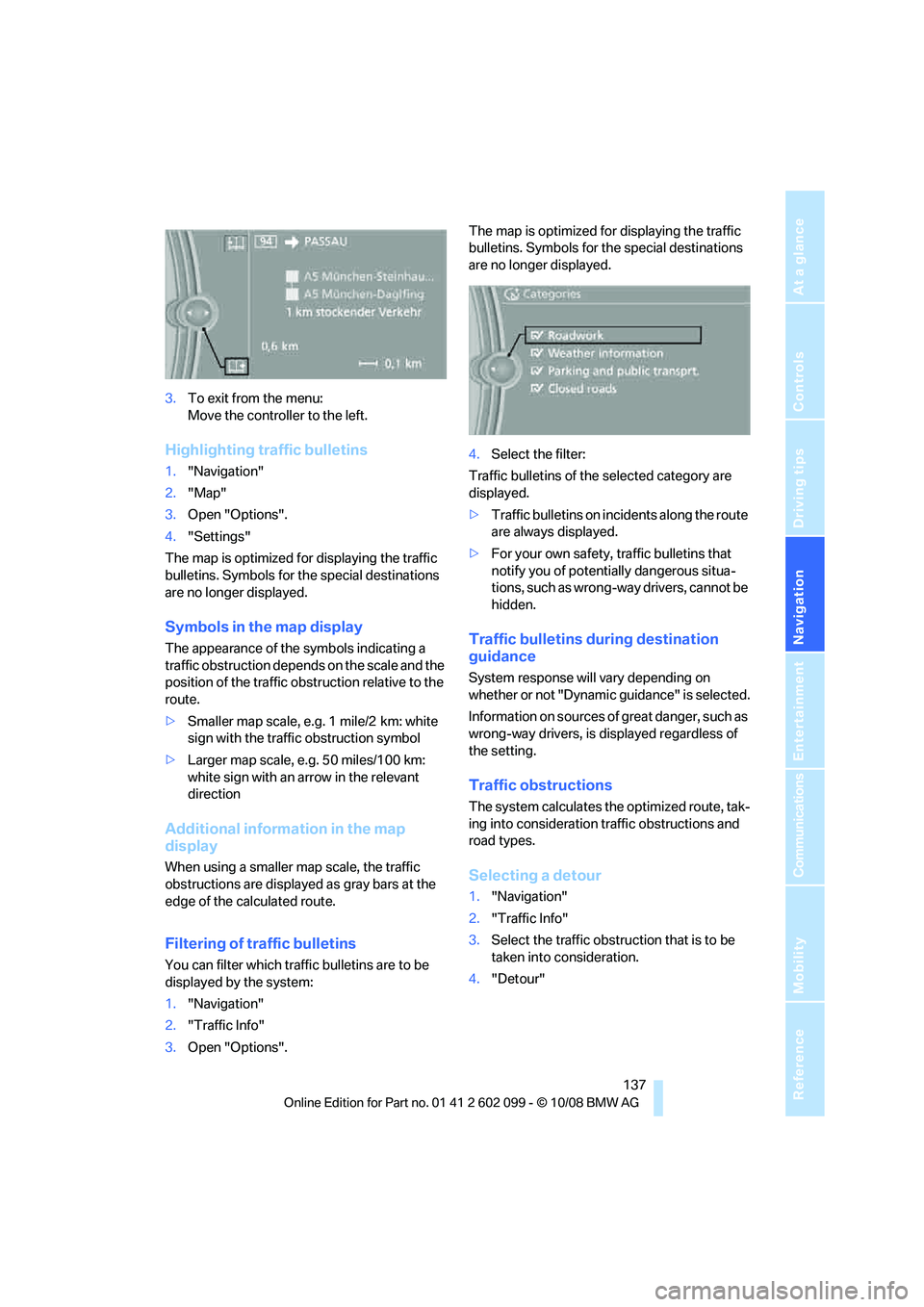
You can filter which traffic bulletins are to be
displayed by the system:
1."Navigation"
2. "Traffic Info"
3. Open "Options". The map is optimized for displaying the traffic
bulletins. Symbols for th
e special destinations
are no longer displayed.
4. Select the filter:
Traffic bulletins of the selected category are
displayed.
> Traffic bulletins on incidents along the route
are always displayed.
> For your own safety, traffic bulletins that
notify you of potentially dangerous situa-
tions, such as wrong- way drivers, cannot be
hidden.
Traffic bulletins during destination
guidance
System response will vary depending on
whether or not "Dynamic guidance" is selected.
Information on sources of great danger, such as
wrong-way drivers, is displayed regardless of
the setting.
Traffic obstructions
The system calculates the optimized route, tak-
ing into consideration traffic obstructions and
road types.
Selecting a detour
1. "Navigation"
2. "Traffic Info"
3. Select the traffic obstruction that is to be
taken into consideration.
4. "Detour"
ba8_E9091_cic.book Seite 137 Mittwoch, 29. Oktober 2008 2:59 14
Page 144 of 268
On/off and tone
142
On/off and tone
The following audio and video sources share
the same control elements and adjustments:
>Radio
> CD player
> CD changer
*
>Video
> External devices, e.g. MP3 player
Controls
The audio and video sources can be controlled
using the:
>Buttons near the CD player
> iDrive
> Buttons on the steeri ng wheel, refer to
page 11
> Programmable memory keys, refer to
page 20
> Voice activation system
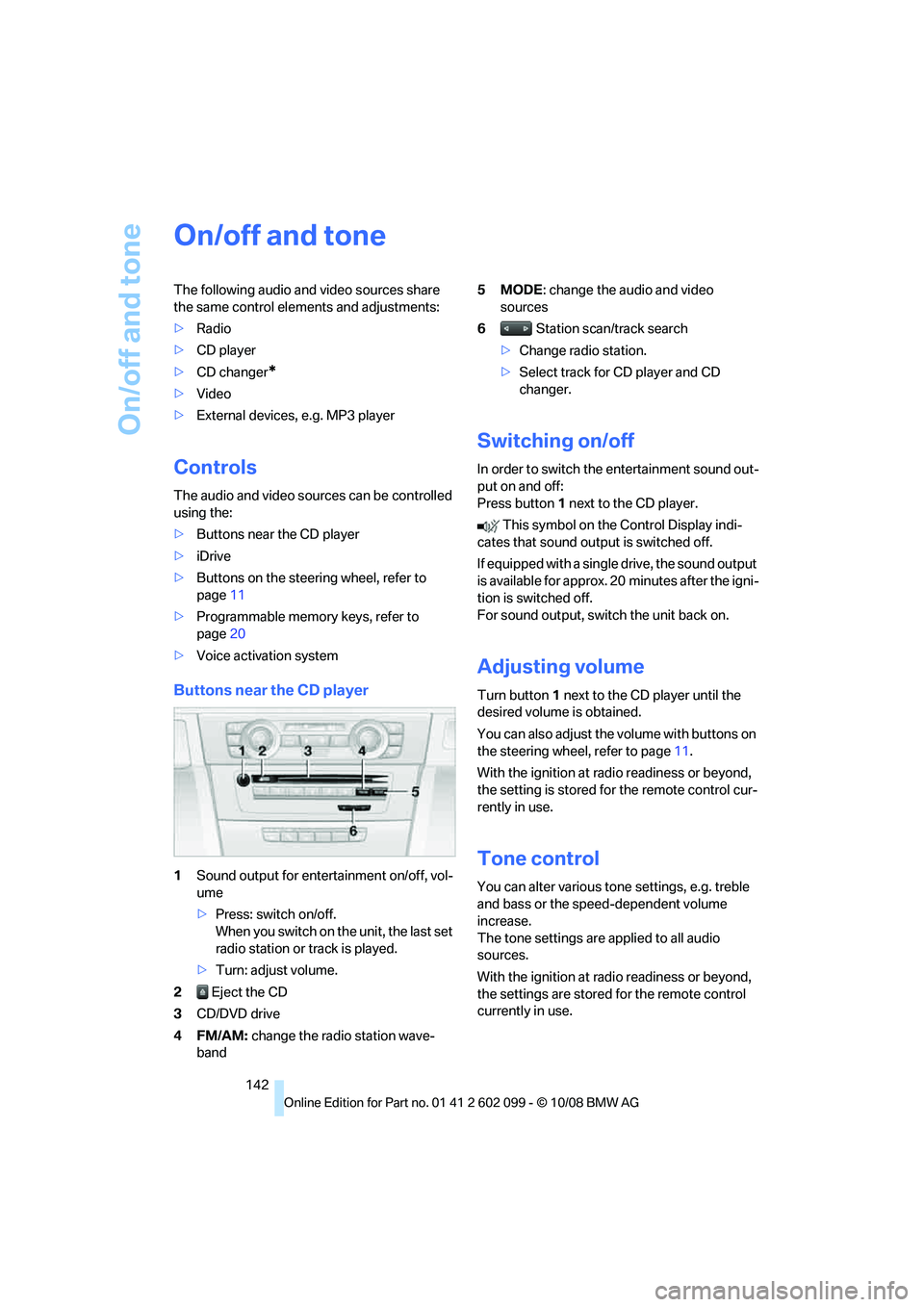
Buttons near the CD player
1Sound output for entertainment on/off, vol-
ume
>Press: switch on/off.
When you switch on the unit, the last set
radio station or track is played.
> Turn: adjust volume.
2 Eject the CD
3 CD/DVD drive
4FM/AM: change the radio station wave-
band 5MODE
: change the audio and video
sources
6 Station scan/track search
> Change radio station.
> Select track for CD player and CD
changer.
Switching on/off
In order to switch the entertainment sound out-
put on and off:
Press button 1 next to the CD player.
This symbol on the Control Display indi-
cates that sound output is switched off.
If equipped with a single drive, the sound output
is available for approx. 20 minutes after the igni-
tion is switched off.
For sound output, switch the unit back on.
Adjusting volume
Turn button 1 next to the CD player until the
desired volume is obtained.
You can also adjust the volume with buttons on
the steering wheel, refer to page 11.
With the ignition at ra dio readiness or beyond,
the setting is stored fo r the remote control cur-
rently in use.
Tone control
You can alter various tone settings, e.g. treble
and bass or the speed-dependent volume
increase.
The tone settings are applied to all audio
sources.
With the ignition at ra dio readiness or beyond,
the settings are stored for the remote control
currently in use.
ba8_E9091_cic.book Seite 142 Mittwoch, 29. Oktober 2008 2:59 14
Page 147 of 268
Navigation
Entertainment
Driving tips
145Reference
At a glance
Controls
Communications
Mobility
Radio
Your radio provides reception of the FM and AM
wavebands.
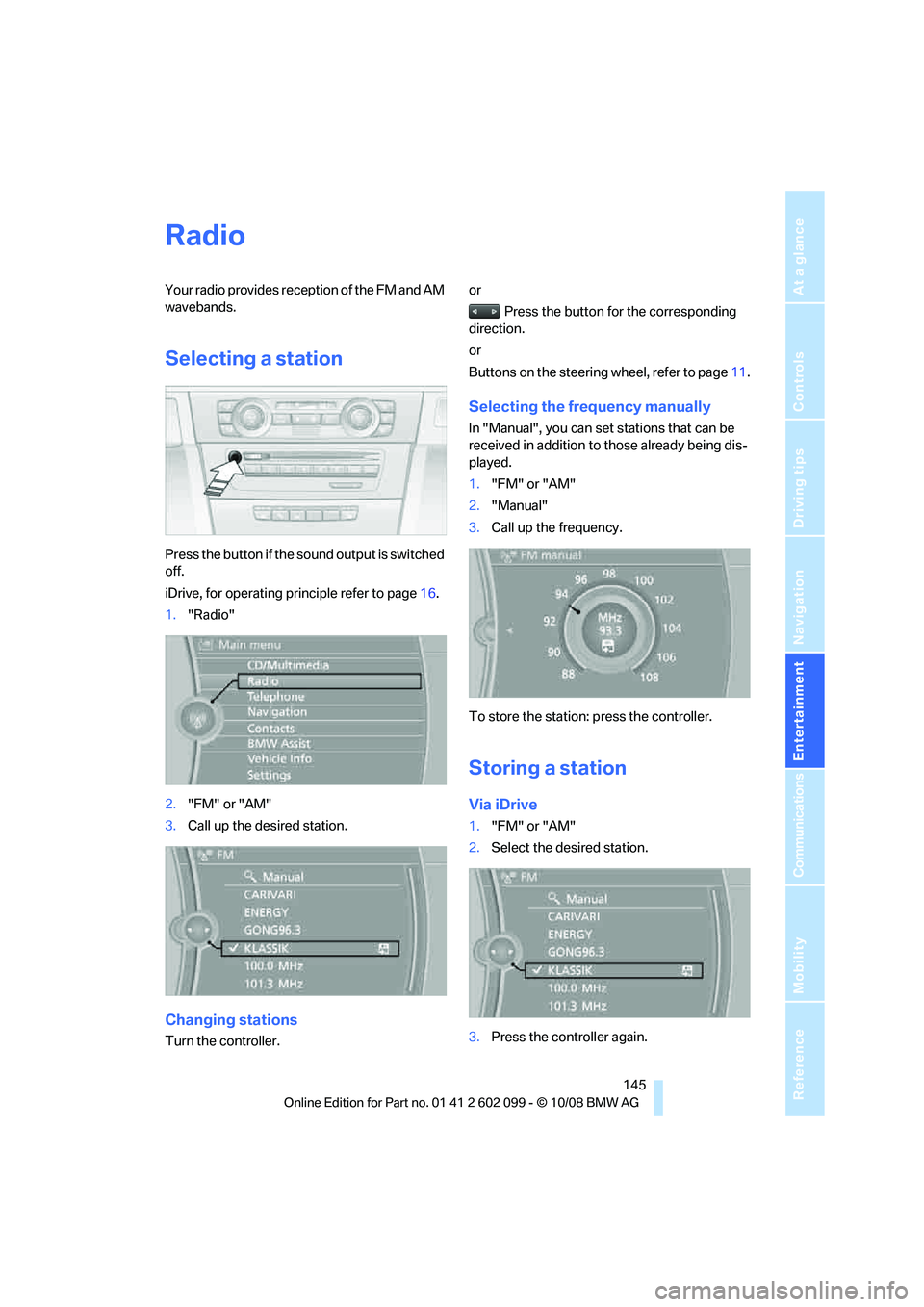
Selecting a station
Press the button if the sound output is switched
off.
iDrive, for operating principle refer to page16.
1. "Radio"
2. "FM" or "AM"
3. Call up the desired station.
Changing stations
Turn the controller. or
Press the button for the corresponding
direction.
or
Buttons on the steering wheel, refer to page11.
Selecting the frequency manually
In "Manual", you can set stations that can be
received in addition to those already being dis-
played.
1."FM" or "AM"
2. "Manual"
3. Call up the frequency.
To store the station: press the controller.
Storing a station
Via iDrive
1. "FM" or "AM"
2. Select the desired station.
3. Press the controller again.
ba8_E9091_cic.book Seite 145 Mittwoch, 29. Oktober 2008 2:59 14