Tail light BMW 325XI TOURING 2006 E91 Owner's Manual
[x] Cancel search | Manufacturer: BMW, Model Year: 2006, Model line: 325XI TOURING, Model: BMW 325XI TOURING 2006 E91Pages: 160, PDF Size: 4.86 MB
Page 13 of 160
At a glance
Controls
Driving tips
Mobility Reference
11
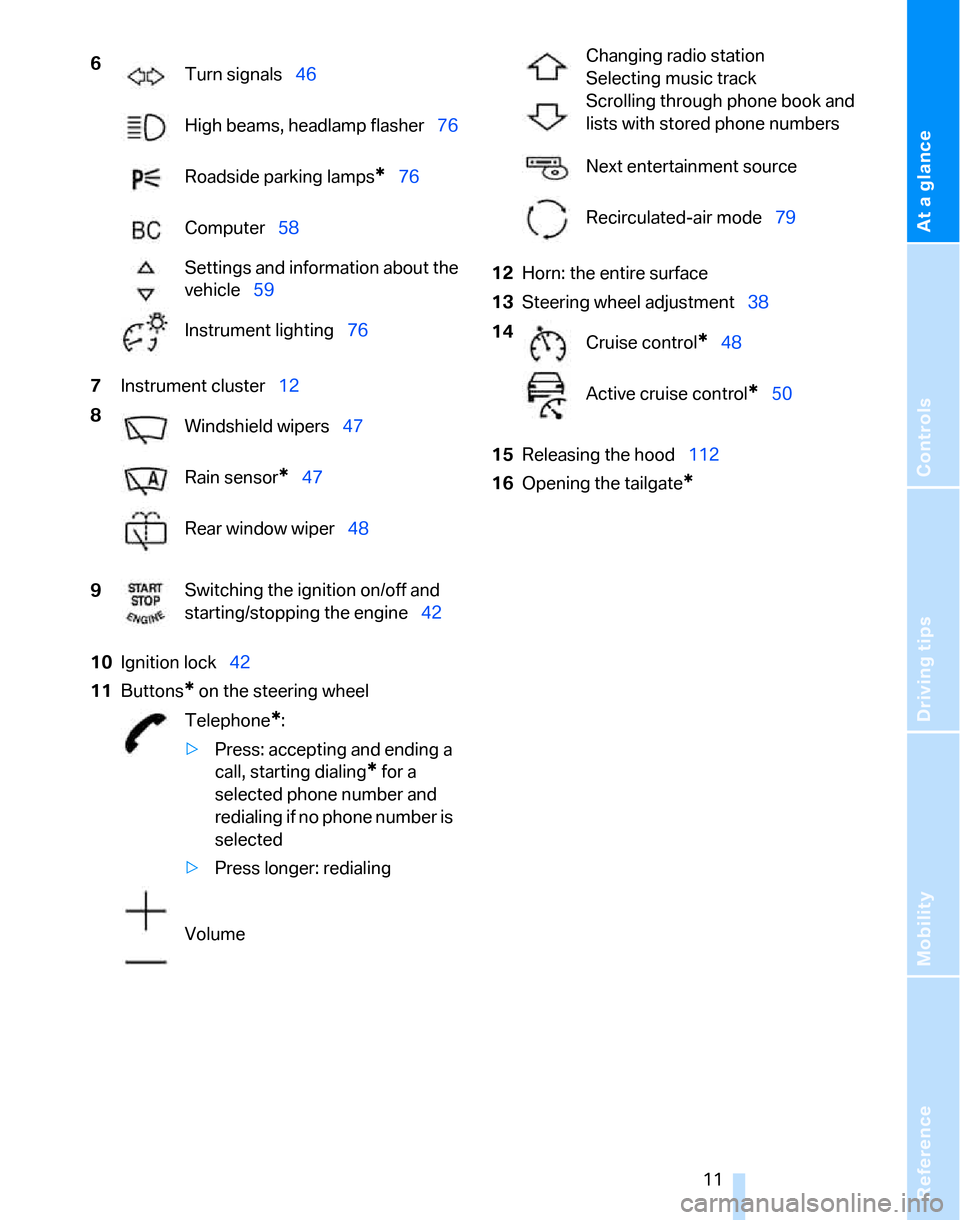
7Instrument cluster12
10Ignition lock42
11Buttons
* on the steering wheel12Horn: the entire surface
13Steering wheel adjustment38
15Releasing the hood112
16Opening the tailgate
*
6
Turn signals46
High beams, headlamp flasher76
Roadside parking lamps
*76
Computer58
Settings and information about the
vehicle59
Instrument lighting76
8
Windshield wipers47
Rain sensor
*47
Rear window wiper48
9Switching the ignition on/off and
starting/stopping the engine42
Telephone
*:
>Press: accepting and ending a
call, starting dialing
* for a
selected phone number and
redialing if no phone number is
selected
>Press longer: redialing
Volume
Changing radio station
Selecting music track
Scrolling through phone book and
lists with stored phone numbers
Next entertainment source
Recirculated-air mode79
14
Cruise control
*48
Active cruise control
*50
Page 23 of 160
Reference
At a glance
Controls
Driving tips
Mobility
21
Unlocking the tailgate
Press the button for a longer period.
The tailgate opens a short distance, regardless
of whether it was locked or unlocked.
If you press the button on the remote
control a second time for a longer period
within three seconds, the cargo area cover is
raised
*. Before closing the tailgate, press the
cover downward until it engages.<
In order to avoid damage, make sure there
is sufficient clearance in all directions
before opening the tailgate.
A previously locked tailgate is locked again after
closing.
Before and after each trip, check that the tail-
gate has not been inadvertently unlocked.<
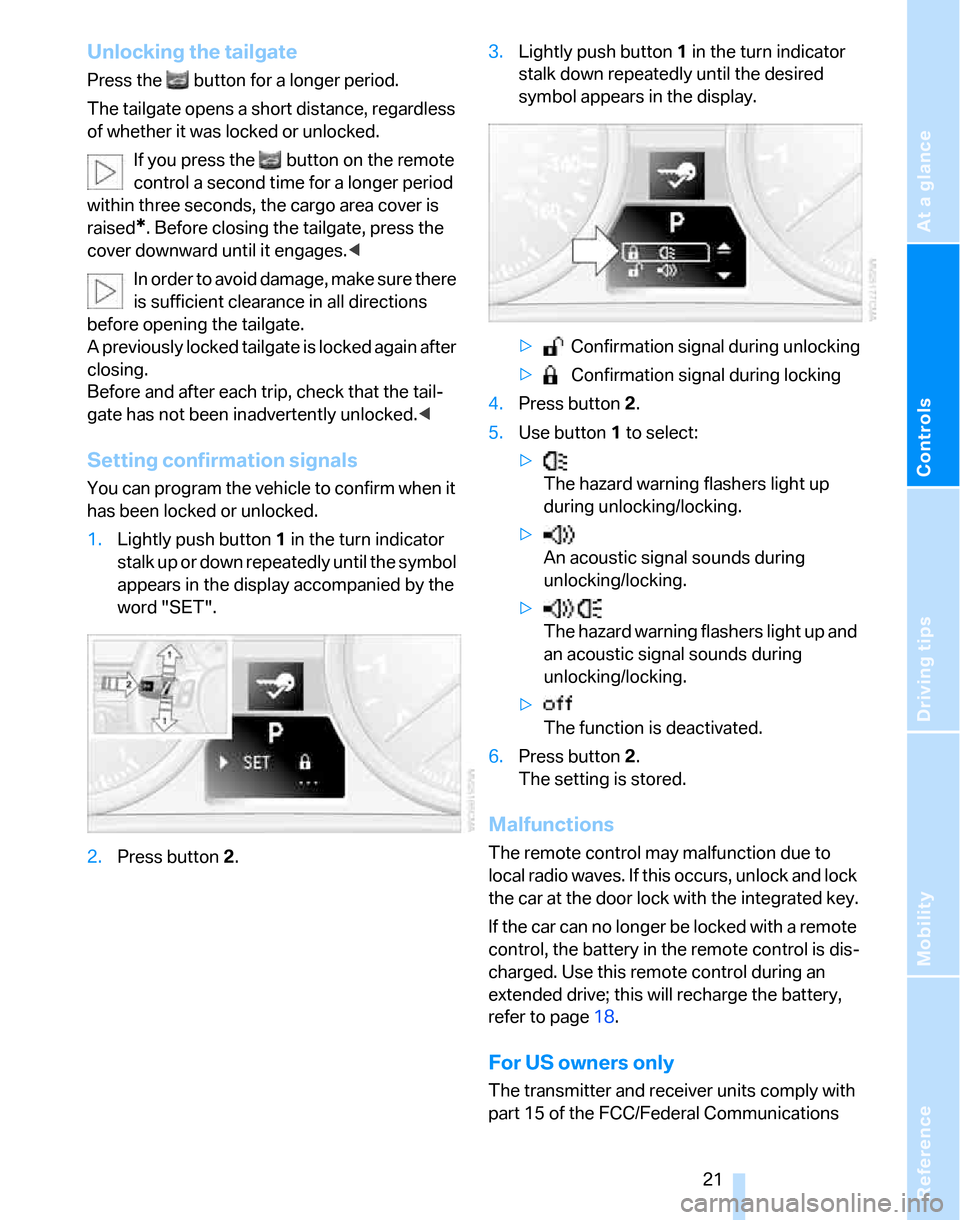
Setting confirmation signals
You can program the vehicle to confirm when it
has been locked or unlocked.
1.Lightly push button1 in the turn indicator
stalk up or down repeatedly until the symbol
appears in the display accompanied by the
word "SET".
2.Press button 2.3.Lightly push button1 in the turn indicator
stalk down repeatedly until the desired
symbol appears in the display.
> Confirmation signal during unlocking
> Confirmation signal during locking
4.Press button 2.
5.Use button 1 to select:
>
The hazard warning flashers light up
during unlocking/locking.
>
An acoustic signal sounds during
unlocking/locking.
>
The hazard warning flashers light up and
an acoustic signal sounds during
unlocking/locking.
>
The function is deactivated.
6.Press button 2.
The setting is stored.
Malfunctions
The remote control may malfunction due to
local radio waves. If this occurs, unlock and lock
the car at the door lock with the integrated key.
If the car can no longer be locked with a remote
control, the battery in the remote control is dis-
charged. Use this remote control during an
extended drive; this will recharge the battery,
refer to page18.
For US owners only
The transmitter and receiver units comply with
part 15 of the FCC/Federal Communications
Page 24 of 160
Opening and closing
22 Commission regulations. Operation is gov-
erned by the following:
FCC ID:
LX8766S
LX8766E
LX8CAS
Compliance statement:
This device complies with part 15 of the FCC
Rules. Operation is subject to the following two
conditions:
>This device must not cause harmful inter-
ference, and
>This device must accept any interference
received, including interference that may
cause undesired operation.
Any unauthorized modifications or
changes to these devices could void the
user's authority to operate this equipment.<
Using the door lock
You can set the way in which the car is
unlocked, refer to page20.
Convenient operation
You can also operate the windows and pan-
orama glass roof via the door lock
*.
Hold the key in the position for unlocking or
locking.
Watch during the closing process to be
sure that no one is injured. Releasing the
key stops the operation.<
Manual operation
In the event of an electrical malfunction, you can
lock and unlock the driver's door by turning the integrated key or the spare key to the corre-
sponding limit positions in the door lock.
Opening and closing: from
inside
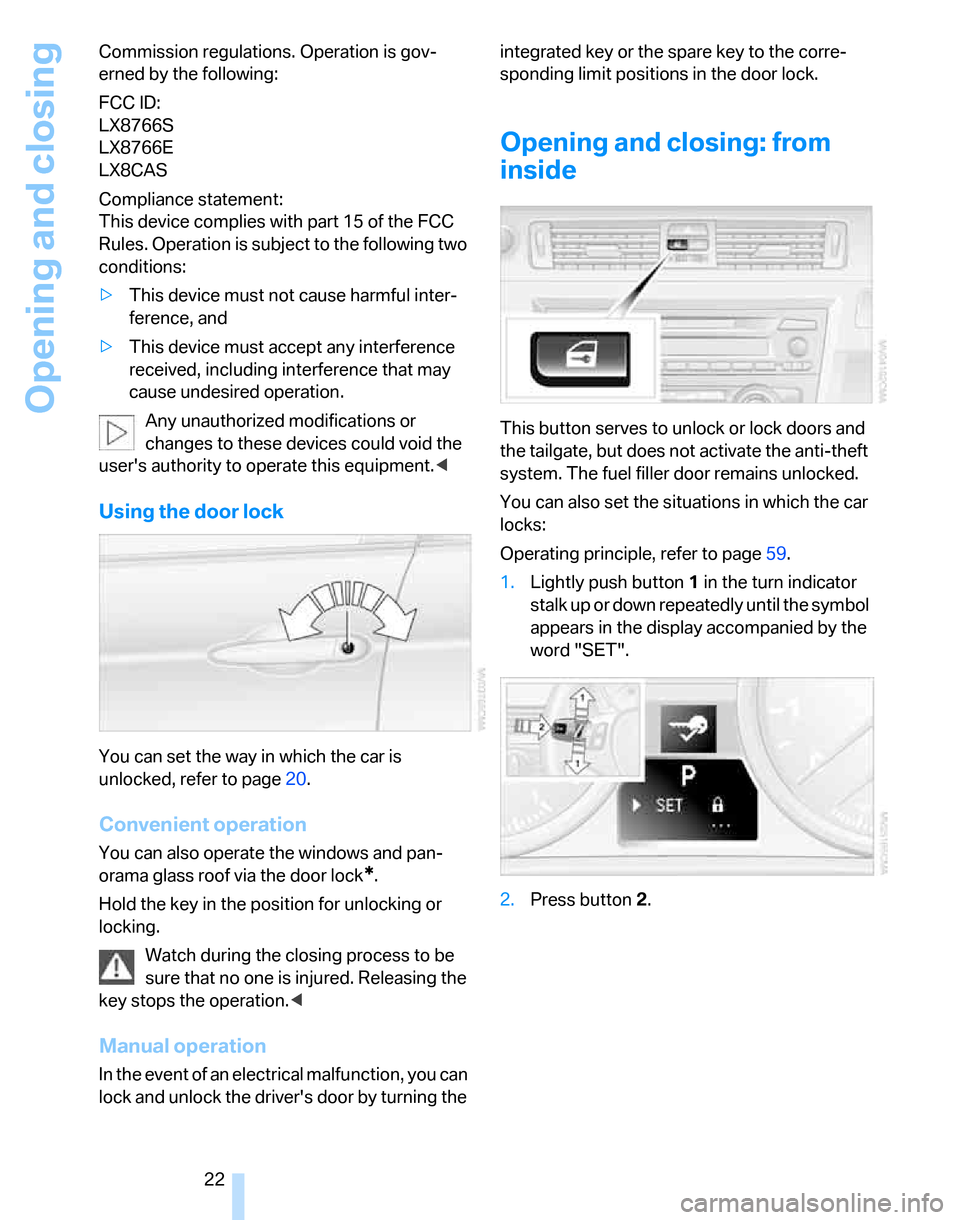
This button serves to unlock or lock doors and
the tailgate, but does not activate the anti-theft
system. The fuel filler door remains unlocked.
You can also set the situations in which the car
locks:
Operating principle, refer to page59.
1.Lightly push button1 in the turn indicator
stalk up or down repeatedly until the symbol
appears in the display accompanied by the
word "SET".
2.Press button 2.
Page 25 of 160
Reference
At a glance
Controls
Driving tips
Mobility
23
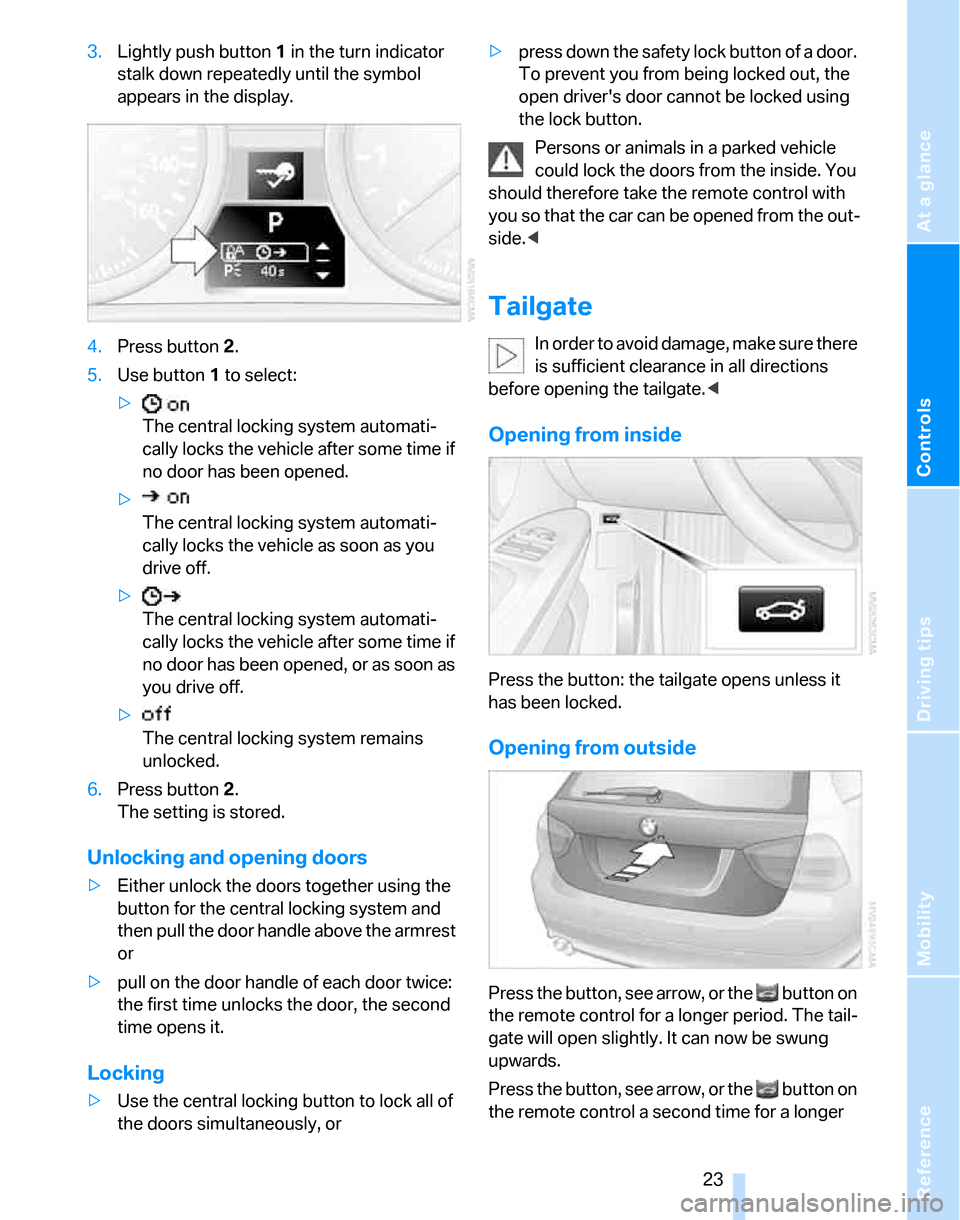
3.Lightly push button1 in the turn indicator
stalk down repeatedly until the symbol
appears in the display.
4.Press button 2.
5.Use button 1 to select:
>
The central locking system automati-
cally locks the vehicle after some time if
no door has been opened.
>
The central locking system automati-
cally locks the vehicle as soon as you
drive off.
>
The central locking system automati-
cally locks the vehicle after some time if
no door has been opened, or as soon as
you drive off.
>
The central locking system remains
unlocked.
6.Press button 2.
The setting is stored.
Unlocking and opening doors
>Either unlock the doors together using the
button for the central locking system and
then pull the door handle above the armrest
or
>pull on the door handle of each door twice:
the first time unlocks the door, the second
time opens it.
Locking
>Use the central locking button to lock all of
the doors simultaneously, or>press down the safety lock button of a door.
To prevent you from being locked out, the
open driver's door cannot be locked using
the lock button.
Persons or animals in a parked vehicle
could lock the doors from the inside. You
should therefore take the remote control with
you so that the car can be opened from the out-
side.<
Tailgate
In order to avoid damage, make sure there
is sufficient clearance in all directions
before opening the tailgate.<
Opening from inside
Press the button: the tailgate opens unless it
has been locked.
Opening from outside
Press the button, see arrow, or the button on
the remote control for a longer period. The tail-
gate will open slightly. It can now be swung
upwards.
Press the button, see arrow, or the button on
the remote control a second time for a longer
Page 26 of 160
Opening and closing
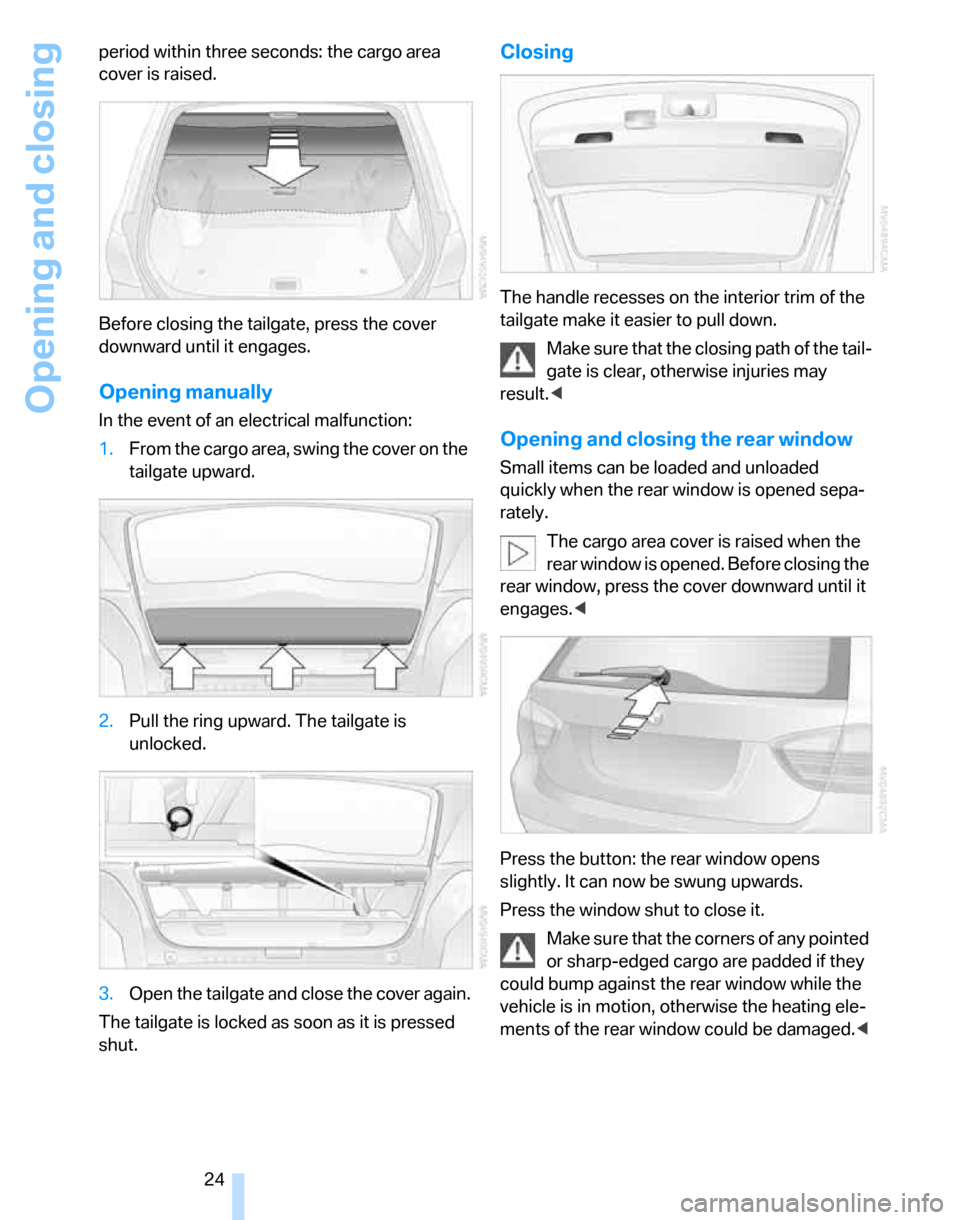
24 period within three seconds: the cargo area
cover is raised.
Before closing the tailgate, press the cover
downward until it engages.
Opening manually
In the event of an electrical malfunction:
1.From the cargo area, swing the cover on the
tailgate upward.
2.Pull the ring upward. The tailgate is
unlocked.
3.Open the tailgate and close the cover again.
The tailgate is locked as soon as it is pressed
shut.
Closing
The handle recesses on the interior trim of the
tailgate make it easier to pull down.
Make sure that the closing path of the tail-
gate is clear, otherwise injuries may
result.<
Opening and closing the rear window
Small items can be loaded and unloaded
quickly when the rear window is opened sepa-
rately.
The cargo area cover is raised when the
rear window is opened. Before closing the
rear window, press the cover downward until it
engages.<
Press the button: the rear window opens
slightly. It can now be swung upwards.
Press the window shut to close it.
Make sure that the corners of any pointed
or sharp-edged cargo are padded if they
could bump against the rear window while the
vehicle is in motion, otherwise the heating ele-
ments of the rear window could be damaged.<
Page 28 of 160
Opening and closing
26 >When transporting on car-carrying trains
>When animals are to remain in the vehicle
Switching off tilt alarm sensor and
interior motion sensor
Press the button on the remote control
twice in a row.
The indicator lamp comes on for approx. two
seconds, then begins to flash steadily. The tilt
alarm sensor and the interior motion sensor are
switched off until the next time the vehicle is
unlocked and subsequently locked again.
Convenient access*
Convenient access enables you to enter your
vehicle without needing to hold the remote con-
trol in your hand. All you need to do is wear the
remote control close to your body, e.g. in your
jacket pocket. The vehicle automatically
detects the corresponding remote control
within the immediate vicinity or in the passen-
ger compartment.
Convenient access supports the following
functions:
>Unlocking/locking the vehicle
>Unlocking the tailgate separately
>Engine starting
>Convenient closure
Functional requirement
>The vehicle or the tailgate can only be
locked when the vehicle detects that the
remote control currently in use is outside of
the vehicle.
>The vehicle cannot be locked or unlocked
again until after approx. 2 seconds.
>The engine can only be started when the
vehicle detects that the remote control cur-
rently in use is inside the vehicle.
Special features in comparison to
conventional remote controls
In general, there is no difference between using
convenient access or pressing the buttons on the remote control to carry out the functions
mentioned above. You should therefore first
familiarize yourself with the instructions on
opening and closing starting on page18.
Special features regarding the use of conve-
nient access are described below.
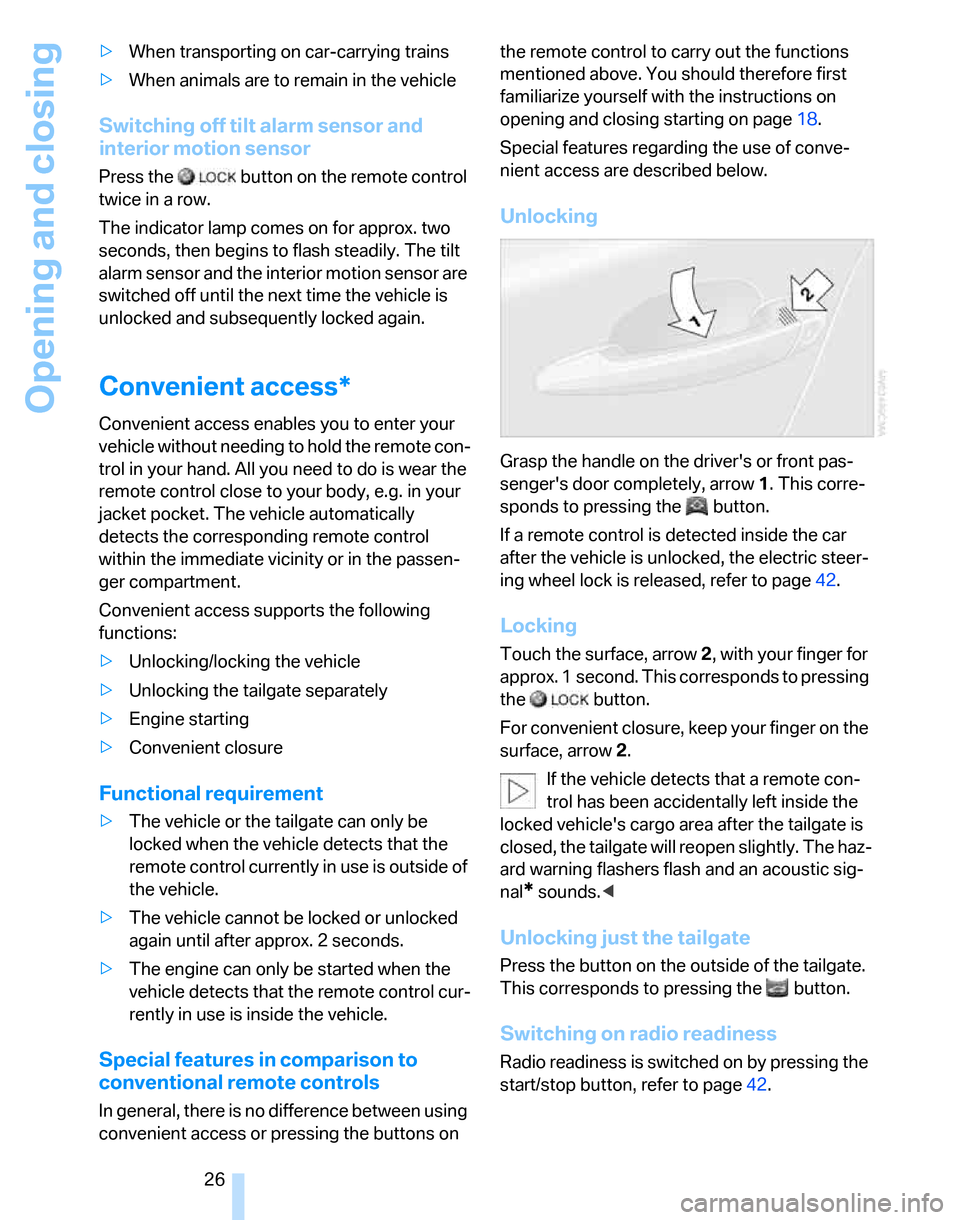
Unlocking
Grasp the handle on the driver's or front pas-
senger's door completely, arrow 1. This corre-
sponds to pressing the button.
If a remote control is detected inside the car
after the vehicle is unlocked, the electric steer-
ing wheel lock is released, refer to page42.
Locking
Touch the surface, arrow 2, with your finger for
approx. 1 second. This corresponds to pressing
the button.
For convenient closure, keep your finger on the
surface, arrow 2.
If the vehicle detects that a remote con-
trol has been accidentally left inside the
locked vehicle's cargo area after the tailgate is
closed, the tailgate will reopen slightly. The haz-
ard warning flashers flash and an acoustic sig-
nal
* sounds.<
Unlocking just the tailgate
Press the button on the outside of the tailgate.
This corresponds to pressing the button.
Switching on radio readiness
Radio readiness is switched on by pressing the
start/stop button, refer to page42.
Page 127 of 160
Reference
At a glance
Controls
Driving tips
Mobility
125
Giving and receiving assistance
Emergency calling*
Conditions for an emergency call:
>Full preparation package mobile phone
>BMW Assist is enabled. Enabling
BMW Assist, refer to separate Owner's
Manual.
>Radio readiness is on.
>The car phone is logged on to a mobile tele-
phone network.
>The emergency call system is operable.
If your subscription contract with BMW Assist
expires, the car phone can be deactivated by a
BMW Center without having to schedule an
appointment at a workshop. Once the car
phone has been deactivated, emergency calls
are not possible. The car phone can be reacti-
vated by a BMW Center after signing a new
contract.
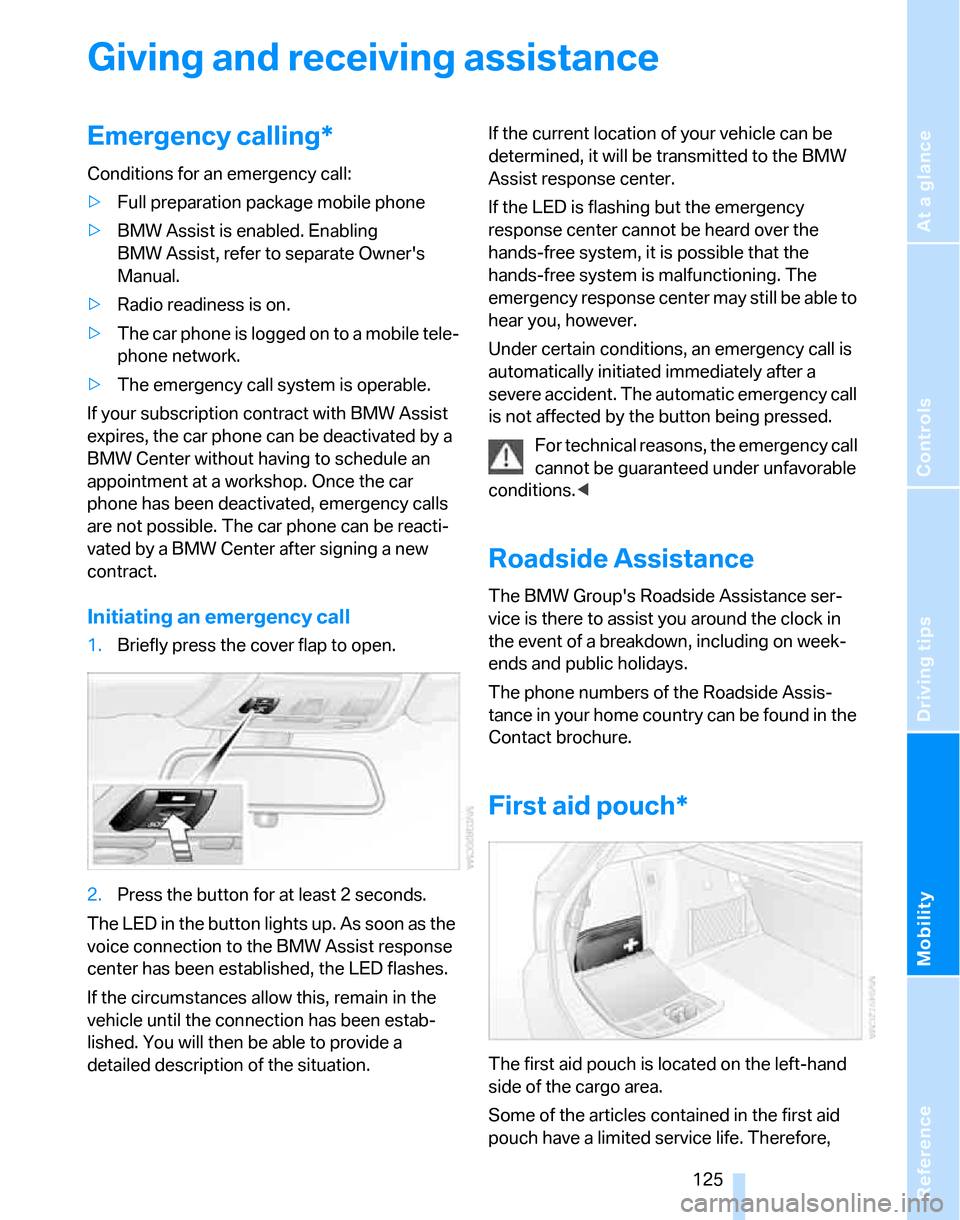
Initiating an emergency call
1.Briefly press the cover flap to open.
2.Press the button for at least 2 seconds.
The LED in the button lights up. As soon as the
voice connection to the BMW Assist response
center has been established, the LED flashes.
If the circumstances allow this, remain in the
vehicle until the connection has been estab-
lished. You will then be able to provide a
detailed description of the situation.If the current location of your vehicle can be
determined, it will be transmitted to the BMW
Assist response center.
If the LED is flashing but the emergency
response center cannot be heard over the
hands-free system, it is possible that the
hands-free system is malfunctioning. The
emergency response center may still be able to
hear you, however.
Under certain conditions, an emergency call is
automatically initiated immediately after a
severe accident. The automatic emergency call
is not affected by the button being pressed.
For technical reasons, the emergency call
cannot be guaranteed under unfavorable
conditions.<
Roadside Assistance
The BMW Group's Roadside Assistance ser-
vice is there to assist you around the clock in
the event of a breakdown, including on week-
ends and public holidays.
The phone numbers of the Roadside Assis-
tance in your home country can be found in the
Contact brochure.
First aid pouch*
The first aid pouch is located on the left-hand
side of the cargo area.
Some of the articles contained in the first aid
pouch have a limited service life. Therefore,
Page 133 of 160
Reference
At a glance
Controls
Driving tips
Mobility
131
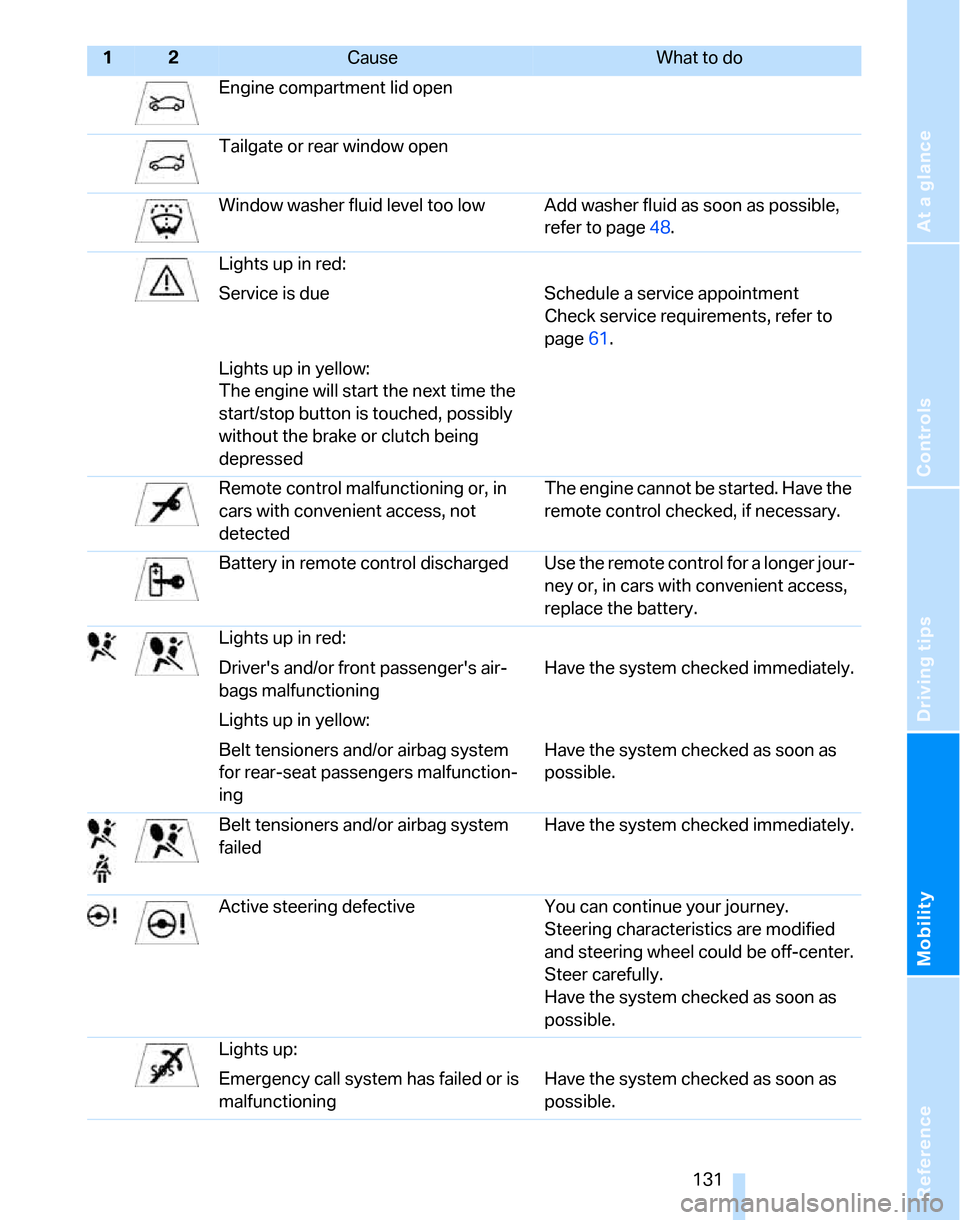
Engine compartment lid open
Tailgate or rear window open
Window washer fluid level too low Add washer fluid as soon as possible,
refer to page48.
Lights up in red:
Service is due Schedule a service appointment
Check service requirements, refer to
page61.
Lights up in yellow:
The engine will start the next time the
start/stop button is touched, possibly
without the brake or clutch being
depressed
Remote control malfunctioning or, in
cars with convenient access, not
detectedThe engine cannot be started. Have the
remote control checked, if necessary.
Battery in remote control discharged Use the remote control for a longer jour-
ney or, in cars with convenient access,
replace the battery.
Lights up in red:
Driver's and/or front passenger's air-
bags malfunctioningHave the system checked immediately.
Lights up in yellow:
Belt tensioners and/or airbag system
for rear-seat passengers malfunction-
ingHave the system checked as soon as
possible.
Belt tensioners and/or airbag system
failedHave the system checked immediately.
Active steering defective You can continue your journey.
Steering characteristics are modified
and steering wheel could be off-center.
Steer carefully.
Have the system checked as soon as
possible.
Lights up:
Emergency call system has failed or is
malfunctioningHave the system checked as soon as
possible.
12Cause What to do
Page 136 of 160
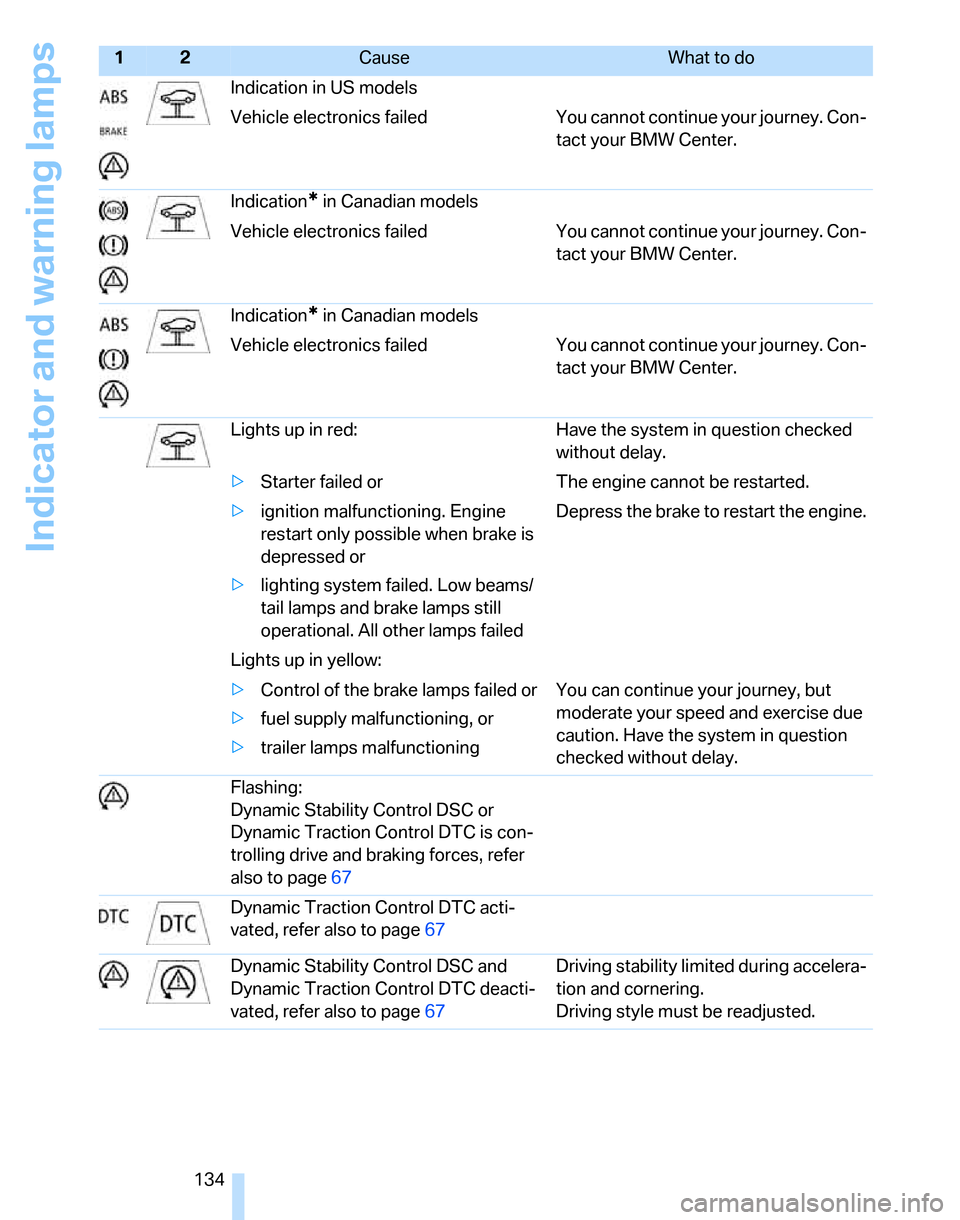
Indicator and warning lamps
134Indication in US models
Vehicle electronics failed You cannot continue your journey. Con-
tact your BMW Center.
Indication
* in Canadian models
Vehicle electronics failed You cannot continue your journey. Con-
tact your BMW Center.
Indication
* in Canadian models
Vehicle electronics failed You cannot continue your journey. Con-
tact your BMW Center.
Lights up in red: Have the system in question checked
without delay.
>Starter failed or The engine cannot be restarted.
>ignition malfunctioning. Engine
restart only possible when brake is
depressed or
>lighting system failed. Low beams/
tail lamps and brake lamps still
operational. All other lamps failedDepress the brake to restart the engine.
Lights up in yellow:
>Control of the brake lamps failed or
>fuel supply malfunctioning, or
>trailer lamps malfunctioning You can continue your journey, but
moderate your speed and exercise due
caution. Have the system in question
checked without delay.
Flashing:
Dynamic Stability Control DSC or
Dynamic Traction Control DTC is con-
trolling drive and braking forces, refer
also to page67
Dynamic Traction Control DTC acti-
vated, refer also to page67
Dynamic Stability Control DSC and
Dynamic Traction Control DTC deacti-
vated, refer also to page67Driving stability limited during accelera-
tion and cornering.
Driving style must be readjusted.
12Cause What to do
Page 149 of 160
Reference
At a glance
Controls
Driving tips
Mobility
147
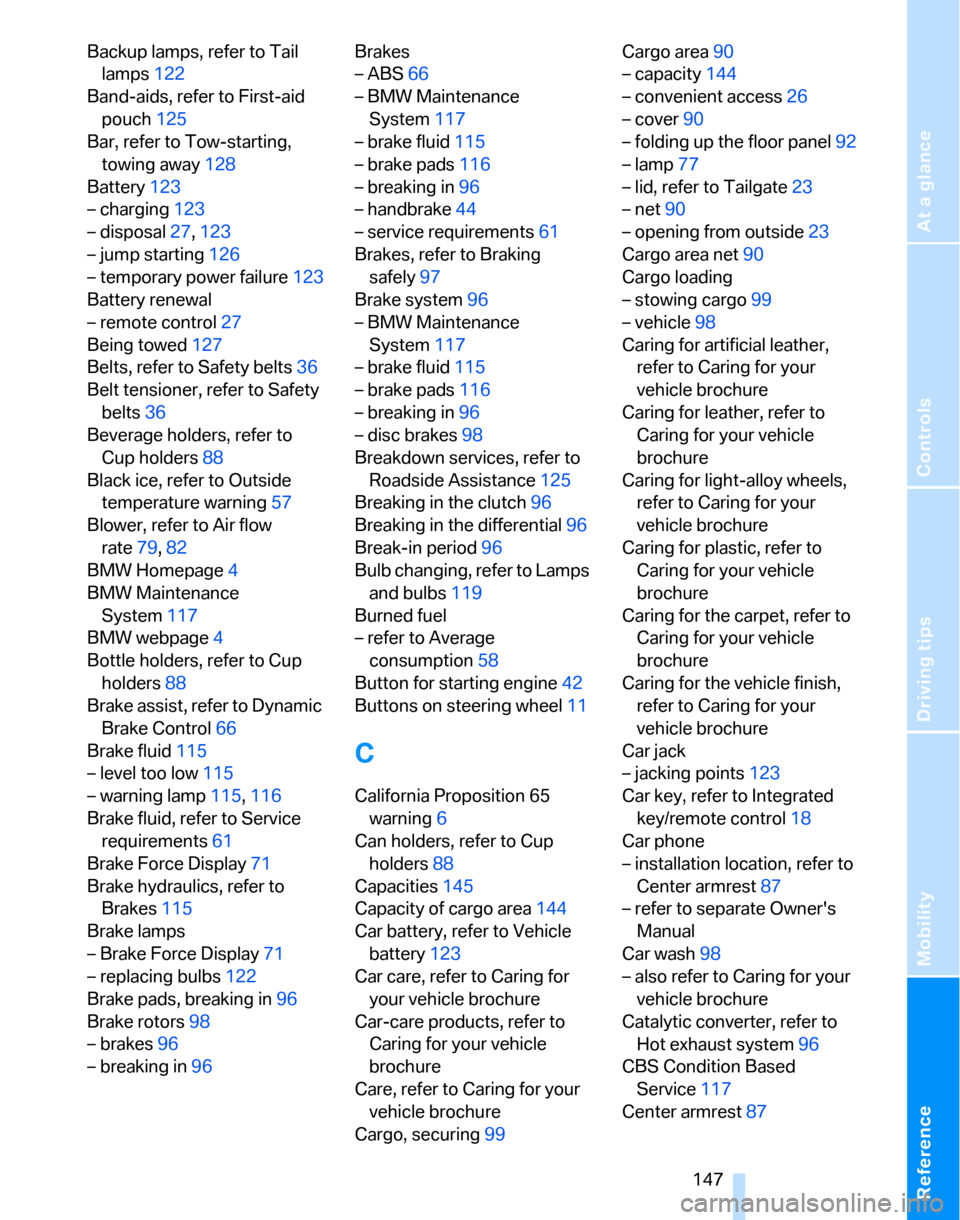
Backup lamps, refer to Tail
lamps122
Band-aids, refer to First-aid
pouch125
Bar, refer to Tow-starting,
towing away128
Battery123
– charging123
– disposal27,123
– jump starting126
– temporary power failure123
Battery renewal
– remote control27
Being towed127
Belts, refer to Safety belts36
Belt tensioner, refer to Safety
belts36
Beverage holders, refer to
Cup holders88
Black ice, refer to Outside
temperature warning57
Blower, refer to Air flow
rate79,82
BMW Homepage4
BMW Maintenance
System117
BMW webpage4
Bottle holders, refer to Cup
holders88
Brake assist, refer to Dynamic
Brake Control66
Brake fluid115
– level too low115
– warning lamp115,116
Brake fluid, refer to Service
requirements61
Brake Force Display71
Brake hydraulics, refer to
Brakes115
Brake lamps
– Brake Force Display71
– replacing bulbs122
Brake pads, breaking in96
Brake rotors98
– brakes96
– breaking in96Brakes
– ABS66
– BMW Maintenance
System117
– brake fluid115
– brake pads116
– breaking in96
– handbrake44
– service requirements61
Brakes, refer to Braking
safely97
Brake system96
– BMW Maintenance
System117
– brake fluid115
– brake pads116
– breaking in96
– disc brakes98
Breakdown services, refer to
Roadside Assistance125
Breaking in the clutch96
Breaking in the differential96
Break-in period96
Bulb changing, refer to Lamps
and bulbs119
Burned fuel
– refer to Average
consumption58
Button for starting engine42
Buttons on steering wheel11
C
California Proposition 65
warning6
Can holders, refer to Cup
holders88
Capacities145
Capacity of cargo area144
Car battery, refer to Vehicle
battery123
Car care, refer to Caring for
your vehicle brochure
Car-care products, refer to
Caring for your vehicle
brochure
Care, refer to Caring for your
vehicle brochure
Cargo, securing99Cargo area90
– capacity144
– convenient access26
– cover90
– folding up the floor panel92
– lamp77
– lid, refer to Tailgate23
– net90
– opening from outside23
Cargo area net90
Cargo loading
– stowing cargo99
– vehicle98
Caring for artificial leather,
refer to Caring for your
vehicle brochure
Caring for leather, refer to
Caring for your vehicle
brochure
Caring for light-alloy wheels,
refer to Caring for your
vehicle brochure
Caring for plastic, refer to
Caring for your vehicle
brochure
Caring for the carpet, refer to
Caring for your vehicle
brochure
Caring for the vehicle finish,
refer to Caring for your
vehicle brochure
Car jack
– jacking points123
Car key, refer to Integrated
key/remote control18
Car phone
– installation location, refer to
Center armrest87
– refer to separate Owner's
Manual
Car wash98
– also refer to Caring for your
vehicle brochure
Catalytic converter, refer to
Hot exhaust system96
CBS Condition Based
Service117
Center armrest87