call up BMW 328I 2011 E90 Owners Manual
[x] Cancel search | Manufacturer: BMW, Model Year: 2011, Model line: 328I, Model: BMW 328I 2011 E90Pages: 286, PDF Size: 8.25 MB
Page 201 of 286
199
Entertainment
Reference
At a glance
Controls
Driving tips Communications
Navigation
Mobility
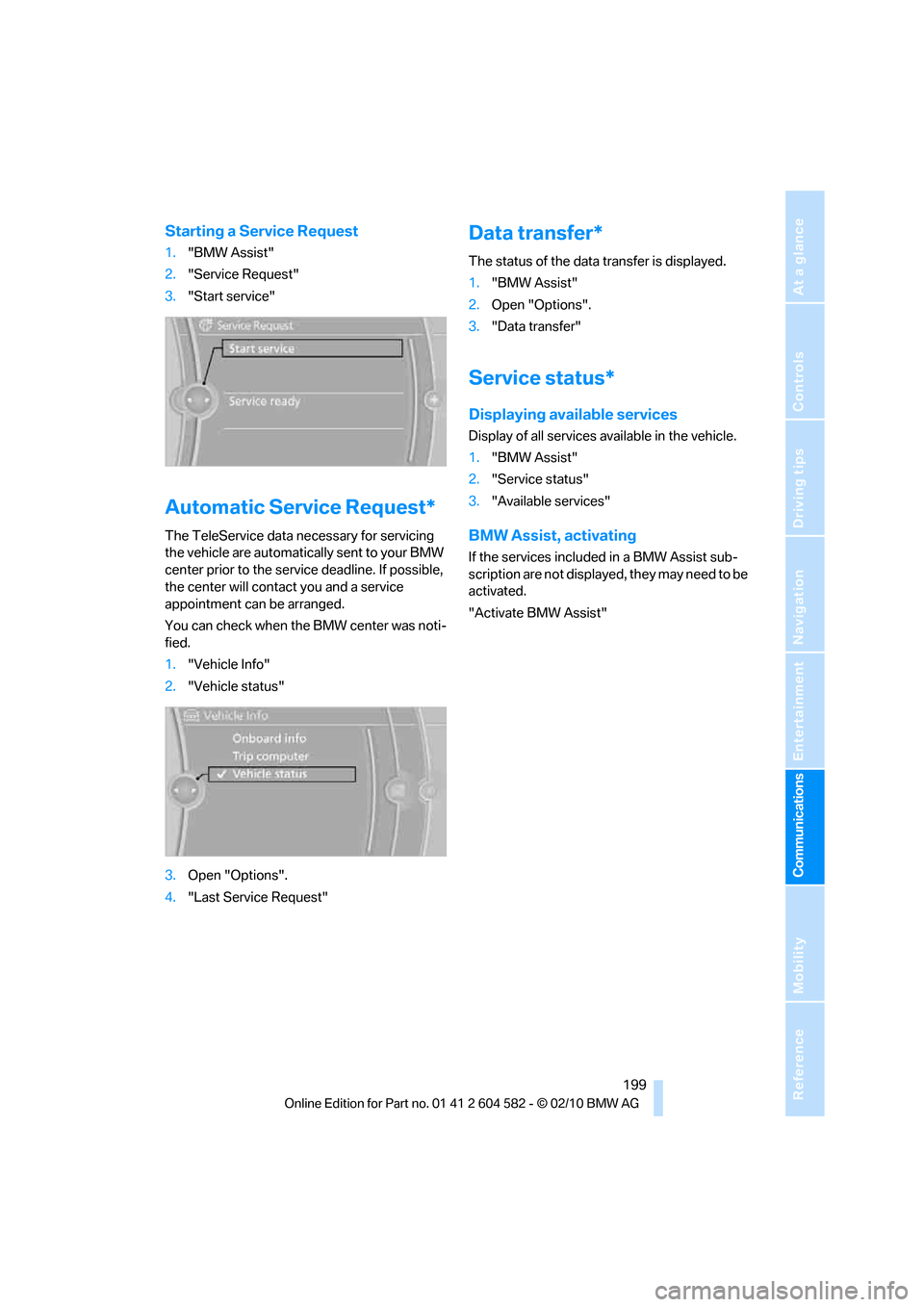
Starting a Service Request
1."BMW Assist"
2."Service Request"
3."Start service"
Automatic Service Request*
The TeleService data necessary for servicing
the vehicle are automatically sent to your BMW
center prior to the service deadline. If possible,
the center will contact you and a service
appointment can be arranged.
You can check when the BMW center was noti-
fied.
1."Vehicle Info"
2."Vehicle status"
3.Open "Options".
4."Last Service Request"
Data transfer*
The status of the data transfer is displayed.
1."BMW Assist"
2.Open "Options".
3."Data transfer"
Service status*
Displaying available services
Display of all services available in the vehicle.
1."BMW Assist"
2."Service status"
3."Available services"
BMW Assist, activating
If the services included in a BMW Assist sub-
scription are not displayed, they may need to be
activated.
"Activate BMW Assist"
Page 229 of 286
Mobility
227Reference
At a glance
Controls
Driving tips
Communications
Navigation
Entertainment
Engine oil
The engine oil consumption is dependent on
driving style and driving conditions.
Checking the engine oil level with the
dipstick*
1.Park the vehicle on a level surface with the
engine at operating temperature, i.e. after
an uninterrupted drive of at least 6.2 miles/
10 km.
2.Switch off the engine.
3.After approx. 5 minutes, pull out the
dipstick5 and wipe it off with a lint-free
cloth, paper towel or similar material.
4.Carefully push the dipstick all the way back
into the measuring tube and pull it out
again.
The oil level must be between the two
markings on the dipstick.
The oil quantity between the two markings on
the dipstick is equivalent to approx. 1 US quart/
1 liter.
The oil level must not be above the upper
marking of the dipstick. Too much oil will
harm the engine.<
Checking the engine oil level
electronically*
Your car is equipped with an electronic oil-level
monitor.
For a precise measurement and display of the
oil level, it is necessary that the engine be at
operating temperature, i.e. after uninterrupted
driving for at least approx. 6.2 miles/10 km. You
can have the oil level displayed while you are
driving, or while the vehicle is at a standstill on
a level surface and the engine is running.
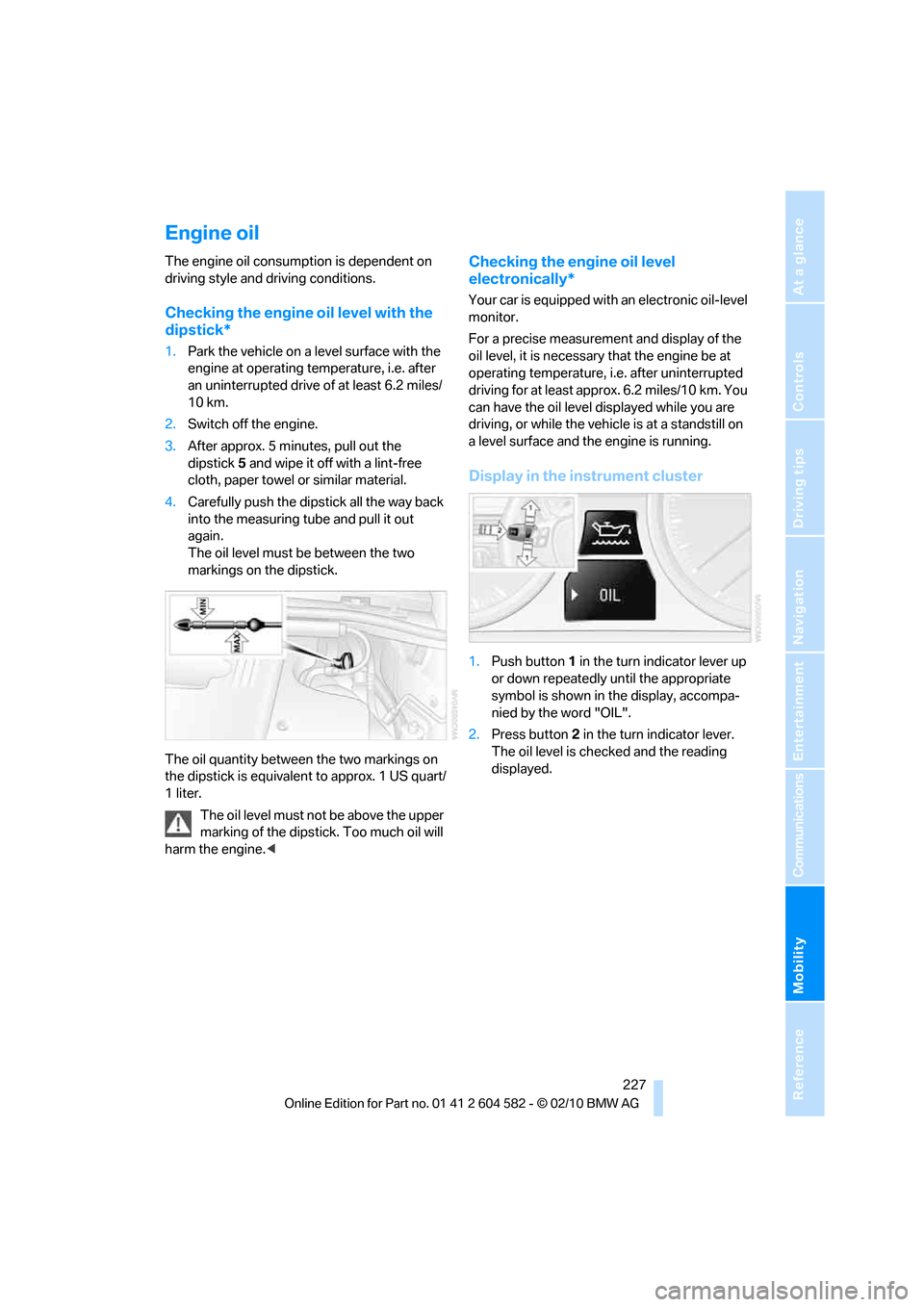
Display in the instrument cluster
1.Push button 1 in the turn indicator lever up
or down repeatedly until the appropriate
symbol is shown in the display, accompa-
nied by the word "OIL".
2.Press button 2 in the turn indicator lever.
The oil level is checked and the reading
displayed.
Page 237 of 286
Mobility
235Reference
At a glance
Controls
Driving tips
Communications
Navigation
Entertainment
Light-alloy wheels
For technical reasons, dust is generated during
braking that is deposited on the light-alloy
wheels. Remove the dust regularly using acid-
free rim cleaner.
Do not use aggressive, acidic, strongly
alkaline and abrasive cleaning agents or
steam jets over 1407/606; otherwise, dam-
age may occur.<
Outside sensors/cameras
Keep the sensors and cameras on the
outside of the vehicle, e.g. those for Park
Distance Control, clean and free of ice to ensure
that they remain fully functional.<
Interior care
Upholstery fabrics/cloth trims/
Alcantara fabrics
Vacuum regularly with a vacuum cleaner to
remove superficial dirt.
To remove severe spots such as stains from
beverages, use a soft sponge or lint-free
microfiber cloth and suitable interior cleaners.
Follow the instructions on the packaging.
Clean the upholstery down to the seams
using a sweeping motion. Avoid strong
rubbing.<
Opened Velcro fasteners on pants or
other articles of clothing can damage the
seat covers. Ensure that Velcro fasteners are
closed.<
Leather/leather trim
The leather used by BMW is a high quality
natural product. Slight irregularities in the
leather are a typical characteristic of natural
leather.<
Dust and road grit in the pores and folds of the
leather have an abrasive effect, leading to
increased wear and causing the leather surface
to become brittle prematurely. Therefore, fre-
quently clean the leather of dust using a cloth or
vacuum cleaner.Clean light-colored leather more frequently as
dust and dirt are more noticeable.
Treat the leather at least once every two
months using a leather lotion as dirt and grease
will gradually attack the leather's protective
layer.
Carpet/floor mats*
The floor mats can be removed for cleaning.
When heavily soiled, clean carpets with a
microfiber cloth and water or textile cleaner.
Rub back and forth in the direction of travel; oth-
erwise, the carpet may become matted.
Interior plastic parts
>Imitation leather surfaces
>Lamp glasses
>Display pane of instrument cluster
>Matte parts
Clean with water and solvent-free plastic
cleaner if necessary.
Fine wood parts
Clean fine wood trim and fine wood parts with a
damp cloth. Wipe dry with a soft cloth.
Safety belts
Dirty belt straps impede the reeling action and
thus have a negative impact on safety.
Do not clean chemically, as this may
destroy the webbing.<
Interior sensors/cameras
To clean interior sensors and cameras, e.g. of
the high-beam assistant, use a lint-free cloth
moistened with glass cleaner.
Page 247 of 286
Mobility
245Reference
At a glance
Controls
Driving tips
Communications
Navigation
Entertainment
Power failure
After a temporary power loss, the functioning of
some equipment may be limited and require
reinitialization. Individual settings may likewise
have been lost and will have to be programmed:
>Time and date
These values must be updated, refer to
page79.
>Radio
In some cases, stations may have to be
stored again, refer to page154.
>Navigation system
Operability must be waited for, refer to
page130.
>Glass roof
It may happen that the roof can only be
raised. The system must be initialized.
Please contact your BMW center.
>Panorama glass roof
It may happen that the roof can only be
raised. The system must be initialized.
Please contact your BMW center.
>Seat and mirror memory
The positions must be stored again, refer to
page46.
>Inside rearview mirror with digital compass
The system must be calibrated, refer to
page110.
>Active steering
The system automatically initializes itself
briefly during a trip. The system is deacti-
vated during this time, refer to page92.
>xDrive
The system automatically initializes itself
during a trip. Indicator lamps light up during
this time. If the lamps do not go out during
the current trip, have the system checked.
Fuses
Never attempt to repair a blown fuse and
do not replace a defective fuse with a sub-
stitute of another color or amperage rating; oth-
erwise, this could lead to a circuit overload, ulti-
mately resulting in a fire in the vehicle.<
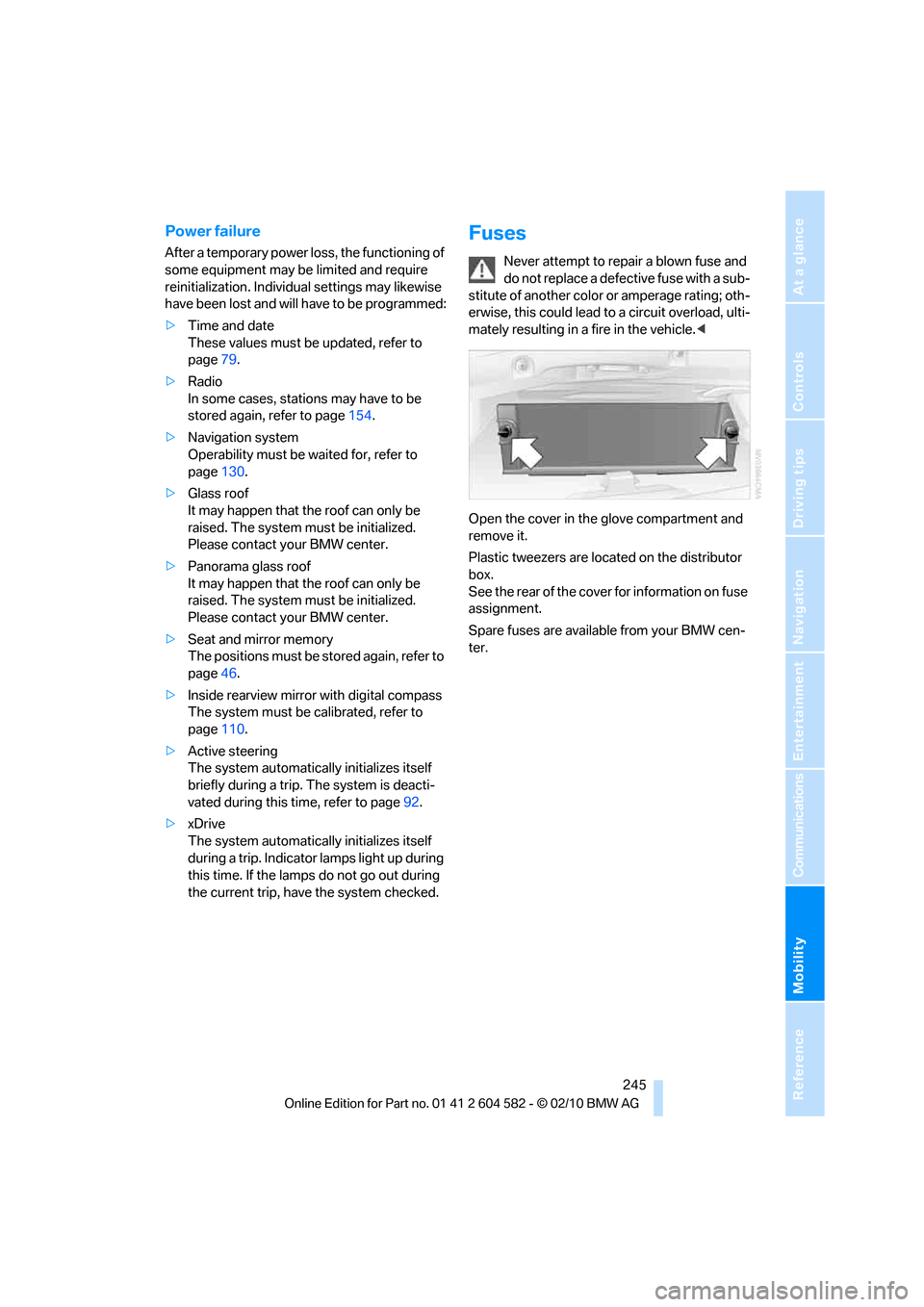
Open the cover in the glove compartment and
remove it.
Plastic tweezers are located on the distributor
box.
See the rear of the cover for information on fuse
assignment.
Spare fuses are available from your BMW cen-
ter.
Page 248 of 286
Giving and receiving assistance
246
Giving and receiving assistance
Emergency Request*
Conditions for an Emergency Request:
>Full preparation package mobile phone: this
equipment makes it possible to send an
Emergency Request even if no mobile
phone is paired with the vehicle.
>BMW Assist is activated. Activating
BMW Assist, refer to page197.
>Radio readiness is on.
>The BMW Assist system is logged on to a
mobile phone network.
>The Emergency Request system is opera-
ble.
Once your service contract for BMW Assist
expires, the BMW Assist system can be deacti-
vated by a BMW center without you having to
visit a workshop. Once the BMW Assist system
has been deactivated, Emergency Requests
are not possible. The BMW Assist system can
be reactivated by a BMW center after a new
contract has been signed.
Sending an Emergency Request
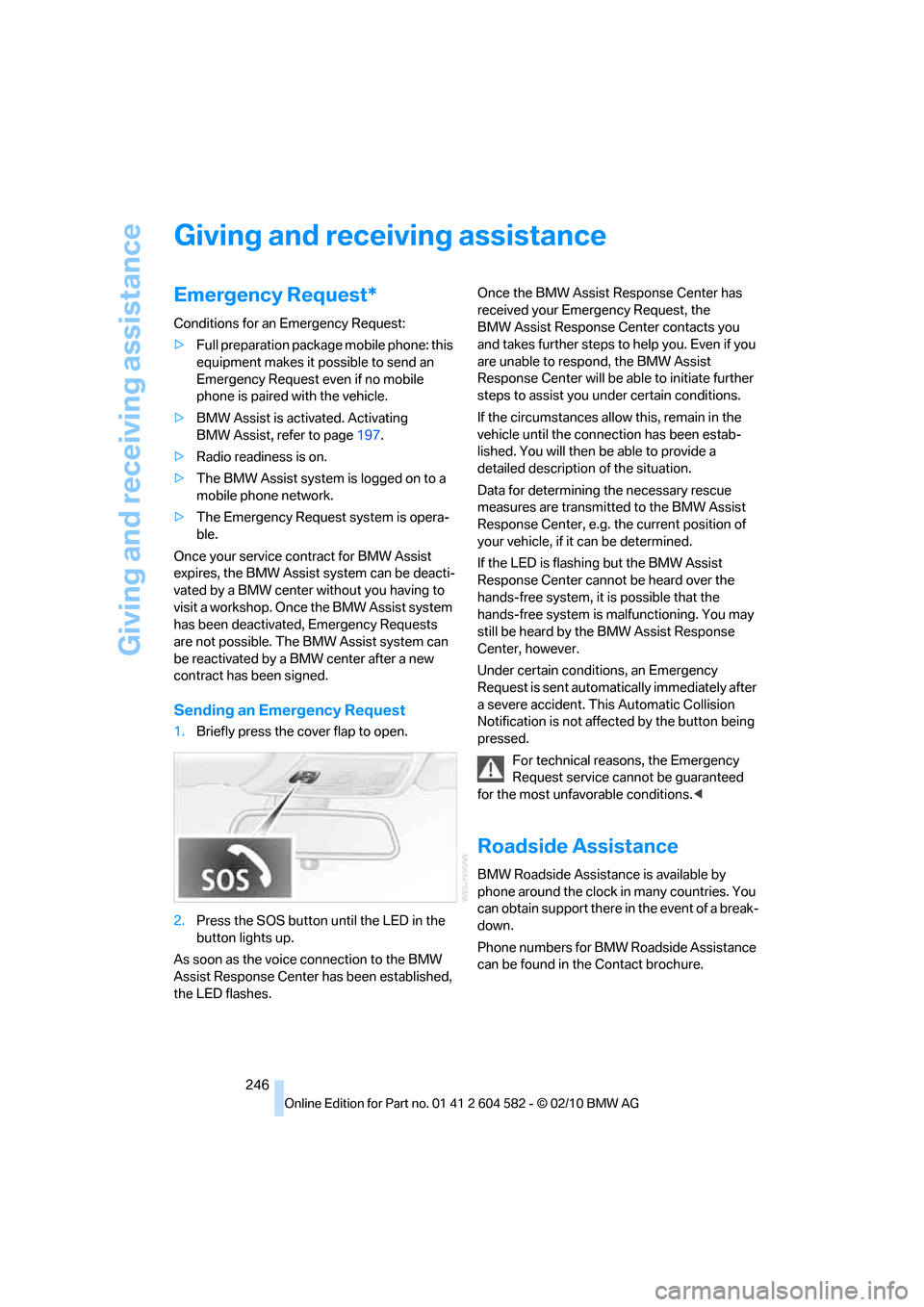
1.Briefly press the cover flap to open.
2.Press the SOS button until the LED in the
button lights up.
As soon as the voice connection to the BMW
Assist Response Center has been established,
the LED flashes.Once the BMW Assist Response Center has
received your Emergency Request, the
BMW Assist Response Center contacts you
and takes further steps to help you. Even if you
are unable to respond, the BMW Assist
Response Center will be able to initiate further
steps to assist you under certain conditions.
If the circumstances allow this, remain in the
vehicle until the connection has been estab-
lished. You will then be able to provide a
detailed description of the situation.
Data for determining the necessary rescue
measures are transmitted to the BMW Assist
Response Center, e.g. the current position of
your vehicle, if it can be determined.
If the LED is flashing but the BMW Assist
Response Center cannot be heard over the
hands-free system, it is possible that the
hands-free system is malfunctioning. You may
still be heard by the BMW Assist Response
Center, however.
Under certain conditions, an Emergency
Request is sent automatically immediately after
a severe accident. This Automatic Collision
Notification is not affected by the button being
pressed.
For technical reasons, the Emergency
Request service cannot be guaranteed
for the most unfavorable conditions.<
Roadside Assistance
BMW Roadside Assistance is available by
phone around the clock in many countries. You
can obtain support there in the event of a break-
down.
Phone numbers for BMW Roadside Assistance
can be found in the Contact brochure.
Page 249 of 286
Mobility
247Reference
At a glance
Controls
Driving tips
Communications
Navigation
Entertainment
First aid pouch*
Some of the articles contained in the first aid
pouch have a limited service life. Therefore,
check the expiration dates of the contents reg-
ularly and replace any items in good time, if nec-
essary.
Sedan
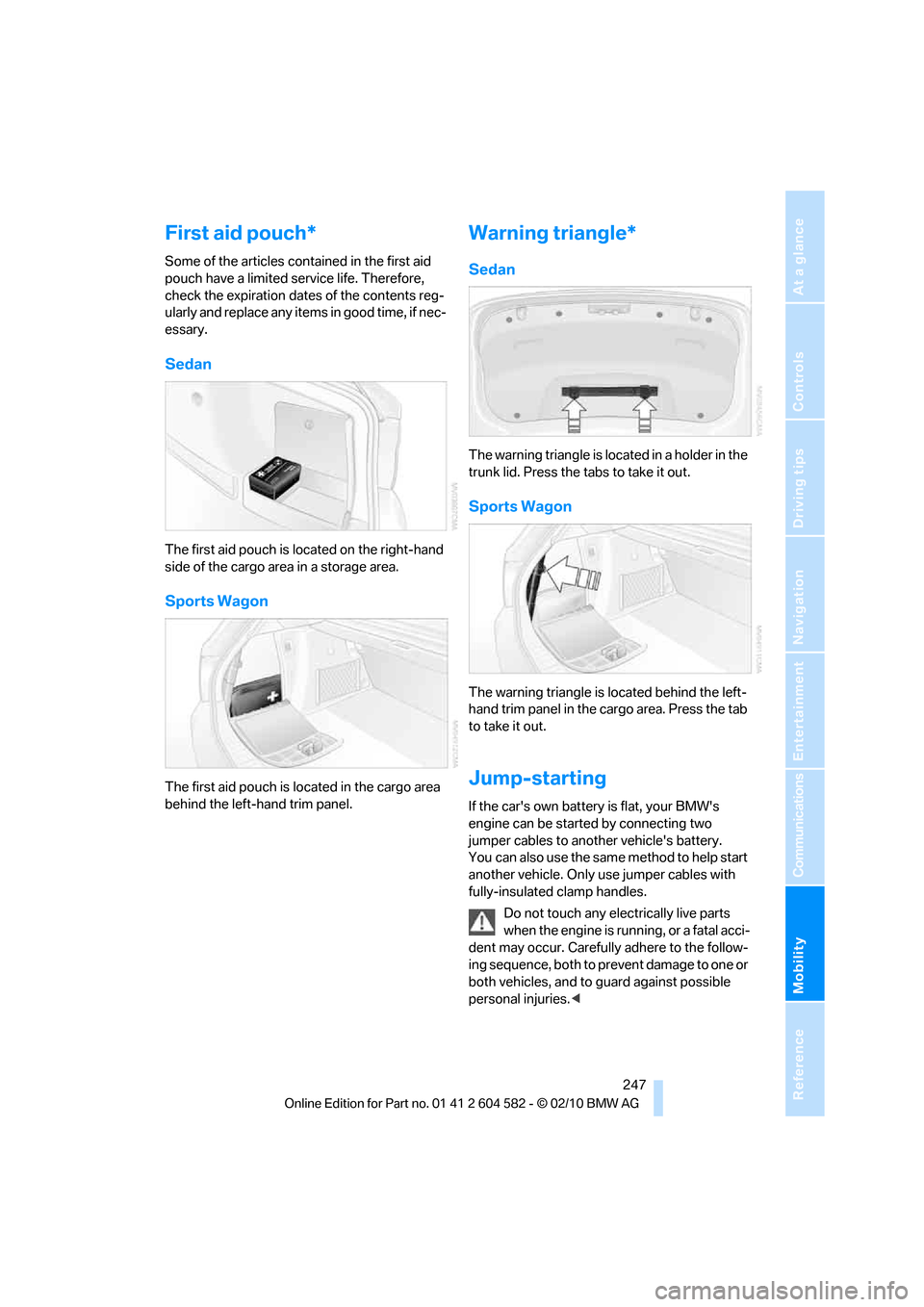
The first aid pouch is located on the right-hand
side of the cargo area in a storage area.
Sports Wagon
The first aid pouch is located in the cargo area
behind the left-hand trim panel.
Warning triangle*
Sedan
The warning triangle is located in a holder in the
trunk lid. Press the tabs to take it out.
Sports Wagon
The warning triangle is located behind the left-
hand trim panel in the cargo area. Press the tab
to take it out.
Jump-starting
If the car's own battery is flat, your BMW's
engine can be started by connecting two
jumper cables to another vehicle's battery.
You can also use the same method to help start
another vehicle. Only use jumper cables with
fully-insulated clamp handles.
Do not touch any electrically live parts
when the engine is running, or a fatal acci-
dent may occur. Carefully adhere to the follow-
ing sequence, both to prevent damage to one or
both vehicles, and to guard against possible
personal injuries.<
Page 252 of 286
Giving and receiving assistance
250
With a tow rope
When starting off in the towing vehicle, make
sure that the tow rope is taut.
To avoid jerking and the associated
stresses on vehicle components when
towing, always use nylon ropes or nylon straps.
Attach the tow rope to the tow fittings only, as
attaching it to other parts of the vehicle could
result in damage.<
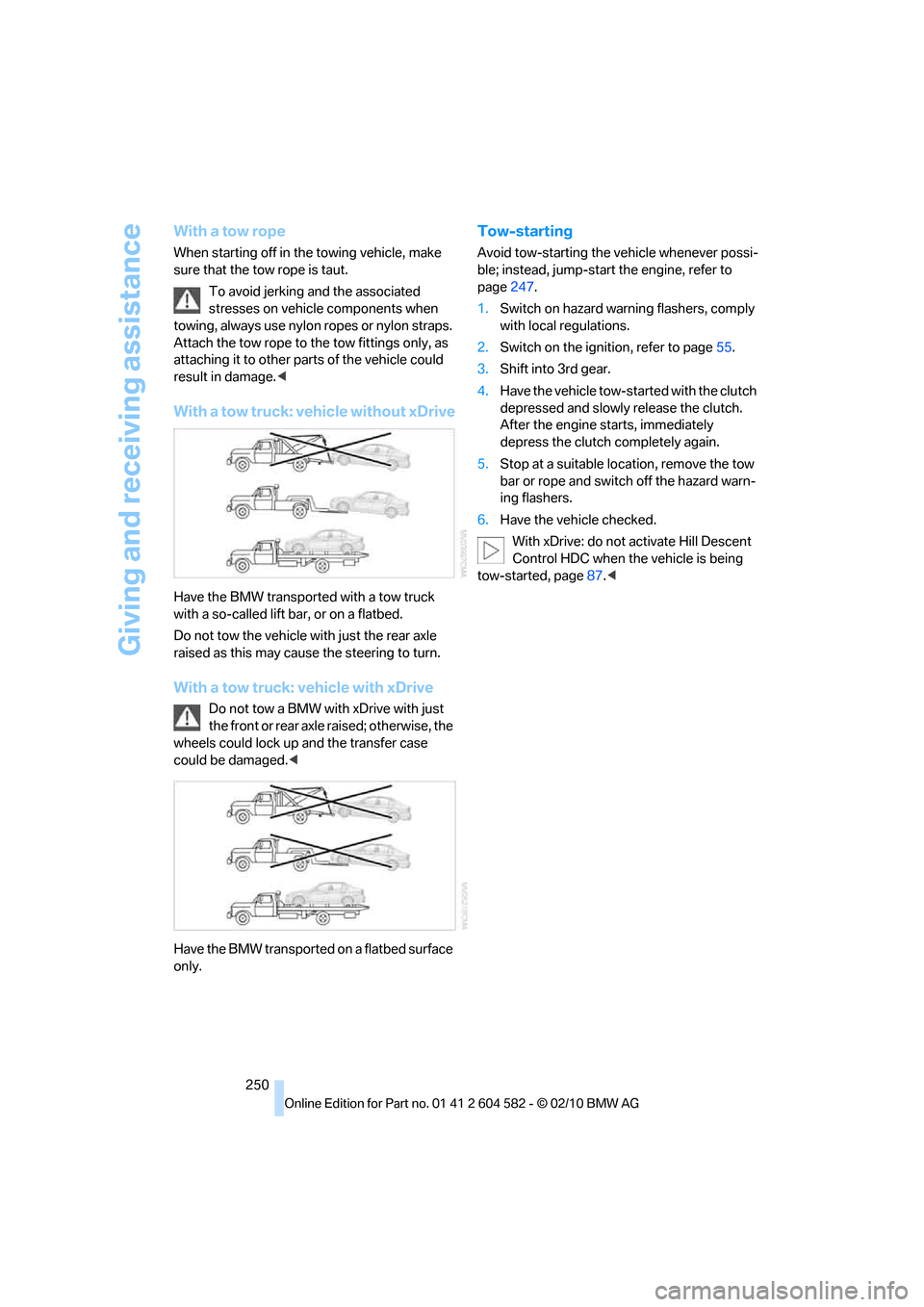
With a tow truck: vehicle without xDrive
Have the BMW transported with a tow truck
with a so-called lift bar, or on a flatbed.
Do not tow the vehicle with just the rear axle
raised as this may cause the steering to turn.
With a tow truck: vehicle with xDrive
Do not tow a BMW with xDrive with just
the front or rear axle raised; otherwise, the
wheels could lock up and the transfer case
could be damaged.<
Have the BMW transported on a flatbed surface
only.
Tow-starting
Avoid tow-starting the vehicle whenever possi-
ble; instead, jump-start the engine, refer to
page247.
1.Switch on hazard warning flashers, comply
with local regulations.
2.Switch on the ignition, refer to page55.
3.Shift into 3rd gear.
4.Have the vehicle tow-started with the clutch
depressed and slowly release the clutch.
After the engine starts, immediately
depress the clutch completely again.
5.Stop at a suitable location, remove the tow
bar or rope and switch off the hazard warn-
ing flashers.
6.Have the vehicle checked.
With xDrive: do not activate Hill Descent
Control HDC when the vehicle is being
tow-started, page87.<
Page 262 of 286
Short commands for the voice activation system
260
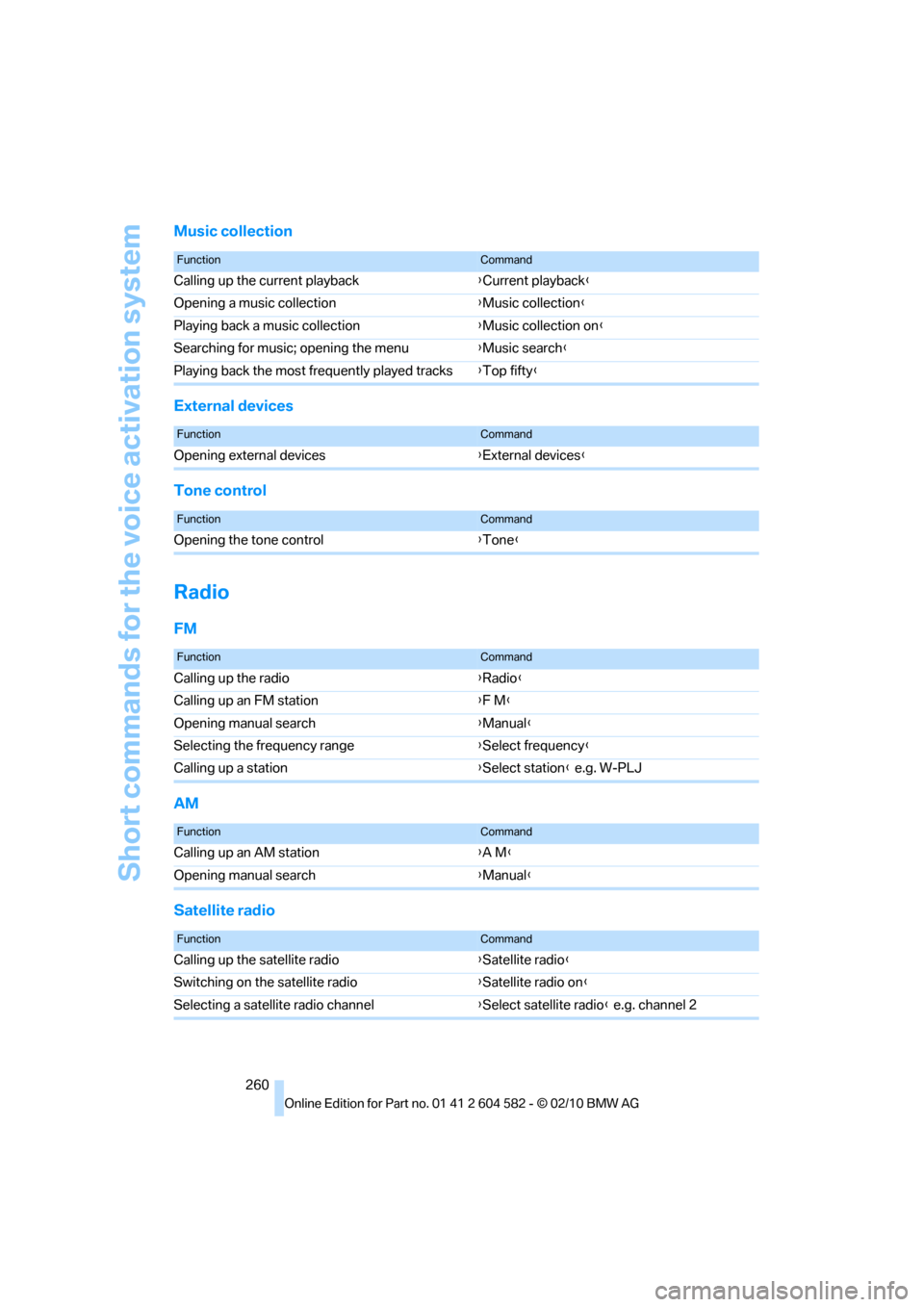
Music collection
External devices
Tone control
Radio
FM
AM
Satellite radio
FunctionCommand
Calling up the current playback{Current playback}
Opening a music collection{Music collection}
Playing back a music collection{Music collection on}
Searching for music; opening the menu{Music search}
Playing back the most frequently played tracks{Top fifty}
FunctionCommand
Opening external devices{External devices}
FunctionCommand
Opening the tone control{Tone}
FunctionCommand
Calling up the radio{Radio}
Calling up an FM station{F M}
Opening manual search{Manual}
Selecting the frequency range{Select frequency}
Calling up a station{Select station} e.g. W-PLJ
FunctionCommand
Calling up an AM station{A M}
Opening manual search{Manual}
FunctionCommand
Calling up the satellite radio{Satellite radio}
Switching on the satellite radio{Satellite radio on}
Selecting a satellite radio channel{Select satellite radio} e.g. channel 2
Page 263 of 286
Reference 261
At a glance
Controls
Driving tips
Communications
Navigation
Entertainment
Mobility
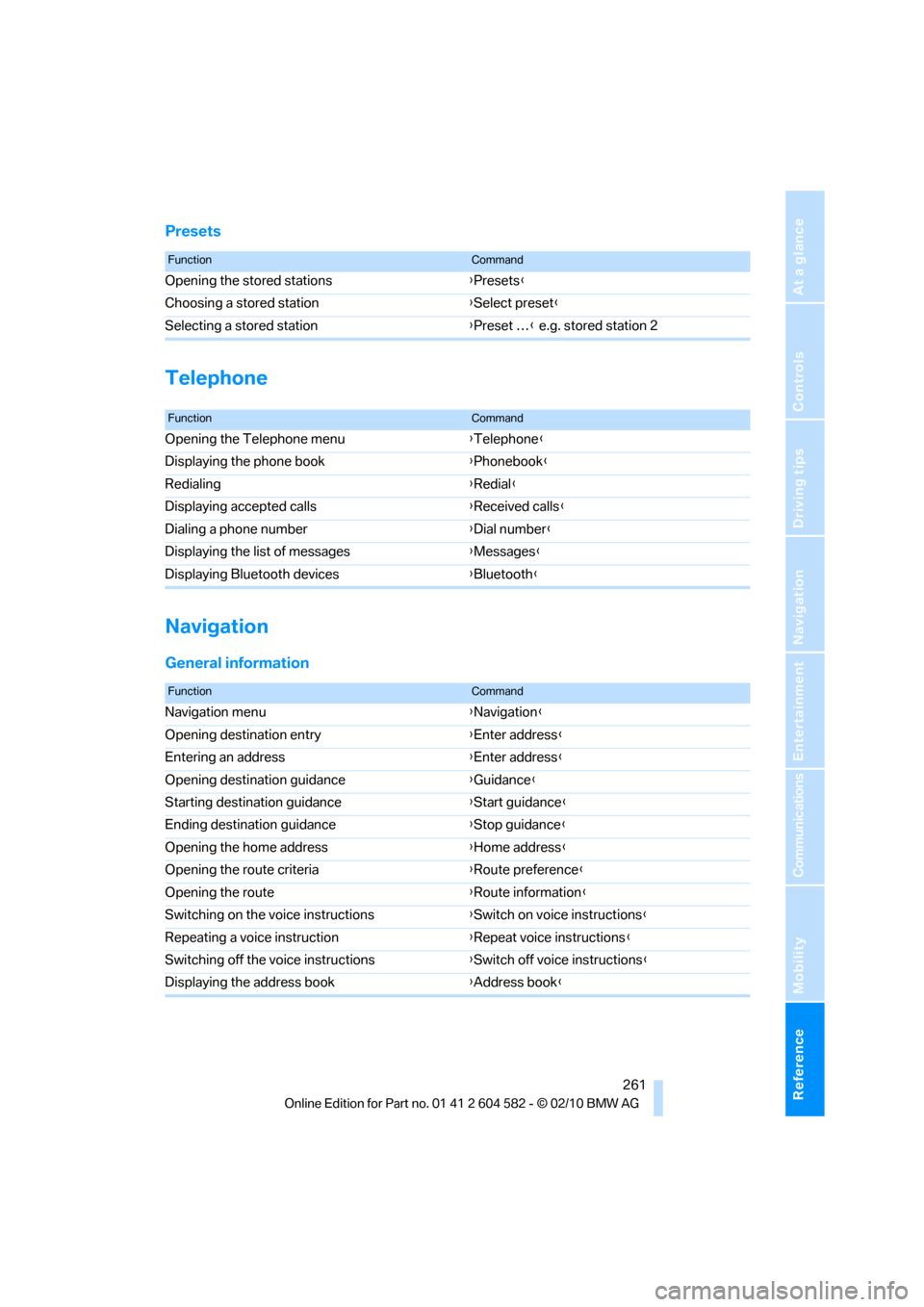
Presets
Telephone
Navigation
General information
FunctionCommand
Opening the stored stations{Presets}
Choosing a stored station{Select preset}
Selecting a stored station{Preset …} e.g. stored station 2
FunctionCommand
Opening the Telephone menu{Telephone}
Displaying the phone book{Phonebook}
Redialing{Redial}
Displaying accepted calls{Received calls}
Dialing a phone number{Dial number}
Displaying the list of messages{Messages}
Displaying Bluetooth devices{Bluetooth}
FunctionCommand
Navigation menu{Navigation}
Opening destination entry{Enter address}
Entering an address{Enter address}
Opening destination guidance{Guidance}
Starting destination guidance{Start guidance}
Ending destination guidance{Stop guidance}
Opening the home address{Home address}
Opening the route criteria{Route preference}
Opening the route{Route information}
Switching on the voice instructions{Switch on voice instructions}
Repeating a voice instruction{Repeat voice instructions}
Switching off the voice instructions{Switch off voice instructions}
Displaying the address book{Address book}
Page 264 of 286
Short commands for the voice activation system
262
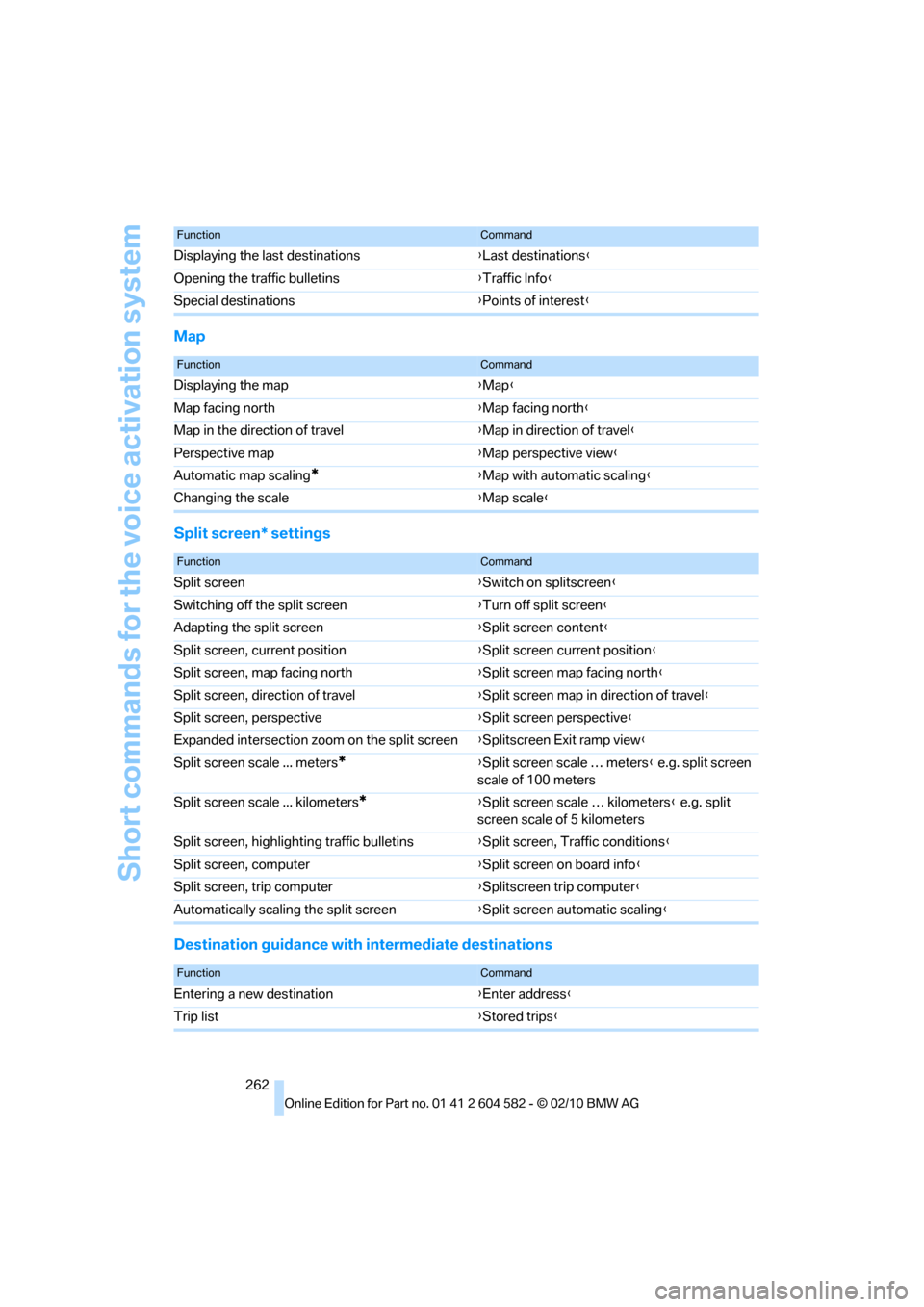
Map
Split screen* settings
Destination guidance with intermediate destinations
Displaying the last destinations{Last destinations}
Opening the traffic bulletins{Traffic Info}
Special destinations{Points of interest}
FunctionCommand
FunctionCommand
Displaying the map{Map}
Map facing north{Map facing north}
Map in the direction of travel{Map in direction of travel}
Perspective map{Map perspective view}
Automatic map scaling
*{Map with automatic scaling}
Changing the scale{Map scale}
FunctionCommand
Split screen{Switch on splitscreen}
Switching off the split screen{Turn off split screen}
Adapting the split screen{Split screen content}
Split screen, current position{Split screen current position}
Split screen, map facing north{Split screen map facing north}
Split screen, direction of travel{Split screen map in direction of travel}
Split screen, perspective{Split screen perspective}
Expanded intersection zoom on the split screen{Splitscreen Exit ramp view}
Split screen scale ... meters
*{Split screen scale … meters} e.g. split screen
scale of 100 meters
Split screen scale ... kilometers
*{Split screen scale … kilometers} e.g. split
screen scale of 5 kilometers
Split screen, highlighting traffic bulletins{Split screen, Traffic conditions}
Split screen, computer{Split screen on board info}
Split screen, trip computer{Splitscreen trip computer}
Automatically scaling the split screen{Split screen automatic scaling}
FunctionCommand
Entering a new destination{Enter address}
Trip list{Stored trips}