parking brake BMW 335I CONVERTIBLE 2013 User Guide
[x] Cancel search | Manufacturer: BMW, Model Year: 2013, Model line: 335I CONVERTIBLE, Model: BMW 335I CONVERTIBLE 2013Pages: 308, PDF Size: 5.65 MB
Page 180 of 308
179
CD/DVD player and CD changer
Entertainment
5.
"Random"
CDs/DVDs with compressed audio files: all the
tracks in the selected directory are played in
random order.
Random mode is switched off when the audio
source is changed or the ignition is switched off.
Fast forward/reverse
Press and hold the button for the corre-
sponding direction.
Video playback
Country codes
Only DVDs with the code of the home region
can be played back; also refer to the information
on your DVD.
Starting playback
For your own safety, the video image is only dis-
played up to approx. 2 mph/3 km/h and in some
market-specific versions, only with the parking
brake engaged or the selector lever of the auto-
matic transmission is in the park position.
DVD video
1. "CD/Multimedia"
2. "CD/DVD"
3. Select a DVD with video content.
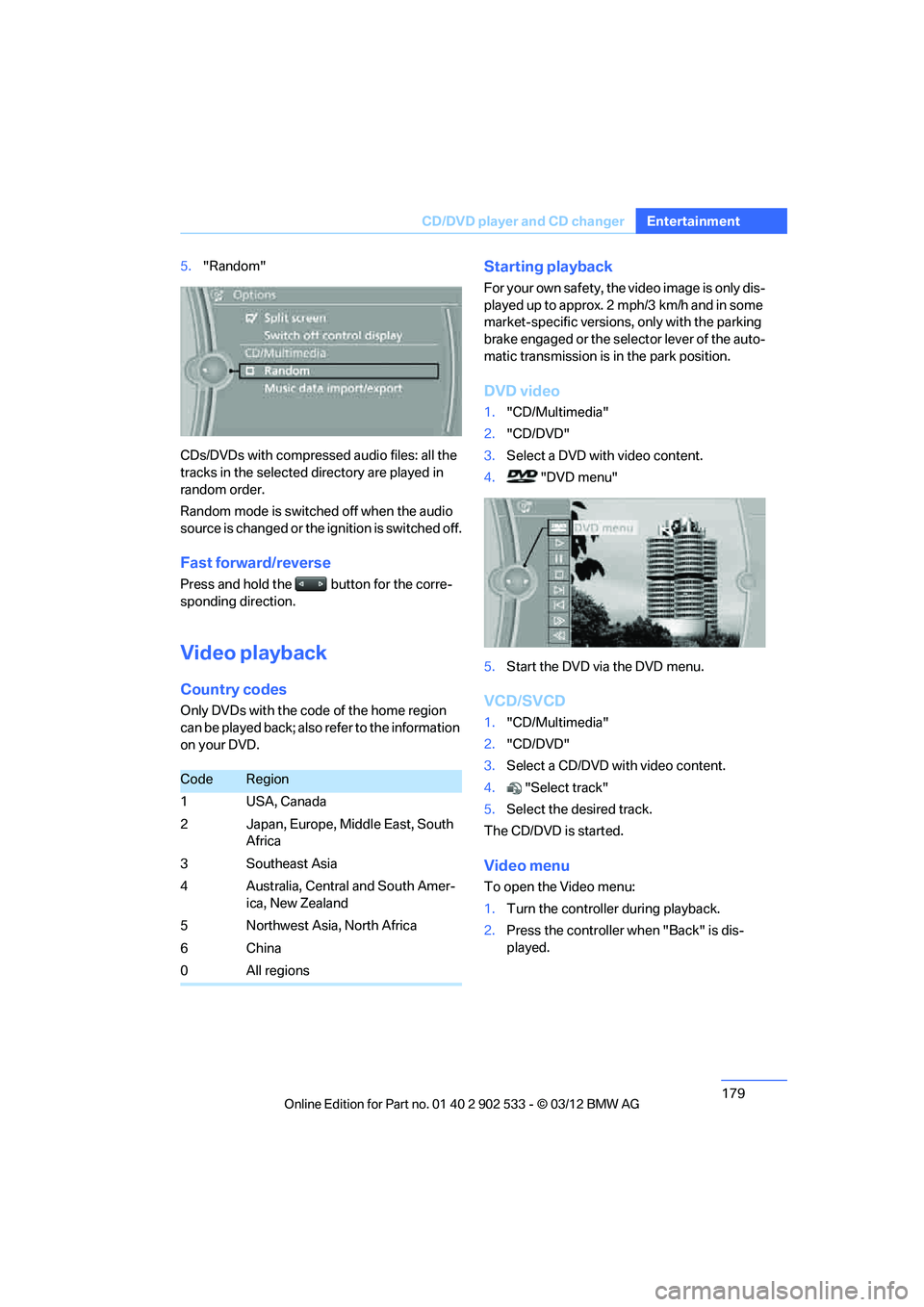
4. "DVD menu"
5. Start the DVD via the DVD menu.
VCD/SVCD
1."CD/Multimedia"
2. "CD/DVD"
3. Select a CD/DVD with video content.
4. "Select track"
5. Select the desired track.
The CD/DVD is started.
Video menu
To open the Video menu:
1. Turn the controller during playback.
2. Press the controller when "Back" is dis-
played.
CodeRegion
1 USA, Canada
2 Japan, Europe, Middle East, South Africa
3Southeast Asia
4 Australia, Central and South Amer- ica, New Zealand
5 Northwest Asia, North Africa
6China
0All regions
00320051004F004C00510048000300280047004C0057004C005200510003
Page 193 of 308
192
EntertainmentExternal devices
Current playback
List of tracks currently being played.
1."CD/Multimedia"
2. "External devices"
3. Select the or symbol.
4. "Current playback"
Random play sequence
The current list of tracks is played in random
sequence.
1."CD/Multimedia"
2. "External devices"
3. Open "Options".
4. "Random"
Fast forward/reverse
Press and hold the button.
Video playback
Overview
Video playback possible via snap-in adapter.
They can be operated via iDrive. Sound is out-
put over the vehicle speakers.
Playback
For your own safety, the video image is only dis-
played up to approx. 2 mph/3 km/h and in some
market-specific versions, only with the parking
brake engaged or the selector lever of the auto-
matic transmission is in the park position.
1."CD/Multimedia"
2. "External devices"
3. Select the symbol.
4. "Video"
5. Select the directory, if necessary.
To change to a higher level directory: move
the controller to the left.
6. Select the desired video file to begin play-
back.
Video menu
Notes
Do not expose the audio device to extreme
environmental conditions, e.g. very high tem-
peratures, refer to the operating instructions of
the audio device.
Depending on the configuration of the audio
files, e.g. bit rates greater than 256 Kbit/s,
proper playback cannot always be ensured.
Information on connection
>The connected audio device is supplied
with a max. power of 500 mA if supported
by the device. For this reason, do not con-
nect the device to a charging socket in the
vehicle; otherwise, it may not be possible to
ensure proper playback.
> Do not use force when plugging the con-
nector into the USB interface.
> Do not connect devices such as fans or
lamps to the USB audio interface.
> Do not connect USB hard drives.
> Do not use the USB audio interface to
recharge external devices.
Bluetooth audio
Overview
>It is possible to use Bluetooth to play music
files from external devices, e.g. audio
devices or mobile phones.
Using a mobile phone as an audio source,
refer to page 190.
SymbolFormat
Next video file
Previous video file
It may be necessary to click the
symbol twice in order to play the
previous video file.
00320051004F004C00510048000300280047004C0057004C005200510003
Page 264 of 308
263
Care
Mobility
Automatic transmission
Before driving into an automatic car wash, per-
form the following steps to ensure that the vehi-
cle can roll:
1.
Insert the remote control into the ignition
lock, even with Comfort Access.
2. Move the selector lever to position N.
3. Release the parking brake.
4. Switch off the engine.
5. Leave the remote control in the ignition lock
so that the vehicle can roll.
Sport automatic transmission with
double clutch
Before driving into an automatic car wash, per-
form the following steps to ensure that the vehi-
cle can roll:
1.Insert the remote control into the ignition
lock, even with Comfort Access.
2. Engage transmission position N.
3. Release the parking brake.
4. Switch off the engine.
5. Leave the remote control in the ignition lock
so that the vehicle can roll.
The transmission is switched into position P:
> automatically after approx. 30 minutes
> if you remove the infrared remote control
from the ignition lock
Steam jets/high-pressure washers
When using steam jets or high-pressure
washers, make sure to maintain sufficient
distance from the vehicle and do not exceed a
temperature of 140 7/60 6.
Insufficient clearance or excessive pressure or
temperature can lead to component damage or
water penetration. Follow the operating instruc-
tions of the high-pressure washer. <
When using high-pressure washers, do
not spray the sensors, e.g. of the Park
Distance Control, for an extended period and maintain a distance of at least 1 ft/30 cm from
them.
<
Manual car wash
When washing the vehicle by hand, use large
quantities of water and car shampoo if neces-
sary. Clean the vehicle with a sponge or wash-
ing brush, applying light pressure only.
Before cleaning the windshield, deacti-
vate the rain sensor or switch off the igni-
tion to prevent unintentional activation of the
wipers. <
Observe local regulations pertaining to
washing vehicles by hand. <
Headlamps
Do not rub them dry and do not use abrasive or
corrosive cleaning agents.
Loosen dirt, e.g. insects, with shampoo or
insect remover and wash away with copious
quantities of water.
Thaw ice with a windshield deicer and do not
use an ice scraper.
Windows
Clean the inside and outside surfaces of the
windows and the mirrors with window cleaner.
Do not clean the mirrors with cleaners
containing quartz. <
Convertible: retractable hardtop
Proceed as you would in a normal car wash.
When you open a wet hardtop, water
drops may run into the trunk. If necessary,
remove items from the trunk beforehand to
avoid water stains or soiling. <
Paintwork care
Regular care contributes to value retention and
protects the paintwork against the long-term
effects of damaging substances.
Environmental influences in regions with ele-
vated levels of air pollution or natural contami-
00320051004F004C00510048000300280047004C0057004C005200510003
Page 269 of 308
268
MobilityReplacin g compon ents
3.Push the wire bracket out of the anchor
towards the right and fold it up.
4. Disconnect the plug, change the bulb and
reconnect the plug.
5. Insert the bulb.
6. Fold the wire bracket down and engage it.
7. Reattach the cover.
Turn signals, front
These lamps use LED technology for operation.
If they malfunction, please contact your BMW
center.
Side turn signals
W5W bulb, 5 watts
1.Press the front edge of the lamp toward the
rear with your fingertip, arrow 1 and pivot it
out, arrow 2.
2. While simultaneously lifting the retaining
tab, rotate bulb holder to the left and
remove.
3. Remove lamp and replace it.
To install, insert rear end of the lamp and press
into place at the front.
Tail lamps
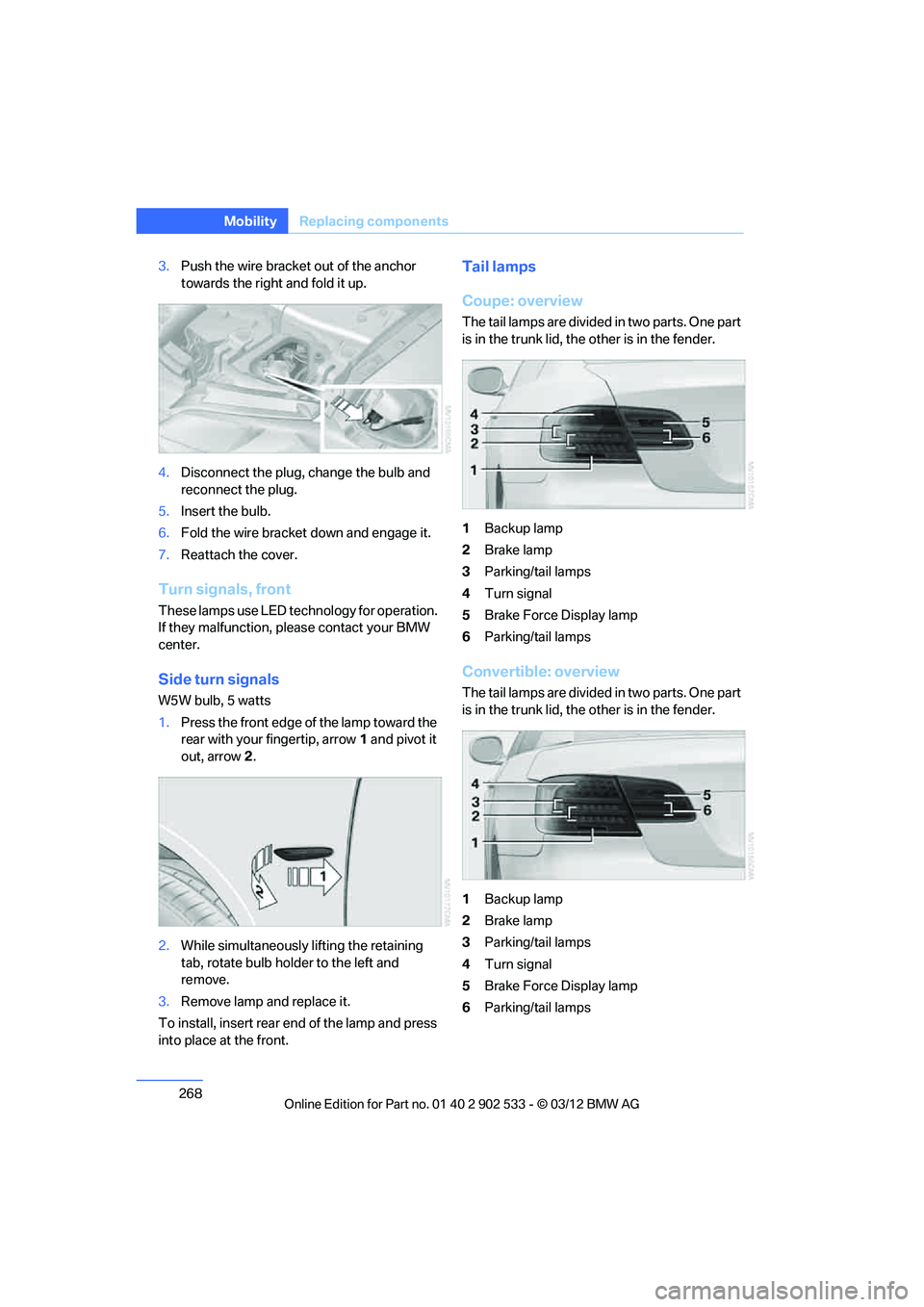
Coupe: overview
The tail lamps are divided in two parts. One part
is in the trunk lid, the other is in the fender.
1 Backup lamp
2 Brake lamp
3 Parking/tail lamps
4 Turn signal
5 Brake Force Display lamp
6 Parking/tail lamps
Convertible: overview
The tail lamps are divided in two parts. One part
is in the trunk lid, the other is in the fender.
1Backup lamp
2 Brake lamp
3 Parking/tail lamps
4 Turn signal
5 Brake Force Display lamp
6 Parking/tail lamps
00320051004F004C00510048000300280047004C0057004C005200510003
Page 270 of 308
269
Replacin g components
Mobility
Backup lamp
If these lamps malfunction, please contact your
BMW center.
Turn signal, brake, license plate,
parking, and tail lamps
These lamps use LED technology for operation.
If they malfunction, please contact your BMW
center.
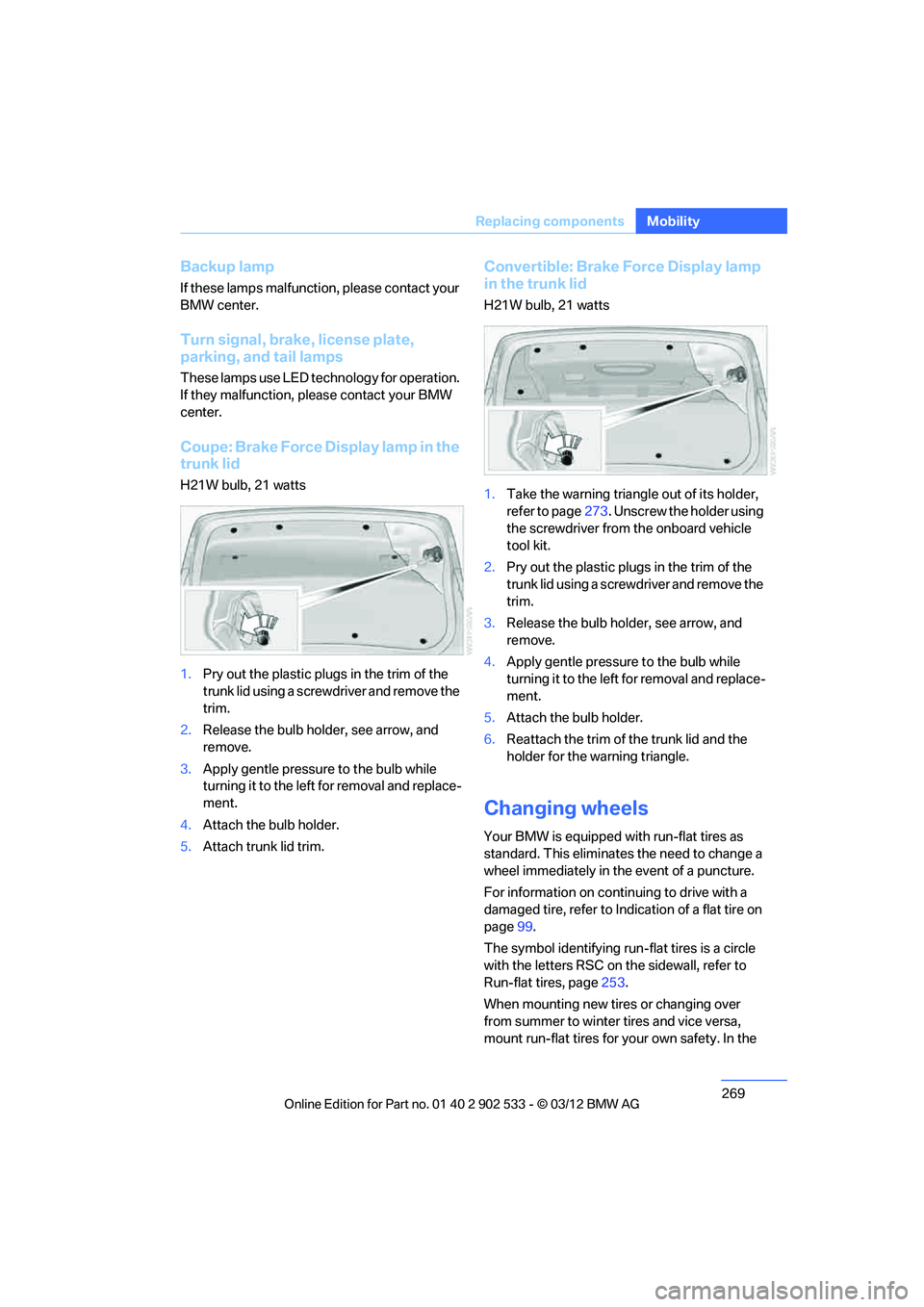
Coupe: Brake Force Display lamp in the
trunk lid
H21W bulb, 21 watts
1.
Pry out the plastic plugs in the trim of the
trunk lid using a screwdriver and remove the
trim.
2. Release the bulb holder, see arrow, and
remove.
3. Apply gentle pressure to the bulb while
turning it to the left for removal and replace-
ment.
4. Attach the bulb holder.
5. Attach trunk lid trim.
Convertible: Brake Force Display lamp
in the trunk lid
H21W bulb, 21 watts
1.Take the warning triangle out of its holder,
refer to page 273. Unscrew the holder using
the screwdriver from the onboard vehicle
tool kit.
2. Pry out the plastic plugs in the trim of the
trunk lid using a screwdriver and remove the
trim.
3. Release the bulb holder, see arrow, and
remove.
4. Apply gentle pressure to the bulb while
turning it to the left for removal and replace-
ment.
5. Attach the bulb holder.
6. Reattach the trim of the trunk lid and the
holder for the warning triangle.
Changing wheels
Your BMW is equipped with run-flat tires as
standard. This eliminates the need to change a
wheel immediately in the event of a puncture.
For information on continuing to drive with a
damaged tire, refer to Indication of a flat tire on
page 99.
The symbol identifying run-flat tires is a circle
with the letters RSC on the sidewall, refer to
Run-flat tires, page 253.
When mounting new tires or changing over
from summer to winter tires and vice versa,
mount run-flat tires for your own safety. In the
00320051004F004C00510048000300280047004C0057004C005200510003
Page 294 of 308
293
Everything from A to Z
Reference
AUX-IN
– port
125
Available services 228
Average fuel consumption 82
– setting the units 85
Average speed 82
Avoid highways in
navigation 155
Avoiding unintentional alarms 38
Axle loads, refer to Weights 283
B
Backrest contour, refer to
Lumbar support 48
Backrests, refer to Seat adjustment 47
Backrest width adjustment 48
Back seats
– refer to Rear seats 50
Bag holder 129
Band-aids, refer to First aid pouch 273
Bar, refer to Towing methods 276
Base plate for telephone or
mobile phone
– refer to Snap-in adapter 211
– refer to Snap-in adapter in
the center armrest storage
compartment 124
Battery 270
– charging 270
– disposal 40,271
– jump-starting 274
– remote control 30
– replacing 270
– temporary power failure 270
Battery renewal
– remote control 40
– remote control for vehicle 39
Being towed 275
Belt hand-over 53
– pinch protection system 53
Belts, refer to Safety belts 52Belt tensioner, refer to Safety
belts 52
Beverage holders, refer to Cupholders 126
Black ice, refer to Outside temperature warning 80
Blinds, refer to Roller
sunblinds 124
Blower, refer to Air volume 116
Bluetooth, activating/ deactivating 201
BMW
– car shampoo 265
BMW Assist 224
– updating 228
BMW Homepage 4
BMW Info 218
BMW Maintenance
System 260
BMW Online 226
BMW webpage 4
Bottle holders, refer to Cupholders 126
Brake Assist, refer to Dynamic
Brake Control DBC 95
Brake fluid, refer to Service requirements 85
Brake Force Display 104
Brake lamps
– B ra
ke Force Display 104
Brake pads 136
– breaking in 136
Brake pedal, refer to Braking
safely 138
Brake rotors 139
– brakes 136
– breaking in 136
Brakes
– ABS 95
– BMW Maintenance System 260
– Brake Force Display 104
– breaking in 136
– parking brake 62
– service requirements 85Brakes, refer to Braking
safely 138
Brake system 136
– BMW Maintenance
System 260
– breaking in 136
– disc brakes 139
Breakdown services, refer to Roadside Assistance 273
Breaking in the clutch 136
Breaking in the differential, refer to Engine and
differential 136
Break-in period 136
Brightness of the Control Display 92
Bulb changing, refer to Lamps and bulbs 266
Button for starting the engine,
refer to Start/Stop button 60
Buttons on the steering wheel 11
C
Calendar 219
– displaying appointment 219
– selecting calendar day 219
California Proposition 65 warning 6
Call
– accepting 205
– ending 205
– muting the microphone 207
– rejecting 205
Calling, refer to Phone numbers, dialing 206
Calling, refer to Telephone owner's manual
Calls
– with multiple parties 206
Can holders, refer to Cupholders 126
Capacities 284
Capacity of the trunk 283
Car battery, refer to Vehicle
battery 270
00320051004F004C00510048000300280047004C0057004C005200510003
Page 297 of 308
296
Referen ceEverything from A to Z
Distance warning, refer to
Park Distance Control
PDC 94
Door key, refer to Remote
control with integrated
key 30
Door lock 34
Doors, emergency operation 34
DOT Quality Grades 251
Draft-free ventilation 117
Drinks holders, refer to Cupholders 126
Drive mode 67
Drive-off assistance, refer to Dynamic Stability Control
DSC 95
Drive-off assistant 98
Driving dynamics control 68
Driving lamps, refer to Parking lamps/low beams 108
Driving notes 136
Driving off on hills, refer to Drive-off assistant 98
Driving stability control
systems 95
Driving through water 138
Driving tips, refer to Driving
notes 136
Dry air, refer to Cooling function 117
DSC Dynamic Stability Control 95
DTC Dynamic Traction
Control 96
– indicator/warning lamp 96
Dynamic Brake Control
DBC 95
Dynamic destination guidance 162
Dynamic Stability Control DSC 95
– indicator/warning lamp 96
Dynamic Traction Control DTC 96
– indicator/warning lamp 96E
EBV Electronic brake-force
distribution 95
Electrical defect
– 7-gear Sport automatic transmission with double
clutch 68
Electrical malfunction
– door lock 34
– driver's door 34
– fuel filler flap 232
Electric seat adjustment 48
Electric steering wheel lock
– with Comfort Access 38
Electronic brake-force
distribution EBV 95
Electronic oil level check 256
Electronic Stability Program
ESP, refer to Dynamic
Stability Control DSC 95
E-mail 218
Emergency actuation, automatic transmission,
refer to Overriding selector
lever lock 65
Emergency operation
– fuel filler flap, manual release 232
Emergency operation, refer to Manual operation
– door lock 34
Emergency release
– trunk lid from inside 36
Emergency Request 272
Emergency services, refer to Roadside Assistance 273
Energy, saving
– saving fuel 136
Engine
– breaking in 136
– overheated, refer to Coolant temperature 259
– starting 61
– starting, Comfort Access 38
– switching off 62
Engine compartment 255Engine coolant, refer to
Coolant 259
Engine oil
– adding 258
– additives, refer to Approved engine oils 258
– alternative oil types 259
– approved engine oils 258
– BMW Maintenance System 260
– capacity 284
– checking level 256
– intervals between changes,
refer to Service
requirements 85
Engine starting, refer to
Starting the engine 61
Entering the postal code for navigation 147
Entry lamps, refer to Interior lamps 112
Entry map for destination 151
ESP Electronic Stability Program, refer to Dynamic
Stability Control DSC 95
Ex haust sy
stem, refer to Hot
exhaust system 137
Exterior mirrors 53
– adjusting 53
– automatic dimming feature 55
– automatic heating 54
– folding in and out 54
External audio device 125
Eyes
– for tow-starting and towing away 275
– for tying down loads 140
F
Failure messages, refer to
Check Control 89
Failure of an electrical consumer 271
00320051004F004C00510048000300280047004C0057004C005200510003
Page 298 of 308
297
Everything from A to Z
Reference
False alarm
– avoiding unintentional
alarm 38
– switching off an alarm 37
Fastening safety belts, refer to Safety belts 52
Fastest route for
navigation 155
Fault messages, refer to Check Control 89
Filter
– refer to Microfilter/activated- charcoal filter for automatic
climate control 118
First aid pouch 273
Fixture for remote control,
refer to Ignition lock 60
Flash when locking/ unlocking 33
Flat tire
– run-flat tires 254
– Tire Pressure Monitor
TPM 100
Flat Tire Monitor FTM 98
– indicating a flat tire 99
– indicator/warning lamp 99
– initialization 98
– snow chains 98,254
– system limits 98
Flat tires, refer to Tire condition 252
Fluid reservoir, refer to Washer fluid reservoir 71
Fog lamps 112
– indicator lamp 13,112
Folding up the floor panel 130
Footwell lamps, refer to
Interior lamps 112
For your own safety 5
Four-wheel drive, refer to
xDrive 97
Front airbags 104
FTM, refer to Flat Tire
Monitor 98 Fuel
233
– average consumption 82
– gauge 81
– high-quality brands 233
– quality 233
– specifications 233
– tank contents, refer to
Capacities 284
Fuel clock, refer to Fuel gauge 81
Fuel consumption indicator
– average fuel consumption 82
Fuel display, refer to Fuel gauge 81
Fuel filler flap 232
– releasing in the event of electrical malfunction 232
Fus es 27
1
G
Garage door opener, refer to
Integrated universal remote
control 120
Gasoline
– refer to Average consumption 82
Gasoline, refer to Required fuel 233
Gasoline display, refer to Fuel
gauge 81
Gas station recommendations 157
Gear indicator, automatic transmission with
Steptronic 63
Gear indicator, refer to Displays in the instrument
cluster 66
Gearshift lever 66
– automatic transmission with Steptronic 63
– manual transmission 63Gearshifts
– automatic transmission with
Steptronic 63
– manual transmission 63
General driving notes 137
Glass roof, electric 41
– Convenient opening and
closing 32
– Convenient opening and closing with Comfort
Access 39
– initializing 42
– opening, closing 41
– pinch protection system 42
– power failure 42
– remote control 32
– tilting 41
Glove compartment 124
GPS navigation, refer to
Navigation system 144
Grills 114
Gross vehicle weight, refer to
Weights 283
H
Handbrake, refer to Parking
brake 62
Hands-free system 14,209
Hazard warning flashers 14
HDC Hill Descent Control 97
Head airbags 104
Headlamp control, automatic 108
Headlamp flasher 70
– indicator lamp 11,13
Head Light, refer to Adaptive
Light Control 109
Head restraints 49
– rear, removing 50
– sitting safely 46
Heated
– mirrors 54
– rear window 117
– seats 51
– steering wheel 55
00320051004F004C00510048000300280047004C0057004C005200510003
Page 302 of 308
301
Everything from A to Z
Reference
Outside temperature
warning 80
Overheated engine, refer to Coolant temperature 259
Overriding selector lever lock 65
P
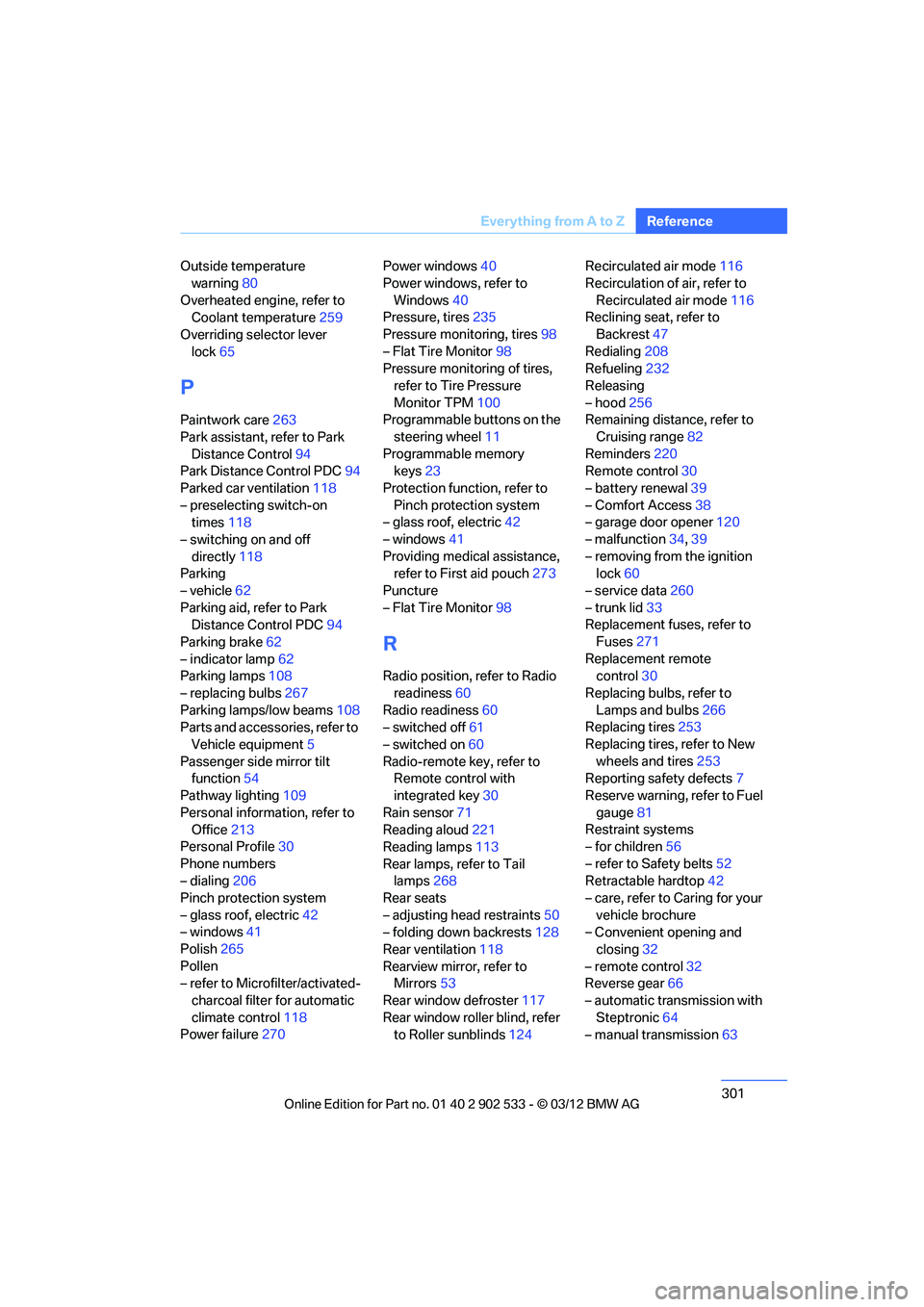
Paintwork care 263
Park assistant, refer to Park Distance Control 94
Park Distance Control PDC 94
Parked car ventilation 118
– preselecting switch-on times 118
– switching on and off directly 118
Parking
– vehicle 62
Parking aid, refer to Park Distance Control PDC 94
Parking brake 62
– indicator lamp 62
Parking lamps 108
– replacing bulbs 267
Parking lamps/low beams 108
Parts and accessories, refer to
Vehicle equipment 5
Passenger side mirror tilt function 54
Pathway lighting 109
Personal information, refer to Office 213
Personal Profile 30
Phone numbers
– dialing 206
Pinch protection system
– glass roof, electric 42
– windows 41
Polish 265
Pollen
– refer to Microfilter/activated- charcoal filter for automatic
climate control 118
Power failure 270 Power windows
40
Power windows, refer to Windows 40
Pressure, tires 235
Pressure monitoring, tires 98
– Flat Tire Monitor 98
Pressure monitoring of tires,
refer to Tire Pressure
Monitor TPM 100
Programmable buttons on the
steering wheel 11
Programmable memory keys 23
Protection function, refer to Pinch protection system
– glass roof, electric 42
– windows 41
Providing medical assistance, refer to First aid pouch 273
Puncture
– Flat Tire Monitor 98
R
Radio position, refer to Radio
readiness 60
Radio readiness 60
– switched off 61
– switched on 60
Radio-remote key, refer to Remote control with
integrated key 30
Rain sensor 71
Reading aloud 221
Reading lamps 113
Rear lamps, refer to Tail lamps 268
Rear seats
– adjusting head restraints 50
– folding down backrests 128
Rear ventilation 118
Rearview mirror, refer to Mirrors 53
Rear window defroster 117
Rear window roller blind, refer to Roller sunblinds 124Recirculated air mode
116
Recirculation of air, refer to Recirculated air mode 116
Reclining seat, refer to
Backrest 47
Redialing 208
Refueling 232
Releasing
– hood 256
Remaining distance, refer to
Cruising range 82
Reminders 220
Remote control 30
– battery renewal 39
– Comfort Access 38
– garage door opener 120
– malfunction 34,39
– removing from the ignition lock 60
– service data 260
– trunk lid 33
Replacement fuses, refer to
Fuses 271
Replacement remote control 30
Replacing bulbs, refer to Lamps and bulbs 266
Replacing tires 253
Replacing tires, refer to New wheels and tires 253
Reporting safety defects 7
Reserve warning, refer to Fuel gauge 81
Restraint systems
– for children 56
– refer to Safety belts 52
Retractable hardtop 42
– care, refer to Caring for your vehicle brochure
– C
onvenient opening and
closing 32
– remote control 32
Reverse gear 66
– automatic transmission with Steptronic 64
– manual transmission 63
00320051004F004C00510048000300280047004C0057004C005200510003
Page 303 of 308
302
Referen ceEverything from A to Z
Road map157
Roadside Assistance 225,273
Roadside parking lamps 110
– replacing bulbs 267
Roadworthiness test, refer to Service requirements 85
Roller sunblinds 124
Rollover protection system, Convertible 106
– resetting 106
Roof load capacity 283
Roof-mounted luggage
rack 141
Rope, refer to Tow-starting, towing away 276
Rotary/pushbutton, refer to iDrive 18
Route 155,156
– bypassing sections 156
– changing 155,156
– changing criteria 155
– displaying streets or towns/ cities 156
– map view 157
– selecting 155
Route instructions, refer to Destination guidance
through voice
instructions 157
Route map, refer to Map
view 157
Route section, changing 156
Route selection 155
RSC Runflat System Component, refer to Run-
flat tires 254
Runflat System Component RSC, refer to Run-flat
tires 254 Run-flat tires
254
– continuing driving with a damaged tire 99
– flat tire 99
– Flat Tire Monitor 99
– inflation pressure 235
– new tires 253
– tire replacement 253
– winter tires 254
Runflat tyres, refer to Run-flat
tires 254
S
Safety-belt height
adjustment 52
Safety belts 52
– belt hand-over 53
– damage 53
– indicator/warning lamp 53
– reminder 53
– sitting safely 46
Safety systems
– airbags 104
– Antilock Brake System
ABS 95
– brake system 95
– driving stability control 95
– Dynamic Stability Control DSC 95
– rollover protection system,
Convertible 106
– safety belts 52
Safety tires, refer to Run-flat
tires 254
Saving fuel 136
Screen, refer to iDrive
controls 18
Screw thread for tow fitting 275
Seat adjustment
– electric 48
– mechanical 47
Seat and mirror memory 52
Seat belt reminder, refer to "Fasten safety belts"
reminder 53 Seat heating
51
Seats 47
– adjusting electrically 48
– adjusting the seats 47
– heating 51
– memory, refer to Seat and mirror memory 52
– saving a setting, refer to Seat and mirror memory 52
– sitting safely 46
Securing cargo 131,132
Securing the vehicle
– from inside 34
– from outside 32
Selecting distance for Active Cruise Control 75
Selecting new scale for navigation 158
Selector lever
– automatic transmission with
Steptronic 63
Selector lever lock, refer to
Changing selector lever
positions, shiftlock 63
Selector lever positions 66
– automatic transmission with Steptronic 63
Service, refer to Roadside
Assistance 273
Service car, refer to Roadside Assi sta
nce273
Service data in the remote control 260
Service Interval Display, refer
to Condition Based Service
CBS 260
Service Request 227
Service requirements 85
Service status 228
Settings
– changing settings on the
Control Display 92
– clock, 12h/24h format 88
– language 92
Settings and information 84
Settings for the map view 159
00320051004F004C00510048000300280047004C0057004C005200510003