COMFORT BMW 5 SERIES 2013 F10 Owner's Manual
[x] Cancel search | Manufacturer: BMW, Model Year: 2013, Model line: 5 SERIES, Model: BMW 5 SERIES 2013 F10Pages: 273, PDF Size: 6.63 MB
Page 8 of 273
![BMW 5 SERIES 2013 F10 Owners Manual Addendum
text that follows, where it reads:
“[h]ave any work on the xenon
lighting system . . . ,” the following
words should be read as preceding
that passage: “It is strongly
suggested that yo](/img/1/2641/w960_2641-7.png "BMW 5 SERIES 2013 F10 Owners Manual Addendum
text that follows, where it reads:
“[h]ave any work on the xenon
lighting system . . . ,” the following
words should be read as preceding
that passage: “It is strongly
suggested that yo")
Addendum
text that follows, where it reads:
“[h]ave any work on the xenon
lighting system . . . ,” the following
words should be read as preceding
that passage: “It is strongly
suggested that you . . . .”
19.At page 238, under the “Battery
replacement” section, the text
should be disregarded and in lieu
thereof the following text should be
read:
Use of recommended vehicle
batteries
The manufacturer of your vehicle
recommends that you use vehicle
batteries that it has tested and
recommends for use in your vehicle;
otherwise the vehicle could be
damaged and systems or functions
may not be fully available.
After a battery replacement, the
manufacturer of your vehicle
recommends that you have the
battery registered on your vehicle
by a service center to ensure that all
comfort functions are fully available,
and that any “check control”
messages of these comfort
functions are no longer displayed.
Page 9 of 273
ContentsThe fastest way to find information on a partic‐
ular topic or item is by using the index, refer to
page 258.6Notes
At a glance
12Cockpit16iDrive23Voice activation system26Integrated Owner's Manual in the vehicle
Controls
30Opening and closing48Adjusting59Transporting children safely63Driving78Displays96Lamps101Safety126Driving stability control systems133Driving comfort160Climate control167Interior equipment176Storage compartments
Driving tips
184Things to remember when driving188Loading191Saving fuelMobility200Refueling202Fuel207Wheels and tires224Engine compartment226Engine oil229Coolant231Maintenance233Replacing components240Breakdown assistance246Care
Reference
252Technical data258Everything from A to Z
Online Edition for Part no. 01 40 2 911 177 - VI/13
Page 16 of 273
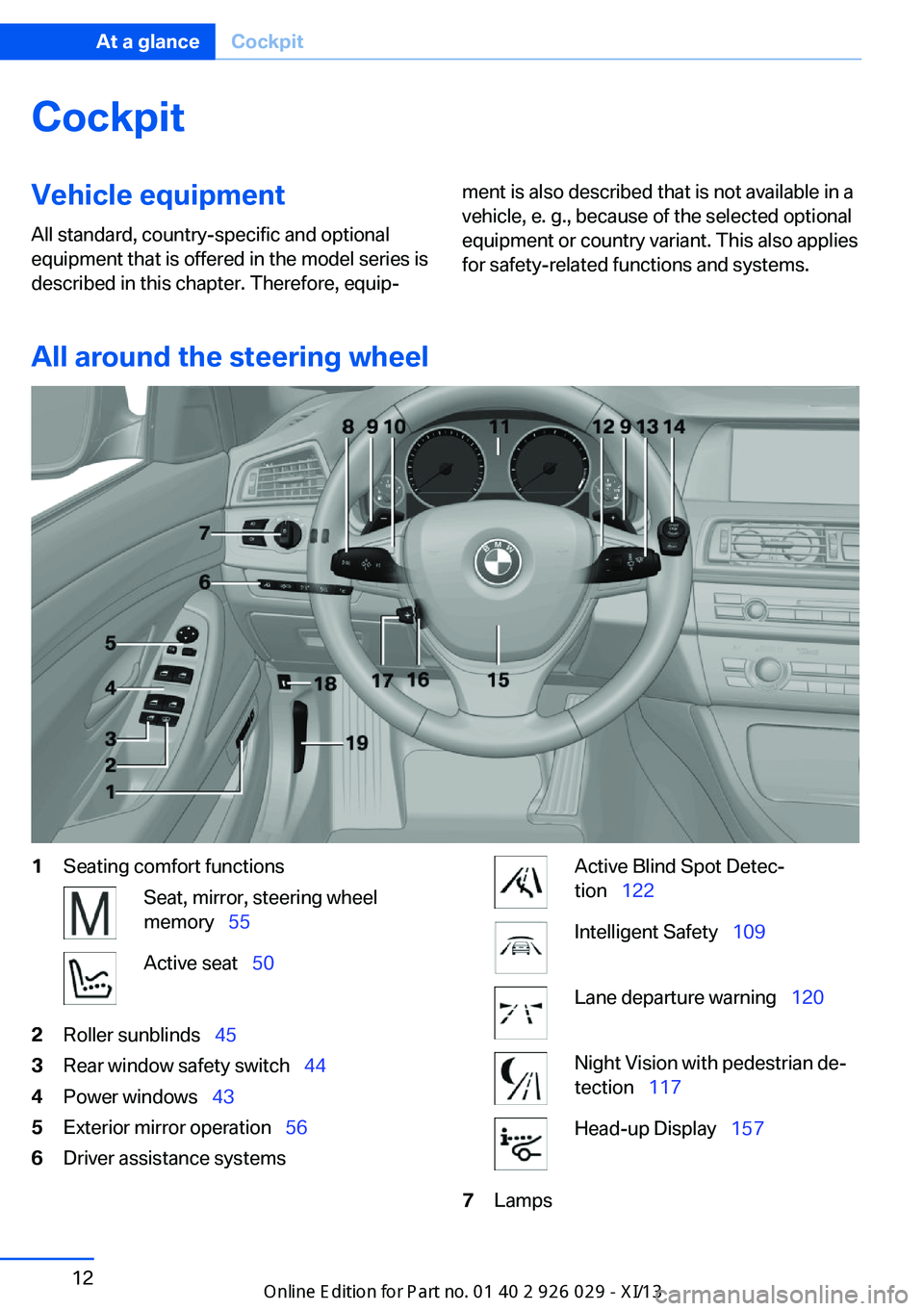
CockpitVehicle equipment
All standard, country-specific and optional
equipment that is offered in the model series is
described in this chapter. Therefore, equip‐ment is also described that is not available in a
vehicle, e. g., because of the selected optional
equipment or country variant. This also applies
for safety-related functions and systems.
All around the steering wheel
1Seating comfort functionsSeat, mirror, steering wheel
memory 55Active seat 502Roller sunblinds 453Rear window safety switch 444Power windows 435Exterior mirror operation 566Driver assistance systemsActive Blind Spot Detec‐
tion 122Intelligent Safety 109Lane departure warning 120Night Vision with pedestrian de‐
tection 117Head-up Display 1577LampsSeite 12At a glanceCockpit12
Online Edition for Part no. 01 40 2 911 177 - VI/13
Page 33 of 273
Controls
This chapter is intended to provide you with
information that will give you complete control of your vehicle. All features and accessories thatare useful for driving and your safety, comfort and convenience are described here.Online Edition for Part no. 01 40 2 911 177 - VI/13
Page 40 of 273
▷Lock the driver's door using the
integrated key in the door lock, or▷Press down the lock button of the front
passenger door and close the door
from the outside.
The fuel filler flap can only be locked using the
remote control.
Manual operation If an electrical malfunction occurs, lock or un‐
lock the vehicle using the integrated key via
the door lock on the driver's door.
Opening and closing: from
the inside
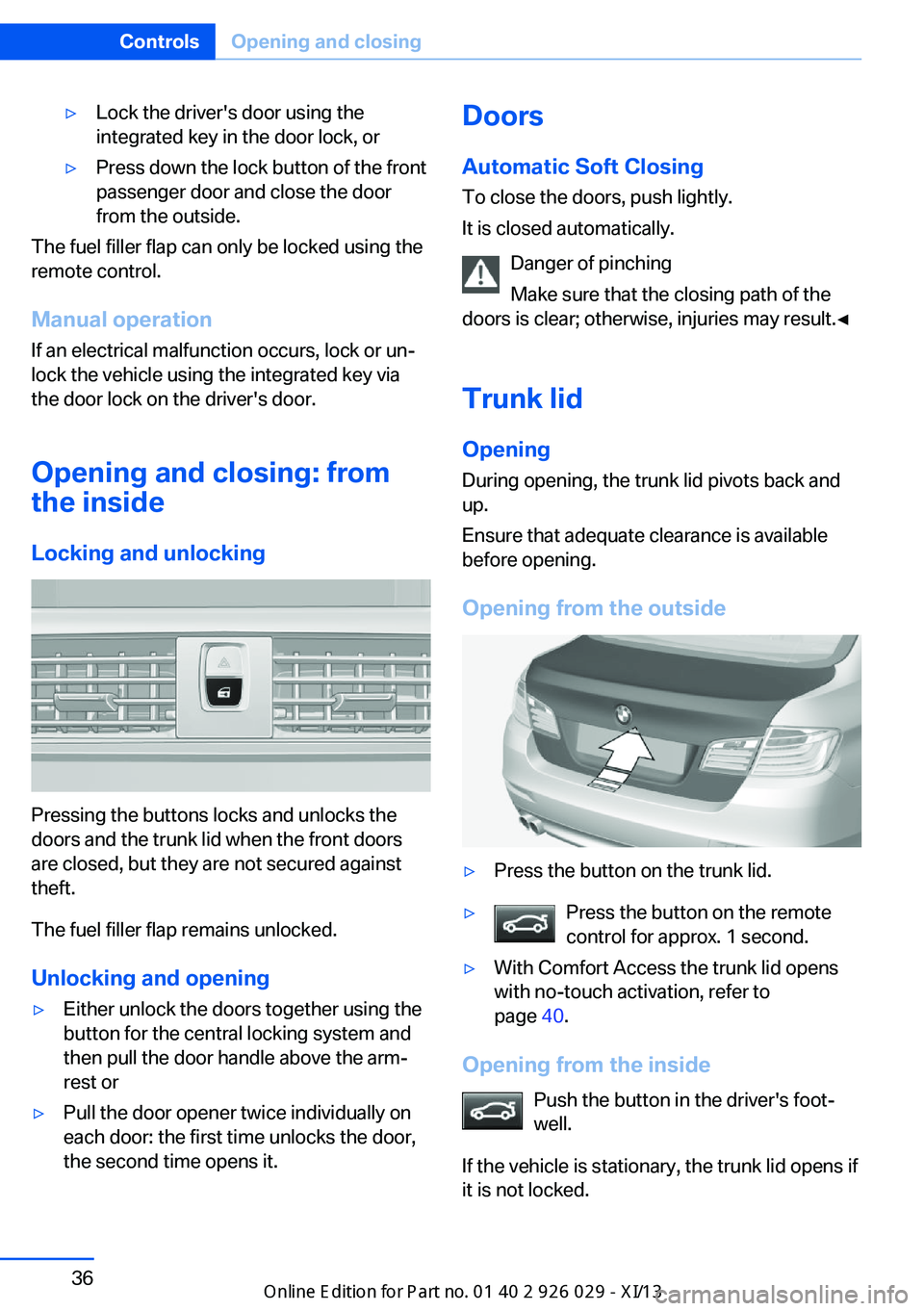
Locking and unlocking
Pressing the buttons locks and unlocks the
doors and the trunk lid when the front doors
are closed, but they are not secured against
theft.
The fuel filler flap remains unlocked.
Unlocking and opening
▷Either unlock the doors together using the
button for the central locking system and
then pull the door handle above the arm‐
rest or▷Pull the door opener twice individually on
each door: the first time unlocks the door,
the second time opens it.Doors
Automatic Soft Closing
To close the doors, push lightly.
It is closed automatically.
Danger of pinching
Make sure that the closing path of the
doors is clear; otherwise, injuries may result.◀
Trunk lidOpening
During opening, the trunk lid pivots back and
up.
Ensure that adequate clearance is available
before opening.
Opening from the outside▷Press the button on the trunk lid.▷Press the button on the remote
control for approx. 1 second.▷With Comfort Access the trunk lid opens
with no-touch activation, refer to
page 40.
Opening from the inside
Push the button in the driver's foot‐
well.
If the vehicle is stationary, the trunk lid opens if
it is not locked.
Seite 36ControlsOpening and closing36
Online Edition for Part no. 01 40 2 911 177 - VI/13
Page 41 of 273
Closing
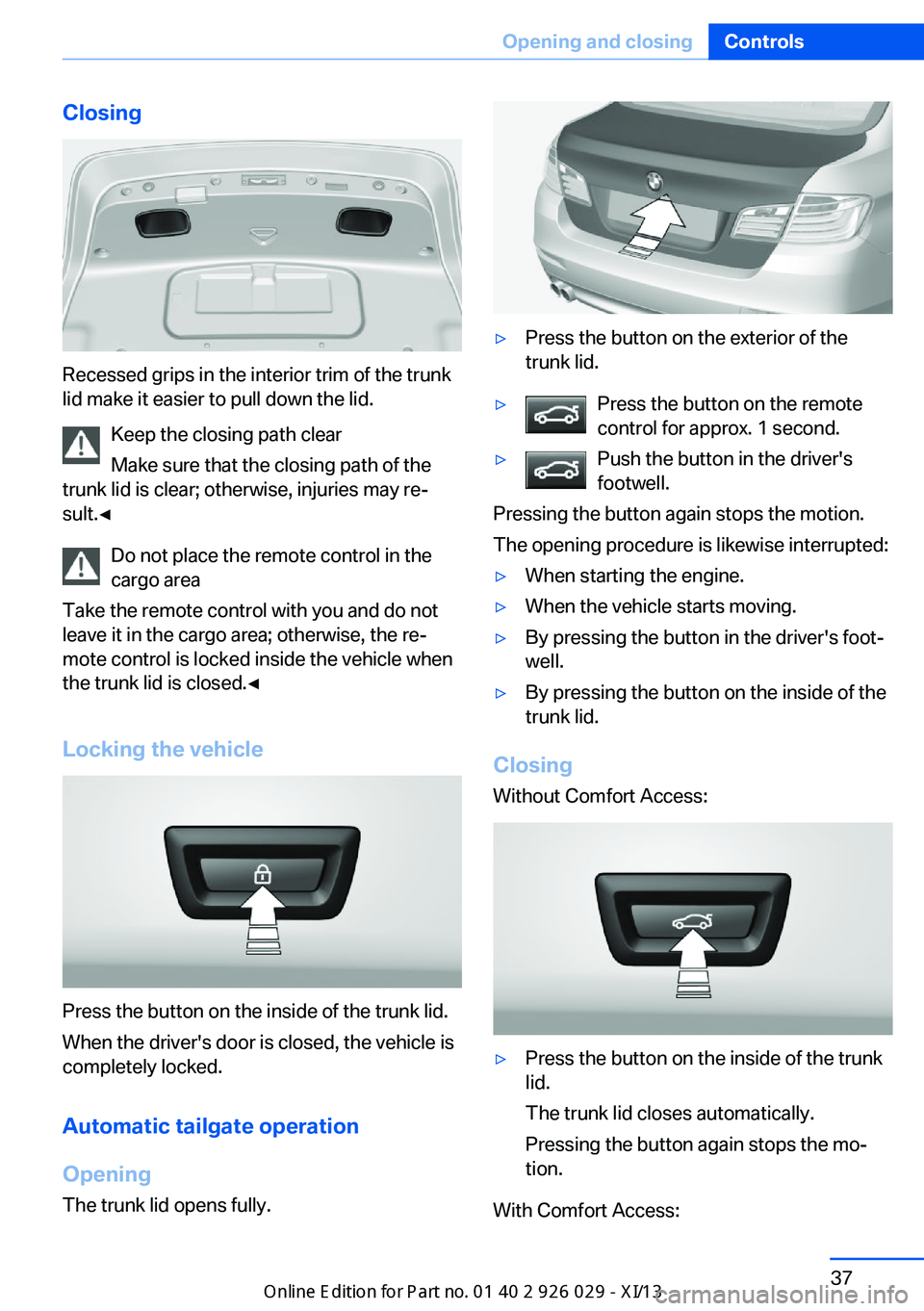
Recessed grips in the interior trim of the trunk
lid make it easier to pull down the lid.
Keep the closing path clear
Make sure that the closing path of the
trunk lid is clear; otherwise, injuries may re‐
sult.◀
Do not place the remote control in the
cargo area
Take the remote control with you and do not
leave it in the cargo area; otherwise, the re‐
mote control is locked inside the vehicle when
the trunk lid is closed.◀
Locking the vehicle
Press the button on the inside of the trunk lid.
When the driver's door is closed, the vehicle is
completely locked.
Automatic tailgate operation
Opening
The trunk lid opens fully.
▷Press the button on the exterior of the
trunk lid.▷Press the button on the remote
control for approx. 1 second.▷Push the button in the driver's
footwell.
Pressing the button again stops the motion.
The opening procedure is likewise interrupted:
▷When starting the engine.▷When the vehicle starts moving.▷By pressing the button in the driver's foot‐
well.▷By pressing the button on the inside of the
trunk lid.
Closing
Without Comfort Access:
▷Press the button on the inside of the trunk
lid.
The trunk lid closes automatically.
Pressing the button again stops the mo‐
tion.
With Comfort Access:
Seite 37Opening and closingControls37
Online Edition for Part no. 01 40 2 911 177 - VI/13
Page 43 of 273
Emergency unlocking
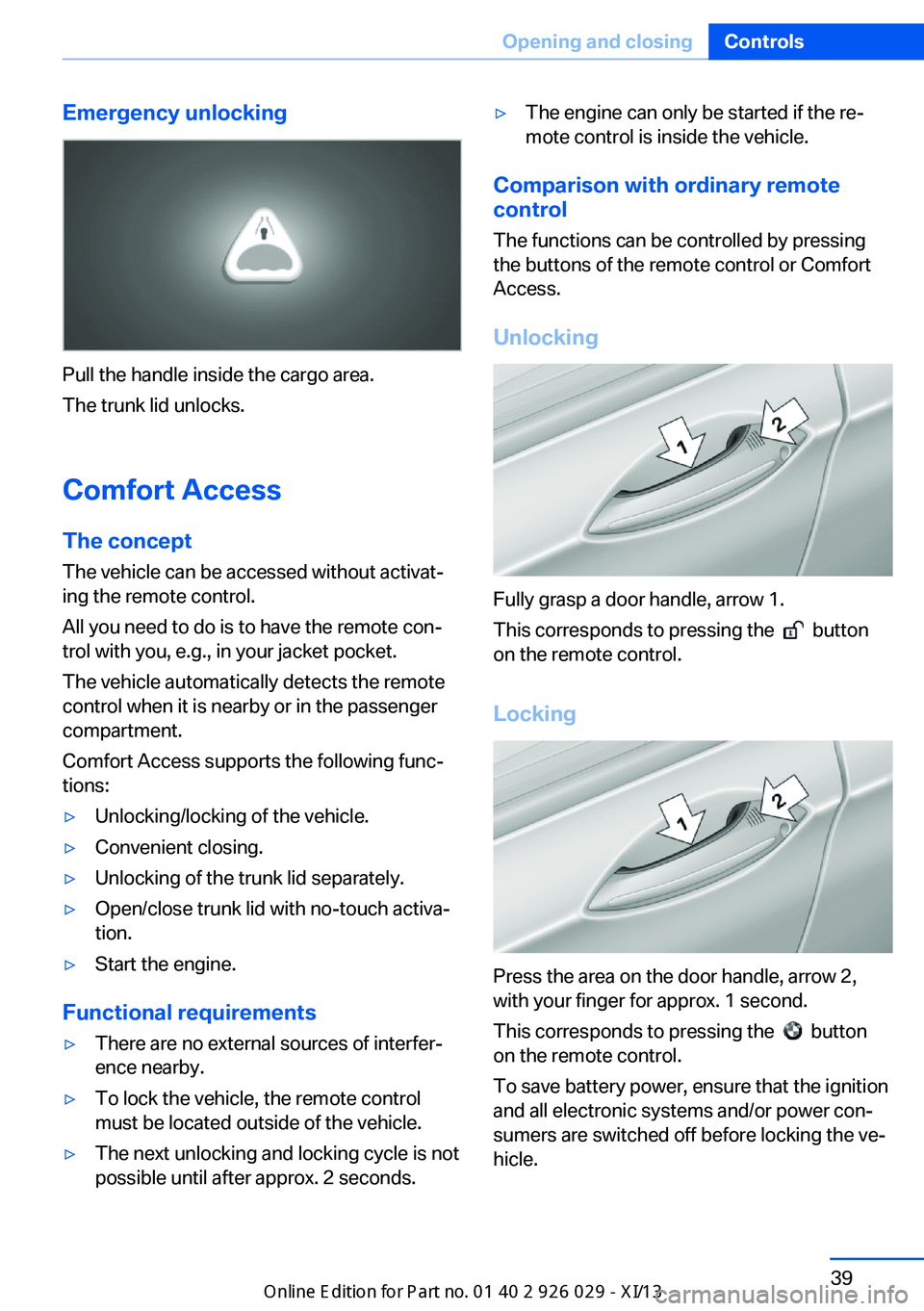
Pull the handle inside the cargo area.
The trunk lid unlocks.
Comfort Access
The concept The vehicle can be accessed without activat‐
ing the remote control.
All you need to do is to have the remote con‐ trol with you, e.g., in your jacket pocket.
The vehicle automatically detects the remote
control when it is nearby or in the passenger
compartment.
Comfort Access supports the following func‐
tions:
▷Unlocking/locking of the vehicle.▷Convenient closing.▷Unlocking of the trunk lid separately.▷Open/close trunk lid with no-touch activa‐
tion.▷Start the engine.
Functional requirements
▷There are no external sources of interfer‐
ence nearby.▷To lock the vehicle, the remote control
must be located outside of the vehicle.▷The next unlocking and locking cycle is not
possible until after approx. 2 seconds.▷The engine can only be started if the re‐
mote control is inside the vehicle.
Comparison with ordinary remote
control
The functions can be controlled by pressing the buttons of the remote control or Comfort
Access.
Unlocking
Fully grasp a door handle, arrow 1.
This corresponds to pressing the
button
on the remote control.
Locking
Press the area on the door handle, arrow 2,
with your finger for approx. 1 second.
This corresponds to pressing the
button
on the remote control.
To save battery power, ensure that the ignition
and all electronic systems and/or power con‐
sumers are switched off before locking the ve‐
hicle.
Seite 39Opening and closingControls39
Online Edition for Part no. 01 40 2 911 177 - VI/13
Page 44 of 273
Convenient closingPress the area on the door handle, arrow 2,
with the finger and hold it down.
In addition to locking, the windows and the
glass sunroof are closed.
Monitor the closing process
Monitor the closing process to ensure
that no one becomes trapped.◀
Unlocking the trunk lid separately
Press the button on the exterior of the trunk
lid, refer to page 36.
This corresponds to pressing the
but‐
ton on the remote control.
Do not place the remote control in the
cargo area
Take the remote control with you and do not
leave it in the cargo area; otherwise, the re‐
mote control is locked inside the vehicle when
the trunk lid is closed.◀
Opening/closing trunk lid with no-
touch activation
With Comfort Access, the trunk lid can be opened or closed with no-touch activation us‐
ing the remote control you are carrying.
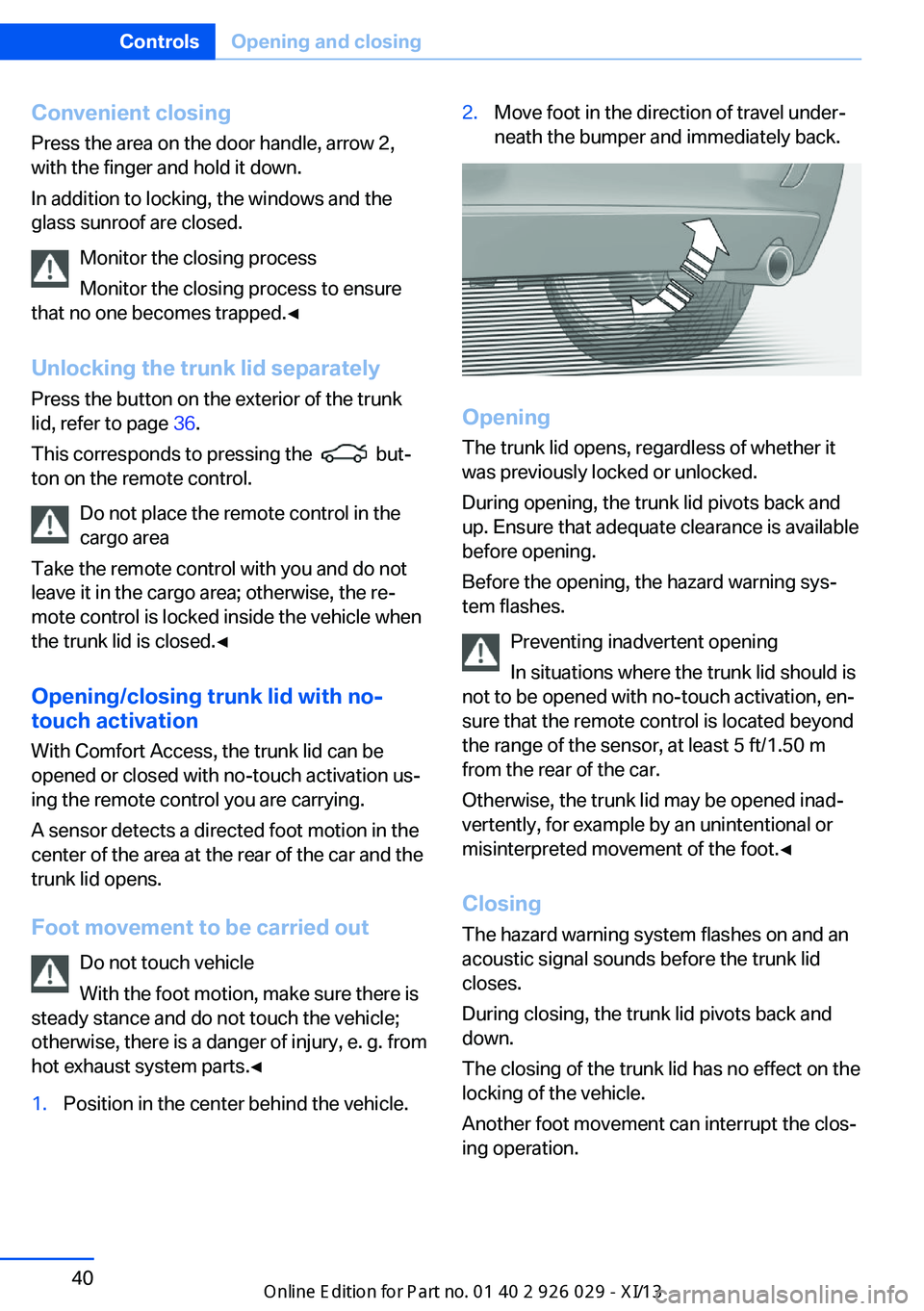
A sensor detects a directed foot motion in the
center of the area at the rear of the car and the trunk lid opens.
Foot movement to be carried out Do not touch vehicle
With the foot motion, make sure there is
steady stance and do not touch the vehicle;
otherwise, there is a danger of injury, e. g. from
hot exhaust system parts.◀
1.Position in the center behind the vehicle.2.Move foot in the direction of travel under‐
neath the bumper and immediately back.
Opening
The trunk lid opens, regardless of whether it
was previously locked or unlocked.
During opening, the trunk lid pivots back and
up. Ensure that adequate clearance is available
before opening.
Before the opening, the hazard warning sys‐
tem flashes.
Preventing inadvertent opening
In situations where the trunk lid should is
not to be opened with no-touch activation, en‐
sure that the remote control is located beyond
the range of the sensor, at least 5 ft/1.50 m
from the rear of the car.
Otherwise, the trunk lid may be opened inad‐
vertently, for example by an unintentional or
misinterpreted movement of the foot.◀
ClosingThe hazard warning system flashes on and an
acoustic signal sounds before the trunk lid
closes.
During closing, the trunk lid pivots back and
down.
The closing of the trunk lid has no effect on the
locking of the vehicle.
Another foot movement can interrupt the clos‐
ing operation.
Seite 40ControlsOpening and closing40
Online Edition for Part no. 01 40 2 911 177 - VI/13
Page 45 of 273
Keep the closing path clear
Make sure that the closing path of the
trunk lid is clear; otherwise, injuries may re‐
sult.◀
Do not place the remote control in the
cargo area
Take the remote control with you and do not
leave it in the cargo area; otherwise, the re‐
mote control is locked inside the vehicle when
the trunk lid is closed.◀
Malfunction
Comfort Access may not function properly if it
experiences interference from external sour‐
ces such as mobile phones, metal objects,
overhead power lines, transmission towers,
etc.
In this case, open or close the vehicle using the
buttons on the remote control or use the
integrated key in the door lock.
If there is a malfunction, open the trunk lid with
the remote control button or with the button on
the trunk lid.
Adjusting
Unlocking The setting is stored for the remote control
currently in use.1."Settings"2."Doors/key"3. Select symbol or "Unlock button:"4.Select the desired function:▷"Driver's door only"
Only the driver's door and the fuel filler
flap are unlocked. Pressing again un‐
locks the entire vehicle.▷"All doors"
The entire vehicle is unlocked.Depending on how the vehicle is equipped or
the country-specific variant, you can set
whether the doors are also unlocked with the
button on the remote control.
Confirmation signals from the vehicle
1."Settings"2."Doors/key"3.Deactivate or activate the desired confir‐
mation signals.▷"Acoustic sig. lock/unlock"▷"Flash when lock/unlock"
Automatic locking
The setting is stored for the remote control
currently in use.
1."Settings"2."Doors/key"3.Select the desired function:▷"Lock if no door opened"
The vehicle locks automatically after a
short period of time if a door is not
opened.▷"Lock after start driving"
The vehicle locks automatically after
you drive away.
Retrieving the seat, mirror, and
steering wheel settings
The driver's seat, exterior mirror, and steering
wheel positions selected last are stored for the
currently used remote control.
When the vehicle is unlocked, these positions
are automatically retrieved if this function was
activated.
Pinch hazard when moving back the seat
If this function is used, first make sure
that the footwell behind the driver's seat is
empty. Otherwise, people can be injured or ob‐
jects damaged when the seat is moved back.◀
The adjustment procedure is interrupted:
Seite 41Opening and closingControls41
Online Edition for Part no. 01 40 2 911 177 - VI/13
Page 46 of 273
▷When a seat position switch is pressed.▷When a button of the seat, mirror, and
steering wheel memory is pressed briefly.
Activating the setting
1."Settings"2."Doors/key"3."Last seat position autom."
Alarm system
The conceptThe vehicle alarm system responds to:
▷Opening of a door, the hood or the trunk
lid.▷Movements in the vehicle.▷Changes in the vehicle tilt, e.g., during at‐
tempts to steal a wheel or when towing the
car.▷Interruptions in battery voltage.
The alarm system briefly indicates tampering:
▷By sounding an acoustic alarm.▷By switching on the hazard warning sys‐
tem.▷By flashing the high beams.
Arming and disarming the alarm
system
General information
When you lock or unlock the vehicle, either
with the remote control, Comfort Access or at
the door lock the alarm system is armed or dis‐
armed at the same time.
Door lock and armed alarm systemUnlocking via the door lock will trigger the
alarm on some country-specific versions.
In order to terminate this alarm, unlock vehicle
with the remote control or switch on the igni‐
tion, if necessary, by emergency detection of
the remote control.
Trunk lid and armed alarm system The trunk lid can be opened even when the
alarm system is armed.
Press the button on the remote con‐
trol for approx. 1 second.
With Comfort Access the trunk lid opens with
no-touch activation, refer to page 40.
After the trunk lid is closed, it is locked and
monitored again if the doors are locked. The
hazard warning system flashes once.
In some vehicle equipment variants, the trunk
lid can only be opened using the remote con‐
trol if the vehicle was unlocked first.
Panic mode You can trigger the alarm system if you find
yourself in a dangerous situation.
Press the button on the remote con‐
trol for at least 3 seconds.
To switch off the alarm: press any button.
Switching off the alarm▷Unlock the vehicle using the remote con‐
trol.▷With Comfort Access: If you are carrying
the remote control with you, pull on the
driver side or front passenger side door
handle.Seite 42ControlsOpening and closing42
Online Edition for Part no. 01 40 2 911 177 - VI/13