park BMW 528I 2012 Service Manual
[x] Cancel search | Manufacturer: BMW, Model Year: 2012, Model line: 528I, Model: BMW 528I 2012Pages: 335, PDF Size: 13.16 MB
Page 291 of 335
Danger of burns
Only change bulbs when they are cool;
otherwise, there is the danger of getting
burned.◀
Working on the lighting system
When working on the lighting system, you
should always switch off the lights affected to
prevent short circuits.
To avoid possible injury or equipment damage
when replacing bulbs, observe any instructions
provided by the bulb manufacturer.◀
Do not perform work/bulb replacement on
xenon headlamps
Have any work on the xenon lighting system, in‐
cluding bulb replacement, performed only by a
service center. Due to the high voltage present
in the system, there is the danger of fatal injuries
if work is carried out improperly.◀
Do not touch the bulbs
Do not touch the glass of new bulbs with
your bare hands, as even minute amounts of
contamination will burn into the bulb's surface
and reduce its service life.
Use a clean tissue, cloth or something similar, or
hold the bulb by its base.◀
Light-emitting diodes (LEDs)
Light-emitting diodes installed behind a cover
serve as the light source for controls, display el‐
ements and other equipment.
These light-emitting diodes, which are related
to conventional lasers, are officially designated
as Class 1 light-emitting diodes.
Do not remove the covers
Do not remove the covers, and never stare
into the unfiltered light for several hours; other‐
wise, irritation of the retina could result.◀Headlamp glass
Condensation can form on the inside of the ex‐
ternal lamps in cool or humid weather. When
driving with the light switched on, the conden‐
sation evaporates after a short time. The head‐
lamp glasses do not need to be changed.
If the headlamps do not dim despite driving with
the light switched on, increasing humidity forms,
e. g. water droplets in the light, have the service
center check this.
Front lamps, bulb replacement
Halogen headlamps
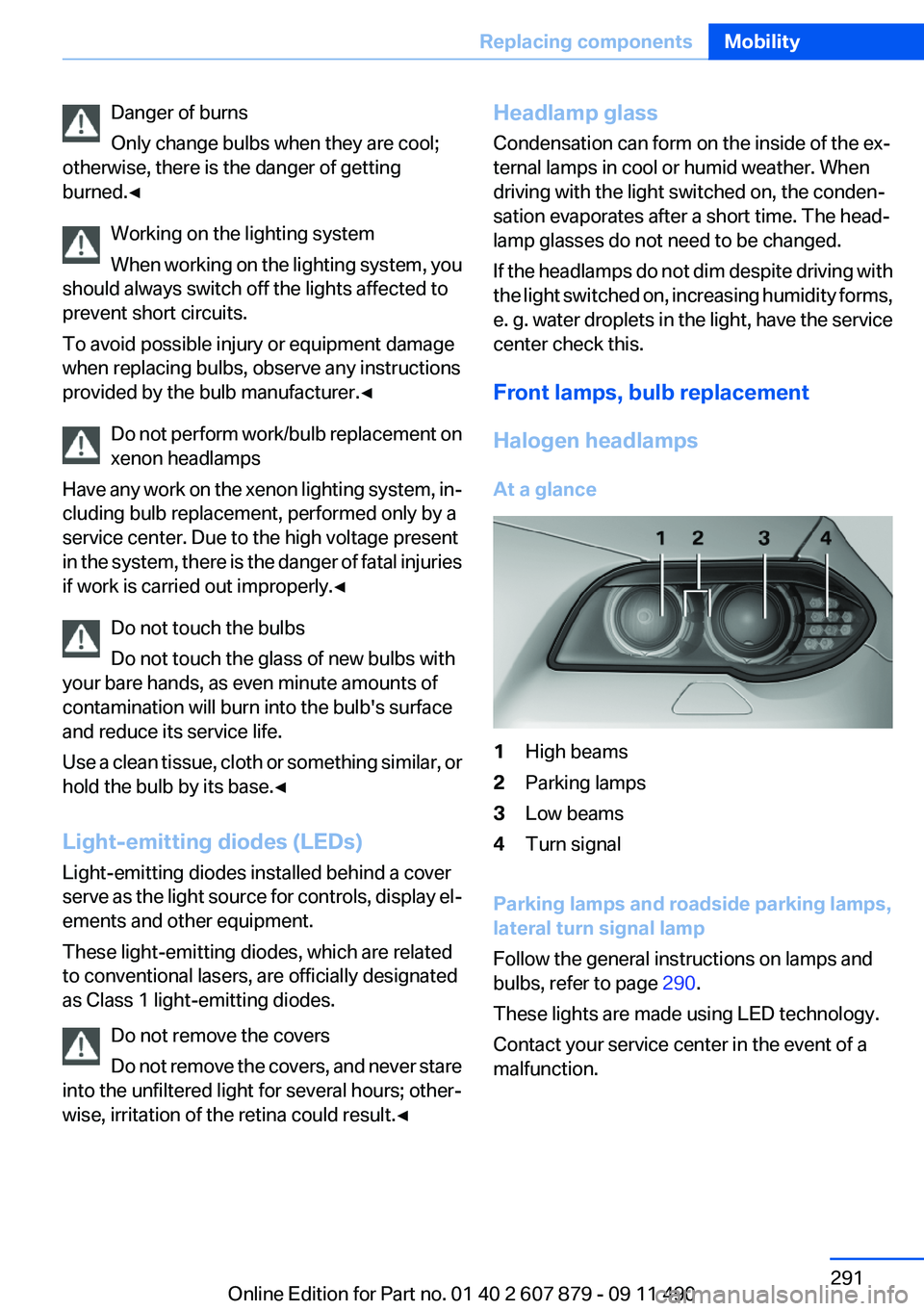
At a glance1High beams2Parking lamps3Low beams4Turn signal
Parking lamps and roadside parking lamps,
lateral turn signal lamp
Follow the general instructions on lamps and
bulbs, refer to page 290.
These lights are made using LED technology.
Contact your service center in the event of a
malfunction.
Seite 291Replacing componentsMobility291
Online Edition for Part no. 01 40 2 607 879 - 09 11 490
Page 293 of 335
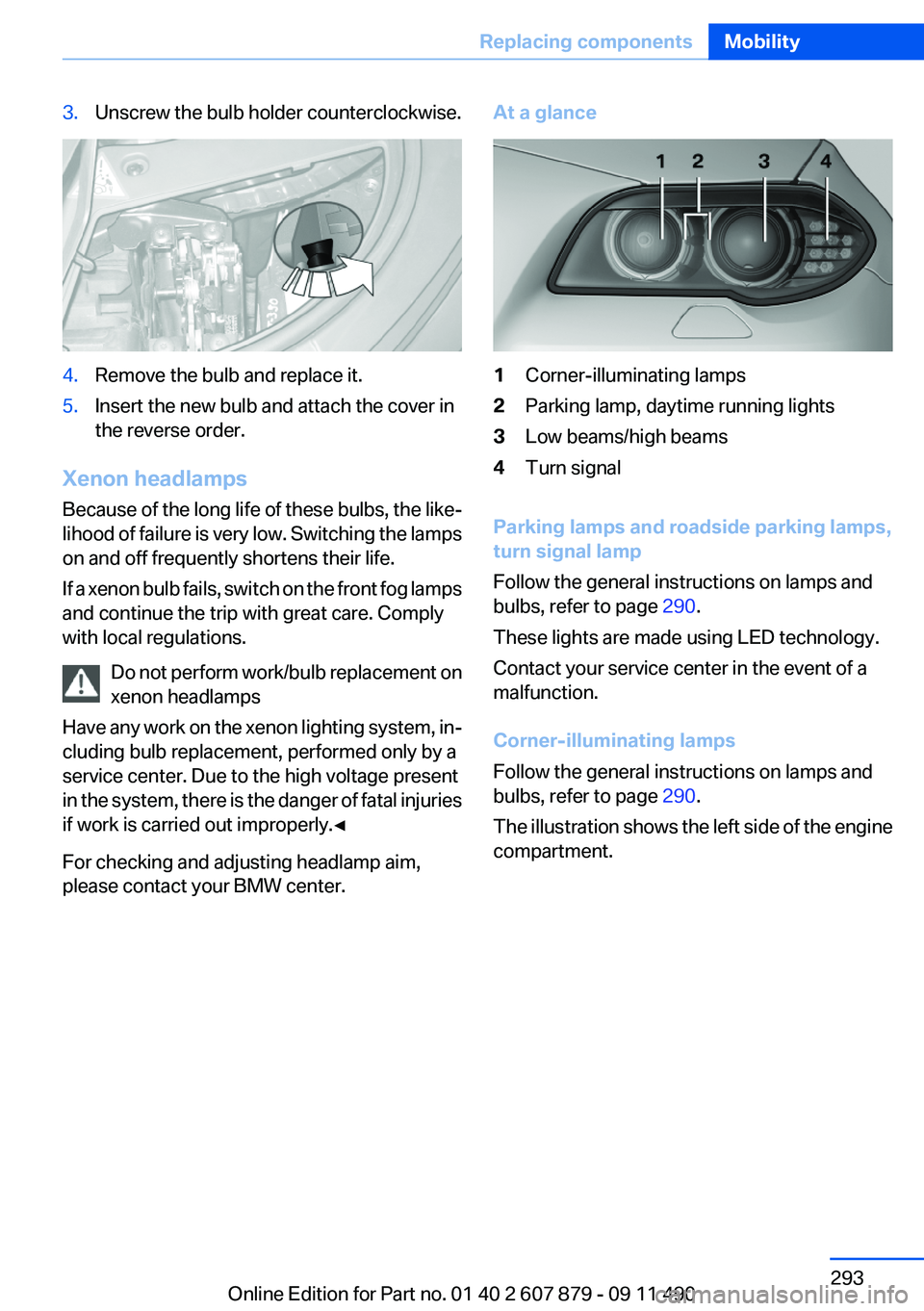
3.Unscrew the bulb holder counterclockwise.4.Remove the bulb and replace it.5.Insert the new bulb and attach the cover in
the reverse order.
Xenon headlamps
Because of the long life of these bulbs, the like‐
lihood of failure is very low. Switching the lamps
on and off frequently shortens their life.
If a xenon bulb fails, switch on the front fog lamps
and continue the trip with great care. Comply
with local regulations.
Do not perform work/bulb replacement on
xenon headlamps
Have any work on the xenon lighting system, in‐
cluding bulb replacement, performed only by a
service center. Due to the high voltage present
in the system, there is the danger of fatal injuries
if work is carried out improperly.◀
For checking and adjusting headlamp aim,
please contact your BMW center.
At a glance1Corner-illuminating lamps2Parking lamp, daytime running lights3Low beams/high beams4Turn signal
Parking lamps and roadside parking lamps,
turn signal lamp
Follow the general instructions on lamps and
bulbs, refer to page 290.
These lights are made using LED technology.
Contact your service center in the event of a
malfunction.
Corner-illuminating lamps
Follow the general instructions on lamps and
bulbs, refer to page 290.
The illustration shows the left side of the engine
compartment.
Seite 293Replacing componentsMobility293
Online Edition for Part no. 01 40 2 607 879 - 09 11 490
Page 300 of 335
Do not touch live parts
To avoid the risk of potentially fatal injury,
always avoid all contact with electrical compo‐
nents while the engine is running.◀
Preparation1.Check whether the battery of the other ve‐
hicle has a voltage of 12 volts. This informa‐
tion can be found on the battery.2.Switch off the engine of the assisting vehi‐
cle.3.Switch off any electronic systems/power
consumers in both vehicles.
Bodywork contact between vehicles
Make sure that there is no contact be‐
tween the bodywork of the two vehicles; other‐
wise, there is the danger of short circuits.◀
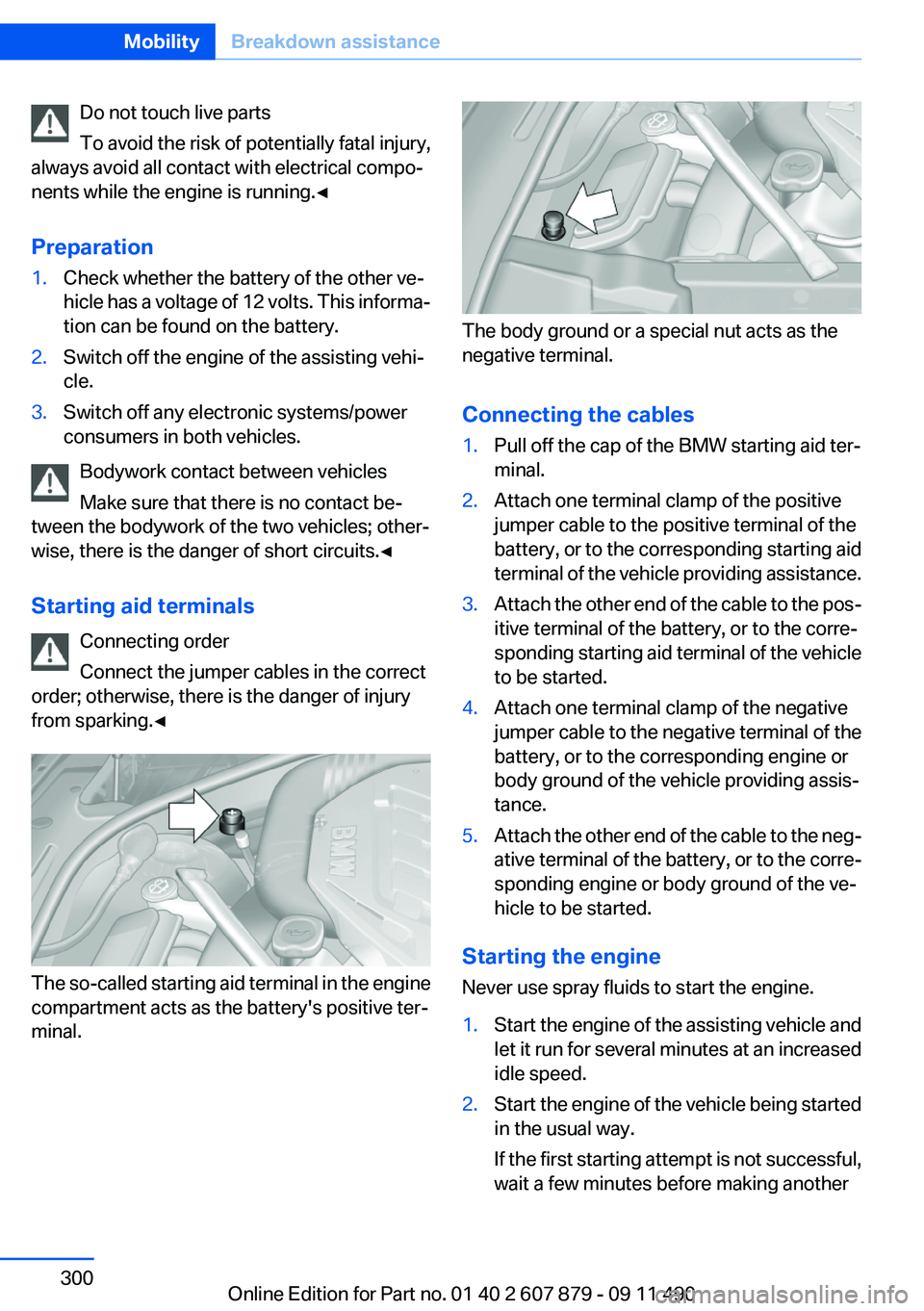
Starting aid terminals Connecting order
Connect the jumper cables in the correct
order; otherwise, there is the danger of injury
from sparking.◀
The so-called starting aid terminal in the engine
compartment acts as the battery's positive ter‐
minal.
The body ground or a special nut acts as the
negative terminal.
Connecting the cables
1.Pull off the cap of the BMW starting aid ter‐
minal.2.Attach one terminal clamp of the positive
jumper cable to the positive terminal of the
battery, or to the corresponding starting aid
terminal of the vehicle providing assistance.3.Attach the other end of the cable to the pos‐
itive terminal of the battery, or to the corre‐
sponding starting aid terminal of the vehicle
to be started.4.Attach one terminal clamp of the negative
jumper cable to the negative terminal of the
battery, or to the corresponding engine or
body ground of the vehicle providing assis‐
tance.5.Attach the other end of the cable to the neg‐
ative terminal of the battery, or to the corre‐
sponding engine or body ground of the ve‐
hicle to be started.
Starting the engine
Never use spray fluids to start the engine.
1.Start the engine of the assisting vehicle and
let it run for several minutes at an increased
idle speed.2.Start the engine of the vehicle being started
in the usual way.
If the first starting attempt is not successful,
wait a few minutes before making anotherSeite 300MobilityBreakdown assistance300
Online Edition for Part no. 01 40 2 607 879 - 09 11 490
Page 301 of 335
attempt in order to allow the discharged bat‐
tery to recharge.3.Let both engines run for several minutes.4.Disconnect the jumper cables in the reverse
order.
Check the battery and recharge if necessary.
Tow-starting and towing
Automatic transmission: transporting
your vehicle
Note
Your vehicle is not permitted to be towed.
Therefore, contact a service center in the event
of a breakdown.
Do not have the vehicle towed
Have your vehicle transported on a loading
platform only; otherwise, damage may occur.◀
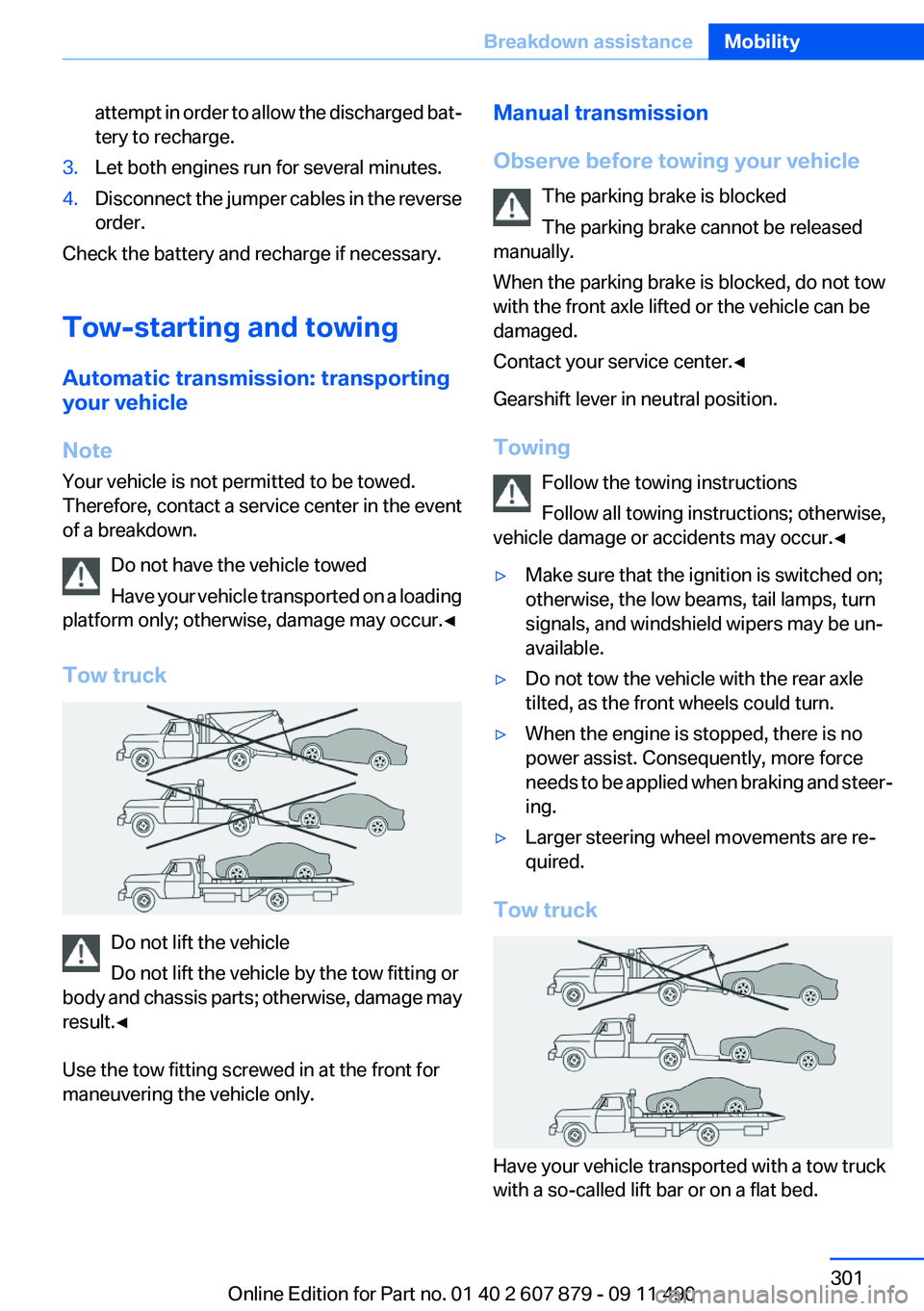
Tow truck
Do not lift the vehicle
Do not lift the vehicle by the tow fitting or
body and chassis parts; otherwise, damage may
result.◀
Use the tow fitting screwed in at the front for
maneuvering the vehicle only.
Manual transmission
Observe before towing your vehicle The parking brake is blocked
The parking brake cannot be released
manually.
When the parking brake is blocked, do not tow
with the front axle lifted or the vehicle can be
damaged.
Contact your service center.◀
Gearshift lever in neutral position.
Towing Follow the towing instructions
Follow all towing instructions; otherwise,
vehicle damage or accidents may occur.◀▷Make sure that the ignition is switched on;
otherwise, the low beams, tail lamps, turn
signals, and windshield wipers may be un‐
available.▷Do not tow the vehicle with the rear axle
tilted, as the front wheels could turn.▷When the engine is stopped, there is no
power assist. Consequently, more force
needs to be applied when braking and steer‐
ing.▷Larger steering wheel movements are re‐
quired.
Tow truck
Have your vehicle transported with a tow truck
with a so-called lift bar or on a flat bed.
Seite 301Breakdown assistanceMobility301
Online Edition for Part no. 01 40 2 607 879 - 09 11 490
Page 304 of 335
CareVehicle equipment
All standard, country-specific and optional
equipment that is offered in the model series is
described in this chapter. Therefore, equipment
is also described that is not available in a vehicle,
e. g., because of the selected optional equip‐
ment or country variant. This also applies for
safety-related functions and systems.
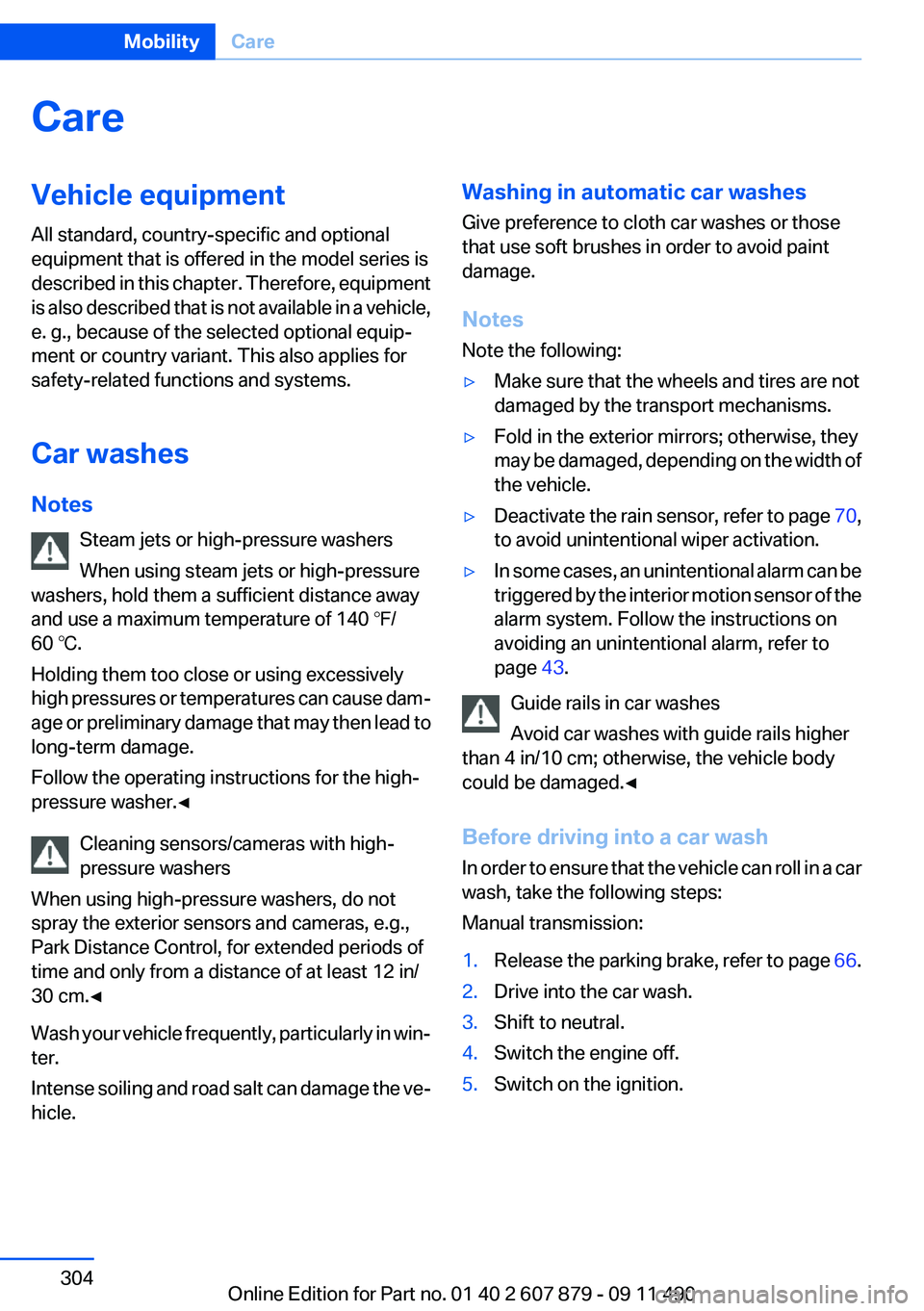
Car washes
Notes Steam jets or high-pressure washers
When using steam jets or high-pressure
washers, hold them a sufficient distance away
and use a maximum temperature of 140 ℉/
60 ℃.
Holding them too close or using excessively
high pressures or temperatures can cause dam‐
age or preliminary damage that may then lead to
long-term damage.
Follow the operating instructions for the high-
pressure washer.◀
Cleaning sensors/cameras with high-
pressure washers
When using high-pressure washers, do not
spray the exterior sensors and cameras, e.g.,
Park Distance Control, for extended periods of
time and only from a distance of at least 12 in/
30 cm.◀
Wash your vehicle frequently, particularly in win‐
ter.
Intense soiling and road salt can damage the ve‐
hicle.Washing in automatic car washes
Give preference to cloth car washes or those
that use soft brushes in order to avoid paint
damage.
Notes
Note the following:▷Make sure that the wheels and tires are not
damaged by the transport mechanisms.▷Fold in the exterior mirrors; otherwise, they
may be damaged, depending on the width of
the vehicle.▷Deactivate the rain sensor, refer to page 70,
to avoid unintentional wiper activation.▷In some cases, an unintentional alarm can be
triggered by the interior motion sensor of the
alarm system. Follow the instructions on
avoiding an unintentional alarm, refer to
page 43.
Guide rails in car washes
Avoid car washes with guide rails higher
than 4 in/10 cm; otherwise, the vehicle body
could be damaged.◀
Before driving into a car wash
In order to ensure that the vehicle can roll in a car
wash, take the following steps:
Manual transmission:
1.Release the parking brake, refer to page 66.2.Drive into the car wash.3.Shift to neutral.4.Switch the engine off.5.Switch on the ignition.Seite 304MobilityCare304
Online Edition for Part no. 01 40 2 607 879 - 09 11 490
Page 305 of 335
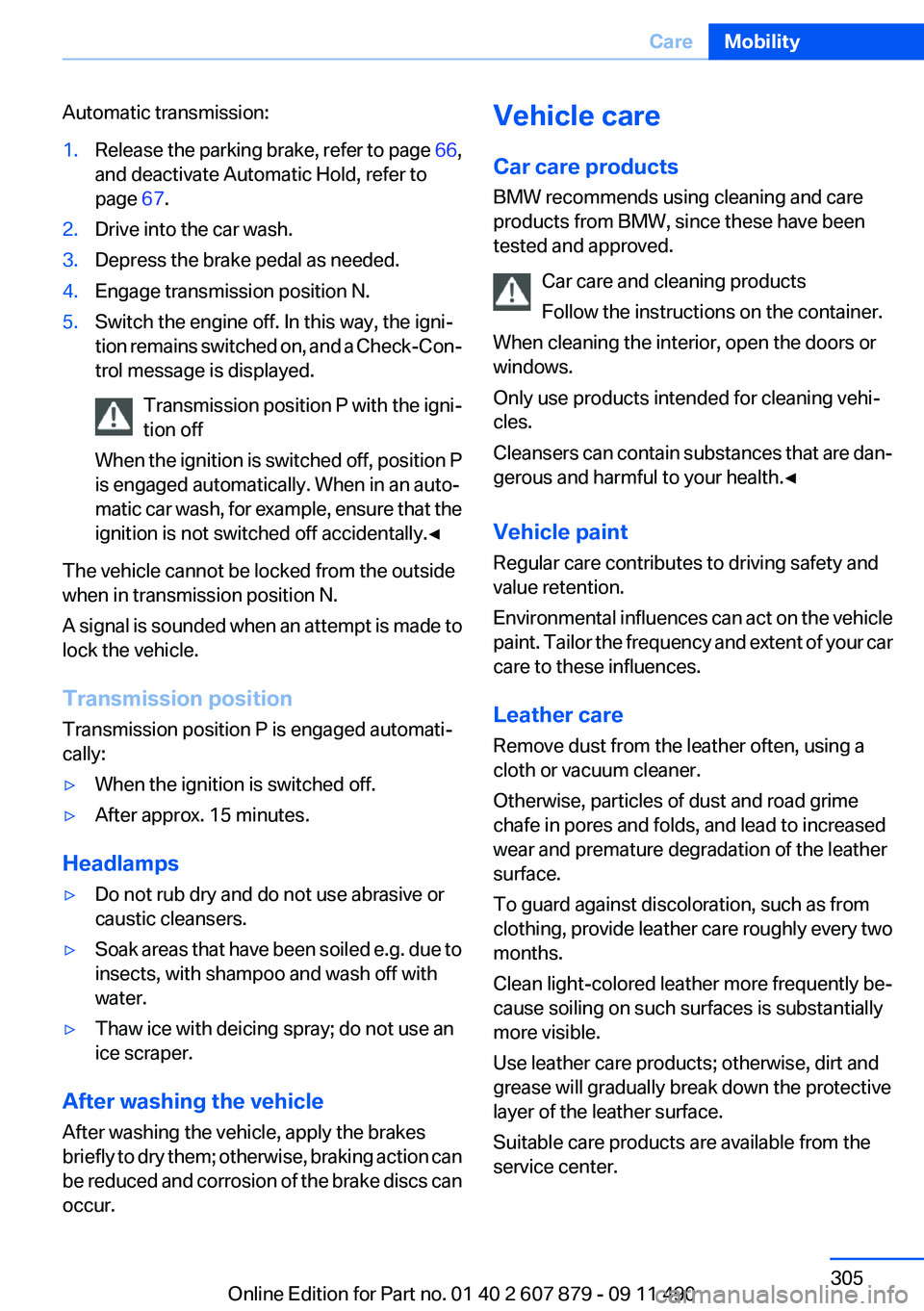
Automatic transmission:1.Release the parking brake, refer to page 66,
and deactivate Automatic Hold, refer to
page 67.2.Drive into the car wash.3.Depress the brake pedal as needed.4.Engage transmission position N.5.Switch the engine off. In this way, the igni‐
tion remains switched on, and a Check-Con‐
trol message is displayed.
Transmission position P with the igni‐
tion off
When the ignition is switched off, position P
is engaged automatically. When in an auto‐
matic car wash, for example, ensure that the
ignition is not switched off accidentally.◀
The vehicle cannot be locked from the outside
when in transmission position N.
A signal is sounded when an attempt is made to
lock the vehicle.
Transmission position
Transmission position P is engaged automati‐
cally:
▷When the ignition is switched off.▷After approx. 15 minutes.
Headlamps
▷Do not rub dry and do not use abrasive or
caustic cleansers.▷Soak areas that have been soiled e.g. due to
insects, with shampoo and wash off with
water.▷Thaw ice with deicing spray; do not use an
ice scraper.
After washing the vehicle
After washing the vehicle, apply the brakes
briefly to dry them; otherwise, braking action can
be reduced and corrosion of the brake discs can
occur.
Vehicle care
Car care products
BMW recommends using cleaning and care
products from BMW, since these have been
tested and approved.
Car care and cleaning products
Follow the instructions on the container.
When cleaning the interior, open the doors or
windows.
Only use products intended for cleaning vehi‐
cles.
Cleansers can contain substances that are dan‐
gerous and harmful to your health.◀
Vehicle paint
Regular care contributes to driving safety and
value retention.
Environmental influences can act on the vehicle
paint. Tailor the frequency and extent of your car
care to these influences.
Leather care
Remove dust from the leather often, using a
cloth or vacuum cleaner.
Otherwise, particles of dust and road grime
chafe in pores and folds, and lead to increased
wear and premature degradation of the leather
surface.
To guard against discoloration, such as from
clothing, provide leather care roughly every two
months.
Clean light-colored leather more frequently be‐
cause soiling on such surfaces is substantially
more visible.
Use leather care products; otherwise, dirt and
grease will gradually break down the protective
layer of the leather surface.
Suitable care products are available from the
service center.Seite 305CareMobility305
Online Edition for Part no. 01 40 2 607 879 - 09 11 490
Page 327 of 335
Engine coolant 286
Engine oil 284
Engine oil, adding 285
Engine oil additives 285
Engine oil change 286
Engine oil filler neck 285
Engine oil temperature 80
Engine oil types, alterna‐ tive 286
Engine oil types, ap‐ proved 285
Engine start during malfunc‐ tion 31
Engine start, refer to Starting the engine 63
Engine start, Starting aid 299
Engine stop 63
Engine temperature 80
Entering a car wash 304
Equalizer 190
Equipment, interior 146
ESP Electronic Stability Pro‐ gram, refer to DSC 107
Exchanging wheels/tires 278
Exhaust system 161
Exterior mirror, automatic dim‐ ming feature 56
Exterior mirrors 55
External devices 212
External start 299
External temperature dis‐ play 81
External temperature warn‐ ing 81
Eyes for securing cargo 164
F
Fader 190
Failure message, refer to Check Control 78
False alarm, refer to Uninten‐ tional alarm 43
Fan, refer to Air volume 140
Fault displays, refer to Check Control 78 Filler neck for engine oil 285
Fine wood, care 306
First aid kit 299
Fitting for towing, refer to Tow fitting 302
Flat tire, changing wheels 296
Flat Tire Monitor FTM 100
Flat tire, Tire Pressure Monitor TPM 97
Flat tire, warning lamp 98, 101
Flooding 161
Floor carpet, care 306
Floor mats, care 306
FM/AM station 192
Fold-out position, windshield wipers 71
Foot brake 161
Front airbags 94
Front fog lamps 93
Front fog lamps, front, bulb re‐ placement 294
Front lamps 291
Front passenger airbags, au‐ tomatic deactivation 96
Front passenger airbags, indi‐ cator lamp 96
FTM Flat Tire Monitor 100
Fuel cap 262
Fuel consumption, current 82
Fuel consumption, refer to Average fuel consump‐
tion 84
Fuel filler flap 262
Fuel gauge 80
Fuel quality 264
Fuel, tank capacity 313
Fuse 297
G
Garage door opener, refer to Integrated universal remote
control 146
Gas station recommenda‐ tion 182 Gear change, automatic trans‐
mission 72
Gear shift indicator 83
General driving notes 160
Glass sunroof, powered 45
Glove compartment 153
Gong, volume equaliza‐ tion 191
GPS navigation, refer to Navi‐ gation system 172
Gray display of the map 185
Gross vehicle weight, ap‐ proved 311
Gross weight, permissible for trailer towing 311
H
Hand brake, refer to Parking brake 66
Hand-held transmitter, alter‐ nating code 147
Hazard warning flashers 298
HDC Hill Descent Control 109
HD Radio 193
Head airbags 94
Headlamp control, auto‐ matic 90
Headlamp courtesy delay fea‐ ture 90
Headlamp courtesy delay fea‐ ture via remote control 35
Headlamp flasher 69
Headlamp glass 291
Headlamps 291
Headlamps, care 305
Headlamp washer system 69
Headliner 15
Headphones, rear entertain‐ ment 225
Head restraints 47
Head restraints, front 52
Head restraints, rear 53
Head-up Display 137
Head-up Display, care 307
Heavy cargo, stowing 164 Seite 327Everything from A to ZReference327
Online Edition for Part no. 01 40 2 607 879 - 09 11 490
Page 329 of 335
Locking/unlocking with re‐mote control 34
Locking, automatic 37
Locking, central 33
Locking via trunk lid 38
Lock, power window 44
Locks, doors, and win‐ dows 61
Low beams 89
Low beams, automatic, refer to High-beam Assistant 91
Lower back support 49
Luggage rack, refer to Roof- mounted luggage rack 164
Lumbar support 49
M
Maintenance 288
Maintenance require‐ ments 288
Maintenance, service require‐ ments 82
Maintenance system, BMW 288
Malfunction displays, refer to Check Control 78
Manual air distribution 140
Manual air volume 140
Manual brake, refer to Parking brake 66
Manual mode, transmis‐ sion 73
Manual operation, backup camera 126
Manual operation, door lock 37
Manual operation, exterior mir‐ rors 56
Manual operation, fuel filler flap 262
Manual operation, Park Dis‐ tance Control PDC 124
Manual operation, Side View 130 Manual operation, Top
View 129
Manual transmission 71
Map, destination entry 177
Map in split screen 184
Map view 182
Marking on approved tires 279
Marking, run-flat tires 280
Massage seat, front 49
Master key, refer to Remote control 30
Maximum cooling 141
Maximum speed, winter tires 279
Measure, units of 87
Medical kit 299
Memory for seat, mirrors, steering wheel 54
Menu, EfficientDynamics 168
Menu in instrument cluster 83
Menus, operating, iDrive 16
Menus, refer to iDrive operat‐ ing concept 17
Message list, traffic bulle‐ tins 184
Messages 245
Messages, refer to Check Control 78
Microfilter 142
Minimum tread, tires 277
Mirror 55
Mirror memory 54
Mobile communication devi‐ ces in the vehicle 161
Mobile phone 230
Mode, ECO PRO 167
Modifications, technical, refer to Safety 6
Moisture in headlamp 291
Monitor, refer to Control Dis‐ play 16
Mounting of child restraint fix‐ ing systems 58
MP3 player 212 Multifunction steering wheel,
buttons 12
Multimedia 200
Music collection 207
Music search 209
Music, storing 207
N
Navigation 172
Navigation data 186
Neck restraints, front, refer to Head restraints 52
Neck restraints, rear, refer to Head restraints 53
New wheels and tires 278
Night Vision with pedestrian detection 134
Notes 249
Nylon rope for tow-starting/ towing 302
O
OBD Onboard Diagnos‐ tics 289
Obstacle marking, backup camera 127
Odometer 81
Office 242
Oil 284
Oil, adding 285
Oil additives 285
Oil change 286
Oil change interval, service re‐ quirements 82
Oil filler neck 285
Oil level check 284
Oil types, alternative 286
Oil types, approved 285
Old batteries, disposal 296
Onboard Diagnostics OBD 289
Onboard monitor, refer to Control Display 16
Onboard vehicle tool kit 290 Seite 329Everything from A to ZReference329
Online Edition for Part no. 01 40 2 607 879 - 09 11 490
Page 330 of 335
Opening/closing from in‐side 37
Opening/closing via door lock 36
Opening/closing with remote control 34
Operating concept, iDrive 16
Optional equipment, standard equipment 6
Outside air, refer to Automatic recirculated-air control 141
Overheating of engine, refer to Coolant temperature 81
P
Paint, vehicle 305
Panic mode 35
Parallel parking assistant 131
Park Distance Control PDC 123
Parked-car ventilation 144
Parked vehicle, condensa‐ tion 162
Parking aid, refer to PDC 123
Parking assistant 131
Parking brake 66
Parking lamps 89
Parking with Auto Hold 67
Passenger side mirror, tilting downward 56
Pathway lines, backup cam‐ era 126
PDC Park Distance Con‐ trol 123
Pedestrian detection, refer to Night Vision 134
People detection, refer to Night Vision 134
Permissible axle load 311
Personal information 242
Personal Profile 31
Phone 230
Pinch protection system, glass sunroof 45 Pinch protection system, win‐
dows 44
Plastic, care 306
PlugIn 258
Position, storing 174
Postal code, entering in navi‐ gation 173
Power failure 296
Power sunroof, glass 45
Power windows 43
Pressure, tire air pres‐ sure 265
Pressure warning FTM, tires 100
Profile, refer to Personal Pro‐ file 31
Programmable memory but‐ tons, iDrive 20
Protective function, glass sun‐ roof 45
Protective function, win‐ dows 44
Push-and-turn switch, refer to Controller 16
R
Radiator fluid 286
Radio 192
Radio-operated key, refer to Remote control 30
Radio ready state 63
Rain sensor 70
Random 201
Random playback 201
RDS 193
Reading out loud 250
Rear automatic climate con‐ trol 143
Rear axle steering 110
Rear entertainment 221
Rear lamps 294
Rear socket 150
Rear source, selecting for rear entertainment 224
Rearview mirror 55 Rear window defroster 141
Recirculated-air mode 141
Recommended tire brands 279
Refueling 262
Remaining range 81
Reminders 249
Remote control/key 30
Remote control, malfunc‐ tion 36
Remote control, rear enter‐ tainment 222
Remote control, universal 146
Replacement fuse 297
Replacing parts 290
Replacing wheels/tires 278
Reporting safety defects 8
RES button 116
Reserve warning, refer to Range 81
Resetting, Tire Pressure Mon‐ itor TPM 98
Residual heat, automatic cli‐ mate control 141
Retaining straps, securing cargo 164
Retreaded tires 279
Reversing lamp, bulb replace‐ ment 295
Roadside Assistance 254
Roadside parking lamps 91
Roller sunblinds 44
Roll stabilization, refer to Adaptive Drive 110
Roll stabilization, refer to Dy‐ namic Drive 110
Roof load capacity 311
Roof-mounted luggage rack 164
Rope for tow-starting/tow‐ ing 302
Route 181
Route criteria, route 180
Route, displaying 181
Routes, avoiding 180
Route section, bypassing 181 Seite 330ReferenceEverything from A to Z330
Online Edition for Part no. 01 40 2 607 879 - 09 11 490
Page 332 of 335
Supplementary text mes‐sage 80
Surround View 126
Switch-on times, parked-car ventilation 145
Switch, refer to Cockpit 12
Symbols 6
T
Tachometer 80
Tail and brake lamps 295
Tailgate 38
Tailgate, automatic 38
Tailgate, opening with no- touch activation 41
Tailgate via remote control 35
Tail lamps 294
Tail lamps, bulb replace‐ ment 295
Tasks 248
Technical changes, refer to Safety 6
Technical data 310
TeleService 254
Temperature, automatic cli‐ mate control 140
Temperature display, external temperature 81
Temperature, engine oil 80
Tempomat, refer to Active Cruise Control 114
Terminal, starting aid 300
Text messages 245
Text message, supplemen‐ tary 80
Theft alarm system, refer to Alarm system 42
Theft protection, refer to Cen‐ tral locking system 33
Thermal camera, refer to Night Vision 134
Through-loading system 150
Tilt alarm sensor 43
Time of arrival 85
Tire damage 278 Tire identification marks 276
Tire inflation pressure 265
Tire inflation pressure monitor, refer to FTM 100
Tire Pressure Monitor TPM 97
Tires, changing 278
Tires, everything on wheels and tires 265
Tires, run-flat tires 280
Tire tread 277
Toll roads, route 180
Tone 190
Tools 290
Top View 128
Total vehicle weight 311
Tow fitting 302
Towing 301
Town/city, navigation 173
Tow-starting 301
Tow truck 301
TPM Tire Pressure Moni‐ tor 97
Traction control 108
Traffic bulletins, naviga‐ tion 184
Transmission, automatic 72
Transmission, manual 71
Transporting children safely 58
Tread, tires 277
Treble, tone 190
Trip computer 85
Triple turn signal activa‐ tion 69
Trip odometer 81
Truck for tow-starting/tow‐ ing 301
Trunk lid 38
Trunk lid, automatic 38
Trunk lid, emergency unlock‐ ing 40
Trunk lid, hotel function 40
Trunk lid, opening with no- touch activation 41 Trunk lid via remote con‐
trol 35
Turning circle 311
Turning circle lines, backup camera 127
Turn signals, operation 69
Turn signals, rear, bulb re‐ placement 295
U
Unintentional alarm 43
Units of measure 87
Universal remote control 146
Unlock button, automatic transmission 72
Unlocking/locking from in‐ side 37
Unlocking/locking via door lock 36
Unlocking/locking with remote control 34
Updates made after the edito‐ rial deadline 6
Updating software 219
Upholstery care 306
USB audio interface 213
USB interface 153
V
Variable steering, Integral Ac‐ tive Steering 110
Vehicle battery 296
Vehicle battery, replacing 296
Vehicle, breaking in 160
Vehicle care 305
Vehicle equipment 6
Vehicle identification number, refer to Identification number
in the engine compart‐
ment 282
Vehicle jack 296
Vehicle paint 305
Vehicle storage 307
Vehicle wash 304 Seite 332ReferenceEverything from A to Z332
Online Edition for Part no. 01 40 2 607 879 - 09 11 490