park BMW 528I 2012 Owners Manual
[x] Cancel search | Manufacturer: BMW, Model Year: 2012, Model line: 528I, Model: BMW 528I 2012Pages: 335, PDF Size: 13.16 MB
Page 13 of 335
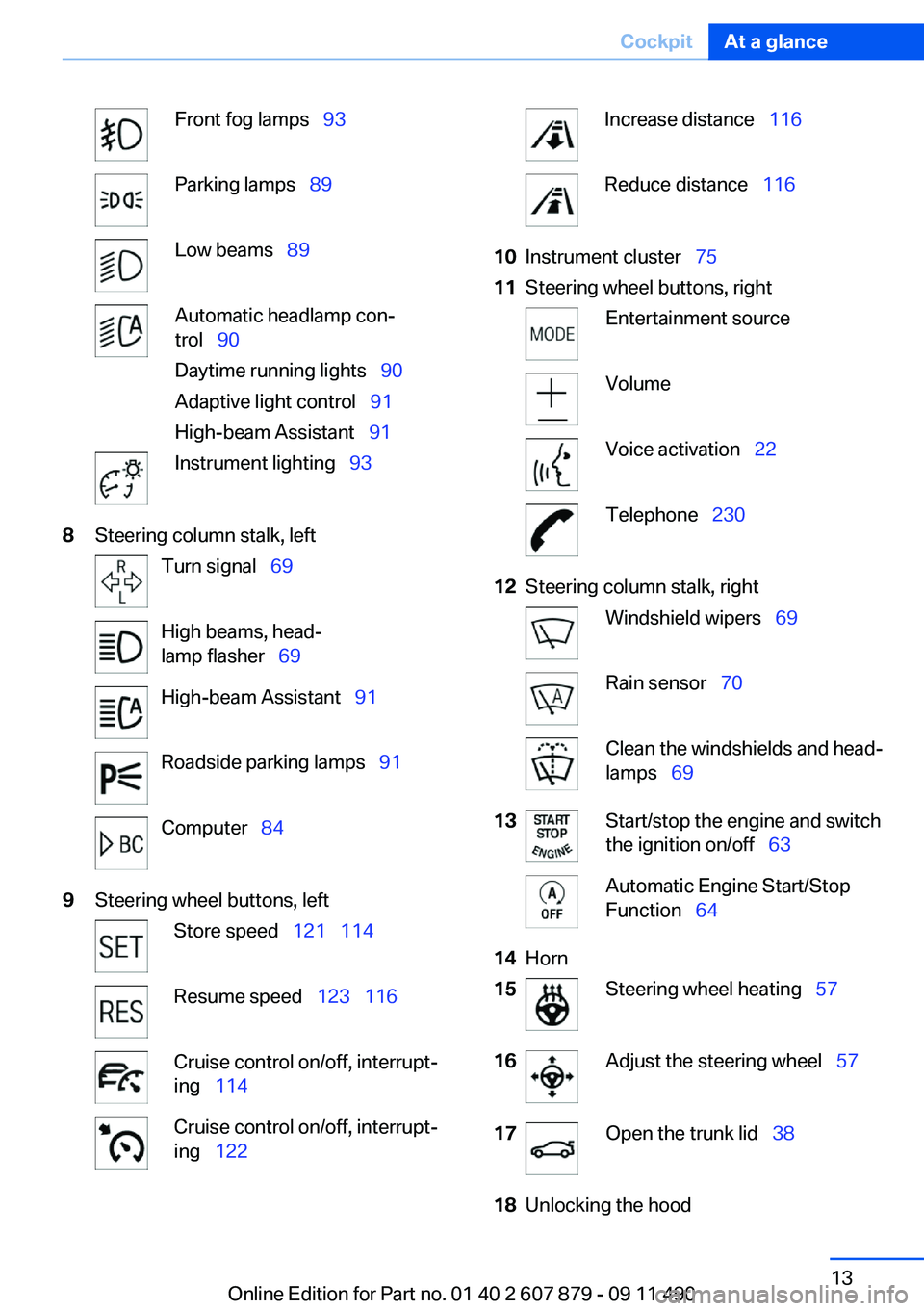
Front fog lamps 93Parking lamps 89Low beams 89Automatic headlamp con‐
trol 90
Daytime running lights 90
Adaptive light control 91
High-beam Assistant 91Instrument lighting 938Steering column stalk, leftTurn signal 69High beams, head‐
lamp flasher 69High-beam Assistant 91Roadside parking lamps 91Computer 849Steering wheel buttons, leftStore speed 121 114Resume speed 123 116Cruise control on/off, interrupt‐
ing 114Cruise control on/off, interrupt‐
ing 122Increase distance 116Reduce distance 11610Instrument cluster 7511Steering wheel buttons, rightEntertainment sourceVolumeVoice activation 22Telephone 23012Steering column stalk, rightWindshield wipers 69Rain sensor 70Clean the windshields and head‐
lamps 6913Start/stop the engine and switch
the ignition on/off 63Automatic Engine Start/Stop
Function 6414Horn15Steering wheel heating 5716Adjust the steering wheel 5717Open the trunk lid 3818Unlocking the hoodSeite 13CockpitAt a glance13
Online Edition for Part no. 01 40 2 607 879 - 09 11 490
Page 14 of 335
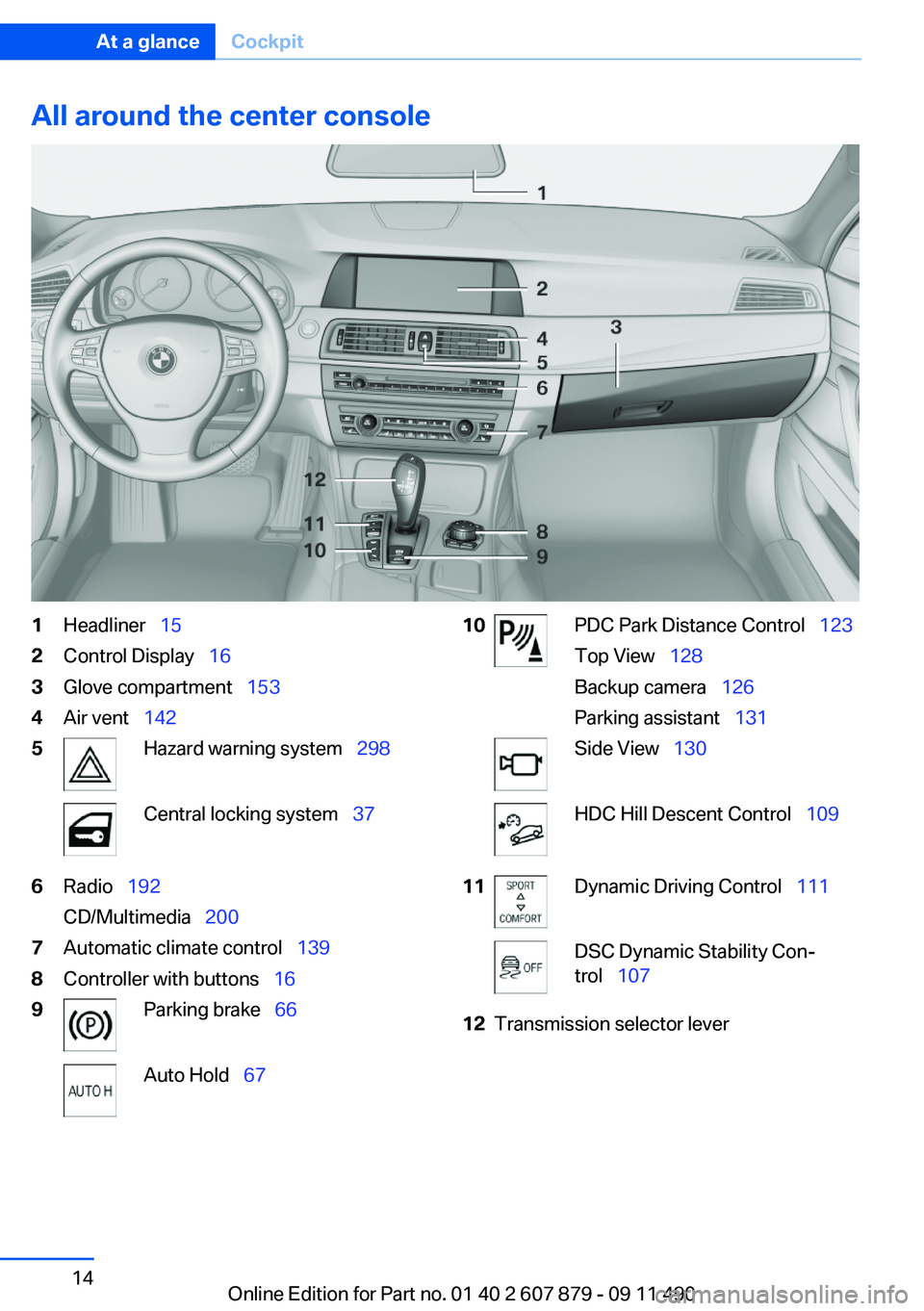
All around the center console1Headliner 152Control Display 163Glove compartment 1534Air vent 1425Hazard warning system 298Central locking system 376Radio 192
CD/Multimedia 2007Automatic climate control 1398Controller with buttons 169Parking brake 66Auto Hold 6710PDC Park Distance Control 123
Top View 128
Backup camera 126
Parking assistant 131Side View 130HDC Hill Descent Control 10911Dynamic Driving Control 111DSC Dynamic Stability Con‐
trol 10712Transmission selector leverSeite 14At a glanceCockpit14
Online Edition for Part no. 01 40 2 607 879 - 09 11 490
Page 33 of 335
4.Open "Guest".5.Create the settings.
Note: the guest profile cannot be renamed.
Display profile list during start
The profile list can be displayed during each
start for selecting the desired profile.
1."Settings"2."Profiles"3."Options" Open.4."Display user list at startup"
Personal Profile settings
The following functions and settings can be
stored in a profile.
More information on the settings can be found
under:
▷Active Cruise Control: collision warning, re‐
fer to page 120.▷Exterior mirror position, refer to page 55.▷CD/Multimedia, refer to page 200: audio
source listened to last.▷Dynamic Driving Control: sport program, re‐
fer to page 112.▷Driver's seat position, refer to page 35: au‐
tomatic retrieval after unlocking.▷Programmable memory buttons, refer to
page 20: assignment.▷Head-up Display, refer to page 137: selec‐
tion, brightness and position of the display.▷Headlamp courtesy delay feature, refer to
page 90: time setting.▷Tone, refer to page 190: tone settings.▷Automatic climate control, refer to
page 139: settings.▷Steering wheel position, refer to page 57.▷Navigation, refer to page 172: map views,
route criteria, voice output on/off.▷Night Vision with pedestrian detection, refer
to page 134: selection of functions and type
of display.▷Daytime running lights, refer to page 90:
current setting.▷Park Distance Control PDC, refer to
page 191: adjusting the signal tone volume.▷Radio, refer to page 192: stored stations,
station listened to last, special settings.▷Backup camera, refer to page 126: selec‐
tion of functions and type of display.▷Side View, refer to page 130: selection of
the display type.▷Language on the Control Display, refer to
page 87.▷Lane departure warning, refer to page 102:
last setting, on/off.▷Active Blind Spot Detection, refer to
page 104: last setting, on/off.▷Triple turn signal activation, refer to
page 69.▷Locking the vehicle, refer to page 37: after
a brief period or after starting to drive.
Central locking system
The concept
The central locking system becomes active
when the driver's door is closed.
The system simultaneously engages and re‐
leases the locks on the following:
▷Doors.▷Trunk lid.▷Fuel filler flap.
Operating from the outside
▷Via the remote control.▷Via the driver's door lock.▷Via the door handles.▷Via the button in the trunk lid.Seite 33Opening and closingControls33
Online Edition for Part no. 01 40 2 607 879 - 09 11 490
Page 34 of 335
The following takes place simultaneously when
locking/unlocking the vehicle via the remote
control:▷Depending on how the vehicle is equipped,
the theft protection is activated/deactivated.
Theft protection prevents the doors from
being unlocked using the lock buttons or the
door opener.▷The welcome lamps, interior lamps and
courtesy lamps are switched on and off.▷The alarm system, refer to page 42, is
armed or disarmed.
Operating from the inside
Via the button for the central locking system.
If the vehicle has been locked from inside, the
fuel filler flap remains unlocked.
If an accident of a certain severity occurs, the
central locking system unlocks automatically.
The hazard warning system and interior lamps
come on.
Opening and closing: from the
outside
Using the remote control
General information Take the remote control with you
People or animals left unattended in a
parked vehicle can lock the doors from the in‐
side. Always take the remote control with you
when leaving the vehicle so that the vehicle can
then be opened from the outside.◀
Unlocking Press the button.
The vehicle is unlocked.
Welcome lamps, interior lamp and courtesy
lamps are switched on.
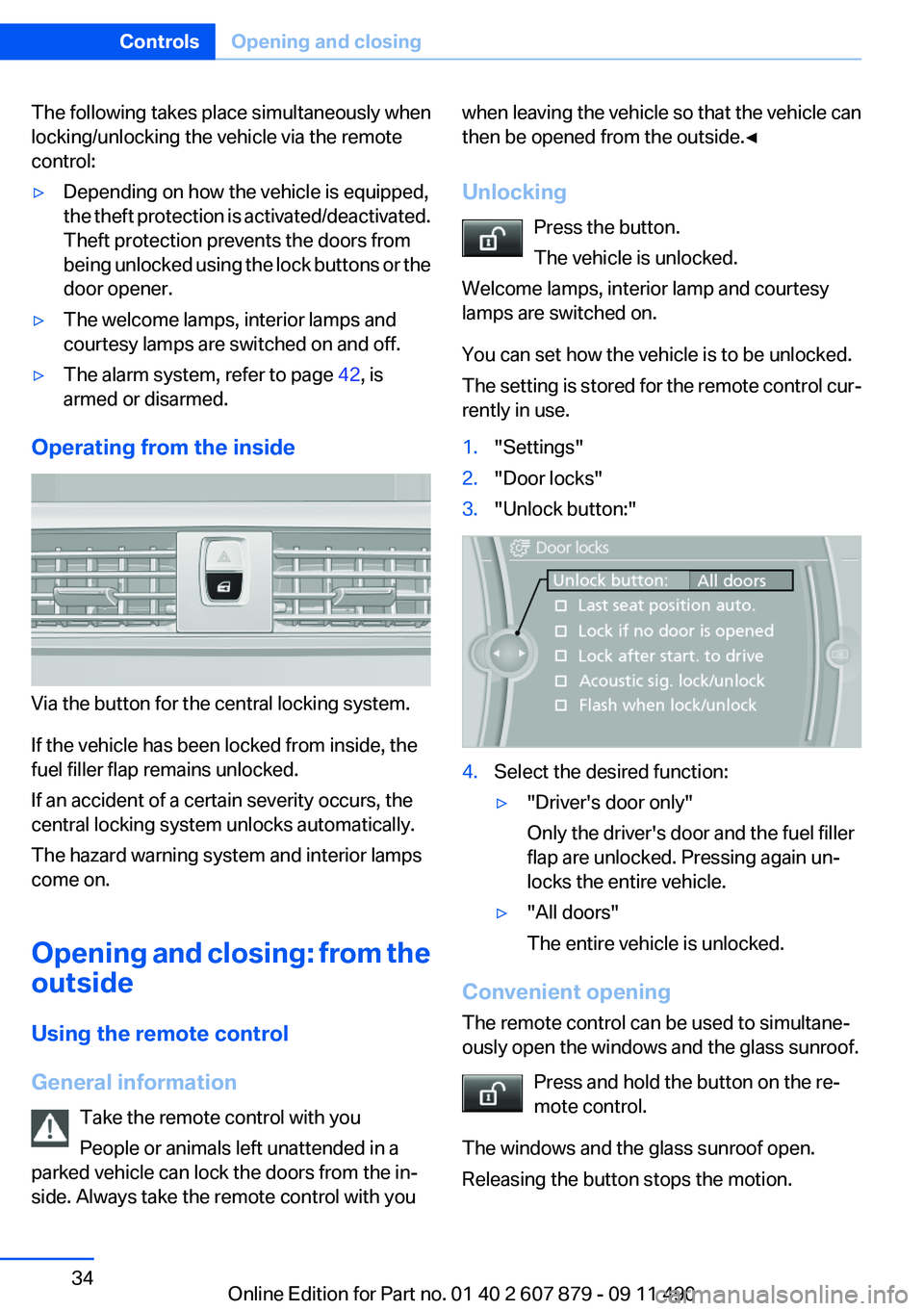
You can set how the vehicle is to be unlocked.
The setting is stored for the remote control cur‐
rently in use.1."Settings"2."Door locks"3."Unlock button:"4.Select the desired function:▷"Driver's door only"
Only the driver's door and the fuel filler
flap are unlocked. Pressing again un‐
locks the entire vehicle.▷"All doors"
The entire vehicle is unlocked.
Convenient opening
The remote control can be used to simultane‐
ously open the windows and the glass sunroof.
Press and hold the button on the re‐
mote control.
The windows and the glass sunroof open.
Releasing the button stops the motion.
Seite 34ControlsOpening and closing34
Online Edition for Part no. 01 40 2 607 879 - 09 11 490
Page 40 of 335
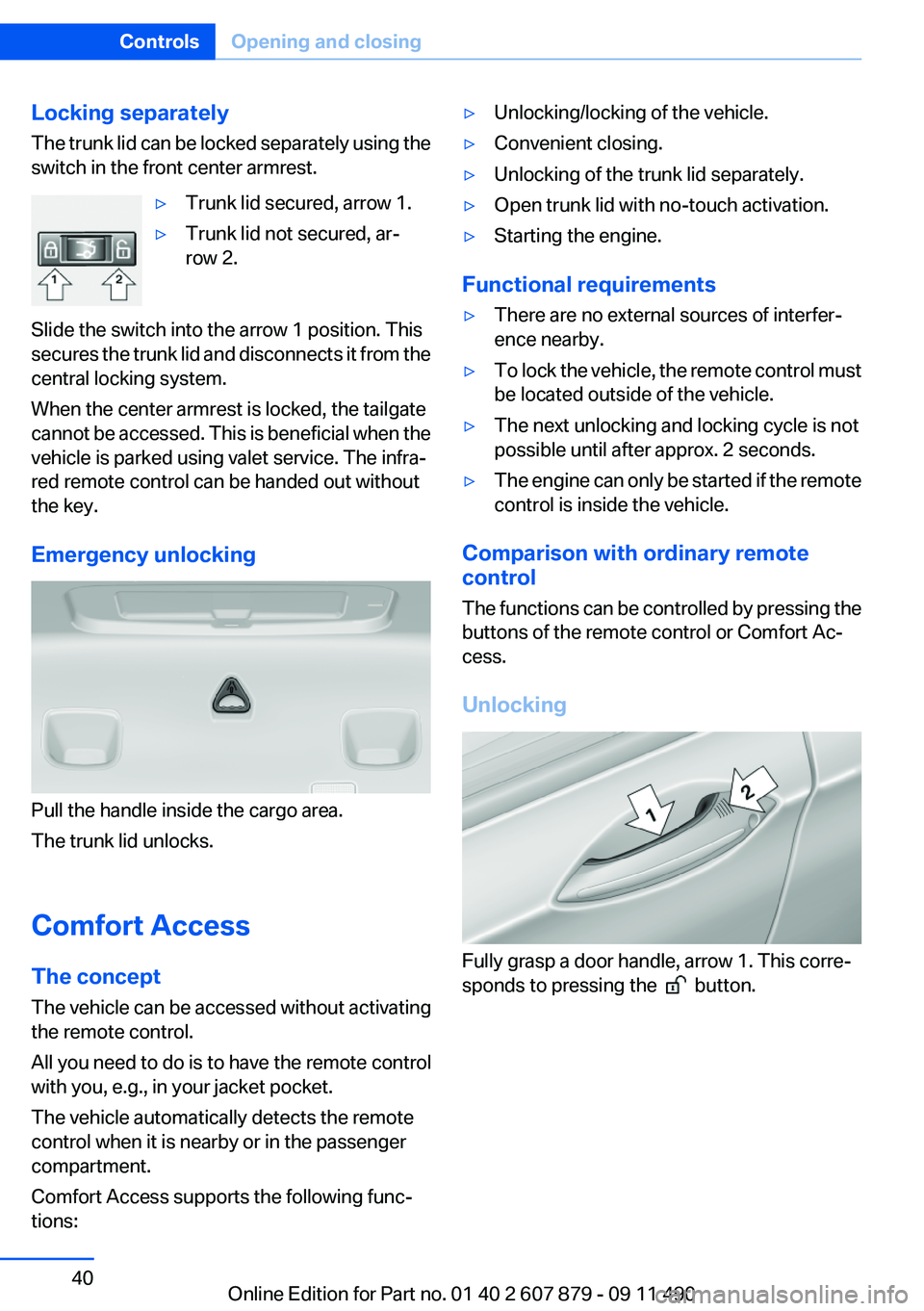
Locking separately
The trunk lid can be locked separately using the
switch in the front center armrest.▷Trunk lid secured, arrow 1.▷Trunk lid not secured, ar‐
row 2.
Slide the switch into the arrow 1 position. This
secures the trunk lid and disconnects it from the
central locking system.
When the center armrest is locked, the tailgate
cannot be accessed. This is beneficial when the
vehicle is parked using valet service. The infra‐
red remote control can be handed out without
the key.
Emergency unlocking
Pull the handle inside the cargo area.
The trunk lid unlocks.
Comfort Access
The concept
The vehicle can be accessed without activating
the remote control.
All you need to do is to have the remote control
with you, e.g., in your jacket pocket.
The vehicle automatically detects the remote
control when it is nearby or in the passenger
compartment.
Comfort Access supports the following func‐
tions:
▷Unlocking/locking of the vehicle.▷Convenient closing.▷Unlocking of the trunk lid separately.▷Open trunk lid with no-touch activation.▷Starting the engine.
Functional requirements
▷There are no external sources of interfer‐
ence nearby.▷To lock the vehicle, the remote control must
be located outside of the vehicle.▷The next unlocking and locking cycle is not
possible until after approx. 2 seconds.▷The engine can only be started if the remote
control is inside the vehicle.
Comparison with ordinary remote
control
The functions can be controlled by pressing the
buttons of the remote control or Comfort Ac‐
cess.
Unlocking
Fully grasp a door handle, arrow 1. This corre‐
sponds to pressing the
button.
Seite 40ControlsOpening and closing40
Online Edition for Part no. 01 40 2 607 879 - 09 11 490
Page 56 of 335
Storing positions
Seat, mirror, and steering wheel memory, refer
to page 54.
Adjusting manually
If an electrical malfunction occurs, for example,
press the edges of the mirror glass.
Automatic Curb Monitor
When the reverse gear is engaged, the mirror
glass tilts downward slightly on the front pas‐
senger side. This improves your view of the curb
and other low-lying obstacles when parking, for
example.
Activating1. Slide the mirror changeover switch
to the driver's side mirror position.2.Engage transmission position R.
Deactivating
Slide the mirror changeover switch to the pas‐
senger's side mirror position.
Fold in and out Press the button.
Possible up to approx. 15 mph/20 km/h.
For example, this is advantageous
▷In car washes.▷In narrow streets.▷For folding back mirrors that were folded
away manually.
Mirrors that were folded in are folded out auto‐
matically at a speed of approx. 25 mph/40 km/h.
Fold in the mirror in a car wash
Before entering an automatic car wash,
fold in the exterior mirrors by hand or with the
button; otherwise, they could be damaged, de‐
pending on the width of the vehicle.◀
Automatic heating
Both exterior mirrors are automatically heated
whenever the engine is running.
Automatic dimming feature
Both exterior mirrors are automatically dimmed.
Photocells are used for control in the Interior rear
view mirror, refer to page 56.
Interior rearview mirror
Reducing the blinding effect
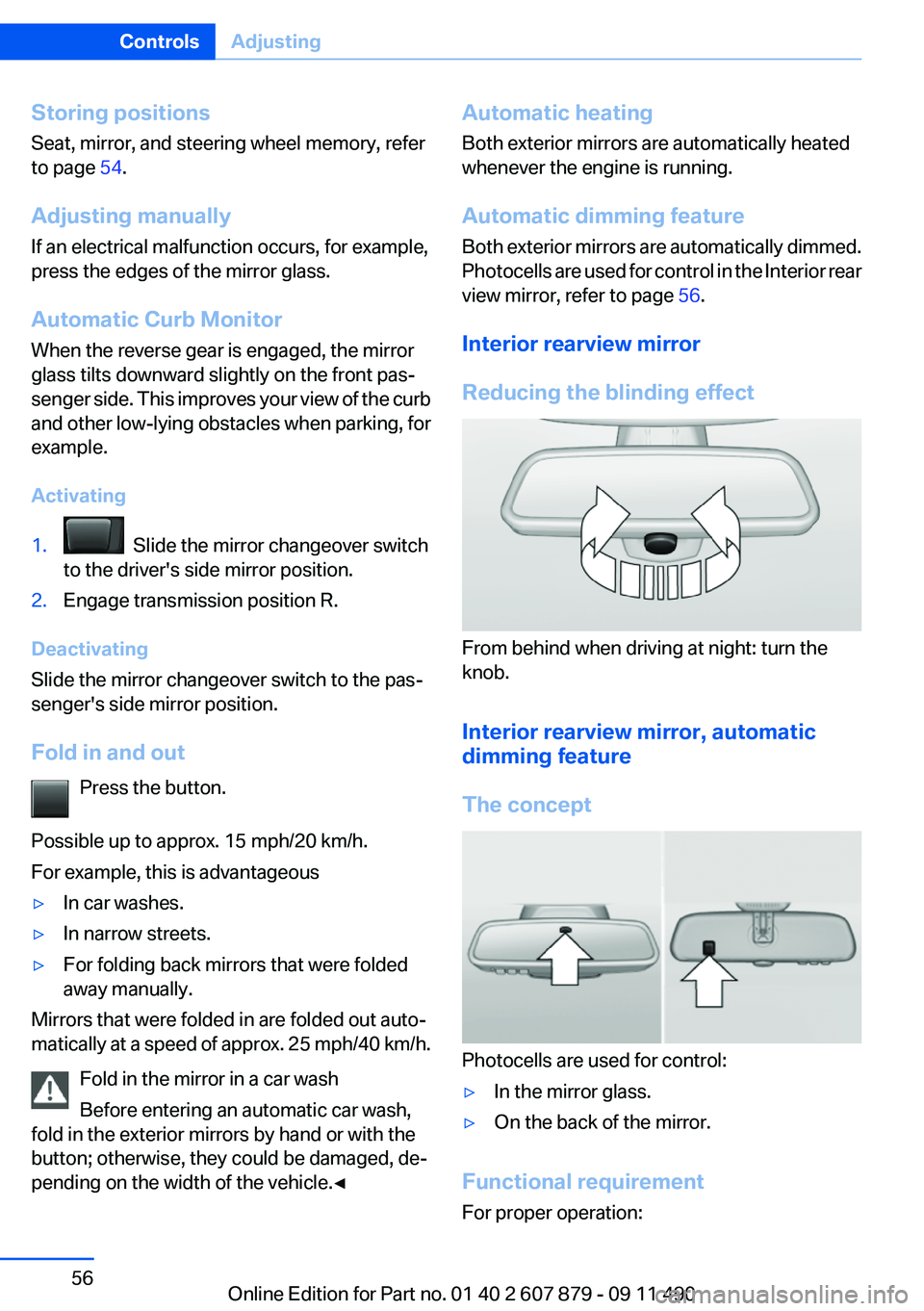
From behind when driving at night: turn the
knob.
Interior rearview mirror, automatic
dimming feature
The concept
Photocells are used for control:
▷In the mirror glass.▷On the back of the mirror.
Functional requirement
For proper operation:
Seite 56ControlsAdjusting56
Online Edition for Part no. 01 40 2 607 879 - 09 11 490
Page 63 of 335
▷When opening and closing the driver door, if
the driver's seat belt is unbuckled and the
low beams are switched off.▷While the driver's seat belt is unbuckled, if
the driver's door is open and the low beams
are switched off.
When the ignition is switched off, by opening or
closing the driver's door or unbuckling the driv‐
er's seat belt, the radio ready state remains ac‐
tive.
Radio ready state
Activate radio ready state:
▷When the ignition is switched off: press ON/
OFF button on the radio.▷When the engine is running: press START/
STOP button.
Some electronic systems/power consumers re‐
main ready for operation.
Radio ready state switches off automatically:
▷After approx. 8 minutes.▷When the vehicle is locked using the central
locking system.▷Shortly before the battery is discharged
completely, so that the engine can still be
started.
Starting the engine
General information Enclosed areas
Do not let the engine run in enclosed
areas; otherwise, breathing of exhaust fumes
may lead to loss of consciousness and death.
The exhaust gases contain carbon monoxide, an
odorless and colorless but highly toxic gas.◀
Unattended vehicle
Do not leave the car unattended with the
engine running; otherwise, it presents a poten‐
tial source of danger.
Before leaving the car with the engine running,
set the parking brake and place the transmission
in position P or neutral to prevent the car from
moving.◀
Frequent starting in quick succession
Avoid repeated futile attempts at starting
the car and avoid starting the car frequently in
quick succession. Otherwise, the fuel is not
burned or is inadequately burned, and there is
the danger of overheating and damaging the
catalytic converter.◀
Do not wait for the engine to warm up while the
vehicle remains stationary. Start driving at mod‐
erate engine speeds.
Manual transmission
Starting the engine1.Depress the brake pedal.2.Press on the clutch and shift to neutral.3.Press the Start/Stop button.
The ignition is activated automatically for a cer‐
tain time and is stopped as soon as the engine
starts.
Automatic-Transmission
Starting the engine
1.Depress the brake pedal.2.Press the Start/Stop button.
The ignition is activated automatically for a cer‐
tain time and is stopped as soon as the engine
starts.
Engine stop
General information Take the remote control with you
Take the remote control with you when
leaving the vehicle so that children, for example,
cannot release the parking brake.◀
Seite 63DrivingControls63
Online Edition for Part no. 01 40 2 607 879 - 09 11 490
Page 64 of 335
Set the parking brake and further secure
the vehicle as required
Set the parking brake firmly when parking; oth‐
erwise, the vehicle could roll. On steep upward
and downward inclines, further secure the vehi‐
cle, for example, by turning the steering wheel in
the direction of the curb. ◀
Before driving into a car wash
In order for the vehicle to be able to roll into a car
wash, heed the information regarding Washing
in automatic car washes, refer to page 304.
Manual transmission
Switching off the engine1.With the vehicle at a standstill, press the
Start/Stop button.2.Shift into first gear or reverse.3.Set the parking brake.
Automatic-Transmission
Switching off the engine
1.Engage transmission position P with the ve‐
hicle stopped.2.Press the Start/Stop button.
The engine is switched off.
The radio ready state is switched on.3.Set the parking brake.
Automatic Engine Start/Stop
Function
The concept
The automatic engine start-stop function helps
save fuel. The system switches off the engine
during a stop, e. g., in a traffic congestion or at
traffic lights. The ignition remains switched on.
The engine starts again automatically for driving
off.
Automatic mode
The automatic engine start/stop function is op‐
erational after each engine start.
The function is activated above a certain speed.▷Manual transmission: above 3 mph, approx.
5 km/h.▷Automatic transmission: from 5 mph, ap‐
prox. 9 km/h.
Engine stop
The engine is switched off automatically during
a stop under the following conditions:
Manual transmission:
▷Neutral is engaged and the clutch pedal is
not pressed.▷The driver's safety belt is buckled or the
driver's door is closed.
Automatic transmission:
▷The selector lever is in transmission position
D.▷The brake pedal remains pressed while the
vehicle is stationary or the vehicle is held by
Automatic Hold.▷The driver's safety belt is buckled or the
driver's door is closed.
The air volume of the air conditioner is reduced
when the engine is switched off.
Display in the instrument cluster The display indicates that the Au‐
tomatic Engine Start/Stop Func‐
tion is ready for an automatic en‐
gine start.
Note
The engine is not switched off automatically in
the following situations:
▷External temperature below approx. +37 ℉/
+3 ℃.Seite 64ControlsDriving64
Online Edition for Part no. 01 40 2 607 879 - 09 11 490
Page 65 of 335
▷External temperature above approx. +95 ℉/
+35 ℃ and the automatic climate control is
operating.▷The passenger compartment has not yet
been heated or cooled to the required level.▷The engine is not yet at operating tempera‐
ture.▷The wheels are at a sharp angle or the steer‐
ing wheel is being turned.▷After driving in reverse.▷Fogging of the windows when the automatic
climate control is switched on.▷The vehicle battery charge is very low.▷The engine compartment lid is unlocked.▷HDC is activated.▷The parking assistant is activated.▷Stop-and-go traffic.
Starting the engine
The engine starts automatically under the fol‐
lowing conditions:
▷Manual transmission:
The clutch pedal is pressed.▷Automatic transmission:
By releasing the brake pedal.
When Automatic Hold is activated: press the
accelerator.
After the engine starts, accelerate as usual.
Safety mode
After the engine switches off automatically, it
will not start again automatically if any one of the
following conditions are met.
▷The driver's safety belt is unbuckled and the
driver's door is open.▷The hood was unlocked.
The indicator lamps come on.
The engine can only be started via the Start/
Stop button.
Note
Even if driving away was not intended, the de‐
activated engine starts up automatically in the
following situations:▷Excessive warming of the passenger com‐
partment when the cooling function is
switched on.▷The steering wheel is turned.▷Automatic transmission: the transmission
position is changed from D to N, R, or M/S.▷Automatic transmission: the transmission
position is changed from P to N, D, R, or M/
S.▷Automatic transmission: the accelerator and
the brake are pressed at the same time.▷The vehicle begins rolling.▷Fogging of the windows when the automatic
climate control is switched on.▷The vehicle battery charge is very low.▷Excessive cooling of the passenger com‐
partment when the heating is switched on.▷Low brake vacuum pressure; this can occur,
for example, if the brake pedal is depressed
a number of times in succession.
Preventing an automatic engine stop
with automatic transmission
The concept
To make it possible to drive away very quickly,
such as at an intersection, the automatic engine
stop can be actively prevented.
Preventing an engine stop using the
brake pedal
The engine stop can be actively prevented
within one second after the vehicle comes to a
standstill.
▷Immediately after the vehicle comes to a
standstill, briefly press the brake pedal
forcefully.Seite 65DrivingControls65
Online Edition for Part no. 01 40 2 607 879 - 09 11 490
Page 66 of 335
▷Then press the brake pedal with normal
braking force.
Activating/deactivating the system
manually
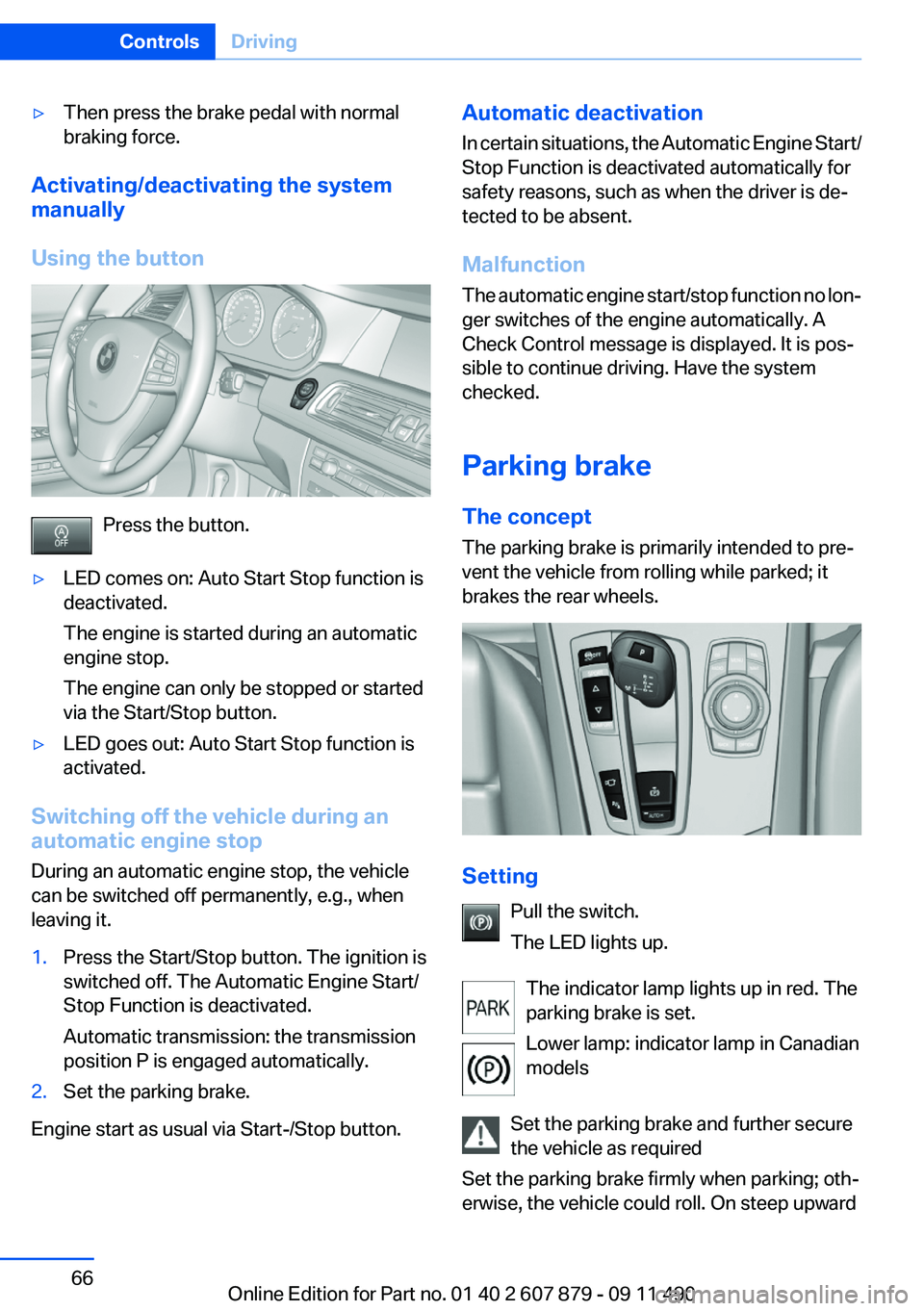
Using the button
Press the button.
▷LED comes on: Auto Start Stop function is
deactivated.
The engine is started during an automatic
engine stop.
The engine can only be stopped or started
via the Start/Stop button.▷LED goes out: Auto Start Stop function is
activated.
Switching off the vehicle during an
automatic engine stop
During an automatic engine stop, the vehicle
can be switched off permanently, e.g., when
leaving it.
1.Press the Start/Stop button. The ignition is
switched off. The Automatic Engine Start/
Stop Function is deactivated.
Automatic transmission: the transmission
position P is engaged automatically.2.Set the parking brake.
Engine start as usual via Start-/Stop button.
Automatic deactivation
In certain situations, the Automatic Engine Start/
Stop Function is deactivated automatically for
safety reasons, such as when the driver is de‐
tected to be absent.
Malfunction
The automatic engine start/stop function no lon‐
ger switches of the engine automatically. A
Check Control message is displayed. It is pos‐
sible to continue driving. Have the system
checked.
Parking brake
The concept
The parking brake is primarily intended to pre‐
vent the vehicle from rolling while parked; it
brakes the rear wheels.
Setting
Pull the switch.
The LED lights up.
The indicator lamp lights up in red. The
parking brake is set.
Lower lamp: indicator lamp in Canadian
models
Set the parking brake and further secure
the vehicle as required
Set the parking brake firmly when parking; oth‐
erwise, the vehicle could roll. On steep upward
Seite 66ControlsDriving66
Online Edition for Part no. 01 40 2 607 879 - 09 11 490