start BMW 545I SEDAN 2004 E60 Repair Manual
[x] Cancel search | Manufacturer: BMW, Model Year: 2004, Model line: 545I SEDAN, Model: BMW 545I SEDAN 2004 E60Pages: 220, PDF Size: 7.12 MB
Page 189 of 220
Mobility
187Reference
At a glance
Controls
Driving tips
Communications
Navigation
Entertainment
Changing a wheel
Safety measures in the event of a
breakdown or wheel change:
Park the vehicle as far away as possible
from moving traffic and on firm ground.
Switch on the hazard warning flashers.
Lock the steering wheel in straight-ahead
setting of the wheels. Apply the handbrake
and engage first gear, reverse gear or
selector lever to position P.
Have all vehicle occupants get out of the
vehicle and ensure that they remain outside
the immediate area in a safe place, such as
behind a guardrail.
If a warning triangle or portable hazard
warning lamp is required, set it up on the
roadside at an appropriate distance from
the rear of the vehicle.
Comply with all safety guidelines and regu-
lations.
Change the wheel only on a level, firm sur-
face which is not slippery.
The vehicle or the jack could slip to the side
if you attempt to raise the vehicle on a soft
or slippery surface such as snow, ice, tiles,
etc.
Position the jack on a firm support surface.
Do not use a wooden block or similar
object as a support base for the jack, as
this would prevent it from extending to its
full support height and reduce its load-car-
rying capacity.
To avoid serious or fatal injury: never lie
under the vehicle, and never start the
engine while it is supported by the jack.<
What you will need
To avoid rattling noises later on, note the
positions of the tools before removing
them, then return them to their initial posi-
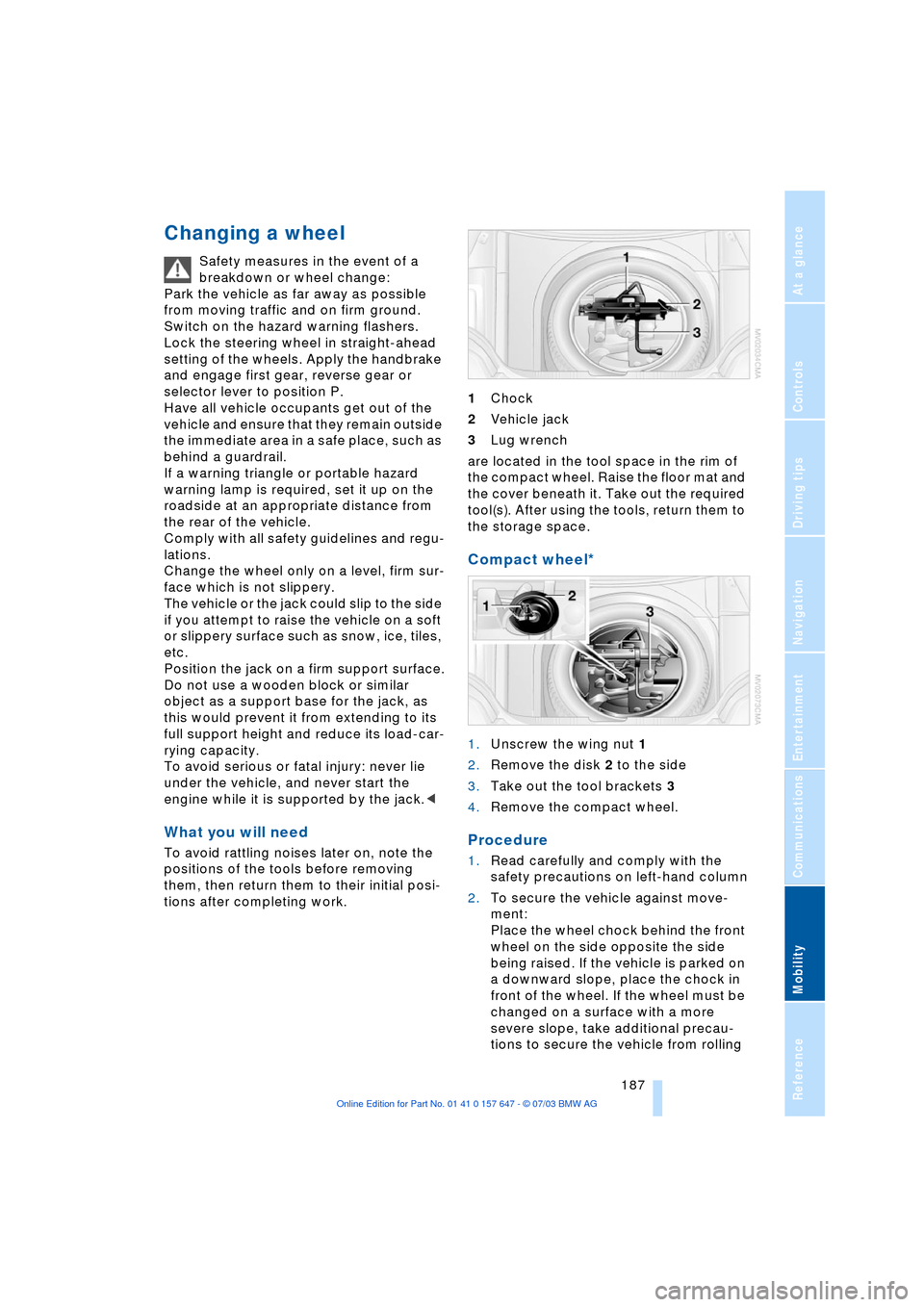
tions after completing work.1Chock
2Vehicle jack
3Lug wrench
are located in the tool space in the rim of
the compact wheel. Raise the floor mat and
the cover beneath it. Take out the required
tool(s). After using the tools, return them to
the storage space.
Compact wheel*
1.Unscrew the wing nut 1
2.Remove the disk 2 to the side
3.Take out the tool brackets 3
4.Remove the compact wheel.
Procedure
1.Read carefully and comply with the
safety precautions on left-hand column
2.To secure the vehicle against move-
ment:
Place the wheel chock behind the front
wheel on the side opposite the side
being raised. If the vehicle is parked on
a downward slope, place the chock in
front of the wheel. If the wheel must be
changed on a surface with a more
severe slope, take additional precau-
tions to secure the vehicle from rolling
Page 191 of 220
Mobility
189Reference
At a glance
Controls
Driving tips
Communications
Navigation
Entertainment
Charging the battery
Only charge the battery in the vehicle via
the terminals in the engine compartment
with the engine off. Connections, refer to
Jump-starting on page 192.
Disposal
Return used batteries to a recycling
point or your BMW center. Maintain
the battery in an upright position for trans-
port and storage. Always restrain the bat-
tery to prevent it from tipping over during
transport.<
Fuses
Never attempt to repair a blown fuse,
and do not replace a defective fuse
with a substitute of another color or amper-
age rating, as this could lead to a circuit
overload, ultimately resulting in a fire in the
vehicle.<
Spare fuses, plastic tweezers and details of
the fuse assignment are located in the
compartment for the onboard tool kit, refer
to page 184.
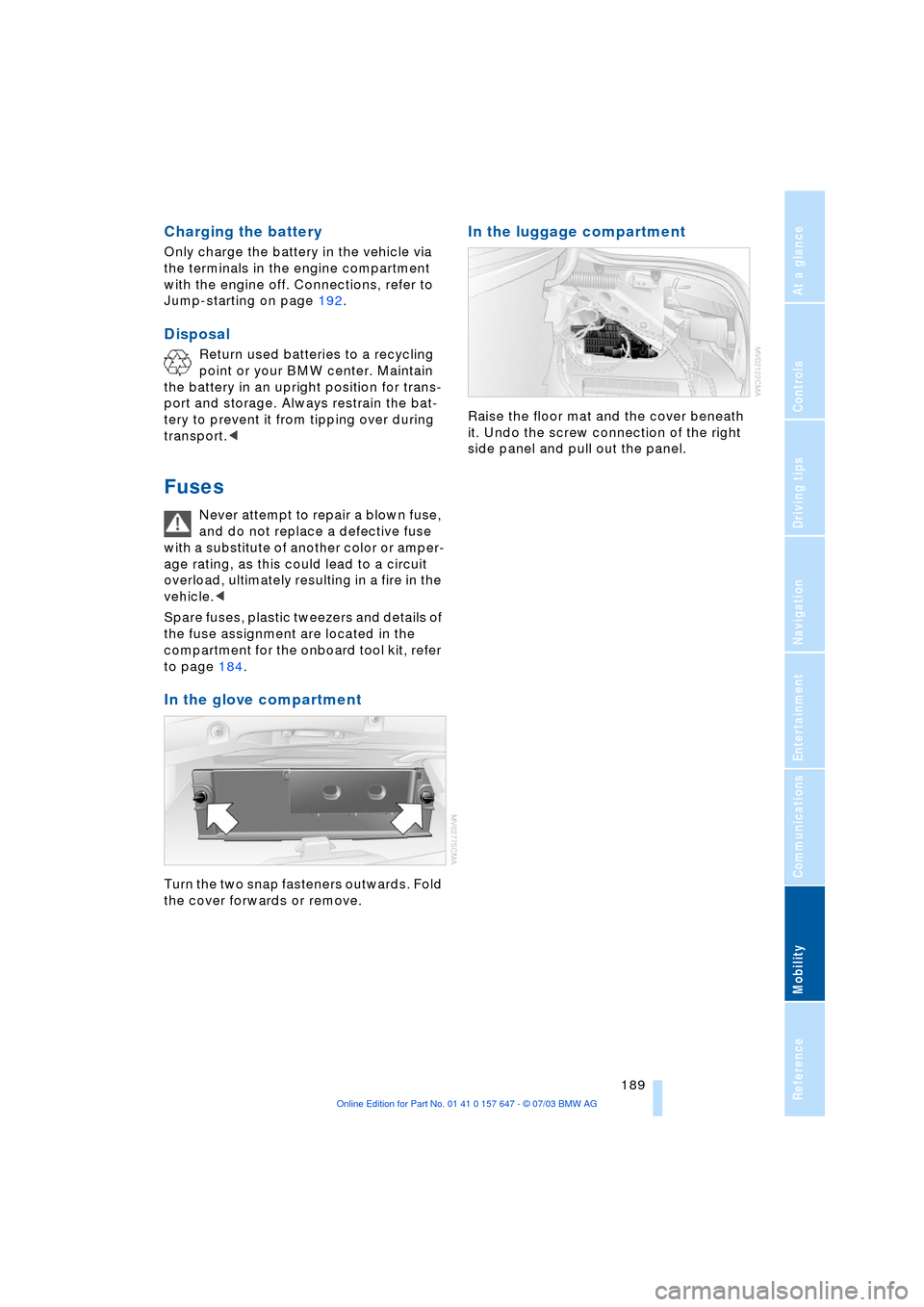
In the glove compartment
Turn the two snap fasteners outwards. Fold
the cover forwards or remove.
In the luggage compartment
Raise the floor mat and the cover beneath
it. Undo the screw connection of the right
side panel and pull out the panel.
Page 192 of 220
Giving and receiving assistance
190
Giving and receiving assistance
Starting an emergency call*
Conditions for an emergency call:
>The car phone is logged on to a porta-
ble phone network
>The emergency call system is operable.
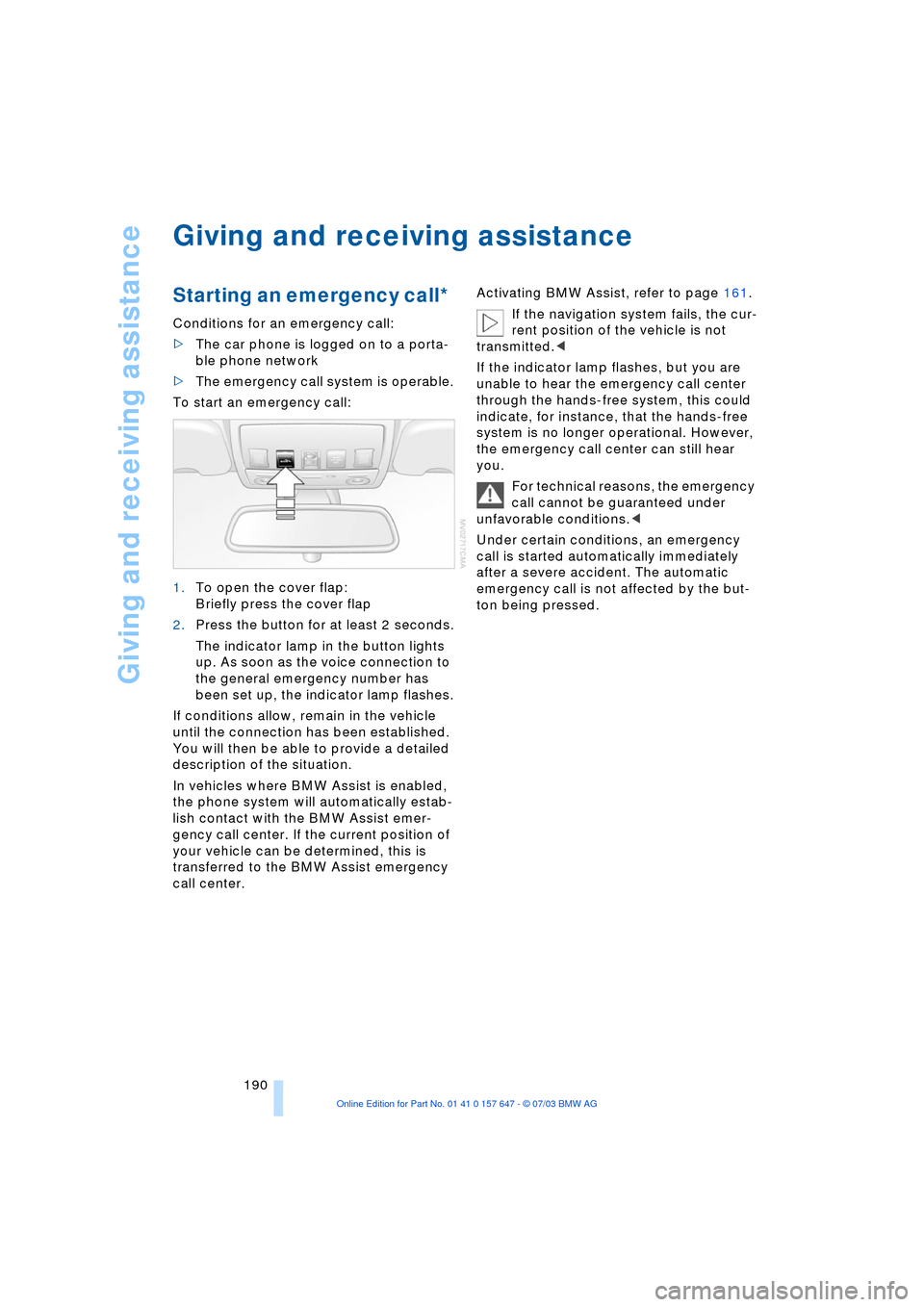
To start an emergency call:
1.To open the cover flap:
Briefly press the cover flap
2.Press the button for at least 2 seconds.
The indicator lamp in the button lights
up. As soon as the voice connection to
the general emergency number has
been set up, the indicator lamp flashes.
If conditions allow, remain in the vehicle
until the connection has been established.
You will then be able to provide a detailed
description of the situation.
In vehicles where BMW Assist is enabled,
the phone system will automatically estab-
lish contact with the BMW Assist emer-
gency call center. If the current position of
your vehicle can be determined, this is
transferred to the BMW Assist emergency
call center.Activating BMW Assist, refer to page 161.
If the navigation system fails, the cur-
rent position of the vehicle is not
transmitted.<
If the indicator lamp flashes, but you are
unable to hear the emergency call center
through the hands-free system, this could
indicate, for instance, that the hands-free
system is no longer operational. However,
the emergency call center can still hear
you.
For technical reasons, the emergency
call cannot be guaranteed under
unfavorable conditions.<
Under certain conditions, an emergency
call is started automatically immediately
after a severe accident. The automatic
emergency call is not affected by the but-
ton being pressed.
Page 194 of 220
Giving and receiving assistance
192
Jump-starting
When your battery is discharged you can
use two jumper cables to start your vehicle
with power from the battery in a second
vehicle. You can also use the same method
to help start another vehicle.Use only
jumper cables with fully-insulated clamp
handles.
To avoid the risk of potentially fatal
injury, always avoid all contact with
electrical components while the engine is
running. Carefully adhere to the following
sequence, both to prevent damage to one
or both vehicles, and to guard against pos-
sible personal injuries.<
Preparing
1.Check whether the battery of the other
vehicle has a voltage of 12 Volts and
approximately the same capacitance in
Ah. This information can be found on
the battery
2.Switch off the engine of the support
vehicle
3.Switch off any consumer units in both
vehicles.
There must not be any contact
between the bodies of the two vehi-
cles, as otherwise there is a danger of short
circuits.<
Connecting the jumper cables
To avoid personal injury from sparks,
always observe this sequence when
connecting jumper cables.<
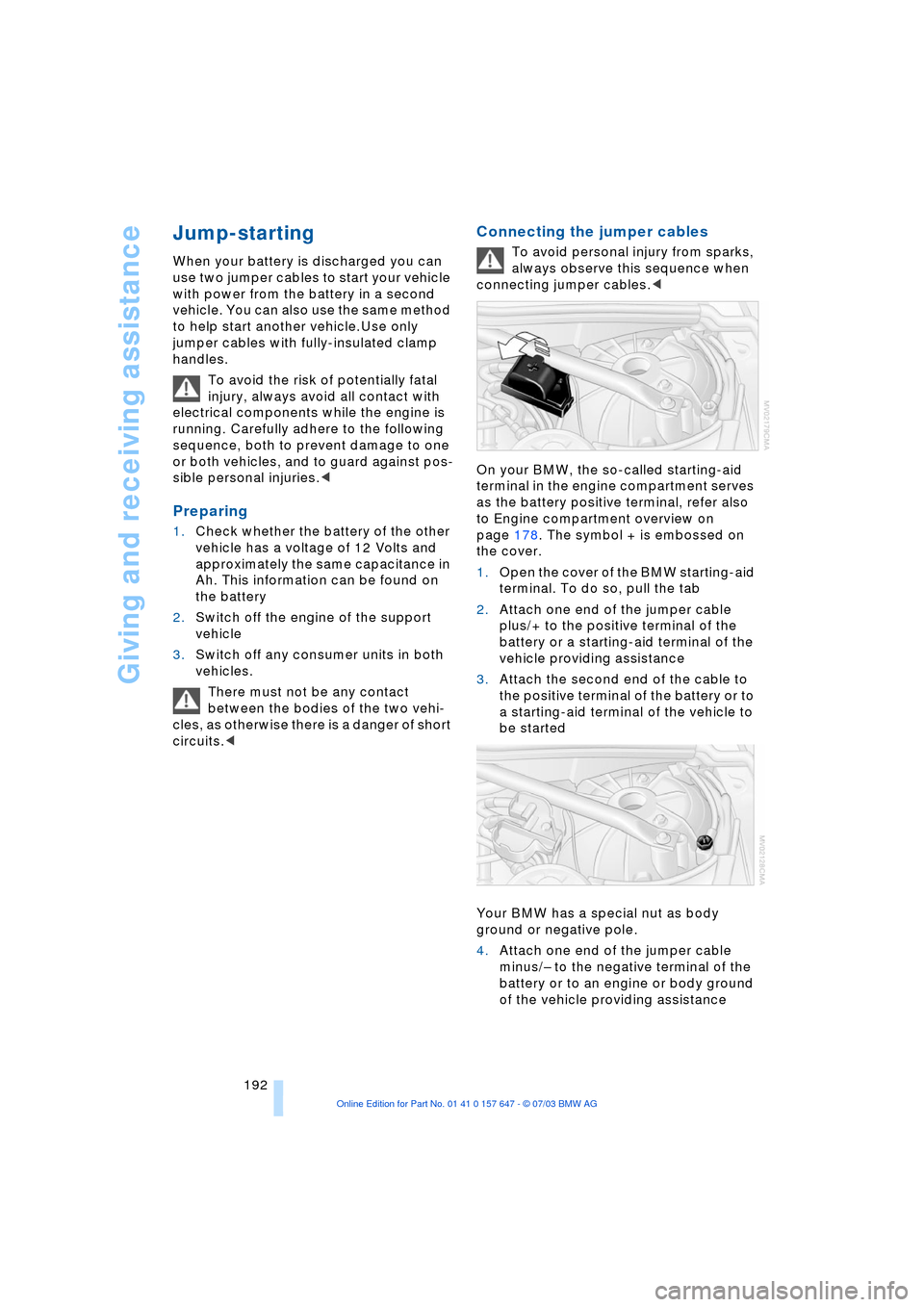
On your BMW, the so-called starting-aid
terminal in the engine compartment serves
as the battery positive terminal, refer also
to Engine compartment overview on
page 178. The symbol + is embossed on
the cover.
1.Open the cover of the BMW starting-aid
terminal. To do so, pull the tab
2.Attach one end of the jumper cable
plus/+ to the positive terminal of the
battery or a starting-aid terminal of the
vehicle providing assistance
3.Attach the second end of the cable to
the positive terminal of the battery or to
a starting-aid terminal of the vehicle to
be started
Your BMW has a special nut as body
ground or negative pole.
4.Attach one end of the jumper cable
minus/Ð to the negative terminal of the
battery or to an engine or body ground
of the vehicle providing assistance
Page 195 of 220
Mobility
193Reference
At a glance
Controls
Driving tips
Communications
Navigation
Entertainment
5.Attach the second end of the cable to
the negative terminal of the battery or to
the engine or body ground of the vehi-
cle to be started.
Starting the engine
1.Start the engine on the support vehicle
and allow it to run for several minutes at
a fast idle
2.Start the engine on the other vehicle in
the usual way.
If the first start attempt is not success-
ful, wait a few minutes before another
attempt in order to allow the discharged
battery to recharge
3.Let the engines run for a few minutes
4.Disconnect the jumper cables by
reversing the connection sequence.
If required, have the battery inspected and
recharged at your BMW center.
Never use spray fluids to start the
engine.<
Towing
Always observe all applicable towing
laws and regulations.<
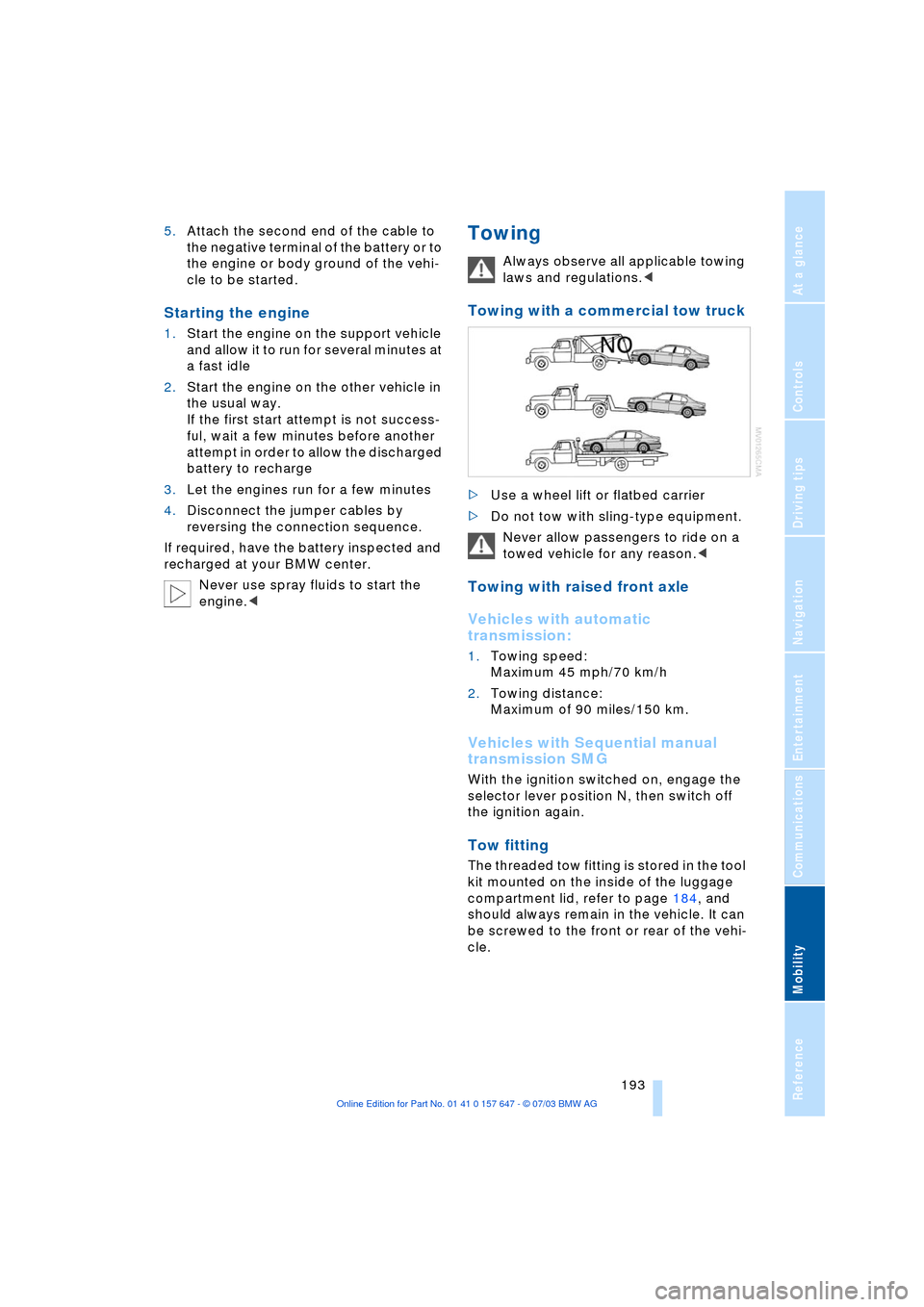
Towing with a commercial tow truck
>Use a wheel lift or flatbed carrier
>Do not tow with sling-type equipment.
Never allow passengers to ride on a
towed vehicle for any reason.<
Towing with raised front axle
Vehicles with automatic
transmission:
1.Towing speed:
Maximum 45 mph/70 km/h
2.Towing distance:
Maximum of 90 miles/150 km.
Vehicles with Sequential manual
transmission SMG
With the ignition switched on, engage the
selector lever position N, then switch off
the ignition again.
Tow fitting
The threaded tow fitting is stored in the tool
kit mounted on the inside of the luggage
compartment lid, refer to page 184, and
should always remain in the vehicle. It can
be screwed to the front or rear of the vehi-
cle.
Page 205 of 220
Reference 203
At a glance
Controls
Driving tips
Communications
Navigation
Entertainment
Mobility
Automatic transmission
with Steptronic 54
Ð indicator lamp 56
Ð interlock 49
Ð selector lever interlock 55
Ð shiftlock 55
Ð sport program 55
Ð starting the engine 50
Ð towing 193
AUTO program, refer to
Automatic air distribution
and volume 91
"Autostore" on the
radio 136
"AUTO" with automatic
climate control 93
Average fuel
consumption 70
Ð setting the units 74
Average speed 70
"Avoid ferries" for
navigation 121
"Avoid freeways / tolls" for
navigation 121
Avoiding unintentional
alarms 33
"Avoid tollroads" for
navigation 121
Axle loads, refer to
Weights 200
"A - Z" 154
B
Backrests, refer to
Seats 36
Backrest width
adjustment 37
Backup lamps, refer to
Reverse gear 51
Ð replacing the bulbs 186
"Balance", audio
system 132
Balance, refer to Tone
control 131
"Bass", audio system 132
Bass, refer to Tone
control 131
Battery 188
Ð in the remote control 26
Ð jump-starting 192Belts, refer to Safety
belts 36, 40
Beverage holders 99
Black ice, refer to Ice
warning 65
Blocking sections of a route
for navigation 125
Blower, refer to Air
volume 91
BMW Assist 161
Ð enabling 161
Ð services offered 162
"BMW Info" 163
BMW Maintenance
System 181
"BMW Service
settings" 161
Bore, refer to Engine
data 198
Bottle holder, refer to
Beverage holders 99
Brake Assistant, refer to
DBC Dynamic Braking
Control 79
Brake fluid 180
Ð indicator lamp 180
Ð level 180
Ð replacing 180
Brake force display 82
Brake hydraulic
systems 180
Brake lamps, replacing the
bulbs 186
Brake pads 107
Ð breaking-in
procedure 106
Brake pedal, refer to
Brakes 107
Brake rotors 107
Brakes 107
Ð ABS 77
Ð brake fluid 180
Ð breaking-in
procedure 106
Ð handbrake 50Brake system 106
Ð brake-fluid level 180
Ð brake pads 107
Ð breaking-in
procedure 106
Ð disc brakes 107
Ð indicator lamp 13, 107
Breakdown services, refer
to Roadside
Assistance 191
Break-in procedures 106
Ð brakes 106
Ð clutch 106
Ð differential 106
Ð engine 106
Brightness on the Control
Display 73
Bulbs and lamps
Ð replacing the bulbs 184
Buttons on steering
wheel 11
C
California Proposition
65 Warning 183
"Call" 154
Call
Ð accepting 153
Ð display accepted 154
Ð ending 154
Ð in absence 154
Ð starting 153
Calling
Ð from phone book 154
Ð from the Top 8 list 154
Ð redialing 154
Calling up traffic
information 126
"Call sender" 156
"Call Sirius" 138
Can holder, refer to
Beverage holders 99
Capacities 201
Car battery, refer to
Battery 188
Car care, refer to Caring for
your vehicle brochure
Car-care products, refer to
Caring for your vehicle
brochure
Page 207 of 220
Reference 205
At a glance
Controls
Driving tips
Communications
Navigation
Entertainment
Mobility
Condition Based Service
CBS 181
"Confirmation" 28
Confirmation signals for
vehicle locking 28
"Confirm unlock code" 153
Connecting a vacuum
cleaner, refer to Lighter
socket 100
Consumption display
Ð refer to average
fuel consumption 70
Consumption indicator
Ð refer to Energy Control 66
"Continue guidance to
dest.?" 126
Control Center 16
Ð adjusting the
brightness 73
Ð assistance window 18
Ð automatic climate
control 92
Ð changing settings 73
Ð changing the menu
page 19
Ð confirming selection or
entry 19
Ð display, menus 16
Ð language selection 74
Ð lists 19
Ð menu item selection 19
Ð selecting units of measure
and display format 74
Ð setting time and date 74
Ð status information 18
Ð symbols 17
Control Display 16
Controller, refer to Control
Center 16
Controls, audio
systems 130
Controls, refer to
Cockpit 10
Convenience operation
Ð glass roof 28
Ð windows 28
Convenience start, refer to
Starting the engine 49
Coolant 179, 180
Ð level 180
Cooling, maximum 91Cornering Brake Control 78
"Country" for destination
entry 117
Country of destination for
navigation 116
Courtesy lighting 89
Cruise control 58
Ð active cruise control 59
Ð indicator lamp 11
Cruising range 70
Cup holder, refer to
Beverage holders 99
Curb weight, refer to
Weights 200
Current fuel
consumption 66
"Current position" 115
"Customer Relations" 163
Cylinders, refer to Engine
data 198
D
Dashboard, refer to
Cockpit 10
Data 198
Ð capacities 201
Ð dimensions 199
Ð engine 198
Ð weights 200
Date 65
Ð calling up 65
Ð display format 75
Ð setting 75
Daytime driving lamps 87
DBC Dynamic Brake
Control 79
Ð indicator lamp 79
Decommissioning the
vehicle, refer to Caring for
your vehicle brochure
Defect
Ð automatic
transmission 56
Ð door lock 29
Ð fuel filler door 168
Ð glass roof 35
Ð luggage compartment
lid 31
Ð Sequential manual
transmission SMG 53Defrosting the windshield,
refer to Defrosting
windows 91
Defrosting windows and
removing
condensation 91
Defrost position, refer to
Defrosting windows 91
"Delete address book" for
navigation 121
"Delete all numbers" on the
portable phone 155
"Delete data" for
navigation 121
"Delete" for portable
phone 155
Deleting the destination
address 120
Destination for navigation
Ð entry 116
Ð recent destinations 119
Ð selecting via map 118
Ð selecting with
information 118
Ð storing 120
Destination guidance 123
Ð changing specified
route 121
Ð interrupting voice
instructions 125
Ð selecting a new route 125
Ð terminating/
continuing 126
Ð volume of voice
instructions 125
"Detour" 126
"Dial number" 153
Digital clock 65
Dimensions 199
Dipstick for engine oil 178
Directional indicators, refer
to Turn signal
indicators 56
Direction announcements,
refer to Voice
instructions 124
Direction instructions, refer
to Voice instructions 124
Directory, refer to Phone
book 154
Page 208 of 220
Everything from A to Z
206 Directory for navigation,
refer to Address
book 120
Disc brakes 107
Displacement, refer to
Engine data 198
Display lighting 88
Displays
Ð refer to Cockpit 10
Ð refer to Control Display 17
Ð refer to Instrument
cluster 12
Displays on the windshield,
refer to Head-Up
Display 85
Disposal
Ð brake fluid 180
Ð coolant 179
Ð engine oil 179
Ð vehicle battery 189
Distance, refer to
Computer 71
Distance cruise control,
refer to Active cruise
control 59
"Distance to destin.Ò 71
Distance to destination,
refer to Computer 71
Distance warning, refer to
Park Distance Control 76
Divided rear seat back,
refer to Fold down rear
seat 101
Door entry lighting 89
Door keys 26
Door lock 29
"Door locks" 28
Doors
Ð manual operation 29
Ð remote control 28
DOT Quality Grades 173
Draft-free ventilation 94
"Driver" 42
"Driver's door only" 28
Driving light, refer to
Parking lamps/low
beams 87
Driving notes 106
Driving stability control 78
Driving tips, refer to Driving
notes 106Dry air, refer to Cooling
function 91
Drying the air, refer to
Cooling function 91
DSC Dynamic Stability
Control 78
Ð indicator lamp 78
DTC Dynamic Traction
Control 79
Ð indicator lamp 79
DVD for navigation 114
Dynamic Brake Control 79
Ð indicator lamp 79
Dynamic Driving Control 54
"Dynamic route" for
navigation 121
Dynamic Stability
Control 78
Ð indicator lamp 78
Dynamic Traction
Control 79
Ð indicator lamp 79
E
EBV Electronic Brake Force
Distribution 78
"Edit" on the portable
phone 154
Electrical malfunction
Ð door lock 29
Ð fuel filler door 168
Ð glass roof 35
Ð luggage compartment
lid 31
Electrical power windows,
refer to Windows 33
Electronic Brake
Force Distribution EBV 78
Electronic Stability
Program ESP, refer to
DSC Dynamic Stability
Control 78
Emergency assistance,
refer to Roadside
Assistance 191
Emergency call 190
Emergency operation, refer
to Manual operationEmergency release of
luggage compartment lid
from luggage
compartmentÕs interior 32
Emergency services, refer
to Roadside
Assistance 191
"Emission inspect." 67, 67
"Enable services" 162
"End call" 154
Energy-conscious driving,
refer to Energy Control 66
Energy Control 66
Engine
Ð breaking-in
procedure 106
Ð data 198
Ð speed 198
Ð starting 49
Engine compartment 178
Engine coolant 179
Engine hood 177
Engine oil
Ð adding 179
Ð checking the oil level 178
Ð prescribed oils 179
Engine output, refer to
Engine data 198
Engine speed 198
"Enter address" 116
Entering destination 117
Entering house number or
intersection 117
Entering switch-on times of
independent ventilation/
heating 95
Entering the address 116
Entering the
intersection 117
Entering the town/city for
navigation 117
Entering zip code for
navigation 117
"Entertainment" 130
"Entertainment
settings" 131
"Equalizer" 133
"Equalizer", audio
systems 131
Page 210 of 220
Everything from A to Z
208 Heating 90
Ð mirrors 43
Ð steering wheel 44
Heating while stopped 92
Heavy cargo, refer to
Stowing cargo 109
Height, refer to
Dimensions 199
Height adjustment
Ð head restraints 39
Ð seats 37
Ð steering wheel 43
High beams 88
Ð headlight flasher 88
Ð indicator lamp 13
Ð replacing the bulbs 185
Hills 107
Holder for beverages 99
"Horn" 44
Horn 10
"Hour memo" 75
"House number" for
destination entry 117
Hydraulic brake assistant,
refer to DBC 79
Hydroplaning 106, 174
I
Ice warning 65
iDrive, refer to Control
Center 16
Ignition key 26
Ignition key positions, refer
to Ignition lock 49
Ignition lock 49
Independent ventilation
Ð switching on and off
directly 94
Independent ventilation/
heating
Ð entering switch-on
times 95
Ð preselecting switch-on
times 95Indicator/warning lamp
Ð active steering 82
Ð airbags 84
Ð Flat Tire Monitor 81
Ð front fog lamps 11
Ð overview 13
Ð safety belt warning 40
Individual air distribution 93
Individual button
assignment options on
steering wheel 44
Individual settings, refer to
Key Memory 26
Inflation pressure, refer to
Tire inflation
pressure 170
"Information" for
navigation 118
Information for navigation
Ð on a different city 118
Ð on city of destination 118
Ð on current position 118
"Information on
destination" 119
"Input map" 118
Installation location
Ð CD changer 144
Ð navigation computer 114
Ð portable phone 151
Instructions for navigation
system, refer to Voice
instructions 124
Instrument cluster 12
Instrument combination,
refer to Instrument
cluster 12
Instrument lighting 88
Instrument panel, refer to
Instrument cluster 10
Integrated universal remote
control 96
Interesting destination 118
"Interim time" 73
Interior lamps 89
Ð remote control 28
Interior mirror, refer to
Interior rearview mirror 43
Interior motion sensor 33
Ð switching off 28Interior rearview mirror 43
Ð automatic dimming
feature 43
Interlock, refer to Steering
locked 49
Intermittent mode of the
wipers 57
J
Jacking points 188
Joystick, refer to Control
Center 16
Jump-starting 192
K
Key Memory 26
"Keypad" 156
Keys 26
Key set, refer Central keys
with remote control 26
Kickdown 55
Knock control 169
L
Lamps and bulbs 184
"Languages" 74
"Languages" for
navigation 124
Lashing eyes, refer to
Securing the load 109
"Last seat position" 38
LATCH child-restraint
fixing 47
LEDs light-emitting
diodes 89
Length, refer to
Dimensions 199
Letter symbol on portable
phone 156
License plate light
Ð replacing the bulbs 186
Light-emitting diodes
LEDs 89
Lighter 100
Ð socket 100
"Lighting" 56, 87
Page 212 of 220
Everything from A to Z
210 Music track
Ð find 142, 145
"Mute on / off" 44
MW, waveband 134
N
"Navigation" 44, 114
Navigation, refer to
Navigation system 114
Navigation CD/DVD 114
Navigation computer,
installation location 114
Navigation destination
Ð manual entry 116
Navigation system 114
Ð address book 120
Ð current position 115
Ð destination guidance in
assistance window 115
Ð destination input 116
Ð destination list 119
Ð entering a destination
manually 116
Ð navigation CD/DVD 114
Ð recent destinations 119
Ð route display 123
Ð route list 124
Ð selecting destination
using information 118
Ð selecting route
criteria 121
Ð starting 114
Ð starting destination
guidance 123
Ð switching off, refer to
Terminating/continuing
destination guidance 126
Ð terminating/continuing
destination guidance 126
Ð voice instructions 124
Ð volume adjustment 125
"Navigation voice
instructions on" 124
Neck support, refer to Head
restraints 39
"New destination" 116, 118
"New route" 125
"Next entertainment
source" 44North alignment of map for
navigation 124
Nozzles, refer to
Windshield washer
nozzles 57
"Number" on portable
phone 153
O
OBD connector 183
Octane numbers, refer to
Fuel quality 169
Odometer 65
Oil
Ð additives 179
Ð capacity 201
Ð dipstick 178
Ð specified engine oils 179
Oil change interval,
refer to Service
requirement display 66
Oil consumption 178
Oil level 178
Old batteries, refer to
Disposal 189
"On a new destination" for
navigation 119
"Onboard info" 71
Onboard monitor, refer to
Control Center 16
Onboard tool kit 184
"On destination" 119
"On location" 119
Opening and closing
Ð from inside 30
Ð from outside 27
Ð using the door lock 29
Ð using the remote
control 27Operation via voice for
portable phone 157
Ð adjusting volume 158
Ð canceling 157
Ð correcting phone
number 158
Ð correcting unlock
code 158
Ð dialing phone number 158
Ð entering unlock code 158
Ð placing a call 158
Ð redialing 159
Ð switching on phone 158
Ð voice commands 157
Ð voice phone book 158
Orientation menu, refer to
Start menu 17
Output, refer to Engine
data 198
Outside air, refer to
Recirculated-air mode 91
Outside temperature
display 65
Ð changing the
measurement unit 74
Ð in the computer 74
P
Panic mode 28
Park Distance Control
PDC 76
Parking
Ð vehicle 50
Parking aid, refer to Park
Distance Control PDC 76
Parking brake, refer to
Handbrake 50
Parking lamp
Ð replacing the bulbs 185
Parking lamps/low
beams 87
Ð replacing the bulbs 185
"Parking lamps on!" 69
Parts and accessories,
refer to Your individual
vehicle 5
"Passenger" 42
Passenger-side mirror tilt
function 39
"Pathway lighting" 87