start BMW 545I SEDAN 2004 E60 Workshop Manual
[x] Cancel search | Manufacturer: BMW, Model Year: 2004, Model line: 545I SEDAN, Model: BMW 545I SEDAN 2004 E60Pages: 220, PDF Size: 7.12 MB
Page 153 of 220
151
Entertainment
Reference
At a glance
Controls
Driving tips Communications
Navigation
Mobility
Batteries
Never attempt to disassemble your
BMW portable phone or its battery.
Use only approved battery types Ð the
wrong battery can destroy your portable
phone.
To avoid possible short circuits, after
removing a battery you should never allow
it to come into contact with metallic sur-
faces of any kind.<
Disposing of used batteries
Return used batteries to a recycling
collection point or to your BMW cen-
ter.<
Care instructions
You can find useful information on caring
for your portable phone in the separate
portable phone Owner's Manual and in the
separate Caring for your vehicle brochure.
Controls
You can operate the BMW portable phone*
using:
>The steering wheel, refer to page 11
>The Control Center, refer to page 152
>The voice control, refer to page 157.
You can use the car phone via the hands-
free unit for BMW Assist calls.
The Control Display indicates which tele-
phone you are using to establish a connec-
tion.
Telephoning with the
car phone: BMW Assist calls
You can use the car phone via the hands-
free unit for BMW Assist calls.
The car phone must have been
enabled prior to initial use. In this con-
nection, please contact your BMW cen-
ter.<
Starting the BMW portable phone*
Before starting off, place the BMW portable
phone in the cradle. If you are making a call
using the car phone, you can only use the
BMW portable phone once you have termi-
nated this call.
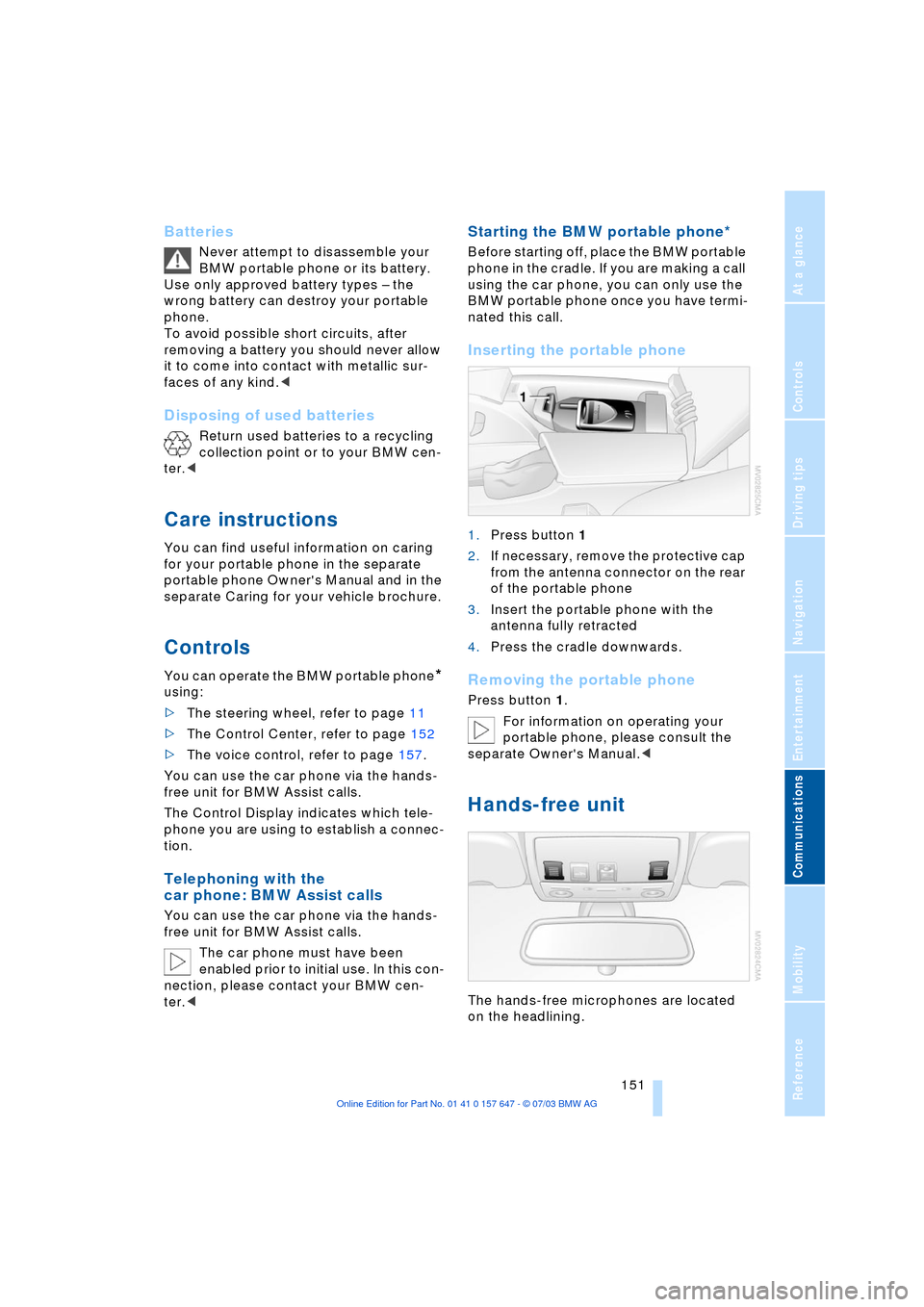
Inserting the portable phone
1.Press button 1
2.If necessary, remove the protective cap
from the antenna connector on the rear
of the portable phone
3.Insert the portable phone with the
antenna fully retracted
4.Press the cradle downwards.
Removing the portable phone
Press button 1.
For information on operating your
portable phone, please consult the
separate Owner's Manual.<
Hands-free unit
The hands-free microphones are located
on the headlining.
Page 154 of 220
Telephoning
152 The hands-free unit is activated whenever
you establish or receive a call using:
>The buttons on the steering wheel
>The Control Center
>Voice control.
To continue a call on the portable phone
using hands-free unit:
Insert the portable phone with the lid
opened in the cradle.
To continue a call on the hands-free unit
using the portable phone:
Take the portable phone with the lid
opened out of the cradle.
The call is ended as soon as you take the
phone from the cradle with a closed lid.
Volume adjustment
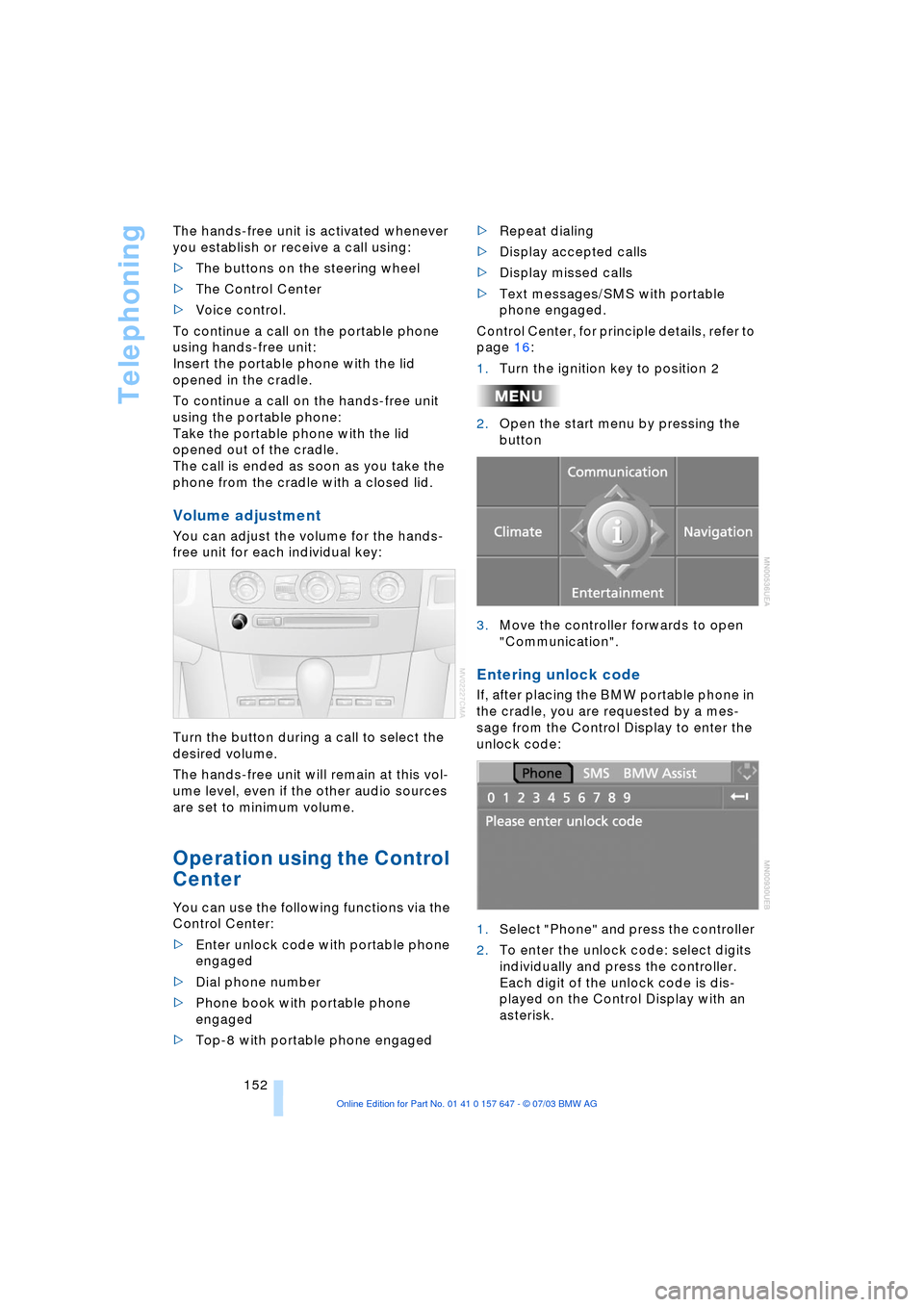
You can adjust the volume for the hands-
free unit for each individual key:
Turn the button during a call to select the
desired volume.
The hands-free unit will remain at this vol-
ume level, even if the other audio sources
are set to minimum volume.
Operation using the Control
Center
You can use the following functions via the
Control Center:
>Enter unlock code with portable phone
engaged
>Dial phone number
>Phone book with portable phone
engaged
>Top-8 with portable phone engaged>Repeat dialing
>Display accepted calls
>Display missed calls
>Text messages/SMS with portable
phone engaged.
Control Center, for principle details, refer to
page 16:
1.Turn the ignition key to position 2
2.Open the start menu by pressing the
button
3.Move the controller forwards to open
"Communication".
Entering unlock code
If, after placing the BMW portable phone in
the cradle, you are requested by a mes-
sage from the Control Display to enter the
unlock code:
1.Select "Phone" and press the controller
2.To enter the unlock code: select digits
individually and press the controller.
Each digit of the unlock code is dis-
played on the Control Display with an
asterisk.
Page 156 of 220
Telephoning
154
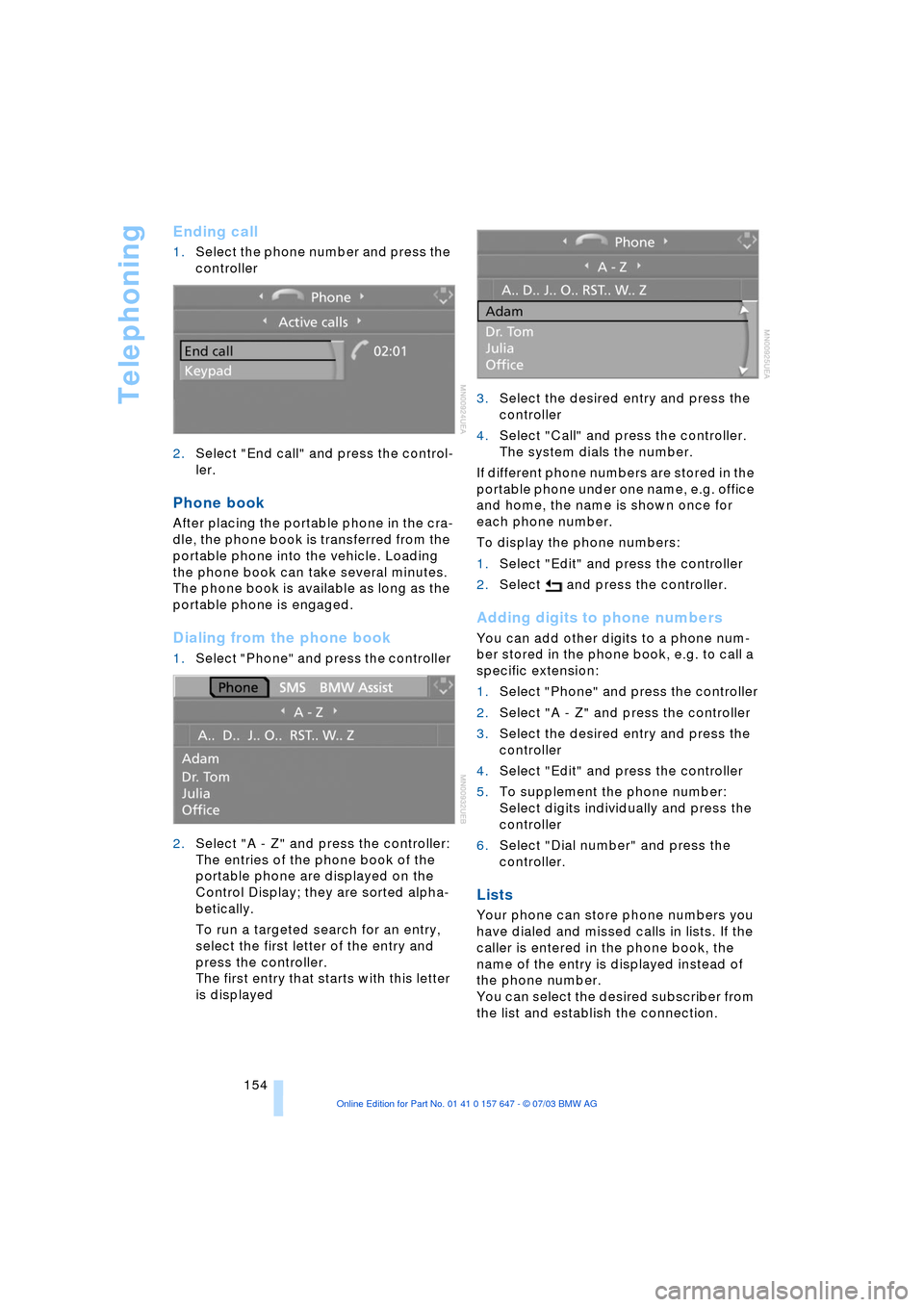
Ending call
1.Select the phone number and press the
controller
2.Select "End call" and press the control-
ler.
Phone book
After placing the portable phone in the cra-
dle, the phone book is transferred from the
portable phone into the vehicle. Loading
the phone book can take several minutes.
The phone book is available as long as the
portable phone is engaged.
Dialing from the phone book
1.Select "Phone" and press the controller
2.Select "A - Z" and press the controller:
The entries of the phone book of the
portable phone are displayed on the
Control Display; they are sorted alpha-
betically.
To run a targeted search for an entry,
select the first letter of the entry and
press the controller.
The first entry that starts with this letter
is displayed3.Select the desired entry and press the
controller
4.Select "Call" and press the controller.
The system dials the number.
If different phone numbers are stored in the
portable phone under one name, e.g. office
and home, the name is shown once for
each phone number.
To display the phone numbers:
1.Select "Edit" and press the controller
2.Select and press the controller.
Adding digits to phone numbers
You can add other digits to a phone num-
ber stored in the phone book, e.g. to call a
specific extension:
1.Select "Phone" and press the controller
2.Select "A - Z" and press the controller
3.Select the desired entry and press the
controller
4.Select "Edit" and press the controller
5.To supplement the phone number:
Select digits individually and press the
controller
6.Select "Dial number" and press the
controller.
Lists
Your phone can store phone numbers you
have dialed and missed calls in lists. If the
caller is entered in the phone book, the
name of the entry is displayed instead of
the phone number.
You can select the desired subscriber from
the list and establish the connection.
Page 159 of 220
157
Entertainment
Reference
At a glance
Controls
Driving tips Communications
Navigation
Mobility
Operation by voice control*
The concept
You can operate your phone without having
to remove your hands from the steering
wheel. The system operates on the basis of
voice commands that you will learn easily
after using them a few times. In addition,
you are also supported by instructions or
questions.
Symbols used
Voice commands
In ignition key position 2:
1.Briefly press the button on the steer-
ing wheel.
A sound signal indicates operating
readiness
2.Speak voice commands.To have the system list the voice com-
mands possible in each case:
Canceling operation via voice
control
Briefly press the button on the steering
wheel or
In dialogs where text of any kind can be
spoken, e.g. a name, canceling is only pos-
sible using the button. This is automati-
cally interrupted when an incoming call is
received.
Voice commands
In addition to the commands described in
this Owner's Manual, alternative com-
mands are often possible for the same
functions, e.g.:
Digits from zero to nine are understood.
You can say each digit individually or group
them into a sequence of three to five digits
to accelerate the input.
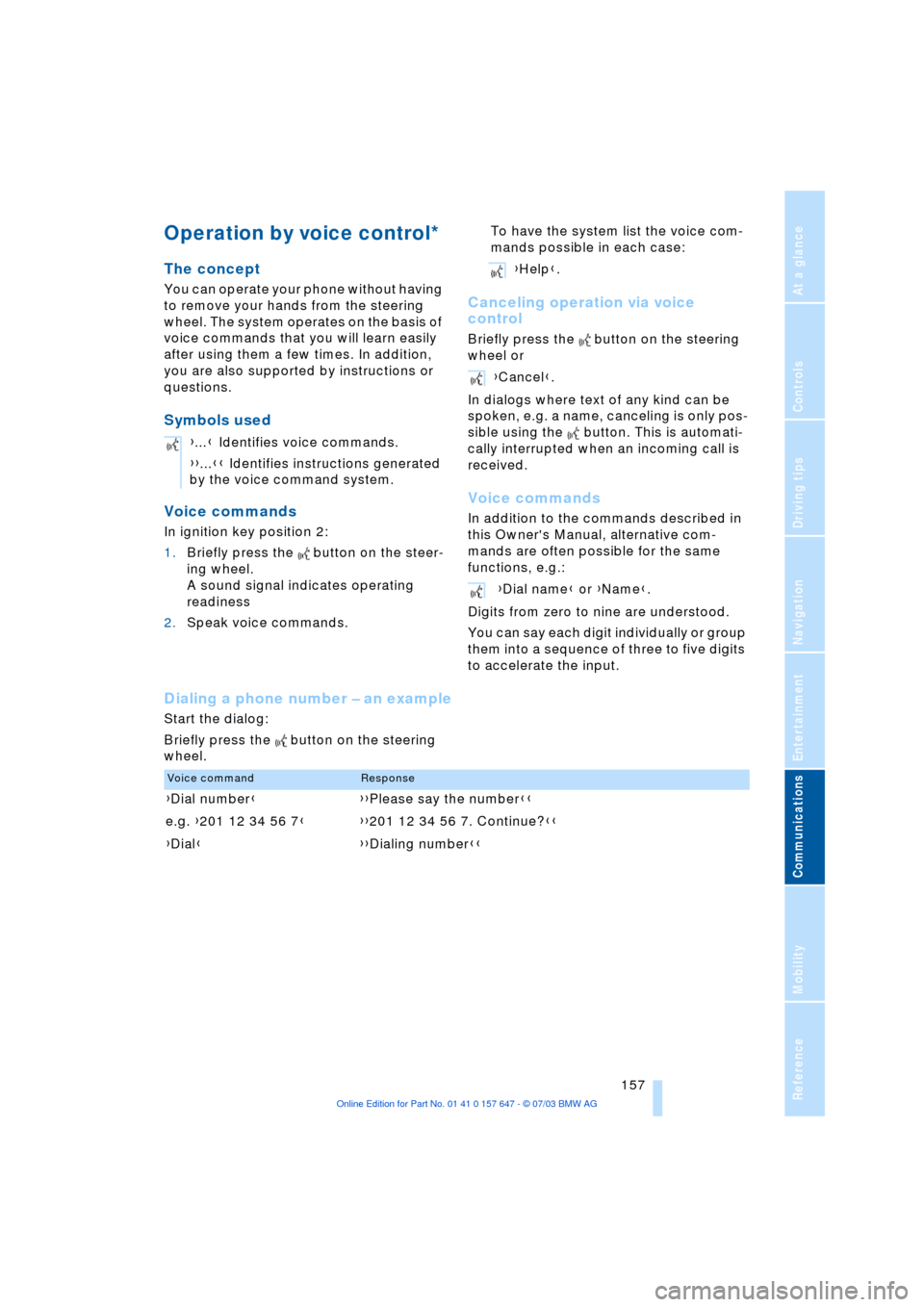
Dialing a phone number Ð an example
Start the dialog:
Briefly press the button on the steering
wheel.{...} Identifies voice commands.
{{...}} Identifies instructions generated
by the voice command system.
{Help}.
{Cancel}.
{Dial name} or {Name}.
Voice commandResponse
{Dial number}{{Please say the number}}
e.g. {201 12 34 56 7}{{201 12 34 56 7. Continue?}}
{Dial}{{Dialing number}}
Page 163 of 220
161
Entertainment
Reference
At a glance
Controls
Driving tips Communications
Navigation
Mobility
TeleService , BMW Assist
TeleService
TeleService opens up a new dimension for
communication with BMW Service. The car
phone can be used to transmit data on the
service status of your vehicle or on legally
prescribed inspections directly to your
BMW center. This is the same data that is
stored for CBS Condition Based Service in
the ignition key. Your BMW center can then
contact you, and you can make an appoint-
ment that suits you while you are still on the
road. Your advantage here is that your
BMW center can prepare in advance for the
required maintenance work. The TeleSer-
vice functions are country-specific. The
data on the service status of your vehicle or
on legally required inspections is transmit-
ted on a country-specific basis either auto-
matically before they fall due or simulta-
neously when you call any service partner
you have chosen. Your BMW center will be
glad to provide more detailed information.
BMW Assist
BMW Assist is available to you if you have
ordered this option at your BMW center or
BMW customer information. This provides
you with other services in addition to
TeleService.
Many functions of BMW Assist depend on
the individually agreed contract.
The subscriber agreement must be com-
pleted successfully before using the BMW
Assist services.
Requirements
The telephone is registered in a portable
phone network that can transmit the ser-
vices.
To transmit position data, the navigation
system must be able to determine the posi-
tion. In order to enable and update TeleServices or BMW Assist, a GPS signal
must be present.
To avoid posing an unnecessary haz-
ard, both to your own vehicle's occu-
pants and to other road users: never
attempt to make adjustments while operat-
ing the vehicle.<
Enabling TeleService or BMW Assist
For you to be able to use the services of
TeleService or BMW Assist, these must be
enabled:
Control Center, for principle details, refer to
page 16:
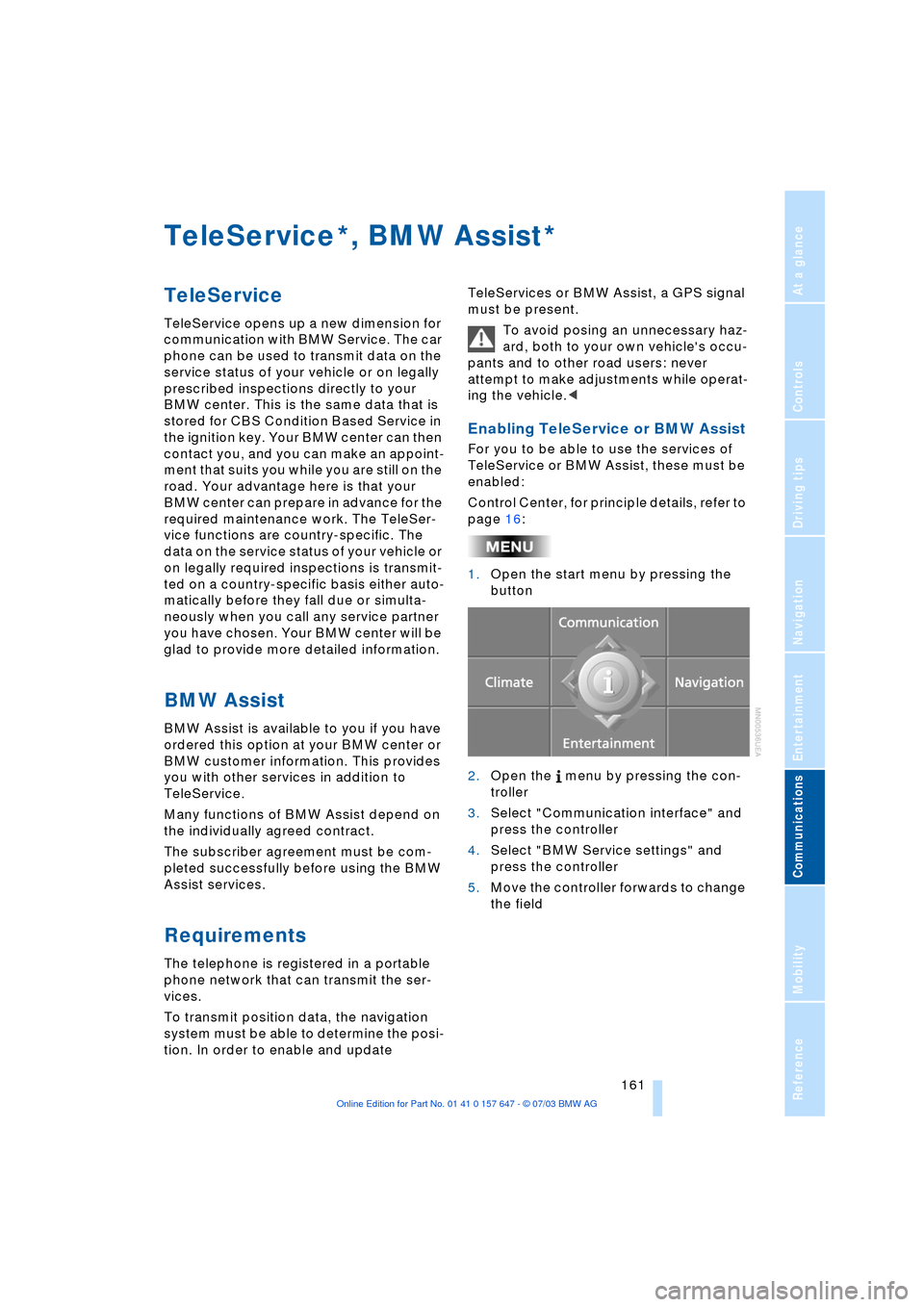
1.Open the start menu by pressing the
button
2.Open the menu by pressing the con-
troller
3.Select "Communication interface" and
press the controller
4.Select "BMW Service settings" and
press the controller
5.Move the controller forwards to change
the field
**
Page 164 of 220
TeleService, BMW Assist
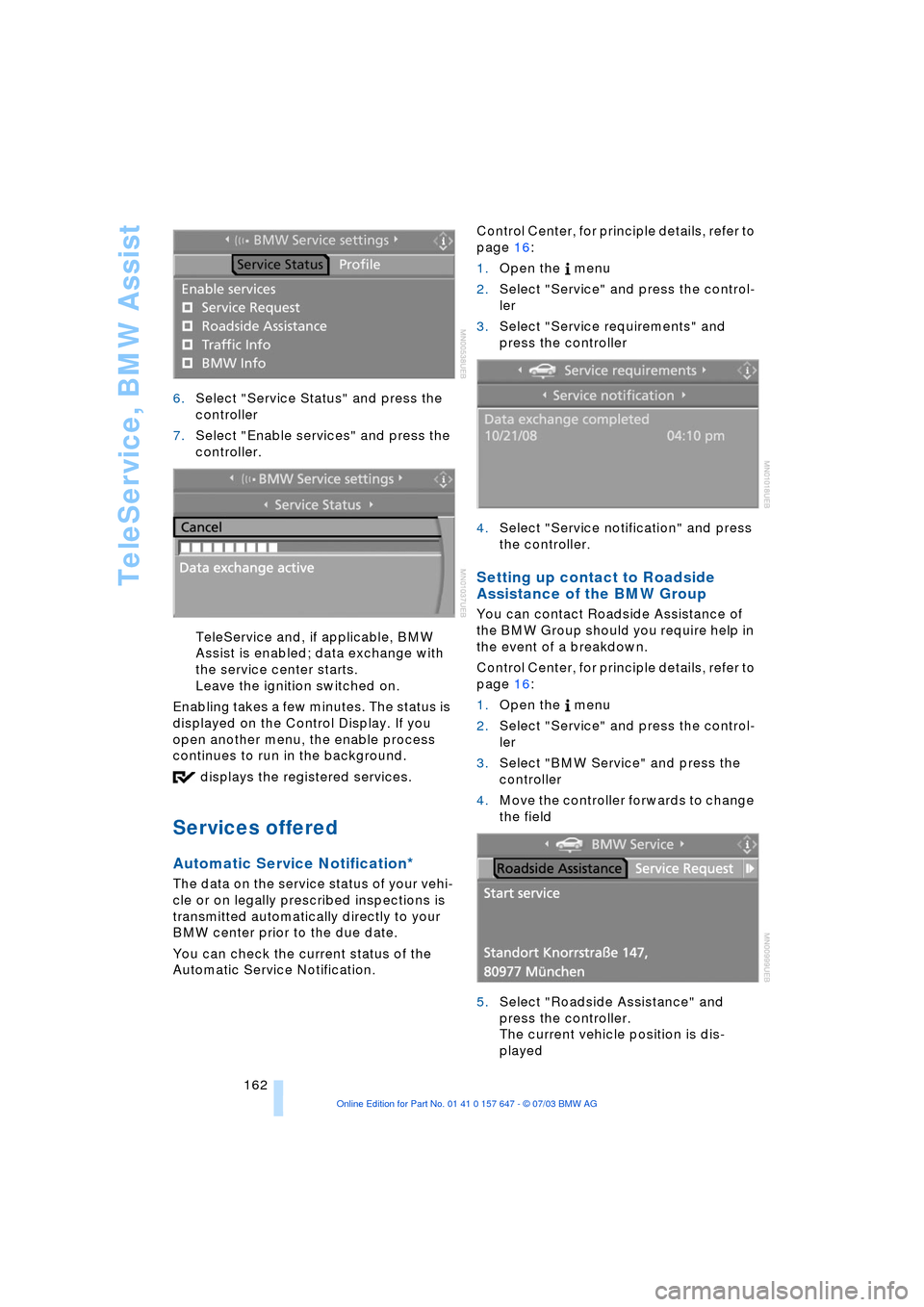
162 6.Select "Service Status" and press the
controller
7.Select "Enable services" and press the
controller.
TeleService and, if applicable, BMW
Assist is enabled; data exchange with
the service center starts.
Leave the ignition switched on.
Enabling takes a few minutes. The status is
displayed on the Control Display. If you
open another menu, the enable process
continues to run in the background.
displays the registered services.
Services offered
Automatic Service Notification*
The data on the service status of your vehi-
cle or on legally prescribed inspections is
transmitted automatically directly to your
BMW center prior to the due date.
You can check the current status of the
Automatic Service Notification. Control Center, for principle details, refer to
page 16:
1.Open the menu
2.Select "Service" and press the control-
ler
3.Select "Service requirements" and
press the controller
4.Select "Service notification" and press
the controller.
Setting up contact to Roadside
Assistance of the BMW Group
You can contact Roadside Assistance of
the BMW Group should you require help in
the event of a breakdown.
Control Center, for principle details, refer to
page 16:
1.Open the menu
2.Select "Service" and press the control-
ler
3.Select "BMW Service" and press the
controller
4.Move the controller forwards to change
the field
5.Select "Roadside Assistance" and
press the controller.
The current vehicle position is dis-
played
Page 165 of 220
163
Entertainment
Reference
At a glance
Controls
Driving tips Communications
Navigation
Mobility
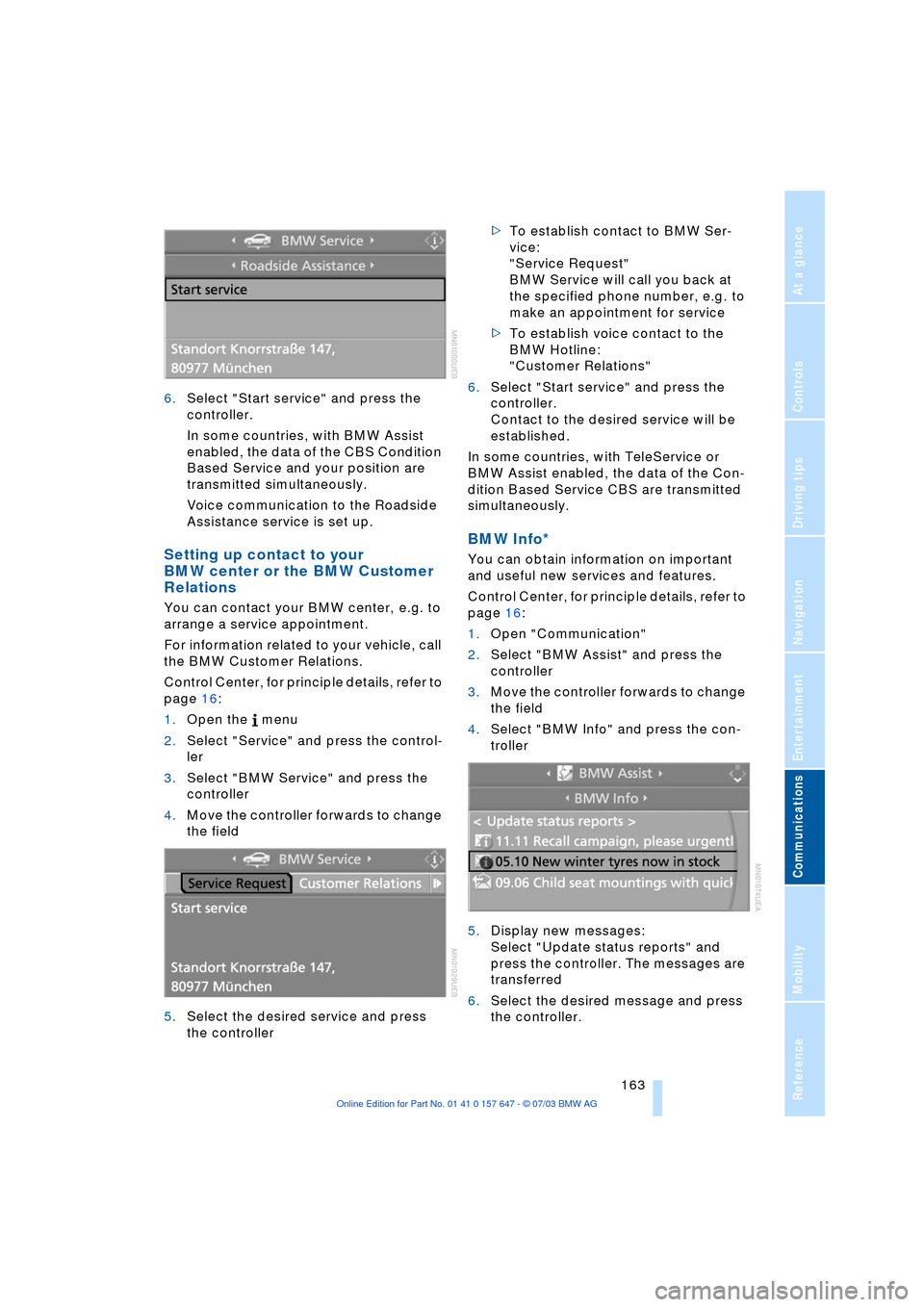
6.Select "Start service" and press the
controller.
In some countries, with BMW Assist
enabled, the data of the CBS Condition
Based Service and your position are
transmitted simultaneously.
Voice communication to the Roadside
Assistance service is set up.
Setting up contact to your
BMW center or the BMW Customer
Relations
You can contact your BMW center, e.g. to
arrange a service appointment.
For information related to your vehicle, call
the BMW Customer Relations.
Control Center, for principle details, refer to
page 16:
1.Open the menu
2.Select "Service" and press the control-
ler
3.Select "BMW Service" and press the
controller
4.Move the controller forwards to change
the field
5.Select the desired service and press
the controller >To establish contact to BMW Ser-
vice:
"Service Request"
BMW Service will call you back at
the specified phone number, e.g. to
make an appointment for service
>To establish voice contact to the
BMW Hotline:
"Customer Relations"
6.Select "Start service" and press the
controller.
Contact to the desired service will be
established.
In some countries, with TeleService or
BMW Assist enabled, the data of the Con-
dition Based Service CBS are transmitted
simultaneously.
BMW Info*
You can obtain information on important
and useful new services and features.
Control Center, for principle details, refer to
page 16:
1.Open "Communication"
2.Select "BMW Assist" and press the
controller
3.Move the controller forwards to change
the field
4.Select "BMW Info" and press the con-
troller
5.Display new messages:
Select "Update status reports" and
press the controller. The messages are
transferred
6.Select the desired message and press
the controller.
Page 167 of 220
165
Entertainment
Reference
At a glance
Controls
Driving tips Communications
Navigation
Mobility
4.Move the controller forward to change
the field
5.Select "Service Status" and press the
controller.
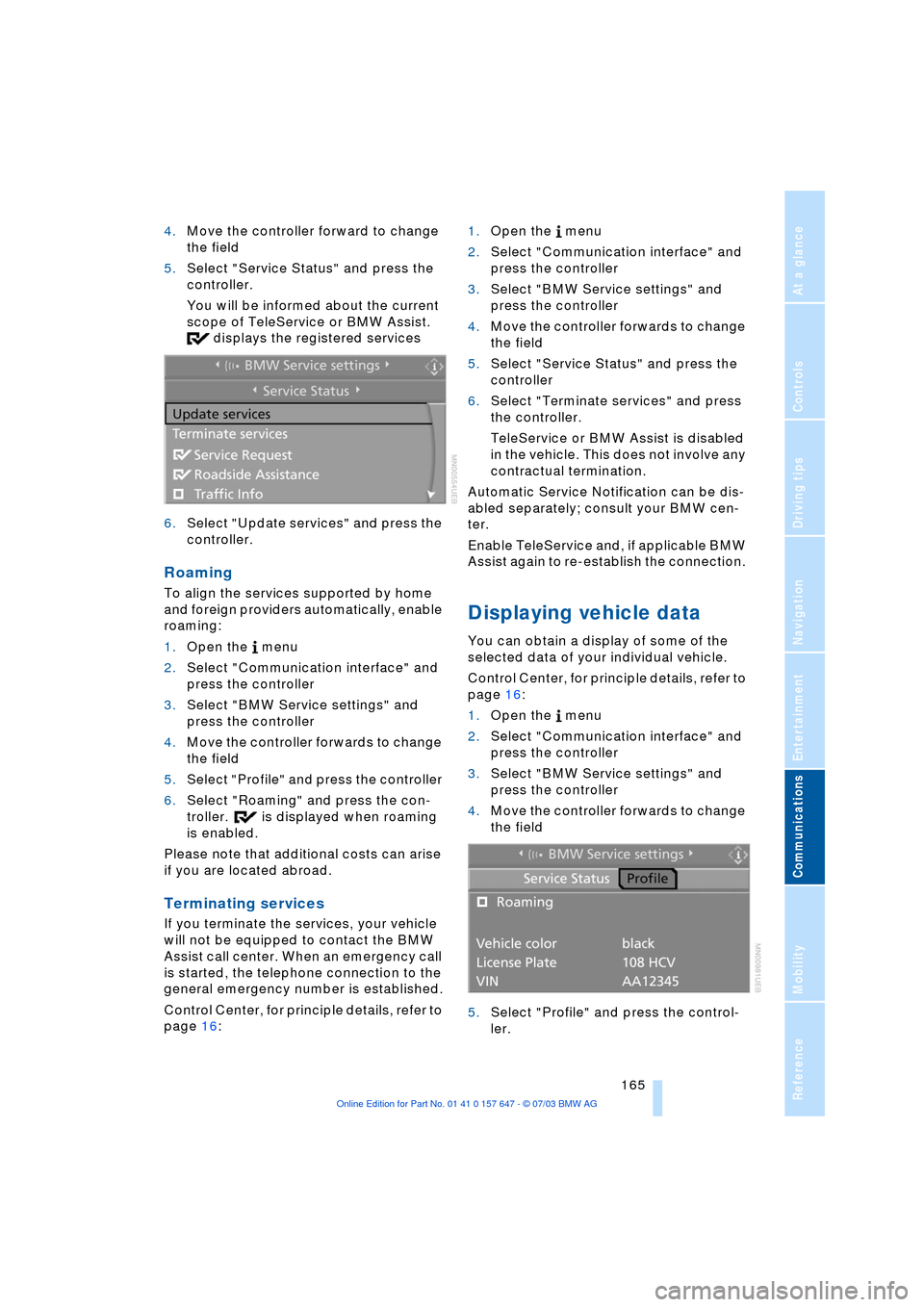
You will be informed about the current
scope of TeleService or BMW Assist.
displays the registered services
6.Select "Update services" and press the
controller.
Roaming
To align the services supported by home
and foreign providers automatically, enable
roaming:
1.Open the menu
2.Select "Communication interface" and
press the controller
3.Select "BMW Service settings" and
press the controller
4.Move the controller forwards to change
the field
5.Select "Profile" and press the controller
6.Select "Roaming" and press the con-
troller. is displayed when roaming
is enabled.
Please note that additional costs can arise
if you are located abroad.
Terminating services
If you terminate the services, your vehicle
will not be equipped to contact the BMW
Assist call center. When an emergency call
is started, the telephone connection to the
general emergency number is established.
Control Center, for principle details, refer to
page 16: 1.Open the menu
2.Select "Communication interface" and
press the controller
3.Select "BMW Service settings" and
press the controller
4.Move the controller forwards to change
the field
5.Select "Service Status" and press the
controller
6.Select "Terminate services" and press
the controller.
TeleService or BMW Assist is disabled
in the vehicle. This does not involve any
contractual termination.
Automatic Service Notification can be dis-
abled separately; consult your BMW cen-
ter.
Enable TeleService and, if applicable BMW
Assist again to re-establish the connection.
Displaying vehicle data
You can obtain a display of some of the
selected data of your individual vehicle.
Control Center, for principle details, refer to
page 16:
1.Open the menu
2.Select "Communication interface" and
press the controller
3.Select "BMW Service settings" and
press the controller
4.Move the controller forwards to change
the field
5.Select "Profile" and press the control-
ler.
Page 180 of 220
Under the hood
178
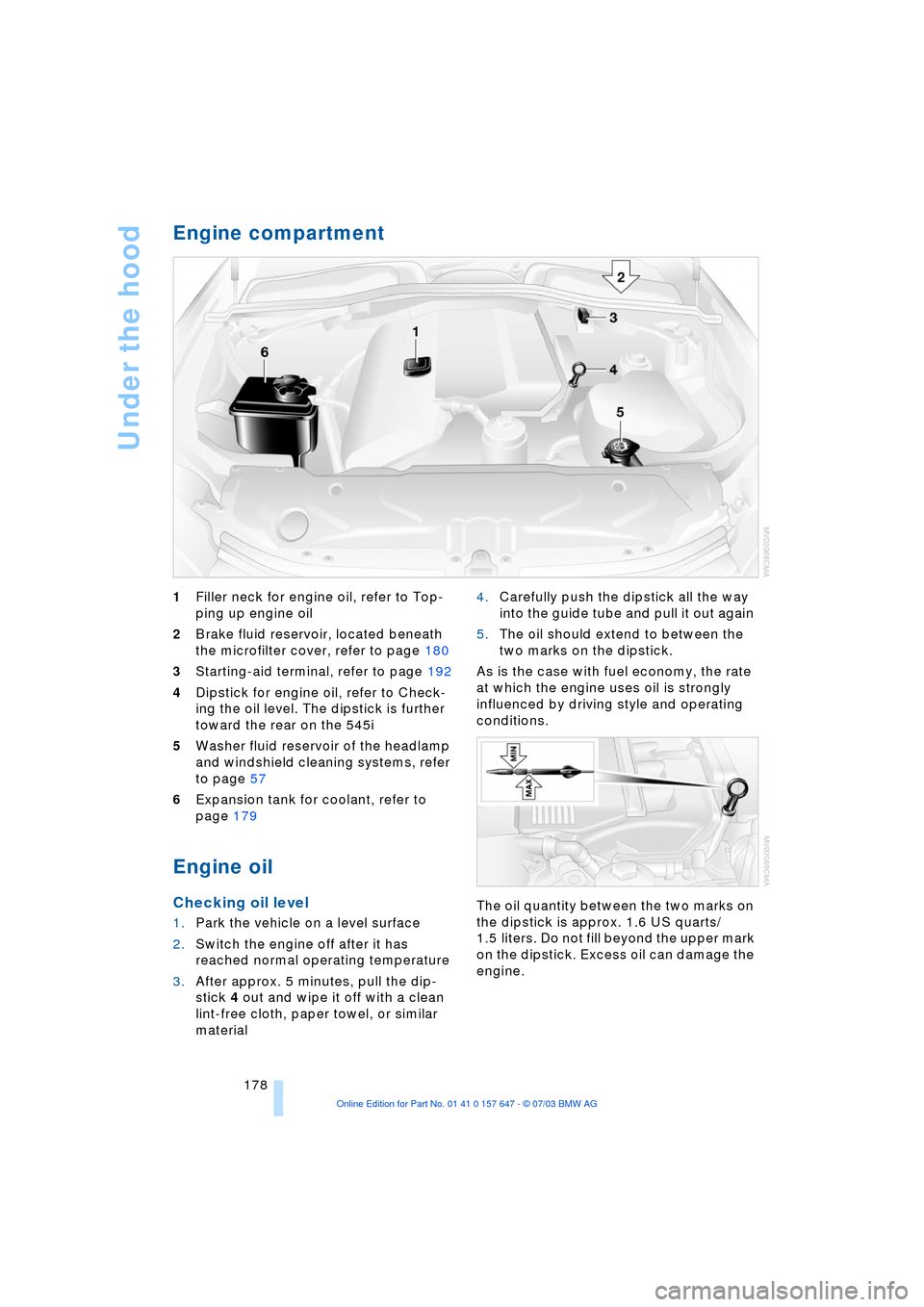
Engine compartment
1Filler neck for engine oil, refer to Top-
ping up engine oil
2Brake fluid reservoir, located beneath
the microfilter cover, refer to page 180
3Starting-aid terminal, refer to page 192
4Dipstick for engine oil, refer to Check-
ing the oil level. The dipstick is further
toward the rear on the 545i
5Washer fluid reservoir of the headlamp
and windshield cleaning systems, refer
to page 57
6Expansion tank for coolant, refer to
page 179
Engine oil
Checking oil level
1.Park the vehicle on a level surface
2.Switch the engine off after it has
reached normal operating temperature
3.After approx. 5 minutes, pull the dip-
stick 4 out and wipe it off with a clean
lint-free cloth, paper towel, or similar
material 4.Carefully push the dipstick all the way
into the guide tube and pull it out again
5.The oil should extend to between the
two marks on the dipstick.
As is the case with fuel economy, the rate
at which the engine uses oil is strongly
influenced by driving style and operating
conditions.
The oil quantity between the two marks on
the dipstick is approx. 1.6 US quarts/
1.5 liters. Do not fill beyond the upper mark
on the dipstick. Excess oil can damage the
engine.
Page 186 of 220
Replacing components
184
Replacing components
Onboard tool kit
The onboard tool kit is located in the lug-
gage compartment lid.
Loosen the wingnut to open.
Windshield wiper blades
To replace, fold the wiper arm up and hold.
Press the catches together while pushing
the wiper blade out of the front.
Lamps and bulbs
The lamps and bulbs are essential factors
contributing to the safety of your vehicle.
Therefore, comply fully with the following
instructions during bulb replacement. If you
are not familiar with the specified proce-
dures, have the replacements carried out at
your BMW center.
Never touch the glass of new bulbs
with your bare fingers, as even minute
amounts of contamination will burn into the bulb's surface and reduce its service life.
Use a clean cloth, napkin, etc., or hold the
bulb by its metal socket.
In the case of bulbs where the replacement
is not described, please consult your BMW
center.<
You can obtain a selection of replacement
bulbs at your BMW center.
To prevent short circuits, before
working on any electrical system,
equipment or accessory you should always
switch it off and disconnect the cable from
the battery's negative terminal before start-
ing.
To avoid possible injury or equipment dam-
age when changing bulbs, observe any
instructions provided by the bulb manufac-
turer.<
When maintaining the headlamps,
please comply with the instructions in
the separate Caring for your vehicle bro-
chure.<
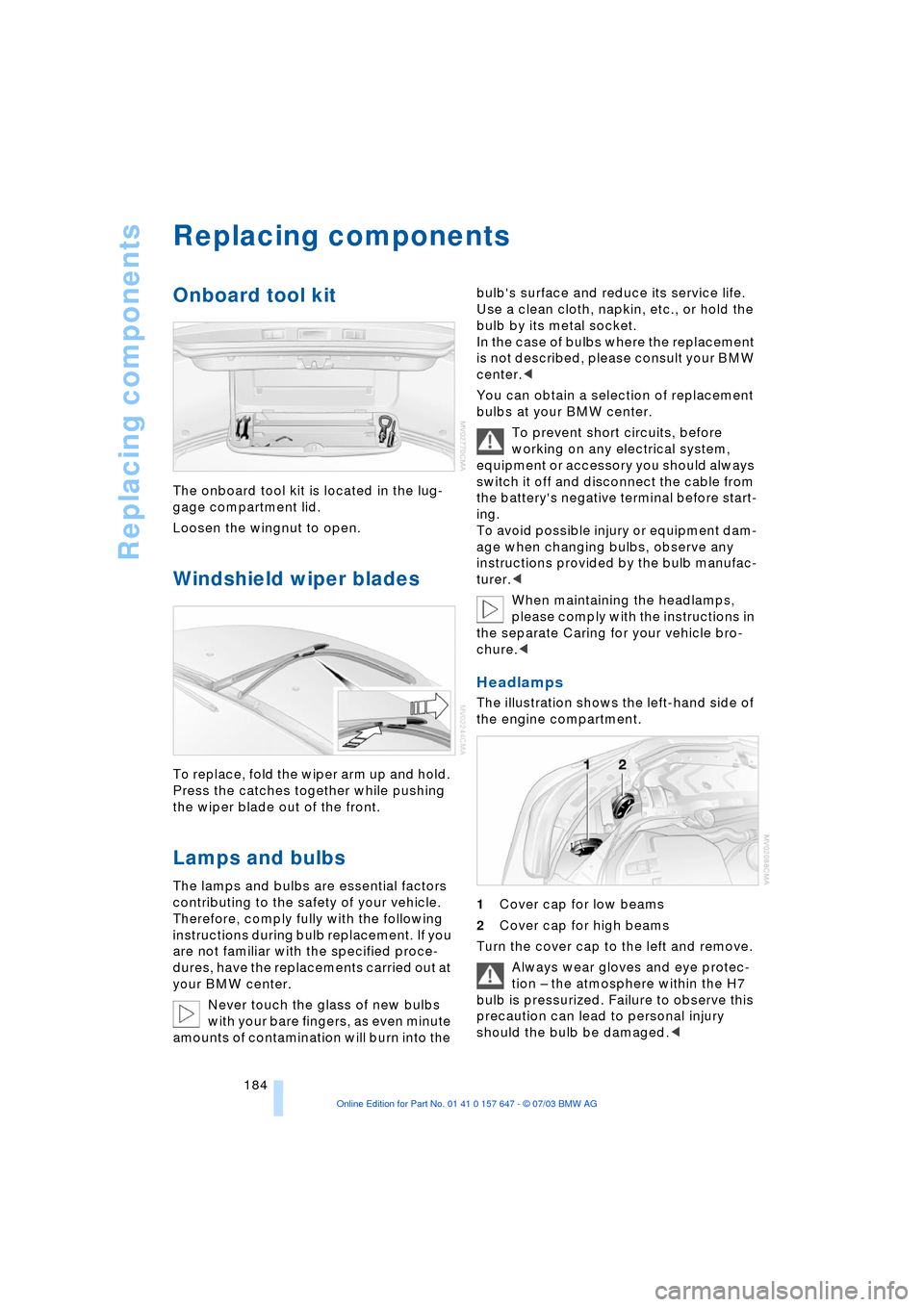
Headlamps
The illustration shows the left-hand side of
the engine compartment.
1Cover cap for low beams
2Cover cap for high beams
Turn the cover cap to the left and remove.
Always wear gloves and eye protec-
tion Ð the atmosphere within the H7
bulb is pressurized. Failure to observe this
precaution can lead to personal injury
should the bulb be damaged.<