tailgate BMW 6 SERIES GRAN COUPE 2017 User Guide
[x] Cancel search | Manufacturer: BMW, Model Year: 2017, Model line: 6 SERIES GRAN COUPE, Model: BMW 6 SERIES GRAN COUPE 2017Pages: 261, PDF Size: 5.24 MB
Page 153 of 261
Overview
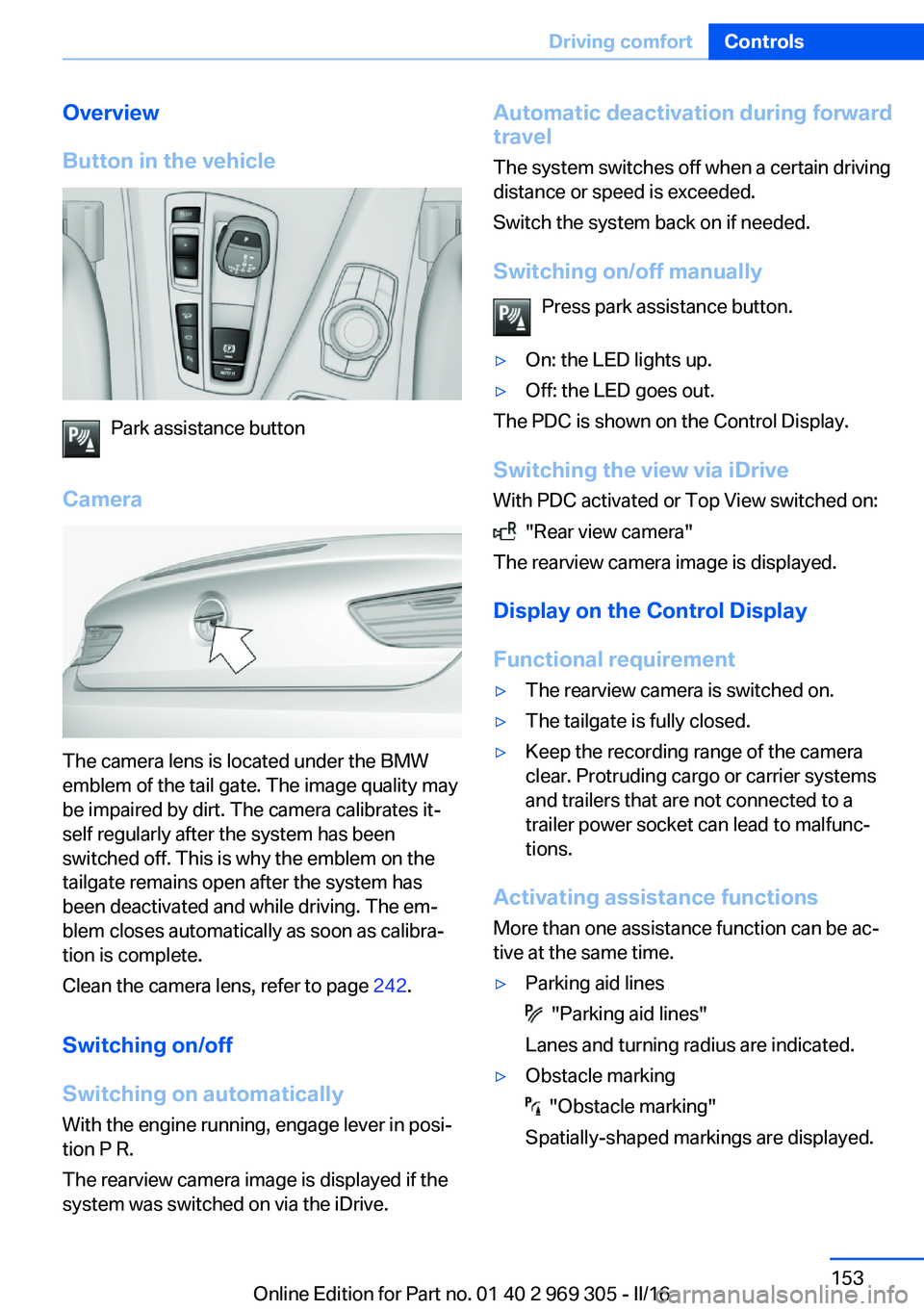
Button in the vehicle
Park assistance button
Camera
The camera lens is located under the BMW
emblem of the tail gate. The image quality may
be impaired by dirt. The camera calibrates it‐
self regularly after the system has been
switched off. This is why the emblem on the
tailgate remains open after the system has
been deactivated and while driving. The em‐
blem closes automatically as soon as calibra‐
tion is complete.
Clean the camera lens, refer to page 242.
Switching on/off
Switching on automatically With the engine running, engage lever in posi‐
tion P R.
The rearview camera image is displayed if the
system was switched on via the iDrive.
Automatic deactivation during forward
travel
The system switches off when a certain driving
distance or speed is exceeded.
Switch the system back on if needed.
Switching on/off manually Press park assistance button.▷On: the LED lights up.▷Off: the LED goes out.
The PDC is shown on the Control Display.
Switching the view via iDrive With PDC activated or Top View switched on:
"Rear view camera"
The rearview camera image is displayed.
Display on the Control Display
Functional requirement
▷The rearview camera is switched on.▷The tailgate is fully closed.▷Keep the recording range of the camera
clear. Protruding cargo or carrier systems
and trailers that are not connected to a
trailer power socket can lead to malfunc‐
tions.
Activating assistance functions
More than one assistance function can be ac‐
tive at the same time.
▷Parking aid lines
"Parking aid lines"
Lanes and turning radius are indicated.
▷Obstacle marking
"Obstacle marking"
Spatially-shaped markings are displayed.
Seite 153Driving comfortControls153
Online Edition for Part no. 01 40 2 969 305 - II/16
Page 158 of 261
Displaying the turning radius and
pathway lines▷The static, red turning radius line shows
the space needed to the side of the vehicle
when the steering wheel is turned all the
way.▷The variable, green pathway line assists
you in assessing the amount of space ac‐
tually needed to the side of the vehicle.
The lane line depends on the engaged
gear and the current steering angle. The
track line is continuously adjusted for the
steering wheel movement.
"Parking aid lines"
Turning circle and pathway lines are displayed.
System limits
Top View cannot be used in the following sit‐
uations:
▷With a door open.▷With the tailgate open.▷With an exterior mirror folded in.▷In poor light.
A Check Control message is displayed in some
of these situations.
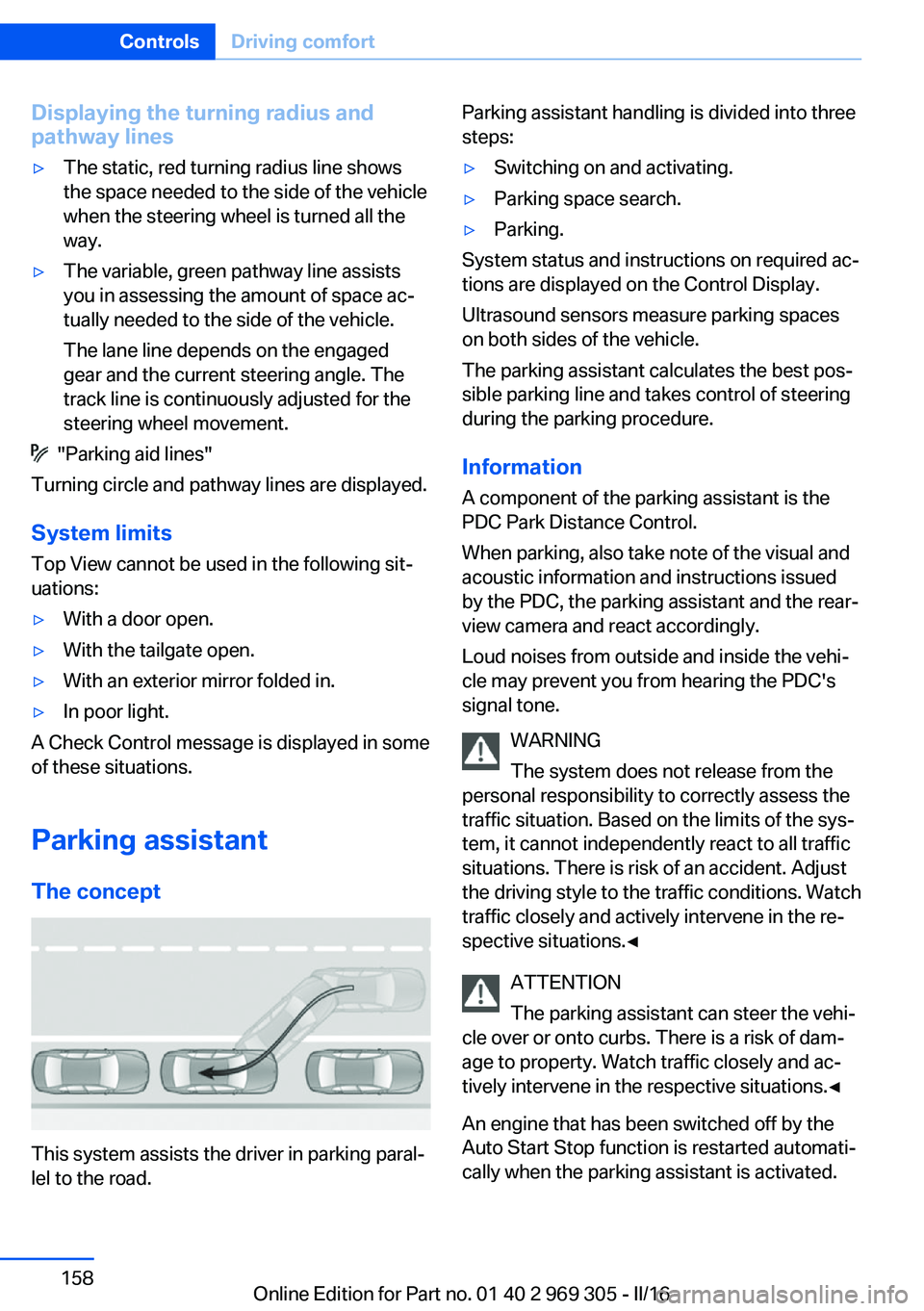
Parking assistant The concept
This system assists the driver in parking paral‐
lel to the road.
Parking assistant handling is divided into three
steps:▷Switching on and activating.▷Parking space search.▷Parking.
System status and instructions on required ac‐
tions are displayed on the Control Display.
Ultrasound sensors measure parking spaces
on both sides of the vehicle.
The parking assistant calculates the best pos‐
sible parking line and takes control of steering
during the parking procedure.
Information A component of the parking assistant is the
PDC Park Distance Control.
When parking, also take note of the visual and
acoustic information and instructions issued
by the PDC, the parking assistant and the rear‐
view camera and react accordingly.
Loud noises from outside and inside the vehi‐
cle may prevent you from hearing the PDC's
signal tone.
WARNING
The system does not release from the
personal responsibility to correctly assess the
traffic situation. Based on the limits of the sys‐
tem, it cannot independently react to all traffic
situations. There is risk of an accident. Adjust
the driving style to the traffic conditions. Watch
traffic closely and actively intervene in the re‐
spective situations.◀
ATTENTION
The parking assistant can steer the vehi‐
cle over or onto curbs. There is a risk of dam‐
age to property. Watch traffic closely and ac‐
tively intervene in the respective situations.◀
An engine that has been switched off by the
Auto Start Stop function is restarted automati‐
cally when the parking assistant is activated.
Seite 158ControlsDriving comfort158
Online Edition for Part no. 01 40 2 969 305 - II/16
Page 159 of 261
Overview
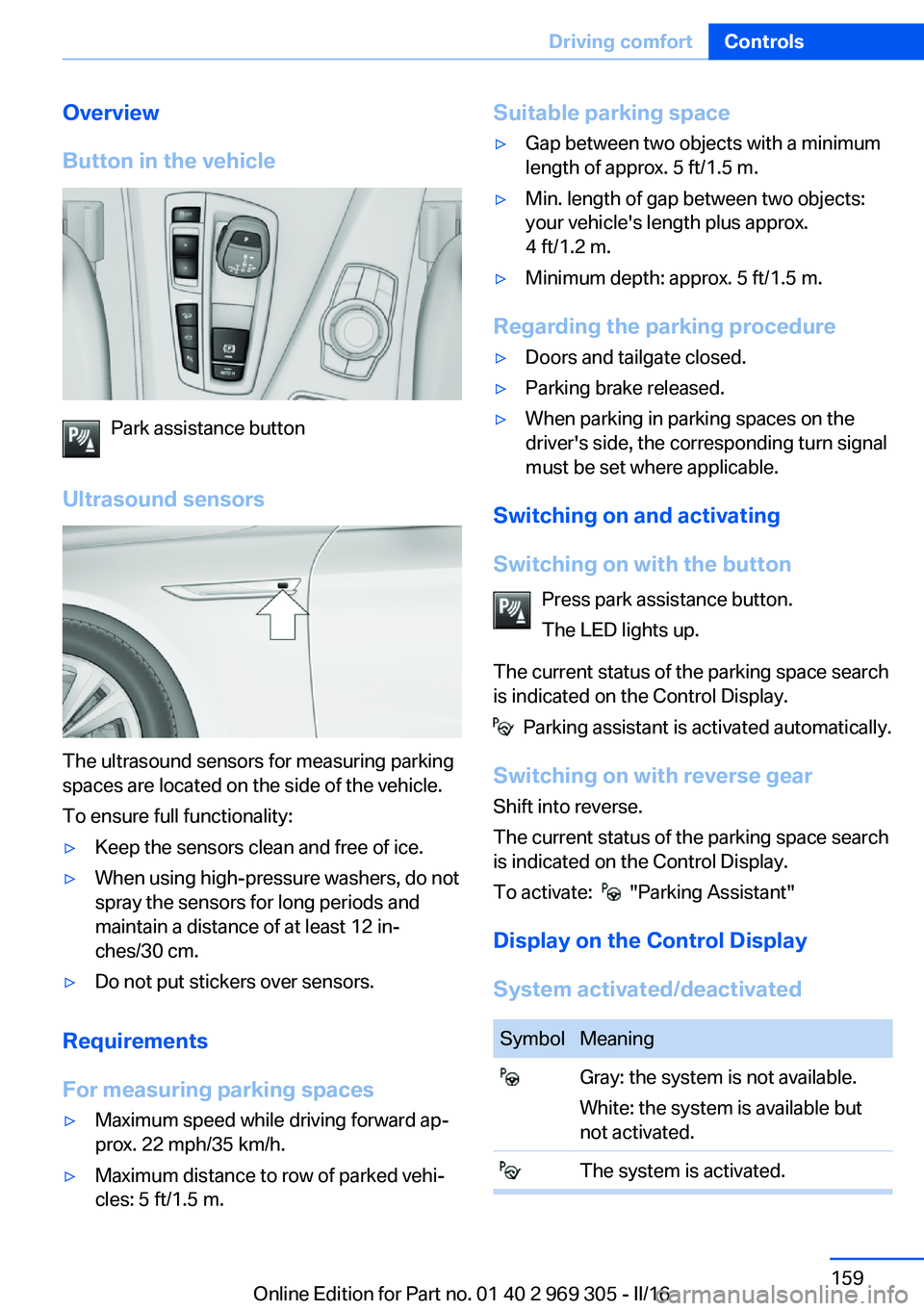
Button in the vehicle
Park assistance button
Ultrasound sensors
The ultrasound sensors for measuring parking
spaces are located on the side of the vehicle.
To ensure full functionality:
▷Keep the sensors clean and free of ice.▷When using high-pressure washers, do not
spray the sensors for long periods and
maintain a distance of at least 12 in‐
ches/30 cm.▷Do not put stickers over sensors.
Requirements
For measuring parking spaces
▷Maximum speed while driving forward ap‐
prox. 22 mph/35 km/h.▷Maximum distance to row of parked vehi‐
cles: 5 ft/1.5 m.Suitable parking space▷Gap between two objects with a minimum
length of approx. 5 ft/1.5 m.▷Min. length of gap between two objects:
your vehicle's length plus approx.
4 ft/1.2 m.▷Minimum depth: approx. 5 ft/1.5 m.
Regarding the parking procedure
▷Doors and tailgate closed.▷Parking brake released.▷When parking in parking spaces on the
driver's side, the corresponding turn signal
must be set where applicable.
Switching on and activating
Switching on with the button Press park assistance button.
The LED lights up.
The current status of the parking space search
is indicated on the Control Display.
Parking assistant is activated automatically.
Switching on with reverse gear
Shift into reverse.
The current status of the parking space search
is indicated on the Control Display.
To activate:
"Parking Assistant"
Display on the Control Display
System activated/deactivated
SymbolMeaning Gray: the system is not available.
White: the system is available but
not activated. The system is activated.Seite 159Driving comfortControls159
Online Edition for Part no. 01 40 2 969 305 - II/16
Page 178 of 261
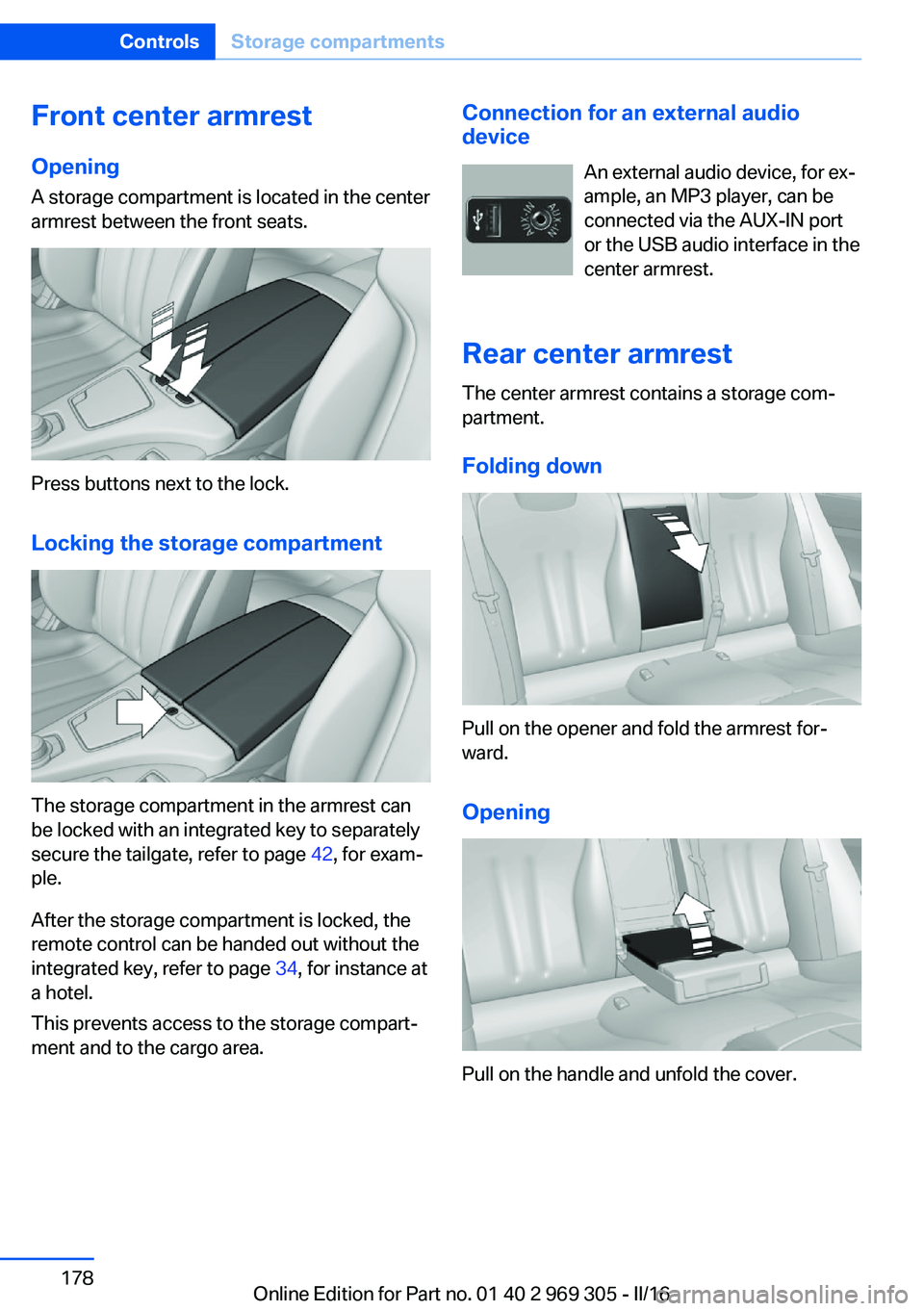
Front center armrest
Opening A storage compartment is located in the center
armrest between the front seats.
Press buttons next to the lock.
Locking the storage compartment
The storage compartment in the armrest can
be locked with an integrated key to separately
secure the tailgate, refer to page 42, for exam‐
ple.
After the storage compartment is locked, the
remote control can be handed out without the
integrated key, refer to page 34, for instance at
a hotel.
This prevents access to the storage compart‐
ment and to the cargo area.
Connection for an external audio
device
An external audio device, for ex‐
ample, an MP3 player, can be
connected via the AUX-IN port
or the USB audio interface in the
center armrest.
Rear center armrest
The center armrest contains a storage com‐
partment.
Folding down
Pull on the opener and fold the armrest for‐
ward.
Opening
Pull on the handle and unfold the cover.
Seite 178ControlsStorage compartments178
Online Edition for Part no. 01 40 2 969 305 - II/16
Page 184 of 261
Things to remember when drivingVehicle features and options
This chapter describes all standard, country-
specific and optional features offered with the
series. It also describes features that are not
necessarily available in your car, e. g., due to
the selected options or country versions. This
also applies to safety-related functions and
systems. The respectively applicable country
provisions must be observed when using the
respective features and systems.
Breaking-in period General information
Moving parts need time to adjust to one an‐
other (break-in time).
The following instructions will help accomplish
a long vehicle life and good efficiency.
During break-in, do not use the Launch Con‐
trol.
Information WARNING
Due to new parts and components,
safety and driver assistance systems can react
with a delay. There is risk of an accident. After
installing new parts or with a new vehicle, drive
conservatively and intervene early if necessary.
Observe the break-in procedures of the re‐
spective parts and components.◀
Engine, transmission, and axle drive
Up to 1,200 miles/2,000 km
Do not exceed the maximum engine and road
speed:▷For gasoline engine 4,500 rpm and
100 mph/160 km/h.Avoid full load or kickdown under all circum‐
stances.
From 1,200 miles/2,000 km The engine and vehicle speed can gradually be
increased.
Tires
Tire traction is not optimal due to manufactur‐
ing circumstances when tires are brand-new;
they achieve their full traction potential after a
break-in time.
Drive conservatively for the first
200 miles/300 km.
Brake system
Brakes require an initial break-in period of ap‐
prox. 300 miles/500 km to achieve optimal per‐
formance between brake discs and brake
pads. Drive moderately during this break-in pe‐
riod.
Following part replacement
The same break-in procedures should be ob‐
served if any of the components above-men‐
tioned have to be renewed in the course of the
vehicle's operating life.
General driving notes
Closing the tailgate WARNING
An open tailgate protrudes from the vehi‐
cle and can endanger occupants and other
traffic participants or damage the vehicle in the
event of an accident, braking or evasive ma‐
neuvers. In addition, exhaust fumes may enter
the vehicle interior. There is a risk of injury or
risk of property damage. Do not drive with the
tailgate open.◀Seite 184Driving tipsThings to remember when driving184
Online Edition for Part no. 01 40 2 969 305 - II/16
Page 185 of 261
If driving with the tailgate open cannot be
avoided:▷Close all windows and the glass sunroof.▷Greatly increase the air flow from the vents.▷Drive moderately.
Hot exhaust system
WARNING
During driving operation, high tempera‐
tures can occur underneath the vehicle body,
e.g., caused by the exhaust gas system. If
combustible materials, such as leaves or grass,
come in contact with hot parts of the exhaust
gas system, these materials can ignite. There
is a risk of injury or risk of property damage.
Do not remove the heat shields installed and
never apply undercoating to them. Make sure
that no combustible materials can come in
contact with hot vehicle parts in driving opera‐
tion, idle or during parking. Do not touch the
hot exhaust system.◀
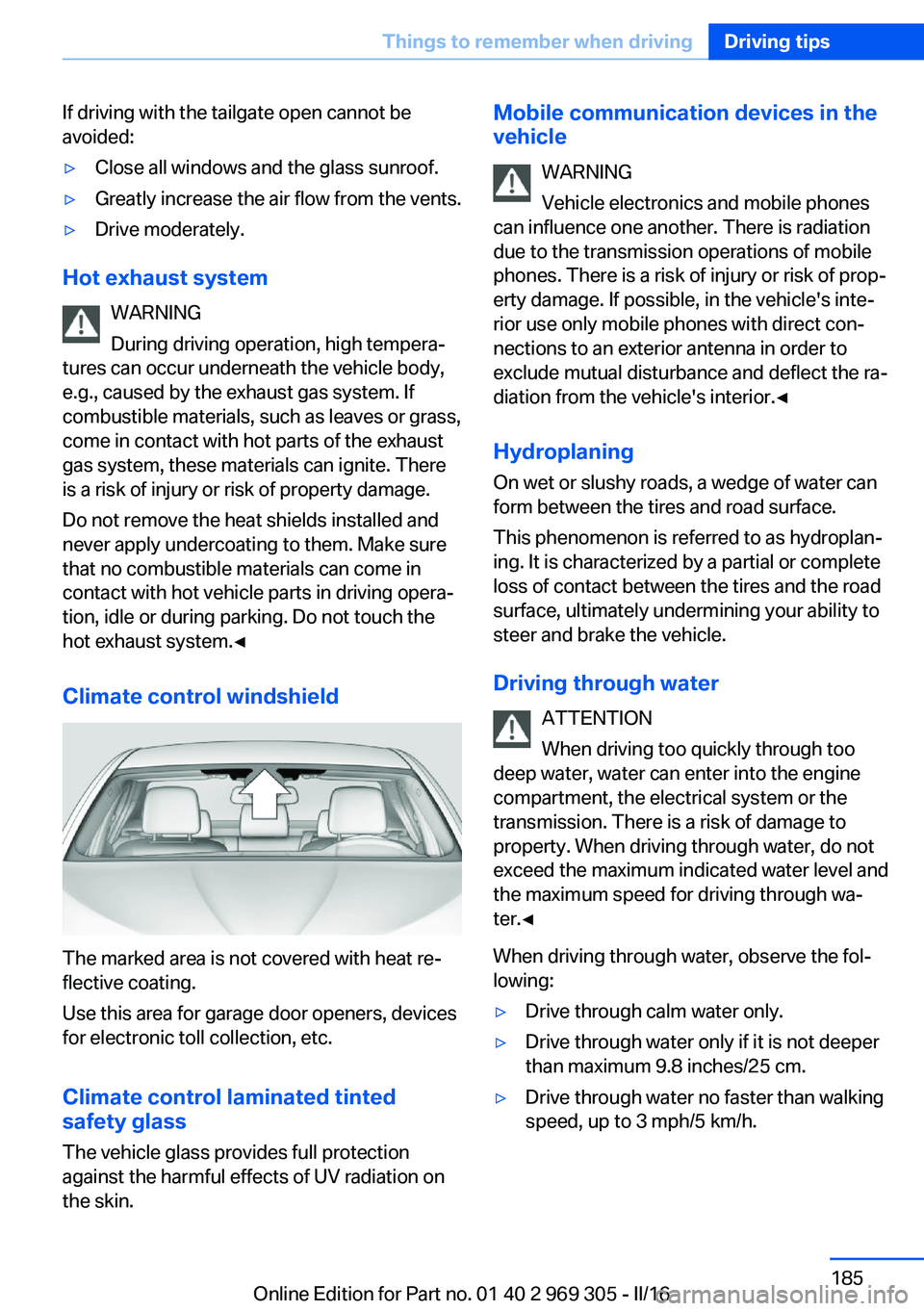
Climate control windshield
The marked area is not covered with heat re‐
flective coating.
Use this area for garage door openers, devices
for electronic toll collection, etc.
Climate control laminated tinted
safety glass
The vehicle glass provides full protection
against the harmful effects of UV radiation on
the skin.
Mobile communication devices in the
vehicle
WARNING
Vehicle electronics and mobile phones
can influence one another. There is radiation
due to the transmission operations of mobile
phones. There is a risk of injury or risk of prop‐
erty damage. If possible, in the vehicle's inte‐
rior use only mobile phones with direct con‐
nections to an exterior antenna in order to
exclude mutual disturbance and deflect the ra‐
diation from the vehicle's interior.◀
Hydroplaning
On wet or slushy roads, a wedge of water can
form between the tires and road surface.
This phenomenon is referred to as hydroplan‐
ing. It is characterized by a partial or complete
loss of contact between the tires and the road
surface, ultimately undermining your ability to
steer and brake the vehicle.
Driving through water ATTENTION
When driving too quickly through too
deep water, water can enter into the engine
compartment, the electrical system or the
transmission. There is a risk of damage to
property. When driving through water, do not
exceed the maximum indicated water level and
the maximum speed for driving through wa‐
ter.◀
When driving through water, observe the fol‐
lowing:▷Drive through calm water only.▷Drive through water only if it is not deeper
than maximum 9.8 inches/25 cm.▷Drive through water no faster than walking
speed, up to 3 mph/5 km/h.Seite 185Things to remember when drivingDriving tips185
Online Edition for Part no. 01 40 2 969 305 - II/16
Page 230 of 261
If an LED fails, switch on the front fog lamps
and continue the trip with great care. Comply
with local regulations.
In the case of a malfunction, contact a dealer’s
service center or another qualified service cen‐
ter or repair shop.
LED front fog lights
These front fog lights are made using LED
technology. In the case of a malfunction, con‐
tact a dealer’s service center or another quali‐
fied service center or repair shop.
Turn signal in exterior mirror
The turn signals in the exterior mirrors feature
LED technology. In the case of a malfunction,
contact a dealer’s service center or another
qualified service center or repair shop.
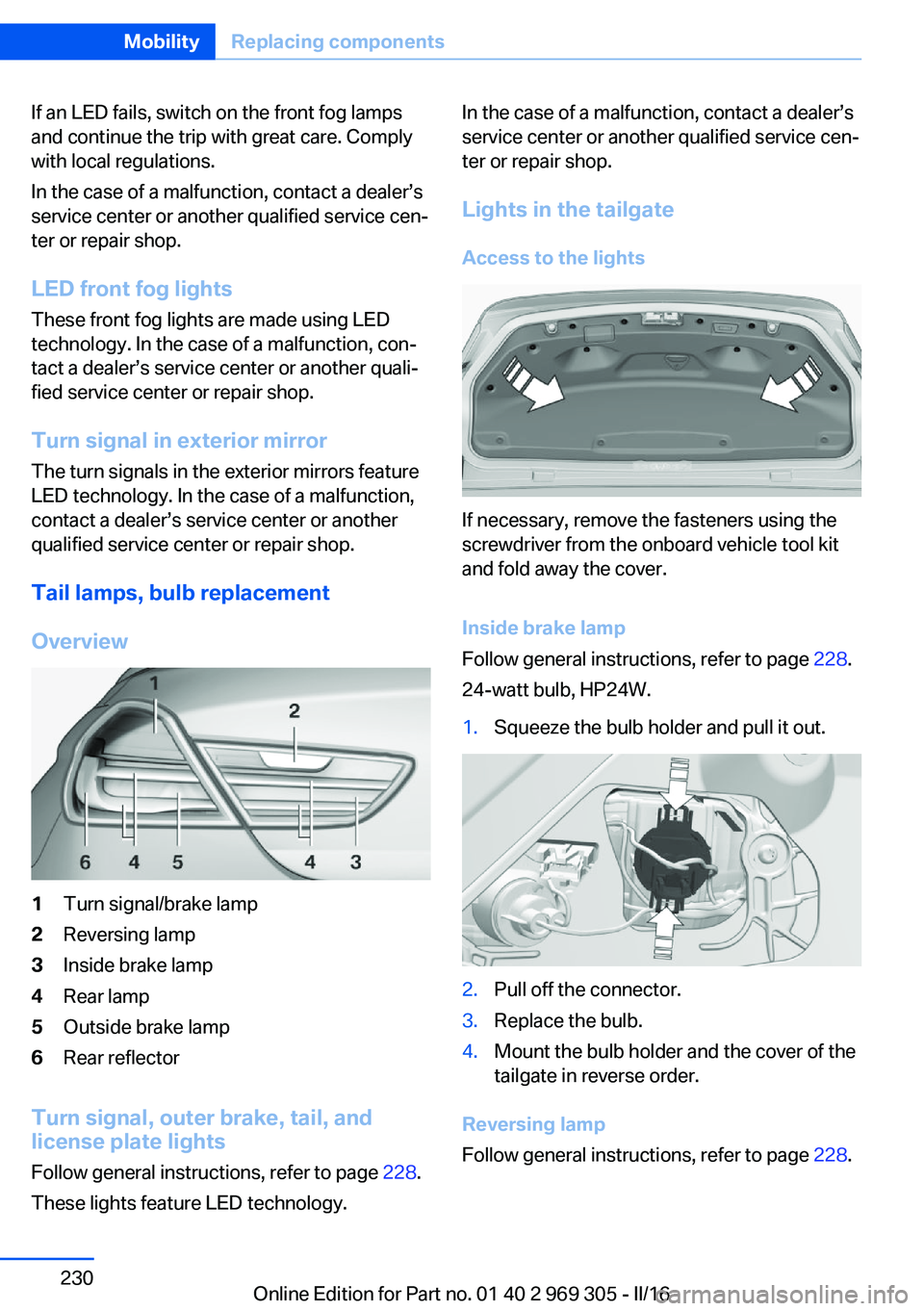
Tail lamps, bulb replacement
Overview1Turn signal/brake lamp2Reversing lamp3Inside brake lamp4Rear lamp5Outside brake lamp6Rear reflector
Turn signal, outer brake, tail, and
license plate lights
Follow general instructions, refer to page 228.
These lights feature LED technology.
In the case of a malfunction, contact a dealer’s
service center or another qualified service cen‐
ter or repair shop.
Lights in the tailgate
Access to the lights
If necessary, remove the fasteners using the
screwdriver from the onboard vehicle tool kit
and fold away the cover.
Inside brake lamp
Follow general instructions, refer to page 228.
24-watt bulb, HP24W.
1.Squeeze the bulb holder and pull it out.2.Pull off the connector.3.Replace the bulb.4.Mount the bulb holder and the cover of the
tailgate in reverse order.
Reversing lamp
Follow general instructions, refer to page 228.
Seite 230MobilityReplacing components230
Online Edition for Part no. 01 40 2 969 305 - II/16
Page 231 of 261
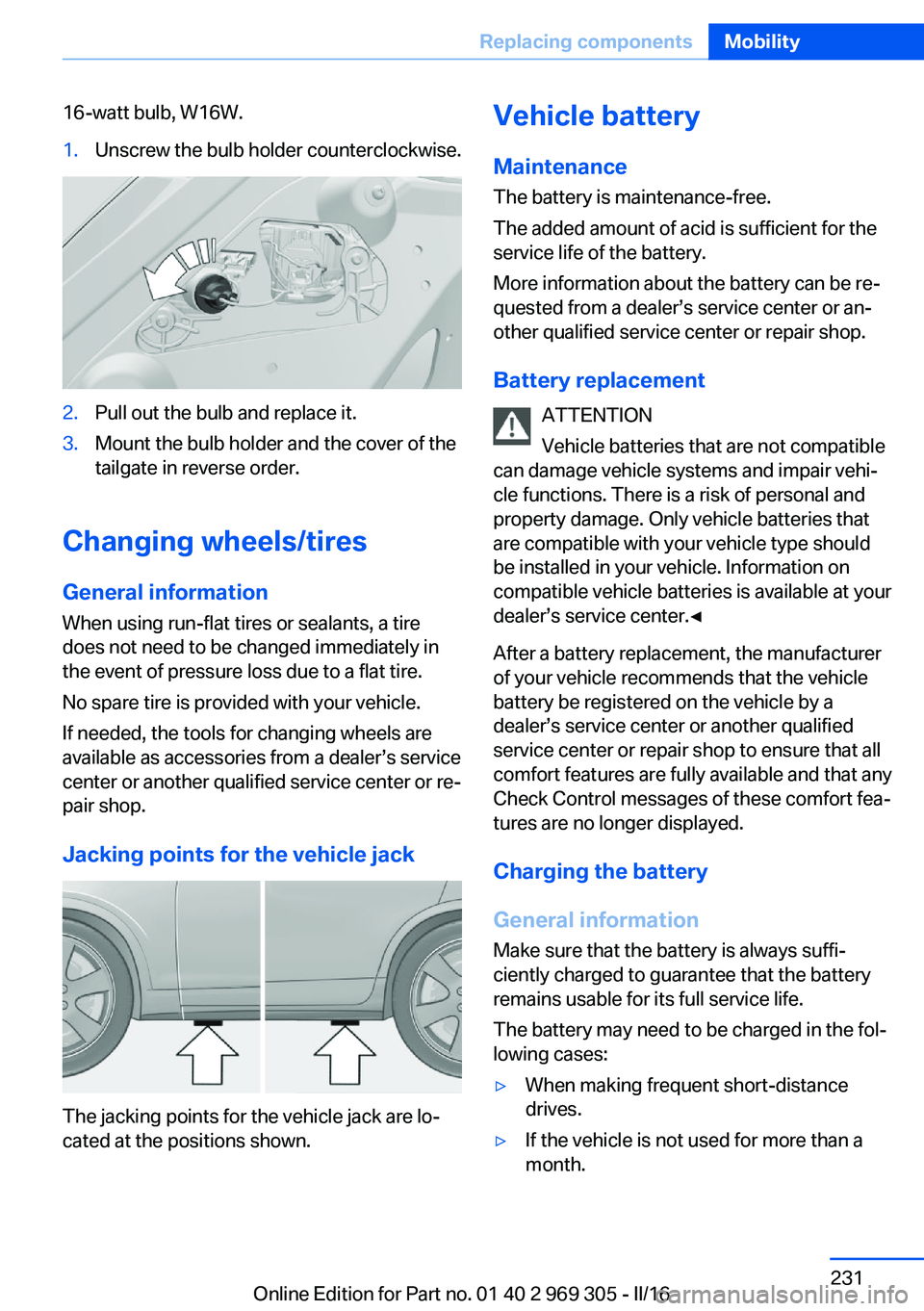
16-watt bulb, W16W.1.Unscrew the bulb holder counterclockwise.2.Pull out the bulb and replace it.3.Mount the bulb holder and the cover of the
tailgate in reverse order.
Changing wheels/tires
General information
When using run-flat tires or sealants, a tire
does not need to be changed immediately in
the event of pressure loss due to a flat tire.
No spare tire is provided with your vehicle.
If needed, the tools for changing wheels are
available as accessories from a dealer’s service
center or another qualified service center or re‐
pair shop.
Jacking points for the vehicle jack
The jacking points for the vehicle jack are lo‐
cated at the positions shown.
Vehicle battery
Maintenance
The battery is maintenance-free.
The added amount of acid is sufficient for the
service life of the battery.
More information about the battery can be re‐
quested from a dealer’s service center or an‐ other qualified service center or repair shop.
Battery replacement ATTENTION
Vehicle batteries that are not compatible
can damage vehicle systems and impair vehi‐
cle functions. There is a risk of personal and
property damage. Only vehicle batteries that
are compatible with your vehicle type should
be installed in your vehicle. Information on
compatible vehicle batteries is available at your
dealer’s service center.◀
After a battery replacement, the manufacturer
of your vehicle recommends that the vehicle
battery be registered on the vehicle by a
dealer’s service center or another qualified
service center or repair shop to ensure that all
comfort features are fully available and that any
Check Control messages of these comfort fea‐
tures are no longer displayed.
Charging the battery
General information
Make sure that the battery is always suffi‐
ciently charged to guarantee that the battery
remains usable for its full service life.
The battery may need to be charged in the fol‐
lowing cases:▷When making frequent short-distance
drives.▷If the vehicle is not used for more than a
month.Seite 231Replacing componentsMobility231
Online Edition for Part no. 01 40 2 969 305 - II/16
Page 234 of 261
steps to help you under certain circum‐
stances.
For this, data are transmitted to the BMW
Response Center which serve to deter‐
mine the necessary rescue measures. E.g.
the current position of the vehicle, if it can
be established.▷If the LED is flashing green, but the BMW
Response Center can no longer be heard
via the speaker, you can nevertheless still
be heard at the BMW Response Center.
Initiating an Emergency Request
automatically
Under certain conditions, an Emergency Re‐
quest is automatically initiated immediately af‐
ter a severe accident. Automatic Collision Noti‐
fication is not affected by pressing the SOS
button.
Roadside Assistance
Service availability Roadside Assistance can be reached around
the clock in many countries. You can obtain as‐
sistance there in the event of a vehicle break‐
down.
Roadside Assistance The Roadside Assistance phone number can
be viewed on the iDrive or a connection to
Roadside Assistance can be established di‐
rectly.
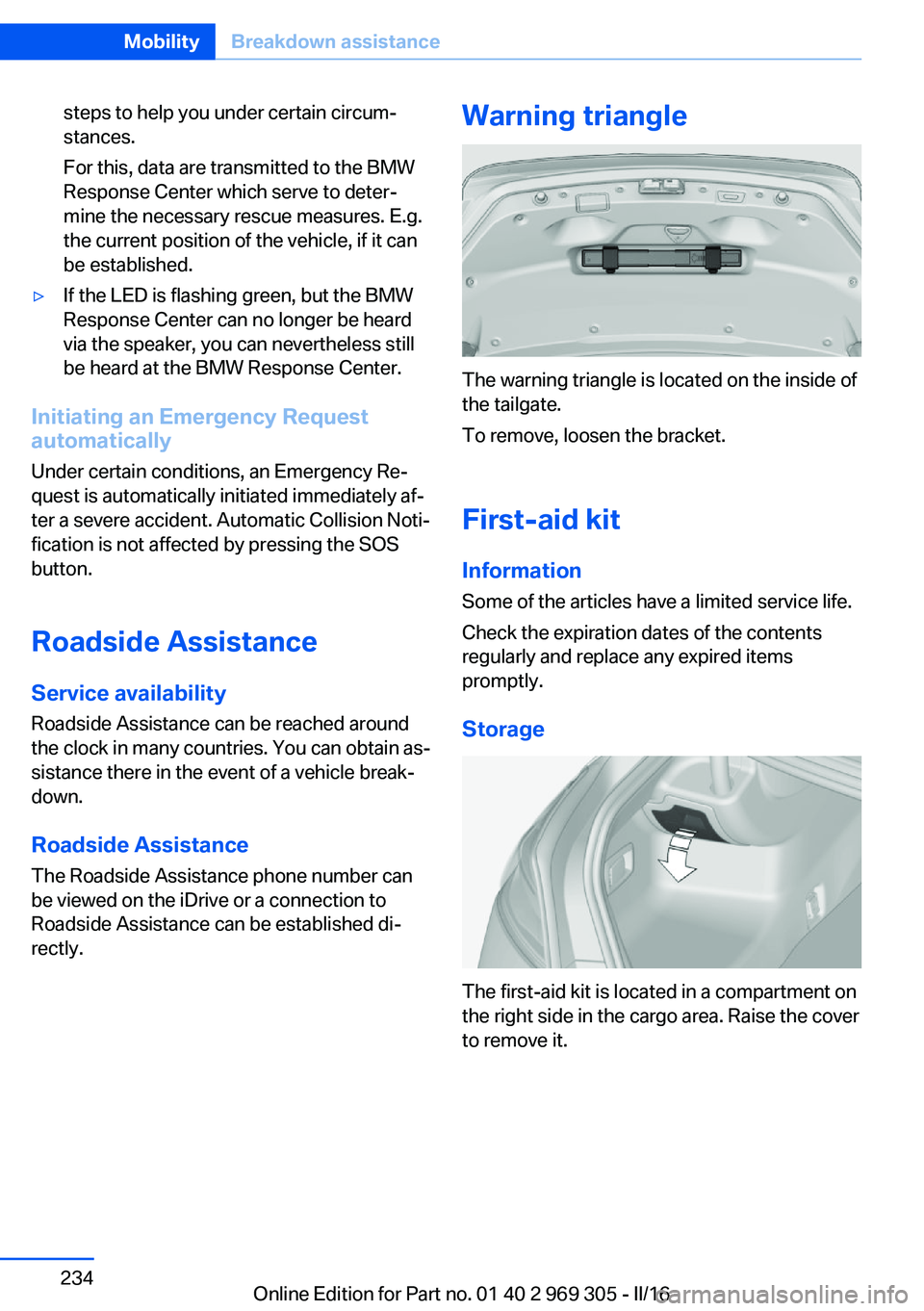
Warning triangle
The warning triangle is located on the inside of
the tailgate.
To remove, loosen the bracket.
First-aid kit InformationSome of the articles have a limited service life.
Check the expiration dates of the contents
regularly and replace any expired items
promptly.
Storage
The first-aid kit is located in a compartment on
the right side in the cargo area. Raise the cover
to remove it.
Seite 234MobilityBreakdown assistance234
Online Edition for Part no. 01 40 2 969 305 - II/16
Page 254 of 261
H
Handbrake, see Parking brake 70
Hand-held transmitter, alter‐ nating code 170
Hazard warning flashers 233
HDC Hill Descent Con‐ trol 135
Head airbags 105
Headlamp control, auto‐ matic 101
Headlight courtesy delay fea‐ ture 101
Headlight courtesy delay fea‐ ture via remote control 39
Headlight flasher 73
Headlight glass 229
Headlights 228
Headlights, care 240
Head restraints 51
Head restraints, front 56
Head-up Display 98
Head-up Display, care 242
Heavy cargo, stowing 189
Height, seats 51
Height, vehicle 246
High-beam Assistant 103
High beams 73
High beams/low beams, see High-beam Assistant 103
Hill Descent Control HDC 135
Hills 186
Hill start assistant, see Drive- off assistant 133
Holder for beverages 179
Homepage 6
Hood 217
Horn 14
Hotel function, tailgate 42
Hot exhaust system 185
HUD Head-up Display 98
Hydroplaning 185 I
Ice warning, see External temperature warning 89
Icy roads, see External tem‐ perature warning 89
Identification marks, tires 208
Identification number, see Ve‐ hicle identification num‐
ber 10
iDrive 18
Ignition key, see Remote con‐ trol 34
Ignition off 66
Ignition on 66
Indication of a flat tire 109 , 112
Indicator and alarm lamps, see Check Control 85
Indicator lamp, see Check Control 85
Individual air distribution 164
Individual settings, see Per‐ sonal Profile 36
Inflation pressure, tires 202
Inflation pressure warning FTM, tires 112
Info display, see On-Board computer 94
Information 6
Initialization, Integral Active Steering 137
Initialize, Tire Pressure Moni‐ tor TPM 109
Initializing, Flat Tire Monitor FTM 112
Instrument cluster 81
Instrument cluster, electronic displays 81
Instrument display, multifunc‐ tional 82
Instrument lighting 104
Integral Active Steering 137
Integrated key 34
Integrated Owner's Manual in the vehicle 29 Intelligent emergency
call 233
Intelligent Safety 114
Intensity, AUTO pro‐ gram 163
Interior equipment 169
Interior lights 104
Interior lights during unlock‐ ing 38
Interior lights with the vehicle locked 38
Interior mirror, automatic dim‐ ming feature 60
Interior motion sensor 46
Internet page 6
Interval display, service re‐ quirements 91
Interval mode 74
J
Jacking points for the vehicle jack 231
Joystick, Steptronic transmis‐ sion 77
Jump-starting 235
K
Key/remote control 34
Keyless Go, see Comfort Ac‐ cess 42
Key Memory, see Personal Profile 36
Kickdown, Steptronic trans‐ mission 77
Knee airbag 106
L Label on recommended tires 211
Lamp in the exterior mirror, see Active Blind Spot De‐
tection 128
Lamp replacement, front 228 Seite 254ReferenceEverything from A to Z254
Online Edition for Part no. 01 40 2 969 305 - II/16