stop start BMW 640I CONVERTIBLE 2012 User Guide
[x] Cancel search | Manufacturer: BMW, Model Year: 2012, Model line: 640I CONVERTIBLE, Model: BMW 640I CONVERTIBLE 2012Pages: 282, PDF Size: 8.25 MB
Page 175 of 282
Automatic repeat*
The selected CDs or DVDs are repeated auto‐
matically.
Video playback*
Country codes
Only
DVDs with the code of the home region can
be played back; also refer to the information on
the DVD. Code Region
1 USA, Canada
2 Japan, Europe, Middle East, South Af‐
rica
3 Southeast Asia
4 Australia, Central and South America, New Zealand
5 Northwest Asia, North Africa
6 China
0 All regions Playback
The video image is displayed on the front Con‐
trol
Display up to a speed of approx. 2 mph/3 km/
h; in some countries, it is only displayed if the
parking brake is set or if the automatic trans‐
mission is in position P.
DVD video
1. "CD/Multimedia"
2. "CD/DVD" 3.
Select a DVD with video content.
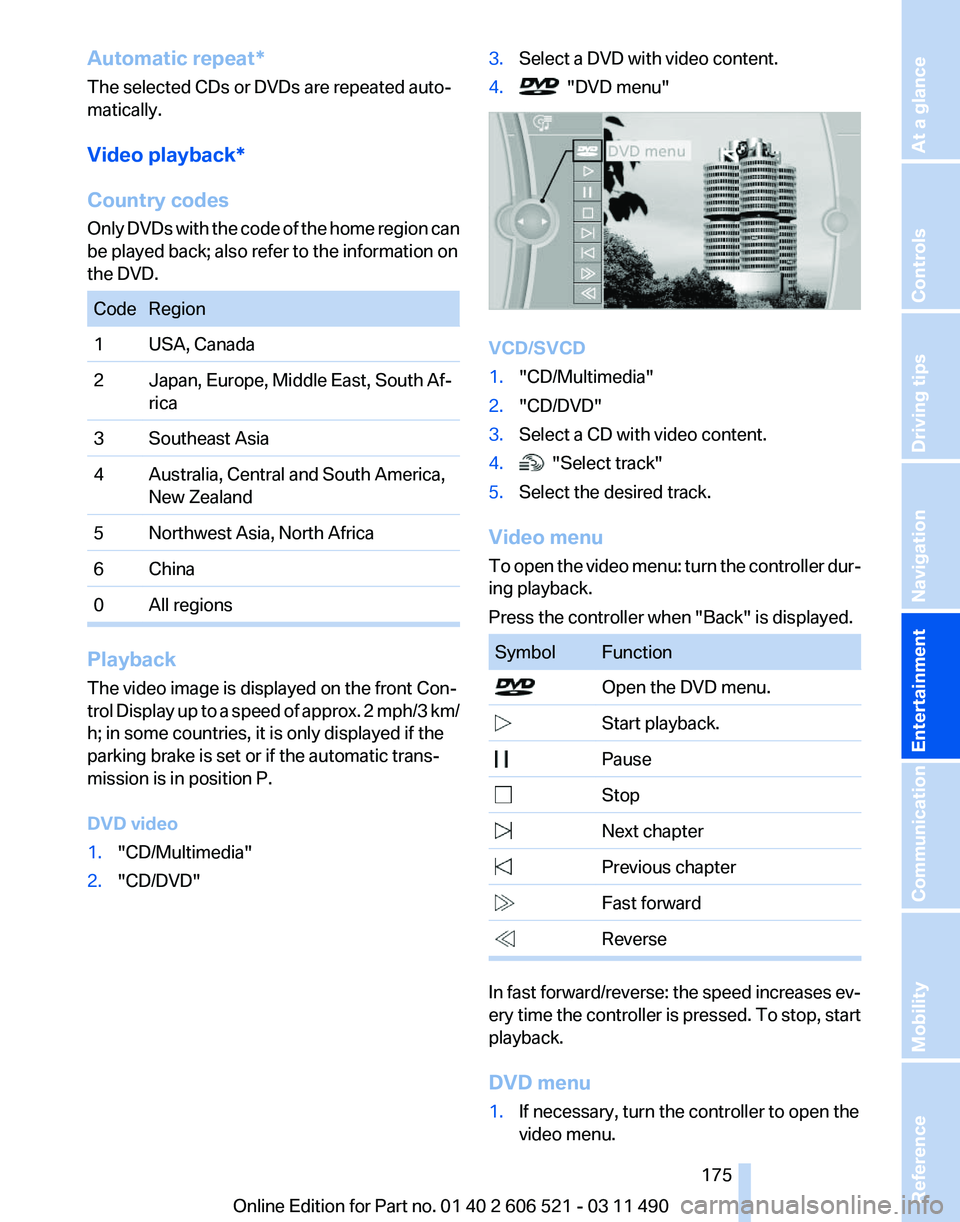
4. "DVD menu"
VCD/SVCD
1.
"CD/Multimedia"
2. "CD/DVD"
3. Select a CD with video content.
4. "Select track"
5. Select the desired track.
Video menu
To
open the video menu: turn the controller dur‐
ing playback.
Press the controller when "Back" is displayed. Symbol Function
Open the DVD menu.
Start playback.
Pause Stop
Next chapter
Previous chapter
Fast forward
Reverse
In fast forward/reverse: the speed increases ev‐
ery
time the controller is pressed. To stop, start
playback.
DVD menu
1. If necessary, turn the controller to open the
video menu.
Seite 175
175Online Edition for Part no. 01 40 2 606 521 - 03 11 490
Reference Mobility Communication
Entertainment Navigation Driving tips Controls At a glance
Page 178 of 282
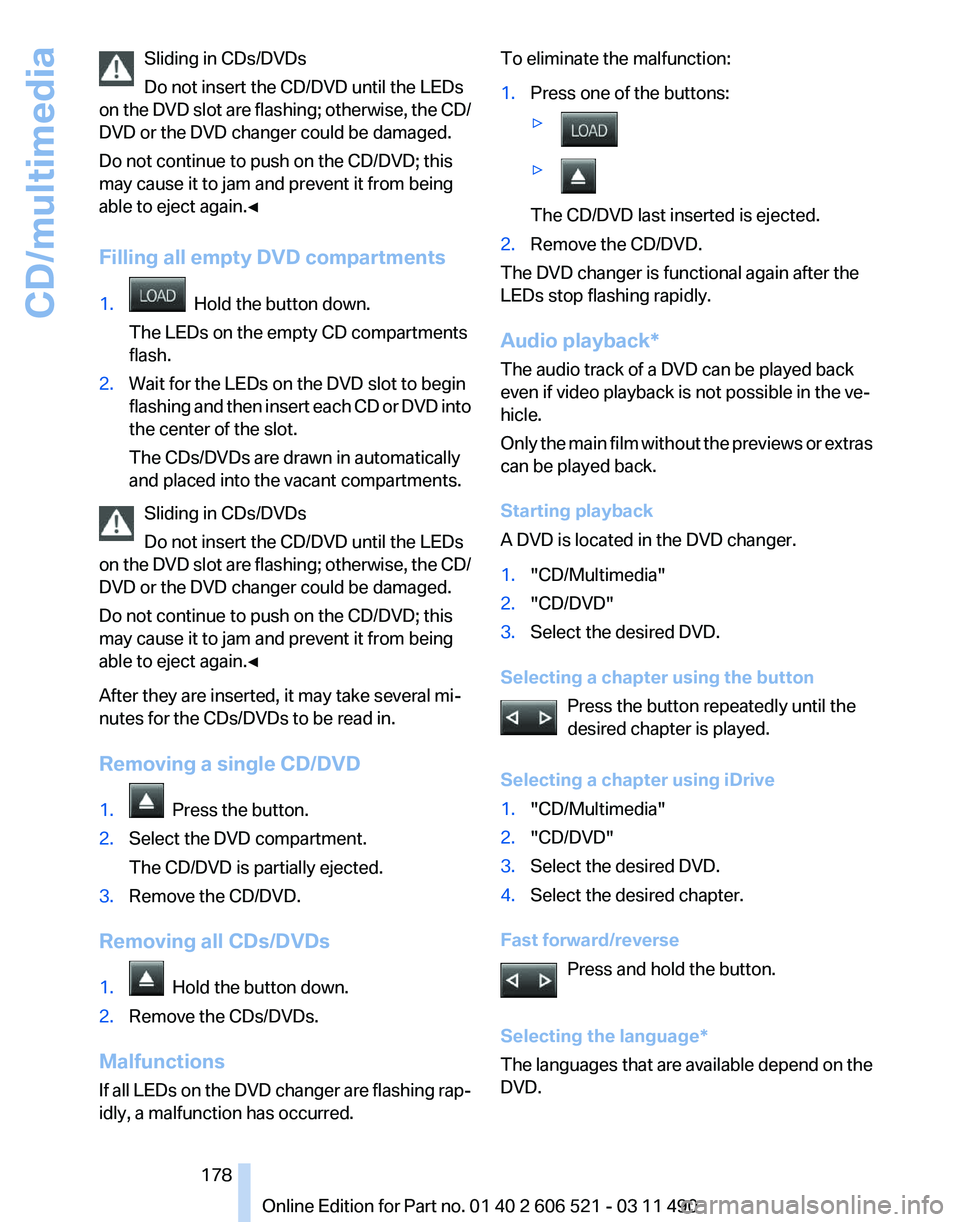
Sliding in CDs/DVDs
Do not insert the CD/DVD until the LEDs
on
the DVD slot are flashing; otherwise, the CD/
DVD or the DVD changer could be damaged.
Do not continue to push on the CD/DVD; this
may cause it to jam and prevent it from being
able to eject again.◀
Filling all empty DVD compartments
1. Hold the button down.
The LEDs on the empty CD compartments
flash.
2. Wait for the LEDs on the DVD slot to begin
flashing
and then insert each CD or DVD into
the center of the slot.
The CDs/DVDs are drawn in automatically
and placed into the vacant compartments.
Sliding in CDs/DVDs
Do not insert the CD/DVD until the LEDs
on
the DVD slot are flashing; otherwise, the CD/
DVD or the DVD changer could be damaged.
Do not continue to push on the CD/DVD; this
may cause it to jam and prevent it from being
able to eject again.◀
After they are inserted, it may take several mi‐
nutes for the CDs/DVDs to be read in.
Removing a single CD/DVD
1. Press the button.
2. Select the DVD compartment.
The CD/DVD is partially ejected.
3. Remove the CD/DVD.
Removing all CDs/DVDs
1. Hold the button down.
2. Remove the CDs/DVDs.
Malfunctions
If
all LEDs on the DVD changer are flashing rap‐
idly, a malfunction has occurred. To eliminate the malfunction:
1.
Press one of the buttons:
▷ ▷
The CD/DVD last inserted is ejected.
2. Remove the CD/DVD.
The DVD changer is functional again after the
LEDs stop flashing rapidly.
Audio playback*
The audio track of a DVD can be played back
even if video playback is not possible in the ve‐
hicle.
Only
the main film without the previews or extras
can be played back.
Starting playback
A DVD is located in the DVD changer.
1. "CD/Multimedia"
2. "CD/DVD"
3. Select the desired DVD.
Selecting a chapter using the button Press the button repeatedly until the
desired chapter is played.
Selecting a chapter using iDrive
1. "CD/Multimedia"
2. "CD/DVD"
3. Select the desired DVD.
4. Select the desired chapter.
Fast forward/reverse Press and hold the button.
Selecting the language
*
The languages that are available depend on the
DVD. Seite 178
178 Online Edition for Part no. 01 40 2 606 521 - 03 11 490
CD/multimedia
Page 251 of 282
attempt in order to allow the discharged bat‐
tery to recharge.
3. Let both engines run for several minutes.
4. Disconnect the jumper cables in the reverse
order.
Check the battery and recharge if necessary.
Tow-starting and towing
Manual transmission
Observe before towing your vehicle
The parking brake is blocked
The parking brake cannot be released
manually.
When the parking brake is blocked, do not tow
with the front axle lifted or the vehicle can be
damaged.
Contact your service center.◀
Gearshift lever in neutral position.
Towing
Follow the towing instructions
Follow all towing instructions; otherwise,
vehicle damage or accidents may occur.◀
▷ Make sure that the ignition is switched on;
otherwise, the low beams, tail lamps, turn
signals, and windshield wipers may be un‐
available.
▷ Do not tow the vehicle with the rear axle
tilted, as the front wheels could turn.
▷ When the engine is stopped, there is no
power assist. Consequently, more force
needs
to be applied when braking and steer‐
ing.
▷ Larger steering wheel movements are re‐
quired. Tow truck
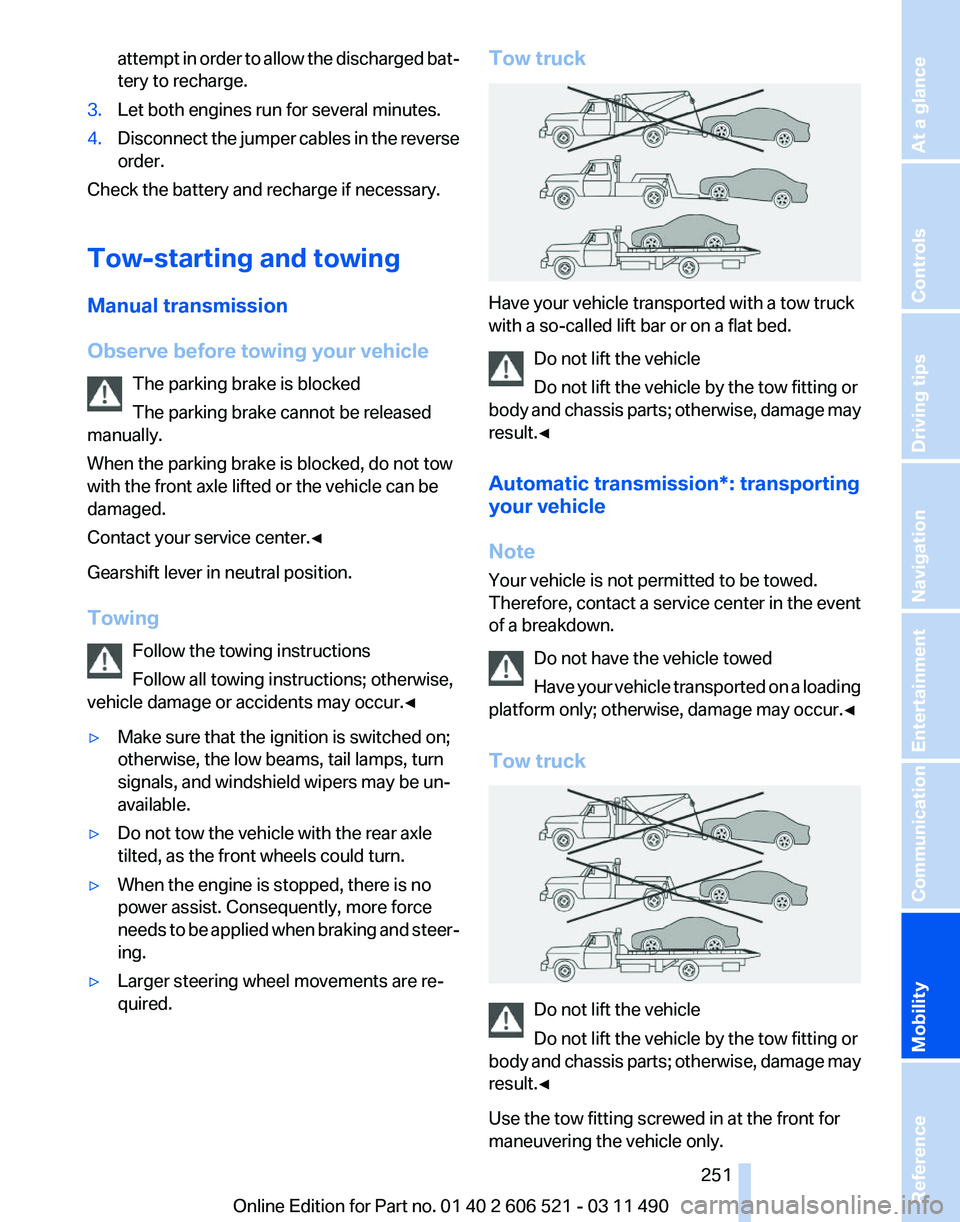
Have your vehicle transported with a tow truck
with a so-called lift bar or on a flat bed.
Do not lift the vehicle
Do not lift the vehicle by the tow fitting or
body
and chassis parts; otherwise, damage may
result.◀
Automatic transmission*: transporting
your vehicle
Note
Your vehicle is not permitted to be towed.
Therefore, contact a service center in the event
of a breakdown.
Do not have the vehicle towed
Have your vehicle transported on a loading
platform only; otherwise, damage may occur.◀
Tow truck Do not lift the vehicle
Do not lift the vehicle by the tow fitting or
body
and chassis parts; otherwise, damage may
result.◀
Use the tow fitting screwed in at the front for
maneuvering the vehicle only. Seite 251
251Online Edition for Part no. 01 40 2 606 521 - 03 11 490
Reference
Mobility Communication Entertainment Navigation Driving tips Controls At a glance
Page 253 of 282
Manual transmission
If
possible, do not tow-start the vehicle but start
the engine by jump-starting, refer to page 249.
If the vehicle is equipped with a catalytic con‐
verter, only tow-start while the engine is cold.
1. Switch on the hazard warning system and
comply with local regulations.
2. Ignition, refer to page 65, on.
3. Engage third gear.
4. Have the vehicle tow-started with the clutch
pressed
and slowly release the clutch. After
the engine starts, immediately press on the
clutch again.
5. Stop at a suitable location, remove the tow
bar or rope, and switch off the hazard warn‐
ing system.
6. Have the vehicle checked.
Seite 253
253Online Edition for Part no. 01 40 2 606 521 - 03 11 490
Reference
Mobility Communication Entertainment Navigation Driving tips Controls At a glance
Page 264 of 282
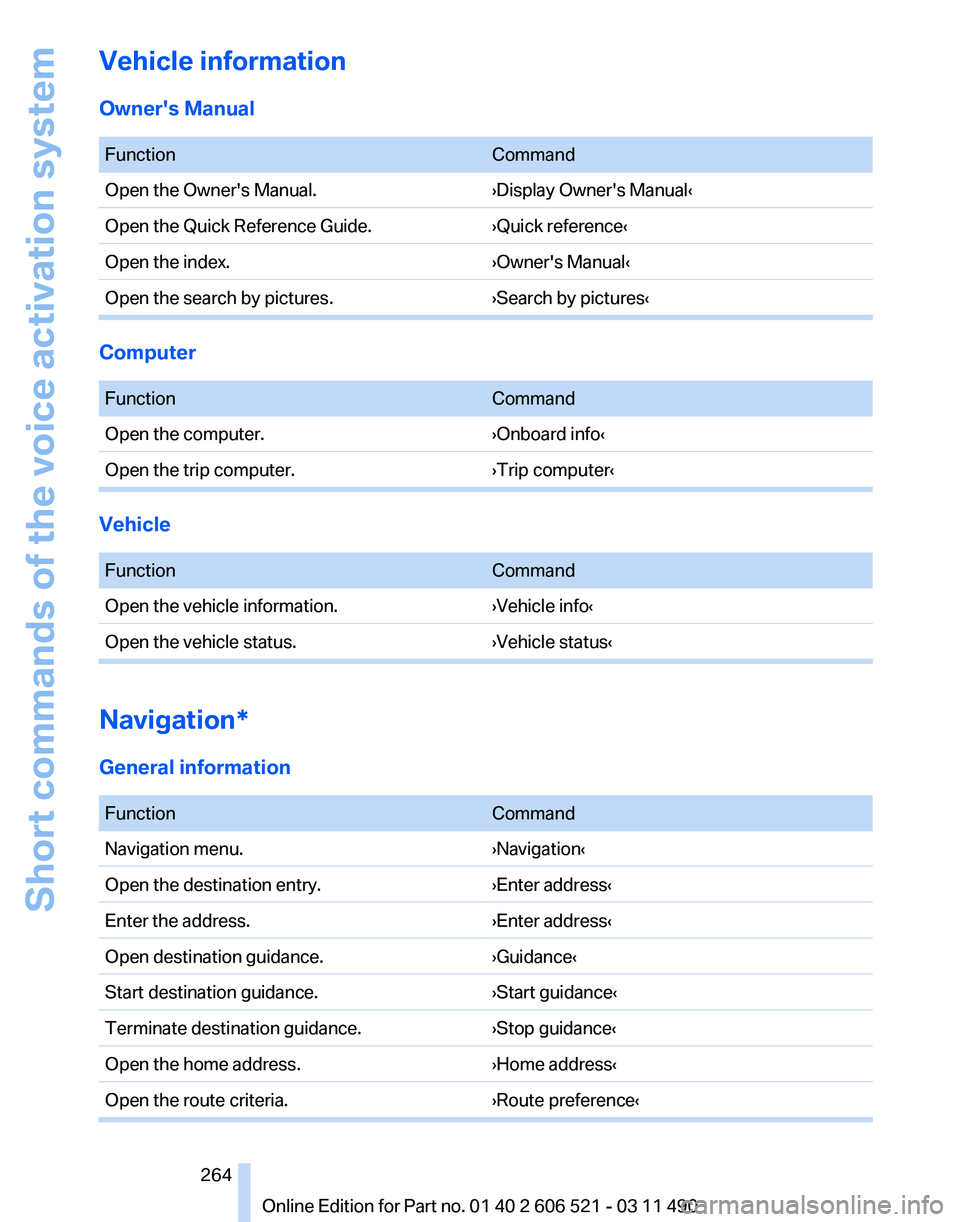
Vehicle information
Owner's Manual
Function
Command
Open the Owner's Manual. ›Display Owner's Manual‹
Open the Quick Reference Guide. ›Quick reference‹
Open the index. ›Owner's Manual‹
Open the search by pictures. ›Search by pictures‹Computer
Function
Command
Open the computer. ›Onboard info‹
Open the trip computer. ›Trip computer‹Vehicle
Function
Command
Open the vehicle information. ›Vehicle info‹
Open the vehicle status. ›Vehicle status‹Navigation*
General information
Function
Command
Navigation menu. ›Navigation‹
Open the destination entry. ›Enter address‹
Enter the address. ›Enter address‹
Open destination guidance. ›Guidance‹
Start destination guidance. ›Start guidance‹
Terminate destination guidance. ›Stop guidance‹
Open the home address. ›Home address‹
Open the route criteria. ›Route preference‹ Seite 264
264 Online Edition for Part no. 01 40 2 606 521 - 03 11 490Short commands of the voice activation system
Page 273 of 282
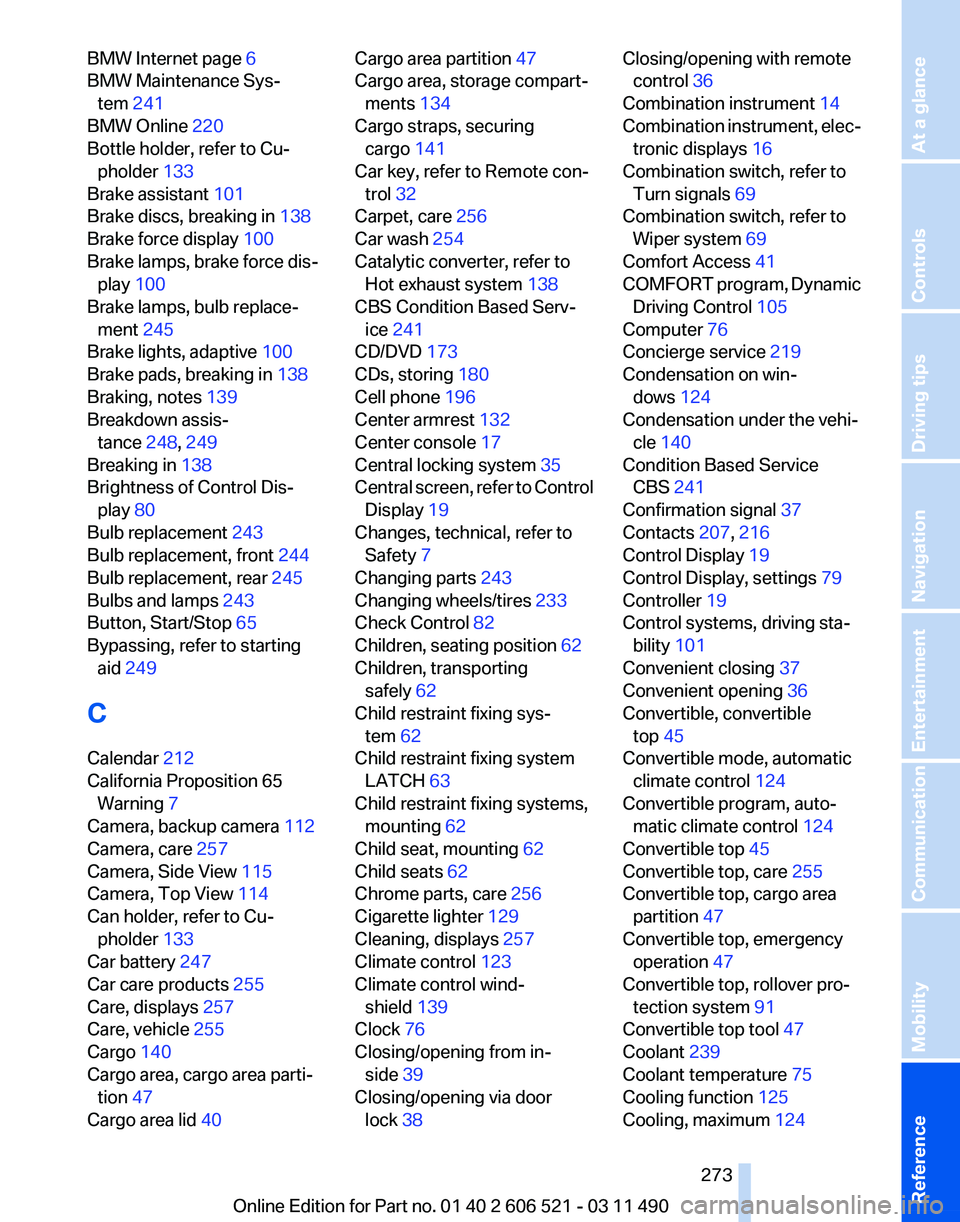
BMW Internet page
6
BMW Maintenance Sys‐ tem 241
BMW Online 220
Bottle holder, refer to Cu‐ pholder 133
Brake assistant 101
Brake discs, breaking in 138
Brake force display 100
Brake lamps, brake force dis‐ play 100
Brake lamps, bulb replace‐ ment 245
Brake lights, adaptive 100
Brake pads, breaking in 138
Braking, notes 139
Breakdown assis‐ tance 248, 249
Breaking in 138
Brightness of Control Dis‐ play 80
Bulb replacement 243
Bulb replacement, front 244
Bulb replacement, rear 245
Bulbs and lamps 243
Button, Start/Stop 65
Bypassing, refer to starting aid 249
C
Calendar 212
California Proposition 65 Warning 7
Camera, backup camera 112
Camera, care 257
Camera, Side View 115
Camera, Top View 114
Can holder, refer to Cu‐ pholder 133
Car battery 247
Car care products 255
Care, displays 257
Care, vehicle 255
Cargo 140
Cargo area, cargo area parti‐ tion 47
Cargo area lid 40 Cargo area partition
47
Cargo area, storage compart‐ ments 134
Cargo straps, securing cargo 141
Car key, refer to Remote con‐ trol 32
Carpet, care 256
Car wash 254
Catalytic converter, refer to Hot exhaust system 138
CBS Condition Based Serv‐ ice 241
CD/DVD 173
CDs, storing 180
Cell phone 196
Center armrest 132
Center console 17
Central locking system 35
Central
screen, refer to Control
Display 19
Changes, technical, refer to Safety 7
Changing parts 243
Changing wheels/tires 233
Check Control 82
Children, seating position 62
Children, transporting safely 62
Child restraint fixing sys‐ tem 62
Child restraint fixing system LATCH 63
Child restraint fixing systems, mounting 62
Child seat, mounting 62
Child seats 62
Chrome parts, care 256
Cigarette lighter 129
Cleaning, displays 257
Climate control 123
Climate control wind‐ shield 139
Clock 76
Closing/opening from in‐ side 39
Closing/opening via door lock 38 Closing/opening with remote
control 36
Combination instrument 14
Combination
instrument, elec‐
tronic displays 16
Combination switch, refer to Turn signals 69
Combination switch, refer to Wiper system 69
Comfort Access 41
COMFORT program, Dynamic Driving Control 105
Computer 76
Concierge service 219
Condensation on win‐ dows 124
Condensation under the vehi‐ cle 140
Condition Based Service CBS 241
Confirmation signal 37
Contacts 207, 216
Control Display 19
Control Display, settings 79
Controller 19
Control systems, driving sta‐ bility 101
Convenient closing 37
Convenient opening 36
Convertible, convertible top 45
Convertible mode, automatic climate control 124
Convertible program, auto‐ matic climate control 124
Convertible top 45
Convertible top, care 255
Convertible top, cargo area partition 47
Convertible top, emergency operation 47
Convertible top, rollover pro‐ tection system 91
Convertible top tool 47
Coolant 239
Coolant temperature 75
Cooling function 125
Cooling, maximum 124
Seite 273
273Online Edition for Part no. 01 40 2 606 521 - 03 11 490
Reference Mobility Communication Entertainment Navigation Driving tips Controls At a glance
Page 274 of 282
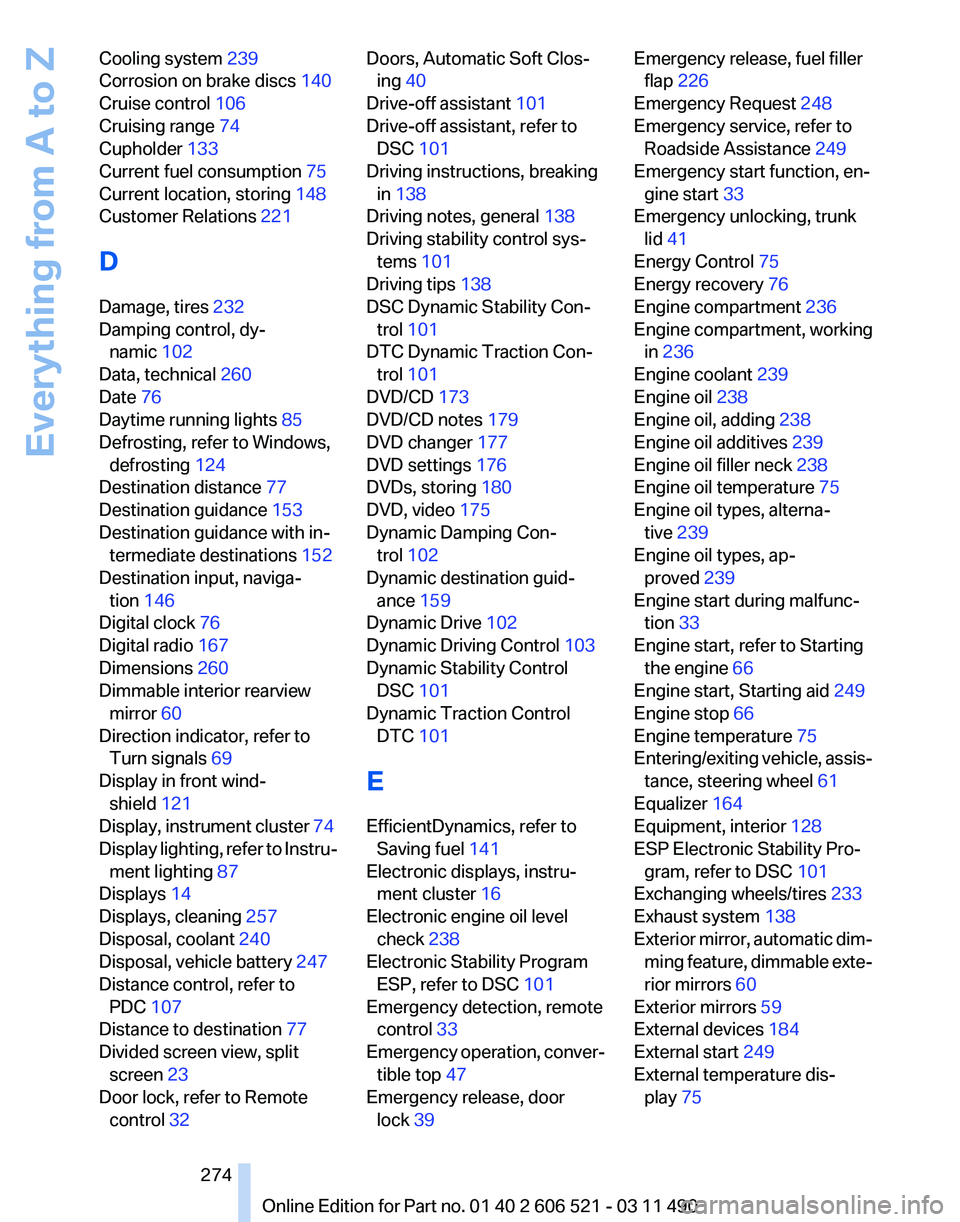
Cooling system
239
Corrosion on brake discs 140
Cruise control 106
Cruising range 74
Cupholder 133
Current fuel consumption 75
Current location, storing 148
Customer Relations 221
D
Damage, tires 232
Damping control, dy‐ namic 102
Data, technical 260
Date 76
Daytime running lights 85
Defrosting, refer to Windows, defrosting 124
Destination distance 77
Destination guidance 153
Destination guidance with in‐ termediate destinations 152
Destination input, naviga‐ tion 146
Digital clock 76
Digital radio 167
Dimensions 260
Dimmable interior rearview mirror 60
Direction indicator, refer to Turn signals 69
Display in front wind‐ shield 121
Display,
instrument cluster 74
Display lighting, refer to Instru‐ ment lighting 87
Displays 14
Displays, cleaning 257
Disposal, coolant 240
Disposal, vehicle battery 247
Distance control, refer to PDC 107
Distance to destination 77
Divided screen view, split screen 23
Door lock, refer to Remote control 32 Doors, Automatic Soft Clos‐
ing 40
Drive-off assistant 101
Drive-off assistant, refer to DSC 101
Driving instructions, breaking in 138
Driving notes, general 138
Driving stability control sys‐ tems 101
Driving tips 138
DSC Dynamic Stability Con‐ trol 101
DTC Dynamic Traction Con‐ trol 101
DVD/CD 173
DVD/CD notes 179
DVD changer 177
DVD settings 176
DVDs, storing 180
DVD, video 175
Dynamic Damping Con‐ trol 102
Dynamic destination guid‐ ance 159
Dynamic Drive 102
Dynamic Driving Control 103
Dynamic Stability Control DSC 101
Dynamic Traction Control DTC 101
E
EfficientDynamics, refer to Saving fuel 141
Electronic displays, instru‐ ment cluster 16
Electronic engine oil level check 238
Electronic Stability Program ESP, refer to DSC 101
Emergency detection, remote control 33
Emergency
operation, conver‐
tible top 47
Emergency release, door lock 39 Emergency release, fuel filler
flap 226
Emergency Request 248
Emergency service, refer to Roadside Assistance 249
Emergency start function, en‐ gine start 33
Emergency unlocking, trunk lid 41
Energy Control 75
Energy recovery 76
Engine compartment 236
Engine compartment, working in 236
Engine coolant 239
Engine oil 238
Engine oil, adding 238
Engine oil additives 239
Engine oil filler neck 238
Engine oil temperature 75
Engine oil types, alterna‐ tive 239
Engine oil types, ap‐ proved 239
Engine start during malfunc‐ tion 33
Engine start, refer to Starting the engine 66
Engine start, Starting aid 249
Engine stop 66
Engine temperature 75
Entering/exiting
vehicle, assis‐
tance, steering wheel 61
Equalizer 164
Equipment, interior 128
ESP Electronic Stability Pro‐ gram, refer to DSC 101
Exchanging wheels/tires 233
Exhaust system 138
Exterior mirror, automatic dim‐ ming feature, dimmable exte‐
rior mirrors 60
Exterior mirrors 59
External devices 184
External start 249
External temperature dis‐ play 75
Seite 274
274 Online Edition for Part no. 01 40 2 606 521 - 03 11 490
Everything from A to Z
Page 278 of 282
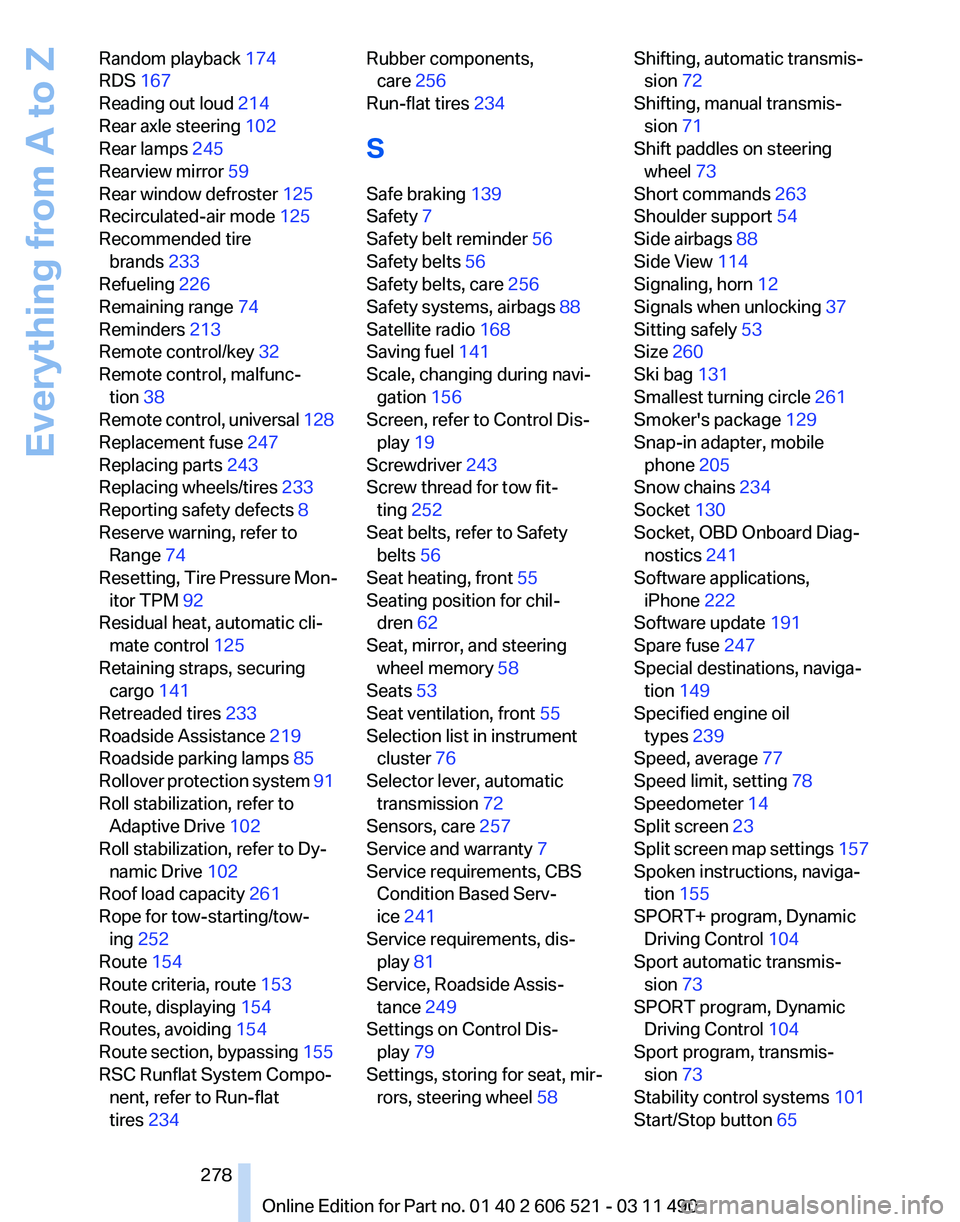
Random playback
174
RDS 167
Reading out loud 214
Rear axle steering 102
Rear lamps 245
Rearview mirror 59
Rear window defroster 125
Recirculated-air mode 125
Recommended tire brands 233
Refueling 226
Remaining range 74
Reminders 213
Remote control/key 32
Remote control, malfunc‐ tion 38
Remote
control, universal 128
Replacement fuse 247
Replacing parts 243
Replacing wheels/tires 233
Reporting safety defects 8
Reserve warning, refer to Range 74
Resetting, Tire Pressure Mon‐ itor TPM 92
Residual heat, automatic cli‐ mate control 125
Retaining straps, securing cargo 141
Retreaded tires 233
Roadside Assistance 219
Roadside parking lamps 85
Rollover protection system 91
Roll stabilization, refer to Adaptive Drive 102
Roll stabilization, refer to Dy‐ namic Drive 102
Roof load capacity 261
Rope for tow-starting/tow‐ ing 252
Route 154
Route criteria, route 153
Route, displaying 154
Routes, avoiding 154
Route section, bypassing 155
RSC Runflat System Compo‐ nent, refer to Run-flat
tires 234 Rubber components,
care 256
Run-flat tires 234
S
Safe braking 139
Safety 7
Safety belt reminder 56
Safety belts 56
Safety belts, care 256
Safety systems, airbags 88
Satellite radio 168
Saving fuel 141
Scale, changing during navi‐ gation 156
Screen, refer to Control Dis‐ play 19
Screwdriver 243
Screw thread for tow fit‐ ting 252
Seat belts, refer to Safety belts 56
Seat heating, front 55
Seating position for chil‐ dren 62
Seat, mirror, and steering wheel memory 58
Seats 53
Seat ventilation, front 55
Selection list in instrument cluster 76
Selector lever, automatic transmission 72
Sensors, care 257
Service and warranty 7
Service requirements, CBS Condition Based Serv‐
ice 241
Service requirements, dis‐ play 81
Service, Roadside Assis‐ tance 249
Settings on Control Dis‐ play 79
Settings, storing for seat, mir‐ rors, steering wheel 58 Shifting, automatic transmis‐
sion 72
Shifting, manual transmis‐ sion 71
Shift paddles on steering wheel 73
Short commands 263
Shoulder support 54
Side airbags 88
Side View 114
Signaling, horn 12
Signals when unlocking 37
Sitting safely 53
Size 260
Ski bag 131
Smallest turning circle 261
Smoker's package 129
Snap-in adapter, mobile phone 205
Snow chains 234
Socket 130
Socket, OBD Onboard Diag‐ nostics 241
Software applications, iPhone 222
Software update 191
Spare fuse 247
Special destinations, naviga‐ tion 149
Specified engine oil types 239
Speed, average 77
Speed limit, setting 78
Speedometer 14
Split screen 23
Split
screen map settings 157
Spoken instructions, naviga‐ tion 155
SPORT+ program, Dynamic Driving Control 104
Sport automatic transmis‐ sion 73
SPORT program, Dynamic Driving Control 104
Sport program, transmis‐ sion 73
Stability control systems 101
Start/Stop button 65
Seite 278
278 Online Edition for Part no. 01 40 2 606 521 - 03 11 490
Everything from A to Z
Page 279 of 282
Start function during malfunc‐
tion 33
Starting aid 249
Starting the engine 66
State/province, selecting for navigation 146
Stations, stored 172
Station, storing 166
Status display, tires 92
Status information, iDrive 22
Status of Owner's Manual 6
Steering, Integral Active Steering 102
Steering wheel, adjusting 60
Steering wheel heating 61
Steering wheel memory 58
Steptronic, automatic trans‐ mission 72
Stopping the engine 66
Storage compartments 132
Storage compartments, loca‐ tions 132
Storage, tires 234
Storing the vehicle 257
Street, entering for naviga‐ tion 147
Summer tires, tread 232
Supplementary text mes‐ sage 82
Surround View 110
Suspension settings 103
Switch for Dynamic Driving Control 103
Switch-on times, parked-car ventilation 126
Switch, refer to Cockpit 12
Symbols 6
T
Tachometer 75
Tail and brake lamps 245
Tailgate 40
Tailgate
via remote control 37
Tail lamps 245
Tail lamps, bulb replace‐ ment 245
Tasks 213 Technical changes, refer to
Safety 7
Technical data 260
TeleService 218
Temperature, automatic cli‐ mate control 124
Temperature display, external temperature 75
Temperature, engine oil 75
Terminal, starting aid 250
Text messages 210
Text message, supplemen‐ tary 82
Theft alarm system, refer to Alarm system 42
Theft protection, lug bolts 246
Theft protection, refer to Cen‐ tral locking system 35
Thermal
camera, refer to Night
Vision 118
Thigh support 54
Tilt alarm sensor 43
Tilt, seats 53
Time of arrival 78
Tire damage 232
Tire identification marks 231
Tire inflation pressure 229
Tire inflation pressure monitor, refer to FTM 95
Tire Pressure Monitor TPM 91
Tires, changing 233
Tires, everything on wheels and tires 229
Tires, run-flat tires 234
Tire tread 232
Toll roads, route 154
Tone 164
Tool kit 243
Tools 243
Top View 112
Total vehicle weight 261
Tow fitting 252
Towing 251
Town/city, navigation 146
Tow-starting 251
Tow truck 251 TPM Tire Pressure Moni‐
tor 91
Traction control 101
TRACTION
program, Dynamic
Driving Control 104
Traffic bulletins, naviga‐ tion 157
Traffic situation/gray card 158
Transmission, automatic 72
Transmission, manual 71
Transporting children safely 62
Tread, tires 232
Treble, tone 164
Trip computer 78
Triple turn signal activa‐ tion 69
Trip odometer 76
Truck for tow-starting/tow‐ ing 251
Trunk, cargo area partition 47
Trunk lid 40
Trunk lid, emergency unlock‐ ing 41
Trunk lid, hotel function 39
Trunk lid via remote con‐ trol 37
Turning circle 261
Turning circle lines, backup camera 111
Turn signals, operation 69
Turn signals, rear, bulb re‐ placement 245
U
Unintentional alarm 43
Units of measure 80
Universal remote control 128
Unlock button, automatic transmission 72
Unlocking/locking from in‐ side 39
Unlocking/locking via door lock 38
Unlocking/locking with remote control 36
Seite 279
279Online Edition for Part no. 01 40 2 606 521 - 03 11 490
Reference Mobility Communication Entertainment Navigation Driving tips Controls At a glance