radio BMW 640I CONVERTIBLE 2013 Owner's Manual
[x] Cancel search | Manufacturer: BMW, Model Year: 2013, Model line: 640I CONVERTIBLE, Model: BMW 640I CONVERTIBLE 2013Pages: 240, PDF Size: 9.64 MB
Page 202 of 240
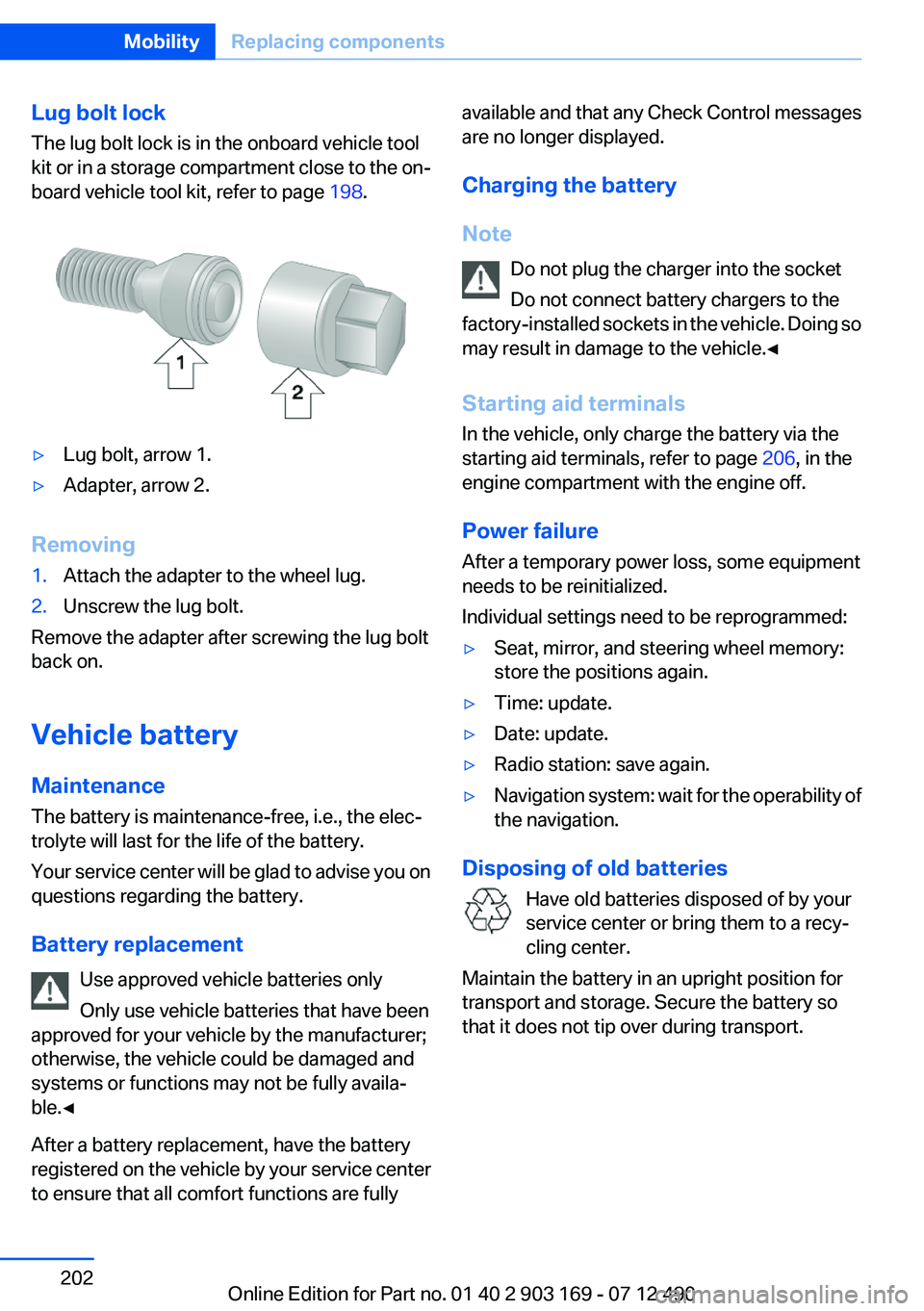
Lug bolt lock
The lug bolt lock is in the onboard vehicle tool
kit or in a storage compartment close to the on‐
board vehicle tool kit, refer to page 198.▷Lug bolt, arrow 1.▷Adapter, arrow 2.
Removing
1.Attach the adapter to the wheel lug.2.Unscrew the lug bolt.
Remove the adapter after screwing the lug bolt
back on.
Vehicle battery
Maintenance
The battery is maintenance-free, i.e., the elec‐
trolyte will last for the life of the battery.
Your service center will be glad to advise you on
questions regarding the battery.
Battery replacement Use approved vehicle batteries only
Only use vehicle batteries that have been
approved for your vehicle by the manufacturer;
otherwise, the vehicle could be damaged and
systems or functions may not be fully availa‐
ble.◀
After a battery replacement, have the battery
registered on the vehicle by your service center
to ensure that all comfort functions are fully
available and that any Check Control messages
are no longer displayed.
Charging the battery
Note Do not plug the charger into the socket
Do not connect battery chargers to the
factory-installed sockets in the vehicle. Doing so
may result in damage to the vehicle.◀
Starting aid terminals
In the vehicle, only charge the battery via the
starting aid terminals, refer to page 206, in the
engine compartment with the engine off.
Power failure
After a temporary power loss, some equipment
needs to be reinitialized.
Individual settings need to be reprogrammed:▷Seat, mirror, and steering wheel memory:
store the positions again.▷Time: update.▷Date: update.▷Radio station: save again.▷Navigation system: wait for the operability of
the navigation.
Disposing of old batteries
Have old batteries disposed of by your
service center or bring them to a recy‐
cling center.
Maintain the battery in an upright position for
transport and storage. Secure the battery so
that it does not tip over during transport.
Seite 202MobilityReplacing components202
Online Edition for Part no. 01 40 2 903 169 - 07 12 490
Page 204 of 240
Breakdown assistanceVehicle equipment
All standard, country-specific and optional
equipment that is offered in the model series is
described in this chapter. Therefore, equipment
is also described that is not available in a vehicle,
e. g., because of the selected optional equip‐
ment or country variant. This also applies for
safety-related functions and systems.
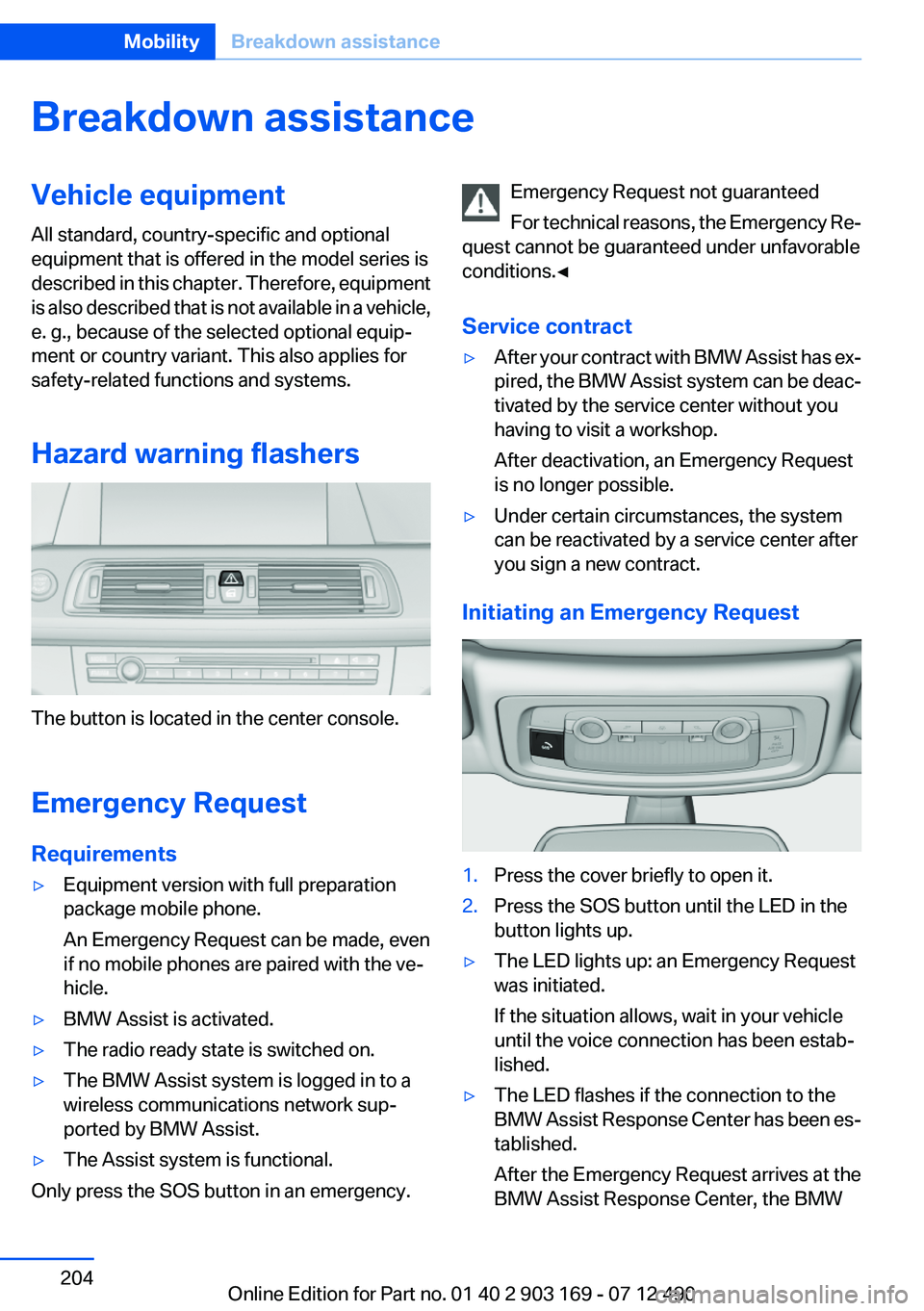
Hazard warning flashers
The button is located in the center console.
Emergency Request
Requirements
▷Equipment version with full preparation
package mobile phone.
An Emergency Request can be made, even
if no mobile phones are paired with the ve‐
hicle.▷BMW Assist is activated.▷The radio ready state is switched on.▷The BMW Assist system is logged in to a
wireless communications network sup‐
ported by BMW Assist.▷The Assist system is functional.
Only press the SOS button in an emergency.
Emergency Request not guaranteed
For technical reasons, the Emergency Re‐
quest cannot be guaranteed under unfavorable
conditions.◀
Service contract▷After your contract with BMW Assist has ex‐
pired, the BMW Assist system can be deac‐
tivated by the service center without you
having to visit a workshop.
After deactivation, an Emergency Request
is no longer possible.▷Under certain circumstances, the system
can be reactivated by a service center after
you sign a new contract.
Initiating an Emergency Request
1.Press the cover briefly to open it.2.Press the SOS button until the LED in the
button lights up.▷The LED lights up: an Emergency Request
was initiated.
If the situation allows, wait in your vehicle
until the voice connection has been estab‐
lished.▷The LED flashes if the connection to the
BMW Assist Response Center has been es‐
tablished.
After the Emergency Request arrives at the
BMW Assist Response Center, the BMWSeite 204MobilityBreakdown assistance204
Online Edition for Part no. 01 40 2 903 169 - 07 12 490
Page 225 of 240
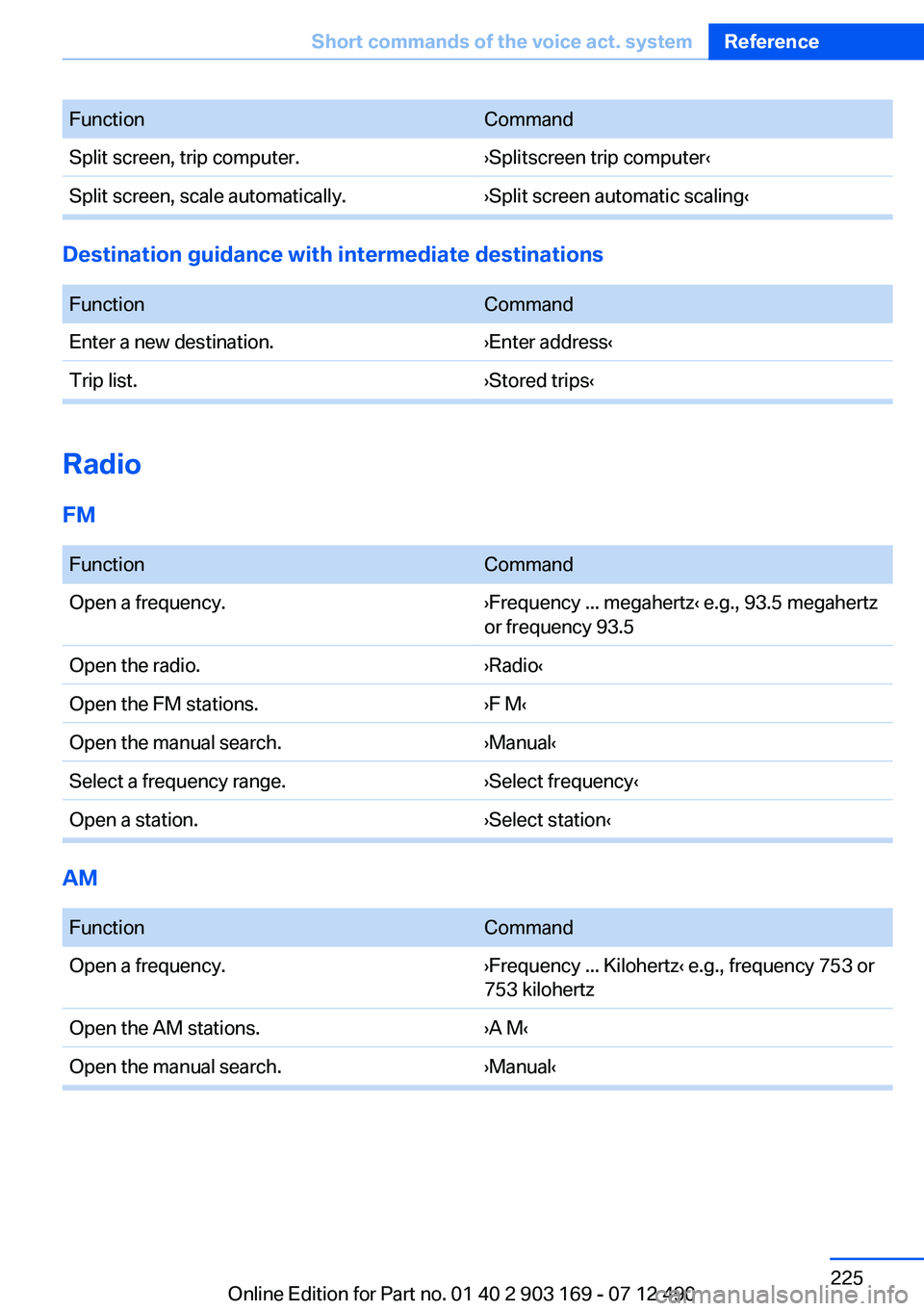
FunctionCommandSplit screen, trip computer.›Splitscreen trip computer‹Split screen, scale automatically.›Split screen automatic scaling‹
Destination guidance with intermediate destinations
FunctionCommandEnter a new destination.›Enter address‹Trip list.›Stored trips‹
Radio
FM
FunctionCommandOpen a frequency.›Frequency ... megahertz‹ e.g., 93.5 megahertz
or frequency 93.5Open the radio.›Radio‹Open the FM stations.›F M‹Open the manual search.›Manual‹Select a frequency range.›Select frequency‹Open a station.›Select station‹
AM
FunctionCommandOpen a frequency.›Frequency ... Kilohertz‹ e.g., frequency 753 or
753 kilohertzOpen the AM stations.›A M‹Open the manual search.›Manual‹Seite 225Short commands of the voice act. systemReference225
Online Edition for Part no. 01 40 2 903 169 - 07 12 490
Page 226 of 240
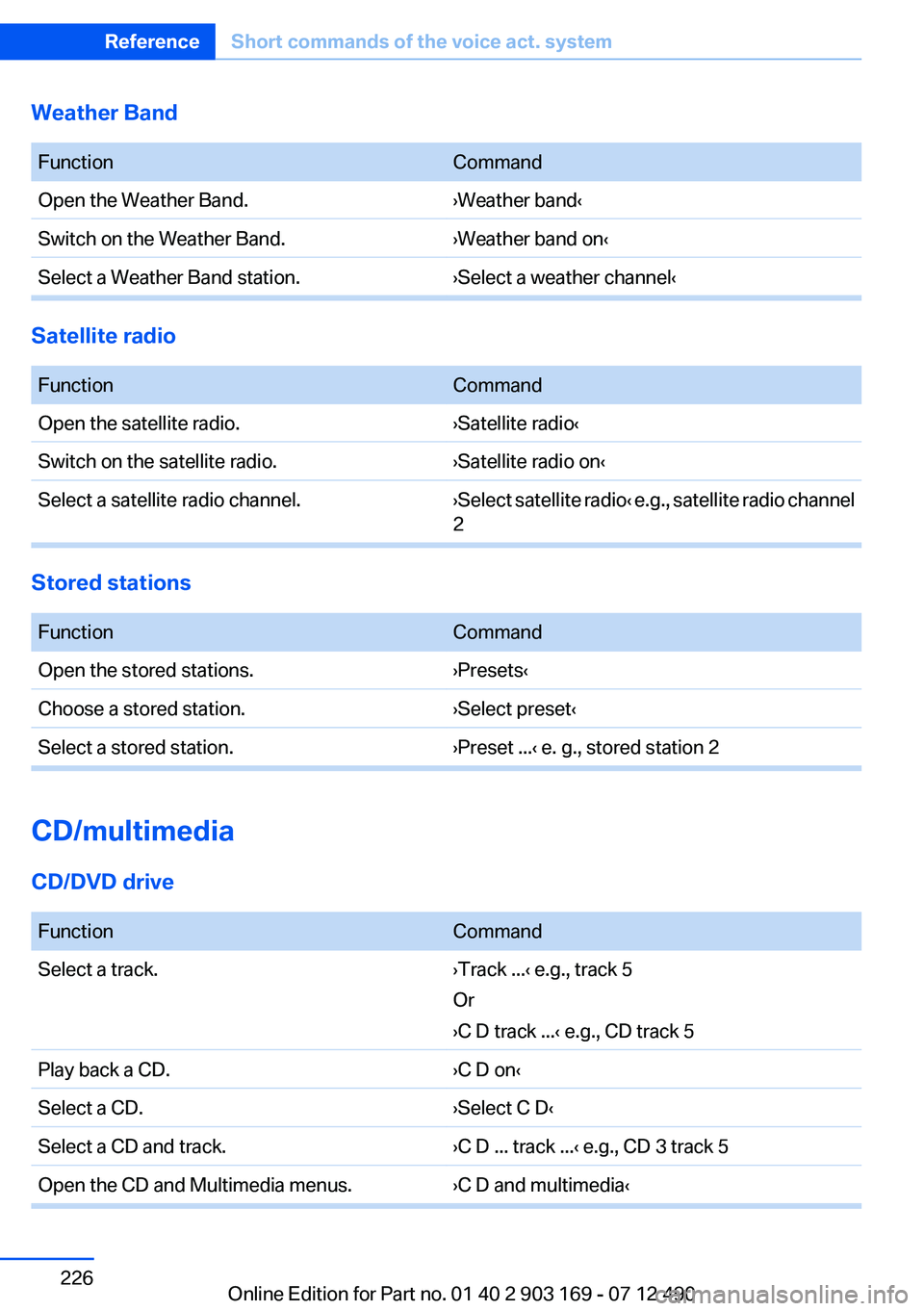
Weather Band
FunctionCommandOpen the Weather Band.›Weather band‹Switch on the Weather Band.›Weather band on‹Select a Weather Band station.›Select a weather channel‹
Satellite radio
FunctionCommandOpen the satellite radio.›Satellite radio‹Switch on the satellite radio.›Satellite radio on‹Select a satellite radio channel.› Select satellite radio ‹ e.g., satellite radio channel
2
Stored stations
FunctionCommandOpen the stored stations.›Presets‹Choose a stored station.›Select preset‹Select a stored station.›Preset ...‹ e. g., stored station 2
CD/multimedia
CD/DVD drive
FunctionCommandSelect a track.›Track ...‹ e.g., track 5
Or
›C D track ...‹ e.g., CD track 5Play back a CD.›C D on‹Select a CD.›Select C D‹Select a CD and track.›C D ... track ...‹ e.g., CD 3 track 5Open the CD and Multimedia menus.›C D and multimedia‹Seite 226ReferenceShort commands of the voice act. system226
Online Edition for Part no. 01 40 2 903 169 - 07 12 490
Page 236 of 240
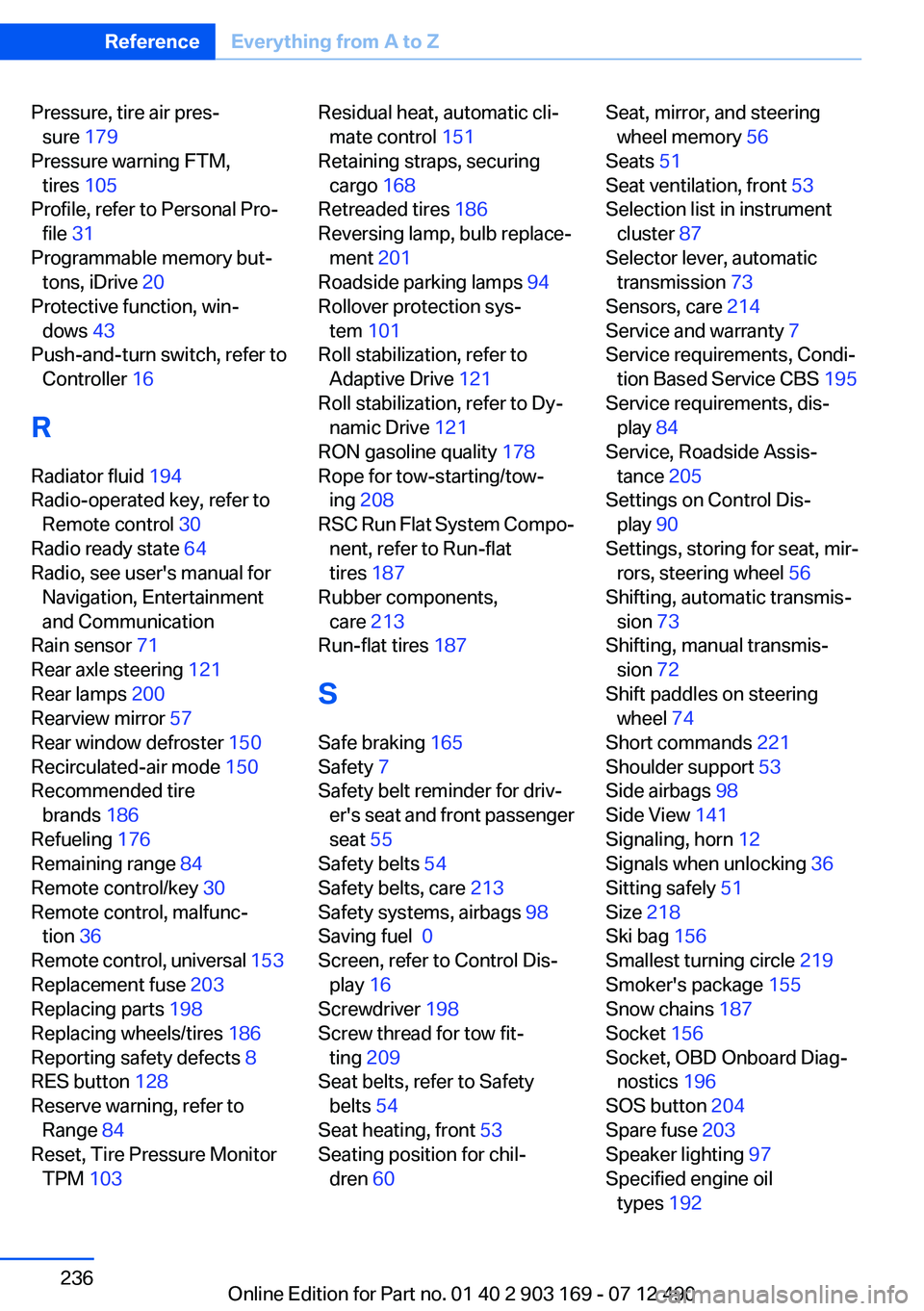
Pressure, tire air pres‐sure 179
Pressure warning FTM, tires 105
Profile, refer to Personal Pro‐ file 31
Programmable memory but‐ tons, iDrive 20
Protective function, win‐ dows 43
Push-and-turn switch, refer to Controller 16
R
Radiator fluid 194
Radio-operated key, refer to Remote control 30
Radio ready state 64
Radio, see user's manual for Navigation, Entertainment
and Communication
Rain sensor 71
Rear axle steering 121
Rear lamps 200
Rearview mirror 57
Rear window defroster 150
Recirculated-air mode 150
Recommended tire brands 186
Refueling 176
Remaining range 84
Remote control/key 30
Remote control, malfunc‐ tion 36
Remote control, universal 153
Replacement fuse 203
Replacing parts 198
Replacing wheels/tires 186
Reporting safety defects 8
RES button 128
Reserve warning, refer to Range 84
Reset, Tire Pressure Monitor TPM 103 Residual heat, automatic cli‐
mate control 151
Retaining straps, securing cargo 168
Retreaded tires 186
Reversing lamp, bulb replace‐ ment 201
Roadside parking lamps 94
Rollover protection sys‐ tem 101
Roll stabilization, refer to Adaptive Drive 121
Roll stabilization, refer to Dy‐ namic Drive 121
RON gasoline quality 178
Rope for tow-starting/tow‐ ing 208
RSC Run Flat System Compo‐ nent, refer to Run-flat
tires 187
Rubber components, care 213
Run-flat tires 187
S
Safe braking 165
Safety 7
Safety belt reminder for driv‐ er's seat and front passenger
seat 55
Safety belts 54
Safety belts, care 213
Safety systems, airbags 98
Saving fuel 0
Screen, refer to Control Dis‐ play 16
Screwdriver 198
Screw thread for tow fit‐ ting 209
Seat belts, refer to Safety belts 54
Seat heating, front 53
Seating position for chil‐ dren 60 Seat, mirror, and steering
wheel memory 56
Seats 51
Seat ventilation, front 53
Selection list in instrument cluster 87
Selector lever, automatic transmission 73
Sensors, care 214
Service and warranty 7
Service requirements, Condi‐ tion Based Service CBS 195
Service requirements, dis‐ play 84
Service, Roadside Assis‐ tance 205
Settings on Control Dis‐ play 90
Settings, storing for seat, mir‐ rors, steering wheel 56
Shifting, automatic transmis‐ sion 73
Shifting, manual transmis‐ sion 72
Shift paddles on steering wheel 74
Short commands 221
Shoulder support 53
Side airbags 98
Side View 141
Signaling, horn 12
Signals when unlocking 36
Sitting safely 51
Size 218
Ski bag 156
Smallest turning circle 219
Smoker's package 155
Snow chains 187
Socket 156
Socket, OBD Onboard Diag‐ nostics 196
SOS button 204
Spare fuse 203
Speaker lighting 97
Specified engine oil types 192 Seite 236ReferenceEverything from A to Z236
Online Edition for Part no. 01 40 2 903 169 - 07 12 490