change BMW 750I 2006 Workshop Manual
[x] Cancel search | Manufacturer: BMW, Model Year: 2006, Model line: 750I, Model: BMW 750I 2006Pages: 247, PDF Size: 8.66 MB
Page 188 of 247
BMW Assist
186
BMW Assist
To avoid posing an unnecessary hazard,
both to your own vehicle's occupants and
to other road users, only make entries while the
vehicle is stationary.<
The contract of participation with BMW Assist
and the registration must be completed before
you can use BMW Assist.
Requirements
>Make sure that the vehicle can determine its
current position. Reception is best when
you have an unobstructed view to the sky.
>Leave radio ready state switched on while
connecting to the system.
The position of the vehicle can influence
the mobile communications/GPS recep-
tion. As a rule, mobile communications/GPS
reception is only possible when your vehicle is
out in the open.
When vehicle data is exchanged with the BMW
center, a corresponding message appears on
the Control Display.<
Initializing BMW Assist
To be able to use the services of BMW Assist,
you must first initialize the system.
iDrive, for principle details, refer to page16.
1.Press the button to open the start
menu.
2.Move the controller toward "BMW Assist".
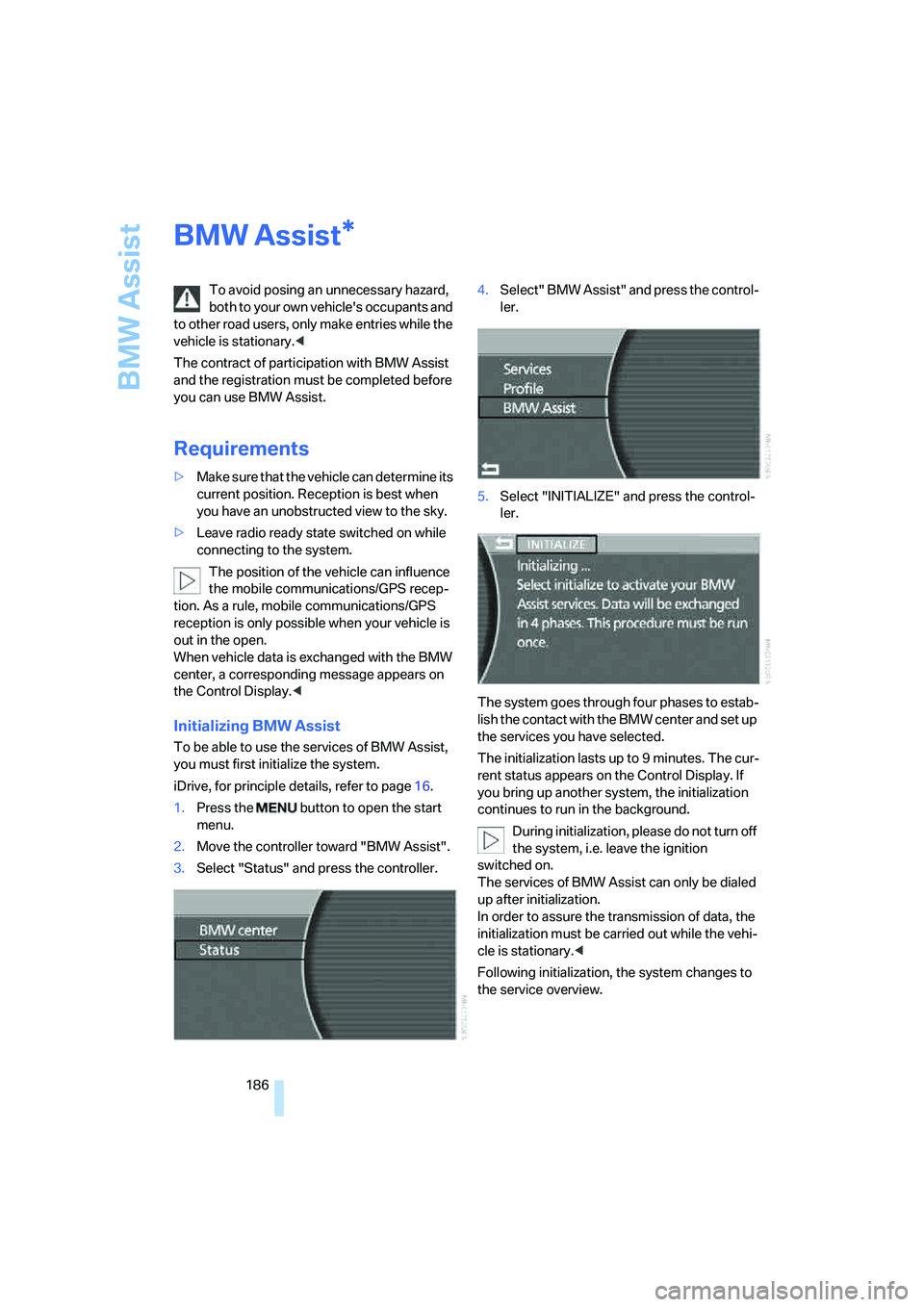
3.Select "Status" and press the controller.4.Select" BMW Assist" and press the control-
ler.
5.Select "INITIALIZE" and press the control-
ler.
The system goes through four phases to estab-
lish the contact with the BMW center and set up
the services you have selected.
The initialization lasts up to 9 minutes. The cur-
rent status appears on the Control Display. If
you bring up another system, the initialization
continues to run in the background.
During initialization, please do not turn off
the system, i.e. leave the ignition
switched on.
The services of BMW Assist can only be dialed
up after initialization.
In order to assure the transmission of data, the
initialization must be carried out while the vehi-
cle is stationary.<
Following initialization, the system changes to
the service overview.
*
Page 190 of 247
BMW Assist
188 5.Select "START" and press the controller.
The BMW center forwards the current vehicle
position and the customer profile and other
vehicle data to the relevant Roadside Assis-
tance service.
A voice connection will be established.
For technical reasons, the Roadside
Assistance cannot be guaranteed under
unfavorable conditions.<
Establishing contact with your
BMW center or the BMW Hotline*
You can contact your BMW center, e.g. to
arrange a service appointment.
For information related to your vehicle, call the
BMW Hotline.
iDrive, for principle details, refer to page16.
1.Press the button to open the start
menu.
2.Move the controller toward "BMW Assist".
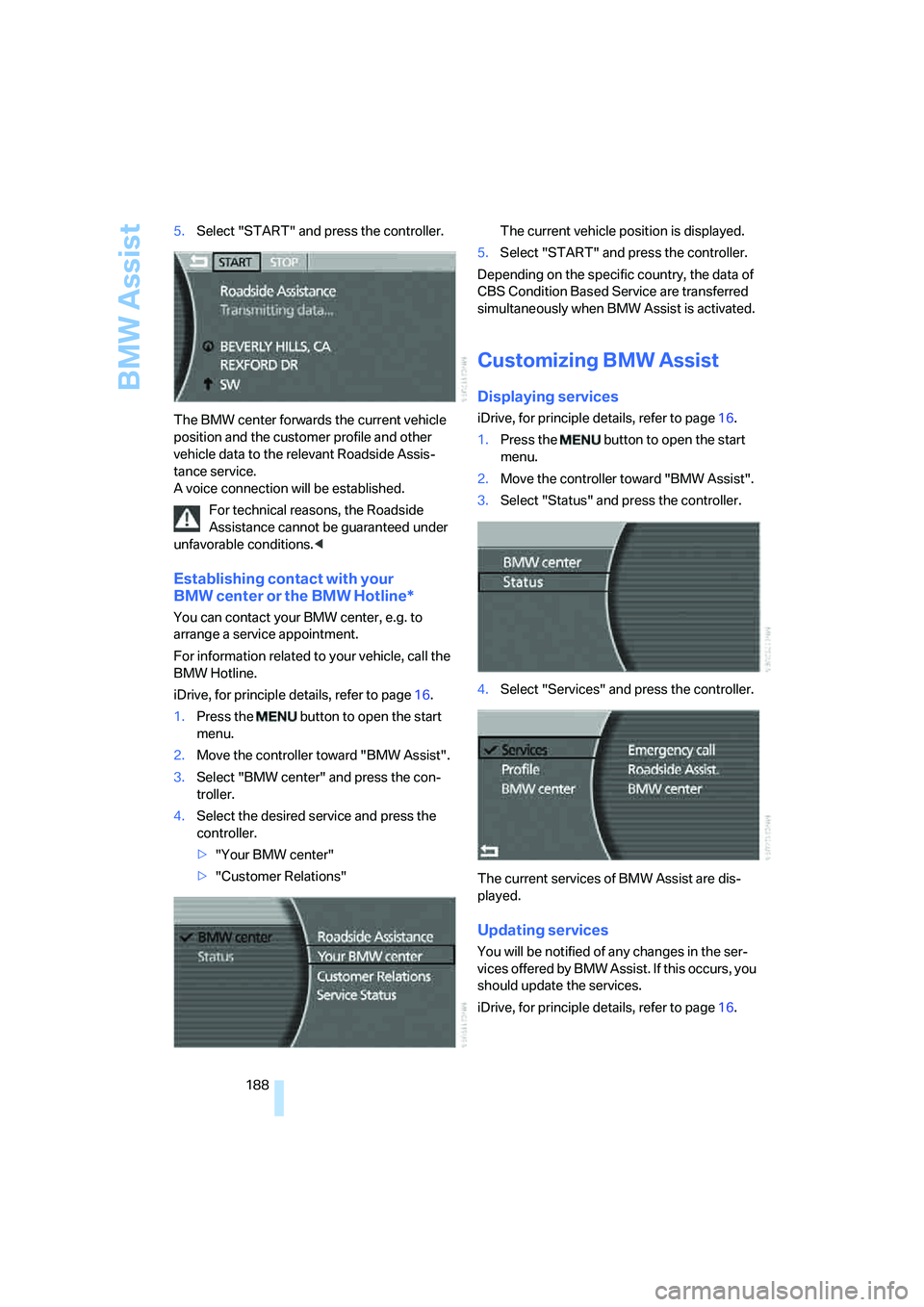
3.Select "BMW center" and press the con-
troller.
4.Select the desired service and press the
controller.
>"Your BMW center"
>"Customer Relations"The current vehicle position is displayed.
5.Select "START" and press the controller.
Depending on the specific country, the data of
CBS Condition Based Service are transferred
simultaneously when BMW Assist is activated.
Customizing BMW Assist
Displaying services
iDrive, for principle details, refer to page16.
1.Press the button to open the start
menu.
2.Move the controller toward "BMW Assist".
3.Select "Status" and press the controller.
4.Select "Services" and press the controller.
The current services of BMW Assist are dis-
played.
Updating services
You will be notified of any changes in the ser-
vices offered by BMW Assist. If this occurs, you
should update the services.
iDrive, for principle details, refer to page16.
Page 200 of 247
Wheels and tires
198
Temperature
The temperature grades are A, B, and C, A
being highest, and represent the tire's resis-
tance to the generation of heat and its ability to
dissipate heat when tested under controlled
conditions on a specified indoor laboratory test
wheel.
Sustained high temperature can cause the
material of the tire to degenerate and reduce
tire life, and excessive temperature can lead to
sudden tire failure. The grade C corresponds to
a level of performance which all passenger car
tires must meet under the Federal Motor Vehi-
cle Safety Standard No. 109. Grades B and A
represent higher levels of performance on the
laboratory test wheel than the minimum
required by law.
The temperature grade for this tire is
established for a tire that is properly
inflated and not overloaded. Excessive speed,
underinflation, or excessive loading, either sep-
arately or in combination, can cause heat
buildup and possible tire failure.<
RSC Run-flat tires
You will recognize run-flat tires by a circular
symbol containing the letters RSC on the side
of the tire, refer to page199.
M+S
Winter and all-season tires.
These have better winter properties than sum-
mer tires.
XL
Indicates specially reinforced tires.
Tire condition
Inspect your tires frequently for tread depth,
signs of damage and for foreign objects lodged
in the tread. Check the tread depth.
Minimum tread depth
The tread depth should not fall below 0.12 in/
3 mm, although, for example, European legisla-
tion only specifies a minimum tread depth of 0.063 in/1.6 mm.
At tread depths below 0.12 in/3 mm, there is an
increased risk of high-speed hydroplaning,
even when only small amounts of water are
present on the road surface.
Winter tires display a noticeable loss in their
ability to cope with cold-weather driving condi-
tions once the tread wears to below 0.16 in/
4 mm. To ensure continued safety, you should
always have such tires replaced.
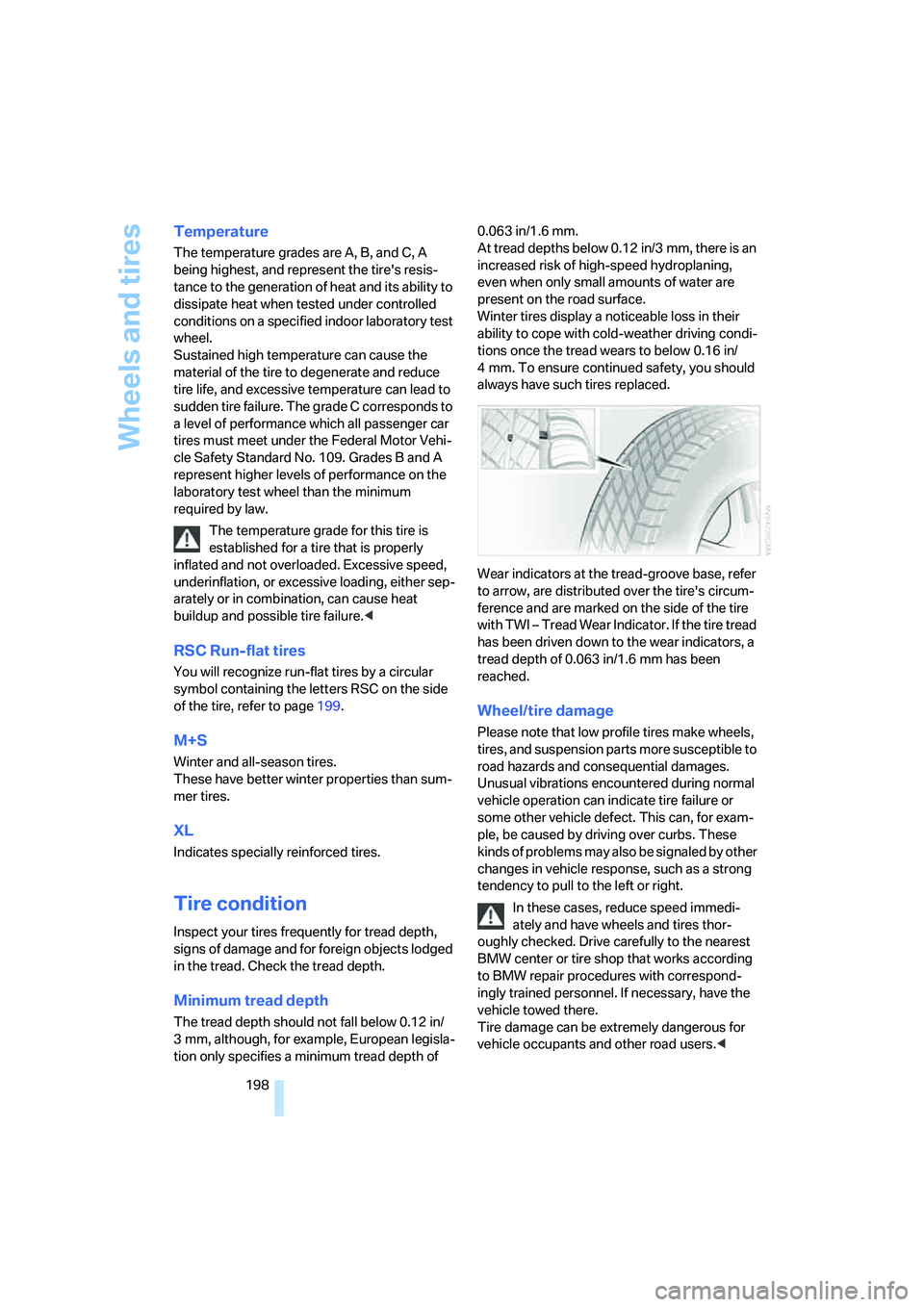
Wear indicators at the tread-groove base, refer
to arrow, are distributed over the tire's circum-
ference and are marked on the side of the tire
with TWI – Tread Wear Indicator. If the tire tread
has been driven down to the wear indicators, a
tread depth of 0.063 in/1.6 mm has been
reached.
Wheel/tire damage
Please note that low profile tires make wheels,
tires, and suspension parts more susceptible to
road hazards and consequential damages.
Unusual vibrations encountered during normal
vehicle operation can indicate tire failure or
some other vehicle defect. This can, for exam-
ple, be caused by driving over curbs. These
kinds of problems may also be signaled by other
changes in vehicle response, such as a strong
tendency to pull to the left or right.
In these cases, reduce speed immedi-
ately and have wheels and tires thor-
oughly checked. Drive carefully to the nearest
BMW center or tire shop that works according
to BMW repair procedures with correspond-
ingly trained personnel. If necessary, have the
vehicle towed there.
Tire damage can be extremely dangerous for
vehicle occupants and other road users.<
Page 205 of 247
Mobility
203Reference
At a glance
Controls
Driving tips
Communications
Navigation
Entertainment
Possible displays
>"Update of engine oil level in process".
>"Engine oil level O.K.".
>"Oil level at minimum! Add 1 quart engine
oil": Add a maximum of 1 quart/1 liter of
engine oil at the earliest opportunity, refer
to Adding engine oil.
>"Oil level under min.! Add 1 quart engine
oil": Add a maximum of 1 quart/1 liter of
engine oil at the earliest opportunity, refer
to Adding engine oil.
>"Engine oil level too high".
Have vehicle checked immediately;
otherwise, overfilled oil can lead to
engine damage.<
>"No measurement possible at this time".
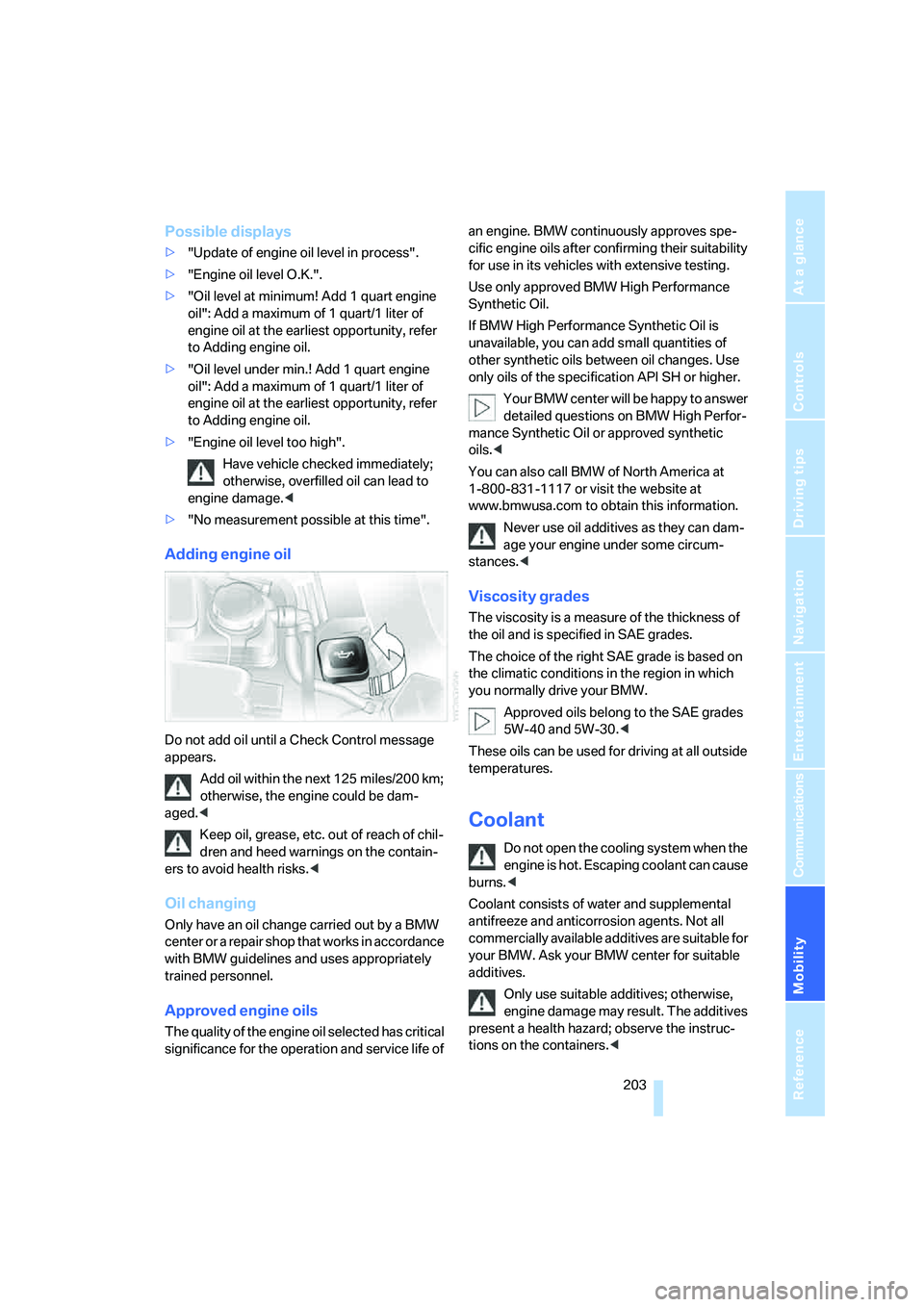
Adding engine oil
Do not add oil until a Check Control message
appears.
Add oil within the next 125 miles/200 km;
otherwise, the engine could be dam-
aged.<
Keep oil, grease, etc. out of reach of chil-
dren and heed warnings on the contain-
ers to avoid health risks.<
Oil changing
Only have an oil change carried out by a BMW
center or a repair shop that works in accordance
with BMW guidelines and uses appropriately
trained personnel.
Approved engine oils
The quality of the engine oil selected has critical
significance for the operation and service life of an engine. BMW continuously approves spe-
cific engine oils after confirming their suitability
for use in its vehicles with extensive testing.
Use only approved BMW High Performance
Synthetic Oil.
If BMW High Performance Synthetic Oil is
unavailable, you can add small quantities of
other synthetic oils between oil changes. Use
only oils of the specification API SH or higher.
Your BMW center will be happy to answer
detailed questions on BMW High Perfor-
mance Synthetic Oil or approved synthetic
oils.<
You can also call BMW of North America at
1-800-831-1117 or visit the website at
www.bmwusa.com to obtain this information.
Never use oil additives as they can dam-
age your engine under some circum-
stances.<
Viscosity grades
The viscosity is a measure of the thickness of
the oil and is specified in SAE grades.
The choice of the right SAE grade is based on
the climatic conditions in the region in which
you normally drive your BMW.
Approved oils belong to the SAE grades
5W-40 and 5W-30.<
These oils can be used for driving at all outside
temperatures.
Coolant
Do not open the cooling system when the
engine is hot. Escaping coolant can cause
burns.<
Coolant consists of water and supplemental
antifreeze and anticorrosion agents. Not all
commercially available additives are suitable for
your BMW. Ask your BMW center for suitable
additives.
Only use suitable additives; otherwise,
engine damage may result. The additives
present a health hazard; observe the instruc-
tions on the containers.<
Page 209 of 247
Mobility
207Reference
At a glance
Controls
Driving tips
Communications
Navigation
Entertainment
Replacing components
Onboard tool kit
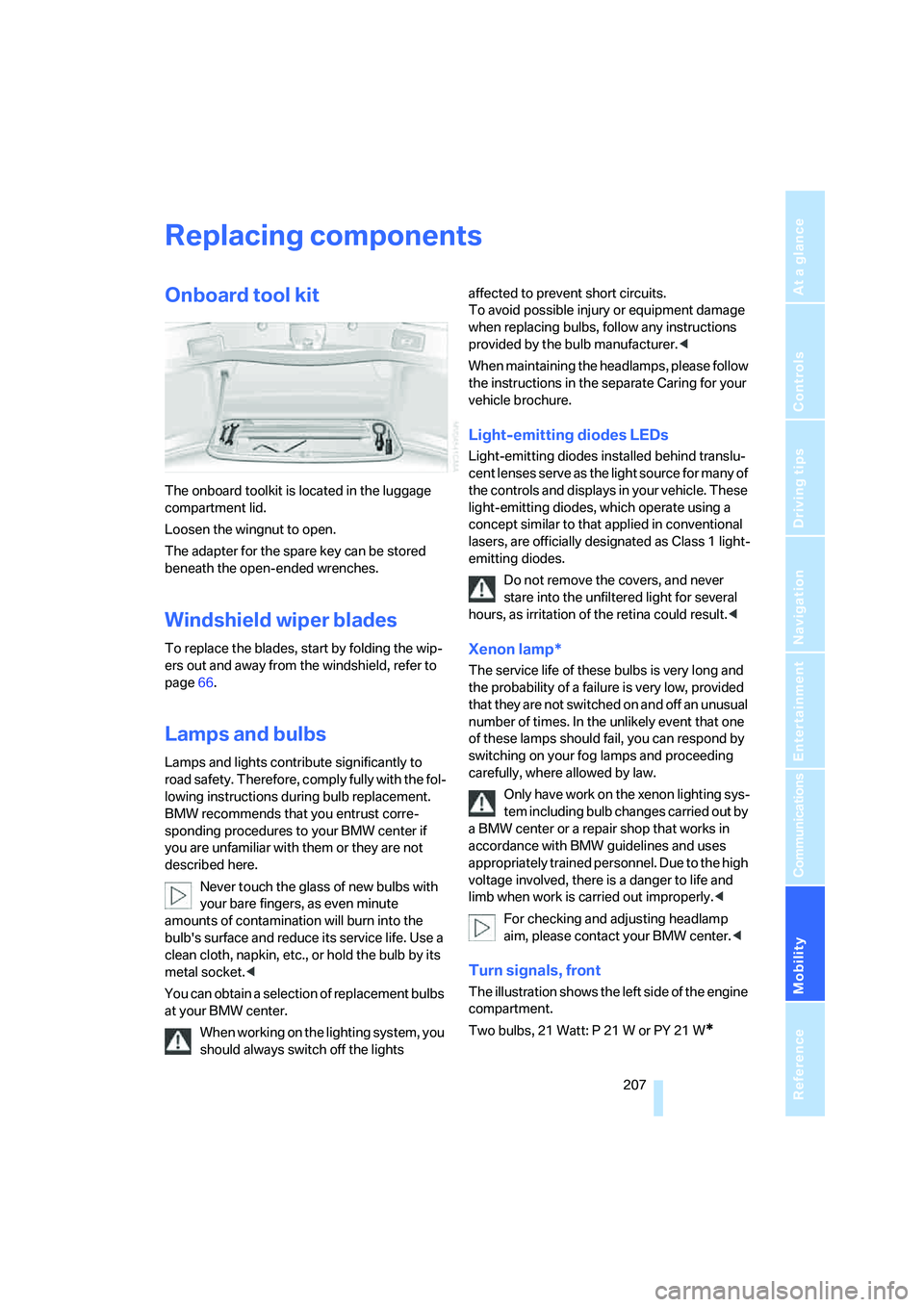
The onboard toolkit is located in the luggage
compartment lid.
Loosen the wingnut to open.
The adapter for the spare key can be stored
beneath the open-ended wrenches.
Windshield wiper blades
To replace the blades, start by folding the wip-
ers out and away from the windshield, refer to
page66.
Lamps and bulbs
Lamps and lights contribute significantly to
road safety. Therefore, comply fully with the fol-
lowing instructions during bulb replacement.
BMW recommends that you entrust corre-
sponding procedures to your BMW center if
you are unfamiliar with them or they are not
described here.
Never touch the glass of new bulbs with
your bare fingers, as even minute
amounts of contamination will burn into the
bulb's surface and reduce its service life. Use a
clean cloth, napkin, etc., or hold the bulb by its
metal socket.<
You can obtain a selection of replacement bulbs
at your BMW center.
When working on the lighting system, you
should always switch off the lights affected to prevent short circuits.
To avoid possible injury or equipment damage
when replacing bulbs, follow any instructions
provided by the bulb manufacturer.<
When maintaining the headlamps, please follow
the instructions in the separate Caring for your
vehicle brochure.
Light-emitting diodes LEDs
Light-emitting diodes installed behind translu-
cent lenses serve as the light source for many of
the controls and displays in your vehicle. These
light-emitting diodes, which operate using a
concept similar to that applied in conventional
lasers, are officially designated as Class 1 light-
emitting diodes.
Do not remove the covers, and never
stare into the unfiltered light for several
hours, as irritation of the retina could result.<
Xenon lamp*
The service life of these bulbs is very long and
the probability of a failure is very low, provided
that they are not switched on and off an unusual
number of times. In the unlikely event that one
of these lamps should fail, you can respond by
switching on your fog lamps and proceeding
carefully, where allowed by law.
Only have work on the xenon lighting sys-
tem including bulb changes carried out by
a BMW center or a repair shop that works in
accordance with BMW guidelines and uses
appropriately trained personnel. Due to the high
voltage involved, there is a danger to life and
limb when work is carried out improperly.<
For checking and adjusting headlamp
aim, please contact your BMW center.<
Turn signals, front
The illustration shows the left side of the engine
compartment.
Two bulbs, 21 Watt: P 21 W or PY 21 W
*
Page 211 of 247
Mobility
209Reference
At a glance
Controls
Driving tips
Communications
Navigation
Entertainment
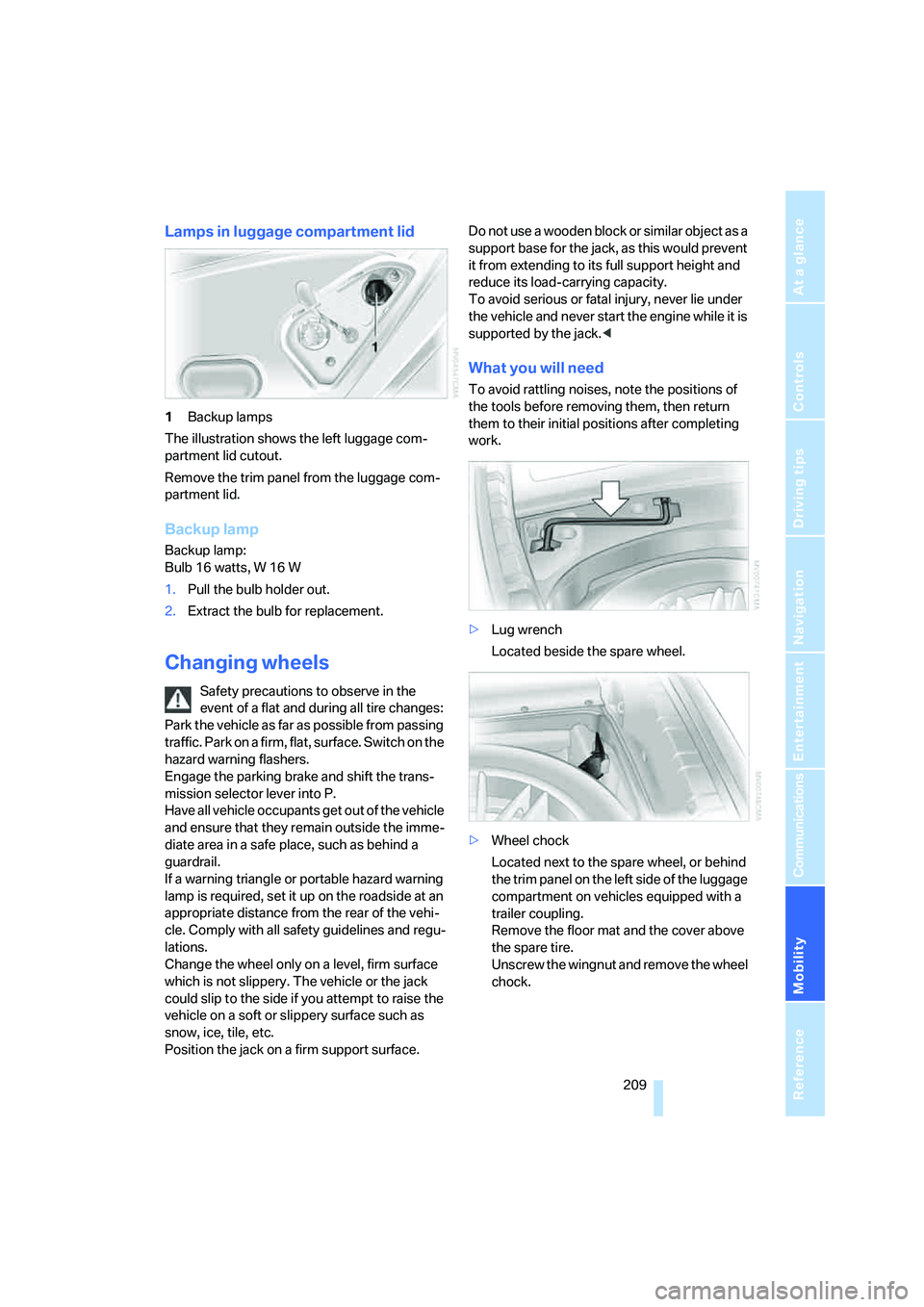
Lamps in luggage compartment lid
1Backup lamps
The illustration shows the left luggage com-
partment lid cutout.
Remove the trim panel from the luggage com-
partment lid.
Backup lamp
Backup lamp:
Bulb 16 watts, W 16 W
1.Pull the bulb holder out.
2.Extract the bulb for replacement.
Changing wheels
Safety precautions to observe in the
event of a flat and during all tire changes:
Park the vehicle as far as possible from passing
traffic. Park on a firm, flat, surface. Switch on the
hazard warning flashers.
Engage the parking brake and shift the trans-
mission selector lever into P.
Have all vehicle occupants get out of the vehicle
and ensure that they remain outside the imme-
diate area in a safe place, such as behind a
guardrail.
If a warning triangle or portable hazard warning
lamp is required, set it up on the roadside at an
appropriate distance from the rear of the vehi-
cle. Comply with all safety guidelines and regu-
lations.
Change the wheel only on a level, firm surface
which is not slippery. The vehicle or the jack
could slip to the side if you attempt to raise the
vehicle on a soft or slippery surface such as
snow, ice, tile, etc.
Position the jack on a firm support surface. Do not use a wooden block or similar object as a
support base for the jack, as this would prevent
it from extending to its full support height and
reduce its load-carrying capacity.
To avoid serious or fatal injury, never lie under
the vehicle and never start the engine while it is
supported by the jack.<
What you will need
To avoid rattling noises, note the positions of
the tools before removing them, then return
them to their initial positions after completing
work.
>Lug wrench
Located beside the spare wheel.
>Wheel chock
Located next to the spare wheel, or behind
the trim panel on the left side of the luggage
compartment on vehicles equipped with a
trailer coupling.
Remove the floor mat and the cover above
the spare tire.
Unscrew the wingnut and remove the wheel
chock.
Page 212 of 247
Replacing components
210 >Vehicle jack
Located in the luggage compartment
behind the right-hand side panel.
Grasp the handle in the upper panel and fold
it down.
Loosen the wingnut and remove the jack.
After use, screw the jack all the way back
down and snap the handle back into place.
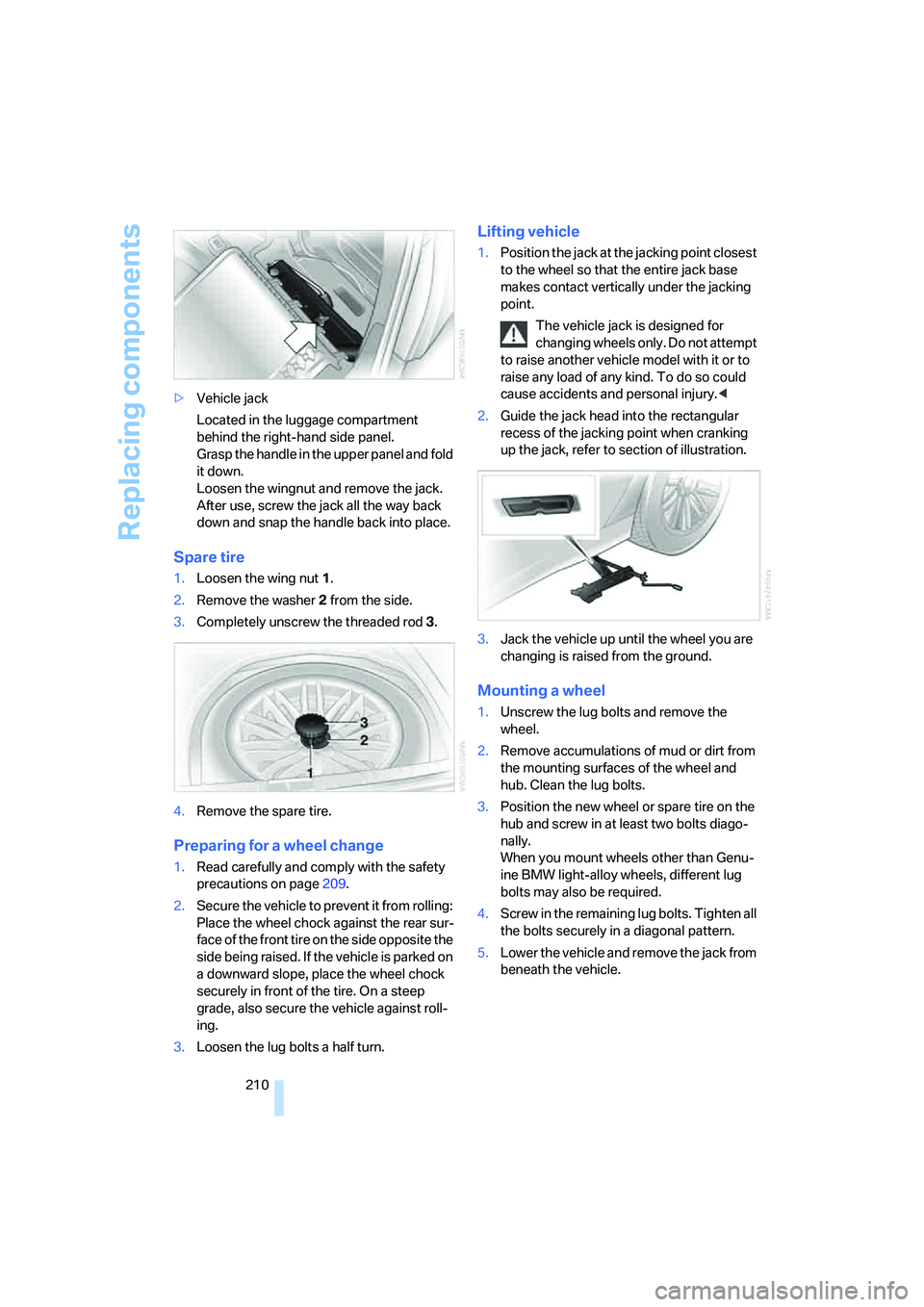
Spare tire
1.Loosen the wing nut 1.
2.Remove the washer 2 from the side.
3.Completely unscrew the threaded rod 3.
4.Remove the spare tire.
Preparing for a wheel change
1.Read carefully and comply with the safety
precautions on page209.
2.Secure the vehicle to prevent it from rolling:
Place the wheel chock against the rear sur-
face of the front tire on the side opposite the
side being raised. If the vehicle is parked on
a downward slope, place the wheel chock
securely in front of the tire. On a steep
grade, also secure the vehicle against roll-
ing.
3.Loosen the lug bolts a half turn.
Lifting vehicle
1.Position the jack at the jacking point closest
to the wheel so that the entire jack base
makes contact vertically under the jacking
point.
The vehicle jack is designed for
changing wheels only. Do not attempt
to raise another vehicle model with it or to
raise any load of any kind. To do so could
cause accidents and personal injury.<
2.Guide the jack head into the rectangular
recess of the jacking point when cranking
up the jack, refer to section of illustration.
3.Jack the vehicle up until the wheel you are
changing is raised from the ground.
Mounting a wheel
1.Unscrew the lug bolts and remove the
wheel.
2.Remove accumulations of mud or dirt from
the mounting surfaces of the wheel and
hub. Clean the lug bolts.
3.Position the new wheel or spare tire on the
hub and screw in at least two bolts diago-
nally.
When you mount wheels other than Genu-
ine BMW light-alloy wheels, different lug
bolts may also be required.
4.Screw in the remaining lug bolts. Tighten all
the bolts securely in a diagonal pattern.
5.Lower the vehicle and remove the jack from
beneath the vehicle.
Page 223 of 247
Reference 221
At a glance
Controls
Driving tips
Communications
Navigation
Entertainment
Mobility
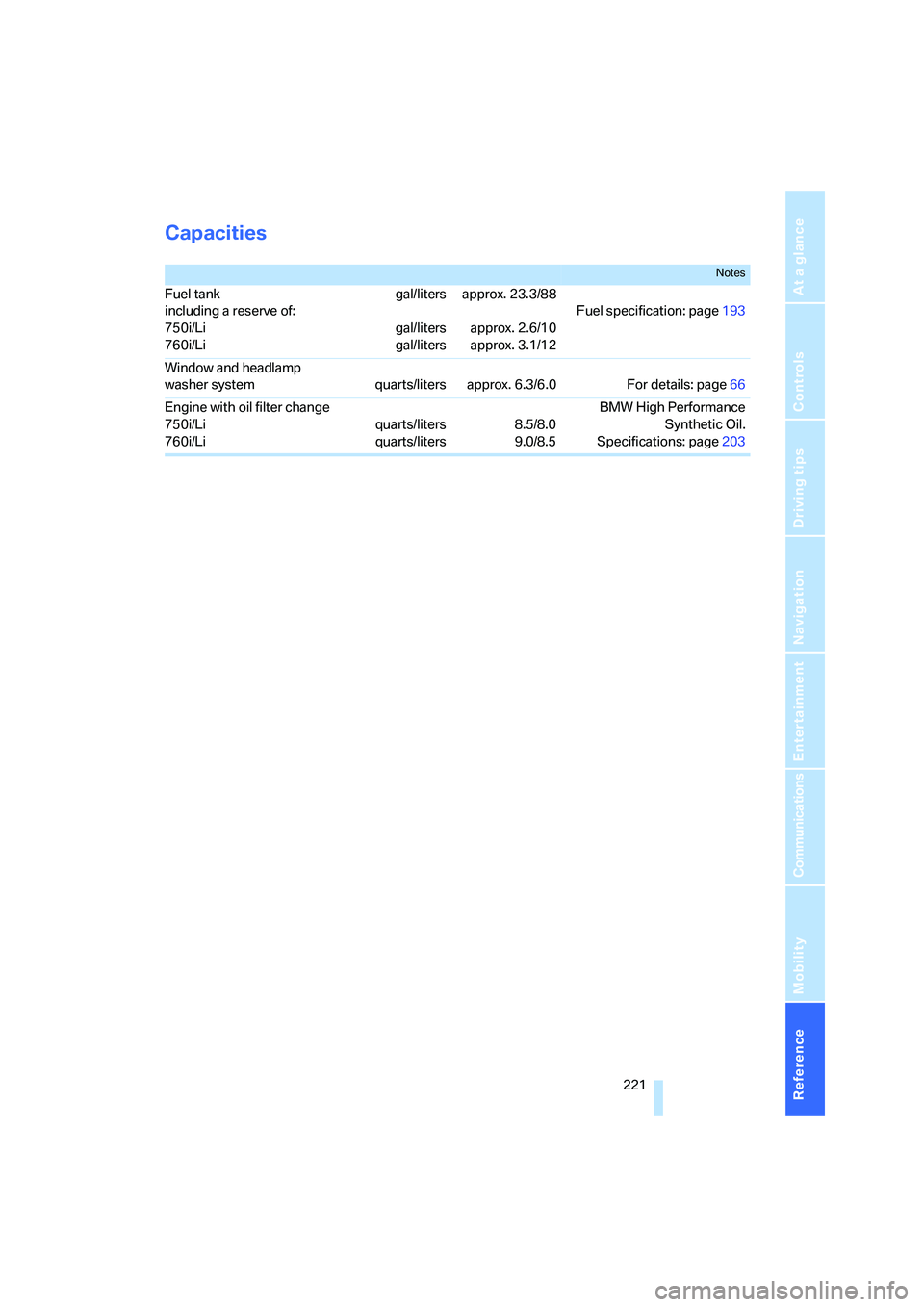
Capacities
Notes
Fuel tank
including a reserve of:
750i/Li
760i/Ligal/liters
gal/liters
gal/litersapprox. 23.3/88
approx. 2.6/10
approx. 3.1/12Fuel specification: page193
Window and headlamp
washer system quarts/liters approx. 6.3/6.0 For details: page66
Engine with oil filter change
750i/Li
760i/Liquarts/liters
quarts/liters8.5/8.0
9.0/8.5BMW High Performance
Synthetic Oil.
Specifications: page203
Page 224 of 247
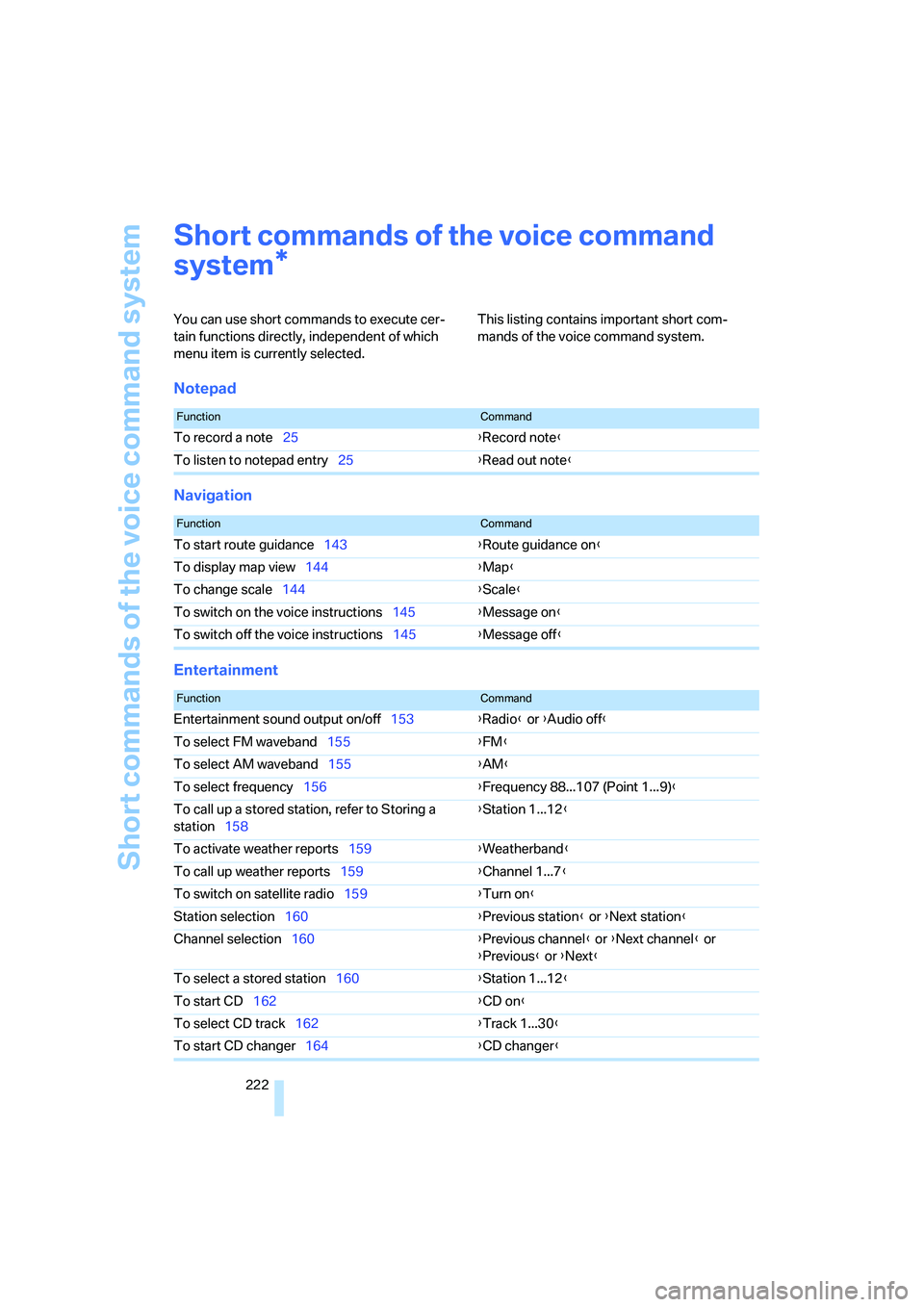
Short commands of the voice command system
222
Short commands of the voice command
system
You can use short commands to execute cer-
tain functions directly, independent of which
menu item is currently selected. This listing contains important short com-
mands of the voice command system.
Notepad
Navigation
Entertainment
*
FunctionCommand
To record a note25{Record note}
To listen to notepad entry25{Read out note}
FunctionCommand
To start route guidance143{Route guidance on}
To display map view144{Map}
To change scale144{Scale}
To switch on the voice instructions145{Message on}
To switch off the voice instructions145{Message off}
FunctionCommand
Entertainment sound output on/off153{Radio} or {Audio off}
To select FM waveband155{FM}
To select AM waveband155{AM}
To select frequency156{Frequency 88...107 (Point 1...9)}
To call up a stored station, refer to Storing a
station158{Station 1...12}
To activate weather reports159{Weatherband}
To call up weather reports159{Channel 1...7}
To switch on satellite radio159{Turn on}
Station selection160{Previous station} or {Next station}
Channel selection160{Previous channel} or {Next channel} or
{Previous} or {Next}
To select a stored station160{Station 1...12}
To start CD162{CD on}
To select CD track162{Track 1...30}
To start CD changer164{CD changer}
Page 226 of 247
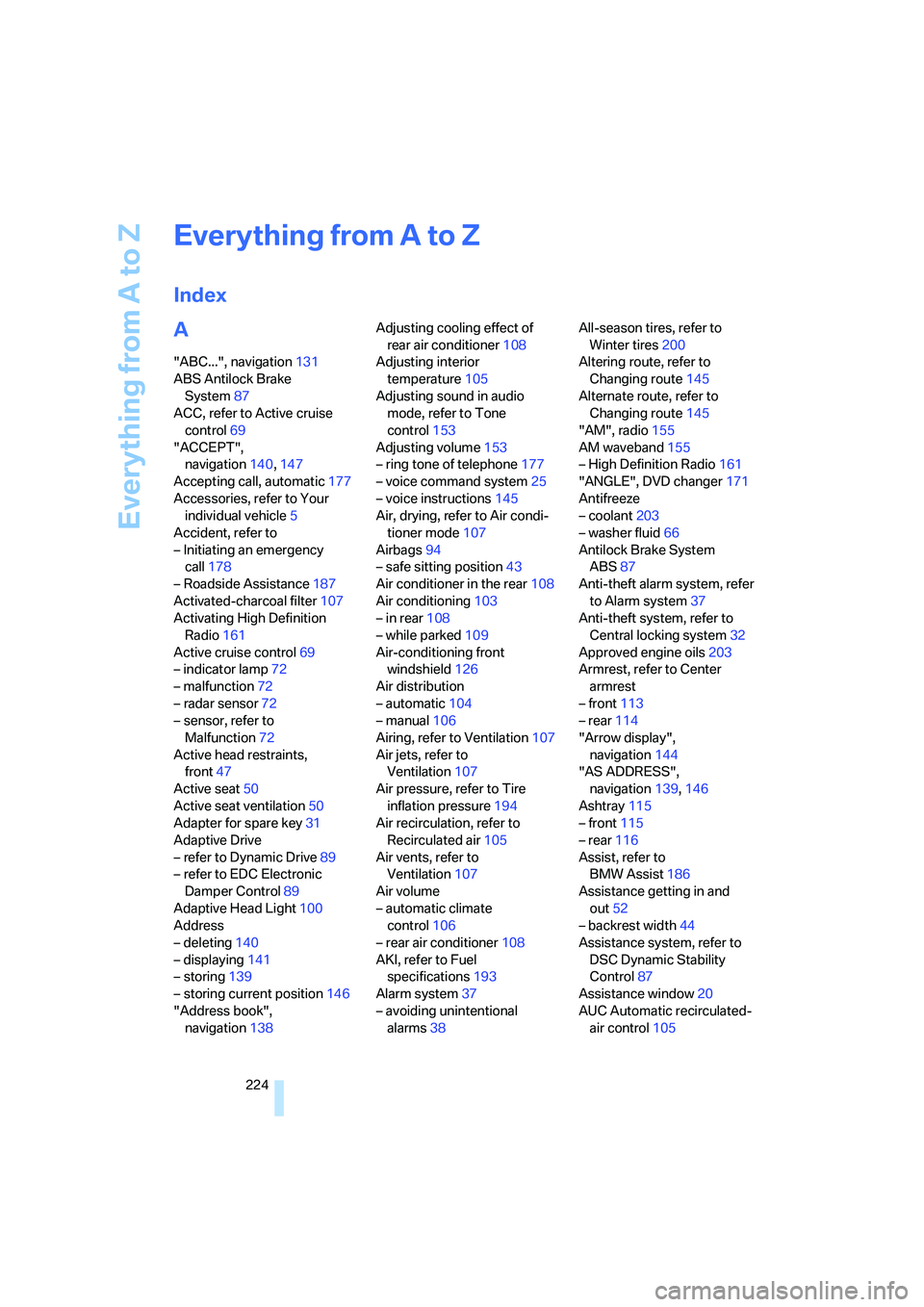
Everything from A to Z
224
Everything from A to Z
Index
A
"ABC...", navigation131
ABS Antilock Brake
System87
ACC, refer to Active cruise
control69
"ACCEPT",
navigation140,147
Accepting call, automatic177
Accessories, refer to Your
individual vehicle5
Accident, refer to
– Initiating an emergency
call178
– Roadside Assistance187
Activated-charcoal filter107
Activating High Definition
Radio161
Active cruise control69
– indicator lamp72
– malfunction72
– radar sensor72
– sensor, refer to
Malfunction72
Active head restraints,
front47
Active seat50
Active seat ventilation50
Adapter for spare key31
Adaptive Drive
– refer to Dynamic Drive89
– refer to EDC Electronic
Damper Control89
Adaptive Head Light100
Address
– deleting140
– displaying141
– storing139
– storing current position146
"Address book",
navigation138Adjusting cooling effect of
rear air conditioner108
Adjusting interior
temperature105
Adjusting sound in audio
mode, refer to Tone
control153
Adjusting volume153
– ring tone of telephone177
– voice command system25
– voice instructions145
Air, drying, refer to Air condi-
tioner mode107
Airbags94
– safe sitting position43
Air conditioner in the rear108
Air conditioning103
– in rear108
– while parked109
Air-conditioning front
windshield126
Air distribution
– automatic104
– manual106
Airing, refer to Ventilation107
Air jets, refer to
Ventilation107
Air pressure, refer to Tire
inflation pressure194
Air recirculation, refer to
Recirculated air105
Air vents, refer to
Ventilation107
Air volume
– automatic climate
control106
– rear air conditioner108
AKI, refer to Fuel
specifications193
Alarm system37
– avoiding unintentional
alarms38All-season tires, refer to
Winter tires200
Altering route, refer to
Changing route145
Alternate route, refer to
Changing route145
"AM", radio155
AM waveband155
– High Definition Radio161
"ANGLE", DVD changer171
Antifreeze
– coolant203
– washer fluid66
Antilock Brake System
ABS87
Anti-theft alarm system, refer
to Alarm system37
Anti-theft system, refer to
Central locking system32
Approved engine oils203
Armrest, refer to Center
armrest
– front113
– rear114
"Arrow display",
navigation144
"AS ADDRESS",
navigation139,146
Ashtray115
– front115
– rear116
Assist, refer to
BMW Assist186
Assistance getting in and
out52
– backrest width44
Assistance system, refer to
DSC Dynamic Stability
Control87
Assistance window20
AUC Automatic recirculated-
air control105