display BMW 760i 2005 E65 User Guide
[x] Cancel search | Manufacturer: BMW, Model Year: 2005, Model line: 760i, Model: BMW 760i 2005 E65Pages: 239, PDF Size: 8.03 MB
Page 21 of 239
At a glance
19Reference
Controls
Driving tips
Communications
Navigation
Entertainment
Mobility
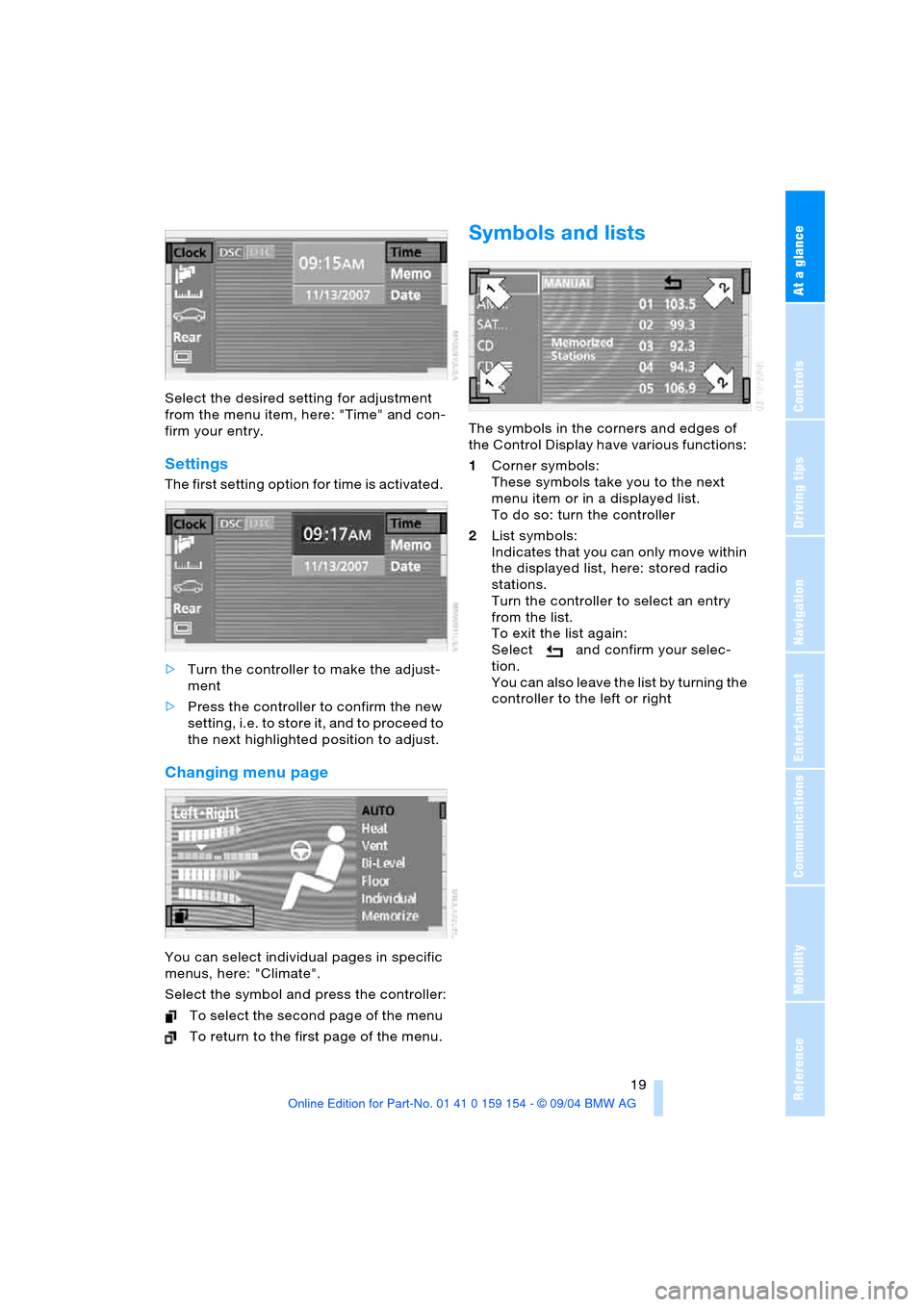
Select the desired setting for adjustment
from the menu item, here: "Time" and con-
firm your entry.
Settings
The first setting option for time is activated.
>Turn the controller to make the adjust-
ment
>Press the controller to confirm the new
setting, i.e. to store it, and to proceed to
the next highlighted position to adjust.
Changing menu page
You can select individual pages in specific
menus, here: "Climate".
Select the symbol and press the controller:
T o sel ect th e secon d pag e of t he m en u
To return to the first page of the menu.
Symbols and lists
The symbols in the corners and edges of
the Control Display have various functions:
1Corner symbols:
These symbols take you to the next
menu item or in a displayed list.
To do so: turn the controller
2List symbols:
Indicates that you can only move within
the displayed list, here: stored radio
stations.
Turn the controller to select an entry
from the list.
To exit the list again:
Select and confirm your selec-
tion.
You can also leave the list by turning the
controller to the left or right
Page 22 of 239
Control Center
20
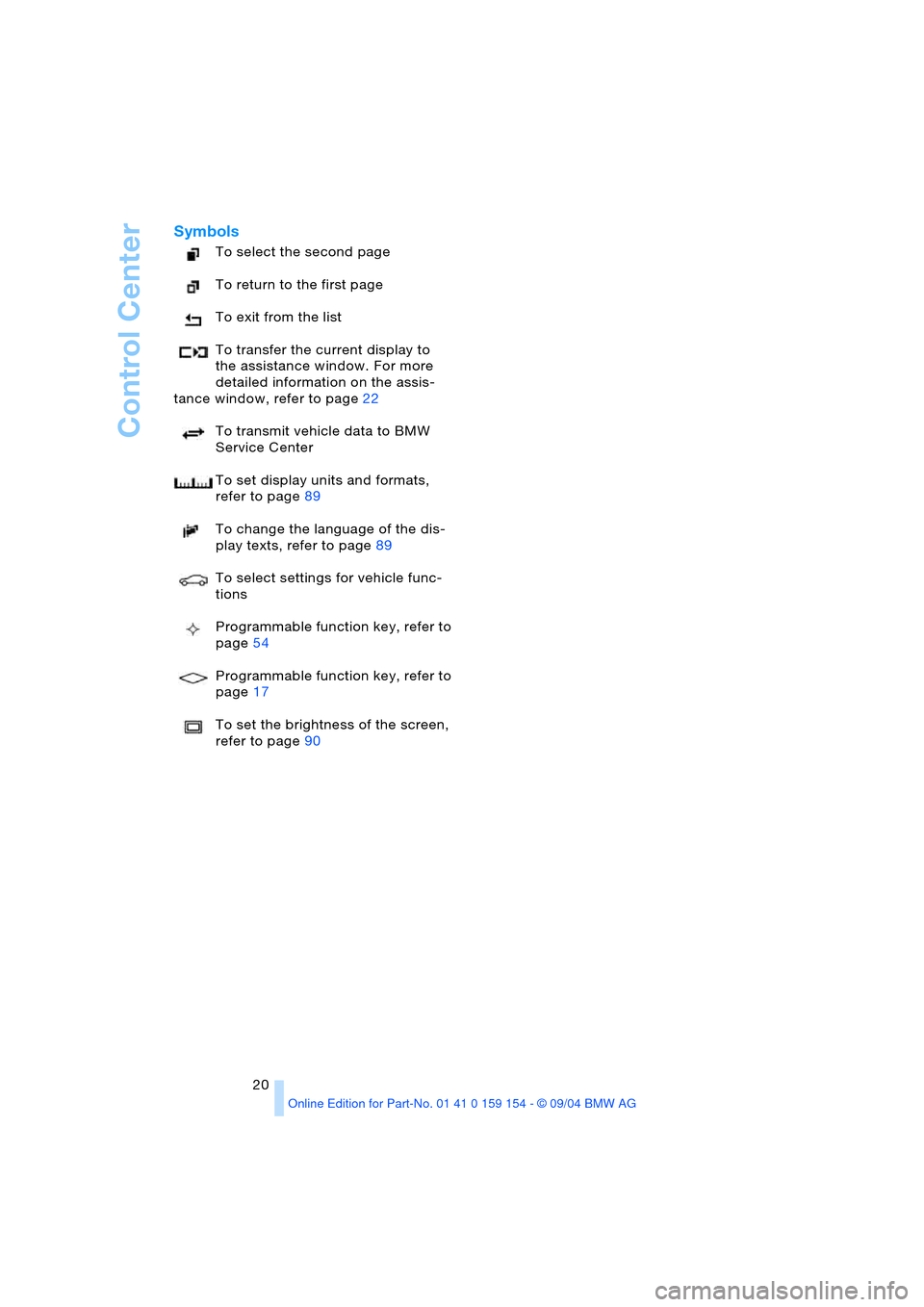
Symbols
To select the second page
To return to the first page
To exit from the list
To transfer the current display to
the assistance window. For more
detailed information on the assis-
tance window, refer to page22
To transmit vehicle data to BMW
Service Center
To set display units and formats,
refer to page89
To change the language of the dis-
play texts, refer to page89
To select settings for vehicle func-
tions
Programmable function key, refer to
page54
Programmable function key, refer to
page17
To set the brightness of the screen,
refer to page90
Page 23 of 239
At a glance
21Reference
Controls
Driving tips
Communications
Navigation
Entertainment
Mobility
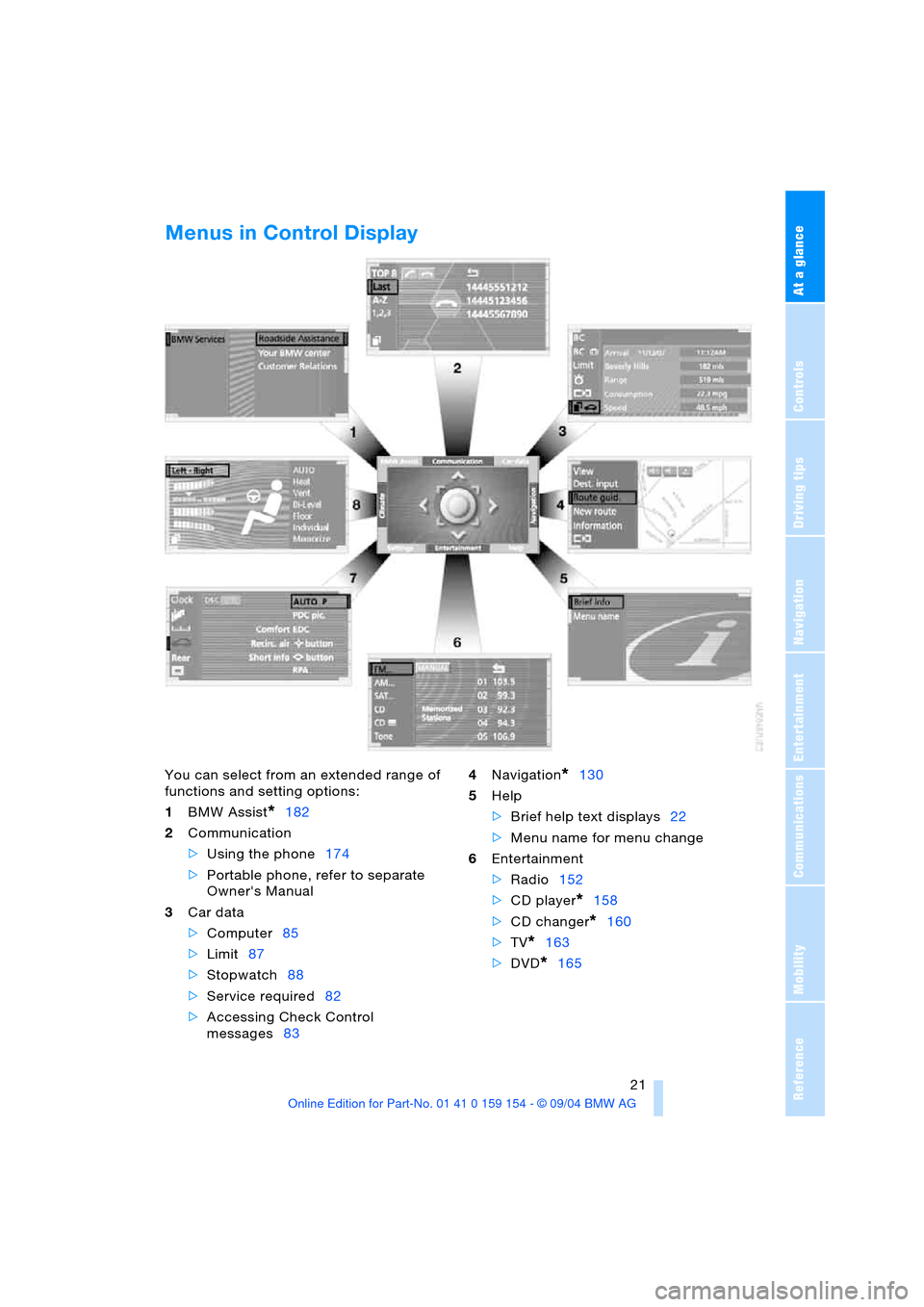
Menus in Control Display
You can select from an extended range of
functions and setting options:
1BMW Assist
*182
2Communication
>Using the phone174
>Portable phone, refer to separate
Owner's Manual
3Car data
>Computer85
>Limit87
>Stopwatch88
>Service required82
>Accessing Check Control
messages834Navigation
*130
5Help
>Brief help text displays22
>Menu name for menu change
6Entertainment
>Radio152
>CD player
*158
>CD changer
*160
>TV
*163
>DVD
*165
Page 24 of 239
Control Center
22 7Settings
>Vehicle functions54,65,91
>Time and date90
>Language89
>Units of measure and display
format89
>Brightness90
>Lock Control Center in rear
*24
8Climate
>Automatic climate control103
>Heated seats
*52
>Independent ventilation110
Assistance window*
While you use the Control Center, the
assistance window can provide you with a
parallel display for the active system.
You can use it for displays of the following:
>Short help and supplementary informa-
tion texts for selected menu items
>A function selected in the "Car data"
menu, refer to page89
>The route for vehicles with a navigation
system, refer to page131.
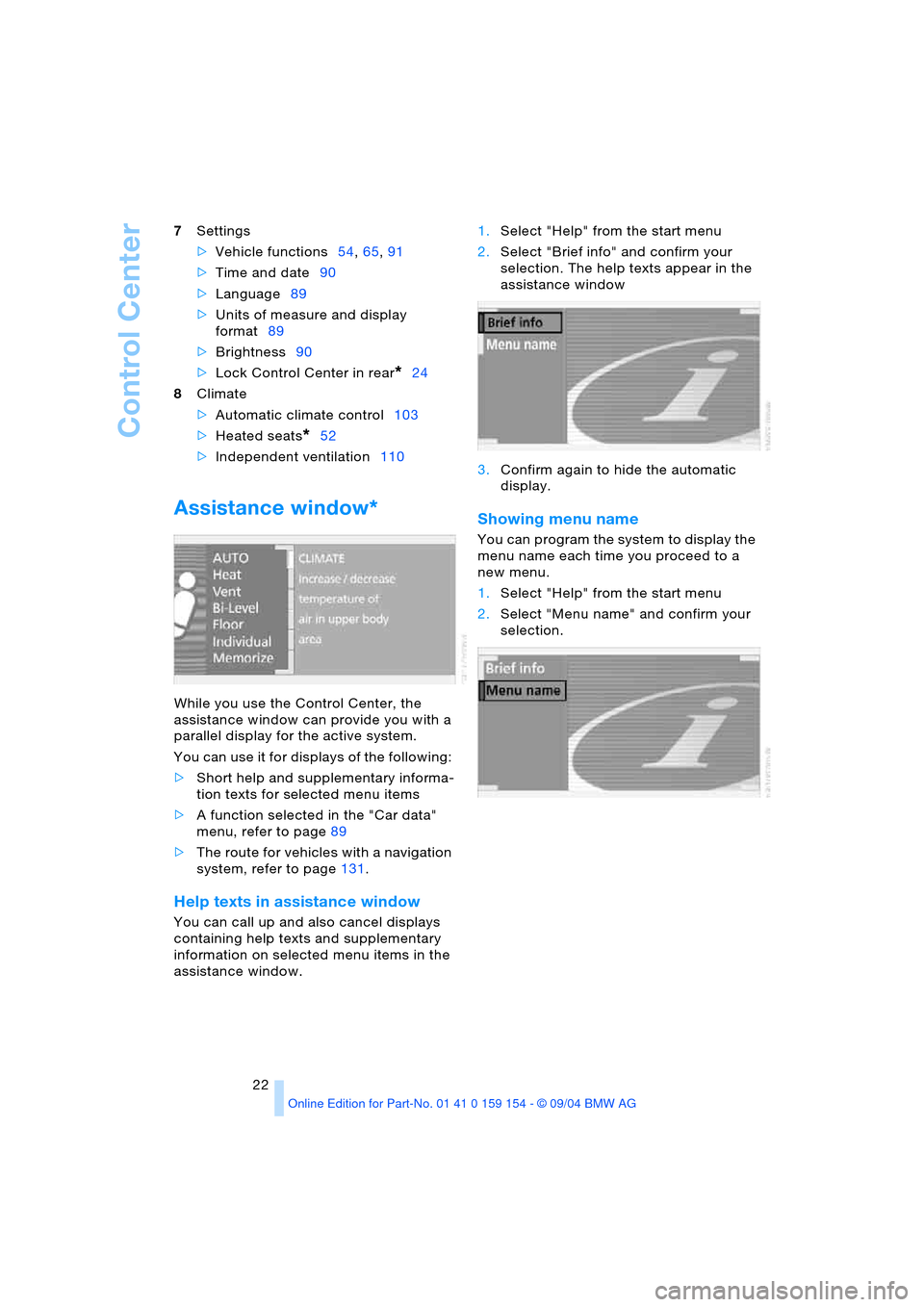
Help texts in assistance window
You can call up and also cancel displays
containing help texts and supplementary
information on selected menu items in the
assistance window. 1.Select "Help" from the start menu
2.Select "Brief info" and confirm your
selection. The help texts appear in the
assistance window
3.Confirm again to hide the automatic
display.
Showing menu name
You can program the system to display the
menu name each time you proceed to a
new menu.
1.Select "Help" from the start menu
2.Select "Menu name" and confirm your
selection.
Page 25 of 239
At a glance
23Reference
Controls
Driving tips
Communications
Navigation
Entertainment
Mobility
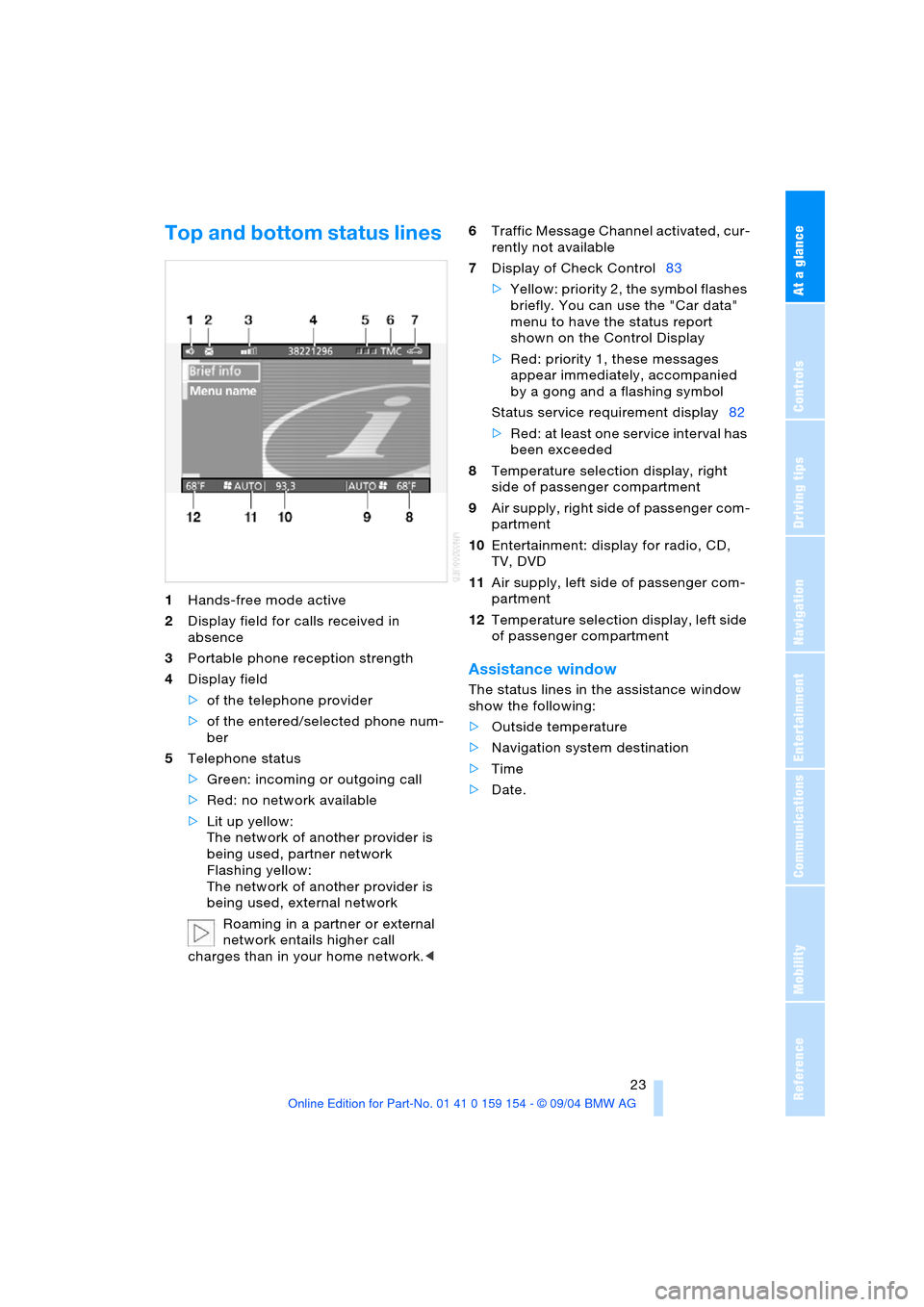
Top and bottom status lines
1Hands-free mode active
2Display field for calls received in
absence
3Portable phone reception strength
4Display field
>of the telephone provider
>of the entered/selected phone num-
ber
5Telephone status
>Green: incoming or outgoing call
>Red: no network available
>Lit up yellow:
The network of another provider is
being used, partner network
Flashing yellow:
The network of another provider is
being used, external network
Roaming in a partner or external
network entails higher call
charges than in your home network.<6Traffic Message Channel activated, cur-
rently not available
7Display of Check Control83
>Yellow: priority 2, the symbol flashes
briefly. You can use the "Car data"
menu to have the status report
shown on the Control Display
>Red: priority 1, these messages
appear immediately, accompanied
by a gong and a flashing symbol
Status service requirement display82
>Red: at least one service interval has
been exceeded
8Temperature selection display, right
side of passenger compartment
9Air supply, right side of passenger com-
partment
10Entertainment: display for radio, CD,
TV, DVD
11Air supply, left side of passenger com-
partment
12Temperature selection display, left side
of passenger compartment
Assistance window
The status lines in the assistance window
show the following:
>Outside temperature
>Navigation system destination
>Time
>Date.
Page 26 of 239
Control Center
24
Control Center in rear*
Rear screen
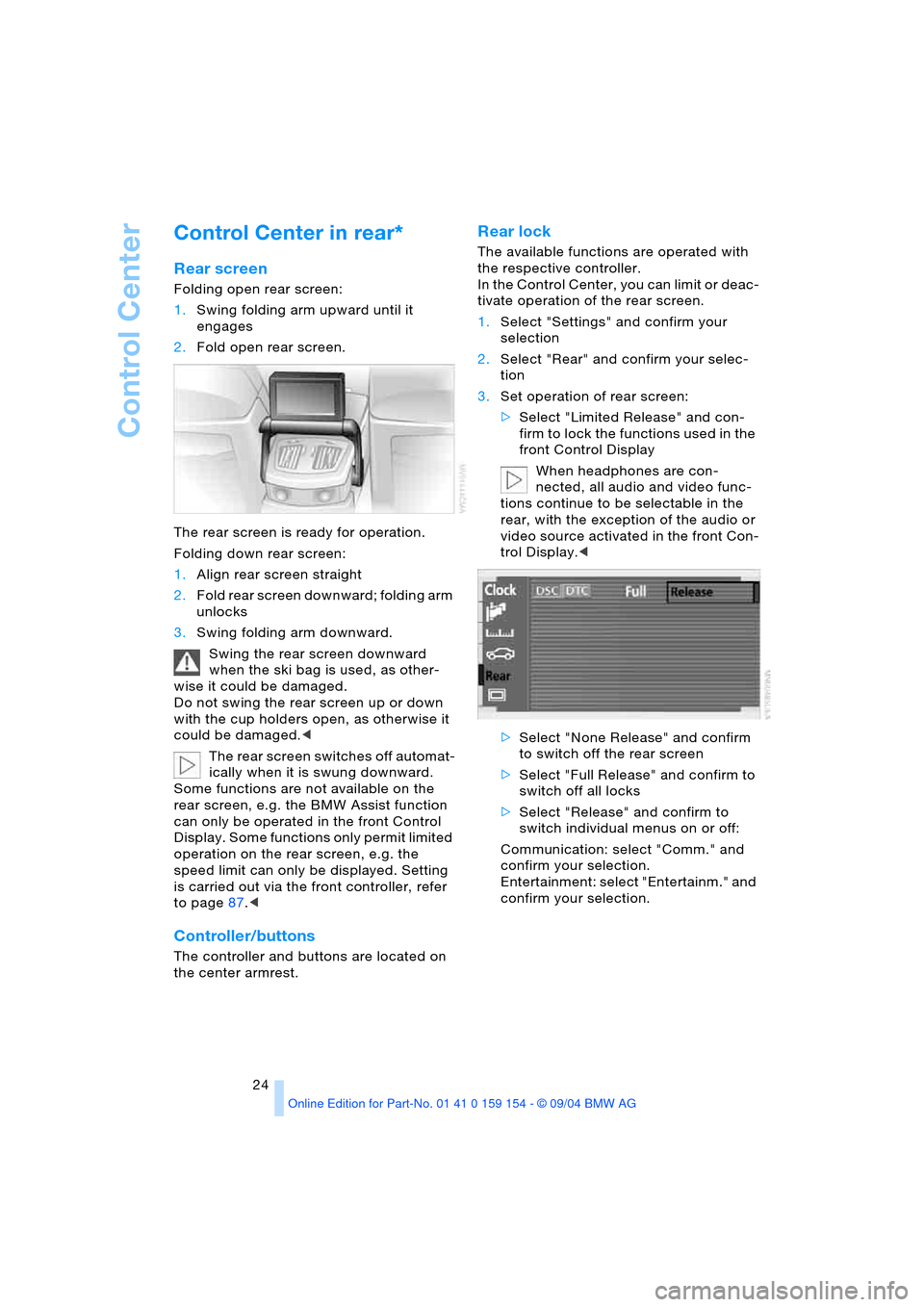
Folding open rear screen:
1.Swing folding arm upward until it
engages
2.Fold open rear screen.
The rear screen is ready for operation.
Folding down rear screen:
1.Align rear screen straight
2.Fold rear screen downward; folding arm
unlocks
3.Swing folding arm downward.
Swing the rear screen downward
when the ski bag is used, as other-
wise it could be damaged.
Do not swing the rear screen up or down
with the cup holders open, as otherwise it
could be damaged.<
The rear screen switches off automat-
ically when it is swung downward.
Some functions are not available on the
rear screen, e.g. the BMW Assist function
can only be operated in the front Control
Display. Some functions only permit limited
operation on the rear screen, e.g. the
speed limit can only be displayed. Setting
is carried out via the front controller, refer
to page87.<
Controller/buttons
The controller and buttons are located on
the center armrest.
Rear lock
The available functions are operated with
the respective controller.
In the Control Center, you can limit or deac-
tivate operation of the rear screen.
1.Select "Settings" and confirm your
selection
2.Select "Rear" and confirm your selec-
tion
3.Set operation of rear screen:
>Select "Limited Release" and con-
firm to lock the functions used in the
front Control Display
When headphones are con-
nected, all audio and video func-
tions continue to be selectable in the
rear, with the exception of the audio or
video source activated in the front Con-
trol Display.<
>Select "None Release" and confirm
to switch off the rear screen
>Select "Full Release" and confirm to
switch off all locks
>Select "Release" and confirm to
switch individual menus on or off:
Communication: select "Comm." and
confirm your selection.
Entertainment: select "Entertainm." and
confirm your selection.
Page 28 of 239
Voice command
26
Voice command
Voice command system
The concept
The voice command system allows you to
control operation of various vehicle sys-
tems without ever removing your hands
from the steering wheel. The system oper-
ates on the basis of voice commands that
you will learn easily after using them a few
times. In many cases, the voice command
system supports you with announcements
or questions while you are making your
entries.
The voice command system transforms
your oral commands and dialog answers
into control signals for the selected sys-
tems.
Please take the time to acquaint your-
self with how a particular system
operates before proceeding to control it
using the voice command system.<
Symbols used
{...} Verbal instructions to use with the
voice command system.
{{...}} Identifies the answers generated by
the voice command system.
Systems available for use with voice
command
>{Telephone}, refer to page174
>{Navigation}, refer to page130
>{Radio}, refer to page152
>{CD}, refer to page158
>{CD changer}, refer to page160
>{Notepad}, refer to page28
>{TV}, refer to page163
>{DVD}, refer to page165. Either the system that you are now operat-
ing or any current error messages will
a ppe ar in th e I n fo Di spla y, re fer to page27.
Voice commands
Voice command system activation
Briefly press the button on the steer-
ing wheel.
A signal tone and "SVS active" in the Info
Display, refer to page27, indicate that the
system is ready for use. You are automati-
cally in the main menu.
From here, you can call up all the equip-
ment that can be operated.
Canceling voice command
Briefly press the button on the steer-
ing wheel
or
In dialogs in which any text can be spoken,
e.g. names, notes, canceling is only possi-
ble using the button.
The system automatically switches
over to its telephone mode if you
receive a call during voice command.
"SVS off" appears in the Info Display, refer
to page27.<
Voice commands
The voice command system operates on
the basis of specific, predefined com-
mands; these commands should be spo-
ken precisely as indicated. You can have
the possible commands read back at any
stage. To do so, say the command
{Options}.
In addition to the commands described,
there are often other commands that run
the same function. Instead of {Options},
you can, for example, also say {What now}.
*
These sections contain information on
using the voice command system.
{Cancel}.
Page 29 of 239
At a glance
27Reference
Controls
Driving tips
Communications
Navigation
Entertainment
Mobility
More detailed commands such as
{Change scale} instead of {Scale} are also
often possible.
Short commands
With the {Main menu} level, you can run
certain functions directly with brief com-
mands, refer to page29, without having to
open an equipment level.
For example, if you want to dial a phone
number, you do not have to say
rather you can say directly
Special commands
Special commands are available for spe-
cific systems. In this Owner's Manual you will find these commands in the sections
describing the individual systems.
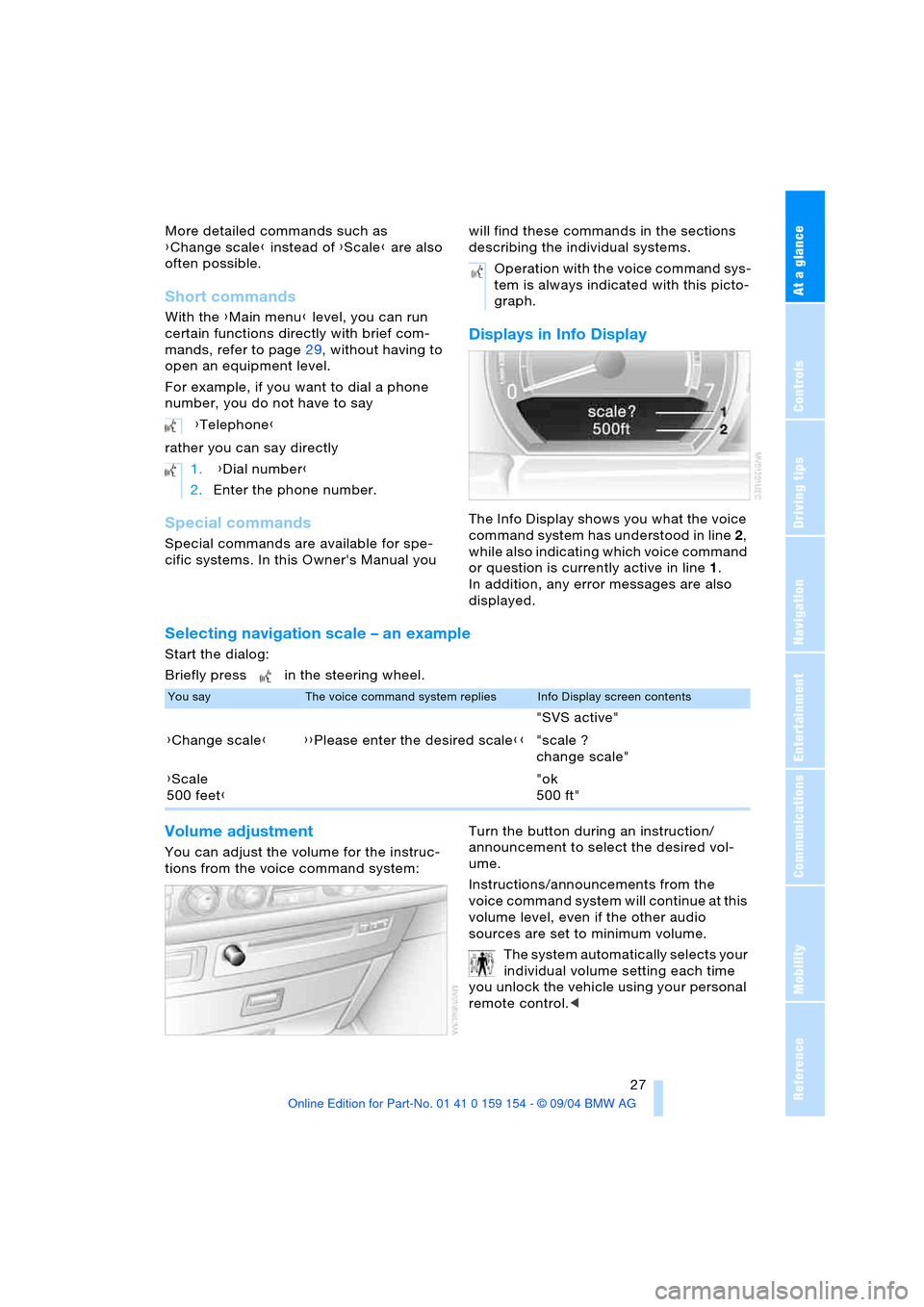
Displays in Info Display
The Info Display shows you what the voice
command system has understood in line 2,
while also indicating which voice command
or question is currently active in line1.
In addition, any error messages are also
displayed.
Selecting navigation scale – an example
Start the dialog:
Briefly press in the steering wheel.
Volume adjustment
You can adjust the volume for the instruc-
tions from the voice command system:Turn the button during an instruction/
announcement to select the desired vol-
ume.
Instructions/announcements from the
voice command system will continue at this
volume level, even if the other audio
sources are set to minimum volume.
The system automatically selects your
individual volume setting each time
you unlock the vehicle using your personal
remote control.< {Telephone}
1. {Dial number}
2.Enter the phone number.
Operation with the voice command sys-
tem is always indicated with this picto-
graph.
You sayThe voice command system repliesInfo Display screen contents
"SVS active"
{Change scale}{{Please enter the desired scale}}"scale ?
change scale"
{Scale
500 feet}"ok
500 ft"
Page 31 of 239
At a glance
29Reference
Controls
Driving tips
Communications
Navigation
Entertainment
Mobility
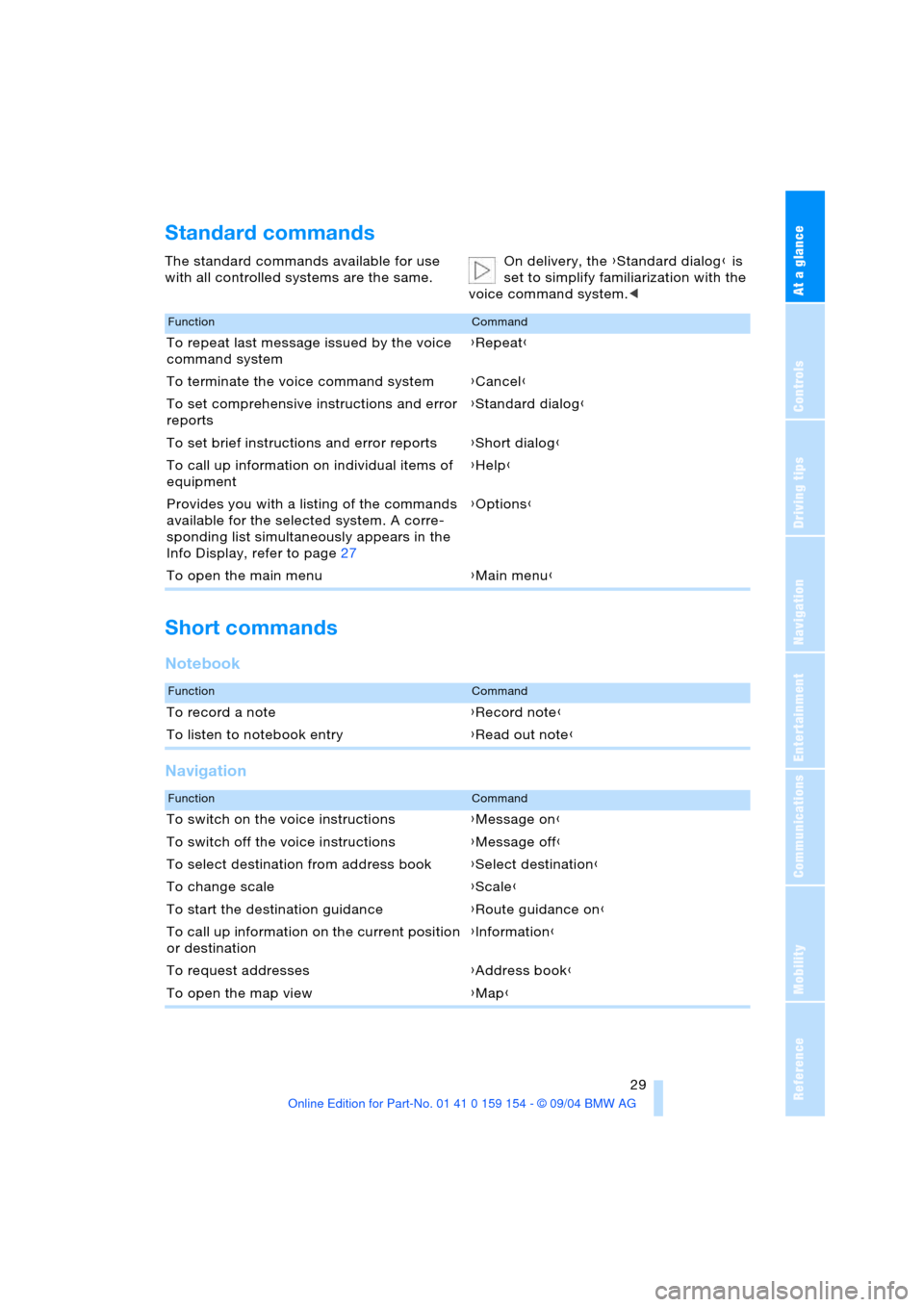
Standard commands
The standard commands available for use
with all controlled systems are the same.On delivery, the {Standard dialog} is
set to simplify familiarization with the
voice command system.<
Short commands
Notebook
Navigation
FunctionCommand
To repeat last message issued by the voice
command system{Repeat}
To terminate the voice command system{Cancel}
To set comprehensive instructions and error
reports{Standard dialog}
To set brief instructions and error reports{Short dialog}
To call up information on individual items of
equipment{Help}
Provides you with a listing of the commands
available for the selected system. A corre-
sponding list simultaneously appears in the
Info Display, refer to page27{Options}
To open the main menu{Main menu}
FunctionCommand
To record a note{Record note}
To listen to notebook entry{Read out note}
FunctionCommand
To switch on the voice instructions{Message on}
To switch off the voice instructions{Message off}
To select destination from address book{Select destination}
To change scale{Scale}
To start the destination guidance{Route guidance on}
To call up information on the current position
or destination{Information}
To request addresses{Address book}
To open the map view{Map}
Page 44 of 239
Opening and closing
42
Luggage compartment
Net*
You can use the net to store smaller objects
on the bulkhead separating the luggage
compartment from the rear seats.
Do not stow objects behind the side
trim panels on the left and right in the
luggage compartment, as otherwise the
electrical parts could overheat and be dam-
aged.<
Alarm system
The concept
The vehicle alarm system responds:
>When a door, the hood, or the luggage
compartment lid is opened
>To movement in the vehicle interior:
interior motion sensor
>To changing the vehicle's tilt if someone
attempts to steal the wheels or tow the
vehicle
>To interruption of battery voltage.
The system responds to unauthorized vehi-
cle entry and attempted theft by simulta-
neously activating:
>An acoustic alarm, which lasts for a
period of approx. 30 seconds
>The hazard warning flashers for approx.
five minutes
>The high beams, which flash on and off
in the same rhythm.
Arming and disarming alarm system
When you lock or unlock the vehicle, either
with the remote control or at the door lock,
the alarm system is armed or disarmed at
the same time.
The system indicates that it has been cor-
rectly armed by switching on the hazard
warning flashers for a single cycle and by
emitting an acoustic signal.You can have different acknowledg-
ment signals set to confirm arming
and disarming.<
You can also open the luggage compart-
ment lid with the system armed using
button3on the remote control, refer
to page36. When you close the lid, the sys-
tem is rearmed.
Unlocking vie the door lock will trigger
the alarm on some national-market
versions.
Pressing the 'Panic mode' button for a
longer period also triggers the alarm, refer
to page36.<
Switching off alarm
>Unlock the vehicle using the remote
control, refer to page36
>or insert the remote control all the way
into the ignition lock, engaging the
detent.
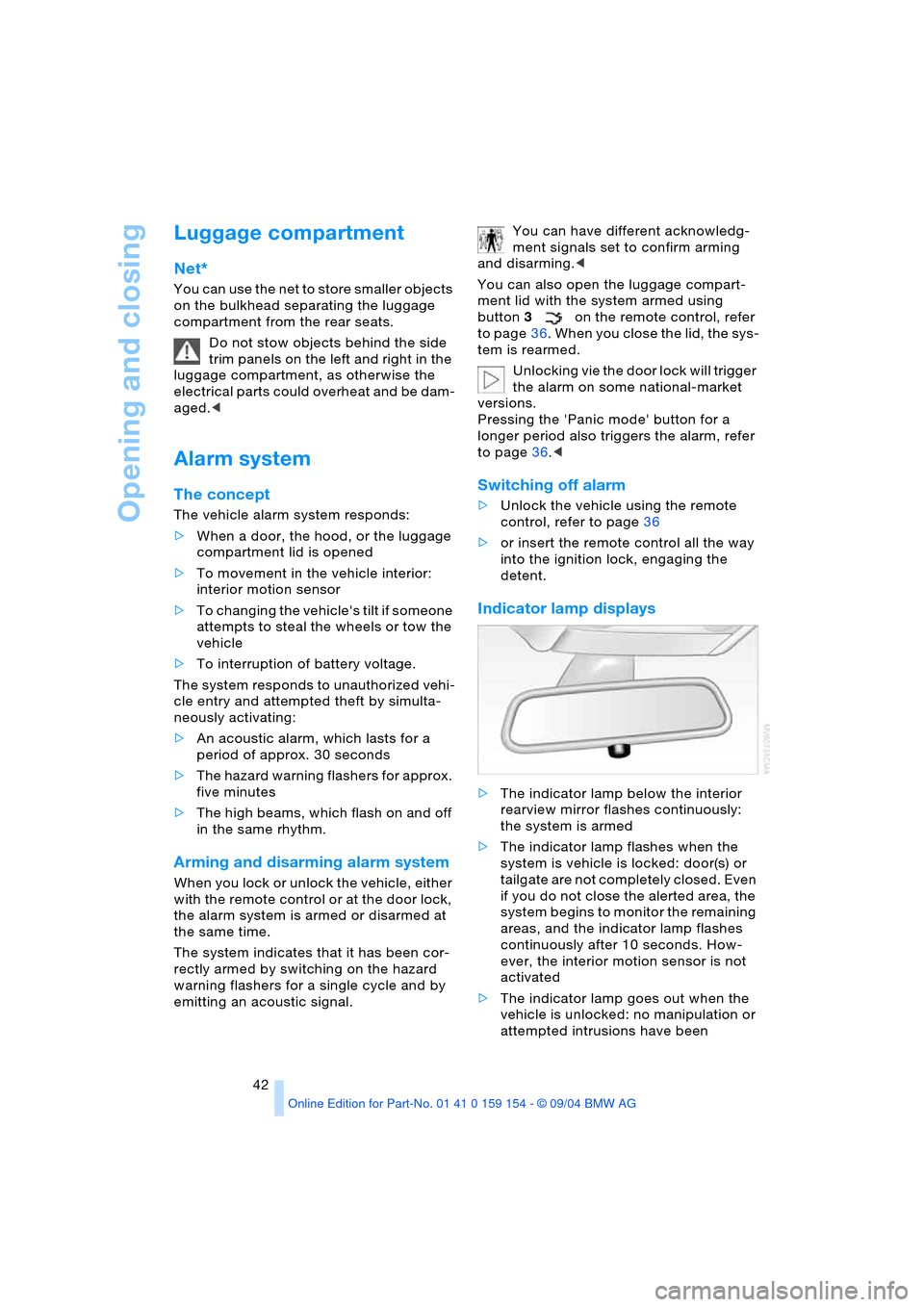
Indicator lamp displays
>The indicator lamp below the interior
rearview mirror flashes continuously:
the system is armed
>The indicator lamp flashes when the
system is vehicle is locked: door(s) or
tailgate are not completely closed. Even
if you do not close the alerted area, the
system begins to monitor the remaining
areas, and the indicator lamp flashes
continuously after 10 seconds. How-
ever, the interior motion sensor is not
activated
>The indicator lamp goes out when the
vehicle is unlocked: no manipulation or
attempted intrusions have been