display BMW 760i 2005 E65 Manual PDF
[x] Cancel search | Manufacturer: BMW, Model Year: 2005, Model line: 760i, Model: BMW 760i 2005 E65Pages: 239, PDF Size: 8.03 MB
Page 154 of 239
Radio
152
Radio
Listening to radio
1.Switch on audio or video sources, refer
to page 149.
Select " Audio" and confirm your
selection if a video source is switched
on
2.If another audio source is switched on,
select "FM..." or "AM..." and confirm
your selection.
Volume adjustment, refer to page149.
Tone control, refer to page149.
Waveband selection
Your radio provides reception the FM and
AM wavebands.
To select waveband:
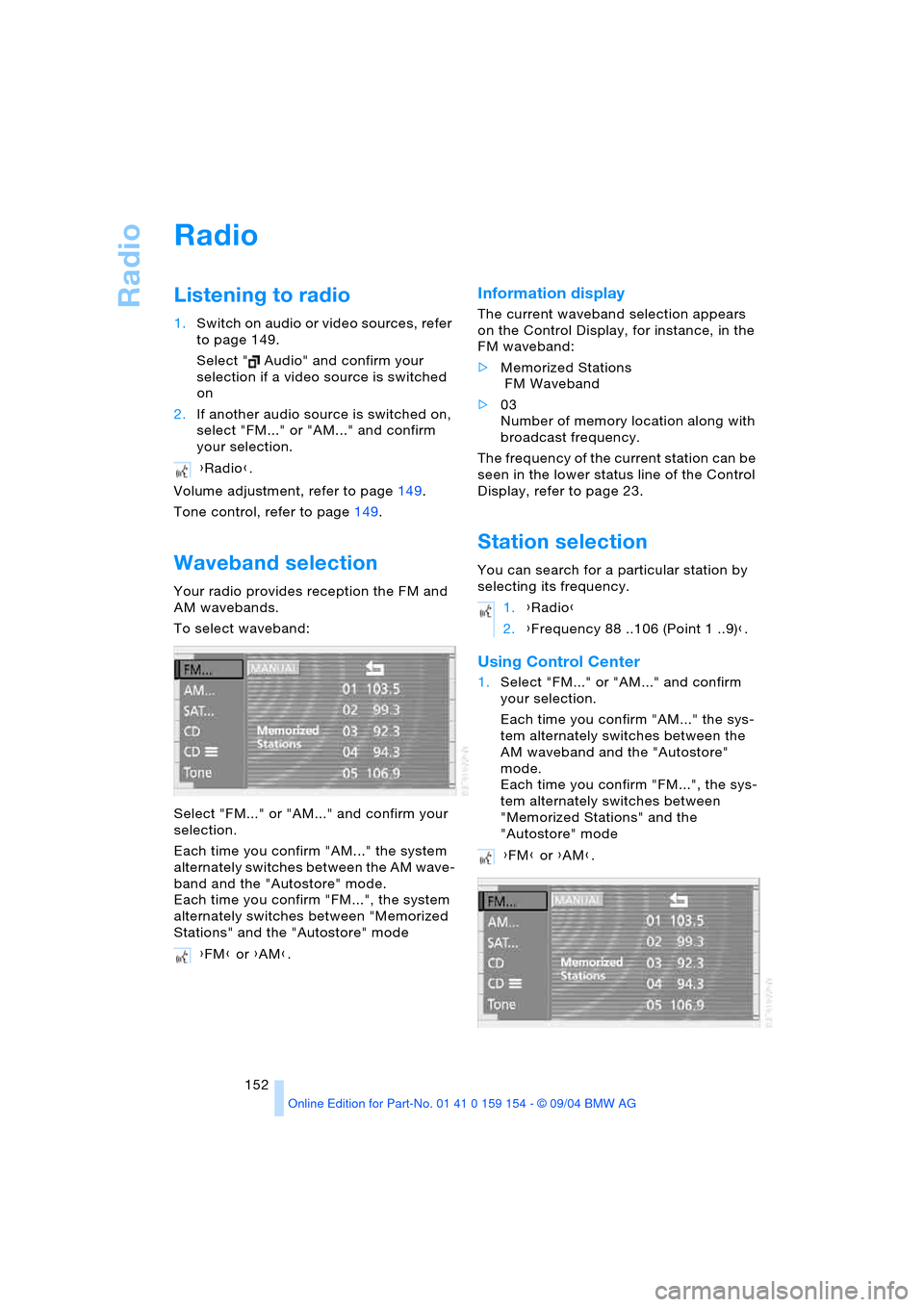
Select "FM..." or "AM..." and confirm your
selection.
Each time you confirm "AM..." the system
alternately switches between the AM wave-
band and the "Autostore" mode.
Each time you confirm "FM...", the system
alternately switches between "Memorized
Stations" and the "Autostore" mode
Information display
The current waveband selection appears
on the Control Display, for instance, in the
FM waveband:
>Memorized Stations
FM Waveband
>03
Number of memory location along with
broadcast frequency.
The frequency of the current station can be
seen in the lower status line of the Control
Display, refer to page 23.
Station selection
You can search for a particular station by
selecting its frequency.
Using Control Center
1.Select "FM..." or "AM..." and confirm
your selection.
Each time you confirm "AM..." the sys-
tem alternately switches between the
AM waveband and the "Autostore"
mode.
Each time you confirm "FM...", the sys-
tem alternately switches between
"Memorized Stations" and the
"Autostore" mode {Radio}.
{FM} or {AM}.
1.{Radio}
2.{Frequency 88 ..106 (Point 1 ..9)}.
{FM} or {AM}.
Page 155 of 239
Navigation
Entertainment
Driving tips
153Reference
At a glance
Controls
Communications
Mobility
2.Select "MANUAL" and confirm your
selection.
Manual search
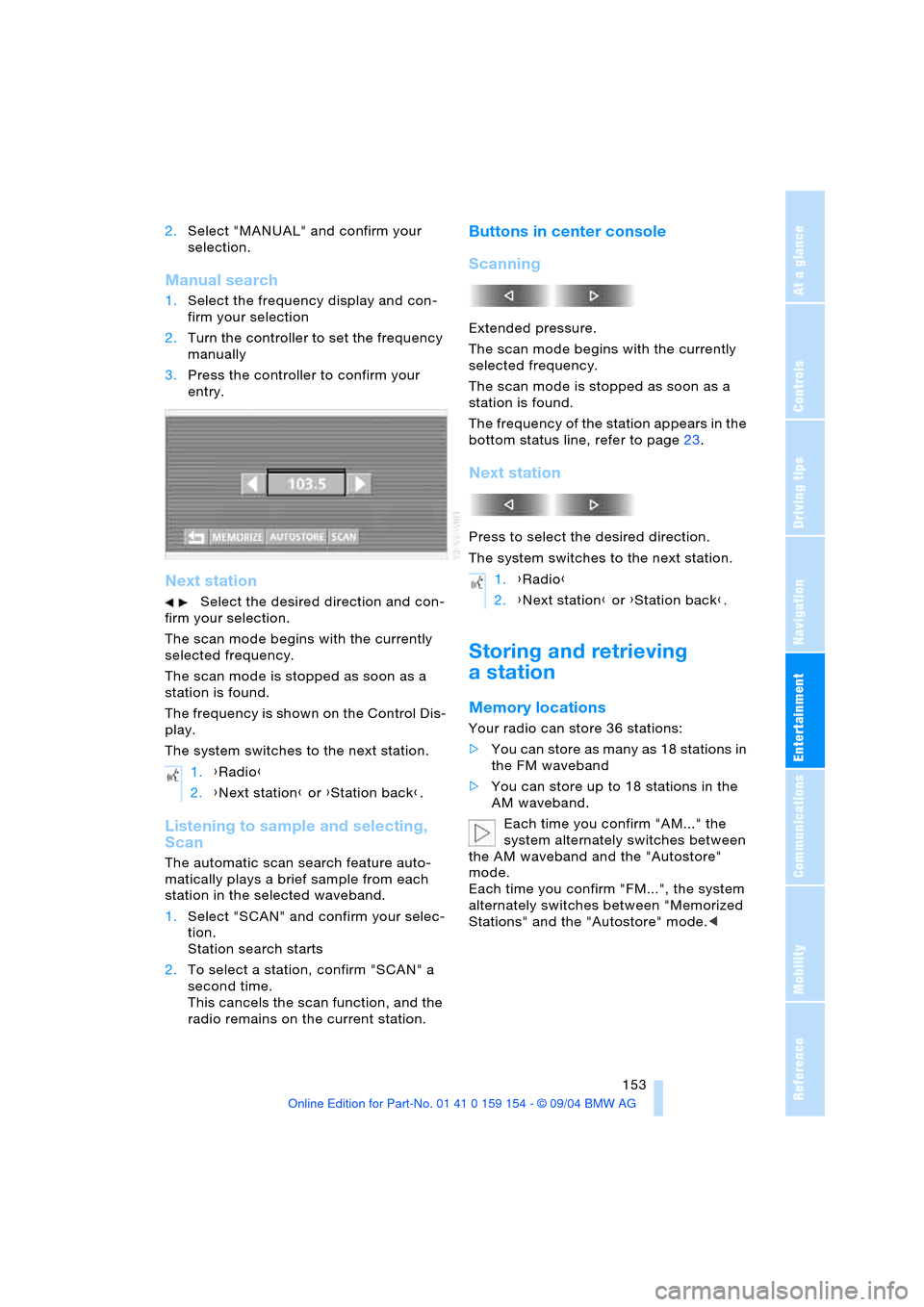
1.Select the frequency display and con-
firm your selection
2.Turn the controller to set the frequency
manually
3.Press the controller to confirm your
entry.
Next station
Select the desired direction and con-
firm your selection.
The scan mode begins with the currently
selected frequency.
The scan mode is stopped as soon as a
station is found.
The frequency is shown on the Control Dis-
play.
The system switches to the next station.
Listening to sample and selecting,
Scan
The automatic scan search feature auto-
matically plays a brief sample from each
station in the selected waveband.
1.Select "SCAN" and confirm your selec-
tion.
Station search starts
2.To select a station, confirm "SCAN" a
second time.
This cancels the scan function, and the
radio remains on the current station.
Buttons in center console
Scanning
Extended pressure.
The scan mode begins with the currently
selected frequency.
The scan mode is stopped as soon as a
station is found.
The frequency of the station appears in the
bottom status line, refer to page23.
Next station
Press to select the desired direction.
The system switches to the next station.
Storing and retrieving
a station
Memory locations
Your radio can store 36 stations:
>You can store as many as 18 stations in
the FM waveband
>You can store up to 18 stations in the
AM waveband.
Each time you confirm "AM..." the
system alternately switches between
the AM waveband and the "Autostore"
mode.
Each time you confirm "FM...", the system
alternately switches between "Memorized
Stations" and the "Autostore" mode.< 1.{Radio}
2.{Next station} or {Station back}.
1.{Radio}
2.{Next station} or {Station back}.
Page 157 of 239
Navigation
Entertainment
Driving tips
155Reference
At a glance
Controls
Communications
Mobility
Weather Band
Weather Radio is a service of the National
Oceanic and Atmospheric Administration,
NOAA, of the U.S. Department of Com-
merce. Weather messages are repeated
every four to six minutes and are routinely
revised every one to three hours, or more
frequently if needed. Most of the stations
operate 24 hours daily. During severe
weather, National Weather Service fore-
casters can interrupt the routine weather
broadcasts and substitute special warning
messages. If you have a question concern-
ing NOAA Weather Radio, please contact
your nearest National Weather Service
Office, or write to National Weather Ser-
vice, Attn: W/OM11, National Oceanic and
Atmospheric Administration, 1325 East-
West Highway Silver Spring, MD. 20910.
Selecting Weather Band
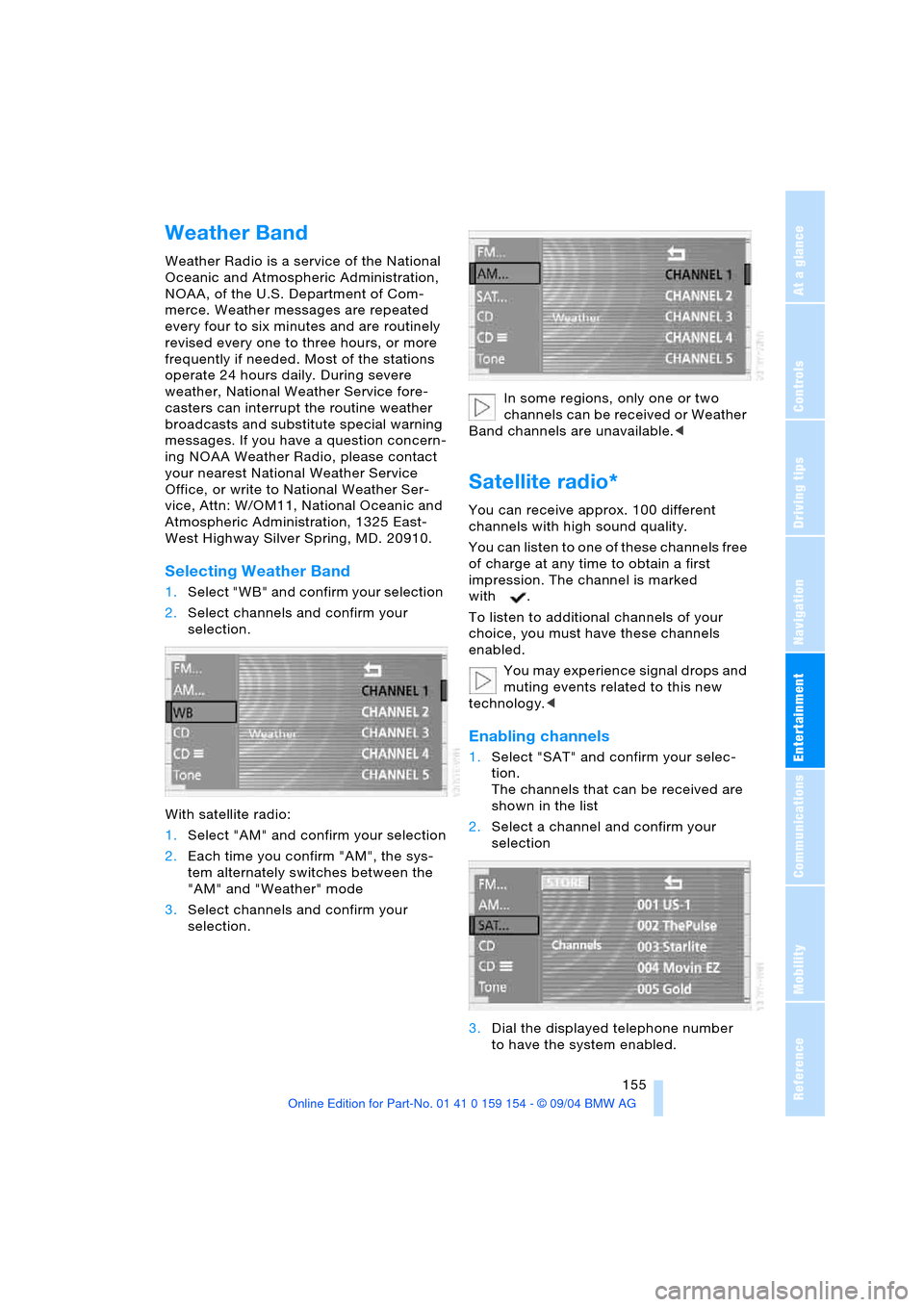
1.Select "WB" and confirm your selection
2.Select channels and confirm your
selection.
With satellite radio:
1.Select "AM" and confirm your selection
2.Each time you confirm "AM", the sys-
tem alternately switches between the
"AM" and "Weather" mode
3.Select channels and confirm your
selection.In some regions, only one or two
channels can be received or Weather
Band channels are unavailable.<
Satellite radio*
You can receive approx. 100 different
channels with high sound quality.
You can listen to one of these channels free
of charge at any time to obtain a first
impression. The channel is marked
with .
To listen to additional channels of your
choice, you must have these channels
enabled.
You may experience signal drops and
muting events related to this new
technology.<
Enabling channels
1.Select "SAT" and confirm your selec-
tion.
The channels that can be received are
shown in the list
2.Select a channel and confirm your
selection
3.Dial the displayed telephone number
to have the system enabled.
Page 158 of 239
Radio
156 During enabling, leave the ignition
switched on.
Channel selection
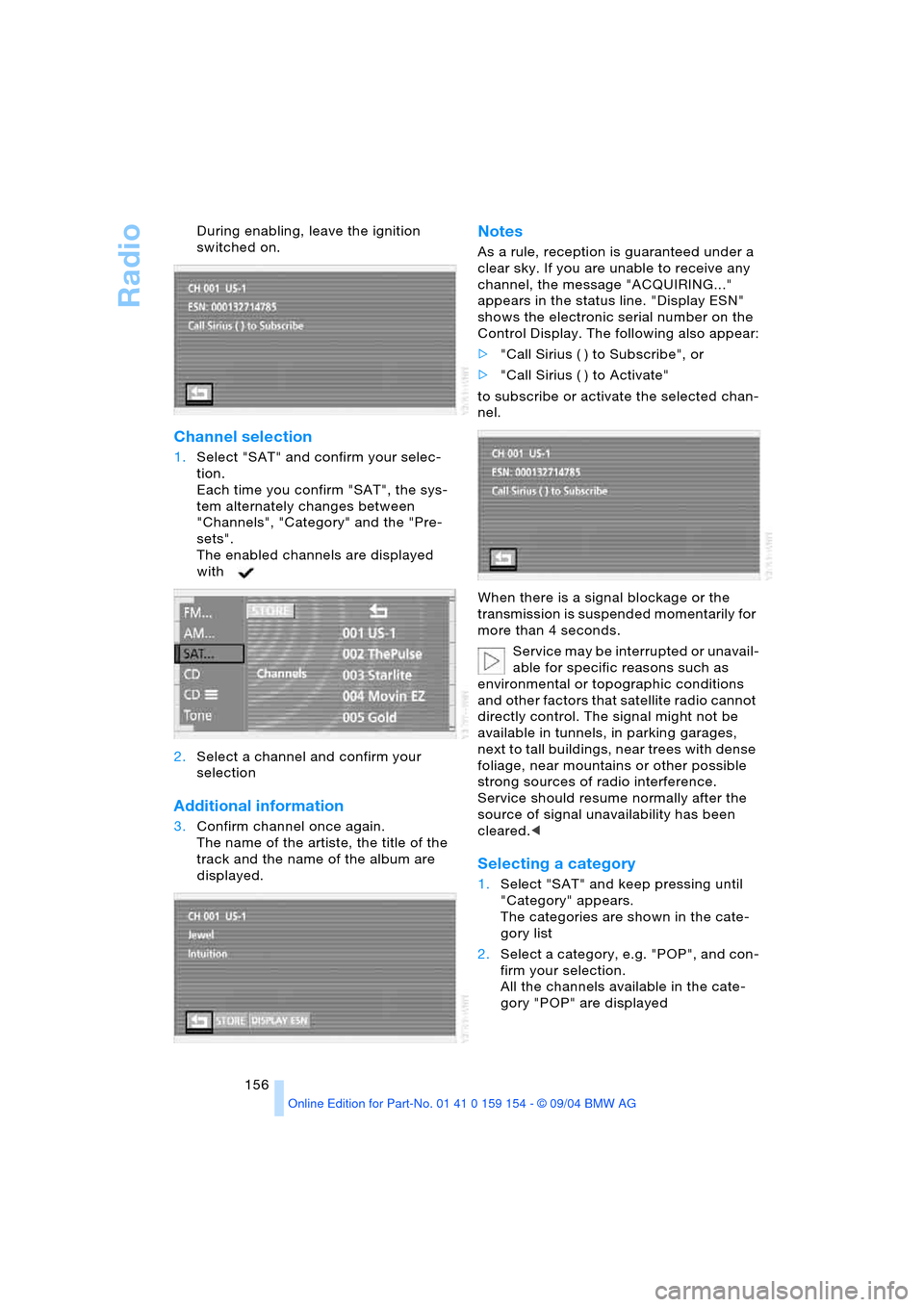
1.Select "SAT" and confirm your selec-
tion.
Each time you confirm "SAT", the sys-
tem alternately changes between
"Channels", "Category" and the "Pre-
sets".
The enabled channels are displayed
with
2.Select a channel and confirm your
selection
Additional information
3.Confirm channel once again.
The name of the artiste, the title of the
track and the name of the album are
displayed.
Notes
As a rule, reception is guaranteed under a
clear sky. If you are unable to receive any
channel, the message "ACQUIRING..."
appears in the status line. "Display ESN"
shows the electronic serial number on the
Control Display. The following also appear:
>"Call Sirius ( ) to Subscribe", or
>"Call Sirius ( ) to Activate"
to subscribe or activate the selected chan-
nel.
When there is a signal blockage or the
transmission is suspended momentarily for
more than 4 seconds.
Service may be interrupted or unavail-
able for specific reasons such as
environmental or topographic conditions
and other factors that satellite radio cannot
directly control. The signal might not be
available in tunnels, in parking garages,
next to tall buildings, near trees with dense
foliage, near mountains or other possible
strong sources of radio interference.
Service should resume normally after the
source of signal unavailability has been
cleared.<
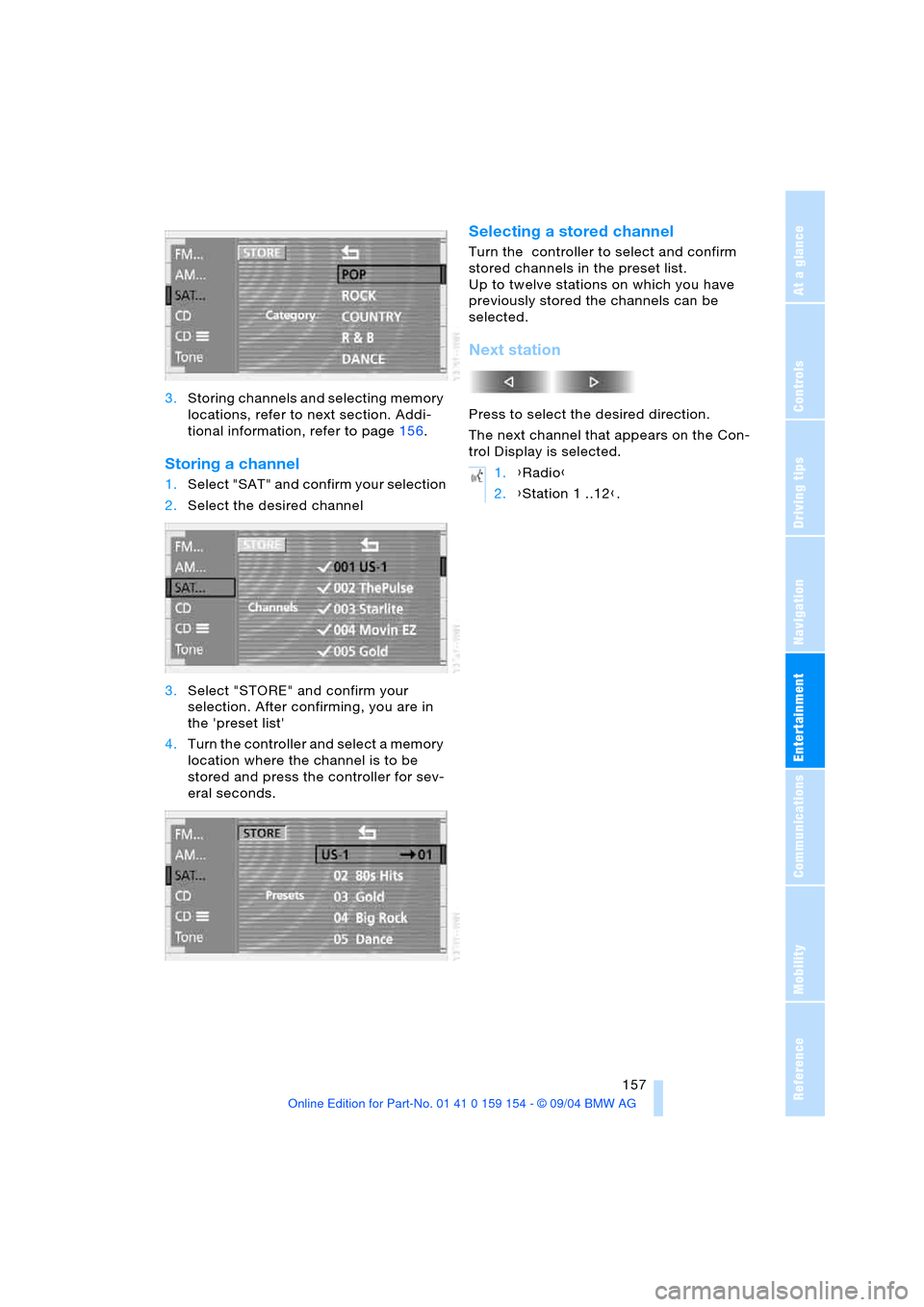
Selecting a category
1.Select "SAT" and keep pressing until
"Category" appears.
The categories are shown in the cate-
gory list
2.Select a category, e.g. "POP", and con-
firm your selection.
All the channels available in the cate-
gory "POP" are displayed
Page 159 of 239
Navigation
Entertainment
Driving tips
157Reference
At a glance
Controls
Communications
Mobility
3.Storing channels and selecting memory
locations, refer to next section. Addi-
tional information, refer to page156.
Storing a channel
1.Select "SAT" and confirm your selection
2.Select the desired channel
3.Select "STORE" and confirm your
selection. After confirming, you are in
the 'preset list'
4.Turn the controller and select a memory
location where the channel is to be
stored and press the controller for sev-
eral seconds.
Selecting a stored channel
Turn the controller to select and confirm
stored channels in the preset list.
Up to twelve stations on which you have
previously stored the channels can be
selected.
Next station
Press to select the desired direction.
The next channel that appears on the Con-
trol Display is selected.
1.{Radio}
2.{Station 1 ..12}.
Page 163 of 239
Navigation
Entertainment
Driving tips
161Reference
At a glance
Controls
Communications
Mobility
If the CD magazine has been newly filled,
playback begins with the lowest CD, e.g.
CD 1, track 1.
Volume adjustment, refer to page149.
Tone control, refer to page149.
If you play self-recorded audio CDs,
faults, e.g. drop-outs, can occur, or
the CD is not played at all.<
Status displays
The CD magazine's load status is indicated
on the Control Display.
If the display fails to detect a CD that
you have loaded in the magazine,
check to ensure that the CD has been
inserted correctly and inspect it for signs of
defects.<
Selecting a track using
Control Center
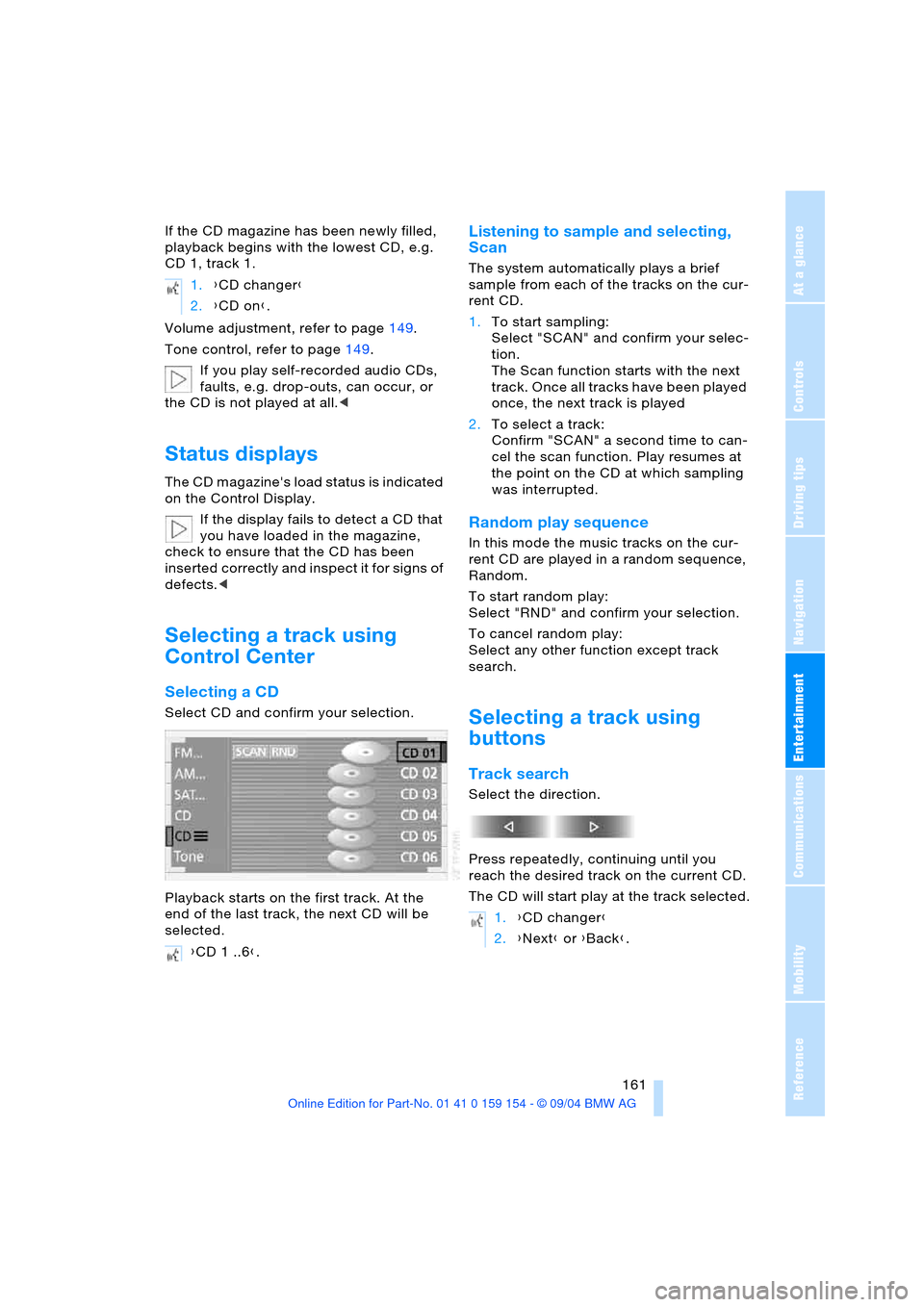
Selecting a CD
Select CD and confirm your selection.
Playback starts on the first track. At the
end of the last track, the next CD will be
selected.
Listening to sample and selecting,
Scan
The system automatically plays a brief
sample from each of the tracks on the cur-
rent CD.
1.To start sampling:
Select "SCAN" and confirm your selec-
tion.
The Scan function starts with the next
track. Once all tracks have been played
once, the next track is played
2.To select a track:
Confirm "SCAN" a second time to can-
cel the scan function. Play resumes at
the point on the CD at which sampling
was interrupted.
Random play sequence
In this mode the music tracks on the cur-
rent CD are played in a random sequence,
Random.
To start random play:
Select "RND" and confirm your selection.
To cancel random play:
Select any other function except track
search.
Selecting a track using
buttons
Track search
Select the direction.
Press repeatedly, continuing until you
reach the desired track on the current CD.
The CD will start play at the track selected. 1.{CD changer}
2.{CD on}.
{CD 1 ..6}.
1.{CD changer}
2.{Next} or {Back}.
Page 166 of 239
TV
164
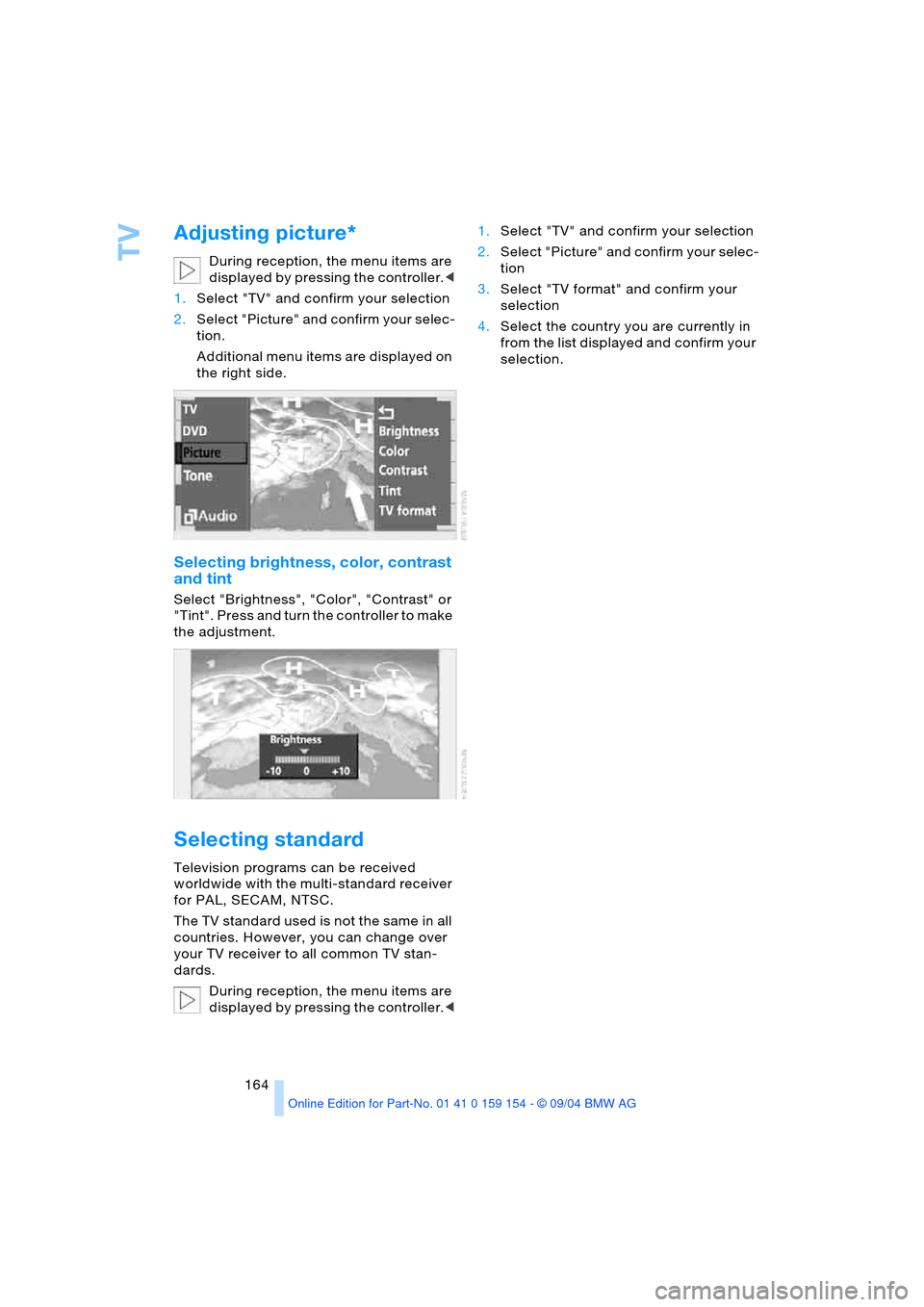
Adjusting picture*
During reception, the menu items are
displayed by pressing the controller.<
1.Select "TV" and confirm your selection
2.Select "Picture" and confirm your selec-
tion.
Additional menu items are displayed on
the right side.
Selecting brightness, color, contrast
and tint
Select "Brightness", "Color", "Contrast" or
"Tint". Press and turn the controller to make
the adjustment.
Selecting standard
Television programs can be received
worldwide with the multi-standard receiver
for PAL, SECAM, NTSC.
The TV standard used is not the same in all
countries. However, you can change over
your TV receiver to all common TV stan-
dards.
During reception, the menu items are
displayed by pressing the controller.<1.Select "TV" and confirm your selection
2.Select "Picture" and confirm your selec-
tion
3.Select "TV format" and confirm your
selection
4.Select the country you are currently in
from the list displayed and confirm your
selection.
Page 168 of 239
DVD changer
166 3.Close the door again.
The DVD changer checks the maga-
zine for inserted DVDs or CDs and is
then ready for operation.<
DVD country codes
Your DVD changer only plays DVDs with
the coding 0 or 1. This coding cannot be
changed.
Playing DVDs
Make all entries with the vehicle sta-
tionary. If you do not observe this pre-
caution, you may endanger vehicle occu-
pants and other road users.<
1.Insert the DVD magazine
2.Select "DVD" and confirm your selec-
tion.
After a few seconds, play will resume at the
point where the DVD stopped earlier.
If the DVD magazine has been newly
filled or an audio CD played from the
DVD magazine, playback begins with the
lowest DVD in the DVD magazine.Volume adjustment, refer to page149.
Tone control, refer to page149.
Status displays
The DVD magazine's load status is indi-
cated on the Control Display.
If the display fails to detect a DVD that
you have loaded in the magazine,
check to ensure that the DVD has been
inserted correctly and inspect it for signs of
defects.
If there are audio CDs in the DVD maga-
zine, these will not be displayed in the DVD
menu, but instead in the CD changer menu.
If your vehicle is equipped with an addi-
tional CD changer, they will be displayed
with the numbers 7 to 12.<
DVD control
With the DVD controller you can select the
track and chapter, display the DVD-specific
menu and operate functions such as Lan-
guage, Fast Forward and Reverse or Freez-
ing Frame.
A DVD can briefly deactivate functions of
the DVD control, under certain circum-
stances while the entire DVD is being
played. You are then unable to operate the
DVD control. In this case, attempt to make
the selection using the DVD-specific menu.
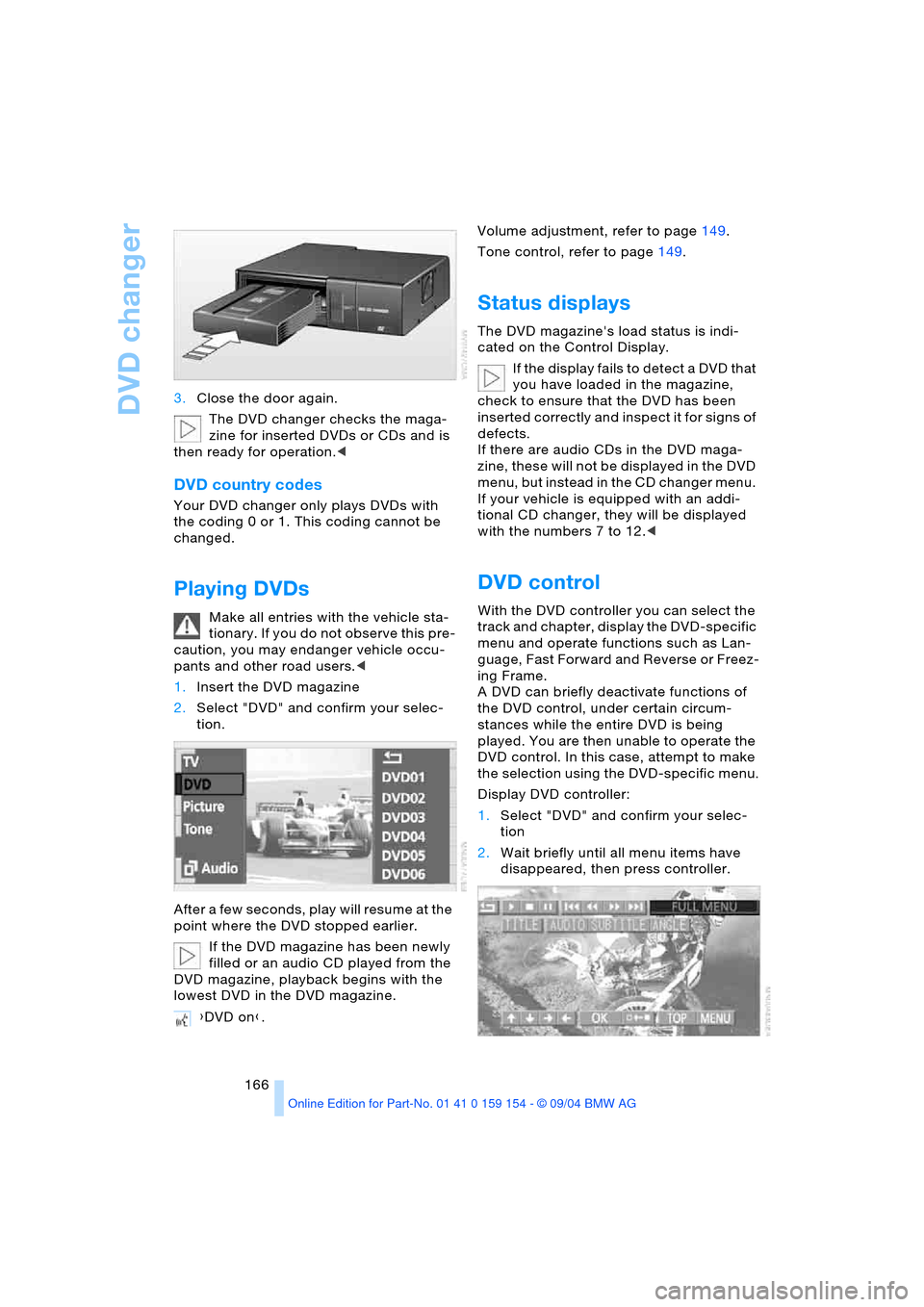
Display DVD controller:
1.Select "DVD" and confirm your selec-
tion
2.Wait briefly until all menu items have
disappeared, then press controller.
{DVD on}.
Page 169 of 239
Navigation
Entertainment
Driving tips
167Reference
At a glance
Controls
Communications
Mobility
The DVD controller disappears again after a
short time if you have not selected a func-
tion.
During playback the DVD controller is
displayed by pressing the controller.<
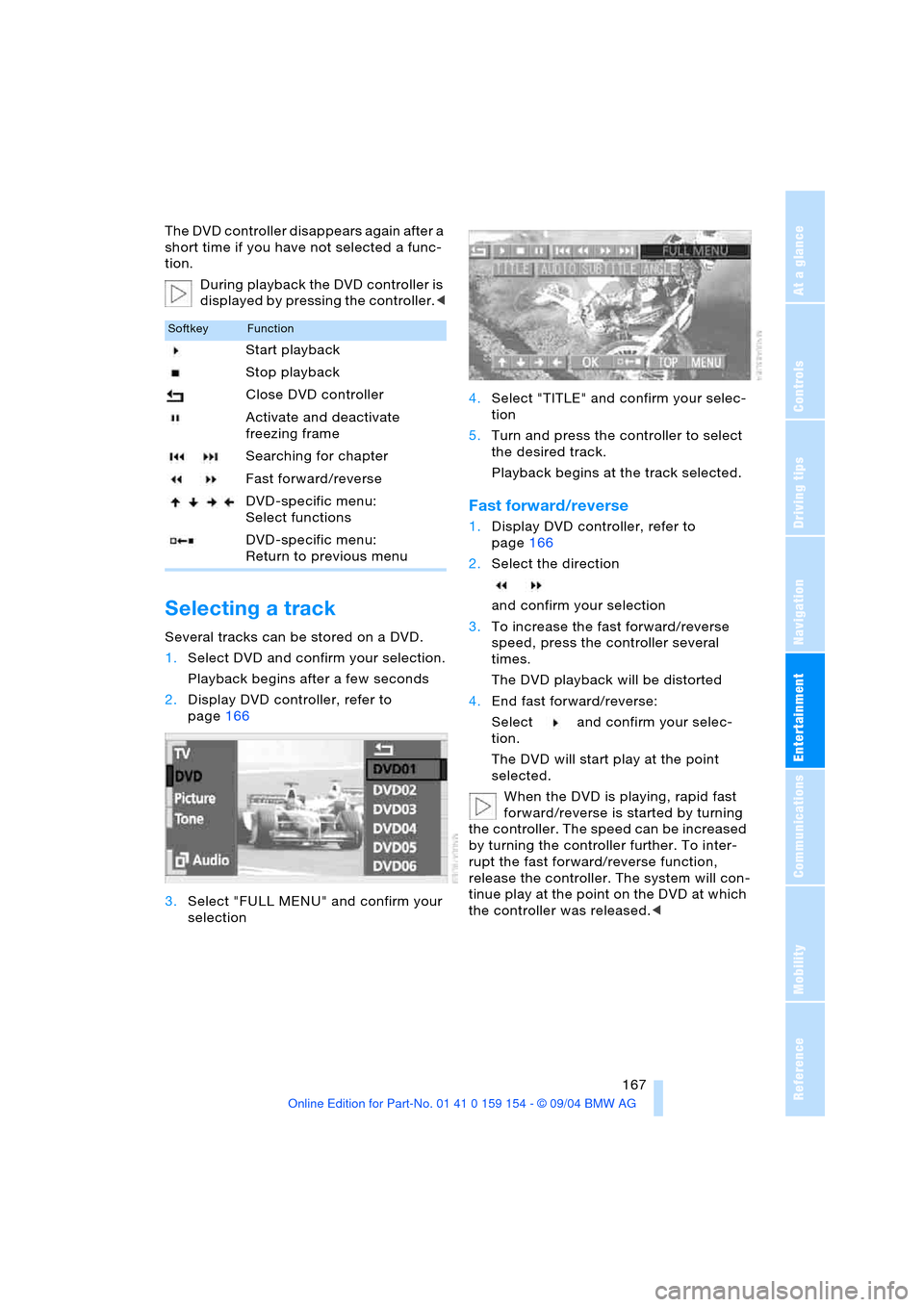
Selecting a track
Several tracks can be stored on a DVD.
1.Select DVD and confirm your selection.
Playback begins after a few seconds
2.Display DVD controller, refer to
page166
3.Select "FULL MENU" and confirm your
selection4.Select "TITLE" and confirm your selec-
tion
5.Turn and press the controller to select
the desired track.
Playback begins at the track selected.
Fast forward/reverse
1.Display DVD controller, refer to
page166
2.Select the direction
and confirm your selection
3.To increase the fast forward/reverse
speed, press the controller several
times.
The DVD playback will be distorted
4.End fast forward/reverse:
Select and confirm your selec-
tion.
The DVD will start play at the point
selected.
When the DVD is playing, rapid fast
forward/reverse is started by turning
the controller. The speed can be increased
by turning the controller further. To inter-
rupt the fast forward/reverse function,
release the controller. The system will con-
tinue play at the point on the DVD at which
the controller was released.<
SoftkeyFunction
Start playback
Stop playback
Close DVD controller
Activate and deactivate
freezing frame
Searching for chapter
Fast forward/reverse
DVD-specific menu:
Select functions
DVD-specific menu:
Return to previous menu
Page 170 of 239
DVD changer
168
Searching for chapter
You can change to the next or previ-
ous chapter during playback.<
1.Display DVD controller, refer to
page166
2.Select the direction
and confirm repeatedly, continuing until
you reach the desired chapter
or with buttons
select the direction.
Press repeatedly, continuing until you
reach the desired chapter on the current
DVD.
Playback begins at the chapter selected.
Adjusting picture
1.During playback, press controller
2.Select and confirm your selection
3.Adjusting the picture, refer to page164.
Freezing frame
1.Display DVD controller, refer to
page166
2.At the desired point:
Select and confirm your selec-
tion.
The film is stopped
3.To restart the DVD:
Select or and confirm your
selection.
DVD playback is continued at the point
at which it was interrupted.
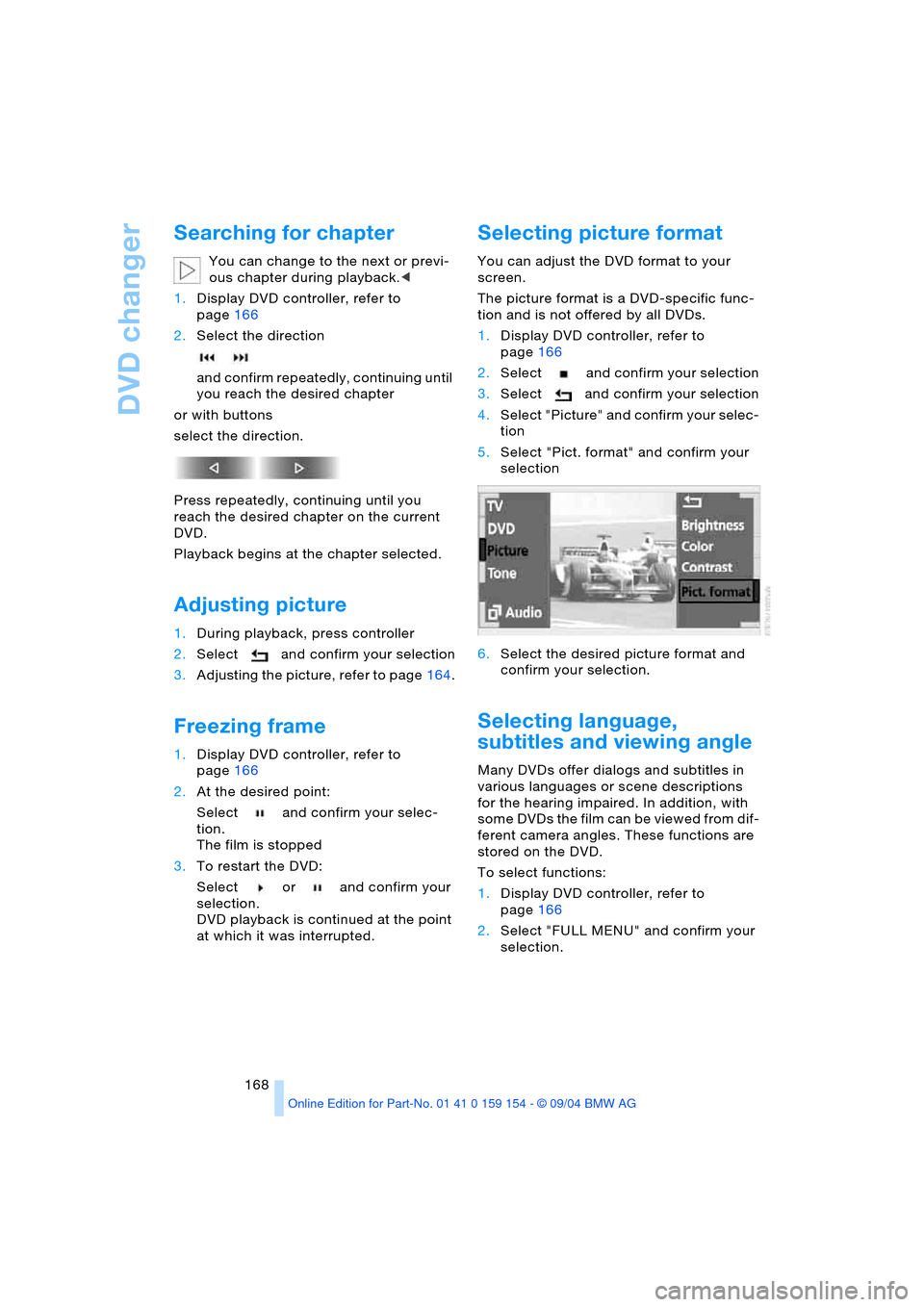
Selecting picture format
You can adjust the DVD format to your
screen.
The picture format is a DVD-specific func-
tion and is not offered by all DVDs.
1.Display DVD controller, refer to
page166
2.Select and confirm your selection
3.Select and confirm your selection
4.Select "Picture" and confirm your selec-
tion
5.Select "Pict. format" and confirm your
selection
6.Select the desired picture format and
confirm your selection.
Selecting language,
subtitles and viewing angle
Many DVDs offer dialogs and subtitles in
various languages or scene descriptions
for the hearing impaired. In addition, with
some DVDs the film can be viewed from dif-
ferent camera angles. These functions are
stored on the DVD.
To select functions:
1.Display DVD controller, refer to
page166
2.Select "FULL MENU" and confirm your
selection.