climate control BMW ACTIVEHYBRID 5 2012 User Guide
[x] Cancel search | Manufacturer: BMW, Model Year: 2012, Model line: ACTIVEHYBRID 5, Model: BMW ACTIVEHYBRID 5 2012Pages: 319, PDF Size: 12.54 MB
Page 133 of 319
Switching on1.Switch off the ignition.2. Press the right side of the button on
the driver's side.
is shown on the display of the automatic cli‐
mate control.
The interior temperature, air volume and air dis‐
tribution can be adjusted with the ignition
switched on.
Switching off
At the lowest fan speed, press the left side of the
button on the driver's side.
on the display of the automatic climate control
goes out.
Switching the system on/off
Switching off
▷Complete system: At the lowest fan speed, press the
left side of the button on the driver's
side.▷On the front passenger side:
At the lowest fan speed, press the
left side of the button on the front
passenger side.
Switching on
Press any button.
Microfilter/activated-charcoal filter
The microfilter removes dust and pollen from
the incoming air.
The activated-charcoal filter removes gaseous
pollutants from the outside air that enters the
vehicle.
This combined filter should be replaced during
scheduled maintenance, refer to page 273, of
your vehicle.
Ventilation
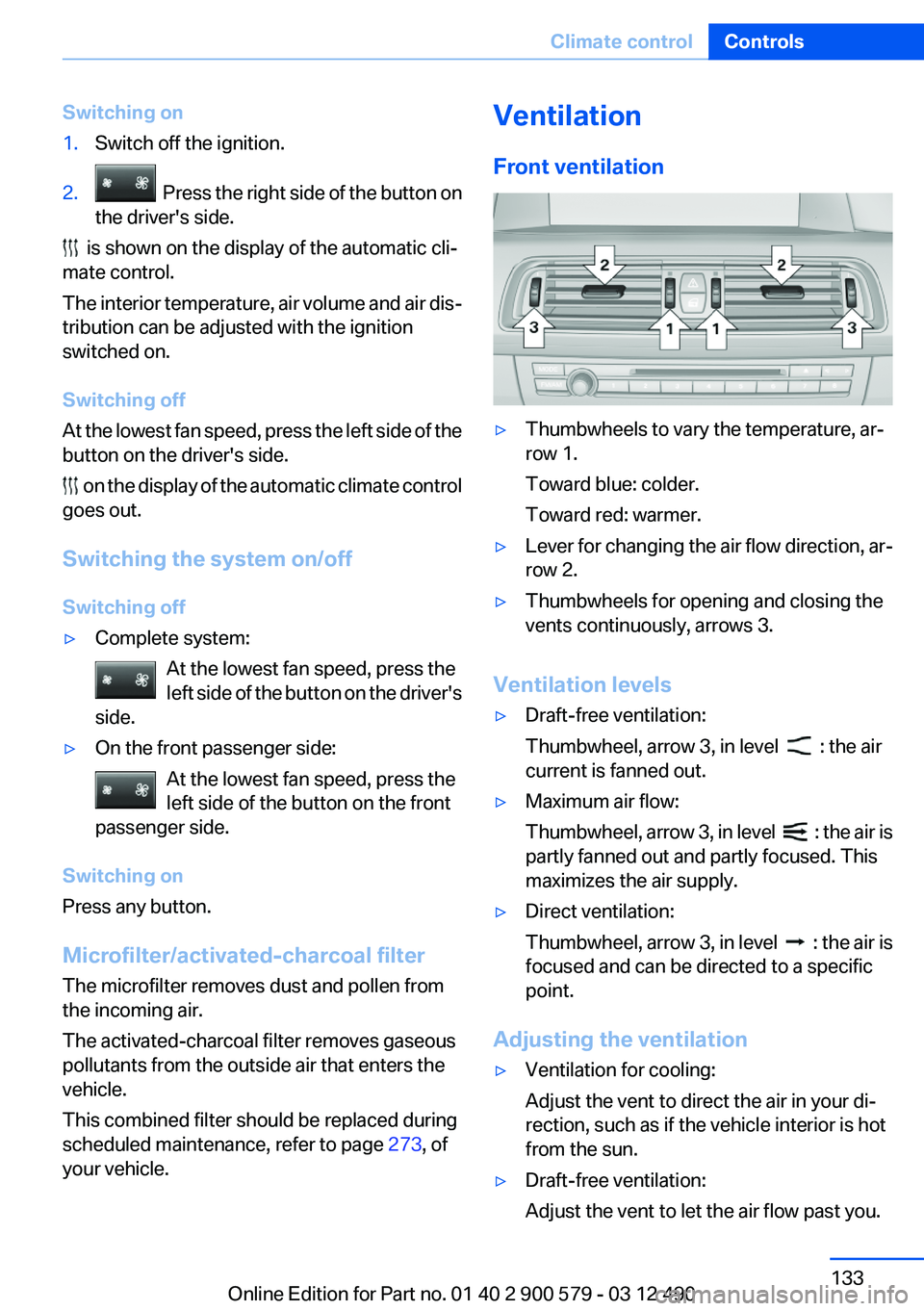
Front ventilation▷Thumbwheels to vary the temperature, ar‐
row 1.
Toward blue: colder.
Toward red: warmer.▷Lever for changing the air flow direction, ar‐
row 2.▷Thumbwheels for opening and closing the
vents continuously, arrows 3.
Ventilation levels
▷Draft-free ventilation:
Thumbwheel, arrow 3, in level
: the air
current is fanned out.
▷Maximum air flow:
Thumbwheel, arrow 3, in level
: the air is
partly fanned out and partly focused. This
maximizes the air supply.
▷Direct ventilation:
Thumbwheel, arrow 3, in level
: the air is
focused and can be directed to a specific
point.
Adjusting the ventilation
▷Ventilation for cooling:
Adjust the vent to direct the air in your di‐
rection, such as if the vehicle interior is hot
from the sun.▷Draft-free ventilation:
Adjust the vent to let the air flow past you.Seite 133Climate controlControls133
Online Edition for Part no. 01 40 2 900 579 - 03 12 490
Page 134 of 319
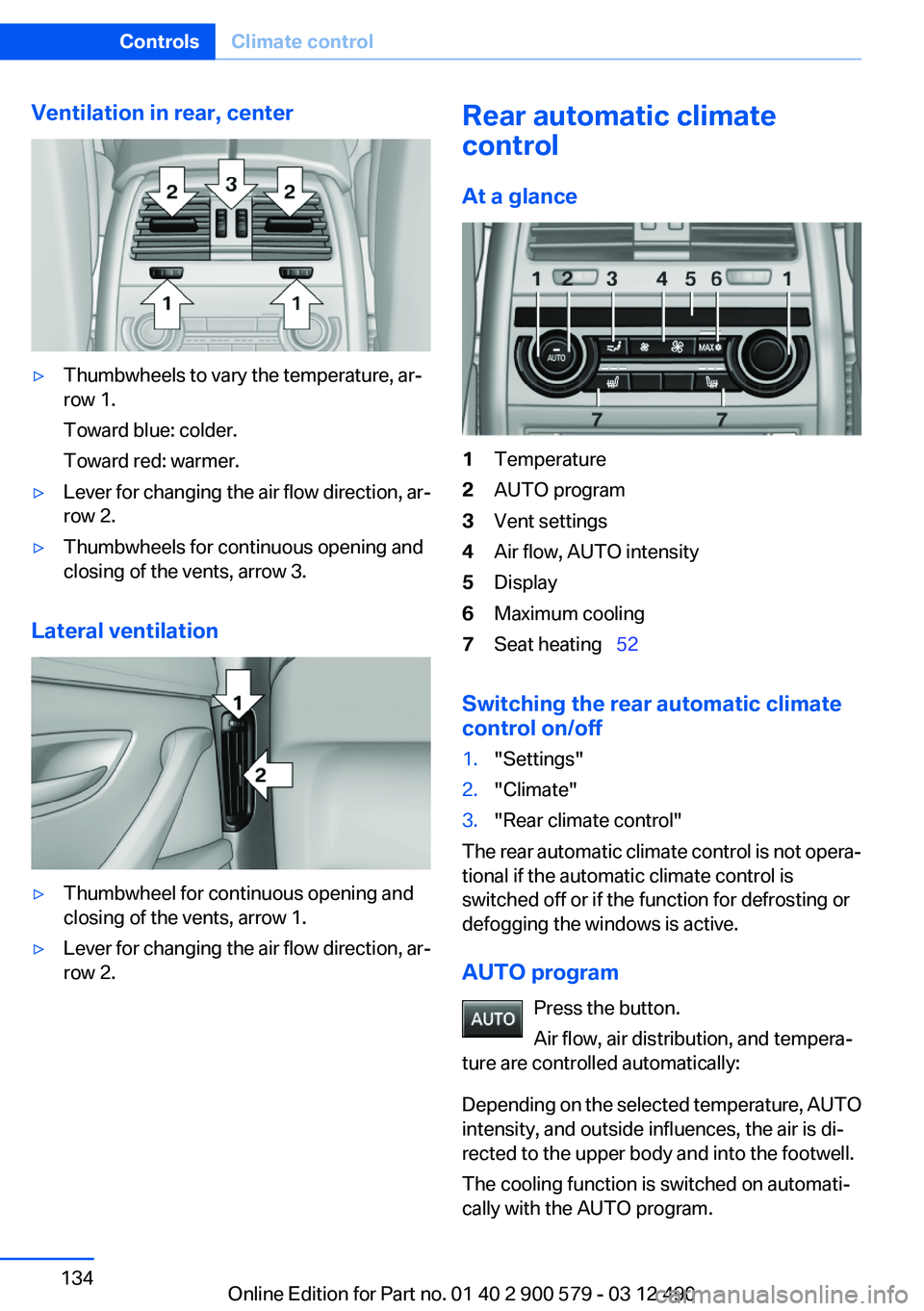
Ventilation in rear, center▷Thumbwheels to vary the temperature, ar‐
row 1.
Toward blue: colder.
Toward red: warmer.▷Lever for changing the air flow direction, ar‐
row 2.▷Thumbwheels for continuous opening and
closing of the vents, arrow 3.
Lateral ventilation
▷Thumbwheel for continuous opening and
closing of the vents, arrow 1.▷Lever for changing the air flow direction, ar‐
row 2.Rear automatic climate
control
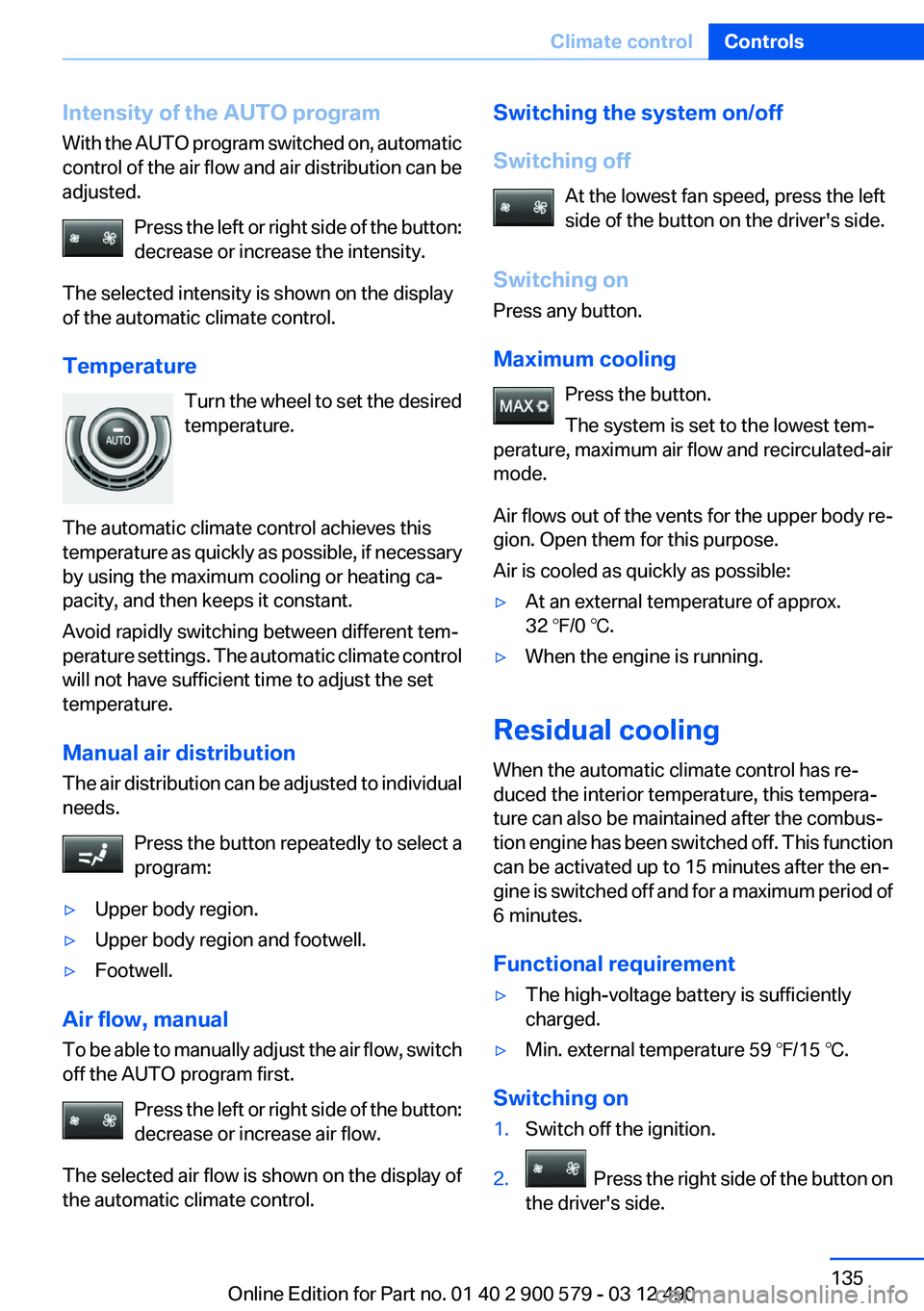
At a glance1Temperature2AUTO program3Vent settings4Air flow, AUTO intensity5Display6Maximum cooling7Seat heating 52
Switching the rear automatic climate
control on/off
1."Settings"2."Climate"3."Rear climate control"
The rear automatic climate control is not opera‐
tional if the automatic climate control is
switched off or if the function for defrosting or
defogging the windows is active.
AUTO program Press the button.
Air flow, air distribution, and tempera‐
ture are controlled automatically:
Depending on the selected temperature, AUTO
intensity, and outside influences, the air is di‐
rected to the upper body and into the footwell.
The cooling function is switched on automati‐
cally with the AUTO program.
Seite 134ControlsClimate control134
Online Edition for Part no. 01 40 2 900 579 - 03 12 490
Page 135 of 319
Intensity of the AUTO program
With the AUTO program switched on, automatic
control of the air flow and air distribution can be
adjusted.
Press the left or right side of the button:
decrease or increase the intensity.
The selected intensity is shown on the display
of the automatic climate control.
Temperature Turn the wheel to set the desired
temperature.
The automatic climate control achieves this
temperature as quickly as possible, if necessary
by using the maximum cooling or heating ca‐
pacity, and then keeps it constant.
Avoid rapidly switching between different tem‐
perature settings. The automatic climate control
will not have sufficient time to adjust the set
temperature.
Manual air distribution
The air distribution can be adjusted to individual
needs.
Press the button repeatedly to select a
program:▷Upper body region.▷Upper body region and footwell.▷Footwell.
Air flow, manual
To be able to manually adjust the air flow, switch
off the AUTO program first.
Press the left or right side of the button:
decrease or increase air flow.
The selected air flow is shown on the display of
the automatic climate control.
Switching the system on/off
Switching off At the lowest fan speed, press the left
side of the button on the driver's side.
Switching on
Press any button.
Maximum cooling Press the button.
The system is set to the lowest tem‐
perature, maximum air flow and recirculated-air
mode.
Air flows out of the vents for the upper body re‐
gion. Open them for this purpose.
Air is cooled as quickly as possible:▷At an external temperature of approx.
32 ℉/0 ℃.▷When the engine is running.
Residual cooling
When the automatic climate control has re‐
duced the interior temperature, this tempera‐
ture can also be maintained after the combus‐
tion engine has been switched off. This function
can be activated up to 15 minutes after the en‐
gine is switched off and for a maximum period of
6 minutes.
Functional requirement
▷The high-voltage battery is sufficiently
charged.▷Min. external temperature 59 ℉/15 ℃.
Switching on
1.Switch off the ignition.2. Press the right side of the button on
the driver's side.
Seite 135Climate controlControls135
Online Edition for Part no. 01 40 2 900 579 - 03 12 490
Page 136 of 319
The symbol appears on the automatic climate
control display.
The interior temperature, air flow and air distri‐
bution can be adjusted with the radio ready state
switched on.
Switching off At the lowest fan speed, press the left
side of the button on the driver's side.
The symbol on the automatic climate control
display disappears.
Parked-car ventilation
The concept
The parked-car ventilation ventilates the vehicle
interior and lowers its temperature, if necessary.
The system can be switched on and off directly
or by using two preset switch-on times. It re‐
mains switched on for 30 minutes.
Operation can be performed via iDrive.
Open the vents to allow air to flow out.
Functional requirement
▷When using a preset switch-on time: an ex‐
ternal temperature above ap‐
prox. 59 ℉/15 ℃.▷When operated directly and if there is no
parked-car heating: any external tempera‐
ture.
Switching on/off directly
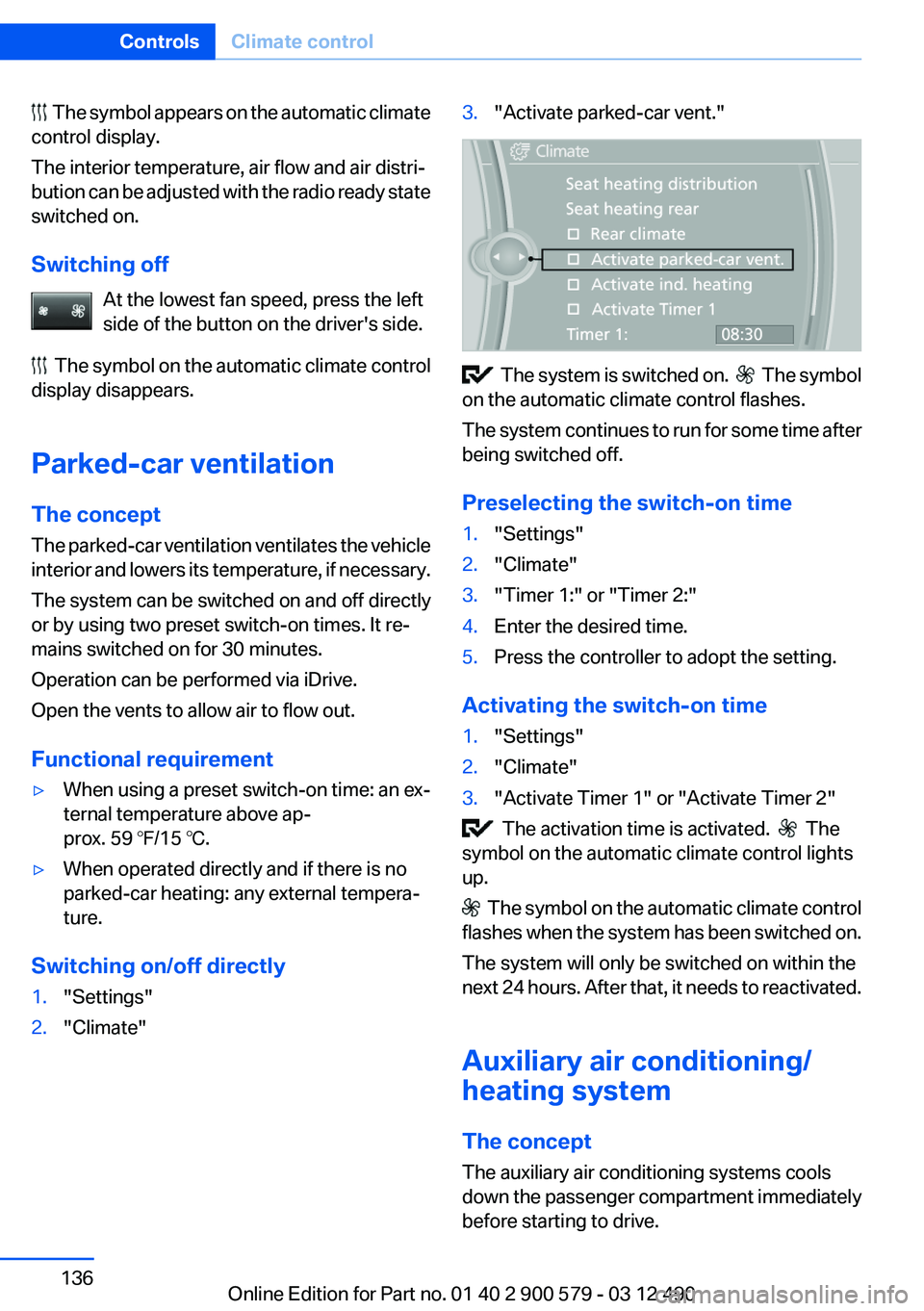
1."Settings"2."Climate"3."Activate parked-car vent."
The system is switched on. The symbol
on the automatic climate control flashes.
The system continues to run for some time after
being switched off.
Preselecting the switch-on time
1."Settings"2."Climate"3."Timer 1:" or "Timer 2:"4.Enter the desired time.5.Press the controller to adopt the setting.
Activating the switch-on time
1."Settings"2."Climate"3."Activate Timer 1" or "Activate Timer 2"
The activation time is activated. The
symbol on the automatic climate control lights
up.
The symbol on the automatic climate control
flashes when the system has been switched on.
The system will only be switched on within the
next 24 hours. After that, it needs to reactivated.
Auxiliary air conditioning/
heating system
The concept
The auxiliary air conditioning systems cools
down the passenger compartment immediately
before starting to drive.
Seite 136ControlsClimate control136
Online Edition for Part no. 01 40 2 900 579 - 03 12 490
Page 137 of 319
The parked-car heating warms the vehicle inte‐
rior, making snow and ice easier to remove.
Both systems can be switched on via the remote
control of the parked-car heating, depending on
the external temperature.
The parked-car heating can also be switched on
and off via the iDrive, either directly or at two
preselected switch-on times.
Controls
When the remote control for the parked-car
heating is used, it depends on the external tem‐
perature for whether the auxiliary air condition‐
ing or the parked-car heating is activated:▷External temperature below approx.
59 ℉/15 ℃: parked-car heating, refer to
page 139, is activated.▷External temperature above approx.
59 ℉/15 ℃: auxiliary air conditioning, refer
to page 137, is activated.
Auxiliary air conditioning
The concept
To cool the heated passenger compartment im‐
mediately before starting to drive, the automatic
climate control can be activated via a remote
control.
The automatic climate control reduces the inte‐
rior temperature with high cooling power for ap‐
prox. two minutes.
The auxiliary air conditioning can be switched on
or off using the remote control or the remote
control of the parked-car heating.
If it is activated using the remote control of the
parked-car heating, the parked-car ventilation is
activated for about, refer to page 136, 30 mi‐
nutes after auxiliary air conditioning.
Remote control
The concept
The remote control can be used to activate the
auxiliary air conditioning for two minutes at tem‐
peratures of 59 ℉/15 ℃ and higher.
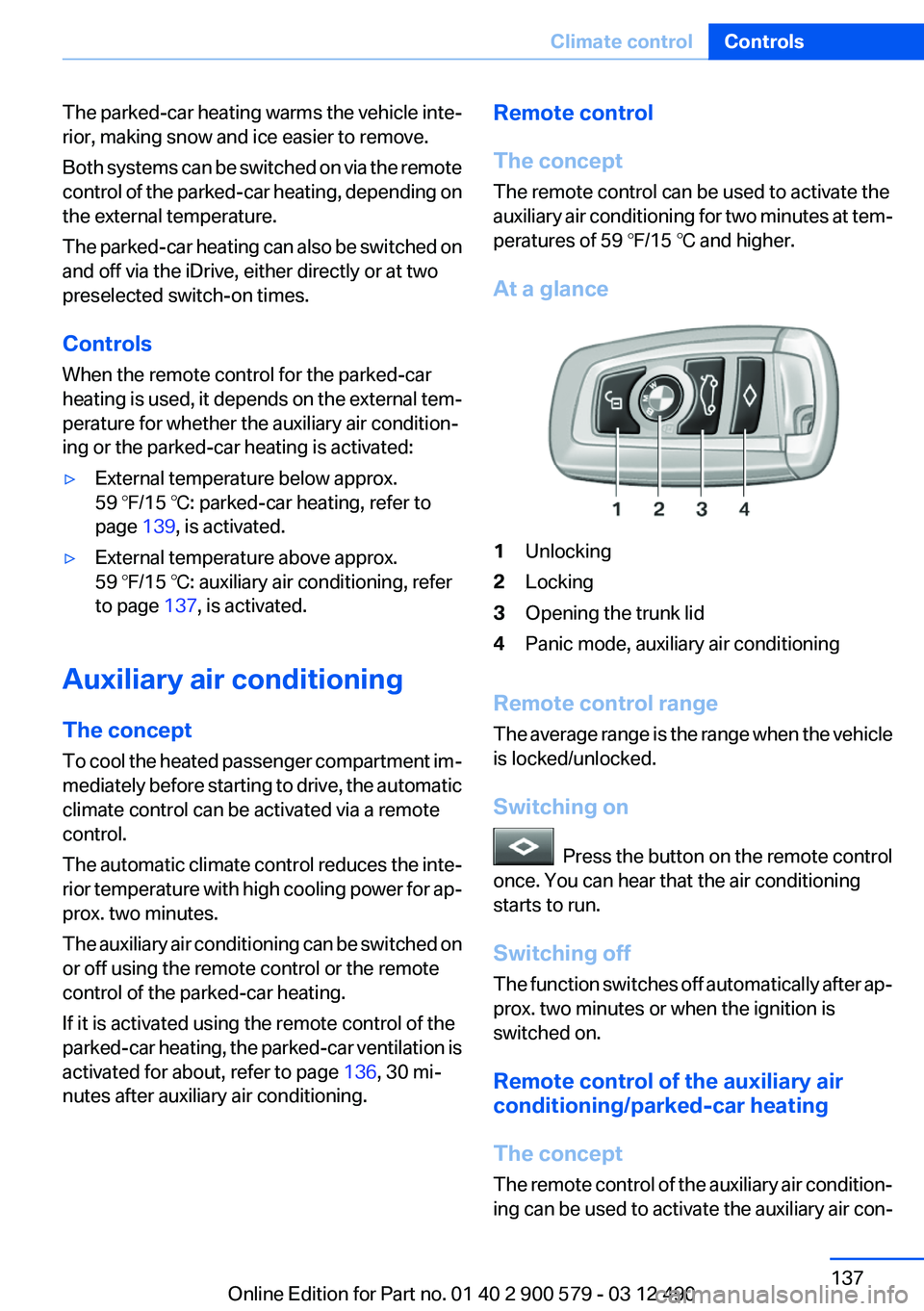
At a glance1Unlocking2Locking3Opening the trunk lid4Panic mode, auxiliary air conditioning
Remote control range
The average range is the range when the vehicle
is locked/unlocked.
Switching on
Press the button on the remote control
once. You can hear that the air conditioning
starts to run.
Switching off
The function switches off automatically after ap‐
prox. two minutes or when the ignition is
switched on.
Remote control of the auxiliary air
conditioning/parked-car heating
The concept
The remote control of the auxiliary air condition‐
ing can be used to activate the auxiliary air con‐
Seite 137Climate controlControls137
Online Edition for Part no. 01 40 2 900 579 - 03 12 490
Page 138 of 319
ditioning for two minutes at temperatures above
59 ℉/15 ℃.
When the ignition is switched off, the parked-car
ventilation is activated for approx. 30 minutes.
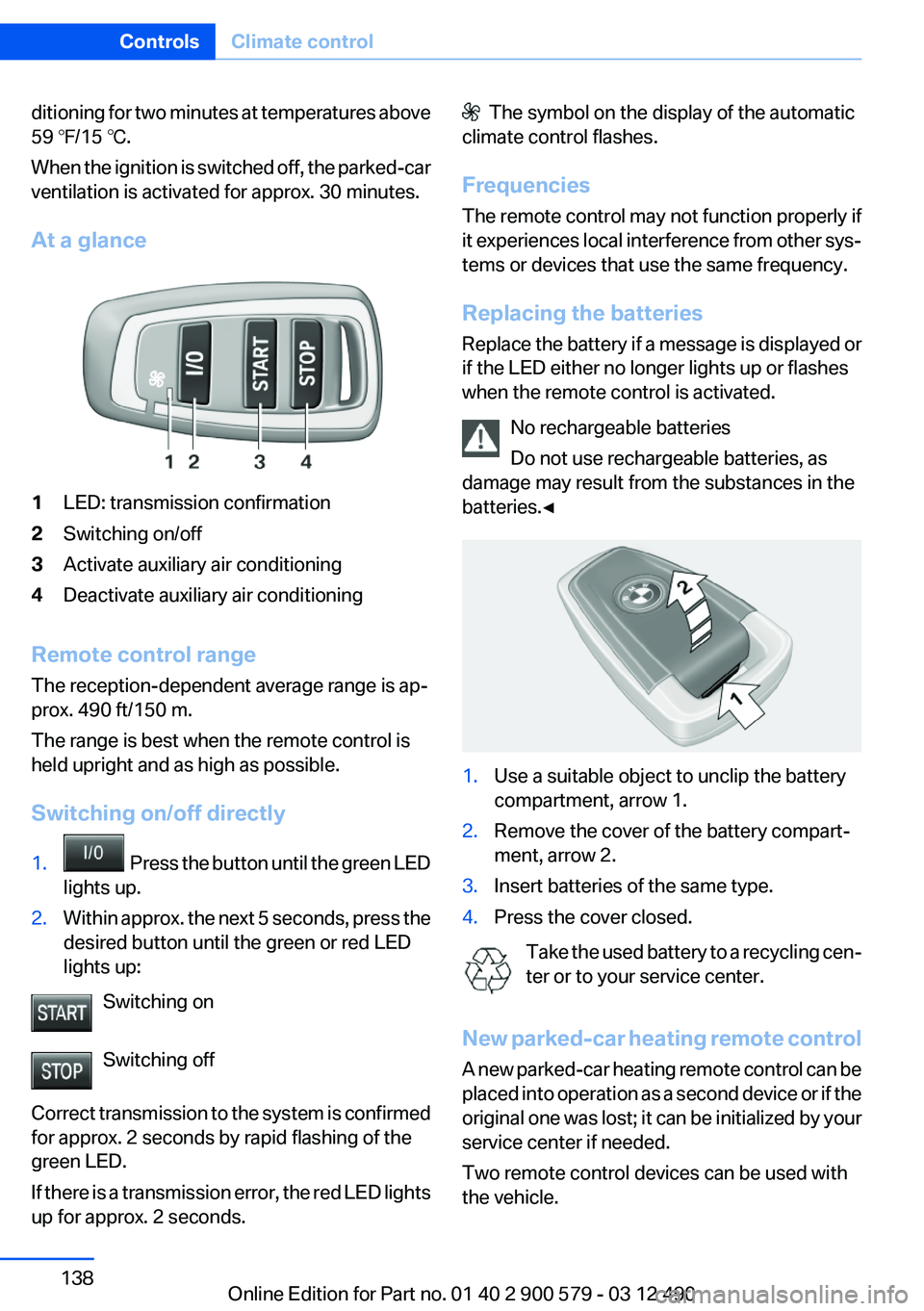
At a glance1LED: transmission confirmation2Switching on/off3Activate auxiliary air conditioning4Deactivate auxiliary air conditioning
Remote control range
The reception-dependent average range is ap‐
prox. 490 ft/150 m.
The range is best when the remote control is
held upright and as high as possible.
Switching on/off directly
1. Press the button until the green LED
lights up.2.Within approx. the next 5 seconds, press the
desired button until the green or red LED
lights up:
Switching on
Switching off
Correct transmission to the system is confirmed
for approx. 2 seconds by rapid flashing of the
green LED.
If there is a transmission error, the red LED lights
up for approx. 2 seconds.
The symbol on the display of the automatic
climate control flashes.
Frequencies
The remote control may not function properly if
it experiences local interference from other sys‐
tems or devices that use the same frequency.
Replacing the batteries
Replace the battery if a message is displayed or
if the LED either no longer lights up or flashes
when the remote control is activated.
No rechargeable batteries
Do not use rechargeable batteries, as
damage may result from the substances in the
batteries.◀1.Use a suitable object to unclip the battery
compartment, arrow 1.2.Remove the cover of the battery compart‐
ment, arrow 2.3.Insert batteries of the same type.4.Press the cover closed.
Take the used battery to a recycling cen‐
ter or to your service center.
New parked-car heating remote control
A new parked-car heating remote control can be
placed into operation as a second device or if the
original one was lost; it can be initialized by your
service center if needed.
Two remote control devices can be used with
the vehicle.
Seite 138ControlsClimate control138
Online Edition for Part no. 01 40 2 900 579 - 03 12 490
Page 139 of 319
Parked-car heating
The concept
The parked-car heating warms the vehicle inte‐
rior, making snow and ice easier to remove. With
the ignition switched off, the air is automatically
routed to the windshield, to the side windows,
and into the footwell.
The systems can be switched on and off directly
or by using two preset switch-on times. They
remain switched on for 30 minutes.
Operation takes place on the iDrive or the re‐
mote control.
Parked-car heating in enclosed areas
Do not operate the parked-car heating in
enclosed areas, as breathing of the harmful ex‐
haust fumes may lead to loss of consciousness
and death. The exhaust gases contain carbon
monoxide, an odorless and colorless but highly
toxic gas. Switch off the parked-car heating
when refueling.◀
Functional requirement▷If the switch-on time is preselected:With the
remote control or if a switch-on time is pre‐
selected: External temperature ap‐
prox. 59 ℉/15 ℃.▷Direct operation: any external temperature.▷The battery is sufficiently charged.▷The fuel tank is filled to above the reserve
range.
If the parked-car heating has not been used for
several months, it may be necessary to switch it
on again after several minutes.
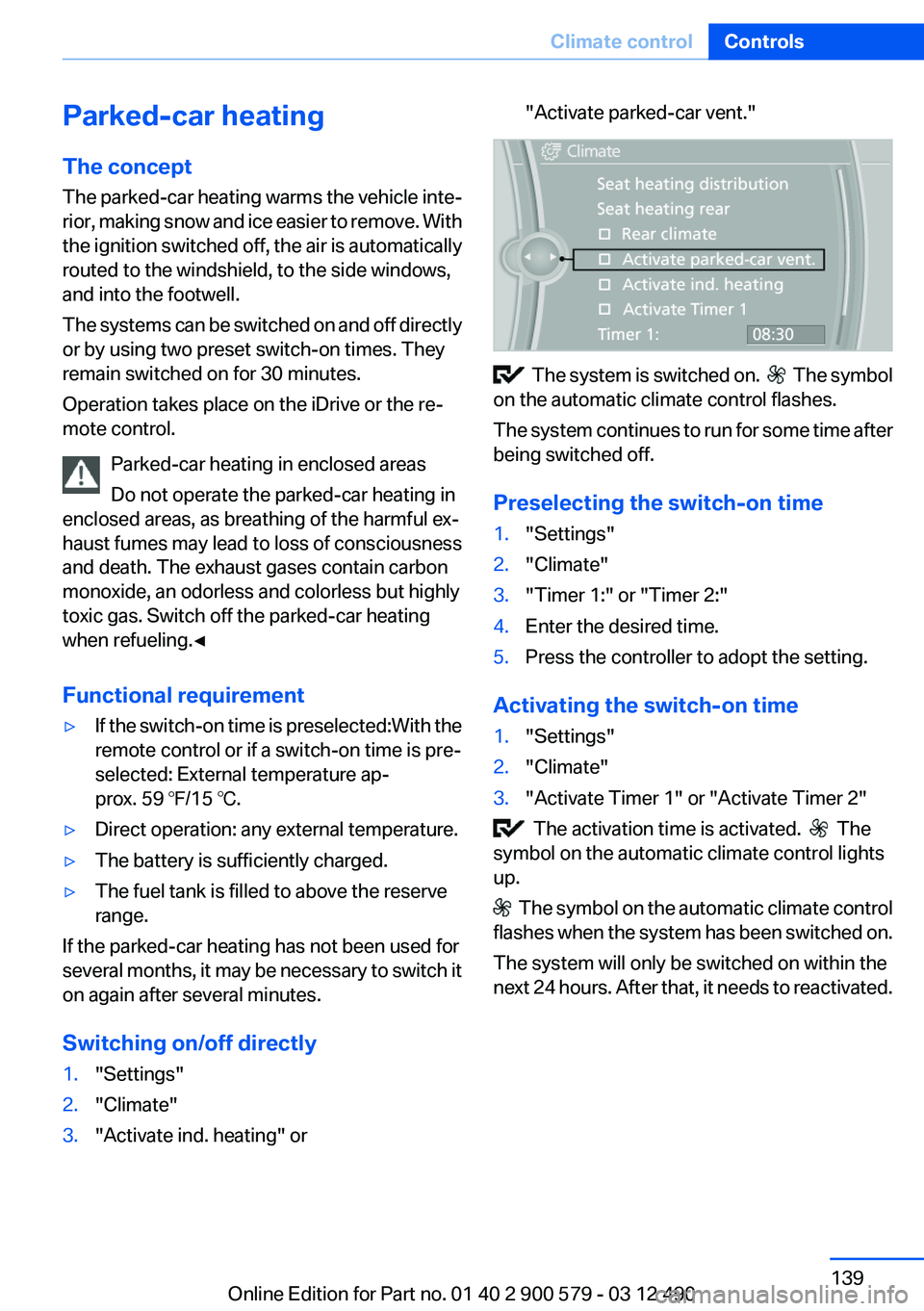
Switching on/off directly
1."Settings"2."Climate"3."Activate ind. heating" or"Activate parked-car vent."
The system is switched on. The symbol
on the automatic climate control flashes.
The system continues to run for some time after
being switched off.
Preselecting the switch-on time
1."Settings"2."Climate"3."Timer 1:" or "Timer 2:"4.Enter the desired time.5.Press the controller to adopt the setting.
Activating the switch-on time
1."Settings"2."Climate"3."Activate Timer 1" or "Activate Timer 2"
The activation time is activated. The
symbol on the automatic climate control lights
up.
The symbol on the automatic climate control
flashes when the system has been switched on.
The system will only be switched on within the
next 24 hours. After that, it needs to reactivated.
Seite 139Climate controlControls139
Online Edition for Part no. 01 40 2 900 579 - 03 12 490
Page 140 of 319
Remote control of the parked-car
heating/auxiliary air conditioning
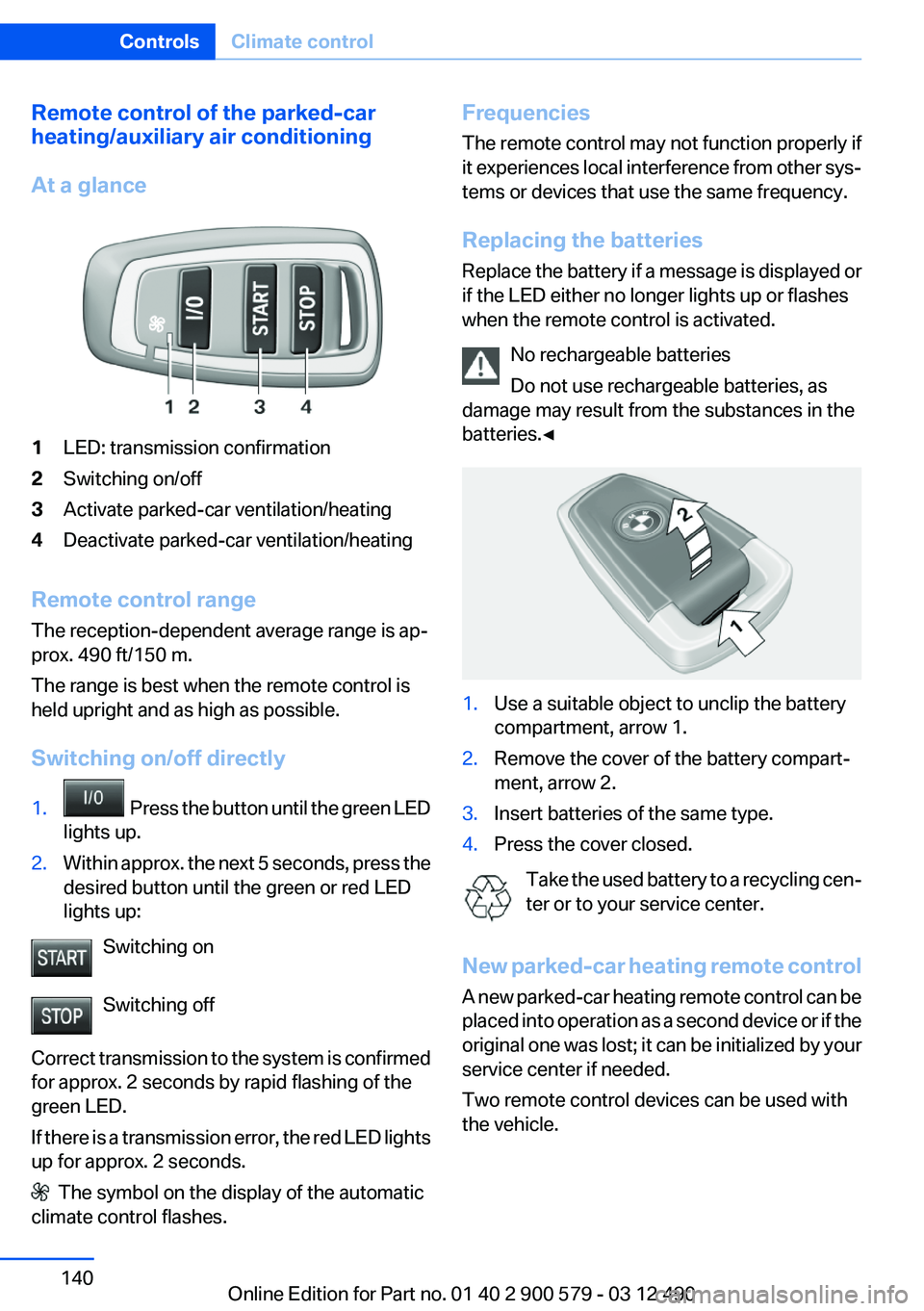
At a glance1LED: transmission confirmation2Switching on/off3Activate parked-car ventilation/heating4Deactivate parked-car ventilation/heating
Remote control range
The reception-dependent average range is ap‐
prox. 490 ft/150 m.
The range is best when the remote control is
held upright and as high as possible.
Switching on/off directly
1. Press the button until the green LED
lights up.2.Within approx. the next 5 seconds, press the
desired button until the green or red LED
lights up:
Switching on
Switching off
Correct transmission to the system is confirmed
for approx. 2 seconds by rapid flashing of the
green LED.
If there is a transmission error, the red LED lights
up for approx. 2 seconds.
The symbol on the display of the automatic
climate control flashes.
Frequencies
The remote control may not function properly if
it experiences local interference from other sys‐
tems or devices that use the same frequency.
Replacing the batteries
Replace the battery if a message is displayed or
if the LED either no longer lights up or flashes
when the remote control is activated.
No rechargeable batteries
Do not use rechargeable batteries, as
damage may result from the substances in the
batteries.◀1.Use a suitable object to unclip the battery
compartment, arrow 1.2.Remove the cover of the battery compart‐
ment, arrow 2.3.Insert batteries of the same type.4.Press the cover closed.
Take the used battery to a recycling cen‐
ter or to your service center.
New parked-car heating remote control
A new parked-car heating remote control can be
placed into operation as a second device or if the
original one was lost; it can be initialized by your
service center if needed.
Two remote control devices can be used with
the vehicle.
Seite 140ControlsClimate control140
Online Edition for Part no. 01 40 2 900 579 - 03 12 490
Page 156 of 319
aged. In addition, exhaust fumes may enter the
passenger compartment.◀
If driving with the tailgate open cannot be
avoided:▷Close all windows and the glass sunroof.▷Greatly increase the blower speed.▷Drive moderately.
Hot exhaust system
Hot exhaust system
High temperatures are generated in the
exhaust system.
Do not remove the heat shields installed and
never apply undercoating to them. When driv‐
ing, standing at idle and while parking, take care
to avoid possible contact between the hot ex‐
haust system and any highly flammable materi‐
als such as hay, leaves, grass, etc. Such contact
could lead to a fire, and with it the risk of serious
personal injury as well as property damage.
Do not touch hot exhaust pipes; otherwise, there
is the danger of getting burned.◀
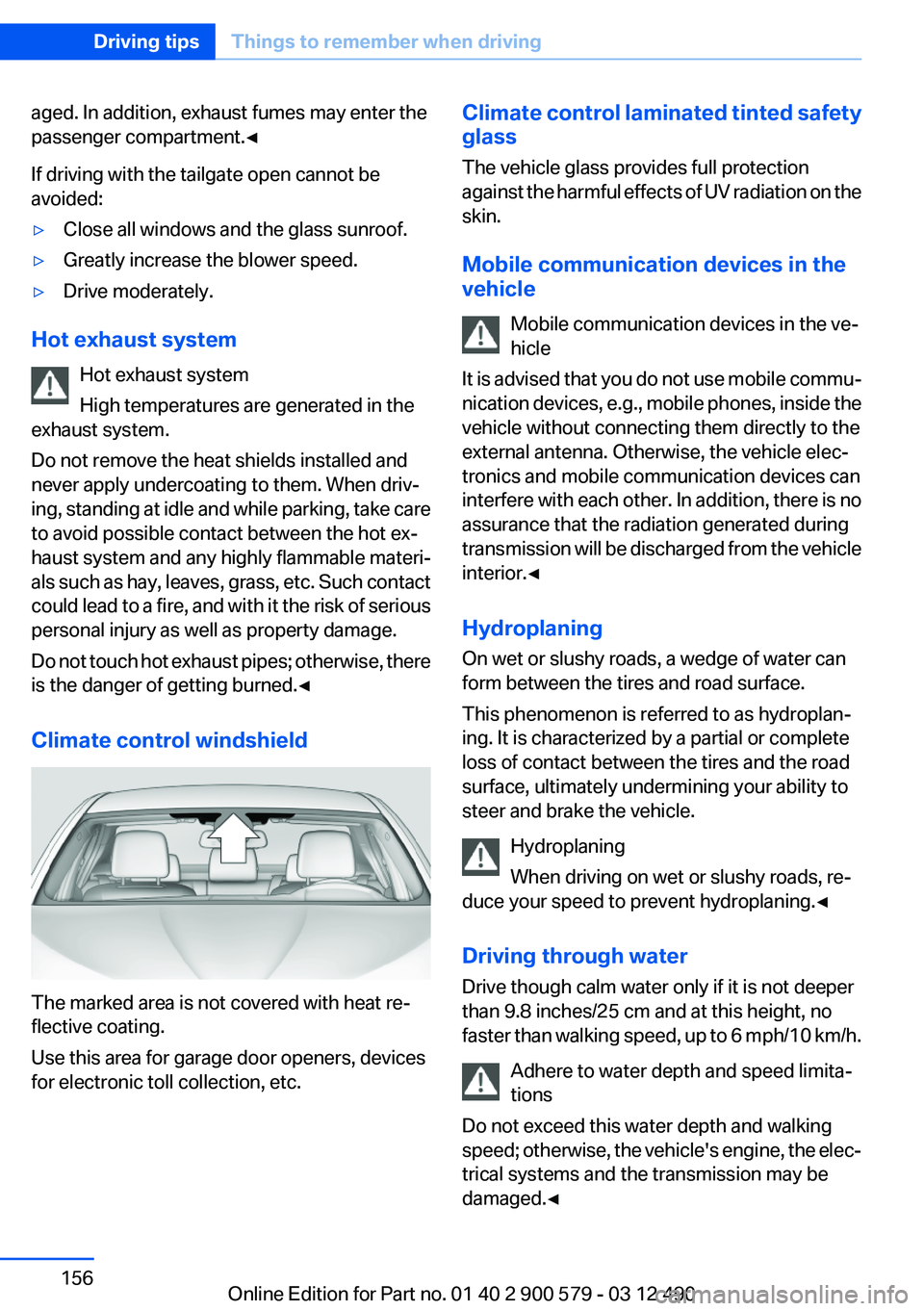
Climate control windshield
The marked area is not covered with heat re‐
flective coating.
Use this area for garage door openers, devices
for electronic toll collection, etc.
Climate control laminated tinted safety
glass
The vehicle glass provides full protection
against the harmful effects of UV radiation on the
skin.
Mobile communication devices in the
vehicle
Mobile communication devices in the ve‐
hicle
It is advised that you do not use mobile commu‐
nication devices, e.g., mobile phones, inside the
vehicle without connecting them directly to the
external antenna. Otherwise, the vehicle elec‐
tronics and mobile communication devices can
interfere with each other. In addition, there is no
assurance that the radiation generated during
transmission will be discharged from the vehicle
interior.◀
Hydroplaning
On wet or slushy roads, a wedge of water can
form between the tires and road surface.
This phenomenon is referred to as hydroplan‐
ing. It is characterized by a partial or complete
loss of contact between the tires and the road
surface, ultimately undermining your ability to
steer and brake the vehicle.
Hydroplaning
When driving on wet or slushy roads, re‐
duce your speed to prevent hydroplaning.◀
Driving through water
Drive though calm water only if it is not deeper
than 9.8 inches/25 cm and at this height, no
faster than walking speed, up to 6 mph/10 km/h.
Adhere to water depth and speed limita‐
tions
Do not exceed this water depth and walking
speed; otherwise, the vehicle's engine, the elec‐
trical systems and the transmission may be
damaged.◀Seite 156Driving tipsThings to remember when driving156
Online Edition for Part no. 01 40 2 900 579 - 03 12 490
Page 157 of 319
Braking safely
Your vehicle is equipped with ABS as a standard
feature.
Applying the brakes fully is the most effective
way of braking in situations when this is neces‐
sary.
The vehicle maintains steering responsiveness.
You can still avoid any obstacles with a minimum
of steering effort.
Pulsation of the brake pedal and sounds from
the hydraulic circuits indicate that ABS is in its
active mode.
Objects in the area around the pedals No objects in the area around the pedals
Keep floor mats, carpets, and any other
objects out of the area of motion of the pedals;
otherwise, the function of the pedals could be
impeded while driving
Do not place additional floor mats over existing
mats or other objects.
Only use floor mats that have been approved for
the vehicle and can be properly fixed in place.
Ensure that the floor mats are securely fastened
again after they were removed for cleaning, for
example.◀
Driving in wet conditions
When roads are wet or there is heavy rain, briefly
exert gentle pressure on the brake pedal every
few miles.
Ensure that this action does not endanger other
road users.
The heat generated in this process helps dry the
brake discs and pads.
In this way braking efficiency will be available
when you need it.
Hills
Drive long or steep downhill gradients in the gear
in which the least braking is required. Otherwise,the brake system may overheat, resulting in a
reduction in the brake system efficiency.
You can increase the engine's braking effect by
shifting down, going all the way to first gear, if
necessary.
Automatic transmission:
You can increase the engine's braking effect by
shifting down in the manual mode of the auto‐
matic transmission.
Avoid load on the brakes
Avoid placing excessive load on the brake
system. Light but consistent brake pressure can
lead to high temperatures, brake wear and pos‐
sibly even brake failure.◀
Do not drive in neutral
Do not drive in neutral or with the engine
stopped, as doing so disables engine braking. In
addition, steering and brake assist is unavailable
with the engine stopped.◀
Brake disc corrosion
Corrosion on the brake discs and contamination
on the brake pads are furthered by:▷Low mileage.▷Extended periods when the vehicle is not
used at all.▷Infrequent use of the brakes.
Corrosion occurs when the minimum pressure
that must be exerted by the pads during brake
applications to clean the discs is not reached.
Should corrosion form on the brake discs, the
brakes will tend to respond with a pulsating ef‐
fect that generally cannot be corrected.
Condensation under the parked vehicle
When using the automatic climate control, con‐
densation water develops that exits underneath
the vehicle.
Therefore, traces of condensed water under the
vehicle are normal.
Seite 157Things to remember when drivingDriving tips157
Online Edition for Part no. 01 40 2 900 579 - 03 12 490