ESP BMW CONVERTIBLE 1998 User Guide
[x] Cancel search | Manufacturer: BMW, Model Year: 1998, Model line: CONVERTIBLE, Model: BMW CONVERTIBLE 1998Pages: 179, PDF Size: 3.51 MB
Page 63 of 179
62
You can store and automatically main-
tain any desired vehicle speed above
approx. 25 mph (40 km/h).
The stored speed is deleted when the
motor is switched off.
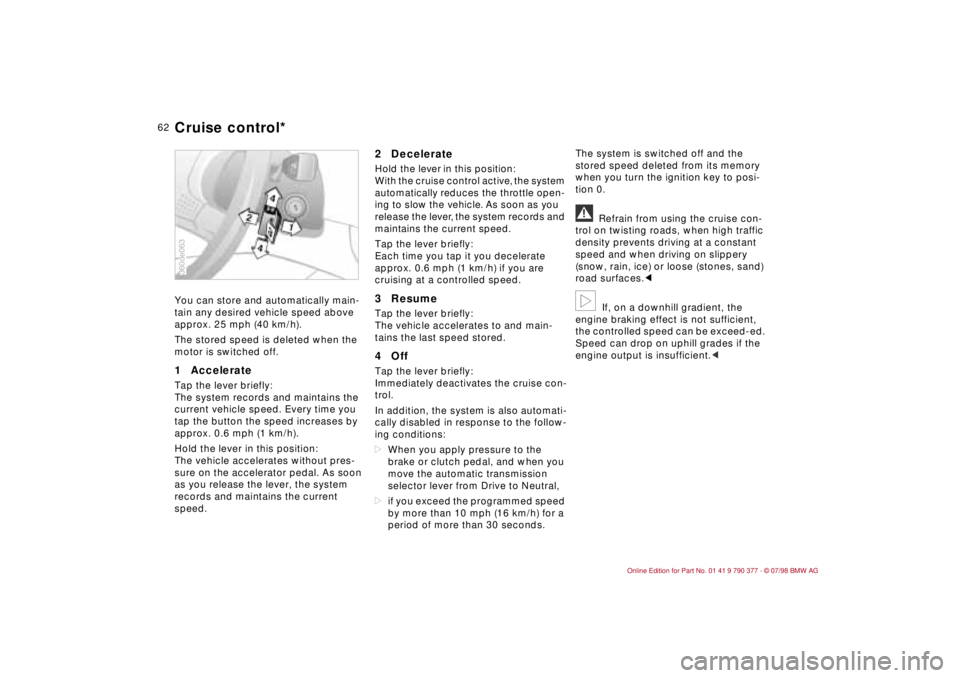
1 Accelerate Tap the lever briefly:
The system records and maintains the
current vehicle speed. Every time you
tap the button the speed increases by
approx. 0.6 mph (1 km/h).
Hold the lever in this position:
The vehicle accelerates without pres-
sure on the accelerator pedal. As soon
as you release the lever, the system
records and maintains the current
speed.
2 DecelerateHold the lever in this position:
With the cruise control active, the system
automatically reduces the throttle open-
ing to slow the vehicle. As soon as you
release the lever, the system records and
maintains the current speed.
Tap the lever briefly:
Each time you tap it you decelerate
approx. 0.6 mph (1 km/h) if you are
cruising at a controlled speed.3 ResumeTap the lever briefly:
The vehicle accelerates to and main-
tains the last speed stored.4 OffTap the lever briefly:
Immediately deactivates the cruise con-
trol.
In addition, the system is also automati-
cally disabled in response to the follow-
ing conditions:
dWhen you apply pressure to the
brake or clutch pedal, and when you
move the automatic transmission
selector lever from Drive to Neutral,
dif you exceed the programmed speed
by more than 10 mph (16 km/h) for a
period of more than 30 seconds.The system is switched off and the
stored speed deleted from its memory
when you turn the ignition key to posi-
tion 0.
a
Refrain from using the cruise con-
trol on twisting roads, when high traffic
density prevents driving at a constant
speed and when driving on slippery
(snow, rain, ice) or loose (stones, sand)
road surfaces.c
b
If, on a downhill gradient, the
engine braking effect is not sufficient,
the controlled speed can be exceed-ed.
Speed can drop on uphill grades if the
engine output is insufficient.c
360de063Cruise control*
Page 65 of 179
64
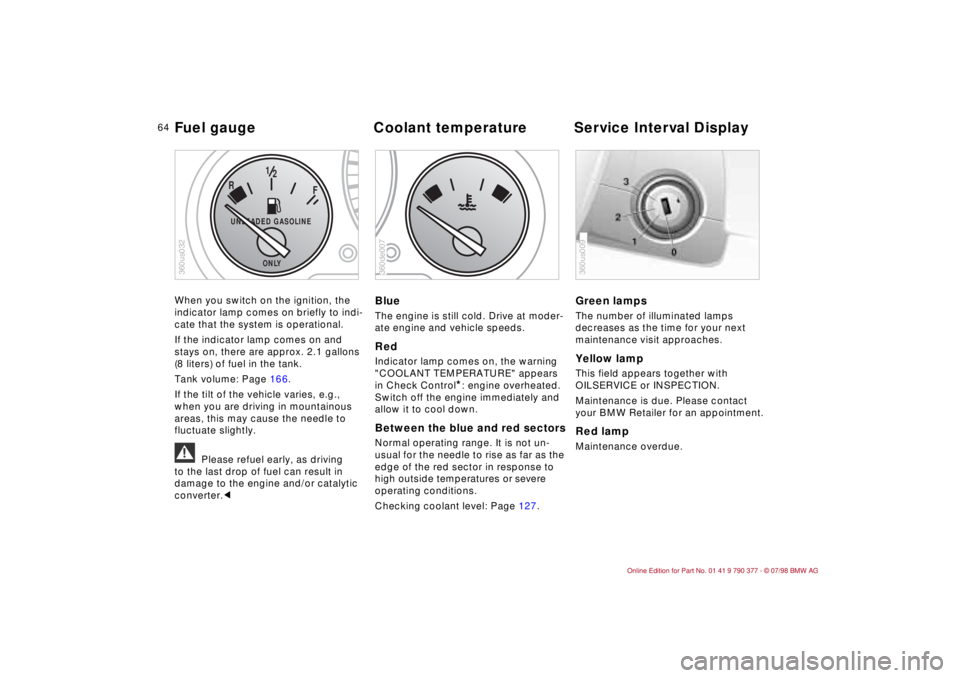
When you switch on the ignition, the
indicator lamp comes on briefly to indi-
cate that the system is operational.
If the indicator lamp comes on and
stays on, there are approx. 2.1 gallons
(8 liters) of fuel in the tank.
Tank volume: Page 166.
If the tilt of the vehicle varies, e.g.,
when you are driving in mountainous
areas, this may cause the needle to
fluctuate slightly.
a
Please refuel early, as driving
to the last drop of fuel can result in
damage to the engine and/or catalytic
converter.c
BlueThe engine is still cold. Drive at moder-
ate engine and vehicle speeds.RedIndicator lamp comes on, the warning
"COOLANT TEMPERATURE" appears
in Check Control
*: engine overheated.
Switch off the engine immediately and
allow it to cool down.
Between the blue and red sectorsNormal operating range. It is not un-
usual for the needle to rise as far as the
edge of the red sector in response to
high outside temperatures or severe
operating conditions.
Checking coolant level: Page 127.
Green lampsThe number of illuminated lamps
decreases as the time for your next
maintenance visit approaches.Yellow lamp This field appears together with
OILSERVICE or INSPECTION.
Maintenance is due. Please contact
your BMW Retailer for an appointment.Red lampMaintenance overdue.
F
R
12
UNLEADED GASOLINE
ONLY
360us032
360de007
360us009
Fuel gauge Coolant temperature Service Interval Display
Page 73 of 179
72
Priority 3These status reports usually appear
after the car is parked and the ignition
key returned to position 0 (if several
messages have been recorded, they will
appear consecutively, with Priority 3
messages following Priority 1 and 2
messages).
Messages remain available for a period
of approx. two minutes after the display
goes out and the ignition key has been
removed, and can be displayed by
pressing the CHECK key.
The messages can also be displayed
before you start driving with the ignition
key in position 2. The texts then go out
after a short time or when you start driv-
ing, and no warning symbols remain.
Messages are not displayed again until
the ignition key is turned to position 0.
If a plus symbol appears: display addi-
tional messages by pressing the CHECK
key.Check coolant levelIndicates that coolant is almost down to
minimum level. Top up at the next
opportunity. Refer to page 127.To check the Check Control display
(only when no messages are displayed):
Press the CHECK key with the ignition
key in position 2: CHECK CONTROL
OK appears in the display.
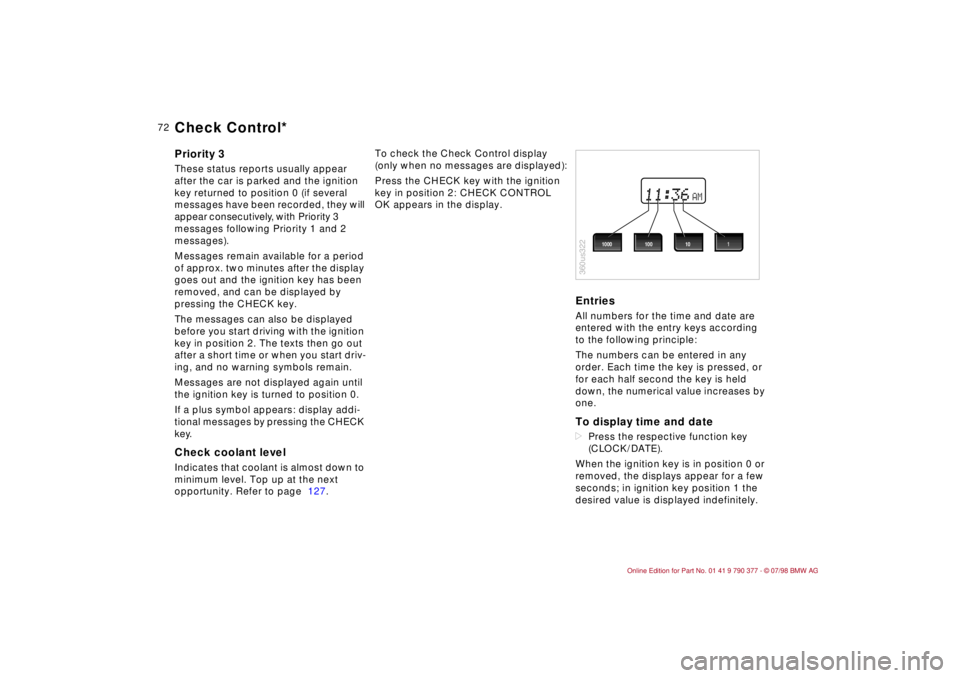
EntriesAll numbers for the time and date are
entered with the entry keys according
to the following principle:
The numbers can be entered in any
order. Each time the key is pressed, or
for each half second the key is held
down, the numerical value increases by
one.To display time and datedPress the respective function key
(CLOCK/DATE).
When the ignition key is in position 0 or
removed, the displays appear for a few
seconds; in ignition key position 1 the
desired value is displayed indefinitely.
AM
360us322
1000 1001 10
Check Control*
Page 75 of 179
74
The Check Control uses texts with mes-
sages and warnings to alert the driver
to defective systems. In addition, an
indicator lamp is provided in the instru-
ment cluster. For details and operating
instructions, refer to pages 71, 72.
The outside temperature can also be
displayed.
With the digital clock you can
ddisplay the time and date,
dpre-program an hourly reminder sig-
nal (memo) e.g., a reminder of the
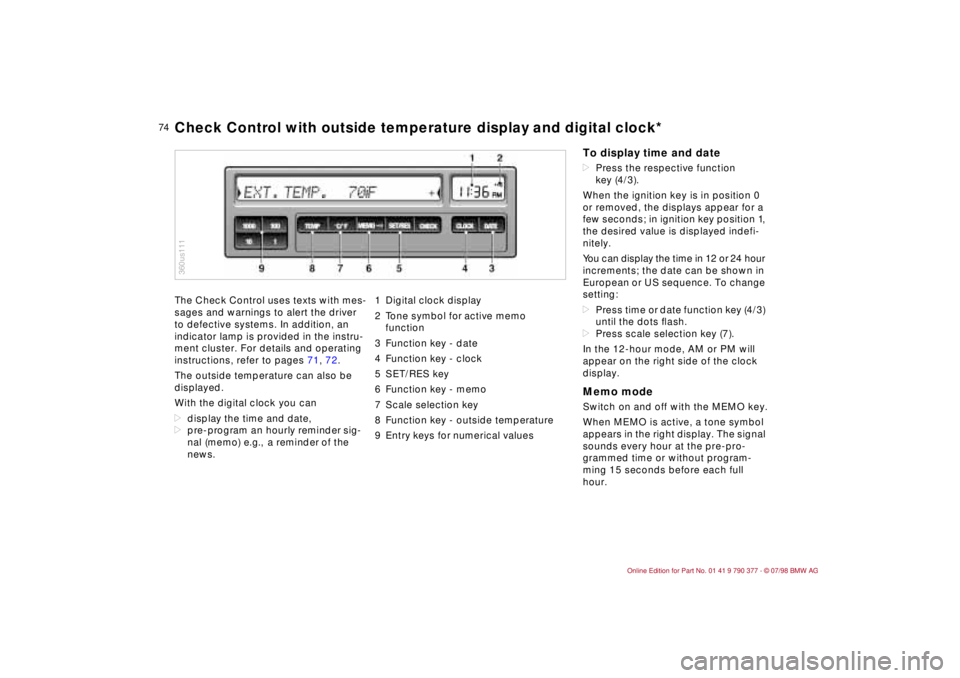
news.1 Digital clock display
2 Tone symbol for active memo
function
3 Function key - date
4 Function key - clock
5 SET/RES key
6 Function key - memo
7 Scale selection key
8 Function key - outside temperature
9 Entry keys for numerical values
360us111Check Control with outside temperature display and digital clock*
To display time and datedPress the respective function
key (4/3).
When the ignition key is in position 0
or removed, the displays appear for a
few seconds; in ignition key position 1,
the desired value is displayed indefi-
nitely.
You can display the time in 12 or 24 hour
increments; the date can be shown in
European or US sequence. To change
setting:
dPress time or date function key (4/3)
until the dots ßash.
dPress scale selection key (7).
In the 12-hour mode, AM or PM will
appear on the right side of the clock
display.Memo modeSwitch on and off with the MEMO key.
When MEMO is active, a tone symbol
appears in the right display. The signal
sounds every hour at the pre-pro-
grammed time or without program-
ming 15 seconds before each full
hour.
Page 81 of 179
80
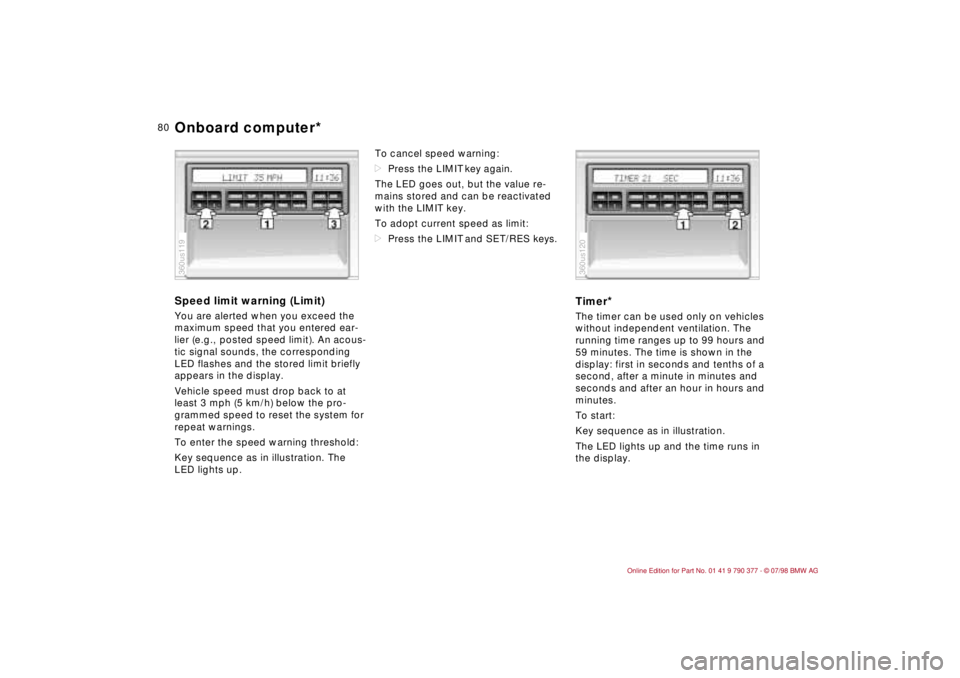
Speed limit warning (Limit)You are alerted when you exceed the
maximum speed that you entered ear-
lier (e.g., posted speed limit). An acous-
tic signal sounds, the corresponding
LED flashes and the stored limit briefly
appears in the display.
Vehicle speed must drop back to at
least 3 mph (5 km/h) below the pro-
grammed speed to reset the system for
repeat warnings.
To enter the speed warning threshold:
Key sequence as in illustration. The
LED lights up.To cancel speed warning:
dPress the LIMIT key again.
The LED goes out, but the value re-
mains stored and can be reactivated
with the LIMIT key.
To adopt current speed as limit:
dPress the LIMIT and SET/RES keys.
Timer
*
The timer can be used only on vehicles
without independent ventilation. The
running time ranges up to 99 hours and
59 minutes. The time is shown in the
display: first in seconds and tenths of a
second, after a minute in minutes and
seconds and after an hour in hours and
minutes.
To start:
Key sequence as in illustration.
The LED lights up and the time runs in
the display.
360us119
360us120
Onboard computer*
Page 83 of 179
82
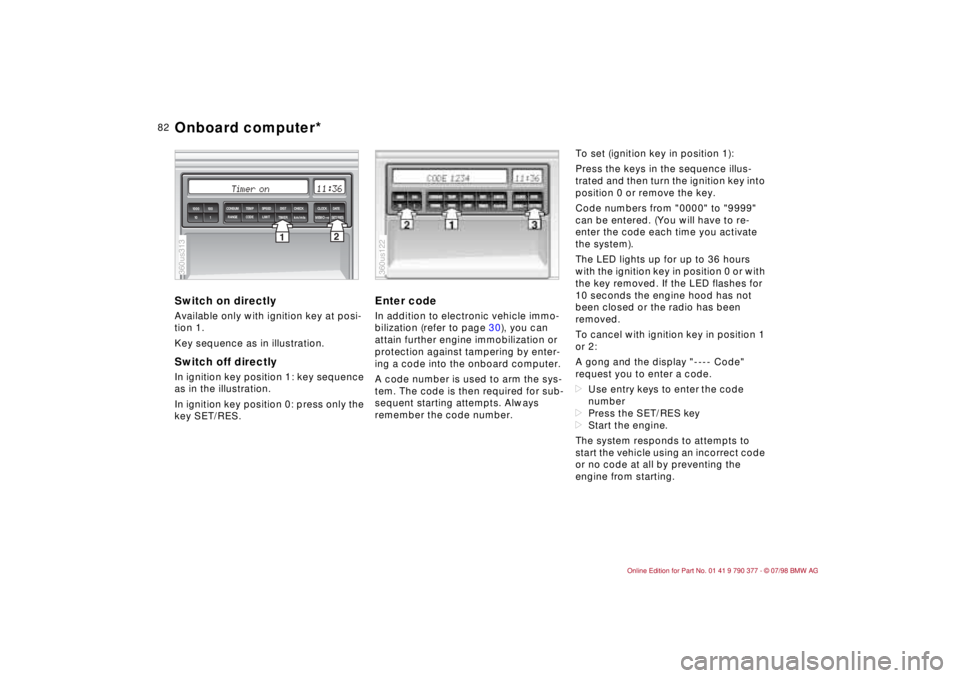
Switch on directlyAvailable only with ignition key at posi-
tion 1.
Key sequence as in illustration.Switch off directlyIn ignition key position 1: key sequence
as in the illustration.
In ignition key position 0: press only the
key SET/RES.
Enter codeIn addition to electronic vehicle immo-
bilization (refer to page 30), you can
attain further engine immobilization or
protection against tampering by enter-
ing a code into the onboard computer.
A code number is used to arm the sys-
tem. The code is then required for sub-
sequent starting attempts. Always
remember the code number.To set (ignition key in position 1):
Press the keys in the sequence illus-
trated and then turn the ignition key into
position 0 or remove the key.
Code numbers from "0000" to "9999"
can be entered. (You will have to re-
enter the code each time you activate
the system).
The LED lights up for up to 36 hours
with the ignition key in position 0 or with
the key removed. If the LED flashes for
10 seconds the engine hood has not
been closed or the radio has been
removed.
To cancel with ignition key in position 1
or 2:
A gong and the display "---- Code"
request you to enter a code.
dUse entry keys to enter the code
number
dPress the SET/RES key
dStart the engine.
The system responds to attempts to
start the vehicle using an incorrect code
or no code at all by preventing the
engine from starting.
2
1TIMER
km/mls
MEMOSET/RES 1000 100
10 1
SPEED CONSUM TEMP DIST CHECK CLOCK
DATE
LIMIT RANGE CODE
360us313
360us122
Onboard computer*
Page 85 of 179
84
Automatic Stability Control plus
Traction (ASC+T)This system is designed to enhance
operating stability, especially while
accelerating and during cornering.
ASC+T automatically assumes opera-
tion each time you start the engine.
The indicator lamp in the instrument
cluster goes out shortly after you switch
on the ignition.
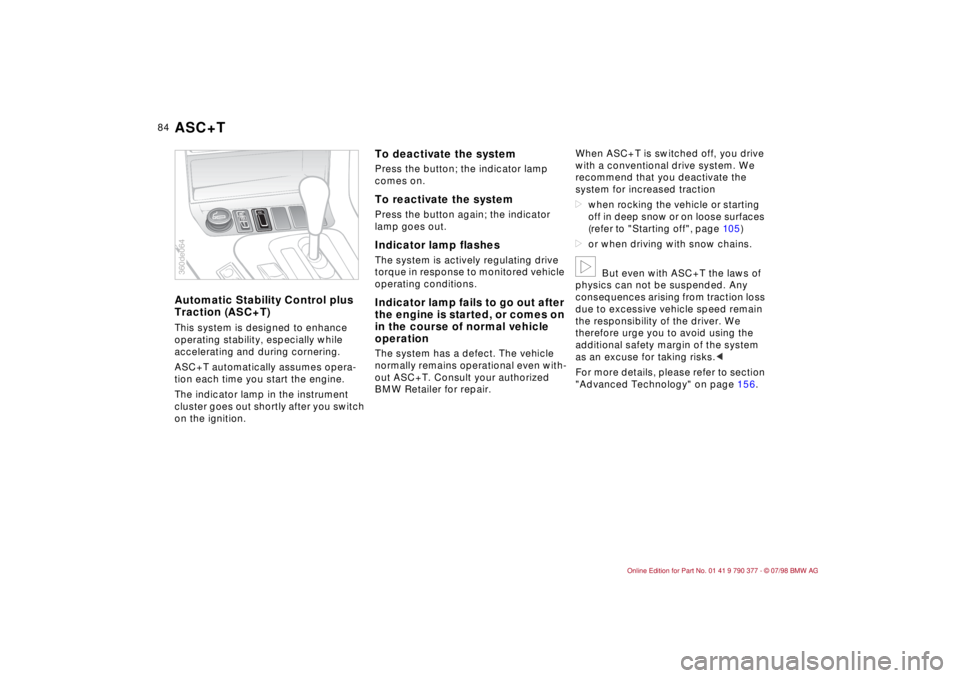
To deactivate the systemPress the button; the indicator lamp
comes on.To reactivate the systemPress the button again; the indicator
lamp goes out.Indicator lamp flashesThe system is actively regulating drive
torque in response to monitored vehicle
operating conditions.Indicator lamp fails to go out after
the engine is started, or comes on
in the course of normal vehicle
operationThe system has a defect. The vehicle
normally remains operational even with-
out ASC+T. Consult your authorized
BMW Retailer for repair.When ASC+T is switched off, you drive
with a conventional drive system. We
recommend that you deactivate the
system for increased traction
dwhen rocking the vehicle or starting
off in deep snow or on loose surfaces
(refer to "Starting off", page 10 5)
dor when driving with snow chains.
b
But even with ASC+T the laws of
physics can not be suspended. Any
consequences arising from traction loss
due to excessive vehicle speed remain
the responsibility of the driver. We
therefore urge you to avoid using the
additional safety margin of the system
as an excuse for taking risks.c
For more details, please refer to section
"Advanced Technology" on page 156.
ASC
360de064ASC+T
Page 90 of 179

89
At a glanceControls Car careRepairsTechnicalDataIndex
1 Air ßow directed against windshield
and door windows
2 Air ßow toward upper body
The rotary dial on the right affords
continuous opening or closing of the
air supply, the lever changes the
direction of the air ßow. The rotary dial
on the left tempers the air coming out
(page 92).
3 Front footwell ventilation
Corresponding vent outlets are also
located in the rear footwell.
4 ControlsAutomatic climate control
Page 92 of 179
91
At a glanceControls Car careRepairsTechnicalDataIndex
To defrost windshield and door
windows
Air conditioner Circulated air mode/Automatic
recirculated air control (AUC)
*
Press the button repeatedly to run
through the following control sequence:
dIndicator lamps off: outside air flow
operational.
dLeft-hand indicator lamp on Ð AUC
mode: the system detects pollutants
in the outside air and responds by
deactivating the outside air flow as
required. The system then recircu-
lates the air currently within the vehi-
cle.
dRight-hand indicator lamp on: the
flow of outside air into the vehicle is
permanently blocked. The system
then recirculates the air currently
within the vehicle.a
If the windshields fog over in circu-
lated air mode, switch off the circulated
air mode/Automatic recirculated air
control and increase the air supply. if
necessary.c
Rear window defrosterBMW Convertible: Heated rear-window
blower.
The rear-window blower is always
switched off with the convertible top
down.
When the hardtop
* is in place, press
the rear-window heating button.
Temperature
This program is designed for
rapid removal of ice and con-
densation from the windshield and side
windows.
The air conditioner cools and
dehumidifies incoming air
before reheating it to the selected tem-
perature.
Depending on the weather, the wind-
shield may fog over briefly when the
engine is started.
Switching off the air conditioner at out-
side temperatures below approx. 41 5F
(56) will prevent the windows from
fogging up.
Frequently switching the air condi-
tioner on and off may also promote the
formation of condensation on the win-
dow surfaces.
b
Condensation forms in the air
conditioner system during operation,
which then exits under the vehicle. It is
not unusual for a small puddle to form
there.c
You can respond to unpleas-
ant odors in the outside air
by temporarily excluding the outside air.
The system then recirculates the air
currently within the vehicle.
A
The indicator lamp comes
on to confirm that the rear
defroster is operating.
The defroster switches off automatically
after approx. 15 minutes.
On both the driver's and the
passenger's side you can
adjust the specific temperature. The fig-
ures in the display provide a general
indication of interior temperature. We
recommend 70 5F (226) as a standard
setting for comfortable travel, both with
and without the air conditioner. When
you start the vehicle, the system
ensures that the selected temperature
is achieved as quickly as possible and
maintained at a constant level by the
control.
Automatic climate control
Page 101 of 179

10 0
To ensure that your vehicle provides
maximum economy throughout a long
service life, we request that you
observe the following.
Engine and differentialUp to 1,250 miles (2,000 km):
Drive at different engine speeds and
vehicle speeds, but be careful not to
exceed the following engine speed:
4,500 rpm
Refrain from using full throttle and avoid
pressing the accelerator beyond the
kickdown point.
After 1,250 miles (2,000 km) you can
gradually increase the number of revo-
lutions or the speed.
You should also observe these break-in
procedures if the engine or differential
is replaced later in the course of the
vehicle service life.
TiresDue to technical factors associated with
their manufacture, tires do not achieve
their full traction potential until an initial
break-in period has elapsed. This
means that you should drive with addi-
tional caution for the first 200 miles
(300 km).Brake systemBrake pads and disks attain their opti-
mal wear patterns only after approx.
300 miles (500 km).
EngineDo not allow the engine to warm to its
normal operating temperature by leav-
ing it idling with the vehicle parked.
However, when starting in extremely
cold weather it is a good idea to allow
the engine to run at fast idle for about
30 seconds before getting underway;
this precaution ensures adequate lubri-
cation.
Avoid high engine speeds while the
engine is still cold; this helps avoid pre-
mature wear and reduced service life.
When driving under high engine loads
(acceleration, steep hills), try to keep
the engine running above 1,500 rpm.
We recommend downshifting into a
more suitable range, especially when
driving up extended inclines.
It is a good idea to follow extended
periods of low-speed operation (dense
urban traffic, stop-and-go driving) by
maintaining an engine speed consis-
tently above 3,000 rpm for several
miles. This procedure helps prevent
deposits from accumulating in the
engine.
Break-in procedures Driving notes