key BMW CONVERTIBLE 1998 Owner's Manual
[x] Cancel search | Manufacturer: BMW, Model Year: 1998, Model line: CONVERTIBLE, Model: BMW CONVERTIBLE 1998Pages: 179, PDF Size: 3.51 MB
Page 55 of 179
54
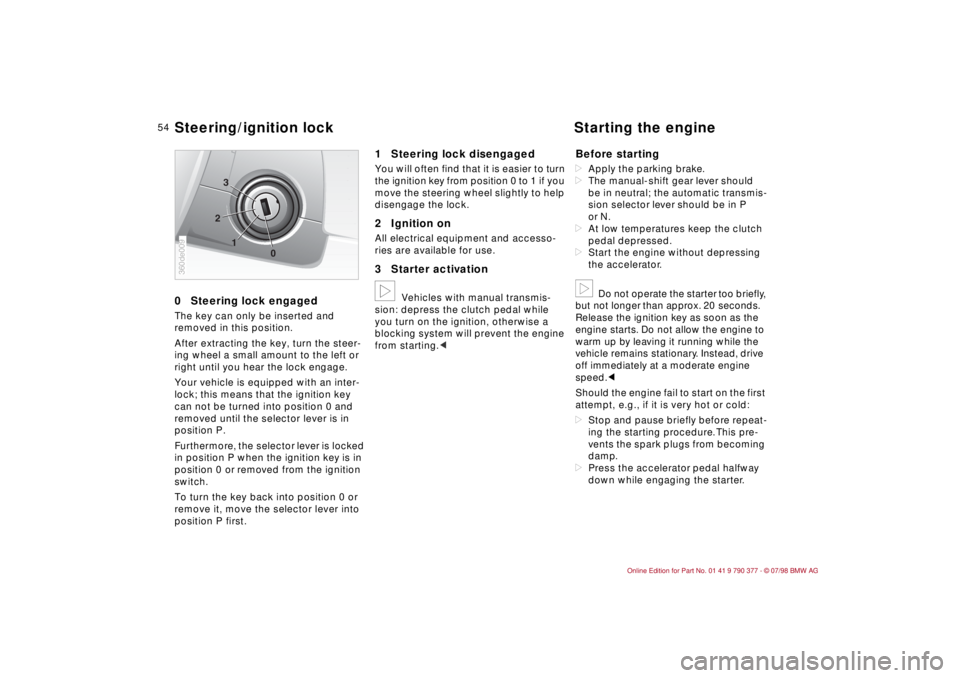
0Steering lock engagedThe key can only be inserted and
removed in this position.
After extracting the key, turn the steer-
ing wheel a small amount to the left or
right until you hear the lock engage.
Your vehicle is equipped with an inter-
lock; this means that the ignition key
can not be turned into position 0 and
removed until the selector lever is in
position P.
Furthermore, the selector lever is locked
in position P when the ignition key is in
position 0 or removed from the ignition
switch.
To turn the key back into position 0 or
remove it, move the selector lever into
position P first.
1 Steering lock disengagedYou will often find that it is easier to turn
the ignition key from position 0 to 1 if you
move the steering wheel slightly to help
disengage the lock.2 Ignition onAll electrical equipment and accesso-
ries are available for use.3 Starter activationb
Vehicles with manual transmis-
sion: depress the clutch pedal while
you turn on the ignition, otherwise a
blocking system will prevent the engine
from starting.c
Before startingdApply the parking brake.
dThe manual-shift gear lever should
be in neutral; the automatic transmis-
sion selector lever should be in P
or N.
dAt low temperatures keep the clutch
pedal depressed.
dStart the engine without depressing
the accelerator.b
Do not operate the starter too briefly,
but not longer than approx. 20 seconds.
Release the ignition key as soon as the
engine starts. Do not allow the engine to
warm up by leaving it running while the
vehicle remains stationary. Instead, drive
off immediately at a moderate engine
speed.c
Should the engine fail to start on the first
attempt, e.g., if it is very hot or cold:
dStop and pause briefly before repeat-
ing the starting procedure. This pre-
vents the spark plugs from becoming
damp.
dPress the accelerator pedal halfway
down while engaging the starter.
1 2
03
360de009Steering/ignition lock Starting the engine
Page 56 of 179

55
At a glanceControls Car careRepairsTechnicalDataIndex
When starting a cold engine at extreme-
ly low temperatures (+55F/-156 or be-
low) or at high altitudes (above 3,300 ft./
1,000 meters), proceed as follows:
dAt the first attempt, keep the starter
engaged for a bit longer (approx.
10 seconds).
dPress the accelerator pedal halfway
down while engaging the starter.
If you operate the vehicle for longer
periods of time at high altitudes and
very low temperatures, put into the
engine an oil with a viscosity of 5WÐ30
(refer to page 126). Please contact your
authorized BMW Retailer for additional
information.a
Never allow the engine to run with
the vehicle standing in an enclosed ar-
ea. The exhaust gases contain carbon
monoxide, an odorless and colorless,
but highly toxic gas. Breathing the ex-
haust gases poses an extreme health
risk, and can lead to unconsciousness
and death.
Never leave the vehicle unattended with
the engine running, as such a vehicle
represents a serious potential safety
hazard.cTurn the ignition key to position 1 or 0.
a
Always remove the ignition key
and engage the steering lock before
leaving the vehicle.
Vehicles with manual transmission:
Always engage the parking brake when
parking on slopes and inclined surfaces,
since selecting 1st gear or reverse may
not provide adequate resistance to roll-
ing.
Vehicles with automatic transmission:
Place the selector lever in Park.c
Starting the engine Switching off the engine
Page 57 of 179
56
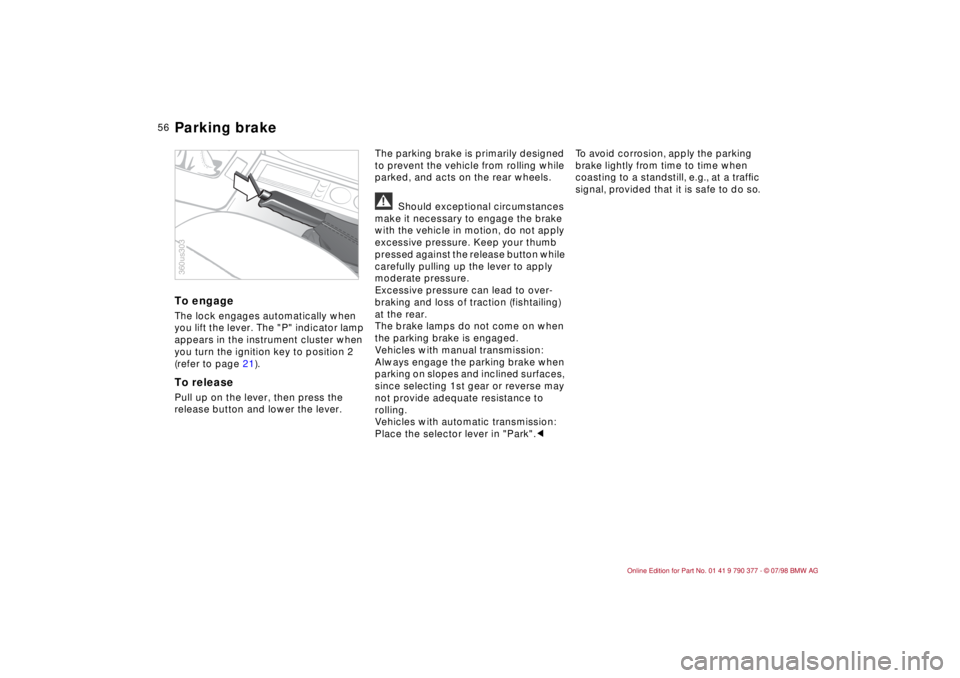
To engageThe lock engages automatically when
you lift the lever. The "P" indicator lamp
appears in the instrument cluster when
you turn the ignition key to position 2
(refer to page 21).To releasePull up on the lever, then press the
release button and lower the lever.The parking brake is primarily designed
to prevent the vehicle from rolling while
parked, and acts on the rear wheels.
a
Should exceptional circumstances
make it necessary to engage the brake
with the vehicle in motion, do not apply
excessive pressure. Keep your thumb
pressed against the release button while
carefully pulling up the lever to apply
moderate pressure.
Excessive pressure can lead to over-
braking and loss of traction (fishtailing)
at the rear.
The brake lamps do not come on when
the parking brake is engaged.
Vehicles with manual transmission:
Always engage the parking brake when
parking on slopes and inclined surfaces,
since selecting 1st gear or reverse may
not provide adequate resistance to
rolling.
Vehicles with automatic transmission:
Place the selector lever in "Park".cTo avoid corrosion, apply the parking
brake lightly from time to time when
coasting to a standstill, e.g., at a trafÞc
signal, provided that it is safe to do so.
360us303Parking brake
Page 58 of 179
57
At a glanceControls Car careRepairsTechnicalDataIndex
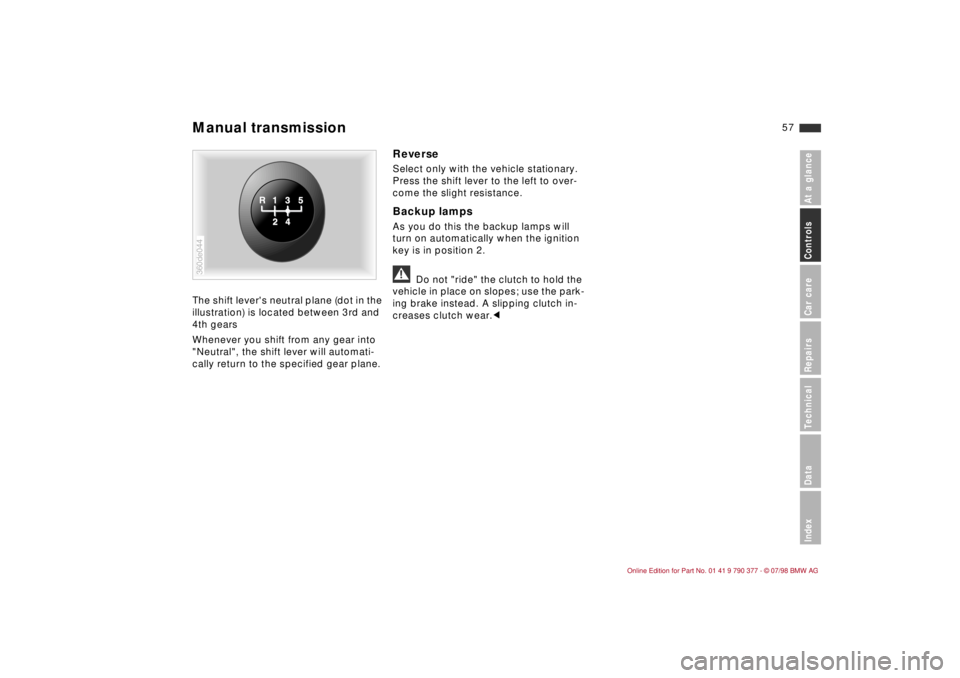
The shift lever's neutral plane (dot in the
illustration) is located between 3rd and
4th gears
Whenever you shift from any gear into
"Neutral", the shift lever will automati-
cally return to the specified gear plane.
ReverseSelect only with the vehicle stationary.
Press the shift lever to the left to over-
come the slight resistance.Backup lampsAs you do this the backup lamps will
turn on automatically when the ignition
key is in position 2.a
Do not "ride" the clutch to hold the
vehicle in place on slopes; use the park-
ing brake instead. A slipping clutch in-
creases clutch wear.c
360de044Manual transmission
Page 61 of 179
60
Indicator lamp for shift
electronicsdIf the lamp fails to go out or
dif it lights up during driving, there is a
malfunction in the shifting electronics
or in the transmission.
Bring the vehicle to a stop, select trans-
mission position "P", set the parking
brake and turn the engine off (ignition
key to position 0).
Wait a few seconds, then start the
engine.
If the indicator lamp goes out after a
few seconds, normal transmission per-
formance has been restored. Drive off
normally.
If the indicator lamp does not go out, all
selector lever positions can still be
selected, however in the forward posi-
tions the vehicle has limited perfor-
mances as it drives only in the 3rd or
4th gear.
If this happens, avoid extreme engine
loads and consult the nearest autho-
rized BMW Retailer.
a
Never carry out any work in the
engine compartment without first
ensuring that the transmission is in Park
or Neutral. Never leave children in the
vehicle unattended.c
For information on tow-starting, towing
and jump starting refer to pages 153
and 154.
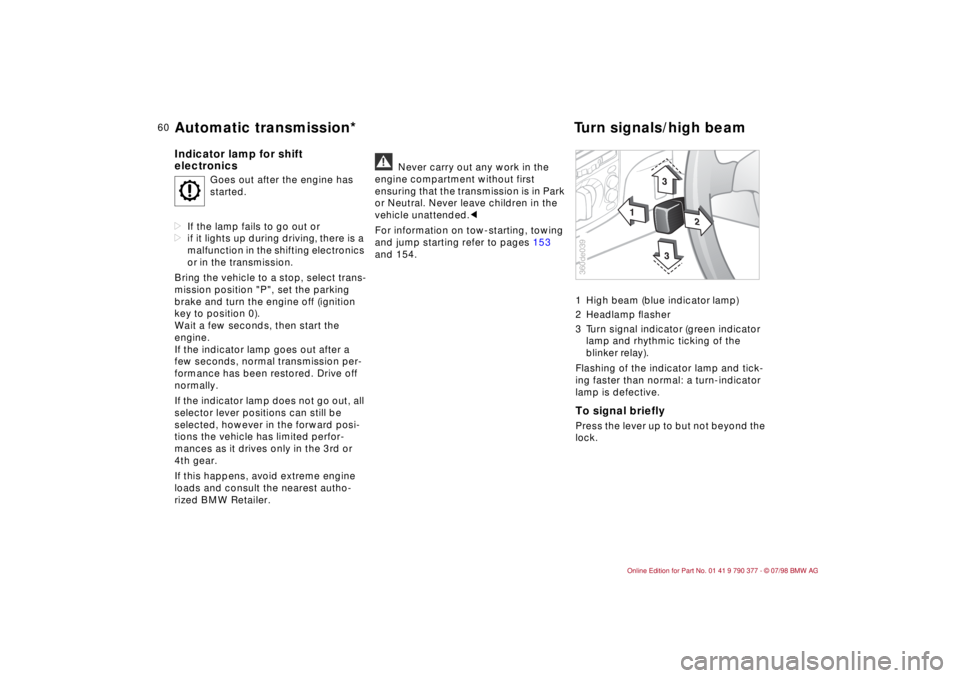
1 High beam (blue indicator lamp)
2 Headlamp ßasher
3 Turn signal indicator (green indicator
lamp and rhythmic ticking of the
blinker relay).
Flashing of the indicator lamp and tick-
ing faster than normal: a turn-indicator
lamp is defective.
To signal brieflyPress the lever up to but not beyond the
lock.
O
Goes out after the engine has
started.
1
2
3
3
360de039
Automatic transmission*Turn signals/high beam
Page 62 of 179
61
At a glanceControls Car careRepairsTechnicalDataIndex
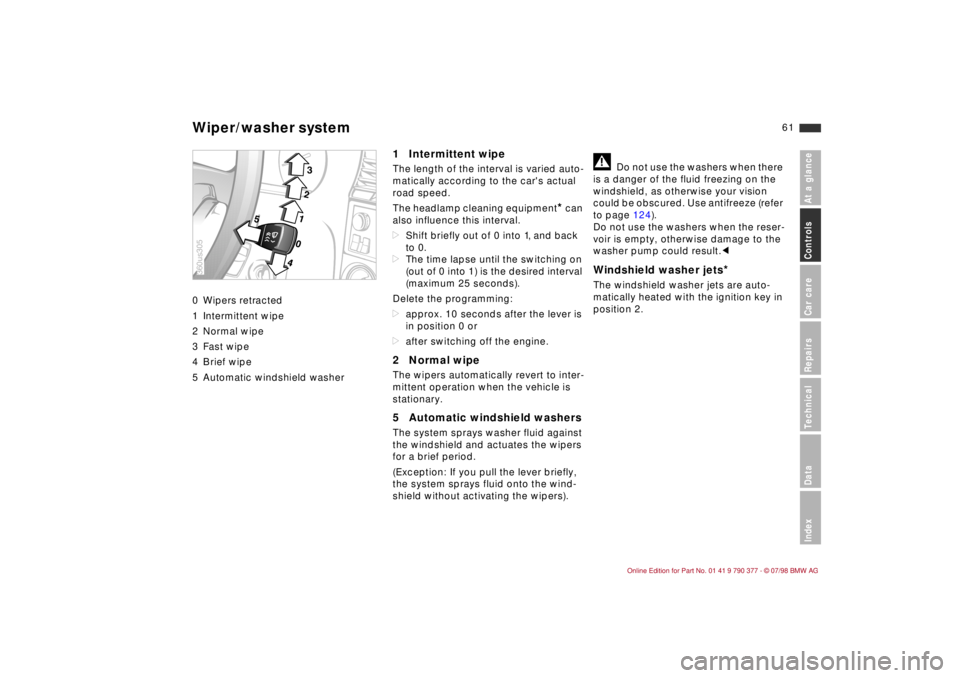
0 Wipers retracted
1 Intermittent wipe
2 Normal wipe
3 Fast wipe
4 Brief wipe
5 Automatic windshield washer
1 Intermittent wipe The length of the interval is varied auto-
matically according to the car's actual
road speed.
The headlamp cleaning equipment
* can
also influence this interval.
dShift briefly out of 0 into 1, and back
to 0.
dThe time lapse until the switching on
(out of 0 into 1) is the desired interval
(maximum 25 seconds).
Delete the programming:
dapprox. 10 seconds after the lever is
in position 0 or
dafter switching off the engine.
2 Normal wipeThe wipers automatically revert to inter-
mittent operation when the vehicle is
stationary.5 Automatic windshield washersThe system sprays washer fluid against
the windshield and actuates the wipers
for a brief period.
(Exception: If you pull the lever briefly,
the system sprays fluid onto the wind-
shield without activating the wipers).
a
Do not use the washers when there
is a danger of the fluid freezing on the
windshield, as otherwise your vision
could be obscured. Use antifreeze (refer
to page 124).
Do not use the washers when the reser-
voir is empty, otherwise damage to the
washer pump could result.c
Windshield washer jets
*
The windshield washer jets are auto-
matically heated with the ignition key in
position 2.
123
40
5
360us305Wiper/washer system
Page 63 of 179
62
You can store and automatically main-
tain any desired vehicle speed above
approx. 25 mph (40 km/h).
The stored speed is deleted when the
motor is switched off.
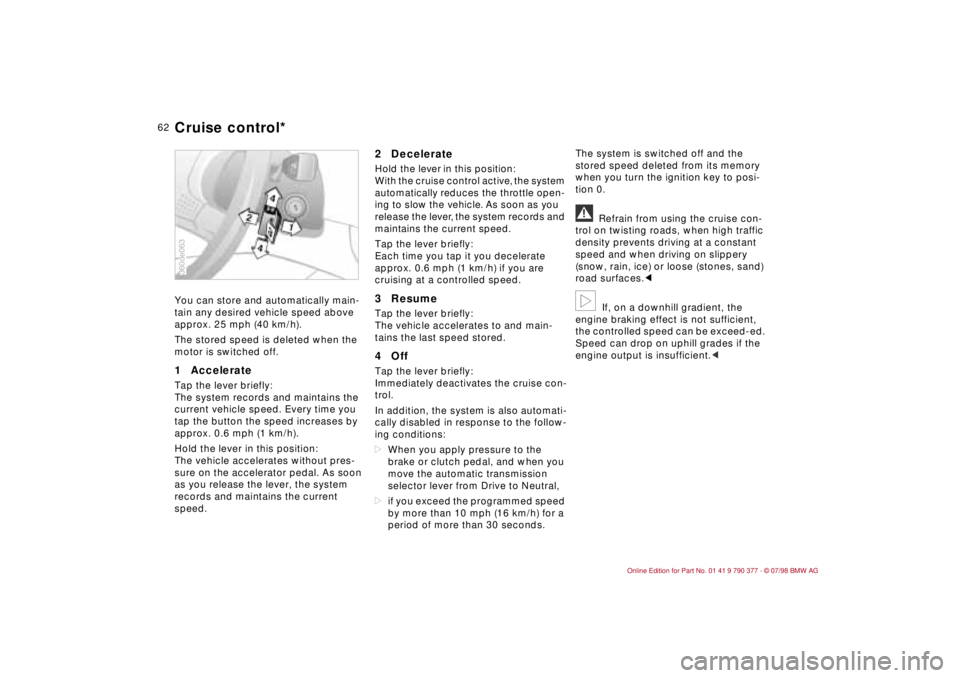
1 Accelerate Tap the lever briefly:
The system records and maintains the
current vehicle speed. Every time you
tap the button the speed increases by
approx. 0.6 mph (1 km/h).
Hold the lever in this position:
The vehicle accelerates without pres-
sure on the accelerator pedal. As soon
as you release the lever, the system
records and maintains the current
speed.
2 DecelerateHold the lever in this position:
With the cruise control active, the system
automatically reduces the throttle open-
ing to slow the vehicle. As soon as you
release the lever, the system records and
maintains the current speed.
Tap the lever briefly:
Each time you tap it you decelerate
approx. 0.6 mph (1 km/h) if you are
cruising at a controlled speed.3 ResumeTap the lever briefly:
The vehicle accelerates to and main-
tains the last speed stored.4 OffTap the lever briefly:
Immediately deactivates the cruise con-
trol.
In addition, the system is also automati-
cally disabled in response to the follow-
ing conditions:
dWhen you apply pressure to the
brake or clutch pedal, and when you
move the automatic transmission
selector lever from Drive to Neutral,
dif you exceed the programmed speed
by more than 10 mph (16 km/h) for a
period of more than 30 seconds.The system is switched off and the
stored speed deleted from its memory
when you turn the ignition key to posi-
tion 0.
a
Refrain from using the cruise con-
trol on twisting roads, when high traffic
density prevents driving at a constant
speed and when driving on slippery
(snow, rain, ice) or loose (stones, sand)
road surfaces.c
b
If, on a downhill gradient, the
engine braking effect is not sufficient,
the controlled speed can be exceed-ed.
Speed can drop on uphill grades if the
engine output is insufficient.c
360de063Cruise control*
Page 64 of 179
63
At a glanceControls Car careRepairsTechnicalDataIndex
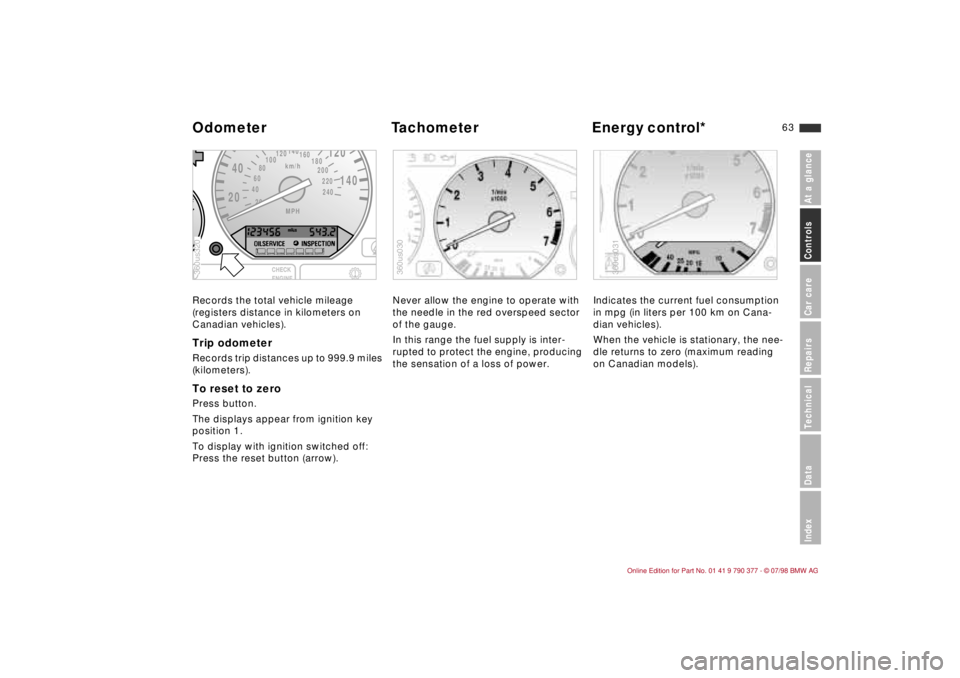
Records the total vehicle mileage
(registers distance in kilometers on
Canadian vehicles).Trip odometerRecords trip distances up to 999.9 miles
(kilometers).To reset to zeroPress button.
The displays appear from ignition key
position 1.
To display with ignition switched off:
Press the reset button (arrow).Never allow the engine to operate with
the needle in the red overspeed sector
of the gauge.
In this range the fuel supply is inter-
rupted to protect the engine, producing
the sensation of a loss of power.Indicates the current fuel consumption
in mpg (in liters per 100 km on Cana-
dian vehicles).
When the vehicle is stationary, the nee-
dle returns to zero (maximum reading
on Canadian models).
2040
120
140
km/h
240 220 200 180 160
140
120
100
80
60
40
20MPH
F360us320
360us030
360us031
Odometer Tachometer Energy control*
Page 67 of 179
66
With the different versions you can dis-
play not only the time and the date, but
also information e.g., on economical
driving and warnings on defective sys-
tems.
The following applies to all versions:
The unit will reject implausible entries.
When entering numerical values with
the number entry keys, the numerical
value is increased by one each time the
key is pressed and after each additional
half second with the key held down.
Numbers can be entered in any order.
The entries are saved in the memory by
pressing the SET/RES or SET key.
Any interruption in the power supply,
e.g., when changing the battery, will
result in the loss of all data saved in the
memory. After the power supply is
restored, you will need to re-enter the
time, date and any switch-on times, the
distance or speed warning threshold.
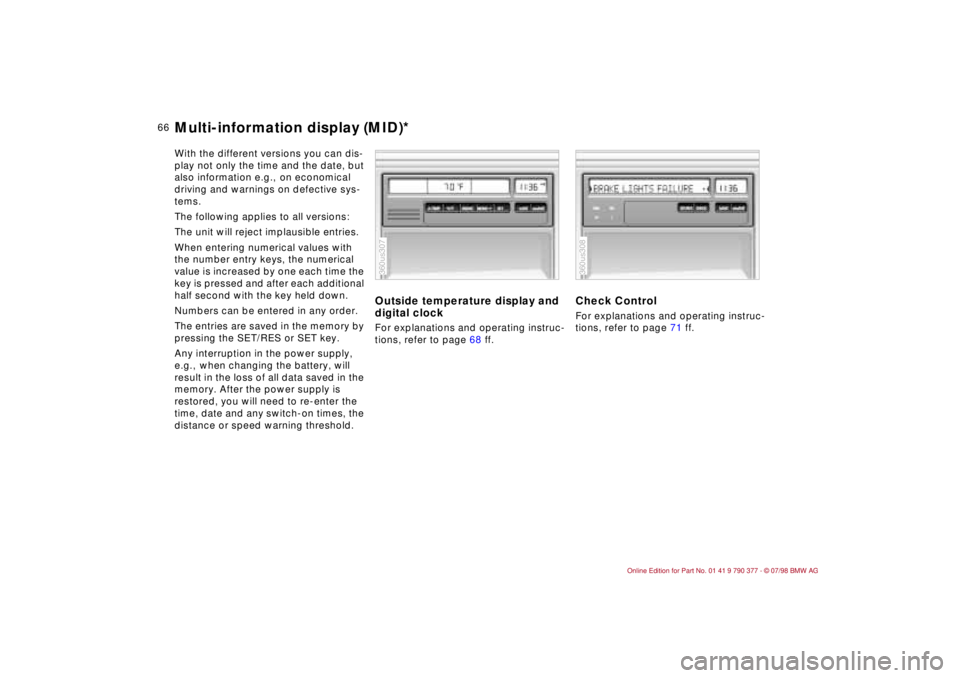
Outside temperature display and
digital clockFor explanations and operating instruc-
tions, refer to page 68 ff.
Check ControlFor explanations and operating instruc-
tions, refer to page 71 ff.
360us307
360us308
Multi-information display (MID)*
Page 69 of 179
68
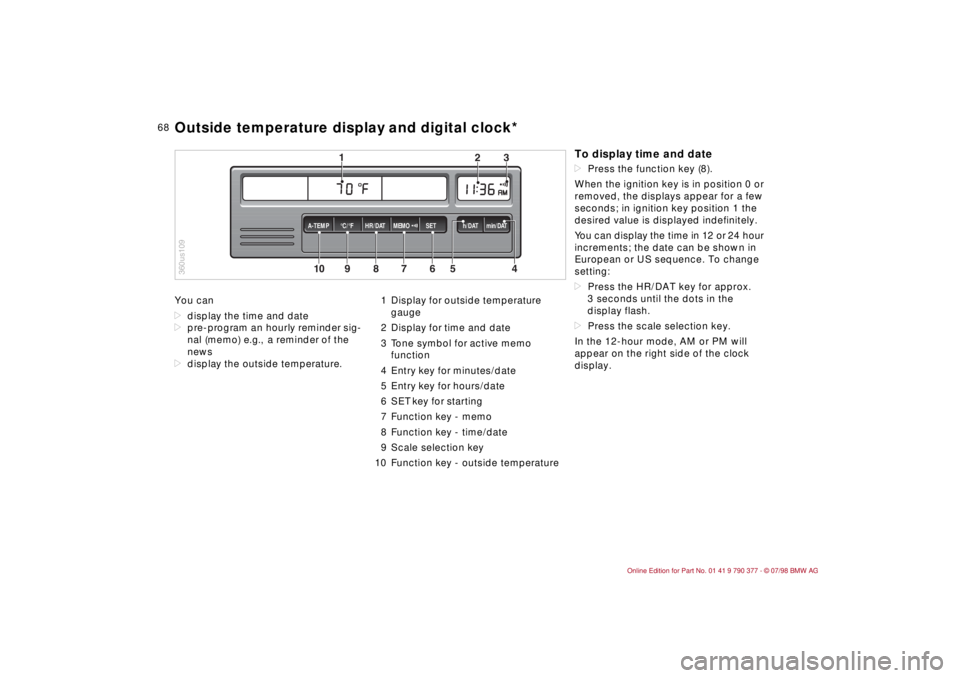
You can
ddisplay the time and date
dpre-program an hourly reminder sig-
nal (memo) e.g., a reminder of the
news
ddisplay the outside temperature.1 Display for outside temperature
gauge
2 Display for time and date
3 Tone symbol for active memo
function
4 Entry key for minutes/date
5 Entry key for hours/date
6 SET key for starting
7 Function key - memo
8 Function key - time/date
9 Scale selection key
10 Function key - outside temperature
10
MEMO
9
8
7
6
5
43
2
1
HR/DAT A-TEMP°C/°F SET h/DAT min/DAT
360us109Outside temperature display and digital clock*
To display time and datedPress the function key (8).
When the ignition key is in position 0 or
removed, the displays appear for a few
seconds; in ignition key position 1 the
desired value is displayed indefinitely.
You can display the time in 12 or 24 hour
increments; the date can be shown in
European or US sequence. To change
setting:
dPress the HR/DAT key for approx.
3 seconds until the dots in the
display flash.
dPress the scale selection key.
In the 12-hour mode, AM or PM will
appear on the right side of the clock
display.