ECO mode BMW I8 2015 I12 Owner's Guide
[x] Cancel search | Manufacturer: BMW, Model Year: 2015, Model line: I8, Model: BMW I8 2015 I12Pages: 224, PDF Size: 12.46 MB
Page 155 of 224
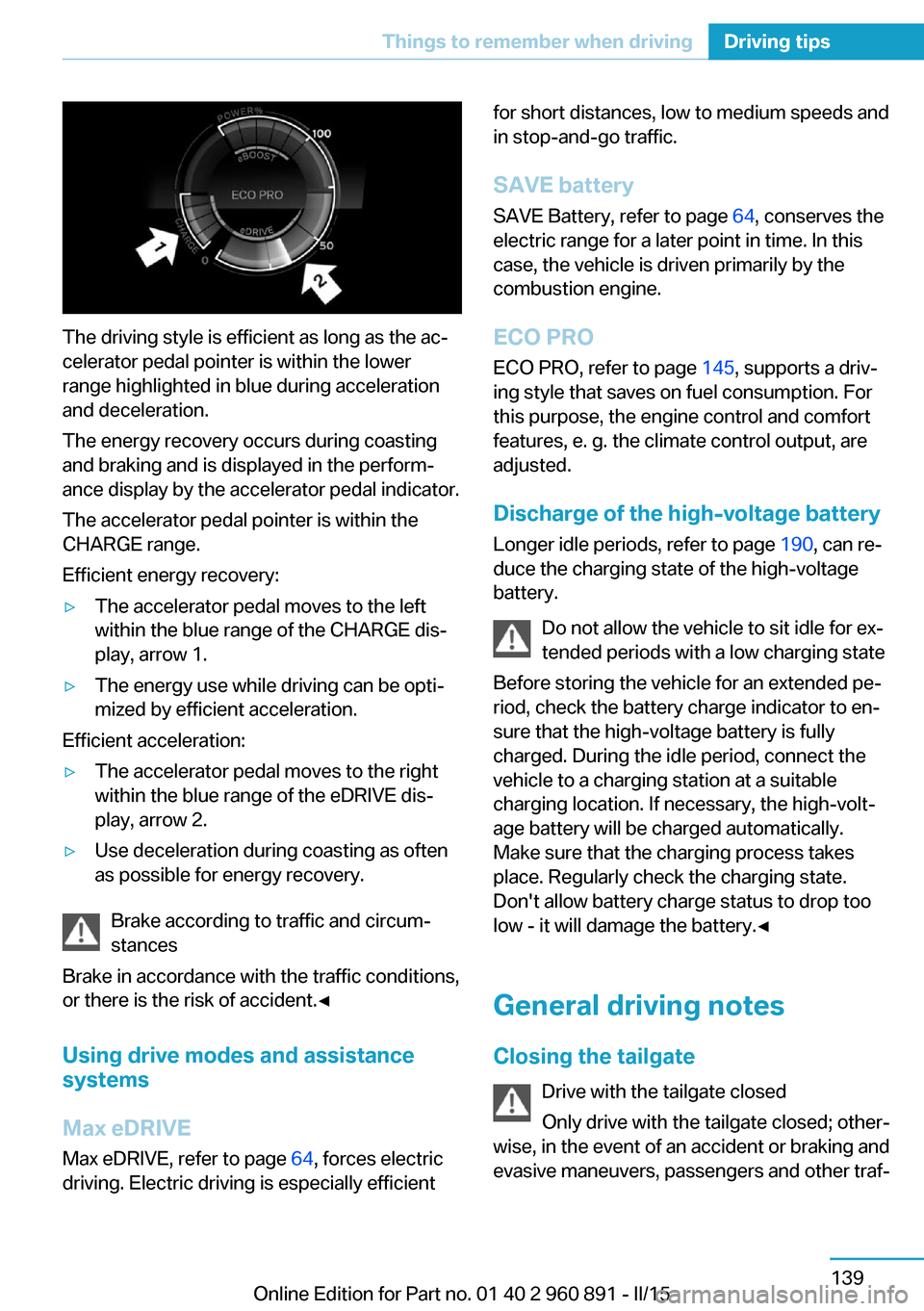
The driving style is efficient as long as the ac‐
celerator pedal pointer is within the lower
range highlighted in blue during acceleration
and deceleration.
The energy recovery occurs during coasting
and braking and is displayed in the perform‐
ance display by the accelerator pedal indicator.
The accelerator pedal pointer is within the
CHARGE range.
Efficient energy recovery:
▷The accelerator pedal moves to the left
within the blue range of the CHARGE dis‐
play, arrow 1.▷The energy use while driving can be opti‐
mized by efficient acceleration.
Efficient acceleration:
▷The accelerator pedal moves to the right
within the blue range of the eDRIVE dis‐
play, arrow 2.▷Use deceleration during coasting as often
as possible for energy recovery.
Brake according to traffic and circum‐
stances
Brake in accordance with the traffic conditions,
or there is the risk of accident.◀
Using drive modes and assistance
systems
Max eDRIVE
Max eDRIVE, refer to page 64, forces electric
driving. Electric driving is especially efficient
for short distances, low to medium speeds and
in stop-and-go traffic.
SAVE battery
SAVE Battery, refer to page 64, conserves the
electric range for a later point in time. In this
case, the vehicle is driven primarily by the
combustion engine.
ECO PRO ECO PRO, refer to page 145, supports a driv‐
ing style that saves on fuel consumption. For
this purpose, the engine control and comfort
features, e. g. the climate control output, are
adjusted.
Discharge of the high-voltage battery Longer idle periods, refer to page 190, can re‐
duce the charging state of the high-voltage
battery.
Do not allow the vehicle to sit idle for ex‐
tended periods with a low charging state
Before storing the vehicle for an extended pe‐
riod, check the battery charge indicator to en‐
sure that the high-voltage battery is fully
charged. During the idle period, connect the
vehicle to a charging station at a suitable
charging location. If necessary, the high-volt‐
age battery will be charged automatically.
Make sure that the charging process takes
place. Regularly check the charging state.
Don't allow battery charge status to drop too
low - it will damage the battery.◀
General driving notes
Closing the tailgate Drive with the tailgate closed
Only drive with the tailgate closed; other‐
wise, in the event of an accident or braking and
evasive maneuvers, passengers and other traf‐Seite 139Things to remember when drivingDriving tips139
Online Edition for Part no. 01 40 2 960 891 - II/15
Page 156 of 224
fic may be injured, and the vehicle may be
damaged.◀
If driving with the tailgate open cannot be
avoided:▷Drive moderately.
Hot exhaust system
Hot exhaust system
High temperatures are generated in the
exhaust system.
Do not remove the heat shields installed and
never apply undercoating to them. Make sure
that flammable materials, e. g. hay, leaves,
grass, etc. do not come in contact with the hot
exhaust system while driving, while in idle po‐
sition mode, or when parked. Such contact
could lead to a fire, resulting in an increased
risk of serious personal injury as well as prop‐
erty damage.
Do not touch hot exhaust pipes; otherwise,
there is a danger of getting burned.◀
Mobile communication devices in the
vehicle
Mobile communication devices in the ve‐
hicle
It is not recommended to use mobile phones,
such as mobile phones, in the vehicle interior
without a direct connection to an external aer‐
ial. Otherwise, the vehicle's electronics and
mobile communication devices can interfere
with each other. In addition, there is no assur‐
ance that the radiation generated during trans‐
mission will be conducted away from the vehi‐
cle interior.◀
Hydroplaning Hydroplaning
When driving on wet or slushy roads, re‐
duce your speed to prevent hydroplaning.◀
On wet or slushy roads, a wedge of water can
form between the tires and road surface.
This phenomenon is referred to as hydroplan‐
ing. It is characterized by a partial or complete
loss of contact between the tires and the road
surface, ultimately undermining your ability to
steer and brake the vehicle.
Driving through water Observe water level and speed
Do not exceed the maximum water level
and maximum speed; otherwise, the vehicle's
engine, the electrical systems and the trans‐
mission may be damaged.◀
Drive though calm water only and only if it is
not deeper than 9.8 inches/25 cm and at this
height, no faster than walking speed, up to
3 mph/5 km/h.
Braking safely
Your vehicle is equipped with ABS as a stand‐
ard feature.
Applying the brakes fully is the most effective
way of braking in situations needed.
Steering is still responsive. You can still avoid
any obstacles with a minimum of steering ef‐
fort.
Pulsation of the brake pedal and sounds from
the hydraulic circuits indicate that ABS is in its
active mode.
In certain braking situations, the perforated
brake discs can cause functional problems.
However, this has no effect on the perform‐
ance and operational reliability of the brake.
Objects within the range of movement
of the pedals
No objects in the area around the pedals
Keep floor mats, carpets, and any other
objects out of the pedal area; otherwise, the
function of the pedals could be impeded while driving and create the risk of an accident.
Do not place additional floor mats over existing
mats or other objects.Seite 140Driving tipsThings to remember when driving140
Online Edition for Part no. 01 40 2 960 891 - II/15
Page 161 of 224
Switch off any functions that
are not currently needed
Functions such as seat heating and the rear
window defroster require a lot of energy and
reduce the range, especially in city and stop-
and-go traffic.
Reel off these functions if they are not needed.
The ECO PRO driving program supports the
energy conserving use of comfort features.
These functions are automatically deactivated
partially or completely.
Have maintenance carried
out
Have vehicles maintained regularly to achieve
optimal vehicle efficiency and operating life.
The maintenance should be carried out by
your service center.
Also note the BMW Maintenance System, refer
to page 178.
ECO PRO
The concept
ECO PRO supports a driving style that saves
on fuel consumption. For this purpose, the en‐
gine control and comfort features, e. g. the cli‐
mate control output, are adjusted.
Under certain conditions the engine is auto‐
matically decoupled from the transmission in
the D selector lever position and the engine is
switched off. Selector lever position D remains
engaged.
At a glance
ECO PRO▷Reduce heat output or heating cycle for ex‐
terior mirror, rear window and seat heating.▷What reduces the the cooling and heating
output of the climate control system.
Activate ECO PRO
Press button repeatedly until ECO
PRO is displayed in the instrument
cluster.
Configuring ECO PRO
Via the Driving Dynamics Control
1.Activate ECO PRO.2."Configure ECO PRO"3.Configure the program.
Via the iDrive
1."Settings"2."ECO PRO mode"
Or
1."Settings"2."Driving mode"3."Configure ECO PRO"
Configure the program.
ECO PRO Tip
▷"Limit at:":
Adjust the ECO PRO speed.▷"ECO PRO speed warning":
The output is reduced once the set ECO
PRO speed is reached.
ECO PRO climate control
"ECO PRO climate control"
Climate control is set to be fuel-efficient.
By making a slight change to the set tempera‐
ture, or slowly adjusting the rate of heating or
cooling of the car's interior, fuel consumption
can be economized.
Seite 145Increase rangeDriving tips145
Online Edition for Part no. 01 40 2 960 891 - II/15
Page 195 of 224
Service and Warranty
Information Booklet for US
models and Warranty and
Service Guide Booklet for
Canadian models
Please consult your Service and Warranty In‐
formation Booklet for US models and Warranty
and Service Guide Booklet for Canadian mod‐
els for additional information on service re‐
quirements.
Maintenance and repair should be performed
by your service center. Make sure to have reg‐
ular maintenance procedures recorded in the
vehicle's Service and Warranty Information
Booklet for US models, and in the Warranty
and Service Guide Booklet for Canadian mod‐
els. These entries are proof of regular mainte‐
nance.
Socket for OBD Onboard
Diagnosis
Note Socket for Onboard Diagnosis
The socket for onboard diagnostics may
only be used by the service center or a work‐
shop that operates in accordance with the
specifications of the vehicle manufacturer with
correspondingly trained personnel and other
authorized persons. Otherwise, use may result
in operating problems for the vehicle.◀Position
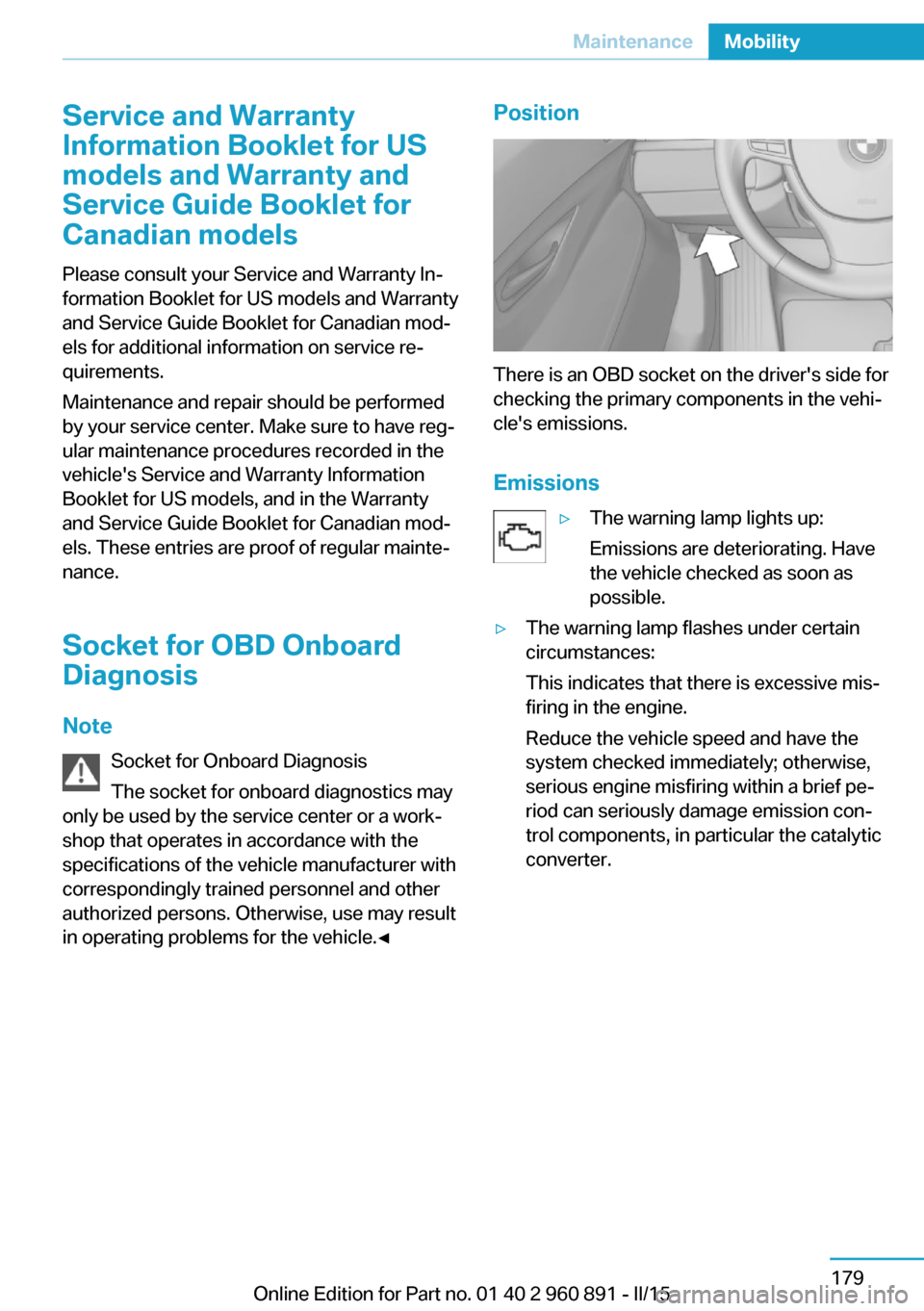
There is an OBD socket on the driver's side for
checking the primary components in the vehi‐
cle's emissions.
Emissions
▷The warning lamp lights up:
Emissions are deteriorating. Have
the vehicle checked as soon as
possible.▷The warning lamp flashes under certain
circumstances:
This indicates that there is excessive mis‐
firing in the engine.
Reduce the vehicle speed and have the
system checked immediately; otherwise,
serious engine misfiring within a brief pe‐
riod can seriously damage emission con‐
trol components, in particular the catalytic
converter.Seite 179MaintenanceMobility179
Online Edition for Part no. 01 40 2 960 891 - II/15
Page 216 of 224
Daytime running lights 93
Deactivating drive readi‐ ness 63
Defrosting, refer to Windows, defrosting 127
Dehumidifying, air 125
Deleting personal data 24
Deletion of personal data 24
Departure times, stationary climate control 128
Destination distance 88
Digital clock 83
Dimensions 194
Dimmable exterior mirrors 55
Dimmable interior rearview mirror 55
Direction indicator, refer to Turn signals 67
Display in windshield 90
Display lighting, refer to In‐ strument lighting 95
Displays 75
Displays, cleaning 190
Displays, hybrid system 77
Disposal, vehicle battery 182
Distance control, refer to PDC 115
Distance to destination 88
Divided screen view, split screen 23
Door lock 43
Door lock, refer to Remote control 38
Drive-off assistant 112
Drive-off assistant, refer to DSC 109
Driver's door, LED 41
Drive readiness 61
Drive readiness in detail 62
Drive readuness, deacti‐ vate 63
Driving Dynamics Con‐ trol 111
Driving instructions, break- in 138 Driving instructions, eDRIVE
drive system 138
Driving mode 111
Driving notes, general 139
Driving stability control sys‐ tems 109
Driving tips 139
Driving with combustion en‐ gine, POWER 65
DSC Dynamic Stability Con‐ trol 109
DTC Dynamic Traction Con‐ trol 110
Dynamic Stability Control DSC 109
Dynamic Traction Control DTC 110
E
eBOOST 65
ECO PRO 145
ECO PRO display 145
ECO PRO driving mode 145
ECO PRO mode 145
ECO PRO Tip - driving in‐ struction 146
eDRIVE drive system, driving instructions 138
eDRIVE, electric driving, see BMW eDRIVE 32
eDrive system, at a glance 31
EfficientDynamics 146
Electric drive readiness, Si‐ lent Start 63
Electric driving, ePOWER 64
Electric driving, max eDRIVE 64
Electric driving, see BMW eDRIVE 32
Electronic oil measure‐ ment 173
Electronic Stability Program ESP, refer to DSC 109
Emergency charging, refer to Backup charging 156 Emergency detection, remote
control 39
Emergency release, fuel filler flap 159
Emergency Request 183
Emergency start function, en‐ gine start 39
Emergency unlocking, tail‐ gate 45
Emergency unlocking, trans‐ mission lock 73
Energy Control 87
Energy recovery, CHARGE 66
Engine coolant 177
Engine noise, artificial 65
Engine oil 173
Engine oil, adding 175
Engine oil additives 175
Engine oil change 176
Engine oil filler neck 175
Engine oil temperature 83
Engine oil types, alterna‐ tive 176
Engine oil types, ap‐ proved 175
Engine start during malfunc‐ tion 39
Engine start, jump-start‐ ing 184
Engine temperature 83
Entering a car wash 187
ePOWER, electric driving 64
Equipment, interior 129
Error displays, see Check Control 79
ESP Electronic Stability Pro‐ gram, refer to DSC 109
Exchanging wheels/tires 167
Exhaust system 140
Exterior mirror, automatic dimming feature 55
Exterior mirrors 54
External start 184
External temperature dis‐ play 83 Seite 200ReferenceEverything from A to Z200
Online Edition for Part no. 01 40 2 960 891 - II/15
Page 220 of 224
QQuick charging cable, see Level 2 charging cable 152
R Radiator fluid 177
Radio 6
Radio-operated key, refer to Remote control 38
Radio ready state 61
Rain sensor 69
Rear beverage holder, rear cup holder 135
Rear bottle holder, refer to Rear cup holder 135
Rear can holder, refer to Rear Cup holder 135
Rear cup holder 135
Rear holder for bever‐ ages 135
Rearview camera 117
Rearview mirror 54
Rear window defroster 127
Recirculated-air filter 127
Recirculated-air mode 125
Recommended fuel grade 161
Recommended tire brands 167
Refueling 158
Remaining range 83
Remote control/key 38
Remote control, malfunc‐ tion 43
Remote control, univer‐ sal 129
Replacement fuse 182
Replacing wheels/tires 167
Reporting safety defects 10
RES button, see Cruise con‐ trol 113
Reserve warning, refer to Range 83 Reset, Tire Pressure Monitor
TPM 100
Retreaded tires 167
Roadside parking lights 93
RON recommended fuel grade 161
Roofliner 17
Rubber components, care 189
S
Safe braking 140
Safety 7
Safety belt reminder for driv‐ er's seat and front passen‐
ger seat 53
Safety belts 53
Safety belts, care 189
Safety of the high-voltage system 34
Safety systems, airbags 96
SAVE Battery, maintaining charging state 64
Screen, refer to Control Dis‐ play 18
Screw thread, see screw thread for tow fitting, screw
thread for tow fitting 186
Sealant 168
Seat belts, refer to Safety belts 53
Seat heating, front 52
Seating position for chil‐ dren 57
Seats 51
Selection list in instrument cluster 86
Selector lever, Steptronic Sport transmission 71
Sensors, care 190
Service and warranty 8
Service requirements, Condi‐ tion Based Service
CBS 178 Service requirements, dis‐
play 84
Services, ConnectedDrive 6
SET button, see Cruise con‐ trol 113
Settings, locking/unlock‐ ing 46
Settings, mirrors 54
Settings on Control Dis‐ play 89
Shift paddles on the steering wheel 73
Side airbags 96
Side View 122
Signaling, horn 14
Signals when unlocking 47
Silent Start, electric drive readiness 63
Sitting safely 51
Size 194
Smallest turning radius 194
Snow chains 171
Socket 131
Socket, OBD Onboard Diag‐ nostics 179
SOS button 183
Spare fuse 182
Specified engine oil types 175
Speed, average 88
Speed limit detection, on- board computer 88
Speed limiter, display 85
Speed Limit Information 85
Speed warning 88
Split screen 23
Sport program, transmis‐ sion 72
Stability control systems 109
Standard charging cable, see Level 1 charging cable 152
Standard charging, see Level 1 Charging 155
Standing air conditioning, re‐ mote control 47
Start/Stop button 61 Seite 204ReferenceEverything from A to Z204
Online Edition for Part no. 01 40 2 960 891 - II/15