display BMW M3 2012 Owners Manual
[x] Cancel search | Manufacturer: BMW, Model Year: 2012, Model line: M3, Model: BMW M3 2012Pages: 314, PDF Size: 7.72 MB
Page 266 of 314
265
Maintenance
Mobility
Socket for Onboard
Diagnosis OBD
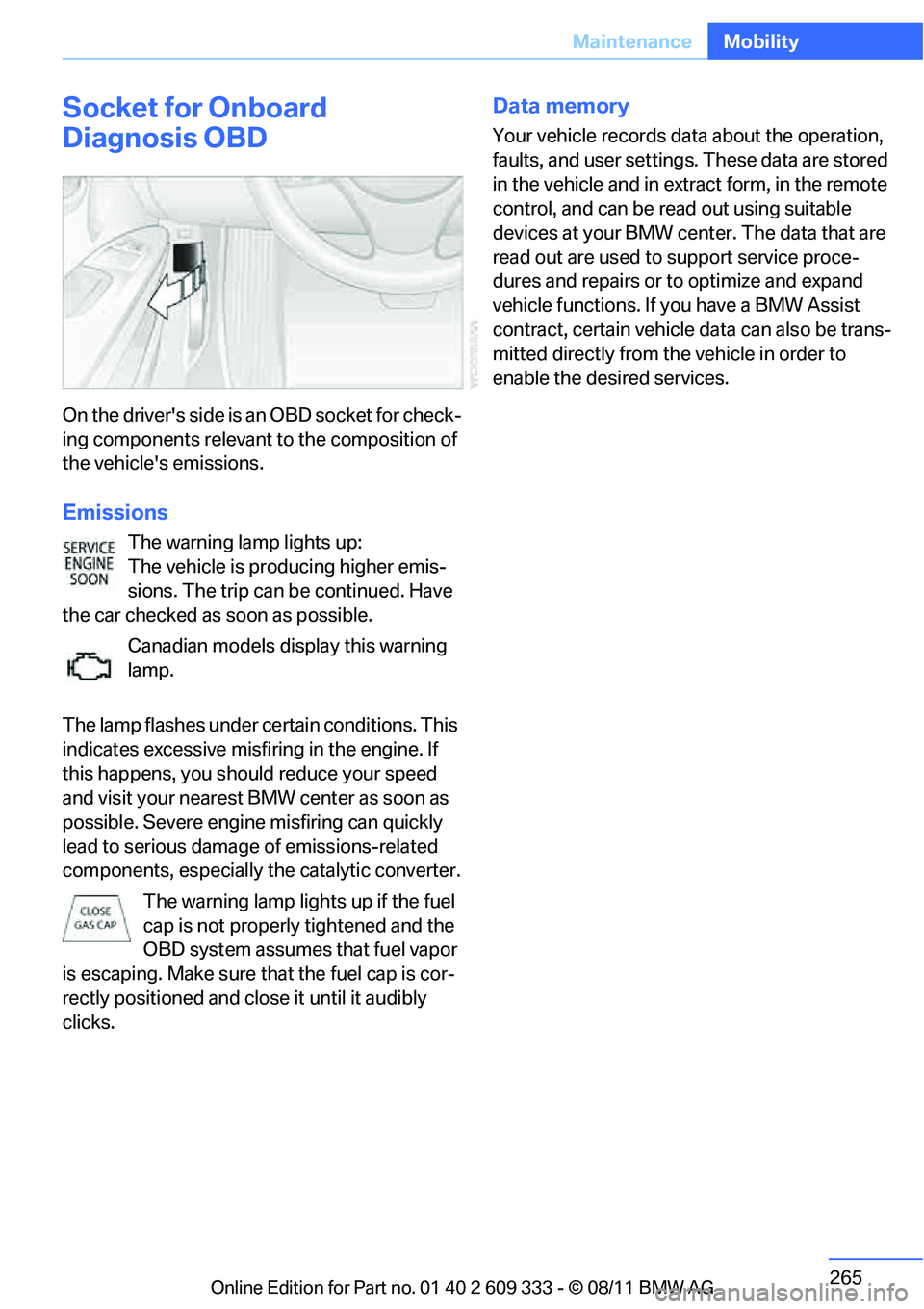
On the drive r's side is a n OBD so cket f or check-
ing components relevant to the composition of
the vehicle's emissions.
Emissions
The warning lamp lights up:
The vehicle is producing higher emis-
sions. The trip can be continued. Have
the car checked as soon as possible.
Canadian models display this warning
lamp.
The lamp flashes under ce rtain conditions. This
indicates excessive misfiring in the engine. If
this happens, you should reduce your speed
and visit your nearest BMW center as soon as
possible. Severe engine misfiring can quickly
lead to serious damage of emissions-related
components, especially the catalytic converter.
The warning lamp lights up if the fuel
cap is not properly tightened and the
OBD system assumes that fuel vapor
is escaping. Make sure that the fuel cap is cor-
rectly positioned and close it until it audibly
clicks.
Data memory
Your vehicle records data about the operation,
faults, and user settings. These data are stored
in the vehicle and in extr act form, in the remote
control, and can be read out using suitable
devices at your BMW center. The data that are
read out are used to support service proce-
dures and repairs or to optimize and expand
vehicle functions. If you have a BMW Assist
contract, certain vehicle data can also be trans-
mitted directly from the vehicle in order to
enable the desired services.
Online Edition for Part no. 01 40 2 609 333 - \251 08/11 BMW AG
Page 270 of 314
269
Care
Mobility
Treat the leather at least once every two
months using a leather lotion as dirt and grease
will gradually attack th
e leather's protective
layer.
Carpet and floor mats
Keep floor mats, carpet, and other objects
out of the movement range of the pedals;
otherwise, they may inhi bit the function of the
pedals during driving.
Do not place additional fl oor mats onto an exist-
ing one or onto other objects.
Only use floor mats that have been approved for
the vehicle and can be appropriately fastened.
Make sure that the floo r mats are securely fas-
tened again after they ha ve been removed, e.g.
for cleaning. <
Interior plastic parts
>Imitation leather surfaces
> Lamp glasses
> Display pane of instrument cluster
> Matte parts
Clean with water and solvent-free plastic
cleaner if necessary.
Fine wood parts
Clean fine wood trim and fine wood parts with a
damp cloth. Wipe dry with a soft cloth.
Safety belts
Dirty belt straps impede the reeling action and
thus have a negative impact on safety. Do not clean chemically, as this may
destroy the webbing. <
Interior sensors/cameras
To clean interior sensor s and cameras, e.g. of
the High-beam Assistant, use a lint-free cloth
moistened with glass cleaner.
Displays
To clean displays, e.g. of the radio or instrument
cluster, use a cleaning cloth for displays or a
soft, non-abrasive, lint-free cloth.
Avoid applying excessive pressure when
cleaning the displays; otherwise, damage
may occur. <
Do not use chemical or abrasive house-
hold cleaning agents. Keep all types of
fluid away from the device. Otherwise, surfaces
or electrical components may be corroded or
damaged. <
CD/DVD drives
Do not use a cleaning CD, as it may dam-
age parts of the drive. <
Vehicle storage
If you plan to park your vehicle for longer than
three months, your BMW center will be happy
to advise you.
Online Edition for Part no. 01 40 2 609 333 - \251 08/11 BMW AG
Page 272 of 314
271
Replacing components
Mobility
When working on electrical systems,
always begin by switching off the con-
sumer in question; otherwise, short-circuits
could result. To avoid possible injury or equip-
ment damage when replacing bulbs, observe
any instructions provided by the bulb manufac-
turer. <
For care of the headla mps, please follow the
instructions in the ch apter entitled 'Care'.
To replace lamps not described here,
please contact your BMW center. <
Light-emitting diodes LED
Light-emitting diodes installed behind translu-
cent lenses serve as the light source for many of
the controls, displays, and equipment in your
vehicle. These light-emitting diodes, which
operate using a concept similar to that applied
in conventional lasers, are officially designated
as Class 1 light-emitting diodes.
Do not remove the covers or expose the
eyes directly to the unfiltered light source
for several hours; otherwise, this could cause
irritation of the retina. <
Headlight lenses
In cool or humid weather, condensation may
form on the interior of outside lamps. The con-
densation will disappear after a short time when
driving with the headlamps switched on. The
headlamp glasses do not need to be changed.
If the headlamps do not defrost despite driving
with the headlamps switch ed on, and additional
moisture builds up, for example water droplets
in the lamps, have them checked by your BMW
center.
Xenon lamps
These bulbs have a very lo ng service life and are
highly unlikely to fail. If a xenon lamp fails never-
theless, switch on the fog lamps and continue
the journey with great ca re, provided that local
legislation does not prohibit this. Have all work on the xenon lamp system,
including bulb replacements, performed
only by your BMW center . Due to high voltage,
there is a risk of fatal injury if work on the xenon
lamps is carried out improperly. <
Access to the lamps
1.Switch off the lamps and take the remote
control out of the ignition lock.
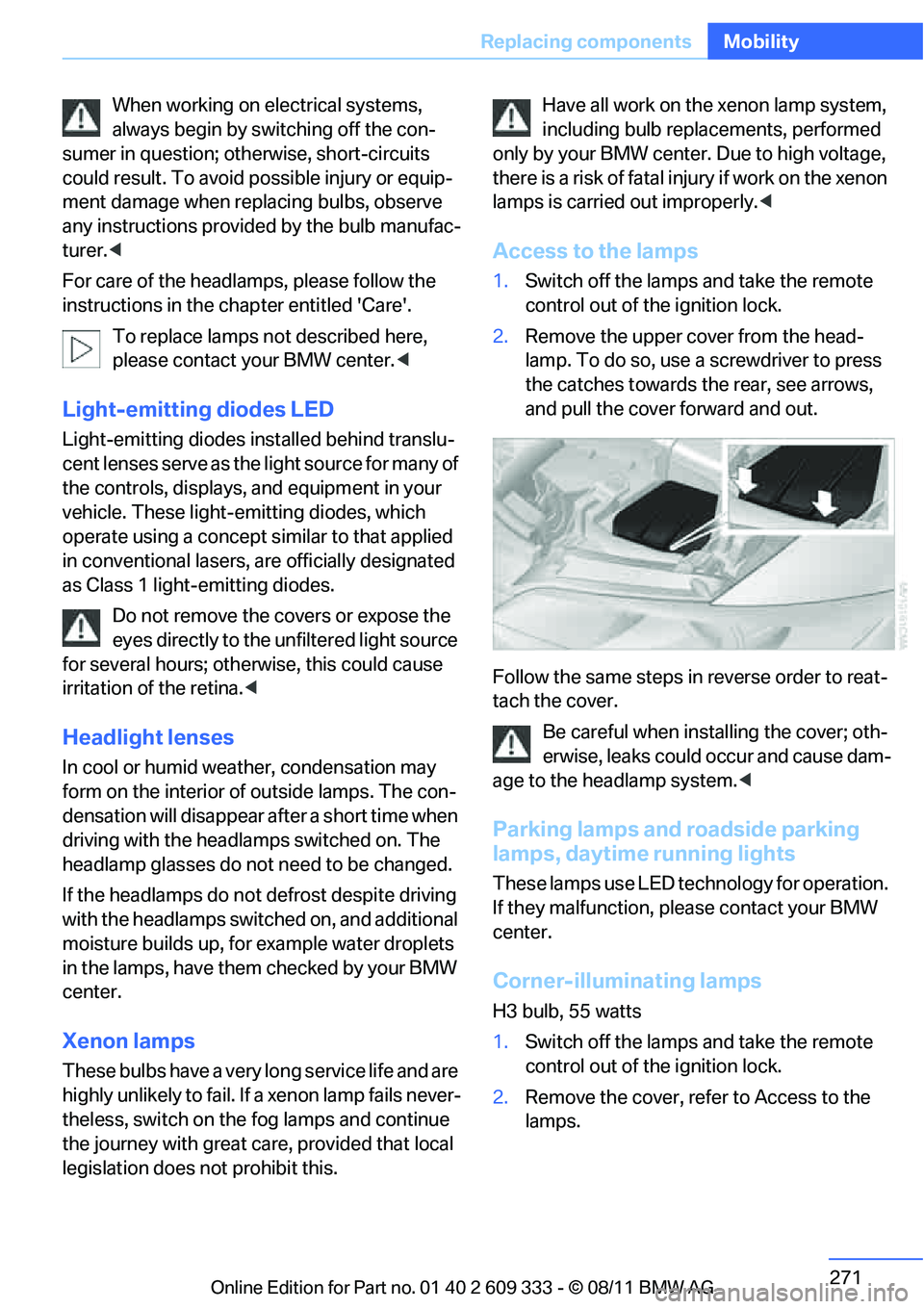
2. Remove the upper co ver from the head-
lamp. To do so, use a screwdriver to press
the catches towards th e rear, see arrows,
and pull the cover forward and out.
Follow the same steps in reverse order to reat-
tach the cover. Be careful when inst alling the cover; oth-
erwise, leaks could occur and cause dam-
age to the headlamp system.<
Parking lamps and roadside parking
lamps, daytime running lights
These lamps use LED technology for operation.
If they malfunction, please contact your BMW
center.
Corner-illuminating lamps
H3 bulb, 55 watts
1. Switch off the lamps and take the remote
control out of the ignition lock.
2. Remove the cover, re fer to Access to the
lamps.
Online Edition for Part no. 01 40 2 609 333 - \251 08/11 BMW AG
Page 273 of 314
272
MobilityReplacing components
3.Push the wire bracket out of the anchor
towards the right and fold it up.
4. Disconnect the plug, change the bulb and
reconnect the plug.
5. Insert the bulb.
6. Fold the wire bracket down and engage it.
7. Reattach the cover.
Turn signals, front
These lamps use LED technology for operation.
If they malfunction, please contact your BMW
center.
Side turn signals
W5W bulb, 5 watts
1.Press the front edge of the lamp toward the
rear with your fingertip, arrow 1 and pivot it
out, arrow 2.
2. While simultaneously lifting the retaining
tab, rotate bulb hold er to the left and
remove.
3. Remove lamp and replace it.
To install, insert rear end of the lamp and press
into place at the front.
Tail lamps
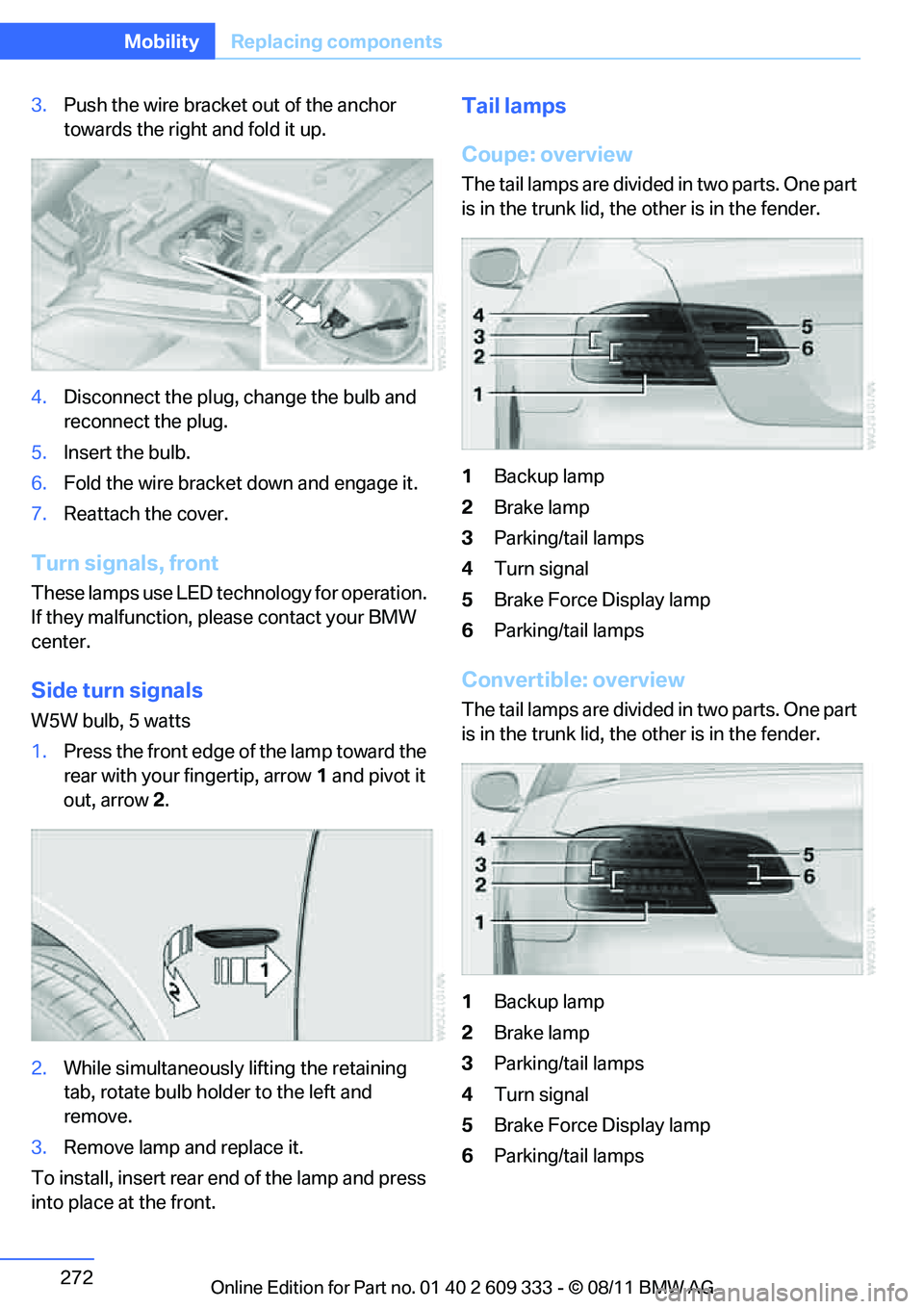
Coupe: overview
The tail lamps are divided in two parts. One part
is in the trunk lid, the other is in the fender.
1 Backup lamp
2 Brake lamp
3 Parking/tail lamps
4 Turn signal
5 Brake Force Display lamp
6 Parking/tail lamps
Convertible: overview
The tail lamps are divided in two parts. One part
is in the trunk lid, the other is in the fender.
1 Backup lamp
2 Brake lamp
3 Parking/tail lamps
4 Turn signal
5 Brake Force Display lamp
6 Parking/tail lamps
Online Edition for Part no. 01 40 2 609 333 - \251 08/11 BMW AG
Page 274 of 314
273
Replacing components
Mobility
Backup lamp
If these lamps malfunctio
n, please contact your
BMW center.
Turn signal, brake, license plate,
parking, and tail lamps
These lamps use LED technology for operation.
If they malfunction, please contact your BMW
center.
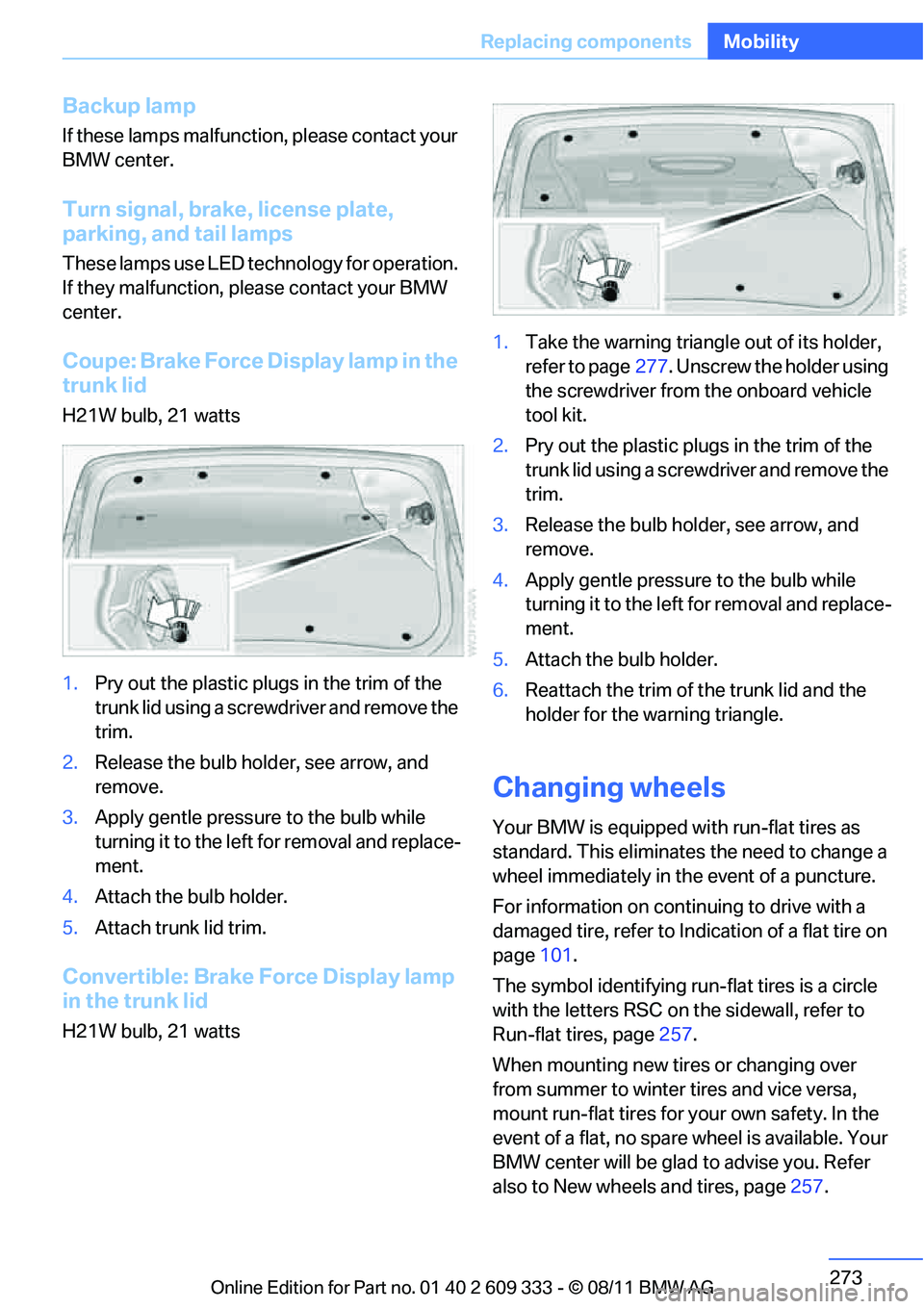
Coupe: Brake Force Display lamp in the
trunk lid
H21W bulb, 21 watts
1. Pry out the plastic plugs in the trim of the
trunk lid using a screwdriver and remove the
trim.
2. Release the bulb hold er, see arrow, and
remove.
3. Apply gentle pressure to the bulb while
turning it to the left for removal and replace-
ment.
4. Attach the bulb holder.
5. Attach trunk lid trim.
Convertible: Brake Force Display lamp
in the trunk lid
H21W bulb, 21 watts 1.
Take the warning triangle out of its holder,
refer to page 277. Unscrew the holder using
the screwdriver from the onboard vehicle
tool kit.
2. Pry out the plastic plugs in the trim of the
trunk lid using a screwd river and remove the
trim.
3. Release the bulb holder, see arrow, and
remove.
4. Apply gentle pressure to the bulb while
turning it to the left for removal and replace-
ment.
5. Attach the bulb holder.
6. Reattach the trim of the trunk lid and the
holder for the warning triangle.
Changing wheels
Your BMW is equipped with run-flat tires as
standard. This eliminates the need to change a
wheel immediately in the event of a puncture.
For information on continuing to drive with a
damaged tire, refer to Indication of a flat tire on
page 101.
The symbol identifying run- flat tires is a circle
with the letters RSC on the sidewall, refer to
Run-flat tires, page 257.
When mounting new tires or changing over
from summer to winter tires and vice versa,
mount run-flat tires for your own safety. In the
event of a flat, no spare wheel is available. Your
BMW center will be glad to advise you. Refer
also to New wheels and tires, page 257.
Online Edition for Part no. 01 40 2 609 333 - \251 08/11 BMW AG
Page 291 of 314
290
ReferenceShort commands for the voice activation system
Short commands for the voice activation
system
Vehicle equipment
In this chapter, all pr oduction, country, and
optional equipment that is offered in the model
range is described. As a result, some equip-
ment described may not be available in a partic-
ular vehicle, for example due to the options or
national-market version selected. This also
applies to safety related functions and systems.
General information
For instructions on the voice activation system,
refer to page 25.
Having the possible spoken commands read
aloud: {Voice commands }.
The following short commands are for vehicles
with the voice activation system. They do not
function with equipment packages that permit
only the mobile phone to be operated by voice.
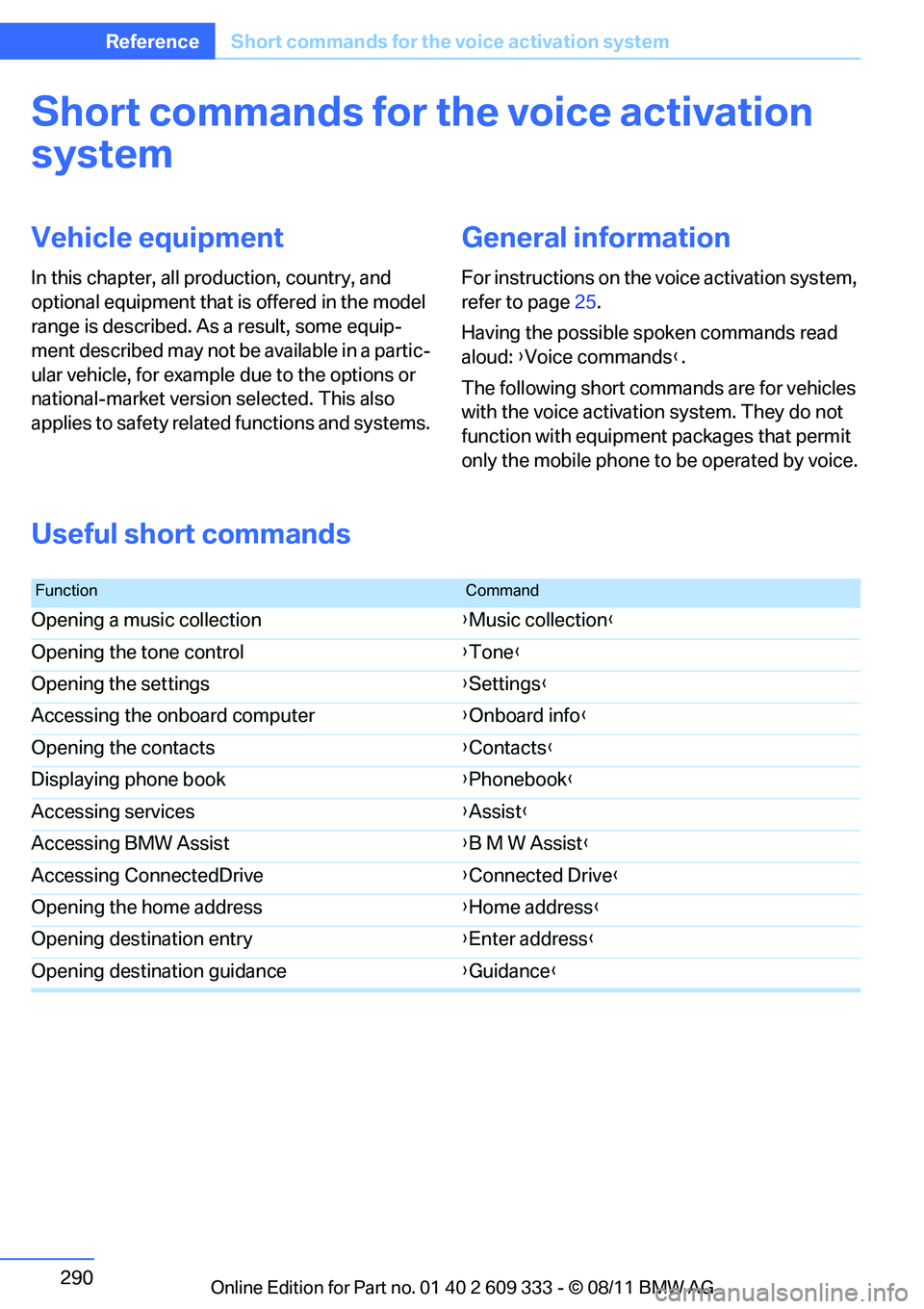
Useful short commands
FunctionCommand
Opening a music collection {Music collection }
Opening the tone control {Tone }
Opening the settings {Settings }
Accessing the onboard computer {Onboard info }
Opening the contacts {Contacts }
Displaying phone book {Phonebook }
Accessing services {Assist }
Accessing BMW Assist {B M W Assist }
Accessing ConnectedDrive {Connected Drive }
Opening the home address {Home address }
Opening destination entry {Enter address }
Opening destination guidance {Guidance }
Online Edition for Part no. 01 40 2 609 333 - \251 08/11 BMW AG
Page 292 of 314
291
Short commands for the voice activation system
Reference
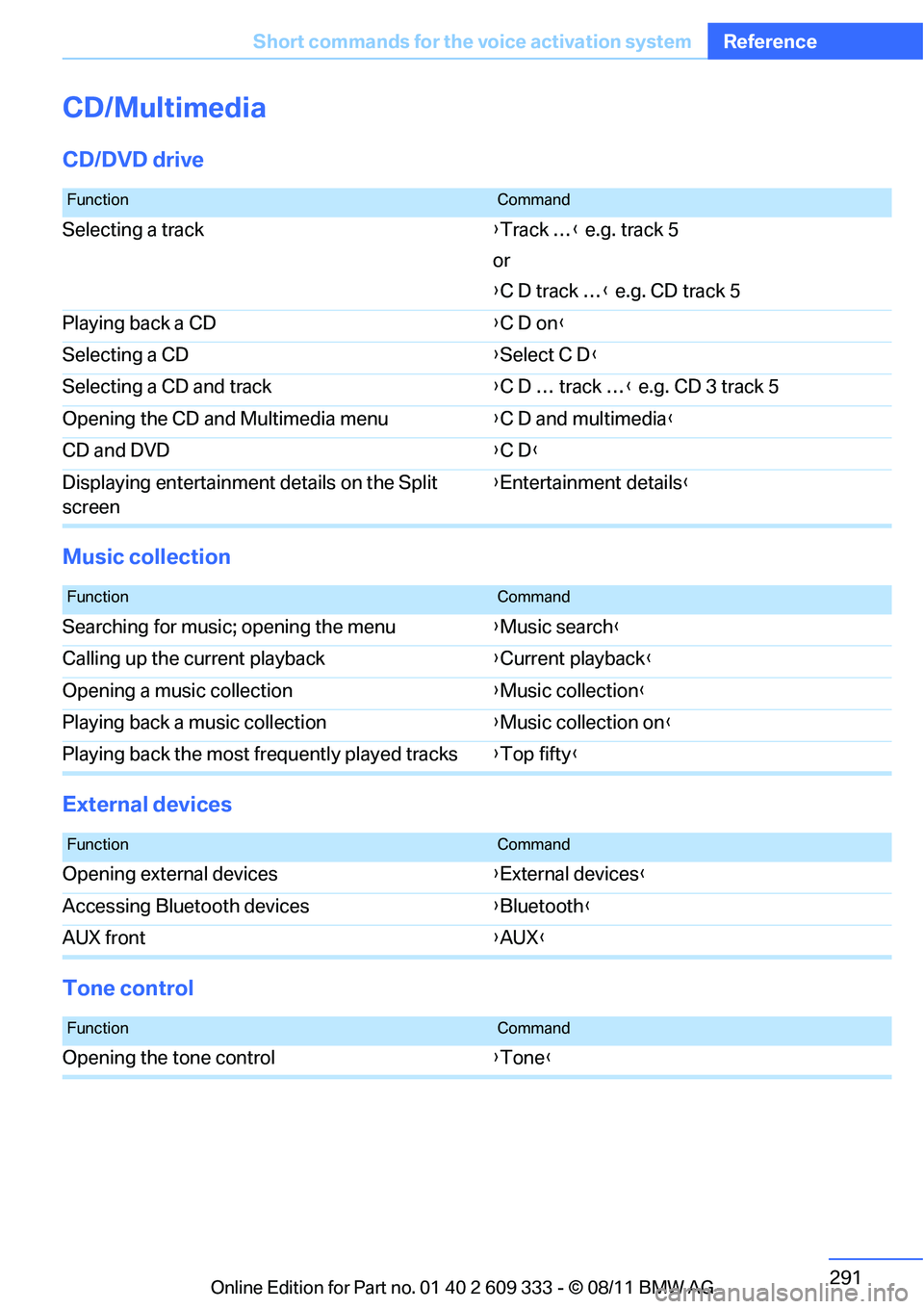
CD/Multimedia
CD/DVD drive
Music collection
External devices
Tone control
FunctionCommand
Selecting a track
{Track … } e.g. track 5
or
{ C D track … } e.g. CD track 5
Playing back a CD {C D on }
Selecting a CD {Select C D }
Selecting a CD and track {C D … track … } e.g. CD 3 track 5
Opening the CD and Multimedia menu {C D and multimedia }
CD and DVD {C D }
Displaying entertainment details on the Split
screen {
Entertainment details }
FunctionCommand
Searching for music; opening the menu {Music search }
Calling up the current playback {Current playback}
Opening a music collection {Music collection }
Playing back a music collection {Music collection on }
Playing back the most frequently played tracks {Top fifty }
FunctionCommand
Opening external devices {External devices }
Accessing Bluetooth devices {Bluetooth }
AUX front {AUX }
FunctionCommand
Opening the tone control {Tone }
Online Edition for Part no. 01 40 2 609 333 - \251 08/11 BMW AG
Page 294 of 314
293
Short commands for the voice activation system
Reference
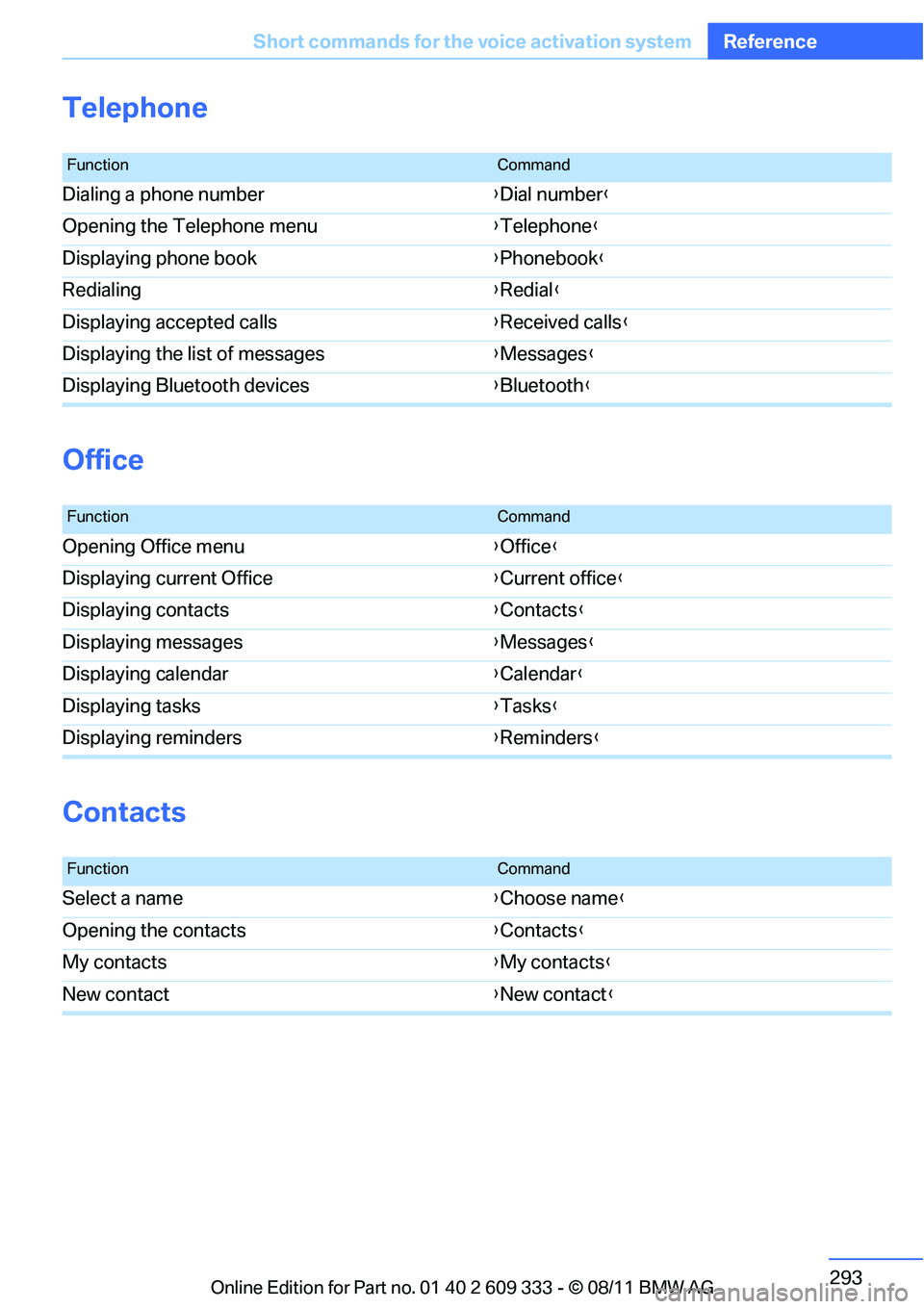
Telephone
Office
Contacts
FunctionCommand
Dialing a phone number
{Dial number }
Opening the Telephone menu {Telephone }
Displaying phone book {Phonebook }
Redialing {Redial }
Displaying accepted calls {Received calls}
Displaying the list of messages {Messages }
Displaying Bluetooth devices {Bluetooth }
FunctionCommand
Opening Office menu {Office }
Displaying current Office {Current office }
Displaying contacts {Contacts }
Displaying messages {Messages }
Displaying calendar {Calendar }
Displaying tasks {Tasks }
Displaying reminders {Reminders }
FunctionCommand
Select a name {Choose name }
Opening the contacts {Contacts }
My contacts {My contacts }
New contact {New contact }
Online Edition for Part no. 01 40 2 609 333 - \251 08/11 BMW AG
Page 295 of 314
294
ReferenceShort commands for the voice activation system
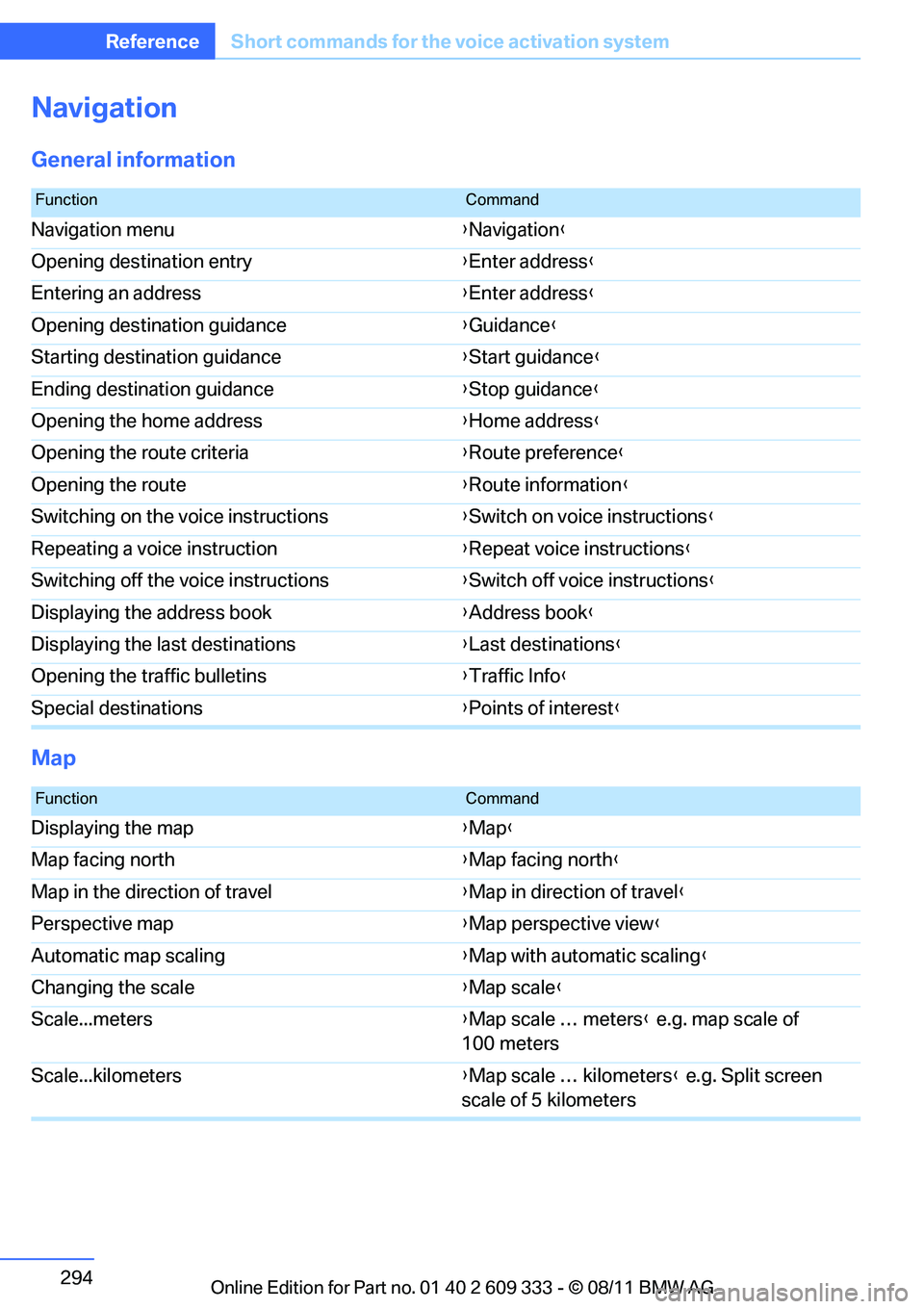
Navigation
General information
Map
FunctionCommand
Navigation menu {Navigation }
Opening destination entry {Enter address }
Entering an address {Enter address }
Opening destination guidance {Guidance }
Starting destination guidance {Start guidance }
Ending destination guidance {Stop guidance }
Opening the home address {Home address }
Opening the route criteria {Route preference }
Opening the route {Route information }
Switching on the voice instructions {Switch on voice instructions }
Repeating a voice instruction {Repeat voice instructions }
Switching off the voice instructions {Switch off voice instructions }
Displaying the address book {Address book }
Displaying the last destinations {Last destinations }
Opening the traffic bulletins {Traffic Info }
Special destinations {Points of interest }
FunctionCommand
Displaying the map {Map }
Map facing north {Map facing north }
Map in the direction of travel {Map in direction of travel }
Perspective map {Map perspective view }
Automatic map scaling {Map with automatic scaling }
Changing the scale {Map scale }
Scale...meters {Map scale … meters } e.g. map scale of
100 meters
Scale...kilometers {Map scale … kilometers } e.g. Split screen
scale of 5 kilometers
Online Edition for Part no. 01 40 2 609 333 - \251 08/11 BMW AG
Page 297 of 314
296
ReferenceShort commands for the voice activation system
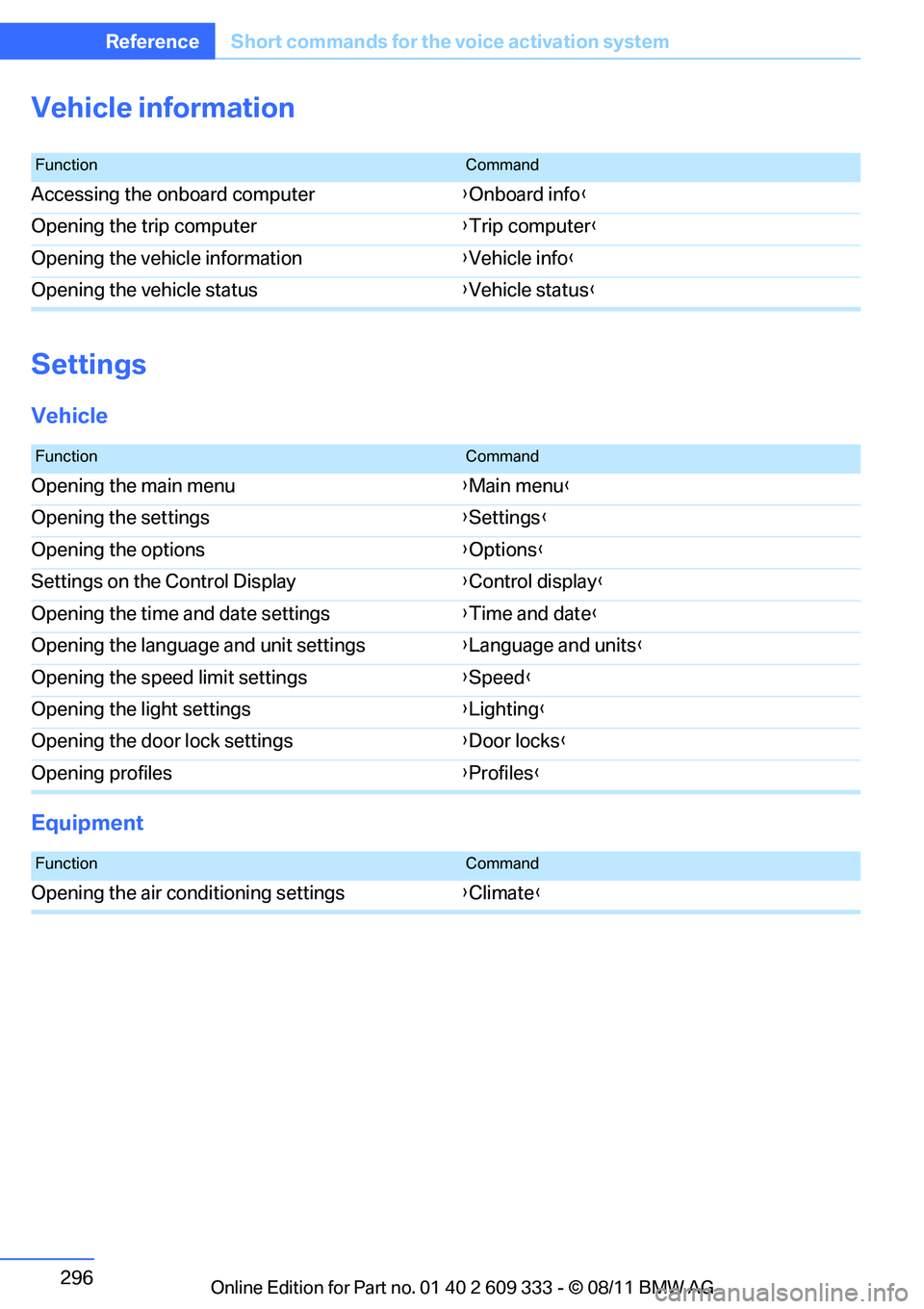
Vehicle information
Settings
Vehicle
Equipment
FunctionCommand
Accessing the onboard computer {Onboard info }
Opening the trip computer {Trip computer }
Opening the vehicle information {Vehicle info }
Opening the vehicle status {Vehicle status }
FunctionCommand
Opening the main menu {Main menu }
Opening the settings {Settings }
Opening the options {Options }
Settings on the Control Display {Control display }
Opening the time and date settings {Time and date }
Opening the language and unit settings {Language and units }
Opening the speed limit settings {Speed }
Opening the light settings {Lighting }
Opening the door lock settings {Door locks }
Opening profiles {Profiles }
FunctionCommand
Opening the air conditioning settings {Climate }
Online Edition for Part no. 01 40 2 609 333 - \251 08/11 BMW AG