phone BMW M3 CONVERTIBLE 2012 Owners Manual
[x] Cancel search | Manufacturer: BMW, Model Year: 2012, Model line: M3 CONVERTIBLE, Model: BMW M3 CONVERTIBLE 2012Pages: 255, PDF Size: 6.32 MB
Page 4 of 255
Contents
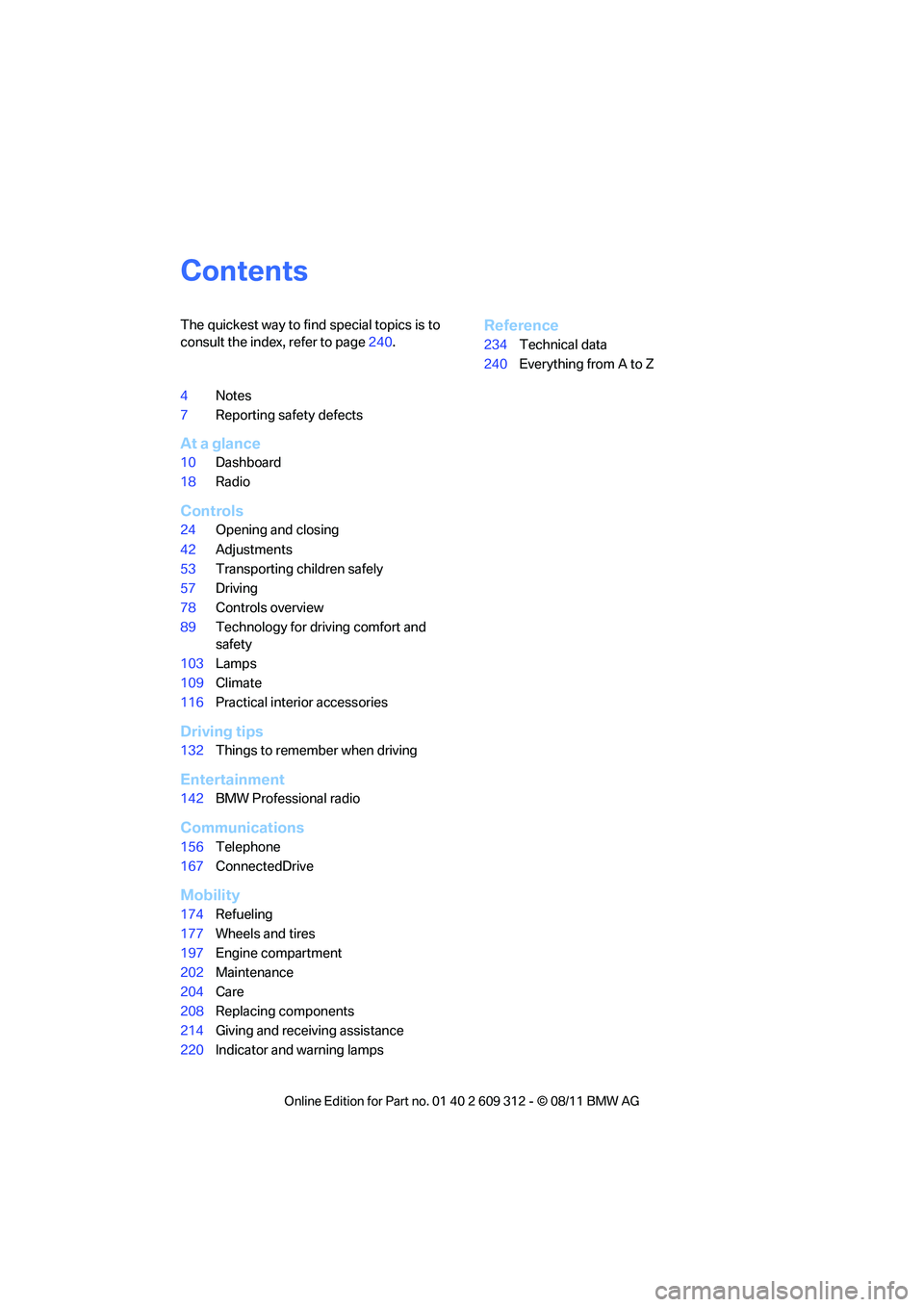
The quickest way to find special topics is to
consult the index, refer to page240.
4 Notes
7 Reporting safety defects
At a glance
10Dashboard
18 Radio
Controls
24Opening and closing
42 Adjustments
53 Transporting children safely
57 Driving
78 Controls overview
89 Technology for driving comfort and
safety
103 Lamps
109 Climate
116 Practical interior accessories
Driving tips
132Things to remember when driving
Entertainment
142BMW Professional radio
Communications
156Telephone
167 ConnectedDrive
Mobility
174Refueling
177 Wheels and tires
197 Engine compartment
202 Maintenance
204 Care
208 Replacing components
214 Giving and receiving assistance
220 Indicator and warning lamps
Reference
234Technical data
240 Everything from A to Z
Online Edition for Part no. 01 40 2 609 312 - \251 08/11 BMW AG
Page 6 of 255
5
Notes
Vehicle equipment
This Owner's Manual de
scribes all models and
all series-specific equipm ent, country-specific
equipment, and optional equipment that is
offered in the series. For this reason, this
Owner's Manual also de scribes and illustrates
some equipment that may not be available in
your vehicle, for example due to the special
options or national-market version selected.
This also applies to safety related functions and
systems.
If equipment and models are not described in
this Owner's Manual, please consult the
accompanying Supplementary Owner's Hand-
books.
Status of this Owner's Manual
at time of printing
BMW pursues a policy of continuous, ongoing
development that is conceived to ensure that
our vehicles continue to embody the highest
quality and safety standards combined with
advanced, state-of-the-art technology. For this
reason, it is possible in exceptional cases that
features described in this Owner's Manual
could differ from those on your vehicle.
Updates after press date
Updates after press date for the Owner's Man-
uals, when necessary, are issued as appendices
to the printed Quick Reference Guide for the
vehicle.
For your own safety
Maintenance and repair
Advanced technology, e.g. the use of
modern materials and powerful electron-
ics, requires specially adapted maintenance
and repair methods. You should therefore have
the corresponding work on your vehicle per-
formed only by your BMW center or at a work- shop that works according to BMW repair pro-
cedures with correspondingly trained
personnel. If this work
is not carried out prop-
erly, there is a danger of subsequent damage
and related sa fety hazards.<
Parts and accessories
For your own safety, use genuine parts
and accessories a pproved by BMW.
When you purchase accessories tested and
approved by BMW and Or iginal BMW Parts, you
simultaneously acquire the assurance that they
have been thoroughly te sted by BMW to ensure
optimum performance when installed on your
vehicle.
BMW warrants these parts to be free from
defects in material and workmanship.
BMW will not accept any liability for damage
resulting from installation of parts and accesso-
ries not approved by BMW.
BMW cannot test every pr oduct made by other
manufacturers to verify if it can be used on a
BMW safely and without ri sk to either the vehi-
cle, its operation, or its occupants.
Original BMW Parts, BMW Accessories and
other products approved by BMW, together
with professional advice on using these items,
are available from all BMW centers.
Installation and operation of accessories not
approved by BMW, such as alarms, radios,
amplifiers, radar detectors, wheels, suspension
components, brake dust shields, telephones,
including operation of any mobile phone from
within the vehicle withou t using an externally
mounted antenna, or transceiver equipment, for
instance, CBs, walkie-talkies, ham radio or sim-
ilar accessories, may ca use extensive damage
to the vehicle, compromi se its safety, interfere
with the vehicle's electrical system or affect the
validity of the BMW Limited Warranty. See your
BMW center for additional information.<
Online Edition for Part no. 01 40 2 609 312 - \251 08/11 BMW AG
Page 8 of 255
7
Notes
If the vehicle is not maintained according to
these specifications, this
could result in serious
da mage to the ve hicle . Such da ma ge is not co v-
ered by the BMW New Vehicle Limited War-
ranty.
Reporting safety defects
For US customers
The following only app lies to vehicles owned
and operated in the US.
If you believe that your vehicle has a defect
which could cause a crash or could cause injury
or death, you should immediately inform the
National Highway Traffic Safety Administration,
NHTSA, in addition to notifying BMW of
North America, LLC, P.O. Box 1227, West-
wood, New Jersey 07675-1227, Telephone
1-800-831-1117.
If NHTSA receives sim ilar complaints, it may
open an investigation, and if it finds that a safety
defect exists in a group of vehicles, it may order
a recall and remedy campaign. However,
NHTSA cannot become involved in individual
problems between you, yo ur center, or BMW of
North America, LLC.
To contact NHTSA, you may call the Vehicle
Safety Hotline toll-free at 1-888-327-4236
(TTY: 1-800-424-9153); go to
http://www.safercar.gov; or write to: Adminis-
trator, NHTSA, 400 Se venth Street, SW.,
Washington, DC 20590. You can also obtain
other information about motor vehicle safety
from http://www.safercar.gov
For Canadian customers
Canadian customers who wish to report a
safety-related defect to Transport Canada,
Defect Investigations and Recalls, may tele-
phone the toll-free hotline 1-800-333-0510.
You can also obtain other information about
motor vehicle safety from http://www.tc.gc.ca/
roadsafety
Online Edition for Part no. 01 40 2 609 312 - \251 08/11 BMW AG
Page 12 of 255
11
Dashboard
At a glance
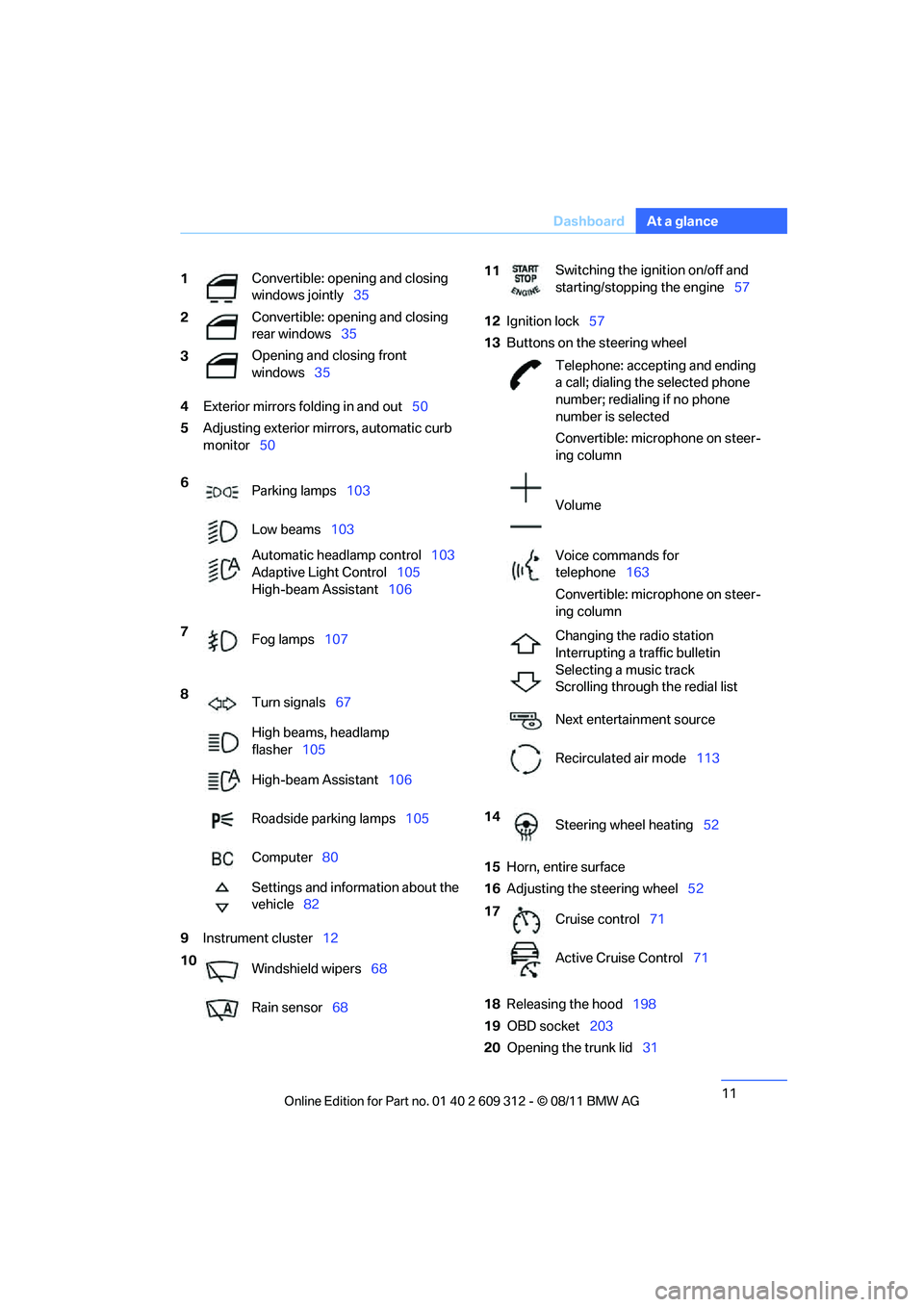
4
Exterior mirrors fo lding in and out50
5 Adjusting exterior mirrors, automatic curb
monitor 50
9 Instrument cluster 12 12
Ignition lock 57
13 Buttons on the steering wheel
15 Horn, entire surface
16 Adjusting the steering wheel 52
18 Releasing the hood 198
19 OBD socket 203
20 Opening the trunk lid 31
1
Convertible: opening and closing
windows jointly
35
2 Convertible: opening and closing
rear windows
35
3 Opening and closing front
windows
35
6 Parking lamps 103
Low beams 103
Automatic head lamp control103
Adaptive Light Control 105
High-beam Assistant 106
7 Fog lamps 107
8 Turn signals 67
High beams, headlamp
flasher 105
High-beam Assistant 106
Roadside parking lamps 105
Computer 80
Settings and information about the
vehicle 82
10 Windshield wipers 68
Rain sensor 68
11Switching the ignition on/off and
starting/stopping the engine
57
Telephone: accepting and ending
a call; dialing the selected phone
number; redialing if no phone
number is selected
Convertible: microphone on steer-
ing column
Volume
Voice commands for
telephone 163
Convertible: microphone on steer-
ing column
Changing the radio station
Interrupting a traffic bulletin
Selecting a music track
Scrolling through the redial list
Next entertainment source
Recirculated air mode 113
14 Steering wheel heating 52
17 Cruise control 71
Active Cruise Control 71
Online Edition for Part no. 01 40 2 609 312 - \251 08/11 BMW AG
Page 17 of 255
16
At a glanceDashboard
Around the roofliner
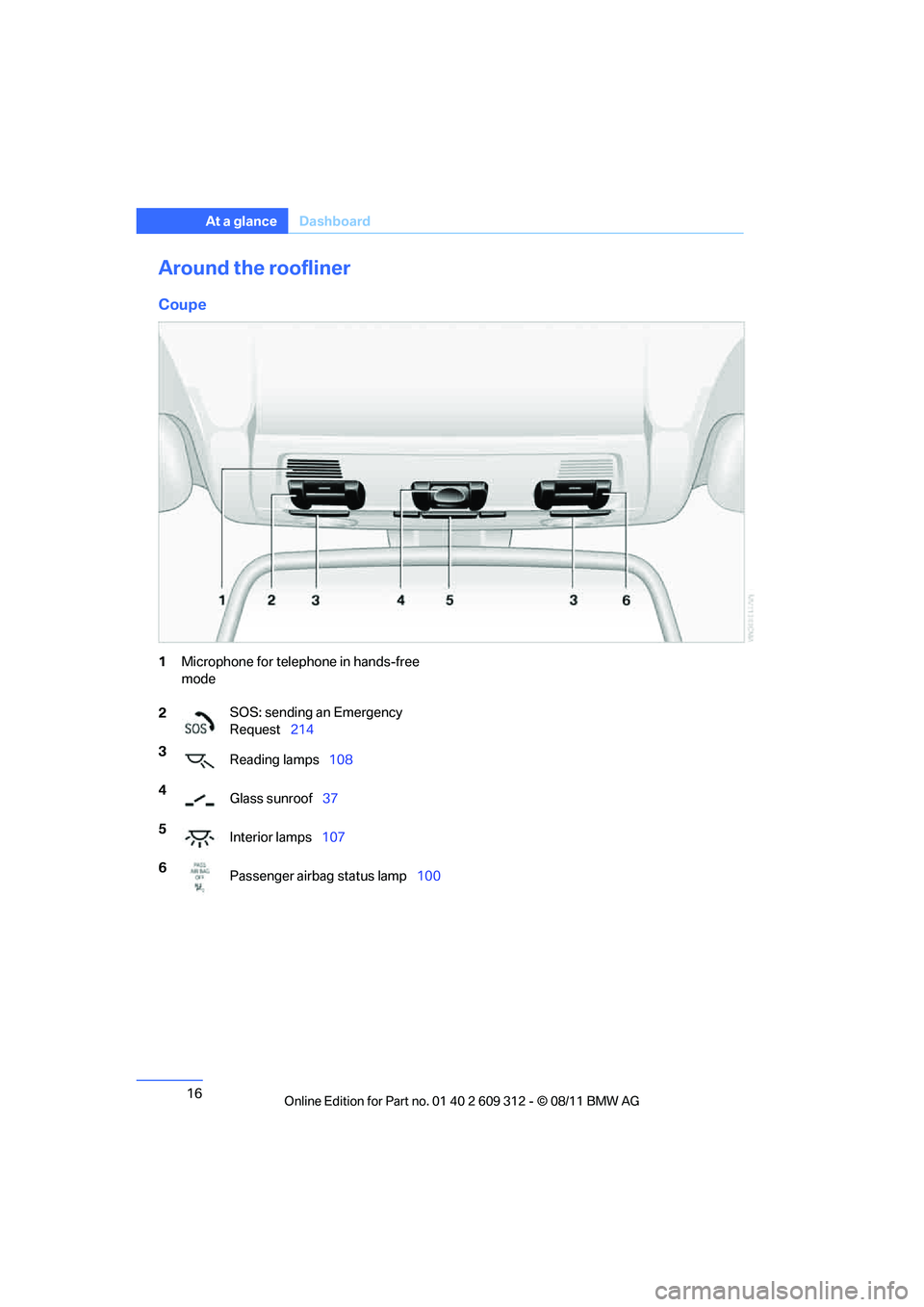
Coupe
1Microphone for telephone in hands-free
mode
2 SOS: sending an Emergency
Request
214
3 Reading lamps 108
4 Glass sunroof 37
5 Interior lamps 107
6 Passenger airbag status lamp 100
Online Edition for Part no. 01 40 2 609 312 - \251 08/11 BMW AG
Page 19 of 255
18
At a glanceRadio
Radio
Vehicle equipment
In this chapter, all pr oduction, country, and
optional equipment that is offered in the model
range is described. For this reason, descrip-
tions will be given of some equipment that may not be available in a vehi
cle, for example due to
the special options or national-market version
selected. This also app lies to safety related
functions and systems.
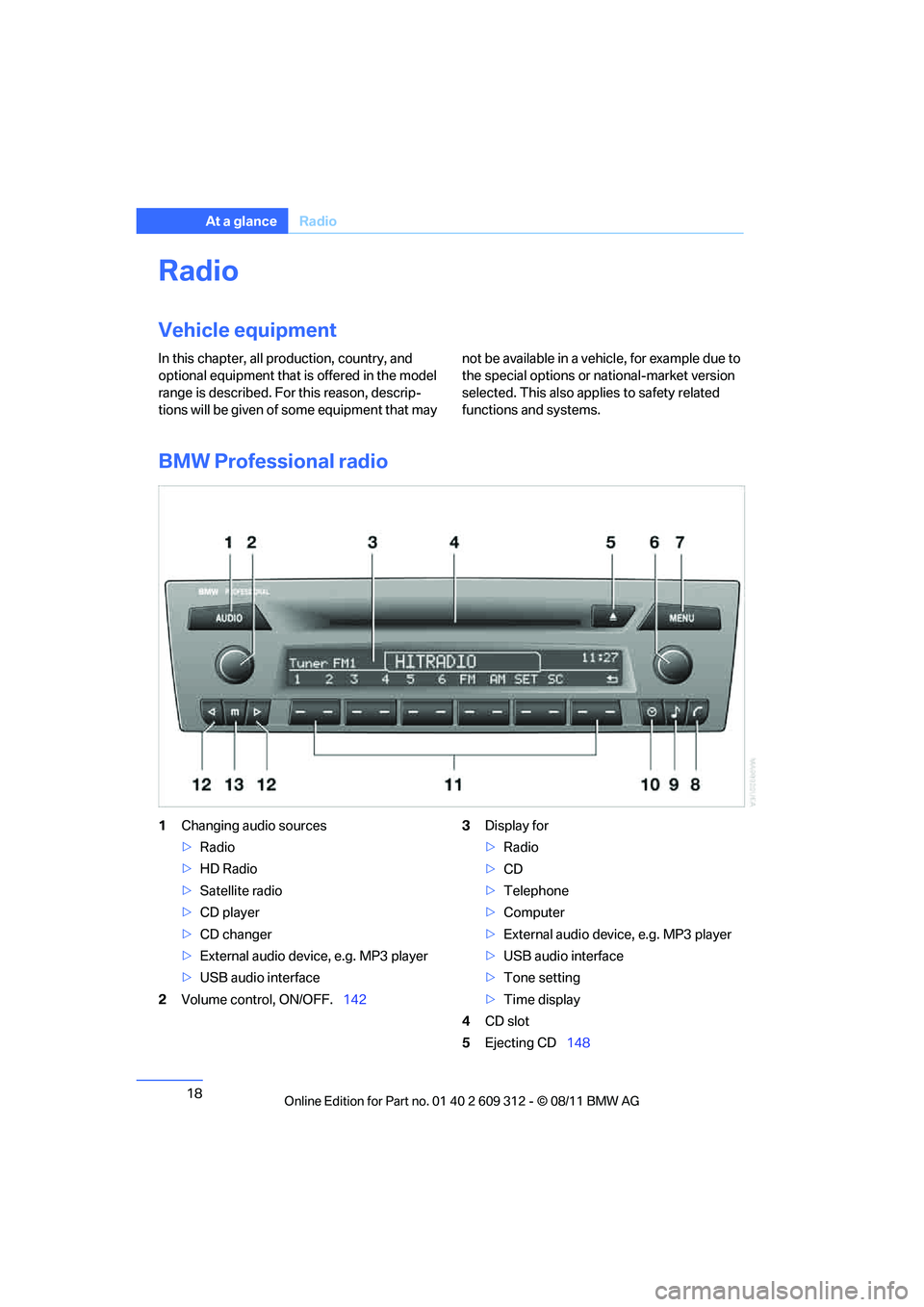
BMW Professional radio
1 Changing audio sources
>Radio
> HD Radio
> Satellite radio
> CD player
> CD changer
> External audio device, e.g. MP3 player
> USB audio interface
2 Volume control, ON/OFF. 1423
Display for
>Radio
> CD
> Telephone
> Computer
> External audio device, e.g. MP3 player
> USB audio interface
> Tone setting
> Time display
4 CD slot
5 Ejecting CD 148
Online Edition for Part no. 01 40 2 609 312 - \251 08/11 BMW AG
Page 20 of 255
19
Radio
At a glance
6
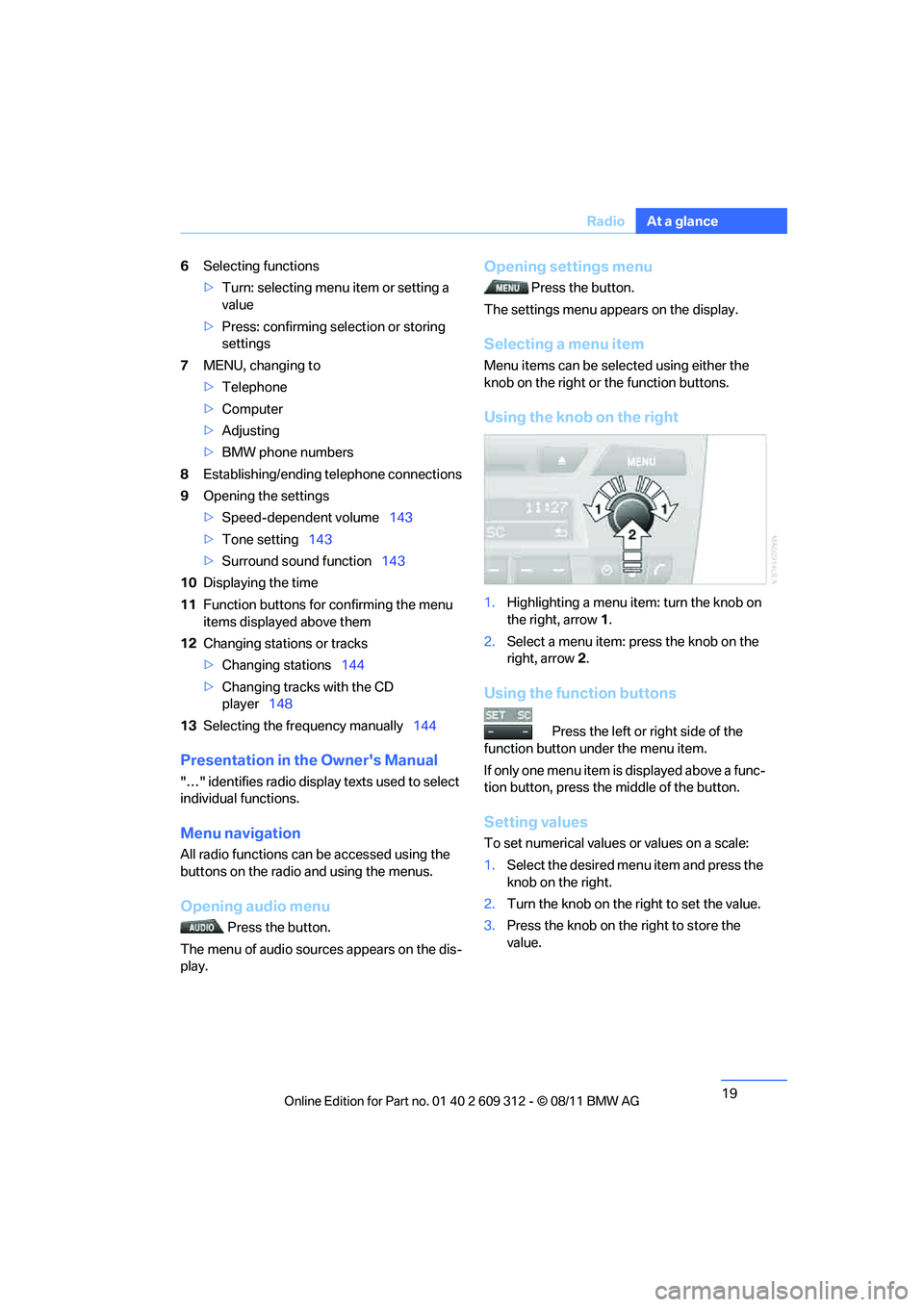
Selecting functions
>Turn: selecting menu item or setting a
value
> Press: confirming selection or storing
settings
7 MENU, changing to
>Telephone
> Computer
> Adjusting
> BMW phone numbers
8 Establishing/ending telephone connections
9 Opening the settings
>Speed-dependent volume 143
> Tone setting 143
> Surround sound function 143
10 Displaying the time
11 Function buttons for confirming the menu
items displayed above them
12 Changing stations or tracks
>Changing stations 144
> Changing tracks with the CD
player 148
13 Selecting the frequency manually 144
Presentation in the Owner's Manual
"…" identifies radio display texts used to select
individual functions.
Menu navigation
All radio functions can be accessed using the
buttons on the radio and using the menus.
Opening audio menu
Press the button.
The menu of audio sources appears on the dis-
play.
Opening settings menu
Press the button.
The settings menu appears on the display.
Selecting a menu item
Menu items can be sele cted using either the
knob on the right or the function buttons.
Using the knob on the right
1. Highlighting a menu item: turn the knob on
the right, arrow 1.
2. Select a menu item: press the knob on the
right, arrow 2.
Using the function buttons
Press the left or right side of the
function button under the menu item.
If only one menu item is displayed above a func-
tion button, press the middle of the button.
Setting values
To set numerical values or values on a scale:
1. Select the desired menu item and press the
knob on the right.
2. Turn the knob on the right to set the value.
3. Press the knob on th e right to store the
value.
Online Edition for Part no. 01 40 2 609 312 - \251 08/11 BMW AG
Page 36 of 255
35
Opening and closing
Controls
Switching off the engine in cars with
automatic transmission
The engine can only be switched off when the
selector lever is in po
sition P, refer to page 59.
To switch the engine off when the selector lever
is in position N, the remote control must be in
the ignition lock.
Malfunction
Local radio waves can in terfere with the func-
tion of Comfort Access, for example when a
mobile phone is in the immediate vicinity of the
remote control or by when a mobile phone is
being charged in the vehicle.
If this happens, open or close the vehicle via the
buttons on the remote co ntrol or using the inte-
grated key. To start the engine afterward, insert
the remote control into the ignition lock.
Warning lamps
The warning lamp in the instrument
cluster lights up when you attempt to
start the engine: the engine cannot
be started. The remote co ntrol is not inside the
vehicle or is malfunctioning.
Take the remote contro l with you inside the
vehicle or have it checke d. If necessary, insert
another remote control in to the ignition lock.
The warning lamp in the instrument
cluster lights up wh ile the engine is
running: the remote control is no
longer inside the vehicle. After the engine is
switched off, the engine can only be restarted
within approx. 10 seconds.
The indicator lamp in the instrument
cluster lights up: re place the battery
in the remote control.
Replacing the battery
The remote control for Comfort Access con-
tains a battery that will need to be replaced from
time to time.
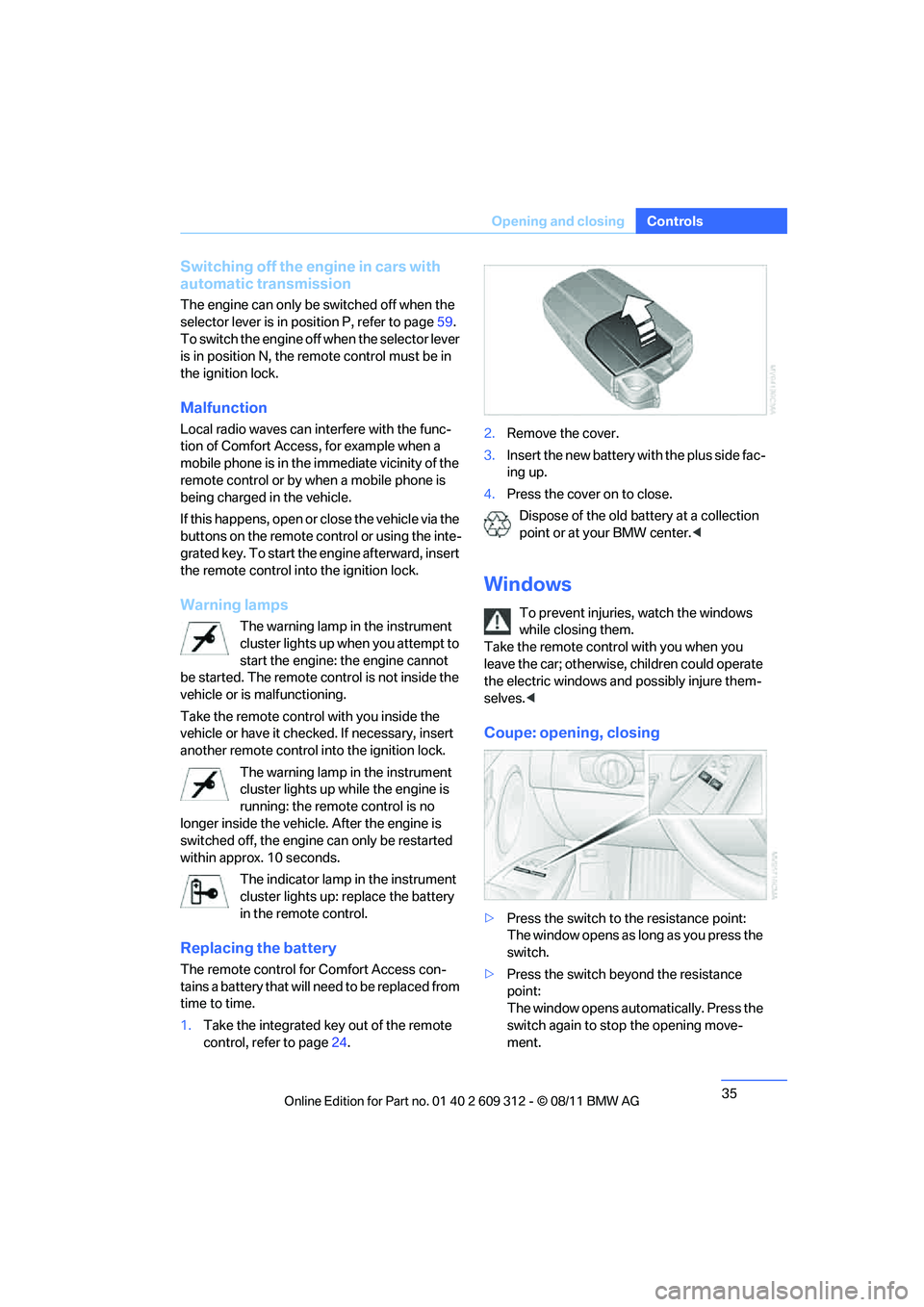
1. Take the integrated ke y out of the remote
control, refer to page 24. 2.
Remove the cover.
3. Insert the new battery wi th the plus side fac-
ing up.
4. Press the cover on to close.
Dispose of the old battery at a collection
point or at your BMW center. <
Windows
To prevent injuries, watch the windows
while closing them.
Take the remote contro l with you when you
leave the car; otherwise, children could operate
the electric windows and possibly injure them-
selves. <
Coupe: opening, closing
>Press the switch to the resistance point:
The window opens as long as you press the
switch.
> Press the switch beyond the resistance
point:
The window opens automatically. Press the
switch again to stop the opening move-
ment.
Online Edition for Part no. 01 40 2 609 312 - \251 08/11 BMW AG
Page 100 of 255
99
Technology for driving comfort and safety
Controls
Airbags
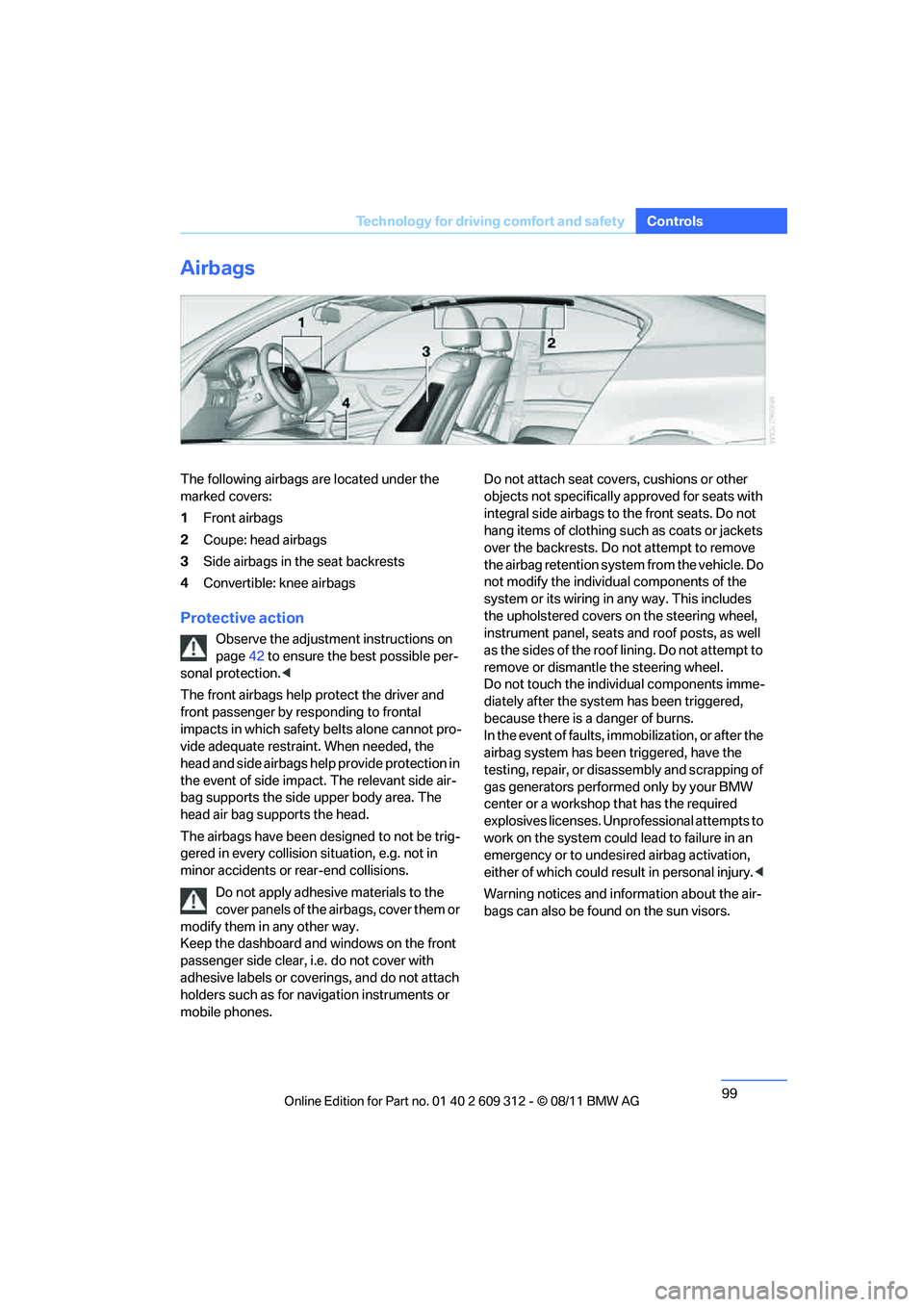
The following airbags are located under the
marked covers:
1
Front airbags
2 Coupe: head airbags
3 Side airbags in the seat backrests
4 Convertible: knee airbags
Protective action
Observe the adjustment instructions on
page 42 to ensure the best possible per-
sonal protection. <
The front airbags help protect the driver and
front passenger by responding to frontal
impacts in which safety belts alone cannot pro-
vide adequate restrain t. When needed, the
head and side airbags help provide protection in
the event of side impact. The relevant side air-
bag supports the side upper body area. The
head air bag supports the head.
The airbags have been designed to not be trig-
gered in every collision si tuation, e.g. not in
minor accidents or rear-end collisions.
Do not apply adhesive materials to the
cover panels of the airbags, cover them or
modify them in any other way.
Keep the dashboard and windows on the front
passenger side clear, i. e. do not cover with
adhesive labels or coveri ngs, and do not attach
holders such as for navi gation instruments or
mobile phones. Do not attach seat cove
rs, cushions or other
objects not specifically approved for seats with
integral side airbags to the front seats. Do not
hang items of clothing such as coats or jackets
over the backrests. Do not attempt to remove
the airbag retention system from the vehicle. Do
not modify the individu al components of the
system or its wiring in any way. This includes
the upholstered covers on the steering wheel,
instrument panel, seats and roof posts, as well
as the sides of the roof lining. Do not attempt to
remove or dismantle the steering wheel.
Do not touch the individual components imme-
diately after the system has been triggered,
because there is a danger of burns.
In the event of faults, immobilization, or after the
airbag system has been triggered, have the
testing, repair, or disassembly and scrapping of
gas generators performe d only by your BMW
center or a workshop that has the required
explosives licenses. Unprofessional attempts to
work on the system could lead to failure in an
emergency or to undesired airbag activation,
either of which could resu lt in personal injury.<
Warning notices and information about the air-
bags can also be found on the sun visors.
Online Edition for Part no. 01 40 2 609 312 - \251 08/11 BMW AG
Page 135 of 255
134
Driving tipsThings to remember when driving
Hot exhaust system
In all vehicles, extremely high tempera-
tures are generated in the exhaust sys-
tem. Do not remove the heat shields installed
adjacent to various sect ions of the exhaust sys-
tem, and never apply un dercoating to them.
When driving, standing at idle and while park-
ing, take care to avoid possible contact
between the hot exhaust system and any highly
flammable materials such as hay, leaves, grass,
etc. Such contact could le ad to a fire, with the
risk of serious personal injuries and property
damage. Do not touch hot exhaust tail pipes.
Otherwise, there is a risk of burns. <
Mobile phones in the vehicle
It is not advisable to use wireless devices
such as mobile phones inside the vehicle
without a direct connection to an external aerial.
Otherwise, it is not poss ible to exclude the pos-
sibility of a reciprocal interference occurring
between the vehicle electronics and the wire-
less device. Otherwise, there is no assurance
that the radiation genera ted by the radio trans-
mission will be conveyed out of the passenger
compartment. <
Hydroplaning
When driving on wet or slushy roads,
reduce road speed. If you do not, a wedge
of water can form between tires and road sur-
face. This situation, known as hydroplaning,
means that the tire can completely lose contact
with the road surface, so that neither the car can
be steered nor the brak e be properly applied.<
The risk of hydroplaning increases with declin-
ing tread depth on the tires, refer also to Mini-
mum tread depth on page 194.
Driving through water
Drive through water on the road only if it is
not deeper than 1 ft/30 cm, and then only
at walking speed at the most. Otherwise, the
vehicle's engine, the electrical systems and the
transmission may be damaged. <
Use the parking brake on inclines
On inclines, do not hold the vehicle for a
lengthy period using the clutch; use the
parking brake instead. Otherwise, greater
clutch wear will result. <
For more information about the drive-off assis-
tant, refer to page 93.
Braking safely
Your BMW is equipped with ABS as a standard
feature. Applying the brakes fully is the most
effective way of braking in situations in which
this is necessary. Sinc e the vehicle maintains
steering responsiveness, you can still avoid
possible obstacles with a minimum of steering
effort.
Pulsation of the brake pedal, combined with
sounds from the hydraulic circuits, indicate that
ABS is in its active mode.
Objects in the movement range of the
pedals
Keep floor mats, carpet, and other objects
out of the movement range of the pedals;
otherwise, they may inhi bit the function of the
pedals during driving.
Do not place additional floor mats onto an exist-
ing one or onto other objects.
Only use floor mats that have been approved for
the vehicle and can be appropriately fastened.
Make sure that the floo r mats are securely fas-
tened again after they ha ve been removed, e.g.
for cleaning. <
Driving in wet conditions
When roads are wet or there is heavy rain,
briefly exert gentle pre ssure on the brake pedal
every few miles. Monitor traffic conditions to
ensure that this maneuver does not endanger
other road users. The heat generated in this
process helps dry the pads and rotors to ensure
that full braking efficiency will then be available
when you need it.
Online Edition for Part no. 01 40 2 609 312 - \251 08/11 BMW AG