brake light BMW M4 2016 Owner's Manual
[x] Cancel search | Manufacturer: BMW, Model Year: 2016, Model line: M4, Model: BMW M4 2016Pages: 228, PDF Size: 4.88 MB
Page 125 of 228
WARNING
When driving with a roof load, for exam‐
ple with a roof rack, the higher centre of gravity
can mean that driving safety is no longer guar‐
anteed in critical driving situations. Danger of
accident or damage to property. Do not deacti‐
vate Dynamic Stability Control DSC when driv‐
ing with a roof load.◀
Overview
Button in the vehicle
DSC OFF button
Indicator and warning lights If indicator light is flashing: DSC is reg‐ulating the acceleration and braking
forces.
If indicator light is illuminated: DSC has failed.
Deactivating DSC: DSC OFF
General Driving stability during acceleration and cor‐
nering is restricted if DSC is deactivated.
To support the driving stability, re-activate
DSC as soon as possible.
Deactivating DSC Press and hold down the button – but for
no longer than approximately 10 seconds
– until the DSC OFF indicator light in the in‐
strument cluster is illuminated and DSC OFF is
displayed.
The DSC system is switched off.
Activating DSC Press the button.
The DSC OFF and DSC OFF indicator
lights are not illuminated.
Indicator and warning lights DSC OFF is displayed in the instrument cluster
when DSC is deactivated.
If indicator light is illuminated: DSC is
deactivated.
M Dynamic Mode
M Dynamic Mode allows driving with higher
longitudinal and transverse acceleration on dry
carriageways, but with restricted drive stability.
Only in the absolute limit of the range does the
system engage for stability purposes by re‐
ducing the engine power and by brakes ap‐
plied to the wheels. In this driving situation, ad‐
ditional steering corrections may be required.
WARNING
With activated M Dynamic Mode stabilis‐
ing engagements are only carried out to a re‐
duced degree. Danger of accident or damage
to property. Adapt to the traffic conditions. Ob‐
serve the traffic situation and intervene actively
if the situation warrants it. Do not move the
steering wheel with unnecessary force in case
of warnings.◀
To support the driving stability, re-activate
DSC as soon as possible.
Activating MDM Press the button briefly.
In the instrument cluster, the indicator
lights MDM and DSC OFF illuminate.Seite 125Driving stability control systemsControls125
Online Edition for Part no. 01 40 2 964 013 - VI/15
Page 127 of 228
Setting is immediately accepted with ac‐
tive M Drive.
To activate the desired M Drive with the selec‐
ted settings, press the corresponding button
on the steering wheel:
▷▷
Using the button
Press button until the desired program is
displayed in the instrument cluster.
Display in the instrument cluster Adaptive M chassis with selected pro‐
gram and activated display of driving
dynamics system statuses, see
page 86.
Drive-off assistant The system provides support when driving off
on upward inclines. It is not necessary to use
the parking brake for this.
1.Hold the vehicle in place by pressing the
foot brake.2.Release the foot brake and drive off with‐
out delay.
The vehicle is held for approximately 2 sec‐
onds after the foot brake has been released.
Depending on the vehicle's load or when tow‐
ing a trailer, the vehicle may roll backwards a
little.
Servotronic
Principle The Servotronic varies the steering force re‐
quired when steering, depending on the
speed. At low speeds the steering force is
heavily supported, in other words a slight force
is needed when steering With increasing
speed the support for the steering force is re‐
duced.
In addition, steering force is adapted according
to drive program, giving a sporty/direct or com‐
fortable steering response.
Programs Adjustment possibilities of the steering force:▷"Comfort": low.▷"Sport": medium.▷"Sport Plus": high.
Selecting program
Via M Drive On the Control Display:
1."Settings"2."M Drive 1" or "M Drive 2"3. Select the symbol.4.Select the desired channel.
Setting is immediately accepted with ac‐
tive M Drive.
To activate the desired M Drive with the selec‐
ted settings, press the corresponding button
on the steering wheel:
▷▷Seite 127Driving stability control systemsControls127
Online Edition for Part no. 01 40 2 964 013 - VI/15
Page 130 of 228
▷When interrupted: press once.
The indicators turn off. The saved desired
speed is deleted.
Interrupting When the system is activated, press
the button on the steering wheel.
The system interrupts automatically in the
following situations:
▷If the brake is applied.▷If the clutch is depressed for a few seconds
or released with no gear engaged.▷If too high a gear has been engaged for the
speed.▷If MDM is activated or DSC is deactivated.▷If DSC intervenes.
Maintaining, saving, changing speed
Notes WARNING
The desired speed can be inadvertently
set incorrectly or called up. Danger of acci‐
dents. Adapt the desired speed to the driving
conditions. Observe the traffic situation and in‐
tervene actively if the situation warrants it.◀
Maintaining speed, saving
During the interruption, press the rocker
switch.
With the system switched on, the driven speed
is maintained and saved as the desired speed.
This is shown in the speedometer and briefly in
the instrument cluster, see page 130.
If necessary, Dynamic Stability Control DSC
will be switched on.
Changing speed
Press the rocker switch repeatedly upwards or
downwards until the desired speed is set.
With the system active, the speed that is then
shown is set and will be achieved on a clear
road.▷Each time the rocker switch is pressed
lightly up to the resistance point, the de‐
sired speed is increased or decreased by
approximately 1 km/h, 1 mph.▷Each time the rocker switch is pressed be‐
yond the resistance point, the desired
speed is increased or decreased to the
next multiple of 10 km/h on the speedome‐
ter display.
The maximum speed which can be set de‐
pends on the vehicle.▷Pressing the rocker switch until the resist‐
ance point is reached and holding acceler‐
ates or decelerates the vehicle without
pressing the accelerator pedal.
The speed is maintained after letting go of
the rocker switch. Pressing beyond the re‐
sistance point results in greater vehicle ac‐
celeration.
Call up desired speed
Press the button on the steering
wheel.
The saved speed is regained and maintained.
Displays in the instrument cluster
Indicator light Depending on the equipment the indi‐
cator light in the instrument cluster
Seite 130ControlsDriving comfort130
Online Edition for Part no. 01 40 2 964 013 - VI/15
Page 160 of 228
BMW M4 TechnologyVehicle equipment
This chapter describes all standard, national
and special equipment provided in the model
series. Equipment not available in the vehicle is
therefore also described, for example the se‐
lected special equipment or national version.
This also applies to safety-relevant functions
and systems. Comply with the relevant na‐
tional regulations when using the correspond‐
ing functions and systems.
High performance engine The high performance engine generates a
maximum power of 317 kW and a maximum
torque of 550 Nm from 3 litres of capacity.
With its spontaneous responsiveness, a very
broad usable engine speed range is produced.
The maximum engine speed is electronically regulated at 7,600 rpm. Due to the powerful
engine dynamics, the maximum engine speed
is limited when the vehicle is stationary.
Driving hot During the engine warm-up phase, the high
performance engine runs slightly more roughly
due to the emission control.
When the engine is cold, the exhaust has a
slightly metallic undertone, depending on the
system.
Other information for hot driving: engine speed
counter, see page 84, and engine oil tempera‐
ture, see page 84.
M compound brakes The high performance brake system has venti‐
lated compound brake discs.
Depending on design requirements, function
noises may occur when braking. However, thishas no effect on the performance, operational
safety and stability of the brakes.
Braking correctly
To keep the brake system in optimum condi‐
tion, it is desirable to load them at regular inter‐
vals depending on the nature of the vehicle.
M Carbon ceramic brakes
The high performance braking system has per‐
forated carbon ceramic brake disks and is de‐
signed for racetrack operation.
Depending on the material-specific properties, there can be increased functional noises when
braking, particularly when it is wet, shortly be‐
fore the vehicle comes to a stop. This has no
effect on performance, operational safety and
endurance of the brakes.
Due to the effect of wet and salt spray, for ex‐
ample, after using a car wash, condensation
overnight etc., the braking effect may corre‐
spond to a conventional braking system. This
can be detected as reduced braking effect and
compensated for by higher pedal pressure, as
needed.
Clean brake discs and brake calliper before
washing in an automatic car wash with a steam
sprayer or high pressure cleaner to avoid en‐
crustations and caking, for example, due to salt
crystals with a related stationary period. The cleaning effect of automatic car washes gener‐
ally not sufficient for this in the wheel area.
Also follow the information on this under vehi‐
cle washing, see page 208, and safe braking,
see page 163.Seite 160Driving hintsBMW M4 Technology160
Online Edition for Part no. 01 40 2 964 013 - VI/15
Page 164 of 228
Applying the brakes fully is the most effective
way of braking in situations in which this is
necessary.
The vehicle can be steered. Any obstacles can
be avoided with steering wheel movements
that are as calm as possible.
A pulsing of the brake pedal shows that ABS is
regulating.
In certain braking situations, the perforated
brake disks can cause functional noise. How‐
ever, this has no effect on the efficiency and
operational safety of the brakes.
Objects in the range of movement of
the pedals and in the footwell
WARNING
Objects in the driver's footwell can re‐
strict the pedal travel, or block a pedal that has
been pressed. Danger of accidents. Stow
items in the vehicle so that they are secure and
cannot get into the driver's footwell. Only use
floor mats that have been categorised as ap‐
propriate for the vehicle and that can be fas‐
tened accordingly. Do not use any loose floor
mats, and do not place several floor mats on
top of one another. Make sure that there is suf‐
ficient space for the pedals. Ensure that the
floor mats are securely reattached after having
been removed, for example for cleaning.◀
Wet roads
In damp weather, if road grit has been spread
or there is heavy rain, apply the brakes lightly
every few kilometres/miles.
In doing so, do not obstruct other road users.
The resulting heat dries the brake discs and
pads.
The braking force will be available immediately
if needed.Downhill gradients
WARNING
Even slight, continuous pressure on the
brake pedal can cause overheating, brake pad
wear or even brake system failure. Danger of
accidents. Avoid excessive loads on the
brake.◀
WARNING
When idling or with the engine switched
off, safety-relevant functions are restricted or
no longer available, for example the braking ef‐
fect of the engine or power assistance for the
braking force and steering. Danger of acci‐
dents. Do not drive at idle speed or with the
engine switched off.◀
When driving on long or steep downhill
stretches, use the gear in which the least brak‐
ing is required. Otherwise the brake system
can overheat and braking action is reduced.
Manual gearbox:
The braking effect can be additionally in‐
creased by shifting down, even into first gear, if
applicable.
M double clutch transmission:
The braking action of the engine can be boos‐
ted further by shifting down in sequential
mode, see page 75.
Corrosion of the brake disc Corrosion of the brake discs and contamina‐
tion of the brake pads increase with the
following circumstances:▷Low mileage.▷Extended periods when the vehicle is not
used.▷Infrequent use of the brakes.
Corrosion occurs when the minimum pressure
that must be exerted by the pads during brake
applications to clean the discs is not reached.
Seite 164Driving hintsDriving precautions164
Online Edition for Part no. 01 40 2 964 013 - VI/15
Page 178 of 228
ted speed for the tyres fitted must be dis‐
played in the driver's field of view. The sticker
is available from a Service Partner or a qualified
specialist workshop.
If winter tyres are fitted, observe and comply
with the respectively permitted maximum
speed.
Interchanging front and rear wheels
The manufacturer of your vehicle advises
against interchanging the front and rear
wheels. This could impair vehicle handling
Such a change is not permitted in vehicles with
different tyre or rim dimensions on the front
and rear axles.
Tyre storage
Store wheels and tyres in a cool, dry and pref‐
erably dark place when not in use.
Protect tyres against contamination from oil,
grease and fuel.
Do not exceed the maximum tyre pressure in‐
dicated on the tyre's side wall.
Remedying flat tyres Safety measures▷Park the vehicle on a solid surface and as
far away from moving traffic as possible.▷Switch on hazard warning lights.▷Protect the vehicle against rolling, by ap‐
plying the parking brake.▷Engage the steering wheel lock in the
straight ahead position of the wheels.▷Allow all vehicle occupants get out of the
vehicle and guide them out of the danger
area, for example behind the crash barrier.▷Set up warning triangle an appropriate dis‐
tance away.Mobility system
Principle With the mobility system, minor tyre damage
can be quickly sealed, to allow you to drive on.
To do that, liquid sealant is pumped into the
tyres which encloses the damage from the in‐ side when it hardens.
The compressor can be used to check the tyre
inflation pressure.
Notes▷Please observe the notes on the applica‐
tion of the Mobility system which are on
the compressor and the sealant container.▷Applying the Mobility system can be inef‐
fective for tyre damage as from a size of
approximately 4 mm.▷Contact a Service Partner or a qualified
specialist workshop if you are unable to put
the tyre back in operation.▷If possible, foreign matter that has penetra‐
ted the tyre should remain inside the tyre.▷Remove the speed limit sticker from the
sealant container and attach to the steer‐
ing wheel.▷Using sealants can damage the TPM wheel
electronics. If sealant is used, check the
electronics as soon as you get an opportu‐
nity and have them replaced if necessary.
DANGER
A blocked exhaust pipe or inadequate
ventilation can allow harmful exhaust fumes to
penetrate the vehicle. The exhaust gas con‐
tains carbon monoxide, which is colourless and
odourless, but highly toxic. In enclosed spaces,
the exhaust fumes can also build up outside
the vehicle. Danger of fatal injury. Keep the ex‐
haust pipe clear and ensure sufficient ventila‐
tion.◀
Storage
Mobility system is located under boot floor.
Seite 178MobilityWheels and tyres178
Online Edition for Part no. 01 40 2 964 013 - VI/15
Page 196 of 228
In the event of a defect, contact the Service
Centre.
Turn indicator in exterior mirror Turn indicators in the exterior mirrors are de‐
signed in the LED technology. Contact a Serv‐
ice Partner or a qualified specialist workshop in
the case of a defect.
Rear lights, replacing the bulbs
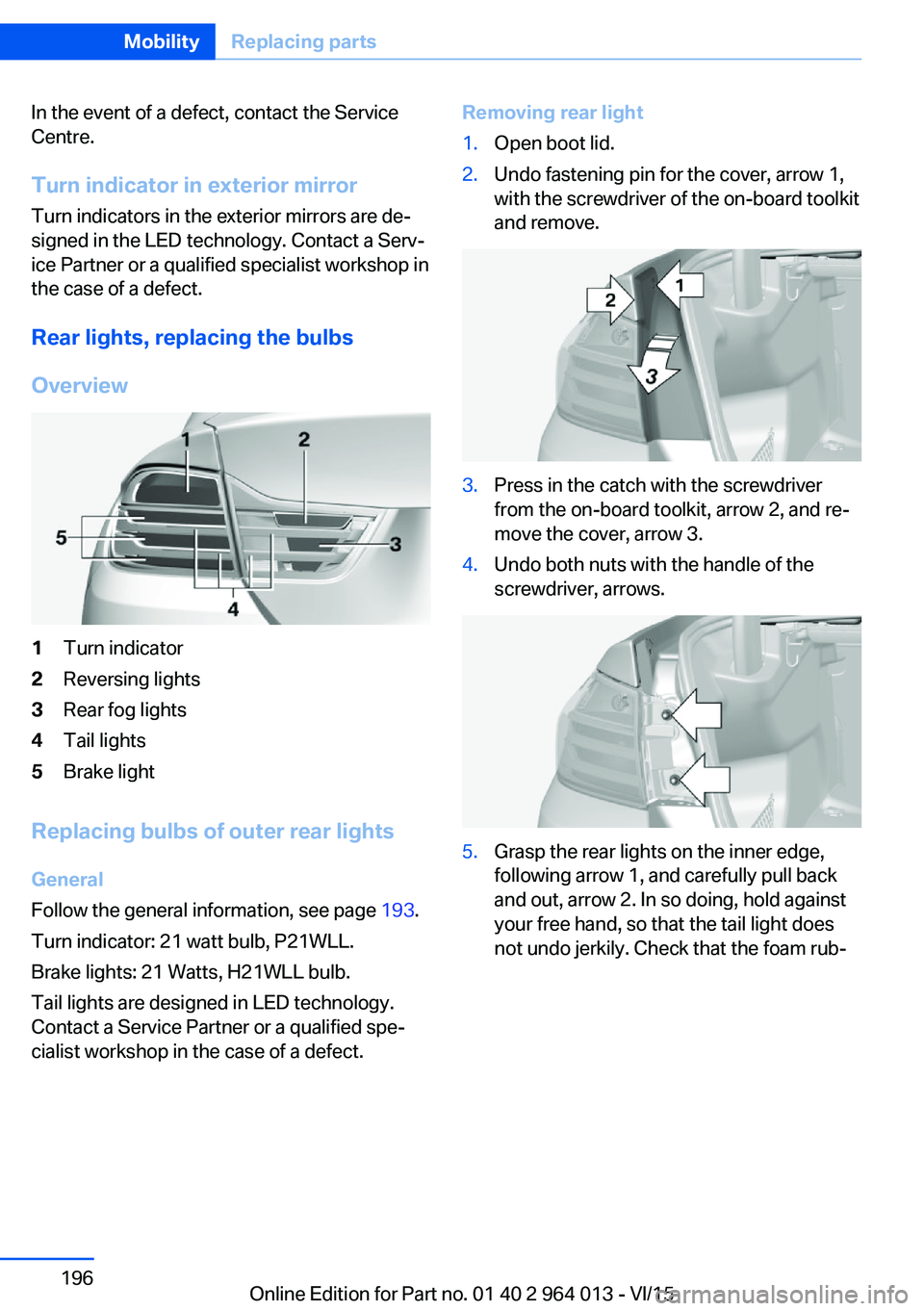
Overview1Turn indicator2Reversing lights3Rear fog lights4Tail lights5Brake light
Replacing bulbs of outer rear lights
General
Follow the general information, see page 193.
Turn indicator: 21 watt bulb, P21WLL.
Brake lights: 21 Watts, H21WLL bulb.
Tail lights are designed in LED technology.
Contact a Service Partner or a qualified spe‐
cialist workshop in the case of a defect.
Removing rear light1.Open boot lid.2.Undo fastening pin for the cover, arrow 1,
with the screwdriver of the on-board toolkit
and remove.3.Press in the catch with the screwdriver
from the on-board toolkit, arrow 2, and re‐
move the cover, arrow 3.4.Undo both nuts with the handle of the
screwdriver, arrows.5.Grasp the rear lights on the inner edge,
following arrow 1, and carefully pull back
and out, arrow 2. In so doing, hold against
your free hand, so that the tail light does
not undo jerkily. Check that the foam rub‐Seite 196MobilityReplacing parts196
Online Edition for Part no. 01 40 2 964 013 - VI/15
Page 199 of 228
5.Install the cable on the handle of the emer‐
gency release and engage the handle into
the fastening.6.Fit the bracket for the warning triangle.7.Attach the warning triangle.
Tail lights, number plate lights and
centre brake light
These lights use LED technology. Contact a
Service Partner or a qualified specialist work‐
shop in the case of a defect.
Changing a wheel
Notes
When using sealants, immediate wheel change
in the event of loss of tyre pressure in case of
puncture is not required.
As a result, no spare wheel is available.
The tools for changing wheels are available as
optional accessories from a Service Partner or
a qualified specialist workshop.
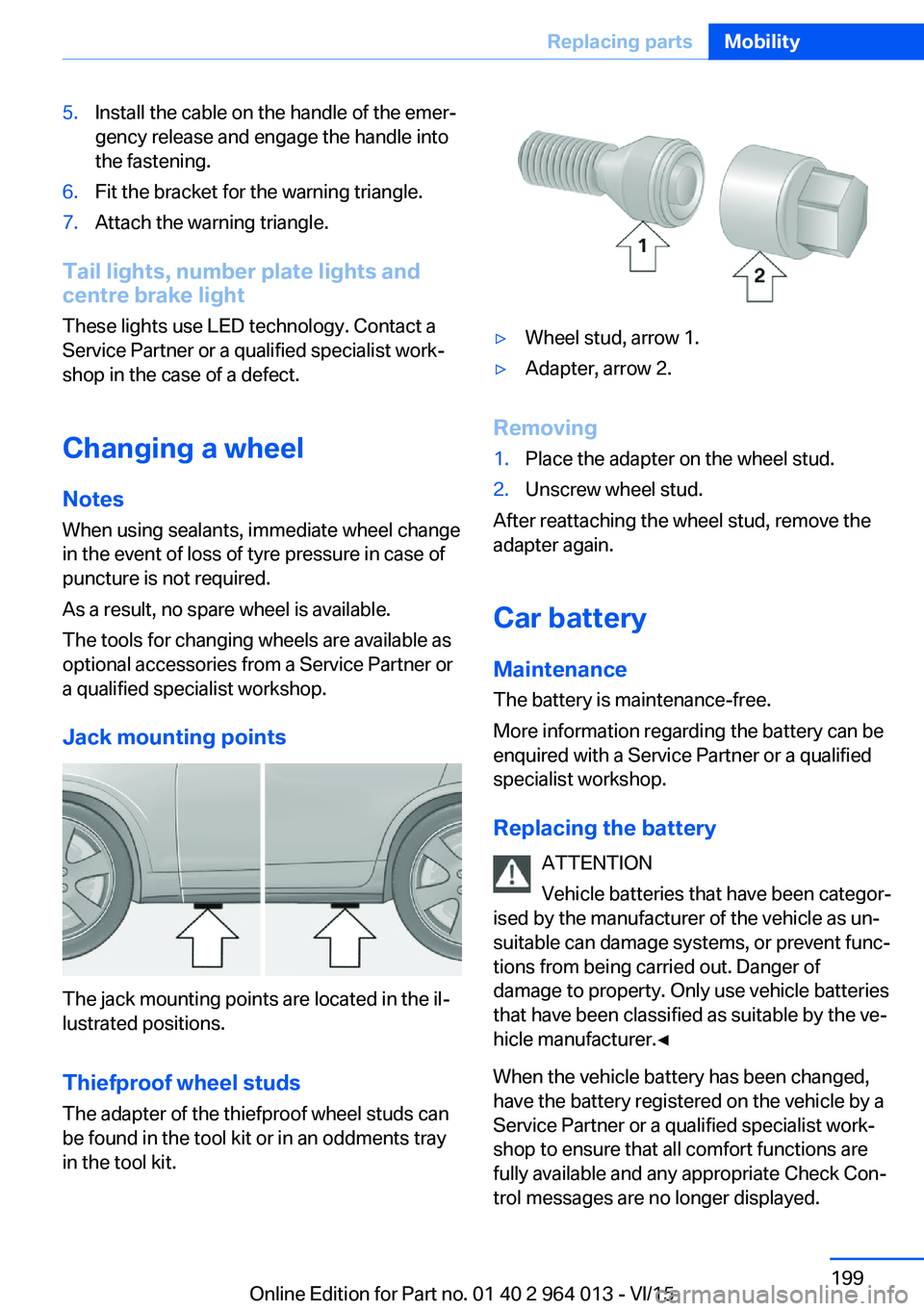
Jack mounting points
The jack mounting points are located in the il‐
lustrated positions.
Thiefproof wheel studs
The adapter of the thiefproof wheel studs can
be found in the tool kit or in an oddments tray
in the tool kit.
▷Wheel stud, arrow 1.▷Adapter, arrow 2.
Removing
1.Place the adapter on the wheel stud.2.Unscrew wheel stud.
After reattaching the wheel stud, remove the
adapter again.
Car battery Maintenance
The battery is maintenance-free.
More information regarding the battery can be
enquired with a Service Partner or a qualified
specialist workshop.
Replacing the battery ATTENTION
Vehicle batteries that have been categor‐
ised by the manufacturer of the vehicle as un‐
suitable can damage systems, or prevent func‐
tions from being carried out. Danger of
damage to property. Only use vehicle batteries
that have been classified as suitable by the ve‐
hicle manufacturer.◀
When the vehicle battery has been changed,
have the battery registered on the vehicle by a
Service Partner or a qualified specialist work‐
shop to ensure that all comfort functions are
fully available and any appropriate Check Con‐
trol messages are no longer displayed.
Seite 199Replacing partsMobility199
Online Edition for Part no. 01 40 2 964 013 - VI/15
Page 205 of 228
Systems, for example approach control warn‐
ing with light braking function. Danger of acci‐
dents. Switch off all Intelligent Safety Systems
before tow-starting/towing.◀
Manual gearboxGearshift lever in idle position.
Being towed Observe the following information:▷Make sure that the ignition is switched on,
otherwise low-beam headlights, rear lights,
turn indicators and wipers would not be
available.▷Do not tow the vehicle with the rear axle
raised, otherwise the steering can turn.▷When the engine is not running, there is no
power assistance and the brake servo is
out of action. The steering and brakes will
require extra effort to operate.▷Greater steering wheel movements are
necessary.▷The towing vehicle must not be lighter
than the towed vehicle, otherwise it may be
unable to keep the towed vehicle reliably
under control.▷Do not exceed a towing speed of on
50 km/h, 30 mph.▷Do not exceed a towing distance of 50 km,
30 miles.Towing truck
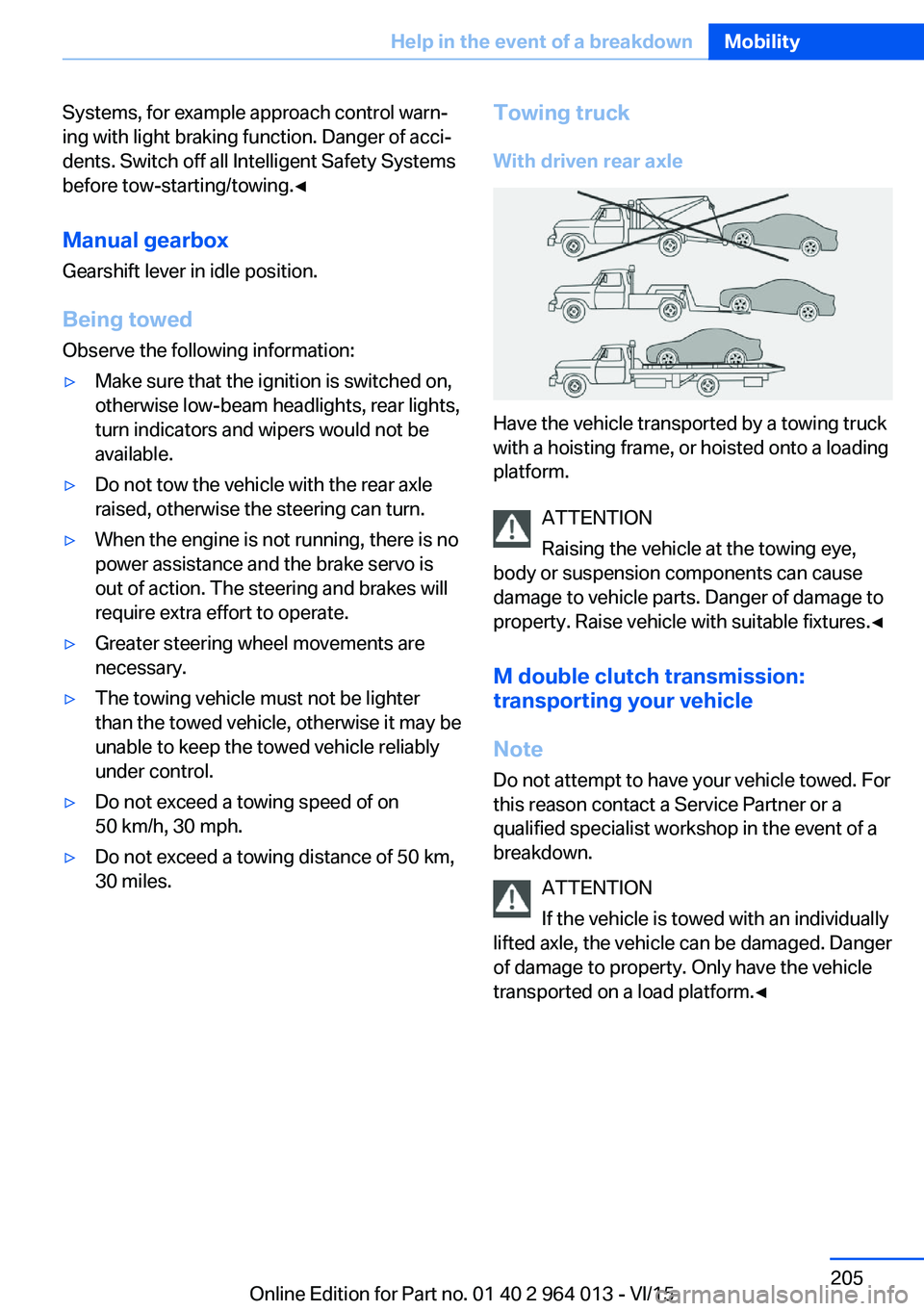
With driven rear axle
Have the vehicle transported by a towing truck
with a hoisting frame, or hoisted onto a loading
platform.
ATTENTION
Raising the vehicle at the towing eye,
body or suspension components can cause
damage to vehicle parts. Danger of damage to
property. Raise vehicle with suitable fixtures.◀
M double clutch transmission:
transporting your vehicle
Note
Do not attempt to have your vehicle towed. For
this reason contact a Service Partner or a
qualified specialist workshop in the event of a
breakdown.
ATTENTION
If the vehicle is towed with an individually
lifted axle, the vehicle can be damaged. Danger
of damage to property. Only have the vehicle
transported on a load platform.◀
Seite 205Help in the event of a breakdownMobility205
Online Edition for Part no. 01 40 2 964 013 - VI/15
Page 209 of 228
Manual gearbox:1.Drive into the car wash.2.Engage idle position.3.Stop the engine.4.Switch on ignition.
M double clutch transmission:
1.Drive into the car wash.2.Engage selector lever position N.3.Stop the engine.
In this way the ignition remains switched
on and a Check Control message is dis‐
played.
It is not possible to lock the vehicle from the
outside in selector lever position N. If an at‐
tempt is made to lock the vehicle, a signal
sounds.
When starting engine with manual gearbox:
1.Press clutch pedal.2.Press the start/stop button.
When starting engine with M double clutch
transmission:
1.Press the brake.2.Press the start/stop button.
Pressing the start/stop button or depressing
the brake switches off the ignition.
Transmission position
Transmission position P is automatically en‐
gaged:
▷With the ignition switched off.▷After approximately 15 minutes.
Headlights
▷Do not rub them when dry or use abrasive
or corrosive cleaning agents.▷Soak impurities such as insects with sham‐
poo and wash off with water.▷Remove ice with a de-icer spray; do not
use an ice scraper.After washing the car
After washing the car, drive it briefly and apply
the brakes to dry them out; this is necessary to
prevent reduced braking action, and also to
avoid corrosion of the brake discs.
Completely remove residues on the wind‐
screens to avoid affecting visibility due to
smearing, and to reduce wiping noise and
wiper blade wear.
Car care Care products The manufacturer of your vehicle recommends
the use of BMW care and cleaning products,
as they are tested by BMW and categorised as
suitable for the use on the vehicle.
WARNING
Cleaning agents can contain hazardous
substances or constitute a health risk. Danger
of injury. When cleaning the interior, open the
doors or windows. Use only products that are
intended for cleaning the vehicle's interior. Ob‐
serve the notes on the pack.◀
Vehicle paintwork Regular care promotes driving safety and pre‐
serves your vehicle's value. Environmental ef‐
fects in areas with higher air pollution or natu‐
ral contaminations, for example tree resin or
leaf dust, may have an effect on the vehicle
paintwork. Base the frequency and extent of
vehicle care on such factors.
Remove corrosive substances, such as run-off
fuel, oil, grease or bird droppings immediately
to avoid changes to the paint or discoloura‐
tions.
Only use suitable cleaning and care products
for matt paintwork. Suitable matt paintwork
care products are available from a Service
Partner or a qualified specialist workshop.Seite 209General careMobility209
Online Edition for Part no. 01 40 2 964 013 - VI/15