clock BMW M5 SEDAN 2007 E60 Owner's Manual
[x] Cancel search | Manufacturer: BMW, Model Year: 2007, Model line: M5 SEDAN, Model: BMW M5 SEDAN 2007 E60Pages: 256, PDF Size: 12.5 MB
Page 31 of 256
Controls
29Reference
At a glance
Driving tips
Communications
Navigation
Entertainment
Mobility
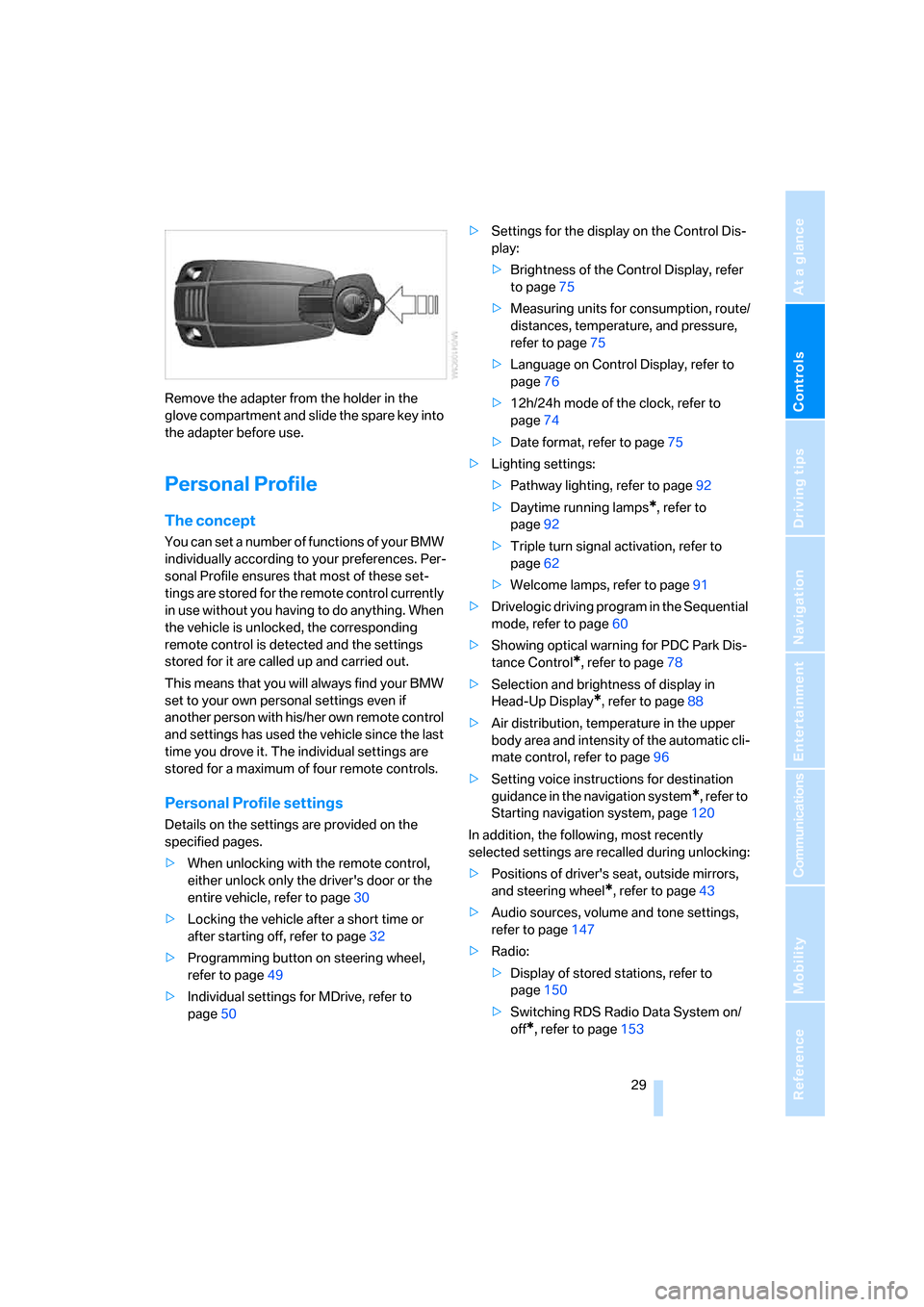
Remove the adapter from the holder in the
glove compartment and slide the spare key into
the adapter before use.
Personal Profile
The concept
You can set a number of functions of your BMW
individually according to your preferences. Per-
sonal Profile ensures that most of these set-
tings are stored for the remote control currently
in use without you having to do anything. When
the vehicle is unlocked, the corresponding
remote control is detected and the settings
stored for it are called up and carried out.
This means that you will always find your BMW
set to your own personal settings even if
another person with his/her own remote control
and settings has used the vehicle since the last
time you drove it. The individual settings are
stored for a maximum of four remote controls.
Personal Profile settings
Details on the settings are provided on the
specified pages.
>When unlocking with the remote control,
either unlock only the driver's door or the
entire vehicle, refer to page30
>Locking the vehicle after a short time or
after starting off, refer to page32
>Programming button on steering wheel,
refer to page49
>Individual settings for MDrive, refer to
page50>Settings for the display on the Control Dis-
play:
>Brightness of the Control Display, refer
to page75
>Measuring units for consumption, route/
distances, temperature, and pressure,
refer to page75
>Language on Control Display, refer to
page76
>12h/24h mode of the clock, refer to
page74
>Date format, refer to page75
>Lighting settings:
>Pathway lighting, refer to page92
>Daytime running lamps
*, refer to
page92
>Triple turn signal activation, refer to
page62
>Welcome lamps, refer to page91
>Drivelogic driving program in the Sequential
mode, refer to page60
>Showing optical warning for PDC Park Dis-
tance Control
*, refer to page78
>Selection and brightness of display in
Head-Up Display
*, refer to page88
>Air distribution, temperature in the upper
body area and intensity of the automatic cli-
mate control, refer to page96
>Setting voice instructions for destination
guidance in the navigation system
*, refer to
Starting navigation system, page120
In addition, the following, most recently
selected settings are recalled during unlocking:
>Positions of driver's seat, outside mirrors,
and steering wheel
*, refer to page43
>Audio sources, volume and tone settings,
refer to page147
>Radio:
>Display of stored stations, refer to
page150
>Switching RDS Radio Data System on/
off
*, refer to page153
ba8_m5us.book Seite 29 Montag, 5. Februar 2007 12:03 12
Page 43 of 256
Controls
41Reference
At a glance
Driving tips
Communications
Navigation
Entertainment
Mobility
Adjusting
Sitting safely
The ideal sitting position can make a vital con-
tribution to relaxed, fatigue-free driving. In the
interaction with the safety belts, the head
restraints and the airbags, the sitting position
plays an important role in an accident. To
ensure that the safety systems operate with
optimal efficiency, we strongly urge you to
observe the instructions contained in the fol-
lowing section.
For additional information on transporting chil-
dren safely, refer to page52.
Airbags
Always maintain an adequate distance
between yourself and the airbags. Always
hold the steering wheel by its rim with hands at
the 9 o'clock and 3 o'clock positions, to mini-
mize the risk of injuries to your hands and arms
in the event of airbag deployment.
No one and nothing is to come between the air-
bags and the seat occupant.
Do not use the cover of the front airbag on the
front passenger side as a storage area. Make
sure that the front passenger is sitting correctly
and does not rest feet or legs on the instrument
panel, otherwise leg injuries can occur if the
front airbags are triggered.
Make sure that occupants do not rest their head
on the side or head airbags, otherwise injuries
can occur if the airbags are triggered.<
Even if you adhere to all the instructions, inju-
ries resulting from contact with airbags cannot
be fully excluded, depending on the circum-
stances. The ignition and inflation noise may
provoke a mild hearing loss in extremely sensi-
tive individuals. This effect is usually only tem-
porary.
For airbag locations and additional information
on airbags, refer to page86.
Head restraints
A correctly adjusted head restraint reduces the
risk of spinal injury in the event of an accident.
Adjust the head restraint so that its center
is approx. at ear level. Otherwise there is
increased danger of injury in the event of an
accident.<
Head restraints, refer to page44.
Safety belts
Before every drive, make sure that safety belts
are being worn at all of the occupied seats. Air-
bags complement the safety belt as an addi-
tional safety device, but they do not represent a
substitute.
Your vehicle is provided with five seats, which
are all equipped with a safety belt.
Never allow more than one person to
wear a single safety belt. Never allow
infants or small children to ride in a passenger's
lap. Make sure that the belt lies low around the
hips in the lap area and does not press on the
abdomen. The safety belt may not lie across the
neck, rub on sharp edges, be routed over solid
or breakable objects or be pinched. Wear the
safety belt without twisting, snugly across the
lap and shoulders, as close to the body as pos-
sible. Otherwise the belt can slip over the hips
in the lap area in a frontal impact and injure the
abdomen. Avoid wearing clothing that prevents
the belt from fitting properly and pull the belt in
the upper body area periodically to readjust the
tension, in order to avoid a reduction in the
restraint of the safety belt.<
Safety belts, refer to page45.
ba8_m5us.book Seite 41 Montag, 5. Februar 2007 12:03 12
Page 67 of 256
Controls
65Reference
At a glance
Driving tips
Communications
Navigation
Entertainment
Mobility
Everything under control
Odometer, outside
temperature display, clock
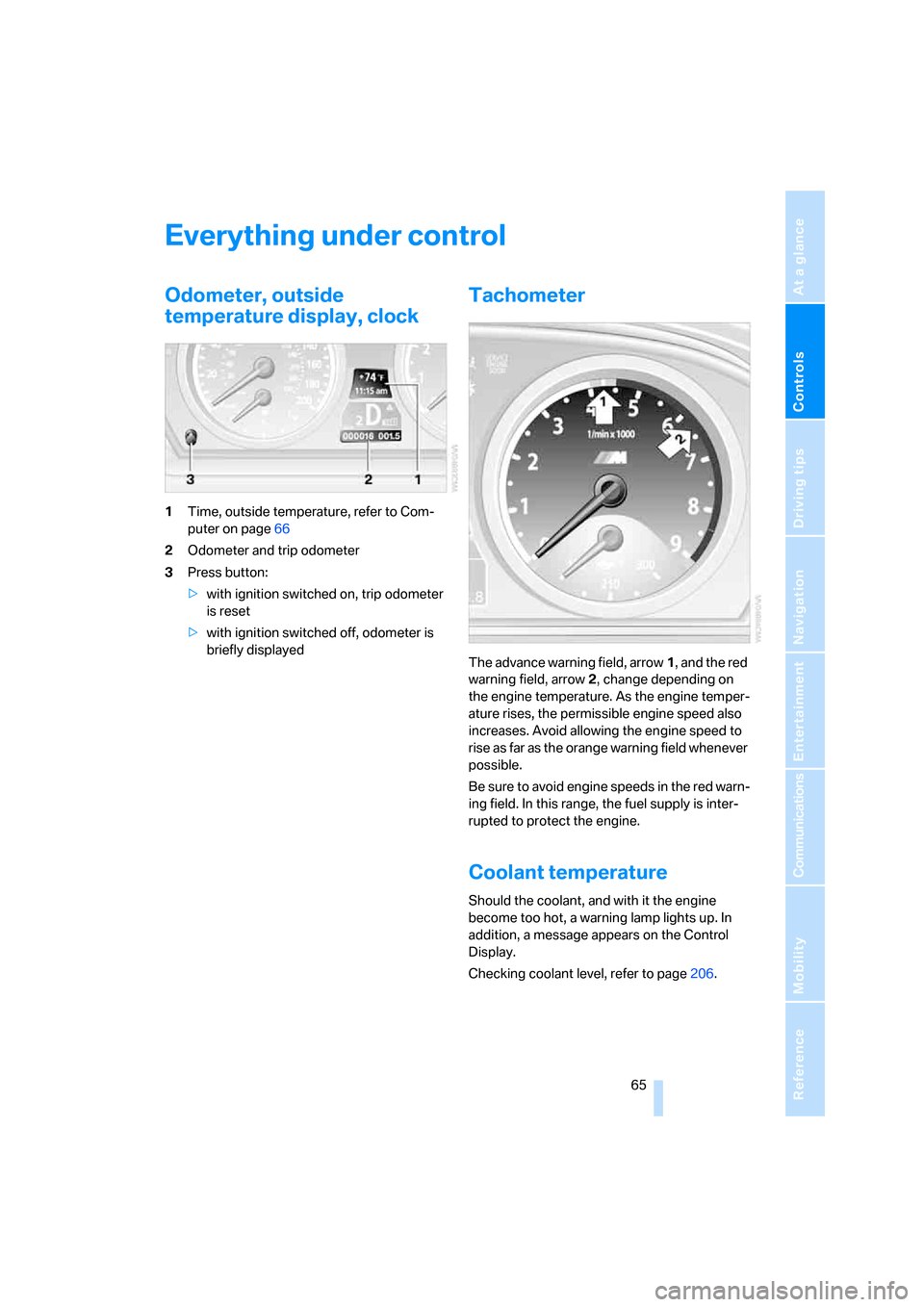
1Time, outside temperature, refer to Com-
puter on page66
2Odometer and trip odometer
3Press button:
>with ignition switched on, trip odometer
is reset
>with ignition switched off, odometer is
briefly displayed
Tachometer
The advance warning field, arrow1, and the red
warning field, arrow2, change depending on
the engine temperature. As the engine temper-
ature rises, the permissible engine speed also
increases. Avoid allowing the engine speed to
rise as far as the orange warning field whenever
possible.
Be sure to avoid engine speeds in the red warn-
ing field. In this range, the fuel supply is inter-
rupted to protect the engine.
Coolant temperature
Should the coolant, and with it the engine
become too hot, a warning lamp lights up. In
addition, a message appears on the Control
Display.
Checking coolant level, refer to page206.
ba8_m5us.book Seite 65 Montag, 5. Februar 2007 12:03 12
Page 198 of 256
Refueling
196
Refueling
Switch off the engine before refueling,
otherwise no fuel can be filled into the
tank and a message is displayed.<
When handling fuel, always observe all
applicable precautionary measures and
regulations. Never transport reserve fuel con-
tainers in the vehicle. These could become
leaky and cause an explosion or a fire in an acci-
dent.<
Fuel filler door
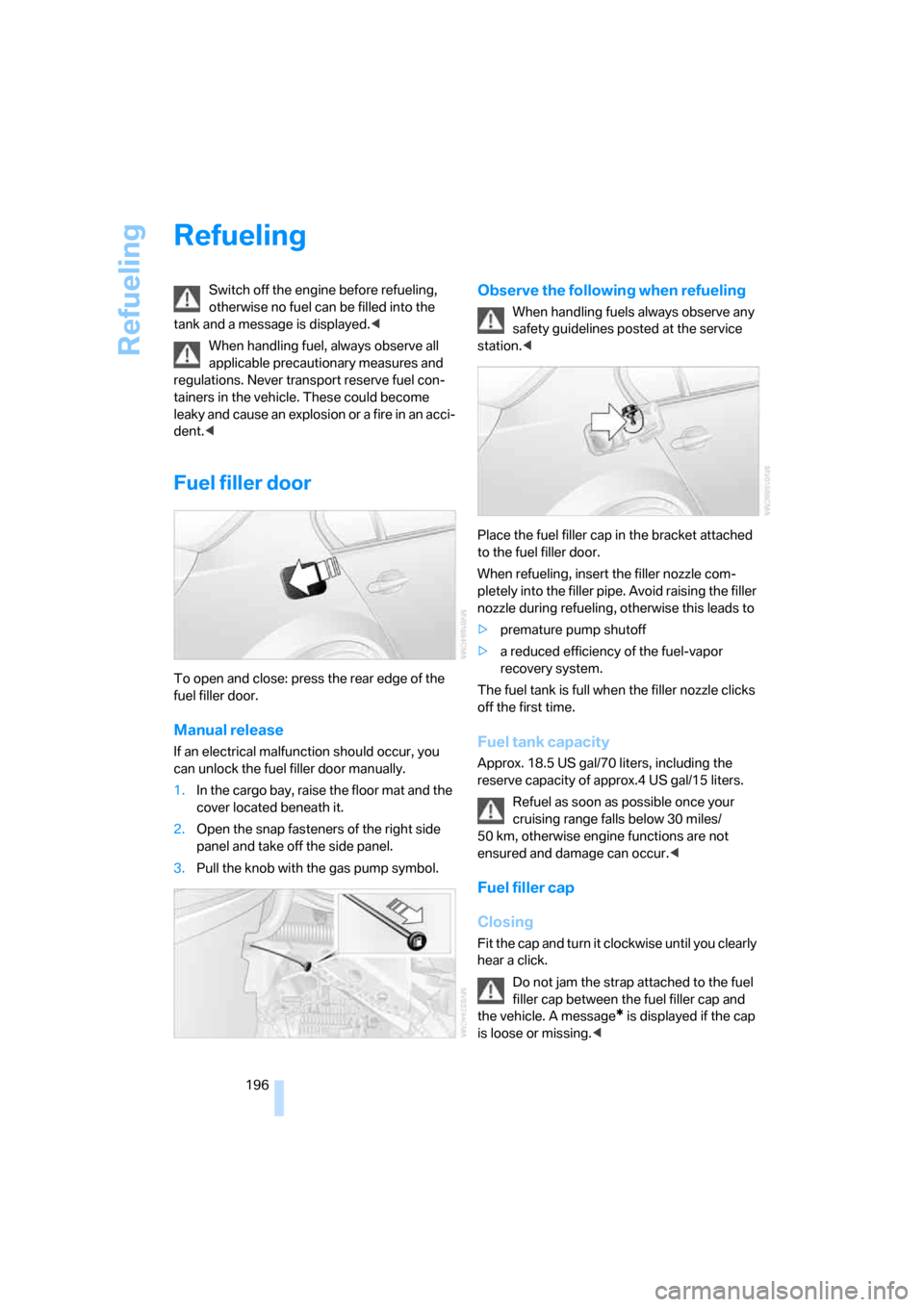
To open and close: press the rear edge of the
fuel filler door.
Manual release
If an electrical malfunction should occur, you
can unlock the fuel filler door manually.
1.In the cargo bay, raise the floor mat and the
cover located beneath it.
2.Open the snap fasteners of the right side
panel and take off the side panel.
3.Pull the knob with the gas pump symbol.
Observe the following when refueling
When handling fuels always observe any
safety guidelines posted at the service
station.<
Place the fuel filler cap in the bracket attached
to the fuel filler door.
When refueling, insert the filler nozzle com-
pletely into the filler pipe. Avoid raising the filler
nozzle during refueling, otherwise this leads to
>premature pump shutoff
>a reduced efficiency of the fuel-vapor
recovery system.
The fuel tank is full when the filler nozzle clicks
off the first time.
Fuel tank capacity
Approx. 18.5 US gal/70 liters, including the
reserve capacity of approx.4 US gal/15 liters.
Refuel as soon as possible once your
cruising range falls below 30 miles/
50 km, otherwise engine functions are not
ensured and damage can occur.<
Fuel filler cap
Closing
Fit the cap and turn it clockwise until you clearly
hear a click.
Do not jam the strap attached to the fuel
filler cap between the fuel filler cap and
the vehicle. A message
* is displayed if the cap
is loose or missing.<
ba8_m5us.book Seite 196 Montag, 5. Februar 2007 12:03 12
Page 207 of 256
Mobility
205Reference
At a glance
Controls
Driving tips
Communications
Navigation
Entertainment
value indicates the current oil level in liters
above Minimum.
After starting the engine, the last determined
value is displayed.
The oil level must be between the two marks.
Manual transmission: the engine oil level
will be shown in the lower display.<
Exact measurement
The oil level is measured continuously while
driving or when stopped with the engine run-
ning.
The determination of a new value can take
30 minutes or longer.
If only dashes are shown in the display,
it was not possible to determine a new
value. This can, for example, be the case when
driving short distances or with a sporty driving
style.<
Fast measurement
In addition to the continuous measurement, you
can also quickly determine the current oil level,
e.g. after adding engine oil, however with a low
measuring accuracy.
1.With the engine at operating temperature,
i.e. after at least 6 miles/10 km of uninter-
rupted driving, park the vehicle in a horizon-
tal position.
2.Allow the engine to run at idle.
3.Press the BC button on the turn signal lever
repeatedly until the oil level display is
shown in the instrument cluster.
4.Press the BC button on the turn signal lever
for at least 2 seconds.
The oil level is determined. A clock symbol
is displayed during the measurement.
5.After approx. 1 minute the current oil level is
displayed.
If not all measuring conditions are met,
e.g. with the engine cold, "-.-" is dis-
played. The requested measurement is carried
out as soon as possible.<
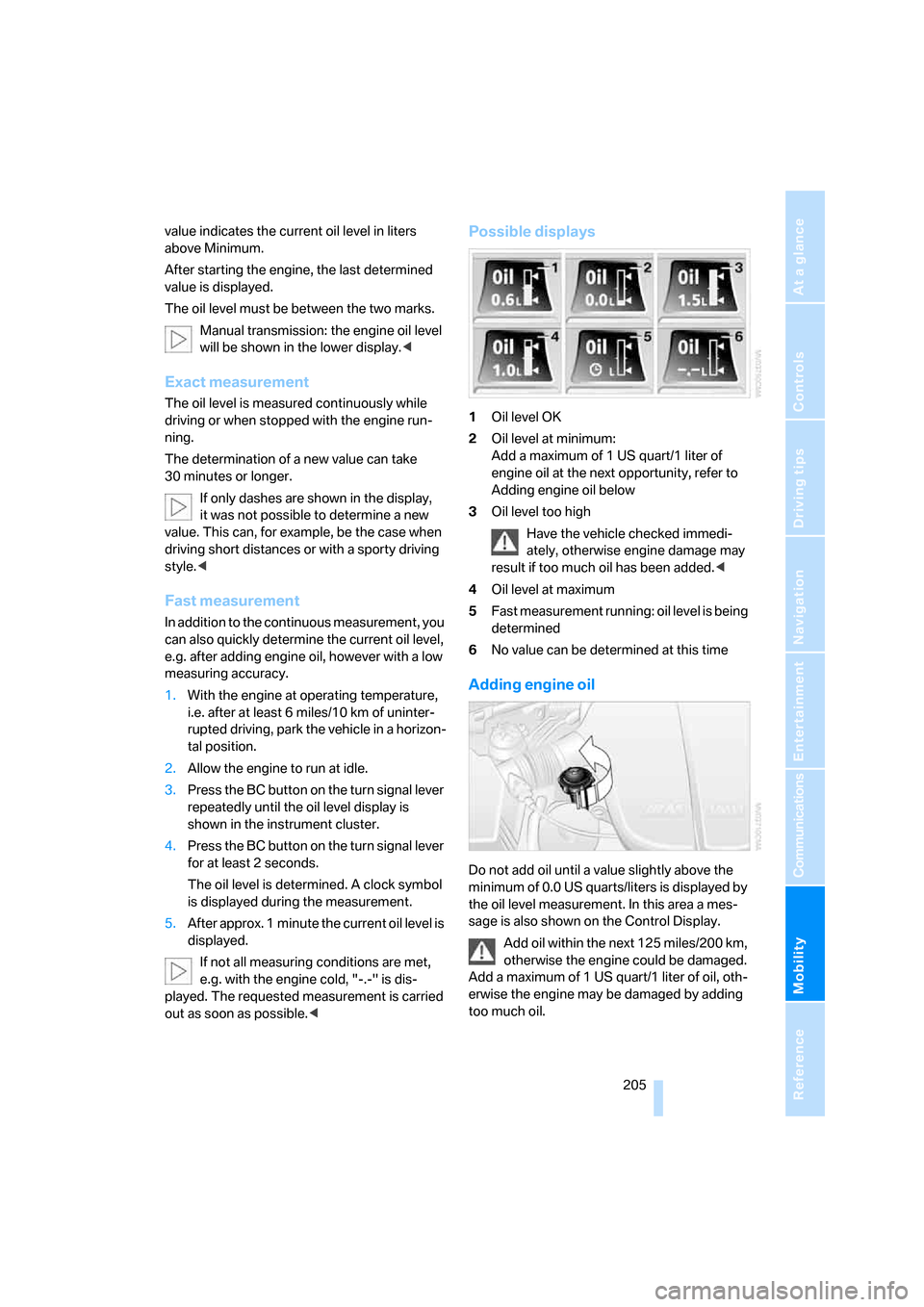
Possible displays
1Oil level OK
2Oil level at minimum:
Add a maximum of 1 US quart/1 liter of
engine oil at the next opportunity, refer to
Adding engine oil below
3Oil level too high
Have the vehicle checked immedi-
ately, otherwise engine damage may
result if too much oil has been added.<
4Oil level at maximum
5Fast measurement running: oil level is being
determined
6No value can be determined at this time
Adding engine oil
Do not add oil until a value slightly above the
minimum of 0.0 US quarts/liters is displayed by
the oil level measurement. In this area a mes-
sage is also shown on the Control Display.
Add oil within the next 125 miles/200 km,
otherwise the engine could be damaged.
Add a maximum of 1 US quart/1 liter of oil, oth-
erwise the engine may be damaged by adding
too much oil.
ba8_m5us.book Seite 205 Montag, 5. Februar 2007 12:03 12
Page 208 of 256
Under the hood
206 Add at least 0.5 US quart/0.5 liter of oil, other-
wise the oil level check cannot reliably display
the current oil level.<
Please conduct a fast measurement after
adding engine oil to check the oil quantity
added and to update the display.<
Continuous exposure to used oil has
caused cancer in laboratory testing.
For this reason, any skin areas that come into
contact with oil should be thoroughly washed
with soap and water.
Keep oil, grease etc. out of reach of children and
observe the warnings on the containers to pre-
vent health risks.<
Oil change
Have oil changed only at your BMW center or
at a workshop that works according to BMW
repair procedures with correspondingly trained
personnel.
Approved engine oils
The quality of the engine oil selected has critical
significance for the operation and service life of
an engine. BMW continuously approves spe-
cific oils after confirming their suitability for use
in its vehicles with extensive testing.
Do not use oil additives, as these may
result in engine damage.<
Your BMW center will be happy to answer
detailed questions on BMW High Perfor-
mance Synthetic Oil or approved synthetic
oils.<
You can also call BMW of North America at
1-800-831-1117 or visit the website at
www.bmwusa.com to obtain this information.
Viscosity grades
Viscosity is a measure of an oil's flow rating and
is specified in SAE grades.
Approved oils belong to the SAE grade
10W-60.<
Alternative oil grades
If BMW High Performance Synthetic Oil is
unavailable, you can add small quantities of
other synthetic oils between oil changes.
Only use oils with the following specifications:
>Viscosity
preferred: SAE 10W-60;
alternative: SAE 10W-40, SAE 5W-50 or
SAE 10W-50
>Specification
API SJ/CF, API SK/CF or higher
Low ambient temperatures
The oils used by BMW from the factory for your
vehicle model can be used at virtually all ambi-
ent temperatures. However, if the vehicle is
operated for a longer period at temperatures
below –47/–206, your BMW center will be
happy to recommend a suitable oil.
Coolant
Do not add coolant to the cooling system
when the engine is hot. Escaping coolant
can cause burns.<
Coolant is comprised of water and coolant addi-
tive. Not all commercially available additives are
suitable for your BMW. Ask your BMW center
for suitable additives.
Only use suitable additives, otherwise
engine damage may result. The additives
present a health hazard; observe the instruc-
tions on the containers.<
Comply with the appropriate environ-
mental protection regulations when dis-
posing of coolant additives.<
Checking coolant level
1.Allow the engine to cool.
2.Turn the cap of the expansion tank counter-
clockwise to allow any accumulated pres-
sure to escape, then continue turning to
open.
ba8_m5us.book Seite 206 Montag, 5. Februar 2007 12:03 12
Page 222 of 256
Giving and receiving assistance
220
First-aid kit*
Some of the articles contained in the first-aid kit
have a limited service life. Therefore, check the
expiration dates of the contents regularly and
replace the contents concerned in good time if
necessary.
The first-aid kit is located in the luggage com-
partment lid.
Loosen the wing nut to open.
Roadside Assistance*
The Roadside Assistance of the BMW Group
offers you assistance in the event of a break-
down around the clock, including on weekends
and public holidays.
The phone numbers of the Roadside Assis-
tance in your home country can be found in the
Contact brochure.
With BMW Assist you can contact the Roadside
Assistance of the BMW Group for assistance in
the event of a breakdown directly via iDrive,
refer to page188.
Jump starting
When your battery is discharged, you can use
two jumper cables to start your BMW with
power from the battery in a second vehicle. You
can also use the same method to help start
another vehicle. Use only jumper cables with
fully-insulated clamp handles.To avoid the risk of potentially fatal injury,
always avoid all contact with electrical
components while the engine is running. Care-
fully adhere to the following sequence, both to
prevent damage to one or both vehicles, and to
guard against possible personal injuries.<
Preparation
1.Check whether the battery of the other
vehicle has a voltage of 12 Volts and
approximately the same capacitance in Ah.
This information can be found on the bat-
tery.
2.Switch off the engine of the assisting vehi-
cle.
3.Switch off any electrical systems and com-
ponents in both vehicles.
There must not be any contact between
the bodies of the two vehicles, otherwise
there is a danger of shorting.<
Connecting jumper cables
To avoid personal injury from sparks, fol-
low this sequence when connecting
jumper cables.<
In your BMW M5, the so-called jump-starting
terminal in the engine compartment serves as a
positive terminal for the battery, also refer to
engine compartment overview on page204.
The cover cap is marked with a +.
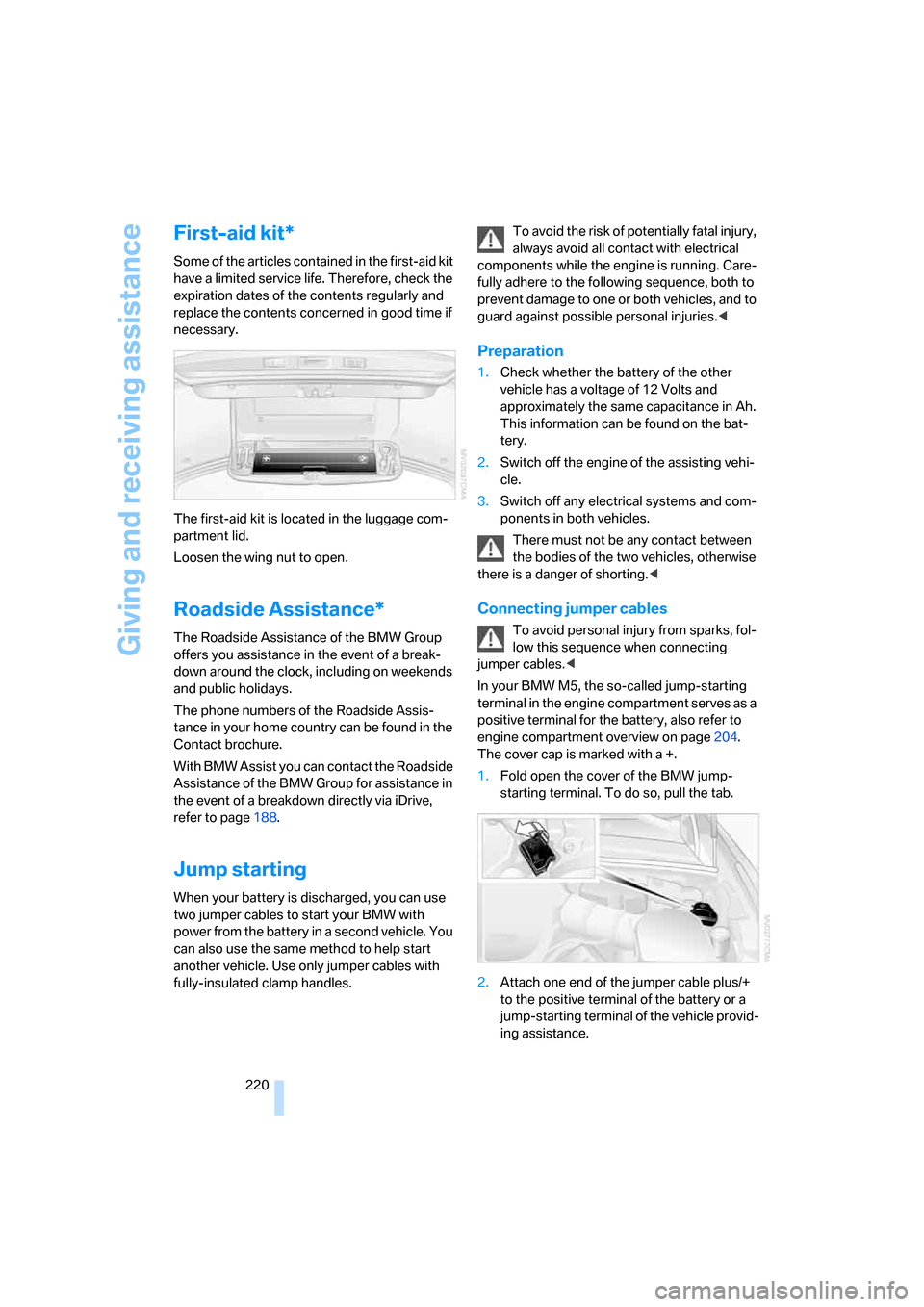
1.Fold open the cover of the BMW jump-
starting terminal. To do so, pull the tab.
2.Attach one end of the jumper cable plus/+
to the positive terminal of the battery or a
jump-starting terminal of the vehicle provid-
ing assistance.
ba8_m5us.book Seite 220 Montag, 5. Februar 2007 12:03 12
Page 239 of 256
Reference 237
At a glance
Controls
Driving tips
Communications
Navigation
Entertainment
Mobility
Center armrest
– front104
– rear107
Center brake lamp212
Center console14
"Central locking"30
Central locking
– from inside32
– from outside30
Central locking system30
– comfort access36
Changes, technical
– refer to For your own
safety5
– refer to Parts and
accessories6
Changing language on
Control Display76
Changing scale for
navigation136
Changing units of measure on
Control Display75
Changing wheels201,215
CHECK button71
Check Control70
"Check Control
messages"72
Check Gas Cap196
Checking the air pressure,
refer to Tire inflation
pressure198
Child restraint fixing system
LATCH53
Child restraint systems52
Child-safety lock54
Child seats, refer to
Transporting children
safely52
Chime, refer to Check
Control70
Chock216
Chrome parts, refer to Caring
for your vehicle brochure
Cigarette lighter106
Cigarette lighter socket, refer
to Connecting electrical
devices107
Cleaning, refer to Caring for
your vehicle brochure"Climate"47,96
Clock66
– 12h/24h mode74
– hour signal74
– setting time and date74
Closing
– from inside32
– from outside30
Closing fuel filler cap196
Clothes hooks105
Cockpit
10
Cold start, refer to Starting
engine56
Comfort access36
– replacing battery, remote
control37
Comfort area, refer to Around
the center console14
Comfort operation
– glass sunroof31
– windows31
– windows with comfort
access36
– with comfort access36
"Comfort" with EDC81
"Communication"178,188
Compact Disc
– refer to CD changer159
– refer to CD player159
Compartment for remote
control, refer to Ignition
lock55
Compartments, refer to
Storage compartments105
Compressed audio files159
Computer66
– clock66
– displays on Control
Display67
– hour signal74
"Concert hall", refer to Tone
control149
"Concierge"190
Condensation, refer to When
vehicle is parked114
Condition Based Service
CBS208
"Confirmation"31Confirmation signals for
locking and unlocking31
Connecting car vacuum
cleaner, refer to Connecting
electrical devices107
Consumption, refer to
Average fuel
consumption67
Consumption statistics, refer
to Average fuel
consumption67
"Continue guidance to
destination?"135
Control Center, refer to
iDrive16
Control Display, refer to
iDrive16
– setting brightness75
– switching off/on21
Controller, refer to iDrive16
Controls, refer to Cockpit10
Coolant206
– checking level206
– temperature
65
Cooling, maximum98
Cooling fluid, refer to
Coolant206
Cooling function, automatic
climate control98
Cooling system, refer to
Coolant206
Copyright2
Cornering Brake Control
CBC78
Country of destination for
navigation123
Courtesy lamps94
Cradle for telephone or mobile
phone104
Cruise control63
Cruising range67
Cup holders105
Curb weight, refer to
Weights228
"Current position"142
Current position
– displaying142
– entering130
– storing130
ba8_m5us.book Seite 237 Montag, 5. Februar 2007 12:03 12
Page 240 of 256
Everything from A to Z
238 "Customer
Relations"182,190
Cylinders, refer to Engine
data226
D
Dashboard, refer to
Cockpit10
Data, technical226
– dimensions227
– engine226
– weights228
"Date"75
Date
– display format75
– setting75
"Date format"75
"Daytime running lamps"92
Daytime running lamps92
DBC Dynamic Brake Control,
warning lamp81
"Deactivated"44
Decommissioning the vehicle,
refer to Caring for your
vehicle brochure
Defect
– door lock32
– fuel filler door196
– glass sunroof39
– luggage compartment lid34
Defrosting windows97
Defrosting windows and
removing condensation97
Defrosting windshield, refer to
Defrosting windows97
Defrost position, refer to
Defrosting windows97
"Delete address book" for
navigation system131
"Delete all numbers" for
mobile phone181
"Delete data" for navigation
system131
"Delete" for mobile
phone181
Destination address
– deleting131
– entering122,125Destination for navigation
– destination list129
– entering via voice125
– entry122
– selecting from address
book130
– selecting using
information128
– storing130
Destination guidance134
– bypassing route
sections138
– canceling voice
instructions50
– changing specified
route132
– displaying route135
– distance and arrival134
– interrupting
134
– starting134
– terminating/continuing134
– voice instructions137
– volume of voice
instructions138
Destination list for
navigation129
Destinations recently driven
to129
"Details" in audio
mode161,167
"Detour" for navigation
system141
"Dial" for mobile phone179
"Dial number"179
Digital clock66
Digital radio, refer to High
Definition Radio154
Dimensions227
Directional indicators, refer to
Turn signals61
Direction announcements,
refer to Voice
instructions137
Direction instructions, refer to
Voice instructions137
Directory, refer to Phone
book180Directory for navigation, refer
to Address book130
Direct selection buttons21
Displacement, refer to Engine
data226
"Display"75
Display, refer to iDrive
controls16
Display elements, refer to
Instrument cluster12
Displaying vehicle data193
Display lighting, refer to
Instrument lighting94
"Display off"21
Displays
– on Control Display, refer to
iDrive16
– refer to Instrument
cluster12
"Display settings"75,88
Displays on the windshield,
refer to Head-Up Display88
Disposal
– battery of remote control
with comfort access37
– coolant206
– vehicle battery218
Distance, refer to
Computer67
"Distance to dest."67
Distance to destination, refer
to Computer67
Distance warning, refer to
PDC Park Distance
Control77
Divided rear backrest, refer to
Through-loading
system108
Door entry lighting94
Door key, refer to Keys/
remote control28
Door lock32
Door locking, confirmation
signals31
"Door locks"30
Doors
– manual operation32
– remote control30
ba8_m5us.book Seite 238 Montag, 5. Februar 2007 12:03 12
Page 242 of 256
Everything from A to Z
240 ESP Electronic Stability
Program, refer to DSC
Dynamic Stability
Control79
Event Data Recorders209
Exhaust system, refer to Hot
exhaust system112
Exterior mirrors48
– adjusting48
– automatic dimming
feature49
– automatic heating48
– folding in and out48
– tilting down passenger-side
exterior mirror48
External audio device105
Eye for tow-starting and
towing, refer to Tow
fitting221
F
"Fader", refer to Tone
control148
Fader, refer to Tone
control148
Failure messages, refer to
Check Control70
False alarm
– refer to Avoiding
unintentional alarms35
– refer to Switching off
alarm35
Fastening safety belts, refer to
Safety belts45
– warning lamp46
Fastest route for
navigation132
"Fast route" for
navigation132
"Favorites", calling up with
radio154
Filler neck for washer fluid63
Filling bottle, refer to
M Mobility System213
Filling sealant into wheel214
Filter, refer to Microfilter/
activated-charcoal filter99Fine wood, refer to Caring for
your vehicle brochure
First aid, refer to First-aid
kit220
First-aid kit220
Flashing
– during locking/unlocking,
refer to Setting confirmation
signals31
– triple turn signal
activation62
Flashlight, refer to
Rechargeable flashlight104
Flat tire
– changing wheels215
– Flat Tire Monitor81,83
– M Mobility System83,213
– refer to Tire condition200
– spare wheel216
– TPM Tire Pressure
Monitor83
– warning lamp83,84
Flat Tire Monitor81
– false alarms82
– initializing system82
– snow chains202
– system limits82
– warning lamp83
Floor mat, refer to Caring for
your vehicle brochure
Floor mats/carpets, refer to
Caring for your vehicle
brochure
Fluid reservoir, refer to Filler
neck for washer fluid63
"FM", reception
range146,150
FM, waveband150
Folding rear backrest108
Fold-over rear backrest108
Footbrake, refer to Braking
safely113
Footwell lamps, refer to
Interior lamps94
Forward, fast
– CD changer163
– CD player163
For your own safety5Freeway, refer to Route
criteria132
Front airbags86
Front armrest, refer to Center
armrest, front104
Front passenger airbags
– deactivating86
– deactivating, refer to
Exception for front
passenger seat52
Front seat adjustment42
"FTM"82
FTM, refer to Flat Tire
Monitor81
Fuel197
– average consumption67
– display66
– high-quality brands197
– quality197
– specifications197
– tank contents, refer to
Capacities228
Fuel clock, refer to Fuel
gauge66
Fuel consumption display,
refer to Computer, average
fuel consumption67
Fuel display, refer to Fuel
gauge66
Fuel filler door196
– releasing in the event of
electrical malfunction196
Full mobile phone preparation
package172
Full screen display, refer to
Switching assistance
window off21
Fuses218
G
Garage door opener, refer to
Integrated universal remote
control102
Gasoline, refer to Required
fuel197
Gasoline display, refer to Fuel
gauge66
Gear changes60
ba8_m5us.book Seite 240 Montag, 5. Februar 2007 12:03 12