ECO mode BMW M6 COUPE 2006 E63 User Guide
[x] Cancel search | Manufacturer: BMW, Model Year: 2006, Model line: M6 COUPE, Model: BMW M6 COUPE 2006 E63Pages: 227, PDF Size: 8.32 MB
Page 183 of 227
Mobility
181Reference
At a glance
Controls
Driving tips
Communications
Navigation
Entertainment
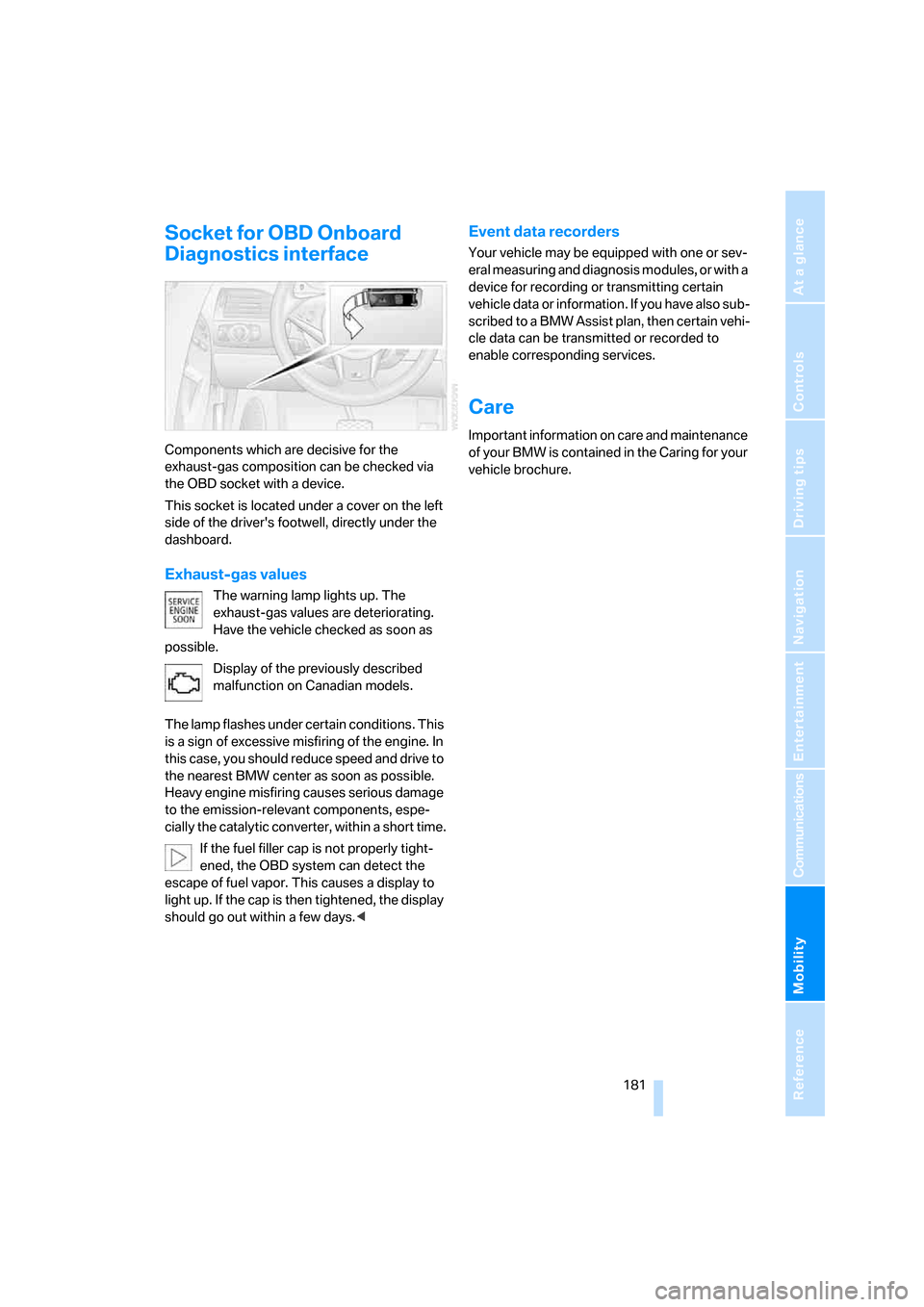
Socket for OBD Onboard
Diagnostics interface
Components which are decisive for the
exhaust-gas composition can be checked via
the OBD socket with a device.
This socket is located under a cover on the left
side of the driver's footwell, directly under the
dashboard.
Exhaust-gas values
The warning lamp lights up. The
exhaust-gas values are deteriorating.
Have the vehicle checked as soon as
possible.
Display of the previously described
malfunction on Canadian models.
The lamp flashes under certain conditions. This
is a sign of excessive misfiring of the engine. In
this case, you should reduce speed and drive to
the nearest BMW center as soon as possible.
Heavy engine misfiring causes serious damage
to the emission-relevant components, espe-
cially the catalytic converter, within a short time.
If the fuel filler cap is not properly tight-
ened, the OBD system can detect the
escape of fuel vapor. This causes a display to
light up. If the cap is then tightened, the display
should go out within a few days.<
Event data recorders
Your vehicle may be equipped with one or sev-
eral measuring and diagnosis modules, or with a
device for recording or transmitting certain
vehicle data or information. If you have also sub-
scribed to a BMW Assist plan, then certain vehi-
cle data can be transmitted or recorded to
enable corresponding services.
Care
Important information on care and maintenance
of your BMW is contained in the Caring for your
vehicle brochure.
Page 211 of 227
Reference 209
At a glance
Controls
Driving tips
Communications
Navigation
Entertainment
Mobility
Child restraint systems48
Chock188
Chrome parts, care, refer to
the Caring for your vehicle
brochure
Cigarette lighter93
Cigarette lighter socket, refer
to Connecting electrical
devices94
Cleaning, refer to Caring for
your vehicle brochure
"Climate"85
Clock60
– 12h/24h mode68
– setting time and date68
Closing
– from inside32
– from outside30
Closing fuel filler cap168
Clothes hooks93
Cockpit10
Cold start, refer to Starting
engine51
Comfort access36
– replacing battery37
Comfort closing
– windows with comfort
access37
– with comfort access37
"Comfort" with EDC73
"Communication"152,163
"Communication
settings"162
Compact disc
– refer to CD changer139
– refer to CD player139
Compartment for remote
control, refer to Ignition
lock50
Compartments, refer to
Storage compartments92
Compressed audio files139
Computer60
– displays on Control
Display61
– hour signal68
"Concert hall", refer to Tone
control128Condition Based Service
CBS180
"Confirmation"31
Connecting car vacuum
cleaner, refer to Connecting
electrical devices94
Consumption display, refer to
Average fuel
consumption61
Consumption statistics, refer
to Average fuel
consumption61
"Continue guidance to
destination?"118
Control Center, refer to
iDrive16
Control Display, refer to
iDrive16
– setting brightness
69
Controller, refer to iDrive16
Controls, refer to Cockpit10
Convenience operation,
windows31,32
Coolant178
– checking level178
– temperature59
Cooling, maximum86
Cornering Brake Control
CBC71
Country of destination for
navigation108
Courtesy lamps, refer to
Interior lamps83
Cruise control57
Cruising range60
Cup holders93
Curb weight, refer to
Weights200
"Current position"122
Current position
– displaying122
– entering114
– storing114
"Customer
Relations"155,164
Cylinders, refer to Engine
data198
D
Dashboard, refer to
Cockpit10
Data
– capacities200
– dimensions199
– engine198
– technical data198
– weights200
"Date"68
Date, setting68
"Date format"69
Daytime running lamps81
DBC Dynamic Brake
Control71
"Deactivated"41
Decommissioning the vehicle
– refer to Caring for your
vehicle brochure
– refer to the Caring for your
vehicle brochure
Defrosting windows86
Defrosting windows and
removing condensation86
Defrost position, refer to
Defrosting windows86
"Delete address book" for
navigation116
"Delete all numbers" on the
mobile phone155
"Delete data" for
navigation116
"Delete" for mobile
phone155
Destination address
– deleting115
– entering107,110
Destination for navigation
– destination list113
– entering via voice110
– entry107
– home address116
– selecting from address
book115
– selecting using
information112
– storing114
Page 218 of 227
Everything from A to Z
216 Parts and accessories6
Passenger airbags, deacti-
vating, refer to Exception for
front passenger seat48
Passenger-side exterior
mirror, tilting down44
"Pathway lighting"80
Pathway lighting80
"PDC"71
"PDC display on"71
PDC Park Distance Control70
Personal Profile29
"Perspective"120
"Phone"153
Phone book152
Phone numbers
– deleting from phone
book155
– dialing153
– most recent numbers154
– selecting in phone book154
– Top 8154
Pinch protection system of
power windows38
Plasters, refer to First-aid
kit192
"Play"
– in audio mode140
– on the radio, selecting137
Plug-in unit for remote
control, refer to Ignition
lock50
Pollen, refer to Microfilter/
activated-charcoal filter87
Position
– displaying122
– storing114
"POWER"46
POWER, refer to M Engine
Dynamic Control55
Power failure190
Power windows, refer to
Windows37
"Presets" on the
radio130,136
Presetting parked car venti-
lation activation times88Pressure, tires170
– producing with M Mobility
System185
"Profile"165
Programmable button on
steering wheel45
Protective function, refer to
Pinch protection system of
windows38
R
Radio
– Autostore131
– controls126
– High Definition Radio134
– playing stations131
– satellite radio135
– selecting frequency
manually131
– selecting
waveband126,130
– station search131
– station selection130
– station with best
reception131
– storing stations132
– switching on/off126
– tone control127
– volume127
– Weather Band, refer to
Weather news flashes133
Radio key, refer to Keys/
remote control28
Radio position, refer to Radio
readiness50
Radio readiness50
– switched off50
– switched on50
– with comfort access37
Rain sensor, windshield
washer system57
"Random", random play
sequence, selecting142
"Random all" in audio
mode142
"Random directory" in audio
mode142Random play sequence
– CD changer142
– CD player142
"RDS"133
Reading lamps83
Rear lamps, refer to Tail
lamps184
Rearview mirrors, refer to
Mirrors43
"Received calls"154
Reception
– quality133
– radio stations133
– regional station131
Reception quality of mobile
phone, refer to Status
information20
Rechargeable flashlight91
Recirculated-air mode, refer
to AUC Automatic recircu-
lated-air control87
Recirculation of air, refer to
AUC Automatic recircu-
lated-air control87
Reclining seat, refer to
Backrest40
Recording times, refer to
Stopwatch67
"Redial" for mobile phone153
Reflectors, refer to Tail
lamps184
Refueling168
Releasing, hood175
"Relock door if not
opened"32
Remaining distance, refer to
Cruising range60
Remaining distance to desti-
nation, refer to Computer61
Remote control28
– battery replacement37
– comfort access36
– garage-door opener90
– luggage compartment lid31
– malfunction31,37
Removing condensation from
windows86