CD player BMW M6 COUPE 2010 E63 User Guide
[x] Cancel search | Manufacturer: BMW, Model Year: 2010, Model line: M6 COUPE, Model: BMW M6 COUPE 2010 E63Pages: 250, PDF Size: 8.4 MB
Page 153 of 250
Navigation
Entertainment
Driving tips
151Reference
At a glance
Controls
Communications
Mobility
Music collection
Storing music
Music tracks from CDs, DVDs and USB devices
can be stored in the music collection in the vehi-
cle and played from there.
>Audio CD: tracks are converted into a com-
pressed audio format when they are stored.
If available, information on the album, such
as the artist, is stored as well.
>CD/DVD or USB device with compressed
audio files: the entire content of the CD/
DVD or the USB device is stored in the vehi-
cle as an album. After storing, the tracks and
directories can be deleted individually. Files
are only stored in the WMA, MP3, and AAC
formats.
Tracks with DRM copy protection can be
stored in the vehicle but cannot be played
back.
Regularly back up the music data; other-
wise, it could be lost if there is a fault on
the hard disc.<
Music recognition technology and
related data are provided by
Gracenote®. Gracenote® is the industry stan-
dard in music recognition technology and
related content delivery. For more information,
please visit www.gracenote.com.
CD and music-related data from Gracenote,
Inc., copyright © 2000-2009 Gracenote.
Gracenote Software copyright 2000-2009
Gracenote. This product and service may prac-
tice one or more of the following U.S. Patents:
#5,987,525; #6,061,680; #6,154,773,
#6,161,132, #6,230,192, #6,230,207,
#6,240,459, #6,330,593, and other patents
issued or pending. Some services supplied
under license from Open Globe, Inc., for U.S.
Patent: #6,304,523.
Gracenote and CDDB are registered trade
marks of Gracenote. The Gracenote logo, the
logo typeface and the "powered by Gracenote"
logo are trade marks of Gracenote.
Storing from CDs/DVDs
Data can only be stored from CDs/DVDs on the
CD/DVD player.
1.Insert the CD/DVD into the CD/DVD player.
2."CD/Multimedia"
3."CD/DVD"
4. Select the symbol for the CD/DVD
player.
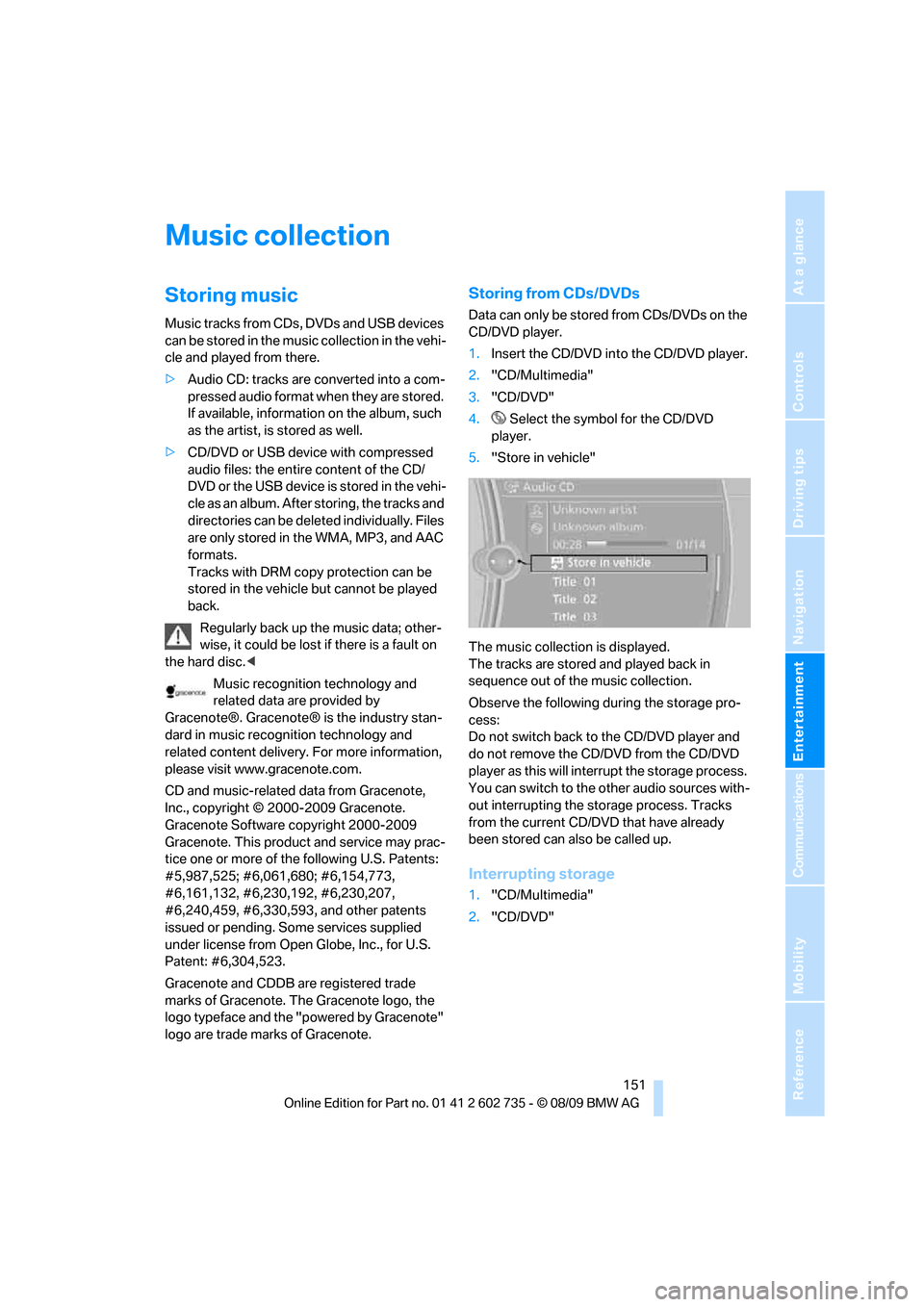
5."Store in vehicle"
The music collection is displayed.
The tracks are stored and played back in
sequence out of the music collection.
Observe the following during the storage pro-
cess:
Do not switch back to the CD/DVD player and
do not remove the CD/DVD from the CD/DVD
player as this will interrupt the storage process.
You can switch to the other audio sources with-
out interrupting the storage process. Tracks
from the current CD/DVD that have already
been stored can also be called up.
Interrupting storage
1."CD/Multimedia"
2."CD/DVD"
Page 154 of 250
Music collection
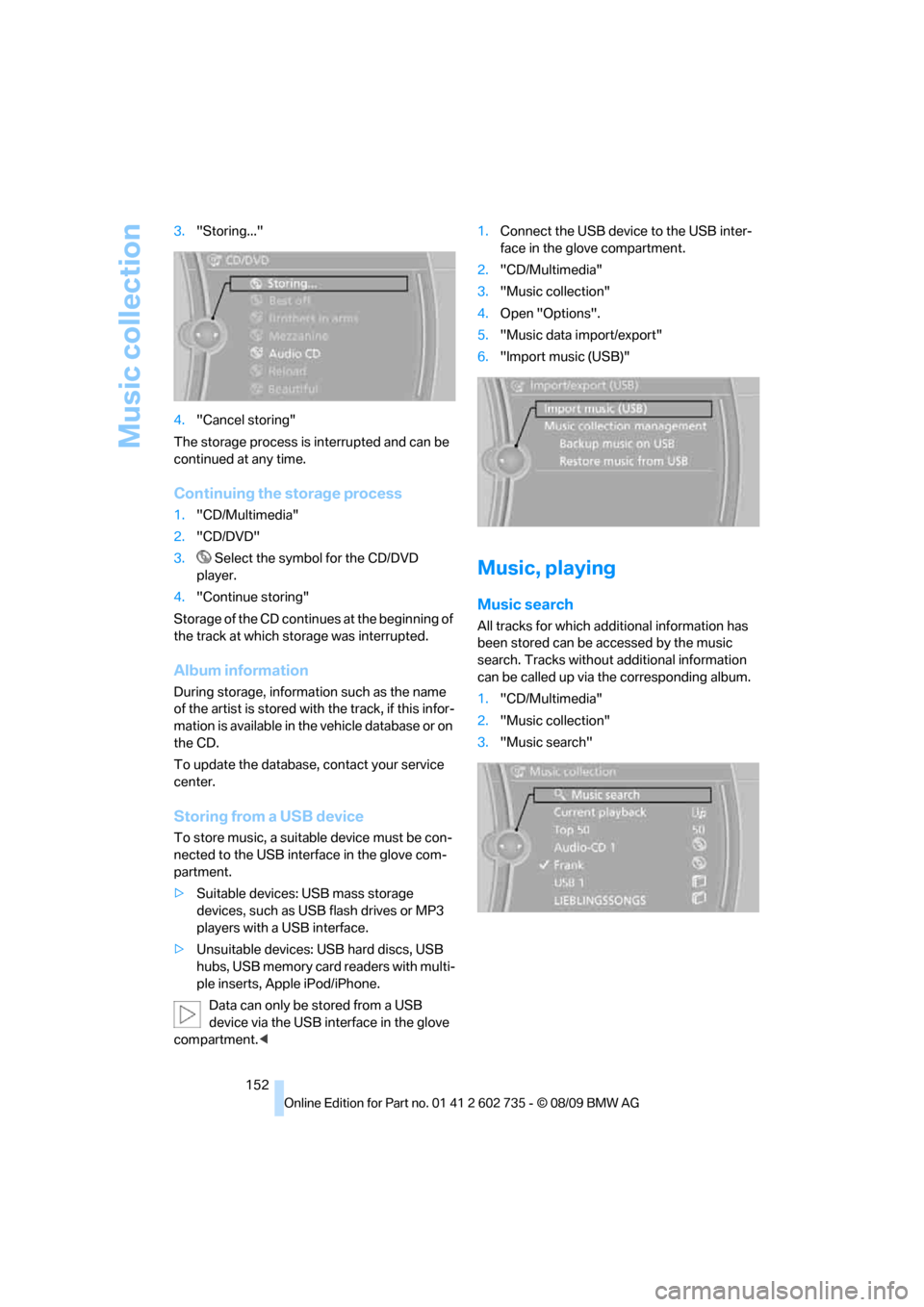
152 3."Storing..."
4."Cancel storing"
The storage process is interrupted and can be
continued at any time.
Continuing the storage process
1."CD/Multimedia"
2."CD/DVD"
3. Select the symbol for the CD/DVD
player.
4."Continue storing"
Storage of the CD continues at the beginning of
the track at which storage was interrupted.
Album information
During storage, information such as the name
of the artist is stored with the track, if this infor-
mation is available in the vehicle database or on
the CD.
To update the database, contact your service
center.
Storing from a USB device
To store music, a suitable device must be con-
nected to the USB interface in the glove com-
partment.
>Suitable devices: USB mass storage
devices, such as USB flash drives or MP3
players with a USB interface.
>Unsuitable devices: USB hard discs, USB
hubs, USB memory card readers with multi-
ple inserts, Apple iPod/iPhone.
Data can only be stored from a USB
device via the USB interface in the glove
compartment.<1.Connect the USB device to the USB inter-
face in the glove compartment.
2."CD/Multimedia"
3."Music collection"
4.Open "Options".
5."Music data import/export"
6."Import music (USB)"
Music, playing
Music search
All tracks for which additional information has
been stored can be accessed by the music
search. Tracks without additional information
can be called up via the corresponding album.
1."CD/Multimedia"
2."Music collection"
3."Music search"
Page 158 of 250
External devices
156
External devices
AUX-IN port
You can connect an external audio device, e.g.
an MP3 player, and play the sound via the vehi-
cle speakers. The sound can be adjusted via
iDrive.
Connecting
Lift up the center armrest.
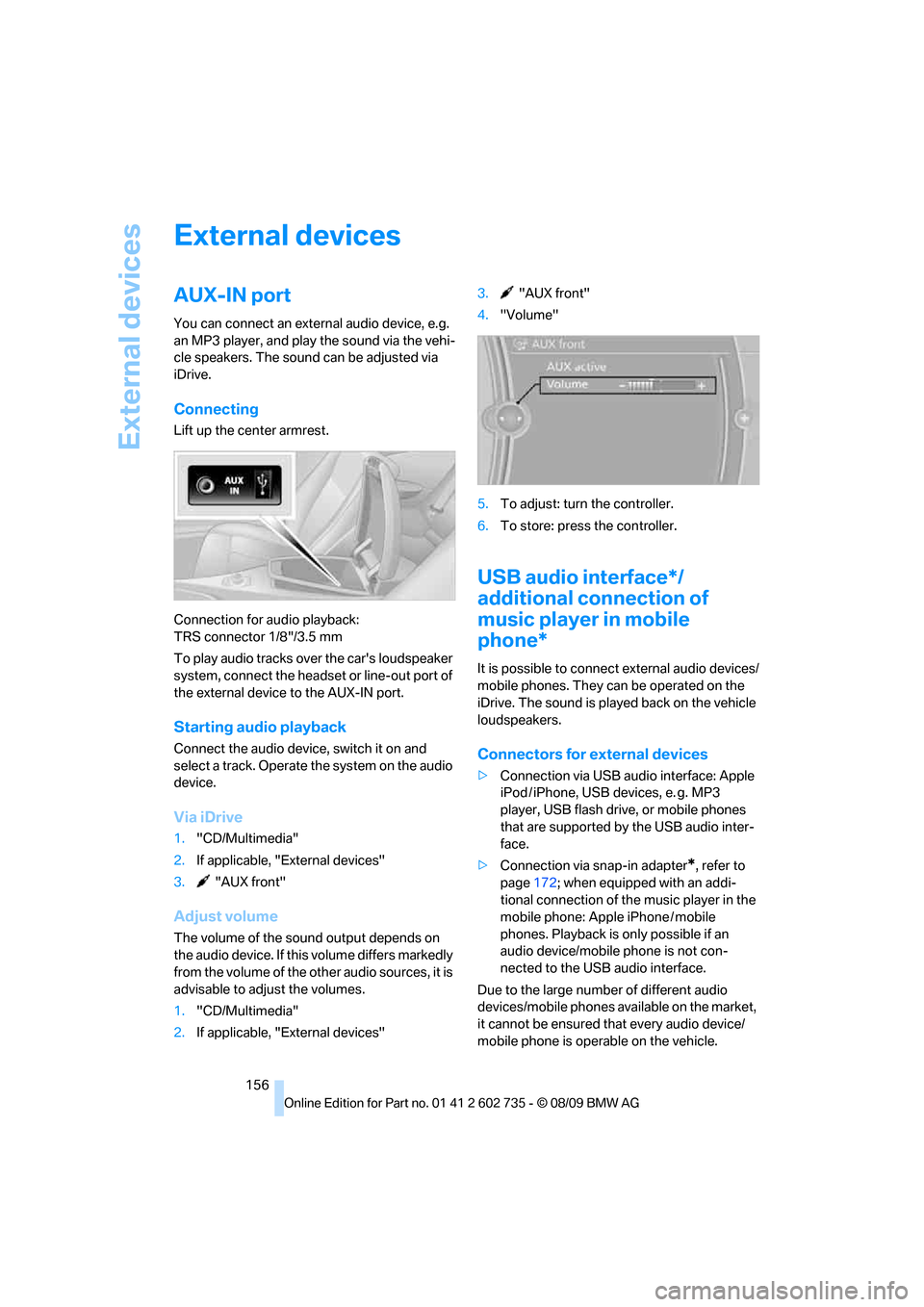
Connection for audio playback:
TRS connector 1/8"/3.5 mm
To play audio tracks over the car's loudspeaker
system, connect the headset or line-out port of
the external device to the AUX-IN port.
Starting audio playback
Connect the audio device, switch it on and
select a track. Operate the system on the audio
device.
Via iDrive
1."CD/Multimedia"
2.If applicable, "External devices"
3. "AUX front"
Adjust volume
The volume of the sound output depends on
the audio device. If this volume differs markedly
from the volume of the other audio sources, it is
advisable to adjust the volumes.
1."CD/Multimedia"
2.If applicable, "External devices"3. "AUX front"
4."Volume"
5.To adjust: turn the controller.
6.To store: press the controller.
USB audio interface*/
additional connection of
music player in mobile
phone*
It is possible to connect external audio devices/
mobile phones. They can be operated on the
iDrive. The sound is played back on the vehicle
loudspeakers.
Connectors for external devices
>Connection via USB audio interface: Apple
iPod / iPhone, USB devices, e. g. MP3
player, USB flash drive, or mobile phones
that are supported by the USB audio inter-
face.
>Connection via snap-in adapter
*, refer to
page172; when equipped with an addi-
tional connection of the music player in the
mobile phone: Apple iPhone / mobile
phones. Playback is only possible if an
audio device/mobile phone is not con-
nected to the USB audio interface.
Due to the large number of different audio
devices/mobile phones available on the market,
it cannot be ensured that every audio device/
mobile phone is operable on the vehicle.
Page 204 of 250
Care
202 matte components with water and, if necessary,
a solvent-free plastic cleaner.
Fine wooden components
Use a damp cloth to clean fine wooden trim
panels and components. Follow up by drying
with a soft cloth.
Safety belts
Dirty belt straps impede the reeling action and
thus have a negative impact on safety.
Chemical cleaning
Do not clean chemically, as this may
destroy the webbing.<
Inside sensors
Clean inside sensors such as those of the High-
beam Assistant using a lint-free cloth moist-
ened with glass cleaner.
Displays
Clean displays like the radio or the Control Dis-
play using a display-cleaning cloth or a soft,
nonabrasive lint-free cloth.
Avoid using excessive pressure when
cleaning displays; otherwise, you could
damage them.<
Never use chemical-based cleansers or
household scouring products. Keep all
liquids away from the equipment. Otherwise
corrosion or damage to surfaces or electrical
components can occur.<
CD/DVD drives
Do not use cleaning CDs; they can dam-
age parts of the player.<
Storing your vehicle
When storing your vehicle for longer than three
months, please seek the advice of your BMW
center or a workshop that works in accordance
with BMW guidelines.
Page 232 of 250
Everything from A to Z
230
Everything from A to Z
Index
A
ABS Antilock Brake
System76
– indicator lamp78
Accessories6
Accident, refer to Emergency
request212
Activated-charcoal filter for
automatic climate control98
Activation times of parked car
ventilation, preselecting98
Active front head restraints46
Adapter for spare key26
Adaptive brake lamps, refer to
Brake force display83
Adaptive Light Control90
Additional connection of
music player in mobile
phone156
Additives
– coolant196
– engine oil, refer to Approved
engine oils195
Address, entering117,123
Address for navigation
– entering117
Adjusting interior
temperature95
Adjusting the tone during
audio operation, refer to
Tone control136
Adjusting thigh support44
Airbags83
– deactivating, refer to
Exception for front
passenger seat52
– indicator/warning lamp85
– indicator lamp for front
passenger airbags84
– sitting safely43Air distribution
– automatic95
– manual96
Airing, refer to Ventilation97
Air outlets, refer to
Ventilation97
Air recirculation, refer to AUC
Automatic recirculated-air
control96
Air supply, automatic climate
control94
Air volume96
AKI, refer to Fuel
specifications185
Alarm system33
– avoiding unintentional
alarms34
– interior motion sensor34
– switching off alarm33
– switching off tilt alarm
sensor and interior motion
sensor34
– tilt alarm sensor34
Albums of music
collection
153
Alloy wheels201
All-season tires, refer to
Winter tires190
Alterations, technical, refer to
For your own safety5
Antenna for mobile phone162
Antifreeze
– coolant196
– washer fluid63
Antilock Brake System
ABS76
Anti-theft alarm system, refer
to Alarm system33
Anti-theft system, refer to
Central locking system27
Approved axle loads, refer to
Weights223
Approved engine oils195Approved gross vehicle
weight, refer to Weights223
Armrest, refer to Center
armrest102
Around the center console14
Around the steering wheel10
Arrival time
– refer to Computer67
Ashtray104
Assistance systems, refer to
Driving stability control
systems76
AUC Automatic recirculated-
air control96
Audio136
– controls136
– switching on/off136
– tone control136
– volume136
Audio device, external102
Automatic
– air distribution95
– air volume95
– cruise control63
– headlamp control89
– steering wheel
adjustment45
Automatic climate control94
– automatic air distribution95
– convertible program95
– parked car ventilation/
heating98
– switching on and off97
Automatic closing of doors,
refer to Automatic soft
closing31
Automatic curb monitor49
Page 234 of 250
Everything from A to Z
232 Care199
– car-care products199
– carpets201
– car washes199
– CD/DVD player202
– chrome components201
– convertible top200
– displays202
– exterior199
– fine wooden
components202
– hand washing200
– headlamps200
– high-pressure cleaning
jets199
– interior201
– leather201
– light-alloy wheels201
– paint200
– plastic components201
– rubber gaskets201
– safety belts202
– sensors and cameras202
– upholstery and cloth-
covered paneling201
– windows200
Cargo area
– capacity223
– emergency release32
– opening/closing, refer to
Luggage compartment
lid32
– opening from inside31
– opening from outside32
– opening with remote
control29
Caring for the vehicle
finish200
Car key, refer to Keys/remote
control26
Car phone
– installation location, refer to
Center armrest102
– refer to separate operating
instructions
Car phone, refer to
Telephone162
Car radio, refer to Radio139
Car Shampoo202Car washes199
Catalytic converter, refer to
Hot exhaust system109
CBC Cornering Brake
Control76
CBS Condition Based
Service197
CD, audio playback144
CD changer144,148
– controls136
– fast forward/reverse146
– filling or emptying the
magazine148
– random sequence145
– selecting a track144
– switching on/off136
– tone control136
– volume136
CD player144
– controls136
– fast forward/reverse146
– random sequence145
– selecting a track144
– switching on/off136
– tone control136
– volume136
Center armrest, adjusting
height102
Center console14
Central locking
– from inside30
– from outside28
Central locking system27
– Comfort Access34
– hotel function31
Changes, technical, refer to
For your own safety5
Changing language on
Control Display73
Changing units of measure on
Control Display68
Changing wheels189,207
Chassis number, refer to
Engine compartment193
CHECK button71
Check Control70
Check Gas Cap184
Checking air pressure, refer to
Tire inflation pressure186Child restraint fixing system
LATCH53
Child restraint systems52
Child seats, refer to
Transporting children
safely52
Chock208
Chrome-plated parts202
Chrome polish202
Cigarette lighter104
Cigarette lighter socket, refer
to Connecting electrical
devices104
Cleaning your BMW, refer to
Care199
Clock66
– 12h/24h format70
– setting time69
– setting time and date70
Closing
– from inside30
– from outside28
Closing fuel filler cap184
Clothes hooks, Coupe103
Cockpit10
Cold start, refer to Starting
engine56
Comfort Access34
– replacing battery, remote
control35
Comfort access34
Comfort program of EDC79
Compartment for remote
control, refer to Ignition
lock55
Compartments, refer to
Storage compartments103
Computer66
– clock66
– displays on Control
Display67
Concierge service177
Condensation, refer to When
vehicle is parked110
Condition Based Service
CBS197
Confirmation signals for
locking and unlocking29
Page 236 of 250
Everything from A to Z
234 Displays
– on Control Display, refer to
iDrive16
– refer to Instrument
cluster12
Displays on the windshield,
refer to Head-up Display86
Disposal
– battery of remote control
with Comfort Access36
– coolant196
– vehicle battery210
Distance, refer to
Computer67
Distance to destination, refer
to Computer67
Distance warning, refer to
PDC Park Distance
Control75
Door entry lighting, refer to
Interior lamps93
Door key, refer to Keys/
remote control26
Door lock29
Doors
– manual operation30
– remote control28
DOT Quality Grades188
Draft-free ventilation97
Drinks holder, refer to
Cupholders103
Drivelogic50,59
Drive-off assistant, refer to
Starting off on uphill
slopes78
Driving lamps, refer to Parking
lamps/low beams89
Driving programs, refer to
Drivelogic59
Driving stability control
systems76
Driving through water109
Driving tips, refer to General
driving notes108
Dry air, refer to Cooling
function96
Drying the air, refer to Cooling
function96
DSC51DSC Dynamic Stability
Control76
– indicator lamp13,76
– malfunction78
DTC Dynamic Traction
Control
– indicator lamp13
DVD
– country codes146
– settings147
– video playback146
DVD menu147
DVD player, refer to CD
player
144
DVD video146
Dynamic destination
guidance127
Dynamic Stability Control
DSC76
– M Dynamic Mode MDM76
E
Easy entry, refer to Entering
rear47
Easy entry/exit50
EDC51
EDC Electronic Damping
Control79
Eject button, refer to Buttons
in area of the CD/DVD
player136
Electrical malfunction
– convertible top39
– door lock30
– driver's door30
– fuel filler flap184
– luggage compartment lid32
– storage compartment, hotel
function31
Electric convertible top38
Electric steering wheel
adjustment50
Electronic brake-force
distribution76Electronic Damping Control
EDC79
– Comfort program79
– Normal program79
– Sport program79
Emergency operation, refer to
Manual operation
– convertible top39
– door lock30
– driver's door30
– fuel filler flap184
– hotel function31
– luggage compartment lid32
Emergency release for
luggage compartment lid in
cargo area32
Emergency request212
Emergency services, refer to
Roadside Assistance213
Engine
– breaking-in108
– data220
– M Engine Dynamic
Control60
– overheated, refer to Coolant
temperature65
– speed220
– starting56
– starting, Comfort Access34
– switching off56
Engine compartment193
Engine coolant196
Engine oil
– adding195
– additives, refer to Approved
engine oils195
– approved oils195
– checking oil level193
– fast measurement
194
– interval between changes,
refer to Service
requirements68
– oil change195
– oil grades, refer to Approved
engine oils195
– possible displays194
– recommended oils195
– temperature66
– temperature gauge66
Page 237 of 250
Reference 235
At a glance
Controls
Driving tips
Communications
Navigation
Entertainment
Mobility
Engine output, refer to Engine
data220
Engine overheating, refer to
Coolant temperature65
Engine speed, refer to Engine
data220
Engine starting, refer to
Starting engine56
Entering destination via town/
city name117
Entering rear47
Entering zip code for
navigation118
Entertainment sound output
on/off136
Entry map for destination122
Equalizer, refer to Tone
control137
ESP Electronic Stability
Program, refer to DSC
Dynamic Stability
Control76
Event Data Recorders198
Exhaust system, refer to Hot
exhaust system109
Exterior mirrors49
– adjusting49
– automatic dimming
feature50
– automatic heating49
– folding in and out49
– tilting down passenger-side
exterior mirror49
External audio device102
External devices
– random sequence158
Eye for tow-starting and
towing, refer to Tow
fitting214
F
Failure messages, refer to
Check Control70
False alarm
– refer to Avoiding
unintentional alarms34
– refer to Switching off
alarm33Fastening safety belts, refer to
Safety belts48
Fastest route for
navigation126
Fast forward
– CD changer146
– CD player146
Filler neck for washer fluid63
Filling bottle, refer to
M Mobility System205
Filter, refer to Microfilter/
activated-charcoal filter98
First aid, refer to First aid
kit213
First aid kit213
Flashing
– during locking/unlocking,
refer to Setting confirmation
signals29
– triple turn signal
activation61
Flat tire
– Flat Tire Monitor79
– M Mobility System205
– run-flat tires82
– spare wheel208
– Tire Pressure Monitor81
– TPM Tire Pressure
Monitor81
– warning lamp81,82
Flat Tire Monitor79
– false alarms80
– initializing system80
– snow chains191
– system limits80
– warning lamp81
Fluid reservoir, refer to Filler
neck for washer fluid63
FM, waveband139
Folding into raised position
convertible top
compartment floor,
Convertible33
Footwell lamps, refer to
Interior lamps93
For your own safety5
Free memory capacity, music
collection154
Front airbags83Front passenger airbags
– deactivating84
FTM, refer to Flat Tire
Monitor79
Fuel
– average consumption67
– display66
– fuel specifications
185
– high-quality brands185
– quality185
– specifications185
– tank contents, refer to
Capacities223
Fuel clock, refer to Fuel
gauge66
Fuel display, refer to Fuel
gauge66
Fuel filler flap184
– releasing in the event of
electrical malfunction184
Fuses210
G
Garage door opener, refer to
Integrated universal remote
control100
Gasoline
– refer to Average fuel
consumption67
– refer to Fuel
specifications185
– refer to Required fuel185
Gasoline display, refer to Fuel
gauge66
Gas station
recommendations127
Gear changes59
Gear display, refer to Displays
in instrument cluster59
Gearshift lever
– manual transmission57
General driving notes108
Glass sunroof, electric with tilt
function
– convenient opening and
closing with Comfort
Access35
Glove compartment101
Page 240 of 250
Everything from A to Z
238
M
MDynamic Mode MDM76
– indicator lamp13,77
M Engine Dynamic Control60
M Mobility System205
M+S tires, refer to Winter
tires190
Maintenance197
– refer to Service
requirements68
Maintenance system197
Malfunction
– convertible top39
– driver's door30
– fuel filler flap184
– hotel function31
Malfunction warnings, refer to
Check Control70
Managing music154
Manual air distribution96
Manual operation
– convertible top39
– door lock30
– driver's door30
– fuel filler flap184
– hotel function31
– luggage compartment lid32
Manual transmission57
– tow-starting216
Map display128
Map for navigation
– changing scale129
– destination entry122
Map view facing north128
Master key, refer to Keys/
remote control26
Maximum cooling96
Maximum speed with winter
tires190
MDM, refer to M Dynamic
Mode76
MDrive50,77
Measurements, refer to
Dimensions
– Convertible222
– Coupe221Memory, refer to Seat, mirror
and steering wheel
memory45
Menus, refer to iDrive16
Messages168
Messages from the concierge
service169
Microfilter98
Microphone
– for telephone14
– for voice activation
system14
Mirror dimming feature
50
Mirrors49
– automatic curb monitor49
– folding in and out49
– heating49
– memory, refer to Seat, mirror
and steering wheel
memory45
Mobile phone
– adjusting volume165
– connecting, refer to Mobile
phone, pairing162
– installation location, refer to
Center armrest102
– operation via iDrive165
– pairing162
– refer to separate operating
instructions
Mobile phone, refer to
Telephone162
Mobile phone battery173
Mobility System205
Monitor, refer to iDrive16
Monitoring pressure of tires,
refer to Flat Tire Monitor79
MP3 player, connecting, refer
to AUX-IN port156
MP3 player, connecting, refer
to USB audio interface156
Multi-channel playback137
Multi-function steering wheel,
refer to Buttons on steering
wheel11
Multifunction switch
– refer to Turn signals/
headlamp flasher61
– refer to Wiper system62Music, playing152
Music collection151
– backup155
– deleting155
– random sequence154
– restoring155
Music player, connecting,
refer to AUX-IN port156
Music player, connecting,
refer to USB audio
interface156
Music search152
M View86
M view87
MW, waveband139
My Info169
N
Navigation
– starting destination
guidance after entering a
destination119
– storing current position119
– voice activation123
Navigation data116
Navigation destination
– entering manually117
– home address120
Navigation instructions, refer
to Switching voice
instructions on/off127
Page 242 of 250
Everything from A to Z
240
R
Radio
– controls136
– HD Radio140
– satellite radio142
– selecting waveband139
– storing stations140
– switching on/off136
– tone control136
– volume136
– weatherband, refer to
Weather news flashes141
Radio key, refer to Keys/
remote control26
Radio position, refer to Radio
readiness55
Radio readiness55
– switched off56
– switched on55
– with Comfort Access35
Rain sensor, windshield wiper
system62
Random sequence
– external devices158
– music collection154
Reading lamps93
Rear lamps, refer to Tail
lamps204
Rearview mirrors, refer to
Mirrors49
Rear window
– heating96
– opening and closing37
Reception
– quality140
– radio stations140
Recirculated-air mode, refer
to AUC Automatic
recirculated-air control96
Recirculation of air, refer to
AUC Automatic
recirculated-air control96
Reclining seat, refer to
Seats43
Reflectors, refer to Tail
lamps204
Refueling184Releasing
– hood192
Releasing the locks, refer to
Unlocking35
Remaining distance, refer to
Cruising range67
Remaining distance to
destination, refer to
Computer67
Remote control26
– Comfort Access34
– garage door opener100
– luggage compartment lid29
– malfunction29,35
– replacing battery35
Removing condensation on
the windows96
Replacement fuses210
Replacement of tires
– refer to Changing
wheels207
Replacement remote control,
refer to New remote
controls26
Replacing bulbs, refer to
Lamps and bulbs203
Replacing wheels/tires, refer
to New wheels and tires189
Reporting safety defects7
Required fuel185
Reserve
– warning, refer to Fuel
gauge66
Reset, refer to Resetting tone
settings138
Residual heat97
Restraint systems
– for children52
– refer to Safety belts48
Retreaded tires190
Reverse
– CD changer146
– CD player146
Reverse gear58
– manual transmission57
Road map128
Roadside
Assistance177,213Roadside parking lamps91
– replacing bulbs, refer to
Parking lamps204
Rollover protection system on
Convertible85
– lowering85
Rope, refer to Tow-starting
and towing214
Rotary/pushbutton, refer to
iDrive16
Route126,127
– bypassing sections127
– changing126,127
– changing criteria126
– displaying map view128
– displaying streets or towns/
cities127
– selecting126
Route information, refer to
Destination guidance with
voice instructions127
Route map, refer to Displaying
map view128
Route selection126
Run-flat tires
– continuing driving with a
damaged tire82
– flat tire82
– tire replacement189
S
Safety belts48
– damage48
– indicator lamp48
– reminder48
– sitting safely43
Safety belt tensioners, refer to
Safety belts48
Safety systems
– ABS Antilock Brake
System76
– airbags83
– driving stability control
systems76
– rollover protection system,
Convertible85
– safety belts48