cruise control BMW M6 GRAN COUPE 2015 F06M Owner's Manual
[x] Cancel search | Manufacturer: BMW, Model Year: 2015, Model line: M6 GRAN COUPE, Model: BMW M6 GRAN COUPE 2015 F06MPages: 226, PDF Size: 4.76 MB
Page 19 of 226
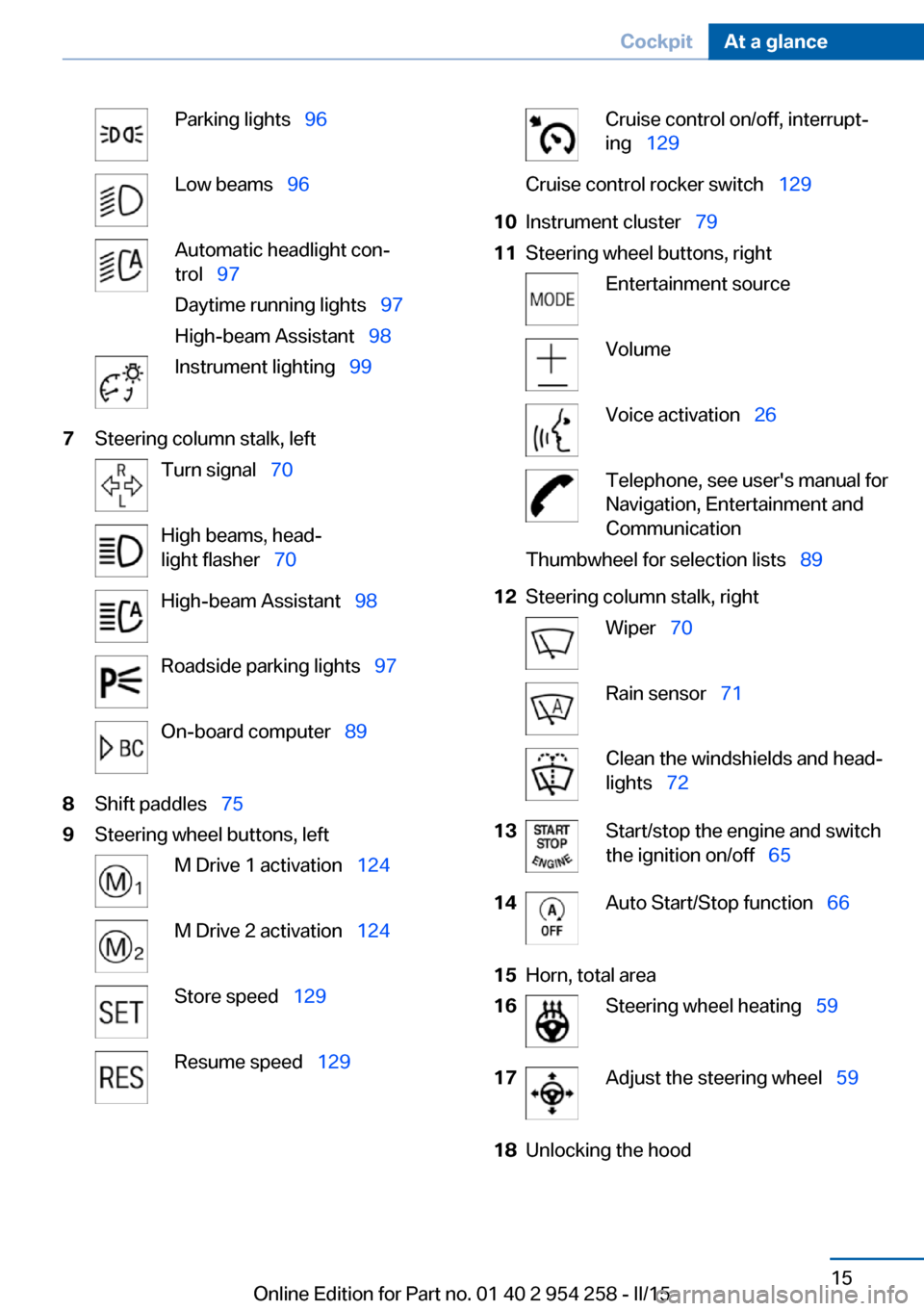
Parking lights 96Low beams 96Automatic headlight con‐
trol 97
Daytime running lights 97
High-beam Assistant 98Instrument lighting 997Steering column stalk, leftTurn signal 70High beams, head‐
light flasher 70High-beam Assistant 98Roadside parking lights 97On-board computer 898Shift paddles 759Steering wheel buttons, leftM Drive 1 activation 124M Drive 2 activation 124Store speed 129Resume speed 129Cruise control on/off, interrupt‐
ing 129Cruise control rocker switch 12910Instrument cluster 7911Steering wheel buttons, rightEntertainment sourceVolumeVoice activation 26Telephone, see user's manual for
Navigation, Entertainment and
CommunicationThumbwheel for selection lists 8912Steering column stalk, rightWiper 70Rain sensor 71Clean the windshields and head‐
lights 7213Start/stop the engine and switch
the ignition on/off 6514Auto Start/Stop function 6615Horn, total area16Steering wheel heating 5917Adjust the steering wheel 5918Unlocking the hoodSeite 15CockpitAt a glance15
Online Edition for Part no. 01 40 2 954 258 - II/15
Page 81 of 226
4.While the vehicle is stationary, press the
selector lever forward and hold it.
A flag symbol is displayed in the instru‐
ment cluster.5.Fully depress the accelerator pedal.
The starting engine speed adjusts.6.If necessary, change the starting engine
speed by 500 rpm via cruise control.7.Release brake. When the selector lever is
released, the vehicle accelerates. Continue
to depress the accelerator pedal.
Upshifting occurs automatically as long as
the accelerator pedal is fully depressed.
Launch Control is available again only after a
certain distance has been driven.
System limits
This transmission has an overheating protec‐
tion mechanism, which protects the clutch
from extreme stress.
▷Indicator lamp lights up yellow:
transmission too hot.
Avoid high engine stress and fre‐
quent starts.▷Indicator lamp lights up red: transmission
is overheating.
Further driving at a moderate pace is pos‐
sible. At the next opportunity, stop the car,
shut off the engine and allow the transmis‐
sion to cool down.
Avoid fast starts, and on inclines did not accel‐
erate lightly while letting the clutch slip; other‐
wise, the transmission may overheat.
During traffic jams or at very low speeds, use
the Low Speed Assistant, refer to page 74.
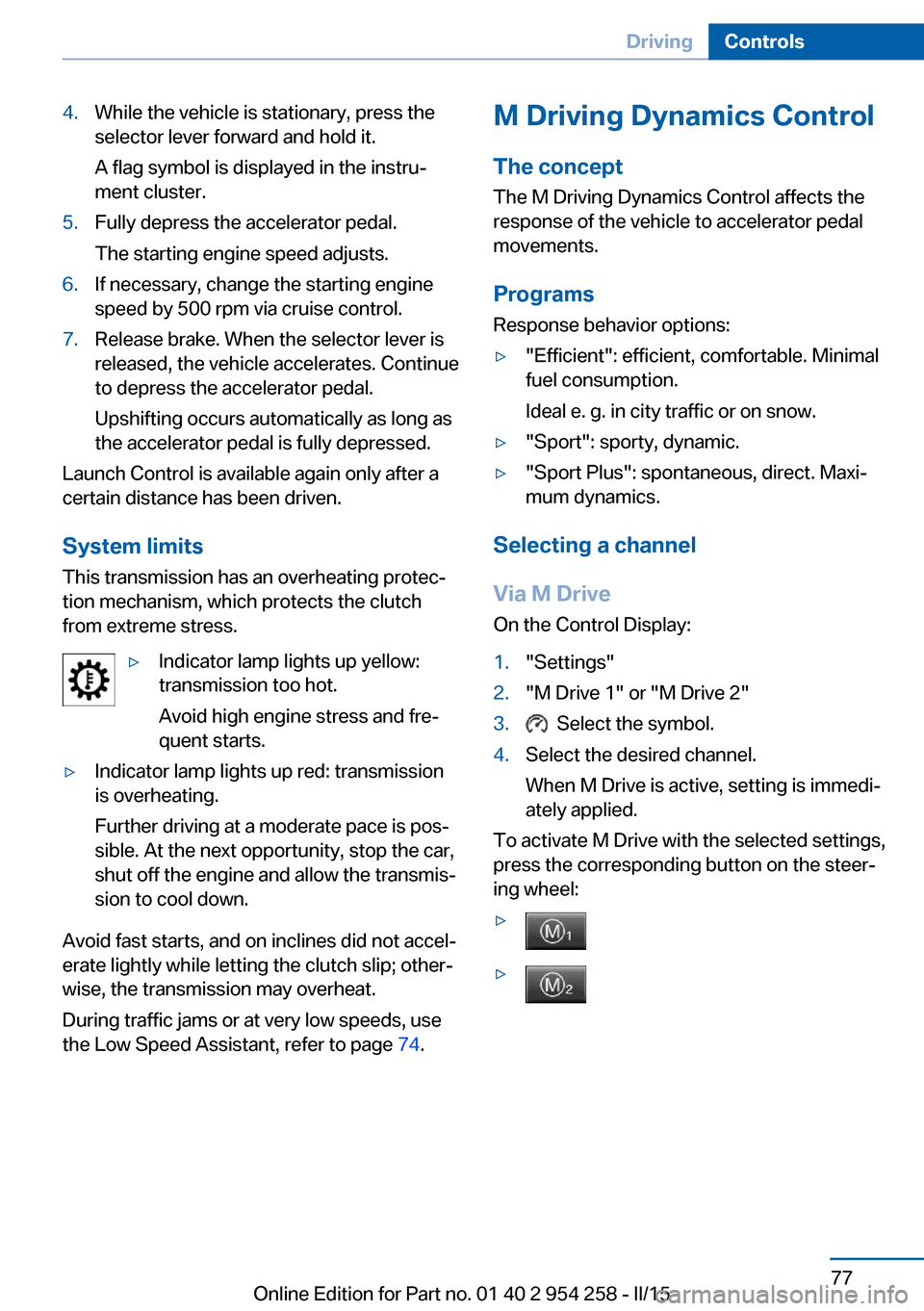
M Driving Dynamics Control
The concept The M Driving Dynamics Control affects the
response of the vehicle to accelerator pedal movements.
Programs Response behavior options:▷"Efficient": efficient, comfortable. Minimal
fuel consumption.
Ideal e. g. in city traffic or on snow.▷"Sport": sporty, dynamic.▷"Sport Plus": spontaneous, direct. Maxi‐
mum dynamics.
Selecting a channel
Via M Drive On the Control Display:
1."Settings"2."M Drive 1" or "M Drive 2"3. Select the symbol.4.Select the desired channel.
When M Drive is active, setting is immedi‐
ately applied.
To activate M Drive with the selected settings,
press the corresponding button on the steer‐
ing wheel:
▷▷Seite 77DrivingControls77
Online Edition for Part no. 01 40 2 954 258 - II/15
Page 86 of 226
For more information, see Tire Pressure Moni‐
tor, refer to page 104.
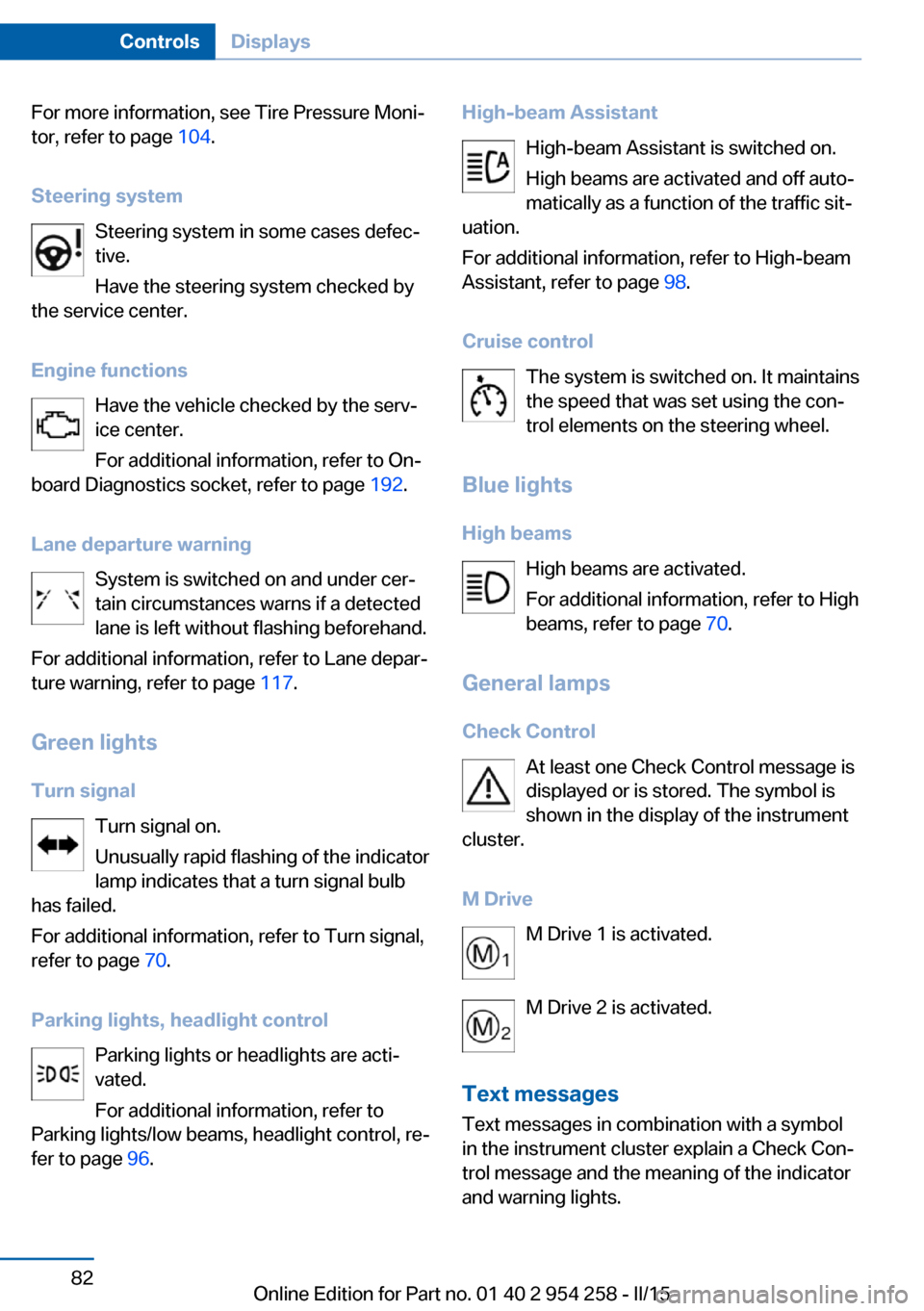
Steering system Steering system in some cases defec‐
tive.
Have the steering system checked by
the service center.
Engine functions Have the vehicle checked by the serv‐ice center.
For additional information, refer to On-
board Diagnostics socket, refer to page 192.
Lane departure warning System is switched on and under cer‐
tain circumstances warns if a detected
lane is left without flashing beforehand.
For additional information, refer to Lane depar‐
ture warning, refer to page 117.
Green lights Turn signal Turn signal on.
Unusually rapid flashing of the indicator
lamp indicates that a turn signal bulb
has failed.
For additional information, refer to Turn signal,
refer to page 70.
Parking lights, headlight control Parking lights or headlights are acti‐
vated.
For additional information, refer to
Parking lights/low beams, headlight control, re‐
fer to page 96.High-beam Assistant
High-beam Assistant is switched on.
High beams are activated and off auto‐
matically as a function of the traffic sit‐
uation.
For additional information, refer to High-beam
Assistant, refer to page 98.
Cruise control The system is switched on. It maintains
the speed that was set using the con‐
trol elements on the steering wheel.
Blue lights
High beams High beams are activated.
For additional information, refer to High
beams, refer to page 70.
General lamps
Check Control At least one Check Control message is
displayed or is stored. The symbol is
shown in the display of the instrument
cluster.
M Drive M Drive 1 is activated.
M Drive 2 is activated.
Text messages Text messages in combination with a symbol
in the instrument cluster explain a Check Con‐
trol message and the meaning of the indicator
and warning lights.Seite 82ControlsDisplays82
Online Edition for Part no. 01 40 2 954 258 - II/15
Page 113 of 226
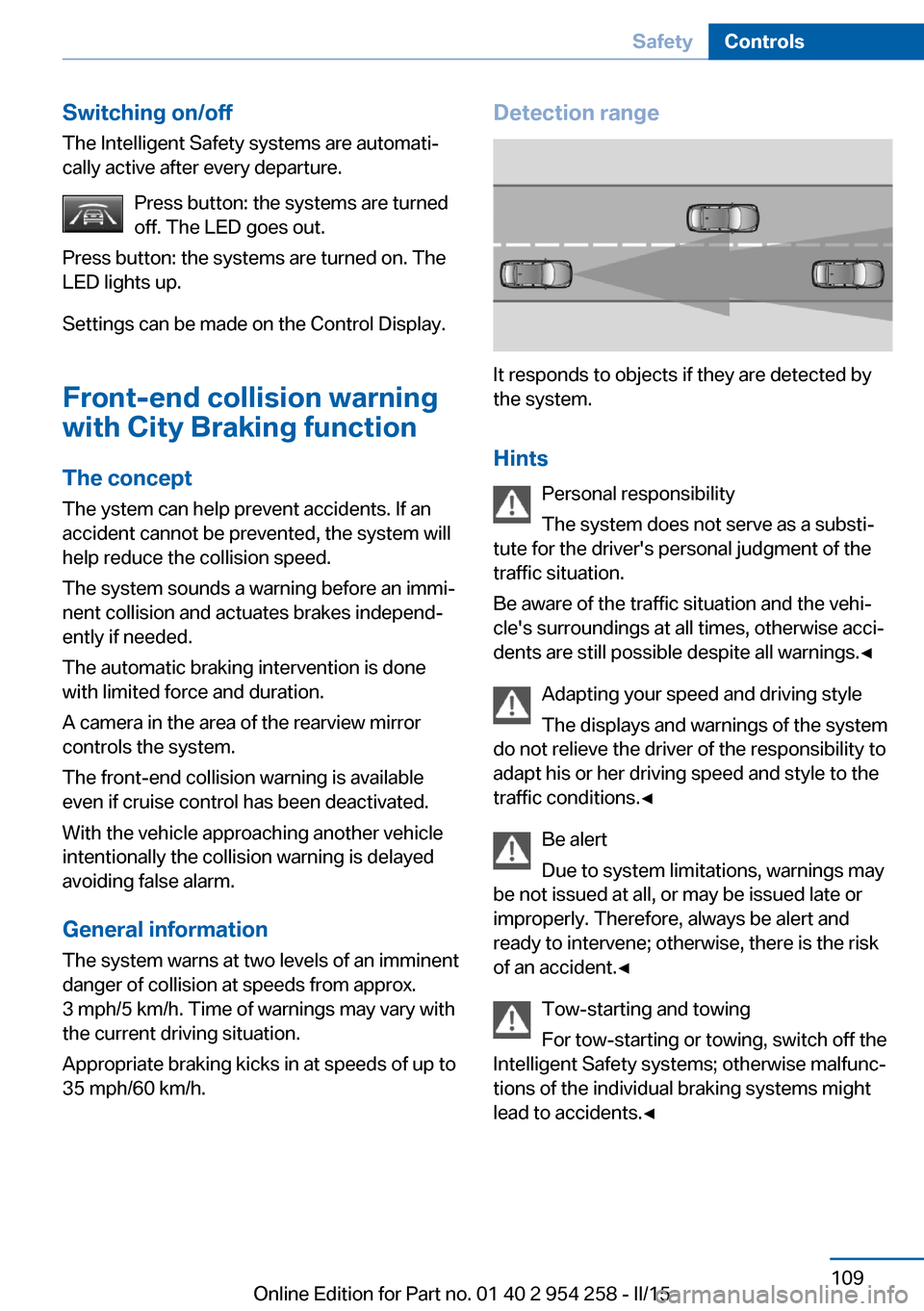
Switching on/offThe Intelligent Safety systems are automati‐
cally active after every departure.
Press button: the systems are turned
off. The LED goes out.
Press button: the systems are turned on. The
LED lights up.
Settings can be made on the Control Display.
Front-end collision warning
with City Braking function
The concept The ystem can help prevent accidents. If an
accident cannot be prevented, the system will help reduce the collision speed.
The system sounds a warning before an immi‐
nent collision and actuates brakes independ‐
ently if needed.
The automatic braking intervention is done
with limited force and duration.
A camera in the area of the rearview mirror controls the system.
The front-end collision warning is available
even if cruise control has been deactivated.
With the vehicle approaching another vehicle
intentionally the collision warning is delayed
avoiding false alarm.
General information
The system warns at two levels of an imminent
danger of collision at speeds from approx.
3 mph/5 km/h. Time of warnings may vary with
the current driving situation.
Appropriate braking kicks in at speeds of up to
35 mph/60 km/h.Detection range
It responds to objects if they are detected by
the system.
Hints Personal responsibility
The system does not serve as a substi‐
tute for the driver's personal judgment of the
traffic situation.
Be aware of the traffic situation and the vehi‐
cle's surroundings at all times, otherwise acci‐
dents are still possible despite all warnings.◀
Adapting your speed and driving style
The displays and warnings of the system
do not relieve the driver of the responsibility to
adapt his or her driving speed and style to the
traffic conditions.◀
Be alert
Due to system limitations, warnings may
be not issued at all, or may be issued late or
improperly. Therefore, always be alert and
ready to intervene; otherwise, there is the risk
of an accident.◀
Tow-starting and towing
For tow-starting or towing, switch off the
Intelligent Safety systems; otherwise malfunc‐
tions of the individual braking systems might
lead to accidents.◀
Seite 109SafetyControls109
Online Edition for Part no. 01 40 2 954 258 - II/15
Page 133 of 226
Driving comfortVehicle features and options
This chapter describes all standard, country-
specific and optional features offered with the
series. It also describes features that are not
necessarily available in your car, e. g., due to
the selected options or country versions. This
also applies to safety-related functions and
systems. The respectively applicable country
provisions must be observed when using the
respective features and systems.
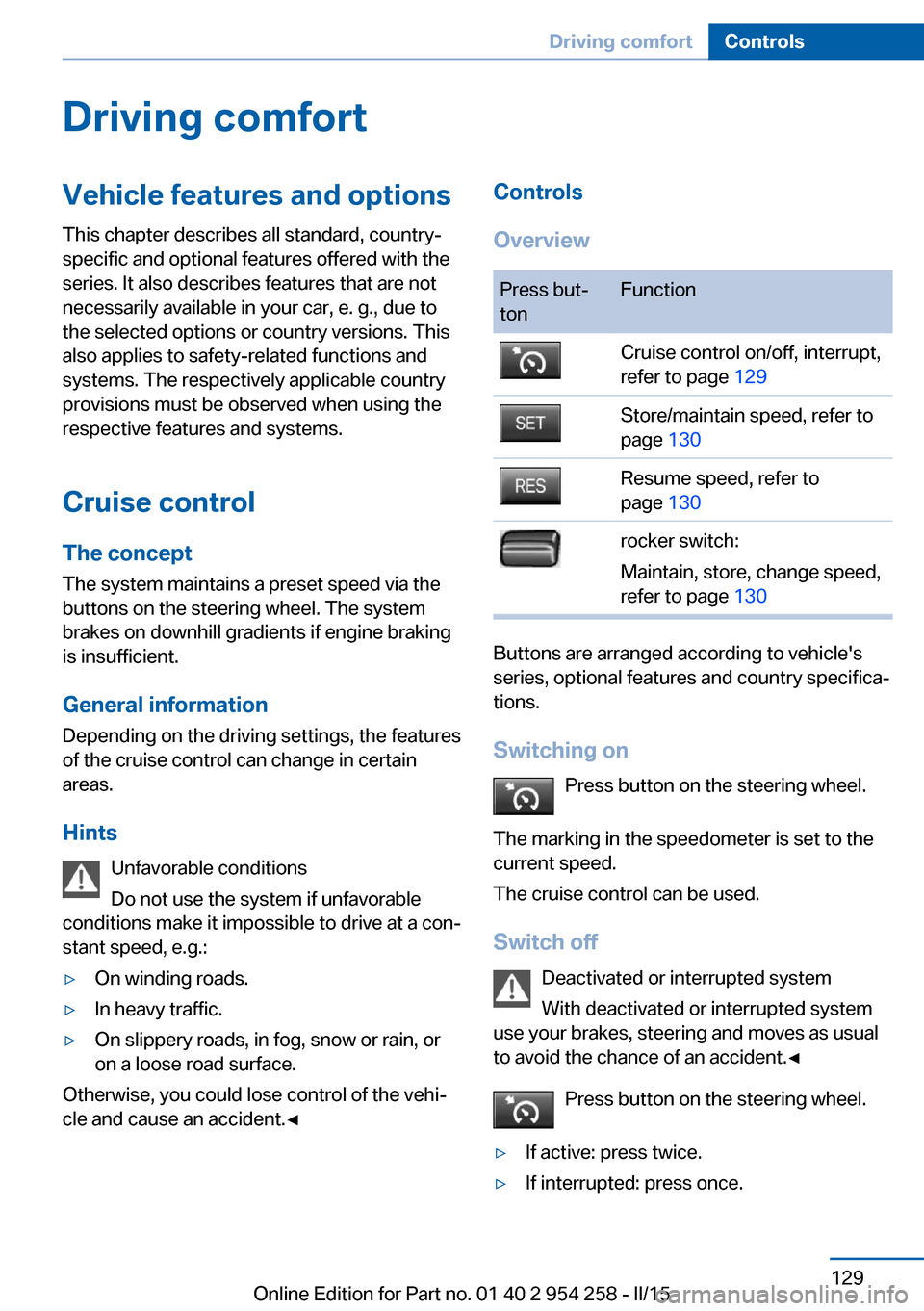
Cruise control The concept The system maintains a preset speed via the
buttons on the steering wheel. The system brakes on downhill gradients if engine braking
is insufficient.
General information
Depending on the driving settings, the features
of the cruise control can change in certain
areas.
Hints Unfavorable conditions
Do not use the system if unfavorable
conditions make it impossible to drive at a con‐
stant speed, e.g.:▷On winding roads.▷In heavy traffic.▷On slippery roads, in fog, snow or rain, or
on a loose road surface.
Otherwise, you could lose control of the vehi‐
cle and cause an accident.◀
Controls
OverviewPress but‐
tonFunctionCruise control on/off, interrupt,
refer to page 129Store/maintain speed, refer to
page 130Resume speed, refer to
page 130rocker switch:
Maintain, store, change speed,
refer to page 130
Buttons are arranged according to vehicle's
series, optional features and country specifica‐
tions.
Switching on Press button on the steering wheel.
The marking in the speedometer is set to the
current speed.
The cruise control can be used.
Switch off Deactivated or interrupted system
With deactivated or interrupted system
use your brakes, steering and moves as usual
to avoid the chance of an accident.◀
Press button on the steering wheel.
▷If active: press twice.▷If interrupted: press once.Seite 129Driving comfortControls129
Online Edition for Part no. 01 40 2 954 258 - II/15
Page 134 of 226
The displays go out. The stored desired speed
is deleted.
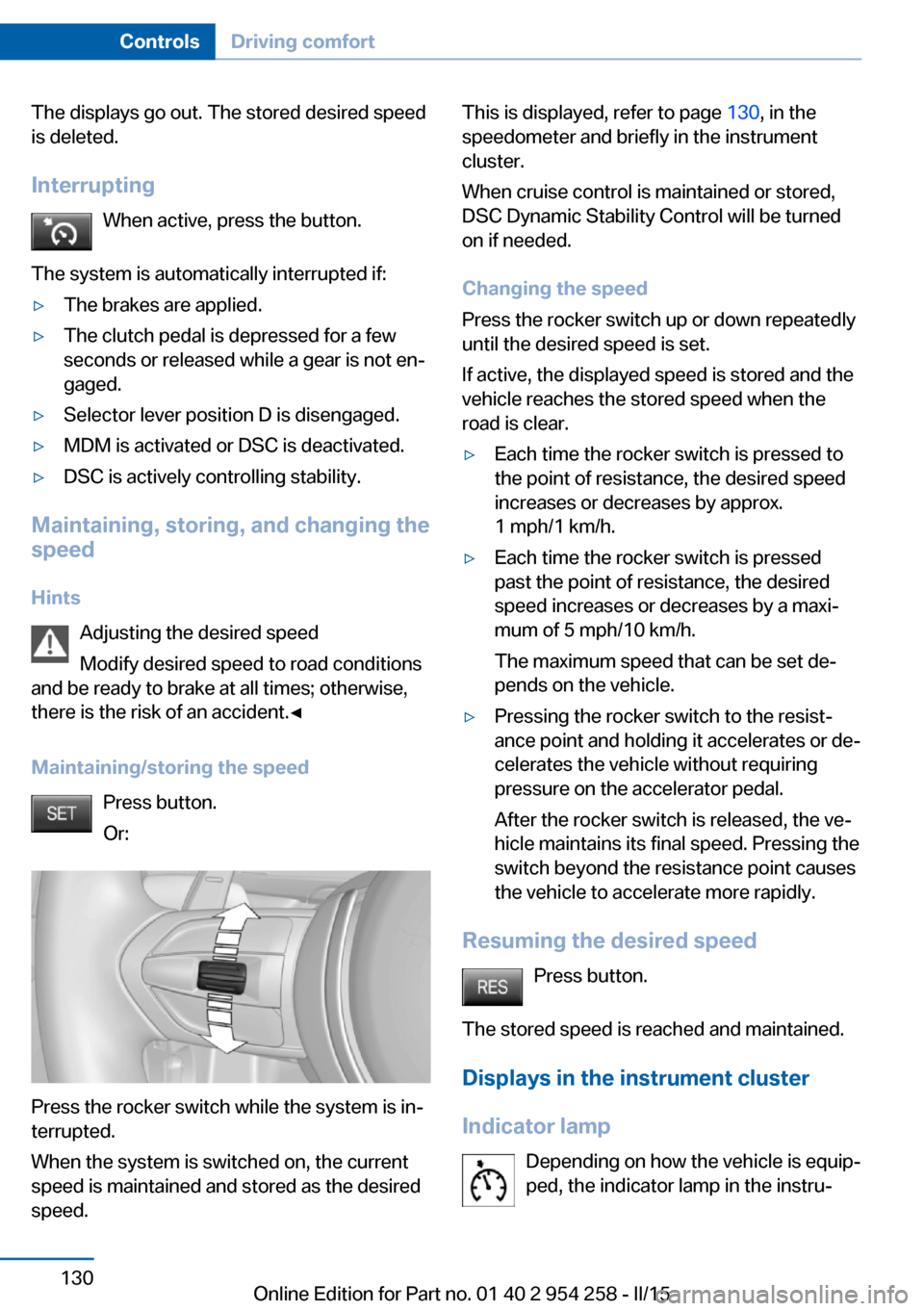
Interrupting When active, press the button.
The system is automatically interrupted if:▷The brakes are applied.▷The clutch pedal is depressed for a few
seconds or released while a gear is not en‐
gaged.▷Selector lever position D is disengaged.▷MDM is activated or DSC is deactivated.▷DSC is actively controlling stability.
Maintaining, storing, and changing the
speed
Hints Adjusting the desired speed
Modify desired speed to road conditions
and be ready to brake at all times; otherwise,
there is the risk of an accident.◀
Maintaining/storing the speed Press button.
Or:
Press the rocker switch while the system is in‐
terrupted.
When the system is switched on, the current
speed is maintained and stored as the desired
speed.
This is displayed, refer to page 130, in the
speedometer and briefly in the instrument
cluster.
When cruise control is maintained or stored,
DSC Dynamic Stability Control will be turned
on if needed.
Changing the speed
Press the rocker switch up or down repeatedly
until the desired speed is set.
If active, the displayed speed is stored and the
vehicle reaches the stored speed when the
road is clear.▷Each time the rocker switch is pressed to
the point of resistance, the desired speed
increases or decreases by approx.
1 mph/1 km/h.▷Each time the rocker switch is pressed
past the point of resistance, the desired
speed increases or decreases by a maxi‐
mum of 5 mph/10 km/h.
The maximum speed that can be set de‐
pends on the vehicle.▷Pressing the rocker switch to the resist‐
ance point and holding it accelerates or de‐
celerates the vehicle without requiring
pressure on the accelerator pedal.
After the rocker switch is released, the ve‐
hicle maintains its final speed. Pressing the
switch beyond the resistance point causes
the vehicle to accelerate more rapidly.
Resuming the desired speed
Press button.
The stored speed is reached and maintained. Displays in the instrument cluster
Indicator lamp Depending on how the vehicle is equip‐
ped, the indicator lamp in the instru‐
Seite 130ControlsDriving comfort130
Online Edition for Part no. 01 40 2 954 258 - II/15
Page 218 of 226
Cornering light 97
Corrosion on brake discs 165
Cosmetic mirror 149
Courtesy lamps during un‐ locking 37
Courtesy lamps with the vehi‐ cle locked 38
Cruise control 129
Cruising range 85
Cupholder 156
Current fuel consumption 85
D
Damage, tires 179
Damping control 127
Damping control, dy‐ namic 127
Data, technical 210
Date 84
Daytime running lights 97
Defrosting, refer to Windows, defrosting 141
Dehumidifying, air 142
Deleting personal data 24
Deletion of personal data 24
Destination distance 90
Differential lock 127
Digital clock 84
Digital speed 84
Digital tachometer 84
Dimensions 210
Dimmable exterior mirrors 58
Dimmable interior rearview mirror 58
Direction indicator, refer to Turn signals 70
Display EfficientDynamics 86
Display, electronic, instru‐ ment cluster 79
Display in windshield 93
Display lighting, refer to In‐ strument lighting 99
Displays, cleaning 207
Disposal, coolant 190
Disposal, vehicle battery 196 Distance control, refer to
PDC 131
Distance to destination 90
Divided screen view, split screen 23
Door lock 39
Door lock, refer to Remote control 34
Doors, Automatic Soft Clos‐ ing 40
Double-clutch transmis‐ sion 73
Drivelogic 75
Drive mode 74
Drive-off assistant 123
Drive-off assistant, refer to DSC 125
Driver assistance, refer to In‐ telligent Safety 108
Driving Assistant, refer to In‐ telligent Safety 108
Driving Dynamics Control 77
Driving instructions, break- in 162
Driving notes, general 163
Driving on racetracks 161
Driving program, refer to Drivelogic 75
Driving stability control sys‐ tems 123
Driving tips 163
DSC Dynamic Stability Con‐ trol 125
Dynamic Damping Con‐ trol 127
Dynamic driving systems 86
Dynamic driving, system states 86
Dynamic Stability Control DSC 125
E EfficientDynamics 86
Electronic displays, instru‐ ment cluster 79 Electronic oil measure‐
ment 187
Electronic Stability Program ESP, refer to DSC 125
Emergency detection, remote control 35
Emergency release, fuel filler flap 172
Emergency Request 198
Emergency start function, en‐ gine start 35
Emergency unlocking, trunk lid 41
Energy Control 85
Energy recovery 85
Engine, automatic Start/Stop function 66
Engine, automatic switch- off 66
Engine compartment 185
Engine compartment, work‐ ing in 185
Engine coolant 190
Engine oil 187
Engine oil, adding 188
Engine oil additives 188
Engine oil change 189
Engine oil filler neck 188
Engine oil temperature 83
Engine oil types, alterna‐ tive 189
Engine oil types, ap‐ proved 189
Engine start during malfunc‐ tion 35
Engine start, jump-start‐ ing 199
Engine start, refer to Starting the engine 65
Engine stop 65
Engine temperature 83
Entering/exiting vehicle, as‐ sistance, steering wheel 59
Entering a car wash 204
Equipment, interior 147 Seite 214ReferenceEverything from A to Z214
Online Edition for Part no. 01 40 2 954 258 - II/15
Page 222 of 226
PPaint, vehicle 205
Park Distance Control PDC 131
Parked-car ventilation 145
Parked vehicle, condensa‐ tion 165
Parking aid, refer to PDC 131
Parking brake 68
Parking lights 96
Parts and accessories 7
Passenger side mirror, tilting downward 57
Pathway lines, rearview cam‐ era 135
PDC Park Distance Con‐ trol 131
Pedestrian detection, see Night Vision 114
Pedestrian warning with city braking function 111
Personal Profile 35
Personal Profile, exporting profiles 36
Pinch protection system, glass sunroof 48
Pinch protection system, win‐ dows 46
Plastic, care 206
Power failure 196
Power sunroof, glass 48
Power windows 45
Pressure, tire air pres‐ sure 176
Pressure warning FTM, tires 107
Preventing Auto Start Stop 67
Profile, refer to Personal Pro‐ file 35
Programmable memory but‐ tons, iDrive 23
Protective function, glass sunroof 48 Protective function, win‐
dows 46
Push-and-turn switch, refer to Controller 18
R Radiator fluid 190
Radio-operated key, refer to Remote control 34
Radio ready state 64
Radio, see user's manual for Navigation, Entertainment
and Communication
Rain sensor 71
Rear automatic climate con‐ trol 143
Rear center armrest 155
Rear lights 195
Rearview camera 133
Rearview mirror 57
Rear window defroster 142
Recirculated-air mode 142
Recommended fuel grade 174
Recommended tire brands 180
Refueling 172
Remaining range 85
Remote control/key 34
Remote control, malfunc‐ tion 38
Remote control, univer‐ sal 147
Replacement fuse 197
Replacing bulbs, see Lamp replacement 193
Replacing parts 193
Replacing wheels/tires 180
Reporting safety defects 9
RES button, see Cruise con‐ trol 129
Reserve warning, refer to Range 85
Reset, Tire Pressure Monitor TPM 105 Residual heat, automatic cli‐
mate control 143
Retaining straps, securing cargo 167
Retreaded tires 180
Reversing lamp, bulb replace‐ ment 195
Roadside parking lights 97
Roller sunblinds 47
RON recommended fuel grade 174
Rope for tow-starting/ towing 202
Rubber components, care 206
S
Safe braking 164
Safety 7
Safety belt reminder for driv‐ er's seat and front passen‐
ger seat 54
Safety belts 53
Safety belts, care 207
Safety Package, refer to Ac‐ tive Protection 120
Safety switch, windows 46
Safety systems, airbags 101
Saving fuel 168
Screen, refer to Control Dis‐ play 18
Screwdriver, see Onboard ve‐ hicle tool kit 193
Screw thread, refer to Screw thread for tow fitting, screw
thread for tow fitting 203
Sealant 181
Seat belts, refer to Safety belts 53
Seat heating, front 52
Seat heating, rear 53
Seating position for chil‐ dren 60
Seat, mirror, and steering wheel memory 56 Seite 218ReferenceEverything from A to Z218
Online Edition for Part no. 01 40 2 954 258 - II/15
Page 223 of 226
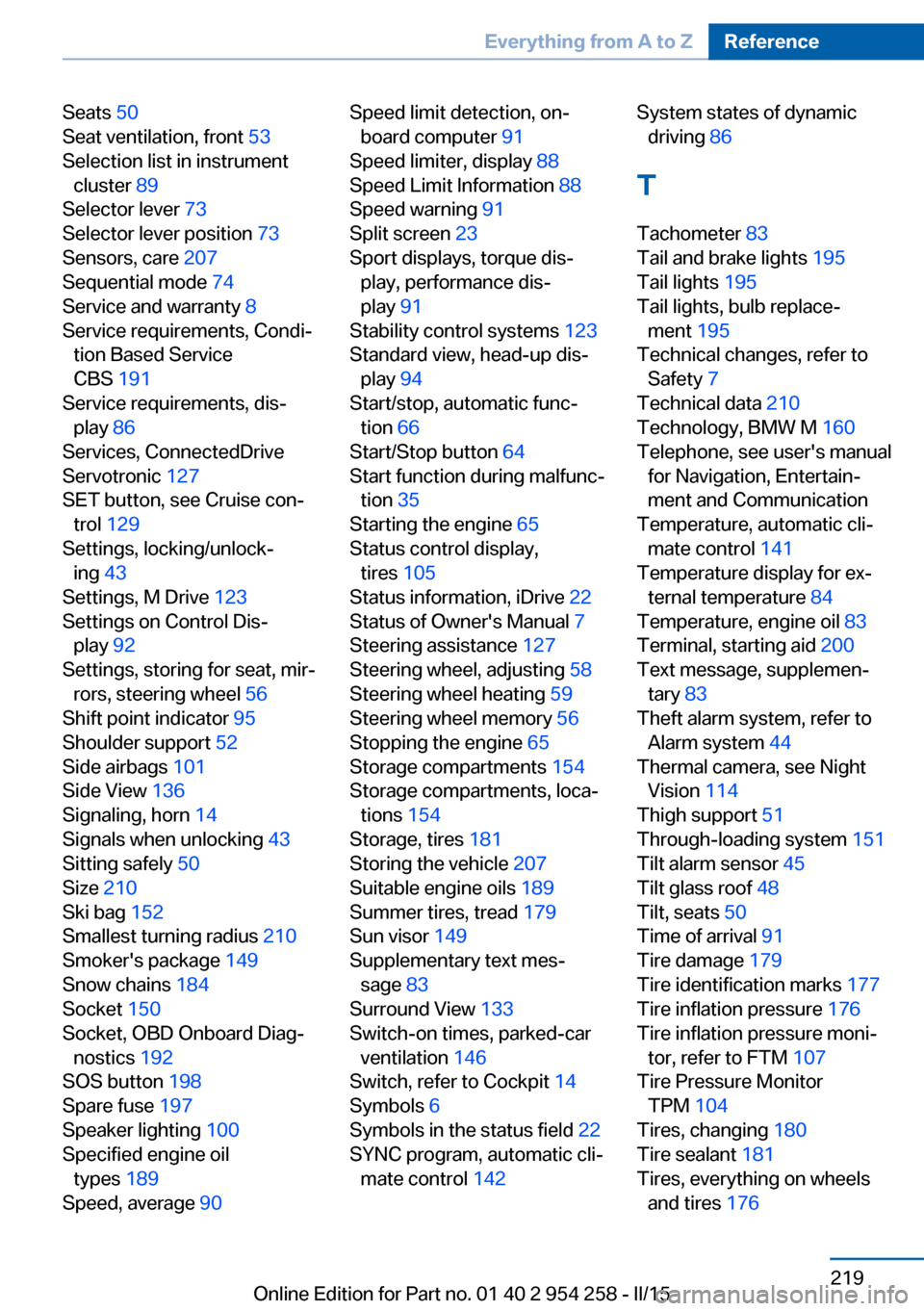
Seats 50
Seat ventilation, front 53
Selection list in instrument cluster 89
Selector lever 73
Selector lever position 73
Sensors, care 207
Sequential mode 74
Service and warranty 8
Service requirements, Condi‐ tion Based Service
CBS 191
Service requirements, dis‐ play 86
Services, ConnectedDrive
Servotronic 127
SET button, see Cruise con‐ trol 129
Settings, locking/unlock‐ ing 43
Settings, M Drive 123
Settings on Control Dis‐ play 92
Settings, storing for seat, mir‐ rors, steering wheel 56
Shift point indicator 95
Shoulder support 52
Side airbags 101
Side View 136
Signaling, horn 14
Signals when unlocking 43
Sitting safely 50
Size 210
Ski bag 152
Smallest turning radius 210
Smoker's package 149
Snow chains 184
Socket 150
Socket, OBD Onboard Diag‐ nostics 192
SOS button 198
Spare fuse 197
Speaker lighting 100
Specified engine oil types 189
Speed, average 90 Speed limit detection, on-
board computer 91
Speed limiter, display 88
Speed Limit Information 88
Speed warning 91
Split screen 23
Sport displays, torque dis‐ play, performance dis‐
play 91
Stability control systems 123
Standard view, head-up dis‐ play 94
Start/stop, automatic func‐ tion 66
Start/Stop button 64
Start function during malfunc‐ tion 35
Starting the engine 65
Status control display, tires 105
Status information, iDrive 22
Status of Owner's Manual 7
Steering assistance 127
Steering wheel, adjusting 58
Steering wheel heating 59
Steering wheel memory 56
Stopping the engine 65
Storage compartments 154
Storage compartments, loca‐ tions 154
Storage, tires 181
Storing the vehicle 207
Suitable engine oils 189
Summer tires, tread 179
Sun visor 149
Supplementary text mes‐ sage 83
Surround View 133
Switch-on times, parked-car ventilation 146
Switch, refer to Cockpit 14
Symbols 6
Symbols in the status field 22
SYNC program, automatic cli‐ mate control 142 System states of dynamic
driving 86
T
Tachometer 83
Tail and brake lights 195
Tail lights 195
Tail lights, bulb replace‐ ment 195
Technical changes, refer to Safety 7
Technical data 210
Technology, BMW M 160
Telephone, see user's manual for Navigation, Entertain‐
ment and Communication
Temperature, automatic cli‐ mate control 141
Temperature display for ex‐ ternal temperature 84
Temperature, engine oil 83
Terminal, starting aid 200
Text message, supplemen‐ tary 83
Theft alarm system, refer to Alarm system 44
Thermal camera, see Night Vision 114
Thigh support 51
Through-loading system 151
Tilt alarm sensor 45
Tilt glass roof 48
Tilt, seats 50
Time of arrival 91
Tire damage 179
Tire identification marks 177
Tire inflation pressure 176
Tire inflation pressure moni‐ tor, refer to FTM 107
Tire Pressure Monitor TPM 104
Tires, changing 180
Tire sealant 181
Tires, everything on wheels and tires 176 Seite 219Everything from A to ZReference219
Online Edition for Part no. 01 40 2 954 258 - II/15