tec BMW X3 3.0I 2004 E83 User Guide
[x] Cancel search | Manufacturer: BMW, Model Year: 2004, Model line: X3 3.0I, Model: BMW X3 3.0I 2004 E83Pages: 132, PDF Size: 3.62 MB
Page 29 of 132
Reference
At a glance
Controls
Driving tips
Mobility
27
Adjustments
Sitting safely
The ideal sitting position can make a vital
contribution to relaxed driving that is as
fatigue-free as possible. The sitting posi-
tion plays an important role together with
the safety belts and airbags in providing
occupants with maximum levels of passive
safety in an accident. Therefore, observe
the following instructions, as otherwise the
protective function of the safety systems
may be impaired.
For additional information on transporting
children safely, refer to page 34.
Sitting safely with airbags
Always maintain an adequate dis-
tance between yourself and the air-
bags. Always hold the steering wheel by
its rim with hands at the 9 o'clock and
3 o'clock positions, to minimize the risk of
injuries to your hands and arms in the event
of airbag deployment.
No one and nothing is to come between the
airbags and the seat occupant.
Do not use the cover of the front airbag on
the front passenger side as a storage area.
Make sure that the front passenger is cor-
rectly seated, i.e. feet or legs not resting on
the instrument panel, as otherwise leg inju-
ries can result if the knee and front airbag is
triggered.
Never let an occupant's head rest near or
on a side airbag because the inflating air-
bag could cause a serious or fatal injury.<
Even if you adhere to all the instructions
injuries resulting from contact with airbags
cannot be fully excluded, depending on the
circumstances. The ignition and inflation
noise may provoke a mild Ð usually tempo-
rary Ð hearing loss in extremely sensitive
individuals.
For airbag locations and additional infor-
mation on airbags, refer to page 54.
Sitting safely with safety belts
Even though there is an airbag, wear a
safety belt every time you get in the vehi-
cle. Although airbags enhance safety by
providing added protection, they are not a
substitute for safety belts.
Your vehicle has five seats that are all
equipped with a safety belt.
Occupants should sit upright and be
properly restrained at all times:
infants and small children in appropriate
child-restraint systems; larger children and
adults using the safety belts.
Expectant mothers should always wear
their safety belts, taking care to position
the lap belt against the lower hips, where it
will not exert pressure against the abdomi-
nal area.
Never allow more than one person to wear
a single safety belt. Never allow infants and
small children to ride in a passengers lap.
Do not route the belt across your neck, or
run it across sharp edges. Be sure that the
belt does not become caught or jammed.
Avoid twisting the belt while routing it firmly
across the hips and shoulder. Do not allow
the belt to rest against hard or fragile
objects. Otherwise, in the event of a frontal
impact, a loose lap belt could slide over
your hips, leading to abdominal injury.
Avoid wearing clothing that prevents the
belt from fitting properly and pull the lap
belt periodically to readjust the tension
across your shoulder in order to avoid a
reduction in the retention effect of the
safety belt.<
For fastening safety belts, refer to page 30.
Seats
Note before adjusting
Never try to adjust your seat while
operating the vehicle. The seat could
respond with unexpected movement, and
Page 30 of 132
Adjustments
28 the ensuing loss of vehicle control could
lead to an accident.
Especially on the passenger's side, do not
incline the backrest too far to the rear while
the vehicle is being driven, as otherwise
there is a danger in the event of an accident
of sliding under the safety belt, eliminating
the protection normally provided by the
belt.<
Please observe the information on using
safety belts provided on page 30 and the
information on the head restraints on
page 28.
Seat adjustment
To ensure that the safety systems
continue to provide optimized protec-
tion, please observe the adjustment
instructions above.<
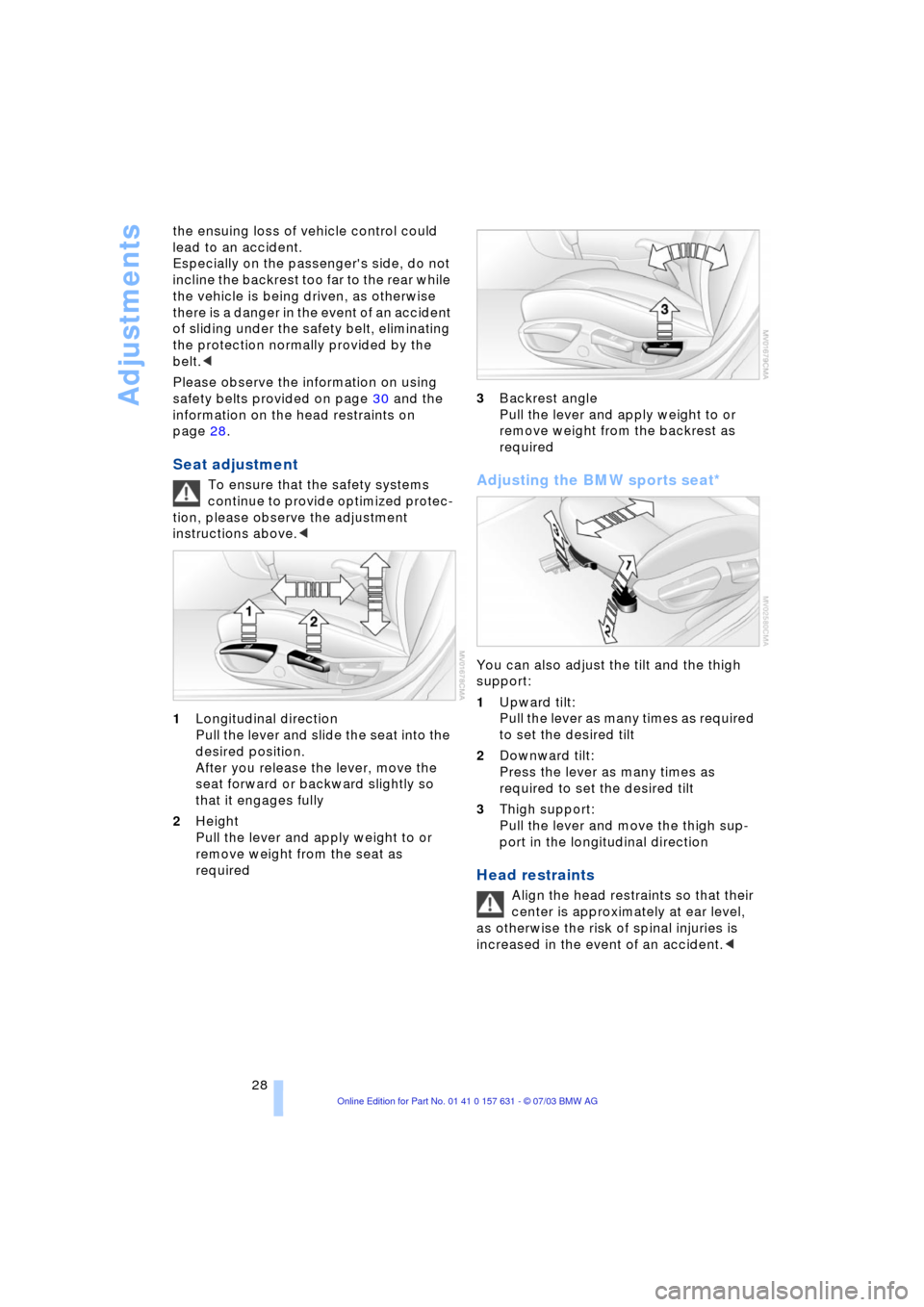
1Longitudinal direction
Pull the lever and slide the seat into the
desired position.
After you release the lever, move the
seat forward or backward slightly so
that it engages fully
2Height
Pull the lever and apply weight to or
remove weight from the seat as
required3Backrest angle
Pull the lever and apply weight to or
remove weight from the backrest as
requiredAdjusting the BMW sports seat*
You can also adjust the tilt and the thigh
support:
1Upward tilt:
Pull the lever as many times as required
to set the desired tilt
2Downward tilt:
Press the lever as many times as
required to set the desired tilt
3Thigh support:
Pull the lever and move the thigh sup-
port in the longitudinal direction
Head restraints
Align the head restraints so that their
center is approximately at ear level,
as otherwise the risk of spinal injuries is
increased in the event of an accident.<
Page 31 of 132
Reference
At a glance
Controls
Driving tips
Mobility
29
Adjustments
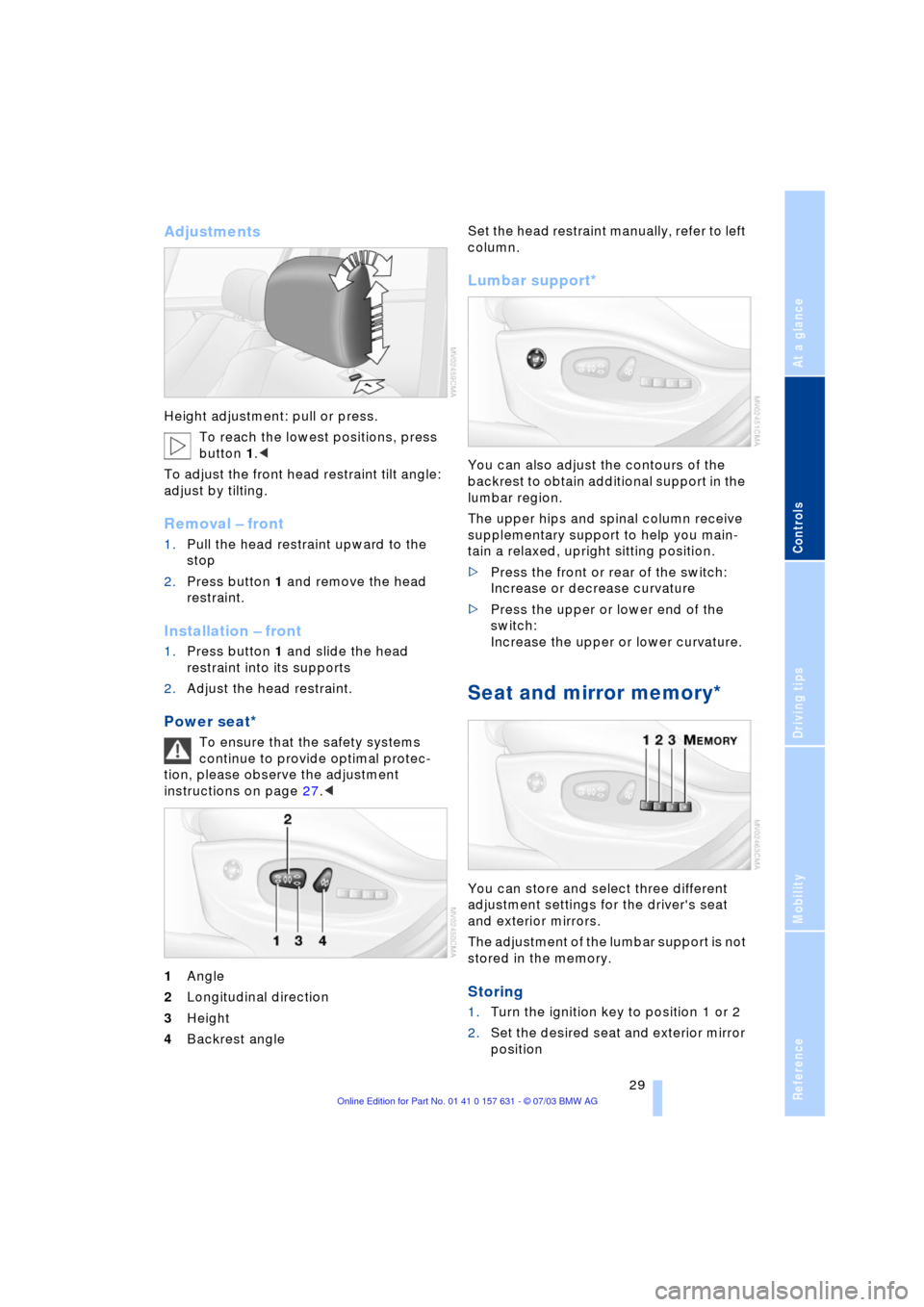
Height adjustment: pull or press.
To reach the lowest positions, press
button 1.<
To adjust the front head restraint tilt angle:
adjust by tilting.
Removal Ð front
1.Pull the head restraint upward to the
stop
2.Press button 1 and remove the head
restraint.
Installation Ð front
1.Press button 1 and slide the head
restraint into its supports
2.Adjust the head restraint.
Power seat*
To ensure that the safety systems
continue to provide optimal protec-
tion, please observe the adjustment
instructions on page 27.<
1Angle
2Longitudinal direction
3Height
4Backrest angle Set the head restraint manually, refer to left
column.
Lumbar support*
You can also adjust the contours of the
backrest to obtain additional support in the
lumbar region.
The upper hips and spinal column receive
supplementary support to help you main-
tain a relaxed, upright sitting position.
>Press the front or rear of the switch:
Increase or decrease curvature
>Press the upper or lower end of the
switch:
Increase the upper or lower curvature.
Seat and mirror memory*
You can store and select three different
adjustment settings for the driver's seat
and exterior mirrors.
The adjustment of the lumbar support is not
stored in the memory.
Storing
1.Turn the ignition key to position 1 or 2
2.Set the desired seat and exterior mirror
position
Page 32 of 132
Adjustments
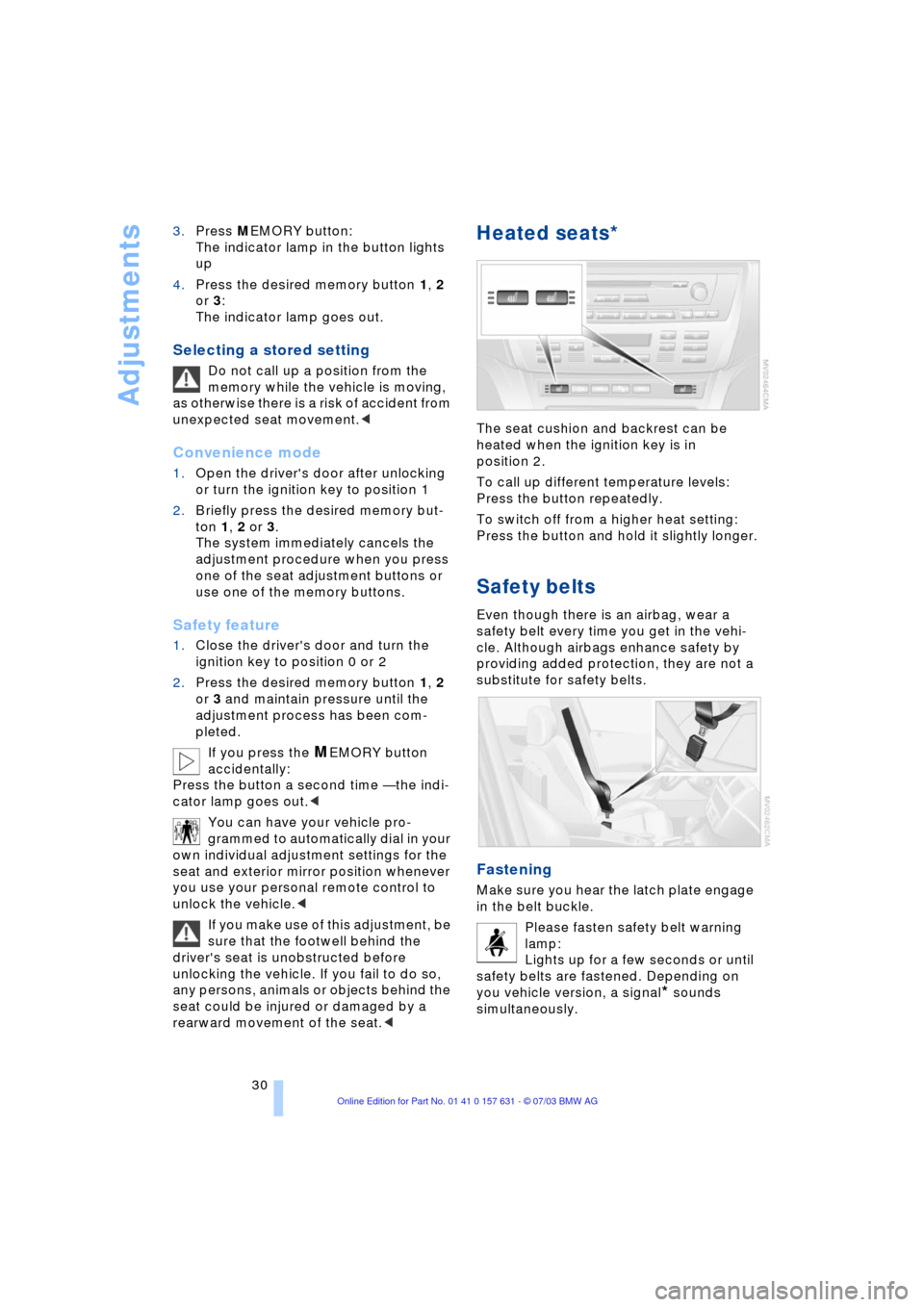
30 3.Press MEMORY button:
The indicator lamp in the button lights
up
4.Press the desired memory button 1, 2
or 3:
The indicator lamp goes out.
Selecting a stored setting
Do not call up a position from the
memory while the vehicle is moving,
as otherwise there is a risk of accident from
unexpected seat movement.<
Convenience mode
1.Open the driver's door after unlocking
or turn the ignition key to position 1
2.Briefly press the desired memory but-
ton 1, 2 or 3.
The system immediately cancels the
adjustment procedure when you press
one of the seat adjustment buttons or
use one of the memory buttons.
Safety feature
1.Close the driver's door and turn the
ignition key to position 0 or 2
2.Press the desired memory button 1, 2
or 3 and maintain pressure until the
adjustment process has been com-
pleted.
If you press the
MEMORY button
accidentally:
Press the button a second time Ñ the indi-
cator lamp goes out.<
You can have your vehicle pro-
grammed to automatically dial in your
own individual adjustment settings for the
seat and exterior mirror position whenever
you use your personal remote control to
unlock the vehicle.<
If you make use of this adjustment, be
sure that the footwell behind the
driver's seat is unobstructed before
unlocking the vehicle. If you fail to do so,
any persons, animals or objects behind the
seat could be injured or damaged by a
rearward movement of the seat.<
Heated seats*
The seat cushion and backrest can be
heated when the ignition key is in
position 2.
To call up different temperature levels:
Press the button repeatedly.
To switch off from a higher heat setting:
Press the button and hold it slightly longer.
Safety belts
Even though there is an airbag, wear a
safety belt every time you get in the vehi-
cle. Although airbags enhance safety by
providing added protection, they are not a
substitute for safety belts.
Fastening
Make sure you hear the latch plate engage
in the belt buckle.
Please fasten safety belt warning
lamp:
Lights up for a few seconds or until
safety belts are fastened. Depending on
you vehicle version, a signal
* sounds
simultaneously.
Page 33 of 132
Reference
At a glance
Controls
Driving tips
Mobility
31
Releasing
1.Press the red button in the buckle
2.Hold the belt
3.Guide the belt back into its reel.
The upper shoulder strap's anchorage
point will be in the correct position for seat
occupants of every build if the seat is cor-
rectly adjusted, refer to page 27.
The two rear safety belt buckles integrated
in the rear seat are for passengers sitting
on the left and right. The belt buckle
embossed with the word CENTER is
intended exclusively for use by passengers
riding in the center position.<
Damage to safety belts
If the safety belts are damaged or
stretched in an accident: have the
entire belt system, including the tensioning
mechanisms, replaced at your BMW Sports
Activity Vehicle Center. Have the belt
anchorage points inspected for damage at
the same time. Failure to observe this pre-
caution may prevent the safety belts from
effectively providing optimal protection
when needed. If a child-restraint system
was in the vehicle during an accident, con-
sult the manufacturer's instructions regard-
ing replacement.<
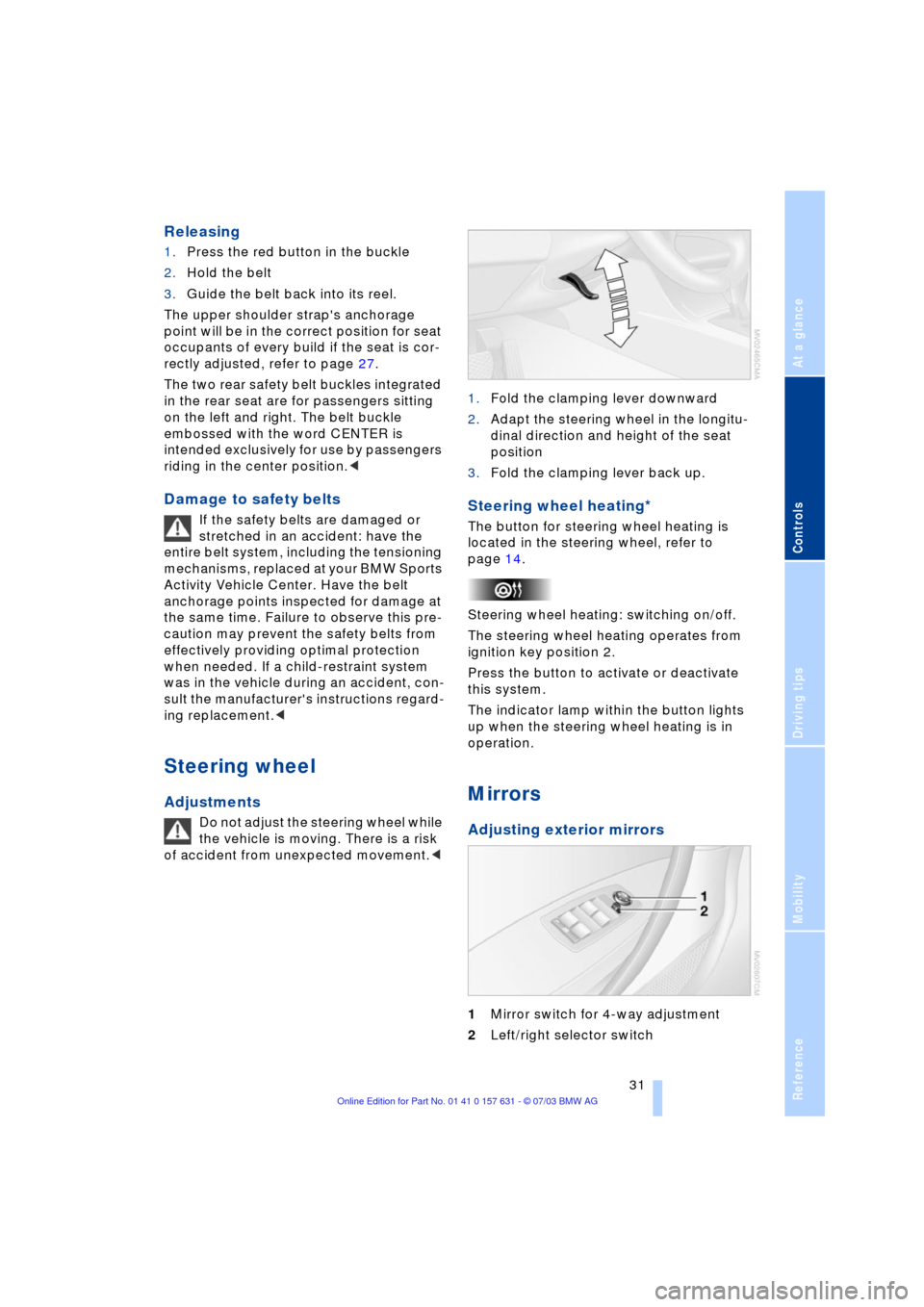
Steering wheel
Adjustments
Do not adjust the steering wheel while
the vehicle is moving. There is a risk
of accident from unexpected movement.< 1.Fold the clamping lever downward
2.Adapt the steering wheel in the longitu-
dinal direction and height of the seat
position
3.Fold the clamping lever back up.
Steering wheel heating*
The button for steering wheel heating is
located in the steering wheel, refer to
page 14.
Steering wheel heating: switching on/off.
The steering wheel heating operates from
ignition key position 2.
Press the button to activate or deactivate
this system.
The indicator lamp within the button lights
up when the steering wheel heating is in
operation.
Mirrors
Adjusting exterior mirrors
1Mirror switch for 4-way adjustment
2Left/right selector switch
Page 37 of 132
Reference
At a glance
Controls
Driving tips
Mobility
35
Installing child-restraint
systems
Before installing any child-restraint system
or child seat, read the following:
Observe the child-restraint system
manufacturer's instructions for instal-
lation and use. Otherwise the degree of
protection can be reduced.
After an accident, have all parts of the rele-
vant vehicle safety belt system checked by
a BMW Sports Activity Vehicle Center and
replaced if necessary.<
Commercially-available child-restraint sys-
tems are designed to be secured with a lap
belt or with the lap belt portion of a combi-
nation lap/shoulder belt. Improperly or
inadequately installed restraint systems
can increase the risk of injury to children.
Always read and follow the instructions that
come with the system.
Child seat security
All of the rear belt retractors and the front
passenger's safety belt can be locked for
mounting and securing child-restraint sys-
tems.
Information regarding this is located near
the buckle latch of each safety belt.
To lock the safety belt
Pull the entire length of the belt from the
belt retractor. Allow the reel to retract the
belt somewhat and engage the buckle,
then tighten the belt against the child-
restraint system. The retraction mechanism
is now locked.
To unlock the safety belt
Release the buckle, remove the child-
restraint system and allow the belt retractor
to reel the belt completely in.
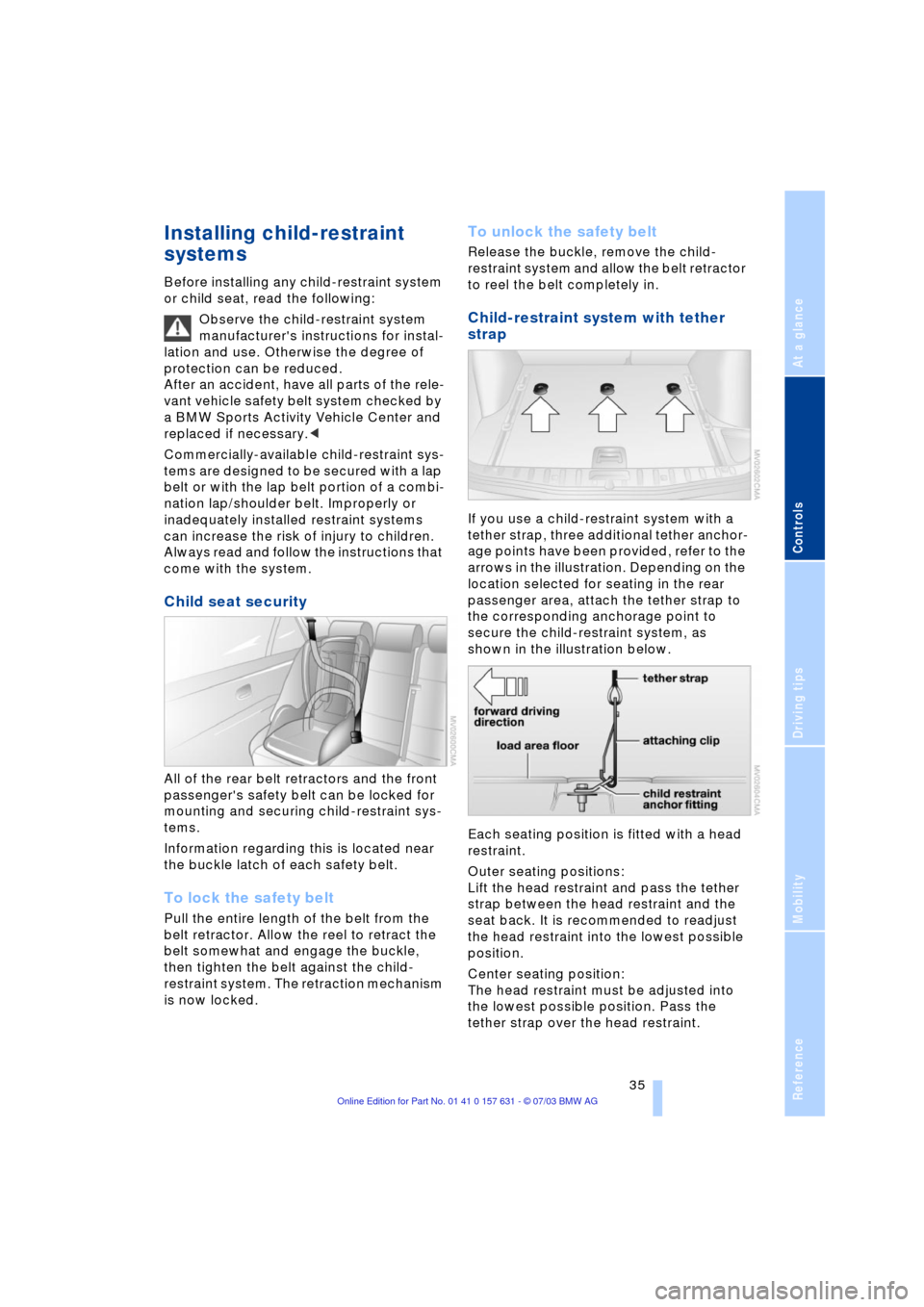
Child-restraint system with tether
strap
If you use a child-restraint system with a
tether strap, three additional tether anchor-
age points have been provided, refer to the
arrows in the illustration. Depending on the
location selected for seating in the rear
passenger area, attach the tether strap to
the corresponding anchorage point to
secure the child-restraint system, as
shown in the illustration below.
Each seating position is fitted with a head
restraint.
Outer seating positions:
Lift the head restraint and pass the tether
strap between the head restraint and the
seat back. It is recommended to readjust
the head restraint into the lowest possible
position.
Center seating position:
The head restraint must be adjusted into
the lowest possible position. Pass the
tether strap over the head restraint.
Page 47 of 132
Reference
At a glance
Controls
Driving tips
Mobility
45
Everything under control
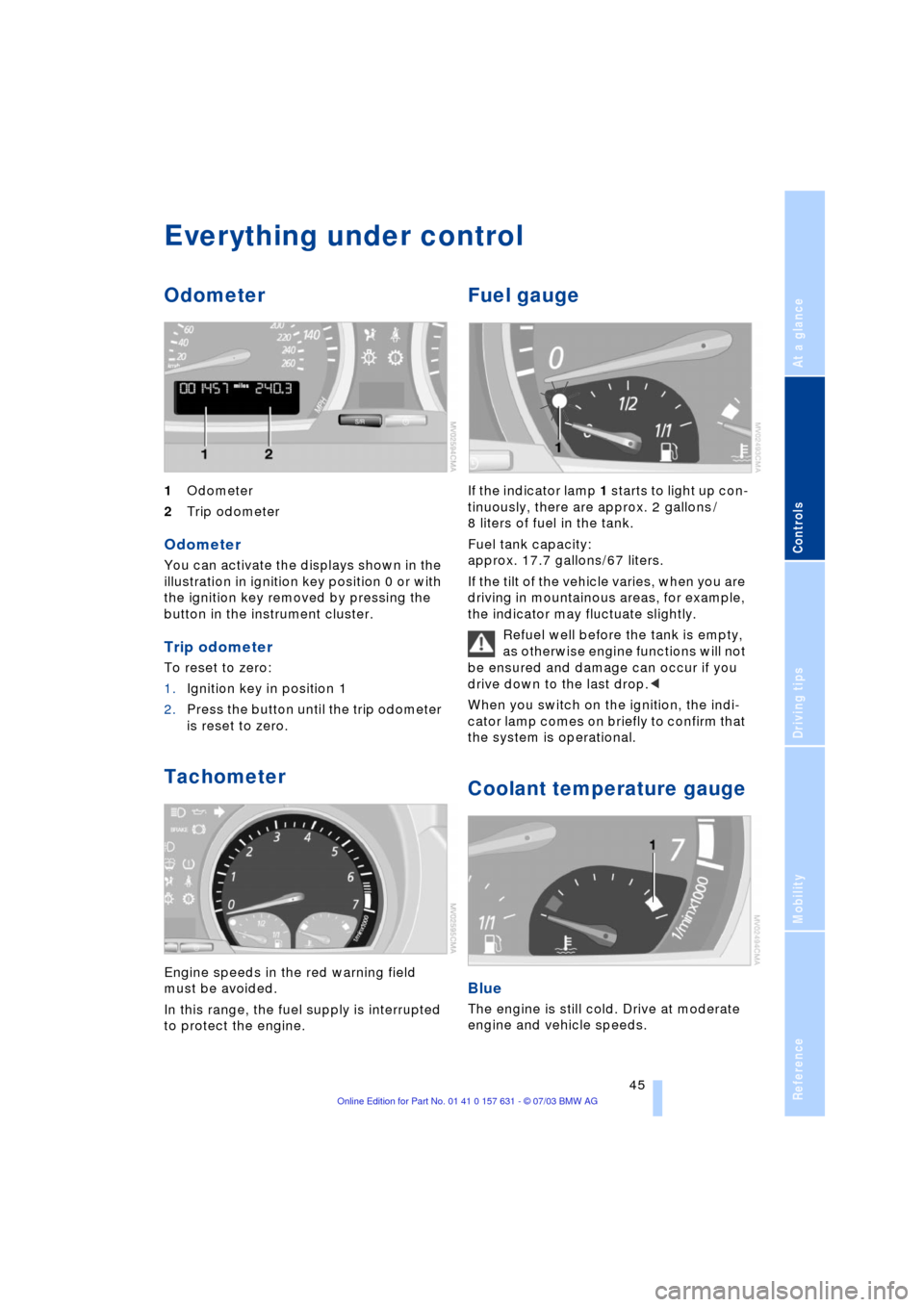
Odometer
1Odometer
2Trip odometer
Odometer
You can activate the displays shown in the
illustration in ignition key position 0 or with
the ignition key removed by pressing the
button in the instrument cluster.
Trip odometer
To reset to zero:
1.Ignition key in position 1
2.Press the button until the trip odometer
is reset to zero.
Tachometer
Engine speeds in the red warning field
must be avoided.
In this range, the fuel supply is interrupted
to protect the engine.
Fuel gauge
If the indicator lamp 1 starts to light up con-
tinuously, there are approx. 2 gallons /
8 liters of fuel in the tank.
Fuel tank capacity:
approx. 17.7 gallons/67 liters.
If the tilt of the vehicle varies, when you are
driving in mountainous areas, for example,
the indicator may fluctuate slightly.
Refuel well before the tank is empty,
as otherwise engine functions will not
be ensured and damage can occur if you
drive down to the last drop.<
When you switch on the ignition, the indi-
cator lamp comes on briefly to confirm that
the system is operational.
Coolant temperature gauge
Blue
The engine is still cold. Drive at moderate
engine and vehicle speeds.
Page 51 of 132
Reference
At a glance
Controls
Driving tips
Mobility
49
Technology for comfort, convenience
and safety
Park Distance Control PDC*
The concept
PDC provides extra safety and conven-
ience during parking maneuvers. Signal
tones indicate the current distance to an
object behind or in front of your vehicle.
Four ultrasonic sensors in both the
bumpers monitor the distance to the near-
est object.
The front and rear sensors on the corners
have a range of approx. 2 ft/60 cm. The
two rear middle sensors have a range of
approx. 5 ft/1.50 m and the two front mid-
dle sensors of approx. 2.6 ft/80 cm.
PDC is a parking aid that can indicate
objects when they are approached
slowly, as is usually the case when parking.
Avoid approaching objects too fast, other-
wise the system may give warning of phys-
ical obstacles too late.<
If you are driving with a trailer, the rear sen-
sors are unable to make proper measure-
ments Ð so they do not switch on.
Automatic mode
As of ignition key position 2, the system
automatically assumes operational status
after a few seconds each time you engage
reverse gear or selector-lever position R.
Wait this short period before park-
ing.<
You can have a signal tone pro-
grammed into the system to verify
that the PDC is active.<
Automatic deactivation
After driving a distance of more than
approx. 160 ft/50 m or exceeding a speed
of approx. 20 mph/30 km/h, the system
switches off and the indicator lamp goes
out. You can reactivate the system manu-
ally as needed.
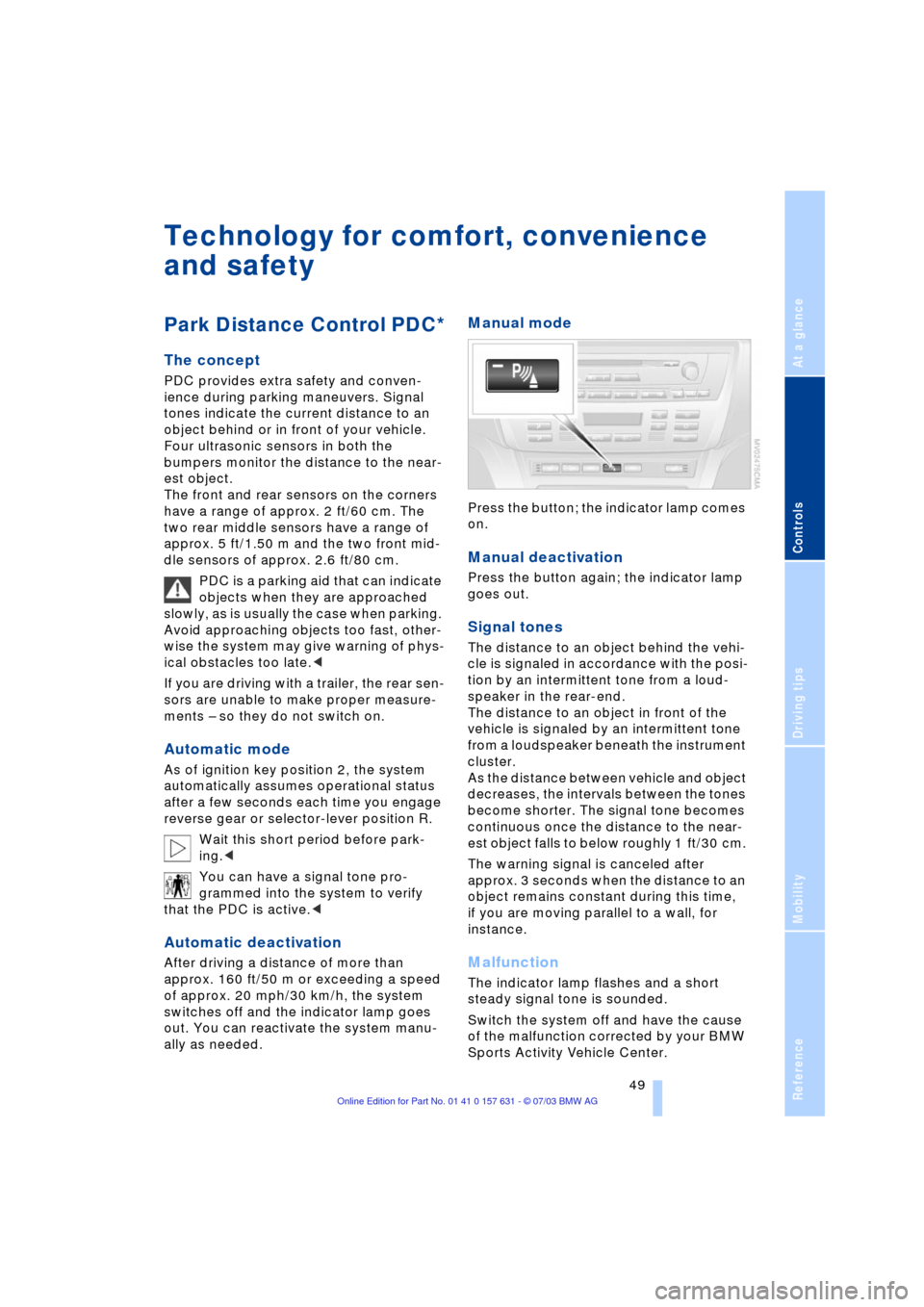
Manual mode
Press the button; the indicator lamp comes
on.
Manual deactivation
Press the button again; the indicator lamp
goes out.
Signal tones
The distance to an object behind the vehi-
cle is signaled in accordance with the posi-
tion by an intermittent tone from a loud-
speaker in the rear-end.
The distance to an object in front of the
vehicle is signaled by an intermittent tone
from a loudspeaker beneath the instrument
cluster.
As the distance between vehicle and object
decreases, the intervals between the tones
become shorter. The signal tone becomes
continuous once the distance to the near-
est object falls to below roughly 1 ft/30 cm.
The warning signal is canceled after
approx. 3 seconds when the distance to an
object remains constant during this time,
if you are moving parallel to a wall, for
instance.
Malfunction
The indicator lamp flashes and a short
steady signal tone is sounded.
Switch the system off and have the cause
of the malfunction corrected by your BMW
Sports Activity Vehicle Center.
Page 52 of 132
Technology for comfort, convenience and safety
50
Limits of the system
Even with PDC, final responsibility for
estimating the distance between the
vehicle and any obstructions always
remains with the driver. Even when sensors
are involved, there is a blind spot in which
objects cannot be detected. The system is
also subject to the physical limits that apply
to all forms of ultrasonic measurement,
such as those encountered with tow bars
and trailer couplings, or thin and wedge-
shaped objects etc. Low objects already
displayed, e.g. a curb, can also disappear
from the detection area of the sensors
again before a continuous tone sounds.
Loud sources of sound, inside and outside
the vehicle, could drown out the PDC sig-
nal tone.<
Keep the sensors clean and free of ice
or snow in order to ensure that they
will continue to operate effectively.
Do not apply high pressure spray to the
sensors for a prolonged period of time.
Keep the spray at least 4 in/10 cm away
from the sensors.<
Driving stability control
systems
Your BMW is equipped with an extended
array of systems designed to enhance and
maintain vehicle stability under extreme
conditions. The following section describes
these functions based on ABS, DSC, HDC
and xDrive.
Antilock Brake System ABS
ABS enhances active safety by preventing
the wheels from locking under braking. The
vehicle continues to be steerable during
hard braking.
ABS also includes Electronic brake-force
distribution EBV.
Safe braking, refer to page 77.
Electronic brake-force distribution
EBV
EBV controls the brake system's applica-
tion pressure at the rear wheels to ensure
stable deceleration.
Dynamic Brake Control DBC
The Dynamic Brake Control actively sup-
ports the driver in dangerous braking situa-
tions. Quickly pumping the brake pedal
increases the braking effect with low pedal
pressure so that the shortest possible
braking distance is achieved. This system
exploits all of the benefits provided by ABS.
Do not reduce the pressure on the brake
pedal for the duration of the brake applica-
tion. DBC is deactivated when you release
the brake pedal.
Dynamic Stability Control DSC
The concept
DSC maintains vehicle stability, even in
critical driving situations.
The DSC is operational every time you start
the engine.
The system optimizes the driving stability
during acceleration and when starting from
a standstill. The system recognizes any
tendency for the vehicle to assume an
unstable attitude such as oversteer or
understeer; it then counteracts this ten-
dency with a combination of graduated
reductions in engine torque and selective
braking intervention at individual wheels.
DSC provides optimal stability within the
limits defined by the laws of physics.
The laws of physics cannot be
repealed, even with DSC. An appro-
priate driving style always remains the
responsibility of the driver. Avoid using the
additional safety margin provided by the
system as an excuse for taking unneces-
sary risks.
Do not make any modifications to the DSC
system. Never allow anyone other than
authorized professional technicians to
carry out service or repairs on the system.<
Page 54 of 132
Technology for comfort, convenience and safety
52
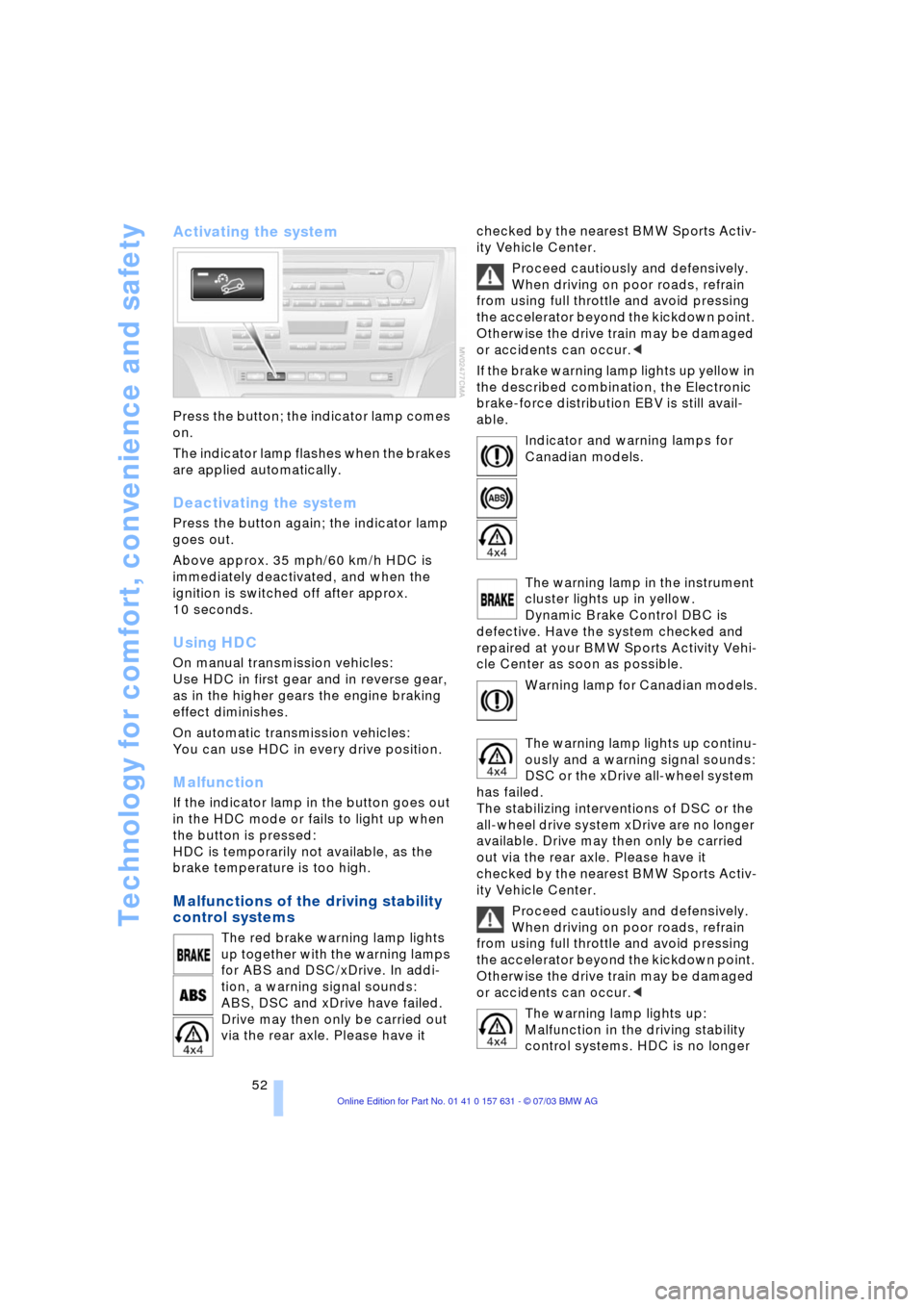
Activating the system
Press the button; the indicator lamp comes
on.
The indicator lamp flashes when the brakes
are applied automatically.
Deactivating the system
Press the button again; the indicator lamp
goes out.
Above approx. 35 mph/60 km/h HDC is
immediately deactivated, and when the
ignition is switched off after approx.
10 seconds.
Using HDC
On manual transmission vehicles:
Use HDC in first gear and in reverse gear,
as in the higher gears the engine braking
effect diminishes.
On automatic transmission vehicles:
You can use HDC in every drive position.
Malfunction
If the indicator lamp in the button goes out
in the HDC mode or fails to light up when
the button is pressed:
HDC is temporarily not available, as the
brake temperature is too high.
Malfunctions of the driving stability
control systems
The red brake warning lamp lights
up together with the warning lamps
for ABS and DSC/xDrive. In addi-
tion, a warning signal sounds:
ABS, DSC and xDrive have failed.
Drive may then only be carried out
via the rear axle. Please have it checked by the nearest BMW Sports Activ-
ity Vehicle Center.
Proceed cautiously and defensively.
When driving on poor roads, refrain
from using full throttle and avoid pressing
the accelerator beyond the kickdown point.
Otherwise the drive train may be damaged
or accidents can occur.<
If the brake warning lamp lights up yellow in
the described combination, the Electronic
brake-force distribution EBV is still avail-
able.
Indicator and warning lamps for
Canadian models.
The warning lamp in the instrument
cluster lights up in yellow.
Dynamic Brake Control DBC is
defective. Have the system checked and
repaired at your BMW Sports Activity Vehi-
cle Center as soon as possible.
Warning lamp for Canadian models.
The warning lamp lights up continu-
ously and a warning signal sounds:
DSC or the xDrive all-wheel system
has failed.
The stabilizing interventions of DSC or the
all-wheel drive system xDrive are no longer
available. Drive may then only be carried
out via the rear axle. Please have it
checked by the nearest BMW Sports Activ-
ity Vehicle Center.
Proceed cautiously and defensively.
When driving on poor roads, refrain
from using full throttle and avoid pressing
the accelerator beyond the kickdown point.
Otherwise the drive train may be damaged
or accidents can occur.<
The warning lamp lights up:
Malfunction in the driving stability
control systems. HDC is no longer