rear entertainment BMW X5 2009 E70 Service Manual
[x] Cancel search | Manufacturer: BMW, Model Year: 2009, Model line: X5, Model: BMW X5 2009 E70Pages: 317, PDF Size: 9.56 MB
Page 271 of 317
Mobility
269Reference
At a glance
Controls
Driving tips
Communications
Navigation
Entertainment
Replacing components
Onboard toolkit
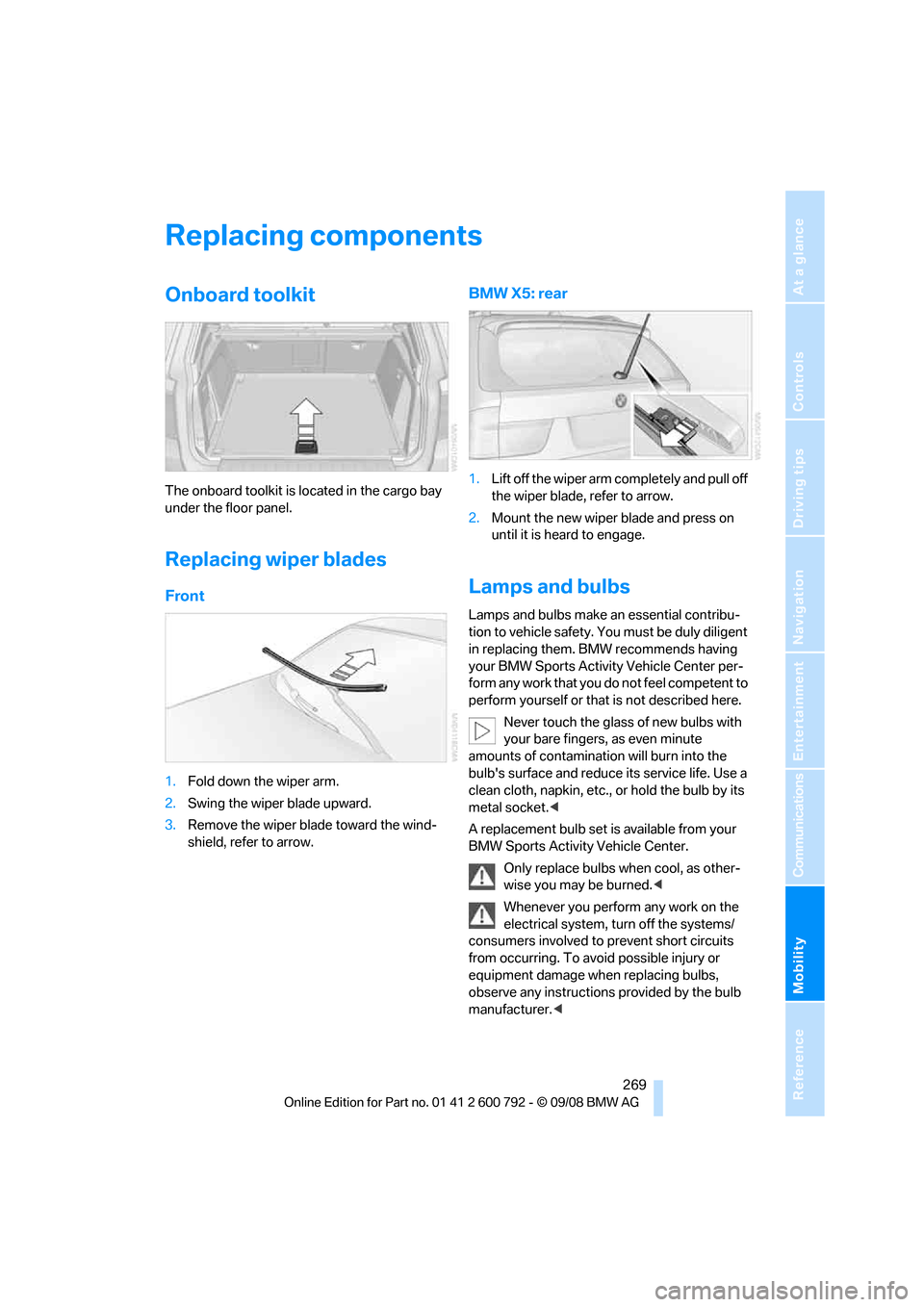
The onboard toolkit is located in the cargo bay
under the floor panel.
Replacing wiper blades
Front
1. Fold down the wiper arm.
2. Swing the wiper blade upward.
3. Remove the wiper blade toward the wind-
shield, refer to arrow.
BMW X5: rear
1.Lift off the wiper arm completely and pull off
the wiper blade, refer to arrow.
2. Mount the new wiper blade and press on
until it is heard to engage.
Lamps and bulbs
Lamps and bulbs make an essential contribu-
tion to vehicle safety. You must be duly diligent
in replacing them. BMW recommends having
your BMW Sports Activity Vehicle Center per-
form any work that you do not feel competent to
perform yourself or that is not described here.
Never touch the glass of new bulbs with
your bare fingers, as even minute
amounts of contamination will burn into the
bulb's surface and reduce its service life. Use a
clean cloth, napkin, etc., or hold the bulb by its
metal socket. <
A replacement bulb set is available from your
BMW Sports Activity Vehicle Center.
Only replace bulbs when cool, as other-
wise you may be burned. <
Whenever you perform any work on the
electrical system, turn off the systems/
consumers involved to prevent short circuits
from occurring. To avoid possible injury or
equipment damage when replacing bulbs,
observe any instructions provided by the bulb
manufacturer. <
Page 273 of 317
Mobility
271Reference
At a glance
Controls
Driving tips
Communications
Navigation
Entertainment
Sports Activity Vehicle Center or a work-
shop that works according to BMW repair
procedures with correspondingly trained
personnel.
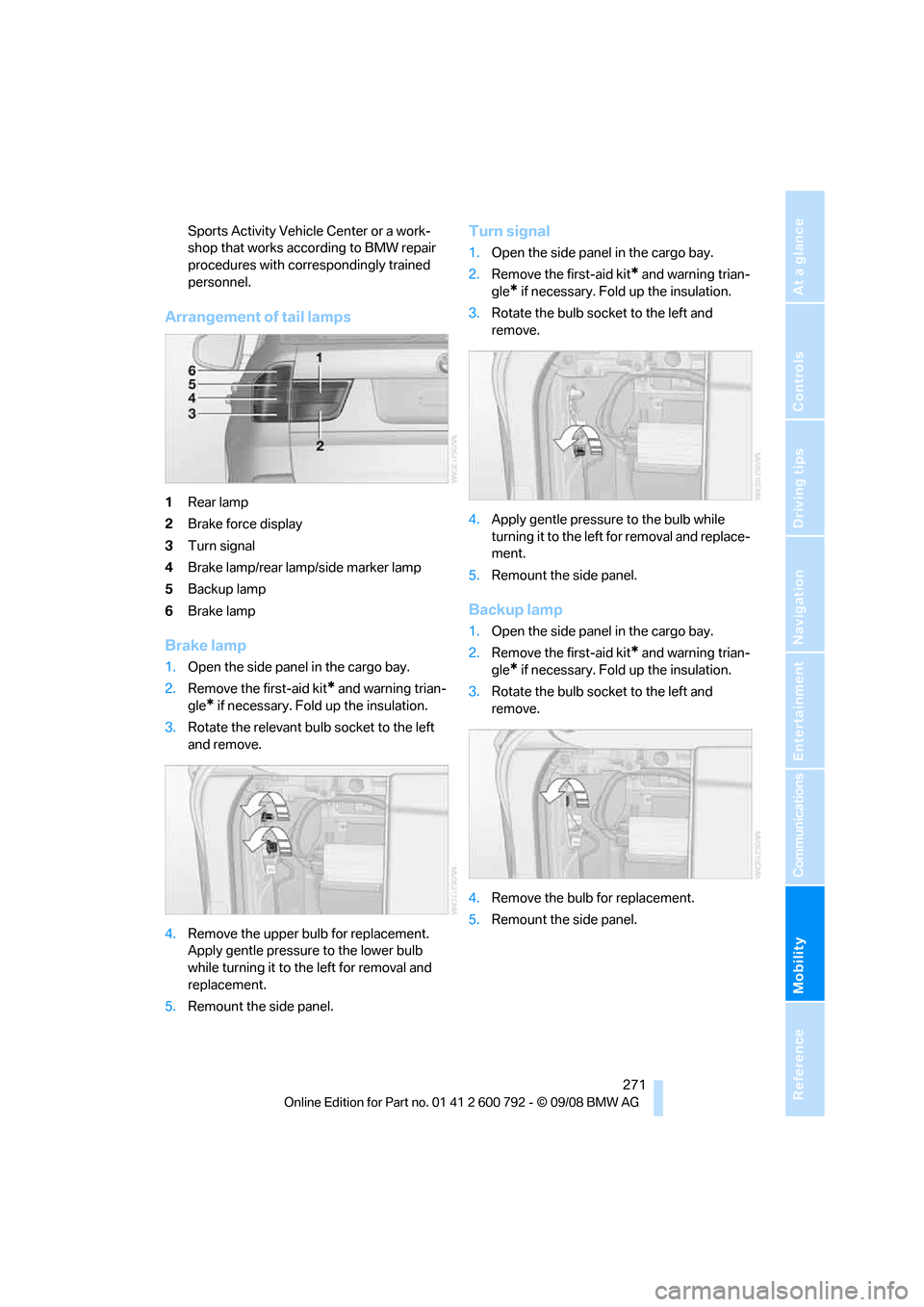
Arrangement of tail lamps
1Rear lamp
2 Brake force display
3 Turn signal
4 Brake lamp/rear lamp/side marker lamp
5 Backup lamp
6 Brake lamp
Brake lamp
1.Open the side panel in the cargo bay.
2. Remove the first-aid kit
* and warning trian-
gle
* if necessary. Fold up the insulation.
3. Rotate the relevant bulb socket to the left
and remove.
4. Remove the upper bulb for replacement.
Apply gentle pressure to the lower bulb
while turning it to the left for removal and
replacement.
5. Remount the side panel.
Turn signal
1.Open the side panel in the cargo bay.
2. Remove the first-aid kit
* and warning trian-
gle
* if necessary. Fold up the insulation.
3. Rotate the bulb sock et to the left and
remove.
4. Apply gentle pressure to the bulb while
turning it to the left for removal and replace-
ment.
5. Remount the side panel.
Backup lamp
1.Open the side panel in the cargo bay.
2. Remove the first-aid kit
* and warning trian-
gle
* if necessary. Fold up the insulation.
3. Rotate the bulb sock et to the left and
remove.
4. Remove the bulb for replacement.
5. Remount the side panel.
Page 275 of 317
Mobility
273Reference
At a glance
Controls
Driving tips
Communications
Navigation
Entertainment
the fog lamps, provided traffic laws in your area
do not prohibit this.
Have work on the xenon light unit includ-
ing changing the bulb carried out only by
your BMW Sports Activity Vehicle Center or a
workshop that works according to BMW repair
procedures with corres pondingly trained per-
sonnel. Due to the high voltage present in the
system, there is a danger of fatal injuries when
work is carried out improperly. <
Parking lamps and roadside parking
lamps, daytime driving lamps
35-Watt bulb, H8
The bulb is pressurized. Therefore, wear
safety glasses and protective gloves.
Otherwise there is a dang er of injuries if the
bulb is accidentally damaged during replace-
ment. <
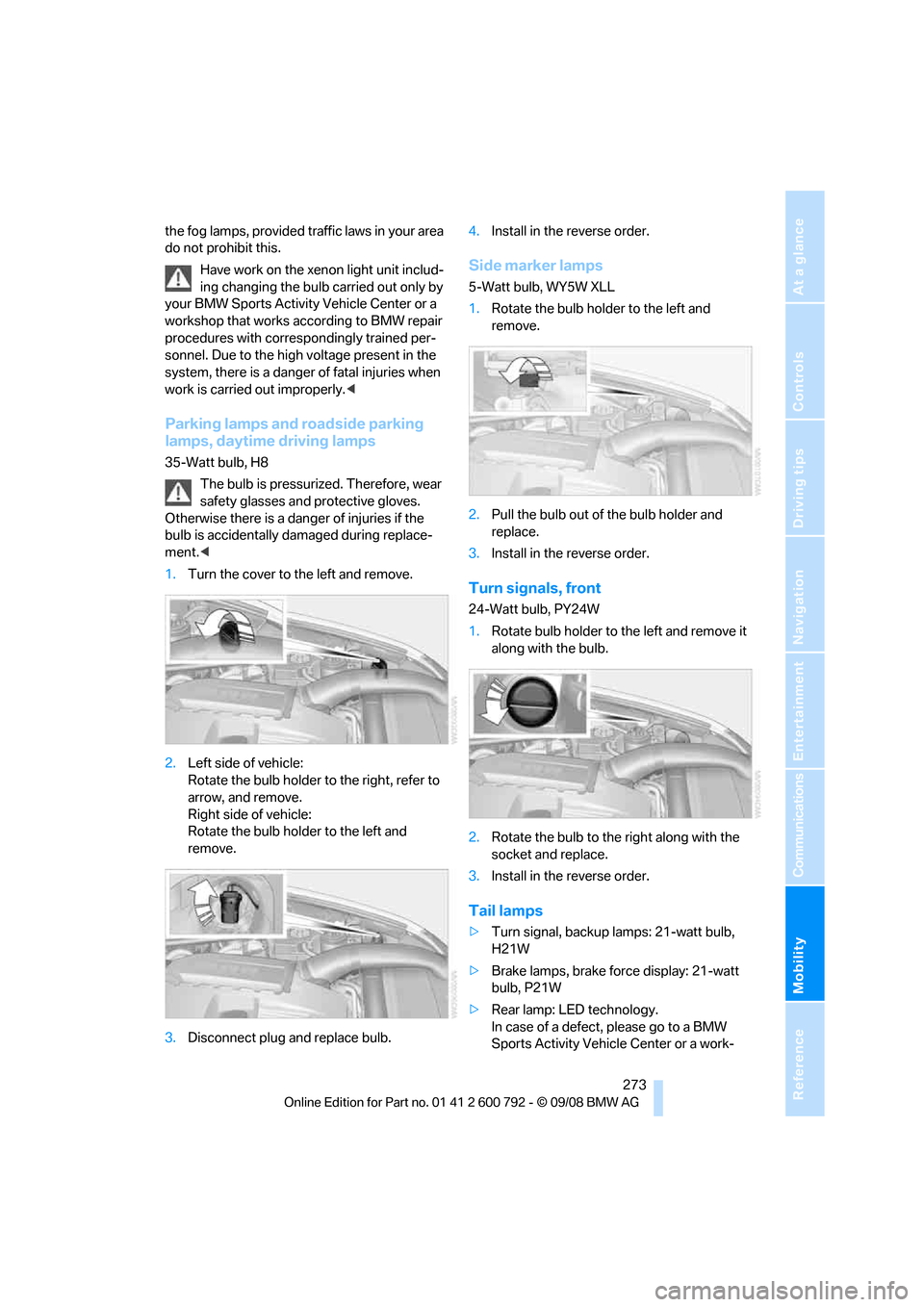
1. Turn the cover to th e left and remove.
2. Left side of vehicle:
Rotate the bulb holder to the right, refer to
arrow, and remove.
Right side of vehicle:
Rotate the bulb hold er to the left and
remove.
3. Disconnect plug and replace bulb. 4.
Install in the reverse order.
Side marker lamps
5-Watt bulb, WY5W XLL
1.Rotate the bulb hold er to the left and
remove.
2. Pull the bulb out of the bulb holder and
replace.
3. Install in the reverse order.
Turn signals, front
24-Watt bulb, PY24W
1.Rotate bulb holder to the left and remove it
along with the bulb.
2. Rotate the bulb to th e right along with the
socket and replace.
3. Install in the reverse order.
Tail lamps
>Turn signal, backup lamps: 21-watt bulb,
H21W
> Brake lamps, brake force display: 21-watt
bulb, P21W
> Rear lamp: LED technology.
In case of a defect, please go to a BMW
Sports Activity Vehicle Center or a work-
Page 277 of 317
Mobility
275Reference
At a glance
Controls
Driving tips
Communications
Navigation
Entertainment
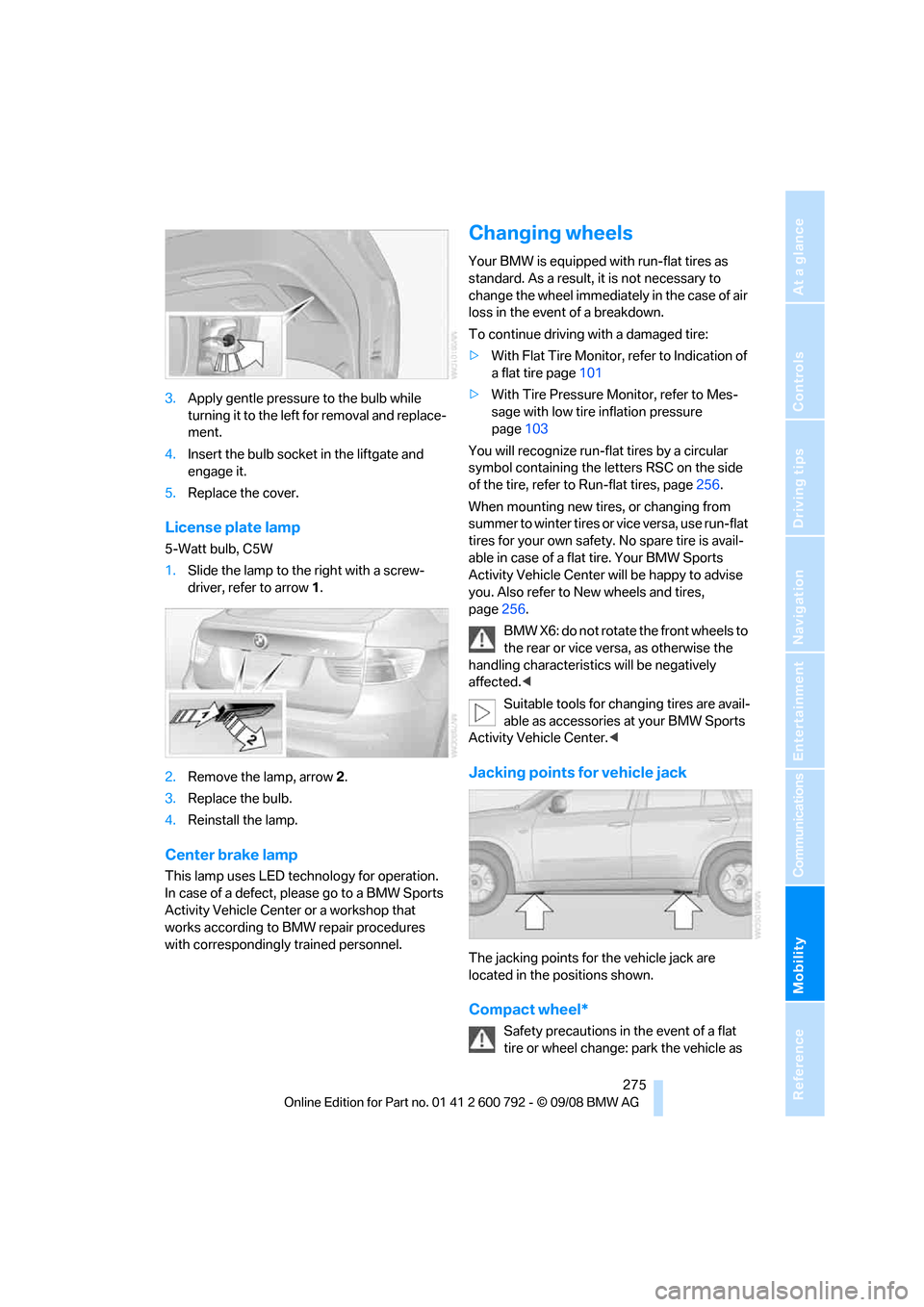
3.Apply gentle pressure to the bulb while
turning it to the left for removal and replace-
ment.
4. Insert the bulb socket in the liftgate and
engage it.
5. Replace the cover.
License plate lamp
5-Watt bulb, C5W
1.Slide the lamp to the right with a screw-
driver, refer to arrow 1.
2. Remove the lamp, arrow 2.
3. Replace the bulb.
4. Reinstall the lamp.
Center brake lamp
This lamp uses LED technology for operation.
In case of a defect, please go to a BMW Sports
Activity Vehicle Center or a workshop that
works according to BMW repair procedures
with correspondingly trained personnel.
Changing wheels
Your BMW is equipped with run-flat tires as
standard. As a result, it is not necessary to
change the wheel immediately in the case of air
loss in the event of a breakdown.
To continue driving with a damaged tire:
> With Flat Tire Monitor, refer to Indication of
a flat tire page 101
> With Tire Pressure Monitor, refer to Mes-
sage with low tire inflation pressure
page 103
You will recognize run-flat tires by a circular
symbol containing the letters RSC on the side
of the tire, refer to Run-flat tires, page 256.
When mounting new tires, or changing from
summer to winter tires or vice versa, use run-flat
tires for your own safety. No spare tire is avail-
able in case of a flat tire. Your BMW Sports
Activity Vehicle Center will be happy to advise
you. Also refer to New wheels and tires,
page 256.
BMW X6: do not rotate the front wheels to
the rear or vice versa, as otherwise the
handling characteristic s will be negatively
affected. <
Suitable tools for changing tires are avail-
able as accessories at your BMW Sports
Activity Vehicle Center. <
Jacking points for vehicle jack
The jacking points for the vehicle jack are
located in the positions shown.
Compact wheel*
Safety precautions in the event of a flat
tire or wheel change: park the vehicle as
Page 283 of 317
Mobility
281Reference
At a glance
Controls
Driving tips
Communications
Navigation
Entertainment
2.Attach one end of the jumper cable plus/+
to the positive terminal of the battery or a
starting-aid terminal of the vehicle provid-
ing assistance.
3. Attach the second end of the cable to the
positive terminal of th e battery or to a start-
ing-aid terminal of the vehicle to be started.
4. Attach one end of the jumper cable minus/–
to the negative terminal of the battery or to
an engine or body ground of the assisting
vehicle.
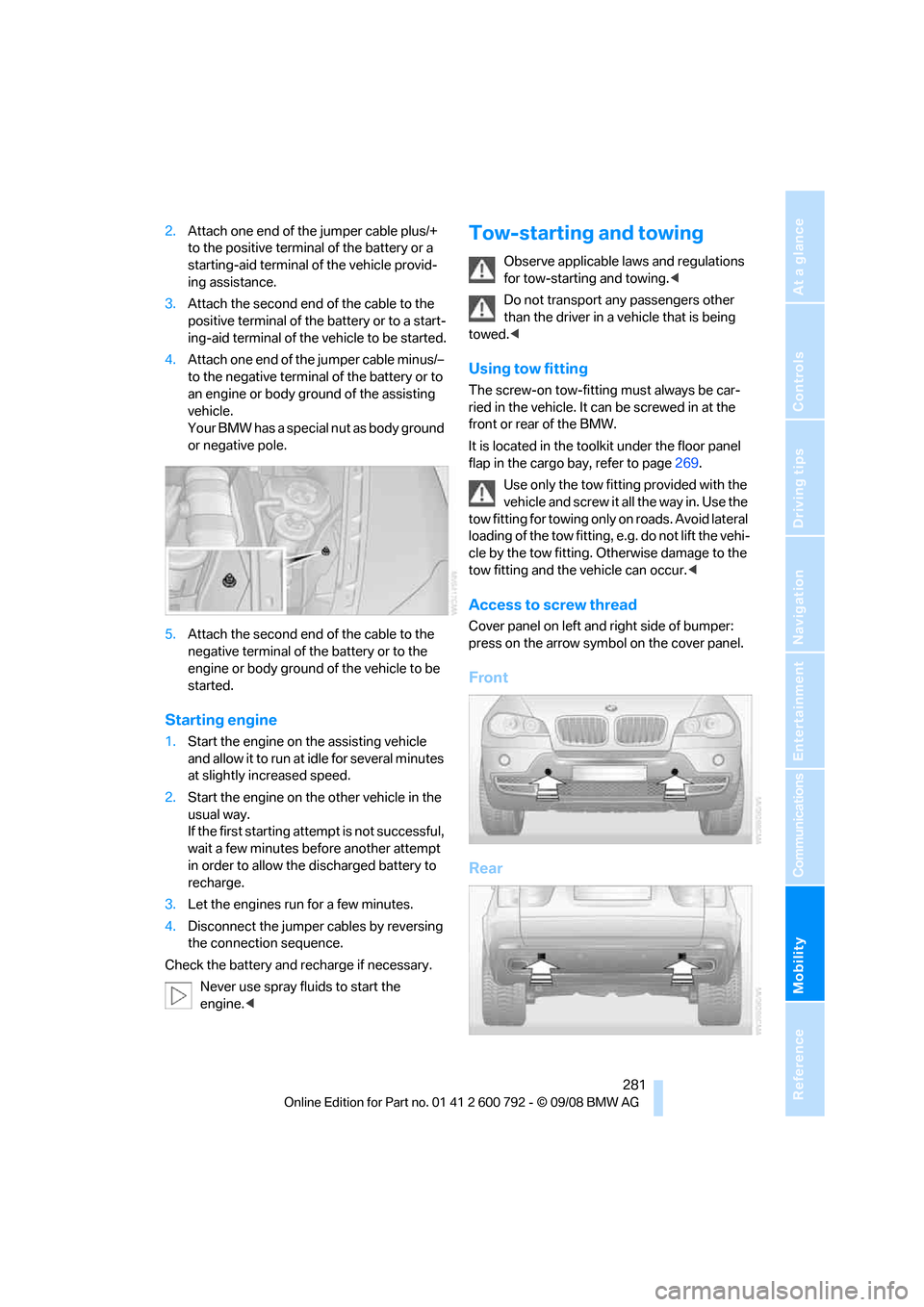
Your BMW has a special nut as body ground
or negative pole.
5. Attach the second end of the cable to the
negative terminal of the battery or to the
engine or body ground of the vehicle to be
started.
Starting engine
1. Start the engine on the assisting vehicle
and allow it to run at idle for several minutes
at slightly increased speed.
2. Start the engine on the other vehicle in the
usual way.
If the first starting attempt is not successful,
wait a few minutes be fore another attempt
in order to allow the discharged battery to
recharge.
3. Let the engines run for a few minutes.
4. Disconnect the jumper cables by reversing
the connection sequence.
Check the battery and recharge if necessary.
Never use spray fluids to start the
engine. <
Tow-starting and towing
Observe applicable la ws and regulations
for tow-starting and towing. <
Do not transport any passengers other
than the driver in a vehicle that is being
towed. <
Using tow fitting
The screw-on tow-fitting must always be car-
ried in the vehicle. It can be screwed in at the
front or rear of the BMW.
It is located in the tool kit under the floor panel
flap in the cargo bay, refer to page 269.
Use only the tow fitting provided with the
vehicle and screw it all the way in. Use the
tow fitting for towing only on roads. Avoid lateral
loading of the tow fitting, e.g. do not lift the vehi-
cle by the tow fitting. Ot herwise damage to the
tow fitting and the vehicle can occur. <
Access to screw thread
Cover panel on left and right side of bumper:
press on the arrow symbol on the cover panel.
Front
Rear
Page 291 of 317
Reference 289
At a glance
Controls
Driving tips
Communications
Navigation
Entertainment
Mobility
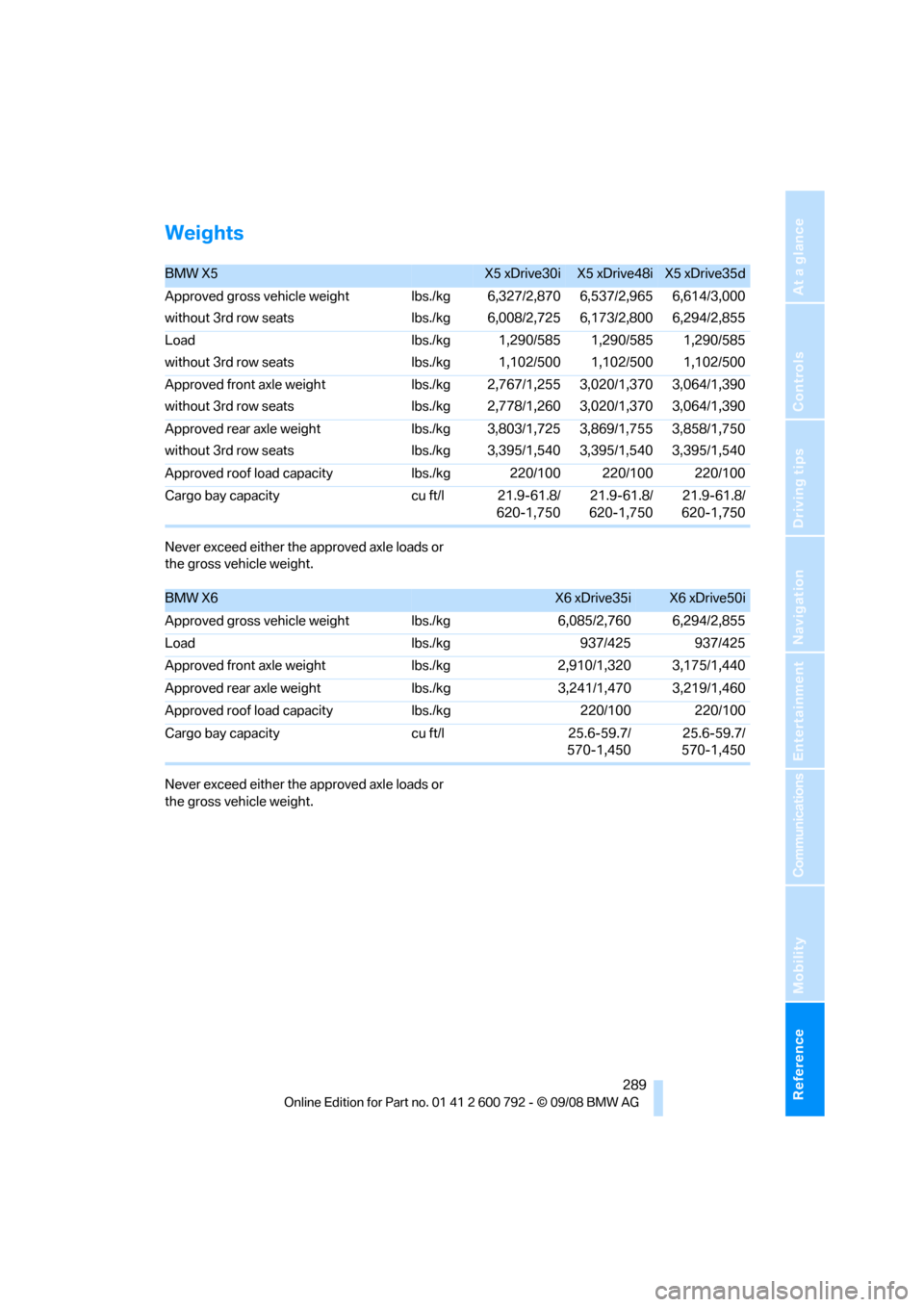
Weights
Never exceed either the approved axle loads or
the gross vehicle weight.
Never exceed either the approved axle loads or
the gross vehicle weight.
BMW X5X5 xDrive30iX5 xDrive48iX5 xDrive35d
Approved gross vehicle weight
without 3rd row seats lbs./kg
lbs./kg6,327/2,870
6,008/2,725 6,537/2,965
6,173/2,8006,614/3,000
6,294/2,855
Load
without 3rd row seats lbs./kg
lbs./kg1,290/585
1,102/500 1,290/585
1,102/5001,290/585
1,102/500
Approved front axle weight
without 3rd row seats lbs./kg
lbs./kg2,767/1,255
2,778/1,260 3,020/1,370
3,020/1,3703,064/1,390
3,064/1,390
Approved rear axle weight
without 3rd row seats lbs./kg
lbs./kg3,803/1,725
3,395/1,540 3,869/1,755
3,395/1,5403,858/1,750
3,395/1,540
Approved roof load capacity lbs./kg 220/100 220/100 220/100
Cargo bay capacity cu ft/l 21.9-61.8/ 620-1,75021.9-61.8/
620-1,750 21.9-61.8/
620-1,750
BMW X6X6 xDrive35iX6 xDrive50i
Approved gross vehicle weight lbs./kg6,085/2,760 6,294/2,855
Load lbs./kg937/425 937/425
Approved front axle weight lbs./kg2,910/1,320 3,175/1,440
Approved rear axle weight lbs./kg3,241/1,470 3,219/1,460
Approved roof load capacity lbs./kg220/100 220/100
Cargo bay capacity cu ft/l25.6-59.7/
570-1,450 25.6-59.7/
570-1,450
Page 299 of 317
Reference 297
At a glance
Controls
Driving tips
Communications
Navigation
Entertainment
Mobility
Ashtray
– front128
– rear 129
Assist 235
– refer to separate operating
instructions
Assistance systems, refer to Driving stability control
systems 96
Assistance window 20
"Assist profile" 241
"Assist. window off" 21
AUC Automatic recirculated-
air control 117
"Audio" 177,181
– for DVD system in rear 216
Audio 174
– controls 174
– switching on/off 174
– tone control 175
– volume 175
Audio CD for DVD system in
rear 210
Audio device, external 127
Automatic
– air distribution 115,120
– air volume 115,120
– BMW Teleservice call 237
– headlamp control 110
– liftgate operation 34,37
– steering wheel adjustment,
refer to Easy entry/exit 58
– storing stations 179
Automatic car washes 140
Automatic climate control
– automatic air distribution 115,120
– in rear 119
– in rear, activating on Control Display 120
– switching off 118,120
– ventilation in rear 119
– with 2-zone control 115
– with 4-zone control 119
Automatic closing of doors, refer to Automatic soft
closing 33 Automatic curb monitor
58
Automatic garage door
opener 123
Automatic Hold 67
– activating 68
– deactivating 68
– parking 68
Auto
matic lighting
– refer to Automatic headlamp control 110
– refer to Daytime driving
lamps 111
– refer to Interior lamps 113
– refer to Pathway lighting 111
"Automatic programs" 116
Automatic recirculated-air
control AUC 117
Automatic soft closing 33
Automatic station search 179
Automatic transmission with Steptronic 70
– deactivating selector lever
interlock 71
– kick-down 71
– manually releasing
transmission lock 72
– tow-starting 282
– with comfort access 40
"Automatic ventilation" 121
AUTO program for automatic climate control 115,120
"Auto Request" 237
"Autostore"
– on the radio 180
"AUX" 175,200 ,202
– AUX-In connection 200
– for DVD system in rear 215
– USB audio interface 201
"AUX / Rear" 206
AUX-In connection 127,200
Average fuel consumption 80
– setting units 89
Average speed, refer to
Computer 80
"Avoid ferries" in navigation 161
"Avoid highways" in navigation 160 Avoiding highways for
navigation 160
Avoiding unintentional alarms 39
"Avoid tollroads" in
navigation 161
Axle weights, refer to Weights 289
"A - Z" 228
B
Backrest contour, refer to
Lumbar support 50
Backrests, refer to Seats 49
Backrest width adjustment 50
Backup lamps, replacing bulbs 270,273
Balance, refer to Tone
control 176
"Balance" for DVD system in rear 209
Band-aids, refer to First-aid kit 279
Bass, refer to Tone
control 175
Battery
– charging 277
– jump starting 280
– power failure 278
– refer to Vehicle battery 277
Battery disposal
– remote control with comfort access 41
– vehicle battery 277
Battery replacement
– remote control for DVD
system in rear 206
– remote control with comfort access 41
Being towed 282
Belts, refer to Safety belts 54
Beverage holder, refer to Cup
holders 127
Blower, refer to Air volume 116,120
BMW Advanced Diesel 245
Page 301 of 317
Reference 299
At a glance
Controls
Driving tips
Communications
Navigation
Entertainment
Mobility
Cargo bay
– capacity289
– emergency operation, refer to Opening manually 33,36
– expanding 132
– opening/closing, refer to Liftgate 33,35
– opening/closing, refer to
Tailgate 35
– opening from inside 33,36
– opening from outside 33,36
– opening with remote control 30
Cargo bay cover, refer to Roll- up cover 130
Caring for the vehicle
finish 266
Car key, refer to Keys/remote control 28
Car phone 220
– installation location, refer to Center armrest, front 127
– refer to Mobile phone 220
– refer to separate operating instructions
Car radio, refer to Radio 178
Car wash 140,265
– before driving in 66
– with comfort access 41
Catalytic converter, refer to Hot exhaust system 139
"Categories" in Satellite radio 185
CBC Cornering Brake
Control 96
CBS Condition Based Service 263
"CD" 175,187
– for DVD system in rear 206
CD, refer to Playing audio
tracks, DVD system in
rear 210
CD/DVD player, DVD system
in rear 205 CD changer
187
– compressed audio files 187
– controls 174
– fast forward/reverse 190
– random sequence 190
– repeating a track 189
– sampling tracks 189
– selecting a CD 187
– selecting a track 188
– switching on/off 174
– ton
e control 175
– volume 175
CD player 187
– compressed audio files 187
– controls 174
– fast forward/reverse 190
– random sequence 190
– repeating a track 189
– sampling tracks 189
– selecting a track 188
– switching on/off 174
– tone control 175
– volume 175
Cell phone
– refer to Mobile phone
Center armrest
– front 127
– rear 130
Center brake lamp 272,275
Center console 14
Central locking system 29
– comfort access 39
– from inside vehicle 32
Changes, technical
– refer to For your own safety 5
– refer to Parts and
accessories 6
Changing gears using shift paddles 71
Changing language on Control Display 90
Changing tires 256
Changing units of measure on Control Display 89
Changing wheels 275
Check Control 85
"Check Control messages" 86 Checking the air pressure,
refer to Tire inflation
pressure 249
Children, transporting 61
Child restraint devices 61
Child restraint fixing system LATCH 62
Child restraint systems 61
Child-safety locks 64
Child seats 61
Chime, refer to Check
Control 85
Cigarette lighter, refer to
Lighter 129
Cleaning your BMW, refer to Care 265
"Climate" 56
Clock 78
– 12h/24h mode 89
– setting tim
e 88
Closing
– from inside 32
– using remote control 29
Closing fuel filler cap 244
Clothes hooks 127
Cockpit 10
Cold start, refer to Starting engine 66
"Color" in DVD system in rear 208
Comfort access 39
– observe in car wash 41
– replacing battery 41
Comfort area, refer to Around
the center console 14
Comfort start, refer to Starting engine 66
"Communication" 226 ,236, 237, 238,239
Compact Disc
– refer to CD changer 187
– refer to CD player 187
Compact wheel
– inflation pressure 251
– wheel change 275
Compartment for remote
control, refer to Ignition
lock 65
Page 303 of 317
Reference 301
At a glance
Controls
Driving tips
Communications
Navigation
Entertainment
Mobility
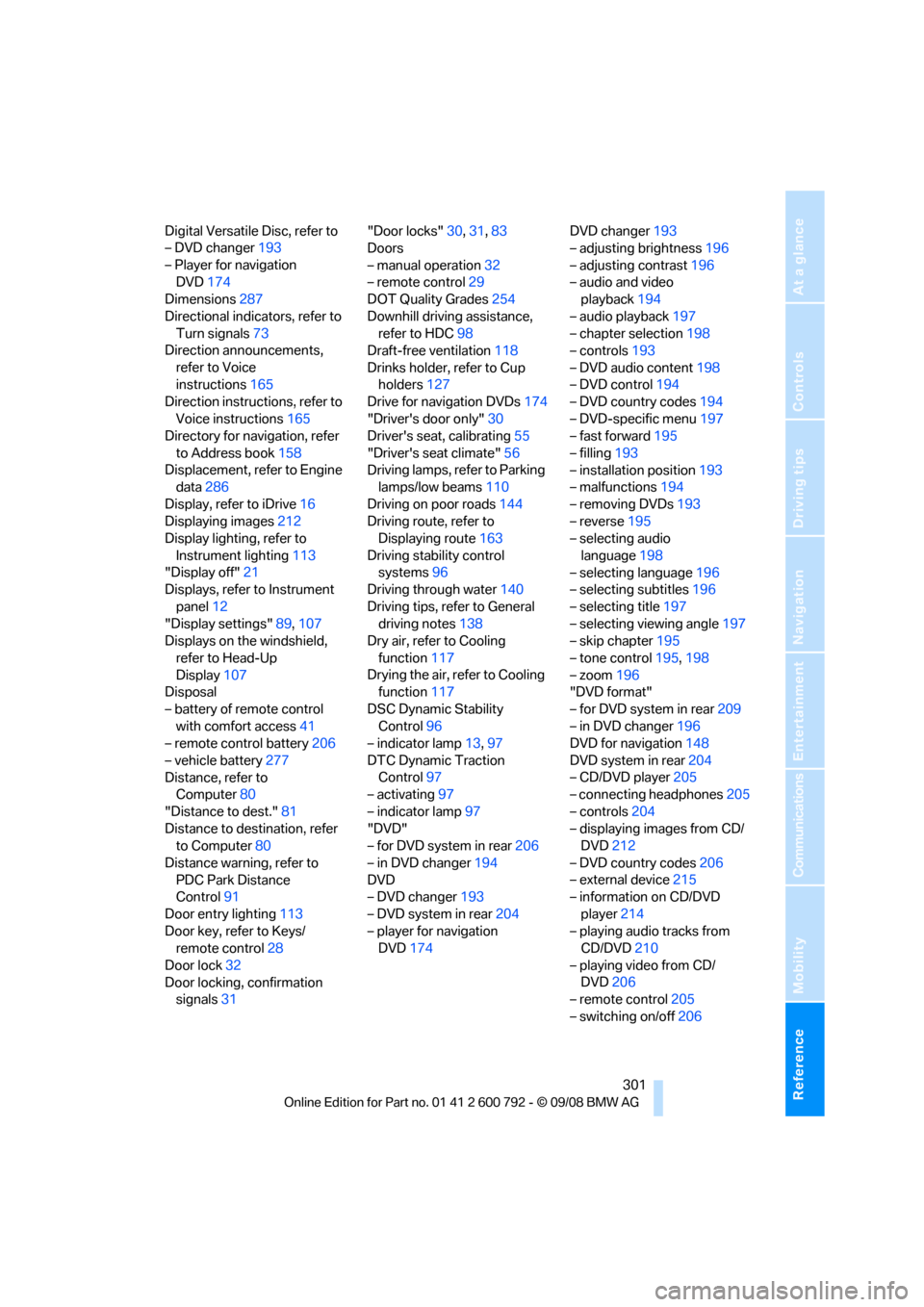
Digital Versatile Disc, refer to
– DVD changer193
– Player for navigation DVD 174
Dimensions 287
Directional indicators, refer to Turn signals 73
Direction announcements,
refer to Voice
instructions 165
Direction instructions, refer to
Voice instructions 165
Directory for navigation, refer
to Address book 158
Displacement, refer to Engine data 286
Display, refer to iDrive 16
Displaying images 212
Display lighting, refer to
Instrument lighting 113
"Display off" 21
Displays, refer to Instrument
panel 12
"Display settings" 89,107
Displays on the windshield,
refer to Head-Up
Display 107
Disposal
– battery of remote control with comfort access 41
– remote control battery 206
– vehicle battery 277
Distance, refer to Computer 80
"Distance to dest." 81
Distance to destination, refer to Computer 80
Distance warning, refer to PDC Park Distance
Control 91
Door entry lighting 113
Door key, refer to Keys/ remote control 28
Door lock 32
Door locking, confirmation signals 31 "Door locks"
30,31,83
Doors
– manual operation 32
– remote control 29
DOT Quality Grades 254
Downhill driving assistance, refer to HDC 98
Draft-free ventilation 118
Drinks holder, refer to Cup holders 127
Drive for navigation DVDs 174
"Driver's door only" 30
Driver's seat, calibrating 55
"Driver's seat climate" 56
Dr
iving lamps, refer to Parking
lamps/low beams 110
Driving on poor roads 144
Driving route, refer to Displaying route 163
Driving stability control systems 96
Driving through water 140
Driving tips, refer to General driving notes 138
Dry air, refer to Cooling
function 117
Drying the air, refer to Cooling function 117
DSC Dynamic Stability Control 96
– indicator lamp 13,97
DTC Dynamic Traction Control 97
– activating 97
– indicator lamp 97
"DVD"
– for DVD system in rear 206
– in DVD changer 194
DVD
– DVD changer 193
– DVD system in rear 204
– player for navigation DVD 174 DVD changer
193
– adjusting brightness 196
– adjusting contrast 196
– audio and video playback 194
– audio playback 197
– chapter selection 198
– controls 193
– DVD audio content 198
– DVD control 194
– DVD country codes 194
– DVD-specific menu 197
– fast forward 195
– filling 193
– installation position 193
– malfunctions 194
– removing DVDs 193
– reverse 195
– selecting audio
language 198
– selecting language 196
– selecting subtitles 196
– selecting title 197
– selecting viewing angle 197
– skip chapter 195
– tone control 195,198
– zoom 196
"DVD form
at"
– for DVD system in rear 209
– in DVD changer 196
DVD for navigation 148
DVD system in rear 204
– CD/DVD player 205
– connecting headphones 205
– controls 204
– displaying images from CD/ DVD 212
– DVD country codes 206
– external device 215
– information on CD/DVD
player 214
– playing audio tracks from CD/DVD 210
– playing video from CD/ DVD 206
– remote control 205
– switching on/off 206
Page 305 of 317
Reference 303
At a glance
Controls
Driving tips
Communications
Navigation
Entertainment
Mobility
Flat tire
– changing wheels275
– compact wheel 275
– Flat Tire Monitor 100
– run-flat tires 101,103, 256
– TPM Tire Pressure Monitor 101
Flat Tire Monitor FTM 100
Fluid reservoir, refer to Filler neck for washer fluid 75
"FM", reception
range 175,178
FM, waveband 178
Fog lamps 112
– indicator lamp 13,112
Folding display screen open/
closed, DVD system in
rear 204
Folding rear seat backrest 132
Footbrake, refer to Braking safely 140
Footwell lamps 113
For your own safety 5
4-wheel drive system, refer to xDrive 97
Front airbags 105
Front passenger airbags 105
– deactivating 106
– refer to Exception of front passenger seat 61
Front seat adjustment 49
FTM Flat Tire Monitor 100
– false alarms 100
– indicating a flat tire 101
– initializing the system 100
– snow chains 257
– system limits 100
– warning lamp 101
Fuel 245
– capacity 290
– display 80
– high-quality brands 245
– quality 245
– saving 138
– specifications 245
Fuel clock, refer to Fuel
gauge 80 Fuel consumption display
– computer, average fuel
consumption 80
Fuel display, refer to Fuel gauge 80
Fuel filler door 244
– closing 24
4
– opening 244
– releasing manually 244
Fuses 278
G
Garage door opener, refer to
Integrated universal remote
control 123
Gasoline, refer to Required fuel 245
Gasoline display, refer to Fuel
gauge 80
Gearshifts, automatic transmission with
Steptronic 71
General driving notes 138,139
Glass sunroof
– convenience operation from outside 32
– convenience operation with comfort access 40
– remote control 30
Glass sunroof, electric 45
– moving manually 46
– opening, closing 45
– power interruption 46
– raising 45
Glove compartment 126
– lighting 126
GPS navigation, refer to Navigation system 148
Grills, refer to Ventilation 118
Grills of the automatic climate control 114
Gross vehicle weight, refer to Weights 289
H
Handbrake, refer to Parking
brake 67
Hands-free system, refer to
Microphone 14
Hand washing 266
Have diesel exhaust fluid
refilled 246
Hazard warning flashers 15
HDC Hill Descent Control 98
"HD radio" 181
HD radio, refer to High
Definition Radio 181
Head airbags 105
Headlamp control,
automatic 110
Headlamp flasher 73
Headlamps 110
– cleaning, refer to Washer/ wiper system 74
– replacing bulbs 269
Head Light, refer to Adaptive Head Light 112
Head restraints 52
– sitting safely 48
"Head-Up Display" 108
Head-Up Display 107
Heated
– mirrors 58
– rear window 116
– seats 55,56
– steering wheel 59
Heating 114
– exterior mirrors 58
– interior 114
– rear window 116
– residual heat 118
– seats 55,56
– steering wheel 59
Heating with engine switched off, refer to Residual
heat 118
Heavy cargo, refer to Securing cargo 143
Height, refer to
Dimensions 287