Head rest BMW X5 2011 E70 User Guide
[x] Cancel search | Manufacturer: BMW, Model Year: 2011, Model line: X5, Model: BMW X5 2011 E70Pages: 312, PDF Size: 8.91 MB
Page 76 of 312
Driving
74
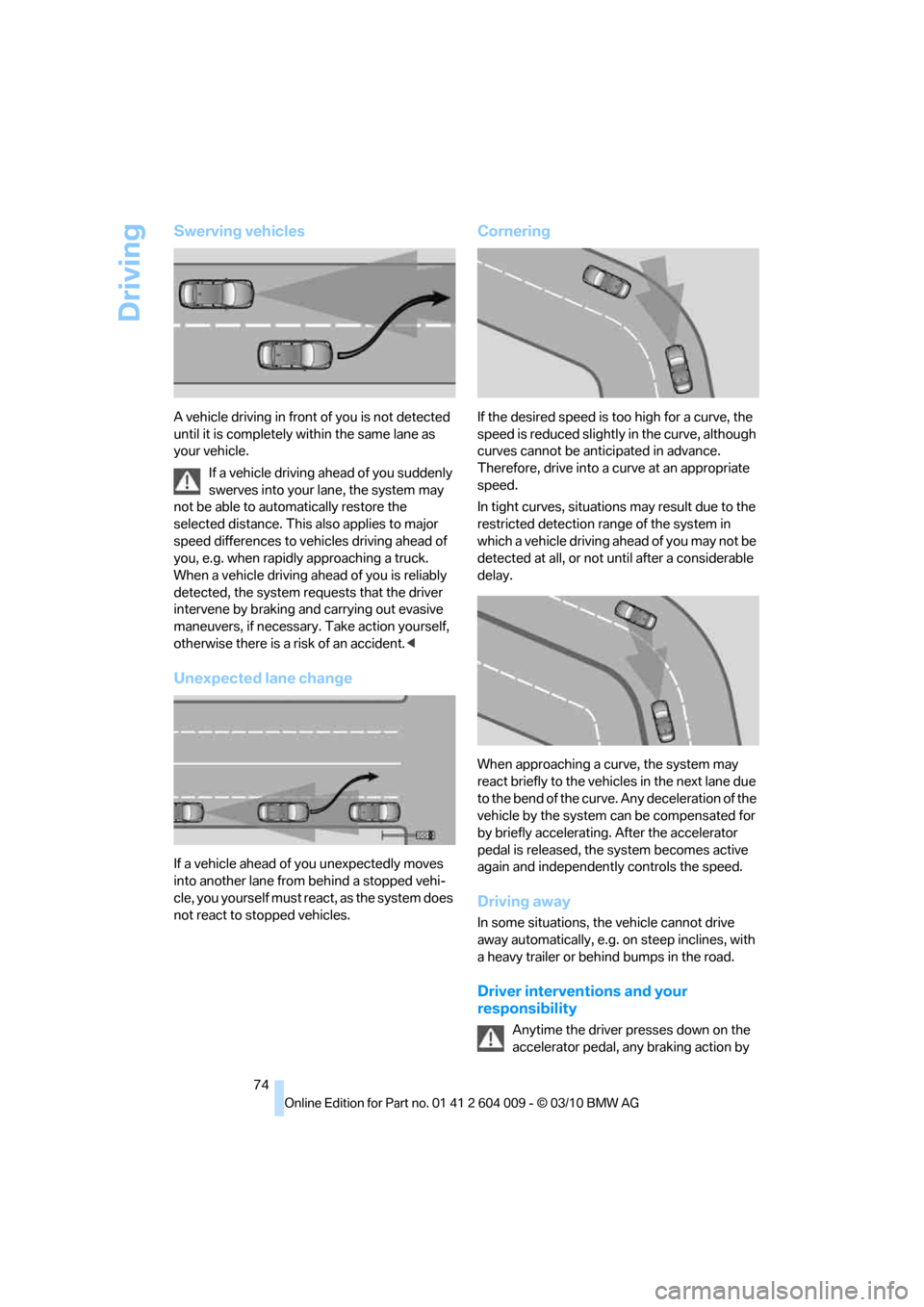
Swerving vehicles
A vehicle driving in front of you is not detected
until it is completely within the same lane as
your vehicle.
If a vehicle driving ahead of you suddenly
swerves into your lane, the system may
not be able to automatically restore the
selected distance. This also applies to major
speed differences to vehicles driving ahead of
you, e.g. when rapidly approaching a truck.
When a vehicle driving ahead of you is reliably
detected, the system requests that the driver
intervene by braking and carrying out evasive
maneuvers, if necessary. Take action yourself,
otherwise there is a risk of an accident.<
Unexpected lane change
If a vehicle ahead of you unexpectedly moves
into another lane from behind a stopped vehi-
cle, you yourself must react, as the system does
not react to stopped vehicles.
Cornering
If the desired speed is too high for a curve, the
speed is reduced slightly in the curve, although
curves cannot be anticipated in advance.
Therefore, drive into a curve at an appropriate
speed.
In tight curves, situations may result due to the
restricted detection range of the system in
which a vehicle driving ahead of you may not be
detected at all, or not until after a considerable
delay.
When approaching a curve, the system may
react briefly to the vehicles in the next lane due
to the bend of the curve. Any deceleration of the
vehicle by the system can be compensated for
by briefly accelerating. After the accelerator
pedal is released, the system becomes active
again and independently controls the speed.
Driving away
In some situations, the vehicle cannot drive
away automatically, e.g. on steep inclines, with
a heavy trailer or behind bumps in the road.
Driver interventions and your
responsibility
Anytime the driver presses down on the
accelerator pedal, any braking action by
Page 77 of 312
Controls
75Reference
At a glance
Driving tips
Communications
Navigation
Entertainment
Mobility
the system is interrupted and the distance indi-
cator goes out until the pedal is fully released.
As soon as you fully release the accelerator, the
system will again control your cruising speed
and distance setting. While driving with the sys-
tem activated, resting your foot on the acceler-
ator pedal will cause the system not to brake
even if necessary. Be certain that floor mats or
other objects on the vehicle floor do not inter-
fere with movement of the accelerator pedal.<
While active cruise control is capable of
braking your vehicle automatically when
you approach a slower vehicle ahead, it is
important to be aware that the ability of the sys-
tem to apply the brakes is also limited, e. g.
when you reduce your desired speed sharply. It
uses only a portion of braking system capacity
and does not utilize the full capacity of the vehi-
cle braking system. Therefore, the system can-
not decrease your speed for large differences in
speed between your vehicle and the vehicle
ahead. Examples: when you approach a vehicle
traveling at a much lower speed than your own
speed such as approaching a toll booth or when
a much slower vehicle cuts in front of you at
close range.<
Page 109 of 312
Controls
107Reference
At a glance
Driving tips
Communications
Navigation
Entertainment
Mobility
Airbags
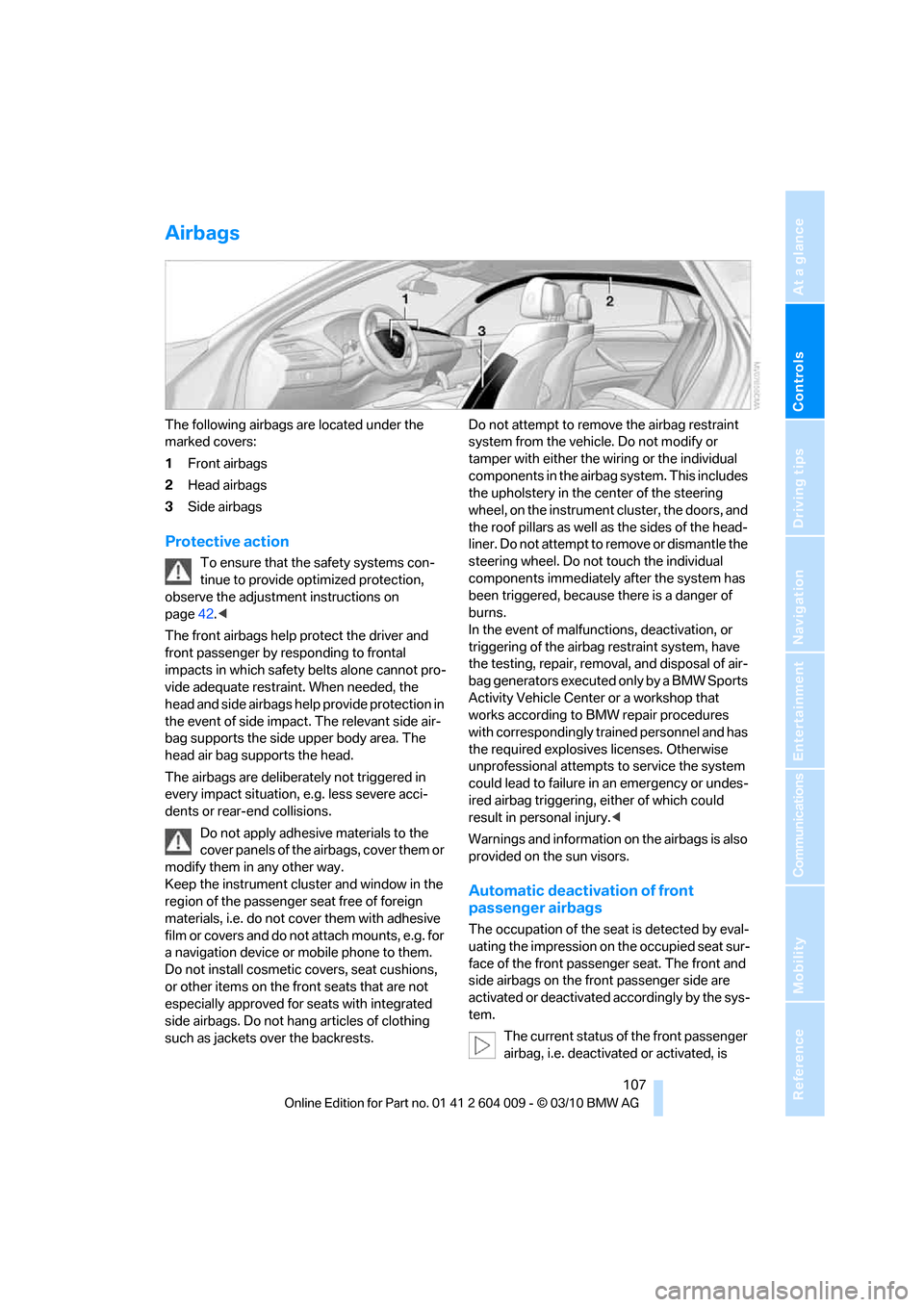
The following airbags are located under the
marked covers:
1Front airbags
2Head airbags
3Side airbags
Protective action
To ensure that the safety systems con-
tinue to provide optimized protection,
observe the adjustment instructions on
page42.<
The front airbags help protect the driver and
front passenger by responding to frontal
impacts in which safety belts alone cannot pro-
vide adequate restraint. When needed, the
head and side airbags help provide protection in
the event of side impact. The relevant side air-
bag supports the side upper body area. The
head air bag supports the head.
The airbags are deliberately not triggered in
every impact situation, e.g. less severe acci-
dents or rear-end collisions.
Do not apply adhesive materials to the
cover panels of the airbags, cover them or
modify them in any other way.
Keep the instrument cluster and window in the
region of the passenger seat free of foreign
materials, i.e. do not cover them with adhesive
film or covers and do not attach mounts, e.g. for
a navigation device or mobile phone to them.
Do not install cosmetic covers, seat cushions,
or other items on the front seats that are not
especially approved for seats with integrated
side airbags. Do not hang articles of clothing
such as jackets over the backrests.Do not attempt to remove the airbag restraint
system from the vehicle. Do not modify or
tamper with either the wiring or the individual
components in the airbag system. This includes
the upholstery in the center of the steering
wheel, on the instrument cluster, the doors, and
the roof pillars as well as the sides of the head-
liner. Do not attempt to remove or dismantle the
steering wheel. Do not touch the individual
components immediately after the system has
been triggered, because there is a danger of
burns.
In the event of malfunctions, deactivation, or
triggering of the airbag restraint system, have
the testing, repair, removal, and disposal of air-
bag generators executed only by a BMW Sports
Activity Vehicle Center or a workshop that
works according to BMW repair procedures
with correspondingly trained personnel and has
the required explosives licenses. Otherwise
unprofessional attempts to service the system
could lead to failure in an emergency or undes-
ired airbag triggering, either of which could
result in personal injury.<
Warnings and information on the airbags is also
provided on the sun visors.
Automatic deactivation of front
passenger airbags
The occupation of the seat is detected by eval-
uating the impression on the occupied seat sur-
face of the front passenger seat. The front and
side airbags on the front passenger side are
activated or deactivated accordingly by the sys-
tem.
The current status of the front passenger
airbag, i.e. deactivated or activated, is
Page 194 of 312
External devices
192
External devices
Overview
AUX-IN connection
You can connect an external audio device, e.g.
an MP3 player, and play the sound via the vehi-
cle speakers. The sound can be adjusted via
iDrive.
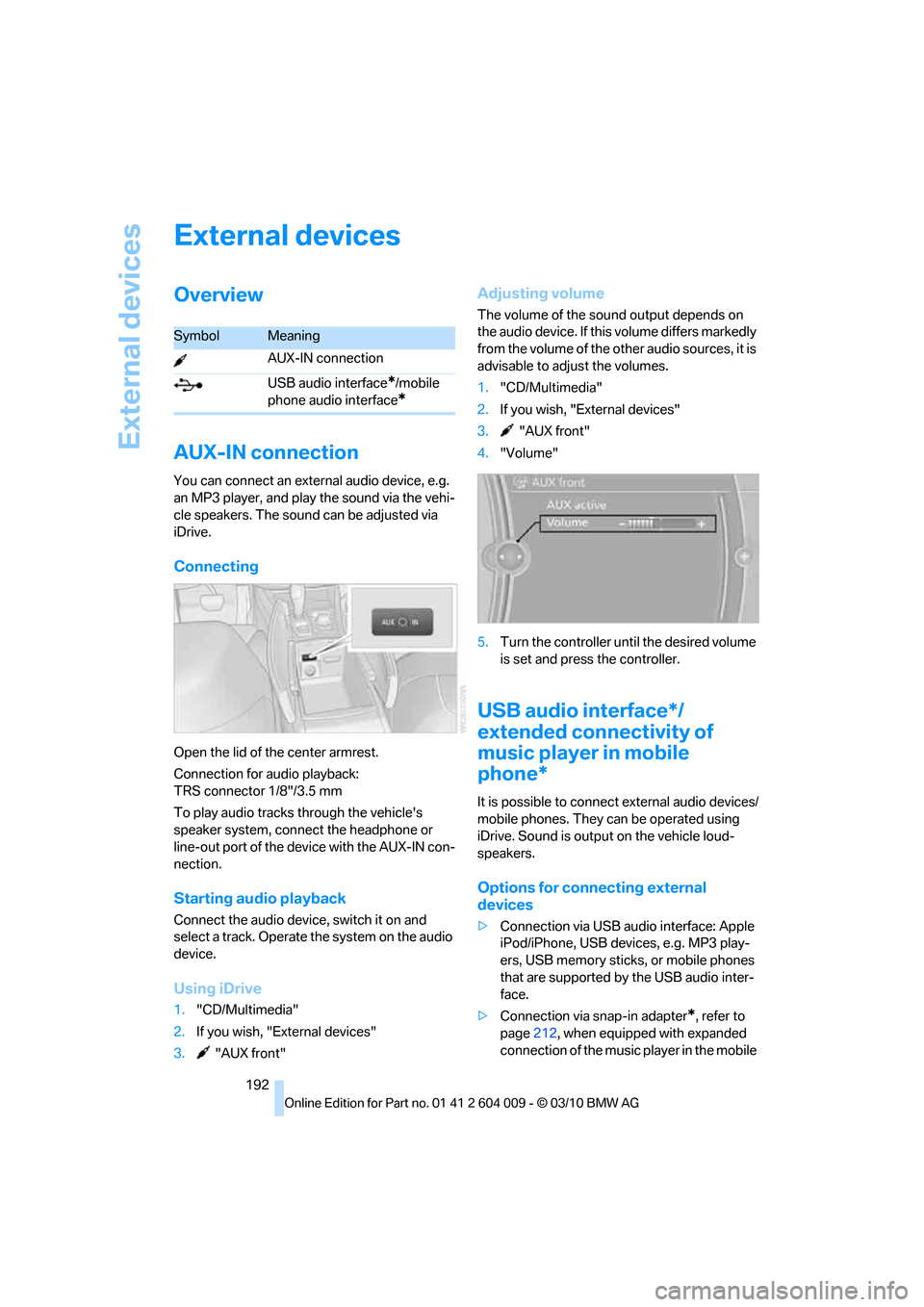
Connecting
Open the lid of the center armrest.
Connection for audio playback:
TRS connector 1/8"/3.5 mm
To play audio tracks through the vehicle's
speaker system, connect the headphone or
line-out port of the device with the AUX-IN con-
nection.
Starting audio playback
Connect the audio device, switch it on and
select a track. Operate the system on the audio
device.
Using iDrive
1."CD/Multimedia"
2.If you wish, "External devices"
3. "AUX front"
Adjusting volume
The volume of the sound output depends on
the audio device. If this volume differs markedly
from the volume of the other audio sources, it is
advisable to adjust the volumes.
1."CD/Multimedia"
2.If you wish, "External devices"
3. "AUX front"
4."Volume"
5.Turn the controller until the desired volume
is set and press the controller.
USB audio interface*/
extended connectivity of
music player in mobile
phone*
It is possible to connect external audio devices/
mobile phones. They can be operated using
iDrive. Sound is output on the vehicle loud-
speakers.
Options for connecting external
devices
>Connection via USB audio interface: Apple
iPod/iPhone, USB devices, e.g. MP3 play-
ers, USB memory sticks, or mobile phones
that are supported by the USB audio inter-
face.
>Connection via snap-in adapter
*, refer to
page212, when equipped with expanded
connection of the music player in the mobile
SymbolMeaning
AUX-IN connection
USB audio interface
*/mobile
phone audio interface
*
Page 198 of 312
DVD system in rear
196
DVD system in rear
With the DVD system in the rear you can play
CDs and DVDs with audio, video and image
data. The DVD system can also play data from
attached external audio and video devices.
Audio output is possible both via headphones
and via the vehicle speakers.
You can control the DVD system using the but-
tons on the CD-/DVD player or using the remote
control.
Some functions are operated using the
remote control.<
Enabling DVD system
The DVD system can be enabled via iDrive.
1."Settings"
2."Allow rear control"
3."Rear DVD system active"
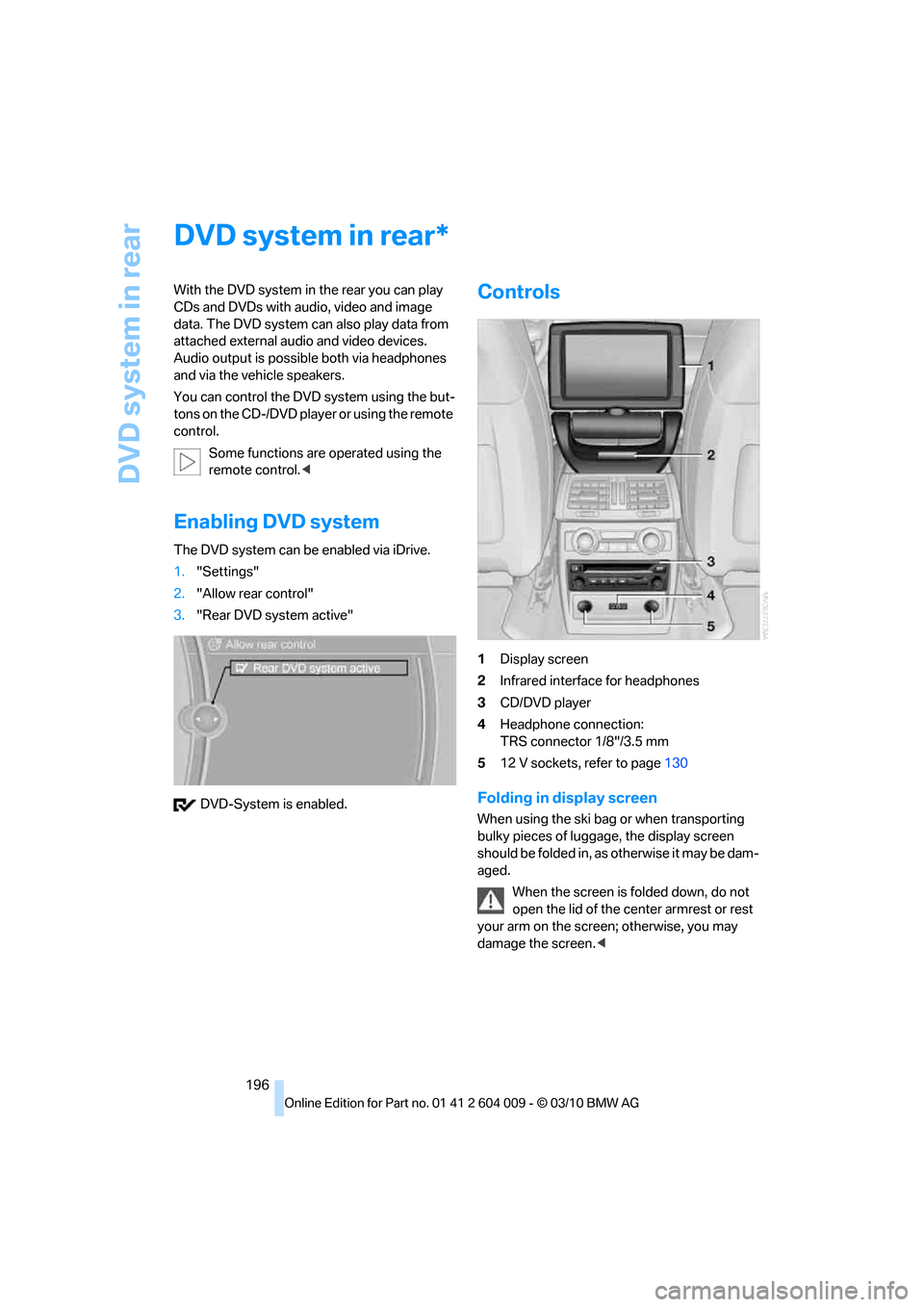
DVD-System is enabled.
Controls
1Display screen
2Infrared interface for headphones
3CD/DVD player
4Headphone connection:
TRS connector 1/8"/3.5 mm
512 V sockets, refer to page130
Folding in display screen
When using the ski bag or when transporting
bulky pieces of luggage, the display screen
should be folded in, as otherwise it may be dam-
aged.
When the screen is folded down, do not
open the lid of the center armrest or rest
your arm on the screen; otherwise, you may
damage the screen.<
*
Page 271 of 312
Mobility
269Reference
At a glance
Controls
Driving tips
Communications
Navigation
Entertainment
it from extending to its full support height and
reduce its load-carrying capacity.
To avoid serious or fatal injury: never lie under
the vehicle, and never start the engine while it is
supported by the jack.<
What you will need
To avoid rattling noises later on, note the posi-
tions of the tools before removing them, then
return them to their initial positions after com-
pleting work.
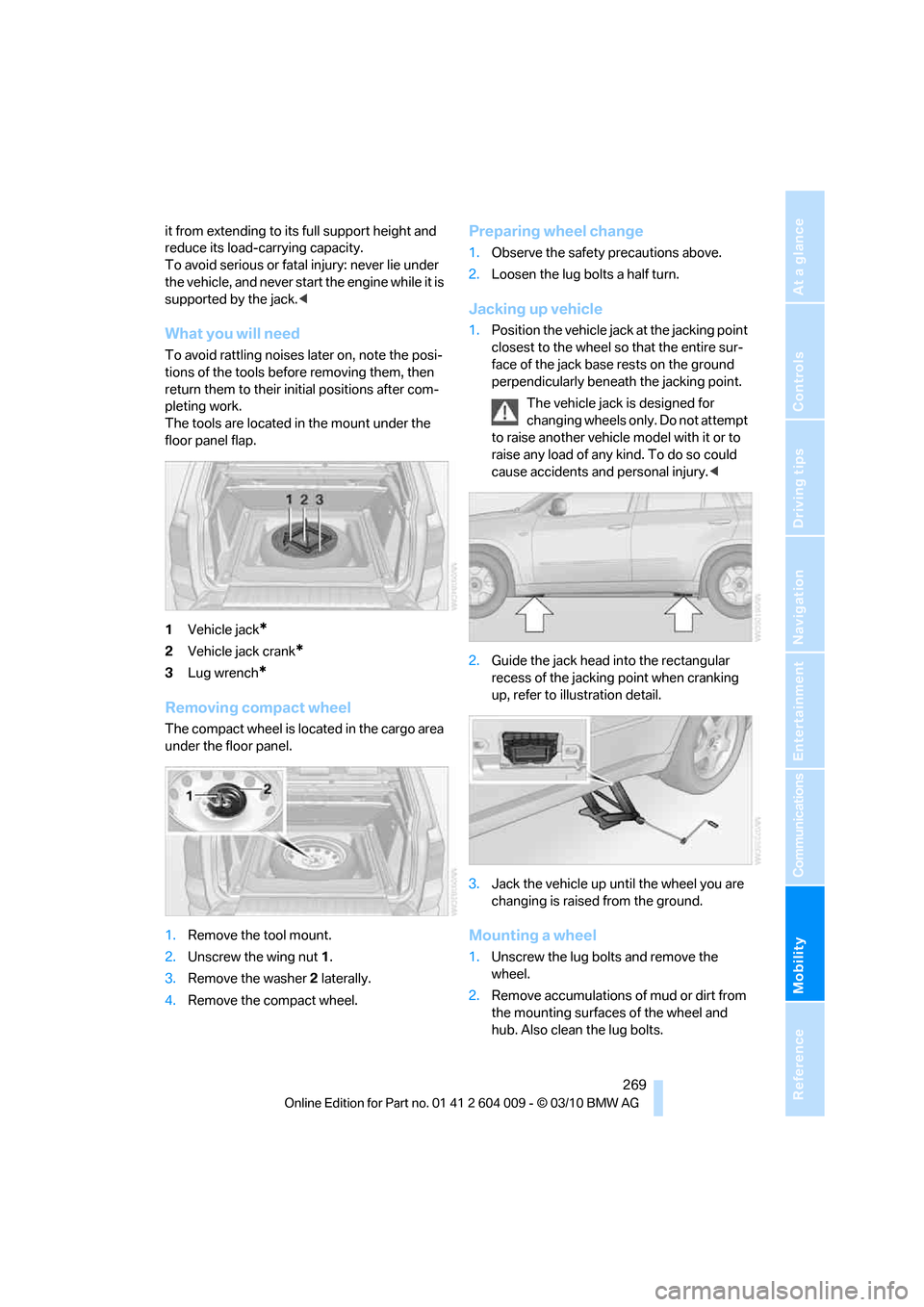
The tools are located in the mount under the
floor panel flap.
1Vehicle jack
*
2Vehicle jack crank*
3Lug wrench*
Removing compact wheel
The compact wheel is located in the cargo area
under the floor panel.
1.Remove the tool mount.
2.Unscrew the wing nut 1.
3.Remove the washer 2 laterally.
4.Remove the compact wheel.
Preparing wheel change
1.Observe the safety precautions above.
2.Loosen the lug bolts a half turn.
Jacking up vehicle
1.Position the vehicle jack at the jacking point
closest to the wheel so that the entire sur-
face of the jack base rests on the ground
perpendicularly beneath the jacking point.
The vehicle jack is designed for
changing wheels only. Do not attempt
to raise another vehicle model with it or to
raise any load of any kind. To do so could
cause accidents and personal injury.<
2.Guide the jack head into the rectangular
recess of the jacking point when cranking
up, refer to illustration detail.
3.Jack the vehicle up until the wheel you are
changing is raised from the ground.
Mounting a wheel
1.Unscrew the lug bolts and remove the
wheel.
2.Remove accumulations of mud or dirt from
the mounting surfaces of the wheel and
hub. Also clean the lug bolts.
Page 294 of 312
Everything from A - Z
292
Everything from A - Z
Index
A
ABS Antilock Brake
System95
ACC, refer to Active cruise
control68
Accessories5
Access to 3rd row seats47
Acoustic signal, refer to Check
Control82
Activated-charcoal filter121
Active cruise control68
– distance, selecting70
– indicator lamp72
– radar sensor72
– warning lamps72
Active seat51
Active seat ventilation50
Active steering105
– malfunction105
– warning lamp105
Adaptive brake lamp
– brake force display106
Adaptive Drive98
Adaptive fixing system133
Adaptive Light Control112
Address, entering149,155
Address for navigation
– entering149
Adjusting opening
height31,33
Adjusting temperature with
expanded-scope automatic
climate control118
Adjusting the tone during
audio operation, refer to
Tone control168
Adjusting thigh
support43,44
Airbags107
– sitting safely42
– warning lamp108Air distribution
– automatic117,121
– manual118
Airing, refer to Ventilation120
Air recirculation119
– AUC Automatic
recirculated-air control119
– recirculated-air mode119
Air vents116
– refer to Ventilation120
Air vents of automatic climate
control116
Air volume118,
122
AKI, refer to Fuel
specifications235
Alarm system34
– avoiding unintentional
alarms35
– interior motion sensor35
– switching off alarm34
– switching off tilt alarm
sensor and interior motion
sensor35
– tilt alarm sensor35
Albums of music
collection189
Alloy wheels259
All-season tires, refer to
Winter tires250
All-wheel drive, refer to
xDrive97
Alterations, technical, refer to
For your own safety5
AM, waveband171
Antenna for mobile phone212
Antifreeze
– coolant255
– washer fluid67
Antilock Brake System
ABS95
Anti-theft system, refer to
Alarm system34Anti-theft system, refer to
Central locking system27
Approved axle weights, refer
to Weights283
Approved engine oils255
Approved gross vehicle
weight, refer to Weights283
Armrest, refer to Center
armrest, front128
Around the center console14
Around the steering wheel10
Arrival time, refer to
Computer79
Ashtray
– front129
– rear129
Assist, refer to separate
operating instructions
Assistance systems, refer to
Driving stability control
systems95
AUC Automatic recirculated-
air control119
Audio168
– controls168
– switching on/off168
– tone control168
– volume168
Audio CDs, DVD system in
rear202
Audio device, external128
Automatic
– air distribution117,121
– air volume
117,121
– cruise control68
– headlamp control111
– liftgate operation31
– steering wheel adjustment,
refer to Easy entry/exit53
Automatically switching high-
beams on and off, refer to
High-beam Assistant113
Automatic car washes258
Page 295 of 312
Reference 293
At a glance
Controls
Driving tips
Communications
Navigation
Entertainment
Mobility
Automatic climate control
– automatic air
distribution117,121
– in rear121
– switching off120,122
– ventilation in rear120
– with 2-zone control117
– with 4-zone control121
Automatic climate control in
rear
– activating on Control
Display121
– deactivating on Control
Display121
Automatic closing of doors,
refer to Automatic soft
closing30
Automatic curb monitor52
Automatic garage door
opener124
Automatic headlamps
– refer to High-beam
Assistant113
Automatic Hold61
– activating61
– deactivating61
– parking61
Automatic lighting
– refer to Automatic headlamp
control111
– refer to Daytime driving
lamps112
– refer to Interior lamps115
– refer to Pathway lighting112
Automatic low-beams, refer to
High-beam Assistant113
Automatic recirculated-air
control AUC119
Automatic Service
Request230
Automatic soft closing30
Automatic transmission with
Steptronic63
– deactivating selector lever
interlock64
– kickdown64
– with Comfort Access36AUTO program of the
automatic climate
control117,121
AUX-IN connection128,192
Available services230
Average fuel consumption78
– setting units86
Average speed, refer to
Computer78
Avoiding highways for
navigation158
Avoiding unintentional
alarms35
Axle weights, refer to
Weights283
B
Backrest contour, refer to
Lumbar support44
Backrests, refer to Seats43
Backrest width adjustment44
Backup lamps, replacing
bulbs264,266
Band-aids, refer to First-aid
kit273
Base plate for telephone or
mobile phone
– refer to Snap-in adapter222
Bass, tone setting168
Battery
– charging270
– jump starting274
– power failure270
Battery, refer to Vehicle
battery270
Battery disposal
– remote control with Comfort
Access37
– vehicle battery270
Battery for mobile phone223
Battery replacement
– remote control for DVD
system in rear198
– remote control with Comfort
Access37
Belts, refer to Safety belts48
Beverage holder, refer to
Cupholders128Blower, refer to Air
volume118,122
Bluetooth, activating/
deactivating214
BMW Assist,
activating228,230
BMW Advanced Diesel236
BMW Assist226
BMW homepage4
BMW maintenance
system256
BMW Search228
BMW TeleService226
BMW website4
Bottle holder, refer to
Cupholders128
Brake assistant95
Brake force display106
Brake lamps
– brake force display106
– replacing bulbs264,266
Brake pedal, refer to Braking
safely140
Brake rotors140
Brakes
– ABS Antilock Brake
System95
– brake assistant95
– brake force display106
– breaking-in138
– CBC Cornering Brake
Control95
– electronic brake-force
distribution95
– parking brake60
– refer to Braking safely140
– warning lamp13
Brake system138
– brake pads138
– breaking-in138
– disc brakes140
Braking safely140
Breakdown
– Flat Tire Monitor99
Breakdown, transporting your
vehicle275
Breakdown services, refer to
Roadside Assistance274
Breaking-in brake pads138
Page 296 of 312
Everything from A - Z
294 Breaking-in rear axle
differential138
Break-in period138
Brightness
– of Control Display86
– on Head-up Display109
Button for starting engine58
Buttons on steering wheel11
C
Calibrating driver's seat49
California Proposition 65
Warning6
Call
– accepting215
– ending216
– rejecting216
Calling, refer to Phone
numbers, dialing216
Calling, refer to the telephone
owner's manual
Camera
– refer to Rear view camera93
– refer to Top View90
Camera, Side View93
Can holder, refer to
Cupholders128
Capacities284
Capacity of cargo area283
Car battery, refer to Vehicle
battery270Care258
– car-care products258
– carpets260
– car washes258
– CD/DVD-player261
– chrome components259
– displays260
– exterior258
– fine wooden
components260
– hand washing259
– headlamps259
– high-pressure cleaning
jets259
– interior260
– leather260
– light-alloy wheels259
– paint259
– plastic components260
– rubber gaskets259
– running boards260
– safety belts260
– sensors and cameras260
– upholstery materials and
cloth-covered paneling260
– windows259
Cargo
– refer to Loading140
– securing142
– securing with ski bag135
Cargo area
– capacity283
– emergency actuation, refer
to Manually opening or
closing34
– emergency operation, refer
to Opening manually31
– expanding132
– opening
33
– opening/closing, refer to
Liftgate30,33
– opening/closing, refer to
Tailgate32
– opening from inside31
– opening from outside31
– opening with remote
control28
Cargo area, refer to Cargo
area131Cargo area cover, refer to
Luggage compartment
roller cover131
Caring for the vehicle
finish259
Car key, refer to Keys/remote
control26
Car phone
– installation location, refer to
Center armrest, front128
– refer to separate operating
instructions
Car phone, refer to
Telephone212
Car radio, refer to Radio171
Car wash258
– before driving in59
– with Comfort Access36
Car washes258
Catalytic converter, refer to
Hot exhaust system139
CBC Cornering Brake
Control95
CBS Condition Based
Service256
CD, audio playback180
CD, refer to Playing audio
tracks, DVD system in
rear202
CD/DVD changer
– magazine, loading183
CD-/DVD player in rear197
CD changer179,183
– controls168
– fast forward/reverse181
– random play sequence180
– selecting a track180
– switching on/off168
– tone control168
– volume168
CD player179
– controls168
– fast forward/reverse181
– random play sequence180
– selecting a track180
– switching on/off168
– tone control168
– volume168
Page 297 of 312
Reference 295
At a glance
Controls
Driving tips
Communications
Navigation
Entertainment
Mobility
Cell phone
– refer to Mobile phone
Center armrest
– front128
– rear131
Center brake lamp265,268
Center console14
Central locking system27
– Comfort Access35
– from inside vehicle30
Changes, technical, refer to
For your own safety5
Changes, technical, refer to
Parts and accessories5
Changing gears
– using shift paddles64
Changing language on
Control Display86
Changing tires249
Changing trips157
Changing units of measure on
Control Display86
Changing wheels268
Check Control82
Checking the air pressure,
refer to Tire inflation
pressure239
Children, transporting54
Child restraint devices54
Child restraint fixing system
LATCH55
Child restraint systems54
Child-safety locks57
Child seats54
Chime, refer to Check
Control82
Cigarette lighter, refer to
Lighter130
Cleaning your BMW, refer to
Care258
Clock76
– 12h/24h mode85
– setting time85
Closing
– from inside30
– using remote control28
Closing fuel filler cap234
Clothes hooks128
Cockpit10Cold start, refer to Starting
engine59
Combination instrument, refer
to Instrument panel12
Comfort Access35
– observe in car wash36
– replacing battery37
Comfort area, refer to Around
the center console14
Comfort start, refer to Starting
engine59
Compact wheel
– inflation pressure241
– wheel change268
Compartment for remote
control, refer to Ignition
lock58
Compartments, refer to
Storage compartments128
Compass, digital125
Computer78
– displaying information78
– opening via iDrive79
Concierge service227
Condition Based Service
CBS256
Confirmation signals,
adjusting for locking and
unlocking28
Connecting car vacuum
cleaner, refer to Connecting
electrical devices130
Connecting headphones197
Consumption, refer to
Average fuel
consumption78
Consumption indicator
– energy control77
Consumption statistics, refer
to Average fuel
consumption78
Contacts
– creating224
Control Center, refer to
iDrive16
Control Display, refer to
iDrive16
– setting brightness86
– switching on/off19Controller, refer to iDrive16
Controls, refer to Cockpit10
Controls DVD system in
rear196
Convenient opening and
closing
– glass sunroof28,29
– glass sunroof with Comfort
Access36
– windows28,29
– windows with Comfort
Access36
– with Comfort Access36
Coolant255
– checking level255
– temperature77
Cooling, maximum119
Copyright2
Cornering Brake Control
CBC95
Country codes DVD181
Courtesy lamps, refer to
Interior lamps115
Cradle for telephone or mobile
phone128
Criteria for route158
Cruise control67
– active cruise control68
Cruising range78
Cupholders128
Current playback
– external devices194
– of music collection189
Customer Relations229
Cylinders, refer to Engine
data280
D
Dashboard, refer to
Cockpit10
Dashboard lighting, refer to
Instrument lighting115
Data280
– capacities284
– dimensions281
– engine280
– technical data280
– weights283