audio BMW X5 3.0I 2007 E70 User Guide
[x] Cancel search | Manufacturer: BMW, Model Year: 2007, Model line: X5 3.0I, Model: BMW X5 3.0I 2007 E70Pages: 272, PDF Size: 9.03 MB
Page 159 of 272
Navigation
Entertainment
Driving tips
157Reference
At a glance
Controls
Communications
Mobility
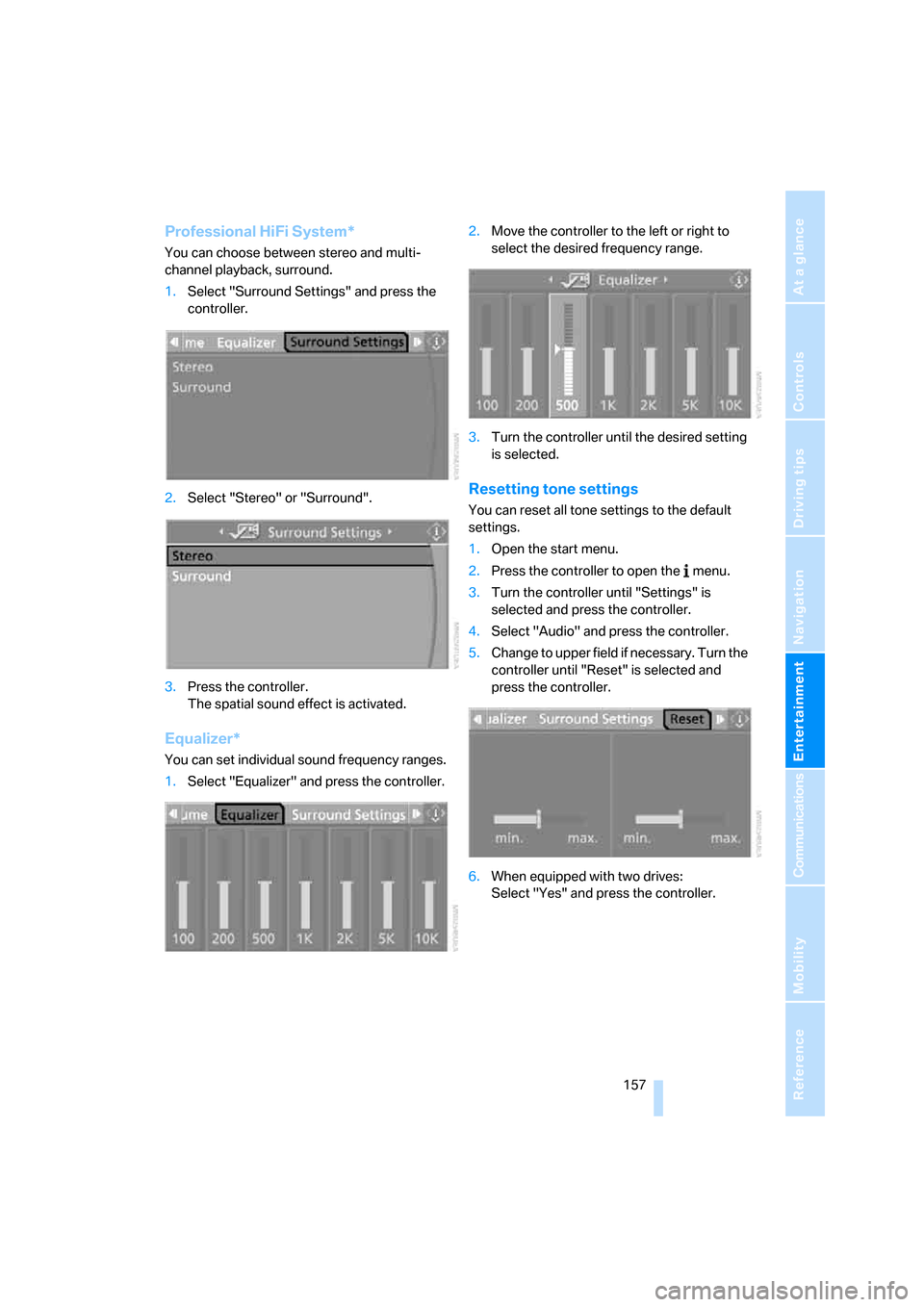
Professional HiFi System*
You can choose between stereo and multi-
channel playback, surround.
1.Select "Surround Settings" and press the
controller.
2.Select "Stereo" or "Surround".
3.Press the controller.
The spatial sound effect is activated.
Equalizer*
You can set individual sound frequency ranges.
1.Select "Equalizer" and press the controller.2.Move the controller to the left or right to
select the desired frequency range.
3.Turn the controller until the desired setting
is selected.
Resetting tone settings
You can reset all tone settings to the default
settings.
1.Open the start menu.
2.Press the controller to open the menu.
3.Turn the controller until "Settings" is
selected and press the controller.
4.Select "Audio" and press the controller.
5.Change to upper field if necessary. Turn the
controller until "Reset" is selected and
press the controller.
6.When equipped with two drives:
Select "Yes" and press the controller.
Page 167 of 272
Navigation
Entertainment
Driving tips
165Reference
At a glance
Controls
Communications
Mobility
CD player and CD changer
Listening to CDs
When equipped with two drives:
The upper drive is for audio CDs.
Compressed audio files
CDs with compressed audio files, i.e. MP3, can
be played by the CD player and CD changer.
Starting CD player
Inserting CD
Insert the CD into the drive with the labeled side
up.
The CD is automatically pulled in. Playback
starts automatically if the sound output is on.
For CDs with compressed audio files, it can take
up to approx. 1 minute to read in the data
depending on the directory structure.
Via iDrive
Starting playback when there is already a CD in
the drive:
iDrive, for explanation of concept, refer to
page16.
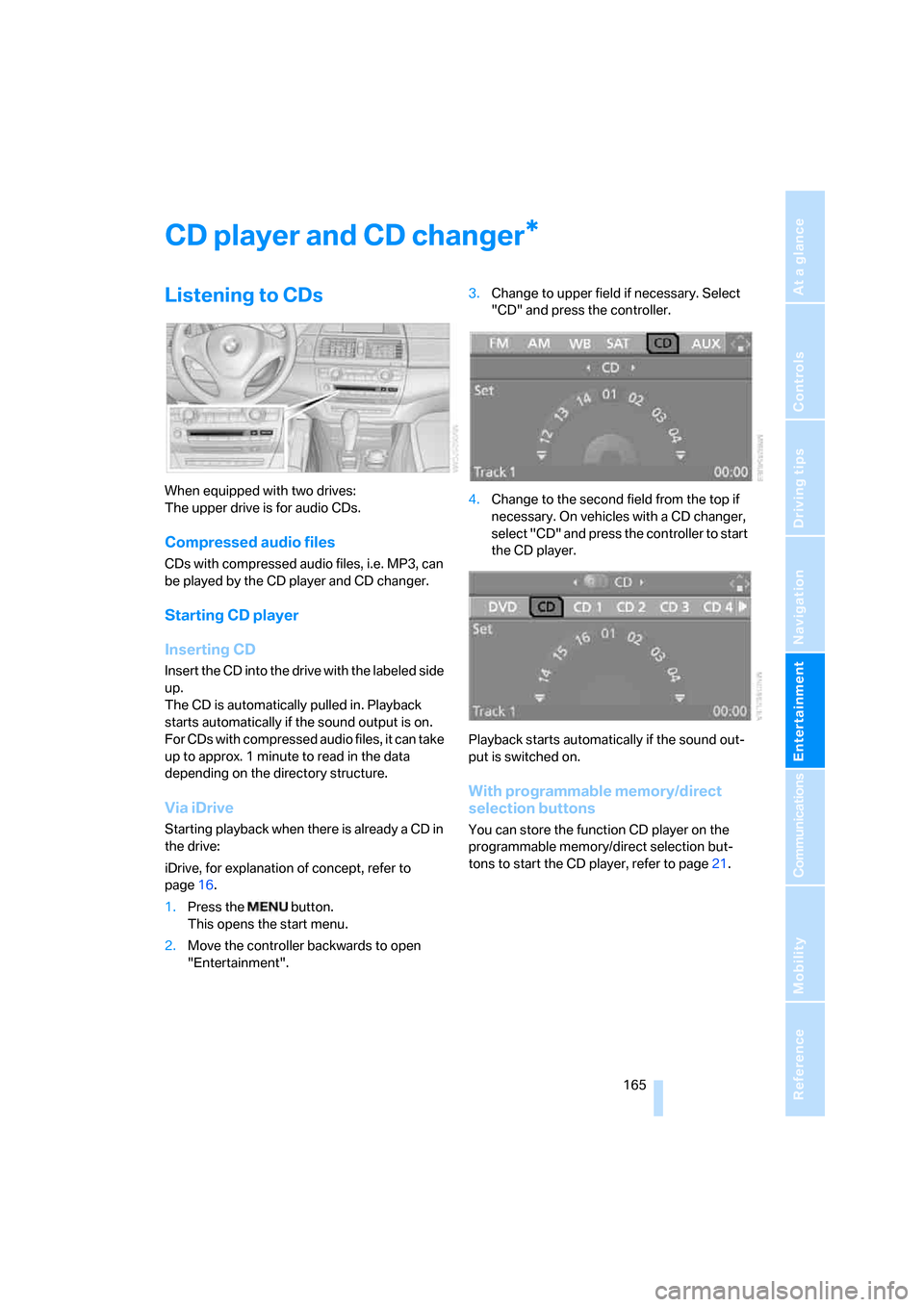
1.Press the button.
This opens the start menu.
2.Move the controller backwards to open
"Entertainment".3.Change to upper field if necessary. Select
"CD" and press the controller.
4.Change to the second field from the top if
necessary. On vehicles with a CD changer,
select "CD" and press the controller to start
the CD player.
Playback starts automatically if the sound out-
put is switched on.
With programmable memory/direct
selection buttons
You can store the function CD player on the
programmable memory/direct selection but-
tons to start the CD player, refer to page21.
*
Page 168 of 272
CD player and CD changer
166
Starting CD changer
Filling CD changer, refer to page169.
Via iDrive
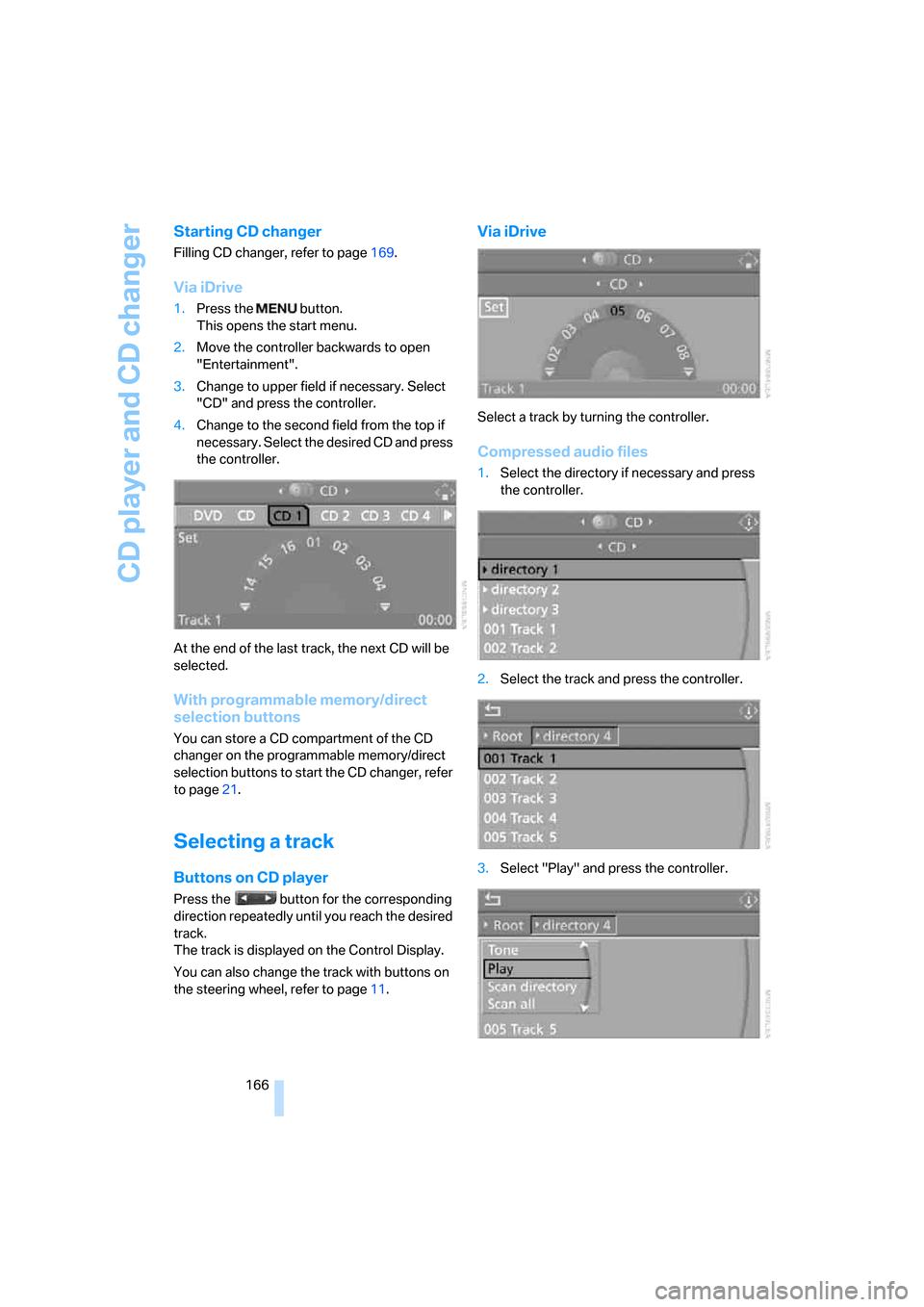
1.Press the button.
This opens the start menu.
2.Move the controller backwards to open
"Entertainment".
3.Change to upper field if necessary. Select
"CD" and press the controller.
4.Change to the second field from the top if
necessary. Select the desired CD and press
the controller.
At the end of the last track, the next CD will be
selected.
With programmable memory/direct
selection buttons
You can store a CD compartment of the CD
changer on the programmable memory/direct
selection buttons to start the CD changer, refer
to page21.
Selecting a track
Buttons on CD player
Press the button for the corresponding
direction repeatedly until you reach the desired
track.
The track is displayed on the Control Display.
You can also change the track with buttons on
the steering wheel, refer to page11.
Via iDrive
Select a track by turning the controller.
Compressed audio files
1.Select the directory if necessary and press
the controller.
2.Select the track and press the controller.
3.Select "Play" and press the controller.
Page 169 of 272
Navigation
Entertainment
Driving tips
167Reference
At a glance
Controls
Communications
Mobility
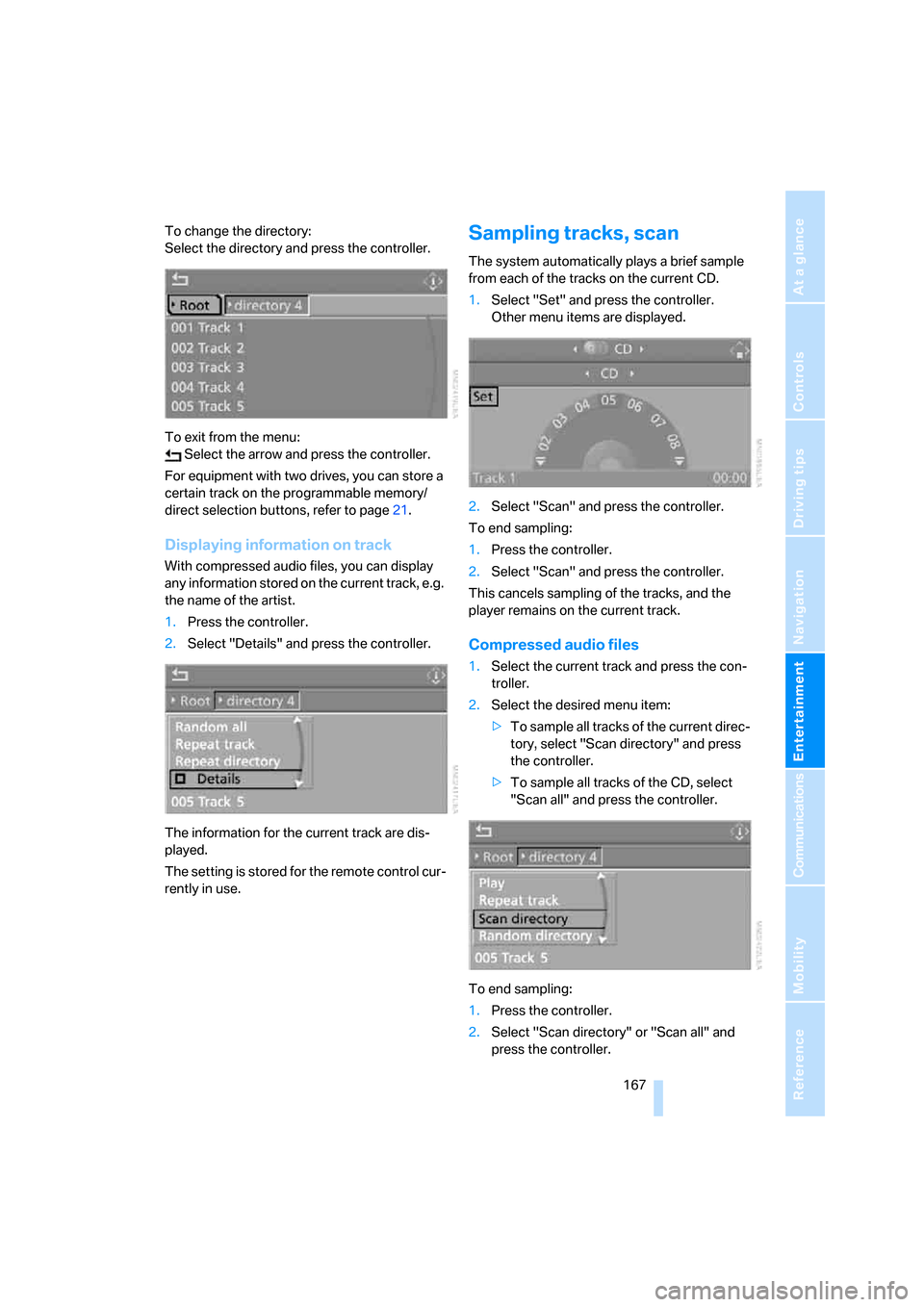
To change the directory:
Select the directory and press the controller.
To exit from the menu:
Select the arrow and press the controller.
For equipment with two drives, you can store a
certain track on the programmable memory/
direct selection buttons, refer to page21.
Displaying information on track
With compressed audio files, you can display
any information stored on the current track, e.g.
the name of the artist.
1.Press the controller.
2.Select "Details" and press the controller.
The information for the current track are dis-
played.
The setting is stored for the remote control cur-
rently in use.
Sampling tracks, scan
The system automatically plays a brief sample
from each of the tracks on the current CD.
1.Select "Set" and press the controller.
Other menu items are displayed.
2.Select "Scan" and press the controller.
To end sampling:
1.Press the controller.
2.Select "Scan" and press the controller.
This cancels sampling of the tracks, and the
player remains on the current track.
Compressed audio files
1.Select the current track and press the con-
troller.
2.Select the desired menu item:
>To sample all tracks of the current direc-
tory, select "Scan directory" and press
the controller.
>To sample all tracks of the CD, select
"Scan all" and press the controller.
To end sampling:
1.Press the controller.
2.Select "Scan directory" or "Scan all" and
press the controller.
Page 170 of 272
CD player and CD changer
168 This cancels sampling, and the player remains
on the current track.
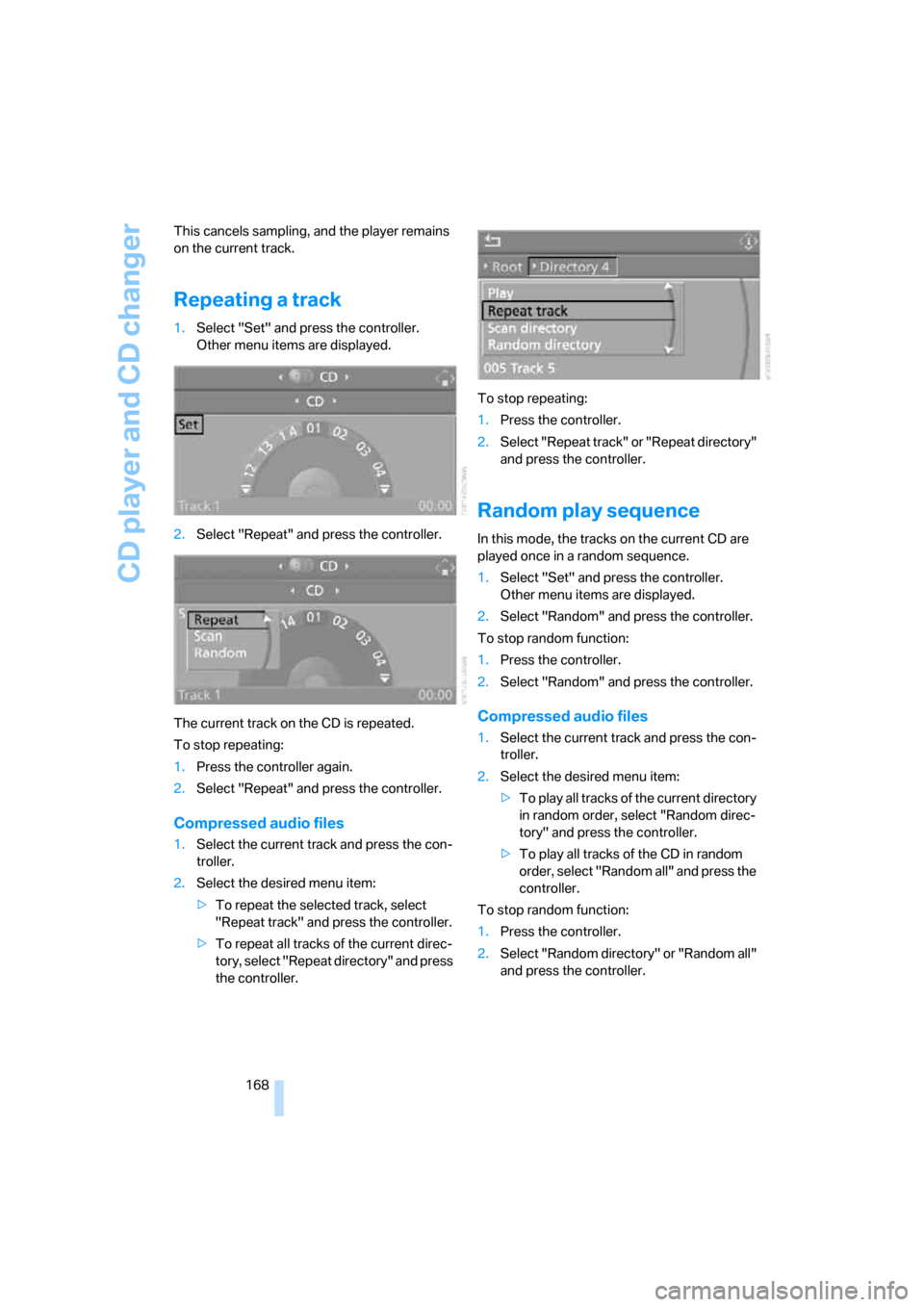
Repeating a track
1.Select "Set" and press the controller.
Other menu items are displayed.
2.Select "Repeat" and press the controller.
The current track on the CD is repeated.
To stop repeating:
1.Press the controller again.
2.Select "Repeat" and press the controller.
Compressed audio files
1.Select the current track and press the con-
troller.
2.Select the desired menu item:
>To repeat the selected track, select
"Repeat track" and press the controller.
>To repeat all tracks of the current direc-
tory, select "Repeat directory" and press
the controller.To stop repeating:
1.Press the controller.
2.Select "Repeat track" or "Repeat directory"
and press the controller.
Random play sequence
In this mode, the tracks on the current CD are
played once in a random sequence.
1.Select "Set" and press the controller.
Other menu items are displayed.
2.Select "Random" and press the controller.
To stop random function:
1.Press the controller.
2.Select "Random" and press the controller.
Compressed audio files
1.Select the current track and press the con-
troller.
2.Select the desired menu item:
>To pla y all tracks of the current directory
in random order, select "Random direc-
tory" and press the controller.
>To play all tracks of the CD in random
order, select "Random all" and press the
controller.
To stop random function:
1.Press the controller.
2.Select "Random directory" or "Random all"
and press the controller.
Page 173 of 272
Navigation
Entertainment
Driving tips
171Reference
At a glance
Controls
Communications
Mobility
External audio device
You can connect an external audio device, e.g.
an MP3 player, and play the sound via the vehi-
cle loudspeakers. The sound can be adjusted
via iDrive.
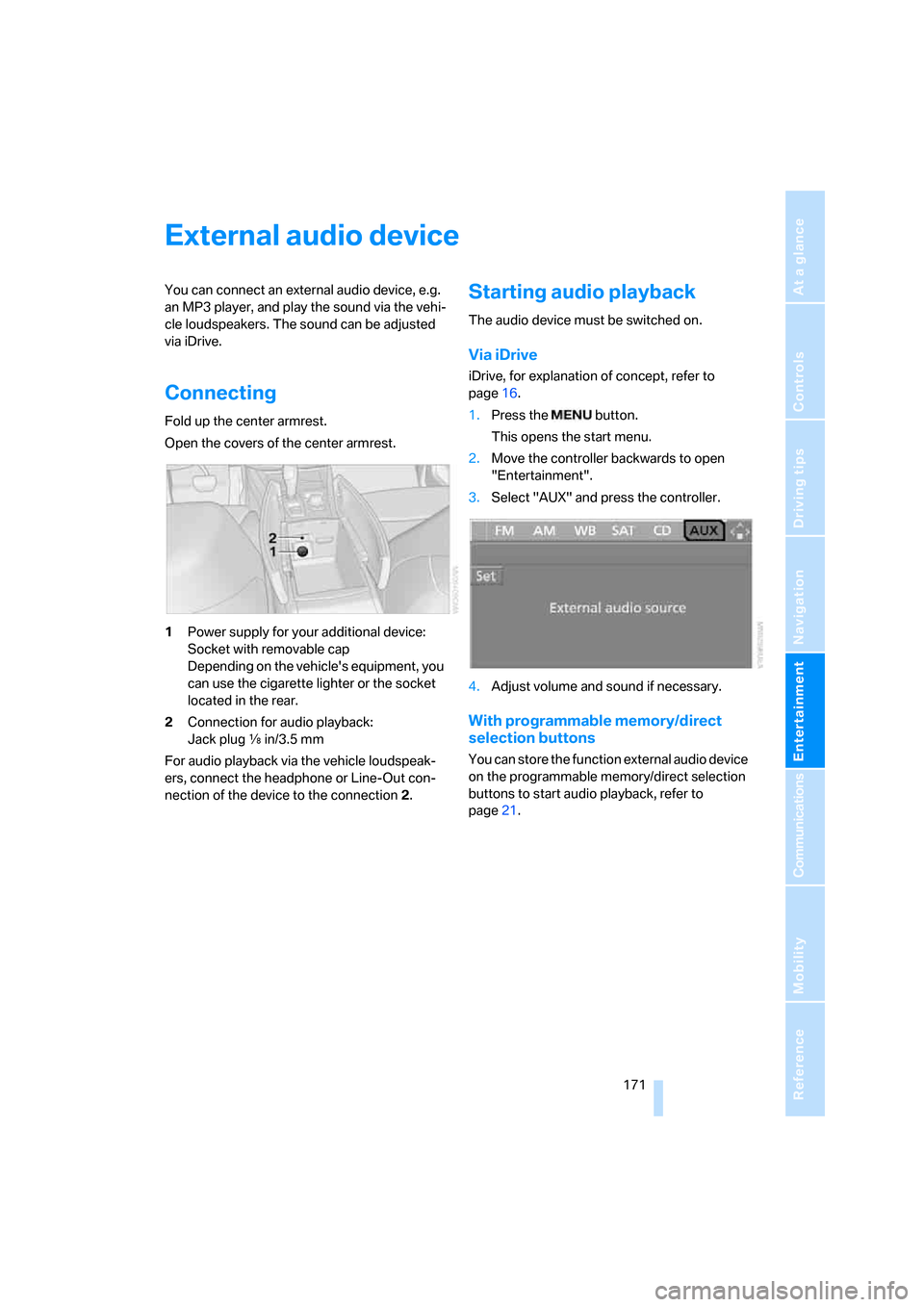
Connecting
Fold up the center armrest.
Open the covers of the center armrest.
1Power supply for your additional device:
Socket with removable cap
Depending on the vehicle's equipment, you
can use the cigarette lighter or the socket
located in the rear.
2Connection for audio playback:
Jack plug εin/3.5 mm
For audio playback via the vehicle loudspeak-
ers, connect the headphone or Line-Out con-
nection of the device to the connection 2.
Starting audio playback
The audio device must be switched on.
Via iDrive
iDrive, for explanation of concept, refer to
page16.
1.Press the button.
This opens the start menu.
2.Move the controller backwards to open
"Entertainment".
3.Select "AUX" and press the controller.
4.Adjust volume and sound if necessary.
With programmable memory/direct
selection buttons
You can store the function external audio device
on the programmable memory/direct selection
buttons to start audio playback, refer to
page21.
Page 174 of 272
DVD system in rear
172
DVD system in rear
With the DVD system in the rear you can play
CDs and DVDs with audio, video and image
data. External audio and video devices can also
be connected and played via the DVD system in
the rear.
Tone output is possible both via headphones
and via the vehicle loudspeakers.
You can operate the DVD system in the rear
with the buttons on the CD/DVD player or with
the remote control.
Some functions can only be operated
with the remote control.<
Enabling DVD system
Enable the DVD system with iDrive. For expla-
nation of concept, refer to page16.
1.Press the button.
This opens the start menu.
2.Press the controller to open the menu.
3.Select "Settings" and press the controller.
4.Select "Unlock rear menu" and press the
controller.
5.Select "Rear enabled" and press the con-
troller.
The DVD system is enabled.
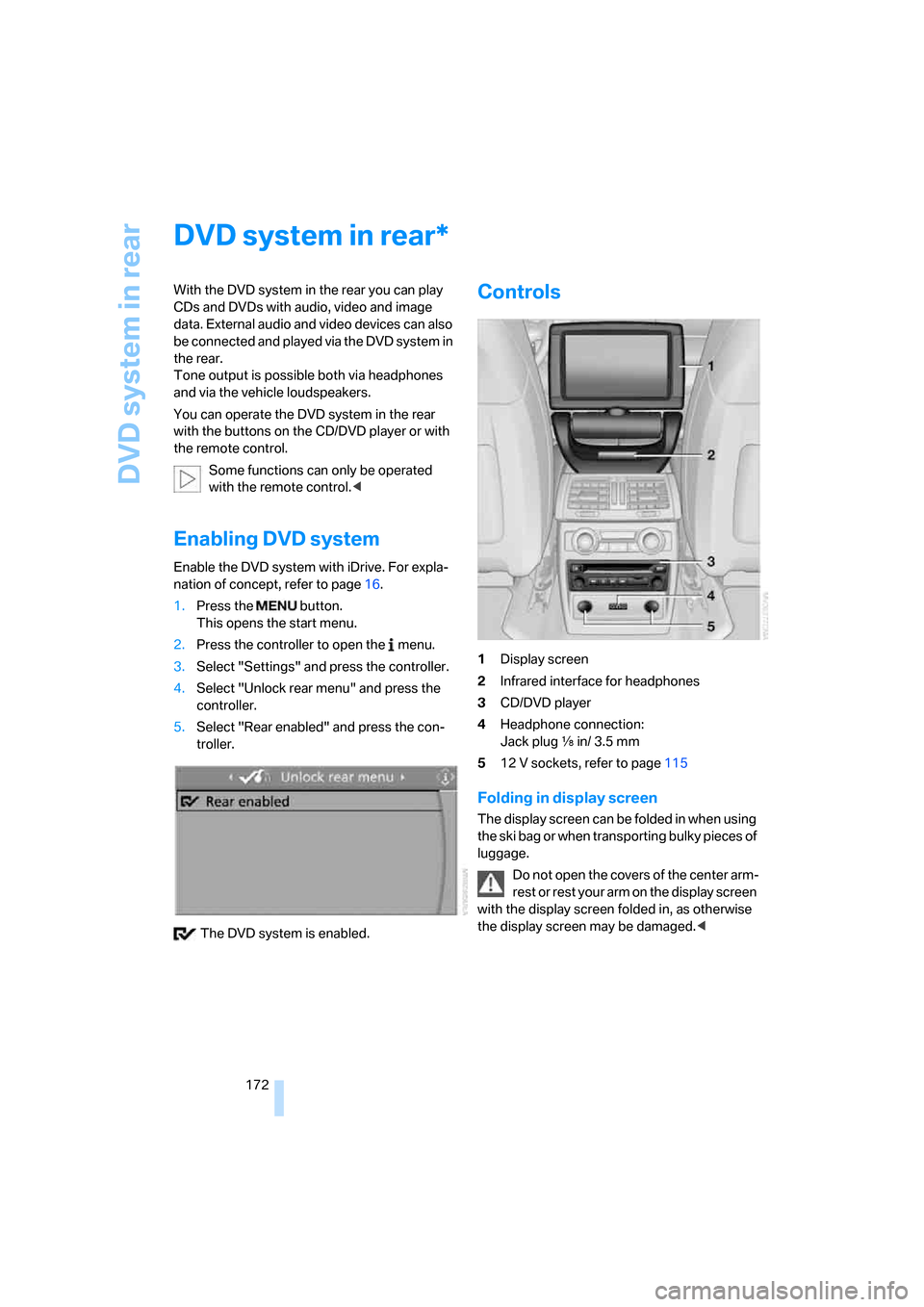
Controls
1Display screen
2Infrared interface for headphones
3CD/DVD player
4Headphone connection:
Jack plug εin/ 3.5 mm
512 V sockets, refer to page115
Folding in display screen
The display screen can be folded in when using
the ski bag or when transporting bulky pieces of
luggage.
Do not open the covers of the center arm-
rest or rest your arm on the display screen
with the display screen folded in, as otherwise
the display screen may be damaged.<
*
Page 176 of 272
DVD system in rear
174 >Press the button:
Activating menu item.
Changing batteries
1.Press the detent and remove the cover.
2.Change the batteries. The type and installa-
tion position are marked on the bottom of
the battery compartment.
3.Close the cover.
Dispose of used batteries at a collection
point or at your BMW Sports Activity
Vehicle Center.<
Sound output via
loudspeakers
In addition to the headphones, you can also play
the sound via the vehicle loudspeakers.
As soon as a plug is inserted in the AUX-In
socket in the center console, the sound output
of the DVD system via the vehicle loudspeakers
is interrupted.
iDrive, for explanation of concept, refer to
page16.
1.Press the button.
This opens the start menu.
2.Move the controller backwards to open
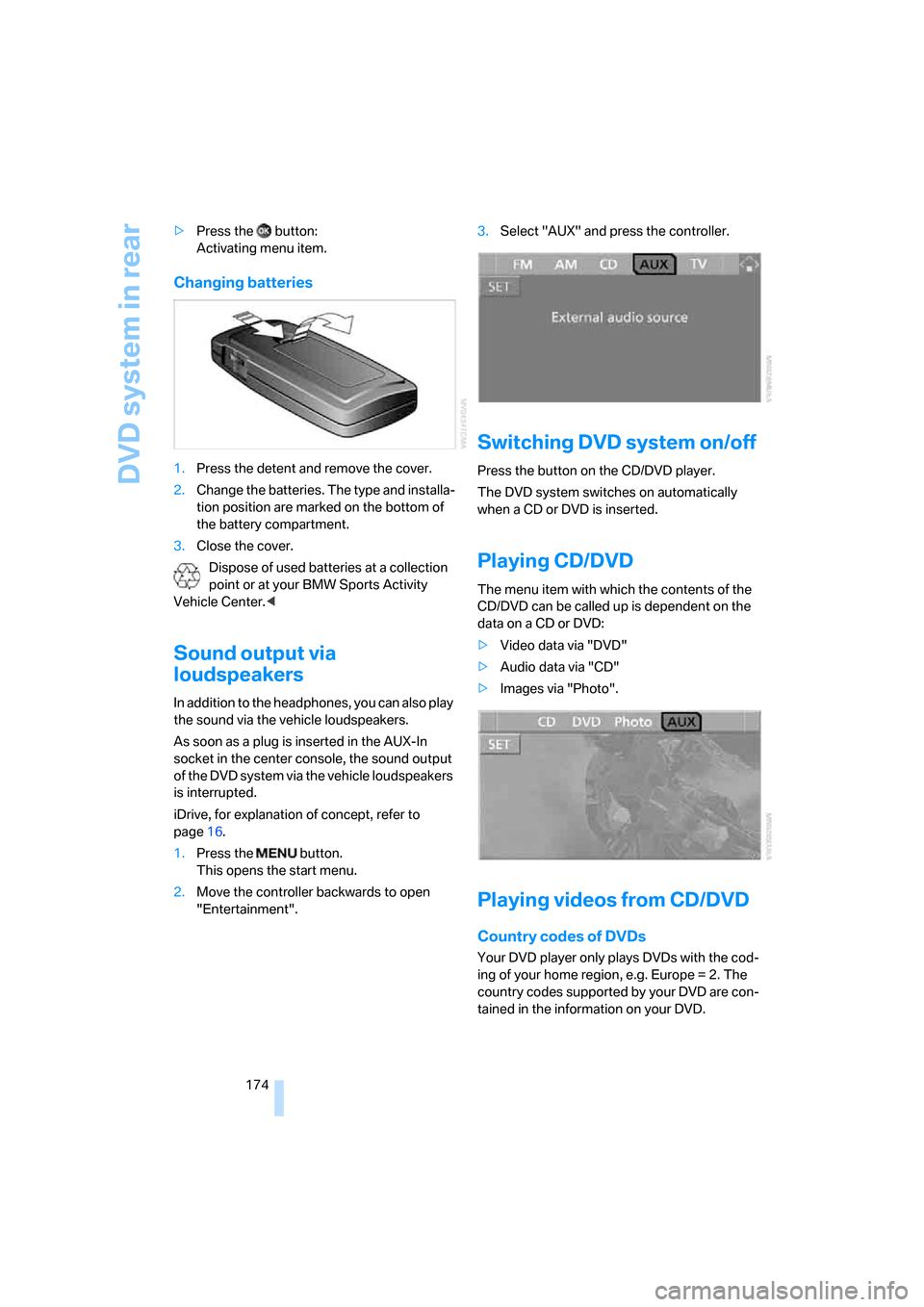
"Entertainment".3.Select "AUX" and press the controller.
Switching DVD system on/off
Press the button on the CD/DVD player.
The DVD system switches on automatically
when a CD or DVD is inserted.
Playing CD/DVD
The menu item with which the contents of the
CD/DVD can be called up is dependent on the
data on a CD or DVD:
>Video data via "DVD"
>Audio data via "CD"
>Images via "Photo".
Playing videos from CD/DVD
Country codes of DVDs
Your DVD player only plays DVDs with the cod-
ing of your home region, e.g. Europe = 2. The
country codes supported by your DVD are con-
tained in the information on your DVD.
Page 180 of 272
DVD system in rear
178
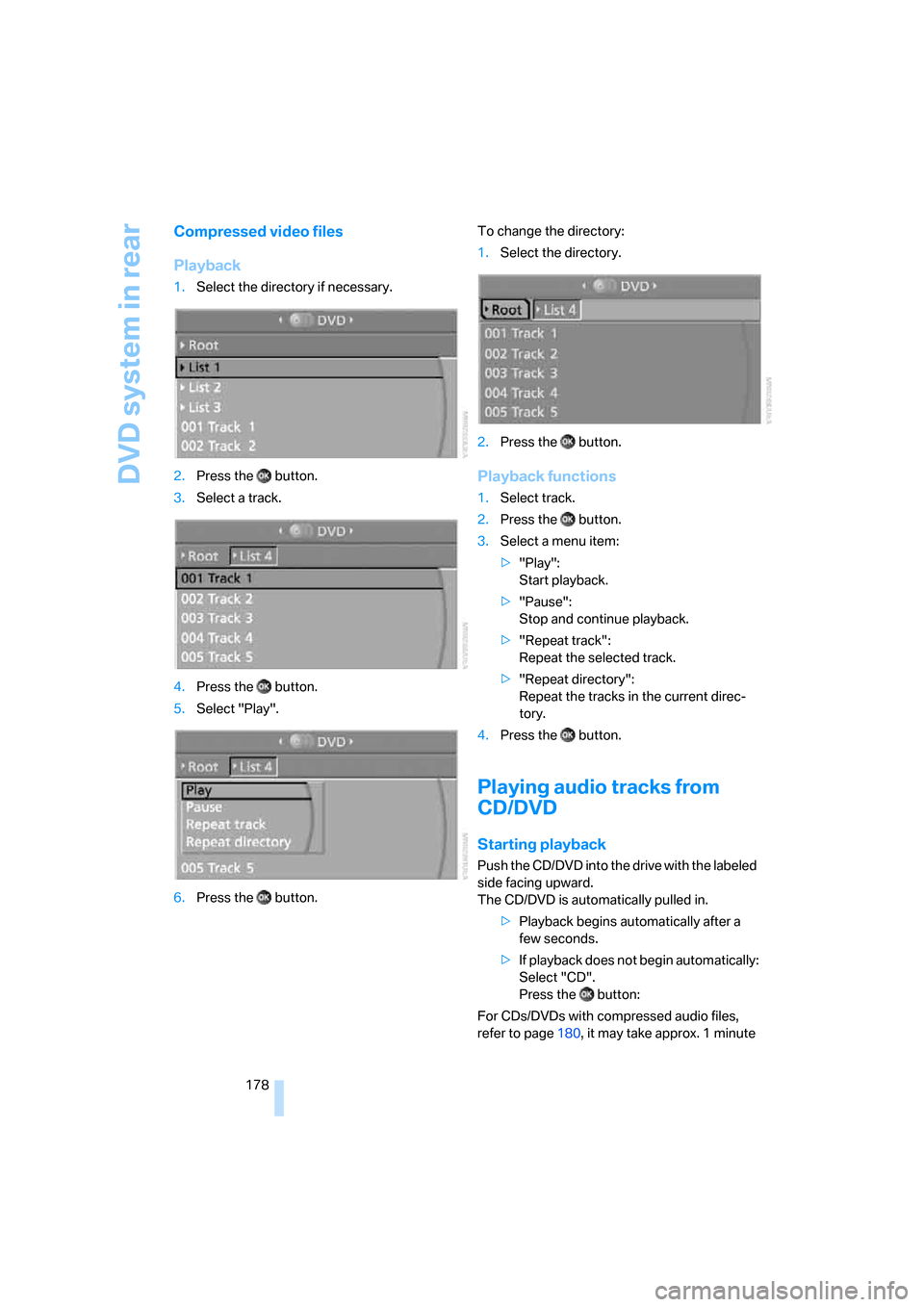
Compressed video files
Playback
1.Select the directory if necessary.
2.Press the button.
3.Select a track.
4.Press the button.
5.Select "Play".
6.Press the button.To change the directory:
1.Select the directory.
2.Press the button.
Playback functions
1.Select track.
2.Press the button.
3.Select a menu item:
>"Play":
Start playback.
>"Pause":
Stop and continue playback.
>"Repeat track":
Repeat the selected track.
>"Repeat directory":
Repeat the tracks in the current direc-
tory.
4.Press the button.
Playing audio tracks from
CD/DVD
Starting playback
Push the CD/DVD into the drive with the labeled
side facing upward.
The CD/DVD is automatically pulled in.
>Playback begins automatically after a
few seconds.
>If playback does not begin automatically:
Select "CD".
Press the button:
For CDs/DVDs with compressed audio files,
refer to page180, it may take approx. 1 minute
Page 181 of 272
Navigation
Entertainment
Driving tips
179Reference
At a glance
Controls
Communications
Mobility
to read the data depending on the directory
structure.
To start playback when there is already a
CD/DVD in the drive:
1.Open the start menu with the remote con-
trol.
2.Select "CD".
As an alternative you can also control the play-
back with the buttons on the CD/DVD player.
Ejecting CD/DVD:
Press the button on the CD/DVD player.
Selecting a track
Buttons on the CD/DVD player
Press the button for the corresponding
direction repeatedly until you reach the desired
track.
Playback begins at the start of the track.
Via the remote control
Press the button for the corresponding
direction repeatedly or turn the knurled wheel
until you reach the desired track.
Playback begins at the start of the track.
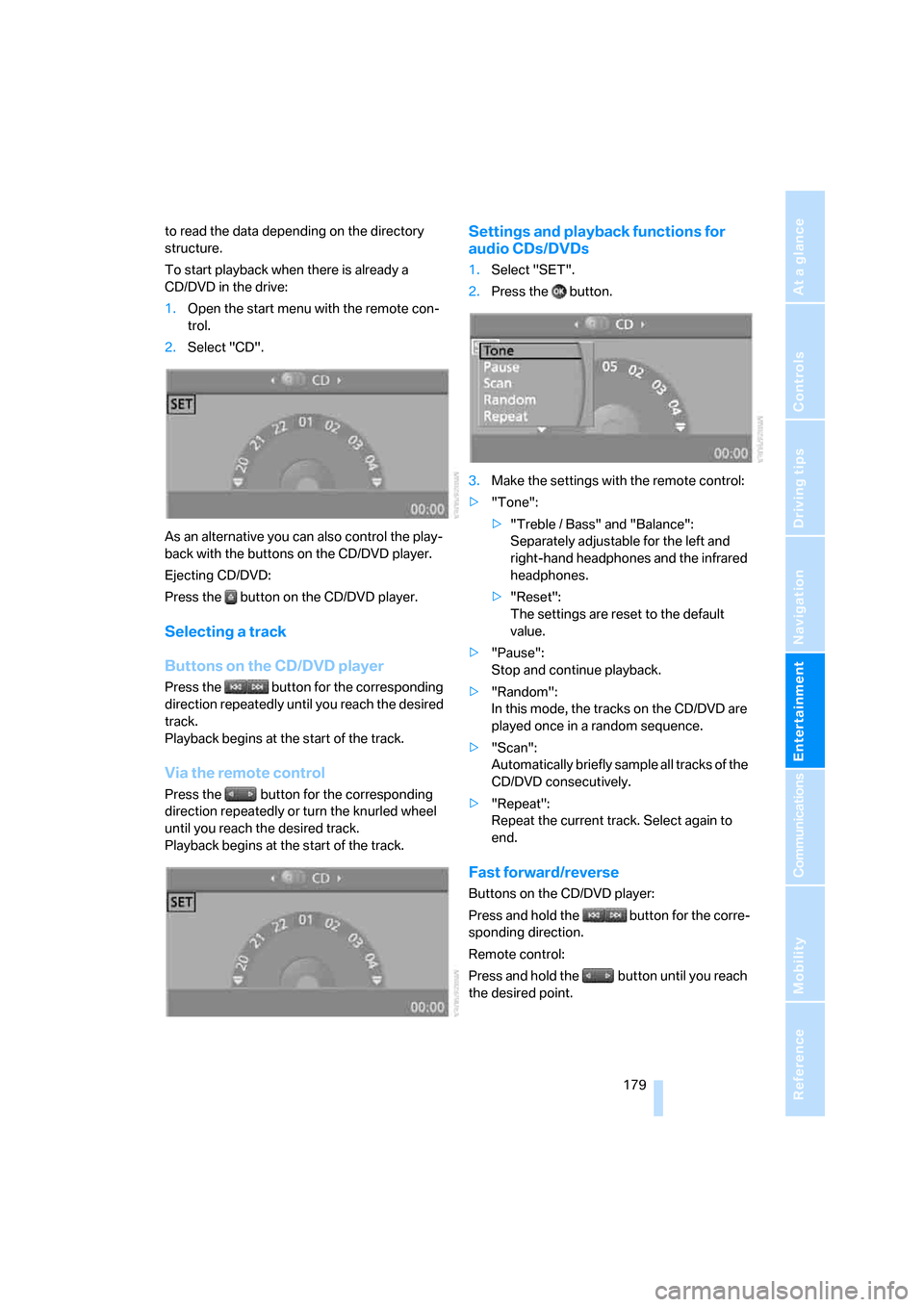
Settings and playback functions for
audio CDs/DVDs
1.Select "SET".
2.Press the button.
3.Make the settings with the remote control:
>"Tone":
>"Treble / Bass" and "Balance":
Separately adjustable for the left and
right-hand headphones and the infrared
headphones.
>"Reset":
The settings are reset to the default
value.
>"Pause":
Stop and continue playback.
>"Random":
In this mode, the tracks on the CD/DVD are
played once in a random sequence.
>"Scan":
Automatically briefly sample all tracks of the
CD/DVD consecutively.
>"Repeat":
Repeat the current track. Select again to
end.
Fast forward/reverse
Buttons on the CD/DVD player:
Press and hold the button for the corre-
sponding direction.
Remote control:
Press and hold the button until you reach
the desired point.