parking brake BMW X5 XDRIVE 48I 2010 E70 User Guide
[x] Cancel search | Manufacturer: BMW, Model Year: 2010, Model line: X5 XDRIVE 48I, Model: BMW X5 XDRIVE 48I 2010 E70Pages: 300, PDF Size: 12.41 MB
Page 94 of 300
Technology for comfort, convenience and safety
92
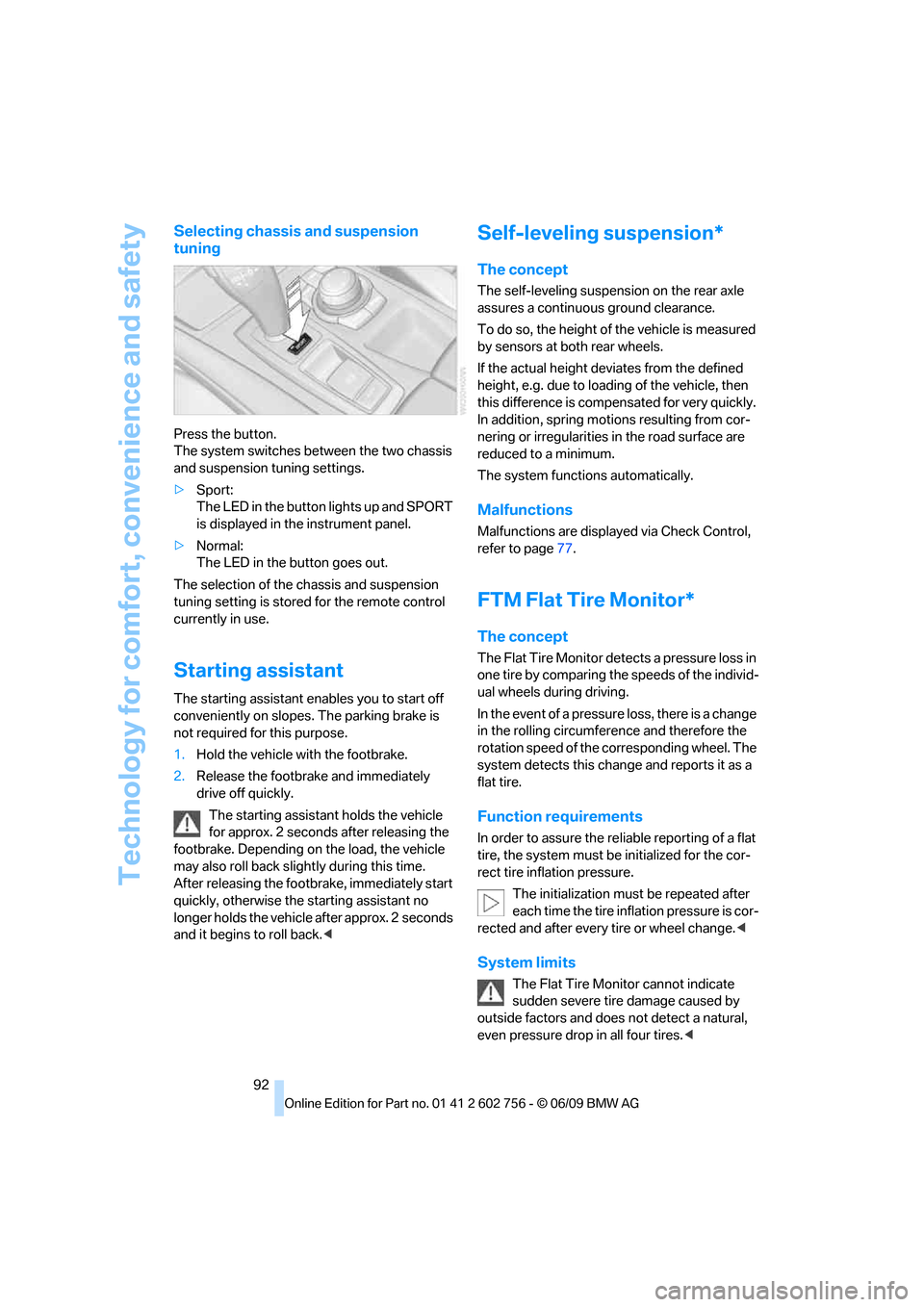
Selecting chassis and suspension
tuning
Press the button.
The system switches between the two chassis
and suspension tuning settings.
>Sport:
The LED in the button lights up and SPORT
is displayed in the instrument panel.
>Normal:
The LED in the button goes out.
The selection of the chassis and suspension
tuning setting is stored for the remote control
currently in use.
Starting assistant
The starting assistant enables you to start off
conveniently on slopes. The parking brake is
not required for this purpose.
1.Hold the vehicle with the footbrake.
2.Release the footbrake and immediately
drive off quickly.
The starting assistant holds the vehicle
for approx. 2 seconds after releasing the
footbrake. Depending on the load, the vehicle
may also roll back slightly during this time.
After releasing the footbrake, immediately start
quickly, otherwise the starting assistant no
longer holds the vehicle after approx. 2 seconds
and it begins to roll back.<
Self-leveling suspension*
The concept
The self-leveling suspension on the rear axle
assures a continuous ground clearance.
To do so, the height of the vehicle is measured
by sensors at both rear wheels.
If the actual height deviates from the defined
height, e.g. due to loading of the vehicle, then
this difference is compensated for very quickly.
In addition, spring motions resulting from cor-
nering or irregularities in the road surface are
reduced to a minimum.
The system functions automatically.
Malfunctions
Malfunctions are displayed via Check Control,
refer to page77.
FTM Flat Tire Monitor*
The concept
The Flat Tire Monitor detects a pressure loss in
one tire by comparing the speeds of the individ-
ual wheels during driving.
In the event of a pressure loss, there is a change
in the rolling circumference and therefore the
rotation speed of the corresponding wheel. The
system detects this change and reports it as a
flat tire.
Function requirements
In order to assure the reliable reporting of a flat
tire, the system must be initialized for the cor-
rect tire inflation pressure.
The initialization must be repeated after
each time the tire inflation pressure is cor-
rected and after every tire or wheel change.<
System limits
The Flat Tire Monitor cannot indicate
sudden severe tire damage caused by
outside factors and does not detect a natural,
even pressure drop in all four tires.<
ba8_e70ag.book Seite 92 Freitag, 5. Juni 2009 11:42 11
Page 219 of 300
217
Entertainment
Reference
At a glance
Controls
Driving tips Communications
Navigation
Mobility
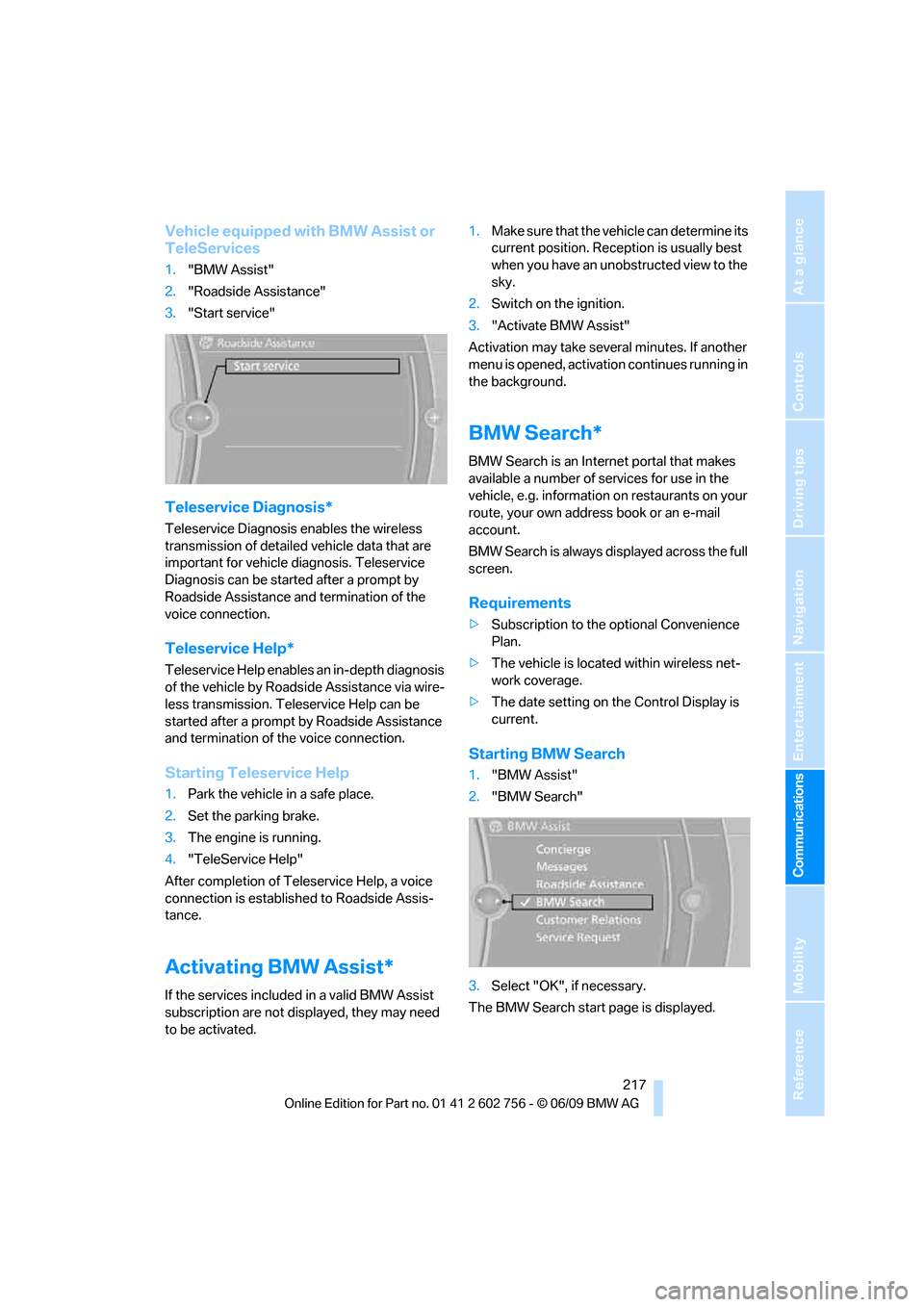
Vehicle equipped with BMW Assist or
TeleServices
1."BMW Assist"
2."Roadside Assistance"
3."Start service"
Teleservice Diagnosis*
Teleservice Diagnosis enables the wireless
transmission of detailed vehicle data that are
important for vehicle diagnosis. Teleservice
Diagnosis can be started after a prompt by
Roadside Assistance and termination of the
voice connection.
Teleservice Help*
Teleservice Help enables an in-depth diagnosis
of the vehicle by Roadside Assistance via wire-
less transmission. Teleservice Help can be
started after a prompt by Roadside Assistance
and termination of the voice connection.
Starting Teleservice Help
1.Park the vehicle in a safe place.
2.Set the parking brake.
3.The engine is running.
4."TeleService Help"
After completion of Teleservice Help, a voice
connection is established to Roadside Assis-
tance.
Activating BMW Assist*
If the services included in a valid BMW Assist
subscription are not displayed, they may need
to be activated.1.Make sure that the vehicle can determine its
current position. Reception is usually best
when you have an unobstructed view to the
sky.
2.Switch on the ignition.
3."Activate BMW Assist"
Activation may take several minutes. If another
menu is opened, activation continues running in
the background.
BMW Search*
BMW Search is an Internet portal that makes
available a number of services for use in the
vehicle, e.g. information on restaurants on your
route, your own address book or an e-mail
account.
BMW Search is always displayed across the full
screen.
Requirements
>Subscription to the optional Convenience
Plan.
>The vehicle is located within wireless net-
work coverage.
>The date setting on the Control Display is
current.
Starting BMW Search
1."BMW Assist"
2."BMW Search"
3.Select "OK", if necessary.
The BMW Search start page is displayed.
ba8_e70ag.book Seite 217 Freitag, 5. Juni 2009 11:42 11
Page 248 of 300
Care
246
Care
Car-care products
For the cleaning and care of your vehicle, BMW
recommends using only products that BMW
has approved for this purpose.
Regular cleaning and care make a significant
contribution to retaining your BMW's value.
The BMW Sports Activity Vehicle Center will be
happy to consult you on products and services
for the cleaning and care of your BMW.
Genuine BMW Care Products are materi-
als tested, laboratory tested, and tested in
actual use. They offer optimum care and pro-
tection for your vehicle.<
Do not use cleaners that contain alcohol
or solvents; they can damage your vehi-
cle.<
Cleaning agents can contain substances
that are dangerous or pose health risks.
You should therefore heed the warnings and
hazard indications on the packaging. Open the
doors or windows on your vehicle whenever
cleaning the interior. Make sure there is suffi-
cient ventilation in enclosed spaces. Use only
products that are formulated for vehicle clean-
ing.<
Exterior care
Washing your vehicle
In the winter months, it is especially
important to ensure that the vehicle is
washed on a regular basis. Otherwise, signifi-
cant soiling and road salt can cause damage to
the vehicle.<
After washing the vehicle, apply the
brakes briefly to dry them. Failure to do so
may lead to a reduction in braking efficiency and
also to corrosion of the brake rotors.<
Car washes
Give preference to cloth car washes.
Before driving into the car wash, make sure that
it is suitable for your BMW. Pay attention to the
following points:
>Dimensions of your vehicle, refer to
page269.
>If necessary, fold in exterior mirrors, refer to
page52.
>Maximum permissible tire width.
Avoid car washes with guide rail heights
over 4 in/10 cm, otherwise there is dan-
ger of damaging chassis parts.<
Preparations for driving into the car wash:
>Deactivate rain sensor
* to prevent
unwanted wiper activation.
>BMW X5: deactivate rear window wiper and
protect it from damage. Take appropriate
protective measures; inquiring with the car
wash operator as needed.
>Remove add-on parts such as spoilers or
phone antennas if they risk being damaged.
Before driving into the car wash, observe the
following so that the vehicle is able to roll:
1.Insert the remote control into the ignition
lock, even with comfort access.
2.Shift into transmission position N.
3.Release the parking brake.
4.Deactivate Automatic Hold, refer to
page62.
5.Switch off the engine.
6.Leave the remote control in the ignition lock
so that the vehicle can roll.
Mixed tires*
Before driving into a car wash, make sure
that the vehicle width is not too large for
the car wash, as otherwise the vehicle and the
car wash could be damaged.<
ba8_e70ag.book Seite 246 Freitag, 5. Juni 2009 11:42 11
Page 253 of 300
Mobility
251Reference
At a glance
Controls
Driving tips
Communications
Navigation
Entertainment
When performing care and maintenance on the
headlamps, please observe the information on
page247.
For bulbs for which replacement is not
described and for checking and adjusting
headlamp aim, please contact your BMW
Sports Activity Vehicle Center.<
Light-emitting diodes LEDs
Light-emitting diodes installed behind translu-
c e n t l e n s e s s e r v e a s t h e l i g h t s o u r c e f o r m a n y o f
the controls and displays in your vehicle. These
light-emitting diodes, which operate using a
concept similar to that applied in conventional
lasers, are officially designated as Class 1 light-
emitting diodes.
Do not remove the covers, and never
stare into the unfiltered light for several
hours, as irritation of the retina could result.<
BMW X5: changing lamps
Xenon lamps
These bulbs have a very long service life and
the probability of a failure is very low. If a lamp
should nevertheless fail, you can continue driv-
ing cautiously with fog lamps
* provided that
this is permitted by the country-specific laws.
Have work on the xenon light unit includ-
ing changing the bulb carried out only by
your BMW Sports Activity Vehicle Center or a
workshop that works according to BMW repair
procedures with correspondingly trained per-
sonnel. Due to the high voltage present in the
system, there is a danger of fatal injuries when
work is carried out improperly.<
Halogen bulbs:
Parking lamps and roadside parking
lamps, daytime driving lamps
35-Watt bulb, H8
The bulb is pressurized. Therefore, wear
safety glasses and protective gloves.
Otherwise there is a danger of injuries if the
bulb is accidentally damaged during replace-
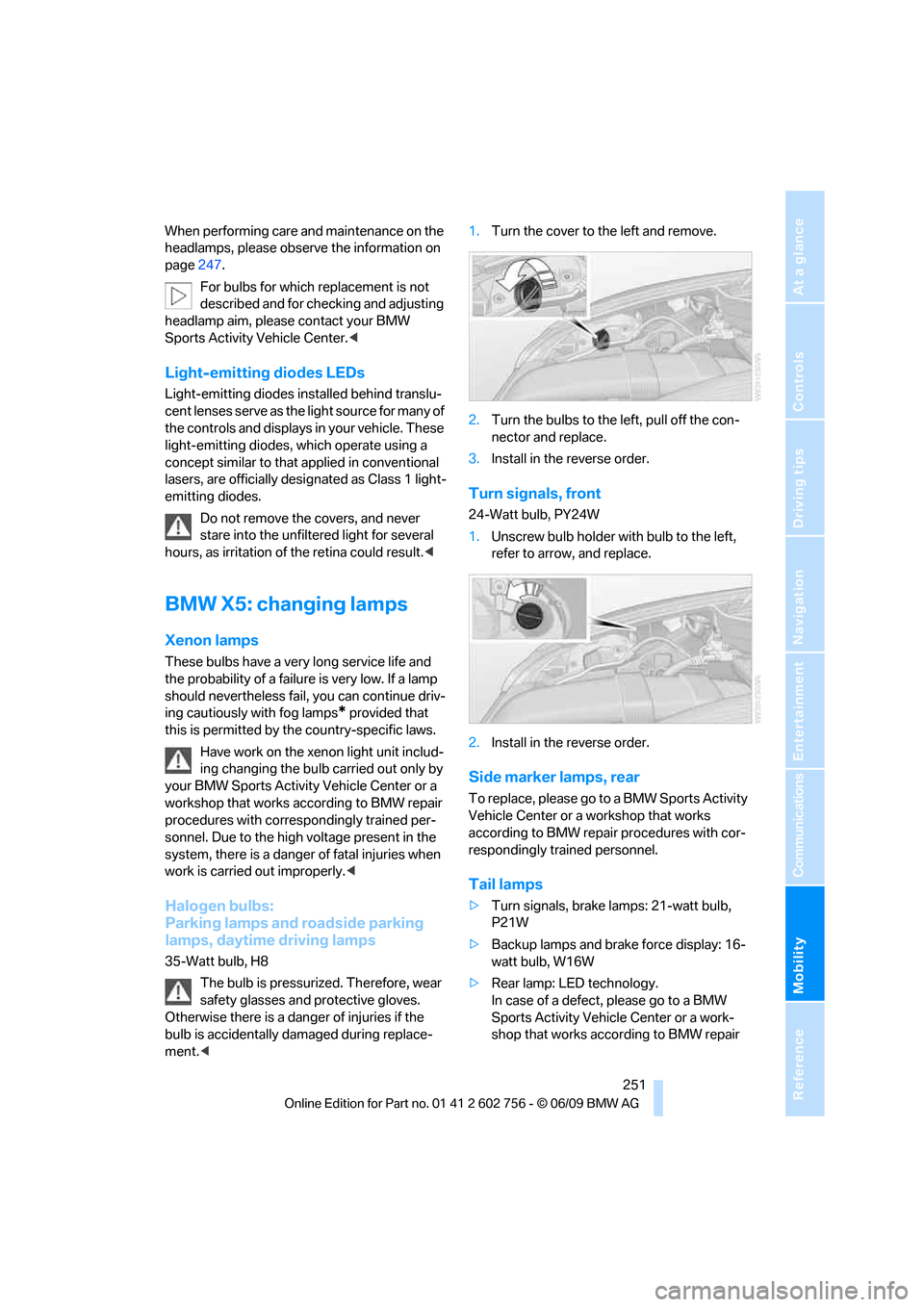
ment.<1.Turn the cover to the left and remove.
2.Turn the bulbs to the left, pull off the con-
nector and replace.
3.Install in the reverse order.
Turn signals, front
24-Watt bulb, PY24W
1.Unscrew bulb holder with bulb to the left,
refer to arrow, and replace.
2.Install in the reverse order.
Side marker lamps, rear
To replace, please go to a BMW Sports Activity
Vehicle Center or a workshop that works
according to BMW repair procedures with cor-
respondingly trained personnel.
Tail lamps
>Turn signals, brake lamps: 21-watt bulb,
P21W
>Backup lamps and brake force display: 16-
watt bulb, W16W
>Rear lamp: LED technology.
In case of a defect, please go to a BMW
Sports Activity Vehicle Center or a work-
shop that works according to BMW repair
ba8_e70ag.book Seite 251 Freitag, 5. Juni 2009 11:42 11
Page 256 of 300
Replacing components
254 Have work on the xenon light unit includ-
ing changing the bulb carried out only by
your BMW Sports Activity Vehicle Center or a
workshop that works according to BMW repair
procedures with correspondingly trained per-
sonnel. Due to the high voltage present in the
system, there is a danger of fatal injuries when
work is carried out improperly.<
Parking lamps and roadside parking
lamps, daytime driving lamps
35-Watt bulb, H8
The bulb is pressurized. Therefore, wear
safety glasses and protective gloves.
Otherwise there is a danger of injuries if the
bulb is accidentally damaged during replace-
ment.<
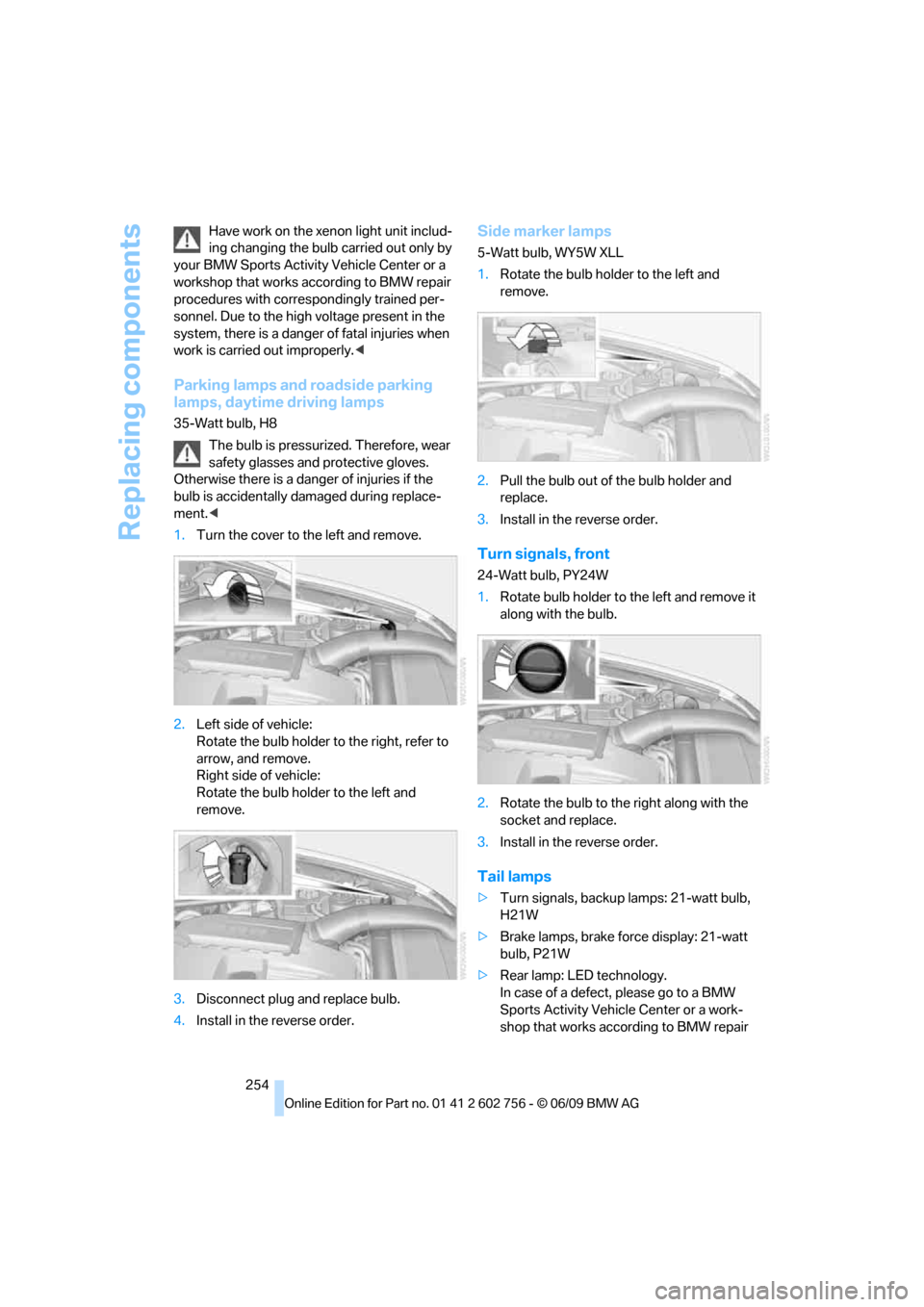
1.Turn the cover to the left and remove.
2.Left side of vehicle:
Rotate the bulb holder to the right, refer to
arrow, and remove.
Right side of vehicle:
Rotate the bulb holder to the left and
remove.
3.Disconnect plug and replace bulb.
4.Install in the reverse order.
Side marker lamps
5-Watt bulb, WY5W XLL
1.Rotate the bulb holder to the left and
remove.
2.Pull the bulb out of the bulb holder and
replace.
3.Install in the reverse order.
Turn signals, front
24-Watt bulb, PY24W
1.Rotate bulb holder to the left and remove it
along with the bulb.
2.Rotate the bulb to the right along with the
socket and replace.
3.Install in the reverse order.
Tail lamps
>Turn signals, backup lamps: 21-watt bulb,
H21W
>Brake lamps, brake force display: 21-watt
bulb, P21W
>Rear lamp: LED technology.
In case of a defect, please go to a BMW
Sports Activity Vehicle Center or a work-
shop that works according to BMW repair
ba8_e70ag.book Seite 254 Freitag, 5. Juni 2009 11:42 11
Page 259 of 300
Mobility
257Reference
At a glance
Controls
Driving tips
Communications
Navigation
Entertainment
ground. Switch on the hazard warning flashers.
Set the parking brake and engage transmission
position P.
Have all vehicle occupants get out of the vehicle
and ensure that they remain outside the imme-
diate area in a safe place, such as behind a
guardrail.
If a warning triangle
* or portable hazard warning
lamp
* is required, set it up on the roadside at an
appropriate distance from the rear of the vehi-
cle. Comply with all safety guidelines and regu-
lations.
Change the wheel only on a level, firm surface
which is not slippery. The vehicle or the jack
could slip to the side if you attempt to raise the
vehicle on a soft or slippery surface such as
snow, ice, tiles, etc.
Position the jack on a firm support surface.
Do not use a wooden block or similar object as a
support base for the jack, as this would prevent
it from extending to its full support height and
reduce its load-carrying capacity.
To avoid serious or fatal injury: never lie under
the vehicle, and never start the engine while it is
supported by the jack.<
What you will need
To avoid rattling noises later on, note the posi-
tions of the tools before removing them, then
return them to their initial positions after com-
pleting work.
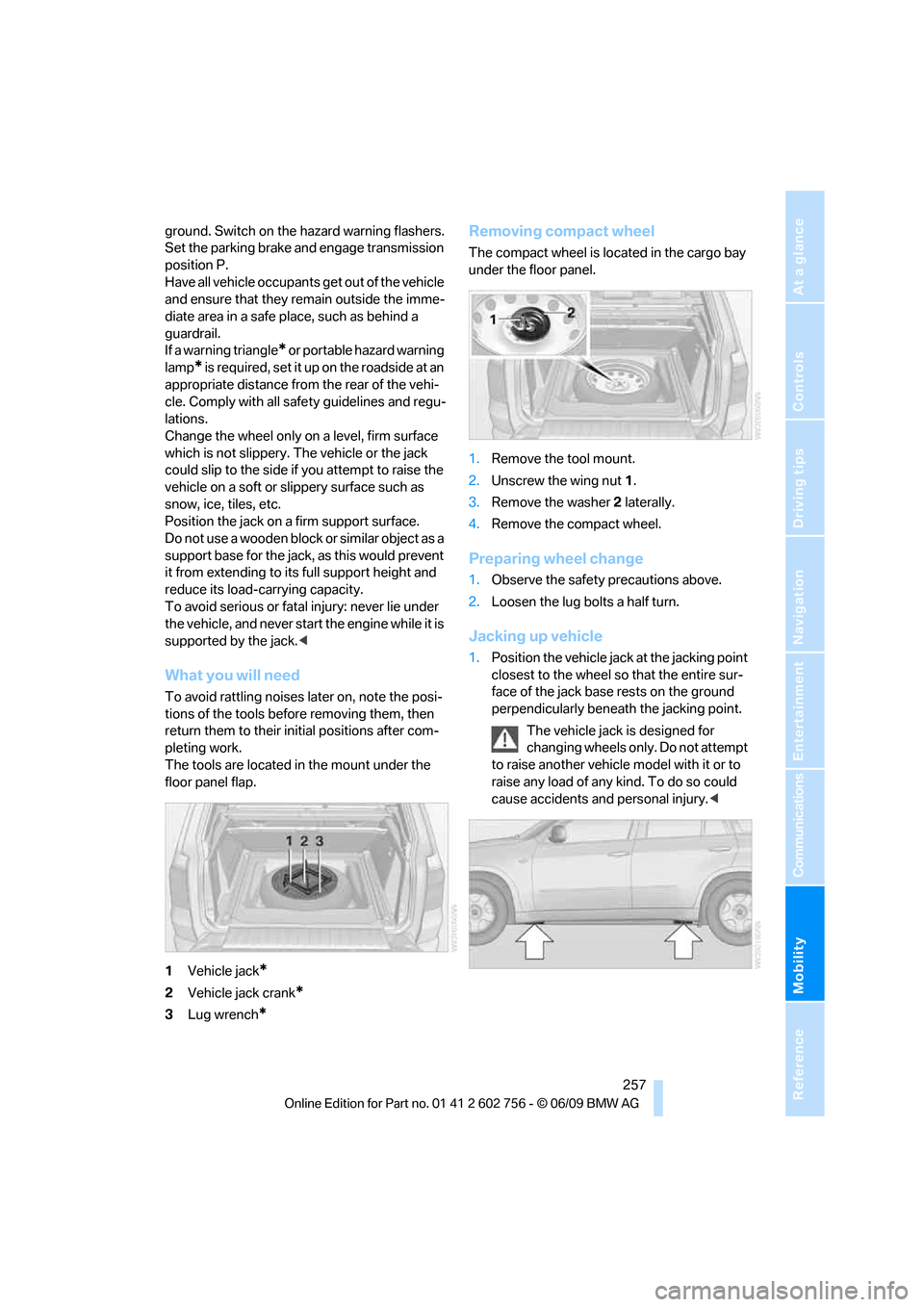
The tools are located in the mount under the
floor panel flap.
1Vehicle jack
*
2Vehicle jack crank*
3Lug wrench*
Removing compact wheel
The compact wheel is located in the cargo bay
under the floor panel.
1.Remove the tool mount.
2.Unscrew the wing nut 1.
3.Remove the washer 2 laterally.
4.Remove the compact wheel.
Preparing wheel change
1.Observe the safety precautions above.
2.Loosen the lug bolts a half turn.
Jacking up vehicle
1.Position the vehicle jack at the jacking point
closest to the wheel so that the entire sur-
face of the jack base rests on the ground
perpendicularly beneath the jacking point.
The vehicle jack is designed for
changing wheels only. Do not attempt
to raise another vehicle model with it or to
raise any load of any kind. To do so could
cause accidents and personal injury.<
ba8_e70ag.book Seite 257 Freitag, 5. Juni 2009 11:42 11
Page 282 of 300
Everything from A to Z
280 Automatic climate control in
rear
– activating on Control
Display112
– deactivating on Control
Display112
Automatic closing of doors,
refer to Automatic soft
closing30
Automatic curb monitor53
Automatic garage door
opener115
Automatic headlamps, refer to
High-beam assistant104
Automatic Hold61
– activating62
– deactivating62
– parking62
Automatic lighting
– refer to Automatic headlamp
control102
– refer to Daytime driving
lamps103
– refer to Interior lamps106
– refer to Pathway lighting103
Automatic low-beams, refer to
High-beam assistant104
Automatic recirculated-air
control AUC110
Automatic Service
Request219
Automatic soft closing30
Automatic transmission with
Steptronic64
– deactivating selector lever
interlock65
– kick-down65
– manually releasing
transmission lock66
– tow-starting264
– with comfort access36
AUTO program for automatic
climate control108,113
AUX-IN connection119,183
Average fuel consumption73
– setting units80
Average speed, refer to
Computer73Avoiding highways for
navigation150
Avoiding unintentional
alarms35
Axle weights, refer to
Weights271
B
Backrest contour, refer to
Lumbar support45
Backrests, refer to Seats44
Backrest width adjustment45
Backup lamps, replacing
bulbs251,254
Band-aids, refer to First-aid
kit262
Base plate for telephone or
mobile phone, refer to Snap-
in adapter212
Bass, tone setting160
Battery
– charging258
– jump starting262
– power failure259
– refer to Vehicle battery258
Battery disposal
– remote control with comfort
access37
– vehicle battery258
Battery for mobile phone212
Battery replacement
– remote control for DVD
system in rear189
– remote control with comfort
access37
Being towed263
Belts, refer to Safety belts49
Beverage holder, refer to Cup
holders119
Blower, refer to Air
volume109,113
Bluetooth, activating/
deactivating204
BMW Advanced Diesel226
BMW Assist215
– activating217
BMW homepage4BMW maintenance
system244
BMW Search217
BMW Sports Activity Vehicle
Center219
BMW TeleServices216
BMW website4
Bottle holder, refer to Cup
holders119
Brake assistant88
Brake force display97
Brake lamps
– brake force display97
– replacing bulbs251,254
Brake rotors132
Brakes
– ABS Antilock Brake
System88
– brake assistant88
– brake force display97
– breaking-in130
– CBC Cornering Brake
Control88
– electronic brake-force
distribution88
– parking brake61
– refer to Braking safely132
– warning lamp13
Brake system130
– brake pads130
– breaking-in130
– disk brakes132
Braking safely132
Breakdown, Flat Tire
Monitor92
Breakdown services, refer to
Roadside Assistance262
Breaking-in brake pads130
Breaking-in rear axle
differential130
Break-in period130
Brightness
– of Control Display80
– on Head-Up Display100
Button for starting engine59
Buttons on steering wheel11
ba8_e70ag.book Seite 280 Freitag, 5. Juni 2009 11:42 11
Page 285 of 300
Reference 283
At a glance
Controls
Driving tips
Communications
Navigation
Entertainment
Mobility
Diesel exhaust fluid
– at low temperatures226
– at minimum226
– refilling yourself227
Diesel particulate filter131
Digital clock71
Digital compass116
Digital radio, refer to HD
Radio164
Dimensions269
Directional indicators, refer to
Turn signals67
Direction announcements,
refer to Voice
instructions152
Direction instructions, refer to
Voice instructions152
Directory for navigation, refer
to Address book143
Displacement, refer to Engine
data268
Display, refer to iDrive16
Displaying images195
Displaying special
destinations146
Display lighting, refer to
Instrument lighting105
Displays, refer to Instrument
panel12
Displays on the windshield,
refer to Head-Up
Display100
Disposal
– battery of remote control
with comfort access37
– battery of the remote
control, DVD system in
rear189
– vehicle battery258
Distance, refer to
Computer74
Distance to destination, refer
to Computer74
Distance warning, refer to
PDC Park Distance
Control82
Door entry lighting106Door key, refer to Keys/
remote control26
Door lock29
Door locking, confirmation
signals28
Doors
– manual operation29
– remote control27
DOT Quality Grades235
Downhill driving assistance,
refer to HDC90
Draft-free ventilation111
Drinks holder, refer to Cup
holders119
Driver's seat, calibrating50
Driving lamps, refer to Parking
lamps/low beams102
Driving on poor roads135
Driving stability control
systems88
Driving through water132
Driving tips, refer to General
driving notes130
Dry air, refer to Cooling
function110
Drying the air, refer to Cooling
function110
DSC Dynamic Stability
Control88
– indicator lamp13,89
DSC OFF, refer to Dynamic
Stability Control88
DTC Dynamic Traction
Control89
– activating89
– indicator lamp89
DVD
– country codes173
– settings174
– video playback173
DVD changer, refer to CD
changer171
DVD menu174
DVD player, refer to CD
player171DVD system in rear187
– CD/DVD player188
– connecting headphones188
– controls187
– displaying images from CD/
DVD195
– DVD country codes190
– external device198
– information on CD/DVD
player196
– playing audio tracks from
CD/DVD193
– playing video from CD/
DVD190
– remote control188
– switching on/off189
DVD video173
Dynamic Performance
Control90
Dynamic Stability Control
DSC88
Dynamic Traction, refer to
Dynamic Traction
Control89
Dynamic Traction Control
DTC89
E
Easy entry/exit54
Eject button, refer to Buttons
on the CD/DVD player160
Electrical malfunction
– automatic transmission with
Steptronic66
– door lock29
– driver's door29
– fuel filler door224
– glass sunroof, electric42
– liftgate31
– panorama glass sunroof40
– parking brake63
Electric seat44
Electronic brake-force
distribution88
Electronic oil level check241
ba8_e70ag.book Seite 283 Freitag, 5. Juni 2009 11:42 11
Page 287 of 300
Reference 285
At a glance
Controls
Driving tips
Communications
Navigation
Entertainment
Mobility
Fuel consumption display,
computer, average fuel
consumption73
Fuel display, refer to Fuel
gauge73
Fuel filler door224
– closing224
– opening224
– releasing manually224
Fuses259
G
Garage door opener, refer to
Integrated universal remote
control115
Gasoline, refer to Required
fuel225
Gasoline display, refer to Fuel
gauge73
Gearshifts, automatic
transmission with
Steptronic65
General driving
notes130,131
Glass sunroof
– convenience operation from
outside29
– convenience operation with
comfort access36
– remote control28
Glass sunroof, electric40
– moving manually42
– opening, closing41
– power interruption42
– raising41
Glove compartment118
– lighting118
GPS navigation, refer to
Navigation system140
Grills, refer to Ventilation111
Grills of the automatic climate
control107
Gross vehicle weight, refer to
Weights271
Guided Tours149
H
Handbrake, refer to Parking
brake61
– Automatic Hold61
Hands-free system, refer to
Microphone14
Hand washing247
Having diesel exhaust fluid
refilled226
Hazard warning flashers15
HDC Hill Descent Control90
HD Radio164
Head airbags98
Headlamp control,
automatic102
Headlamp flasher67
Headlamps102
– cleaning, refer to Washer/
wiper system67
– replacing bulbs250
Head Light, refer to Adaptive
Head Light103
Head restraints46
– sitting safely43
Head-Up Display100
Heated
– mirrors52
– rear window109
– seats50,51
– steering wheel54
Heating107
– exterior mirrors52
– interior107
– rear window109
– residual heat110
– seats50,51
– steering wheel54
Heating with engine switched
off, refer to Residual
heat110
Heavy cargo, refer to Securing
cargo134
Height
– on Head-Up Display100
– refer to Dimensions269
Height adjustment
– seats44
– steering wheel53High-beam assistant104
High beams67,104
– automatically switching on
and off, refer to High-beam
assistant104
– headlamp flasher67
– indicator lamp13
High-pressure cleaning
jets247
High water, refer to Driving
through water132
Highway, refer to Route
criteria150
Hill Descent Control HDC90
Hills132
Holder for cups119
Homepage4
Hood239
Horn10
Hot exhaust system131
Hydraulic brake assistant,
refer to Brake assistant88
Hydroplaning132
I
IBOC, refer to HD Radio164
Ice, refer to Outside
temperature warning71
Ice warning, refer to Outside
temperature warning71
Identification, tire238
Identification mark, run-flat
tires237
iDrive16
– changing language81
– changing settings79
– changing units of measure
and display type80
– controller16
– controls16
– main menu17
– setting brightness80
– setting date80
– setting time79
– status information19
Ignition59
– switched off59
– switched on59
ba8_e70ag.book Seite 285 Freitag, 5. Juni 2009 11:42 11
Page 289 of 300
Reference 287
At a glance
Controls
Driving tips
Communications
Navigation
Entertainment
Mobility
Loading133
– securing cargo134
– stowing cargo134
– vehicle133
Load securing equipment,
refer to Securing cargo134
Lock buttons in the doors,
refer to Locking30
Locking
– from inside30
– setting confirmation
signals28
– using remote control27
– without key, refer to Comfort
access35
Locking and unlocking doors
– from inside30
– setting confirmation
signals28
Locking without key, refer to
Comfort access35
Low beams102
– automatic102
Lower back support, refer to
Lumbar support45
Low-sulfur diesel225
Lug bolts257
– tightening torque, refer to
After mounting258
– wrench257
Luggage compartment
capacity, refer to Cargo bay
capacity271
Luggage rack, refer to Roof-
mounted luggage rack135
Lumbar support45
LW, waveband163
M
M+S tires, refer to Winter
tires238
Main menu, iDrive17Maintenance
– refer to Service and
Warranty Information
Booklet for US models244
– refer to Service
requirements74
– refer to Warranty and
Service Guide Booklet for
Canadian models244
Maintenance system244
Malfunction
– door lock29
– driver's door29
– fuel filler door224
– glass sunroof, electric42
– liftgate31
– panorama glass sunroof40
– parking brake63
Malfunction warnings, refer to
Check Control77
Manual air distribution110
Manually releasing
transmission lock66
Manual mode, automatic
transmission with
Steptronic65
Manual operation
– door lock29
– driver's door29
– fuel filler door224
– transmission lock, automatic
transmission66
Map display152
Map for navigation
– changing scale153
– entering destination146
Master key, refer to Keys/
remote control26
Maximum cooling110
Maximum speed
– for winter tires238
– with compact wheel258
Memory, refer to Seat, mirror
and steering wheel
memory45
Menus, refer to iDrive16
Messages208
Microfilter112Microphone
– for mobile phone14
– for telephone14
– for voice activation
system14
Mirror dimming feature53
Mirrors52
– automatic curb monitor53
– exterior mirrors52
– folding in and out52
– heating
52
– interior rearview mirror53
– memory, refer to Seat, mirror
and steering wheel
memory45
Mobile phone
– adjusting volume205
– connecting, refer to Mobile
phone, pairing202
– installation location, refer to
Center armrest, front119
– operation via iDrive205
– pairing202
– refer to separate operating
instructions
– refer to Telephone202
Monitor, refer to iDrive16
Monitoring tire pressure, refer
to FTM Flat Tire Monitor92
MP3 player, connecting
– refer to AUX-IN
connection183
– refer to USB-audio
interface183
Multifunction steering wheel,
refer to Buttons on steering
wheel11
Multifunction switch
– refer to Turn signals/
headlamp flasher/high
beams67
– refer to Washer/wiper
system67
Music
– managing181
– playing179
– storing178
Music collection178
– backup181
ba8_e70ag.book Seite 287 Freitag, 5. Juni 2009 11:42 11