check BMW X5M 2012 Owner's Guide
[x] Cancel search | Manufacturer: BMW, Model Year: 2012, Model line: X5M, Model: BMW X5M 2012Pages: 317, PDF Size: 8.83 MB
Page 116 of 317
Displaying turning lines and pathway
lines
▷
The static, red turning line shows the lateral
space required when the wheel is fully
turned.
▷ The variable, green pathway lines assist you
in
estimating the amount of lateral space ac‐
tually required.
The pathway lines depend on the current
steering angle and are continuously
adapted to movements of the steering
wheel. "Parking aid lines"
Turning lines and pathway lines are displayed.
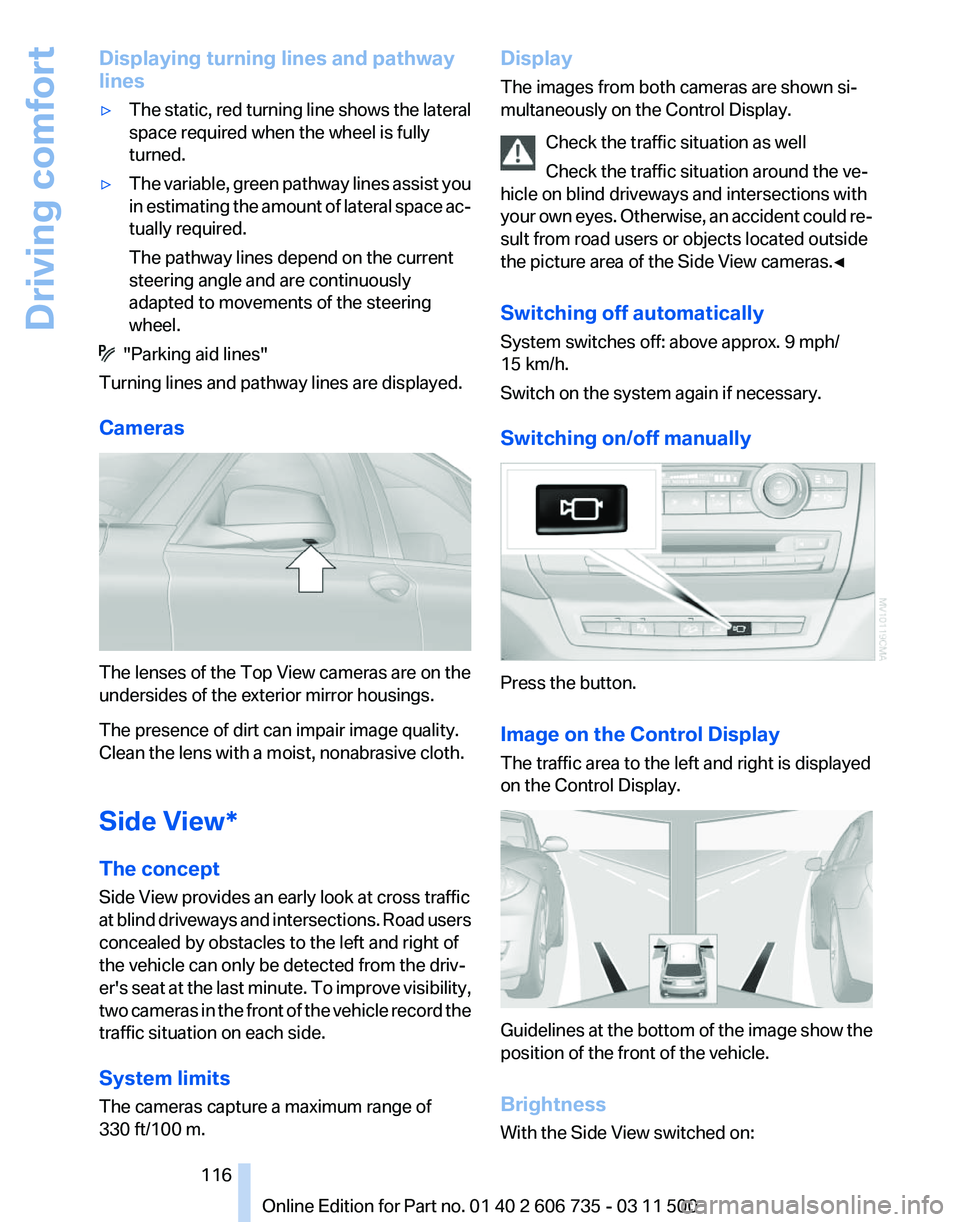
Cameras The lenses of the Top View cameras are on the
undersides of the exterior mirror housings.
The presence of dirt can impair image quality.
Clean the lens with a moist, nonabrasive cloth.
Side View*
The concept
Side View provides an early look at cross traffic
at
blind driveways and intersections. Road users
concealed by obstacles to the left and right of
the vehicle can only be detected from the driv‐
er's seat at the last minute. To improve visibility,
two cameras in the front of the vehicle record the
traffic situation on each side.
System limits
The cameras capture a maximum range of
330 ft/100 m. Display
The images from both cameras are shown si‐
multaneously on the Control Display.
Check the traffic situation as well
Check the traffic situation around the ve‐
hicle on blind driveways and intersections with
your
own eyes. Otherwise, an accident could re‐
sult from road users or objects located outside
the picture area of the Side View cameras.◀
Switching off automatically
System switches off: above approx. 9 mph/
15 km/h.
Switch on the system again if necessary.
Switching on/off manually Press the button.
Image on the Control Display
The traffic area to the left and right is displayed
on the Control Display.
Guidelines at the bottom of the image show the
position of the front of the vehicle.
Brightness
With the Side View switched on: Seite 116
116 Online Edition for Part no. 01 40 2 606 735 - 03 11 500
Driving comfort
Page 117 of 317
1. "Brightness"
2. Turn the controller until the desired setting
is reached and press the controller.
Contrast
With the Side View switched on:
1. "Contrast"
2. Turn the controller until the desired setting
is reached and press the controller.
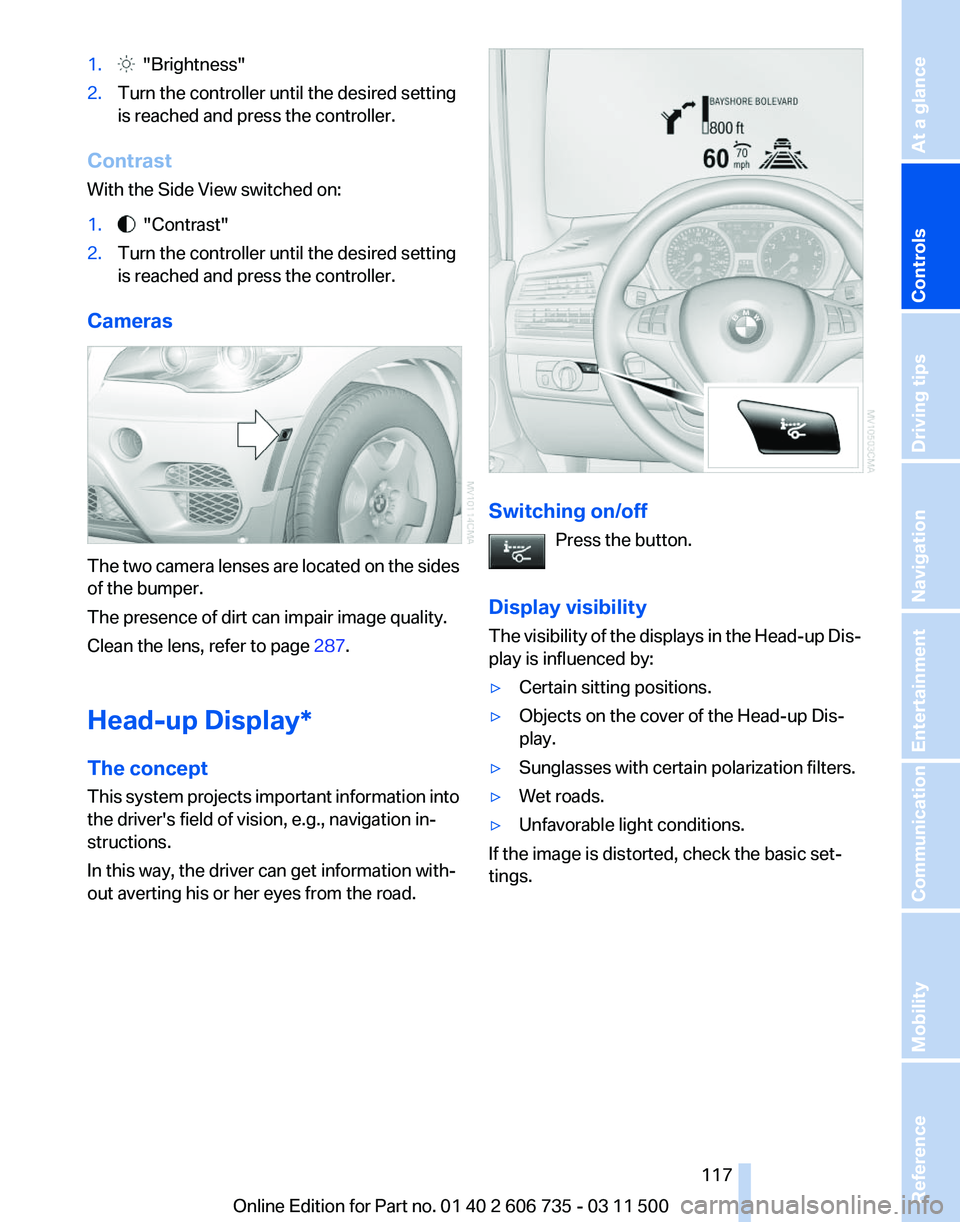
Cameras The two camera lenses are located on the sides
of the bumper.
The presence of dirt can impair image quality.
Clean the lens, refer to page
287.
Head-up Display
*
The concept
This system projects important information into
the driver's field of vision, e.g., navigation in‐
structions.
In this way, the driver can get information with‐
out averting his or her eyes from the road. Switching on/off
Press the button.
Display visibility
The
visibility of the displays in the Head-up Dis‐
play is influenced by:
▷ Certain sitting positions.
▷ Objects on the cover of the Head-up Dis‐
play.
▷ Sunglasses with certain polarization filters.
▷ Wet roads.
▷ Unfavorable light conditions.
If the image is distorted, check the basic set‐
tings. Seite 117
117Online Edition for Part no. 01 40 2 606 735 - 03 11 500
Reference Mobility Communication Entertainment Navigation Driving tips
Controls At a glance
Page 118 of 317
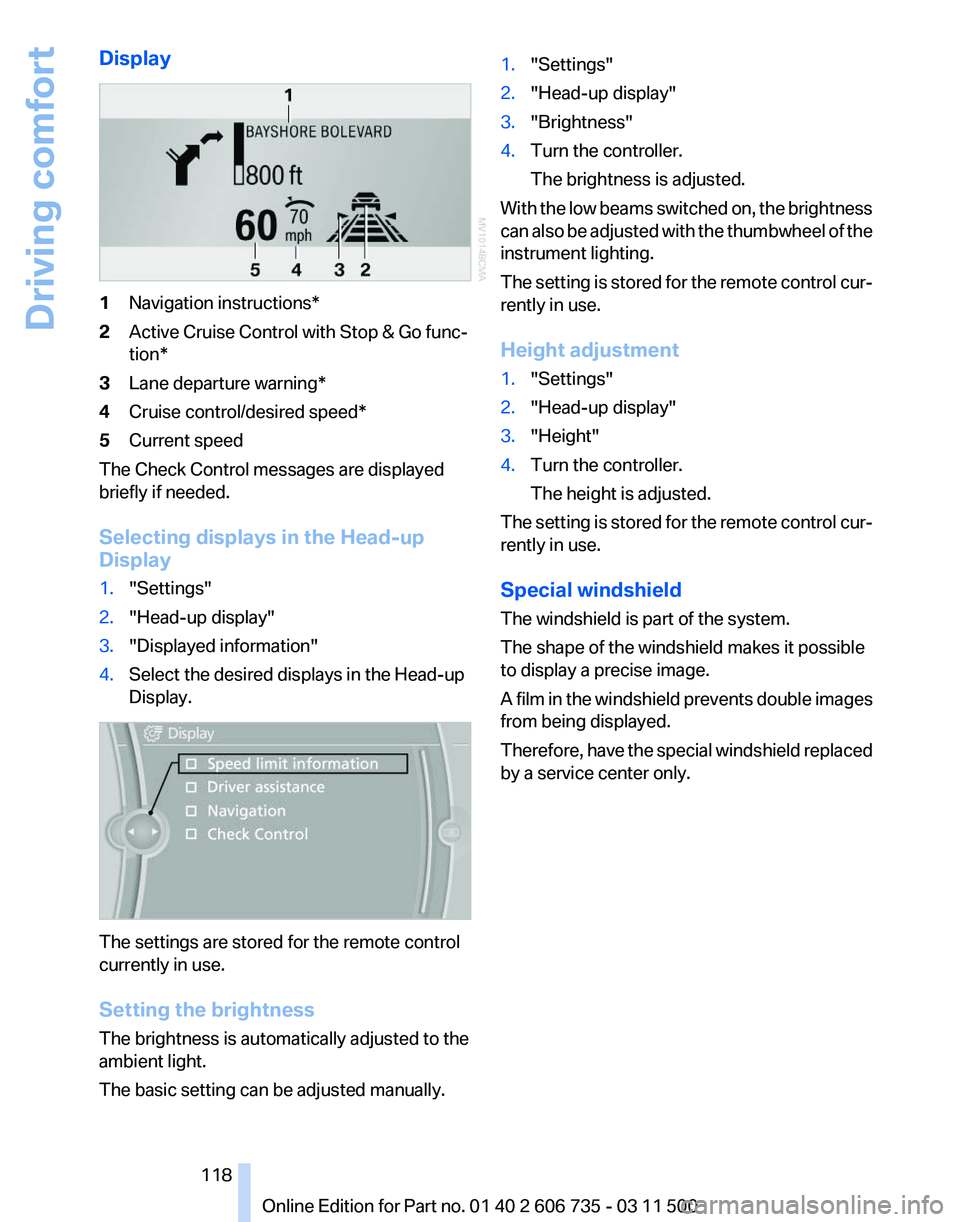
Display
1
Navigation instructions*
2 Active Cruise Control with Stop & Go func‐
tion*
3 Lane departure warning*
4 Cruise control/desired speed*
5 Current speed
The Check Control messages are displayed
briefly if needed.
Selecting displays in the Head-up
Display
1. "Settings"
2. "Head-up display"
3. "Displayed information"
4. Select the desired displays in the Head-up
Display. The settings are stored for the remote control
currently in use.
Setting the brightness
The brightness is automatically adjusted to the
ambient light.
The basic setting can be adjusted manually. 1.
"Settings"
2. "Head-up display"
3. "Brightness"
4. Turn the controller.
The brightness is adjusted.
With the low beams switched on, the brightness
can also be adjusted with the thumbwheel of the
instrument lighting.
The setting is stored for the remote control cur‐
rently in use.
Height adjustment
1. "Settings"
2. "Head-up display"
3. "Height"
4. Turn the controller.
The height is adjusted.
The setting is stored for the remote control cur‐
rently in use.
Special windshield
The windshield is part of the system.
The shape of the windshield makes it possible
to display a precise image.
A
film in the windshield prevents double images
from being displayed.
Therefore, have the special windshield replaced
by a service center only.
Seite 118
118 Online Edition for Part no. 01 40 2 606 735 - 03 11 500
Driving comfort
Page 128 of 317
lease the button on the hand-held transmit‐
ter several times for 2 seconds.
6. To program additional hand-held transmit‐
ters, repeat steps 3 to 5.
The device can be operated using the memory
button with the engine running or the ignition
switched on.
Malfunction
If the device cannot be used after repeated at‐
tempts at programming, please check whether
the hand-held transmitter is equipped with an
alternating code system.
To do so:
▷ Read the instructions of the hand-held
transmitter.
▷ Press the memory button of the universal
remote control for an extended period.
If the LED of the integrated universal remote
control flashes quickly for a short period and
then lights up continuously, the hand-held
transmitter
is equipped with an alternating code
system.
In this case, program the memory buttons as
described under Alternating-code hand-held
transmitters.
Alternating-code hand-held
transmitters
Please obtain information on synchronizing the
device in the operating manual of the device be‐
ing set up.
Programming will be easier with the aid of a sec‐
ond person.
1. Park the vehicle within range of the remote-
controlled device.
2. Program the integrated universal remote
control as described above under Fixed-
code hand-held transmitters.
3. Locate the button on the receiver of the de‐
vice to be set, e.g., on the drive. 4.
Press the button on the receiver of the de‐
vice
to be set. You have approx. 30 seconds
for the next step.
5. Press the programmed memory button of
the integrated universal remote control for
approx. 3 seconds. Repeat this step up to
three times if necessary.
The device can be operated using the memory
button with the engine running or the ignition
switched on.
Reassigning individual programs
1. Switch on the ignition.
2. Hold the hand-held transmitter at a distance
of approx. 1 to 3 in/2.5 to 8 cm from the
memory buttons.
The required distance depends on the par‐
ticular hand-held transmitter.
3. Press the memory button of the integrated
universal remote control.
4. If the LED flashes slowly after approx.
20 seconds, press the transmit button on
the hand-held transmitter.
5. Release both buttons when the LED flashes
rapidly.
If
the LED does not flash rapidly after approx.
60 seconds, change the distance and repeat
the step.
Canada: if the LED does not flash rapidly af‐
ter approx. 60 seconds, change the distance
and repeat the step. If programming was
aborted by the hand-held transmitter, hold
down the memory button and press and re‐
lease the button on the hand-held transmit‐
ter several times for 2 seconds.
Deleting all stored programs
Press both outer memory buttons 1 for ap‐
prox. 20 seconds until the LED flashes rapidly.
All stored programs are deleted.
The programs cannot be deleted individually.
Seite 128
128 Online Edition for Part no. 01 40 2 606 735 - 03 11 500
Interior equipment
Page 132 of 317
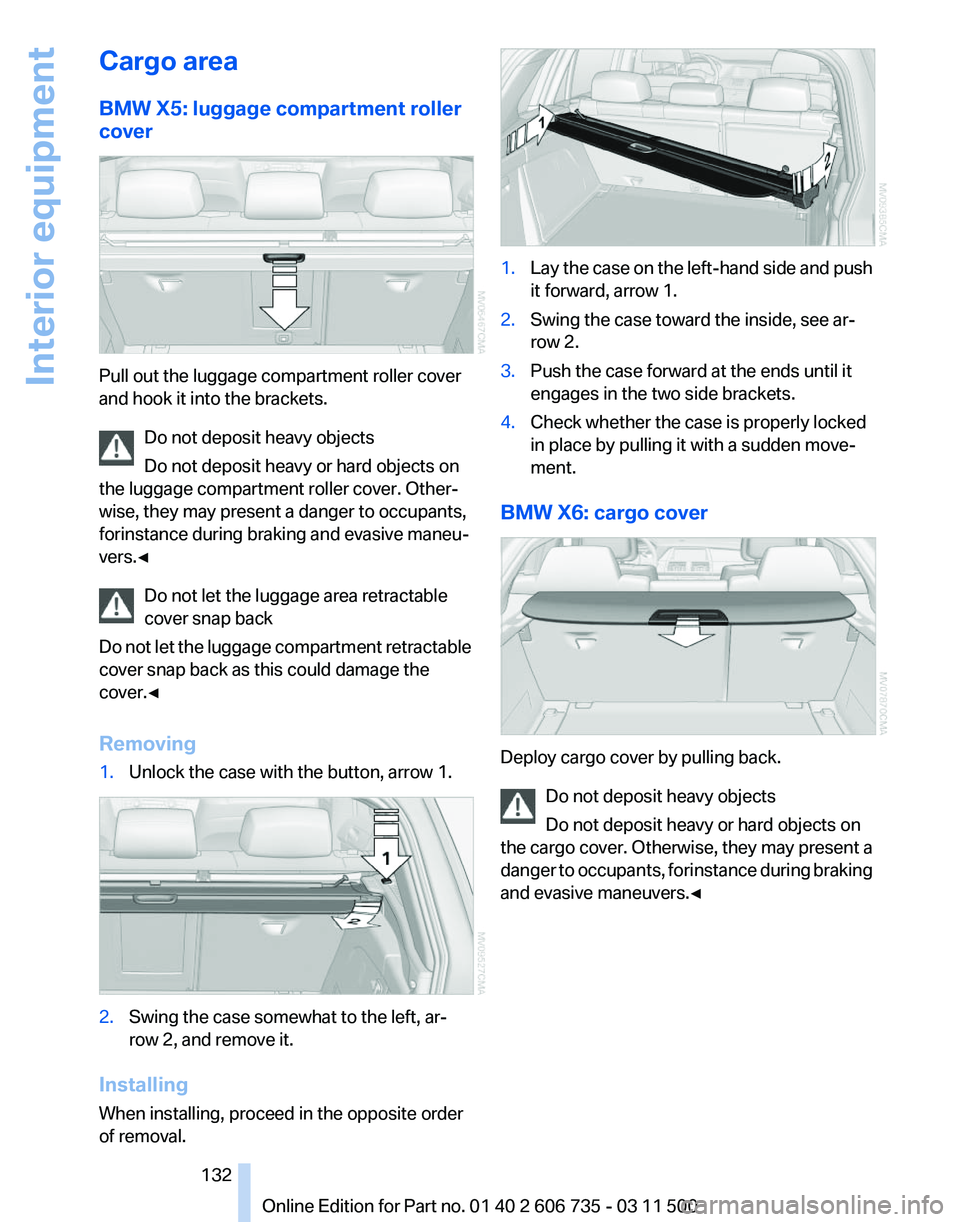
Cargo area
BMW X5: luggage compartment roller
cover
Pull out the luggage compartment roller cover
and hook it into the brackets.
Do not deposit heavy objects
Do not deposit heavy or hard objects on
the luggage compartment roller cover. Other‐
wise, they may present a danger to occupants,
for instance during braking and evasive maneu‐
vers.◀
Do not let the luggage area retractable
cover snap back
Do
not let the luggage compartment retractable
cover snap back as this could damage the
cover.◀
Removing
1. Unlock the case with the button, arrow 1. 2.
Swing the case somewhat to the left, ar‐
row 2, and remove it.
Installing
When installing, proceed in the opposite order
of removal. 1.
Lay the case on the left-hand side and push
it forward, arrow 1.
2. Swing the case toward the inside, see ar‐
row 2.
3. Push the case forward at the ends until it
engages in the two side brackets.
4. Check whether the case is properly locked
in place by pulling it with a sudden move‐
ment.
BMW X6: cargo cover Deploy cargo cover by pulling back.
Do not deposit heavy objects
Do not deposit heavy or hard objects on
the
cargo cover. Otherwise, they may present a
danger to occupants, for instance during braking
and evasive maneuvers.◀ Seite 132
132 Online Edition for Part no. 01 40 2 606 735 - 03 11 500
Interior equipment
Page 137 of 317
▷
Retaining straps* on the left and right side
trim for fastening small objects.
▷ Lashing rail with lashing eyes*. You can se‐
cure
heavy-duty cargo straps on the lashing
eyes. They can be removed at the notches
in the rails. To move the lashing eyes, press
the button.
Read and comply with the information enclosed
with the heavy-duty cargo straps.
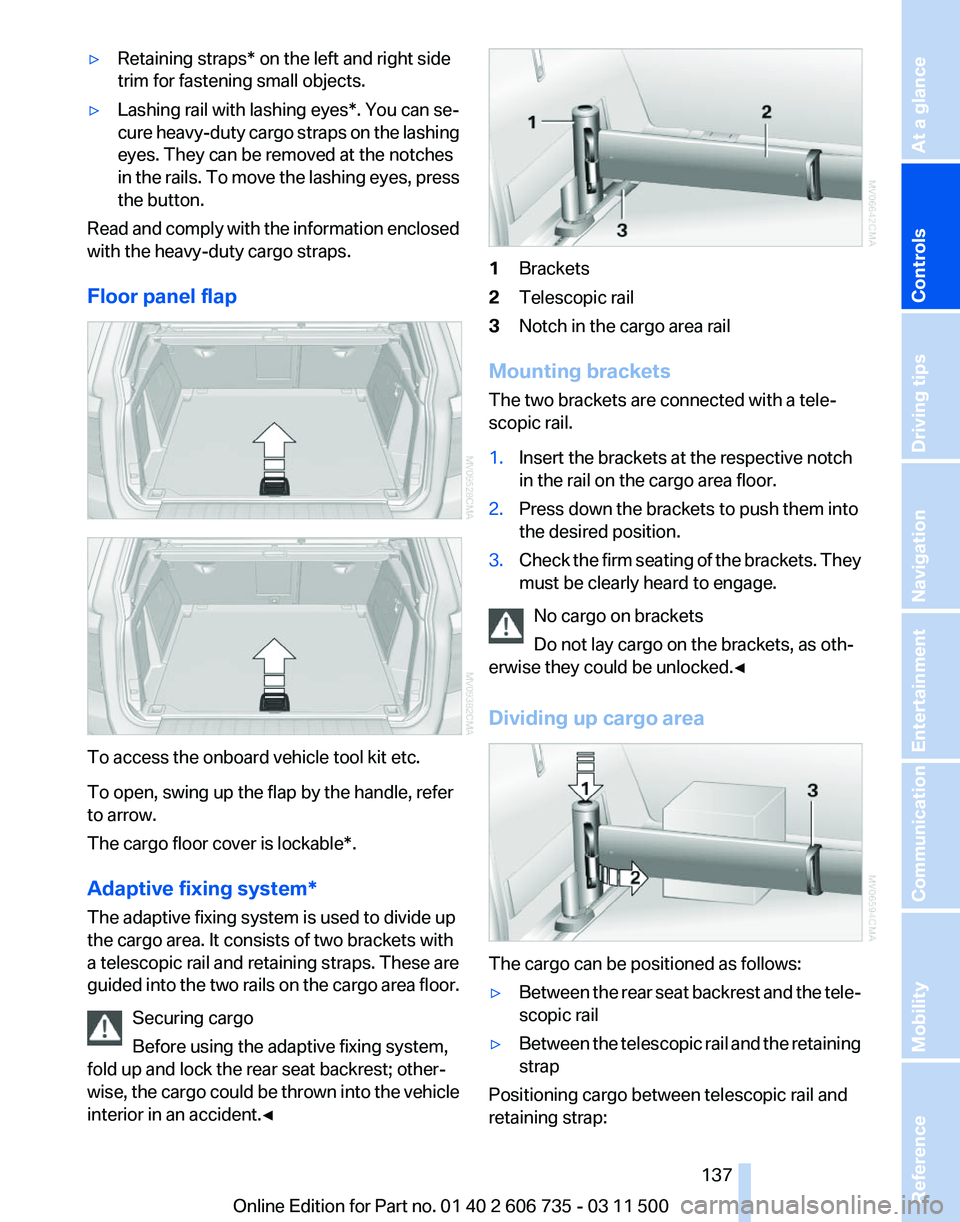
Floor panel flap To access the onboard vehicle tool kit etc.
To open, swing up the flap by the handle, refer
to arrow.
The cargo floor cover is lockable*.
Adaptive fixing system
*
The adaptive fixing system is used to divide up
the cargo area. It consists of two brackets with
a telescopic rail and retaining straps. These are
guided into the two rails on the cargo area floor.
Securing cargo
Before using the adaptive fixing system,
fold up and lock the rear seat backrest; other‐
wise, the cargo could be thrown into the vehicle
interior in an accident.◀ 1
Brackets
2 Telescopic rail
3 Notch in the cargo area rail
Mounting brackets
The two brackets are connected with a tele‐
scopic rail.
1. Insert the brackets at the respective notch
in the rail on the cargo area floor.
2. Press down the brackets to push them into
the desired position.
3. Check the firm seating of the brackets. They
must be clearly heard to engage.
No cargo on brackets
Do not lay cargo on the brackets, as oth‐
erwise they could be unlocked.◀
Dividing up cargo area The cargo can be positioned as follows:
▷
Between the rear seat backrest and the tele‐
scopic rail
▷ Between the telescopic rail and the retaining
strap
Positioning cargo between telescopic rail and
retaining strap: Seite 137
137Online Edition for Part no. 01 40 2 606 735 - 03 11 500
Reference Mobility Communication Entertainment Navigation Driving tips
Controls At a glance
Page 148 of 317
▷
After driving through water, press on the
brake pedal several times at low speeds to
dry the brakes.
▷ Depending on the prevailing terrain, activate
Dynamic Traction Control DTC, refer to
page 97, briefly.
▷ When the wheels spin, accelerate to enable
the driving stability control systems to dis‐
tribute the drive force to the individual
wheels.
▷ BMW X5 with M Sport Package*: if the ve‐
hicle is primarily used on poor roads or un‐
paved surfaces, it may be advantageous,
depending on the driving style, to use the
stone
chip guard offered by the service cen‐
ter. This reduces the risk of damage to
painted vehicle components, such as in the
area of the side skirts and wheel arches.
Your service center will be glad to advise
you.
After driving on poor roads
Adhere
to the following points to ensure vehicle
safety:
▷ Remove excessive accumulations of dirt
and mud from the vehicle body.
▷ Clear mud, snow, ice, etc., from the wheels
and tires and check for damage.
Saving fuel
General information
Your vehicle contains advanced technology for
the reduction of fuel consumption and emis‐
sions.
Fuel consumption depends on a number of dif‐
ferent factors.
The implementation of certain measures, driv‐
ing style and regular maintenance, refer to
page 268, can have an influence on fuel con‐
sumption and on the environmental impact.
Remove unnecessary cargo
Additional weight increases fuel consumption. Remove attached parts following use
Remove
unneeded auxiliary mirrors, roof or rear
luggage racks after use.
Attached parts on the vehicle impair the aero‐
dynamics and increase the fuel consumption.
Closing the windows and glass
sunroof*/panoramic glass sunroof*
Driving with the glass sunroof/panoramic glass
sunroof and windows open results in increased
air resistance and raises fuel consumption.
Check the tire inflation pressure
regularly
Check and, if necessary, correct the tire inflation
pressure, refer to page 252, at least twice a
month and before starting on a long trip.
Low tire inflation pressure increases rolling re‐
sistance and thus raises fuel consumption and
tire wear.
Drive away without delay
Do not wait for the engine to warm up while the
vehicle remains stationary. Start driving right
away, but at moderate engine speeds.
This is the fastest way for the cold engine to
reach its operating temperature.
Look well ahead when driving
Avoid unnecessary acceleration and braking.
By maintaining a suitable distance to the vehicle
driving ahead of you.
Driving smoothly and looking ahead reduces
fuel consumption.
Avoid high engine speeds
Driving at a low engine speed reduces fuel con‐
sumption and minimizes wear.
Use coasting conditions
When approaching a red light, take your foot off
the accelerator and let the vehicle coast to a halt.
On a downhill gradient, take your foot off the ac‐
celerator and let the vehicle roll.
The flow of fuel is interrupted while coasting.
Seite 148
148 Online Edition for Part no. 01 40 2 606 735 - 03 11 500
Things to remember when driving
Page 154 of 317
2.
Highlight the town/city.
3. Select the town/city.
Entering the postal code*
1. Select "Town/City/Postal Code" or the dis‐
played town/city.
2. Select the symbol.
3. Select the numbers.
4. Change to the list of postal codes and towns/
cities.
5. Highlight the entry.
6. Selecting an entry.
Entering a street and intersection
1. Select "Street" or the displayed street.
2. Enter a street and intersection in the same
way as you would enter a town/city.
If there are several streets with the same name:
1. Change to the list of street names.
2. Highlight the street.
3. Select the street.
Alternative: enter the street address
and house number
1. Select "Street" or the displayed street.
2. Enter the street as you would the town/city.
3. "House number"
4. Select the numbers.
5. Change to the list of house numbers.
6. Select a house number or range of house
numbers.
Street does not exist in the destination
city/town
The
desired street does not exist in the specified
city/town because it belongs to another part of
the city/town.
1. "Navigation"
2. "Enter address"
3. Select "Street" or the displayed street.
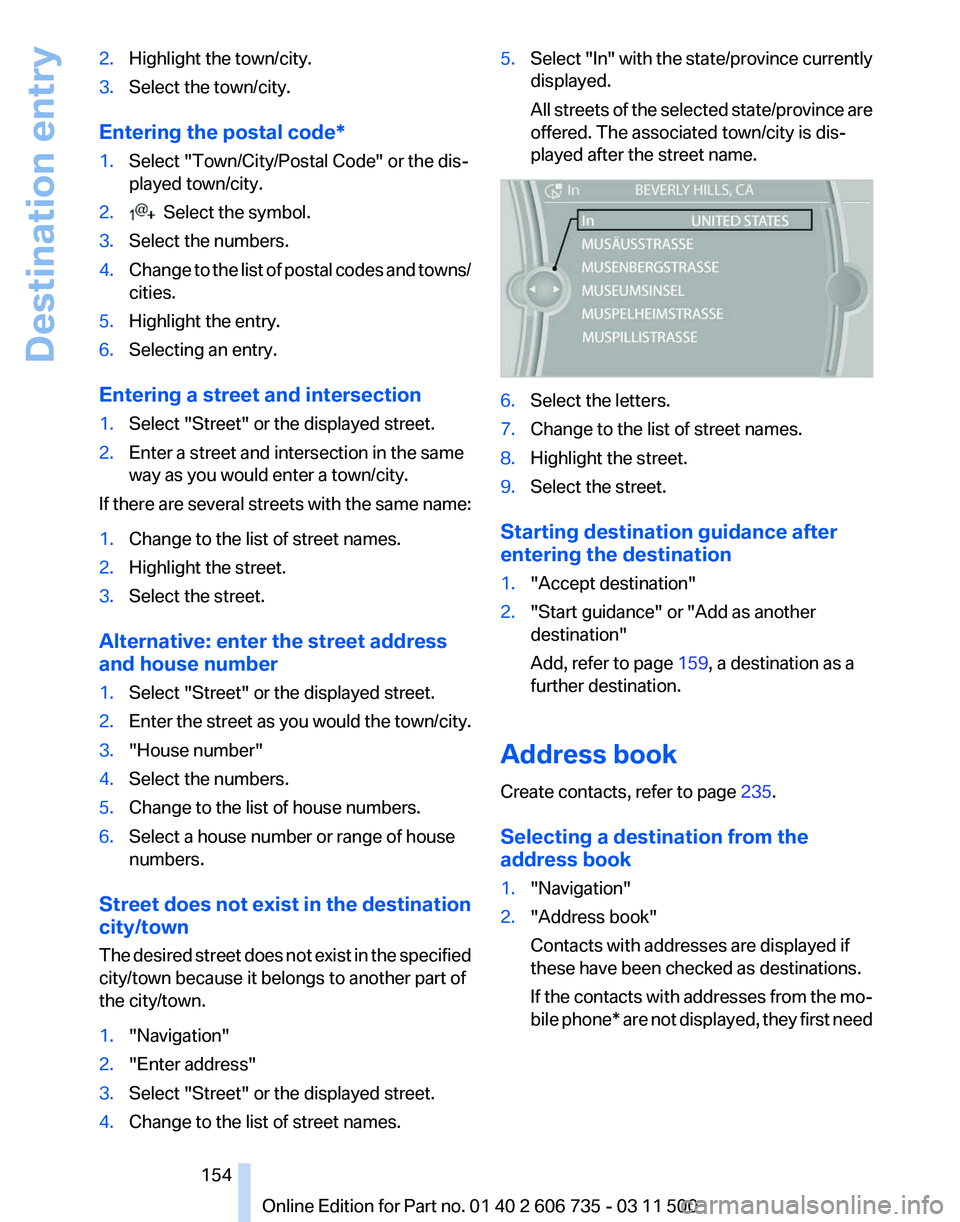
4. Change to the list of street names. 5.
Select "In"
with the state/province currently
displayed.
All streets of the selected state/province are
offered. The associated town/city is dis‐
played after the street name. 6.
Select the letters.
7. Change to the list of street names.
8. Highlight the street.
9. Select the street.
Starting destination guidance after
entering the destination
1. "Accept destination"
2. "Start guidance" or "Add as another
destination"
Add, refer to page 159, a destination as a
further destination.
Address book
Create contacts, refer to page 235.
Selecting a destination from the
address book
1. "Navigation"
2. "Address book"
Contacts with addresses are displayed if
these have been checked as destinations.
If
the contacts with addresses from the mo‐
bile phone* are not displayed, they first need
Seite 154
154 Online Edition for Part no. 01 40 2 606 735 - 03 11 500
Destination entry
Page 155 of 317
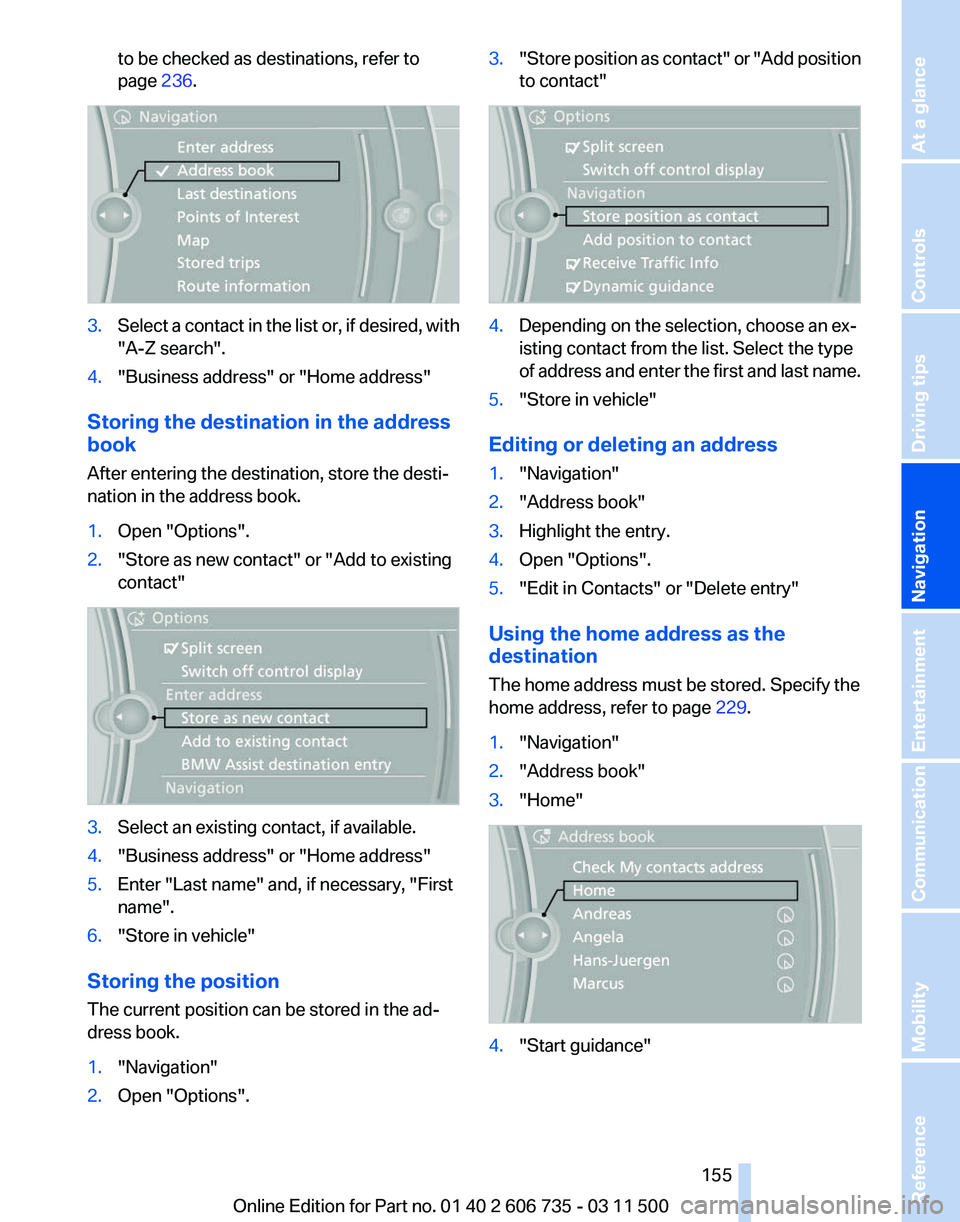
to be checked as destinations, refer to
page
236. 3.
Select a contact in the list or, if desired, with
"A-Z search".
4. "Business address" or "Home address"
Storing the destination in the address
book
After entering the destination, store the desti‐
nation in the address book.
1. Open "Options".
2. "Store as new contact" or "Add to existing
contact" 3.
Select an existing contact, if available.
4. "Business address" or "Home address"
5. Enter "Last name" and, if necessary, "First
name".
6. "Store in vehicle"
Storing the position
The current position can be stored in the ad‐
dress book.
1. "Navigation"
2. Open "Options". 3.
"Store position as contact" or "Add position
to contact" 4.
Depending on the selection, choose an ex‐
isting contact from the list. Select the type
of
address and enter the first and last name.
5. "Store in vehicle"
Editing or deleting an address
1. "Navigation"
2. "Address book"
3. Highlight the entry.
4. Open "Options".
5. "Edit in Contacts" or "Delete entry"
Using the home address as the
destination
The home address must be stored. Specify the
home address, refer to page 229.
1. "Navigation"
2. "Address book"
3. "Home" 4.
"Start guidance"
Seite 155
155Online Edition for Part no. 01 40 2 606 735 - 03 11 500
Reference Mobility Communication Entertainment
Navigation Driving tips Controls At a glance
Page 187 of 317
1.
"CD/Multimedia"
2. "CD/DVD"
3. Select the desired DVD.
4. Open "Options".
5. "Audio/language"
6. Select the desired language.
Notes
CD/DVD player and changer Do not remove the cover
BMW CD/DVD players and changers are
officially designated Class 1 laser products. Do
not operate if the cover is damaged; otherwise,
severe eye damage can result.◀
CDs and DVDs
Use of CDs/DVDs
▷Do not use self-recorded CDs/DVDs
with labels applied, as these can be‐
come detached during playback due
to
heat buildup and can cause irrepar‐
able damage to the device.
▷ Only use round CDs/DVDs with a standard
diameter of 4.7 in/12 cm and do not play
CDs/DVDs
with an adapter, e.g., single CDs;
otherwise, the CDs or the adapter may jam
and no longer eject.
▷ Do not use combined CDs/DVDs, e.g., DVD
Plus, as the CDs/DVDs can jam and will no
longer eject.◀
General malfunctions
▷ CD/DVD changers and players have been
optimized for performance in vehicles. In
some
instances they may be more sensitive
to faulty CDs/DVDs than stationary devices
would be.
▷ If a CD/DVD cannot be played, first check
whether it has been inserted correctly. Humidity
High
levels of humidity can lead to condensation
on the CD/DVD or the laser's scan lens, and
temporarily prevent playback.
Malfunctions involving individual CDs/
DVDs
If malfunctions occur only with particular CDs/
DVDs, this can be due to one of the following
causes:
Home-recorded CDs/DVDs
▷ Possible reasons for malfunctions with
home-recorded
CDs/DVDs are inconsistent
data creation or recording processes, or
poor quality or old age of the blank CD/DVD.
▷ Only label CDs/DVDs on the upper side with
a pen intended for this purpose.
Damage
▷ Avoid fingerprints, dust, scratches and
moisture.
▷ Store CDs/DVDs in a sleeve.
▷ Do not subject CDs/DVDs to temperatures
over 122 ℉/50 ℃, high humidity or direct
sunlight.
CDs/DVDs with copy protection
CDs/DVDs are often provided with a copy pro‐
tection feature by the manufacturer. This can
mean
that some CDs/DVDs cannot be played or
can only be played to a limited extent.
MACROVISION
This product contains copyrighted technology
that is based on multiple registered US patents
and the intellectual property of the Macrovision
Corporation and other manufacturers. The use
of this copy protection must be approved by
Macrovision. Media protected by this product -
unless otherwise agreed with Macrovision - may
only be used for private purposes. Copying of
this technology is prohibited.
Seite 187
187Online Edition for Part no. 01 40 2 606 735 - 03 11 500
Reference Mobility Communication
Entertainment Navigation Driving tips Controls At a glance