check BMW X5M 2012 Service Manual
[x] Cancel search | Manufacturer: BMW, Model Year: 2012, Model line: X5M, Model: BMW X5M 2012Pages: 317, PDF Size: 8.83 MB
Page 199 of 317
▷
Switch the radio on and off again.
Music files can only be played back softly.
▷ Adjust the volume settings on the device.
Playback is disturbed when buttons are pressed
or by other messages on the device.
▷ Switch off the button tones and other signal
tones on the device.
Playback is interrupted by a telephone call or
traffic bulletin and is not resumed automatically.
▷ Switch the radio on and off again.
Playback is not possible if the mobile phone is
connected
both via Bluetooth Audio and via the
extended connectivity of the music player in the
mobile phone*.
▷ Disconnect one of the two connections; for
example, disconnect the audio connection,
refer to page 198, and restart playback.
If all points in this list have been checked and the
required function is still not available, please
contact the hotline or service center.
Software Update*
The vehicle supports various external devices
depending
on the current software version. With
a software update, the vehicle can support new
cell phones or new external device, for example.
▷ USB.
Software updates and related current infor‐
mation is available at www.bmw.com/up‐
date.
Displaying the current version
The currently installed software is displayed.
1. "Settings"
2. "Software update"
3. "Show current version"
Select desired version* to display additional in‐
formation*.
Updating software via USB
*
The software may only be updated when the ve‐
hicle is stationary. 1.
Store the file for the software-update in the
main director of a USB flash drive.
2. Insert the USB flash drive into the USB in‐
terface of the USB audio interface in the
center armrest. An update via the USB in‐
terface
in the glove compartment is not pos‐
sible.
3. "Settings"
4. "Software update"
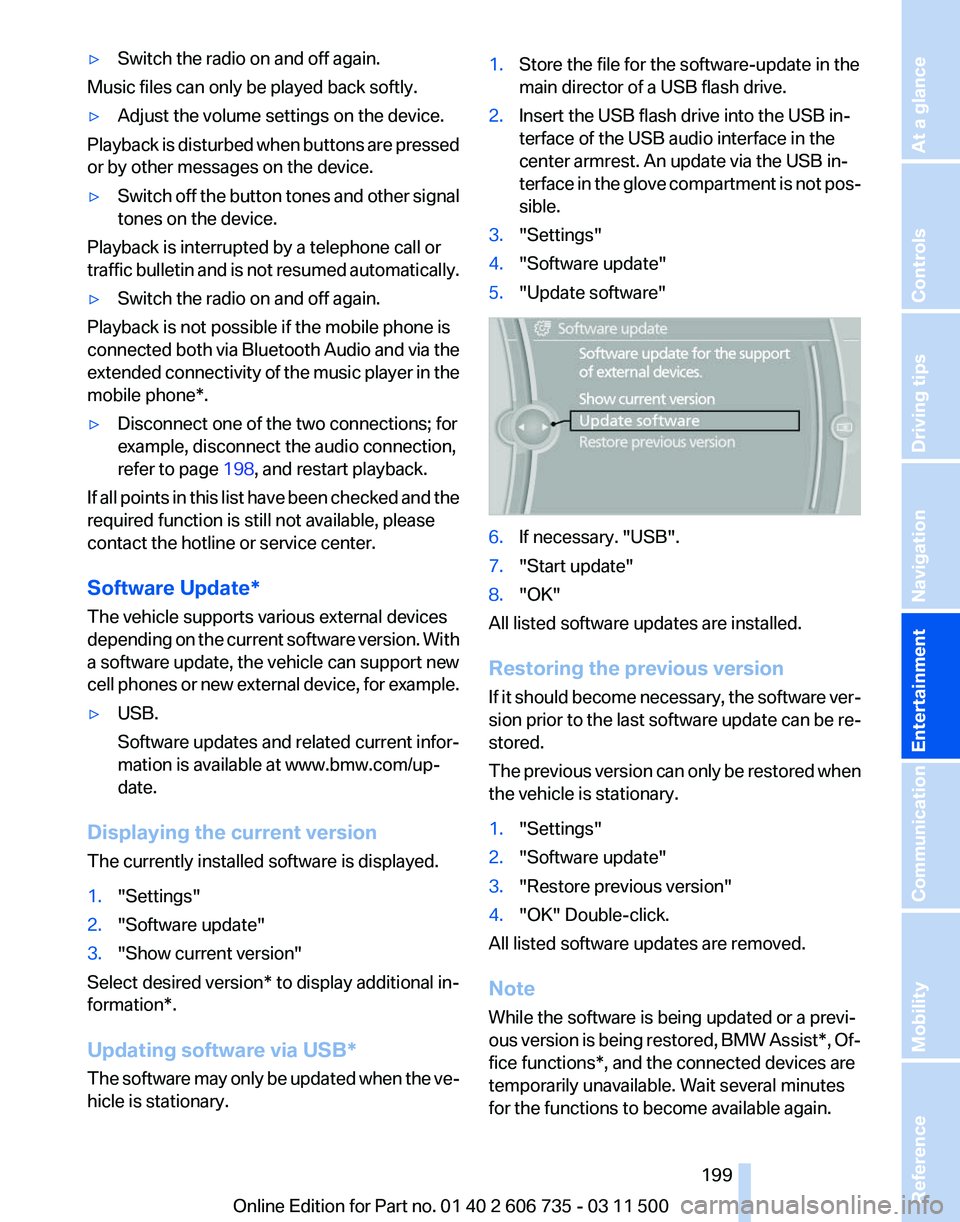
5. "Update software" 6.
If necessary. "USB".
7. "Start update"
8. "OK"
All listed software updates are installed.
Restoring the previous version
If
it should become necessary, the software ver‐
sion prior to the last software update can be re‐
stored.
The previous version can only be restored when
the vehicle is stationary.
1. "Settings"
2. "Software update"
3. "Restore previous version"
4. "OK" Double-click.
All listed software updates are removed.
Note
While the software is being updated or a previ‐
ous
version is being restored, BMW Assist*, Of‐
fice functions*, and the connected devices are
temporarily unavailable. Wait several minutes
for the functions to become available again.
Seite 199
199Online Edition for Part no. 01 40 2 606 735 - 03 11 500
Reference Mobility Communication
Entertainment Navigation Driving tips Controls At a glance
Page 210 of 317
To play the information on the other side, turn
over the DVD.
Supported formats
Depending on the compression method used,
not all files of the specified formats can be
opened.
Images
▷
JPEG/JPG.
With very large image files, it can take longer for
the images to be displayed.
Compressed audio files
▷ MP3.
▷ WMA.
▷ OGG.
▷ AAC.
Compressed video files
▷ SVCD.
▷ MPEG1.
▷ MPEG2.
▷ MPEG4/DivX.
Digital Rights Management (DRM)
In some cases, it may not be possible to play
CDs/DVDs with integrated Digital Rights Man‐
agement (DRM).
General malfunctions
▷ CD/DVD changers and players have been
optimized for performance in vehicles. In
some
instances they may be more sensitive
to faulty CDs/DVDs than stationary devices
would be.
▷ If a CD/DVD cannot be played, first check
whether it has been inserted correctly.
Foreign bodies/liquids in the CD/DVD slot
Make sure that no foreign objects or liq‐
uids get into the CD/DVD slot; otherwise, the
CD/DVD player will be damaged.
◀ Humidity
High
levels of humidity can lead to condensation
on the CD/DVD or the laser's scan lens, and
temporarily prevent playback.
Malfunctions involving individual CDs/
DVDs
If malfunctions occur only with particular CDs/
DVDs, this can be due to one of the following
causes.
Copied or self-recorded CDs/DVDs
▷ Possible reasons for malfunctions with
home-recorded
CDs/DVDs are inconsistent
data creation or recording processes, or
poor quality or old age of the blank CD/DVD.
▷ Only label CDs/DVDs on the upper side with
a pen intended for this purpose.
Damaged CDs/DVDs
▷ Avoid fingerprints, dust, scratches and
moisture.
▷ Store CDs/DVDs in a sleeve.
▷ Do not subject CDs/DVDs to temperatures
over 122 ℉/50 ℃, high humidity or direct
sunlight.
CDs/DVDs with copy protection
CDs/DVDs are often provided with a copy pro‐
tection
feature by the manufacturer. As a result,
some CDs/DVDs cannot be played, can only be
played to a limited degree, or cause the system
to switch off. In this case, wait a short while and
then switch the system back on again. Then re‐
move the CD/DVD from the drive.
CDs/DVDs with compressed audio files
If the language set for the CD/DVD player does
not match the language of the music track, the
music tracks may be displayed incorrectly.
Seite 210
210 Online Edition for Part no. 01 40 2 606 735 - 03 11 500
DVD system in rear
Page 220 of 317
▷
The strength of the Bluetooth signal on the
mobile phone can be adjusted, depending
on the mobile phone.
▷ Insert the mobile phone into the snap-in
adapter* or place it in the area of the center
console.
▷ Adjust the volume of the microphone and
loudspeakers separately.
If all points in this list have been checked and the
required function is still not available, please
contact the hotline or service center.
Controls
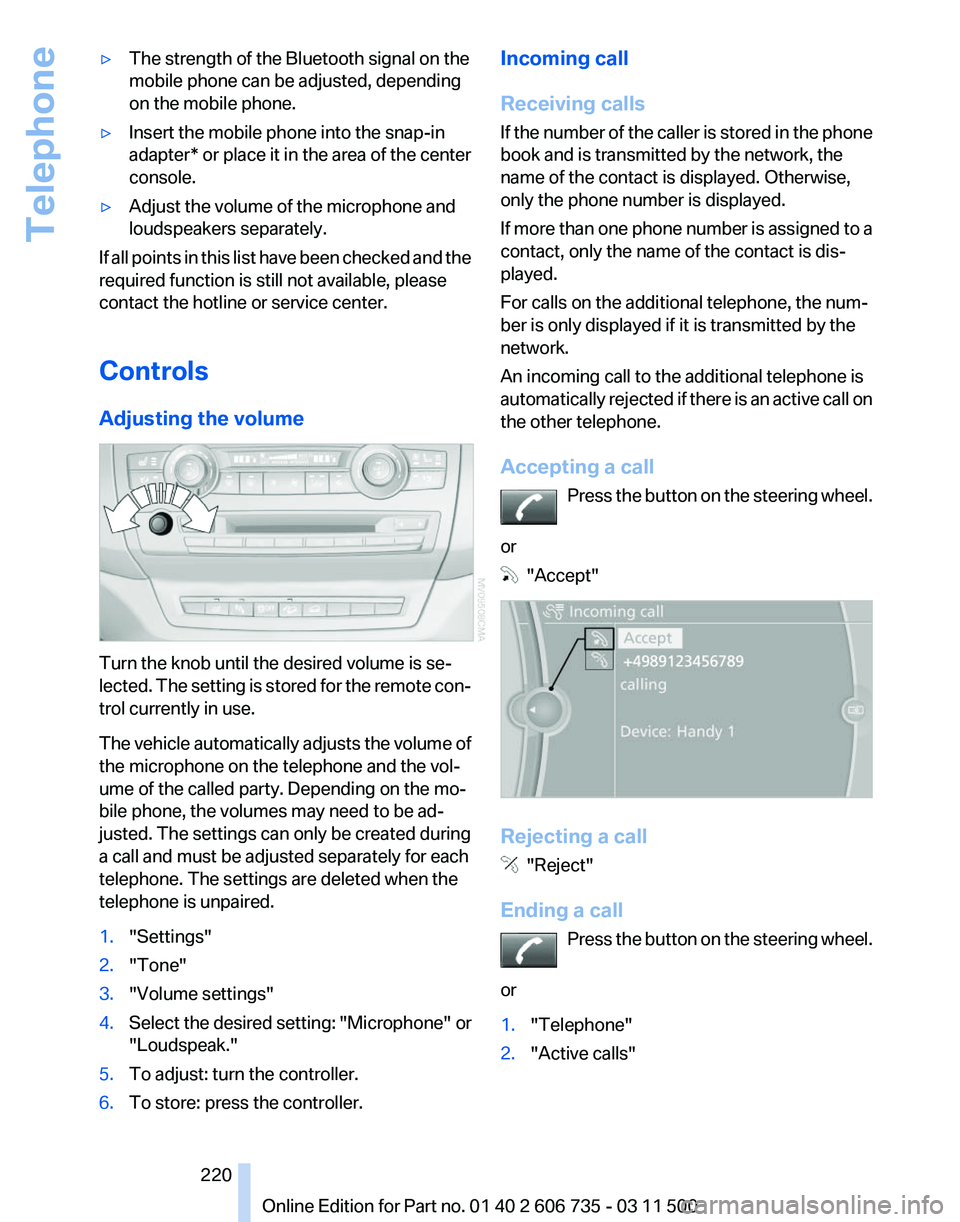
Adjusting the volume Turn the knob until the desired volume is se‐
lected.
The setting is stored for the remote con‐
trol currently in use.
The vehicle automatically adjusts the volume of
the microphone on the telephone and the vol‐
ume of the called party. Depending on the mo‐
bile phone, the volumes may need to be ad‐
justed. The settings can only be created during
a call and must be adjusted separately for each
telephone. The settings are deleted when the
telephone is unpaired.
1. "Settings"
2. "Tone"
3. "Volume settings"
4. Select the desired setting: "Microphone" or
"Loudspeak."
5. To adjust: turn the controller.
6. To store: press the controller. Incoming call
Receiving calls
If
the number of the caller is stored in the phone
book and is transmitted by the network, the
name of the contact is displayed. Otherwise,
only the phone number is displayed.
If more than one phone number is assigned to a
contact, only the name of the contact is dis‐
played.
For calls on the additional telephone, the num‐
ber is only displayed if it is transmitted by the
network.
An incoming call to the additional telephone is
automatically rejected if there is an active call on
the other telephone.
Accepting a call
Press the button on the steering wheel.
or "Accept"
Rejecting a call
"Reject"
Ending a call Press
the button on the steering wheel.
or
1. "Telephone"
2. "Active calls" Seite 220
220 Online Edition for Part no. 01 40 2 606 735 - 03 11 500
Telephone
Page 228 of 317
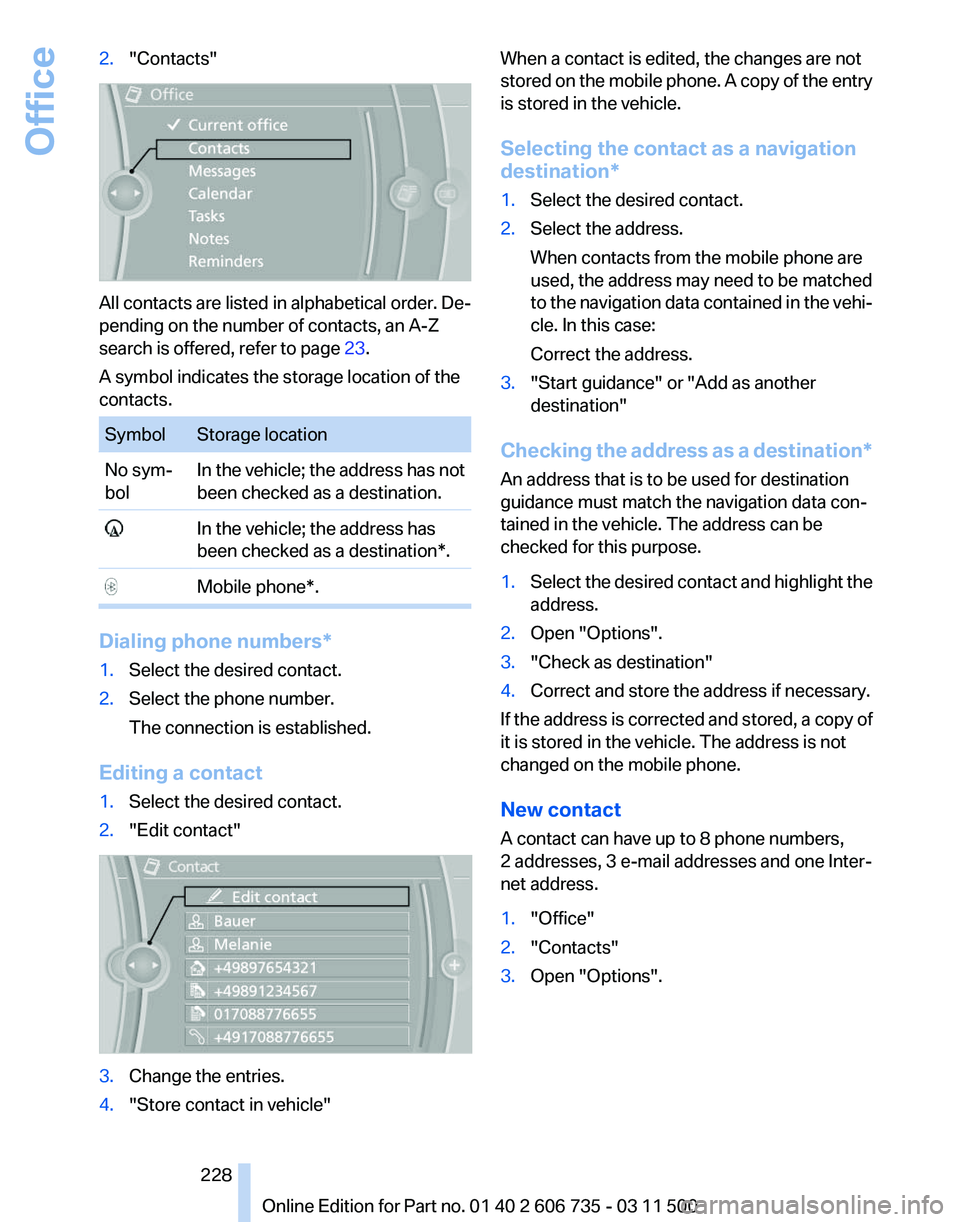
2.
"Contacts" All contacts are listed in alphabetical order. De‐
pending on the number of contacts, an A-Z
search is offered, refer to page
23.
A symbol indicates the storage location of the
contacts. Symbol Storage location
No sym‐
bol
In the vehicle; the address has not
been checked as a destination. In the vehicle; the address has
been checked as a destination*. Mobile phone*.
Dialing phone numbers*
1.
Select the desired contact.
2. Select the phone number.
The connection is established.
Editing a contact
1. Select the desired contact.
2. "Edit contact" 3.
Change the entries.
4. "Store contact in vehicle" When a contact is edited, the changes are not
stored
on the mobile phone. A copy of the entry
is stored in the vehicle.
Selecting the contact as a navigation
destination*
1. Select the desired contact.
2. Select the address.
When contacts from the mobile phone are
used, the address may need to be matched
to
the navigation data contained in the vehi‐
cle. In this case:
Correct the address.
3. "Start guidance" or "Add as another
destination"
Checking the address as a destination*
An address that is to be used for destination
guidance must match the navigation data con‐
tained in the vehicle. The address can be
checked for this purpose.
1. Select the desired contact and highlight the
address.
2. Open "Options".
3. "Check as destination"
4. Correct and store the address if necessary.
If the address is corrected and stored, a copy of
it is stored in the vehicle. The address is not
changed on the mobile phone.
New contact
A contact can have up to 8 phone numbers,
2 addresses, 3 e-mail addresses and one Inter‐
net address.
1. "Office"
2. "Contacts"
3. Open "Options".
Seite 228
228 Online Edition for Part no. 01 40 2 606 735 - 03 11 500
Office
Page 234 of 317
Displaying contact or selecting phone
number
1.
"Use contact data"
2. Display the contact or select the phone
number:
▷Select the contact to display contact de‐
tails.
▷ Select the phone number to establish a
connection directly.
Storing contact data
1. "Use contact data"
2. Highlight the phone number or e-mail ad‐
dress.
3. Open "Options".
4. "Add to existing contact" or "Store as new
contact"
Reading out loud*
Text messages, e-mails, appointment entries,
tasks, and notes can be read out loud.
1. Select the desired message, appointment,
task, or note.
2. Select the symbol.
The following options are available during read‐
ing:
▷ "Pause"
Interrupt reading. Select again to restart
reading.
▷ "Back to beginning"
Start reading the message again from the
beginning.
▷ Select the symbol.
Go back one paragraph.
▷ Select the symbol.
Skip a paragraph.
▷ To end reading, turn the controller to the left. What to do if...
Information on suitable mobile phones, refer to
page
216.
Appointments, tasks, notes, text messages, or
e-mails from the mobile phone are not dis‐
played.
▷ The mobile phone is not capable of the
missing function or is not connected cor‐
rectly.
▷ The Office function is deactivated.
▷ The mobile phone is connected as an addi‐
tional phone.
▷ Appointments are older than 20 days or are
more than 50 days in the future.
▷ The tasks have been marked as completed
or have a due date that lies more than
90 days in the future.
▷ Depending on the number of stored ap‐
pointments, task notes, and messages in
the
mobile phone, not all are displayed in the
vehicle.
Not all appointments and tasks from the mobile
phone are displayed at the right time?
▷ The time zone, time, or date is incorrectly set
on the Control Display and mobile phone.
The e-mail attachment is not displayed.
▷ E-mails are transmitted without an attach‐
ment.
Entries are not displayed in full length.
▷ Text were already transmitted from the mo‐
bile phone in a shortened form.
▷ Synchronization between the mobile phone
and vehicle may take several minutes.
The contact pictures are not being displayed?
▷ Up to 200 contact pictures can be stored in
the vehicle.
The E-mail is displayed with a delay?
▷ Check the e-mail settings on the telephone
and adjust if necessary.
If all points in this list have been checked and the
required function is still not available, please
contact the hotline or service center.
Seite 234
234 Online Edition for Part no. 01 40 2 606 735 - 03 11 500
Office
Page 235 of 317
Contacts*
General information
Contacts
can be created and edited and the ad‐
dresses can be adopted as destinations for nav‐
igation.
New contact
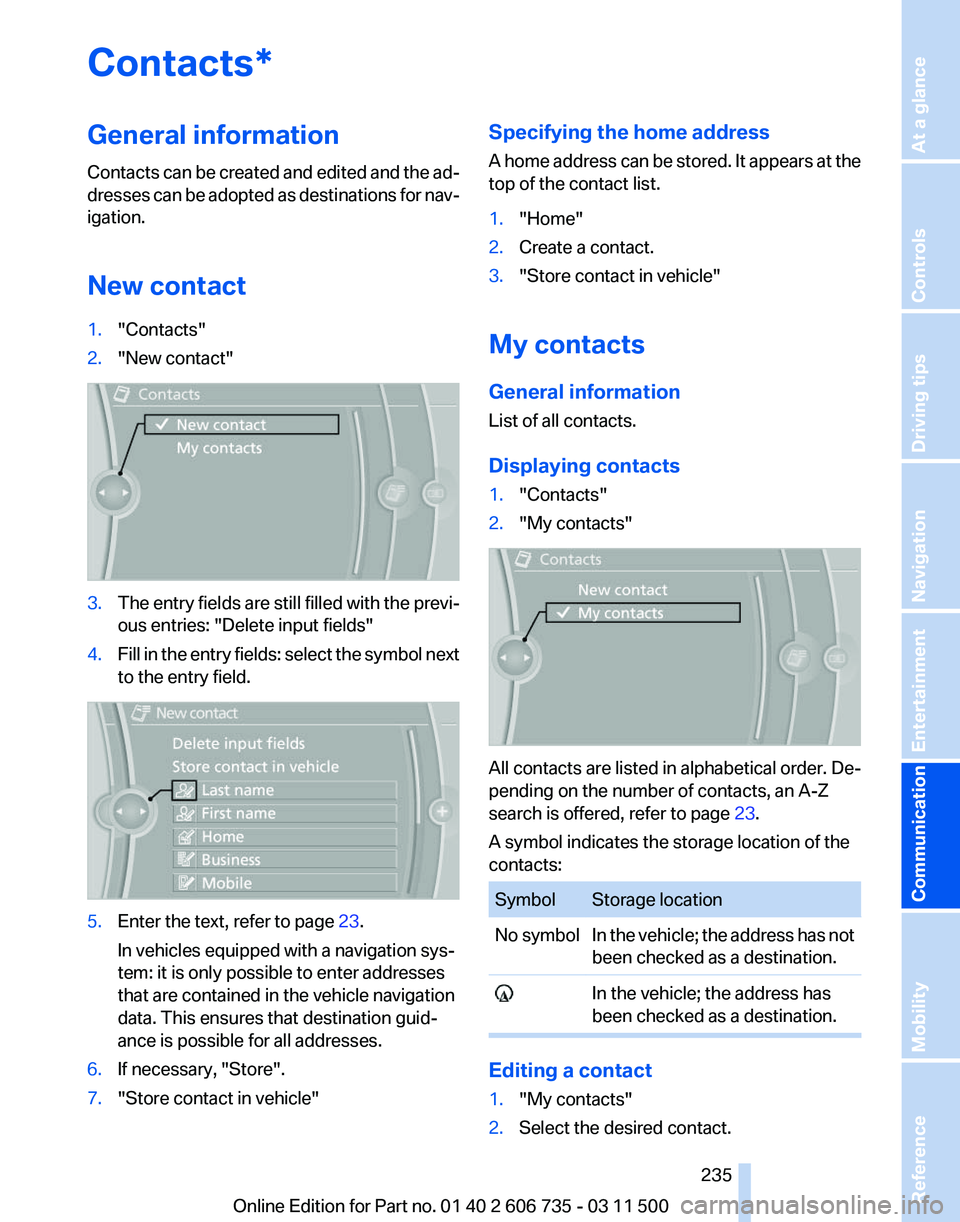
1. "Contacts"
2. "New contact" 3.
The entry fields are still filled with the previ‐
ous entries: "Delete input fields"
4. Fill in the entry fields: select the symbol next
to the entry field. 5.
Enter the text, refer to page 23.
In vehicles equipped with a navigation sys‐
tem: it is only possible to enter addresses
that are contained in the vehicle navigation
data. This ensures that destination guid‐
ance is possible for all addresses.
6. If necessary, "Store".
7. "Store contact in vehicle" Specifying the home address
A
home address can be stored. It appears at the
top of the contact list.
1. "Home"
2. Create a contact.
3. "Store contact in vehicle"
My contacts
General information
List of all contacts.
Displaying contacts
1. "Contacts"
2. "My contacts" All contacts are listed in alphabetical order. De‐
pending on the number of contacts, an A-Z
search is offered, refer to page
23.
A symbol indicates the storage location of the
contacts: Symbol Storage location
No symbol In the vehicle; the address has not
been checked as a destination. In the vehicle; the address has
been checked as a destination. Editing a contact
1.
"My contacts"
2. Select the desired contact.
Seite 235
235Online Edition for Part no. 01 40 2 606 735 - 03 11 500
Reference Mobility
Communication Entertainment Navigation Driving tips Controls At a glance
Page 236 of 317
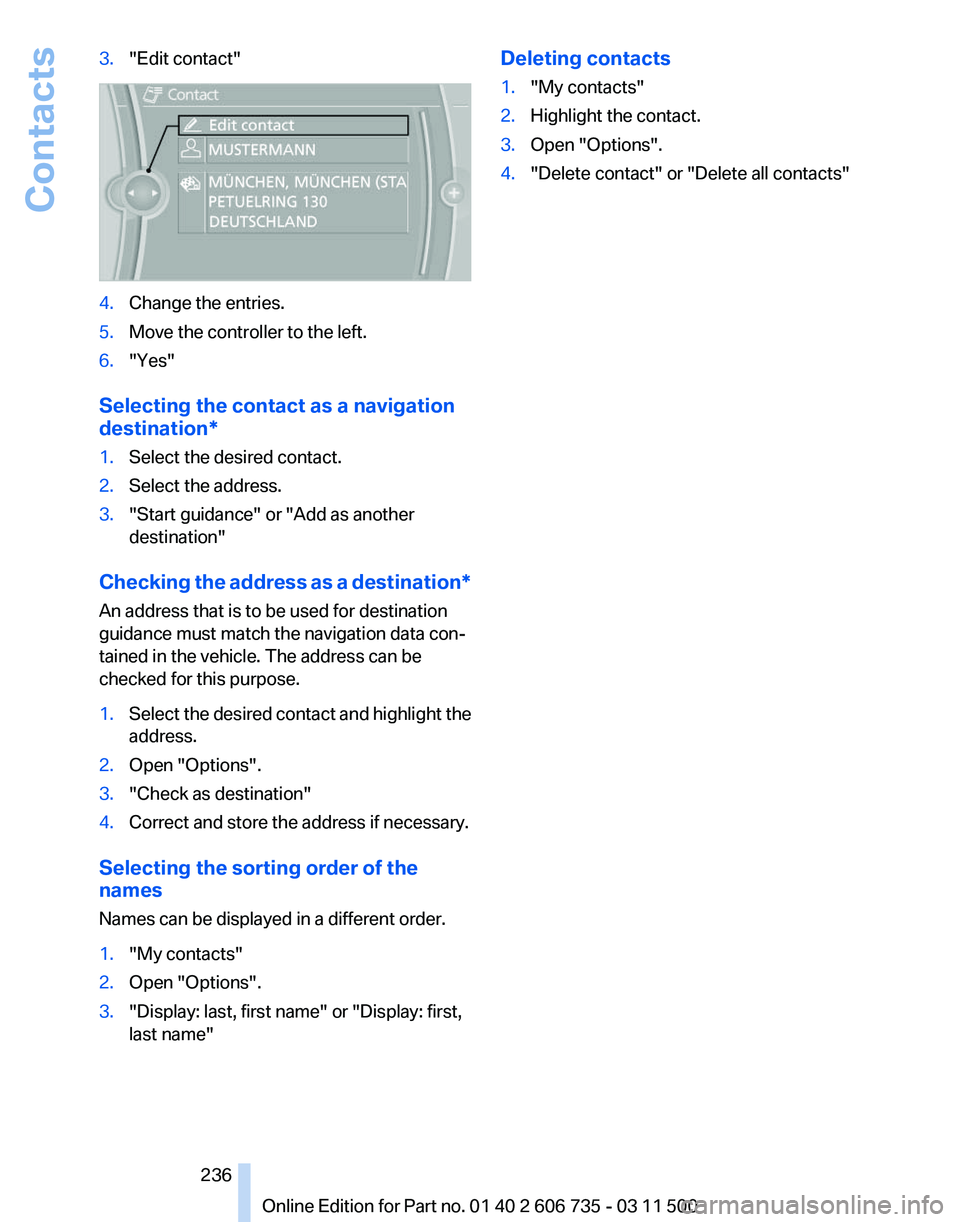
3.
"Edit contact" 4.
Change the entries.
5. Move the controller to the left.
6. "Yes"
Selecting the contact as a navigation
destination*
1. Select the desired contact.
2. Select the address.
3. "Start guidance" or "Add as another
destination"
Checking the address as a destination*
An address that is to be used for destination
guidance must match the navigation data con‐
tained in the vehicle. The address can be
checked for this purpose.
1. Select the desired contact and highlight the
address.
2. Open "Options".
3. "Check as destination"
4. Correct and store the address if necessary.
Selecting the sorting order of the
names
Names can be displayed in a different order.
1. "My contacts"
2. Open "Options".
3. "Display: last, first name" or "Display: first,
last name" Deleting contacts
1.
"My contacts"
2. Highlight the contact.
3. Open "Options".
4. "Delete contact" or "Delete all contacts"
Seite 236
236 Online Edition for Part no. 01 40 2 606 735 - 03 11 500Contacts
Page 238 of 317
in advance. This shortens the duration of the
service appointment.
▷ In the event of a breakdown, data on the ve‐
hicle's condition can be sent directly to
Roadside Assistance*.
▷ The service varies by country.
▷ Connection costs may ensue.
▷ Services may be restricted abroad.
Requirements
▷ BMW Assist is activated.
If BMW Assist is not activated, a mobile
phone that has been recommended by
BMW
for TeleService and that is configured
for mobile data communication must be
connected with the vehicle.
▷ Wireless reception is available.
▷ The engine is running.
Using BMW TeleService*
BMW TeleService are typically activated in the
vehicle.
Even if the BMW TeleService are not active, a
voice contact to Roadside Assistance* is still
possible.
To
continue using or to deactivate the services,
please contact your service partner or the BMW
customer hotline.
Concierge service*
General information
The BMW Assist Concierge service offers infor‐
mation on events, gas stations, and hotels, and
provides phone numbers and addresses. Hotels
can be booked directly by the BMW Assist Con‐
cierge service. The Concierge service is part of
the optional Convenience Plan.
Starting the Concierge service
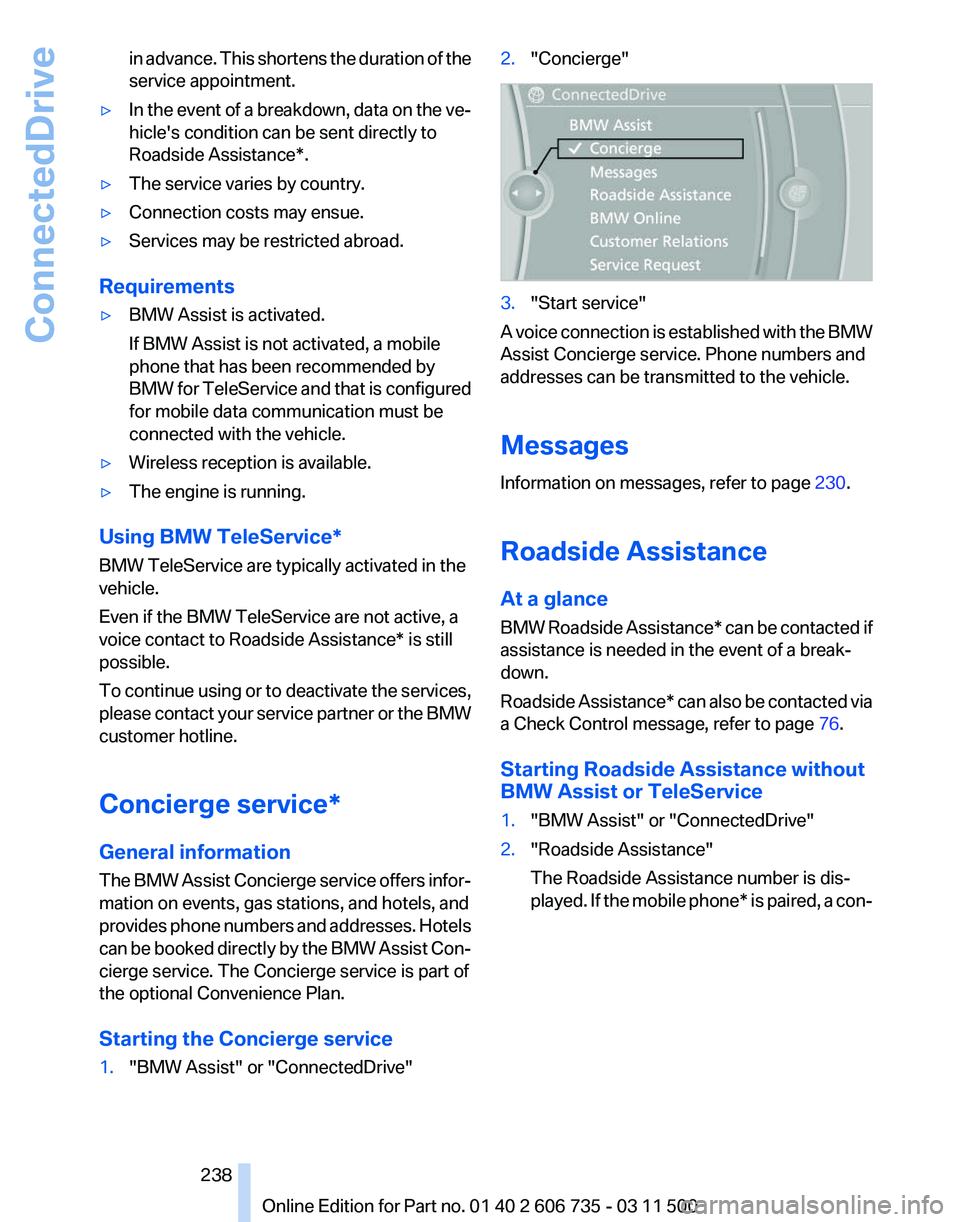
1. "BMW Assist" or "ConnectedDrive" 2.
"Concierge" 3.
"Start service"
A voice connection is established with the BMW
Assist Concierge service. Phone numbers and
addresses can be transmitted to the vehicle.
Messages
Information on messages, refer to page 230.
Roadside Assistance
At a glance
BMW
Roadside Assistance* can be contacted if
assistance is needed in the event of a break‐
down.
Roadside Assistance* can also be contacted via
a Check Control message, refer to page 76.
Starting Roadside Assistance without
BMW Assist or TeleService
1. "BMW Assist" or "ConnectedDrive"
2. "Roadside Assistance"
The Roadside Assistance number is dis‐
played.
If the mobile phone* is paired, a con‐
Seite 238
238 Online Edition for Part no. 01 40 2 606 735 - 03 11 500
ConnectedDrive
Page 241 of 317
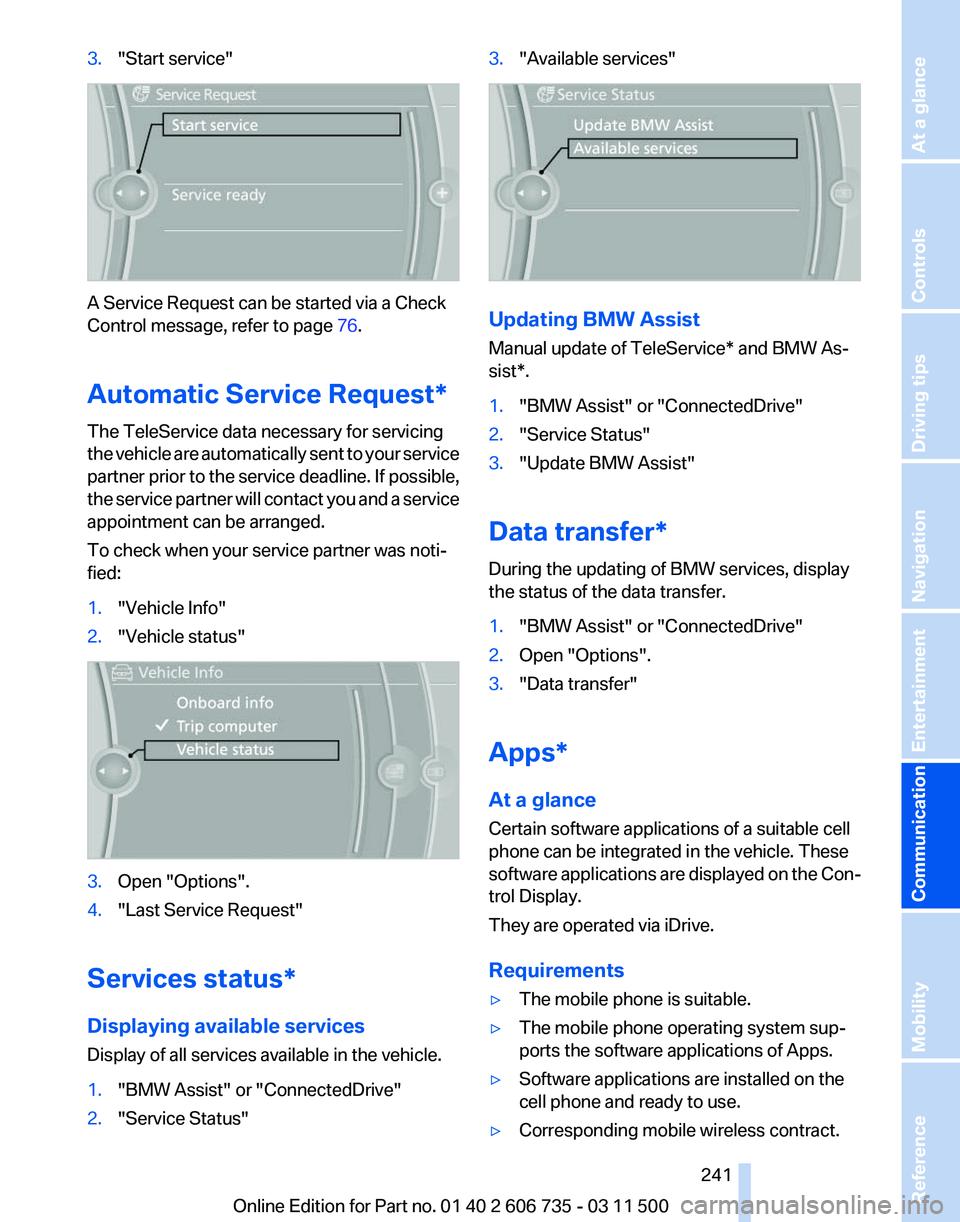
3.
"Start service" A Service Request can be started via a Check
Control message, refer to page
76.
Automatic Service Request
*
The TeleService data necessary for servicing
the vehicle are automatically sent to your service
partner prior to the service deadline. If possible,
the service partner will contact you and a service
appointment can be arranged.
To check when your service partner was noti‐
fied:
1. "Vehicle Info"
2. "Vehicle status" 3.
Open "Options".
4. "Last Service Request"
Services status*
Displaying available services
Display of all services available in the vehicle.
1. "BMW Assist" or "ConnectedDrive"
2. "Service Status" 3.
"Available services" Updating BMW Assist
Manual update of
TeleService* and BMW As‐
sist*.
1. "BMW Assist" or "ConnectedDrive"
2. "Service Status"
3. "Update BMW Assist"
Data transfer*
During the updating of BMW services, display
the status of the data transfer.
1. "BMW Assist" or "ConnectedDrive"
2. Open "Options".
3. "Data transfer"
Apps*
At a glance
Certain software applications of a suitable cell
phone can be integrated in the vehicle. These
software
applications are displayed on the Con‐
trol Display.
They are operated via iDrive.
Requirements
▷ The mobile phone is suitable.
▷ The mobile phone operating system sup‐
ports the software applications of Apps.
▷ Software applications are installed on the
cell phone and ready to use.
▷ Corresponding mobile wireless contract.
Seite 241
241Online Edition for Part no. 01 40 2 606 735 - 03 11 500
Reference Mobility
Communication Entertainment Navigation Driving tips Controls At a glance
Page 248 of 317
Fuel
Fuel specifications
Gasoline engine: required fuel
Do
not use fuels that are labeled at the fuel pump
as containing metals.
Only refuel with lead-free gasoline without
metal additives
Do not refuel with leaded gasoline or gasoline
with metal additives, e. g., manganese or iron;
otherwise, the catalytic converter and other
components will be permanently damaged.◀
Do not refuel with ethanol E85
Do not refuel with E85, i.e., fuel with an
ethanol content of 85 %, or with Flex Fuel, as this
would damage the engine and fuel supply sys‐
tem.◀
Super Premium Gasoline/AKI 91
This gasoline is highly recommended.
However, you may also use gasoline with less
AKI. The minimum AKI Rating is:
▷ BMW X5: 87
▷ BMW X6: 89
If you use gasoline with this minimum AKI Rat‐
ing, the engine may produce knocking sounds
when starting at high outside temperatures.
This has no affect on the engine life.
Minimum fuel grade
Do not use any gasoline below the mini‐
mum specified fuel grade; otherwise, engine
damage may occur.◀
Use high-quality brands
Field
experience has indicated significant differ‐
ences in fuel quality: volatility, composition, ad‐
ditives, etc., among gasolines offered for sale in
the United States and Canada. Fuels containing
up to and including 10% ethanol or other oxy‐
genates with up to 2.8% oxygen by weight, that
is, 15% MTBE or 3% methanol plus an equiva‐ lent amount of co-solvent, will not void the ap‐
plicable warranties with respect to defects in
materials or workmanship.
Minimum fuel grade
The
use of poor-quality fuels may result in
driveability, starting and stalling problems es‐
pecially under certain environmental conditions
such as high ambient temperature and high al‐
titude.
Should you encounter driveability problems
which you suspect could be related to the fuel
you are using, we recommend that you respond
by switching to a recognized high-quality brand
such as gasoline that is advertised as Top Tier
Detergent Gasoline.
Failure to comply with these recommendations
may result in unscheduled maintenance.◀
BMW X5 with BMW Advanced Diesel:
required fuel
Ultra-Low Sulfur Diesel
The engine of your BMW is designed for diesel
with a low sulfur content:
Ultra-low sulfur diesel ASTM D 975-07a.
Only refuel with ultra-low sulfur diesel.
The percentage of biodiesel in the fuel
must not exceed 5%, referred to as B5. Do not
refuel with gasoline. If the vehicle has been re‐
fueled with incorrect fuel such as gasoline, do
not start the engine; otherwise, there is a danger
of engine damage.◀
If you added the wrong fuel, contact the service
center.
The fuel filling neck is designed for refueling with
diesel nozzles.
If the nozzle cannot be inserted into the fuel filler
pipe of your BMW, please check to make sure
that you are refueling with a diesel fuel pump and
whether this is equipped with a diesel nozzle. Seite 248
248 Online Edition for Part no. 01 40 2 606 735 - 03 11 500Fuel