check BMW X5M 2012 User Guide
[x] Cancel search | Manufacturer: BMW, Model Year: 2012, Model line: X5M, Model: BMW X5M 2012Pages: 317, PDF Size: 8.83 MB
Page 50 of 317
Safety belts
General information
Always make sure that safety belts are being
worn by all occupants before driving away.
Although airbags enhance safety by providing
added protection, they are not a substitute for
safety belts.
Number of safety belts
Your
vehicle has been fitted with safety belts for
the safety of you and your passengers.
▷ BMW X5: five or seven* safety belts.
▷ BMW X6: four or five* safety belts.
Notes One person per safety belt
Never
allow more than one person to wear
a single safety belt. Never allow infants or small
children to ride on a passenger's lap.◀
Putting on the belt
Lay the belt, without twisting, snugly
across the lap and shoulders, as close to the
body as possible. Make sure that the belt lies low
around the hips in the lap area and does not
press on the abdomen. Otherwise, the belt can
slip over the hips in the lap area in a frontal im‐
pact and injure the abdomen.
The safety belt must not lie across the neck, rub
on sharp edges, be routed over solid or breaka‐
ble objects, or be pinched.◀
Reduction of restraining effect
Avoid wearing clothing that prevents the
belt from fitting properly, and pull the shoulder
belt periodically to readjust the tension across
your lap; otherwise, the retention effect of the
safety belt may be reduced.◀
Using the middle safety belt
If the middle safety belt in the rear is used,
the larger section of the backrest must be
locked. Otherwise, the safety belt will not have
a restraining effect.◀ Buckling the belt
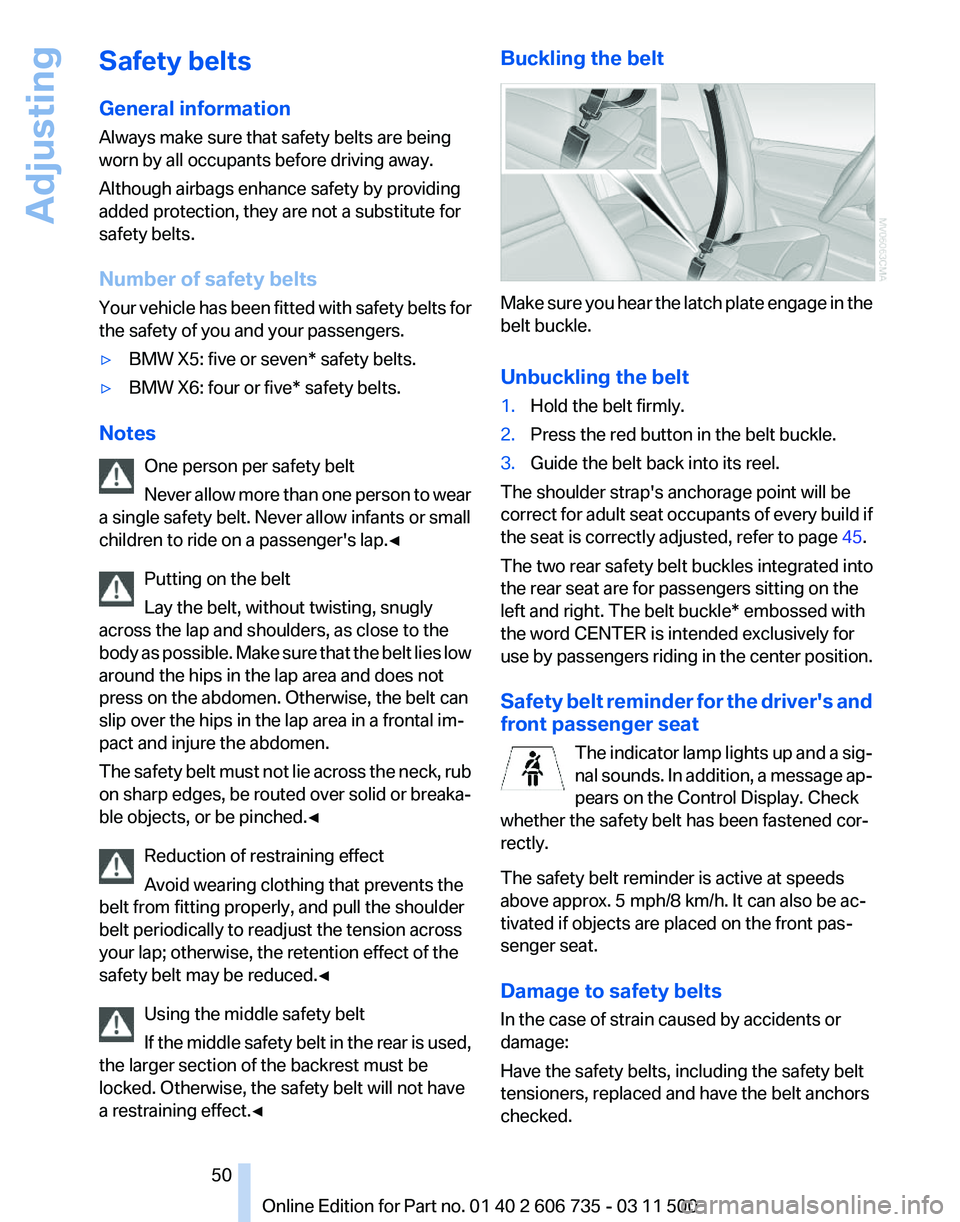
Make sure you hear the latch plate engage in the
belt buckle.
Unbuckling the belt
1.
Hold the belt firmly.
2. Press the red button in the belt buckle.
3. Guide the belt back into its reel.
The shoulder strap's anchorage point will be
correct
for adult seat occupants of every build if
the seat is correctly adjusted, refer to page 45.
The two rear safety belt buckles integrated into
the rear seat are for passengers sitting on the
left and right. The belt buckle* embossed with
the word CENTER is intended exclusively for
use by passengers riding in the center position.
Safety belt reminder for the driver's and
front passenger seat The indicator lamp lights up and a sig‐
nal sounds. In addition, a message ap‐
pears on the Control Display. Check
whether the safety belt has been fastened cor‐
rectly.
The safety belt reminder is active at speeds
above approx. 5 mph/8 km/h. It can also be ac‐
tivated if objects are placed on the front pas‐
senger seat.
Damage to safety belts
In the case of strain caused by accidents or
damage:
Have the safety belts, including the safety belt
tensioners, replaced and have the belt anchors
checked. Seite 50
50 Online Edition for Part no. 01 40 2 606 735 - 03 11 500
Adjusting
Page 51 of 317
Checking and replacing safety belts
Have the work performed only by your
service center; otherwise, it cannot be ensured
that this safety feature will function properly.◀
Belt-force limiter
The
effect of the belt-force limiter on the driver's
seat is dependent on the position of the driver's
seat.
To maintain the long-term accuracy of this func‐
tion, the driver's seat must be calibrated if a cor‐
responding message is displayed on the Control
Display.
Calibrating driver's seat
The warning lamp lights up. A mes‐
sage also appears on the Control Dis‐
play. Please calibrate the driver's seat.
1. Move the driver's seat forward until it stops.
2. Move the driver's seat forward again. It
briefly moves toward the front in the proc‐
ess.
3. Set the desired seating position again.
The calibration is completed when the message
on the Control Display disappears. Should this
message continue to be displayed, repeat the
calibration. If the message does not disappear
even
after repeated calibration, have the system
checked as soon as possible.
Do not carry out calibration while the ve‐
hicle is moving
Never carry out calibration while the vehicle is
moving, as this can cause accidents.
Make sure that no persons or objects become
wedged during the calibration process, as this
can cause injuries or damage.◀
Head restraints
Correctly adjusted head restraints
A correctly adjusted head restraint reduces the
risk of spinal injury in the event of an accident. Adjusting the head restraint
Correctly adjust the head restraints of all
occupied
seats; otherwise, there is an increased
risk of injury in an accident.◀
BMW X5: push the head restraints of the 3rd row
seats* into the top position.
Height
Adjust the head restraint so that its center is ap‐
prox. at ear level.
Distance
Adjust the distance so that the head restraint is
as close as possible to the back of the head.
Active front head restraints
In the event of a rear-end collision of sufficient
severity, the active head restraint reduces the
distance to the head.
Reduced protective function
▷Do not use seat or head restraint cov‐
ers.
▷ Do not hang objects, e.g., clothes hangers,
directly on the head restraints.
▷ Only attach accessories approved by BMW
to the seat or head restraint.
Otherwise, the protective function of the active
head
restraint will be impaired and the personal
safety of the occupants will be endangered.
Have the active head restraints reset after they
are triggered in a rear-end collision. Have this
work performed by the service center only; oth‐
erwise, this safety feature with not be opera‐
tional.◀
Please contact the service center if the front
head restraints need to be removed or installed.
Front seats: adjusting the height
Adjust the head restraint so that its center is ap‐
prox. at ear level. Seite 51
51Online Edition for Part no. 01 40 2 606 735 - 03 11 500
Reference Mobility Communication Entertainment Navigation Driving tips
Controls At a glance
Page 71 of 317
Displays
Odometer, external
temperature display, clock
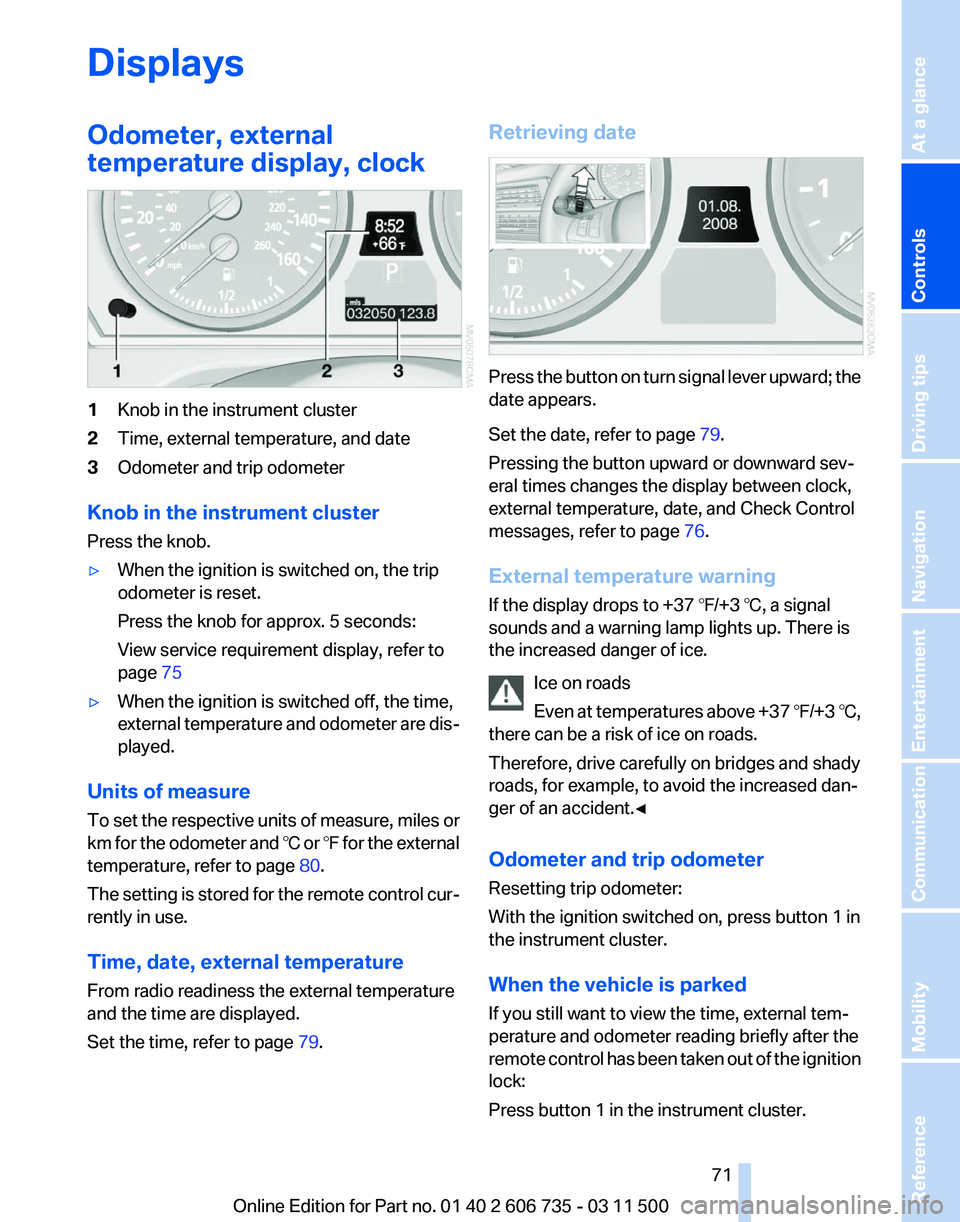
1
Knob in the instrument cluster
2 Time, external temperature, and date
3 Odometer and trip odometer
Knob in the instrument cluster
Press the knob.
▷ When the ignition is switched on, the trip
odometer is reset.
Press the knob for approx. 5 seconds:
View service requirement display, refer to
page 75
▷ When the ignition is switched off, the time,
external
temperature and odometer are dis‐
played.
Units of measure
To
set the respective units of measure, miles or
km for the odometer and ℃ or ℉ for the external
temperature, refer to page 80.
The setting is stored for the remote control cur‐
rently in use.
Time, date, external temperature
From radio readiness the external temperature
and the time are displayed.
Set the time, refer to page 79.Retrieving date
Press the button on turn signal lever upward; the
date appears.
Set the date, refer to page
79.
Pressing the button upward or downward sev‐
eral times changes the display between clock,
external temperature, date, and Check Control
messages, refer to page 76.
External temperature warning
If the display drops to +37 ℉/+3 ℃, a signal
sounds and a warning lamp lights up. There is
the increased danger of ice. Ice on roads
Even
at temperatures above +37 ℉/+3 ℃,
there can be a risk of ice on roads.
Therefore, drive carefully on bridges and shady
roads, for example, to avoid the increased dan‐
ger of an accident.◀
Odometer and trip odometer
Resetting trip odometer:
With the ignition switched on, press button 1 in
the instrument cluster.
When the vehicle is parked
If you still want to view the time, external tem‐
perature and odometer reading briefly after the
remote control has been taken out of the ignition
lock:
Press button 1 in the instrument cluster. Seite 71
71Online Edition for Part no. 01 40 2 606 735 - 03 11 500
Reference Mobility Communication Entertainment Navigation Driving tips
Controls At a glance
Page 72 of 317
Tachometer
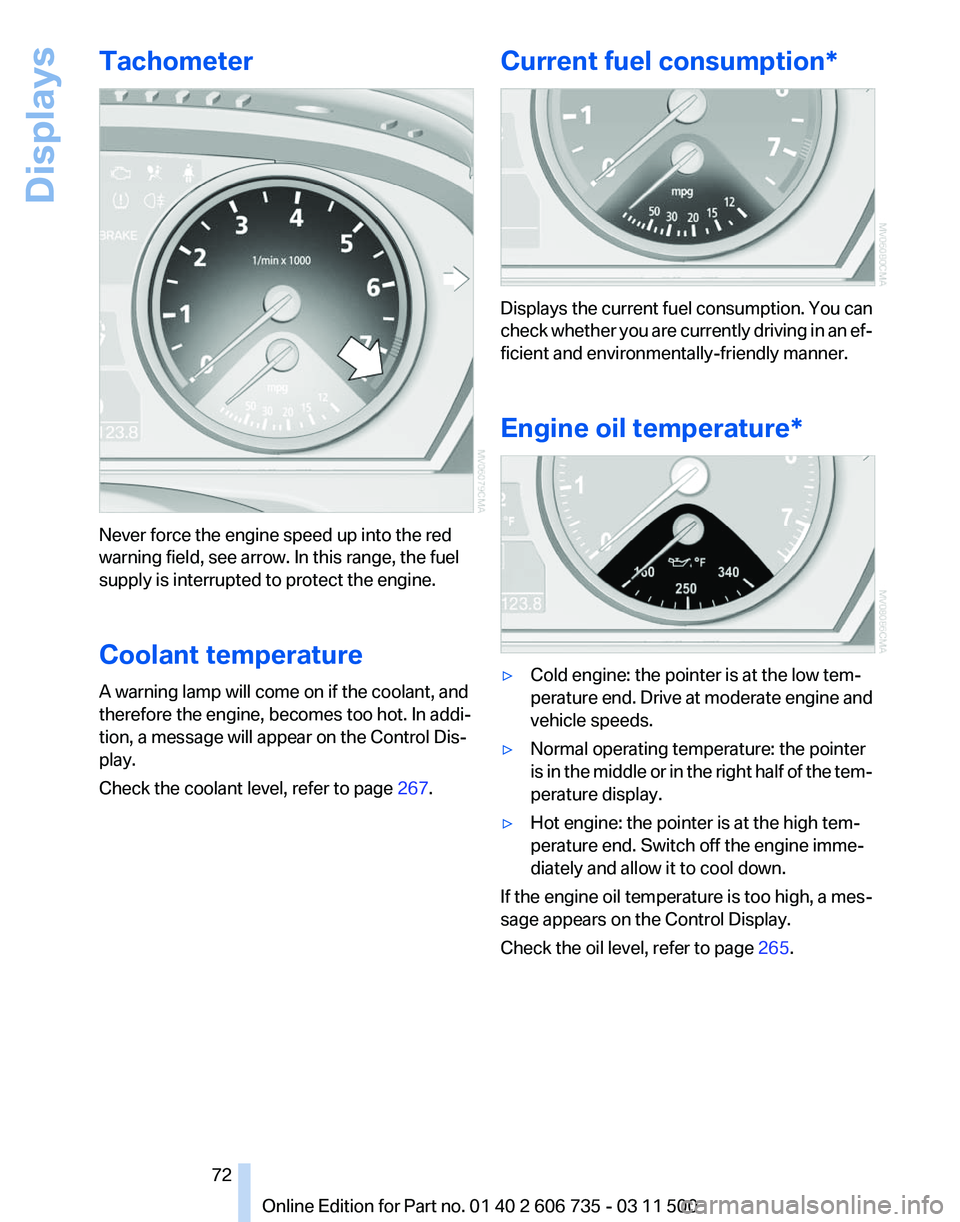
Never force the engine speed up into the red
warning field, see arrow. In this range, the fuel
supply is interrupted to protect the engine.
Coolant temperature
A warning lamp will come on if the coolant, and
therefore the engine, becomes too hot. In addi‐
tion, a message will appear on the Control Dis‐
play.
Check the coolant level, refer to page
267.Current fuel consumption* Displays the current fuel consumption. You can
check
whether you are currently driving in an ef‐
ficient and environmentally-friendly manner.
Engine oil temperature* ▷
Cold engine: the pointer is at the low tem‐
perature
end. Drive at moderate engine and
vehicle speeds.
▷ Normal operating temperature: the pointer
is
in the middle or in the right half of the tem‐
perature display.
▷ Hot engine: the pointer is at the high tem‐
perature end. Switch off the engine imme‐
diately and allow it to cool down.
If the engine oil temperature is too high, a mes‐
sage appears on the Control Display.
Check the oil level, refer to page 265.
Seite 72
72 Online Edition for Part no. 01 40 2 606 735 - 03 11 500
Displays
Page 76 of 317
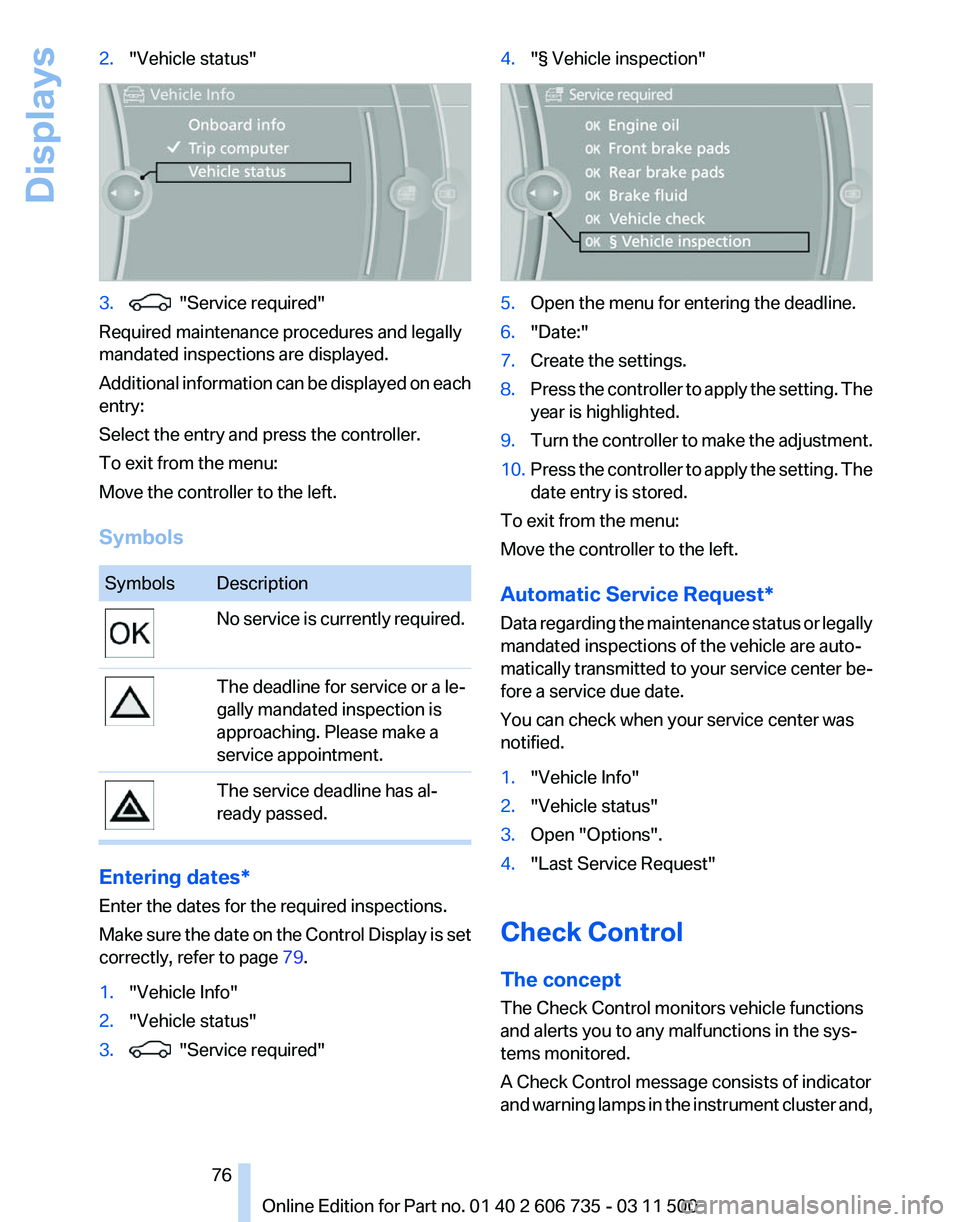
2.
"Vehicle status" 3. "Service required"
Required maintenance procedures and legally
mandated inspections are displayed.
Additional
information can be displayed on each
entry:
Select the entry and press the controller.
To exit from the menu:
Move the controller to the left.
Symbols Symbols Description
No service is currently required.
The deadline for service or a le‐
gally mandated inspection is
approaching. Please make a
service appointment.
The service deadline has al‐
ready passed.
Entering dates*
Enter the dates for the required inspections.
Make
sure the date on the Control Display is set
correctly, refer to page 79.
1. "Vehicle Info"
2. "Vehicle status"
3. "Service required" 4.
"§ Vehicle inspection" 5.
Open the menu for entering the deadline.
6. "Date:"
7. Create the settings.
8. Press the controller to apply the setting. The
year is highlighted.
9. Turn the controller to make the adjustment.
10. Press the controller to apply the setting. The
date entry is stored.
To exit from the menu:
Move the controller to the left.
Automatic Service Request
*
Data regarding the maintenance status or legally
mandated inspections of the vehicle are auto‐
matically transmitted to your service center be‐
fore a service due date.
You can check when your service center was
notified.
1. "Vehicle Info"
2. "Vehicle status"
3. Open "Options".
4. "Last Service Request"
Check Control
The concept
The Check Control monitors vehicle functions
and alerts you to any malfunctions in the sys‐
tems monitored.
A Check Control message consists of indicator
and
warning lamps in the instrument cluster and,
Seite 76
76 Online Edition for Part no. 01 40 2 606 735 - 03 11 500
Displays
Page 77 of 317
in some circumstances, an acoustic signal and
text
messages at the top of the Control Display.
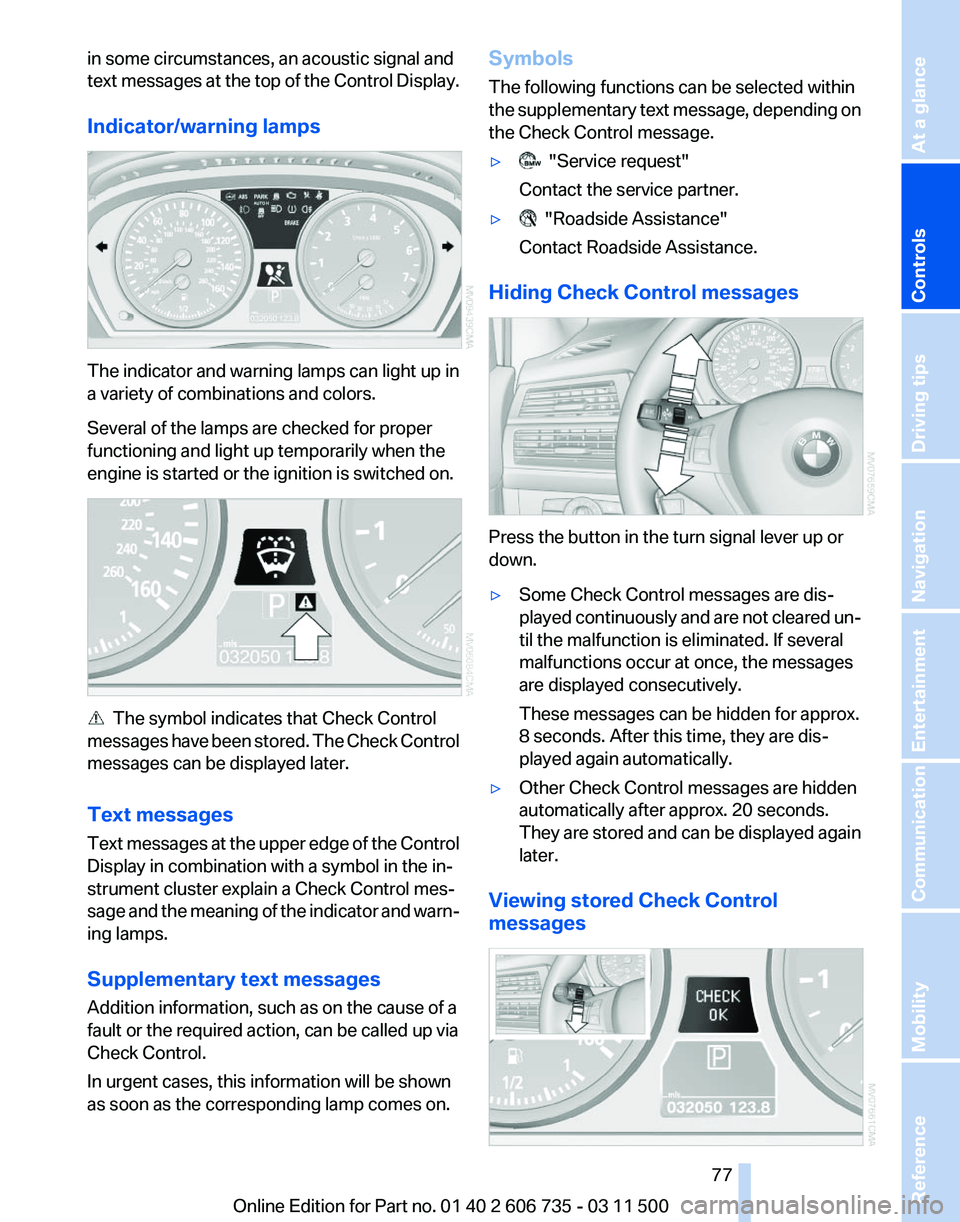
Indicator/warning lamps The indicator and warning lamps can light up in
a variety of combinations and colors.
Several of the lamps are checked for proper
functioning and light up temporarily when the
engine is started or the ignition is switched on.
The symbol indicates that Check Control
messages
have been stored. The Check Control
messages can be displayed later.
Text messages
Text messages at the upper edge of the Control
Display in combination with a symbol in the in‐
strument cluster explain a Check Control mes‐
sage and the meaning of the indicator and warn‐
ing lamps.
Supplementary text messages
Addition information, such as on the cause of a
fault or the required action, can be called up via
Check Control.
In urgent cases, this information will be shown
as soon as the corresponding lamp comes on. Symbols
The following functions can be selected within
the
supplementary text message, depending on
the Check Control message.
▷ "Service request"
Contact the service partner.
▷ "Roadside Assistance"
Contact Roadside Assistance.
Hiding Check Control messages Press the button in the turn signal lever up or
down.
▷
Some Check Control messages are dis‐
played
continuously and are not cleared un‐
til the malfunction is eliminated. If several
malfunctions occur at once, the messages
are displayed consecutively.
These messages can be hidden for approx.
8 seconds. After this time, they are dis‐
played again automatically.
▷ Other Check Control messages are hidden
automatically after approx. 20 seconds.
They
are stored and can be displayed again
later.
Viewing stored Check Control
messages Seite 77
77Online Edition for Part no. 01 40 2 606 735 - 03 11 500
Reference Mobility Communication Entertainment Navigation Driving tips
Controls At a glance
Page 78 of 317
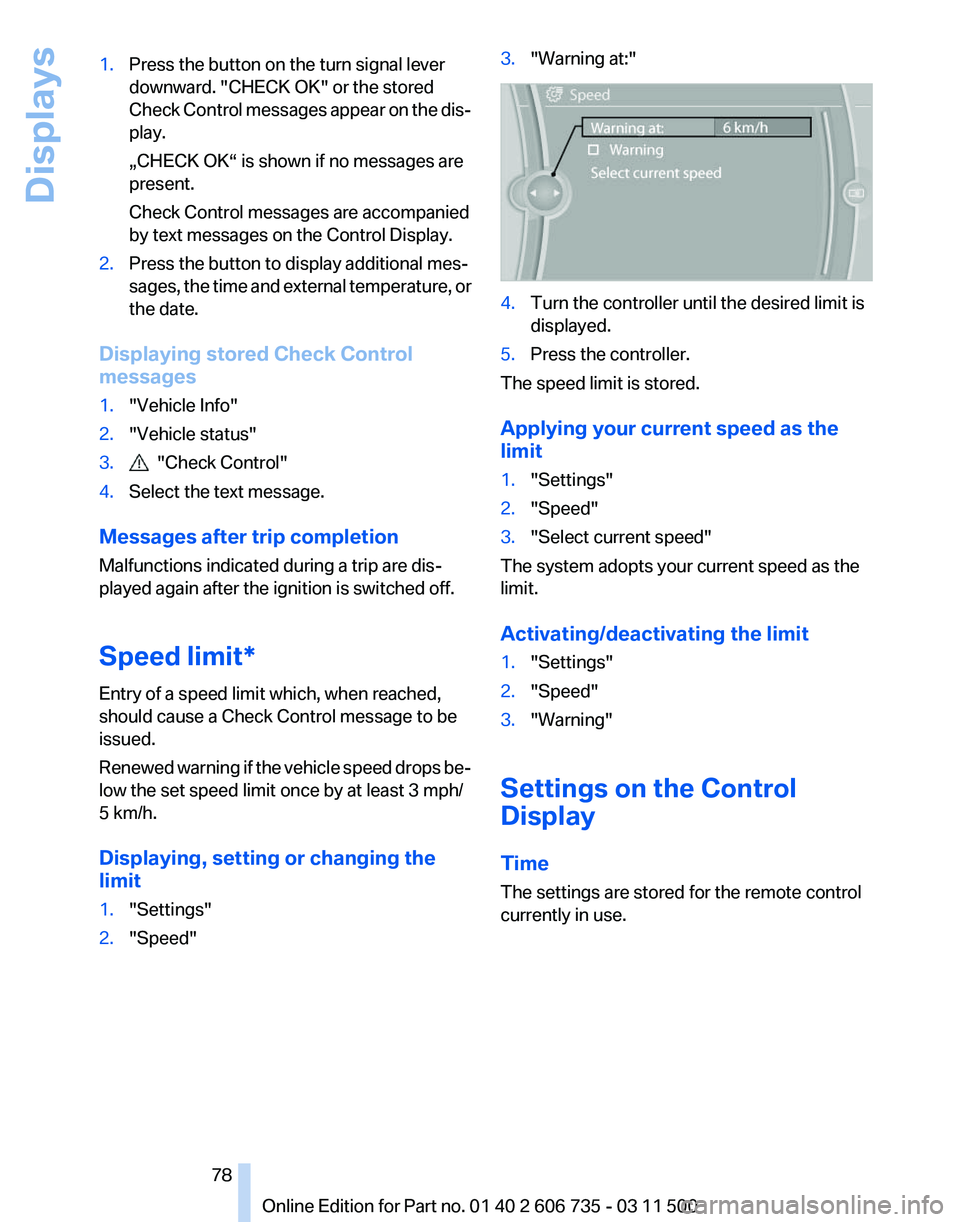
1.
Press the button on the turn signal lever
downward. "CHECK OK" or the stored
Check
Control messages appear on the dis‐
play.
„CHECK OK“ is shown if no messages are
present.
Check Control messages are accompanied
by text messages on the Control Display.
2. Press the button to display additional mes‐
sages,
the time and external temperature, or
the date.
Displaying stored Check Control
messages
1. "Vehicle Info"
2. "Vehicle status"
3. "Check Control"
4. Select the text message.
Messages after trip completion
Malfunctions indicated during a trip are dis‐
played again after the ignition is switched off.
Speed limit
*
Entry of a speed limit which, when reached,
should cause a Check Control message to be
issued.
Renewed warning if the vehicle speed drops be‐
low the set speed limit once by at least 3 mph/
5 km/h.
Displaying, setting or changing the
limit
1. "Settings"
2. "Speed" 3.
"Warning at:" 4.
Turn the controller until the desired limit is
displayed.
5. Press the controller.
The speed limit is stored.
Applying your current speed as the
limit
1. "Settings"
2. "Speed"
3. "Select current speed"
The system adopts your current speed as the
limit.
Activating/deactivating the limit
1. "Settings"
2. "Speed"
3. "Warning"
Settings on the Control
Display
Time
The settings are stored for the remote control
currently in use.
Seite 78
78 Online Edition for Part no. 01 40 2 606 735 - 03 11 500
Displays
Page 83 of 317
Malfunction
A message is displayed.
Adaptive light control is malfunctioning or has
failed.
Have the system checked as soon as pos‐
sible.
High beams/roadside parking
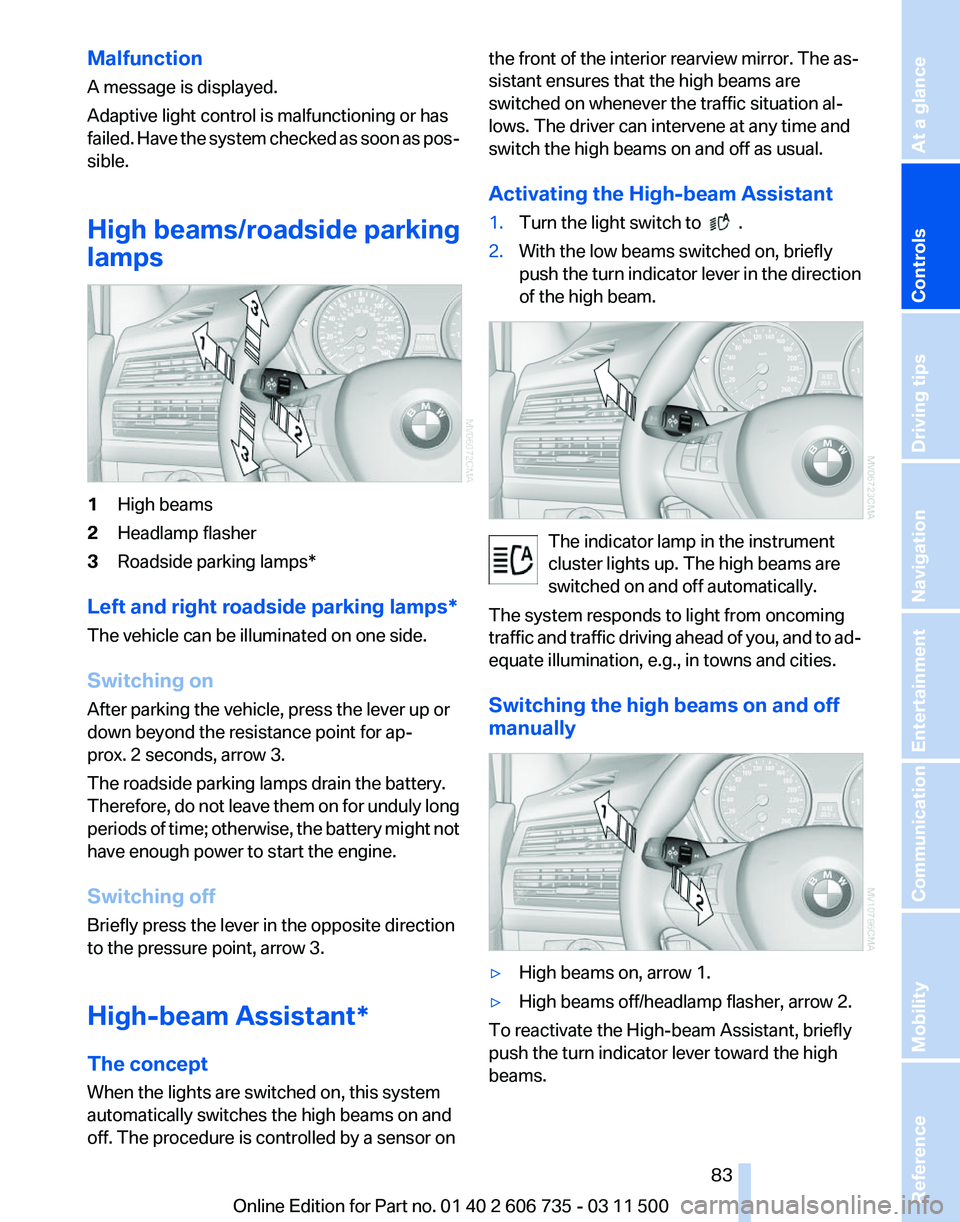
lamps 1
High beams
2 Headlamp flasher
3 Roadside parking lamps*
Left and right roadside parking lamps*
The vehicle can be illuminated on one side.
Switching on
After parking the vehicle, press the lever up or
down beyond the resistance point for ap‐
prox. 2 seconds, arrow 3.
The roadside parking lamps drain the battery.
Therefore,
do not leave them on for unduly long
periods of time; otherwise, the battery might not
have enough power to start the engine.
Switching off
Briefly press the lever in the opposite direction
to the pressure point, arrow 3.
High-beam Assistant*
The concept
When the lights are switched on, this system
automatically switches the high beams on and
off. The procedure is controlled by a sensor on the front of the interior rearview mirror. The as‐
sistant ensures that the high beams are
switched on whenever the traffic situation al‐
lows. The driver can intervene at any time and
switch the high beams on and off as usual.
Activating the High-beam Assistant
1.
Turn the light switch to .
2. With the low beams switched on, briefly
push
the turn indicator lever in the direction
of the high beam. The indicator lamp in the instrument
cluster lights up. The high beams are
switched on and off automatically.
The system responds to light from oncoming
traffic
and traffic driving ahead of you, and to ad‐
equate illumination, e.g., in towns and cities.
Switching the high beams on and off
manually ▷
High beams on, arrow 1.
▷ High beams off/headlamp flasher, arrow 2.
To reactivate the High-beam Assistant, briefly
push the turn indicator lever toward the high
beams. Seite 83
83Online Edition for Part no. 01 40 2 606 735 - 03 11 500
Reference Mobility Communication Entertainment Navigation Driving tips
Controls At a glance
Page 87 of 317
▷
Do not apply adhesive materials to the air‐
bag cover panels, cover them or modify
them in any way.
▷ Never modify either the individual compo‐
nents
or the wiring in the airbag system. This
also applies to steering wheel covers, the
dashboard, the seats, the roof pillars and the
sides of the headliner.◀
Even when all instructions are followed closely,
injury from contact with the airbags cannot be
ruled out in certain situations.
The ignition and inflation noise may lead to
short-term
and, in most cases, temporary hear‐
ing impairment in sensitive individuals.
In the case of a malfunction, deactivation
and after triggering of the airbags
Do not touch the individual components imme‐
diately after the system has been triggered; oth‐
erwise, there is the danger of burns.
Only have the airbags checked, repaired or dis‐
mantled and the airbag generator scrapped by
your service center or a workshop that has the
necessary authorization for handling explosives.
Non-professional attempts to service the sys‐
tem could lead to failure in an emergency or un‐
desired triggering of the airbag, either of which
could result in injury.◀
Warnings and information on the airbags are
also found on the sun visors.
Automatic deactivation of the front
passenger airbags
The occupation of the seat is detected by eval‐
uating the impression on the occupied seat sur‐
face of the front passenger seat.
The front and side airbags on the front passen‐
ger side are activated or deactivated accordingly
by the system.
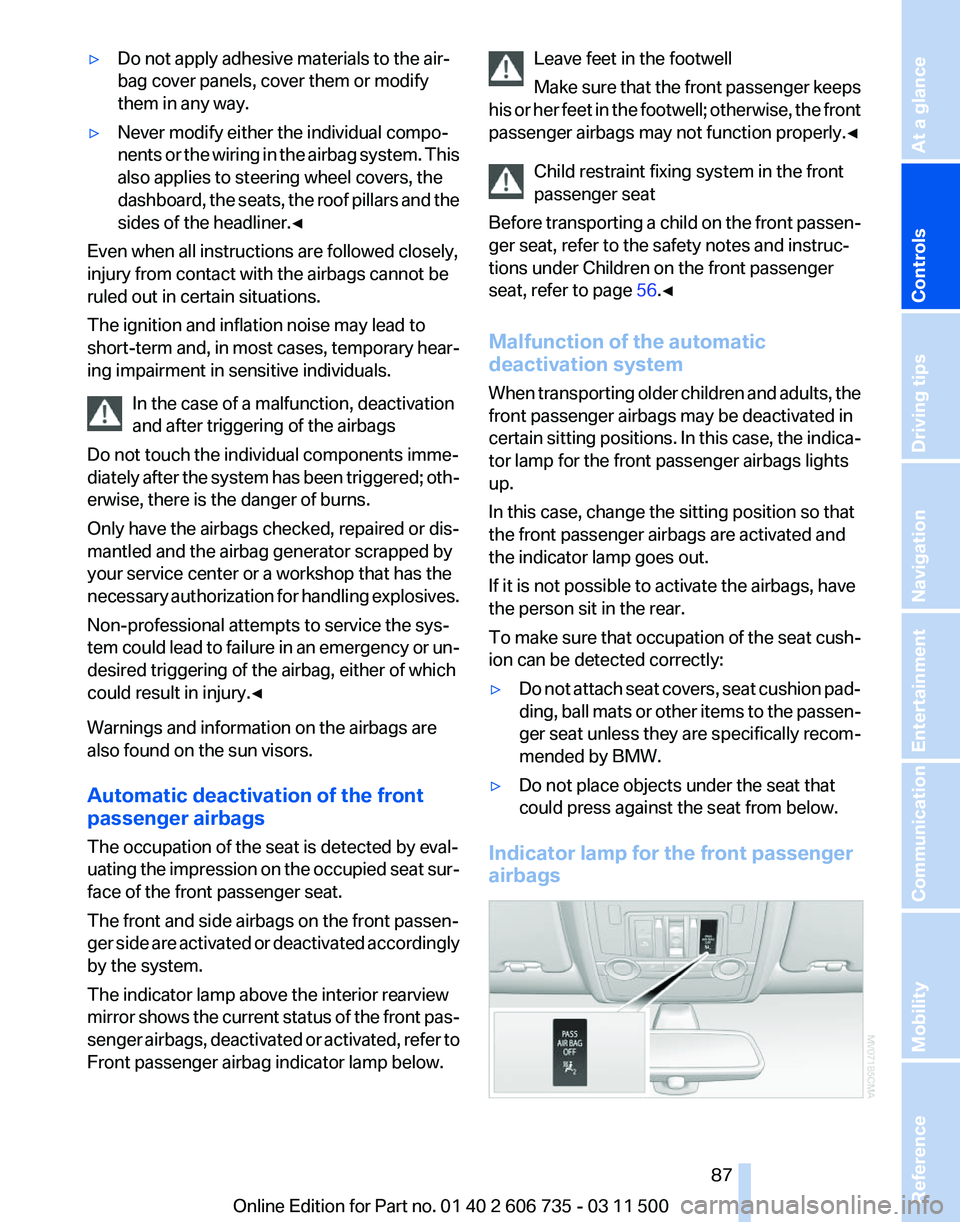
The indicator lamp above the interior rearview
mirror shows the current status of the front pas‐
senger airbags, deactivated or activated, refer to
Front passenger airbag indicator lamp below. Leave feet in the footwell
Make
sure that the front passenger keeps
his or her feet in the footwell; otherwise, the front
passenger airbags may not function properly.◀
Child restraint fixing system in the front
passenger seat
Before transporting a child on the front passen‐
ger seat, refer to the safety notes and instruc‐
tions under Children on the front passenger
seat, refer to page 56.◀
Malfunction of the automatic
deactivation system
When transporting older children and adults, the
front passenger airbags may be deactivated in
certain sitting positions. In this case, the indica‐
tor lamp for the front passenger airbags lights
up.
In this case, change the sitting position so that
the front passenger airbags are activated and
the indicator lamp goes out.
If it is not possible to activate the airbags, have
the person sit in the rear.
To make sure that occupation of the seat cush‐
ion can be detected correctly:
▷ Do not attach seat covers, seat cushion pad‐
ding,
ball mats or other items to the passen‐
ger seat unless they are specifically recom‐
mended by BMW.
▷ Do not place objects under the seat that
could press against the seat from below.
Indicator lamp for the front passenger
airbags Seite 87
87Online Edition for Part no. 01 40 2 606 735 - 03 11 500
Reference Mobility Communication Entertainment Navigation Driving tips
Controls At a glance
Page 88 of 317
Depending on the vehicle's equipment, the ar‐
rangement of the switches and indicator lamps
may differ somewhat.
The indicator lamp for the front passenger air‐
bags indicates the operating state of the front
passenger airbags.
The lamp indicates whether the airbags are ac‐
tivated or deactivated.
▷
The indicator lamp lights up when a child in
a child restraint fixing system intended for
the purpose is properly detected on the
seat. The airbags on the front passenger
side are not activated.
▷ The indicator lamp does not light up when,
for example, a correctly seated person of
sufficient size is detected on the seat. The
airbags on the front passenger side are ac‐
tivated.
▷ The indicator lamp does not light up when
the seat is empty. However, the airbags on
the front passenger side are not activated.
The system generally detects children seated in
a child seat, especially in the child seats that
were required by NHTSA when the vehicle was
manufactured.
After installing a child seat, make
sure that the indicator lamp for the front pas‐
senger airbags lights up. This indicates that the
child seat has been detected and the front pas‐
senger airbags are not activated.
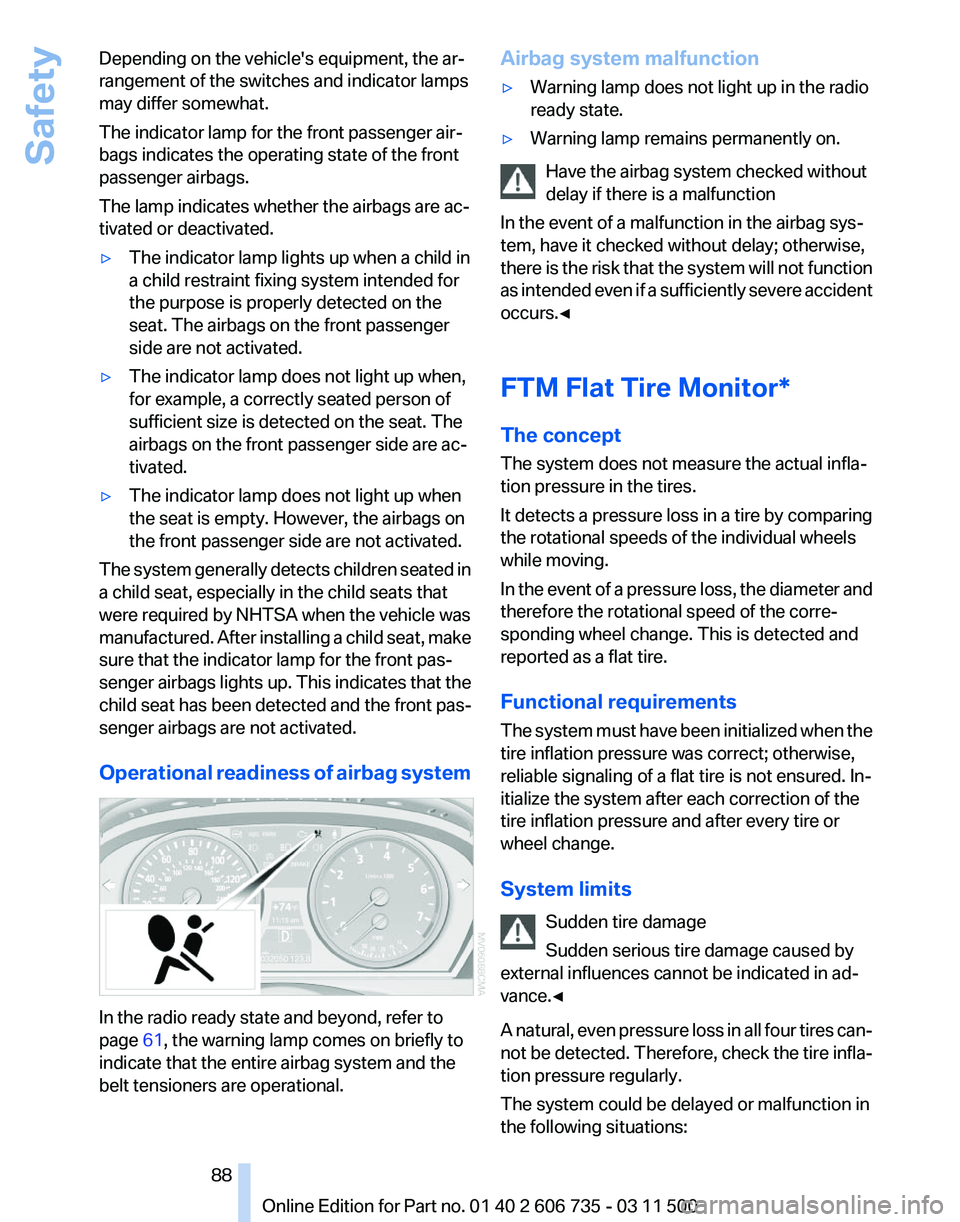
Operational readiness of airbag system In the radio ready state and beyond, refer to
page
61, the warning lamp comes on briefly to
indicate that the entire airbag system and the
belt tensioners are operational. Airbag system malfunction
▷
Warning lamp does not light up in the radio
ready state.
▷ Warning lamp remains permanently on.
Have the airbag system checked without
delay if there is a malfunction
In the event of a malfunction in the airbag sys‐
tem, have it checked without delay; otherwise,
there
is the risk that the system will not function
as intended even if a sufficiently severe accident
occurs.◀
FTM Flat Tire Monitor*
The concept
The system does not measure the actual infla‐
tion pressure in the tires.
It detects a pressure loss in a tire by comparing
the rotational speeds of the individual wheels
while moving.
In the event of a pressure loss, the diameter and
therefore the rotational speed of the corre‐
sponding wheel change. This is detected and
reported as a flat tire.
Functional requirements
The system must have been initialized when the
tire inflation pressure was correct; otherwise,
reliable signaling of a flat tire is not ensured. In‐
itialize the system after each correction of the
tire inflation pressure and after every tire or
wheel change.
System limits
Sudden tire damage
Sudden serious tire damage caused by
external influences cannot be indicated in ad‐
vance.◀
A natural, even pressure loss in all four tires can‐
not be detected. Therefore, check the tire infla‐
tion pressure regularly.
The system could be delayed or malfunction in
the following situations: Seite 88
88 Online Edition for Part no. 01 40 2 606 735 - 03 11 500Safety