phone BMW X5M 2012 Repair Manual
[x] Cancel search | Manufacturer: BMW, Model Year: 2012, Model line: X5M, Model: BMW X5M 2012Pages: 317, PDF Size: 8.83 MB
Page 280 of 317
Breakdown assistance
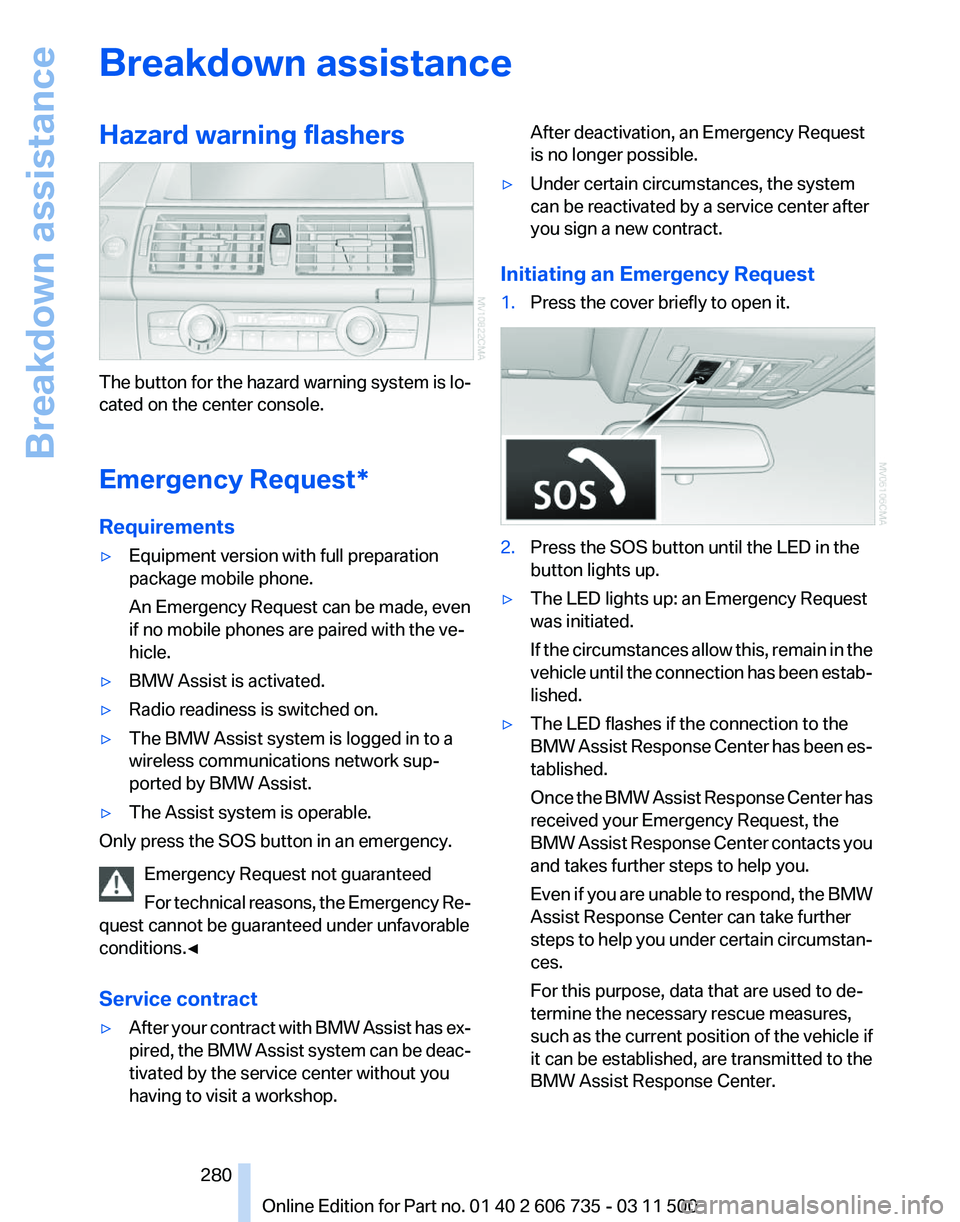
Hazard warning flashers
The button for the hazard warning system is lo‐
cated on the center console.
Emergency Request
*
Requirements
▷ Equipment version with full preparation
package mobile phone.
An Emergency Request can be made, even
if no mobile phones are paired with the ve‐
hicle.
▷ BMW Assist is activated.
▷ Radio readiness is switched on.
▷ The BMW Assist system is logged in to a
wireless communications network sup‐
ported by BMW Assist.
▷ The Assist system is operable.
Only press the SOS button in an emergency.
Emergency Request not guaranteed
For
technical reasons, the Emergency Re‐
quest cannot be guaranteed under unfavorable
conditions.◀
Service contract
▷ After your contract with BMW Assist has ex‐
pired,
the BMW Assist system can be deac‐
tivated by the service center without you
having to visit a workshop. After deactivation, an Emergency Request
is no longer possible.
▷ Under certain circumstances, the system
can be reactivated by a service center after
you sign a new contract.
Initiating an Emergency Request
1. Press the cover briefly to open it. 2.
Press the SOS button until the LED in the
button lights up.
▷ The LED lights up: an Emergency Request
was initiated.
If
the circumstances allow this, remain in the
vehicle until the connection has been estab‐
lished.
▷ The LED flashes if the connection to the
BMW
Assist Response Center has been es‐
tablished.
Once the BMW Assist Response Center has
received your Emergency Request, the
BMW Assist Response Center contacts you
and takes further steps to help you.
Even if you are unable to respond, the BMW
Assist Response Center can take further
steps to help you under certain circumstan‐
ces.
For this purpose, data that are used to de‐
termine the necessary rescue measures,
such as the current position of the vehicle if
it can be established, are transmitted to the
BMW Assist Response Center.
Seite 280
280 Online Edition for Part no. 01 40 2 606 735 - 03 11 500
Breakdown assistance
Page 281 of 317
▷
If the LED is flashing but the BMW Assist
Response Center cannot be heard on the
hands-free system, the hands-free system
may be malfunctioning. However, the BMW
Assist
Response Center may still be able to
hear you.
Initiating an Emergency Request
automatically
Under certain conditions, an Emergency Re‐
quest
is automatically initiated immediately after
a severe accident. Automatic Collision Notifica‐
tion is not affected by pressing the SOS button.
Roadside Assistance*
Service availability
Roadside Assistance can be reached around the
clock in many countries. You can obtain assis‐
tance there in the event of a vehicle breakdown.
Roadside Assistance
The Roadside Assistance, refer to page 238
phone number can be viewed on the iDrive or a
connection to Roadside Assistance* can be es‐
tablished directly.
Warning triangle*
The warning triangle is located in the cargo area.
First aid kit*
The first aid kit is located in a storage compart‐
ment on the right side in the cargo area.
Some of the articles contained in the first aid
pouch have a limited service life.
Check the expiration dates of the contents reg‐
ularly and replace any items promptly. Jump-starting
Notes
If the battery is discharged, an engine can be
started using the battery of another vehicle and
two jumper cables*. Only use jumper cables
with fully insulated clamp handles.
To prevent personal injury or damage to both
vehicles, adhere strictly to the following proce‐
dure.
Do not touch live parts
To avoid the risk of potentially fatal injury,
always avoid all contact with electrical compo‐
nents while the engine is running.◀
Preparation
1. Check whether the battery of the other ve‐
hicle has a voltage of 12 volts and approxi‐
mately
the same capacitance in Ah. This in‐
formation can be found on the battery.
2. Switch off the engine of the assisting vehi‐
cle.
3. Switch off any electronic systems/power
consumers in both vehicles.
Bodywork contact between vehicles
There must not be any contact between
the bodies of the two vehicles, otherwise there
is a danger of shorting.◀
Starting aid terminals
Connecting order
Connect the jumper cables in the correct
order; otherwise, there is the danger of injury
from sparking.◀ Seite 281
281Online Edition for Part no. 01 40 2 606 735 - 03 11 500
Reference
Mobility Communication Entertainment Navigation Driving tips Controls At a glance
Page 285 of 317
Care
Car washes
Notes
Steam jets or high-pressure washers
When using steam jets or high-pressure
washers, hold them a sufficient distance away
and use a maximum temperature of 140 ℉/
60 ℃.
Holding them too close or using excessively
high
pressures or temperatures can cause dam‐
age or preliminary damage that may then lead to
long-term damage.
Follow the operating instructions for the high-
pressure washer.◀
Cleaning sensors/cameras with high-
pressure washers
When using high-pressure washers, do not
spray the exterior sensors and cameras, for Park
Distance Control* or the backup camera*, for
instance, for extended periods of time and only
from a distance of at least 12 in/30 cm.◀
Wash your vehicle frequently, particularly in win‐
ter.
Intense soiling and road salt can damage the ve‐
hicle.
Washing in automatic car washes
Your vehicle can be washed in automatic car
washes right from the start.
Give preference to cloth car washes or those
that use soft brushes in order to avoid paint
damage.
Notes
Note the following:
▷ Make sure that the wheels and tires are not
damaged by the transport mechanisms.
▷ Fold in the exterior mirrors; otherwise, they
may
be damaged, depending on the width of
the vehicle. ▷
Deactivate rain sensor, refer to page 67, to
prevent unintentional wiper action.
▷ BMW X5: deactivate the rear window wiper
and protect it from damage. Ask the car
wash
operator about any necessary protec‐
tive measures.
▷ Remove additional attachments, for in‐
stance a spoiler or telephone antenna, if
there is a risk that these may be damaged.
Guide rails in car washes
Avoid car washes with guide rails higher
than 4 in/10 cm; otherwise, the vehicle body
could be damaged.
◀
Before driving into a car wash
The vehicle is able to roll if the following steps
are taken.
1. Insert the remote control into the ignition
lock, even with Comfort Access.
2. Engage transmission position N.
3. Release the parking brake.
4. Deactivating Automatic Hold, refer to
page 64.
5. Switch the engine off.
6. Leave the remote control in the ignition lock
so that the vehicle can roll.
Mixed tires* Note the vehicle width
Before driving into a car wash, make sure
that
the vehicle width is not too large for the car
wash, as otherwise the vehicle and the car wash
could be damaged.◀
Headlamps
▷ Do not rub dry and do not use abrasive or
caustic cleansers.
▷ Soak areas that have been soiled e.g. due to
insects, with shampoo and wash off with
water. Seite 285
285Online Edition for Part no. 01 40 2 606 735 - 03 11 500
Reference
Mobility Communication Entertainment Navigation Driving tips Controls At a glance
Page 295 of 317
Short commands for voice activation
system*
General information
Instructions
for voice activation system, refer to
page 24.
To have the available spoken instructions read
out loud: ›Voice commands‹ The following short commands apply to vehicles
equipped with a voice activation system. They
have no function in vehicles in which only the
mobile phone is operated using the voice.
Adjusting
Vehicle
Function
Command
Opens the main menu. ›Main menu‹
Open the options. ›Options‹
Open the settings. ›Settings‹
Settings on the Control Display. ›Control display‹
Open the time and date. ›Time and date‹
Open the language and units. ›Language and units‹
Open the speed limit. ›Speed‹
Open the light. ›Lighting‹
Open the door lock. ›Door locks‹Equipment*
Function
Command
Open the air conditioning settings. ›Climate‹
Open the Head-up Display. ›head up display‹
Enable the rear. ›Allow rear control‹ Seite 295
295Online Edition for Part no. 01 40 2 606 735 - 03 11 500
Reference Mobility Communication Entertainment Navigation Driving tips Controls At a glance
Page 300 of 317
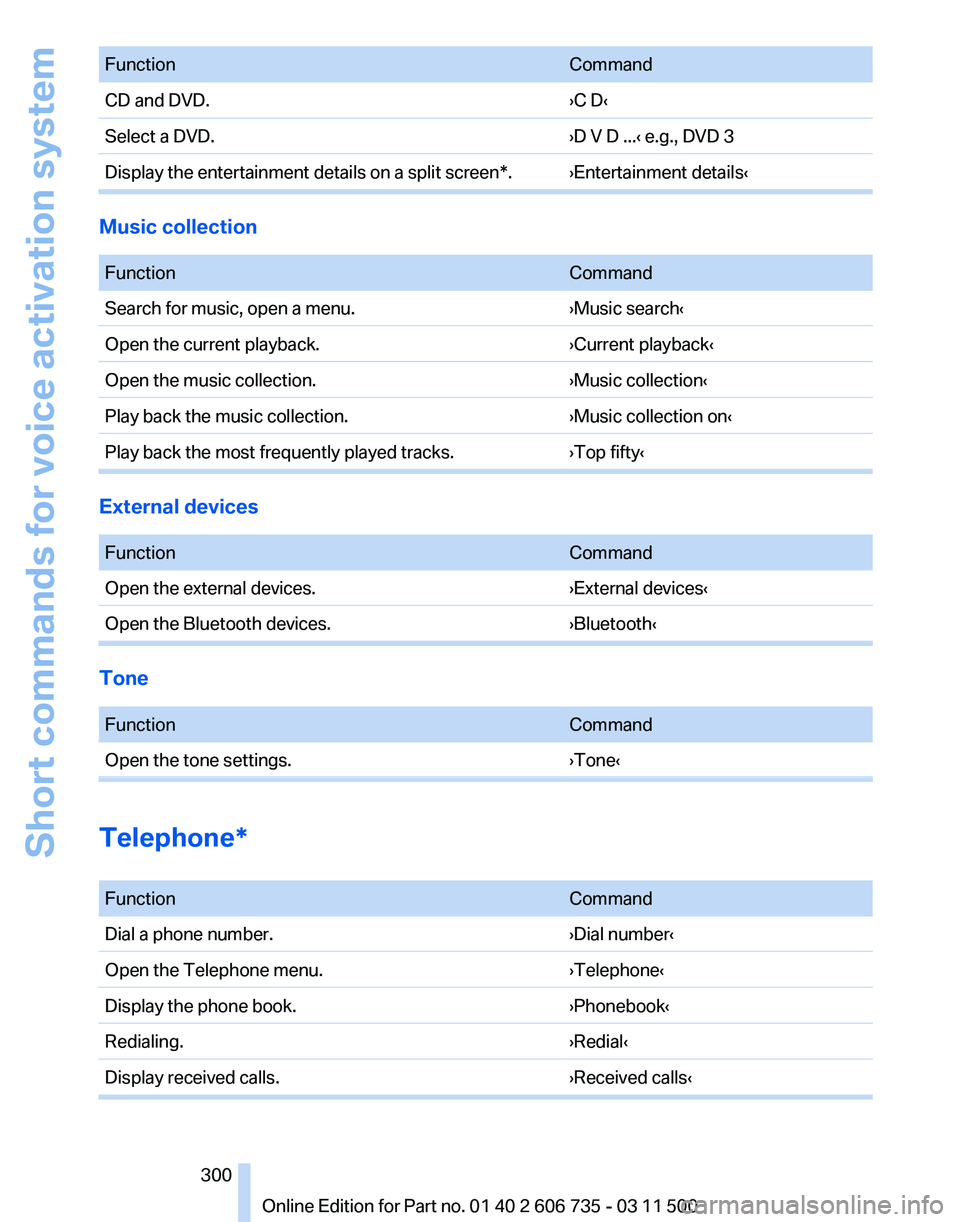
Function
Command
CD and DVD. ›C D‹
Select a DVD. ›D V D ...‹ e.g., DVD 3
Display the entertainment details on a split screen*. ›Entertainment details‹ Music collection
Function
Command
Search for music, open a menu. ›Music search‹
Open the current playback. ›Current playback‹
Open the music collection. ›Music collection‹
Play back the music collection. ›Music collection on‹
Play back the most frequently played tracks. ›Top fifty‹External devices
Function
Command
Open the external devices. ›External devices‹
Open the Bluetooth devices. ›Bluetooth‹Tone
Function
Command
Open the tone settings. ›Tone‹Telephone*
Function
Command
Dial a phone number. ›Dial number‹
Open the Telephone menu. ›Telephone‹
Display the phone book. ›Phonebook‹
Redialing. ›Redial‹
Display received calls. ›Received calls‹ Seite 300
300 Online Edition for Part no. 01 40 2 606 735 - 03 11 500Short commands for voice activation system
Page 302 of 317
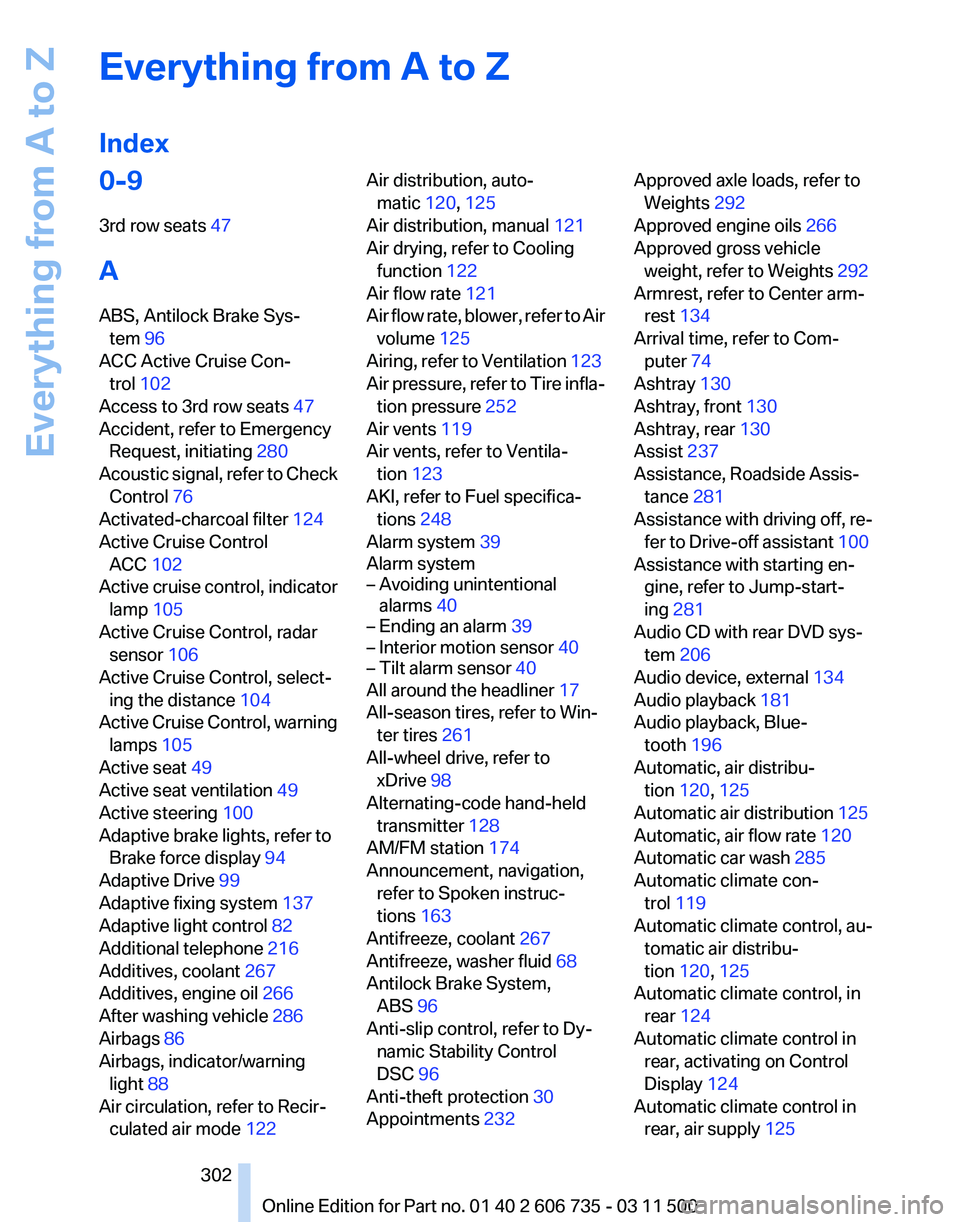
Everything from A to Z
Index
0-9
3rd row seats 47
A
ABS, Antilock Brake Sys‐ tem 96
ACC Active Cruise Con‐ trol 102
Access to 3rd row seats 47
Accident, refer to Emergency Request, initiating 280
Acoustic
signal, refer to Check
Control 76
Activated-charcoal filter 124
Active Cruise Control ACC 102
Active cruise control, indicator lamp 105
Active Cruise Control, radar sensor 106
Active Cruise Control, select‐ ing the distance 104
Active Cruise Control, warning lamps 105
Active seat 49
Active seat ventilation 49
Active steering 100
Adaptive brake lights, refer to Brake force display 94
Adaptive Drive 99
Adaptive fixing system 137
Adaptive light control 82
Additional telephone 216
Additives, coolant 267
Additives, engine oil 266
After washing vehicle 286
Airbags 86
Airbags, indicator/warning light 88
Air circulation, refer to Recir‐ culated air mode 122 Air distribution, auto‐
matic 120, 125
Air distribution, manual 121
Air drying, refer to Cooling function 122
Air flow rate 121
Air
flow rate, blower, refer to Air
volume 125
Airing, refer to Ventilation 123
Air pressure, refer to Tire infla‐ tion pressure 252
Air vents 119
Air vents, refer to Ventila‐ tion 123
AKI, refer to Fuel specifica‐ tions 248
Alarm system 39
Alarm system
– Avoiding unintentional alarms 40
– Ending an alarm 39
– Interior motion sensor 40
– Tilt alarm sensor 40
All around the headliner 17
All-season tires, refer to Win‐ ter tires 261
All-wheel drive, refer to xDrive 98
Alternating-code hand-held transmitter 128
AM/FM station 174
Announcement, navigation, refer to Spoken instruc‐
tions 163
Antifreeze, coolant 267
Antifreeze, washer fluid 68
Antilock Brake System, ABS 96
Anti-slip control, refer to Dy‐ namic Stability Control
DSC 96
Anti-theft protection 30
Appointments 232 Approved axle loads, refer to
Weights 292
Approved engine oils 266
Approved gross vehicle weight, refer to Weights 292
Armrest, refer to Center arm‐ rest 134
Arrival time, refer to Com‐ puter 74
Ashtray 130
Ashtray, front 130
Ashtray, rear 130
Assist 237
Assistance, Roadside Assis‐ tance 281
Assistance
with driving off, re‐
fer to Drive-off assistant 100
Assistance with starting en‐ gine, refer to Jump-start‐
ing 281
Audio CD with rear DVD sys‐ tem 206
Audio device, external 134
Audio playback 181
Audio playback, Blue‐ tooth 196
Automatic, air distribu‐ tion 120, 125
Automatic air distribution 125
Automatic, air flow rate 120
Automatic car wash 285
Automatic climate con‐ trol 119
Automatic climate control, au‐ tomatic air distribu‐
tion 120, 125
Automatic climate control, in rear 124
Automatic climate control in rear, activating on Control
Display 124
Automatic climate control in rear, air supply 125
Seite 302
302 Online Edition for Part no. 01 40 2 606 735 - 03 11 500
Everything from A to Z
Page 304 of 317
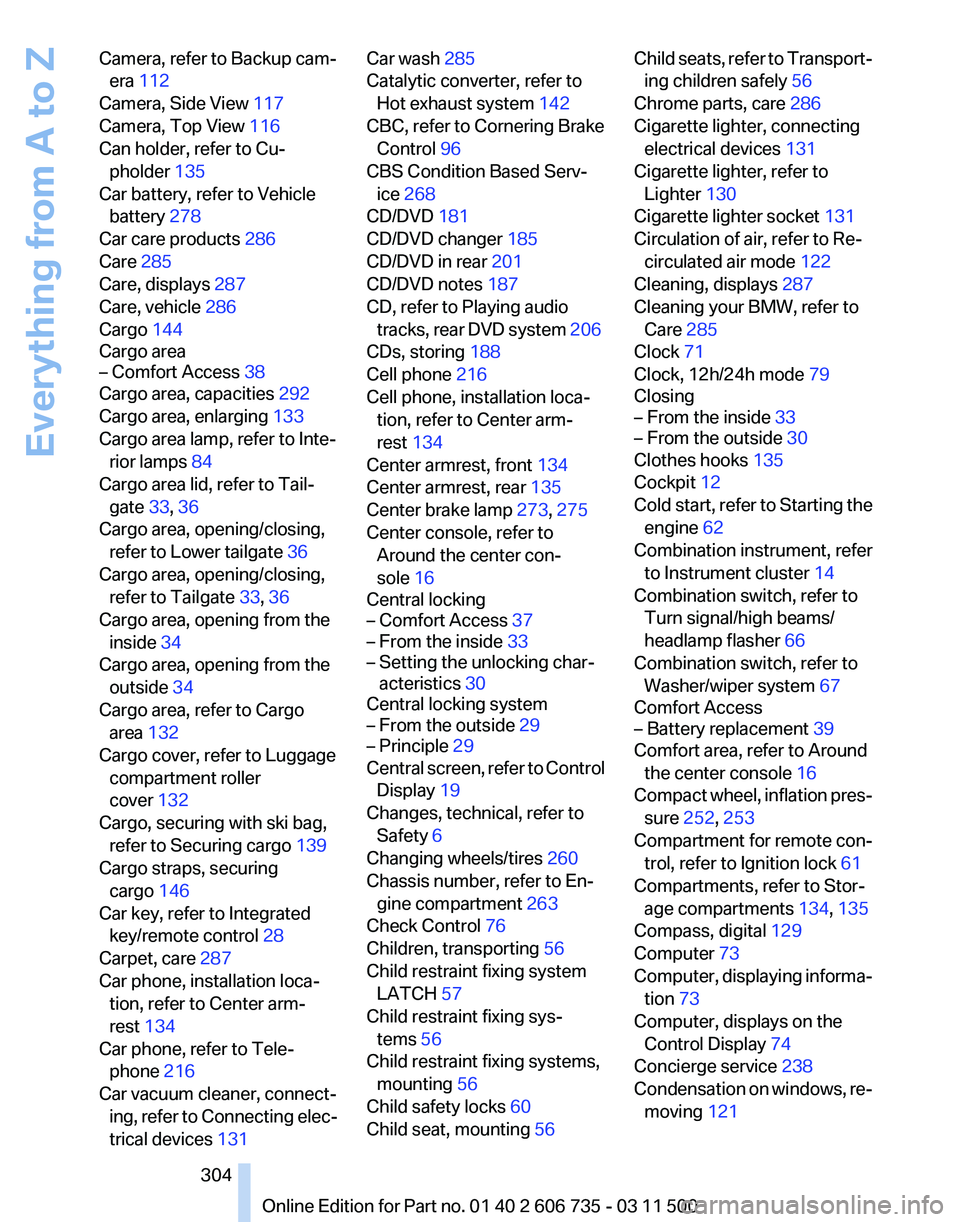
Camera, refer to Backup cam‐
era 112
Camera, Side View 117
Camera, Top View 116
Can holder, refer to Cu‐ pholder 135
Car battery, refer to Vehicle battery 278
Car care products 286
Care 285
Care, displays 287
Care, vehicle 286
Cargo 144
Cargo area
– Comfort Access 38
Cargo area, capacities 292
Cargo area, enlarging 133
Cargo area lamp, refer to Inte‐ rior lamps 84
Cargo area lid, refer to Tail‐ gate 33, 36
Cargo area, opening/closing, refer to Lower tailgate 36
Cargo area, opening/closing, refer to Tailgate 33, 36
Cargo area, opening from the inside 34
Cargo area, opening from the outside 34
Cargo area, refer to Cargo area 132
Cargo cover, refer to Luggage compartment roller
cover 132
Cargo, securing with ski bag, refer to Securing cargo 139
Cargo straps, securing cargo 146
Car key, refer to Integrated key/remote control 28
Carpet, care 287
Car phone, installation loca‐ tion, refer to Center arm‐
rest 134
Car phone, refer to Tele‐ phone 216
Car vacuum cleaner, connect‐ ing,
refer to Connecting elec‐
trical devices 131 Car wash 285
Catalytic converter, refer to
Hot exhaust system 142
CBC, refer to Cornering Brake Control 96
CBS Condition Based Serv‐ ice 268
CD/DVD 181
CD/DVD changer 185
CD/DVD in rear 201
CD/DVD notes 187
CD, refer to Playing audio tracks,
rear DVD system 206
CDs, storing 188
Cell phone 216
Cell phone, installation loca‐ tion, refer to Center arm‐
rest 134
Center armrest, front 134
Center armrest, rear 135
Center brake lamp 273, 275
Center console, refer to Around the center con‐
sole 16
Central locking
– Comfort Access 37
– From the inside 33
– Setting the unlocking char‐ acteristics 30
Central locking system
– From the outside 29
– Principle 29
Central screen, refer to Control
Display 19
Changes, technical, refer to Safety 6
Changing wheels/tires 260
Chassis number, refer to En‐ gine compartment 263
Check Control 76
Children, transporting 56
Child restraint fixing system LATCH 57
Child restraint fixing sys‐ tems 56
Child restraint fixing systems, mounting 56
Child safety locks 60
Child seat, mounting 56 Child seats, refer to Transport‐
ing children safely 56
Chrome parts, care 286
Cigarette lighter, connecting electrical devices 131
Cigarette lighter, refer to Lighter 130
Cigarette lighter socket 131
Circulation of air, refer to Re‐ circulated air mode 122
Cleaning, displays 287
Cleaning your BMW, refer to Care 285
Clock 71
Clock, 12h/24h mode 79
Closing
– From the inside 33
– From the outside 30
Clothes hooks 135
Cockpit 12
Cold
start, refer to Starting the
engine 62
Combination instrument, refer to Instrument cluster 14
Combination switch, refer to Turn signal/high beams/
headlamp flasher 66
Combination switch, refer to Washer/wiper system 67
Comfort Access
– Battery replacement 39
Comfort area, refer to Around
the center console 16
Compact
wheel, inflation pres‐
sure 252, 253
Compartment for remote con‐ trol, refer to Ignition lock 61
Compartments, refer to Stor‐ age compartments 134, 135
Compass, digital 129
Computer 73
Computer, displaying informa‐ tion 73
Computer, displays on the Control Display 74
Concierge service 238
Condensation on windows, re‐ moving 121
Seite 304
304 Online Edition for Part no. 01 40 2 606 735 - 03 11 500
Everything from A to Z
Page 305 of 317
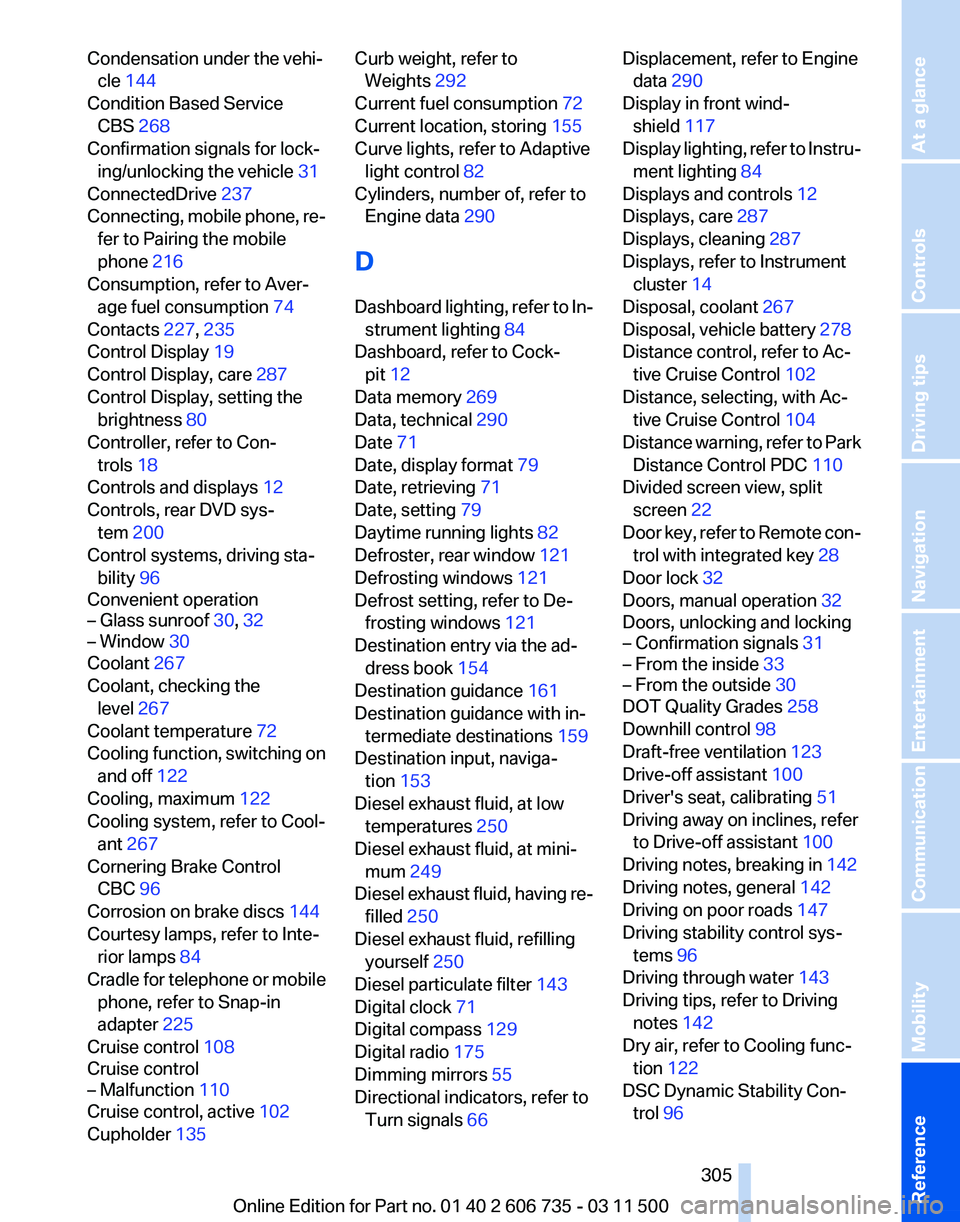
Condensation under the vehi‐
cle 144
Condition Based Service CBS 268
Confirmation signals for lock‐ ing/unlocking the vehicle 31
ConnectedDrive 237
Connecting,
mobile phone, re‐
fer to Pairing the mobile
phone 216
Consumption, refer to Aver‐ age fuel consumption 74
Contacts 227, 235
Control Display 19
Control Display, care 287
Control Display, setting the brightness 80
Controller, refer to Con‐ trols 18
Controls and displays 12
Controls, rear DVD sys‐ tem 200
Control systems, driving sta‐ bility 96
Convenient operation
– Glass sunroof 30, 32
– Window 30
Coolant 267
Coolant, checking the
level 267
Coolant temperature 72
Cooling
function, switching on
and off 122
Cooling, maximum 122
Cooling system, refer to Cool‐ ant 267
Cornering Brake Control CBC 96
Corrosion on brake discs 144
Courtesy lamps, refer to Inte‐ rior lamps 84
Cradle for telephone or mobile phone, refer to Snap-in
adapter 225
Cruise control 108
Cruise control
– Malfunction 110
Cruise control, active 102
Cupholder 135 Curb weight, refer to
Weights 292
Current fuel consumption 72
Current location, storing 155
Curve lights, refer to Adaptive light control 82
Cylinders, number of, refer to Engine data 290
D
Dashboard
lighting, refer to In‐
strument lighting 84
Dashboard, refer to Cock‐ pit 12
Data memory 269
Data, technical 290
Date 71
Date, display format 79
Date, retrieving 71
Date, setting 79
Daytime running lights 82
Defroster, rear window 121
Defrosting windows 121
Defrost setting, refer to De‐ frosting windows 121
Destination entry via the ad‐ dress book 154
Destination guidance 161
Destination guidance with in‐ termediate destinations 159
Destination input, naviga‐ tion 153
Diesel exhaust fluid, at low temperatures 250
Diesel exhaust fluid, at mini‐ mum 249
Diesel exhaust fluid, having re‐ filled 250
Diesel exhaust fluid, refilling yourself 250
Diesel particulate filter 143
Digital clock 71
Digital compass 129
Digital radio 175
Dimming mirrors 55
Directional indicators, refer to Turn signals 66 Displacement, refer to Engine
data 290
Display in front wind‐ shield 117
Display
lighting, refer to Instru‐
ment lighting 84
Displays and controls 12
Displays, care 287
Displays, cleaning 287
Displays, refer to Instrument cluster 14
Disposal, coolant 267
Disposal, vehicle battery 278
Distance control, refer to Ac‐ tive Cruise Control 102
Distance, selecting, with Ac‐ tive Cruise Control 104
Distance warning, refer to Park Distance Control PDC 110
Divided screen view, split screen 22
Door key, refer to Remote con‐ trol with integrated key 28
Door lock 32
Doors, manual operation 32
Doors, unlocking and locking
– Confirmation signals 31
– From the inside 33
– From the outside 30
DOT Quality Grades 258
Downhill control 98
Draft-free ventilation 123
Drive-off assistant 100
Driver's seat, calibrating 51
Driving away on inclines, refer to Drive-off assistant 100
Driving
notes, breaking in 142
Driving notes, general 142
Driving on poor roads 147
Driving stability control sys‐ tems 96
Driving through water 143
Driving tips, refer to Driving notes 142
Dry air, refer to Cooling func‐ tion 122
DSC Dynamic Stability Con‐ trol 96
Seite 305
305Online Edition for Part no. 01 40 2 606 735 - 03 11 500
Reference Mobility Communication Entertainment Navigation Driving tips Controls At a glance
Page 307 of 317
Flat Tire Monitor FTM, snow
chains 261
Flat tire, run-flat tires 261
Flat
tire, Tire Pressure Monitor
TPM 90
Flat tire, warning lamp 89, 91
Flat tire, wheel change 275
Flooding, refer to Driving through water 143
Floor carpet, care 287
Floor mats, care 287
FM/AM station 174
Fog on windows, remov‐ ing 121
Foldable rear seat back‐ rest 133
Foot brake 143
Footwell lamps, refer to Inte‐ rior lamps 84
For your own safety 6
Four-wheel drive, refer to xDrive 98
Front airbags 86
Front fog lamps 84
Front fog lamps, indicator lamp 84
FTM Flat Tire Monitor 88
Fuel 248
Fuel
– Refer to Average fuel con‐ sumption 74
Fuel, average consump‐
tion 74
Fuel cap 246
Fuel cap, closing 246
Fuel consumption display
– Average fuel consump‐ tion 74
Fuel consumption display,
current fuel consumption 72
Fuel-efficient driving, refer to Current
fuel consumption 72
Fuel filler flap, closing 246
Fuel filler flap, opening 246
Fuel filler flap, unlocking in case of an electrical malfunc‐
tion 246
Fuel gauge 73
Fuel, high-quality brands 248 Fuel, quality
248
Fuel, saving 148
Fuel, specifications 248
Fuel
tank capacity, refer to Fill‐
ing capacities 293
Fuel tank contents, refer to Filling capacities 293
Fuel tank, refer to Filling ca‐ pacities 293
Fuse 279
G
Garage door opener, refer to Integrated universal remote
control 127
Gasoline gauge, refer to Fuel gauge 73
Gasoline, refer to Required fuel 248
Gas station recommenda‐ tion 162
Gear change, automatic trans‐ mission with Steptronic 70
Gear change, via shift pad‐ dles 70
General driving notes 142
Glass sunroof, closing 43
Glass sunroof, electric
– Convenient operation 30
– Remote control 30
Glass sunroof, initializing 44
Glass sunroof, opening 43
Glass sunroof, pinch protec‐
tion 44
Glass sunroof, power fail‐ ure 44
Glass sunroof, refer to Panor‐ amic glass sunroof 42
Glass sunroof, tilting 43
Glove compartment 134
Glove compartment
– USB interface 134
Glove compartment, light‐
ing 134
GPS navigation, refer to Navi‐ gation system 152
Gross vehicle weight, refer to Weights 292 H
Handbrake, refer to Parking
brake 63
Hand-held transmitter, alter‐ nating code 128
Hands-free microphone 16
Hazard warning sys‐ tem 16, 280
HDC Hill Descent Control 98
HD Radio 175
Head airbags 86
Headlamp control, auto‐ matic 81, 82
Headlamp courtesy delay fea‐ ture 81
Headlamp flasher 66, 83
Headlamp flasher, indicator lamp 15
Headlamps 81
Headlamps, care 285
Headlamps, cleaning 67
Headlamps, cleaning, washer fluid 68
Headliner 17
Headphones,
connecting, rear
DVD system 201
Head restraints 51
Head-up Display 117
Head-up Display, care 287
Heatable rear window 121
Heating 119
Heating
– Seats 48
Heating, interior 119
Heating, mirrors 54
Heating, residual heat 122
Heating with the engine switched off, refer to Resid‐
ual heat 122
Heavy cargo, refer to Stowing cargo 145
Height, refer to Dimen‐ sions 291
High-beam Assistant 83
High beams 83
High beams/low beams, auto‐ matic, refer to High-beam
Assistant 83
Seite 307
307Online Edition for Part no. 01 40 2 606 735 - 03 11 500
Reference Mobility Communication Entertainment Navigation Driving tips Controls At a glance
Page 308 of 317
High beams, indicator
lamp 15
High-pressure washers 285
Hill Descent Control HDC 98
Hill drive-off assistant, refer to Drive-off assistant 100
Hills 144
Holder for beverages 135
Holder for remote control, re‐ fer to Ignition lock 61
Homepage 6
Hood 264
Hood, opening 264
Horn 12
Hot exhaust system 142
Hotline 240
House number, entering for navigation 154
Hydraulic brake assistant 96
Hydroplaning 143
I
Ice warning, refer to External temperature warning 71
Icy roads, refer to External temperature warning 71
Identification marks, tires 258
iDrive 18
iDrive, changing settings 78
iDrive, changing the lan‐ guage 80
iDrive, changing the units of measure and display for‐
mat 80
iDrive, setting the bright‐ ness 80
iDrive, setting the date 79
iDrive, setting the time 79
Ignition 61
Ignition
key position 1, refer to
Radio ready state 61
Ignition key position 2, refer to Ignition on 61
Ignition key, refer to Remote control with integrated
key 28
Ignition lock 61 Ignition, switched off 61
Ignition, switched on 61
Images, displaying, rear DVD
system 208
Indication of a flat tire 89, 91
Indicator and warning lamps 15
Inflation pressure monitor, re‐ fer to Flat Tire Monitor 88
Inflation
pressure, refer to Tire
inflation pressure 252
Information on the navigation data 152
Initialization after power fail‐ ure 278
Initializing
– Compass, refer to Calibrat‐ ing 129
– Panoramic glass sunroof 43
Initializing, Flat Tire Monitor
FTM 89
Initializing, glass sunroof 44
Initializing, refer to Setting the date 79
Initializing, refer to Setting the time 79
Initializing,
Tire Pressure Mon‐
itor TPM 91
Installation location, tele‐ phone 134
Instrument cluster 14
Instrument lighting 84
Instrument panel, refer to In‐ strument cluster 14
Instruments, refer to Cock‐ pit 12
Integrated key 28
Integrated universal remote control 127
Interactive map 157
Interior equipment 127
Interior lamps 84
Interior lamps
– Remote control 30
Interior mirror 54
Interior rearview mirror, auto‐ matic dimming 55
Interior rearview mirror, com‐ pass 129 Interior temperature, setting,
automatic climate con‐
trol 119
Intermediate
destinations 159
Internet page 6
Intersection, entering for navi‐ gation 154
iPod/iPhone 193
J
Jacking points for the vehicle jack 276
Jack, refer to Vehicle jack 276
Joystick, refer to Selector lever 69
Jump-starting 281
K
Keyless Go, refer to Comfort Access 37
Keyless opening and closing, refer to Comfort Access 37
Key Memory, refer to Personal Profile 28
Key, refer to Integrated key/re‐ mote control 28
Kickdown
– Automatic transmission with Steptronic 69
Knocking control 248
L
Label, run-flat tire 261
Lamp and bulb replacement, lamp replacement 270
Lamps 81
Lamps, automatic headlamp control 81, 82
Lamps, High-beam Assis‐ tant 83
Lamps, parking lamps/low beams 81
Lamps, replacing, refer to Lamp and bulb replace‐
ment 270
Lane departure warning 93
Seite 308
308 Online Edition for Part no. 01 40 2 606 735 - 03 11 500
Everything from A to Z