wheel BMW X6 XDRIVE 35I 2014 Owners Manual
[x] Cancel search | Manufacturer: BMW, Model Year: 2014, Model line: X6 XDRIVE 35I, Model: BMW X6 XDRIVE 35I 2014Pages: 323, PDF Size: 8.36 MB
Page 5 of 323
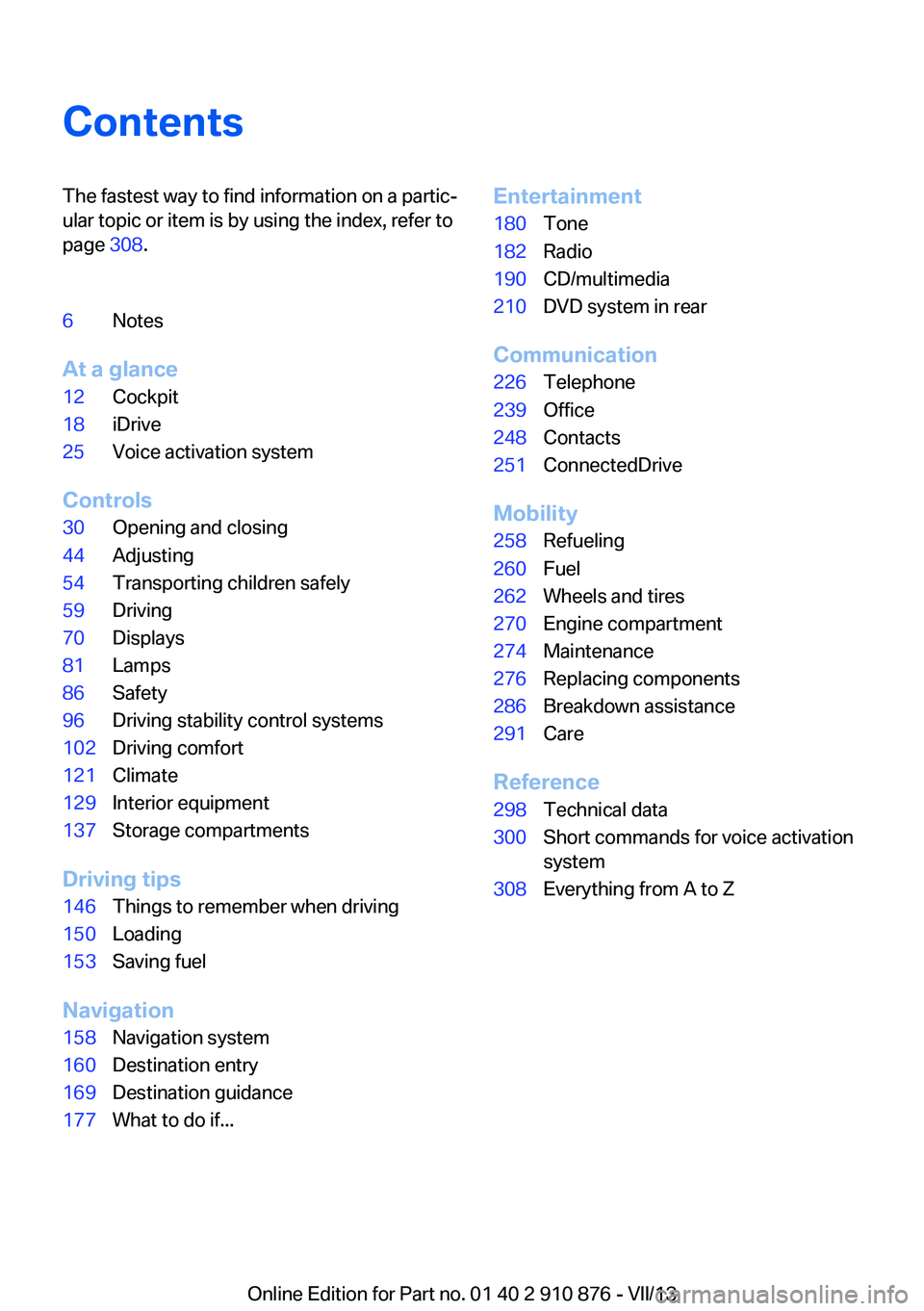
ContentsThe fastest way to find information on a partic‐
ular topic or item is by using the index, refer to
page 308.6Notes
At a glance
12Cockpit18iDrive25Voice activation system
Controls
30Opening and closing44Adjusting54Transporting children safely59Driving70Displays81Lamps86Safety96Driving stability control systems102Driving comfort121Climate129Interior equipment137Storage compartments
Driving tips
146Things to remember when driving150Loading153Saving fuel
Navigation
158Navigation system160Destination entry169Destination guidance177What to do if...Entertainment180Tone182Radio190CD/multimedia210DVD system in rear
Communication
226Telephone239Office248Contacts251ConnectedDrive
Mobility
258Refueling260Fuel262Wheels and tires270Engine compartment274Maintenance276Replacing components286Breakdown assistance291Care
Reference
298Technical data300Short commands for voice activation
system308Everything from A to Z
Online Edition for Part no. 01 40 2 910 876 - VII/13
Page 7 of 323
sary to adapt your vehicle to potentially differ‐
ing operating conditions and permit
requirements. If your vehicle does not comply
with the homologation requirements in a cer‐
tain country you cannot lodge warranty claims
for your vehicle there. Further information can
be obtained from your Service Centre.
Maintenance and repairs
Advanced technology, e.g., the use of modern
materials and high-performance electronics,
requires suitable maintenance and repair methods.
Therefore, have this work performed only by a
BMW center or a workshop that works accord‐
ing to BMW repair procedures with appropri‐
ately trained personnel.
If this work is not carried out properly, there is
the danger of subsequent damage and related
safety hazards.
Parts and accessories
For your own safety, use genuine parts and ac‐
cessories approved by BMW. When you pur‐
chase accessories tested and approved by
BMW and Genuine BMW Parts, you simultane‐
ously acquire the assurance that they have
been thoroughly tested by BMW to ensure op‐
timum performance when installed on your ve‐
hicle. BMW warrants these parts to be free
from defects in material and workmanship.
BMW will not accept any liability for damage
resulting from installation of parts and acces‐
sories not approved by BMW. BMW cannot
test every product made by other manufactur‐
ers to verify if it can be used on a BMW safely
and without risk to either the vehicle, its opera‐
tion, or its occupants. Genuine BMW Parts,
BMW Accessories and other products ap‐
proved by BMW, together with professional
advice on using these items, are available from
all BMW centers. Installation and operation of
non-BMW approved accessories such as
alarms, radios, amplifiers, radar detectors,
wheels, suspension components, brake dustshields, telephones, including operation of any
mobile phone from within the vehicle without
using an externally mounted antenna, or trans‐
ceiver equipment, for instance, CBs, walkie-
talkies, ham radios or similar accessories, may
cause extensive damage to the vehicle, com‐
promise its safety, interfere with the vehicle's
electrical system or affect the validity of the
BMW Limited Warranty. See your BMW center
for additional information. Maintenance, re‐
placement, or repair of the emission control
devices and systems may be performed by any
automotive repair establishment or individual
using any certified automotive part.
California Proposition 65 WarningCalifornia laws require us to state the following
warning:
Engine exhaust and a wide variety of automo‐
bile components and parts, including compo‐
nents found in the interior furnishings in a vehi‐
cle, contain or emit chemicals known to the
State of California to cause cancer and birth
defects and reproductive harm. In addition,
certain fluids contained in vehicles and certain
products of component wear contain or emit
chemicals known to the State of California to
cause cancer and birth defects or other repro‐
ductive harm. Battery posts, terminals and re‐
lated accessories contain lead and lead com‐
pounds. Wash your hands after handling. Used
engine oil contains chemicals that have caused
cancer in laboratory animals. Always protect
your skin by washing thoroughly with soap and
water.
Service and warranty We recommend that you read this publication
thoroughly. Your vehicle is covered by the fol‐
lowing warranties:▷New Vehicle Limited Warranty▷Rust Perforation Limited Warranty▷Federal Emissions System Defect War‐
rantySeite 7Notes7
Online Edition for Part no. 01 40 2 910 876 - VII/13
Page 8 of 323
▷Federal Emissions Performance Warranty▷California Emission Control System Lim‐
ited Warranty
Detailed information about these warranties is
listed in the Service and Warranty Information
Booklet for US models or in the Warranty and
Service Guide Booklet for Canadian models.
Your vehicle has been specifically adapted and
designed to meet the particular operating con‐
ditions and homologation requirements in your
country and continental region in order to de‐
liver the full driving pleasure while the vehicle
is operated under those conditions. If you wish
to operate your vehicle in another country or
region, you may be required to adapt your ve‐
hicle to meet different prevailing operating
conditions and homologation requirements.
You should also be aware of any applicable
warranty limitations or exclusions for such
country or region. In such case, please contact
Customer Relations for further information.
Maintenance
Maintain the vehicle regularly to sustain the
road safety, operational reliability and the New
Vehicle Limited Warranty.
Specifications for required maintenance meas‐
ures:
▷BMW Maintenance system▷Service and Warranty Information Booklet
for US models▷Warranty and Service Guide Booklet for
Canadian models
If the vehicle is not maintained according to
these specifications, this could result in seri‐
ous damage to the vehicle. Such damage is
not covered by the BMW New Vehicle Limited
Warranty.
Data memory
Numerous electronic components in your vehi‐
cle contain data memories that store technical
information on the vehicle condition, events and faults, either temporarily or permanently.
This technical information generally docu‐
ments the state of a component, a module, a
system or the environment.▷Operating conditions of system compo‐
nents, such as filling levels.▷Status messages from the vehicle and its
individual components, such as wheel rpm/
speed, motion delay, transverse accelera‐
tion.▷Malfunctions and defects in important sys‐
tem components, such as lights and
brakes.▷Vehicle responses to special driving situa‐
tions, such as airbag deployment, use of
the stability control systems.▷Ambient conditions, such as the tempera‐
ture.
These data are of a technical nature only and
are used to detect and eliminate faults and to
optimize vehicle functions. Travel profiles of
routes driven with the vehicle cannot be cre‐
ated from these data. If services are used, for
instance in the event of repairs, service proc‐
esses, warranty cases, quality assurance, etc.,
this technical information can be read out from
the event and fault data memories by service
personnel, including the manufacturer, using
special diagnosis tools. This service personnel
can provide you with more information if
needed. After troubleshooting, the information
in the fault memory is cleared or overwritten
continuously.
Situations are conceivable during the use of
the vehicle in which these technical data could
become associated with a specific person in
combination with other information, such as an
accident report, damage to the vehicle, wit‐
ness accounts, etc., possibly with the involve‐
ment of an authorized expert.
Additional functions that are contractually
agreed with the customer, such as vehicle lo‐
calization in the event of an emergency, permit
Seite 8Notes8
Online Edition for Part no. 01 40 2 910 876 - VII/13
Page 12 of 323
CockpitVehicle equipment
This chapter describes all series equipment as
well as country-specific and special equipment
offered for this model series.Therefore, it alsodescribes equipment that may not be found in
your vehicle, for instance due to the selected
special equipment or the country version. This
also applies to safety-related functions and
systems.
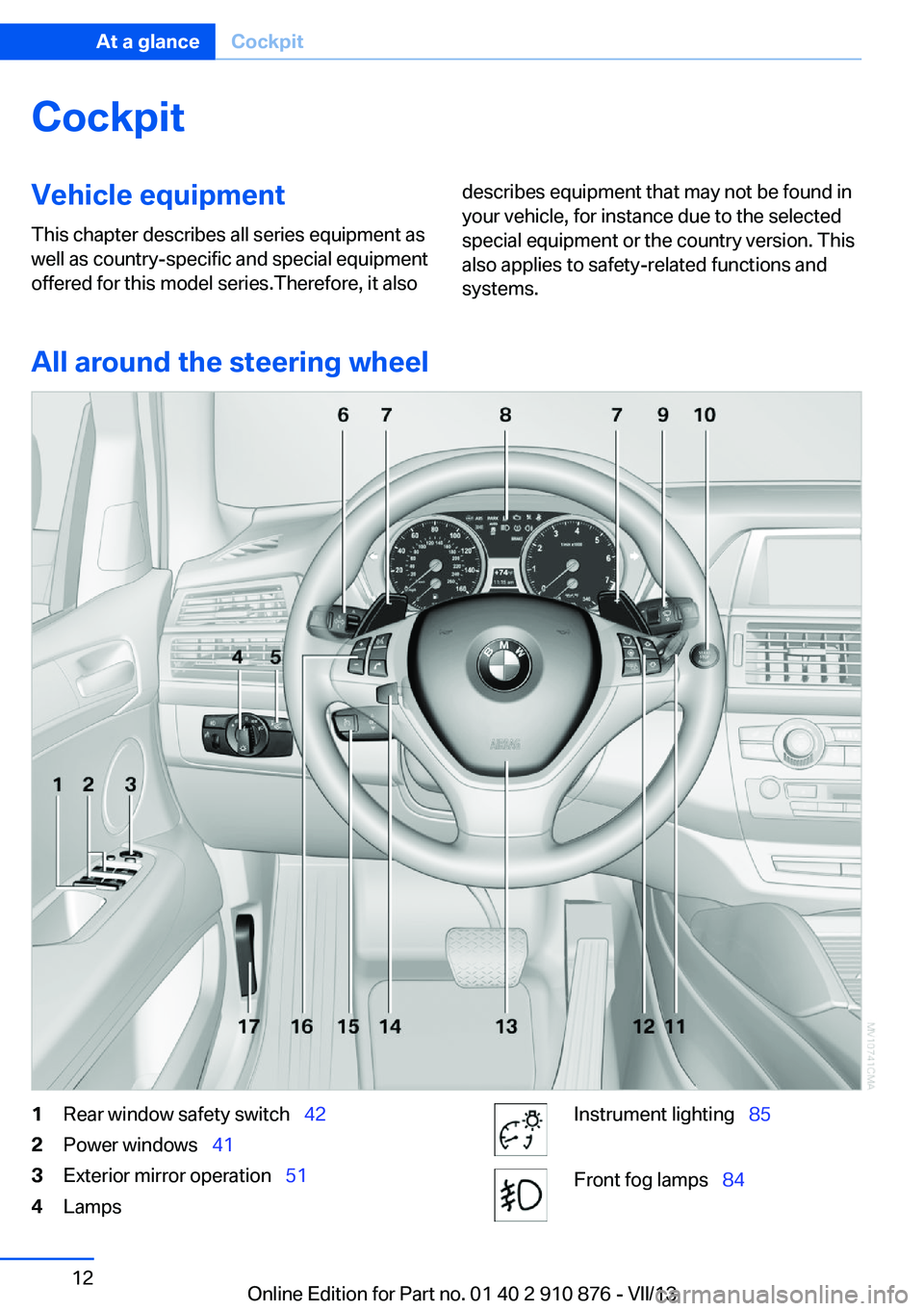
All around the steering wheel
1Rear window safety switch 422Power windows 413Exterior mirror operation 514LampsInstrument lighting 85Front fog lamps 84Seite 12At a glanceCockpit12
Online Edition for Part no. 01 40 2 910 876 - VII/13
Page 13 of 323
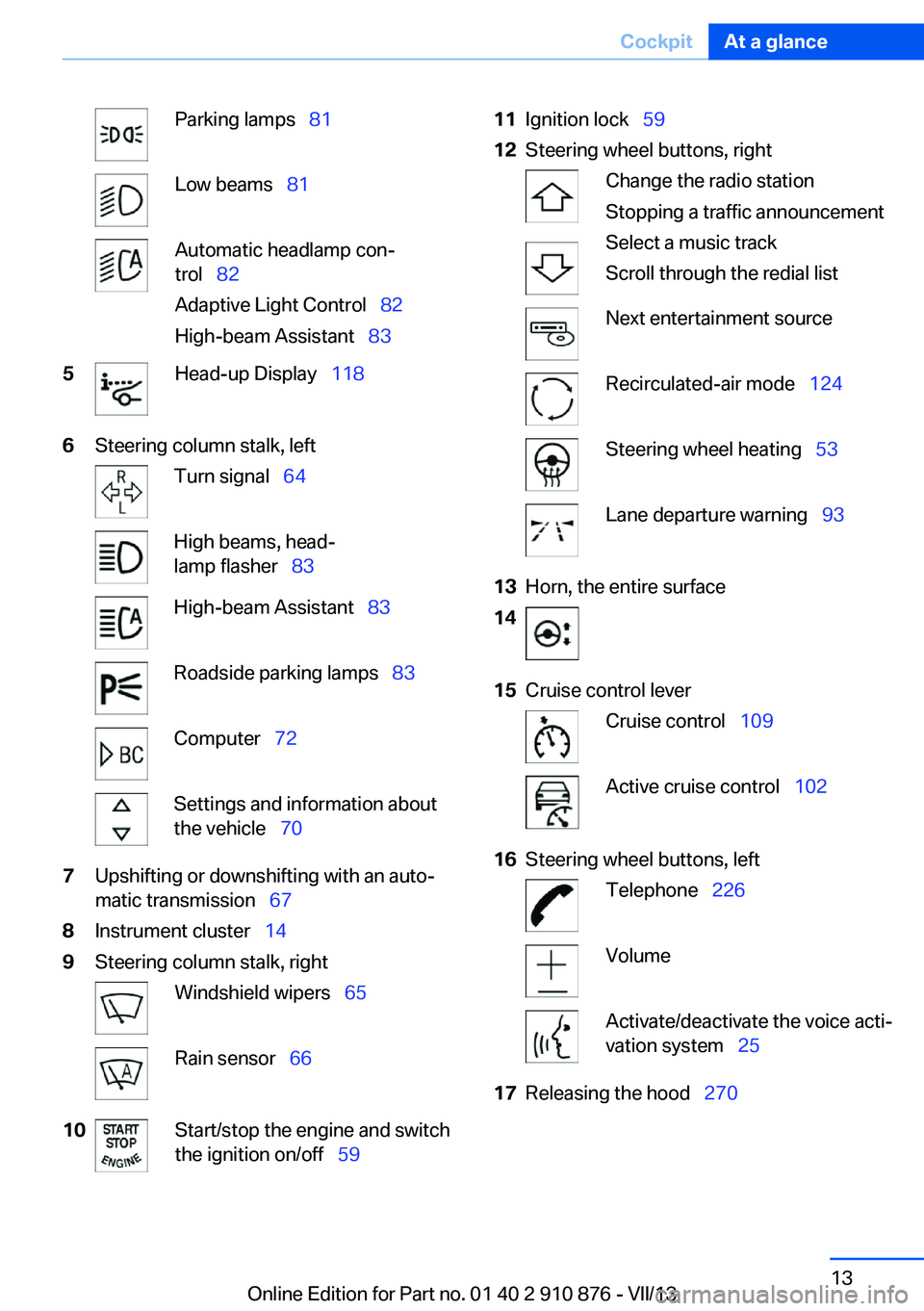
Parking lamps 81Low beams 81Automatic headlamp con‐
trol 82
Adaptive Light Control 82
High-beam Assistant 835Head-up Display 1186Steering column stalk, leftTurn signal 64High beams, head‐
lamp flasher 83High-beam Assistant 83Roadside parking lamps 83Computer 72Settings and information about
the vehicle 707Upshifting or downshifting with an auto‐
matic transmission 678Instrument cluster 149Steering column stalk, rightWindshield wipers 65Rain sensor 6610Start/stop the engine and switch
the ignition on/off 5911Ignition lock 5912Steering wheel buttons, rightChange the radio station
Stopping a traffic announcement
Select a music track
Scroll through the redial listNext entertainment sourceRecirculated-air mode 124Steering wheel heating 53Lane departure warning 9313Horn, the entire surface1415Cruise control leverCruise control 109Active cruise control 10216Steering wheel buttons, leftTelephone 226VolumeActivate/deactivate the voice acti‐
vation system 2517Releasing the hood 270Seite 13CockpitAt a glance13
Online Edition for Part no. 01 40 2 910 876 - VII/13
Page 25 of 323
Voice activation systemVehicle equipment
This chapter describes all series equipment as
well as country-specific and special equipment
offered for this model series.Therefore, it also
describes equipment that may not be found in
your vehicle, for instance due to the selected
special equipment or the country version. This
also applies to safety-related functions and
systems.
The concept▷Most functions that are displayed on the
Control Display can be operated with the
voice activation system using spoken com‐
mands. The system prompts you to make
your entries.▷Functions that can only be used when the
vehicle is stationary cannot be operated
using the voice activation system.▷The system uses a special microphone lo‐
cated in the area of the interior rearview
mirror.▷›...‹ Verbal instructions in the Owner's
Manual to use with the voice activation
system.
Requirements
Via the Control Display, set a language that is
also supported by the voice activation system
so that the spoken commands can be identi‐
fied.
Set the language, refer to page 79.
Using voice activation
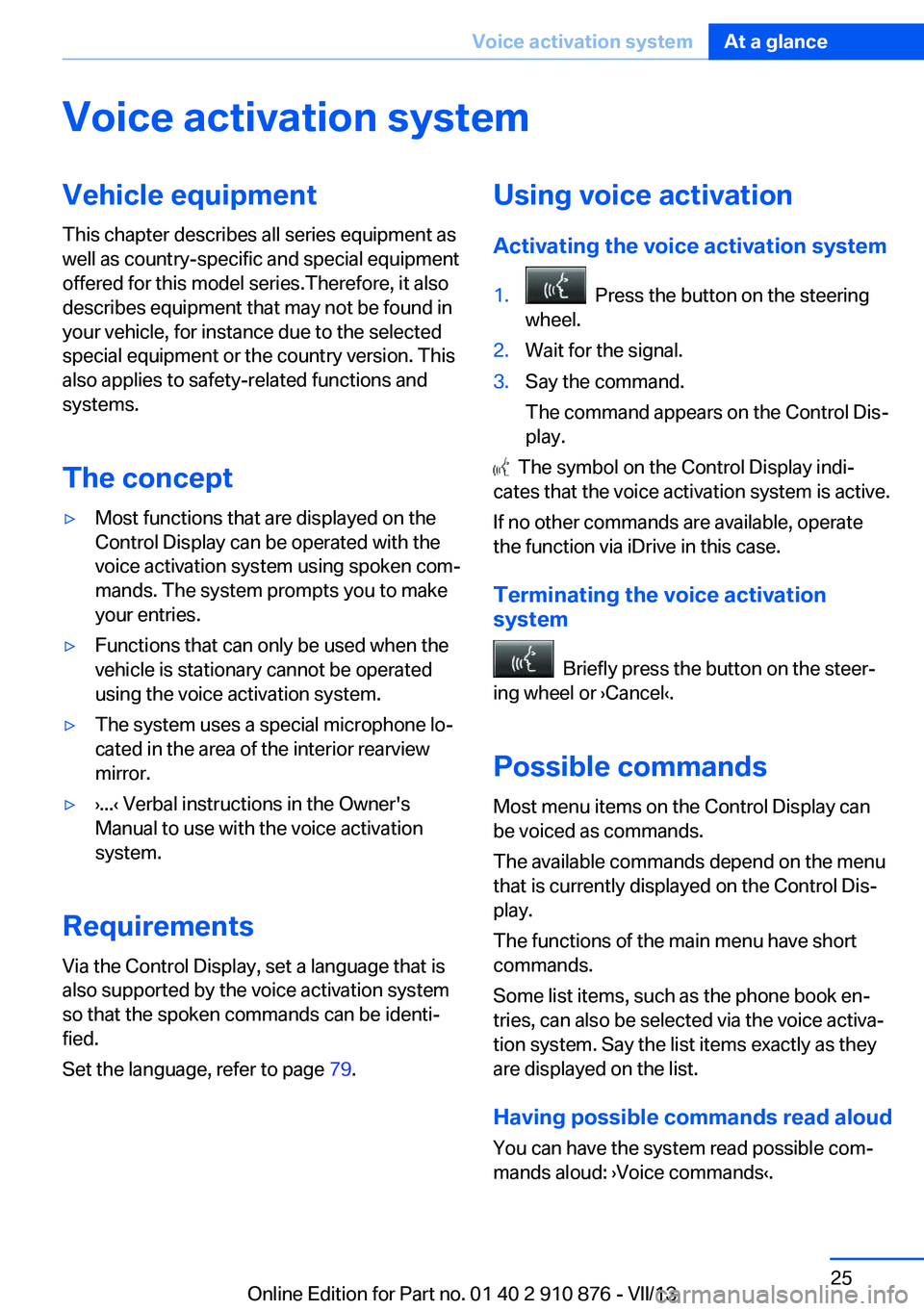
Activating the voice activation system1. Press the button on the steering
wheel.2.Wait for the signal.3.Say the command.
The command appears on the Control Dis‐
play.
The symbol on the Control Display indi‐
cates that the voice activation system is active.
If no other commands are available, operate
the function via iDrive in this case.
Terminating the voice activation
system
Briefly press the button on the steer‐
ing wheel or ›Cancel‹.
Possible commands
Most menu items on the Control Display can
be voiced as commands.
The available commands depend on the menu
that is currently displayed on the Control Dis‐
play.
The functions of the main menu have short
commands.
Some list items, such as the phone book en‐
tries, can also be selected via the voice activa‐
tion system. Say the list items exactly as they
are displayed on the list.
Having possible commands read aloud You can have the system read possible com‐
mands aloud: ›Voice commands‹.
Seite 25Voice activation systemAt a glance25
Online Edition for Part no. 01 40 2 910 876 - VII/13
Page 26 of 323
For example, if the "Settings" menu is dis‐
played, the commands for the settings are
read out loud.
Executing functions using short
commands
Functions on the main menu can be performed
directly by means of short commands, usually
irrespective of which menu item is currently selected, for instance ›Vehicle status‹.
List of short commands of the voice activation
system, refer to page 300.
Help dialog for the voice activation
system
Calling up help dialog: ›Help‹
Additional commands for the help dialog:▷›Help with examples‹: information about the
current operating options and the most im‐
portant commands for them are an‐
nounced.▷›Help with voice activation‹: information
about the principle of operation for the
voice activation system is announced.
Example: playing back a CD
Via the main menu The commands of the menu items are spoken
out loud, in the same way as they are selected
via the controller.
1.Switch on the Entertainment sound output
if necessary.2. Press the button on the steering
wheel.3.›C D and multimedia‹
The medium last played is played back.4.›C D‹5.›C D drive‹
The CD is played back.6. Press the button on the steering
wheel again to select a specific track.7.›Track ...‹ e.g., CD track 4.
Via short commands
Playback of the CD can also be started using a
short command.
1.Switch on the Entertainment sound output
if necessary.2. Press the button on the steering
wheel.3.›C D drive Track ...‹ e.g., CD track 4.
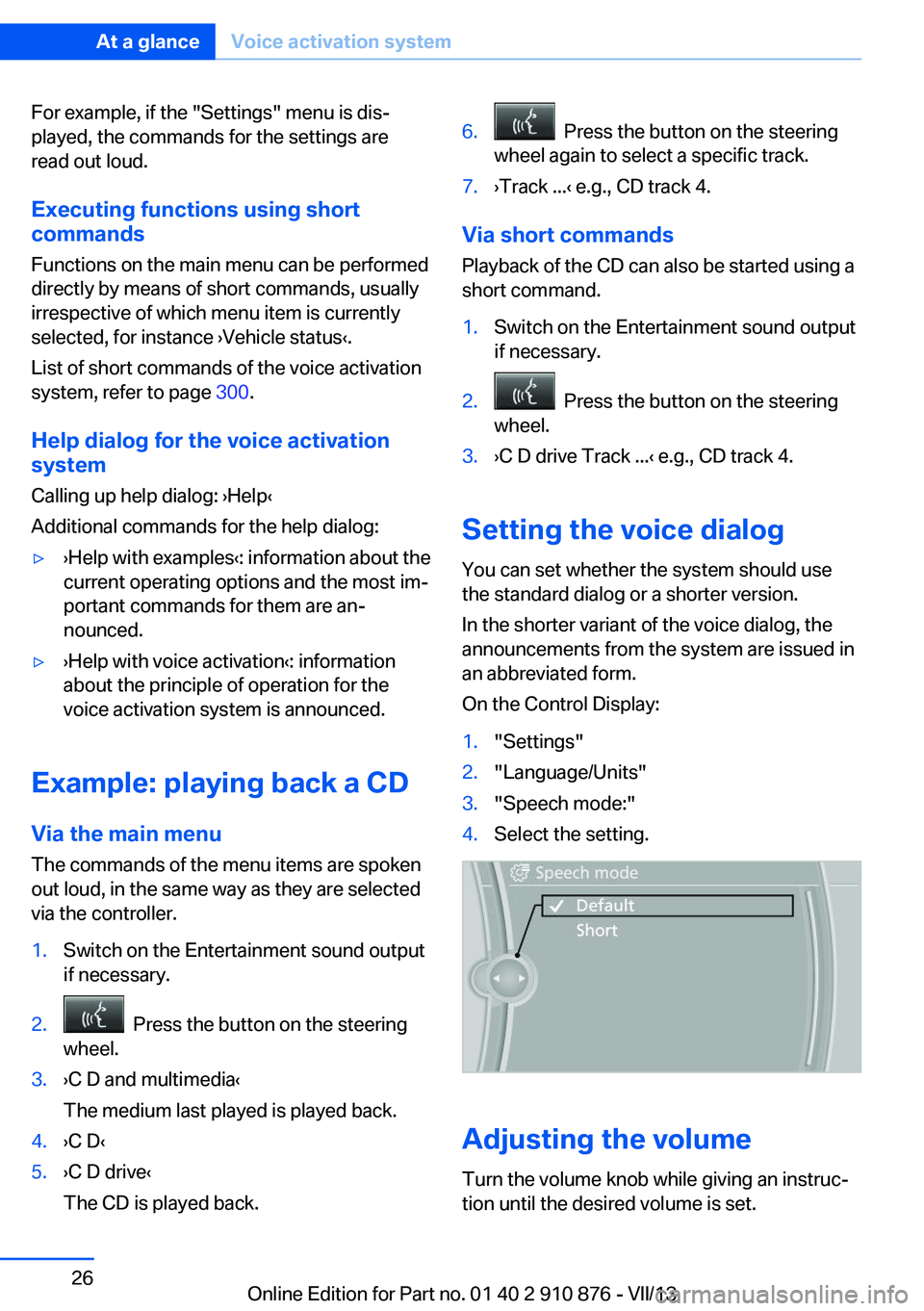
Setting the voice dialog
You can set whether the system should use
the standard dialog or a shorter version.
In the shorter variant of the voice dialog, the
announcements from the system are issued in
an abbreviated form.
On the Control Display:
1."Settings"2."Language/Units"3."Speech mode:"4.Select the setting.
Adjusting the volume
Turn the volume knob while giving an instruc‐
tion until the desired volume is set.
Seite 26At a glanceVoice activation system26
Online Edition for Part no. 01 40 2 910 876 - VII/13
Page 31 of 323
▷The settings are automatically saved in the
profile currently activated in the remote
control.▷The remote control used is detected when
the vehicle is unlocked and the stored pro‐
file is called up.▷Your personal settings will be recognized
and called up again even if the vehicle has
been used in the meantime by someone
else with another remote control.
The individual settings are stored for a maxi‐
mum of four remote controls. They are stored
for two remote controls if Comfort Access is in
use.
Personal Profile settingsThe following functions and settings can be
stored in a profile.
More information on the settings can be found
under:
▷Assigning the programmable memory but‐
tons, refer to page 23.▷Response of the central locking system
when the car is being unlocked, refer to
page 32.▷Automatic locking of the vehicle, refer to
page 35.▷Driver's seat, exterior mirror and steering
wheel positions, refer to page 50.▷Settings for the display on the Control Dis‐
play and in the instrument cluster:▷12h/24h clock format, refer to
page 78.▷Date format, refer to page 79.▷Brightness of the Control Display, refer
to page 79.▷Language on the Control Display, refer
to page 79.▷Units of measure for fuel consumption,
distance covered/remaining distances,
and temperature, refer to page 79.▷Show visual warning for the Park Distance
Control PDC, refer to page 112.▷Show visual warning for Top View, refer to
page 115.▷Show Side View, refer to page 117.▷Backup camera:▷Function selection, refer to page 114.▷Type of display, refer to page 115.▷Lane departure warning: last setting, on/
off, refer to page 93.▷Head-up Display: selection, brightness and
position of the display, refer to page 118.▷Adaptive Drive: selected chassis and sus‐
pension tuning, refer to page 100.▷Light settings:▷Triple turn signal activation, refer to
page 65.▷Welcome lamps, refer to page 81.▷Headlamp courtesy delay feature, refer
to page 82.▷Daytime running lights, refer to
page 82.▷High-beam Assistant, refer to
page 83.▷Automatic climate control with 2-zone con‐
trol: settings, refer to page 122.▷Navigation:▷Voice activation, refer to page 171.▷Route criteria, refer to page 169.▷Map view settings, refer to page 173.▷Entertainment:▷Tone control, refer to page 180.▷Radio, stored stations, refer to
page 188.▷CD/multimedia, audio source listened
to last, refer to page 190.▷Telephone: volume, refer to page 230.Seite 31Opening and closingControls31
Online Edition for Part no. 01 40 2 910 876 - VII/13
Page 33 of 323
Convenient opening
Press and hold the button on the remote
control.
The windows and the glass sunroof open.
Locking
Press the button on the remote con‐
trol.
Locking from the outside
Do not lock the vehicle from the outside
if there are people in it, as the vehicle cannot
be unlocked from inside without special knowl‐
edge.◀
Switching on the interior lamps and
courtesy lamps
Press the button on the remote con‐
trol with the vehicle locked.
Panic mode
You can trigger the alarm system if you find
yourself in a dangerous situation.
Press the button on the remote control for
at least 3 seconds.
To switch off the alarm: press any button.
Unlocking tailgate
Press the button on the remote control for
approx. 1 second and release.
The tailgate will open slightly, regardless of
whether it was previously locked or unlocked.
With automatic tailgate operation: the tailgate
opens automatically.
The tailgate pivots back and up when it opens.
Ensure that adequate clearance is available
before opening.
To avoid locking yourself out of the vehicle, do
not place the remote control into the cargo
area. The tailgate is locked again as soon as it
is pushed closed.
Before and after each trip, check that the tail‐
gate has not been inadvertently unlocked.
Provide edge protection
Sharp or angular objects can hit the rear
window while driving and damage the heating
wires of the rear window. Provide edge protec‐
tion.◀
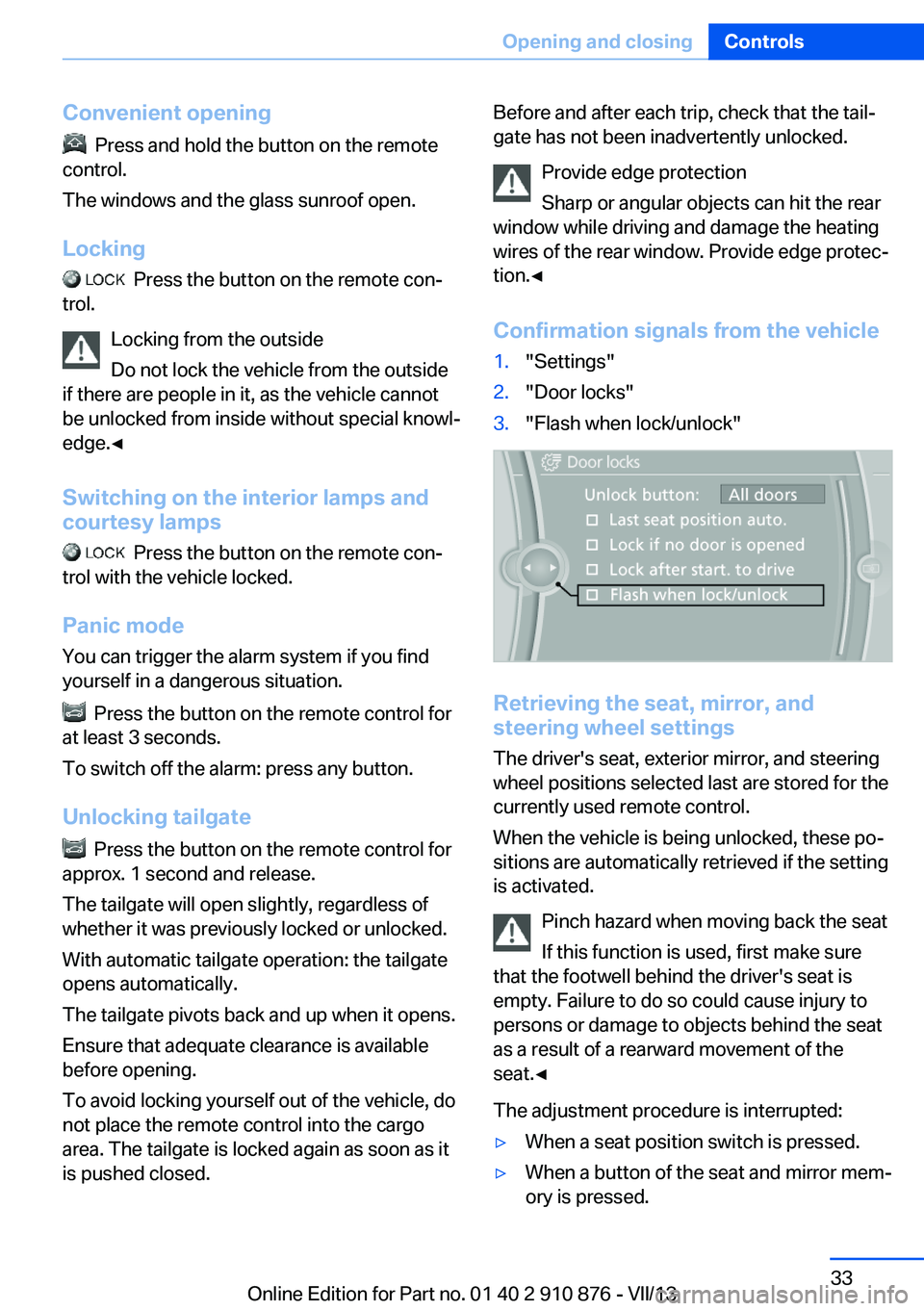
Confirmation signals from the vehicle1."Settings"2."Door locks"3."Flash when lock/unlock"
Retrieving the seat, mirror, and
steering wheel settings
The driver's seat, exterior mirror, and steering
wheel positions selected last are stored for the
currently used remote control.
When the vehicle is being unlocked, these po‐
sitions are automatically retrieved if the setting
is activated.
Pinch hazard when moving back the seat
If this function is used, first make sure
that the footwell behind the driver's seat is
empty. Failure to do so could cause injury to
persons or damage to objects behind the seat
as a result of a rearward movement of the
seat.◀
The adjustment procedure is interrupted:
▷When a seat position switch is pressed.▷When a button of the seat and mirror mem‐
ory is pressed.Seite 33Opening and closingControls33
Online Edition for Part no. 01 40 2 910 876 - VII/13
Page 39 of 323
Malfunction
The Comfort Access functions can be distur‐
bed by local radio waves, such as by a mobile
phone in the immediate vicinity of the remote
control or when a mobile phone is being
charged in the vehicle.
If this occurs, open or close the vehicle using
the buttons on the remote control or use the
integrated key in the door lock.
To start the engine afterward, insert the re‐
mote control into the ignition switch.
Warning lamps The warning lamp in the instrument
cluster lights up when you attempt to
start the engine: the engine cannot
be started.
The remote control is not in the vehicle or has
a malfunction. Take the remote control with
you inside the vehicle or have it checked. If
necessary, insert another remote control into
the ignition switch.
The warning lamp in the instrument
cluster lights up while the engine is
running: the remote control is no lon‐
ger inside the vehicle.
After switching off the engine, the engine can
only be started again within approx. 10 sec‐ onds if no door has been opened.
The indicator lamp in the instrument
cluster comes on and a message ap‐ pears on the Control Display: replace
the remote control battery.Replacing the battery
The remote control for Comfort Access con‐
tains a battery that will need to be replaced
from time to time.1.Take the integrated key out of the remote
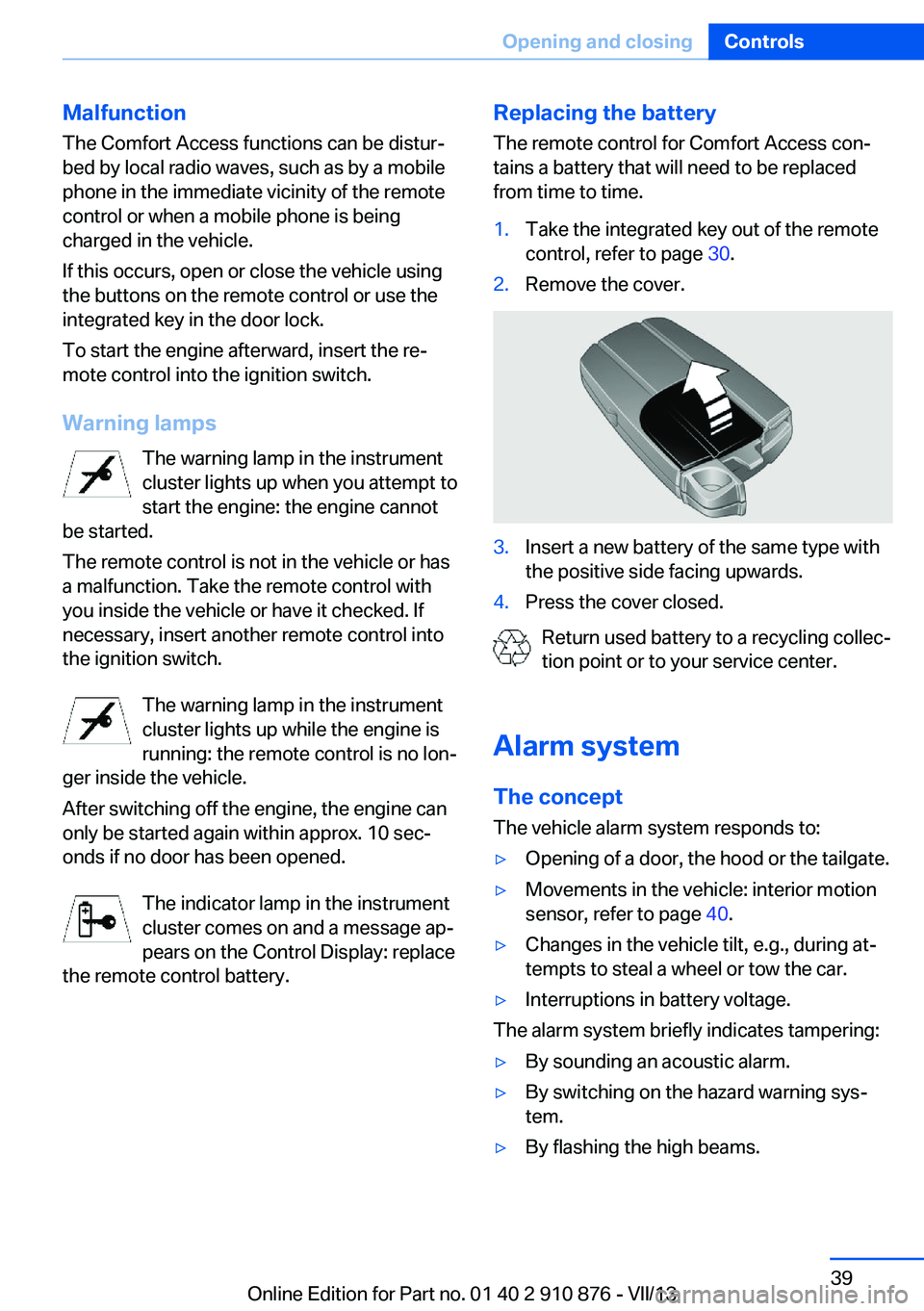
control, refer to page 30.2.Remove the cover.3.Insert a new battery of the same type with
the positive side facing upwards.4.Press the cover closed.
Return used battery to a recycling collec‐
tion point or to your service center.
Alarm system The conceptThe vehicle alarm system responds to:
▷Opening of a door, the hood or the tailgate.▷Movements in the vehicle: interior motion
sensor, refer to page 40.▷Changes in the vehicle tilt, e.g., during at‐
tempts to steal a wheel or tow the car.▷Interruptions in battery voltage.
The alarm system briefly indicates tampering:
▷By sounding an acoustic alarm.▷By switching on the hazard warning sys‐
tem.▷By flashing the high beams.Seite 39Opening and closingControls39
Online Edition for Part no. 01 40 2 910 876 - VII/13