ECU BMW X6M 2013 E71 Owner's Guide
[x] Cancel search | Manufacturer: BMW, Model Year: 2013, Model line: X6M, Model: BMW X6M 2013 E71Pages: 327, PDF Size: 7.71 MB
Page 275 of 327
If this work is not carried out properly, there is
the danger of subsequent damage and related
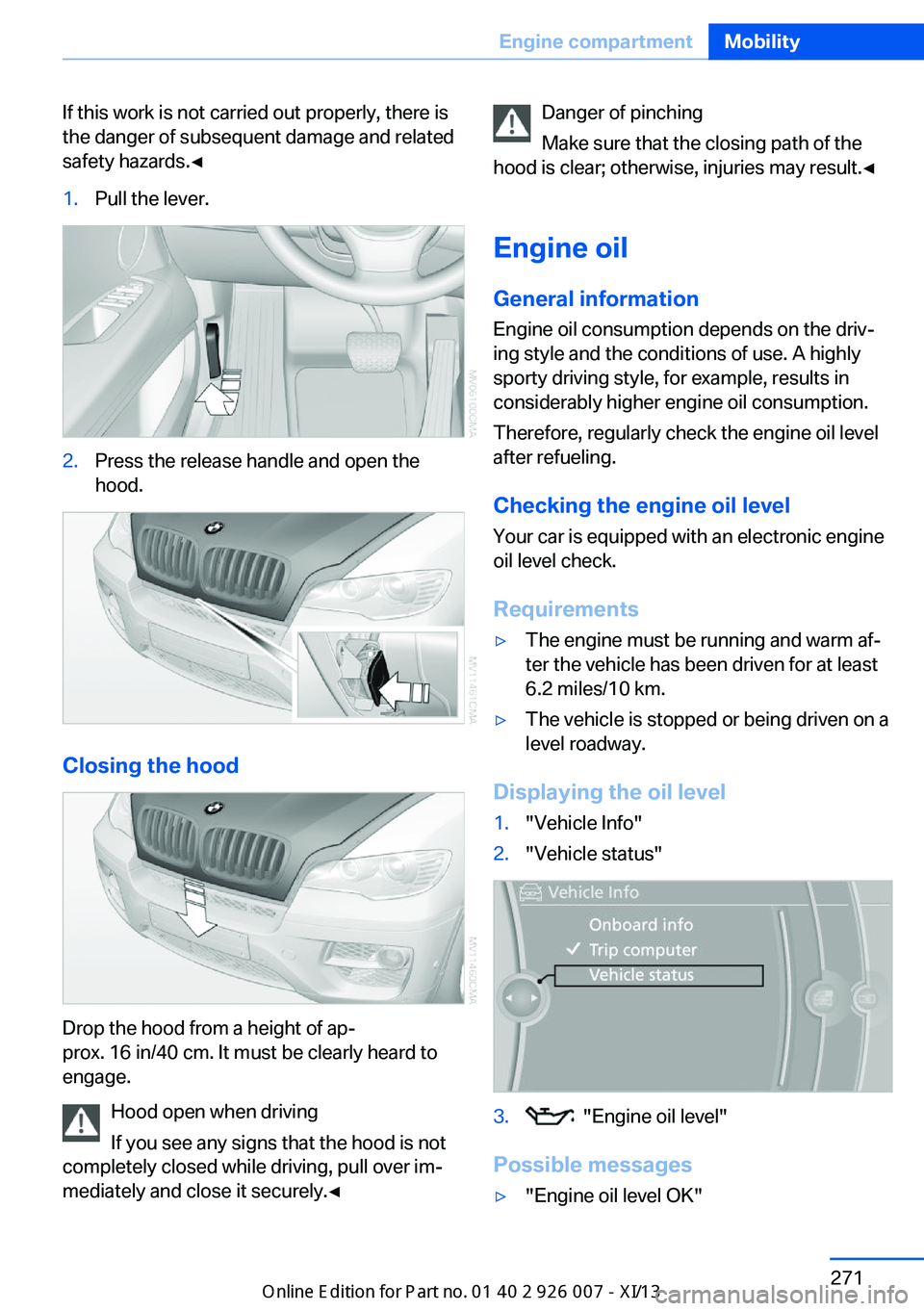
safety hazards.◀1.Pull the lever.2.Press the release handle and open the
hood.
Closing the hood
Drop the hood from a height of ap‐
prox. 16 in/40 cm. It must be clearly heard to
engage.
Hood open when driving
If you see any signs that the hood is not
completely closed while driving, pull over im‐
mediately and close it securely.◀
Danger of pinching
Make sure that the closing path of the
hood is clear; otherwise, injuries may result.◀
Engine oil
General information Engine oil consumption depends on the driv‐
ing style and the conditions of use. A highly
sporty driving style, for example, results in
considerably higher engine oil consumption.
Therefore, regularly check the engine oil level
after refueling.
Checking the engine oil level Your car is equipped with an electronic engine
oil level check.
Requirements▷The engine must be running and warm af‐
ter the vehicle has been driven for at least
6.2 miles/10 km.▷The vehicle is stopped or being driven on a
level roadway.
Displaying the oil level
1."Vehicle Info"2."Vehicle status"3. "Engine oil level"
Possible messages
▷"Engine oil level OK"Seite 271Engine compartmentMobility271
Online Edition for Part no. 01 40 2 910 876 - VII/13
Page 286 of 327
Preparing wheel change1.Observe the safety precautions above.2.Loosen the lug bolts a half turn.
Jacking up vehicle
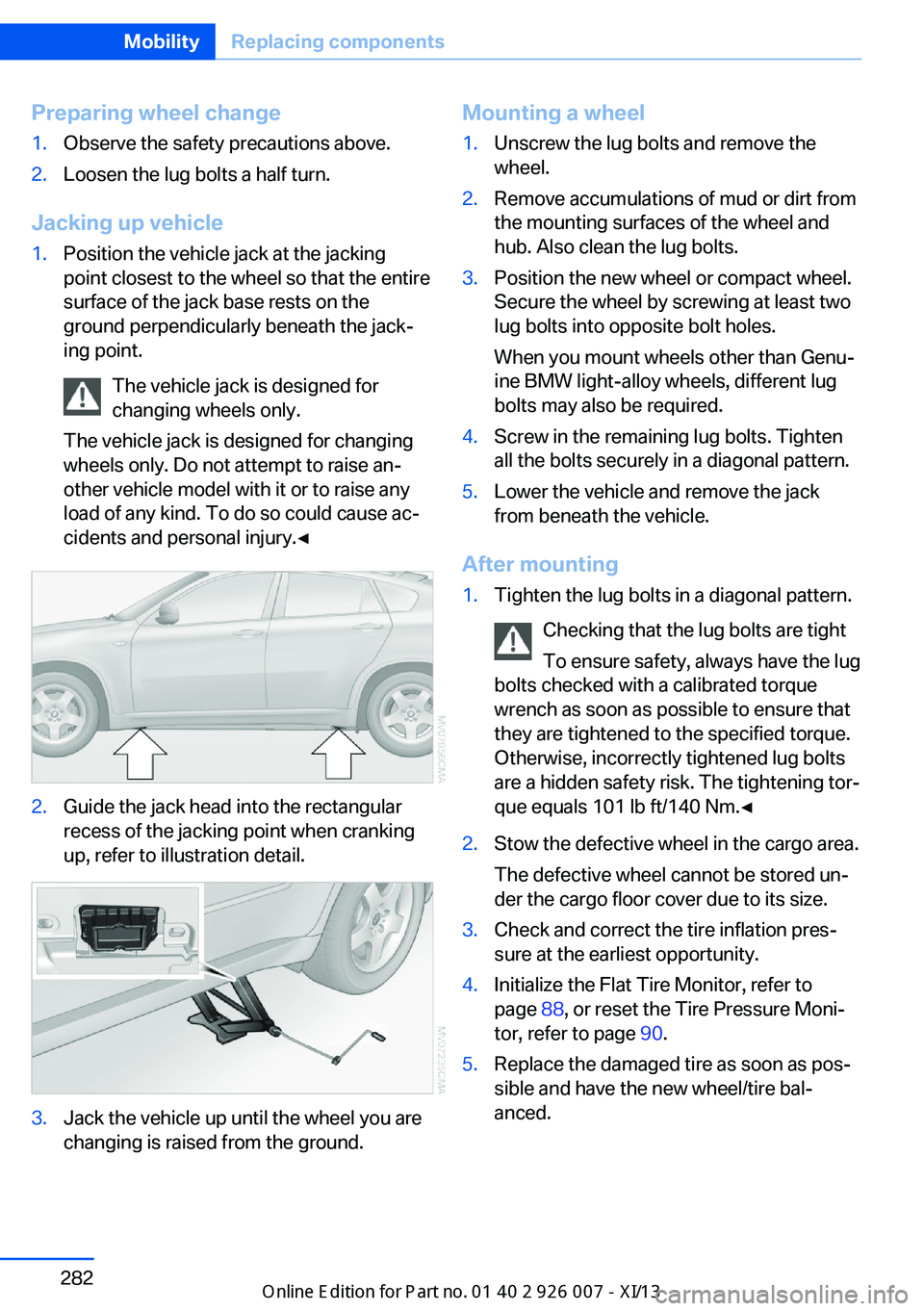
1.Position the vehicle jack at the jacking
point closest to the wheel so that the entire
surface of the jack base rests on the
ground perpendicularly beneath the jack‐
ing point.
The vehicle jack is designed for
changing wheels only.
The vehicle jack is designed for changing
wheels only. Do not attempt to raise an‐
other vehicle model with it or to raise any
load of any kind. To do so could cause ac‐
cidents and personal injury.◀2.Guide the jack head into the rectangular
recess of the jacking point when cranking
up, refer to illustration detail.3.Jack the vehicle up until the wheel you are
changing is raised from the ground.Mounting a wheel1.Unscrew the lug bolts and remove the
wheel.2.Remove accumulations of mud or dirt from
the mounting surfaces of the wheel and
hub. Also clean the lug bolts.3.Position the new wheel or compact wheel.
Secure the wheel by screwing at least two
lug bolts into opposite bolt holes.
When you mount wheels other than Genu‐
ine BMW light-alloy wheels, different lug
bolts may also be required.4.Screw in the remaining lug bolts. Tighten
all the bolts securely in a diagonal pattern.5.Lower the vehicle and remove the jack
from beneath the vehicle.
After mounting
1.Tighten the lug bolts in a diagonal pattern.
Checking that the lug bolts are tight
To ensure safety, always have the lug
bolts checked with a calibrated torque
wrench as soon as possible to ensure that
they are tightened to the specified torque.
Otherwise, incorrectly tightened lug bolts
are a hidden safety risk. The tightening tor‐
que equals 101 lb ft/140 Nm.◀2.Stow the defective wheel in the cargo area.
The defective wheel cannot be stored un‐
der the cargo floor cover due to its size.3.Check and correct the tire inflation pres‐
sure at the earliest opportunity.4.Initialize the Flat Tire Monitor, refer to
page 88, or reset the Tire Pressure Moni‐
tor, refer to page 90.5.Replace the damaged tire as soon as pos‐
sible and have the new wheel/tire bal‐
anced.Seite 282MobilityReplacing components282
Online Edition for Part no. 01 40 2 910 876 - VII/13
Page 288 of 327
▷Active steering: the system automatically
initializes for a short time as you drive. Dur‐
ing this time, the system is deactivated, re‐
fer to page 101.▷xDrive: the system automatically initializes
as you drive. During this time, indicator
lamps light up. If the lamps do not disap‐
pear during the current trip, have the sys‐
tem checked.
Disposing of old batteries
Have old batteries disposed of by your
service center or bring them to a recy‐
cling center.
Maintain the battery in an upright position for
transport and storage. Secure the battery so
that it does not tip over during transport.
Fuses Replacing fuses
Never attempt to repair a blown fuse and
do not replace a defective fuse with a substi‐
tute of another color or amperage rating; this
could lead to a circuit overload, ultimately re‐
sulting in a fire in the vehicle.◀
In interior
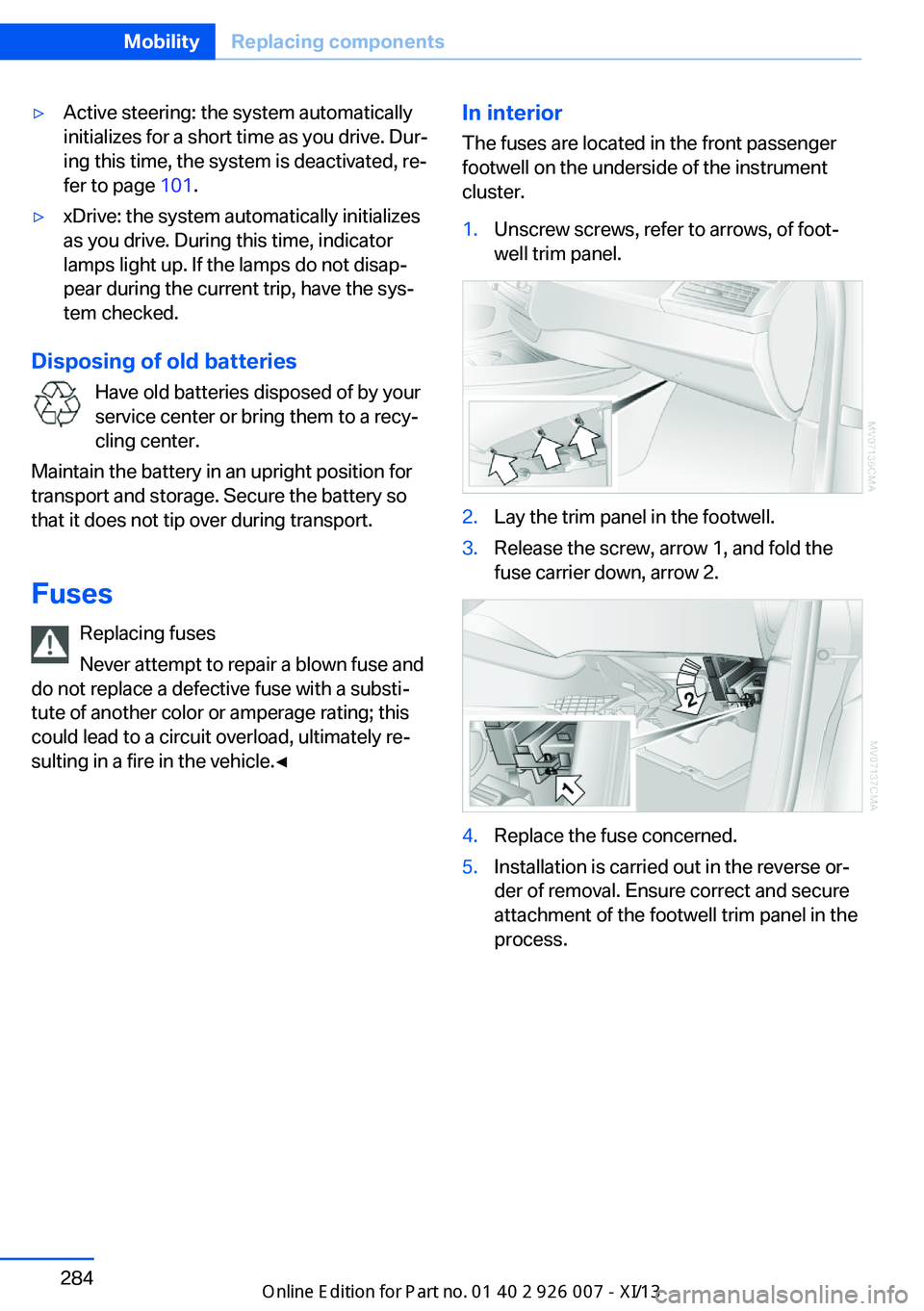
The fuses are located in the front passenger
footwell on the underside of the instrument
cluster.1.Unscrew screws, refer to arrows, of foot‐
well trim panel.2.Lay the trim panel in the footwell.3.Release the screw, arrow 1, and fold the
fuse carrier down, arrow 2.4.Replace the fuse concerned.5.Installation is carried out in the reverse or‐
der of removal. Ensure correct and secure
attachment of the footwell trim panel in the
process.Seite 284MobilityReplacing components284
Online Edition for Part no. 01 40 2 910 876 - VII/13
Page 294 of 327
To avoid jerking and the associated stresses
on the vehicle components when towing, al‐
ways use nylon ropes or nylon straps.
Attaching the tow rope correctly
Only secure the tow rope on the tow fit‐
ting; otherwise, damage can occur when it is
secured on other parts of the vehicle.◀
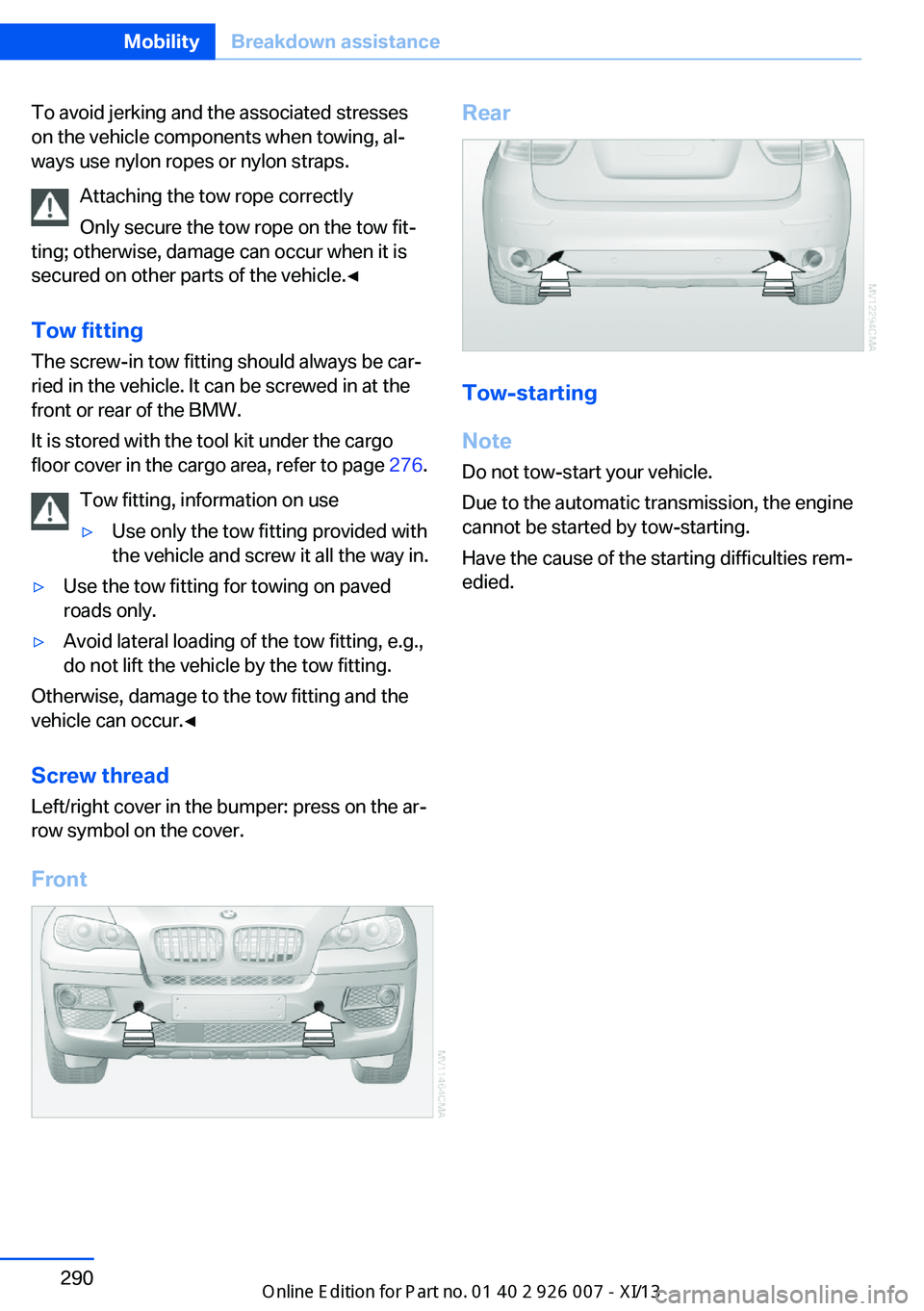
Tow fitting
The screw-in tow fitting should always be car‐
ried in the vehicle. It can be screwed in at the
front or rear of the BMW.
It is stored with the tool kit under the cargo
floor cover in the cargo area, refer to page 276.
Tow fitting, information on use▷Use only the tow fitting provided with
the vehicle and screw it all the way in.▷Use the tow fitting for towing on paved
roads only.▷Avoid lateral loading of the tow fitting, e.g.,
do not lift the vehicle by the tow fitting.
Otherwise, damage to the tow fitting and the
vehicle can occur.◀
Screw thread Left/right cover in the bumper: press on the ar‐
row symbol on the cover.
Front
Rear
Tow-starting
Note Do not tow-start your vehicle.
Due to the automatic transmission, the engine
cannot be started by tow-starting.
Have the cause of the starting difficulties rem‐
edied.
Seite 290MobilityBreakdown assistance290
Online Edition for Part no. 01 40 2 910 876 - VII/13
Page 298 of 327
Ensure that the floor mats are securely fas‐
tened again when they are returned after being
removed, such as for cleaning.◀
Floor mats can be removed from the passen‐
ger compartment for cleaning.
When returning the floor mats, secure them
again to prevent slipping.
If the floor carpets are very dirty, clean with a
microfiber cloth and water or a textile cleaner.
To prevent matting of the carpet, rub back and
forth in the direction of travel only.
Sensors/cameras
To clean sensors or cameras, use a cloth mois‐
tened with a small amount of glass cleaner.
Displays/screens
Clean the displays with an anti-static micro‐
fiber cloth.
Cleaning displays
Do not use chemical or household
cleansers.
Keep all fluids and moisture away from the
unit.
Otherwise, they could affect or damage surfa‐
ces or electrical components.
Avoid pressing too hard when cleaning and do
not use abrasive materials; otherwise, damage
can result.◀
Long-term vehicle storage Your service center can advise you on what to
consider when storing the vehicle for longer
than three months.Seite 294MobilityCare294
Online Edition for Part no. 01 40 2 910 876 - VII/13
Page 314 of 327
California Proposition 65Warning 7
Camera, care 294
Camera, refer to Backup cam‐ era 113
Camera, side view 118
Camera, Top View 117
Can holder, refer to Cu‐ pholder 139
Car battery, refer to Vehicle battery 283
Car care products 292
Care 291
Care, displays 294
Care, vehicle 292
Cargo 150
Cargo area– Comfort Access 38
Cargo area, capacities 298
Cargo area, enlarging 135
Cargo area lamp, refer to Inte‐ rior lamps 85
Cargo area lid, refer to Tail‐
gate 36
Cargo area, opening/closing, refer to Tailgate 36
Cargo area, refer to Cargo area 135
Cargo cover 135
Cargo, securing with ski bag, refer to Securing cargo 142
Cargo straps, securing cargo 151
Car key, refer to Integrated key/remote control 30
Carpet, care 293
Car phone, installation loca‐ tion, refer to Center arm‐
rest 138
Car phone, refer to Tele‐ phone 226
Car vacuum cleaner, connect‐ ing, refer to Connecting
electrical devices 133
Car wash 291
Catalytic converter, refer to Hot exhaust system 146
CBC, refer to Cornering Brake
Control 96
CBS Condition Based Serv‐ ice 274
CD/DVD 190
CD/DVD changer 194
CD/DVD in rear 211
CD/DVD notes 196
CD, refer to Playing audio tracks, rear DVD sys‐
tem 216
CDs, storing 197
Cell phone 226
Cell phone, installation loca‐ tion, refer to Center arm‐
rest 138
Center armrest, front 138
Center armrest, rear 138
Center brake lamp 280
Center console, refer to Around the center con‐
sole 16
Central locking– Comfort Access 37– From the inside 35– Setting the unlocking char‐
acteristics 32
Central locking system
– From the outside 32– Principle 32
Central screen, refer to Con‐
trol Display 19
Changes, technical, refer to Safety 6
Changing wheels/tires 267
Chassis number, refer to En‐ gine compartment 270
Check Control 76
Children, transporting 54
Child restraint fixing system LATCH 55
Child restraint fixing sys‐ tems 54
Child restraint fixing systems, mounting 54
Child safety locks 57
Child seat, mounting 54
Child seats, refer to Trans‐
porting children safely 54
Chrome parts, care 293
Cigarette lighter, connecting electrical devices 133
Cigarette lighter, refer to Lighter 133
Cigarette lighter socket 133
Circulation of air, refer to Re‐ circulated air mode 124
Cleaning, displays 294
Cleaning your BMW, refer to Care 291
Clock 70
Clock, 12h/24h mode 78
Closing– From the inside 35– From the outside 32
Clothes hooks 138
Cockpit 12
Cold start, refer to Starting the engine 60
Combination instrument, refer to Instrument cluster 14
Combination switch, refer to Turn signal/high beams/
headlamp flasher 64
Combination switch, refer to Washer/wiper system 65
Comfort Access
– Battery replacement 39
Comfort area, refer to Around
the center console 16
Compact wheel, inflation pressure 262
Compartment for remote control, refer to Ignition
lock 59
Compartments, refer to Stor‐ age compart‐
ments 137, 138
Compass, digital 131
Computer 72
Computer, displaying infor‐ mation 72
Computer, displays on the Control Display 73
Seite 310ReferenceEverything from A to Z310
Online Edition for Part no. 01 40 2 910 876 - VII/13
Page 316 of 327
DVD system in rear 210
DVD, video 192
Dynamic destination guid‐ ance 176
Dynamic Performance Con‐ trol 98
Dynamic Stability Control DSC 96
Dynamic Traction Control DTC 97
E
Easy entry/exit 53
EfficientDynamics, refer to Saving fuel 153
Electrical malfunction– Door lock 34– Driver's door 34– Fuel filler flap 258
Electrical malfunction, park‐
ing brake 63
Electric seat adjustment 45
Electric steering wheel ad‐
justment 53
Electronic brake-force distri‐ bution 96
Electronic engine oil level check 271
Electronic Stability Program ESP, refer to Dynamic Sta‐
bility Control DSC 96
Emergency operation
– Door lock, refer to Manual
operation 34
Emergency operation, fuel
filler flap, unlocking man‐
ually 258
Emergency Request 286
Emergency service, refer to Roadside Assistance 287
Energy-conscious driving, re‐ fer to Current fuel consump‐
tion 71
Energy, saving, refer to Sav‐ ing fuel 153
Engine, breaking in 146
Engine compartment 270
Engine coolant, refer to Cool‐ ant 273
Engine oil, adding 272
Engine oil, additives, refer to Approved engine oils 272
Engine oil, alternative oil types 273
Engine oil, BMW maintenance system 274
Engine oil change intervals, refer to Service require‐
ments 74
Engine oil, checking the level 271
Engine oil, filling ca‐ pacity 299
Engine oil temperature 71
Engine oil types, alterna‐ tive 272
Engine oil types, ap‐ proved 272
Engine, overheating, refer to Coolant temperature 71
Engine start, assistance 287
Engine, starting 60
Engine, starting– Comfort Access 37
Engine, starting, Start/Stop
button 59
Engine, stopping, Start/Stop button 59
Engine, switching off 60
Environmentally friendly driv‐ ing, refer to Current fuel
consumption 71
Equalizer 180
Equipment, interior 129
ESP Electronic Stability Pro‐ gram, refer to Dynamic Sta‐
bility Control DSC 96
Exchanging wheels/tires 267
Exhaust system 146
Exterior mirrors 51
Exterior mirrors, adjusting 51
Exterior mirrors, automatic dimming 52
Exterior mirrors, automatic
heating 52
Exterior mirrors, folding in and out 52
External audio device 138
External devices 202
External temperature dis‐ play 70
External temperature display, changing the units of meas‐
ure, changing the units of
measure on the Control Dis‐
play 79
External temperature warn‐ ing 70
Externel temperature dis‐ play 70
Eyes for securing cargo 151
F
Fader 180
Failure messages, refer to Check Control 76
False alarm– Avoiding unintentional
alarms 40– Ending an alarm 40
Fastening safety belts, refer
to Safety belts 47
Fault messages, refer to Check Control 76
Filling capacities 299
Filter, refer to Microfilter/acti‐ vated-charcoal filter 126
Fine wood, care 293
First aid kit 287
Fitting for towing 290
Fixing system, adaptive 140
Flashing when locking/ unlocking 33
Flat Tire Monitor FTM 88
Flat Tire Monitor FTM, snow chains 269
Flat tire, run-flat tires 268
Flat tire, Tire Pressure Moni‐ tor TPM 90
Seite 312ReferenceEverything from A to Z312
Online Edition for Part no. 01 40 2 910 876 - VII/13
Page 319 of 327
Lamps, automatic headlampcontrol 81, 82
Lamps, High-beam Assis‐ tant 83
Lamps, parking lamps/low beams 81
Lamps, replacing, refer to Lamp and bulb replace‐
ment 276
Lane departure warning 93
Lane margin, warning 93
Language, changing on Con‐ trol Display 79
Lap-and-shoulder belt, refer to Safety belts 47
Lashing eyes, securing cargo 151
LATCH child restraint fixing system 55
Leather, care 292
LEDs, light-emitting di‐ odes 277
Length, refer to Dimen‐ sions 298
Letters and numbers, enter‐ ing 23
License plate lamps, replac‐ ing bulbs 280
Light-alloy wheels, care 293
Light-emitting diodes, LEDs 277
Lighter 133
Lighting– Instruments 85
Lighting, vehicle, refer to
Lamps 81
Light switch 81
Limit, refer to Speed limit 77
Load 151
Loading 150
Lock buttons, doors, refer to Locking 35
Locking– From the inside 35– From the outside 33– Setting the confirmation
signals 33– Without remote control, re‐
fer to Comfort Access 37
Locking the vehicle
– From the inside 35– From the outside 32
Locks, doors, and win‐
dows 57
Longlife oils, alternative oil types 273
Longlife oils, refer to Ap‐ proved engine oils 272
Low beams 81
Low beams
– Automatic 82
Low beams, automatic 81
Low beams, automatic, refer to High-beam Assistant 83
Lower back support, refer to Lumbar support 45
Luggage rack, refer to Roof- mounted luggage rack 152
Lumbar support 45
M
Main inspection, refer to Service requirements 74
Maintenance 274
Maintenance, refer to Service booklet
Maintenance, refer to Service requirements 74
Maintenance require‐ ments 274
Maintenance system BMW 274
Malfunction
– Door lock 34– Fuel filler flap 258
Malfunction, parking
brake 63
Malfunction warnings, refer to
Check Control 76
Manual air distribution 124
Manual mode, automatic transmission with Step‐
tronic 68
Manual operation– Door lock 34– Driver's door 34
Manual operation, fuel filler
flap 258
Manual operation, Side View 118
Manual operation, Top View 116
Map, destination entry 165
Map display in black and white 174
Map in split screen 173
Map view 171
Marking on approved tires 268
Master key, refer to Remote control with integrated
key 30
Maximum cooling 124
Maximum speed, winter tires 268
Medical kit, refer to First aid kit 287
Memory, refer to Seat and mirror memory 50
Menus, operating, iDrive 18
Menus, refer to iDrive operat‐ ing concept 19
Message list, traffic bulle‐ tins 173
Messages 242
Microfilter 126
Minimum tread, tires 266
Mirror
– Mirror memory, refer to Seat
and mirror memory 50
Mirrors 51
Mirrors
– Automatic Curb Monitor 52
Mirrors, folding in and out 52
Seite 315Everything from A to ZReference315
Online Edition for Part no. 01 40 2 910 876 - VII/13
Page 321 of 327
Pressure warning, tires 88
Profile depth, refer to Mini‐ mum tread depth 266
Profile, tires 266
Programmable memory but‐ tons, iDrive 23
Protection function, refer to Pinch protection 43
Protective function, refer to
Pinch protection– Windows 41
Push-and-turn switch, refer to
Controls 18
R Radiator fluid, refer to Cool‐ ant 273
Radio-operated key, refer to Remote control with
integrated key 30
Radio ready state 59
Radio ready state, switched off 60
Radio ready state, switched on 59
Radio setting, refer to Radio ready state 59
Rain sensor 66
Random 191
Random playback 191
Range 72
RDS 183
Reading lamps 85
Reading out loud 246
Rear entertainment, refer to DVD system in rear 210
Rear lamps, refer to Tail lamps 279
Rear seat backrest, folda‐ ble 135
Rear seats, adjusting the head restraints 50
Rear seats, heating 46
Rear socket 134
Rear ventilation 126
Rear ventilation, automatic
climate control in rear 126
Rearview camera, clean‐ ing 115
Rearview mirror, refer to Mir‐ rors 51
Rear window defroster 123
Recirculated air mode 124
Recommended tire brands 268
Redialing 233
Refueling 258
Remaining distance to desti‐ nation, refer to Com‐
puter 73
Remaining range for service, refer to Service require‐
ments 74
Remaining range, refer to Range 72
Reminders 246
Remote control– Battery replacement 39– Comfort Access 37– Garage door opener 129– Malfunction 34, 39– Tailgate 33– Universal 129
Remote control, rear DVD
system 211
Remote control, removing from the ignition lock 59
Remote control, service data 274
Remote inquiry 232
Replacement fuse 284
Replacement remote con‐ trol 30
Replacing wheels/tires 267
Reporting safety defects 9
Reserve warning, refer to Fuel gauge 72
Reservoir for washer fluid, re‐ fer to Washer fluid reser‐
voir 67
Resetting, Tire Pressure Monitor TPM 91
Residual heat 125
Restraining systems– Refer to Safety belts 47
Restraint systems for chil‐
dren 54
Retaining straps, securing cargo 151
Retreaded tires 268
Rim cleaner, care 293
Road, avoiding 169
Road detour 169
Roadside Assistance 252
Roadside parking lamps 83
Roller sunblinds 42
RON gasoline quality 260
RON, refer to Fuel qual‐ ity 260
Roof load capacity 298
Roof-mounted luggage rack 152
Rope, refer to Towing 289
Route 170
Route criteria, route 169
Route, displaying 170
Route section, bypass‐ ing 170
RSC Runflat System Compo‐ nent, refer to Run-flat
tires 268
Rubber components, care 293
Run-flat tires 268
Run-flat tires, tire inflation pressure 262
Running lights, refer to Park‐ ing lamps/low beams 81
S Safe braking 147
Safety 6
Safety belts 47
Safety belts
– Damage 48
Safety belts, care 293
Safety belts, indicator/warn‐ ing lamp 48
Seite 317Everything from A to ZReference317
Online Edition for Part no. 01 40 2 910 876 - VII/13