wheel BMW X6M 2013 E71 Workshop Manual
[x] Cancel search | Manufacturer: BMW, Model Year: 2013, Model line: X6M, Model: BMW X6M 2013 E71Pages: 327, PDF Size: 7.71 MB
Page 223 of 327
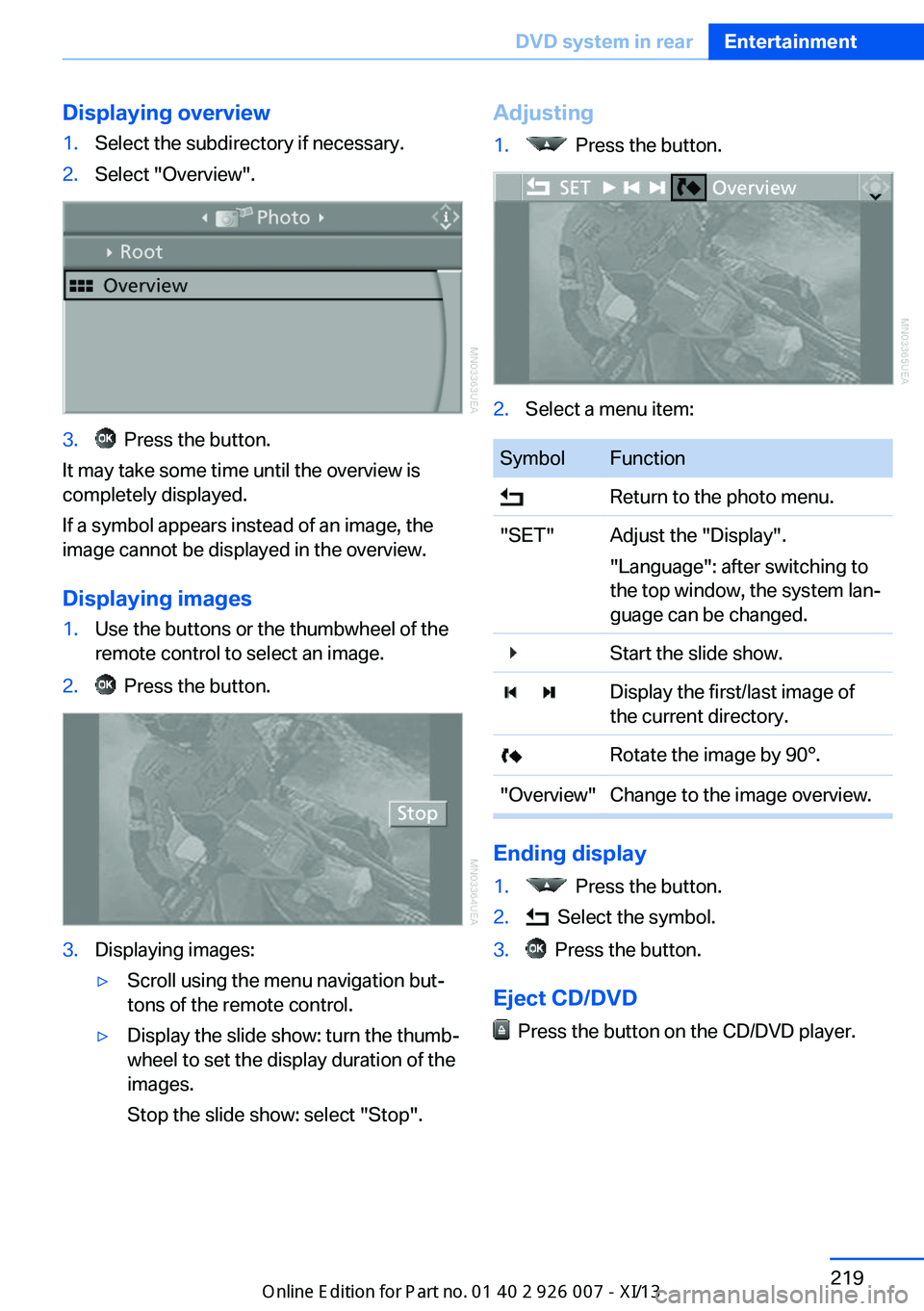
Displaying overview1.Select the subdirectory if necessary.2.Select "Overview".3. Press the button.
It may take some time until the overview is
completely displayed.
If a symbol appears instead of an image, the
image cannot be displayed in the overview.
Displaying images
1.Use the buttons or the thumbwheel of the
remote control to select an image.2. Press the button.3.Displaying images:▷Scroll using the menu navigation but‐
tons of the remote control.▷Display the slide show: turn the thumb‐
wheel to set the display duration of the
images.
Stop the slide show: select "Stop".Adjusting1. Press the button.2.Select a menu item:SymbolFunction Return to the photo menu."SET"Adjust the "Display".
"Language": after switching to
the top window, the system lan‐
guage can be changed. Start the slide show. Display the first/last image of
the current directory. Rotate the image by 90°."Overview"Change to the image overview.
Ending display
1. Press the button.2. Select the symbol.3. Press the button.
Eject CD/DVD
Press the button on the CD/DVD player.
Seite 219DVD system in rearEntertainment219
Online Edition for Part no. 01 40 2 910 876 - VII/13
Page 230 of 327
TelephoneVehicle equipmentThis chapter describes all series equipment as
well as country-specific and special equipment
offered for this model series.Therefore, it also
describes equipment that may not be found in
your vehicle, for instance due to the selected
special equipment or the country version. This
also applies to safety-related functions and
systems.
At a glance
The concept Mobile phones or other external devices such
as audio players can be connected to the vehi‐
cle via Bluetooth.
Bluetooth® is a registered trademark of Blue‐
tooth® SIG, Inc.
After these devices are paired once, they are
recognized automatically when the ignition is
switched on as soon as they are in the vehicle
and can then be operated via iDrive, the but‐
tons on the steering wheel, and via voice acti‐
vation.
Depending on their functionality, external devi‐
ces can be used via the vehicle as a telephone
or as an audio source. The telephone functions
are described in the following. Operating the
audio functions, refer to page 205.
Up to four external devices can be paired.
Certain functions may need to be enabled by
the mobile phone provider or service provider.
Using the mobile phone while driving
Make entries only when traffic and road
conditions allow. Do not hold the mobile phone
in your hand while you are driving; use the
hands-free system instead. If you do not ob‐
serve this precaution, you can endanger the
vehicle occupants and other road users.◀Snap-in adapter
The snap-in adapter is used to:▷Hold the mobile phone.▷Recharge the battery.▷Connect the mobile phone to an outside
antenna of the vehicle.
This provides for better network reception
and consistent sound quality.
Approved mobile phones
Details on which mobile phones and external
devices with a Bluetooth interface are sup‐
ported by the mobile phone preparation pack‐
age can be obtained at www.bmwusa.com/
bluetooth.
Displaying the vehicle identification
number and software part number
The vehicle identification number and software part number are needed to determine which
mobile phones are supported by the mobile
phone preparation package. The software ver‐
sion of the mobile phone may also be required.
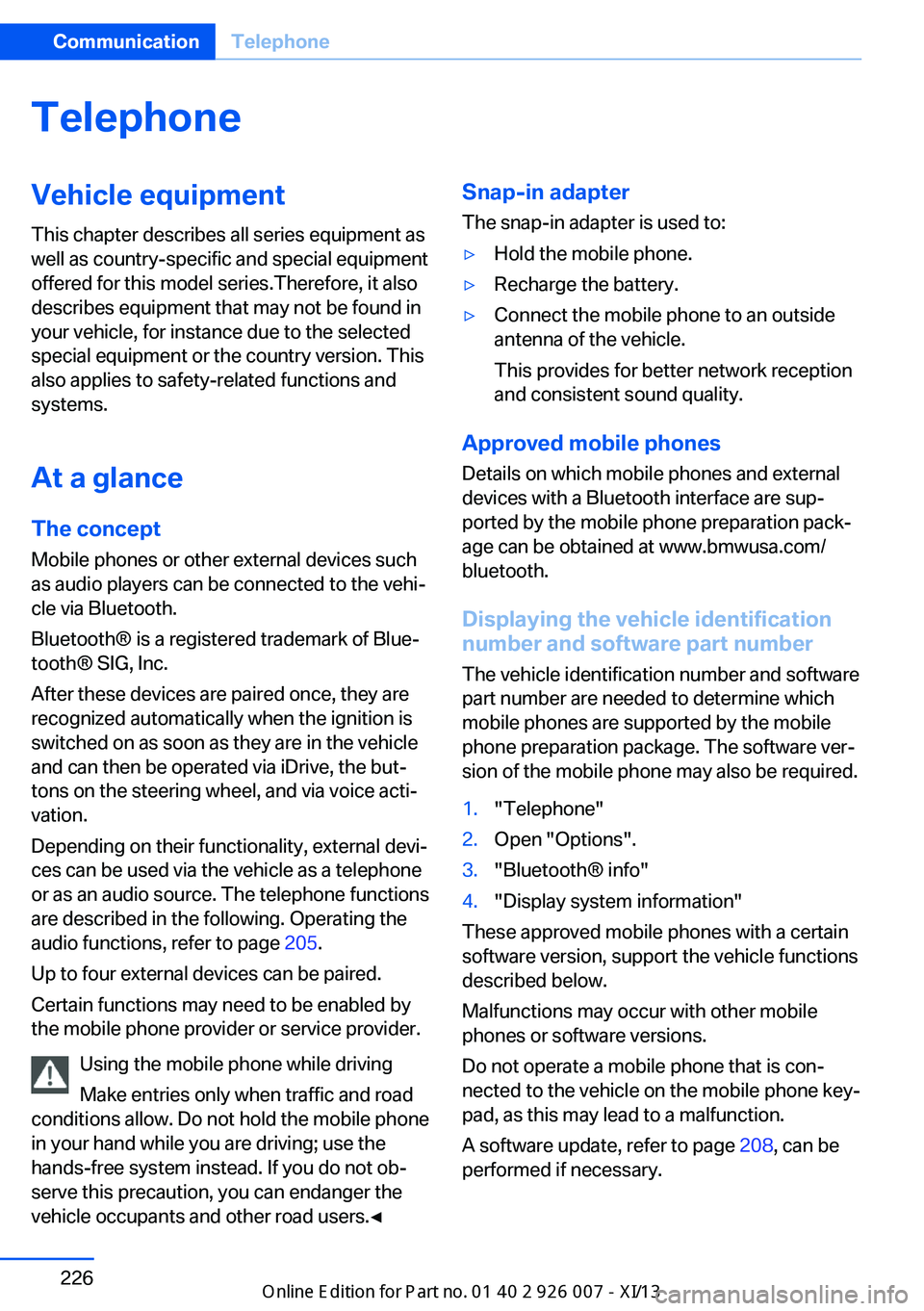
1."Telephone"2.Open "Options".3."Bluetooth® info"4."Display system information"
These approved mobile phones with a certain
software version, support the vehicle functions
described below.
Malfunctions may occur with other mobile
phones or software versions.
Do not operate a mobile phone that is con‐
nected to the vehicle on the mobile phone key‐
pad, as this may lead to a malfunction.
A software update, refer to page 208, can be
performed if necessary.
Seite 226CommunicationTelephone226
Online Edition for Part no. 01 40 2 910 876 - VII/13
Page 235 of 327
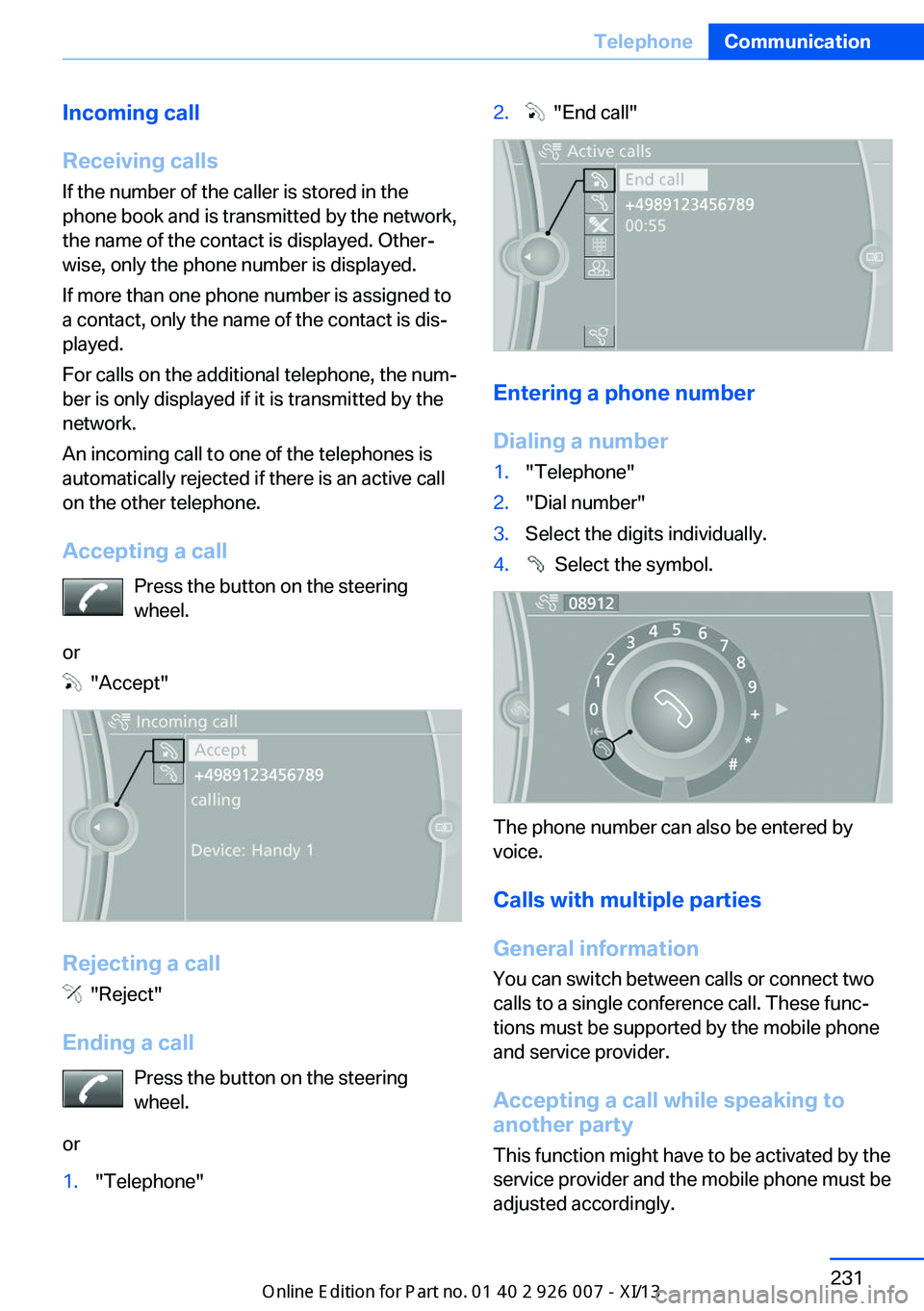
Incoming call
Receiving calls If the number of the caller is stored in the
phone book and is transmitted by the network,
the name of the contact is displayed. Other‐
wise, only the phone number is displayed.
If more than one phone number is assigned to
a contact, only the name of the contact is dis‐
played.
For calls on the additional telephone, the num‐
ber is only displayed if it is transmitted by the
network.
An incoming call to one of the telephones is
automatically rejected if there is an active call
on the other telephone.
Accepting a call Press the button on the steering
wheel.
or
"Accept"
Rejecting a call
"Reject"
Ending a call Press the button on the steering
wheel.
or
1."Telephone"2. "End call"
Entering a phone number
Dialing a number
1."Telephone"2."Dial number"3.Select the digits individually.4. Select the symbol.
The phone number can also be entered by
voice.
Calls with multiple parties
General information
You can switch between calls or connect two
calls to a single conference call. These func‐
tions must be supported by the mobile phone
and service provider.
Accepting a call while speaking to
another party
This function might have to be activated by the
service provider and the mobile phone must be
adjusted accordingly.
Seite 231TelephoneCommunication231
Online Edition for Part no. 01 40 2 910 876 - VII/13
Page 237 of 327
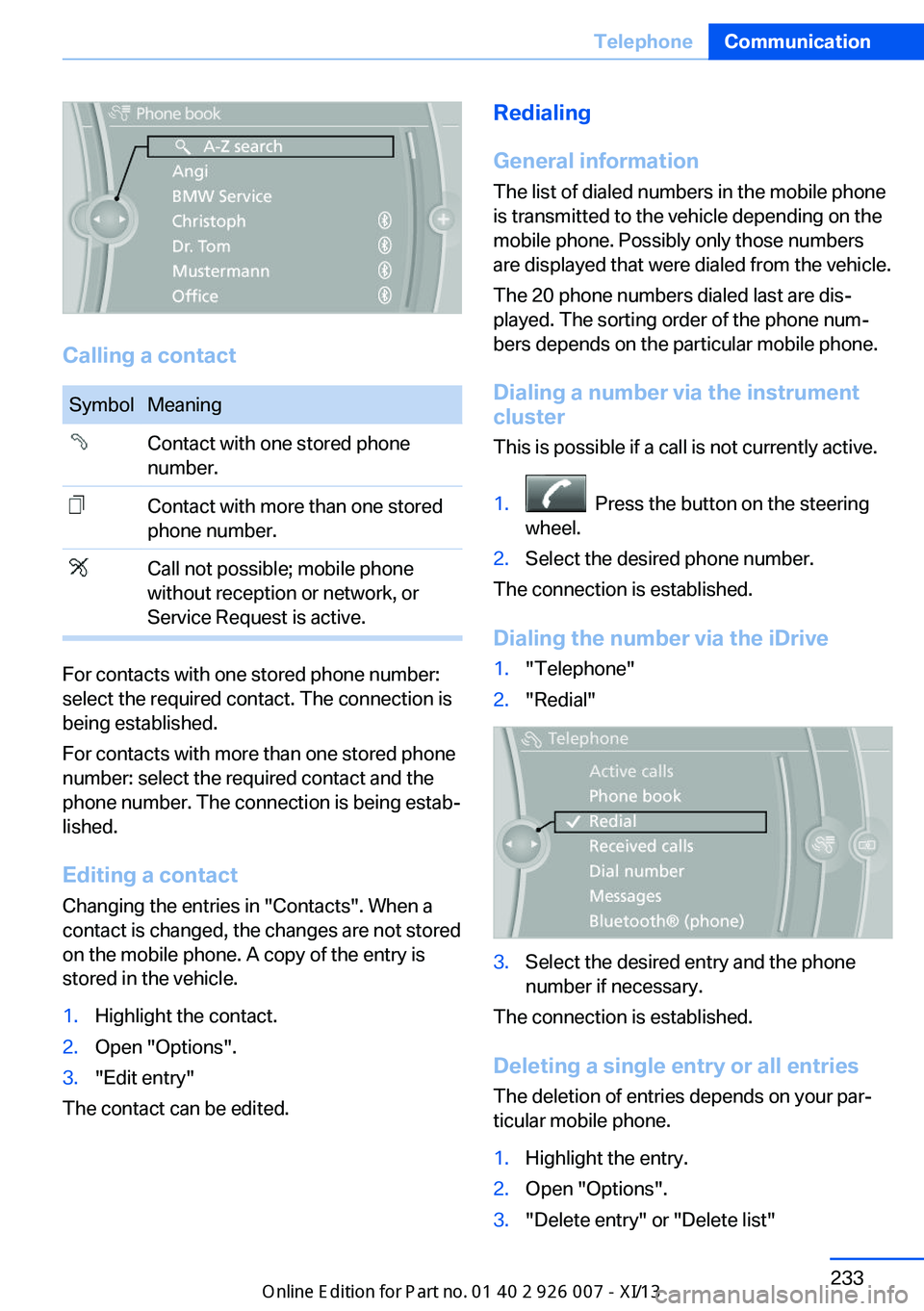
Calling a contact
SymbolMeaningContact with one stored phone
number.Contact with more than one stored
phone number.Call not possible; mobile phone
without reception or network, or
Service Request is active.
For contacts with one stored phone number:
select the required contact. The connection is
being established.
For contacts with more than one stored phone
number: select the required contact and the
phone number. The connection is being estab‐
lished.
Editing a contact Changing the entries in "Contacts". When a
contact is changed, the changes are not stored
on the mobile phone. A copy of the entry is
stored in the vehicle.
1.Highlight the contact.2.Open "Options".3."Edit entry"
The contact can be edited.
Redialing
General information
The list of dialed numbers in the mobile phone
is transmitted to the vehicle depending on the
mobile phone. Possibly only those numbers
are displayed that were dialed from the vehicle.
The 20 phone numbers dialed last are dis‐
played. The sorting order of the phone num‐
bers depends on the particular mobile phone.
Dialing a number via the instrument cluster
This is possible if a call is not currently active.1. Press the button on the steering
wheel.2.Select the desired phone number.
The connection is established.
Dialing the number via the iDrive
1."Telephone"2."Redial"3.Select the desired entry and the phone
number if necessary.
The connection is established.
Deleting a single entry or all entries The deletion of entries depends on your par‐
ticular mobile phone.
1.Highlight the entry.2.Open "Options".3."Delete entry" or "Delete list"Seite 233TelephoneCommunication233
Online Edition for Part no. 01 40 2 910 876 - VII/13
Page 239 of 327
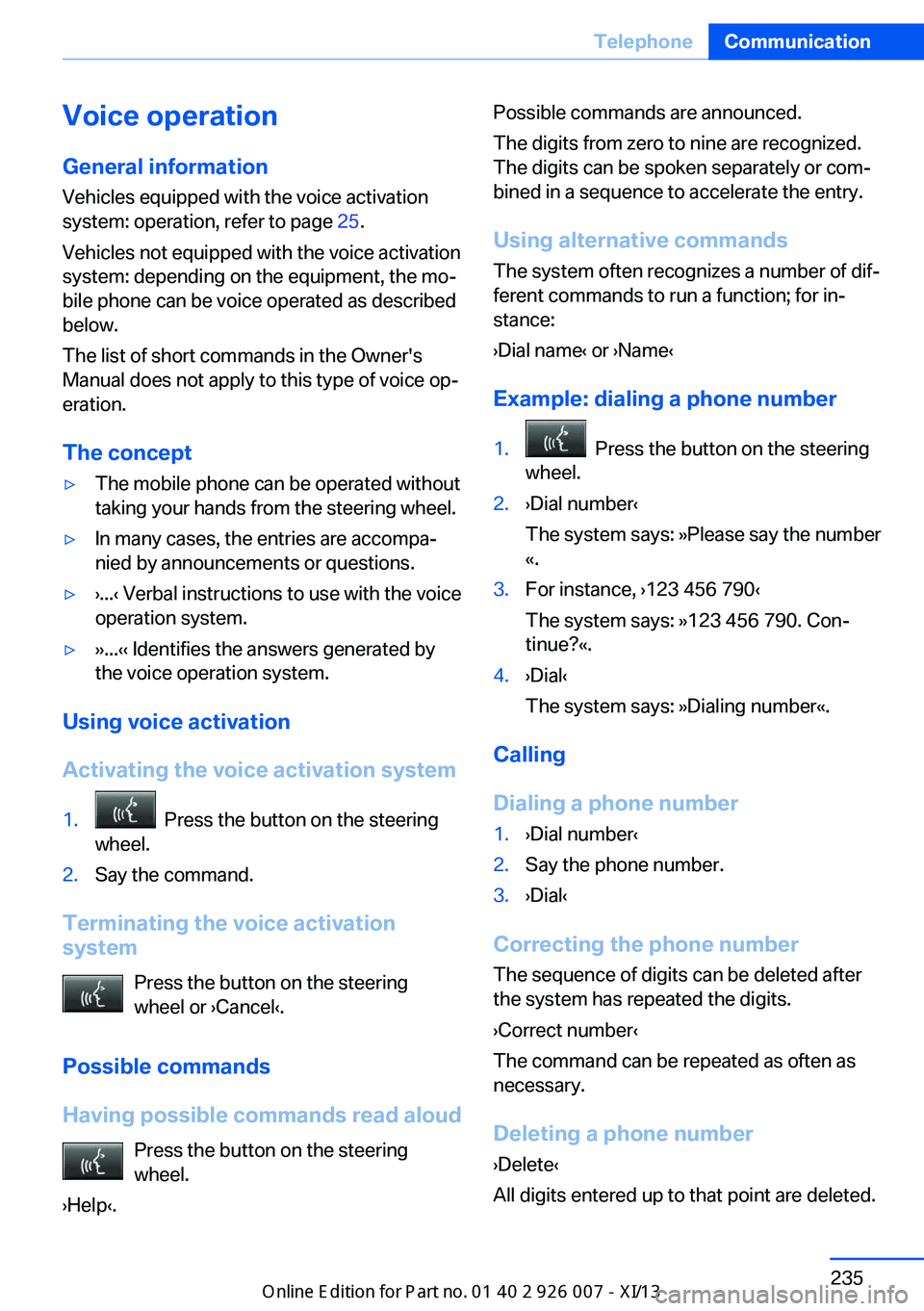
Voice operationGeneral information
Vehicles equipped with the voice activation
system: operation, refer to page 25.
Vehicles not equipped with the voice activation
system: depending on the equipment, the mo‐
bile phone can be voice operated as described
below.
The list of short commands in the Owner's
Manual does not apply to this type of voice op‐
eration.
The concept▷The mobile phone can be operated without
taking your hands from the steering wheel.▷In many cases, the entries are accompa‐
nied by announcements or questions.▷›...‹ Verbal instructions to use with the voice
operation system.▷››...‹‹ Identifies the answers generated by
the voice operation system.
Using voice activation
Activating the voice activation system
1. Press the button on the steering
wheel.2.Say the command.
Terminating the voice activation
system
Press the button on the steering
wheel or ›Cancel‹.
Possible commands
Having possible commands read aloud Press the button on the steering
wheel.
›Help‹.
Possible commands are announced.
The digits from zero to nine are recognized.
The digits can be spoken separately or com‐
bined in a sequence to accelerate the entry.
Using alternative commands
The system often recognizes a number of dif‐
ferent commands to run a function; for in‐
stance:
›Dial name‹ or ›Name‹
Example: dialing a phone number1. Press the button on the steering
wheel.2.›Dial number‹
The system says: »Please say the number
«.3.For instance, ›123 456 790‹
The system says: »123 456 790. Con‐
tinue?«.4.›Dial‹
The system says: »Dialing number«.
Calling
Dialing a phone number
1.›Dial number‹2.Say the phone number.3.›Dial‹
Correcting the phone number The sequence of digits can be deleted after
the system has repeated the digits.
›Correct number‹
The command can be repeated as often as
necessary.
Deleting a phone number ›Delete‹
All digits entered up to that point are deleted.
Seite 235TelephoneCommunication235
Online Edition for Part no. 01 40 2 910 876 - VII/13
Page 261 of 327
Mobility
In order to always ensure your mobility, you will find important information on operating fluids,wheels and tires, maintenance and Roadside Assistance in the following.Online Edition for Part no. 01 40 2 910 876 - VII/13
Page 266 of 327
Wheels and tiresVehicle equipment
This chapter describes all series equipment as
well as country-specific and special equipment
offered for this model series.Therefore, it also
describes equipment that may not be found in
your vehicle, for instance due to the selected
special equipment or the country version. This
also applies to safety-related functions and
systems.
Tire inflation pressure
Safety information
It is not merely the tires' service life, but also
driving comfort and, to a great extent, driving
safety that depend on the condition of the tires
and the maintenance of the specified tire pres‐
sure.
Checking the pressure Only check the tire inflation pressure when the
tires are cold. This means after a maximum of
1.25 miles/2 km driving or when the vehicle
has been parked for at least 2 hours. When the
tires are warm, the tire inflation pressure is
higher.
Check the tire inflation pressure regularly
Check the tire inflation pressure regularly
and correct it if necessary, even in the compact
wheel: usually twice monthly or before em‐
barking on a long trip. If you fail to observe this
precaution, you may be driving on tires with in‐
correct tire pressures, a condition that may not
only compromise your vehicle's driving stabil‐
ity, but also lead to tire damage and the risk of
an accident.Do not drive with depressurized or flat tires,
except for run-flat tires. A flat tire will seriously
impair your vehicle's handling and braking re‐
sponse. Attempts to drive on a flat tire can lead
to a loss of control over the vehicle.◀
After adjusting the tire inflation pressure, reset
the Tire Pressure Monitor, refer to page 90, or
reinitialize the Flat Tire Monitor, refer to
page 88.
Pressure specifications The tables below provide all the correct infla‐
tion pressures for the specified tire sizes at
ambient temperature.
The inflation pressures apply to the tire sizes
approved and tire brands recommended by
BMW; a list of these is available from your
service center.
For correct identification of the right tire infla‐
tion pressures, observe the following:▷Tire sizes of your vehicle.▷Maximum allowable driving speed.
Tire inflation pressures for driving up
to 100 mph or 160 km/h
For normal driving up to 100 mph/160 km/h,
adjust pressures to the respective tire inflation
pressures listed on the following pages in the
column for traveling speeds up to 100 mph/
160 km/h to achieve optimum driving comfort.
These tire inflation pressures can also be
found on the driver's side door pillar when the
driver's door is open.
Seite 262MobilityWheels and tires262
Online Edition for Part no. 01 40 2 910 876 - VII/13
Page 267 of 327
Do not exceed the maximum permissible
speed
The maximum permissible speed for these tire
pressures is 100 mph/160 km/h. Do not ex‐
ceed this speed; otherwise, tire damage and
accidents may occur.◀
Tire inflation pressures for driving
above 100 mph or 160 km/h
Adjust the tire inflation pressures
To drive at maximum speeds in excess of
100 mph/160 km/h, adjust pressures to the re‐
spective tire inflation pressures listed on the
following pages in the column for traveling
speeds including those exceeding 100 mph or
160 km/h. Otherwise, tire damage and acci‐
dents could occur.◀
Observe all national and local maximum speed
limits; otherwise, violations of the laws could
occur.
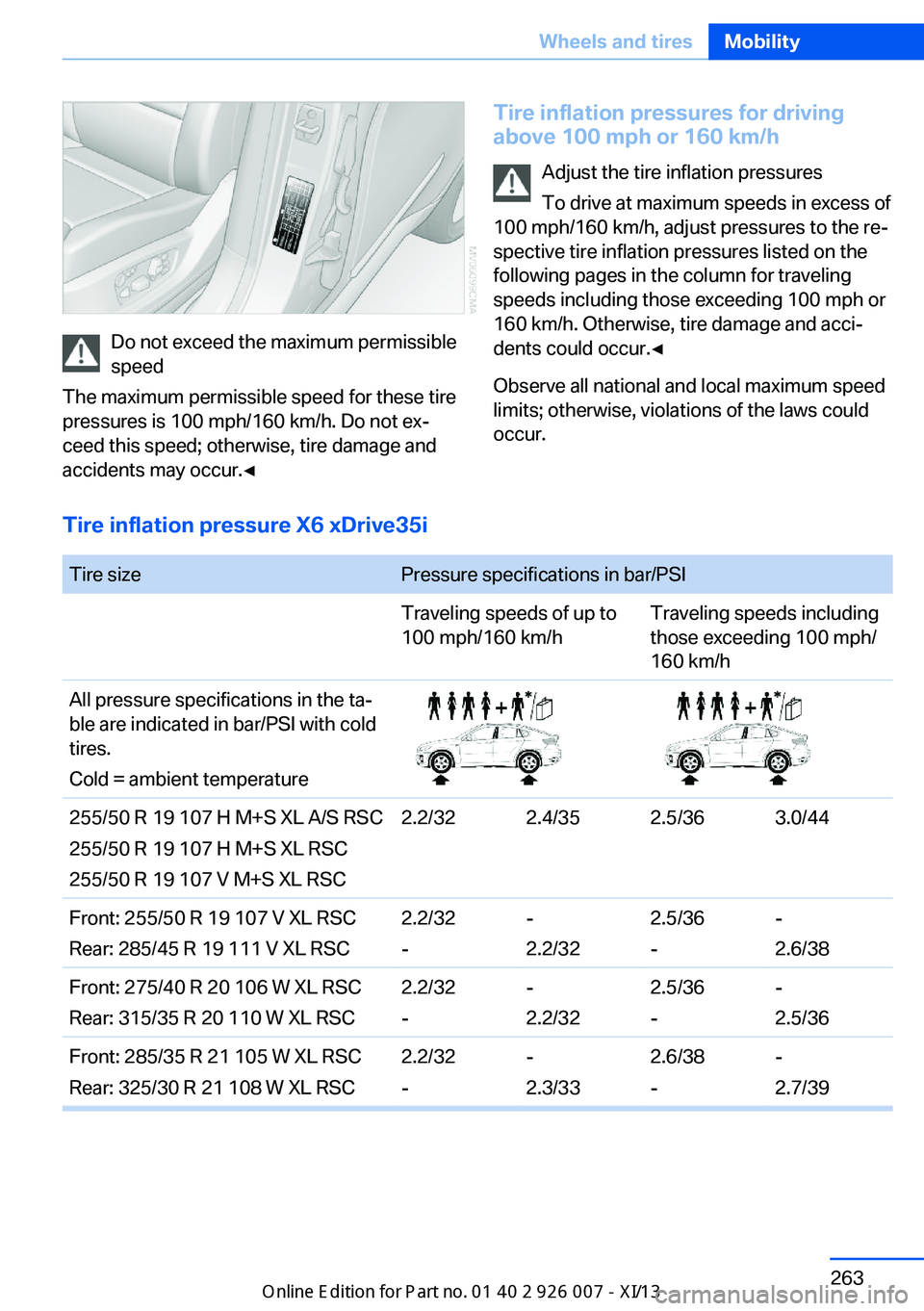
Tire inflation pressure X6 xDrive35i
Tire sizePressure specifications in bar/PSITraveling speeds of up to
100 mph/160 km/hTraveling speeds including
those exceeding 100 mph/
160 km/hAll pressure specifications in the ta‐
ble are indicated in bar/PSI with cold
tires.
Cold = ambient temperature255/50 R 19 107 H M+S XL A/S RSC
255/50 R 19 107 H M+S XL RSC
255/50 R 19 107 V M+S XL RSC2.2/322.4/352.5/363.0/44Front: 255/50 R 19 107 V XL RSC
Rear: 285/45 R 19 111 V XL RSC2.2/32
--
2.2/322.5/36
--
2.6/38Front: 275/40 R 20 106 W XL RSC
Rear: 315/35 R 20 110 W XL RSC2.2/32
--
2.2/322.5/36
--
2.5/36Front: 285/35 R 21 105 W XL RSC
Rear: 325/30 R 21 108 W XL RSC2.2/32
--
2.3/332.6/38
--
2.7/39Seite 263Wheels and tiresMobility263
Online Edition for Part no. 01 40 2 910 876 - VII/13
Page 268 of 327
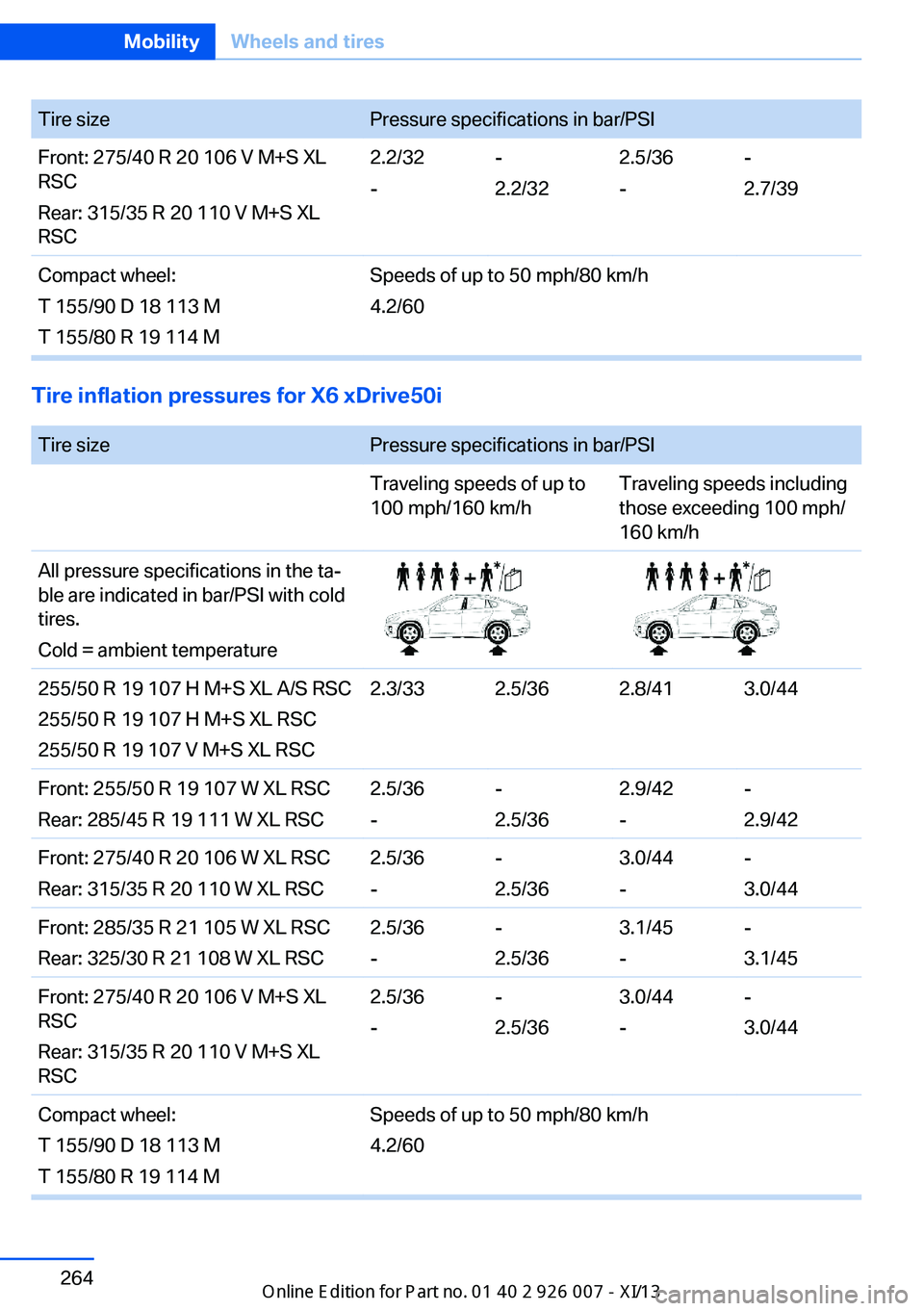
Tire sizePressure specifications in bar/PSIFront: 275/40 R 20 106 V M+S XL
RSC
Rear: 315/35 R 20 110 V M+S XL
RSC2.2/32
--
2.2/322.5/36
--
2.7/39Compact wheel:
T 155/90 D 18 113 M
T 155/80 R 19 114 MSpeeds of up to 50 mph/80 km/h
4.2/60
Tire inflation pressures for X6 xDrive50i
Tire sizePressure specifications in bar/PSITraveling speeds of up to
100 mph/160 km/hTraveling speeds including
those exceeding 100 mph/
160 km/hAll pressure specifications in the ta‐
ble are indicated in bar/PSI with cold
tires.
Cold = ambient temperature255/50 R 19 107 H M+S XL A/S RSC
255/50 R 19 107 H M+S XL RSC
255/50 R 19 107 V M+S XL RSC2.3/332.5/362.8/413.0/44Front: 255/50 R 19 107 W XL RSC
Rear: 285/45 R 19 111 W XL RSC2.5/36
--
2.5/362.9/42
--
2.9/42Front: 275/40 R 20 106 W XL RSC
Rear: 315/35 R 20 110 W XL RSC2.5/36
--
2.5/363.0/44
--
3.0/44Front: 285/35 R 21 105 W XL RSC
Rear: 325/30 R 21 108 W XL RSC2.5/36
--
2.5/363.1/45
--
3.1/45Front: 275/40 R 20 106 V M+S XL
RSC
Rear: 315/35 R 20 110 V M+S XL
RSC2.5/36
--
2.5/363.0/44
--
3.0/44Compact wheel:
T 155/90 D 18 113 M
T 155/80 R 19 114 MSpeeds of up to 50 mph/80 km/h
4.2/60Seite 264MobilityWheels and tires264
Online Edition for Part no. 01 40 2 910 876 - VII/13
Page 269 of 327
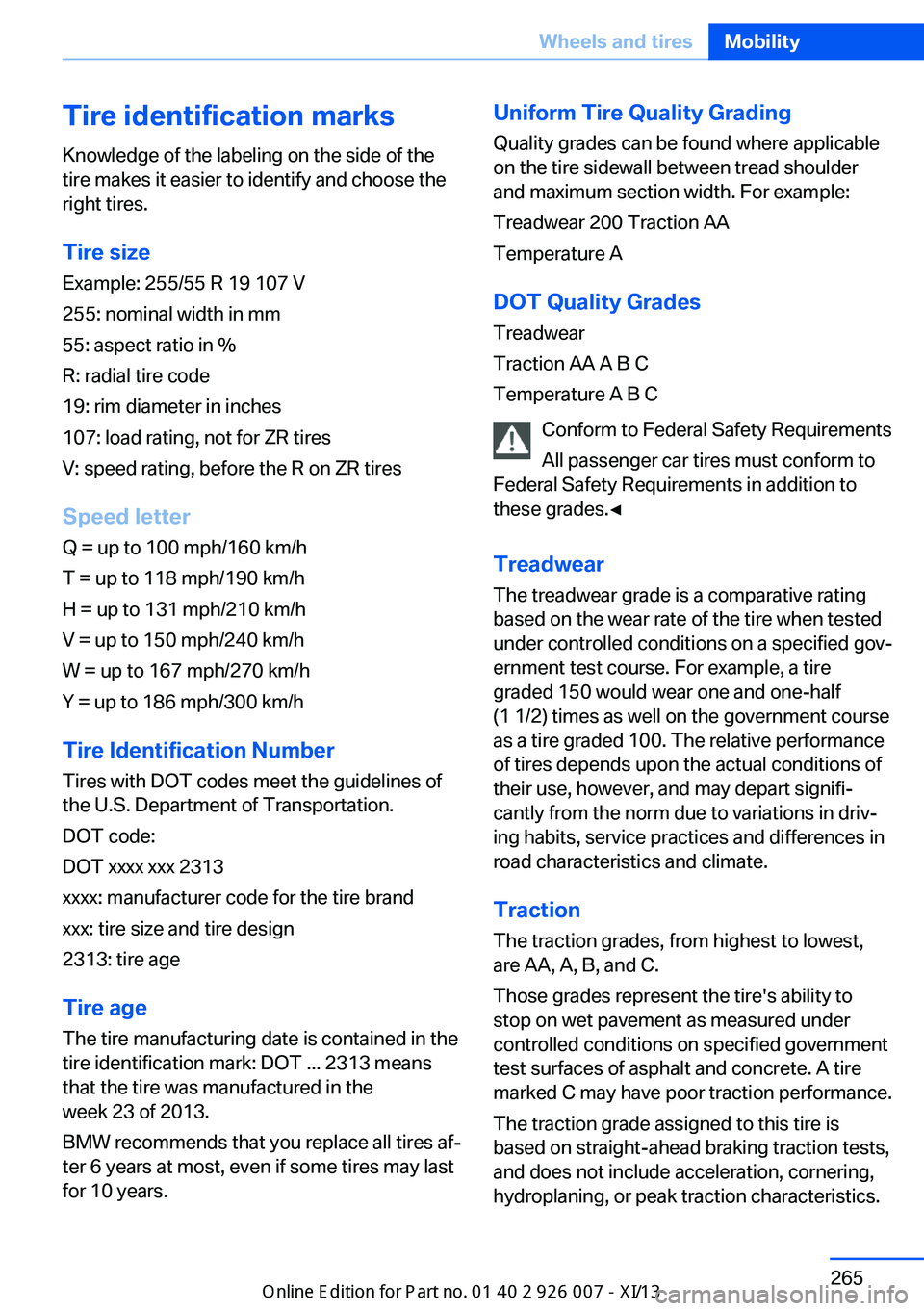
Tire identification marksKnowledge of the labeling on the side of the
tire makes it easier to identify and choose the
right tires.
Tire size
Example: 255/55 R 19 107 V
255: nominal width in mm
55: aspect ratio in %
R: radial tire code
19: rim diameter in inches
107: load rating, not for ZR tires
V: speed rating, before the R on ZR tires
Speed letter
Q = up to 100 mph/160 km/h
T = up to 118 mph/190 km/h
H = up to 131 mph/210 km/h
V = up to 150 mph/240 km/h
W = up to 167 mph/270 km/h
Y = up to 186 mph/300 km/h
Tire Identification Number Tires with DOT codes meet the guidelines of
the U.S. Department of Transportation.
DOT code:
DOT xxxx xxx 2313
xxxx: manufacturer code for the tire brand
xxx: tire size and tire design
2313: tire age
Tire age
The tire manufacturing date is contained in the
tire identification mark: DOT ... 2313 means
that the tire was manufactured in the
week 23 of 2013.
BMW recommends that you replace all tires af‐
ter 6 years at most, even if some tires may last
for 10 years.Uniform Tire Quality Grading
Quality grades can be found where applicable
on the tire sidewall between tread shoulder
and maximum section width. For example:
Treadwear 200 Traction AA
Temperature A
DOT Quality Grades
Treadwear
Traction AA A B C
Temperature A B C
Conform to Federal Safety Requirements
All passenger car tires must conform to
Federal Safety Requirements in addition to
these grades.◀
Treadwear The treadwear grade is a comparative rating
based on the wear rate of the tire when tested
under controlled conditions on a specified gov‐
ernment test course. For example, a tire graded 150 would wear one and one-half
(1 1/2) times as well on the government course
as a tire graded 100. The relative performance
of tires depends upon the actual conditions of
their use, however, and may depart signifi‐
cantly from the norm due to variations in driv‐
ing habits, service practices and differences in
road characteristics and climate.
Traction
The traction grades, from highest to lowest,
are AA, A, B, and C.
Those grades represent the tire's ability to
stop on wet pavement as measured under
controlled conditions on specified government
test surfaces of asphalt and concrete. A tire
marked C may have poor traction performance.
The traction grade assigned to this tire is
based on straight-ahead braking traction tests,
and does not include acceleration, cornering,
hydroplaning, or peak traction characteristics.Seite 265Wheels and tiresMobility265
Online Edition for Part no. 01 40 2 910 876 - VII/13