turn signal BUICK CASCADA 2016 User Guide
[x] Cancel search | Manufacturer: BUICK, Model Year: 2016, Model line: CASCADA, Model: BUICK CASCADA 2016Pages: 381, PDF Size: 5.52 MB
Page 107 of 381
Buick Cascada Owner Manual (GMNA-Localizing-U.S-9186636) - 2016 - crc -
3/9/16
106 Instruments and Controls
This light comes on when the brake
pedal needs to be applied to release
the Electric Parking Brake (EPB).
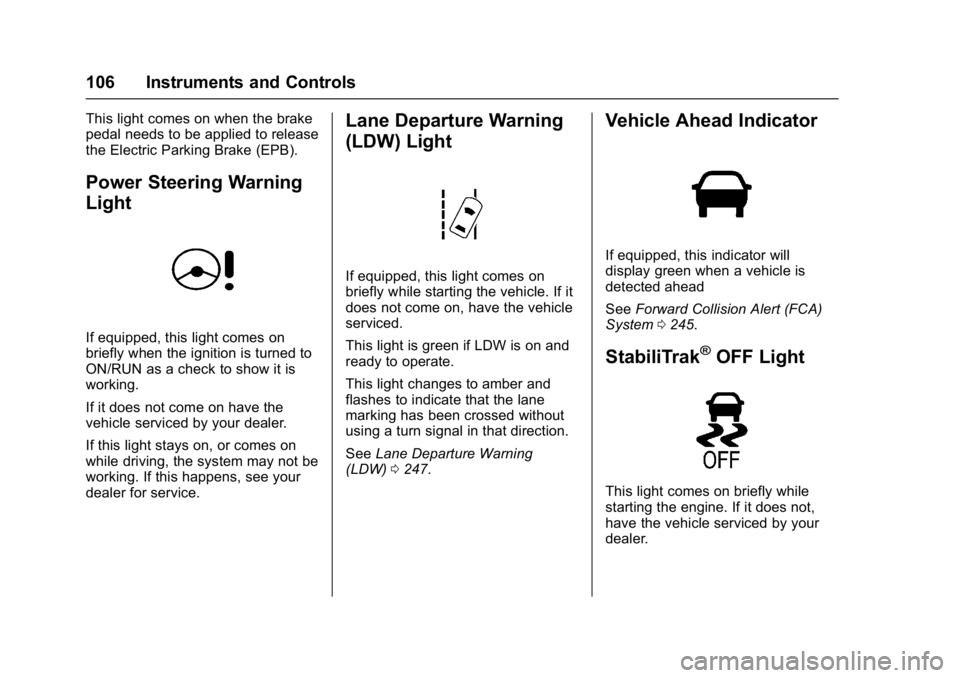
Power Steering Warning
Light
If equipped, this light comes on
briefly when the ignition is turned to
ON/RUN as a check to show it is
working.
If it does not come on have the
vehicle serviced by your dealer.
If this light stays on, or comes on
while driving, the system may not be
working. If this happens, see your
dealer for service.
Lane Departure Warning
(LDW) Light
If equipped, this light comes on
briefly while starting the vehicle. If it
does not come on, have the vehicle
serviced.
This light is green if LDW is on and
ready to operate.
This light changes to amber and
flashes to indicate that the lane
marking has been crossed without
using a turn signal in that direction.
SeeLane Departure Warning
(LDW) 0247.
Vehicle Ahead Indicator
If equipped, this indicator will
display green when a vehicle is
detected ahead
See Forward Collision Alert (FCA)
System 0245.
StabiliTrak®OFF Light
This light comes on briefly while
starting the engine. If it does not,
have the vehicle serviced by your
dealer.
Page 111 of 381
Buick Cascada Owner Manual (GMNA-Localizing-U.S-9186636) - 2016 - crc -
3/9/16
110 Instruments and Controls
Information Displays
Driver Information
Center (DIC)
The DIC displays information about
the vehicle. It also displays warning
messages if a system problem is
detected. SeeVehicle Messages
0 113. All messages appear in the
DIC display in the center of the
instrument cluster.
DIC Operation and Displays
The DIC has different displays
which can be accessed by using the
DIC buttons on the turn signal lever.
The DIC displays trip, fuel, and
vehicle system information, and
warning messages if a system
problem is detected.
The bottom of the DIC display
shows the position of the shift lever
and the odometer. It may also show
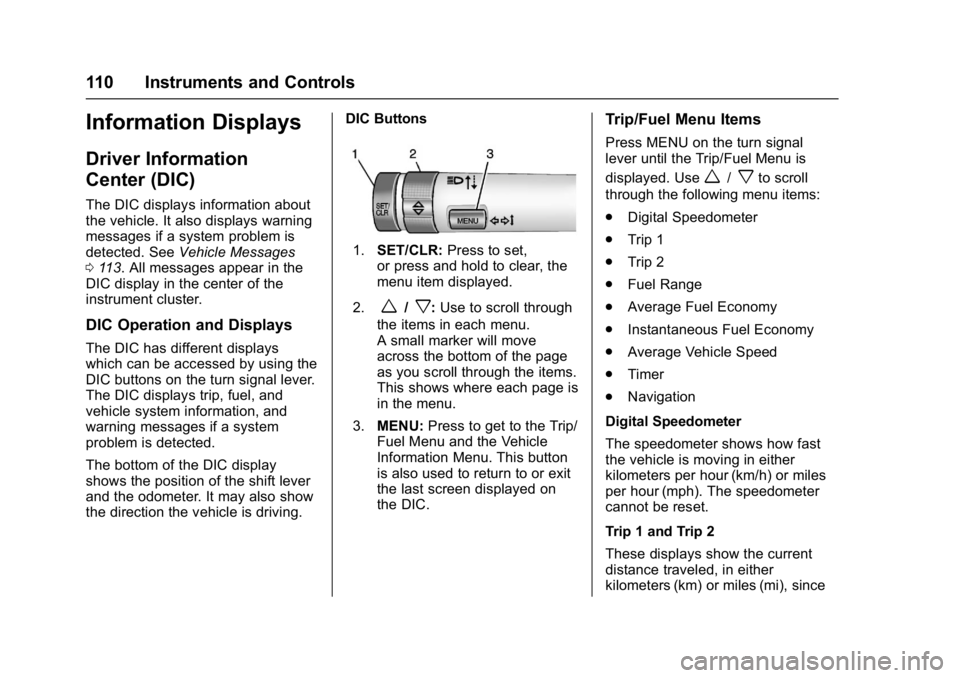
the direction the vehicle is driving. DIC Buttons
1.
SET/CLR: Press to set,
or press and hold to clear, the
menu item displayed.
2.
w/x: Use to scroll through
the items in each menu.
A small marker will move
across the bottom of the page
as you scroll through the items.
This shows where each page is
in the menu.
3. MENU: Press to get to the Trip/
Fuel Menu and the Vehicle
Information Menu. This button
is also used to return to or exit
the last screen displayed on
the DIC.
Trip/Fuel Menu Items
Press MENU on the turn signal
lever until the Trip/Fuel Menu is
displayed. Use
w/xto scroll
through the following menu items:
. Digital Speedometer
. Trip 1
. Trip 2
. Fuel Range
. Average Fuel Economy
. Instantaneous Fuel Economy
. Average Vehicle Speed
. Timer
. Navigation
Digital Speedometer
The speedometer shows how fast
the vehicle is moving in either
kilometers per hour (km/h) or miles
per hour (mph). The speedometer
cannot be reset.
Trip 1 and Trip 2
These displays show the current
distance traveled, in either
kilometers (km) or miles (mi), since
Page 113 of 381
Buick Cascada Owner Manual (GMNA-Localizing-U.S-9186636) - 2016 - crc -
3/9/16
112 Instruments and Controls
Vehicle Information Menu
Items
Press MENU on the turn signal
lever until the Vehicle Information
Menu is displayed. Use
w/xto
scroll through the following menu
items:
. Unit
. Tire Pressure
. Remaining Oil Life
. Battery Voltage
Unit
Press SET/CLR to set. Move
w/
xto switch between metric or US
when the set Unit display is active.
Press SET/CLR to confirm the
setting. This will change the
displays on the cluster and DIC to
either metric or English (US)
measurements.
Tire Pressure
The display will show a vehicle with
the approximate pressures of all
four tires. Tire pressure is displayed
in either kilopascal (kPa) or pounds
per square inch (psi). See
Tire Pressure Monitor System
0 296 andTire Pressure Monitor
Operation 0297.
Remaining Oil Life
This display shows an estimate of
the oil's remaining useful life.
If REMAINING OIL LIFE 99% is
displayed, that means 99% of the
current oil life remains.
When the remaining oil life is low,
the CHANGE ENGINE OIL SOON
message will appear on the display.
The oil should be changed as soon
as possible. See Engine Oil0260.
In addition to the engine oil life
system monitoring the oil life,
additional maintenance is
recommended in the Maintenance
Schedule. See Maintenance
Schedule 0331.
Remember, the Remaining Oil Life
display must be reset after each oil
change. It will not reset itself. Also,
be careful not to reset the
Remaining Oil Life display
accidentally at any time other than
when the oil has just been changed.
It cannot be reset accurately until
the next oil change. To reset the engine oil life system, press SET/
CLR while the Remaining Oil Life
display is active. See
Engine Oil
Life System 0262.
Battery Voltage
This display shows the current
battery voltage. If the voltage is in
the normal range, the value will
display. For example, the display
may read Battery Voltage 15.0
Volts. The vehicle's charging system
regulates voltage based on the state
of the battery. The battery voltage
can fluctuate while viewing this
information on the DIC. This is
normal. See Charging System
Light 0102.
Page 120 of 381
Buick Cascada Owner Manual (GMNA-Localizing-U.S-9186636) - 2016 - crc -
3/9/16
Lighting 119
Lighting
Exterior Lighting
Exterior Lamp Controls . . . . . . . 119
Headlamp High/Low-BeamChanger . . . . . . . . . . . . . . . . . . . . 120
Flash-to-Pass . . . . . . . . . . . . . . . . 120
Daytime Running Lamps (DRL) . . . . . . . . . . . . . . . 120
Automatic Headlamp System . . . . . . . . . . . . . . . . . . . . . . 121
Adaptive Forward Lighting (AFL) . . . . . . . . . . . . . . . 121
Headlamp Leveling Control . . . 122
Hazard Warning Flashers . . . . . 122
Turn and Lane-Change Signals . . . . . . . . . . . . . . . . . . . . . . 122
Fog Lamps . . . . . . . . . . . . . . . . . . . 122
Interior Lighting
Instrument Panel Illumination Control . . . . . . . . . . . . . . . . . . . . . . 123
Courtesy Lamps . . . . . . . . . . . . . . 123
Dome Lamps . . . . . . . . . . . . . . . . . 123
Reading Lamps . . . . . . . . . . . . . . 124
Lighting Features
Entry Lighting . . . . . . . . . . . . . . . . 124
Exit Lighting . . . . . . . . . . . . . . . . . . 124
Battery Load Management . . . 124
Battery Power Protection . . . . . 125
Exterior Lighting Battery Saver . . . . . . . . . . . . . . . . . . . . . . . 125
Exterior Lighting
Exterior Lamp Controls
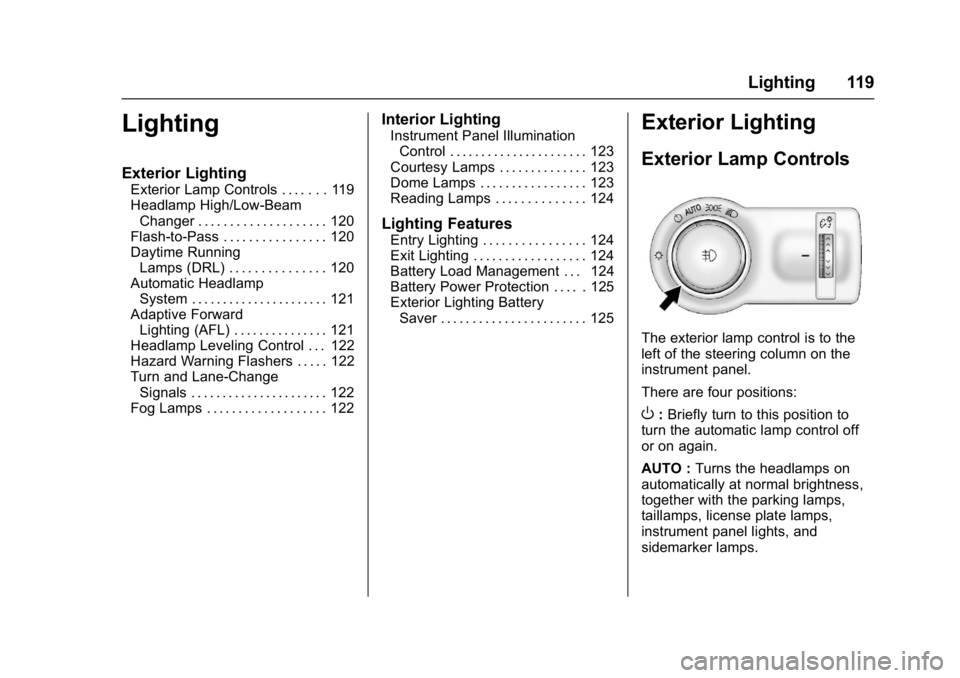
The exterior lamp control is to the
left of the steering column on the
instrument panel.
There are four positions:
O: Briefly turn to this position to
turn the automatic lamp control off
or on again.
AUTO : Turns the headlamps on
automatically at normal brightness,
together with the parking lamps,
taillamps, license plate lamps,
instrument panel lights, and
sidemarker lamps.
Page 121 of 381
Buick Cascada Owner Manual (GMNA-Localizing-U.S-9186636) - 2016 - crc -
3/9/16
120 Lighting
;:Turns on the parking lamps
including all lamps, except the
headlamps.
5: Turns on the headlamps
together with the parking lamps and
instrument panel lights. A warning
chime sounds if the driver door is
opened when the ignition switch is
off and the headlamps are on.
#: If equipped, press to turn the
fog lamps on or off.
See Fog Lamps 0122.
When the lights are on,
;will be
lit. See Lamps On Reminder 0109.
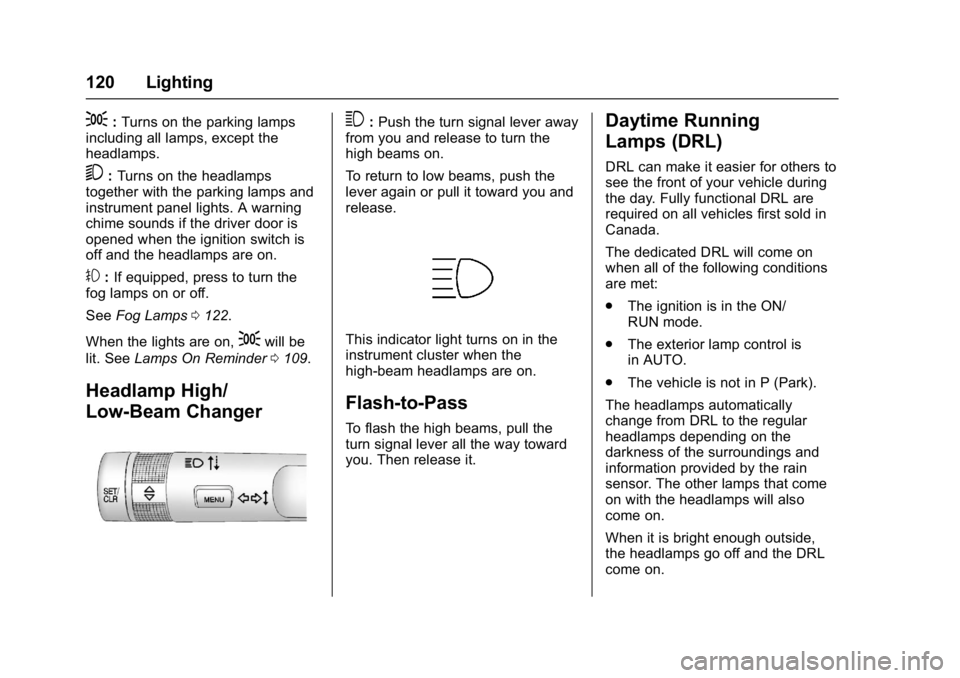
Headlamp High/
Low-Beam Changer
3:Push the turn signal lever away
from you and release to turn the
high beams on.
To return to low beams, push the
lever again or pull it toward you and
release.
This indicator light turns on in the
instrument cluster when the
high-beam headlamps are on.
Flash-to-Pass
To flash the high beams, pull the
turn signal lever all the way toward
you. Then release it.
Daytime Running
Lamps (DRL)
DRL can make it easier for others to
see the front of your vehicle during
the day. Fully functional DRL are
required on all vehicles first sold in
Canada.
The dedicated DRL will come on
when all of the following conditions
are met:
. The ignition is in the ON/
RUN mode.
. The exterior lamp control is
in AUTO.
. The vehicle is not in P (Park).
The headlamps automatically
change from DRL to the regular
headlamps depending on the
darkness of the surroundings and
information provided by the rain
sensor. The other lamps that come
on with the headlamps will also
come on.
When it is bright enough outside,
the headlamps go off and the DRL
come on.
Page 122 of 381
Buick Cascada Owner Manual (GMNA-Localizing-U.S-9186636) - 2016 - crc -
3/9/16
Lighting 121
To turn the DRL off or on again, turn
the exterior lamp control to
Oand
then release. For vehicles first sold
in Canada, the DRL cannot be
turned off.
Automatic Headlamp
System
When it is dark enough outside and
the exterior lamp control is in the
automatic position and the engine is
running, the headlamps come on
automatically. See Exterior Lamp
Controls 0119.
The system may also turn on the
headlamps when driving through a
parking garage or tunnel.
If the vehicle is started in a dark
garage, the automatic headlamp
system comes on immediately. If it
is light outside when the vehicle
leaves the garage, there is a slight
delay before the automatic
headlamp system changes to the
DRL. During that delay, the
instrument cluster may not be as
bright as usual. Make sure the
instrument panel brightness control is in the full bright position. See
Instrument Panel Illumination
Control
0123.
Lights On with Wipers
If the windshield wipers are
activated in daylight with the engine
on, and the exterior lamp control is
in AUTO, the headlamps, parking
lamps, and other exterior lamps
come on. The transition time for the
lamps coming on varies based on
wiper speed. When the wipers are
not operating, these lamps turn off.
Move the exterior lamp control to
P
or;to disable this feature.
Adaptive Forward
Lighting (AFL)
The AFL system adjusts the
headlamps to provide greater road
illumination in various driving
conditions.
To enable AFL, set the exterior lamp
control to the AUTO position.
Moving the control out of the AUTO
position will deactivate the system.
AFL will operate when the vehicle speed is greater than 3 km/h
(2 mph). AFL will not operate when
the transmission is in R (Reverse).
AFL is not immediately operable
after starting the vehicle; driving a
short distance is required to
calibrate the AFL. See
Exterior
Lamp Controls 0119.
Curve Lighting
The light beam pivots based on the
steering wheel position and vehicle
speed of at least 10 km/h (6 mph).
The headlamps shine at an angle of
up to 15 degrees to the right or left
of the direction of travel.
Corner Lighting
On tight bends or when making a
turn, depending on the steering
angle or the turn signal lamp, an
additional left or right reflector is
turned on to illuminate the road at a
right angle to the direction of travel.
It is activated up to a speed of
40 km/h (25 MPH).
Reversing Function
If the headlamps are on and the
shift lever is in R (Reverse), both
corner lights are turned on. They
Page 123 of 381
Buick Cascada Owner Manual (GMNA-Localizing-U.S-9186636) - 2016 - crc -
3/9/16
122 Lighting
remain on for 20 seconds after
moving the shift lever out of
R (Reverse) position or until the
vehicle is driving forward faster than
16 km/h (10 mph).
Headlamp Leveling
Control
The level of the headlamps is
adjusted automatically based on
vehicle load.
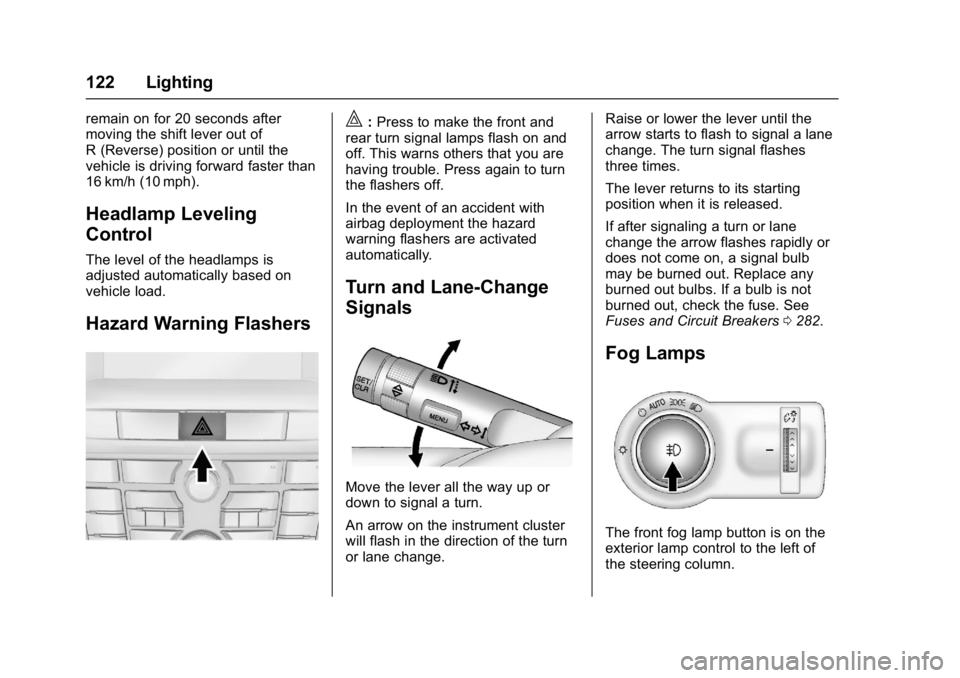
Hazard Warning Flashers
|:Press to make the front and
rear turn signal lamps flash on and
off. This warns others that you are
having trouble. Press again to turn
the flashers off.
In the event of an accident with
airbag deployment the hazard
warning flashers are activated
automatically.
Turn and Lane-Change
Signals
Move the lever all the way up or
down to signal a turn.
An arrow on the instrument cluster
will flash in the direction of the turn
or lane change. Raise or lower the lever until the
arrow starts to flash to signal a lane
change. The turn signal flashes
three times.
The lever returns to its starting
position when it is released.
If after signaling a turn or lane
change the arrow flashes rapidly or
does not come on, a signal bulb
may be burned out. Replace any
burned out bulbs. If a bulb is not
burned out, check the fuse. See
Fuses and Circuit Breakers
0282.
Fog Lamps
The front fog lamp button is on the
exterior lamp control to the left of
the steering column.
Page 146 of 381
Buick Cascada Owner Manual (GMNA-Localizing-U.S-9186636) - 2016 - crc -
3/9/16
Infotainment System 145
especially around tall buildings or
hills, causing the sound to fade in
and out.
AM
The range for most AM stations is
greater than for FM, especially at
night. The longer range can cause
station frequencies to interfere with
each other. Static can occur when
things like storms and power lines
interfere with radio reception. When
this happens, try reducing the treble
on the radio.
SiriusXM®Satellite Radio
Service
SiriusXM Satellite Radio Service
gives digital radio reception from
coast to coast in the 48 contiguous
United States, and in Canada. Just
as with FM, tall buildings or hills can
interfere with satellite radio signals,
causing the sound to fade in and
out. In addition, traveling or standing
under heavy foliage, bridges,
garages, or tunnels may cause loss
of the SiriusXM signal for a period
of time.
Cellular Phone Usage
Cell phone usage, such as making
or receiving phone calls, charging,
or having the phone on may cause
static interference in the radio.
Unplug the phone or turn it off if this
happens.
Multi-Band Antenna
The multi-band antenna is used for
OnStar, the SiriusXM Satellite Radio
Service System, and GPS (Global
Positioning System), if the vehicle
has these features. Keep the
antenna clear of obstructions for
clear reception.
If the vehicle has a sunroof, and it is
open, reception can also be
affected.
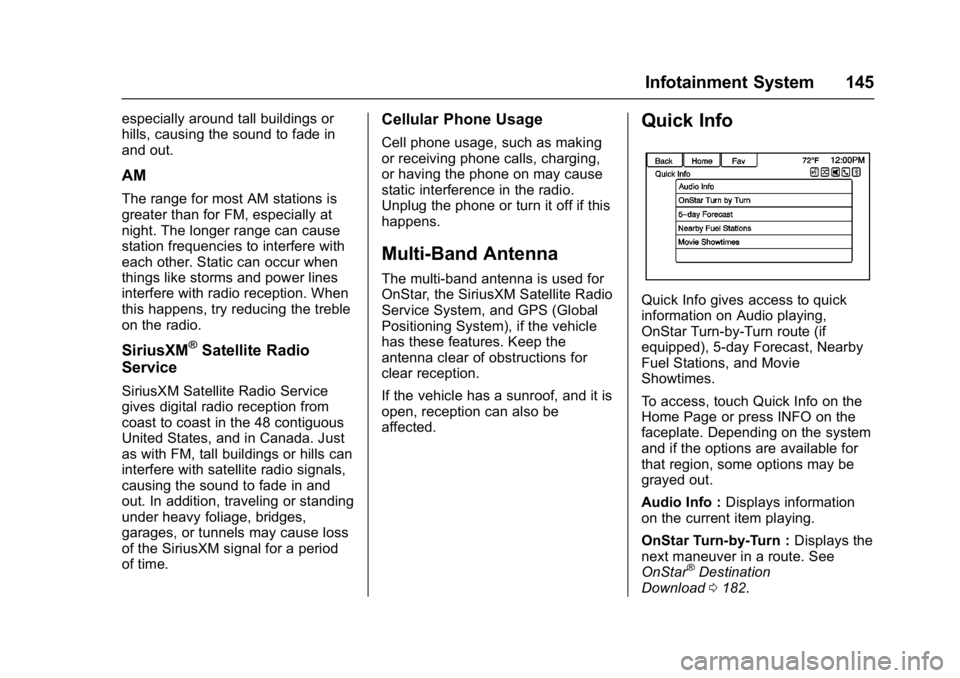
Quick Info
Quick Info gives access to quick
information on Audio playing,
OnStar Turn-by-Turn route (if
equipped), 5-day Forecast, Nearby
Fuel Stations, and Movie
Showtimes.
To access, touch Quick Info on the
Home Page or press INFO on the
faceplate. Depending on the system
and if the options are available for
that region, some options may be
grayed out.
Audio Info : Displays information
on the current item playing.
OnStar Turn-by-Turn : Displays the
next maneuver in a route. See
OnStar
®Destination
Download 0182.
Page 190 of 381
Buick Cascada Owner Manual (GMNA-Localizing-U.S-9186636) - 2016 - crc -
3/9/16
Infotainment System 189
Global Positioning
System (GPS)
The position of the vehicle is
determined by using satellite
signals, various vehicle signals, and
map data.
At times, other interference such as
the satellite condition, road
configuration, condition of the
vehicle, and/or other circumstances
can affect the navigation system's
ability to determine the accurate
position of the vehicle.
The GPS shows the current position
of the vehicle using signals sent by
GPS Satellites. When the vehicle is
not receiving signals from the
satellites, a symbol appears on the
map screen. SeeNavigation
Symbols 0170.
This system might not be available
or interference can occur if any of
the following are true:
. Signals are obstructed by tall
buildings, trees, large trucks,
or a tunnel. .
Satellites are being repaired or
improved.
For more information if the GPS is
not functioning properly, see
Problems with Route Guidance
0 190 andIf the System Needs
Service 0190.
Vehicle Positioning
At times, the position of the vehicle
on the map could be inaccurate due
to one or more of the following
reasons:
.
The road system has changed.
. The vehicle is driving on slippery
road surfaces such as sand,
gravel, or snow.
. The vehicle is traveling on
winding roads or long straight
roads.
. The vehicle is approaching a tall
building or a large vehicle.
. The surface streets run parallel
to a freeway.
. The vehicle has been transferred
by a vehicle carrier or a ferry. .
The current position calibration
is set incorrectly.
. The vehicle is traveling at high
speed.
. The vehicle changes directions
more than once, or the vehicle is
turning on a turn table in a
parking lot.
. The vehicle is entering and/or
exiting a parking lot, garage, or a
lot with a roof.
. The GPS signal is not received.
. A roof carrier is installed on the
vehicle.
. Tire chains have been installed.
. The tires are replaced or worn.
. The tire pressure for the tires is
incorrect.
. This is the first navigation use
after the map data is updated.
. The 12-volt battery was
disconnected for several days.
. The vehicle is driving in heavy
traffic where driving is at low
speeds, and the vehicle is
stopped and started repeatedly.
Page 223 of 381

Buick Cascada Owner Manual (GMNA-Localizing-U.S-9186636) - 2016 - crc -
3/9/16
222 Driving and Operating
clear roads in shaded areas.
The surface of a curve or an
overpass can remain icy when
the surrounding roads are clear.
Avoid sudden steering
maneuvers and braking while
on ice.
. Turn off cruise control.
Blizzard Conditions
Stop the vehicle in a safe place and
signal for help. Stay with the vehicle
unless there is help nearby.
If possible, use Roadside
Assistance. See Roadside
Assistance Program 0350. To get
help and keep everyone in the
vehicle safe:
. Turn on the hazard warning
flashers.
. Tie a red cloth to an outside
mirror.
{Warning
Snow can trap engine exhaust
under the vehicle. This may
cause exhaust gases to get
inside. Engine exhaust contains
carbon monoxide (CO), which
cannot be seen or smelled. It can
cause unconsciousness and even
death.
If the vehicle is stuck in snow:
. Clear snow from the base of
the vehicle, especially any
blocking the exhaust pipe.
. Open a window about 5 cm
(2 in) on the vehicle side
that is away from the wind,
to bring in fresh air.
. Fully open the air outlets on
or under the instrument
panel.
. Adjust the climate control
system to circulate the air
inside the vehicle and set
(Continued)
Warning (Continued)
the fan speed to the highest
setting. See“Climate
Control Systems.”
For more information about CO,
see Engine Exhaust 0232.
To save fuel, run the engine for
short periods to warm the vehicle
and then shut the engine off and
partially close the window. Moving
about to keep warm also helps.
If it takes time for help to arrive,
when running the engine, push the
accelerator pedal slightly so the
engine runs faster than the idle
speed. This keeps the battery
charged to restart the vehicle and to
signal for help with the headlamps.
Do this as little as possible, to
save fuel.