radio BUICK CENTURY 1994 Owners Manual
[x] Cancel search | Manufacturer: BUICK, Model Year: 1994, Model line: CENTURY, Model: BUICK CENTURY 1994Pages: 308, PDF Size: 16.3 MB
Page 14 of 308
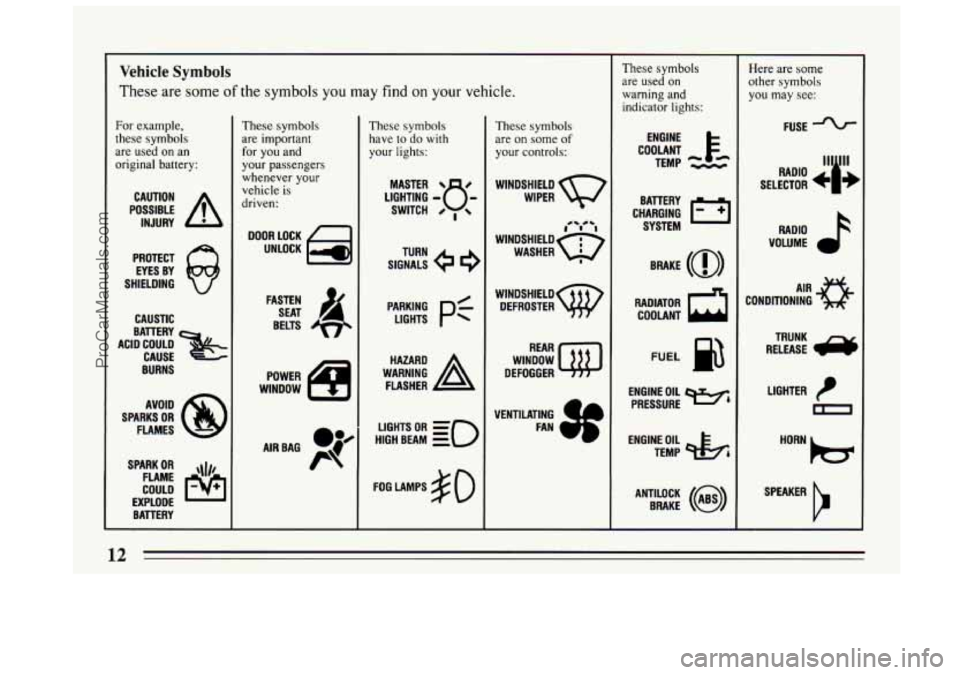
Vehicle Symbols
These are some of the symbols you may find on your vehicle.
Fur example,
these symbols
are used on an
original battery:
POSSIBLE A
CAUTION
INJURY
PROTECT EYES BY
SHIELDING
Q
CAUSTIC
BURNS AVOID
SPARKS
OR
FLAMES
SPARK
OR ,\I/,
COULD FLAME
EXPLODE BATTERY
These symbols
are important
for you and
your passengers whenever your
vehicle is
driven:
FASTEN SEAT 4
BELTS
POWER
WINDOW
AIRBAG P
These symbols have
to do with
your lights:
SIGNALS e
TURN
HIGH BEAM
OR = =o
FOG LAMPS $0
These symbols
are
on some of
your controls:
WIPER v
WINDSHIELDw DEFROSTER
WINDOW
DEFOGGER
VENTILATING FAN
These symbols
are used
on
warning and
indicator lights:
COOLANT F&
TEMP -.--
ENGINE
CHARGING
I-1
BAllERY SYSTEM
RADIATOR COOLANT
a
FUEL
ENGINE OIL e,
PRESSURE
TEMP
OIL 4%
ANTILOCK (@)
BRAKE
Here are some
other symbols
you may see:
FUSE
RADIO
k
VOLUME J
CONDITIONING A'R 0
RELEASE 6
TRUNK
LIGHTER
m
ProCarManuals.com
Page 71 of 308
up to 30 feet (9 m) away using the key chain transmitter
supplied with your vehicle.
Your Remote Keyless Entry System operates on a radio
frequency subject to Federal Communications
Commission (FCC) Rules.
This device complies with Part
15 of the FCC Rules.
Operation is subject to the following two conditions:
(1) This device may not cause harmful interference, and
(2) This device must accept any interference received,
including interference that may cause undesired
operation.
Should interference to this system occur, try this:
e
e
e
0
Check to determine if battery replacement is
necessary. See the instructions on battery
replacement.
Check the distance. You may be
too far from your
vehicle. This product has a maximum range.
Check the location. Other vehicles or objects may be
blocking
the signal.
See your Buick dealer or a qualified technician for
service.
Changes or modifications
to this system by other than an
authorized service facility could void authorization
to
use this equipment.
Operation
The driver’s door will unlock and the interior lights will
go
on when “UNLOCK” is pressed. If pressed again
within five seconds, all doors will unlock.
The interior
lights will go out after
40 seconds or when you turn on
the ignition.
All doors will lock when “DOOR”
is pressed.
Press the opened trunk symbol to unlock the trunk or
wagon liftgate. The transaxle must be in “P” (Park.) If
you have the wagon, the ignition must also be “Off.”
Matching Transmitter(s) To Your Vehicle
Each key chain transmitter is coded to prevent another
transmitter from unlocking your vehicle. If
a transmitter
is lost or stolen, a replacement can be purchased through
your dealer. Remember
to bring any remaining
transmitters with you when
you go to your dealer. When
the dealer matches the replacement transmitter to your
vehicle, the remaining transmitters must also be
matched. Once the new transmitter
is coded, the lost
transmitter will not unlock your vehicle.
You can match a transmitter
to as many different
vehicles as you own, provided they are equipped with
exactly the same model system. (General Motors offers
several different models
of these systems on their
69
ProCarManuals.com
Page 120 of 308
NOTICE:
Damage to your engine from neglected oil
problems can be costly and is not covered by
your warranty.
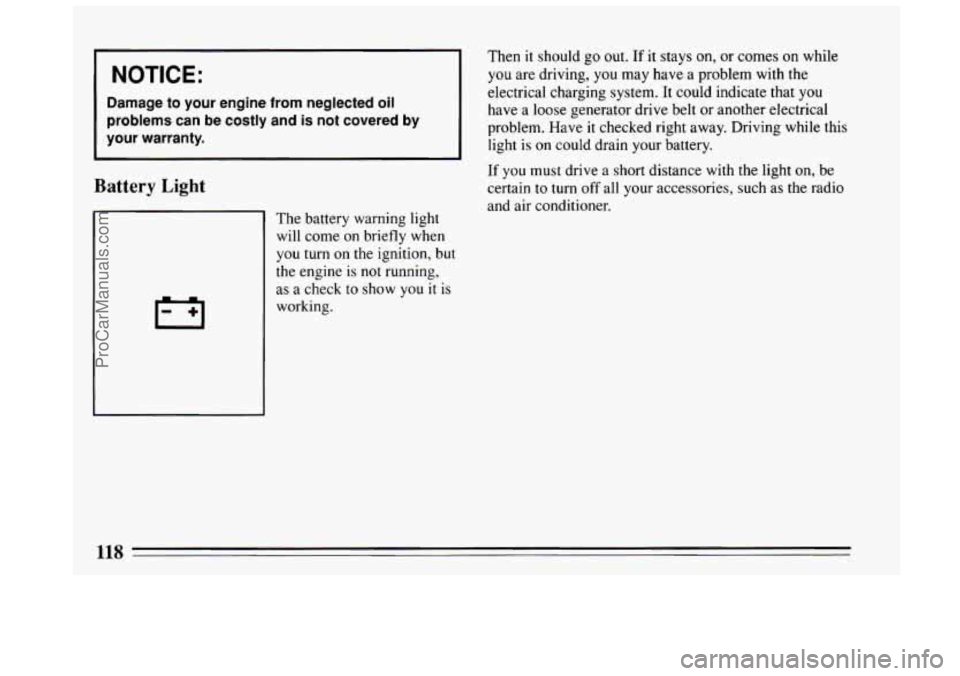
Battery Light
Then it should go out. If it stays on, or corn-es 6n %bile
you are driving, you may have a problem with the
electrical charging system. It could indicate that
you
have a loose generator drive belt or another electrical
problem. Have
it checked right away. Driving while this
light is on could drain your battery.
If you must drive a short distance with the light on, be
certain
to turn off all your accessories, such as the radio
and air conditioner.
The battery warning light
will come on briefly when
you turn on the ignition, but
the engine
is not running,
as a check to
show you it is
working.
118
ProCarManuals.com
Page 123 of 308
Part 3 Comfort Controls and Audio Systems
In this part you’ll find out how to operate the comfort control systems and audio systems offered with your Buick .
Be sure to read about the particular system supplied with your vehicle .
Part 3 includes:
Comfort Control System .......................................................... i22
Airconditioner ............................................................... 122
Ventilation
................................................................... 123
Heater and Defroster
........................................................... 123
RearWindowDefogger
........................................................ 123
Audiosystems
.................................................................... 125
Radio Controls
....................................................... 126. 128. 130
TapePlayerControls ........................................................... 130
CDPlayerControls
............................................................ 132
Care of Cassette Tape Player and Tapes
............................................ 136
CareofCompactDiscs
......................................................... 136
Power Antenna Mast Care
...................................................... 137
ProCarManuals.com
Page 127 of 308
Audio Systems
Your Delco@ audio system has been designed to operate
easily and give years
of listening pleasure. But you will
get the most enjoyment out
of it if you acquaint yourself
with it first. Find out what your Delco@ system can do
and how to operate all its controls, to be sure you're
getting the most out of the advanced engineering that
went into it.
AM Stereo
FM Stereo
FM stereo will give you the best sound. But FM signals
will reach only about
10 to 40 miles (16 to 65 km). Tall
buildings or hills can interfere with
FM signals, causing
the sound to come and
go.
AM
The range for most AM stations is greater than for FM,
especially at night. The longer range, however, can
cause stations to interfere with each other. AM can also
pick up noise from things like storms and power lines.
Try reducing the treble to lower this noise. Your
Delco@ system may be able to receive C-Quam@
stereo broadcasts. Many AM stations around the country
use C-Quam@
to produce stereo, though some do not.
(C-Quam@ is a registered trademark of Motorola, Inc.)
If your Delco' system can get C-Quam@ signals, your
stereo indicator light will come on when you are
receiving
it.
Be aware that hearing damage from loud noise is almost
undetectable
until it is too late. Your hearing can adapt
to higher volumes of sound. Sound that seems normal
can be loud and harmful to your hearing. Take
precautions by adjusting the volume control
on your
radio to a safe sound level before your hearing adapts
to it.
125
ProCarManuals.com
Page 128 of 308
To help avoid hearing loss or damage:
Adjust the volume control to the lowest setting.
Increase volume slowly until you hear comfortably
and clearly.
NOTICE:
Before you add any sound equipment to your
vehicle
-- like a tape player, CB radio, mobile
telephone or two-way radio
-- be sure you can
add what you want. If you can,
it's very important
to do
it properly. Added sound equipment may
interfere with the operation
of your vehicle's
engine, Delco@ radio or other systems, and even
damage them. And, your vehicle's systems may
interfere with the operation of sound equipment
that has been added improperly.
So, before adding sound equipment, check with
your dealer and be sure to check Federal rules
covering mobile radio and telephone units.
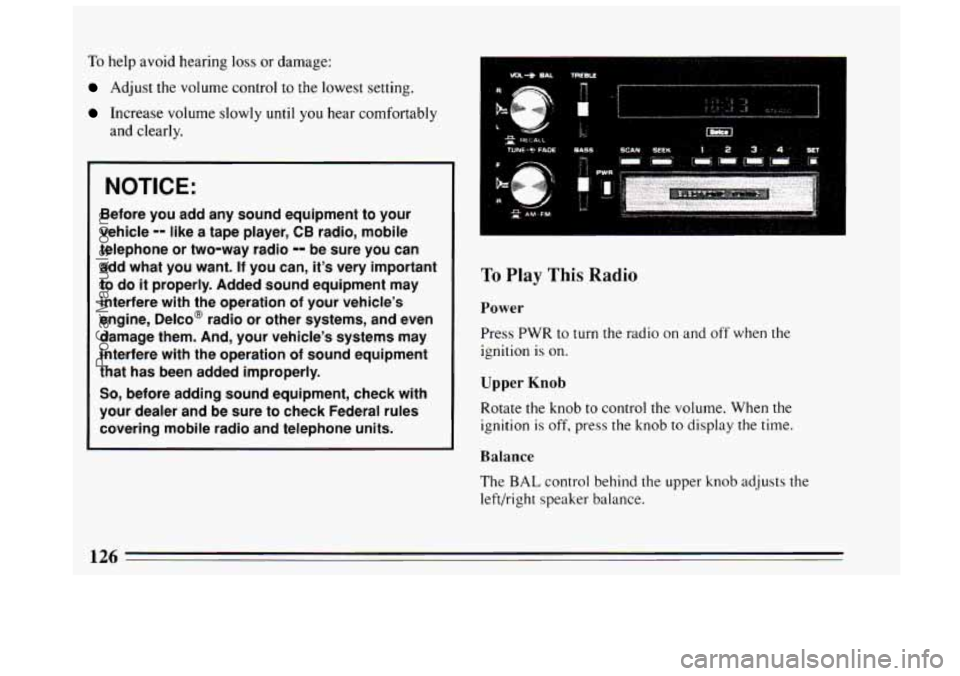
To Play This Radio
Power
Press PWR to turn the radio on and off when the
ignition is on.
Upper Knob
Rotate the knob to control the volume. When the
ignition is off, press the knob to display the time.
Balance
The BAL control behind the upper knob adjusts the
left/right speaker balance.
126
ProCarManuals.com
Page 129 of 308
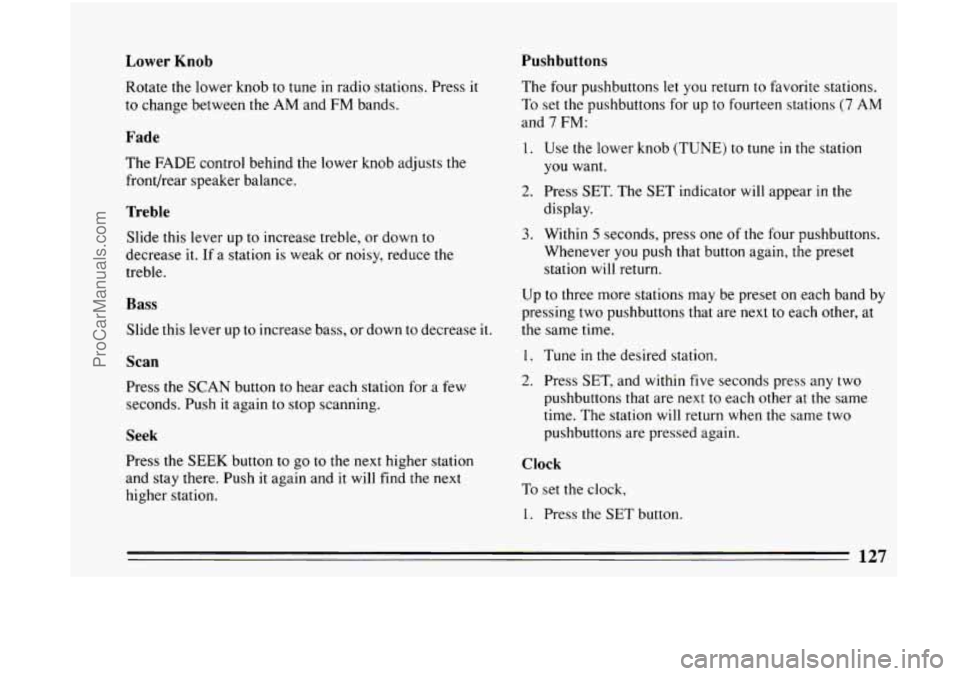
Lower Knob Pushbuttons
Rotate
the lower knob to tune in radio stations. Press it
to change between the AM and FM bands.
Fade
The FADE control behind the lower knob adjusts the
front/rear speaker balance.
Treble
Slide this lever up to increase treble, or down to
decrease it. If a station is weak or noisy, reduce the
treble.
Bass
Slide this lever up to increase bass, or down to decrease it.
Scan
Press the SCAN button to hear each station for a few
seconds. Push it again to stop scanning.
Seek
rress the SEEK button to go to the next higher station
and stay there. Push
it again and it will find the next
higher station. The
four pushbuttons let you return to favorite stations.
To set the pushbuttons for up
to fourteen stations (7 AM
and
7 FM:
1. Use the lower knob (TUNE) to tune in the station
you want.
display.
3. Within 5 seconds, press one of the four pushbuttons.
Whenever you push that button again, the preset
station will return.
2. Press SET. The SET indicator will appear in the
Up to three more stations may be preset on each band by
pressing two pushbuttons that are next to each other, at
the same time.
1. Tune in the desired station.
2. Press SET, and within five seconds press any two
pushbuttons that are next to each other at the same
time. The station will return when the same two
pushbuttons are pressed again.
Clock
To set the clock,
1. Press the SET button.
127
ProCarManuals.com
Page 130 of 308
2. Within 5 seconds, press and hold SCAN until the
correct hour appears
on the display.
3. Press and hold SEEK until the correct minute
appears on the display.
...... _.__” ....... ~ ........ .”... .. 7
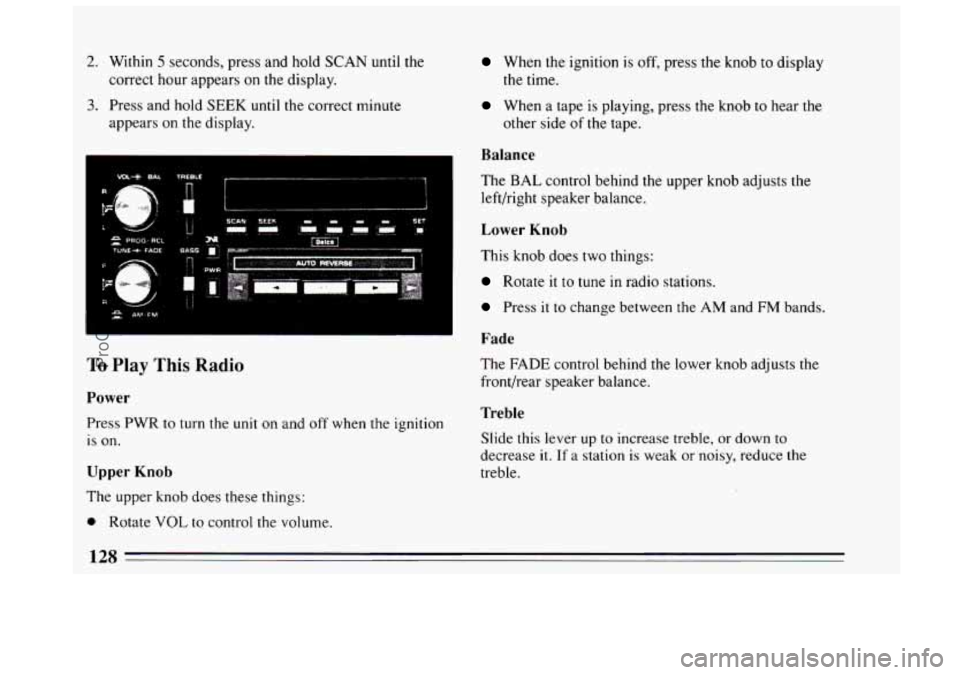
To Play This Radio
Power
Press PWR to turn the unit on and off when the ignition
is on.
Upper Knob
The upper knob does these things:
0 Rotate VOL to control the volume.
When the ignition is off, press the knob to display
the time.
When a tape is playing, press the knob t.o hear the
other side of the tape.
Balance
The BAL control behind the upper knob adjusts the
left/right speaker balance.
Lower Knob
This knob does two things:
Rotate it to tune in radio stations.
Press it to change between the AM and FM bands.
Fade
The FADE control behind the lower knob adjusts the
front/rear speaker balance.
Treble
Slide this lever up to increase treble, or down to
decrease
it. If a station is weak or noisy, reduce the
treble.
128
ProCarManuals.com
Page 131 of 308
Bass
Slide this lever up to increase bass, or down to decrease it.
Scan
Press the SCAN button to hear each station for a few
seconds. Push it again
to stop scanning.
Seek
Press the SEEK button to go to the next higher station
and stay there. Push
it again and it will find the next
higher station.
Pushbuttons
The four pushbuttons let you return to favorite stations.
To set
the pushbuttons for up to fourteen stations
(7 AM and 7 FM:
1. Use the lower knob (TUNE) to tune in the station
you want.
display.
3. Within 5 seconds, press one of the four pushbuttons.
Whenever
you push that button again, the preset
station will return.
2. Press SET. The SET indicator will appear in the Up
to three more stations may be
preset on each band by
pressing two pushbuttons that are next
to each other, at
the same time.
1. Tune in the desired station
2. Press SET, and within five seconds press any two
pushbuttons
that are next to each other at the same
time. The station will return when the same two
pushbuttons are pressed again.
Clock
To set the clock,
1. Press the SET button.
2. Within 5 seconds, press and hold SCAN until the
correct hour appears on the display.
3. Press and hold SEEK until the correct minute
appears on the display.
Dynamic Noise Reduction
Press the DNR@ button to select the Dynamic Noise
Reduction system that reduces background hiss on AM
and
FM radio broadcasts, as well as on cassette tapes.
You may want to leave
it pushed in all the time.
129
ProCarManuals.com
Page 132 of 308
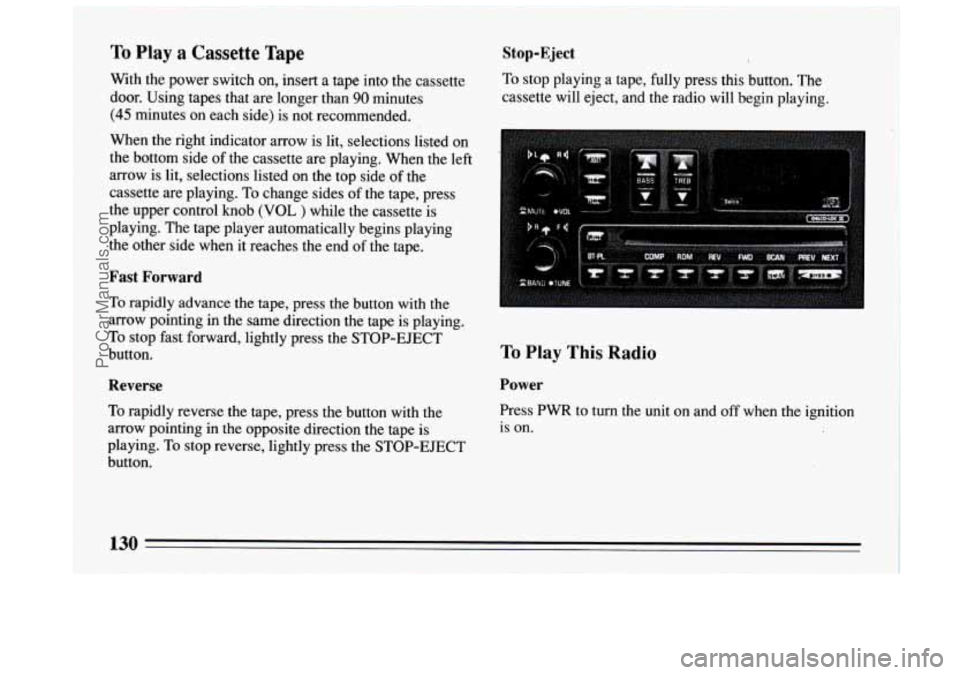
To Play a Cassette Tape
With the power switch on, insert a tape into the cassette
door. Using tapes that are longer than
90 minutes
(45 minutes on each side) is not recommended.
When the right indicator arrow is lit, selections listed on
the bottom side of the cassette are playing. When the left
arrow is lit, selections listed on the top side of the
cassette are playing. To change sides of the tape, press
the upper control
knob (VOL ) while the cassette is
playing. The tape player automatically begins playing
the other side when it reaches the end
of the tape.
Fast Forward
To rapidly advance the tape, press the button with the
arrow pointing in the same direction the tape is playing.
To stop fast forward, lightly press the STOP-EJECT
button.
Reverse
To rapidly reverse the tape, press the button with the
arrow pointing in the opposite direction the tape
is
playing. To stop reverse, lightly press the STOP-EJECT
button.
Stop-Eject
To stop playing a tape, fully press this button. The
cassette will eject, and the radio will begin playing.
To Play This Radio
Power
Press PWR to turn the unit on and off when the ignition
is
on.
130
ProCarManuals.com