instrument panel BUICK CENTURY 2003 Owner's Guide
[x] Cancel search | Manufacturer: BUICK, Model Year: 2003, Model line: CENTURY, Model: BUICK CENTURY 2003Pages: 344, PDF Size: 2.57 MB
Page 198 of 344
Turn Signals When Towing a Trailer
When you tow a trailer, your vehicle may need a
different turn signal ¯asher and/or extra wiring. Check
with your dealer. The arrows on your instrument
panel will ¯ash whenever you signal a turn or lane
change. Properly hooked up, the trailer lamps will also
¯ash, telling other drivers you're about to turn,
change lanes or stop.
When towing a trailer, the arrows on your instrument
panel will ¯ash for turns even if the bulbs on the trailer
are burned out. Thus, you may think drivers behind
you are seeing your signal when they are not. It's
important to check occasionally to be sure the trailer
bulbs are still working.
Driving On Grades
Reduce speed and shift to a lower gearbeforeyou start
down a long or steep downgrade. If you don't shift
down, you might have to use your brakes so much that
they would get hot and no longer work well.
On a long uphill grade, shift down and reduce your
speed to around 45 mph (70 km/h) to reduce the
possibility of engine and transaxle overheating.
If you are towing a trailer, you may want to drive in
THIRD (3) instead of AUTOMATIC OVERDRIVE (
X).
Shift to a lower gear as needed.
Parking on Hills
{CAUTION:
You really should not park your vehicle, with a
trailer attached, on a hill. If something goes
wrong, your rig could start to move. People
can be injured, and both your vehicle and the
trailer can be damaged.
But if you ever have to park your rig on a hill, here's
how to do it:
1. Apply your regular brakes, but don't shift into
PARK (P) yet.
2. Have someone place chocks under the trailer's
wheels.
3. When the wheel chocks are in place, release the
regular brakes until the chocks absorb the load.
4. Reapply the regular brakes. Then apply your
parking brake, and shift to PARK (P).
5. Release the regular brakes.
4-40
Page 211 of 344
Hood Release
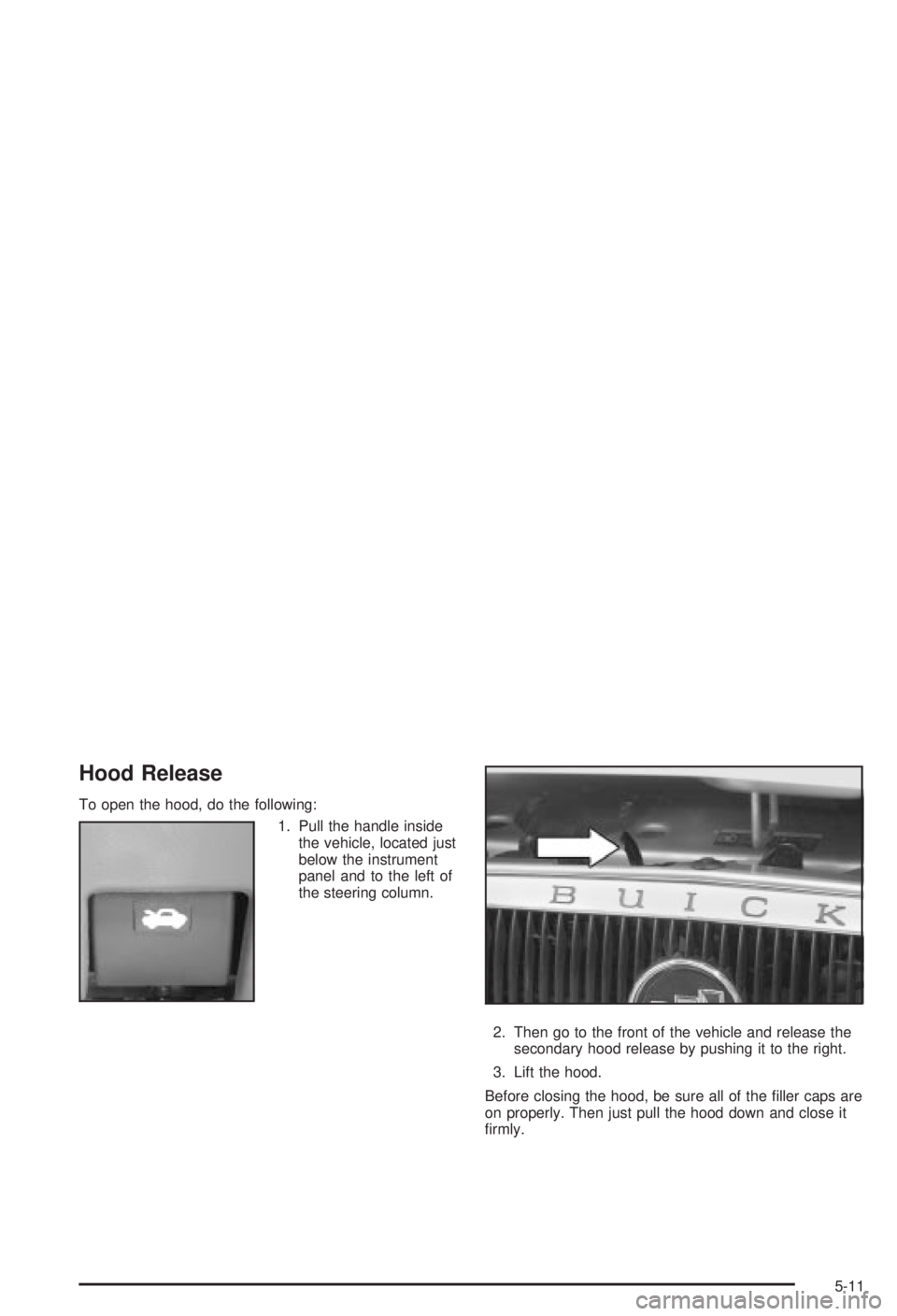
To open the hood, do the following:
1. Pull the handle inside
the vehicle, located just
below the instrument
panel and to the left of
the steering column.
2. Then go to the front of the vehicle and release the
secondary hood release by pushing it to the right.
3. Lift the hood.
Before closing the hood, be sure all of the ®ller caps are
on properly. Then just pull the hood down and close it
®rmly.
5-11
Page 226 of 344
Radiator Pressure Cap
Notice:Your radiator cap is a pressure-type cap
and must be tightly installed to prevent coolant loss
and possible engine damage from overheating.
Be sure the arrows on the cap line up with the
over¯ow tube on the radiator ®ller neck.
The radiator pressure cap is located near the front of
the engine compartment on the passenger's side of the
vehicle. See
Engine Compartment Overview on
page 5-12for more information on location.
Engine Overheating
You will ®nd a coolant temperature gage and a hot
engine warning light on your instrument panel.
See
Engine Coolant Temperature Gage on page 3-30andEngine Coolant Temperature Warning Light on
page 3-29.
Overheated Engine Protection
Operating Mode
The emergency engine protection operating mode
allows your vehicle to be driven to a safe place in an
emergency situation. If an overheated engine condition
exists, this protection mode alternates ®ring groups
of cylinders to help prevent engine damage. In
this mode, you will notice a signi®cant loss in power and
engine performance. The engine coolant temperature
gage indicator will move to the red area, showing that an
overheated engine condition exists. Driving extended
miles (km) and/or towing a trailer in the overheated
protection mode should be avoided.
Notice:After driving in the overheated engine
protection operating mode, to avoid engine damage,
allow the engine to cool before attempting any repair.
The engine oil will be severely degraded. Repair the
cause of coolant loss, change the oil and reset the oil
life system. See ªEngine Oilº in the Index.
5-26
Page 259 of 344
The tire in¯ation monitor system detects differences in tire
rotation speeds that are caused by changes in tire
pressure. The system can alert you about a low tire ± but
it doesn't replace normal tire maintenance. See
Tires on
page 5-57.
When the LOW TIRE light comes on, you should stop
as soon as you can and check all your tires for damage.
(If a tire is ¯at, see
If a Tire Goes Flat on page 5-66.)
Also check the tire pressure in all four tires as soon as
you can. See
In¯ation -- Tire Pressure on page 5-57.
The LOW TIRE light will also be displayed (while
the ignition is on) until you reset (calibrate) the system.
Don't reset the tire in¯ation monitor system without
®rst correcting the cause of the problem and checking
and adjusting the pressure in all four tires. If you
reset the system when the tire pressures are incorrect,
the system will not work properly and may not alert
you when a tire is low.
Any time you adjust a tire's pressure, rotate your tires,
or have one or more tires repaired or replaced, you'll
need to reset (calibrate) the tire in¯ation monitor system.
You'll also need to reset the system whenever you
buy new tires and whenever the vehicle's battery has
been disconnected.To reset (calibrate) the system:
1. Turn the ignition to RUN.
2. Locate the red RESET button inside of your
instrument panel fuse block.
The fuse block is located under the cover labeled
FUSES, which is at the end of the instrument panel
on the passenger's side of the vehicle. The
RESET button is the ®rst button in the top row of
the fuse block.
3. Press and hold the RESET button for about ®ve
seconds.
The LOW TIRE light will come on and ¯ash three
times. Then it will go off. If the light doesn't go
off, see your dealer for service.
The system completes the calibration process during
driving.
The system normally takes 15 to 20 minutes of driving
in each of three speed ranges to ªlearnº tire pressures.
The speed ranges are 15 to 40 mph (25 to 65 km/h),
40 to 65 mph (65 to 105 km/h) and above 65 mph
(105 km/h). When learning is complete, the system will
alert you after two to eight minutes if a tire is 12 psi
(83 kPa) different from the other three tires. Detection
thresholds may be higher and detection times may
be longer on rough roads, curves and at high speeds.
The system is not capable of detection at speeds greater
than 70 mph (110 km/h).
5-59
Page 281 of 344
Cleaning Vinyl
Use warm water and a clean cloth.
·Rub with a clean, damp cloth to remove dirt. You
may have to do this more than once.
·Things like tar, asphalt and shoe polish will stain if
you don't get them off quickly. Use a clean cloth
and vinyl cleaner. See your dealer for this product.
Cleaning Leather
Use a soft cloth with lukewarm water and a mild soap or
saddle soap and wipe dry with a soft cloth. Then, let
the leather dry naturally. Do not use heat to dry.
·For stubborn stains, use a leather cleaner.
·Neveruse oils, varnishes, solvent-based or abrasive
cleaners, furniture polish or shoe polish on leather.
·Soiled or stained leather should be cleaned
immediately. If dirt is allowed to work into the ®nish,
it can harm the leather.
Cleaning the Top of the Instrument
Panel
Use only mild soap and water to clean the top surfaces
of the instrument panel. Sprays containing silicones
or waxes may cause annoying re¯ections in the
windshield and even make it difficult to see through the
windshield under certain conditions.
Cleaning Interior Plastic Components
Use only a mild soap and water solution on a soft cloth
or sponge. Commercial cleaners may affect the
surface ®nish.
Cleaning Glass Surfaces
Glass should be cleaned often. GM Glass Cleaner or a
liquid household glass cleaner will remove normal
tobacco smoke and dust ®lms on interior glass. See
Vehicle Care/Appearance Materials on page 5-85.
Notice:Don't use abrasive cleaners on glass,
because they may cause scratches. Avoid placing
decals on the inside rear window, since they
may have to be scraped off later. If abrasive cleaners
are used on the inside of the rear window, an
electric defogger element may be damaged. Any
temporary license should not be attached across the
defogger grid.
5-81
Page 287 of 344
Vehicle Identi®cation
Vehicle Identi®cation Number (VIN)
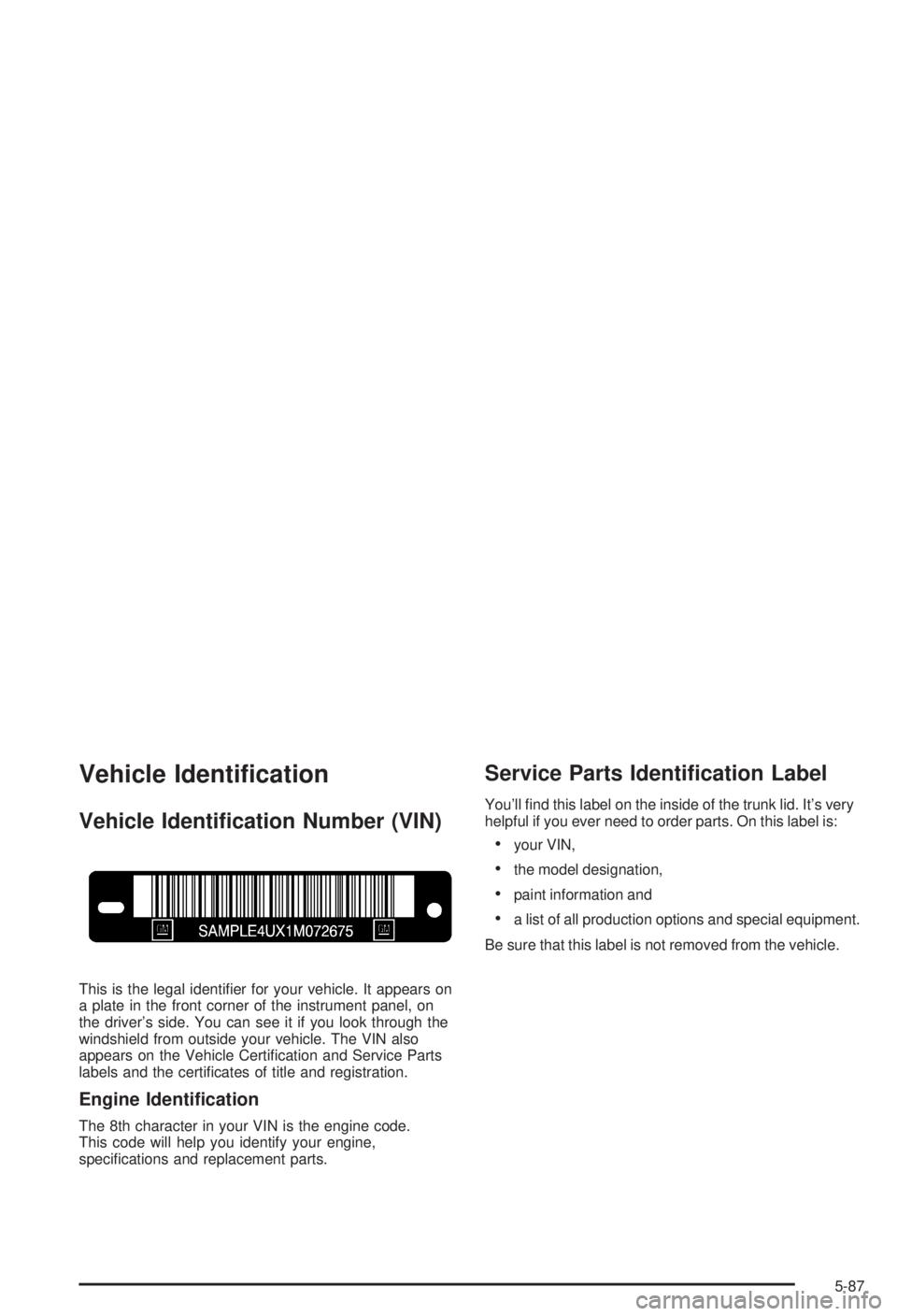
This is the legal identi®er for your vehicle. It appears on
a plate in the front corner of the instrument panel, on
the driver's side. You can see it if you look through the
windshield from outside your vehicle. The VIN also
appears on the Vehicle Certi®cation and Service Parts
labels and the certi®cates of title and registration.
Engine Identi®cation
The 8th character in your VIN is the engine code.
This code will help you identify your engine,
speci®cations and replacement parts.
Service Parts Identi®cation Label
You'll ®nd this label on the inside of the trunk lid. It's very
helpful if you ever need to order parts. On this label is:
·your VIN,
·the model designation,
·paint information and
·a list of all production options and special equipment.
Be sure that this label is not removed from the vehicle.
5-87
Page 288 of 344
Electrical System
Add-On Electrical Equipment
Notice:Don't add anything electrical to your vehicle
unless you check with your dealer ®rst. Some
electrical equipment can damage your vehicle and
the damage wouldn't be covered by your warranty.
Some add-on electrical equipment can keep other
components from working as they should.
Your vehicle has an air bag system. Before attempting
to add anything electrical to your vehicle, see
Servicing Your Air Bag-Equipped Vehicle on page 1-62.
Headlamp Wiring
The headlamp wiring is protected by a circuit breaker in
the underhood fuse block. An electrical overload will
cause the lamps to go on and off, or in some cases to
remain off. If this happens, have your headlamp
system checked right away.
Windshield Wiper Fuses
The windshield wiper motor is protected by a circuit
breaker and a fuse. If the motor overheats due to heavy
snow, etc., the wiper will stop until the motor cools. If
the overload is caused by some electrical problem, have
it ®xed.
Power Windows and Other Power
Options
Circuit breakers in the instrument panel fuse block
protect the power windows and other power accessories.
When the current load is too heavy, the circuit breaker
opens and closes, protecting the circuit until the
problem is ®xed.
5-88
Page 289 of 344
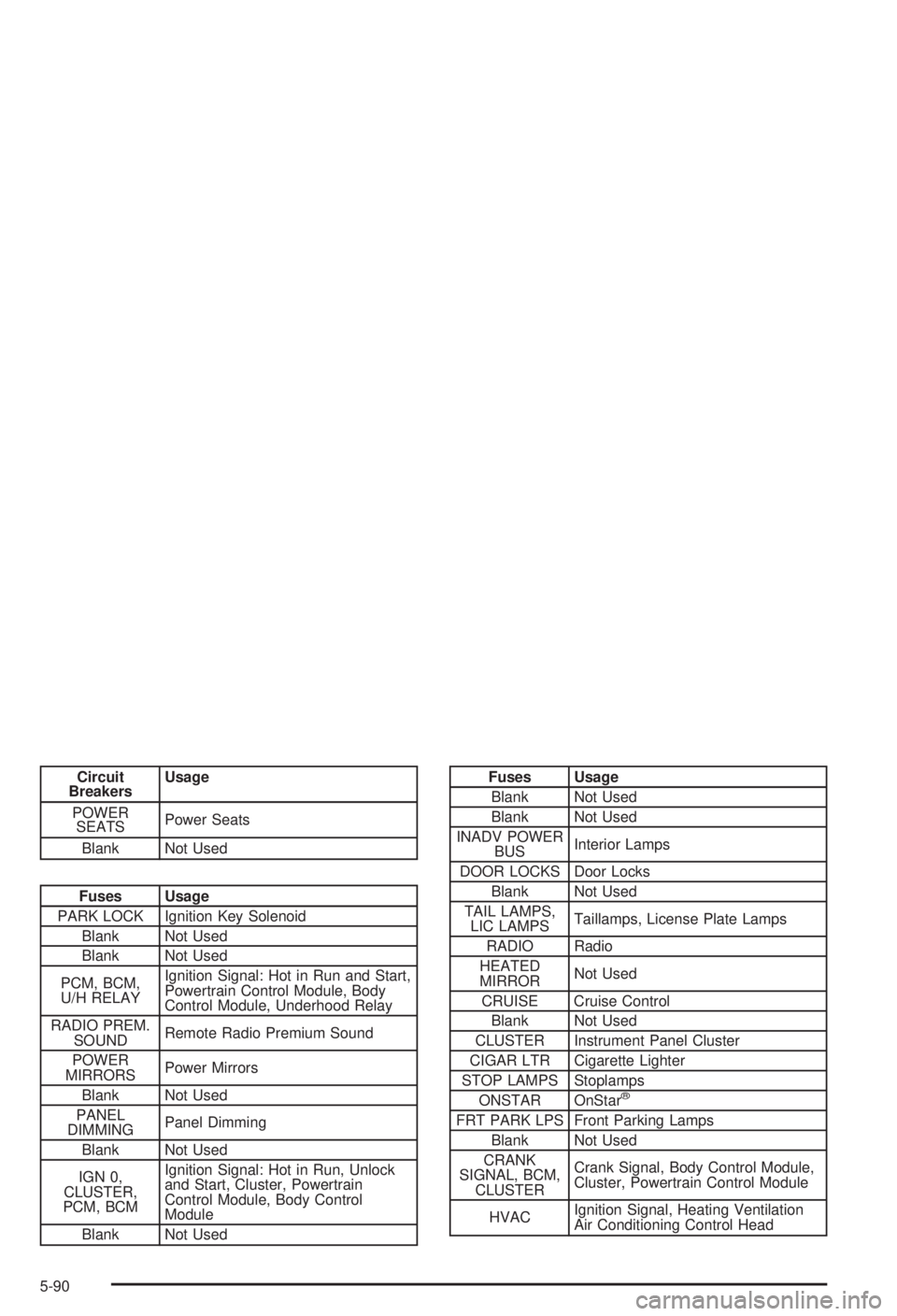
Fuses and Circuit Breakers
The wiring circuits in your vehicle are protected from
short circuits by a combination of fuses, circuit breakers
and in the fuse block wiring itself. This greatly reduces
the chance of ®res caused by electrical problems.
Look at the silver-colored band inside the fuse. If the
band is broken or melted, replace the fuse. Be sure you
replace a bad fuse with a new one of the identical
size and rating.
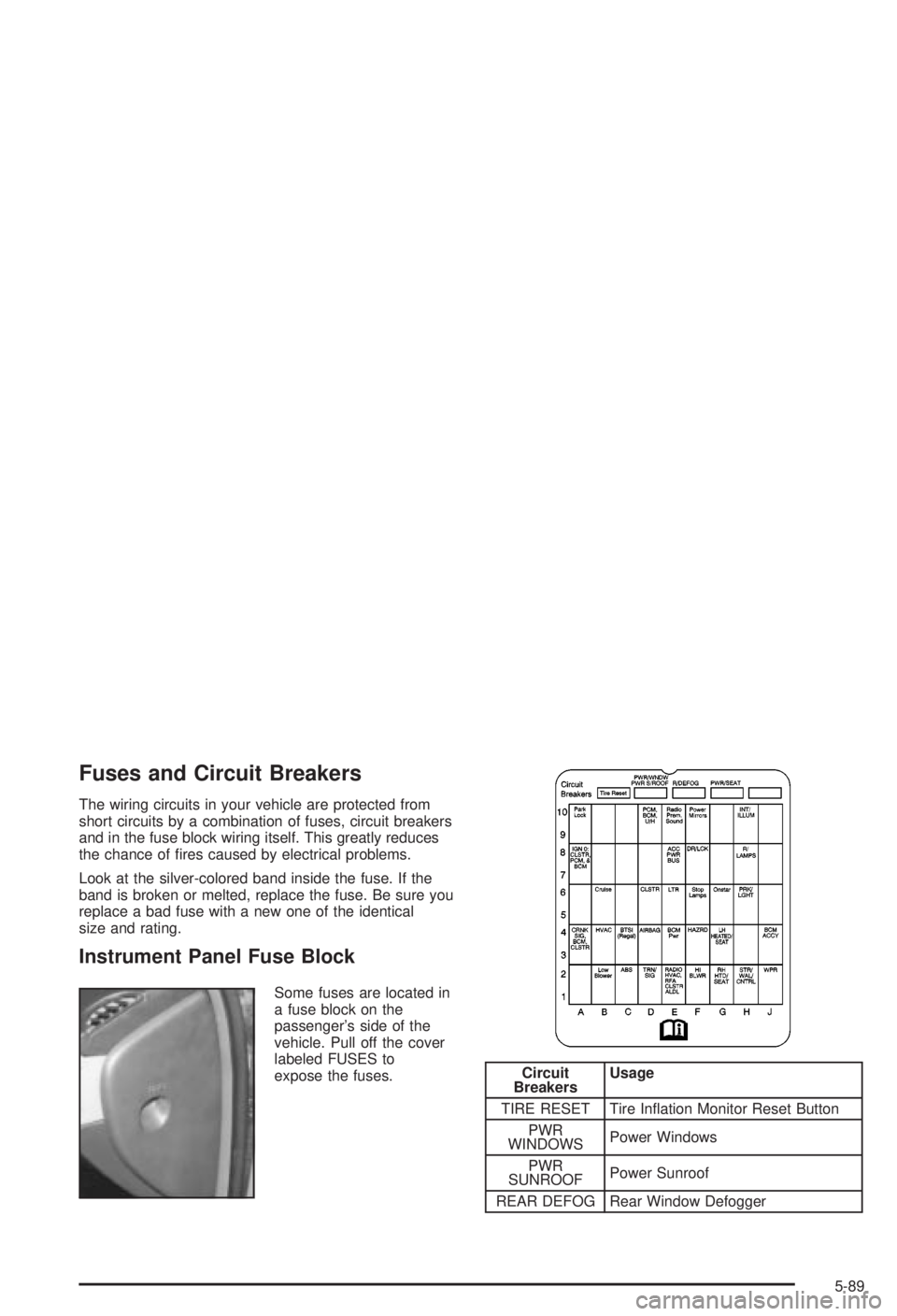
Instrument Panel Fuse Block
Some fuses are located in
a fuse block on the
passenger's side of the
vehicle. Pull off the cover
labeled FUSES to
expose the fuses.
Circuit
BreakersUsage
TIRE RESET Tire In¯ation Monitor Reset Button
PWR
WINDOWSPower Windows
PWR
SUNROOFPower Sunroof
REAR DEFOG Rear Window Defogger
5-89
Page 290 of 344
Circuit
BreakersUsage
POWER
SEATSPower Seats
Blank Not Used
Fuses Usage
PARK LOCK Ignition Key Solenoid
Blank Not Used
Blank Not Used
PCM, BCM,
U/H RELAYIgnition Signal: Hot in Run and Start,
Powertrain Control Module, Body
Control Module, Underhood Relay
RADIO PREM.
SOUNDRemote Radio Premium Sound
POWER
MIRRORSPower Mirrors
Blank Not Used
PANEL
DIMMINGPanel Dimming
Blank Not Used
IGN 0,
CLUSTER,
PCM, BCMIgnition Signal: Hot in Run, Unlock
and Start, Cluster, Powertrain
Control Module, Body Control
Module
Blank Not Used
Fuses Usage
Blank Not Used
Blank Not Used
INADV POWER
BUSInterior Lamps
DOOR LOCKS Door Locks
Blank Not Used
TAIL LAMPS,
LIC LAMPSTaillamps, License Plate Lamps
RADIO Radio
HEATED
MIRRORNot Used
CRUISE Cruise Control
Blank Not Used
CLUSTER Instrument Panel Cluster
CIGAR LTR Cigarette Lighter
STOP LAMPS Stoplamps
ONSTAR OnStar
ž
FRT PARK LPS Front Parking Lamps
Blank Not Used
CRANK
SIGNAL, BCM,
CLUSTERCrank Signal, Body Control Module,
Cluster, Powertrain Control Module
HVACIgnition Signal, Heating Ventilation
Air Conditioning Control Head
5-90
Page 318 of 344
Customer Assistance
Information
Customer Satisfaction Procedure
Your satisfaction and goodwill are important to
your dealer and to Buick. Normally, any concerns with
the sales transaction or the operation of your vehicle will
be resolved by your dealer's sales or service
departments. Sometimes, however, despite the best
intentions of all concerned, misunderstandings can
occur. If your concern has not been resolved to your
satisfaction, the following steps should be taken:
STEP ONE:Discuss your concern with a member of
dealership management. Normally, concerns can
be quickly resolved at that level. If the matter has
already been reviewed with the sales, service or parts
manager, contact the owner of the dealership or
the general manager.STEP TWO:If after contacting a member of dealership
management, it appears your concern cannot be
resolved by the dealership without further help, contact
the Buick Customer Assistance Center by calling
1-800-521-7300. In Canada, contact GM of Canada
Customer Communication Centre in Oshawa by calling
1-800-263-3777 (English) or 1-800-263-7854 (French).
We encourage you to call the toll-free number in order to
give your inquiry prompt attention. Please have the
following information available to give the Customer
Assistance Representative:
·Vehicle Identi®cation Number (This is available from
the vehicle registration or title, or the plate at the
top left of the instrument panel and visible through
the windshield.)
·Dealership name and location
·Vehicle delivery date and present mileage
When contacting Buick, please remember that your
concern will likely be resolved at a dealer's facility.
That is why we suggest you follow Step One ®rst if
you have a concern.
7-2