instrument panel BUICK ENCLAVE 2022 User Guide
[x] Cancel search | Manufacturer: BUICK, Model Year: 2022, Model line: ENCLAVE, Model: BUICK ENCLAVE 2022Pages: 382, PDF Size: 7.67 MB
Page 120 of 382
Buick Enclave Owner Manual (GMNA-Localizing-U.S./Canada/Mexico-
15253195) - 2022 - CRC - 11/3/21
Instruments and Controls 119
Head-Up Display (HUD)
{Warning
If the HUD image is too bright or too
high in your field of view, it may take
you more time to see things you need to
see when it is dark outside. Be sure to
keep the HUD image dim and placed low
in your field of view.
If equipped with HUD, some information
concerning the operation of the vehicle is
projected onto the windshield. The image is
projected through the HUD lens on top of
the instrument panel. The information
appears as an image focused out toward the
front of the vehicle.
Caution
If you try to use the HUD image as a
parking aid, you may misjudge the
distance and damage your vehicle. Do not
use the HUD image as a parking aid.
The HUD information can be displayed in
various languages in some vehicles. The
speedometer reading and other numerical
values can be displayed in either English or
metric units. The language selection is changed through
the radio and the units of measurement is
changed through the instrument cluster. See
Settings
0172 and “Options” under
Instrument Cluster (Base Level) 098 or
Instrument Cluster (Uplevel) 0100.
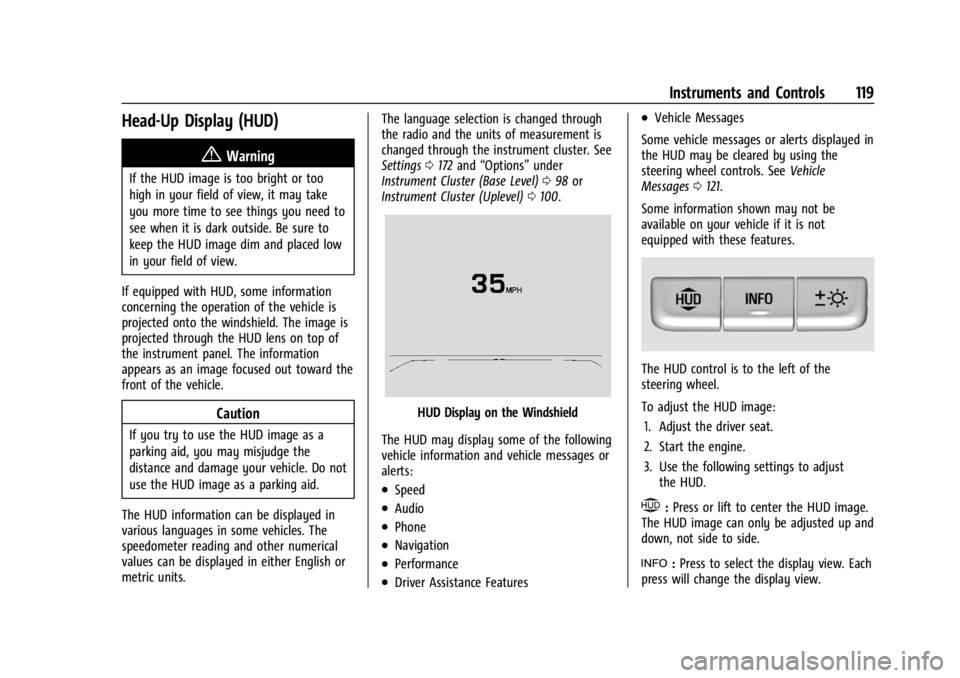
HUD Display on the Windshield
The HUD may display some of the following
vehicle information and vehicle messages or
alerts:
.Speed
.Audio
.Phone
.Navigation
.Performance
.Driver Assistance Features
.Vehicle Messages
Some vehicle messages or alerts displayed in
the HUD may be cleared by using the
steering wheel controls. See Vehicle
Messages 0121.
Some information shown may not be
available on your vehicle if it is not
equipped with these features.
The HUD control is to the left of the
steering wheel.
To adjust the HUD image: 1. Adjust the driver seat.
2. Start the engine.
3. Use the following settings to adjust the HUD.
$:Press or lift to center the HUD image.
The HUD image can only be adjusted up and
down, not side to side.
!: Press to select the display view. Each
press will change the display view.
Page 131 of 382
Buick Enclave Owner Manual (GMNA-Localizing-U.S./Canada/Mexico-
15253195) - 2022 - CRC - 11/3/21
130 Lighting
Lighting
Exterior Lighting
Exterior Lamp Controls . . . . . . . . . . . . . . . . 130
Exterior Lamps Off Reminder . . . . . . . . . . . 131
Headlamp High/Low-Beam Changer . . . . 131
Flash-to-Pass . . . . . . . . . . . . . . . . . . . . . . . . . . . 132
Daytime Running Lamps (DRL) . . . . . . . . . 132
Automatic Headlamp System . . . . . . . . . . 132
Hazard Warning Flashers . . . . . . . . . . . . . . 133
Turn and Lane-Change Signals . . . . . . . . . 133
Interior Lighting
Instrument Panel IlluminationControl . . . . . . . . . . . . . . . . . . . . . . . . . . . . . . . 133
Courtesy Lamps . . . . . . . . . . . . . . . . . . . . . . . 134
Dome Lamps . . . . . . . . . . . . . . . . . . . . . . . . . . 134
Reading Lamps . . . . . . . . . . . . . . . . . . . . . . . . 134
Lighting Features
Entry Lighting . . . . . . . . . . . . . . . . . . . . . . . . . 135
Exit Lighting . . . . . . . . . . . . . . . . . . . . . . . . . . . 135
Battery Load Management . . . . . . . . . . . . . 135
Battery Power Protection . . . . . . . . . . . . . . 136
Exterior Lighting Battery Saver . . . . . . . . 136
Exterior Lighting
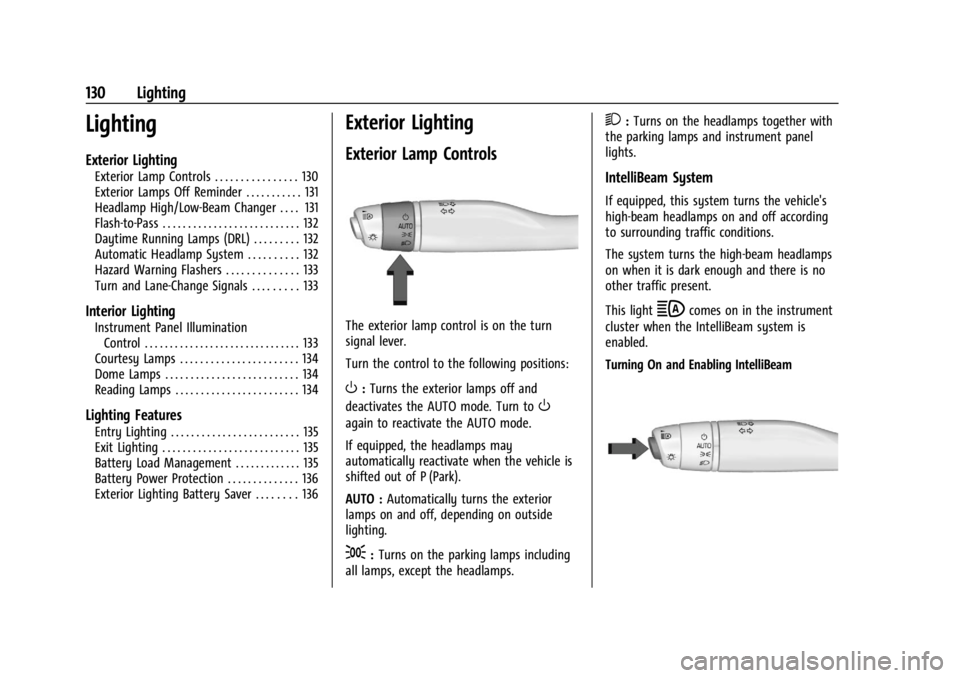
Exterior Lamp Controls
The exterior lamp control is on the turn
signal lever.
Turn the control to the following positions:
O: Turns the exterior lamps off and
deactivates the AUTO mode. Turn to
O
again to reactivate the AUTO mode.
If equipped, the headlamps may
automatically reactivate when the vehicle is
shifted out of P (Park).
AUTO : Automatically turns the exterior
lamps on and off, depending on outside
lighting.
;: Turns on the parking lamps including
all lamps, except the headlamps.
2: Turns on the headlamps together with
the parking lamps and instrument panel
lights.
IntelliBeam System
If equipped, this system turns the vehicle's
high-beam headlamps on and off according
to surrounding traffic conditions.
The system turns the high-beam headlamps
on when it is dark enough and there is no
other traffic present.
This light
bcomes on in the instrument
cluster when the IntelliBeam system is
enabled.
Turning On and Enabling IntelliBeam
Page 133 of 382

Buick Enclave Owner Manual (GMNA-Localizing-U.S./Canada/Mexico-
15253195) - 2022 - CRC - 11/3/21
132 Lighting
Flash-to-Pass
This feature is used to signal to the vehicle
ahead that you want to pass.
If the headlamps are off or in the low-beam
position, pull the turn signal lever toward
you to momentarily switch to high beams.
Release the lever to turn the high-beam
headlamps off.
Daytime Running Lamps (DRL)
DRL can make it easier for others to see the
front of your vehicle during the day. Fully
functional DRL are required on all vehicles
first sold in Canada.
The dedicated DRL will come on when all of
the following conditions are met:
.The ignition is on.
.The exterior lamp control is in AUTO.
.The light sensor determines it is daytime.
.The parking brake is released or the
vehicle is not in P (Park).
The taillamps, instrument panel lights, and
other lamps will not be on. The DRL turn off when the headlamps are
turned to
Oor the ignition is off. For
vehicles sold in Canada, this control only
works when the vehicle is parked.
Automatic Headlamp System
When the exterior lamp control is set to
AUTO and it is dark enough outside, the
headlamps come on automatically.
There is a light sensor on top of the
instrument panel. Do not cover the sensor;
otherwise the headlamps will come on when
they are not needed.
The system may also turn on the headlamps
when driving through a parking garage or
tunnel. If the vehicle is started in a dark garage, the
automatic headlamp system comes on
immediately. If it is light outside when the
vehicle leaves the garage, there is a slight
delay before the automatic headlamp
system changes to the Daytime Running
Lamps (DRL). During that delay, the
instrument cluster may not be as bright as
usual. Make sure the instrument panel
brightness control is in the full bright
position. See
Instrument Panel Illumination
Control 0133.
When it is bright enough outside, the
headlamps will turn off or may change
to DRL.
The automatic headlamp system turns off
when the exterior lamp control is turned to
Oor the ignition is off.
Lights On with Wipers
If the windshield wipers are activated in
daylight with the engine on, and the
exterior lamp control is in AUTO, the
headlamps, parking lamps, and other
exterior lamps come on. The transition time
for the lamps coming on varies based on
wiper speed. When the wipers are not
Page 134 of 382

Buick Enclave Owner Manual (GMNA-Localizing-U.S./Canada/Mexico-
15253195) - 2022 - CRC - 11/3/21
Lighting 133
operating, these lamps turn off. Move the
exterior lamp control to
Oor;to disable
this feature.
Hazard Warning Flashers
|: Press to make the front and rear turn
signal lamps flash on and off. This warns
others that you are having trouble.
Press
|again to turn the flashers off.
Turn and Lane-Change Signals
Move the lever all the way up or down to
signal a turn.
An arrow on the instrument cluster will
flash in the direction of the turn or lane
change.
Raise or lower the lever until the arrow
starts to flash to signal a lane change. Hold
it there until the lane change is complete.
If the lever is moved momentarily to the
lane change position, the arrow will flash
three times. It will flash six times if Tow/
Haul Mode is active.
The lever returns to its starting position
when it is released.
If after signaling a turn or lane change, the
arrow flashes rapidly or does not come on, a
signal bulb may be burned out. Have any burned out bulbs replaced. If a
bulb is not burned out, check the fuse. See
Instrument Panel Fuse Block
0292.
Interior Lighting
Instrument Panel Illumination
Control
This feature adjusts the brightness of all
illuminated controls.
D:Move the thumbwheel up or down to
brighten or dim the lights.
The thumbwheel is functional at night,
or when the headlamps or parking lamps
are on.
Page 193 of 382

Buick Enclave Owner Manual (GMNA-Localizing-U.S./Canada/Mexico-
15253195) - 2022 - CRC - 11/3/21
192 Climate Controls
The driver and passenger temperatures can
also be adjusted by touching the controls on
the climate control display.
Sync :Touch Sync on the display to link all
passenger settings to the driver settings.
Adjust the driver side temperature control to
change the linked temperature. When the
passenger settings are adjusted, the Sync
button is displayed and the temperatures
are unlinked.
Manual Operation
CLIMATE : Press CLIMATE to show the
climate control display.
ON/OFF : Press to turn the fan on or off.
When off, no air will flow into the vehicle.
Turning the fan on, pressing any other
button, or turning a knob will turn the
system back on using the current setting.
hi: Press or touch the fan controls on the
center stack or the display to increase or
decrease the fan speed. The fan speed
setting displays.
Pressing either button cancels automatic fan
control and the fan is controlled manually.
Press AUTO to return to automatic
operation. Air Delivery Mode Control :
When the
climate information is displayed, touch
6,
Y, orXon the display to change the
direction of airflow. Any combination of the
three modes can be selected. The selected
air delivery mode is lit. Pressing any mode
control cancels automatic air delivery control
and the direction of the airflow is controlled
manually. Press AUTO to return to
automatic operation.
To change the current mode, select one or
more of the following:
6: Air is directed to the floor outlets, with
some air to the windshield and side
windows.
Y: Air is directed to the instrument panel
outlets.
X: Clears the windows of fog or moisture.
Air is directed to the windshield.
1MAX : Air is directed to the windshield,
the fan runs at a higher speed, and the
temperature of the air is increased if not
already at maximum. This mode overrides
the previous mode selected and clears fog or
frost from the windshield more quickly. When
1MAX is pressed again, the system
returns to the previous mode setting and
fan speed.
For best results, clear all snow and ice from
the windshield before defrosting.
A/C : Touch A/C on the display to turn the
air conditioning on or off. If the fan is
turned off, the air conditioner will not run
and A/C OFF will show on the climate
control display.
Touch AUTO to return to automatic
operation and the air conditioner runs
automatically as needed.
@: Press to turn on recirculation. An
indicator light comes on. Air is recirculated
to quickly cool the inside of the vehicle or
to reduce the entry of outside air and odors.
If selected during cool or cold weather, the
windshield and windows may fog. Turn off
recirculation to help clear the windshield
and windows.
Auto Defog : The climate control system has
a sensor to automatically detect high
humidity inside the vehicle. When high
humidity is detected, the climate control
system may adjust to outside air supply and
turn on the air conditioner. The fan speed
Page 194 of 382

Buick Enclave Owner Manual (GMNA-Localizing-U.S./Canada/Mexico-
15253195) - 2022 - CRC - 11/3/21
Climate Controls 193
may slightly increase to help prevent
fogging. If the climate control system does
not detect possible window fogging, it
returns to normal operation.
To turn Auto Defog off or on, see“Climate
and Air Quality” underVehicle
Personalization 0122.
Ionizer : If equipped with an ionizer, this
feature helps to clean the air inside the
vehicle and remove contaminants such as
pollen, odors, and dust. If the climate
control system is on and the ionizer is
enabled, Ionizer On will be displayed. To
turn the ionizer on or off, see “Climate and
Air Quality” underVehicle Personalization
0 122.
Rear Window Defogger
K:Press to turn the rear window defogger
on or off. An indicator light on the button
comes on to show that the rear window
defogger is on. The rear window defogger
only works when the engine is running.
It turns off when the ignition is turned off
or in ACC/ACCESSORY.
The rear window defogger can be set to
automatic operation. See “Climate and Air
Quality” underVehicle Personalization 0122.
When Auto Rear Defog is selected, the rear window defogger turns on automatically
when the interior temperature is cold and
the outside temperature is about 4 °C (40 °F)
and below. The auto rear defogger turns off
automatically after about 10 minutes,
or after five minutes if the outside
temperature is not as cold.
The upper gridlines on the rear window are
antenna lines and are not intended to heat
when the defogger is activated.
The heated outside mirrors turn on when
the rear window defogger button is on and
help to clear fog or frost from the surface of
the mirror. See
Heated Mirrors028.
Caution
Do not try to clear frost or other material
from the inside of the front windshield
and rear window with a razor blade or
anything else that is sharp. This may
damage the rear window defogger grid
and affect the radio's ability to pick up
stations clearly. The repairs would not be
covered by the vehicle warranty.
Heated and Ventilated Seats
MorL:If equipped, pressMorLto
heat the driver or passenger seat.
Cor{: If equipped, pressCor{to
ventilate the driver or passenger seat. See
Heated and Ventilated Front Seats 041.
Remote Start Climate Control Operation :
The climate control system may run when
the vehicle is started remotely. If the vehicle
has heated or ventilated seats, they may
come on during a remote start. See Remote
Vehicle Start 014 and
Heated and Ventilated Front Seats 041.
Sensors
The solar sensor, on top of the instrument
panel near the windshield, monitors the
solar heat.
The climate control system uses the sensor
information to adjust the temperature, fan
speed, recirculation, and air delivery mode
for best comfort.
Do not cover the sensor; otherwise the
automatic climate control system may not
work properly.
Afterblow Feature
If equipped, under certain conditions, the
fan may stay on or may turn on and off
several times after you turn off and lock the
vehicle. This is normal.
Page 208 of 382
Buick Enclave Owner Manual (GMNA-Localizing-U.S./Canada/Mexico-
15253195) - 2022 - CRC - 11/4/21
Driving and Operating 207
{Warning
Snow can trap engine exhaust under the
vehicle. This may cause exhaust gases to
get inside. Engine exhaust contains
carbon monoxide (CO), which cannot be
seen or smelled. It can cause
unconsciousness and even death.
If the vehicle is stuck in snow:
.Clear snow from the base of the
vehicle, especially any blocking the
exhaust pipe.
.Open a window about 5 cm (2 in) on
the vehicle side that is away from the
wind, to bring in fresh air.
.Fully open the air outlets on or under
the instrument panel.
.Adjust the climate control system to
circulate the air inside the vehicle and
set the fan speed to the highest
setting. See“Climate Control Systems.”
For more information about CO, see
Engine Exhaust 0217. To save fuel, run the engine for short
periods to warm the vehicle and then shut
the engine off and partially close the
window. Moving about to keep warm also
helps.
If it takes time for help to arrive, when
running the engine, push the accelerator
pedal slightly so the engine runs faster than
the idle speed. This keeps the battery
charged to restart the vehicle and to signal
for help with the headlamps. Do this as
little as possible, to save fuel.
If the Vehicle Is Stuck
Slowly and cautiously spin the wheels to
free the vehicle when stuck in sand, mud,
ice, or snow.
If stuck too severely for the traction system
to free the vehicle, turn the traction system
off and use the rocking method. See
Traction Control/Electronic Stability Control
0
224.
{Warning
If the vehicle's tires spin at high speed,
they can explode, and you or others
could be injured. The vehicle can
(Continued)
Warning (Continued)
overheat, causing an engine compartment
fire or other damage. Spin the wheels as
little as possible and avoid going above
56 km/h (35 mph).
Select All-Wheel Drive (AWD) Mode. See
Driver Mode Control 0226 and
All-Wheel Drive 0222.
Rocking the Vehicle to Get it Out
Turn the steering wheel left and right to
clear the area around the front wheels. Turn
off any traction system. Shift back and forth
between R (Reverse) and a low forward gear,
spinning the wheels as little as possible. To
prevent transmission wear, wait until the
wheels stop spinning before shifting gears.
Release the accelerator pedal while shifting,
and press lightly on the accelerator pedal
when the transmission is in gear. Slowly
spinning the wheels in the forward and
reverse directions causes a rocking motion
that could free the vehicle. If that does not
get the vehicle out after a few tries, it
might need to be towed out. If the vehicle
does need to be towed out, see Towing the
Vehicle 0323.
Page 228 of 382

Buick Enclave Owner Manual (GMNA-Localizing-U.S./Canada/Mexico-
15253195) - 2022 - CRC - 11/4/21
Driving and Operating 227
AWD Mode Switch
To activate each mode, press the MODE
switch on the instrument panel.
Modes
Tour Mode
Use for normal city and highway driving to
provide a smooth ride. This setting provides
balance between comfort and handling.
There is no persistent indicator in the
instrument cluster for this mode.
Sport Mode
Use where road conditions or personal
preference demand a more controlled
response. Sport Mode improves vehicle
handling and acceleration on dry pavement. When active, Sport Mode modifies AWD
torque, steering, Electronic Stability Control
(ESC), Traction Control System (TCS), and
suspension tuning, if equipped.
AWD Mode
AWD provides torque to all four wheels.
Pressing the AWD Mode switch will select
AWD Mode. The AWD light will flash briefly
while the system is engaging and stay on to
indicate AWD is active. AWD Mode can be
turned on and off independently of other
modes. Select AWD Mode to improve
traction and control on slippery road
surfaces, such as gravel, sand, wet
pavement, snow, and ice. For more
information on AWD, see
All-Wheel Drive
0 222.
Tow/Haul Mode
This mode will automatically activate AWD,
if available. The transmission holds lower
gears longer before shifting to provide more
torque necessary when towing heavy loads.
This will also increase fuel consumption.
Tow/Haul Mode also modifies, steering, ESC,
TCS, and suspension tuning, if equipped. Use
this mode to assist in maintaining desired vehicle speeds when driving on downhill
grades by using the engine and transmission
to slow the vehicle.
This helps prevent the brakes from
overheating. For more information, see
Towing the Vehicle
0323.
Cruise Control
With cruise control the vehicle can maintain
a speed of about 40 km/h (25 mph) or more
without keeping your foot on the
accelerator. Cruise control does not work at
speeds below 40 km/h (25 mph).
{Warning
Cruise control can be dangerous where
you cannot drive safely at a steady
speed. Do not use cruise control on
winding roads or in heavy traffic.
Cruise control can be dangerous on
slippery roads. On such roads, fast
changes in tire traction can cause
excessive wheel slip, and you could lose
control. Do not use cruise control on
slippery roads.
Page 259 of 382

Buick Enclave Owner Manual (GMNA-Localizing-U.S./Canada/Mexico-
15253195) - 2022 - CRC - 11/4/21
258 Driving and Operating
{Warning
To prevent serious injury or death from
carbon monoxide (CO), when towing a
trailer:
.Do not drive with the liftgate, trunk/
hatch, or rear-most window open.
.Fully open the air outlets on or under
the instrument panel.
.Adjust the climate control system to a
setting that brings in only outside air.
See“Climate Control Systems” in the
Index.
For more information about carbon
monoxide, see Engine Exhaust 0217.
Towing a trailer requires experience. The
combination of the vehicle and trailer is
longer and not as responsive as the vehicle
itself. Get used to the handling and braking
of the combination by driving on a level
road surface before driving on public roads.
The trailer structure, the tires, and the
brakes must be all be rated to carry the
intended cargo. Inadequate trailer
equipment can cause the combination to
operate in an unexpected or unsafe manner.
Before driving, inspect all trailer hitch parts and attachments, safety chains, electrical
connectors, lamps, tires, and mirrors. See
Towing Equipment
0263. If the trailer has
electric brakes, start the combination
moving and then manually apply the trailer
brake controller to check the trailer brakes
work. During the trip, occasionally check
that the cargo and trailer are secure and
that the lamps and any trailer brakes are
working.Towing with a Stability Control System
When towing, the stability control system
might be heard. The system reacts to
vehicle movement caused by the trailer,
which mainly occurs during cornering. This is
normal when towing heavier trailers.
Following Distance
Stay at least twice as far behind the vehicle
ahead as you would when driving without a
trailer. This can help to avoid heavy braking
and sudden turns.
Passing
More passing distance is needed when
towing a trailer. The combination of the
vehicle and trailer will not accelerate as
quickly and is much longer than the vehicle
alone. It is necessary to go much farther beyond the passed vehicle before returning
to the lane. Pass on level roadways. Avoid
passing on hills if possible.
Backing Up
Hold the bottom of the steering wheel with
one hand. To move the trailer to the left,
move that hand to the left. To move the
trailer to the right, move that hand to the
right. Always back up slowly and, if possible,
have someone guide you.
Making Turns
Caution
Turn more slowly and make wider arcs
when towing a trailer to prevent damage
to your vehicle. Making very sharp turns
could cause the trailer to contact the
vehicle.
Make wider turns than normal when towing,
so trailer will not go over soft shoulders,
over curbs, or strike road signs, trees,
or other objects. Always signal turns well in
advance. Do not steer or brake suddenly.
Page 266 of 382

Buick Enclave Owner Manual (GMNA-Localizing-U.S./Canada/Mexico-
15253195) - 2022 - CRC - 11/4/21
Driving and Operating 265
Read and follow the instructions for the
trailer brakes so they are installed, adjusted,
and maintained properly.
Never attempt to tap into your vehicle's
hydraulic brake system. If you do, both the
vehicle anti-lock brakes and the trailer
brakes may not function, which could result
in a crash.
Trailer Wiring
The trailer wiring harness (if equipped), with
a 7-pin connector is located at the rear of
the vehicle, and it is tied to the vehicle's
frame.
If the vehicle is not equipped with a 7-pin
trailer connector, the body harness has
provisions to connect a trailer harness and a
7-pin trailer connector which is available
through your dealer.
Use only a round, seven-wire connector with
flat blade terminals meeting SAE J2863
specifications for proper electrical
connectivity.
The seven-wire harness contains the
following trailer circuits:1 Stop/Turn
Signal Left Yellow/Blue
2 Tail/Parking Lamps Gray/Brown
3 Reverse Lamps White/Green
4 Battery Feed Red/Green
5 Stop/Turn Signal
Right Green/Brown
6 Electric Trailer
Brake* Blue
7 Ground Black
* Circuit powered by electric trailer brake
control wiring provisions.Electric Trailer Brake Control Wiring
Provisions
Wiring provisions for an aftermarket electric
trailer brake controller are included with the
vehicle as part of the trailer wiring package.
The harness contains the following circuits: Electric Trailer
Brakes Blue
Battery Feed Red/Green or
Red/Blue
Brake Apply Signal White/Blue
Ground Black
Refer to the aftermarket electric trailer brake
controller owner's manual to determine wire
color coding of the electric trailer brake
controller. The wire colors on the brake
controller may be different from the vehicle.
The electric trailer brake controller should be
installed by your dealer or a qualified
service center.
If equipped, there are four blunt cut wires
inside the front driver side instrument panel.
It will be necessary to have a technician
connect the 12-volt power to the engine
compartment fuse block.