lock BUICK ENCORE 2013 Workshop Manual
[x] Cancel search | Manufacturer: BUICK, Model Year: 2013, Model line: ENCORE, Model: BUICK ENCORE 2013Pages: 368, PDF Size: 6.38 MB
Page 135 of 368

Black plate (29,1)Buick Encore Owner Manual - 2013 - crc - 1/8/13
Instruments and Controls 5-29
road spray. To clean the system,
clean the outside of the windshield
area in front of the LDW/FCA
camera sensor.
LANE DEPARTURE WARNING
UNAVAILABLE
If equipped with the Lane Departure
Warning (LDW) system, this
message may display if the LDW
system cannot activate due to a
temporary condition. SeeLane
Departure Warning (LDW) on
page 9-40.
PARK ASSIST OFF
This message displays when the
park assist system has been turned
off or when there is a temporary
condition causing the system to be
disabled. See Ultrasonic Parking
Assist on page 9-36.
PARK ASSIST FAULT CLEAN
BUMPER
This message displays if snow,
mud, ice, or dirt is blocking the
sensors on the bumpers. Clean the
bumpers.
SERVICE LANE DEPARTURE
WARNING
This message displays when the
Lane Departure Warning (LDW)
system is disabled and need
service. See your dealer.
SERVICE PARKING ASSIST
This message displays if there is a
problem with the Ultrasonic Front
and Rear Parking Assist (UFRPA)
system. Do not use this system to
help you park. See Ultrasonic
Parking Assist on page 9-36.
Ride Control System
Messages
ALL WHEEL DRIVE OFF
If your vehicle has the All-Wheel
Drive (AWD) system, this message
displays when the rear drive system
is overheating. This message turns
off when the rear drive system cools
down. If the warning message stays
on for a while, you need to reset the
warning message. To reset the
warning message, turn the ignition
off and then back on again. If the
message stays on, see your dealer
right away. See All-Wheel Drive on
page 9-26 for more information.
SERVICE ALL WHEEL DRIVE
SYSTEM
If your vehicle has the All-Wheel
Drive (AWD) system, this message
displays if a problem occurs with
this system. If this message
appears, stop as soon as possible
and turn off the vehicle. Restart the
vehicle and check for the message
on the DIC display. If the message
Page 139 of 368

Black plate (33,1)Buick Encore Owner Manual - 2013 - crc - 1/8/13
Instruments and Controls 5-33
Device List
Allows the management of a
Bluetooth device.
Select Connect, Separate,
or Delete.
Pair Device
Allows the pairing of a new
Bluetooth device. See“Bluetooth”in
the infotainment manual.
Change Bluetooth Code
Manually change or set the code.
Return to Factory Settings
Select Return to Factory Settings to
return Bluetooth to the default
settings.
Select Yes or No.
Display Settings
Select Display Settings and the
following may be displayed:
.Home Page Menu
.Display Off
Home Page Menu
Select Home Page Menu and the
following may be displayed:
.Customize
.Sort
.Restore Home Page Defaults
Customize
Select what icons will be available
on the Home Page.
Turn TUNE/MENU knob or outer
ring to select an icon, then press the
knob or outer ring.
Sort
This allows the first Home Page to
be customized. See “Home Page”
under “Using the System” in the
infotainment manual.
Restore Home Page Defaults
Select Restore Home Page Defaults
to return the Home Page to the
default settings.
Select Yes or No.
Vehicle Settings
The following list of menu items may
be available:
.Climate and Air Quality
.Comfort and Convenience
.Lighting
.Power Door Locks
.Remote Lock/Unlock/Start
.Return to Factory Settings?
Climate and Air Quality
If equipped, select the Climate and
Air Quality menu and the following
may be displayed:
.Auto Fan Speed
.Air Conditioning Mode
.Remote Start Auto Heat Seats
.Auto Defog
.Auto Rear Defog
Page 141 of 368
Black plate (35,1)Buick Encore Owner Manual - 2013 - crc - 1/8/13
Instruments and Controls 5-35
Button Volume
This allows the selection of the
volume level when a button is
pressed.
Select Normal or High.
Reverse Tilt Mirror
This feature tilts the outside mirrors
when the vehicle is in R (Reverse)
allowing the driver to view the curb
for parallel parking.
Select On or Off.
Auto Reverse Gear Wiper
When selected, the rear wiper will
intermittent wipe when the vehicle is
shifted into R (Reverse). When
deselected, the rear wiper will
continuously wipe when the vehicle
is shifted into R (Reverse).
Select or Deselect.
Lighting
Select the Lighting menu and the
following will be displayed:
.Exit Lighting
.Vehicle Locator Lights
Exit Lighting
This allows the selection of how
long the exterior lamps stay on
when leaving the vehicle when it is
dark outside.
Select Off, 30 Seconds, 1 Minute,
or 2 Minutes.
Vehicle Locator Lights
This allows the headlamps, parking
lamps, taillamps, and most of the
interior lamps to turn on briefly
when
Kis pressed.
Select or Deselect.
Power Door Locks
Select Power Door Locks and the
following will be displayed:
.Open Door Anti Lock Out
.Auto Door Unlock
.Delayed Door Lock Open Door Anti Lock Out
When selected, this feature will
keep the driver door from locking
when the door is open. When
deselected, the Delayed Door Lock
menu will be available and the door
will lock as programmed through
this menu.
Select or Deselect.
Auto Door Unlock
This allows selection of which of the
doors will automatically unlock when
the vehicle is shifted into P (Park).
Select All Doors, Driver Door,
or OFF.
Delayed Door Lock
When selected, this feature will
delay the locking of the doors after
the last door is closed.
Select or Deselect.
Page 142 of 368

Black plate (36,1)Buick Encore Owner Manual - 2013 - crc - 1/8/13
5-36 Instruments and Controls
Remote Lock/Unlock/Start
Select Remote Lock/Unlock/Start
and the following will be displayed
(depending on the system):
.Remote Unlock Feedback
.Remote Lock Feedback
.Remote Door Unlock
Remote Unlock Feedback
This allows selection of what type of
feedback is given when unlocking
the vehicle with the RKE transmitter.
Select Flash Lights or Off.
Remote Lock Feedback
This allows selection of what type of
feedback is given when locking the
vehicle with the RKE transmitter.
Select Lights and Horn, Lights Only,
Horn Only, or Off. Remote Door Unlock
This allows selection of which doors
will unlock when pressing
Kon the
RKE transmitter.
When set to Driver Door, the driver
door will unlock the first time
Kis
pressed and all doors will unlock
when
Kis pressed a second time.
When set to All Doors, all of the
doors will unlock at the first press
of
K.
Select Driver Door or All Doors.
Return to Factory Settings?
Select Return to Factory Settings, to
return all vehicle personalization to
the default settings.
Select Yes or No.
Page 151 of 368
Black plate (3,1)Buick Encore Owner Manual - 2013 - crc - 1/8/13
Infotainment System 7-3
3.s©(Previous/Reverse)
.Radio: Seeks the previous
station.
.CD: Selects the previous
track or rewinds within a
track.
4.
O/VOL (Power/Volume)
.Turns the system on or off
and adjusts the volume.
5.
¨ \(Next/Forward)
.Radio: Seeks the next
station.
.CD: Selects the next track
or fast forwards within a
track.
6. FAV 1-2-3 (Favorites Page)
.Radio: Opens the
favorites list.
7. CD
.Selects the CD player. 8. AUX (Auxiliary)
.Selects an external audio
source.
9.
V/8(Phone/Mute)
.Opens the phone
main menu.
.Mutes the audio system.
10. CD Slot
.Insert a CD.
11. TONE
.Opens the tone menu.
12.
/BACK
.Menu: Moves one
level back.
.Character Input: Deletes
the last character.
13. TUNE/MENU
.Turn to open menus,
highlight menu items,
or set numeric values
while in a menu.
.Press to select menu
items.
.Radio: Manually selects
radio stations.
.CD: Selects tracks.
.Bluetooth: Press to
answer a call, or turn to
answer or reject a call,
then press to confirm.
14. CONFIG (Configuration)
.Opens the settings menu.
15. INFO (Information)
.Radio: Shows available
information about the
current station.
.CD: Shows available
information about the
current track.
16.
Z(Eject)
.Removes a disc from the
CD slot.
17.
H(Clock)
.Opens the clock menu.
Page 172 of 368
Black plate (24,1)Buick Encore Owner Manual - 2013 - crc - 1/8/13
7-24 Infotainment System
Telephone Number Dialing
After the“Dial”command, the voice
control requests input of a number.
The telephone number must be
spoken in your normal speech
without any artificial pauses
between the numbers.
Recognition is best, if a pause of at
least half a second is made after
every three to five digits. The
infotainment system then repeats
the numbers recognized.
Available Commands:
.“Dial”: the inputs are accepted.
.“Digit”: a numeric value between
“0–9” is entered.
.“Delete”: the number last
entered or the block of numbers
last entered is deleted.
.“Plus”: a preceding “+”is entered
for a call abroad.
.“Verify”: the inputs are repeated
by the voice output.
.“Asterisk”: an asterisk “*”is
entered.
.“Hash”: a hash character “#”is
entered.
.“Pause”: a pause is entered into
the character sequence.
.“Help”
.“Cancel”
The telephone number entered can
have a maximum length of 25 digits.
To be able to make a call abroad
you can say the word “Plus”(+) at
the beginning of your number. The
plus allows you to call from any
country without knowing the prefix
for calls made abroad in that
country. Then say the required
country code.
Example of a Dialogue
User: “Dial.”
Voice output: “Please say the
number to dial.”
User: “Plus four nine.”
User: “Seven three one.” Voice output:
“Seven three one.”
User: “One one nine nine.”
Voice output: “One one nine nine.”
User: “Dial.”
Voice output: “The number is being
dialed.”
Making a Call Using Name Tag
When the “Call”command is used,
a telephone number is entered that
has been stored in the telephone
book as a name tag.
Available commands:
.“Yes”
.“No”
.“Help”
.“Cancel”
Example of a Dialogue
User: “Call.”
Voice output: “Please say the name
tag to call.”
Page 179 of 368

Black plate (1,1)Buick Encore Owner Manual - 2013 - crc - 1/8/13
Climate Controls 8-1
Climate Controls
Climate Control Systems
Climate Control Systems . . . . . . 8-1
Dual Automatic Climate ControlSystem . . . . . . . . . . . . . . . . . . . . . . 8-3
Air Vents
Air Vents . . . . . . . . . . . . . . . . . . . . . . 8-6
Maintenance
Air Intake . . . . . . . . . . . . . . . . . . . . . 8-6
Passenger Compartment AirFilter . . . . . . . . . . . . . . . . . . . . . . . . . 8-6
Climate Control Systems
The heating, cooling, defrosting, and ventilation for the vehicle can be
controlled with this system.
1. Temperature Control
2. Air Delivery Modes
3. Fan Control
4. Recirculation
5. Air Conditioning
6. Rear Window Defogger
7. Defrost9(Fan Control): Turn the knob
clockwise or counterclockwise to
increase or decrease the fan speed.
Turn the knob completely to 0 to
turn off the fan and air conditioning
compressor.
Page 180 of 368
Black plate (2,1)Buick Encore Owner Manual - 2013 - crc - 1/8/13
8-2 Climate Controls
Temperature Control:Turn the
knob clockwise or counterclockwise
to increase or decrease the
temperature setting.
Air Delivery Mode Control:
Press
[,Y, orXto change the
direction of the airflow. Air delivery
mode settings can be combined. An
indicator light comes on in the
selected mode button.
[(Floor): Air is directed to the
floor outlets.
Y(Vent): Air is directed to the
instrument panel outlets.
X(Defog): Air is directed to the
windshield and side window vents.
0(Defrost): Press to clear the
windshield of fog or frost more
quickly. Air is directed to the
windshield.
For best results, clear all snow and
ice from the windshield before
defrosting.
Do not drive the vehicle until all the
windows are clear.
Air Conditioning
#(Air Conditioning): Press to
turn the air conditioning on or off. An
indicator light comes on. If the fan is
turned off or the outside
temperature falls below freezing, the
air conditioning compressor will
not work.
h(Recirculation): Press to turn
on the recirculation. An indicator
light comes on. Air is recirculated
inside the vehicle. It helps to quickly
cool the air inside the vehicle or
prevent outside air and odors from
entering. To improve fuel efficiency
and to cool the vehicle faster,
recirculation may be automatically
selected in warm weather when the
temperature is set to the coldest
setting. The recirculation light will
not come on. Press
hto select
recirculation; press it again to select
outside air.
Rear Window Defogger
1(Rear Defogger): Press to turn
the rear window defogger on or off.
The rear window defogger turns off
after about 10 minutes. It can also
be turned off by turning the ignition
to ACC/ACCESSORY or LOCK/
OFF. If turned on again it runs for
about five minutes before
turning off.
Do not drive the vehicle until all the
windows are clear.
Notice: Do not use a razor blade
or sharp object to clear the inside
rear window. Do not adhere
anything to the defogger grid
lines in the rear glass. These
actions may damage the rear
defogger. Repairs would not be
covered by your warranty.
Page 184 of 368
Black plate (6,1)Buick Encore Owner Manual - 2013 - crc - 1/8/13
8-6 Climate Controls
Air Vents
Use the louvers located on the air
vents to change the direction of the
airflow.
Use the thumbwheels near the air
vents to control the amount of
airflow or to shut off the airflow.
Operation Tips
.Keep all outlets open whenever
possible for best system
performance.
.Keep the paths under all seats
clear of objects to help circulate
the air inside the vehicle more
effectively.
.Use of non-GM approved hood
deflectors can adversely affect
the performance of the system.
Maintenance
Air Intake
Clear away any ice, snow, or leaves
from the air intake at the base of the
windshield that can block the flow of
air into the vehicle.
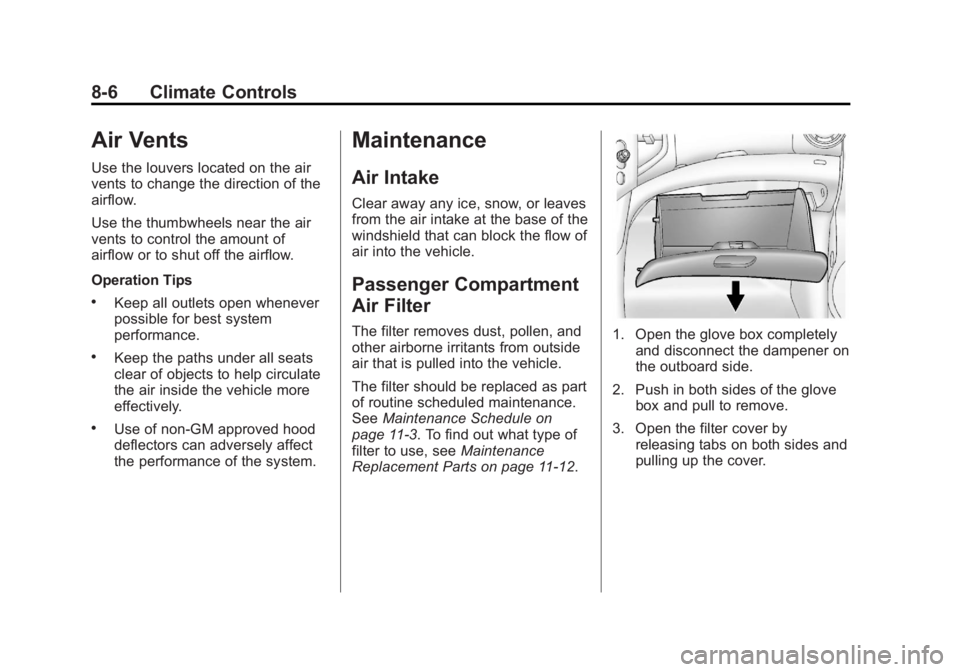
Passenger Compartment
Air Filter
The filter removes dust, pollen, and
other airborne irritants from outside
air that is pulled into the vehicle.
The filter should be replaced as part
of routine scheduled maintenance.
SeeMaintenance Schedule on
page 11-3. To find out what type of
filter to use, see Maintenance
Replacement Parts on page 11-12.1. Open the glove box completely and disconnect the dampener on
the outboard side.
2. Push in both sides of the glove box and pull to remove.
3. Open the filter cover by releasing tabs on both sides and
pulling up the cover.
Page 187 of 368

Black plate (1,1)Buick Encore Owner Manual - 2013 - crc - 1/8/13
Driving and Operating 9-1
Driving and
Operating
Driving Information
Driver Behavior . . . . . . . . . . . . . . . 9-2
Driving Environment . . . . . . . . . . 9-2
Vehicle Design . . . . . . . . . . . . . . . . 9-2
Distracted Driving . . . . . . . . . . . . . 9-3
Defensive Driving . . . . . . . . . . . . . 9-4
Drunk Driving . . . . . . . . . . . . . . . . . 9-4
Control of a Vehicle . . . . . . . . . . . 9-4
Braking . . . . . . . . . . . . . . . . . . . . . . . 9-4
Steering . . . . . . . . . . . . . . . . . . . . . . . 9-5
Off-Road Recovery . . . . . . . . . . . . 9-5
Loss of Control . . . . . . . . . . . . . . . . 9-6
Driving on Wet Roads . . . . . . . . . 9-6
Highway Hypnosis . . . . . . . . . . . . 9-7
Hill and Mountain Roads . . . . . . 9-7
Winter Driving . . . . . . . . . . . . . . . . . 9-8
If the Vehicle Is Stuck . . . . . . . . 9-10
Vehicle Load Limits . . . . . . . . . . 9-10
Starting and Operating
New Vehicle Break-In . . . . . . . . 9-15
Ignition Positions . . . . . . . . . . . . 9-15
Starting the Engine . . . . . . . . . . 9-17
Engine Heater . . . . . . . . . . . . . . . 9-18
Retained AccessoryPower (RAP) . . . . . . . . . . . . . . . 9-19
Shifting Into Park . . . . . . . . . . . . 9-19
Shifting out of Park . . . . . . . . . . 9-20
Parking over Things That Burn . . . . . . . . . . . . . . . . . . 9-22
Engine Exhaust
Engine Exhaust . . . . . . . . . . . . . . 9-22
Running the Vehicle WhileParked . . . . . . . . . . . . . . . . . . . . . 9-23
Automatic Transmission
Automatic Transmission . . . . . 9-23
Manual Mode . . . . . . . . . . . . . . . . 9-25
Drive Systems
All-Wheel Drive . . . . . . . . . . . . . . 9-26
Brakes
Antilock BrakeSystem (ABS) . . . . . . . . . . . . . . 9-26
Parking Brake . . . . . . . . . . . . . . . 9-27
Brake Assist . . . . . . . . . . . . . . . . . 9-27
Hill Start Assist (HSA) . . . . . . . 9-28
Ride Control Systems
Traction Control System (TCS) . . . . . . . . . . . . . . 9-28
StabiliTrak
®System . . . . . . . . . 9-30
Cruise Control
Cruise Control . . . . . . . . . . . . . . . 9-32
Object Detection Systems
Forward Collision Alert (FCA) System . . . . . . . . . . . . . . . . . . . . . 9-34
Ultrasonic Parking Assist . . . . 9-36
Rear Vision Camera (RVC) . . . . . . . . . . . . . 9-38
Lane Departure Warning (LDW) . . . . . . . . . . . . . 9-40