horn BUICK ENCORE 2020 Owner's Manual
[x] Cancel search | Manufacturer: BUICK, Model Year: 2020, Model line: ENCORE, Model: BUICK ENCORE 2020Pages: 314, PDF Size: 5.28 MB
Page 7 of 314
Buick Encore Owner Manual (GMNA-Localizing-U.S./Canada-13710474) -
2020 - CRC - 10/7/19
6 Introduction
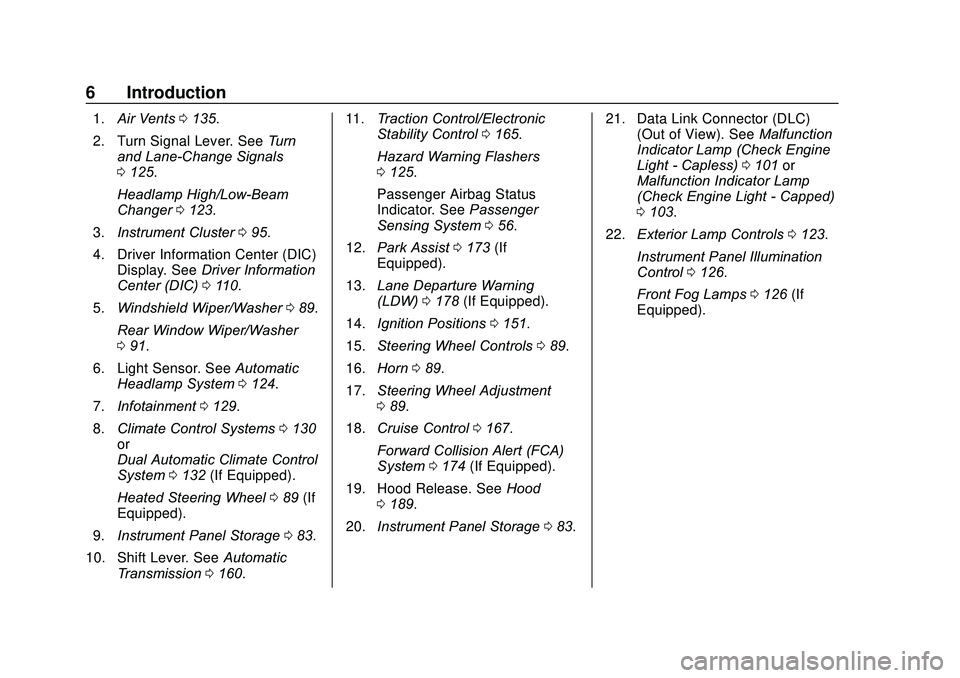
1.Air Vents 0135.
2. Turn Signal Lever. See Turn
and Lane-Change Signals
0 125.
Headlamp High/Low-Beam
Changer 0123.
3. Instrument Cluster 095.
4. Driver Information Center (DIC) Display. See Driver Information
Center (DIC) 0110.
5. Windshield Wiper/Washer 089.
Rear Window Wiper/Washer
0 91.
6. Light Sensor. See Automatic
Headlamp System 0124.
7. Infotainment 0129.
8. Climate Control Systems 0130
or
Dual Automatic Climate Control
System 0132 (If Equipped).
Heated Steering Wheel 089 (If
Equipped).
9. Instrument Panel Storage 083.
10. Shift Lever. See Automatic
Transmission 0160. 11.
Traction Control/Electronic
Stability Control 0165.
Hazard Warning Flashers
0 125.
Passenger Airbag Status
Indicator. See Passenger
Sensing System 056.
12. Park Assist 0173 (If
Equipped).
13. Lane Departure Warning
(LDW) 0178 (If Equipped).
14. Ignition Positions 0151.
15. Steering Wheel Controls 089.
16. Horn 089.
17. Steering Wheel Adjustment
089.
18. Cruise Control 0167.
Forward Collision Alert (FCA)
System 0174 (If Equipped).
19. Hood Release. See Hood
0 189.
20. Instrument Panel Storage 083. 21. Data Link Connector (DLC)
(Out of View). See Malfunction
Indicator Lamp (Check Engine
Light - Capless) 0101 or
Malfunction Indicator Lamp
(Check Engine Light - Capped)
0 103.
22. Exterior Lamp Controls 0123.
Instrument Panel Illumination
Control 0126.
Front Fog Lamps 0126 (If
Equipped).
Page 10 of 314
Buick Encore Owner Manual (GMNA-Localizing-U.S./Canada-13710474) -
2020 - CRC - 10/7/19
Keys, Doors, and Windows 9
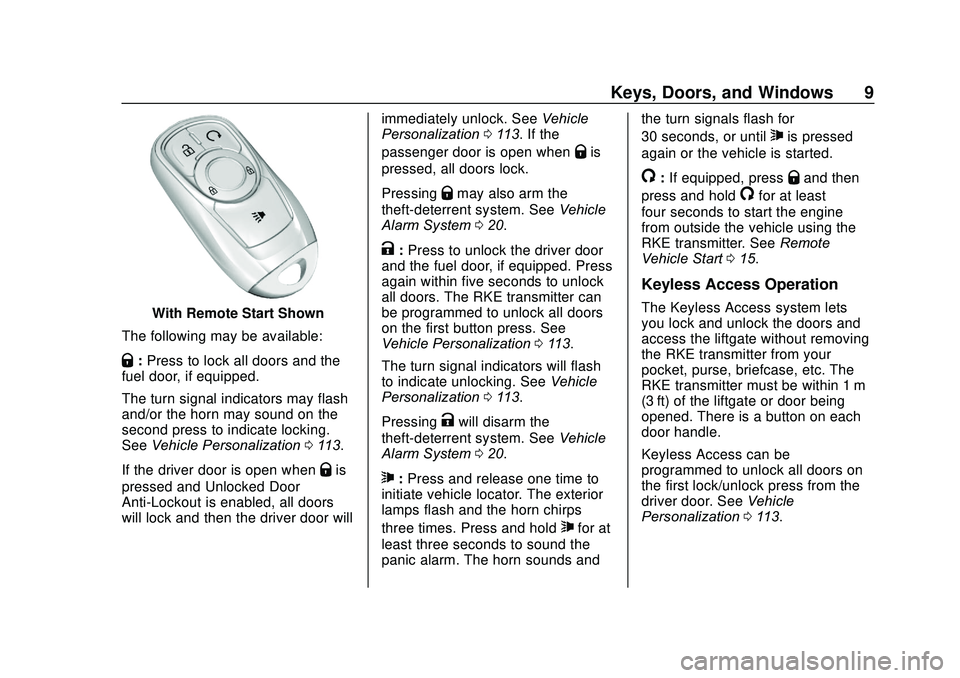
With Remote Start Shown
The following may be available:
Q: Press to lock all doors and the
fuel door, if equipped.
The turn signal indicators may flash
and/or the horn may sound on the
second press to indicate locking.
See Vehicle Personalization 0113.
If the driver door is open when
Qis
pressed and Unlocked Door
Anti-Lockout is enabled, all doors
will lock and then the driver door will immediately unlock. See
Vehicle
Personalization 0113. If the
passenger door is open when
Qis
pressed, all doors lock.
Pressing
Qmay also arm the
theft-deterrent system. See Vehicle
Alarm System 020.
K:Press to unlock the driver door
and the fuel door, if equipped. Press
again within five seconds to unlock
all doors. The RKE transmitter can
be programmed to unlock all doors
on the first button press. See
Vehicle Personalization 0113.
The turn signal indicators will flash
to indicate unlocking. See Vehicle
Personalization 0113.
Pressing
Kwill disarm the
theft-deterrent system. See Vehicle
Alarm System 020.
7:Press and release one time to
initiate vehicle locator. The exterior
lamps flash and the horn chirps
three times. Press and hold
7for at
least three seconds to sound the
panic alarm. The horn sounds and the turn signals flash for
30 seconds, or until
7is pressed
again or the vehicle is started.
/: If equipped, pressQand then
press and hold
/for at least
four seconds to start the engine
from outside the vehicle using the
RKE transmitter. See Remote
Vehicle Start 015.
Keyless Access Operation
The Keyless Access system lets
you lock and unlock the doors and
access the liftgate without removing
the RKE transmitter from your
pocket, purse, briefcase, etc. The
RKE transmitter must be within 1 m
(3 ft) of the liftgate or door being
opened. There is a button on each
door handle.
Keyless Access can be
programmed to unlock all doors on
the first lock/unlock press from the
driver door. See Vehicle
Personalization 0113.
Page 12 of 314
Buick Encore Owner Manual (GMNA-Localizing-U.S./Canada-13710474) -
2020 - CRC - 10/7/19
Keys, Doors, and Windows 11
If passive locking is enabled, the
doors may lock with the RKE
transmitter inside the vehicle. Do
not leave the RKE transmitter in an
unattended vehicle.
To customize the doors to
automatically lock when exiting the
vehicle, seeVehicle Personalization
0 113.
Temporary Disable of Passive
Locking
Temporarily disable passive locking
by pressing and holding
Kon the
interior door switch with a door open
for several seconds, or until three
chimes are heard. Passive locking
will then remain disabled until
Qon
the interior door is pressed, or until
the vehicle is turned on.
Remote Left In Vehicle Alert
When the vehicle is turned off and
an RKE transmitter is left in the
vehicle, the horn will chirp three
times after all doors are closed.
To turn on or off see Vehicle
Personalization 0113. Remote No Longer In Vehicle Alert
If the vehicle is on with a door open
and then all doors are closed, the
vehicle will check for RKE
transmitters inside. If an RKE
transmitter is not detected, the
Driver Information Center (DIC) will
display NO REMOTE DETECTED
and the horn will chirp three times.
This occurs only once each time the
vehicle is driven. To turn on or off
see
Vehicle Personalization 0113.
Keyless Liftgate Opening
When the doors are locked, press
the touch pad to open the liftgate if
the RKE transmitter is within
1 m (3 ft).
Programming Transmitters to
the Vehicle
Only RKE transmitters programmed
to the vehicle will work. If a
transmitter is lost or stolen, a
replacement can be purchased and
programmed through your dealer.
The vehicle can be reprogrammed
so that lost or stolen transmitters no
longer work. Any remaining
transmitters will need to be reprogrammed. Each vehicle can
have up to eight transmitters
matched to it.
Programming with Recognized
Transmitters
A new transmitter can be
programmed to the vehicle when
there are two recognized
transmitters. To program, the vehicle
must be off and all of the
transmitters, both currently
recognized and new, must be
with you.
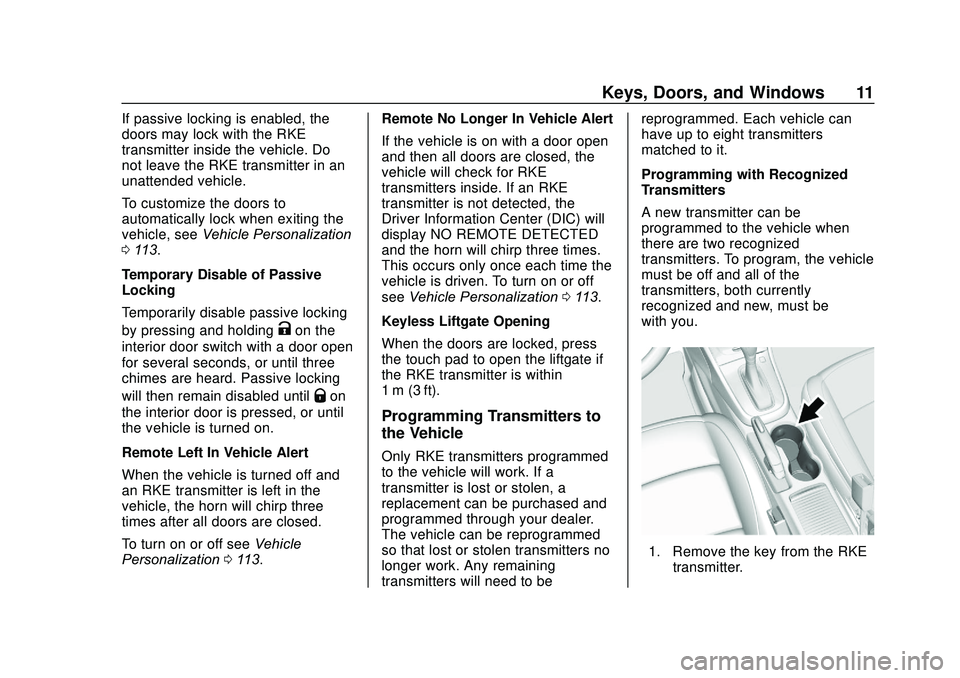
1. Remove the key from the RKE
transmitter.
Page 19 of 314
Buick Encore Owner Manual (GMNA-Localizing-U.S./Canada-13710474) -
2020 - CRC - 10/7/19
18 Keys, Doors, and Windows
K:Press to unlock the doors.
Q:Press to lock the doors.
Delayed Locking
This feature delays the locking of
the doors until five seconds after all
doors are closed.
Delayed locking can only be turned
on when the Unlocked Door
Anti-Lockout has been turned off.
When
Qis pressed on the power
door lock switch while the door is
open, a chime will sound three
times indicating delayed locking is
active.
The doors will lock automatically
five seconds after all doors are
closed. If a door is reopened before
that time, the five-second timer will
reset when all doors are closed
again.
Press
Qon the door lock switch
again or press
Qon the RKE
transmitter to lock the doors
immediately. This feature can also be
programmed. See
Vehicle
Personalization 0113.
Automatic Door Locks
The doors will lock automatically
when all doors are closed, the
ignition is on, and the vehicle is
shifted out of P (Park).
If a vehicle door is unlocked, and
then opened and closed, the doors
will lock either when your foot is
removed from the brake or the
vehicle speed becomes faster than
13 km/h (8 mph).
To unlock the doors:
.
Press
Kon the power door lock
switch.
. Shift the transmission into
P (Park).
Automatic door locking cannot be
disabled. Automatic door unlocking
can be programmed. See Vehicle
Personalization 0113.
Lockout Protection
If the vehicle is on or in ACC/
ACCESSORY and the power door
lock switch is pressed with the
driver door open, all the doors will
lock and only the driver door will
unlock.
If the vehicle is off and locking is
requested while a door is open,
when all doors are closed the
vehicle will check for RKE
transmitters inside. If an RKE
transmitter is detected and the
number of RKE transmitters inside
has not reduced, the driver door will
unlock and the horn will chirp three
times.
Lockout Protection can be manually
overridden with the driver door open
by pressing and holding
Qon the
power door lock switch.
Unlocked Door Anti-Lockout
If Unlocked Door Anti-Lockout has
been turned on and the vehicle is
off, the driver door is open, and
locking is requested, all the doors
will lock and the driver door will
Page 22 of 314

Buick Encore Owner Manual (GMNA-Localizing-U.S./Canada-13710474) -
2020 - CRC - 10/7/19
Keys, Doors, and Windows 21
Fast Flast :Vehicle is unsecured.
A door, the liftgate, or the hood
is open.
Slow Flash : Alarm system is
armed.
Arming the Alarm System
1. Turn off the vehicle.
2. Lock the vehicle in one of
two ways:
.Use the RKE transmitter.
. With a door open, press
Q
on the interior of the door.
3. After 30 seconds the alarm system will arm, and the
indicator light will begin to
slowly flash indicating the
alarm system is operating.
Pressing
Qon the RKE
transmitter a second time will
bypass the 30-second delay
and immediately arm the alarm
system.
The vehicle alarm system will not
arm if the doors are locked with
the key. If any door or the hood is opened
without first unlocking with the RKE
transmitter, the horn will chirp and
the lights will flash to indicate
pre-alarm. If the vehicle is not
started, or the door is not unlocked
by pressing
Kon the RKE
transmitter during the 10-second
pre-alarm, the alarm will be
activated.
The alarm will also be activated if
any door or the the hood is opened
without first disarming the system.
When the alarm is activated, the
turn signals flash and the horn
sounds for about 30 seconds. The
alarm system will then re-arm to
monitor for the next unauthorized
event.
Disarming the Alarm System
To disarm the alarm system or turn
off the alarm if it has been activated:
. Press
Kon the RKE transmitter.
. Start the vehicle. Avoid setting off the alarm by
accident:
.
Lock the vehicle after all
occupants have exited and all
doors are closed.
. Always unlock the vehicle with
the RKE transmitter.
Unlocking the driver door with the
key will not disarm the system or
turn off the alarm.
How to Detect a Tamper
Condition
IfKis pressed and the horn chirps
and the lights flash three times, an
attempted break-in has occurred
while the system was armed.
Immobilizer
See Radio Frequency Statement
0 289.
Immobilizer Operation
This vehicle has a passive
theft-deterrent system.
The system does not have to be
manually armed or disarmed.
Page 89 of 314
Buick Encore Owner Manual (GMNA-Localizing-U.S./Canada-13710474) -
2020 - CRC - 10/7/19
88 Instruments and Controls
Instruments and
Controls
Controls
Steering Wheel Adjustment . . . . 89
Steering Wheel Controls . . . . . . . 89
Heated Steering Wheel . . . . . . . . 89
Horn . . . . . . . . . . . . . . . . . . . . . . . . . . . 89
Windshield Wiper/Washer . . . . . . 89
Rear Window Wiper/Washer . . . 91
Compass . . . . . . . . . . . . . . . . . . . . . . 92
Clock . . . . . . . . . . . . . . . . . . . . . . . . . . 93
Power Outlets . . . . . . . . . . . . . . . . . 93
Warning Lights, Gauges, and
Indicators
Warning Lights, Gauges, andIndicators . . . . . . . . . . . . . . . . . . . . 94
Instrument Cluster . . . . . . . . . . . . . 95
Speedometer . . . . . . . . . . . . . . . . . . 96
Odometer . . . . . . . . . . . . . . . . . . . . . . 96
Trip Odometer . . . . . . . . . . . . . . . . . 97
Tachometer . . . . . . . . . . . . . . . . . . . . 97
Fuel Gauge . . . . . . . . . . . . . . . . . . . . 97
Engine Coolant Temperature Gauge . . . . . . . . . . . . . . . . . . . . . . . . 98
Seat Belt Reminders . . . . . . . . . . . 99
Airbag Readiness Light . . . . . . . . 99 Passenger Airbag Status
Indicator . . . . . . . . . . . . . . . . . . . . 100
Charging System Light . . . . . . . 101
Malfunction Indicator Lamp (Check Engine Light -
Capless) . . . . . . . . . . . . . . . . . . . . 101
Malfunction Indicator Lamp (Check Engine Light -
Capped) . . . . . . . . . . . . . . . . . . . . 103
Brake System Warning Light . . . . . . . . . . . . . . . . . . . . . . . . 105
Antilock Brake System (ABS) Warning Light . . . . . . . . . . . . . . . 105
Lane Departure Warning (LDW) Light . . . . . . . . . . . . . . . . . 106
Vehicle Ahead Indicator . . . . . . 106
Traction Off Light . . . . . . . . . . . . . 106
StabiliTrak OFF Light . . . . . . . . . 106
Traction Control System (TCS)/ StabiliTrak Light . . . . . . . . . . . . . 107
Tire Pressure Light . . . . . . . . . . . 107
Engine Oil Pressure Light . . . . 107
Low Fuel Warning Light . . . . . . 108
Immobilizer Light . . . . . . . . . . . . . 108
High-Beam On Light . . . . . . . . . . 108
Front Fog Lamp Light . . . . . . . . . 109
Lamps On Reminder . . . . . . . . . 109
Cruise Control Light . . . . . . . . . . 109
Door Ajar Light . . . . . . . . . . . . . . . 109
Information Displays
Driver Information Center (DIC) . . . . . . . . . . . . . . . . 110
Vehicle Messages
Vehicle Messages . . . . . . . . . . . . 112
Engine Power Messages . . . . . 113
Vehicle Speed Messages . . . . . 113
Vehicle Personalization
Vehicle Personalization . . . . . . . 113
Universal Remote System
Universal Remote System . . . . 119
Universal Remote SystemProgramming . . . . . . . . . . . . . . . . 119
Universal Remote System Operation . . . . . . . . . . . . . . . . . . . 122
Page 90 of 314
Buick Encore Owner Manual (GMNA-Localizing-U.S./Canada-13710474) -
2020 - CRC - 10/7/19
Instruments and Controls 89
Controls
Steering Wheel
Adjustment
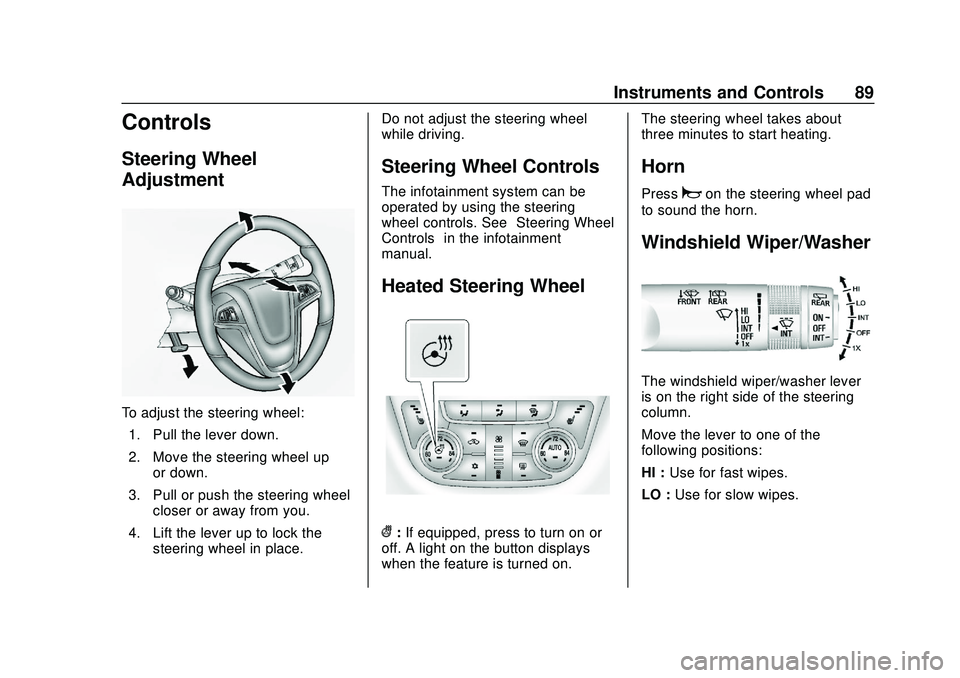
To adjust the steering wheel:1. Pull the lever down.
2. Move the steering wheel up or down.
3. Pull or push the steering wheel closer or away from you.
4. Lift the lever up to lock the steering wheel in place. Do not adjust the steering wheel
while driving.
Steering Wheel Controls
The infotainment system can be
operated by using the steering
wheel controls. See
“Steering Wheel
Controls” in the infotainment
manual.
Heated Steering Wheel
(: If equipped, press to turn on or
off. A light on the button displays
when the feature is turned on. The steering wheel takes about
three minutes to start heating.
Horn
Pressaon the steering wheel pad
to sound the horn.
Windshield Wiper/Washer
The windshield wiper/washer lever
is on the right side of the steering
column.
Move the lever to one of the
following positions:
HI : Use for fast wipes.
LO : Use for slow wipes.
Page 117 of 314
Buick Encore Owner Manual (GMNA-Localizing-U.S./Canada-13710474) -
2020 - CRC - 10/7/19
116 Instruments and Controls
.Exit Lighting
Vehicle Locator Lights
This feature will flash the exterior
lamps when
Kon the Remote
Keyless Entry (RKE) transmitter is
pressed to locate the vehicle.
Select Off or On.
Exit Lighting
This allows the selection of how
long the exterior lamps stay on
when leaving the vehicle when it is
dark outside.
Select Off, 30 Seconds, 60 Seconds,
or 120 Seconds.
Power Door Locks
Select and the following may be
displayed:
. Unlocked Door Anti Lock Out
. Auto Door Unlock
. Delayed Door Lock Unlocked Door Anti Lock Out
When on, this feature will keep the
driver door from locking when the
door is open. If Off is selected, the
Delayed Door Lock menu will be
available.
Select Off or On.
Auto Door Unlock
This allows selection of which of the
doors will automatically unlock when
the vehicle is shifted into P (Park).
Select Off, All Doors, or Driver Door.
Delayed Door Lock
When on, this feature will delay the
locking of the doors. To override the
delay, press the power door lock
switch on the door.
Select Off or On.
Remote Lock, Unlock, Start
Select and the following may be
displayed:
.
Remote Unlock Light Feedback
. Remote Lock Feedback
. Remote Door Unlock .
Remote Start Auto Heat Seats
. Passive Door Unlock
. Passive Door Lock
. Remote Left in Vehicle Alert
Remote Unlock Light Feedback
When on, the exterior lamps will
flash when unlocking the vehicle
with the RKE transmitter.
Select Off or Flash Lights.
Remote Lock Feedback
This allows selection of what type of
feedback is given when locking the
vehicle with the RKE transmitter.
Select Off, Lights and Horn, Lights
Only, or Horn Only.
Remote Door Unlock
This allows selection of which doors
will unlock when pressing
Kon the
RKE transmitter.
When set to Driver Door, the driver
door will unlock the first time
Kis
pressed and all doors will unlock
when
Kis pressed a second time.
Page 118 of 314
Buick Encore Owner Manual (GMNA-Localizing-U.S./Canada-13710474) -
2020 - CRC - 10/7/19
Instruments and Controls 117
When set to All Doors, all of the
doors will unlock at the first press
of
K.
Select All Doors or Driver Door.
Remote Start Auto Heat Seats
If equipped and turned on,
this feature will turn on the
heated seats when using remote
start on cold days. See Heated
Front Seats 036 and
Remote Vehicle Start 015.
Select Off or On.
Passive Door Unlock
This allows the selection of what
doors will unlock when using the
button on the driver door to unlock
the vehicle.
Select All Doors or Driver Door.
Passive Door Lock
This allows passive locking to be
turned on or off and selects
feedback. See Remote Keyless
Entry (RKE) System Operation 08.
Select Off, On with Horn
Chirp, or On. Remote Left in Vehicle Alert
This feature sounds an alert when
the RKE transmitter is left in the
vehicle. This menu also enables
Remote No Longer in Vehicle Alert.
Select Off or On.
Bluetooth
Select and the following may be
displayed:
.
Pair New Device
. Device Management
. Ringtones
. Voice Mail Numbers
. Text Message Alerts
Pair New Device
Select to pair a new device. See
“Pairing” in“Infotainment Controls”
under “Bluetooth” in the infotainment
manual.
Device Management
Select to connect to a different
phone source, disconnect a phone,
or delete a phone. Ringtones
Touch to change the ring tone for
the specific phone. The phone does
not need to be connected to change
the ring tone.
Voice Mail Numbers
This feature displays the voice mail
number for all connected phones.
To change the voice mail number,
touch the edit icon. Type a new
number, then touch SAVE.
Text Message Alerts
This allows the feature to be turned
on or off.
Select Off or On.
Apple CarPlay
Select and the following may
display:
.
Apple CarPlay
. Manage Apple CarPlay Devices
Apple CarPlay
This feature allows Apple devices to
be connected to the infotainment
system through a USB port.
Page 216 of 314
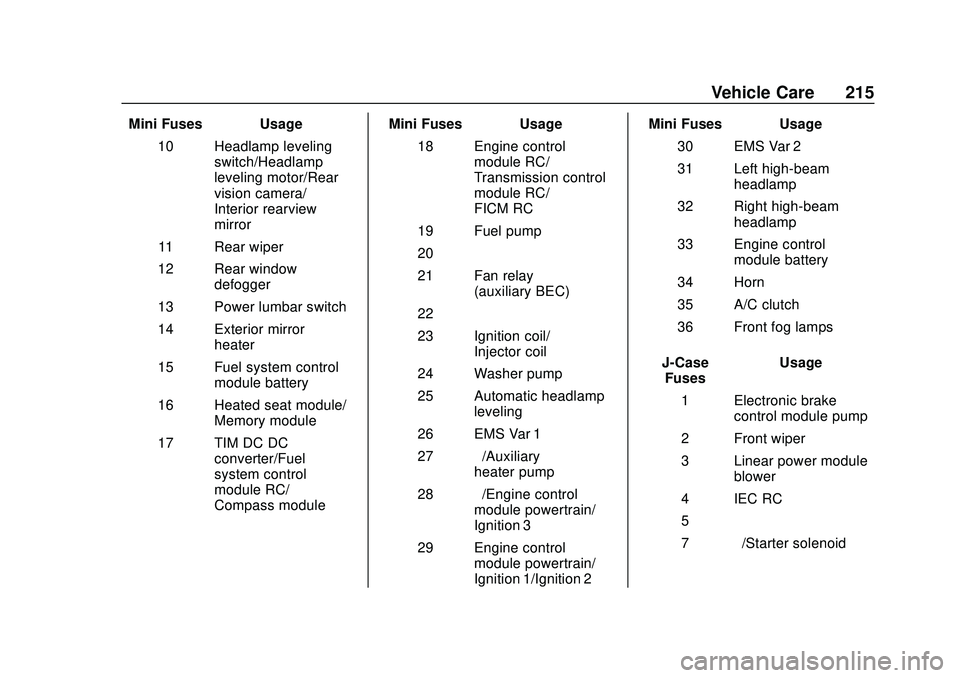
Buick Encore Owner Manual (GMNA-Localizing-U.S./Canada-13710474) -
2020 - CRC - 10/7/19
Vehicle Care 215
Mini Fuses Usage10 Headlamp leveling switch/Headlamp
leveling motor/Rear
vision camera/
Interior rearview
mirror
11 Rear wiper
12 Rear window defogger
13 Power lumbar switch
14 Exterior mirror heater
15 Fuel system control module battery
16 Heated seat module/ Memory module
17 TIM DC DC converter/Fuel
system control
module RC/
Compass module Mini Fuses Usage
18 Engine control module RC/
Transmission control
module RC/
FICM RC
19 Fuel pump
20 –
21 Fan relay (auxiliary BEC)
22 –
23 Ignition coil/ Injector coil
24 Washer pump
25 Automatic headlamp leveling
26 EMS Var 1
27 –/Auxiliary
heater pump
28 –/Engine control
module powertrain/
Ignition 3
29 Engine control module powertrain/
Ignition 1/Ignition 2 Mini Fuses Usage
30 EMS Var 2
31 Left high-beam headlamp
32 Right high-beam headlamp
33 Engine control module battery
34 Horn
35 A/C clutch
36 Front fog lamps
J-Case Fuses Usage
1 Electronic brake control module pump
2 Front wiper
3 Linear power module blower
4 IEC RC
5 –
7 –/Starter solenoid